service AUDI A5 CABRIOLET 2010 Owner's Manual
[x] Cancel search | Manufacturer: AUDI, Model Year: 2010, Model line: A5 CABRIOLET, Model: AUDI A5 CABRIOLET 2010Pages: 364, PDF Size: 86.51 MB
Page 61 of 364

-Turn the release key counterclockwise until it stops to
open the latch.
- Remove the emergency key. •
Step 5: Closing the power top
The power top must be positioned by hand.
Fig. 58 Power top
partially open
Fig . 59 Windshield:
Power top
- Raise the power top out of the tray=> & in "Step 2:
Lifting the power top compartment cover out" on
page 57.
- Pull the power top out completely .
- Press the power top onto the windshield frame~ fig. 59.
Contro ls a nd e quip
m en t Vehicle
OP-eration
Power top
Have a second person assist when positioning the power top. That
person should stand on the opposite side of the vehicle and perform
the same steps.
& WARNING
• When positioning the power top, avoid contact with the
supports or other moving parts. Otherwise you could pinch your
hands.
• When pressing the power top down onto the windshield frame,
make sure that you do not pinch yourself or anyone else. •
Step 6: Retracting the power top
compartment cover
The power top compartment cover must be retracted by
hand.
Fig. 60 Power top
raised
- Raise the rear of the power top and hold it in place
=> fig. 60 (D => & in "Step 2: Lifting the power top
compartment cover out" on
page 57.
- Slide the power top compartment forward until it reaches
the end position => fig. 60
@. Release the power top. ..,
Vehicle care Do-it-yourselt service iTechnical data
Page 63 of 364

Step 9: Securing the latch
Fig. 64 Rear of th e
power top: Se curing
th e latch
The latches must be secured on the left and right sides of the
vehicle.
- Pull the power top headliner to the side in the area around
the rear headrests to secure the latches=> fig. 64 =>
& in
"Step 2: Lifting the power top compartment cover out" on
page 57.
- Then remove the emergency key and insert the short end
into the power top support at the yellow marking.
- Press the emergency key in the direction of the arrow
=> fig. 64
0 until the latc h is secure .
& WARNING
Do not pin ch yourself or othe rs when clo sing the power top
c ompa rtment. •
Con tro ls a nd e quip
m en t Vehicle
OP-eration
Power top
Vehicle care Do-it-yourselt service iTechnical data
Page 65 of 364

& WARNING
Automatic headlights are only intended to assist the driver. They
do not relieve the driver of his responsibility to check the head
lights and to turn them on manually a ccording to the current light
and visibility conditions . For example , fog cannot be detected by
the light sensors . So always switch on the headlights under these
weather conditions and when driving in the dark
tD .
[ i J Tips
• Th e light sensor for head light control is located in the rea r view
m irror mount. You shou ld therefore not app ly any st ickers to the
windshield in th is area in order to prevent m alfunct ions or fa ilure s.
• Th e sensitivity level fo r the light senso r se t a t the factory can be
changed in the MMI menu ~
page 64 in the automatic d riving lights
fu nction .
• When you remove your key from the ign ition wh ile the veh icle's
ligh ts ar e tu rned on, a bu zzer sounds as long as the d river 's door is
open.
• Please obey all laws when using the lighting systems described
here .
• The coming home/ leav ing home fu nction is avai lab le o nly with the
switch in the AU TO position. •
Contro ls a nd e quip
m en t Vehicle
OP-eration
Applies to vehicl es: with fog lights
Fog Lights
Clear vision
Fig . 66 Fo g light
s witch
- To t urn o n the fo g lights tD, press butto n (D:::} fig. 66.
- To turn o n the rear fog lights
0$, press butt on @ .
Fog lights
The side marker lights or low beams must be sw itched on . When the
fog lights a re switc hed on, the green check lig ht at the edge of the
switch comes on .
I f automat ic dr iv ing light cont rol AUTO is act ivated , the low beams
a re switched on whe n the fog ligh ts are turned on.
Rear fog lights
Lo w beam s or sid e ma rke r lig hts wi th f og l igh ts mus t be t urne d o n.
Wh en the rea r fog l ights are turned o n, the y ellow check light at the
edge o f the swi tch comes on .
0 Note
The rea r fog lig hts sho uld only be turned on in accor dance w it h traffic
reg ulation, as t he lights are brig ht for fo llow ing traffic .•
Vehicle care Do-it-yourselt service iTechnical data
Page 67 of 364
ignition is switched on, there is a difference between vehicles with bi
xenon lights and halogen lamps:
• On vehicles with b i-xenon lights only the dayt ime running lamps in
the headlights will come on.
• On vehicles with halogen lights the front fog lights, side marker
lights and tail lights come on automatically.
& WARNING
Never u se daytime running lights to see where you are going . They
are not bright enough and will not l et you see fa r en ough ah ead
for safety , espe ciall y at dusk or when it i s dark. Be awar e of
c hanges in out side l ight condit ion s wh en you are dri ving and
respond b y switching on your l ow be am s
tD .
0 Note
• Alw ays be aware of changes in out side light condit ion s while you
are drivin g. Re spond in tim e to fadin g daylight b y turning the light
s witch to po sition
tD (or "AUTO") to turn on yo ur headlight s.
[I) Tips
The daytime running lights function cannot be turned off. •
Contro ls a nd e quip
m en t Vehicle
OP-eration
Clear vision
Instrument lighting
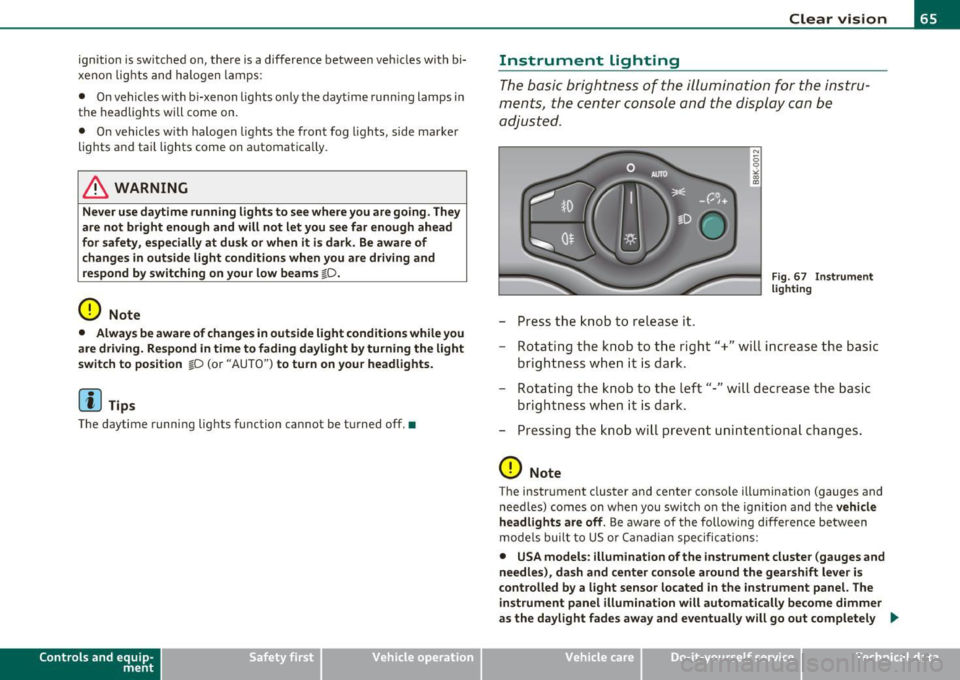
The basic brightness of the illumination for the instru
ments, the center console and the display can be
adjusted.
- Press the knob to release it.
N
-0 0 >< 00
"'
Fi g. 6 7 I nst rume nt
l ighti ng
- Rotating the knob to the right"+" will increase the basic
brightness when it is dark.
- Rotating the knob to the left"-" will decrease the basic
brightness when it is dar k.
- Pressing the knob will prevent unin tentiona l changes .
0 Note
The instrument cluster and center conso le illumination (gauges and
need les) comes on when you switch o n the ignition and the
veh icle
h eadlights are off .
Be aware of the following difference between
mode ls built to US or Canadian specifications:
• USA models : illumination of the inst rument cluste r (gauges and
needle s), da sh and center c onsol e around the gearshift l ever i s
c o ntrolled b y a light senso r lo cated in the instrument panel. The
in strument panel illumination will autom atically be come dimmer
as the day light fades away and eventu all y will go out completel y .,
Vehicle care Do-it-yourselt service iTechnical data
Page 69 of 364

The emergency flashers will turn on automatically if you are in an acc ident where the airbag has deployed.
(I) Tips
You shou ld turn on th e emergency flashers when :
• you are the last vehicle standing in a traffic jam so that any other
vehicles com ing can see yo u, or when
• your vehicle has broken down or you are in an emergency situa
tion, or when
• your vehicle is being towed by a tow truck or if you are towing
ano ther vehicle behind you .•
Turn signals -¢ ¢ and high beam 1[D lever
The lever on the le~ side of the steering column is used to
operate the turn signals and the high beam as well as the
headlight flasher .
Fig. 70 Turn si gnal
an d hi gh beam leve r
The turn s ignal and high beam lever has the follow ing func
tions:
Con tro ls a nd e quip
m en t Vehicle
OP-eration
Clear vision
Turn signals
¢ ¢ (D @
- Push the lever up as far as it can go to turn on the right
turn signal or down to tu rn on the le ft turn signal
~ fig. 70.
- Move the lever br iefly until you meet resistance and
release it to flash three times.
- Move the lever (up or down) until you meet res istance a nd
hold it there to determine the flashing t ime for the turn
signals.
High beam ~D ®
- Push the lev er forward to switc h on the high beam .
- Pu ll the leve r back towards you to switch o ff the high
beam.
Headlight flasher ~D ©
- Pull the lever toward the steering wheel to use the head
light flasher.
Notes on these featu res
• Th e turn signals only work with the ign ition t urne d on. The ind i
cator lights ¢ or ¢ in the instrument cluster also blink.
• After you have t urned a corner, the tu rn signal switches off auto
matically.
• The
high beam works only when the head lights are on . The ind i
cator light ~Din the instrument cluster illuminates when the high
beams are on.
• T he
headlight flasher works only as long as you ho ld the lever -
even if there are no lights switched on . The ind icator light ~D in the
instrument cluster illuminates when you use the headlight flasher. _.,
Vehicle care Do-it-yourselt service iTechnical data
Page 71 of 364

Vision
Sun visors
Using the sun visors makes driving safer.
C
Fig. 73 S un viso r
The s un visors for the dr iver and passenger ca n be p ulled out of their
brackets in the center of the vehicle and turned towa rds the the doors
=> fig. 73 (D .
Vanity mirror
The van ity m irrors on the sun visors are cove red. When the lid is
opened @, the mirror light in the headliner turns on automatically.
It t urns off when the lid is closed and the visor is folded up aga in. •
Con tro ls a nd e quip
m en t Vehicle
OP-eration
Clear vision
Wiper and washer system
Switching on the windshield wipers
Fi g. 7 4 Wind shield
w iper l ever
Move the windshie ld w iper lever to the corresponding position :
©-W indshield wiper off
(D -Inte rval mode . To ex tend/shor ten t he w iper intervals, move the
switch @to the left/r ight . In ve hicles with a rain sensor*, the wind
shield wipers are activated a utomatically s tarting at a speed of 2 mph
(4 km/h) . The higher the sensi tivity of the ra in sensor* is set (sw itch
@ to the right), the earlier the windsh ield wipers react to mo isture
on the w indshield .
@ -Slow wiping
® -Fast wiping
© -Sing le wipe
© -Clean the windshield. To eliminate water droplets, the wind
shield wiper per forms one a fterwipe o pera tion a fter severa l seconds
wh ile dr iving . You can swi tch this funct ion off by moving the lever to
posit ion © with in 10 seconds of t he afterwipe operation . The after
w ipe function is react ivated the ne xt t ime the ignit ion is switched on .
Cleaning the headlights*. The headlight washer system * only func
ti ons whe n the light is switc hed on. The headlights are automat ically
cleaned the first time and every fifth t ime the lever is moved to posi-.,
Vehicle care Do-it-yourselt service iTechnical data
Page 72 of 364

Clear vision
tion ®· They are also cleaned every time you hold the lever in position
© for long er than 2 seconds .
& WARNING
• The rain sensor is only intended to assist the driver. The driver
is still responsible for manually switching the wipers on according
to the visibility conditions.
• The windshield may not be treated with water-repelling wind
shield coating agents. Unfavorable conditions, such as wetness,
darkness, low sun, can result in increased glare. Wiper blade
chatter is also possible.
• Properly functioning windshield wiper blades are required for
a clear view and safe driving~ page
71, "Installing new wiper
blades ".
0 Note
• In the case of frost, check whether the windshield wiper blades are
frozen to the windshie ld. Switching on the windshield wipers can
damage the wiper blades!
• Prio r to using a car wash, the windsh ield wiper system must be
switched off (lever in position 0) . This prevents unintentional
switching on and damage to the win dshield wiper system.
[ i J Tips
• The windshield wipers are switched off when the ignition is turned
off . Activate the windsh ield wipers after the ignition is switched back
on by moving the windshield wiper lever to any position.
• Worn or dirty windshield wiper blades result in streaking. This can
affect the rain sensor* function . Check your windshield wiper blades
regularly .
• Th e washer fluid nozzles of the w indshield washe r system are
heated at low temperatures when the ignition is on. •
When stopping temporarily, e .g . at a traffic light, the set speed of
the windsh ield wipers is automatically reduced by one speed.•
Service position
The windshield wiper blades are replaced in the service
position.
Fig. 75 Service posi
tion
The service position is set in the radio or in the MMI*.
- If the wiper blades are not frozen to the windshield, bring
the windshield wiper lever to the basic position @
~ page 69, fig . 74.
-Select: Function button [ CAR] > Windshield wipers >
Service position.
• On -changing the windshield wipe r blades can only be done if you
br ing the wiper arms to the service position~ fig. 75 . You will also
avoid paint damage to the hood when working on the wipers in this
position .
• Off -the windshield wipers are moved to their initial position
again.
Page 73 of 364

0 Note
Never maneuver your vehicle with the front windshield wiper arms
raised since they will automatically be moved back to their basic posi
tion above a speed of 3 mph (6 km/h) and can scratch the hood.
W Tips
• You can also use the se rvice position, for example, if you want to
protect the w indshield from icing by using a cover.
• T he service position automatica lly switches to
Off when you
operate the windsh ield wiper lever, or speed exceeds 3 mph (6
km/h). •
Installing new wiper blades
Wiper blades in good condition help keep the windshield
clear.
Removing the wiper blade
F ig . 76 Re movin g th e
wi per bla de
- Bring the windsh ield wipers to the service position
=:>
page 70 .
- Lift the windshi eld wi per arm up from the windshie ld.
Controls and equip
ment Safety first
Clear v
ision
- Press the loc king knob© =:> fig. 76 on the wiper blade .
Hold the wiper blade firmly .
- Remove the wiper b lade in the direction of the arrow .
Attaching the wiper blade
- Install the new wiper blade in the retainer on the wiper
arm @unti l you hear it click into p lace on the wiper arm.
- Place the wiper arm back on t he windsh ield .
& WARNING
• Clean your wiper blade s regularly with a wind sh ield wa sher
solut ion to pre vent st reaking . If the wiper blades are ver y dirt y,
f o r e xampl e w ith insects , ca refull y clean the wiper blade s w ith a
s ponge or a soft brush .
• For your safety, you should repla ce the w iper blade s once or
t w ice a year. See you r autho riz ed Aud i dea ler for replacem ent
blade s.
0 Note
• T he windshield wipe r blades must only be replaced when in the
serv ice posit ion~
page 70! Otherw ise, you risk damaging the paint
on the hood or the windshie ld wiper motor.
• To prevent damage to the wiper system, always loosen blades
wh ic h are frozen to the windshield be fore ope rating wipe rs .
• To prevent damage to wiper blades, do not use gasoline, kero
sene, paint th inner, o r other solvents on or nea r th e w iper blades .
• To prevent damage to the wiper arms or other components, do
not attempt to move the wipers by hand. .,,_
Vehicle care Technical data
Page 75 of 364

& WARNING (cont inued )
soap and water; medical attention is recommended. Thoroughly
wash affe cted clothing and shoes before reuse.
• If swallowed and person is conscious, rinse mouth with water
for at least 15 minutes. Do not induce vomiting unle ss instructed
to do so by medical professional. Get medical attention immedi
ately .
0 Note
Liquid elec tro ly te le aked fro m a broken mirro r g la ss w ill damage any
plast ic surfaces it comes i n contact with . Clean up spilled electro lyte
immedi ately wit h cle ar wa te r an d a spo nge.
[ i ] Tips
• If you switch off the automatic dimming function on the inside
mirror, automatic dimming of the outside mirrors will likewise be
disabled.
• Check to make s ure there are no objects preventing light from
reach ing the inside m irro r.
• Do not attach any st ickers to the w indshield in front of the light
s ensor, as this wo uld inter fere wi th both t he a utom atic oper ation of
the headlights and the automatic d imm ing of the inside mi rror. •
Contro ls a nd e quip
m en t Vehicle
OP-eration
Clear vision
Outside mirrors
Th e outs ide m irrors are e lec tricall y adj ust ed ( pow er
m irr ors )
Adjusting exterior mirrors
Fig. 78 Forward
section of d river 's
armr est : p ower mirror
controls
- R otate the kn ob to the© position (driver's ex ter ior
m irror) or t o th e® p osit io n (passe nger's e xterior mi rro r)
=> fig. 78 .
- R otate the k nob a nd th e mirror so t hat you have a clear
v iew to the rea r.
Heated mirrors
- Rotat e the k nob to position
@ .
Depen ding on the outs ide te mperature, the mir ror surfa ce s a re
heated until the ignit ion is sw itched off- even if the knob is no longer
in pos itio n
@.
You are w ell -advis ed to fold th e outside m irro rs in when man euv ering
in tight spaces or when leaving the ca r parked close to other vehicles ._..
Vehicle care Do-it-yourselt service Technical data
Page 77 of 364

0 Note
Liquid electrolyte leaked from a broken mirror g lass w ill damage any
plastic surfaces it comes in contact with. Clean up spi lled electro lyte
immediately with clear water and a sponge.
[I) Tips
• Swit ching off the dimming function of the insid e rearview
mir ror also deact ivates the automa tic dimm ing funct ion of the
e xterior mirrors.
• Automatic dimm ing for the mirror only operates properly if the
ligh t str ik ing the inside m irror is not h indered by o ther objects. •
Digital compass
Appli es to v eh icl es: w it h dig ital comp ass
Activating or deactivating the compass
The direction is displayed on the interior rear view mirror.
Fig. 79 In side rear
vi ew m irror: digi ta l
compass ac tiva ted
To activate or deact ivate, hold the @button dow n until
the red display appears or disappears.
Con trol s and equ ip
m ent Vehicle
OP-eration
Clear vision
The d ig ita l compass on ly works w it h the ignit ion turned on . The d irec
ti ons are d isp layed as ini tials:
N (No rth), NE (No rthe ast), E (East), SE
(Southeast), S (South), SW (Southwest), W (West), NW (Northwest).
[I) Tips
To avoid inaccurate directions, do not allow any remote controls,
electrical systems, or metal parts close to the mirror .•
A pp lies to veh icl es : w it h d igital com pass
Setting the magnetic deflection zone
The correct magnetic d eflection zone must be set in order
t o display the directions co rrectly.
@
©
Fi g. 8 0 Nor th Am eric a : ma gnet ic d efle ction zo ne bou ndarie s
Vehicle care Do-it-yourselt service iTechnical data