fuel AUDI A5 COUPE 2010 User Guide
[x] Cancel search | Manufacturer: AUDI, Model Year: 2010, Model line: A5 COUPE, Model: AUDI A5 COUPE 2010Pages: 360, PDF Size: 84.39 MB
Page 35 of 360
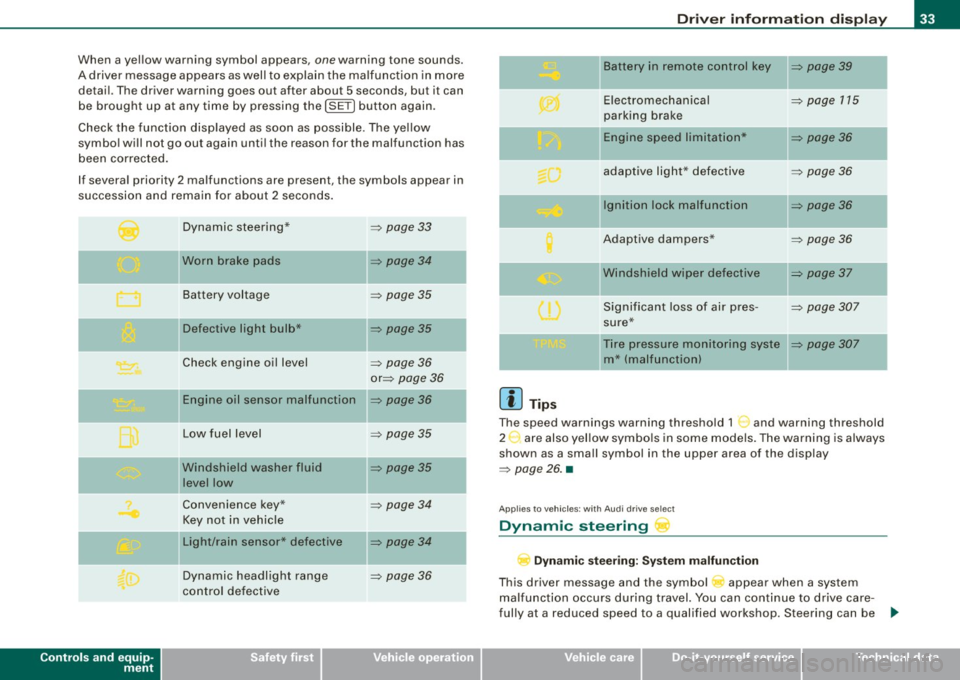
When a yellow warning symbol appears, one warning tone sounds.
A driver message appears as well to explain the malfunc tion in more
detail. The driver warning goes out after about 5 seconds, but it can
be brought up at any time by pressing the
!SE T) button again.
Check the function disp layed as soon as possible . The ye llow
symbol will not go out again until the reason for the malfunction has
been corrected.
If several priority 2 malfunctions are present, the symbols appear in
succession and remain for about 2 seconds .
Controls and equip
ment
Dynamic steering*
Worn brake pads
Battery voltage
II Defective light bulb*
Check engine oil level
Engine oil sensor malfunction
Low fuel level
Windshield washer fluid
level low
Convenience key*
Key not in vehicle
Light/rain sensor* defective
Dynamic headlight range
control defective =>
page 33
=> page 34
=>
page 35
=> page 35
-
=> page 36
or => page 36
=> page36
=> page 35
=> page 35
=> page 34
=> page 34
=> page 36
Dr ive r informat ion di spl ay
II Battery in remote control key => page 39
-
Electromechanical => page 115
parking brake
-Engine speed limitation* => page 36
adaptive light * defective => page 36
Ignition lock malfunction => page 36
Adaptive dampers* => page 36
"Windshield wiper defective => page 37
-
Significant loss of air pres -=> page 307
sure*
Tire pressure monitoring syste
=> page 307
m* (malfunction)
[ i ] Tip s
The speed warnings warning threshold 1 '") and warning threshold
2 :,. are also yel low symbo ls in some models. The warning is always
shown as a small symbol in the upper area of the display
=> page 26. •
Applies t o veh ic les: w ith Audi dri ve sele ct
Dynamic steering
D yn a m ic s te er ing : Syste m malfun cti on
This driver message and the symbol appear when a system
malfunction occurs during travel. You can continue to drive care
fully at a reduced speed to a qualified workshop. Steering can be .,_
I • •
Page 37 of 360
Applies to vehic les: with defective light bulb warn ing
Defective light bulb warning
The defective light bulb warning monitors the function of
the light bulbs in the vehicle.
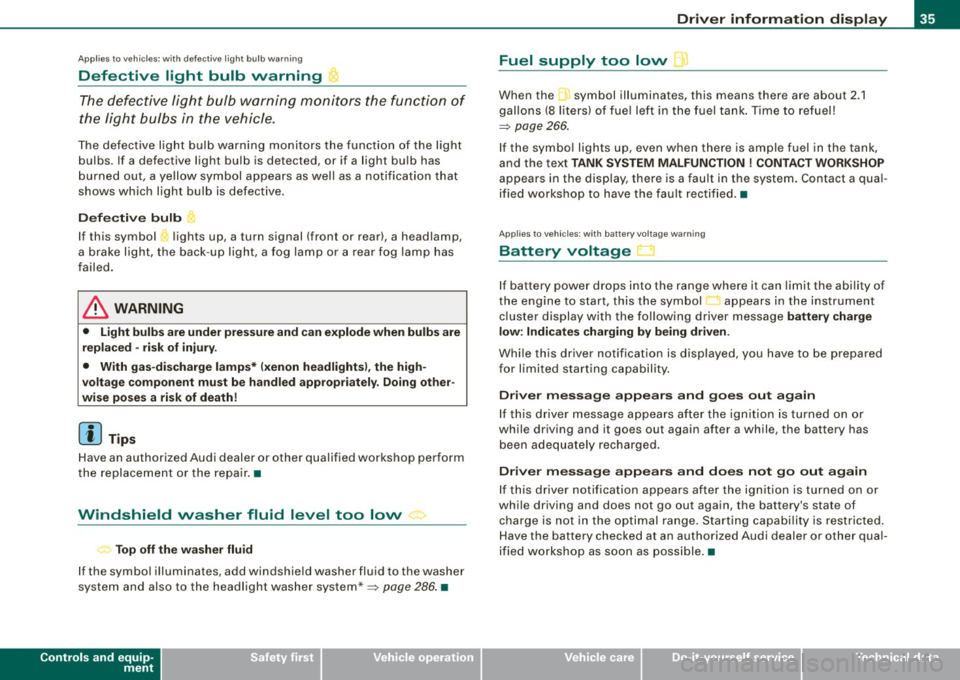
The defective light bulb warning monitors the function of the light
bulbs. If a defective light bulb is detected, or if a light bulb has
burned out, a yellow symbol appears as well as a notification that
shows which light bulb is defective.
Defective bulb
If this symbol lights up, a turn signal (front or rear), a headlamp,
a brake light, the back-up light, a fog lamp or a rear fog lamp has
failed.
& WARNING
• Light bulbs are under pressure and can explode when bulbs are
replaced -risk of injury.
• With gas-discharge lamps* (xenon headlights), the high
voltage component must be handled appropriately. Doing other
wise poses a risk of death!
[ i] Tips
Have an authorized Audi dealer or other qualified workshop perform
the replacement or the repair. •
Windshield washer fluid level too low ->
Top off the washer fluid
If the symbol illuminates, add windshield washer fluid to the washer
system and also to the headlight washer system* =>
page 286. •
Controls and equip
ment
Driver information display
Fuel supply too low \l
When the symbol illuminates, this means there are about 2.1
gallons
(8 liters) of fuel left in the fuel tank. Time to refuel!
=>
page 266.
If the symbol lights up, even when there is ample fuel in the tank,
and the text
TANK SYSTEM MALFUNCTION ! CONTACT WORKSHOP
appears in the display, there is a fault in the system. Contact a qual
ified workshop to have the fault rectified. •
Applies to veh icles: with battery voltage warning
Battery voltage ..:J
If battery power drops into the range where it can limit the ability of
the engine to start, this the symbol appears in the instrument
cluster display with the following driver message
battery charge
low: Indicates charging by being driven .
While this driver notification is displayed, you have to be prepared
for limited starting capability.
Driver message appears and goes out again
If this driver message appears after the ignition is turned on or
while driving and it goes out again after a while, the battery has
been adequately recharged.
Driver message appears and does not go out again
If this driver notification appears after the ignition is turned on or
while driving and does not go out again, the battery's state of
charge is not in the optimal range. Starting capability is restricted.
Have the battery checked at an authorized Audi dealer or other qual
ified workshop as soon as possible. •
I • •
Page 38 of 360

Driver information display
Check engine oil ~
:... Please top off with max. 1 L of oil . You can keep driving.
If the .._. symbol lights up displaying this driver message, then add
a maximum of 1 liter at your earliest opportunity=>
page 275. •
Engine oil level 'I..!.
Please check oil level
When the symbol illuminates, check the engine oil level as soon as
possible =>
page 275. Top off the oil at your earliest opportunity
=>
page 275. •
Engine oil sensor defective --
,. Oil level! Sensor defective
If the symbol illuminates, contact your authorized Audi dealer and
have the oil sensor inspected . Until you have this done, check the oil
level each time you refuel just to be on the safe side=>
page 275. •
Applies to vehi cles: with engine spee d lim itation
Engine speed limitation
~ Engine speed maximum XXXX RPM
The / symbol illuminates when there is an engine control malfunc
tion . The indicator light • in the instrument cluster also illumi
nates. The engine speed is limited to the speed displayed in the
driver information system. Keep in mind that the engine speed will not exceed the value displayed in the driver information system, for
example when downshifting.
Please go to an authorized Audi dealer or other qualified workshop
to have the malfunction repaired. •
• Headlight range control defective )
, > Headlight range control defective !
If the symbol "', illuminates, the dynamic headlight range control is
no longer working properly. Have the system checked and repaired
at your authorized Audi dealer. •
Applies t o vehicl es: with a dapt iv e ligh t
Adaptive light defective .CJ
Adaptive Light defective
When this symbol illuminates, it means that adaptive light is
defective. Go to an authorized Audi dealer to have the headlights or
the control unit for the adaptive light repaired. •
Ignition lock malfunction ~
Ignition lock defective
If the symbol in the display comes on, there is a malfunction in
the electronic ignition lock. Please go to an authorized Audi dealer
or other qualified workshop to have the malfunction repaired. •
Applies to vehi cles : with Audi drive se lec t
Adaptive dampers
11
Adaptive dampers: system malfunction
If the symbol in the display comes on, there is a malfunction in the
adaptive dampers . Please go to an authorized Audi dealer or other
qualified workshop to have the malfunction repaired. •
Page 87 of 360

Mounting points
The roof r ack must be a ttached onl y at the loc ations
marked .
Installation
Fig . 92 Mou ntin g lo ca
tion s for r oof rac k
When ins tall ing the front fee t, make sure that they are p ositioned
exactly on the positioning bolts provided @between the side panel
and the upper roof frame=> fig. 92. The bol t is visible as soon as you
push back the seal from the upper roof frame us ing the insta llation
t ool s upplied with the roof rack . The rear markings ® are identified
at the upper edge of the side g lass by two smal l arrowheads.
& WARNING
After tra veling several mile s, ens ure that the roof ra ck is secure .
[ i ] Tip s
The roof rack indicates whether it is to be mounted in the front or
b ack .•
Con tro ls and eq uip
ment
Seats and storag e
Roof load
The cargo on the roof must be securely attached.
Han dling c har acteristic s change when c argo is trans
ported .
The permissible roof load for your vehicle is 165 lb s. (75 kgl. The roof
load is a combination of the weight of the carrier system and the
cargo .
W hen using roof rack systems with a lower load capacity, you
cannot use the maximum permissib le roof load . In this case , the
ro of rack can only be loaded to the we ight li mit given in the instal
lation guide.
& WARNING
• The cargo must be se curel y attached on the roof ra ck, other
wise you risk an a ccident.
• You mu st under no cir cumstances exceed the permissible roof
load , the permi ssible axle load s and the permis sible overall we ight
of your vehicle -risk of an a ccident.
• Consider that when tra nspo rting heavy obje cts or one with a
la rg e surface , the handling characteristi cs change due to shift in
the center of gravity or the greater surface exposed to the w ind.
So adapt your driv ing and your speed to pre vailing condit ion s.
<£> For the sake of the environment
As a result of the increase wind resistance created by a roof rack ,
your vehicle is using fuel unnecessarily . So remove the roof rack
after using i t.•
Vehicle care I I irechnical data
Page 97 of 360
You can adjust the air distribution so that air flows from specific
vents. In position
;J air flows only to the windows, in position :,J, it
flows to the driver or passenger, and in position
!,a it flows to the
footwell. There are additional combinations available to adjust air
dist ribution as needed .
To regu late air distribution automatically, switch to
( AU TO] .
When the radio or MMI* is turned on, the air distribution setting
appears for a few seconds on the screen=>
page 94, fig. 105 . •
A pp lies to vehicles: w ith de lu xe a utomat ic c limate co ntro l
Defrost [@ I
The windshield and side windows are defrosted or cleared
of condensation as quickly as possible.
- Press the button [@)to turn on the defroster .
- Press the b utton
(@J again, or press the [AUTO I button to
t ur n it off.
Temperature is control led automatical ly . The maximum amount of
air flows main ly from the vents below the windshield .
Pressing the[@] button sw itches off recirculation mode .•
Ap plies to ve hicles: w ith d elu xe au to m at ic c limate co ntro l
Rear window defogger [[jiiJ )
The rear window def ogger clears the rear window of
condensati on.
- Press the [QWJ button to turn the rear w indow defogger on
and off .
The rear window defogger works only when the engine is running .
T he indicator light in the button illuminates when the rear window
defogger is on .
Controls and equip
ment
W arm and cold
The rear window defogger is switched off automatica lly after 10 to
20 minu tes, depending on the ou tside tempera ture .
The rear window defogger can be turned on permanently by pressing the
[Ciul] button for more than two seconds. This remains
stored until the ignition is switched off . A rear window defogger that
was switched on also remains stored for 15 minutes after the igni
t ion is sw itched off .
I f the engine is restarted within these 15 minutes, the rear window
defogger is activated for 10 to 20 minutes, depending on ou tside
temperature . When a vehic le is parked for a short time , the rear
window defogger does not need to be manually activated again.
ci> For th e sake of the environment
As soon as the rear window is clea r, you shou ld switch the rear
window defogger off . The reduced power consumption has a bene
ficial effect on fuel consumption .•
Ap plies to vehic les: w it h d eluxe au tomat ic c limate co ntro l
AC mode [ACJ
Deactivating
- Press the [AC I button.
Activating
- Press the [AC] button again.
The cooling system is turned on in AC mode. The heating and venti
lation system is controlled automatica lly.
[ i ] Tip s
If the LED in the switch continues to illuminate after AC mode has
been turned off( = turning the AC off), there is a fault in an air -condi -_,.
I • •
Page 98 of 360
Warm and cold
tioning component. Please cons ult an authori zed dealersh ip if there
is an operating problem. •
Applies t o ve hicles: w it h d elu xe au to m ati c clim ate con tro l
Rear air vents
The rear air vents are located in the center console.
- Rotate the thumbwheel to open and close the vents.
- To ad just the direction of the airflow from the outlet,
move the tab in the center of the outlet in the desired
direction. The direction of the air delivered from the
vents can be adjusted horizontally and vertically.
The air vents are actuated either automatically or manually d e pending on the op erating mode selec ted . H eated or unh eated
fresh air, or cooled air flows from the vents.
i he ai r ven ts to heat the rear footwell are located under the front
seats.
[ i J Tips
If the climate control is operating in cooling mode, air flows prima
rily from the vents in the center console. To achieve adequate
cooling, you should never close these v ents completely. •
Applies to ve hicles: with delu xe au to m atic c limate con tro l
Economical use of the climate control system
Economical use of the climate control system helps save
fuel.
When the climate control system is working in cooling mode, engine performance is reduced and fuel consump- tion is affected. To keep the time
the climate control system
is on as short as possible, you should do the following:
- To save fuel, turn off cooling mode by pressing the
[AC )
button (ind icator light goes out).
- In addition, if you open the window or the
panorama/tilting sunroof* while driving, turn off cooling
mode by pressing the
[AC) button (indicator light goes
out).
- If the vehicle is extremely hot due to the heat of the sun,
briefly open doors and windows .
c£> For the sake of the environment
When you save fuel, you reduce emissions from the vehicle. •
Deluxe automatic climate control
plus
Applies to vehicle s: with D elu xe a utoma tic cl ima te co ntrol p lus
Description
The air conditioner is fully automatic and is designed to
maintain a comfortable and uniform climate inside the
vehicle.
We recommend the following settings :
- Set the temperature to 75 °F (+23 °Cl.
- Press the [AUTO
I button.
With this setting, you attain maximum comfort in the least amount
of time . Change th is s etting, as des ired, to meet your personal
needs .
~
Page 104 of 360
• .___w __ a _r _m _ a _n_d_ c_ o _ ld __________________________________________________ _
You can adjust the air distribution so that air flows from specif ic
vents. In position
:0 air flows only to the windows, in position :J, it
flows to the driver or passenger , and in position
!-0 it flows to the
footwell. There are additional combinations available to adjust air
dis tribution as needed .
To regulate a ir distribution automat ically, switch to [AUTO] .
When the MMI display is turned on, the air distribution setting appears for a few seconds on the screen=>
page 101, fig. 112. •
Applies to ve hicles: w ith Delu xe automa tic c lima te con tro l plus
Defrost [@ I
The windshield and side windows are defrosted or cleared
of condensation as quickly as possible.
- Press the 1@ 1 button to turn on the defroster .
- Press the
[@ j button again, or press the [ AUTO j button to
turn it off.
Temperature is controlled automatically. The maximum amount of
air flows mainly from the vents below the windshield.
Pressing the [@] button switches off recirculation mode. •
Applies to ve hicles: w ith Deluxe au to m ati c cli mate con tro l plus
Rear window defogger [CiWj
The rear window defogger clears the rear window of
condensation.
- Press the ICiW ] button to turn the rear window defogger on
and off.
The rear window defogger works only when the engine is running.
The indicator light in the button illuminates when the rear window
defogger is on. The
rear window defogger is switched off automatically after 10 to
20 minutes, depending on the outside temperature.
The rear window defogger can be turned on permanently by
pressing the
[Cial] button for more than two seconds. This remains
stored until the ignition is switched off . A rear window defogger that
was switched on also remains stored for 15 m inutes after the igni
tion is switched off.
If the engine is restarted within these 15 minutes , the rear window
defogger is activated for 10 to 20 minutes, depending on outside
temperature. When a vehicle is parked for a short time , the rear
window defogger does not need to be manually activated again.
~ For the sake of the environment
As soon as the rear window is clear, you should switch the rear
window defogger off. The reduced power consumption has a bene
ficial ef fect on fuel consumption .•
Ap plies to veh ic les: w ith Delux e au tomatic c limate co ntrol p lu s
AC mode [AC ]
Turning AC off
- Press the IACI button.
Turning AC on
- Press the IACj button again.
The cooling system is turned on in AC mode. The heating and v enti
lation system is controlled automatically .
[ i] Tips
If the LED in the switch does not illuminate after AC mode has been
turned on( = turning th e AC off), there is a fault in an air -conditioning .,_
Page 106 of 360

• .___w __ a _r _m _ a _n_d_ c_ o _ ld __________________________________________________ _
Applies to vehic les: with Deluxe automatic c limate con tro l plu s
Economical use of the climate control system
Economical use of the climate control system helps save
fuel.
When the climate control system is working in cooling
mode, engine performance is reduced and fuel consump
tion is affected. To keep the time the climate control system
is on as short as possible, you should do the following:
- To save fuel, turn off cooling mode by pressing the AC
button (indicator light goes out).
- In addition, if you open the window or the panoramic
sliding/tilting sunroof * while driving, turn off cooling
mode by pressing the AC button (indicator light goes
outl.
- If the vehicle is extremely hot due to the heat of the sun,
briefly open doors and windows.
c£> For the sake of the environment
When you save fuel, you reduce emissions from the vehicle. •
Deluxe automatic climate control
plus - basic settings
Applies to vehic les : with Deluxe automatic climate contro l plus
General information
The basic climate control settings can be adjusted in the
radio or
MM/* .
Fig . 114 MMI display:
Setup climate control
- Select: Function button [CAR]> Control button AC.
The following functions can be selected:
• Automatic recirculat. =>
page 104
• Synchronization=> page 105 •
Applies to veh icles: w ith Deluxe automatic clima te co ntrol p lus
Automatic recirculation
An air quality sensor detects increased concentrations of
pollutants in the outside air and automatically switches
to recirculation mode.
We recommend that you always keep automatic recirculati on ON to
prevent polluted outside air from entering the vehicle interior. .,_
Page 153 of 360
Tra ns mi ssio n -
----------------
Aut omat ic selec to r l ever lock
The se lector lever is locked in the P and N positions when the igni
tion is turned on. To move the lever from these positions the driver
must depress the brake pedal. As a reminder to the driver, the
follow ing warning appears in the instrument cluster display when
the selector is in
P and N:
W hen sta tio nary app ly footbrake while selecting g ear
A time delay e lement prevents the selector lever from locking when
it is moved through the
N position (going from R to Dl. The locking
e lement will lock the selector lever if the lever is left in N (Neutral)
for more than approximately 1 second, without the brake peda l
being pressed.
At speeds above about 3 mph (5 km/h) the Automatic Shift Lock is
automatically deactivated in the
N position .
Interlock butt on
The lock button on the selector lever prevents the lever from being
accidentally shifted into certain positions. Pressing this button
deactivates the selector lever lock. Depending on the direction of
the shift, the selector lever locks at different positions. The positions
are highlighted in the illustration =>
page 150, fig. 161.
Igniti on key sa fe ty in te rlo ck
The key cannot be removed from the ignition unless the selector
lever is in the
P park position. When the ignition key is removed, the
selector lever wil l be locked in the
P position. •
Applies to vehicles : with automatic transm iss ion
Kick-down
The kick-down feature allows the vehicle to generate
maximum acceleration .
When you press the acce lerator pedal beyond the resistance point
that is reached at ful l throttle, the transmission wi ll select a lower
gear ratio based on vehic le speed and engine RPM. The engine RPM
Controls and equip
ment
wi ll be controlled to produce maximum vehic le acceleration as long
as you continue to press the accelerator pedal beyond this resis
tance point .
& WARNING
Be care ful whe n usi ng the kick -dow n fe atur e on slipp ery ro ads .
R apid acc eleration may cau se th e v ehicle to skid . •
App lies to vehicles : with automat ic transm ission
Dynamic shift program (DSP)
The aut omatic transmission is electronically controlled.
The transmission is se lf adapting and will a ut oma tica lly se lect the
best shift program suited to the driving conditions and driving style.
The transmission will select one of the
eco nom y programs when
you drive at a steady speed or a g radually changing speed without
heavy acceleration. This achieves optimum fuel efficiency, with early
upshifting and delayed downshifting.
The transmission will automatically select the
s p ort y shift programs
when you drive at higher speeds, or with heavy acceleration and
frequent ly changing speeds . Upshifts are delayed to make full use
of engine power . Downshifting takes place at higher engine speeds
than in the economy programs .
The se lect ion of the most su itable shift program is a continuous,
automatic process. The driver can also make the transmission
sw itch to a sporty program by
quick ly pressing down the gas peda l.
This causes the transmission to shift down to a lower gear to
achieve rapid acceleration, e.g. for quickly passing another vehicle .
You do not need to press the gas pedal into the kick-down range.
After the transm ission has upshifted, the original program is
selected accord ing to your driving sty le.
An additiona l shift program allows the automatic transmission to
select the proper gear for uph ill and downhi ll gradients. ..,.
I • •
Page 154 of 360
-Tr
ansmi ssio n
..__ ______________ _
This keeps the transmission from shifting up and down unneces
sari ly on hills. The transmission will shift down to a lower gear when
the driver presses the brake pedal on a downhi ll gradient. This
makes use of the braking effect of the engine without the need to
shift down manually. •
Applies to vehi cles: with aut om ati c transmi ssio n
Manual shift program
Using the manual shift program you can manually select
gears.
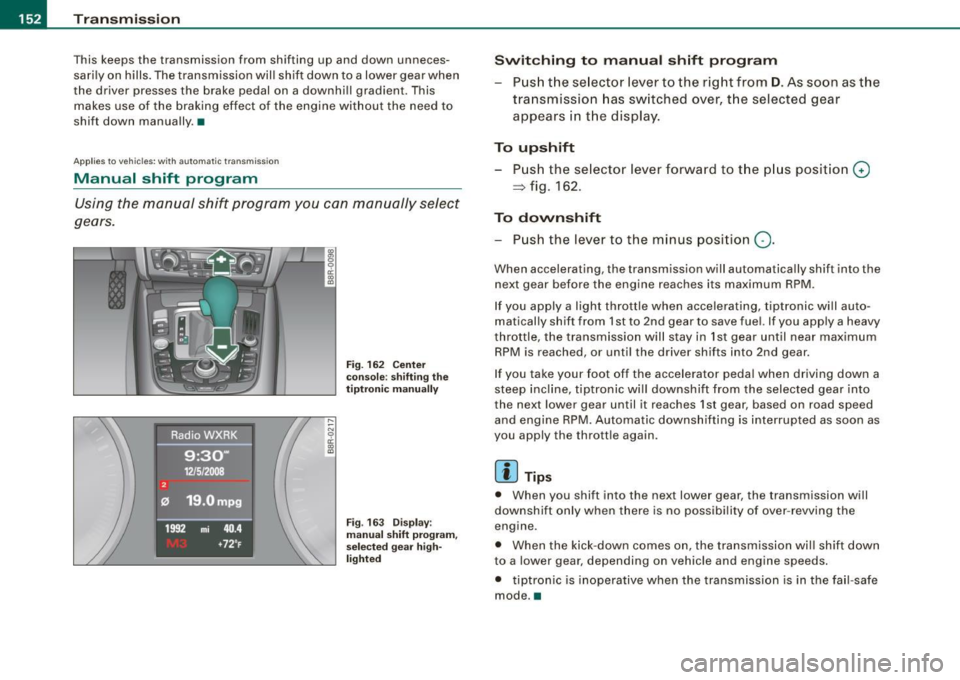
F ig . 162 Ce nter
conso le : sh if ting the
t iptr oni c man ually
Fig . 163 Disp lay:
m anua l shi ft p rogra m ,
selected gear hig h
li g ht ed
Swit chin g to m anu al s hift pr ogr am
Push the se lector lever to the right from D . As soon as the
transmission has switched over, the selected gear
appears in the display .
To upshift
Push the selector lever forward to the p lus position G)
~ fig . 162.
To dovvnshift
- Push the lever to the minus position Q.
When accelerating , the transmission will automatically shift into the
next gear before the engine reaches its maximum RPM .
If you apply a light throttle when accelerating, tiptronic wi ll au to
matically shift from 1st to 2nd gear to save fuel. If you apply a heavy
throttle, the transmission will s tay in 1st gear until near maximum
RPM is reached, or unti l the driver shif ts into 2nd gear.
If you take your foot off the accelerator peda l when driving down a
steep inc line, tiptronic wi ll downshift from the selected gear into
the neX1 lower gear until it reaches 1st gear, based on road speed
and engine RPM. Automatic downshifting is interrupted as soon as
you apply the thrott le again .
[ i ] Tips
• When you shift into the next lower gear, the transmission will
downshift only when there is no possibi lity of over -revving the
engine .
• When the kick-down comes on , the transmission wil l shift down
to a lower gear , depending on vehicle and engine speeds .
• tiptron ic is inoperative when the transmission is in the fa il-safe
mode. •