radio AUDI A5 COUPE 2010 User Guide
[x] Cancel search | Manufacturer: AUDI, Model Year: 2010, Model line: A5 COUPE, Model: AUDI A5 COUPE 2010Pages: 360, PDF Size: 84.39 MB
Page 44 of 360
Openin g a nd clo sin g
• Door hand les with convenience key*~ page 44,
• Lock cylind er at the dr iver's door~ page 45, or
• Power locking switch inside~
page 46.
Selec tive u nlo ck ing
When they are closed, the door a nd rear lid are locked . When
unlocking, you can set in the radio or MM I* whether
onlythe driver's
door or the entire vehic le should be unlocked~
page 43.
Autom atic lockin g
The automatic locking feature locks a ll the vehic le doors and the
rear lid when you drive faster than 9 mph (15 km/h).
The car is unlocked again once the ignition key is removed. In addi
tion, the vehicle can be unlocked if the open ing function in the
power locking system switch or at one of the door levers is actuated.
The Auto Lock function can be turned on and off in the radio or MMI *
~ page 43.
Additiona lly, in the event of a crash with airbag deployment the
doors are automatical ly un locked to allow access to the vehicle.
Anti -the ft alarm wa rning syste m
If the anti-theft alarm warning system detects a break -in into the
vehic le, acoustic and visual warn ing signa ls are triggered .
The anti-theft warning system is activated automatically when you lock the vehicle . It is deactivated when unlocking using the
re mot e
k ey ,
with the mechanical ke y, and when you switch on the ignition.
The alarm also turns off when the a larm cycle has expired.
T urn signal s
When you unlock the vehic le, the turn signals flash twice, when you
lock it once . If they do not flash, one of the doors, the rear lid or the
hood is not locked.
Unint ent ionally l ocking yours elf out
In the fo llowing cases there safeguards to prevent you locking your
remote master key in the vehic le : • T
he vehicle does not lock with the central locking switch
~ page 46 if the driver 's door is open.
• On vehicles with convenience key*, if the most recently used
master key is in the luggage compartment, the rear lid is automati
ca lly unlocked again after it is closed~
page 47.
Do not lock your vehicle with the remote master key until al l doors
and the rear lid are closed. In this way you avoid locking yourself out
accidentally .
& WARNING
• When you leave the vehicle , alway s remove the ignition key and
ta ke it with y ou. Thi s w ill pre vent pa ssenger s (children , for
exampl e) from a ccidentally being loc ked in the v ehicle should they
ac cident ally p ress the p ower locki ng switch in th e fron t door s.
• Do not l eave children in side the vehicle un supervi sed . In an
em ergen cy it w ou ld be impo ssible to open the door s from th e
out side without the key .
[ i ] Tips
• I n the event of a crash with airbag deployment all locked doors
wi ll be automatical ly un locked to give access to the vehic le occu
pants from the outside .
• If the power locking system should malfunction, you can lock the
driver's door using the mechanical key~
page 47.
• If the power locking system should fail, you can stil l open the
fue l tank flap in an emergency~
page 269.
• You are we ll advised not to keep valuables inside an unattended
vehic le, v isib le or not . Even a properly locked veh ic le cannot provide
the security of a safe.
• I f the LED in the upper edge of the driver's door panel comes on
for about 30 seconds after the vehicle is locked, there is a ma lfunc
tion in the power locking or the anti -theft warning system. Have the
~
Page 45 of 360
malfunction corrected by an authorized Audi dealership or qualified
repair facility. •
Setting power locking
The driver can determine the functions for power locking
in the radio or
MM/*.
Fig . 3 6 MM I display :
Ce ntra l l oc king m enu
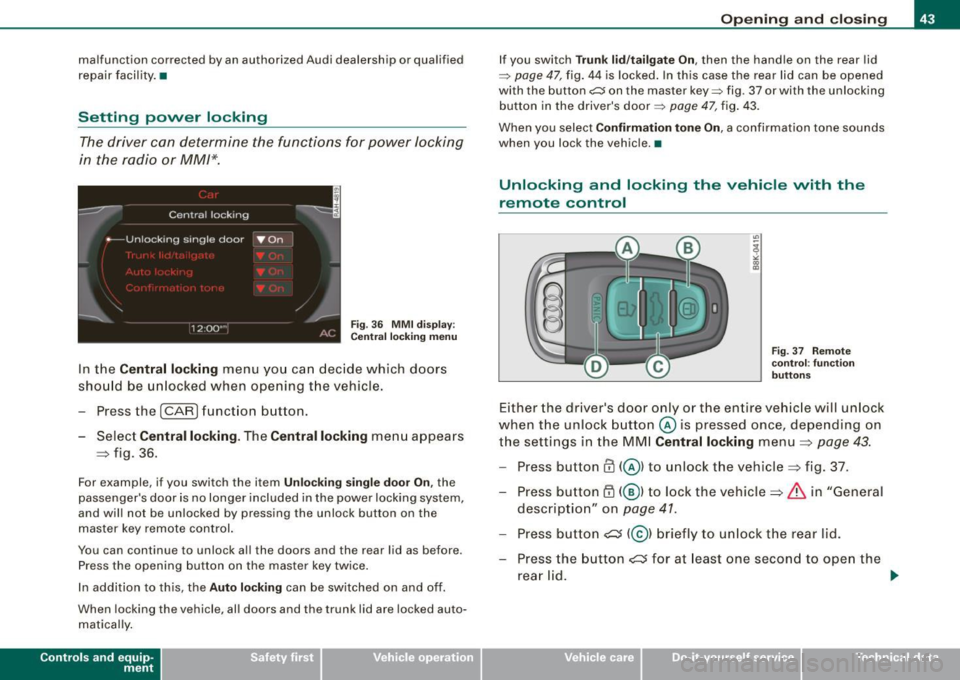
In the Central locking menu you ca n decide which doo rs
sho uld be u nlocked when opening t he vehicle .
- Press the
I CARI funct ion button.
- Select
Central locking . The Central locking menu ap pears
=> fig . 36.
For example , if you switch the item Un lo ck ing sin g le doo r On , the
passenger's door is no longer included in the power locking system,
and will not be unlocked by pressing the unlock button on the
master key remote control.
You can continue to unlock all the doors and the rear lid as before .
Press the opening button on the master key twice .
I n addition to this, the
Auto lock ing can be switched on and off.
When locking the vehicle, all doors and the trunk lid are locked auto
matically .
Contro ls and eq uip
ment
Op ening and clo sing
If you switch Trun k lid /tailgate On , then the handle on the rear lid
~ pag e 47, fig. 44 is locked . In th is case the rear lid can be opened
with the button~ on the master key~ fig. 37 or with the unlocking
button in the driver's door~
page 47, fig. 43.
When you select
Confirmation tone On , a confirmation tone sounds
when you lock the vehicle. •
Unlocking and locking the vehicle with the
remote control
Fig. 37 Remot e
co ntr ol: fu nctio n
b uttons
Either the driver's doo r only or the entire vehic le will un lock
when t he unlock b utton © is pressed once, depending on
the settings in the MM I
Central locking menu=> page 43.
Press button@( @) to unlock the vehicle=> fig. 37.
- Press button
ED (@ l to lock the vehicle=> & in "Gener al
description" on
page 41.
- Press bu tton ~ (@ l b riefly to un lock t he rear lid.
- Press the button
~ fo r a t least one secon d to ope n the
rea r lid. .,_
Vehicle care I I irechnical data
Page 46 of 360
![AUDI A5 COUPE 2010 User Guide Opening and closing
- Push the red
I PANIC I button (@ ) to activate the panic
function. The horn sounds and the turn signals flash.
Push the red [PANIC] button again to deactiva](/img/6/57582/w960_57582-45.png "AUDI A5 COUPE 2010 User Guide Opening and closing
- Push the red
I PANIC I button (@ ) to activate the panic
function. The horn sounds and the turn signals flash.
Push the red [PANIC] button again to deactiva")
Opening and closing
- Push the red
I PANIC I button (@ ) to activate the panic
function. The horn sounds and the turn signals flash.
Push the red [PANIC] button again to deactivate the
panic function.
If the vehicle is unlocked and no door, the rear lid or the hood is
opened within 60 seconds, the vehicle locks itself again automati
cally. This feature prevents the vehicle from being accidentally left
unlocked over a long period of time.
I t depends on the settings in th e radio or MMI* whether the entire
vehicle is unlocked or only certain doors~
page 43.
On vehicles with automatic transmission *, t he selector lever must
be in the P position, otherwise the vehicle cannot be locked.
& WARNING
Read and follow all WARNINGS ~ & in "General description" on
page 41.
[ i ] Tips
• In order to make sure the locking function is working, you should
always keep your eye on the vehicle to make sure it is properly
locked .
• Do not use the remote control if you are inside the car, otherwise
you may uninten tionally lock the vehicle, and then you would set off
the anti -theft alarm when you try to start the engine or open a door.
In case this happens anyhow, push the unlock button
0 .
• Use the panic function only if you are in an emergency
situation. •
Applies to veh ic les: w it h co nveni ence key
Unlocking and locking with convenience key
The doors and the rear lid can be unlocked and locked
without operating the master key.
Unlocking vehicle
Fig. 38 Convenience
key: Unlocking vehicle
door
Fig. 39 Convenience
key: Locking the
vehicle
- Take hold of the door handle. The door is unlocked auto-
matically.
- Pull the handle to open the door.
Locking vehicle
- Move the selector lever to the
P position (automatic
transmission*), otherwise the vehicle cannot be locked. _,,,
Page 47 of 360

-Touch the sensor at the door hand le on ce => page 44,
fig. 39 to lock the vehicle=> & in "Ge neral description"
on
page 41 .
The vehicle can be locked and unlocked at any door. It depends on
the settings in the radio or MM I* whether the entire vehicle is
unlocked or one of the doors =>
page 43. The master key mus t be
within a range of about 1 .5 m from the appropriate door or the rear
lid . It makes no difference whethe r the master key is in your jacket
pocket or in your brief case.
If you grip the door handle while locking, this can adversely affect
the locking funct ion.
It is not possib le to re-open the door for a brief period directly after
closing i t. This allows you to ensure that the doo rs are proper ly
locked.
& WARNING
Read and foll ow all WARNING S => & in "General description " on
page 41 .
[ i ] Tips
If you r vehicle has been s tanding for an extended period, p lease
note the following:
• The proxim ity sensors are deactivated after a few days to save
power. You then have to pull on the door handle once to unlock the
vehic le and a second time to open the vehic le .
• T o prevent the battery from being discharged and to preserve
your vehicle's ability t o start for as long as possible, the energy
management system gradual ly switches off unnecessary conve
nience functions . It is possib le tha t you will not be ab le to unlock
your vehicle using these convenience functions.
• For Declara tion of Compliance to United States FCC and Industry
Canada regulations=>
page 342. •
Controls and equip
ment
Opening and clo sing
Operating locks with the mechanical key
In the event of a failure of the po wer locking system, the
driver's do or can locked and unlocked with the mechan
ical key at the lock cylinder.
To unlo ck the vehicle
~ N 0
"' "' m
Fig . 4 0 Key turns for
o pen ing and clo sing
- Insert t he mec han ica l key into the lock of the driver's
doo r.
- Turn t he mec ha ni ca l key to position @=> fig. 40 .
To lock the vehicle
-Move the selector lever to the P position (automatic
t ra n smission*).
- Close a ll windows and doors proper ly.
- Turn the mec han ica l key in the lock of the dr iver's door to
the lock position
® => & in "Gene ra l description" on
page 41.
If the power locking system fai ls, there is emergency locking for the
passenger's door=>
page 47. ~
I • •
Page 57 of 360
![AUDI A5 COUPE 2010 User Guide Adjusting exterior lighting
The functions are selected in the radio or MM/*.
Fig. 53 MMI Display:
Exterior l ighting
-Select: Function button [CAR]> Exterior lighting .
Coming home](/img/6/57582/w960_57582-56.png "AUDI A5 COUPE 2010 User Guide Adjusting exterior lighting
The functions are selected in the radio or MM/*.
Fig. 53 MMI Display:
Exterior l ighting
-Select: Function button [CAR]> Exterior lighting .
Coming home")
Adjusting exterior lighting
The functions are selected in the radio or MM/*.
Fig. 53 MMI Display:
Exterior l ighting
-Select: Function button [CAR]> Exterior lighting .
Coming home*
The coming home function ensures that after
turning off the igni
tion and opening the driver's door
the vehicle periphery is illumi
nated in the dark. In addition, the front fog lights, the tail lights and
the license plate light are turned on. The power-on time can be set
for a period from
O (off) to 30 or 60 seconds.
Leaving home*
The leaving home functions ensures that
when unlocking, the
vehicle periphery is illuminated in the dark. In addition, the front fog
lights, the tail lights and the license plate light are turned on. This
function can be turned on and off.
Auto headlights*
When the light switch is in the AUTO~
page 53 position, the switch
on point of the lights can be changed in the automatic driving light
function.
Controls and equip
ment
Clear vision
Daytime running lights
The daytime running lights can be turned on or off using this func
tion. If the function is active, the daytime running lights are turned
on automatically when the ignition is switched on.
[ i] Tips
The coming home/leaving home function * is available only with the
switch in the AUTO position . •
Daytime running lights
When you turn on the ignition the daytime running lights
will come on automatically .
USA models
The daytime running lights are activated when the light switch
~ page 53, fig. 51 is in the O position or the AUTO position (only in
daylight conditions). The daytime running lights function can be
turned on and off in the radio or
MMI* menu Exterior lighting
~ page 55.
Canada models
The daytime running lights are activated when the light switch
~ page 53, fig. 51 is in the O position, ooo: position or the AUTO posi
tion (only in daylight conditions). The daytime running lights func
tion cannot be turned off.
& WARNING
Never use daytime running lights to see where you are going. They
are not bright enough and will not let you see far enough ahead for
safety, especially at dusk or when it is dark. Be aware of changes
in outside light conditions when you are driving and respond by
switching on your low beams
io. ~
I • •
Page 64 of 360
Clear vision
[ i J Tips
• The windshield wipers are switched off when the ignition is
turned off. Activate the windshield wipers after the ignition is switched back on by moving the windshield wiper lever to any posi
tion .
• Worn or dirty windshield wiper blades result in streaking. This
can affect the rain sensor * function. Check your windshield wiper
blades regularly.
• The rain sensor * is part of the interval wiping system. Turning off
the ignition will also deactivate the rain sensor*. To reactivate the sensor, switch off the interval wiping function, then switch it back
on again.
• The washer fluid nozzles of the windshield washer system are
heated at low temperatures when the ignition is on.
• When stopping temporarily, e.g. at a traffic light, the set speed of
the windshield wipers is automatically reduced by one speed .•
Service position
The windshield wiper blades are replaced in the service
position .
Fig. 64 MMI Display:
Windshield wipers Fig. 65
Servic e posi
tion
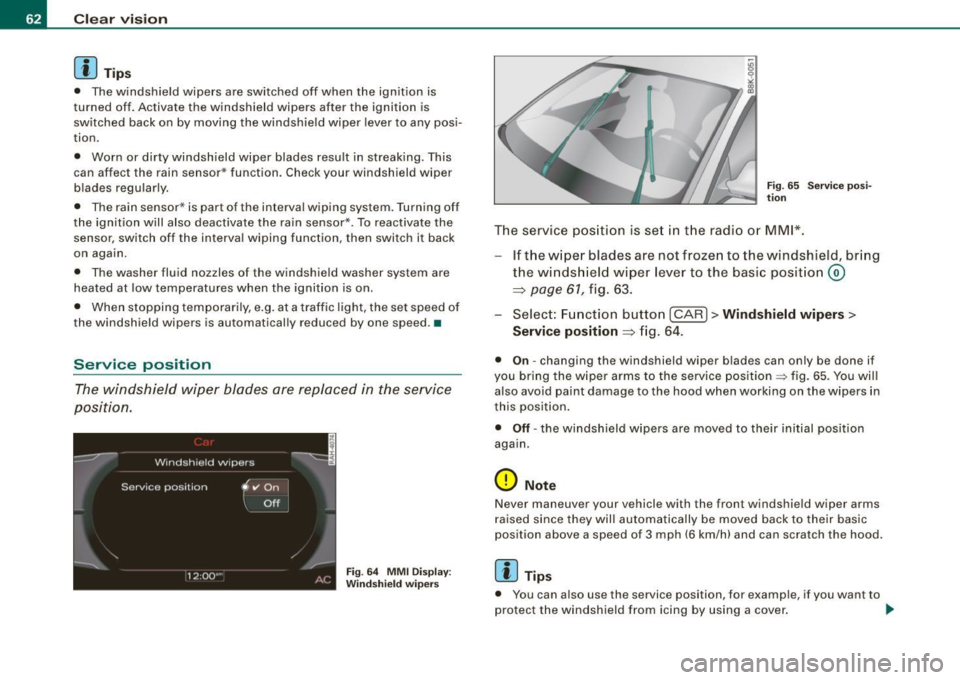
The service position is set in the radio or MMI*.
If the wiper blades are not frozen to the windshield, bring
the windsh ield wiper lever to the basic position@
~ page 61, fig. 63.
- Select: Function button
[CARI> Windshield wipers>
Service position ~
fig. 64.
• On -changing the windshield wiper blades can only be done if
you bring the wiper arms to the service position
=> fig. 65. You will
also avoid paint damage to the hood when working on the wipers in
this position .
• Off -the windshield wipers are moved to their initial position
again.
0 Note
Never maneuver your vehicle with the front windshield wiper arms
raised since they will automatically be moved back to their basic
position above a speed of 3 mph (6 km/h) and can scratch the hood.
[ i J Tips
• You can also use the service position, for example, if you want to
protect the windshield from icing by using a cover . _,,
Page 78 of 360
Seats and storage
Applies to vehicles: with seat memory
Activating remote control key memory
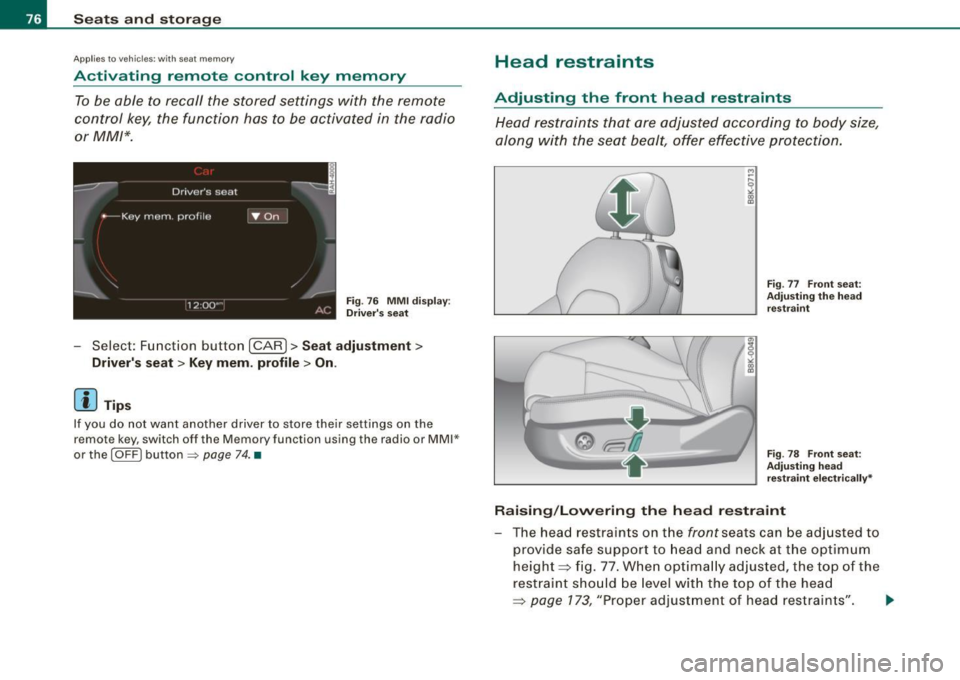
To be able to recall the stored settings with the remote
control key, the function has to be activated in the radio
or MM/*.
Fig. 76 MMI display:
Driver's seat
-Select: Function button [CAR]> Seat adjustment>
Driver's seat > Key mem. profile> On .
[ i ] Tips
If you do not want another driver to store their settings on the
remote key, switch off the Memory function using the radio or MMI*
or the
I OFF ) button => page 74. •
Head restraints
Adjusting the front head restraints
Head restraints that are adjusted according to body size,
along with the seat bealt, offer effective protection.
Fig. 77 Front seat:
Adjusting the head
restraint
Fig . 78 Front seat:
Adjusting head restraint electrically*
Raising/Lowering the head restraint
- The head restraints on the front seats can be adjusted to
provide safe support to head and neck at the optimum
height~ fig. 77. When optimally adjusted, the top of the
restraint should be level with the top of the head
~ page 173, "Proper adjustment of head restraints". ~
Page 95 of 360

Applies to vehic les: w ith de lu xe a utomat ic c limate co ntro l
Setting the temperature
Fig . 100 Te mperature
sett ing regu lator
Fi g. 10 1 Di spl ay :
Settin g the t emp era
ture
- Rotate the regulator to the left to red uce the temp era
t ur e, or to the right to in crease the tem perature
~ fig. 100.
The se lected temperature appears on the climate contro l display .
The temperature set ting wil l also appear for a few seconds in the
radio or MMI* display~
page 100, fig. 108. The radio display may be
d ifferent than what is shown in the illustration .•
Con tro ls and eq uip
ment
W arm and cold
A pp lies to ve hicles: with d elux e a utomat ic c limat e co ntro l
Fan @
The automatically preset fan speed can be reduced or
increased .
Press the [St?) butto n.
Fig . 1 02 Fa n butto n
a nd r egulator
F ig . 103 Dis play:
Se tting t he fan
Rotate the regulator to set the desired fan speed (air
vo lume).
We recommend a lways running the fan at a low speed when driving
s low ly .
To prevent polluted outside ai r (smell) from entering the interior of
the vehicle, sw itch to
r e cir cula tion mode by pr essing the button I= ). _.,
Vehicle care I I Technical data
Page 96 of 360
![AUDI A5 COUPE 2010 User Guide Warm and cold
When the radio or MM1 ·• is turned on, the fan speed setting appears
for a few seconds on the screen =:.
page 93, fig. 103.
[ i ] Tips
• It is possible tha](/img/6/57582/w960_57582-95.png "AUDI A5 COUPE 2010 User Guide Warm and cold
When the radio or MM1 ·• is turned on, the fan speed setting appears
for a few seconds on the screen =:.
page 93, fig. 103.
[ i ] Tips
• It is possible tha")
Warm and cold
When the radio or MM1 ·• is turned on, the fan speed setting appears
for a few seconds on the screen =:.
page 93, fig. 103.
[ i ] Tips
• It is possible that the fan speed may c hange automatically. This
occurs to ensure that the desired temperature se tting is reached as
quickly as possible.
• The fan speed cannot be regulated separately for the driver and
front passenger. •
App lies to v ehicl es: with d eluxe a utom ati c clim ate contro l
Recirculation mode [¢7:;) ]
The reci rculation m ode preve nts po llute d ou tside a ir from
entering the vehicle interior.
A ctivating
- Press the button joE::> ] ~ &.
Deactivating
Press the button [~ I again, or
press the [AUTO
I button.
In recircu lation mode , air is drawn from the vehicle interior , fi ltered
and recirculated. We recommend select ing recirculation mode
under the fol low ing conditions:
When driving through a tunnel or in a traffic jam so that exhaust
fumes and odors cannot enter the veh icle in terior.
& WARNING
Y ou should not use the re circulation mode for an ext ended period
since no fres h air is drawn in . W ith the air- co nd itio ning sw itched
& W ARNING (continu ed )
off , the window s ca n fog up , which increases the risk of an
accident! •
Applies to veh icle s: wi th de luxe automat ic c limate con trol
Air distribution I in ]
The automati cally pr eset air distribu tion c an be change d.
- Press th e [ in ] bu tton.
F ig . 104 Air distr ibu
t io n bu tt o n and r egu
l a tor
F ig . 10 5 Display: A ir
d is tribu tion
- Rota te the regulator to the des ired sett ing.
Page 97 of 360
You can adjust the air distribution so that air flows from specific
vents. In position
;J air flows only to the windows, in position :,J, it
flows to the driver or passenger, and in position
!,a it flows to the
footwell. There are additional combinations available to adjust air
dist ribution as needed .
To regu late air distribution automatically, switch to
( AU TO] .
When the radio or MMI* is turned on, the air distribution setting
appears for a few seconds on the screen=>
page 94, fig. 105 . •
A pp lies to vehicles: w ith de lu xe a utomat ic c limate co ntro l
Defrost [@ I
The windshield and side windows are defrosted or cleared
of condensation as quickly as possible.
- Press the button [@)to turn on the defroster .
- Press the b utton
(@J again, or press the [AUTO I button to
t ur n it off.
Temperature is control led automatical ly . The maximum amount of
air flows main ly from the vents below the windshield .
Pressing the[@] button sw itches off recirculation mode .•
Ap plies to ve hicles: w ith d elu xe au to m at ic c limate co ntro l
Rear window defogger [[jiiJ )
The rear window def ogger clears the rear window of
condensati on.
- Press the [QWJ button to turn the rear w indow defogger on
and off .
The rear window defogger works only when the engine is running .
T he indicator light in the button illuminates when the rear window
defogger is on .
Controls and equip
ment
W arm and cold
The rear window defogger is switched off automatica lly after 10 to
20 minu tes, depending on the ou tside tempera ture .
The rear window defogger can be turned on permanently by pressing the
[Ciul] button for more than two seconds. This remains
stored until the ignition is switched off . A rear window defogger that
was switched on also remains stored for 15 minutes after the igni
t ion is sw itched off .
I f the engine is restarted within these 15 minutes, the rear window
defogger is activated for 10 to 20 minutes, depending on ou tside
temperature . When a vehic le is parked for a short time , the rear
window defogger does not need to be manually activated again.
ci> For th e sake of the environment
As soon as the rear window is clea r, you shou ld switch the rear
window defogger off . The reduced power consumption has a bene
ficial effect on fuel consumption .•
Ap plies to vehic les: w it h d eluxe au tomat ic c limate co ntro l
AC mode [ACJ
Deactivating
- Press the [AC I button.
Activating
- Press the [AC] button again.
The cooling system is turned on in AC mode. The heating and venti
lation system is controlled automatica lly.
[ i ] Tip s
If the LED in the switch continues to illuminate after AC mode has
been turned off( = turning the AC off), there is a fault in an air -condi -_,.
I • •