radio AUDI A5 COUPE 2010 Owner's Manual
[x] Cancel search | Manufacturer: AUDI, Model Year: 2010, Model line: A5 COUPE, Model: AUDI A5 COUPE 2010Pages: 360, PDF Size: 84.39 MB
Page 106 of 360

• .___w __ a _r _m _ a _n_d_ c_ o _ ld __________________________________________________ _
Applies to vehic les: with Deluxe automatic c limate con tro l plu s
Economical use of the climate control system
Economical use of the climate control system helps save
fuel.
When the climate control system is working in cooling
mode, engine performance is reduced and fuel consump
tion is affected. To keep the time the climate control system
is on as short as possible, you should do the following:
- To save fuel, turn off cooling mode by pressing the AC
button (indicator light goes out).
- In addition, if you open the window or the panoramic
sliding/tilting sunroof * while driving, turn off cooling
mode by pressing the AC button (indicator light goes
outl.
- If the vehicle is extremely hot due to the heat of the sun,
briefly open doors and windows.
c£> For the sake of the environment
When you save fuel, you reduce emissions from the vehicle. •
Deluxe automatic climate control
plus - basic settings
Applies to vehic les : with Deluxe automatic climate contro l plus
General information
The basic climate control settings can be adjusted in the
radio or
MM/* .
Fig . 114 MMI display:
Setup climate control
- Select: Function button [CAR]> Control button AC.
The following functions can be selected:
• Automatic recirculat. =>
page 104
• Synchronization=> page 105 •
Applies to veh icles: w ith Deluxe automatic clima te co ntrol p lus
Automatic recirculation
An air quality sensor detects increased concentrations of
pollutants in the outside air and automatically switches
to recirculation mode.
We recommend that you always keep automatic recirculati on ON to
prevent polluted outside air from entering the vehicle interior. .,_
Page 112 of 360

• ..__O_ n_ t_h _e _ r_o _a _ d __________________________________________________ _
Starting and stopping the engine
vvith convenience key
App lies to vehi cles: with conven ience key
Starting the engine with the
[ START E NGINE STOP] button
This button switches on the ignition and star ts the engine.
Fig. 118 Conven ie nc e
ke y: START ENGINE
S TOP
but ton
Manual transmission: Fully depress the clutch pedal and
move t he shift lever to the neut ra l posi tion.
- Automatic transmission*: Step on the brake peda l and
move the selector leve r to
P or N => & .
Press on the ( START ENGINE STOP ] b utton=> fig. 11 8 -
t h e eng ine will sta rt.
By pressing the [STAR T ENGINE STOP) button without depressing
the c lutch or the brake peal, the ignition is switched on and
switched off by pressing it again .
If the engine does not start immediately, stop trying a fter 10
seconds and then try to restart the engine about 30 seconds later .
After a cold engine is sta rted, there may be a brief period of
increased noise because oil pressure must first bu ild up in the hydraulic valve adjusters. This is normal and not a cause for
concern.
Dri
ver message in th e instrument cluster displ ay
No key ide ntified
This message appears when the [S TART ENGINE ST OP ) button is
pressed if there is no master key inside the vehic le or if the system
does not recognize it . For example, the master key cannot be recog
n ized if it is covered by an object (e.g. aluminu m brief case) which
screens the radio signal. Electronic devices such as cell phones can
also interfere with the radio signa l.
Press brake pedal to start engine
This message appears if you press the I START ENGINE STOP ]
button to start the engine and do not depress the brake pedal. The
engine can only be started if the brake pedal is depressed.
Pre ss clut ch pedal to start engin e
This message appears with a manua l transmission when you press
the
I S T ART ENGINE ST OP l button to start the engine and do not
depress the clu tch pedal. The eng ine can only be started when the
clutch peda l is depressed.
E n ga ge N or P to start engine
This message appea rs when attempting to start the engine if the
selector lever for the automat ic transmission is not in the
P or N
position . The engine can only be started with the se lector in these
pos itions.
Key not in vehicle
This message appears along with the symbo l if the master key is
r emoved from the vehic le with the engine r unning. It is intended to
remind you (e.g. when changing drivers) not to continue the journey
without the maste r key.
I f the master key is no longe r in the vehicle, y ou canno t switch o n
the ignition after stopping the engine and you also cannot start the .,
Page 143 of 360
___________________________________________________ A_ u _ d_i_ s_ id_ e_ a _ s_s _ i_s _t __ llllll
© Signal on outside mirror does not light up
If you activate your turn signal in driving situation @, the signal still
does not light up on the outside mirror=>
& in "Safety tips" on
page 143. •
Applies t o vehicles: with side assist
Setting the signal brightness on the outside
mirror
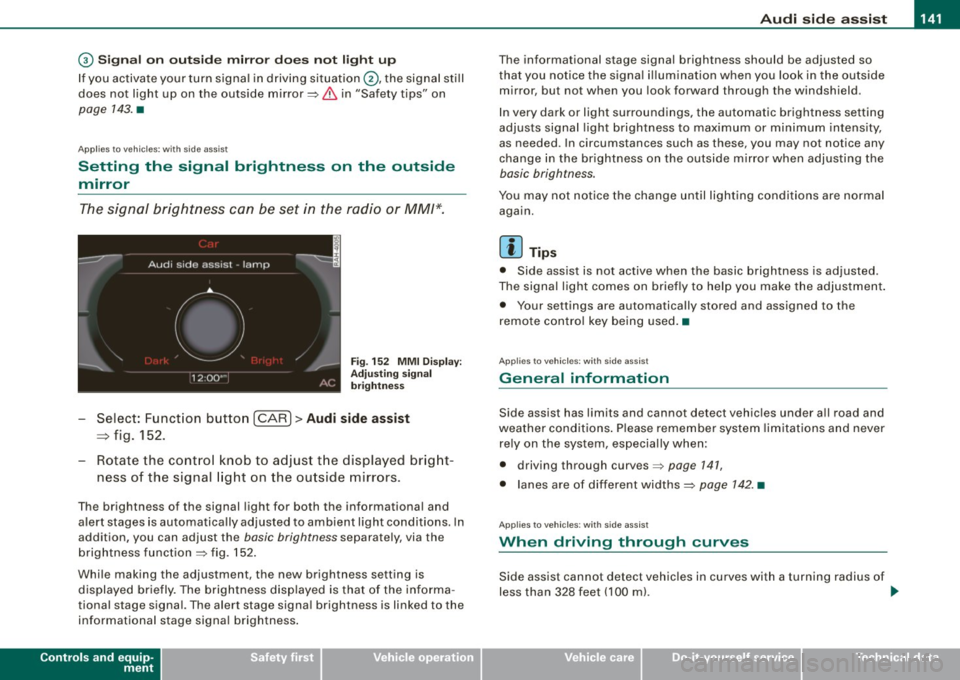
The signal brightness can be set in the radio or MM/*.
Fig. 152 MMI Display:
Adjusting sign al
brigh tness
- Select: Function button [CARI> Audi side assist
=> fig. 152.
- Rotate the cont ro l knob to adjust the displayed bright-
ness of the signal light on the outside mirrors .
The brightness of the signal light for both the informationa l and
alert stages is automatica lly adjusted to ambient light conditions. In
addition, you can adjust the
basic brightness separately, via the
brightness function
=> fig . 152.
While making the adjustment, the new brightness setting is
displayed briefly. The brightness displayed is that of the informa
tional stage signal. The alert stage signa l brightness is linked to the
informational stage signal brightness .
Controls and equip
ment
The informational stage signal brightness should be adjusted so
that you notice the signa l illumination when you look in the outside
mirror, but not when you look forward through the windshield.
In very dark or light surroundings, the automatic brightness setting
adjusts signal ligh t brightness to maximum or minimum intensity,
as needed . In circumstances such as these, you may not notice any
change in the brigh tness on the outside mirror when adjusting the
basic brightness.
You may not notice the change until lighting conditions are normal
again.
[ i ] Tips
• Side assist is not active when the basic brightness is adjusted.
The signal light comes on briefly to help you make the adjustment .
• Your settings are automatically stored and assigned to the
remote control key being used.•
Applies to veh ic les: with s ide ass ist
General information
Side assist has limits and cannot detect vehicles under a ll road and
weather conditions . Please remember system limitat ions and never
re ly on the system, especially when:
• driving through curves=>
page 141,
• lanes are of different widths=> page 142. •
Applies to veh ic les : with s ide ass ist
When driving through curves
Side assist cannot detect vehic les in curves with a turning radius of
less than 328 feet (100 ml. .,,
I • •
Page 158 of 360

• .___P_ a_r_ k_ a_s_ s_ i _s_ t ____________________________________________________ _
Please note that low objects already signalled by a warning can
disappear fro m the system 's detectio n range and wil l n ot con tinu e
to be signa lled .
If the distance to an obstacle remains the same, the vo lume of the
d istance wa rni ng i s gradually reduced after a bout 4 seconds .
Approaching another obstacle wi ll result in the distance warning
sound ing at th e nor mal vo lume agai n.
Malfunctions in the system If a warnin g tone is audib le for about five seconds when you turn on
the ignition, there is a ma lfunction in the system. Have the prob lem
corrected by y our aut horiz ed Aud i deale r.
Keep the sensors in the rear bu mper c lean and free from ice so that
th e acous tic par k ass is t sy stem can f unction properl y.
& WARNING
• Sensors have dead spaces in which objects cannot be
detected . Be especially alert for small children and animals , since
they are not always detected by the sensors.
• The acoustic parking system is not a substitute for the dr iver's
own caution and alertness . Ultimate responsibility always
remains with the driver during parking and similar maneuvers .
Always watch where you are driving .
• You should always adjust the volume and frequency of the
warning tones so that you can easily hear the acoustic distance
warn ing even if the radio is play ing , the air-conditioner blower is
on High or there is a high level of outside noise.
-Check the settings whenever anyone else has driven the
vehicle before you.
0 Note
• Reme mber that low obstacles for wh ic h a war ning has already
been issued may "dive" below the system's sensing zone if the
v ehicl e is be ing backe d up close r. In t his cas e, t he wa rnin g so und shutting off does
not indicate that you have c leared the obstacle .
In stea d, impact is im min ent.
• Objects such as trai ler hitches, chains, narrow posts or fences
cov ered by a t hin lay er of p ain t may no t always be detecte d by t he
syst em . T hey can stil l damage your vehicle without warning.
[ i ] Tips
K eep the sensors in the rear bumper clean and free of snow and ice
s o t hat the ac oustic parki ng a ssis t s ystem ca n fu nc tio n proper ly.•
Ap plies to ve hic le s : w ith pa rk ing syst em (rea r)
Adjusting the warning tones
Th e warning ton es can be adj usted in the MM /*.
-Select: [CARI> Parking system.
• Rear volume - rea r sens or vo lum e
• Rear frequency -rea r sensor frequency
Fig . 167 MMI displ ay:
parking system
• In-car entertainment fader -when the parking system is
sw itched o n, t he v olum e of the ac tive a udio sou rce is lo wered .
Page 164 of 360
• ..__P_ a_r _k _ a_s _ s_ i_ s _t ____________________________________________________ _
& WARNING
• The rear view camera doe s not show the entire area behind the
vehicle
=> page 157 , fig. 1 70 . Watch out especially for small chil
dren and animal s. The rear view camera cannot always detect
them , posing ri sk of an a ccident!
• Please note that objects not tou ching the ground can appear to
be further away than they really are (for example , the bumper of a
parked vehi cle , a trailer h itch , or the rear of a t ruck ). In this case ,
you should not use the help lines to help with parking , which
poses danger of an a ccident !
0 Note
In the MMI d isplay, the d irection of trave l o f the vehicle rear is rep re
sented depending on the steering wheel angle. The vehicle front
swings out more than the veh ic le rear. Maintain ple nty of distance
from an obstacle so that your outside mirror or a corner of your
veh icle does not col lide with any obs tacles - danger of accident!
[ i J Tips
The left or r igh t ori entat ion li nes and s urfaces will be displayed,
depending on the turn signa l being used .•
Ap plies to veh ic les: w ith par king sy ste m !rear, with rear vie w camera)
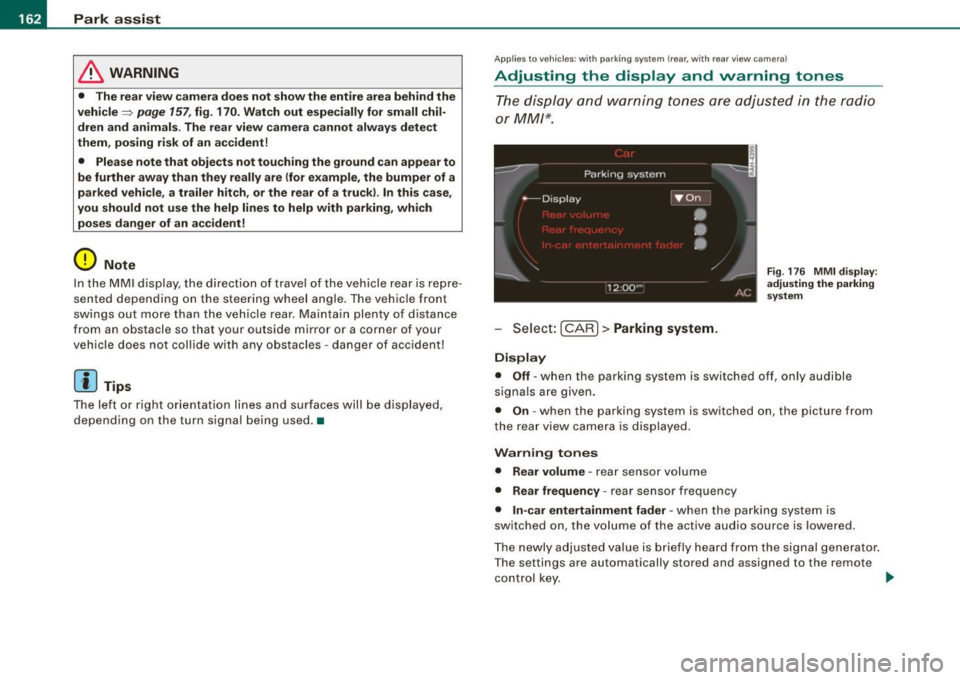
Adjusting the display and warning tones
The d isplay and warning tones are adjusted in the radio
or
MM /*.
Sele ct: [CARI> Parking system .
Display
Fig . 17 6 MMI di spla y:
adjusting the parking
sys tem
• Off -when the parking system is switched off, on ly audible
sig nals a re given .
• On -when the par king system is switched on, the picture from
the rea r view came ra is displayed .
Warning tones
• Rear volume -
rear sensor volume
• Rear frequency -rear sensor frequency
• In-car entertainment fader -when the parking system is
switched on, the volume of the active audio source is lowered.
The newly a dju sted va lue is b riefly heard fr om the sig nal gene rator .
T he settings are automatically stored and assigned to the remote
control k ey.
~
Page 165 of 360

______________________________________________________ P_ a _ r_k _ a_s _s _ i_s _t __ _
& WARNING
• Always make sure that the volume and frequen cy of the
warning tones is adjusted so that you can easily hear the acoustic distan ce signal even if the radio is playing , the air -conditioner
blower is on High or there is a high level of outside noise .
• Che ck the settings whene ver someone else has dri ven the
vehicle before you.
[ i ] Tips
• The wa rni ng ton es can a ls o b e adjuste d directly fro m the rea r
v iew camera image. Simp ly press the [SettingsJ * control button .
• Change d se ttin gs are ac tivated whe n parking ass is t is switched
on again .•
App lies to veh ic les: w ith parking system ( rear , with rea r view camera)
Error messages
If a war nin g to ne is au dible fo r abou t five seconds wh en yo u tu rn on
the ignit ion, there is a malfunc tion in the system . Have the prob lem
co rrected by y our autho rized Aud i deale r.
Kee p the sensors in the rea r bu mper c lean a nd free fro m ice so that
the acoustic park assist system can function prope rly. •
Controls and equip
ment
I • •
Page 204 of 360
lffl) __ A_ ir_ b_ a-g _ s_y _s_ t_ e_ m _________________________________________________ _
& WARN ING (continued )
seating posit ion and have the airb ag system inspe cted by your
authorized Audi dealer.
• A t ight tether or other strap on a rearward-fa cing child restr aint
att ached to the front pas senger se at can put too much pres sure
on the weight-sensing mat in the seat and reg ister more weight
than is actually on the seat. The heavier weight registered can
m ake the system work as though an adult were on the seat and
deploy the Advanced Airbag when it must be suppressed cau sing
ser ious or even fatal injury to the child .
• If, in exceptional circumstance s, you mu st in stall a forward
f a cing child restraint on the front passenger seat , always move the
seat into its rearmost position in the seat's fore and aft adjust
ment range , as far away from the airbag as po ssible . The ba ckrest
must be adjusted to an upright position. Make sure that the
PASSENGER AIR BAG OFF light comes on and stay s on all the time
whenever the ignition is switched on .
& WARNING
• If the PASSENGER AIR BAG OFF light does not go out when an
adult is sitting on the front passenger seat after tak ing the step s
described above, make sure the adult is properly seated and
restrained at one of the rear seating posit ions .
• Have the airbag system inspected by your authorized Audi
dealer before transport ing anyone on the front passenger seat .
[ i ] Tips
If the weight -sensing mat in the front passenger seat detects an
e m pty seat , the front a irbag on the passenge r side wil l be tur ned
off, and PASSENGER AIR BAG OFF will stay on.•
Repair, care and disposal of the airbags
P arts of the airbag system are installed at many different p laces on
you r Aud i. Insta ll ing, r emoving, servic ing or repa iring a pa rt in an
area of the vehicle can damage a part of an airbag system and
p revent that sys tem from working pr operly in a c ollisi on.
There are some important things you have to know to ma ke sure
t h at the effective ness of the system will not be impai red and that
discarded co mponents do not cause injury or po llute the env iro n
ment .
& WARNING
Improper care , servicing and repair procedures can increase the
risk of personal injury and death by pre venting an airbag from
deploying when needed or deploying an airbag unexpectedly:
• Never cover , obstruct , or change the steering wheel horn pad
or airbag cover or the instrument panel or modify them in any way .
• Never attach any objects such as cupholders or telephone
mountings to the surfaces covering the airbag units .
• For cleaning the horn pad or instrument panel , use only a soft,
dry cloth or one moistened with plain water. Solvents or cleaners
could damage the airbag cover or change the stiffness or strength
of the material so that the airbag cannot deploy and protect prop
erly .
• Never repair , adju st, or change any parts of the airbag sy stem .
• All work on the steering wheel , instrument panel , front seats or
electrical system (including the installation of audio equipment,
cellular telephones and CB radios , etc .I must be performed by a
qualified technician who has the training and special equipment
necessary .
• For any work on the airbag system, we strongly recommend
that you see your author ized Audi dealer or qual ified workshop .
• Never modify the front bumper or parts of the vehicle body .
Page 244 of 360

llffl __ ln_ t _e_ ll-'"ig ...,_ e_ n_t _t_ e_ c_ h _ n_o _ l_o _,.g= y,_ __________________________________________ _
Take into consideration that when you unlock your vehicle, some
convenience functions, such as the remote key or power seat
adjustment, may not be available. The convenience functions will be
available again when you turn on the ignition and start the engine.
With the engine turned off
If you listen to the radio, for example, with the engine turned off or
use other MMI functions, the battery is being discharged .
If starting capability is jeopardized due to energy consumption, the
following warning appears in the MMI display :
Please start engine, otherwise system will switch off in
3 minutes.
The warning indicates that the system will be turned off automati
cally after 3 minutes. If you wish to continue using the functions,
you have to start the engine .
With the engine running
Although electrical energy is generated when the vehicle is being
driven, the battery can become discharged. This happens mostly
when little energy is being generated and a great deal consumed and the battery's state of charge is not optimal.
To bring the energy balance back into equilibrium, consumers
which require especially large amounts of energy are temporarily
cut back or switched off. Heating systems in particular require a
great deal of energy. If you notice, for example, that the heated
seats* or the heated rear window are not heating, they have been
temporarily cut back or switched off. These systems will be available
again as soon as the energy balance has been restored.
You will also notice that engine idle speed has been increased
slightly . This is normal and not a cause for concern. By increasing
engine idle speed the additional energy required is generated and
the battery is charged.
Driver not ification in the instrument cluster
d isplay
If battery power drops into the range where it can limit the ability of
the engine to start, this is shown in the instrument cluster display
with the following driver message:
'-' Low battery charge: battery will be charged while driving
This notification reminds you that the starting capability of the
engine may be limited. As soon as you start driving again, the
battery will be recharged and the notification will go out.
Driver notification appears and goes out again
If this driver notification appears after the ignition is turned on or
while driving and it goes out again after a while, the battery has
been adequately recharged.
Driver notification appears and does not go out again
If this driver notification appears after the ignition is turned on or
while driving and does not go out again, the battery's state of
charge is not in the optimal range . Starting ability is restricted . Have
the battery checked as soon as possible by an authorized Audi
dealer or qualified workshop. •
Page 278 of 360
-L-___:C::..:....: h:..:e :...:c :..: k..:..: i..:..n :.;;g~ a::..:n..:.. d~ f:...:. i.:.:.11 .:.:.in ..:..g~ ___________________________________________ _
-Unscrew the cap~ to the engine oil filling hole
=>
page 275, fig. 224.
Carefully top off with the appropriate oil in 0.5 liter doses.
- Screw the cap back on the filling hole and close the
engine hood.
- Check the oil level again after two minutes=>
page 275.
-Top off the oil again, if necessary.
& WARNING
• While topping off, the oil must not come in contact with hot
engine parts -fire hazard!
• The oil filler cap must be properly secured to prevent oil from
being sprayed on the hot engine and exhaust system when the
engine is running -fire hazard!
• If your skin has come in contact with the engine oil, you must
subsequently cleanse it thoroughly.
0 Note
• Check the oil level using the radio or MMI*. If the message Please
reduce oil level appears, contact your authorized Audi dealer or
other qualified workshop to have excess oil extracted if necessary.
• Audi does not recommend the use of oil additives. They may
damage the engine and adversely affect your New Vehicle Warranty.
'i> For the sake of the environment
• Under no circumstances can the oil come in contact with the
sewage network or the soil.
• Observe and follow legal regulations when disposing of empty
oil containers. •
Changing the engine oil
We recommend that have your oil changed by an autho
rized Audi dealer or a qualified service station.
Before you check anything in the engine compartment, always read
and heed all WARNINGS=>
& in "Working in the engine compart
ment" on
page 271.
The engine oil must be changed according to the intervals specified
in your Warranty
& Maintenance booklet. This is very important
because the lubricating properties of oil diminish gradually during
normal vehicle use.
Under some circumstances the engine oil should be changed more
frequently. Change oil more often if you drive mostly short
distances, operate the vehicle in dusty areas or under predomi
nantly stop-and-go traffic conditions, or have your vehicle where
temperatures remain below freezing for extended periods.
Detergent additives in the oil will make fresh oil look dark after the
engine has been running for a short time. This is normal and is not
a reason to change the oil more often than recommended.
Because of the problem of proper disposal, along with the special
tools and necessary expertise required, we strongly recommend
that you have your oil changed by an authorized Audi dealer or a
qualified service station .
If you choose to change your oil yourself, please note the following
important information:
& WARNING
To reduce the risk of personal injury if you must change the engine
oil in your vehicle yourself:
• Wear eye protection.
• To reduce the risk of burns from hot engine oil, let the engine
cool down to the touch.
~
Page 287 of 360
___________________________________________ C_ h_e _c_ k_ i_n _g _ a_n _d_ f_il _li _n _g __ _
•
Fast charging the battery {charging rate above 14 .8
Volts )
For technical reasons do not use a battery charger that uses vo ltage
greater than 1 4.8 Vo lts to charge y our ve hic le 's battery.
& WARNING
Charging a battery can be dangerous .
• Always follow the operating instruct ions provided by the
battery charger manufacturer when charging your battery.
• Never charge a frozen battery. It may explode because of gas
trapped in the ice . Allow a frozen battery to thaw out first.
• Do not reuse batteries which were frozen. The battery housing
may have cracked and weakened when the battery froze .
• Charge the battery in a well ventilated area. Keep away from
open flame or electrical spark . Do not smoke . Hydrogen gas gener
ated by the battery is explosive.
• To redu ce the danger of e xplos ion , never connect or disconnect
charger cables while the charger i s operating.
• Fast charging a battery is dangerous and should only be
attempted by a competent technician with the proper equipment.
• Battery acid that may spill during charging should be washed
off with a solution of warm water and baking soda to neutralize
the acid .
0 Note
Never use a fast charger as a booster to start the engine . T his wil l
se rious ly da mage sen sit ive elec tronic componen ts, such a s control
un its, re lays, radio, etc., as well as the battery charger. •
Battery replacement
Th e ne w batt ery must hav e the sam e speci ficat ions and
d im en sions as t he o rigin al equi pmen t b att ery.
Intel ligent energy management in your vehicle is respons ib le for
d istr ibut ing t he e lectr ica l energy t hro ugh out your ve hicl e
~ page 241. The intelligent energy management syste m wil l keep
t h e eng ine ba ttery charge d better then veh icles without t his system .
T o make sure the additional electrical energy is available once again
af te r you hav e cha nged the battery, w e re co mmend tha t you in sta ll
batteries of the same type and manufacture on ly (the same as those
i nsta lled at t he time your vehic le was delive re d ). S pecifi cations a re
listed on the battery housing . Your authorized Audi dea ler wi ll then
code the batter y ma nageme nt control u nit.
If it is not poss ible to use a batt ery o f this ty pe, the new ba ttery must
have the same capacity, voltage (12 vo lts) , amperage, constr uction
and p lug sea lin g.
W hen installing the batter y, ma ke sure the ignition and all electrical
c o nsumers are tur ned off .
0 Note
Make sure the ven tilat io n hose on t he side o f the ba ttery is
conn ected, otherwise fumes or b att ery ac id can leak out .
<£' For the sake of the environment
Because of the proble m of proper d isposal o f a ba ttery, we recom
mend your authorized Audi dealer change the battery for you.
B at teri es co nt ain sulf uric acid a nd lead an d mu st alwa ys be
disposed of proper ly in comp liance with a ll environmental regula
t ions. Dispos ing o f v ehicle bat ter ie s i mproper ly is very danger ous to
the environment .•
Vehicle care I t •