ECO mode AUDI A5 COUPE 2011 Owner's Manual
[x] Cancel search | Manufacturer: AUDI, Model Year: 2011, Model line: A5 COUPE, Model: AUDI A5 COUPE 2011Pages: 362, PDF Size: 84.88 MB
Page 103 of 362
_________________________________________________ w __ a _r _m __ a_n _d_ c_ o_ ld __ _
affected . To keep the time the climate control system is on as
short as possible, you should do the following:
- To save fuel, turn off cooling mode by pressing the
[AC)
button (indicator light goes out) .
- In addition, if you open the window or the
panorama/tilting sunroof* while driving, turn off cooling
mode by pressing the
[AC) button (indicator light goes
out).
- If the vehicle is extremely hot due to the heat of the sun,
briefly open doors and windows.
~ For the sake of th e environm ent
When you save fuel, you reduce emissions from the vehicle .•
Deluxe automatic climate control
plus
App lies to veh icles: w ith De luxe automatic climate control plus
Description
The air conditioner is fully automatic and is designed to
maintain a comfortable and uniform climate inside the
vehicle.
We recommend the following settings:
- Set the temperature to 75 °F (+23 °C).
- Press the
[AUTO) button.
With this setting, you attain maximum comfort in the least amount
of time. Change this setting, as desired, to meet your personal needs.
Controls and equip
ment Safety first
The climate controls are a combination
of heating, ventilation and
coo ling systems, which automatically red uce humidity and cool the
air inside your vehicle .
The climate control automatically maintains a temperature once it
has been set. The temperature of the air from the vents, fan speed
(air volume) and air distribution are also automatically adjusted. The
system a lso takes into account strong sunsh ine so that man ual
adjustment is not necessary. So in almost all cases,
automa tic mo de
offers the best condit ions for the comfort of the occupants at all
times of the year~
page 104.
Please note the following:
T urn on the a ir cond itioner to reduce humidity in the vehicle. This also
prevents the windows from fogging up.
When the outside temperature is high and the air is very humid,
condensati on from the evaporator may drip under the vehicle. This is
normal and does not indicate a leak .
If the outside temperature is low, the fan normally only switches to a
higher speed once the engine coolant has warmed up sufficiently.
T he air conditioner temporari ly switches off when you drive off from
a standstill using full throttle to save engine power.
T he compressor also switches off if the coolant temperature is too
high, so that the engine can be adequately cooled under extreme
loads.
Du st a nd p ollen filt er
The dust and pollen filter (a combined particle fi lter and activated
charcoal filter) reduces or prevents outside a ir po llution (dust, or
pollen) from entering the vehicle.
T he dust and pollen filter must be changed at the intervals specified
in your Maintenance booklet, so that the air conditioner can properly
work.
If you drive your vehicle in an area with a high degree of air pollution,
the filter may need to be changed more frequently than specified in .,.
Vehicle care Technical data
Page 106 of 362

llll..__w __ a _r _m __ a_n _ d_ c_ o_ ld ________________________________________________ _
Applies to veh icles : w ith Deluxe automatic climate contro l p lus
Turn ing the climate control on and off
- Briefly press [ OFF ], or press [AUTO) to turn the climate
control
on .
Press the [ OFF] button for at least 2 seconds to turn the
climate control
off and to block the air supply from the
outside. "OFF" appears in the display.
Climate control turns on again when you press the tem per atur e
re gulator •
Applies to veh ic les: with Deluxe automatic climate contro l plus
Automatic mode !AUTO]
The standard operating mode for all times of the year.
Turning on autom atic mode
- Set the temperature between 60 ° F (+16 °C) and 84 °F
(+28 °().
- Press the [AUTO I button.
Automatic mode ensures constant temperatu res in the interior and
dehumidifies the air inside the vehicle. Air temperature, volume and
distribution are controlled automatically to reach or maintain the
desired interior temperature as q uickly as possib le . Fluctuations in
exterior temperature and the effects of temperature from the posi
tion of the sun are compensated for automatically.
Th is operating mode works only in an adjustable temperature range
of 60° F (+16°() to 84°F (+ 28°C) . If a temperature below 60° F
(+ 16°() is selec ted, LO appears in the display . At temperatures above
84°F (+28°(), HI is disp layed . At both extreme settings, climate
control runs continuously at maximum cooling or heat ing power .
T he re is no temperature regulation .•
Applies to veh icles: w ith De luxe automat ic climate control p lus
Setting the temperature
The temperature can be set separately for the driver's
side and front passenger's side.
Fig . 1 0 1 T emperat ure
s etti ng regu lator
- Rotate the regulator ~ fig. 101 to the left to reduce the
temperature, or to the right to increase the temperature .
The selected temperature appears on the climate control display.
When the MMI d isp lay is turned on, the temperature setting appears
for a few seconds on the screen. •
Page 107 of 362

_________________________________________________ W_ a_ r_m _ a_ n_d_ c_ o_ ld _ ___.llfflll
App lies to veh icles : wi th Delu xe aut omat ic climate contro l plus
Fan ~
The automatically preset fan speed can be reduced or
increased .
-Press the[~] button=> fig . 102.
Fi g. 102 Fa n but ton
and re g ul ator
- Rotate the regulator to set the des ired fan speed (air
volume) .
The clima te control system automatically regula tes fan speed based
on the interior temperature . You can adjust the volume of a ir
produced by the fan to your own requirements.
W hen the MMI display is tur ned on, t he fan speed setting appears for
a few seconds on the screen .
[ i J Tips
• It is possible that the fan speed may change automatically . This
occurs to ens ure that the desired temperature set ting is reached as
quickly as possible.
• T he fan speed cannot be reg ulated separately for the dr ive r and
front passenger .•
Con tro ls a nd e quip
m en t Vehicle
OP-eration
Applies to vehicles : with Deluxe au tomat ic clima te cont ro l plus
Recirculation mode[~)
The recirculation mode prevents polluted outside air
from entering the vehicle interior.
Turning on recirculation mode
- Press the [a;:, ]=> & button .
Turning off recirculation mode
-Press the~ button again, or
press the
[AU TO] button.
In recirculation mode, ai r is drawn from the vehicle interior, filtered
and rec irc ulated . We recommend selecting rec irculation mode under
the following conditions:
Whe n driving throug h a tunnel or i n a t raffic jam so that exhaust
fumes and odors cannot enter the veh icle interior.
& WARNING
You should not u se the recirculation mode f or an exte nded period
sinc e no fre sh a ir i s drawn in . With the air- conditioning switch ed
off, the windows can fog up , which increase s the risk of an
a cci dent! •
Vehicle care Do-it-yourselt service iTechnical data
Page 108 of 362
![AUDI A5 COUPE 2011 Owners Manual ffl..__w __ a _r _m __ a_n _ d_ c_ o_ ld ________________________________________________ _
Applies to veh icles : w ith Deluxe automatic climate contro l p lus
Air distribution [~]
The au](/img/6/57583/w960_57583-107.png "AUDI A5 COUPE 2011 Owners Manual ffl..__w __ a _r _m __ a_n _ d_ c_ o_ ld ________________________________________________ _
Applies to veh icles : w ith Deluxe automatic climate contro l p lus
Air distribution [~]
The au")
ffl..__w __ a _r _m __ a_n _ d_ c_ o_ ld ________________________________________________ _
Applies to veh icles : w ith Deluxe automatic climate contro l p lus
Air distribution [~]
The automatically preset air distribution can be changed.
- Press the[~] button=> fig. 103.
Fig. 103 Air distribu
tion button and regu
lator
- Rotate the regulator to the desired setting.
You can adjust the air distribution so that air flows from specific
vents . In position
;J air flows only to the windows, in position :J, it
flows to the driver or passenger, and in position
!,O it flows to the
footwell. There are additional combinations availab le to adjust air
distribution as needed.
To regulate air distribution automatically , switch to
[AUTO] .
When the MMI display is turned on, the air distribution setting
appears for a few seconds on the screen. •
Applies to vehicles: w ith De luxe automatic climate control plus
Defrost [@]
The windshield and side windows are defrosted or cleared
of condensation as quickly as possible.
- Press the[@] button to turn on the defroster. -
Press the[@] button again, or press the (AUTO
I button to
turn it off.
T emperat ure is controlled automatically. The maximum amount of
air flows mainly from the vents below the windshield.
Pressing the
I@ ] button switches off recirculation mode. •
Applies to vehicl es: w ith Deluxe automat ic clima te control plus
Rear window defogger [ Qiil ]
The rear window defogger clears the rear window of
condensation.
- Press the [lllil] button to turn the rear window defogger on
and off .
The rear window defogger works only when the engine is running. The
indicator light in the button illuminates when the rear wind ow
defogger is on.
The rear window defogger is switched off automatically after 10 to
20 minutes, depending on the outside temperature.
The rear window defogger can be turned on permanently by pressing
the
[Qlil] button for more than two seconds. This remains stored until
the ign it ion is switched off. A rear window defogger that was
switched on also remains stored for 15 minutes after the ignition is
switched off.
If the engine is restarted within these 15 minutes, the rear window
defogger is activated for 10 to 20 minutes, depending on outside
temperature. When a vehicle is parked for a short time, the rear
window defogger does not need to be manually activated again. •
Page 110 of 362
![AUDI A5 COUPE 2011 Owners Manual 1111....__w __ a _r_ m __ a_n_ d_ c_ o _ l_d _______________________________________________ _
(I] Tips
If the climate control is running in cooling mode, air flows mainly
from vents @ and @. T](/img/6/57583/w960_57583-109.png "AUDI A5 COUPE 2011 Owners Manual 1111....__w __ a _r_ m __ a_n_ d_ c_ o _ l_d _______________________________________________ _
(I] Tips
If the climate control is running in cooling mode, air flows mainly
from vents @ and @. T")
1111....__w __ a _r_ m __ a_n_ d_ c_ o _ l_d _______________________________________________ _
(I] Tips
If the climate control is running in cooling mode, air flows mainly
from vents @ and @. To achieve adequate cooling, you should never
close these vents completely. •
Applies to vehicles: with Deluxe automatic cl imate control plus
Rear air vents
The rear air vents are located in the center console.
- Rotate the thumbwheel to open and close the vents .
- To adjust the direction of the airflow from the outlet,
move the tab in the center of the outlet in the desired
direction . The direction of the air delivered from the vents
can be adjusted horizontally and vertically.
The air vents are actuated either automatically or manually
depending on the operating mode selected. Heated or unheated
fresh air, or cooled air flows from the vents .
The air vents to heat the rear footwell are located under the front
seats.
(I] Tips
If the climate control is operating in cooling mode, air flows primarily
from the vents in the center console. To achieve adequate cooling,
you should never close these vents completely. •
Applies to vehicles: with De luxe automatic climate contro l p lus
Economical use of the climate control
system
Economical use of the climate control system helps save
fuel.
When the climate control system is working in cooling mode,
engine performance is reduced and fuel consumption is
affected. To keep the time the climate control system is on as
short as possible, you should do the following:
- To save fuel, turn off cooling mode by pressing the AC
button (indicator light goes out).
- In addition, if you open the window or the panoramic
sliding/tilting sunroof* while driving, turn off cooling
mode by pressing the AC button (indicator light goes out).
- If the vehicle is extremely hot due to the heat of the sun,
briefly open doors and windows.
~ For the sake of the environment
When you save fuel, you reduce emissions from the vehicle. •
Deluxe automatic climate control
plus - basic settings
Applies to veh icles: with De luxe automatic climate control plus
General information
The basic climate control settings can be adjusted in the
radio or f\1/\11*.
-Select: Function button I CAR] > Control button AC. ~
Page 111 of 362

_______________________________________________ W_ a _r_m _ a_ n_d _ c_o _l_ d _ __.ffl'I
The following functions can be selected :
• Auto recirculat.
~ page 109
• Synchronization~
page 109 •
Applies to vehicles: with D eluxe automatic climate con trol plus
Automatic recirculation
An air quality sensor detects increased concentrations of
pollutants in the outside air and automatically switches to recirculation mode.
We recommend that you always keep automatic recirculation ON to
prevent polluted outside air from entering the vehicle interior .
If the
air quality sensor located in the climate control system detects
polluted outside air, the sensor decides whether the air pollution can
be reduced by the factory-installed pollutant filter or whether it is
necessary to switch to recirculation. With heavy concentrations of
pollutants, the climate control system is switched automatically to
recirculation mode and the supply of outside air is blocked . As soon
as the concentration of pollutants in the outside air drops, fresh air is
supplied to the vehicle interior again.
I n the event that the windows fog up during automatic recirculation ,
press the
l<:wl button immediately.
Under certain operating conditions, automatic recirculation is
switched off automatically. When outside temperatures are below
about
50 °F ( +10 °C), automatic recirculation is limited to
30 seconds. When outside temperatures are below about 30 °F (-
1 °C),
automatic recirculation is limited to 15 seconds.•
Con tro ls a nd e quip
m en t Vehicle
OP-eration
Applies to vehicles: with Deluxe automatic climate control plus
Synchronization
One climate control setting for all seats .
After Synchronization is set to On, all of the subsequent climate
control settings (except for seat heating*) for the driver are trans
ferred to the front passenger .
Synchronization is canceled when settings are adjusted on the front
passenger's side .•
Seat heating
App lies to v ehicl es: w ith front se at heati ng
Front seat heating~
The seat cushion and the seatback of the front seats can
be heated electrically.
- Press the (g button.
Fig. 105 Seat heating
button and regulator
-Rotate the regulator to the desired setting.
In position 0, seat heating is turned off. The control range is from 1
to 6 . .,,
Vehicle care Do-it-yourselt service iTechnical data
Page 129 of 362
____________________________________________ A_ d_ a.:.p _t_ i_ v _e_ c_r_u _ i_ s _e_ c_o_ n_ t_r _o _l __ ffl'II
A ppli es to ve hicl es: wi th a daptive cruise cont rol
How is the distance (time interval) set?
Distance con be set in four stages.
m 0 [;; ,.: 00 a,
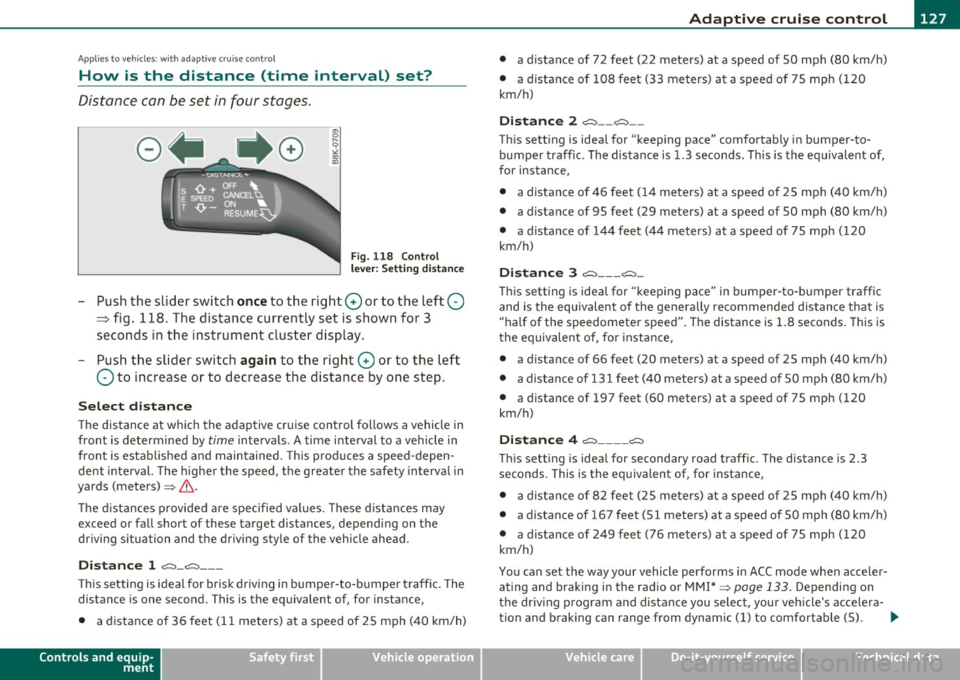
Fig . 118 Control
l ever : Sett ing distance
-Push the slider switch once to the right 0 or to the left Q
~ fig. 118. The distance currently set is shown for 3
seconds in the instrument cluster display.
- Push the slider switch again to the right 0 or to the left
Q to increase or to decrease the distance by one step.
Select distance
The distance at which the adaptive cru ise control follows a vehicle in
front is determined by
time intervals . A time interval to a vehicle in
front is estab lished and maintained. This produces a speed-depen
dent interval. The higher the speed, the greater the safety interval in
yards (meters) ~
&-
Th e distances provided are specified values. These distances may
exceed or fall short of these target distances, depending on the
driving situation and the driving style of the vehicle ahead.
Distance 1 ~-~ ---
Thi s sett ing is ideal for brisk driving i n bumper-to-bumper traffic. The
distance is one second. This is the equivalent of, for instance,
• a distance of 36 feet (11 meters) at a speed of 25 mph (40 km/h)
Controls and equip
ment Safety first
•
a distance of 72 feet (22 meters) at a speed of 50 mph (80 km/h)
• a dist ance of 108 feet (33 meters) at a speed of 75 mph (120
km/h)
Distance 2 ,;::::,-- ~--
This setting is ideal for "keeping pace" comfortably in bumper-to
bumper traffic. The distance is 1.3 seconds. This is the equ ivalent of,
for instance,
• a distance of 46 feet (14 meters) at a speed of 25 mph (40 km/h)
• a dista nce of 95 feet (29 meters) at a speed of 50 mph (80 km/h)
• a distance of 144 feet (44 meters) at a speed of 75 mph ( 120
km/h)
Distance 3 ~--- ~-
This setting is idea l for "keeping pace" in bumper-to-bumper traffic
and is the equivalent of the generally recommended distance that is
"half of the speedometer speed" . The distance is 1 .8 seconds. This is
th e equivalent of, fo r instance,
• a distance of 66 feet (20 meters) at a speed of 25 mph (40 km/h)
• a distance of 131 feet (40 meters) at a speed of 50 mph (80 km/h)
• a distance of 197 feet (60 meters) at a speed of 75 mph (120
km/h)
Distance 4 ~---- ~
This sett ing is ideal for secondary road traffic. The distance is 2.3
seconds. This is the equivalent of, for instance,
• a distance of 82 feet (25 meters) at a speed of 25 mph (40 km/h)
• a distance of 167 feet (51 meters) at a speed of 50 mph (80 km/h)
• a distance of 249 feet (76 meters) at a speed of 75 mph (120
km/h)
You can set the way your vehicle performs in ACC mode when acce ler
ating and braking in the radio or MM !* ~
page 133. Depending on
the driving program and distance you select , you r veh icle's accelera-
tion and braking can range from dynam ic (1) to comfortable (5) . _,.
Vehicle care Technical data
Page 149 of 362

_____________________________________________ _:_A..:. u =.= d:.:i...: d=.:.. r.:..:iv :..:e=-..: s:.: e=. l:.: e:.: c=. t:..__1!'11
Audi drive select
Driving settings
Applies to veh icles: with dr ive select
Introduction
Audi drive se lect provides the possib ility to experience different types
o f vehicle se ttings in one ve hicle. For ins tan ce, using the t hree
COMFORT, AUTO and DYNA MIC modes, the driver can switch from a
sporty to a com fortab le dr iv ing mode with the p ress of a bu tton .
Add itionally, in ve hicles with MMI*, the veh icle se tup for I NDI
VIDUAL * mo de can be c ustomized by you. This makes it poss ib le to
combi ne sett ings such as a sporty engi ne tuning w it h light st eering.
& WARNING
• Improper use of the Audi drive select can cause collisions,
other accidents and serious personal injury.
• Never drive at speeds that are too high for traffic , road and
weather conditions. •
Applies to vehicles: with drive select
Description
The ve hicle setup in eac h mode depends on the vehicle's features.
However, the engine and servo tron ic are always affe cted . The auto
matic transm issio n*, dy namic steering* and adapt ive dampers * are
also ad justab le.
Depe nd ing o n the mode, t he
engine and automatic transmission*
respond more quickly or in a more balanced manner to accelerator
ped al m oveme nts.
Controls and equip
ment Safety first
Th
e Servotronic (st ee ring s ervo assistance) ~ page 242 can a lso be
adapted to d riving situations.
Dynamic steering c hanges the s teer ing ra tio as a func tion of the
dr iv ing speed in order to optimize the driver's required steering
effor t. T his se ts the s teer ing to be less sensi tive at hig he r speeds in
orde r to provide greate r co ntro l over the ve hicle. At reduced speeds,
however, steering is more direct in o rder to keep the stee rin g effort
as min imal as possible whe n the dr ive r is maneuvering the vehicle. At
low and average speeds, dynam ic steer ing add it iona lly p rovides more
respo nsive steer ing pe rfo rmance. The dr iver can set the basic
steering ratio characteristics.
Th e
adaptive dampers use senso rs to recor d info rmat io n regar ding
steering movements, braking and acce lera tion operations by the
dr ive r, road sur face, driving speed, and lo ad . T his makes i t possib le to
adapt damp ing to the driving si tuat ion v irt ua lly in r eal t ime . Audi
dr ive select a lso makes it poss ible to satisfy the desire fo r sporty
s u spension (DY NAMIC) and comfortab le sus pension (COMFOR T)
without giving up balanced tun ing (A UTO) .
Th e follow ing ch art prov ides a n overv iew o f th e ch ara cterist ics o f
each driving mode.
Systems AUTO DYNAMIC
Engine/gearbox b ala nce d balan ced sp orty
Servotronic comfortable balanced sporty
Dynamic steering comfort- bal- spo rty/d irect
a b le/indire ct anc ed/ direct
Adaptive dampers comfortable balanced sporty
Th e Servotr onic sett in gs are ad juste d und er the
Dyn. steering menu
item. .,_
Vehicle care Technical data
Page 164 of 362
1111...._ __ P_a _ r_ k_ a_ s_ s_is _ t ____________________________________________________ _
• Never use warm or hot water to remove snow or ice from the
camera lens -danger of crack fo rmation on the lens!
• When cleaning the lens, never use products that are abrasive. •
App lies to veh icles : wi th par kin g syst em (re ar, wi th rea r vi ew cam era)
Switching on/off
The rear view camera switches on automatically together
with the acoustic park assist when you put the vehicle in
reverse.
Switching on
- Put the vehicle in reverse gear, the acoustic parking
system with rear view camera is activa ted automatically .
Activation of the acoustic parking system is confirmed by
a brief acknowledgement sound.
Switching off
-Drive faster than 6 mph (10 km/h), or
- take the vehicle out of reverse gear. The acoustic parking
system is immediately deactivated, and the rear view
camera picture is deact ivated automatically after a period
of about 15 seconds, or
- switch off the ignition.
T he delay in deactivating the camera provides an uninterrupted view
behind the vehicle espec ially when maneuver ing in tight parking
spaces and prevents the picture from tu rning off the every time you
shift out of reverse .
If the warning message appears in the display but not the rear view
came ra pict ure, read and confi rm the warning message . T he acoustic
distance s ignal is always active. If
you press a function button on the MMI control console, the rear
view came ra pictu re disappears. The rear view camera pict ure reap
pears the next time you park .
Further information on the warning message and the MMI control
conso le can be found in the MMI instruction booklet.
[I] Tips
• The rear view came ra pi cture is avai lable as soon as the MM I
Display or the MMI is switched on, or the start-up phase is completed.
• Keep the sensors in the rear bumper and the rear view came ra lens
clean and free of snow and ice, so that the parking system can work
properly . P lease follow the additional notes on~
page 165. •
Applies to veh icles: wit h park ing system (rear, wit h rear view camera )
Reverse Parking
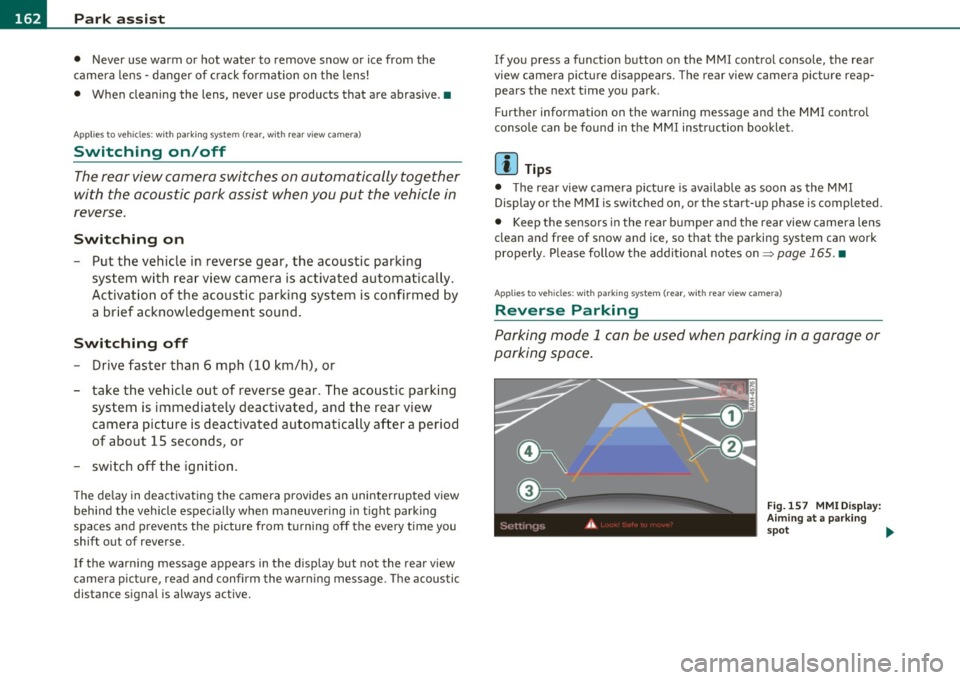
Parking mode l can be used when parking in a garage or
parking space .
Fig.157 M MI Disp lay :
Aimi ng a t a park ing
s p ot .,,,
Page 168 of 362

lffll.__ __ H_o_ m_ e_ L_ in_ k_® ____________________________________________________ _
Homelink®
Universal remote control
Applies to veh icles: w ith Hom elin k® un iversal re m ote contro l
General information
The Homelink ® feature can learn up to three radio
frequency codes for most current transmitters used for
operating garage doors, estate gates , home or outdoor
lighting systems, and other devices.
Yo u must fi rst p rogr am the Home link® tra nsmi tte r be fore you can
use the system=>
page 167, "Programming the Homelink ® trans
m itter".
In order to program the Homelink ® transm itter fo r devices utilizing
rolling code, a second person on a ladder who can sa fely reach t he
garage door opener motor is recommended. It is also necessary to
locate the "learn" button on yo ur garage door opener motor . Re fer to
t he oper ating ins truc tions fo r th e opene r, as the loca tion and color o f
this button may vary by manufacturer .
Yo u can still use the original remote control for the device at any
t ime .
& WARNING
• Never use the Homelink'"' transmitter with any garage door
opener that does have not the safety stop and rever se feature as
required by fed eral safety standards. This includes any garage
door opener model manufactured before April
l , 1982 .
• A garage door opener which cannot detect an object, signaling
the door to stop and reverse does not meet current federal safety
standards . Using a garage door opener without these features
increases risk of serious injury or death.
& WARNING (cont inu ed )
• For safety reasons never release the parking brake o r start the
engine while anyone i s standing in front of the vehicle .
• A ga rage door or an estate gate may sometimes be set in
motion when the Homelink ® remote control is being
programmed. If the device is repeatedly activated, this can over
s train motor and dam age its electri cal components · an over
heated motor is a fi re hazard!
• To avoid pos sible injurie s
or property damage , plea se always
make absolutely certain that no persons or objects are located in
the range of motion of any equipment being operated.
[ i ] Tips
• If you would like mo re inf orma tion o n Hom eli nk ®, whe re to
purchase the Homelink ® compat ible products, or would like to
purc hase the Homeli nk® Home Lighting Pac kage, p lease ca ll to ll
free : 1-800-355-3515 .
• F or Declaration of Compliance to United Sta tes FCC an d Indus try
Canada regulations=>
page 343. •