warning AUDI A5 COUPE 2018 Owners Manual
[x] Cancel search | Manufacturer: AUDI, Model Year: 2018, Model line: A5 COUPE, Model: AUDI A5 COUPE 2018Pages: 409, PDF Size: 67.63 MB
Page 136 of 409
Ass is tance sy stems
detected and classified as crit ical. The d isp lay in
the mirror turns on, but is dim .
The display remains dim in the info rmation stage
so that yo ur view toward the front is not distur
bed .
Warning stage
I f the d isp lay in a mirror blinks br ight ly when you
ac tivate a turn sig nal, side assist is
warning you
about de tected ve hicles tha t it has classified as
cr itical. If this happens, check traffic by g lanc ing
in the exterior mirrors and over your shoulder
¢ .&. in General information on page 135 .
Applies to: vehicles with active lane assist: the
d isp lay in the mirror can also blink if you have not
activated a turn signal: if you are approaching a
detected lane marker line and it appears you will
be leaving the lane, side ass ist will warn you
about detected vehicles that it has classified as
cr itical.
(D Tips
You can ad just the brightness on of the dis
play on the rearview
mirror¢ page 135.
General information
Applies to: vehicles with Audi side assist
®
@
©
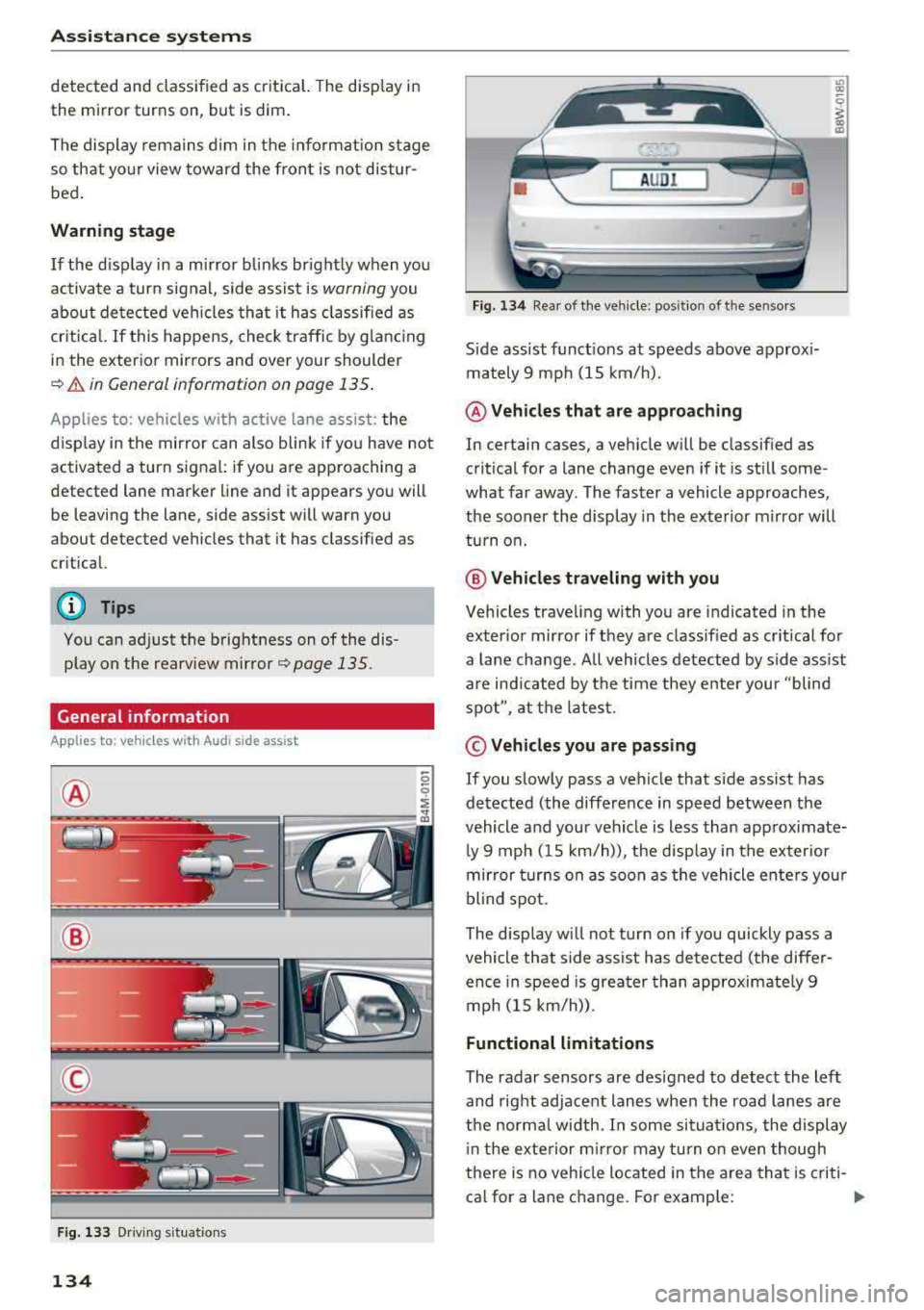
F ig . 133 Driving s itua tio ns
134
AUD I
F ig. 13 4 Rear of the ve hicle : posit ion of t he se nsors
Side assist funct ions at speeds above approx i
mately 9 mph (15 km/h) .
@ Vehicles that are approaching
"' 00
I m
In certain cases, a veh icle w ill be classified as
critical for a lane change even if it is st ill some
what far away. The faster a vehicle approaches,
the sooner the display in the ex terior m irror will
turn o n.
@ Vehicles traveling with you
Vehicles traveling with you are indicated in the
exter ior mir ror if they are class ified as cr it ical for
a la ne change . All vehicles detected by side ass ist
a re indicated by the time they enter your "blind
spot", at the latest.
© Vehicles you are p assing
If you slowly pass a vehicle that side assist has detected (the differe nce in speed between the
vehicle and your vehicle is less than approximate
ly 9 mph ( 15 km/h)), the disp lay in the exter ior
mir ror turns on as soon as the vehicle ente rs you r
blind spot.
The display wi ll not turn on if you quickly pass a
vehicle that side ass ist has detected (the differ
ence in speed is grea ter than approximate ly 9
mph (15 km/h)) .
Functional limitations
The radar sensors are des igned to detect the left
and right adjacent lanes whe n the road lanes are
the norma l width. I n some situa tions, the display
i n the exte rior m irror may turn o n even though
there is no vehicle located in the area tha t is criti
ca l for a lane c hange. For example:
Page 137 of 409
<( a, .... N ,....
N .... 0 \0
3 a,
-If the lanes are narrow or if your are driving on
the edge of your lane. If this is the case , the
system may have detected a veh icle in another
lane that is
not adjacent to your current lane.
-If you are driving through a curve . Side assist
may react to a vehicle that is in the same lane
or one lane over from the adjacent lane.
-If side assist reacts to other objects (such as
roadside structures like guard rails).
-In poor weather conditions . The side assist
functions are limited.
Do not cover the radar
sensors ¢ fig. 134 with
stickers, deposits, bicycle whee ls or other ob
jects, because this wi ll impa ir the function. Do
not use side assist when towing a trailer. For in
formation on cleaning, see
¢page 362 .
A WARNING
-Always pay attention to traffic and to the
area around your vehicle. Side assist cannot replace a dr iver's attention. The dr iver alone
is a lways responsib le for lane changes and
similar d riving maneuvers.
-In some situat ions, the system may not
function or its funct ion may be limited. For
example:
-If vehicles are approach ing or being left
behind very quickly. The display may not
turn on in t ime.
-In poor weather conditions such as heavy
rain, snow or heavy mist.
-On very wide lanes, in tight curves, or if
there is a rise in the road surface. Vehicles
in the adjacent lane may not be detected
because they are outs ide of the sensor
range.
(D Note
The sensors can be displaced by impacts or damage to the bumper, wheel housing and
underbody. Th is can impa ir the system . Have
an authorized Audi dealer or authorized Audi
Serv ice Facility check their function.
-If the window glass in the driver's door or
front passenger 's doo r has been t inted, the
-
A ss ista nce sys te m s
display in the exterior mirror may be incor
rect.
-For an exp lanat ion on con formity w ith the
FCC regulat ions in the United States and the
Industry Canada regulations, see
¢ page 392.
Switching on/off
Applies to : vehicles wit h Aud i s ide ass ist
The system con be switched on/off in the Info
tainment system .
If the system is activated , the disp lays in the ex
terior mirrors will turn on briefly when the igni
tion is switched on .
.,. Select in the Infotainment system: I MENU! but
ton
> V ehicle > left control b utton > D riv er as
s istance
> Audi side a ssist. Off switches the
system off.
(D Tips
When yo u switch side assist on or off, the ex it
warning system activates or deactivates
¢ page 136 .
Setting the display brightness
Applies to : vehicles wit h Aud i s ide ass ist
The display brightness con be adjusted in the In
fotainment system.
.,. Sele ct in the Infotainment system: I MENU ! but
t on
> Veh icle > left control b utton > D riv er as
s istance
> Audi side a ssist.
The disp lay brightness adjusts automatically to
the brightness o f the surroundings, bo th in the
information and in the warning stage . In very
dark or very bright surround ings, the automatic
adjustment will set the display to the minim um
or max imum level. In such cases, you may notice
no change when adjusting the br ightness, or the
change may only be noticeable once the sur
roundings cha nge .
Adjust the br ightness to a leve l where the display
in the information stage will not disrupt your
view ahead . If you change the brightness, the d is-
play in the exterior mirror will br iefly show the
.,..
135
Page 138 of 409
Ass is tance sy stems
b rightness level in the information stage . The
brightness of the warning stage is linked to the
brightness in the information stage and is ad just
ed along with the information stage.
(D Tips
- Side assist is not active whi le you are mak
i ng the adjustment.
- Your settings are automatically stored and
ass igned to the remote co ntrol key being
used.
Exit warning
Applies to: vehicles with exit warning system
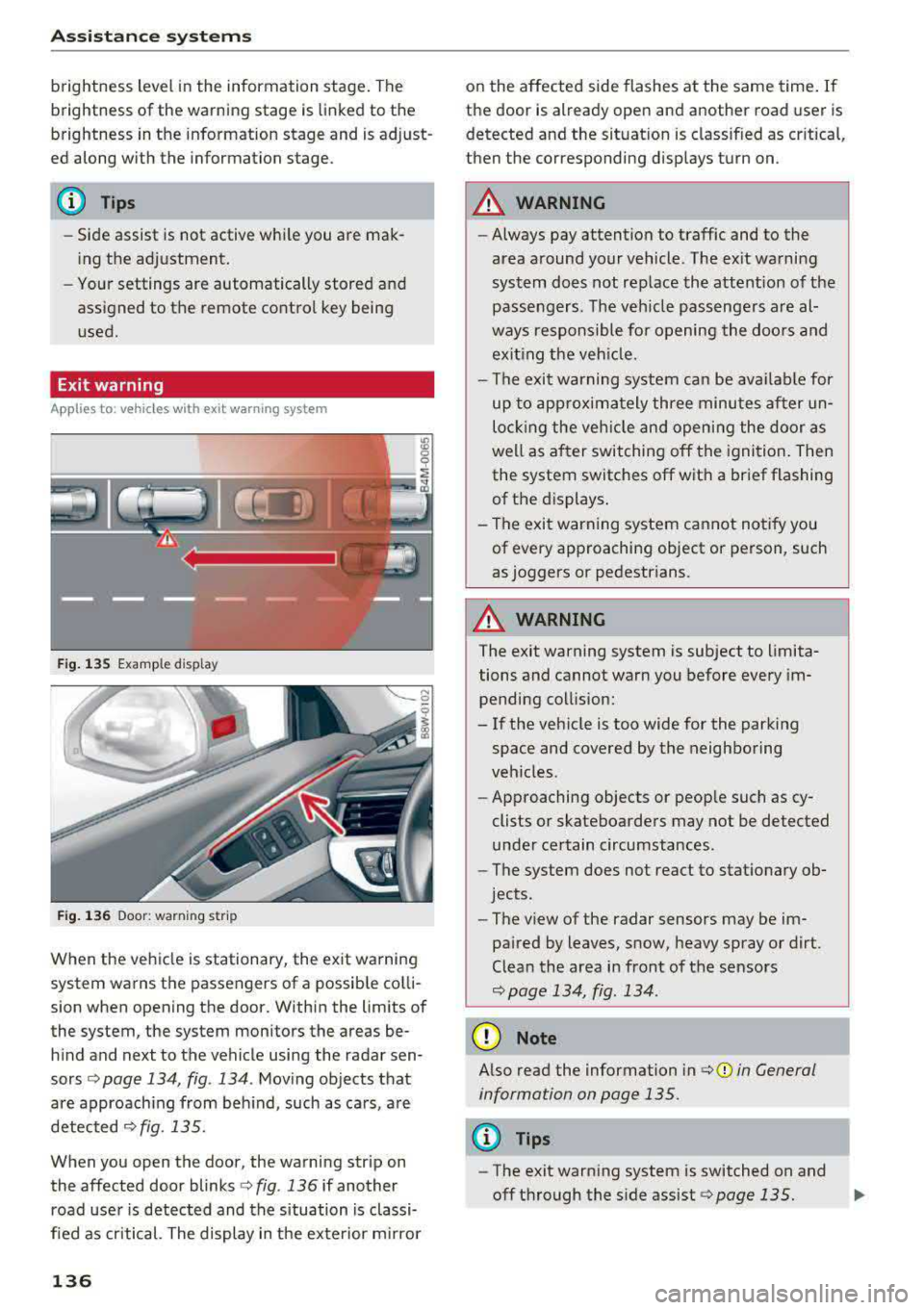
Fig . 13 5 Example d isplay
F ig. 136 Door : warn ing str ip
When the veh icle is stationary, the exit warning
system wa rns the passengers of a possible co lli
sion when opening the door. Within the limits of
the system, the system monitors the areas be h ind and next to the vehicle using the radar sen
sors ¢ page 134, fig. 134 . Moving objects that
are approach ing from beh ind, such as cars, a re
detected
c>fig. 135.
When you open the door, the warning strip on
the affected door
blinks ¢ fig. 136 if another
road user is detected and the situation is classi
fied as critical. The display in the exterior m irro r
136
on the affected side flashes at the same time . If
the door is already open and another road user is
detected and the sit uat ion is classif ied as cr itica l,
then the corresponding disp lays turn on.
A WARNING
- Always pay attention to traffic and to the
area around your vehicle . The e xit wa rni ng
system does not replace the attention of the
passengers. The veh icle passengers a re al
ways responsible fo r opening the doo rs and
exiting the veh icle.
- The exit warn ing system ca n be ava ilab le for
up to app rox ima tely three minutes after un
lo cki ng the veh icle and openi ng the door as
we ll as a fter switching off the igni tion. Then
the system switches off wit h a brief flashing
of the displays .
- The exit warning system ca nnot notify you
of every approaching object or person, such
as joggers or pedestrians.
A WARNING
The exit warning system is subject to limita
tions and cannot warn you before every im
pending collis ion:
- If the veh icle is too wide for the parking
space and covered by the neighboring
veh icles.
- App roaching objects or peop le such as cy
clists or skateboarders may not be detected
under certain circumstances.
- The system does not react to stat io nary ob
jects.
- The v iew of the radar sensors may be im
pa ired by leaves, snow, heavy spray or dirt.
Clean the area in front of the sensors
¢ page 134, fig. 134 .
(D Note
Also read the information in ¢ (Din General
information on page 135.
(D Tips
- The exit warn ing system is switched on and
off through the s ide
assist <=> page 135.
-
Page 139 of 409
-The display brightness for the exit warning
system cannot be adjusted.
-The system is not available when towing a
trailer.
Rear cross-traffic assist
A ppl ies to: ve hicles with rear c ross-tra ffic ass ist
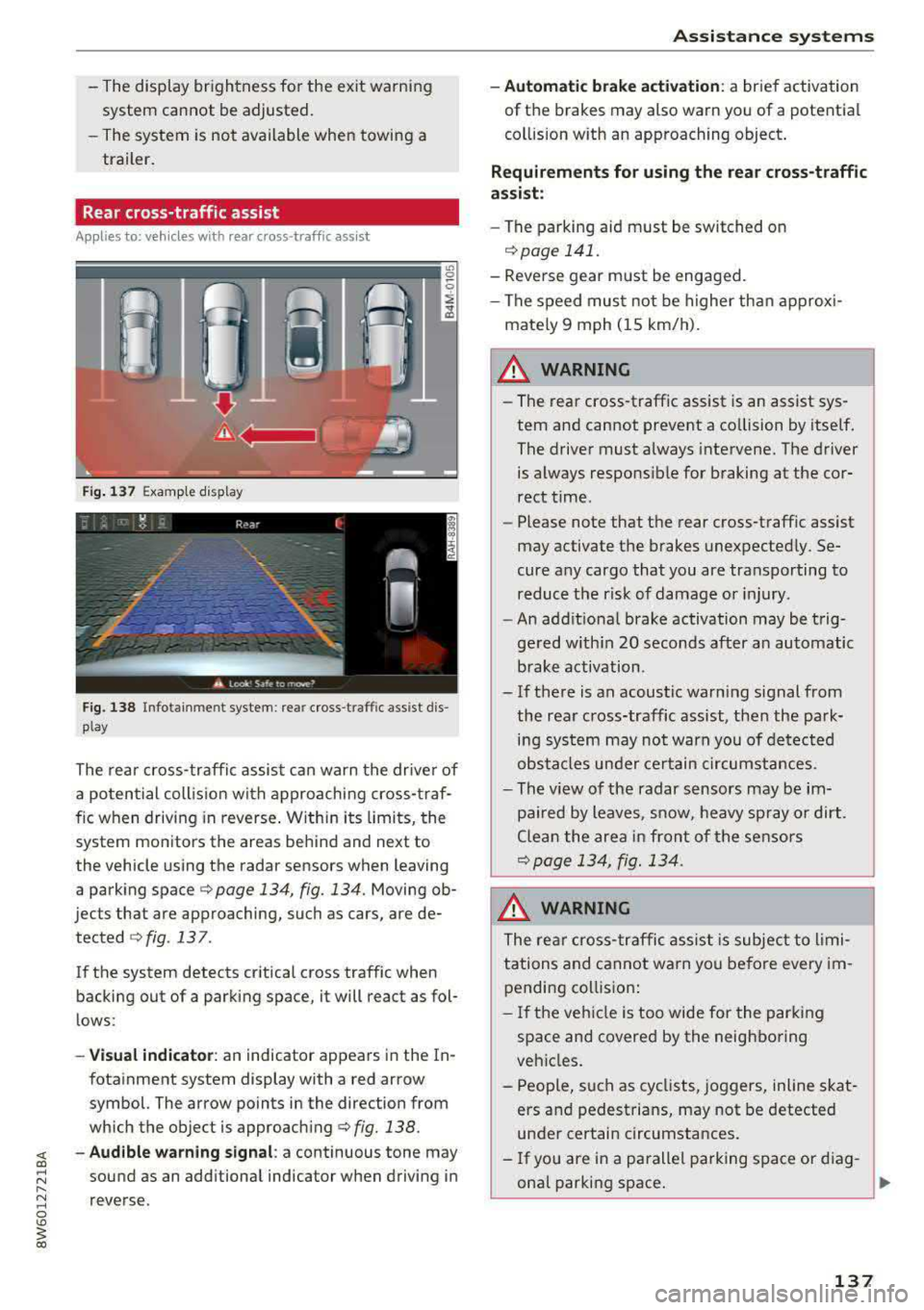
F ig. 137 Example display
Fig. 138 Infotai nme nt system : rea r cross-t raffic ass ist dis
p lay
The rear cross-traffic assist can warn the driver of
a po tential collis ion with approaching cross-traf
fic when driving in reverse . Within its limits, the
system monitors the areas behind and next to
the vehicle using the radar sensors when leaving
a parking space
c:;, page 134, fig. 134. Moving ob
jects that are approaching, such as cars, are de· tected
c:;, fig . 137 .
If the system detects critical cross traffic when
backing out of a parking space, it will react as fol
l ows:
-Vi su al indicator : an indicator appears in the In·
fotainment system display with a red arrow
symbol. The arrow points in the direction from
which the object is approach ing
c:;, fig. 138.
~ - Aud ibl e w arning signal : a continuous tone may
sound as an add itional indicator when driving in
reverse.
A ss is ta nce syst ems
-Automat ic brak e acti vation : a brief activation
of the brakes may also warn you of a potential
col lision with an approaching object .
Requirements for using the rear cross -traffic
a ssi st :
-The parking aid m ust be switched on
r=;, page 141.
-Reve rse gear must be engaged.
-The speed must not be h igher than approx i-
mately 9 mph (15 km/h).
_& WARNING
-The rear cross -traffic assist is an assist sys
tem and cannot prevent a co llision by itself .
The driver must always intervene. The driver is always respons ible for braking at the cor·
rect time.
-Please note that the rear cross-traff ic assist
may activate the brakes unexpected ly. Se
cure any cargo that you are transporting to reduce the risk of damage or injury .
-An addit iona l brake activation may be trig
gered w ith in 20 seconds after an automatic
brake activation .
-If there is an acoustic warn ing signal from
the rear c ross-traffic assist, then the park
ing system may not warn you of detected
obstacles under certain circumstances.
-The v iew of the radar sensors may be im
pa ired by leaves, snow, heavy sp ray o r dirt .
Clea n the area i n front of the sensors
¢page 134, fig. 134.
.8_ WARNING
The rear cross -traffi c assist is subjec t to limi
tations and cannot warn yo u before every im
pending coll ision:
-If the ve hicle is too wide for the par king
space and covered by the neighboring
vehicles.
-P eop le, such as cycl ists, joggers, inline skat
ers and pedestrians, may not be detected
under certain circumstances.
-I f you are in a parallel parking space or d iag
onal parking space .
137
Page 140 of 409
Assistance systems
CJ) Note
Also read the informat ion in c:> (D in General
information on page 135 .
@ Tips
-You can can cel the automa tic brake activa
tion w ith increasing braking fo rce if you ap
pl y the bra kes yourself or accelerate cons id
e rab ly.
-In some s ituations, rea r cross -traffic assist
may warn you even if there is no cross t raffic
i n a critical a rea, for example w hen back ing
in to a parking space or ma neuver ing.
-The rea r cross-traffic assist also switches off
whe n yo u switc h off the ESC.
-The rea r cross traffic assist switches on and
off thro ugh the pa rking aid
<=:>page 141.
-T he system is not available whe n towin g a
trailer.
Messages
A ppl ies to : ve hicles w ith Audi side assis t
A message appears in the inst rument cl uster dis
p lay if the s ide assist swi tches off automatically .
iii Audi side assist: malfunction! Please contact
Service
@i Audi side assist and exit warning: malfunc
tion! Please contact Service
T he sys tem c an not guar antee th at it w ill detec t
ve hicl es co rrectly and it h as swit ched off. The
sensors h ave bee n moved o r are faul ty . H ave t he
system checked by an a uthorized Audi dea ler or
author ized Audi Se rvice Facility soon.
@i Audi side assist: currently unavailable. Sen
sor vision restricted due to surroundings. See
owner 's manual
@i Audi side a ssist and exit warning : currently
unavailable. Sensor vision restricted due to sur roundings
T he radar senso r vis io n is i mp air ed . Th e ar ea in
fr on t of t he senso rs m ust n ot be covered by bik e
ra ck s, st ickers, leaves, snow or any othe r o bj ects.
Clea n the area in front of the sensors, if necessa
ry
c:> page 134, fig . 134 .
138
@i Audi side assist: currently unavailable. See
owne r's manual
@i Audi side assist and exit warning: currently
unavailable . See owner's manual
S ide assis t ca nnot be switched on at this ti me be
ca use there is a ma lfu nction (fo r exa mple, the
b att ery ch arge level m ay be to o l ow).
@i Audi side assist: unavailable in tow ing mode
iii Audi side assist and exit warning: currently
unavailable. Towing mode
Si de assist switches off automatically when the
e lectrica l connecto r in the factory-installed trail
er hitch is connected. There is no guarantee the
system will sw itch off when using a retrofitted
trailer hitch . Do not use side assist and the ex it
warning w hen tow ing a tra ile r.
Iii Rear parking aid : obstacle detection restrict
ed
The rear c ross-traffic ass ist is not available . E i
ther t he ESC is sw itche d off, or the rada r senso rs
may be cove red by a bike rack, stic ke rs, leaves,
snow or other objects. Switch the ESC on, or clean the area in fron t of the se nso rs if necessa ry
c:> page 134, fig . 134 . If th is message con tinues
to be displayed, dr ive immedia tely to a n author
iz ed Audi dealer or author ized A udi Se rvi ce Facili
ty to h ave the m alfunc tion re paire d.
Audi drive select
Introduction
App lies to : vehicles wi th Audi drive se lect
D rive select makes it possib le to exper ience dif
ferent types of veh icle sett ings in one veh icle.
The dr iver can select
Comfort , Auto and Dynamic
modes in t he In fo tainment system to sw itch b e
t ween, for exa mple , a s porty an d a comfor table
d riv ing mode . In the
Individual mode, t he set
ti ngs c an be adjus ted to yo ur persona l prefe ren
ces . Thi s makes it possib le to comb ine settings
s uc h as a sporty e ngine setting wit h lig ht steer
i ng .
Page 142 of 409
Assistance systems
Auto -provides an overall comfortable yet dy
namic drivi ng feel and is suited fo r every day use .
Dynami c -gives the d river a sporty d riving feel
a nd i s s uited to a spor ty d riving sty le.
Individual -~ page 140 .
Adjusting the Individual mode
Applies to: veh icles w ith Audi drive select
A WARNING
-
Pay attention to traffic when ope rating the
d rive select to reduce the r is k of an accident .
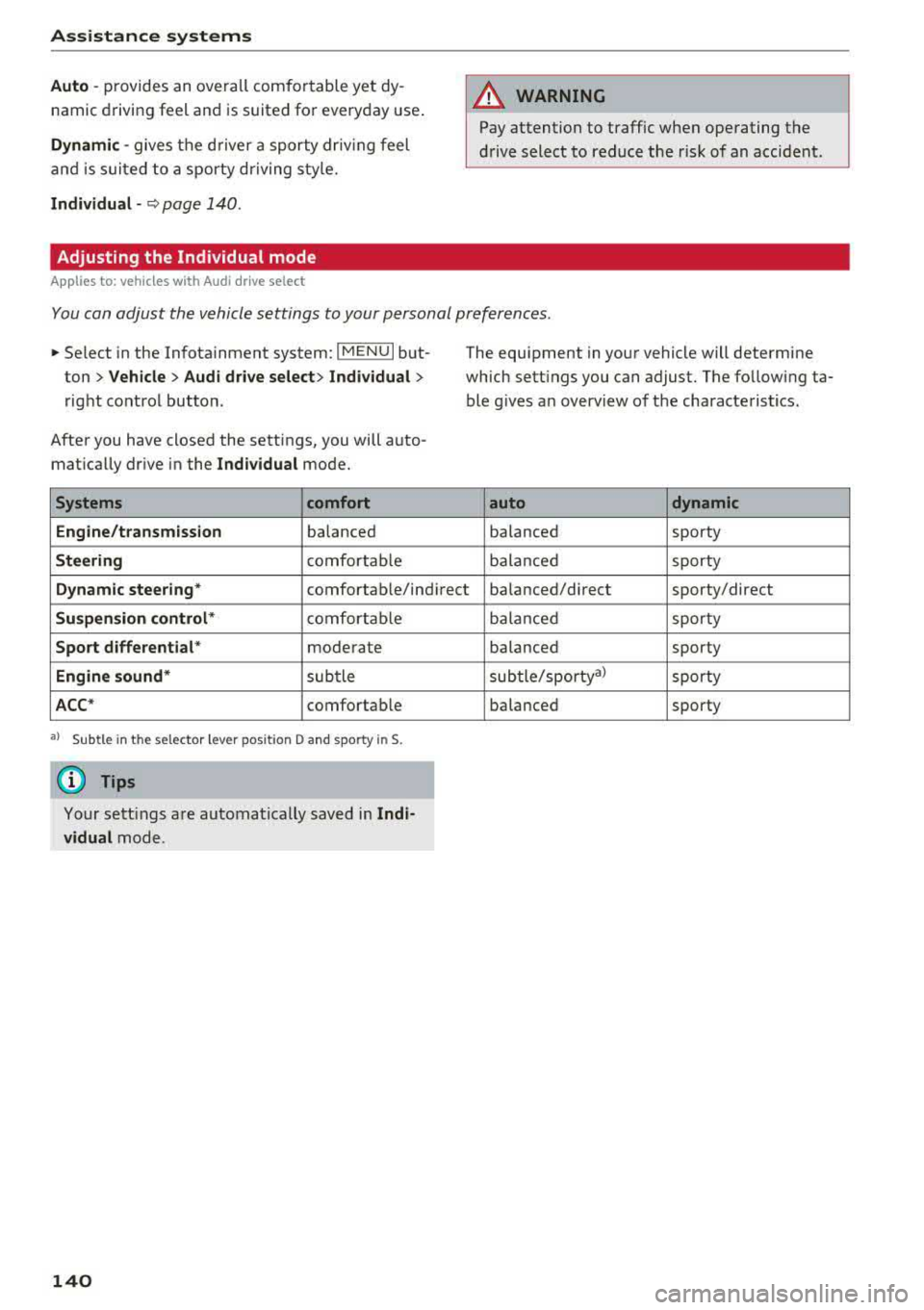
You can adjust the vehicle settings to your personal preferences .
.. Select in the Infotainment system: IMEN UI but
ton >
Vehicle > Aud i drive select > Individual >
right cont ro l button.
Afte r you have closed the settings, you will a uto
mat ically dr ive in the
Individual mode.
Systems comfort
Engine/t ransmission
ba lanced
Steering c o m for ta bl e The equipment in your vehicle will determine
which sett ings you can adjust. The fo llowing ta
ble g ives a n overview of t he characte ristics.
auto dynamic
balanced sporty
ba la nced sporty
Dynamic steering* comfortable/ind i recil: ba lanced/d irect sporty/direct
Suspen sion control * co m fort able
Sport differential * moder ate
Engine sound* sub tle
ACC * comfortab le
• > Sub tle in the se lecto r lever pos it ion D and spo rty in S.
(D Tips
Your sett ings a re automatically saved in Indi
vidual
mode .
140
balanc ed sporty
ba lance d sporty
sub tle/sportya)
sporty
ba lanced sporty
Page 143 of 409
<( a, ..... N ,....
N ..... 0 \0
3 a,
Parking systems
General information
Applies to: ve hicles with a rea r parking sys te m /pa rking sys
tem plus/rearv iew camera/peripheral cameras
Depending on your vehicle's equipment, various
parking aids will help you when parking and ma
neuvering.
The
rear parking system is an audible parking aid
that warns you of obstacles
behind the vehicle
¢page 142.
T he
parking system plus assists you when park
ing by audibly and visually indicating objects de
tected
in front of and behind the vehicle
¢ page 142.
T he
rearview camera shows the area behind the
vehicle in the Infotainment system display . The
lines in the rearview camera image help you to
park or maneuver ¢
page 143. The parking sys
tem plus functions are also available
¢ page 142.
The
peripheral cameras give various views to
help you when parking or maneuvering
¢
page 145 . The parking system plus functions
are also available
¢ page 142.
A WARNING
-Always look for traffic and check the area
around your vehicle by looking at it directly
as well. The parking system cannot replace
the driver's attention. The driver is always
responsible when entering or leaving a park
ing space and during similar maneuvers .
-
-Please note that some surfaces, such as
clothing, are not detected by the system .
-Sensors and cameras have blind spots in
which people and objects cannot be detect
ed . Be especially cautious of small children
and animals.
-Always keep your eyes on the vehicle's sur
roundings, using the rearview mirror as
well.
-The sensors can be displaced by impacts or
damage to the radiator grille, bumper,
wheel housing and the underbody . The park
ing system may be impaired as a result.
Parking systems
Have an authorized Audi dealer or author
ized Audi Service Facility check their func
tion.
(D Note
-Some objects are not detected or displayed
by the system under certain circumstances:
-objects such as barrier chains, trailer draw bars, vertical poles or fences
-objects above the sensors such as wall ex
tensions
-objects with certain surfaces or structures
such as chain link fences or powder snow
-If you continue driving closer to a low ob
ject, it may disappear from the sensor
range . Note that you will no longer be
warned about this obstacle.
-Keep enough distance from the curb to re
duce the risk of damage to the rims.
(!) Tips
-The system may provide a warning even
though there are no obstacles in the cover
age area in some situations, such as:
-certain road surfaces or when there is tall
grass
-external ultrasonic sources such as from
cleaning vehicles
-in heavy rain, snow, or thick vehicle ex
haust
-We recommend that you practice parking in
a traffic-free location or parking lot to be
come familiar with the system. When doing
this, there should be good light and weath
er conditions .
-You can change the volume of the signals
and the display ¢
page 148.
-Please refer to the instructions for towing a
trailer located in
¢page 149.
-What appears in the infotainment display is
somewhat time-delayed.
-The sensors must be kept clean and free of
snow and ice for the parking aid to operate.
141
Page 144 of 409
Parking system s
Rear parking system
Description
Applies to: ve hicles w ith rear park ing aid
The rear parking system is an audible parking
aid.
Descri ption
There is a sensor in the rear bumper cover . If
these detect an obstacle, audible signals warn
you .
Make sure the sensors are not covered by stick
ers, deposits or any other obstructions as it may
impair the function of the system . For informa
tion on cleaning, see
r=.> page 362 .
The range at which the sensors begin to measure
is approximately:
side 3 ft (0 .90 m)
rear
center 5.2
ft (1.60 m)
The closer you get to the obstacle, the shorter
the interval between the audible signals . A con
tinuous tone sounds when the obstacle is less
than approximately 1 foot (0.30 meters) away.
Do not continue backing up
r=.> .&. in General infor
mation on page 141,
r=.> 0 in General information
on page
141!
If the distance to an obstacle remains constant,
the volume of the distance warning gradually lowers after a few seconds until it is muted (this
is not apply in the continuous tone range). If the
obstacle becomes closer than it was before the
sound was muted, the tone will sound again. If
the obstacle is father away than it was before the
sound was muted, no tone wil l sound . Pay atten
tion to the vehicle's surroundings when you start
to drive.
Acti vating
The rear parking assist activates automat ically
when the reverse gear is engaged. A brief confir
mat ion tone will sound.
142
Parking aid plus
Description
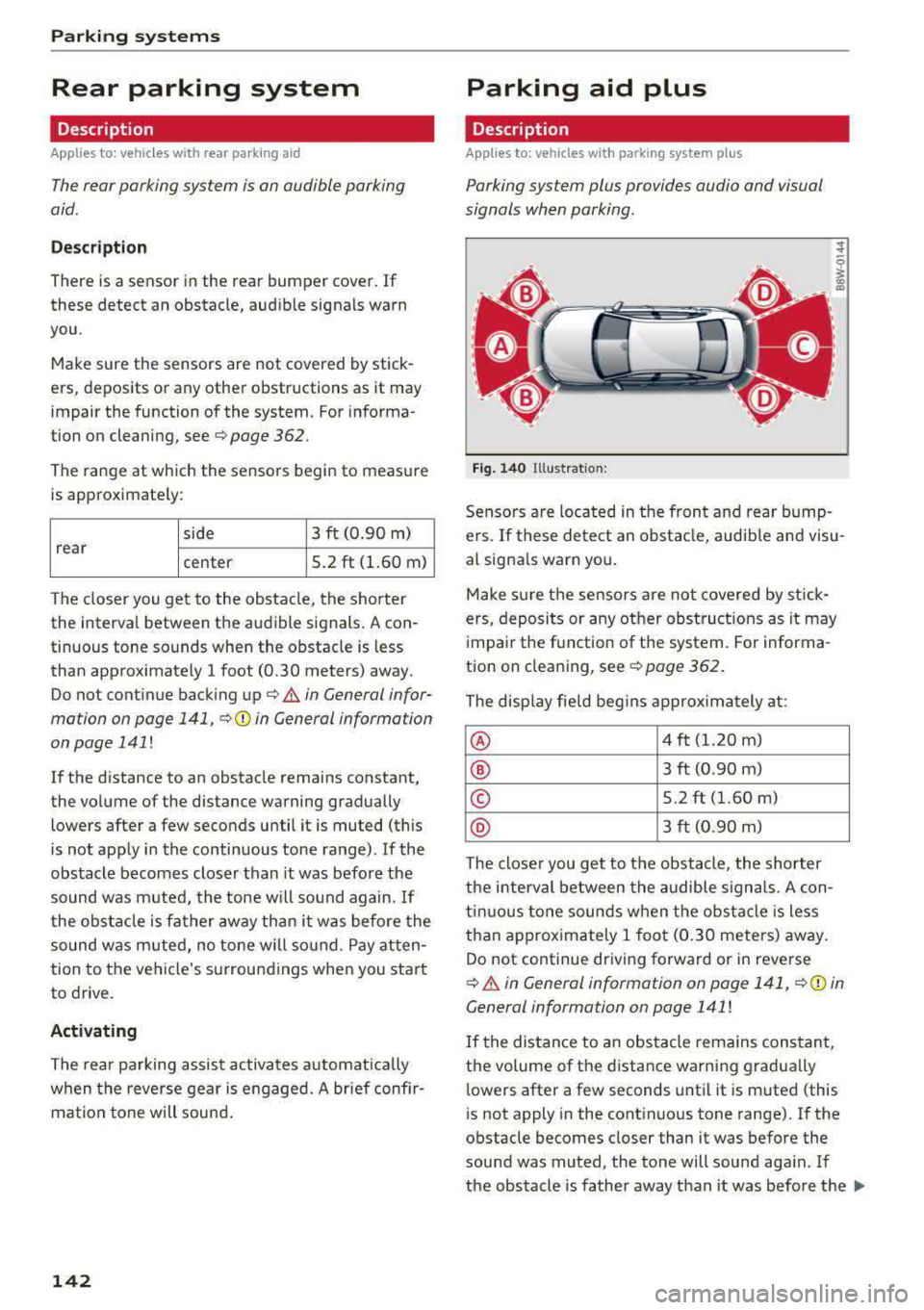
App lies to: vehicles with parking system plus
Parking system plus provides audio and visual
signals when parking .
Fig. 140 Illus trat io n:
Sensors are located in the front and rear bump
ers. If these detect an obstacle, audib le and visu
al signa ls warn you .
Make sure the sensors are not covered by stick
ers, deposits or any other obstruct ions as it may
impair the function of the system. For informa
tion on cleaning, see
r:::>page 362.
The display field begins approximately at:
® 4 ft (1.20 m)
® 3 ft (0 .90 m)
© 5.2 ft (1.60 m)
® 3 ft (0.90 m)
The closer you get to the obstacle , the shorter
the interval between the audible signals. A con
tinuous tone sounds when the obstacle is less
than approximately 1 foot (0.30 meters) away.
Do not continue driving forward or in reverse
r:::> .&. in General information on page 141, ¢@) in
General information on page 141
!
If the distance to an obstacle remains constant,
the volume of the distance warning gradually
lowers after a few seconds until it is muted (this
is not apply in the continuous tone range). If the
obstacle becomes closer than it was before the
sound was muted, the tone will sound aga in. If
the obstacle is father away than it was before the
..,.
Page 146 of 409
Parking system s
General information
Applies to: ve hicles w ith rearview camera
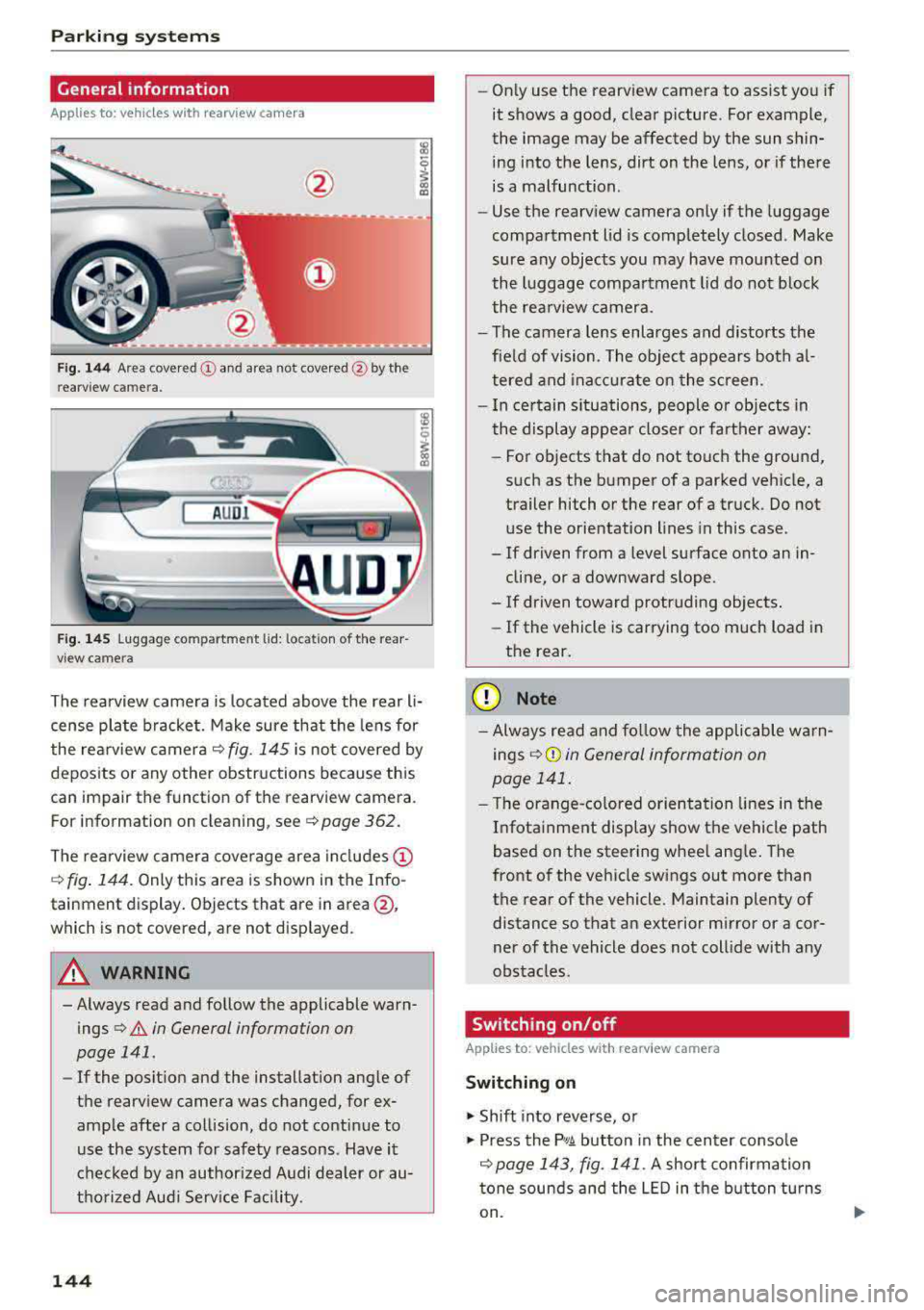
Fig. 144 Area cove red © and area not cove red @ by the
r earv iew c amera.
Fig . 145 Luggage co mpartment lid : loca tion of the rear
v iew came ra
l8
i
The rearview camera is located above the rear li
cense plate bracket. Make sure that the lens for
the rea rview camera
c:::> fig. 145 is no t covered by
deposits or any other obstructions because this
can impair the function of the rearview camera .
F or information on clean ing , se e
c:::> page 362.
The rea rview camera coverage area in cl udes @
c:::> fig. 144 . Only this area is shown in the Info
tainment display . Objects that are in
area @,
which is not cover ed , are not disp layed.
A WARNING
-Always read and follow the applicable warn
ings
c:::> .&. in General information on
page 141 .
-If the posit ion and the installation angle of
the rearv iew camera was changed, for e x
amp le after a collision, do not continue to
use the system for safety reasons . Have it
checked by an author ized Audi dealer or au
thorized Aud i Serv ice Facility .
144
-On ly use the rearview camera to assist you if
it shows a good, clear picture . Fo r example,
the image may be affected by the sun shin
ing into the lens, dirt on the lens, or if there
is a malfunction .
- Use the rearv iew camera only if the luggage
compartment lid is completely closed . Make
sure any objects you may have mounted on
the luggage compa rtment lid do not b lock
the rea rview camera.
- The camera lens enlarges and distorts the
fie ld of vision . The object appears both a l
tered and inac cu ra te on the s creen.
- I n ce rtain s ituations, people or objects in
the display appea r closer or farther away:
- For objects that do not touch the ground,
s uch as the bumper of a parked vehicle, a
trailer hitch or the rear of a truck. Do not use the orientation lines in this case .
- If driven from a level surface onto an in cline, or a downward slope .
- If driven toward protruding objects.
- If the vehicle is carrying too much load in
the rear.
(D Note
- Always read and fo llow the applicable wa rn
ings
c:::> (!j) in General information on
page 141 .
- The orange-co lored orientation lines in the
I n fotainment display show the vehicle path
based on the steering whee l ang le . The
front of the vehicle swings out more than
the rear of the vehicle. Maintain plenty of distance so that an exterior m irror or a cor
ner of the vehicle does not coll ide with any
obstacles.
Switching on/off
Applies to: vehicles wit h rearv iew camera
Switching on
.,. Shift into reverse, o r
.,. Press the p,qA button in the center console
c:::> page 143, fig. 141 . A short confirmation
tone sounds and the
LE D in the b utton turns
on .
Page 148 of 409
Parking systems
General information
Applies to: ve hicles w ith per ip heral cameras
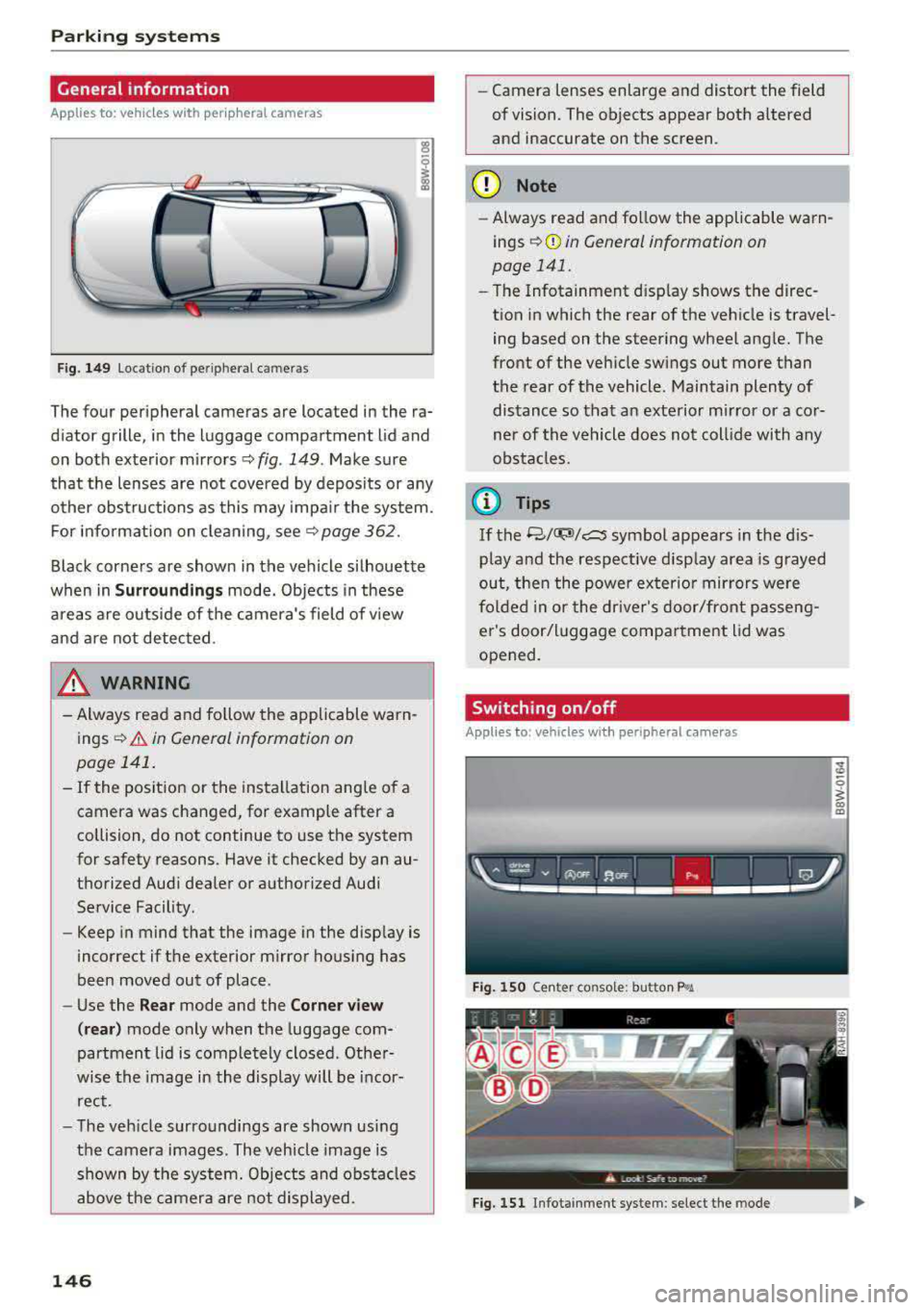
Fig . 149 Location of peripheral cam eras
The four periphe ral cameras are located in the ra
diator grille , in the luggage compartment lid and
on both exterior mirrors
Q fig . 149 . Make sure
that the lenses are not covered by deposits or any
other obstructions as this may impair the system.
For information on cleaning, see
Q page 362.
Black corners are shown in the vehicle silhouette
when in
Surroundings mode. Objects in these
areas are outside of the camera's field of view
and are not detected.
& WARNING
- Always read and follow the applicable warn
ings
Q .&. in General information on
page 141.
- If the position or the installation angle of a camera was changed, for example after a
collision, do not continue to use the system
for safety reasons. Have it checked by an au
thorized Audi dealer or authorized Audi
Service Facility.
- Keep in mind that the image in the display is
incorrect if the exterior mirror housing has
been moved out of place .
- Use the
Rear mode and the Corner view
(rear)
mode only when the luggage com
partment lid is completely closed . Other
wise the image in the display will be incor
rect.
- The vehicle surroundings are shown using
the camera images . The vehicle image is
shown by the system. Objects and obstacles above the camera are not displayed.
146
- Camera lenses enlarge and distort the field
of vision. The objects appear both altered
and inaccurate on the screen.
(D Note
-Always read and follow the applicable warn
ings
Q (i) in General information on
page 141.
- The Infotainment disp lay shows the direc
tion in which the rear of the vehicle is travel ing based on the steering wheel angle. The
front of the vehicle swings out more than
the rear of the vehicle. Maintain plenty of
distance so that an exterior mirror or a cor
ner of the vehicle does not collide with any
obstacles.
@ Tips
If the 8/~/c:s symbol appears in the dis
play and the respective display area is grayed
out, then the power exterior mirrors
were
folded in or the driver's door/front passeng
er's door/luggage compartment lid was
opened.
Switching on/off
Applies to: vehicles wit h peripheral ca meras
Fig. 150 Ce nte r console: butto n ~i
Fig. 151 Infot ainment system : select the mode