warning AUDI A5 COUPE 2018 Owners Manual
[x] Cancel search | Manufacturer: AUDI, Model Year: 2018, Model line: A5 COUPE, Model: AUDI A5 COUPE 2018Pages: 409, PDF Size: 67.63 MB
Page 151 of 409
<( a, .... N ,....
N .... 0 \0
3 a,
Entertainment fader -the volume of the audio/
video source is lowered when the parking system
is turned on
The newly selected leve l is demonstrated briefly
by the sound generator.
View* -switch between a n optical display
(Graphic ) and camera image (Camera) in the
right section of the display.
Trailer view* -show trailer view
*Auto. front/rear camera change * -the view be
h in d the veh icle
( Rear mode) is displayed auto
mat ically when you shift into reverse gear . The
view in front of the vehicle
(Front mode) is dis
p layed automatically when you shif t into the fo r
ward gea rs. When first a ctivating in a forward
gear with the
P,,1~ button, the front side view is
displayed
( Corner view (front) mode).
If you do not set the../, the view behind the vehi
cle
( Rear mode) is always displayed and it does
not switch to the
Front mode when a forward
gear is selec ted.
(D Tips
- Several menus can be accessed w ith the
right control button only when the parking
aid is active.
- The settings for volume and automatic acti
vat ion* are automatically stored and as
s ig ned to the remote control key being
used.
Error messages
Applies to: veh icles with a rea r parking system/parking sys
tem plus/ rearv iew camera/peripheral cameras
[II Rear park assist: malfunction! Obstacles
cannot be detected
[II Front park assist: malfunction! Obstacles
cannot be detected
Ill Park assist: malfunction! Obstacles cannot
be detected
When one of these messages appears, there is a
system ma lfunction. The LED in the
p,qA button al
so blinks when switching it on. The relevant mes-
Parking systems
sage on ly appears again when you manually acti
vate the parking aid with the button.
Ill Rear parking aid: obstacle detection restrict
ed
T he rear cross-traffic assist* ¢ page 137, Rear
cross -traffic assist
is not available. Either the ESC
is switched off, or the radar sensors may be cov
ered by a bike rack, stickers, leaves, snow or o th
er objects. Switch the ESC on, or clean the area in
front of the sensors if necessary
¢ page 134,
fig . 134.
If this message cont inues to be dis
played, drive immed iately to an author iz ed Audi
dealer or authorized Audi Service Fac ility to have
the malfunction repaired.
Parking system plus*
If a sensor or speaker is faulty, the 94 symbo l
will appear in front of/behind the vehicle in the
Infotainment system d isplay. If a rear sensor is
faulty, only obstacles that are in areas @and @
are shown
¢ page 142, fig. 140 . If a front sensor
i s fa ulty, only obstacles that are in areas© and
@ are shown.
Peripheral cameras*
There is a system malfunction if the% symbol
appears and the corresponding area of the dis
play is shown in black . The camera is not working
i n th is area .
Drive to an authori zed Audi dealer or authori zed
Audi Service Facility immed iately to have the
malfunction corrected .
Trailer hitch
Applies to: vehicles with a rear parking system/park ing sys
tem plus/ rea rview came ra/pe ripheral cameras and traile r
hi tch
When the trailer socket is in use, the parking sys
tem rear se nsors are not activated when you shift
into reverse gear or when yo u press the
p,q~ but
ton . Thi s resu lts in the following restrict ions .
Rear parking system*
There is no distance warning.
149
Page 152 of 409
Parking sy stem s
Parking sy stem plu s*
There is no distance warning fo r the rear. The
front sensors remain activated. The visual display
sw itches to trai ler mode.
Rearv iew camera * /per iph eral camera s*
There is no d istance wa rning for the rear. The
front sensors rema in activated . The visual display
sw itches to tra iler mode . T he rearview camera
image will not show the orientation lines and the
b lue surfaces .
@ Tips
Trailer h itches that are not installed at the
factory may cause the parking system to mal
function or they may restrict its function .
150
Page 153 of 409
Intelligent Technology Electronic stabilization
control (ESC)
Description
Ele ctronic stabilization control (ESC) supports
driver safety . It reduces the risk of slipping and
improves d riving stability. ESC detects critica l sit
uations such as when the vehicle is oversteering
and understeering or the wheels are spinn ing.
T he vehicle is stabilized by applying the brakes or
reducing eng ine torq ue. When the ESC engages,
the
J;,j ind icator light blinks in the instrument
cluste r.
T he follow ing systems are integrated in the ESC:
Ant i-loc k bra king s ystem (ABS)
ABS prevents the whee ls from locking when brak
ing. The vehicle can still be steered even during
hard brak ing. Apply steady pressure to the brake
pedal. Do not pump the pedal. A pulsing in the
b rake pedal indicates that the system is act ing to
stabilize the vehicle .
Br ake a ssist s ystem
The brake assist system can decrease braking dis
tance. It increases brak ing power when the driver
presses the brake pedal quickly in emergency sit
uations . You must press and hold the brake pedal
unti l the dangerous sit uat io n is ove r. In veh icles
with adaptive cr uise contro l*, the bra ke assist
system is more sensitive if t he d istance detec ted
to the veh icle dr iv ing ahead is too small.
Anti-Slip Regulation (ASR )
ASR red uces eng ine power when the drive wheels
begin spinning and adapts the force to the road
conditions . This makes it easie r to sta rt, acceler
ate and dr ive up hill s.
Electronic differenti al lock (EDL )
EDL applies the brakes to a wheel that starts
spi nning and t ransfers t he drive powe r to the
;;§ other driving wheels. This f unct ion is not availa-....
~ b lea t higher speeds.
N .... 0 \0
3
In extreme cases , ED L automat ica lly switches off
to keep the brake o n the braked wheel from over
heating. The veh icle is still working correct ly. ED L
will switch on again automatically when condi
tions have returned to normal.
Ste ering recommendation
The ESC he lps to stabilize the vehicle by changing
the steering torque.
In veh icles wi th dynamic steer ing*, ESC also
helps to stab ilize the steer ing in crit ica l sit ua
tions.
Selective wheel torque control
Se lective w heel to rque con trol is used w hen d riv
i ng on curves. Bra king is targeted towa rd t he
whee ls on the inside of the cu rve as needed. This
allows mo re precise driving in curves .
Automatic post -collision braking system
The "automat ic post-collision braking system "
can help to reduce the risk of sliding and of addi
tiona l co llisions after an acciden t. If the a irbag
contro l
module detects a co llision, the veh icle is
braked by the ESC.
T he veh icle does not bra ke automatically if:
- the dr iver presses the acce lerator pedal, or
- the ESC, the brake system or the veh icle elect ri-
cal system are not functioning.
A WARNING
=
- The ESC and its integrated systems cannot
overcome the lim its imposed by natural
phys ica l laws. This is especially important
on slippery or wet roads. If the systems be
gin acting to s tabilize yo ur vehicle, you
should immediately alter your speed to
match the road and traffic conditions. Do
not let the inc reased safety provided tempt
you into taking risks. This could increase
your r isk of a coll is ion.
- Please note the ris k of a collis ion increases
when dr iv ing fast, especially through curves
and on slippery or wet roads, and when dr iv-
ing too close to objects ahead . The ESC and
~
151
Page 154 of 409
Intelligent Technology
its integra ted systems cannot always pre
vent collisions
-there is still a risk of acci
dents!
- Press the accelerator pedal carefully when
acce lerating on smooth, slippery surfaces
such as ice and snow. The dr ive wheels can
spin even when these control systems are
Switching on and off
installed and this can affect dr iv ing stab ility
and increase the risk of a collision.
@ Tips
- The ABS and ASR only funct ion correctly
when a ll four wheels have a simi lar wear
condition . Different tire sizes can lead to a
red uction in engine power.
- You may hear noises when the systems de
scribed are working.
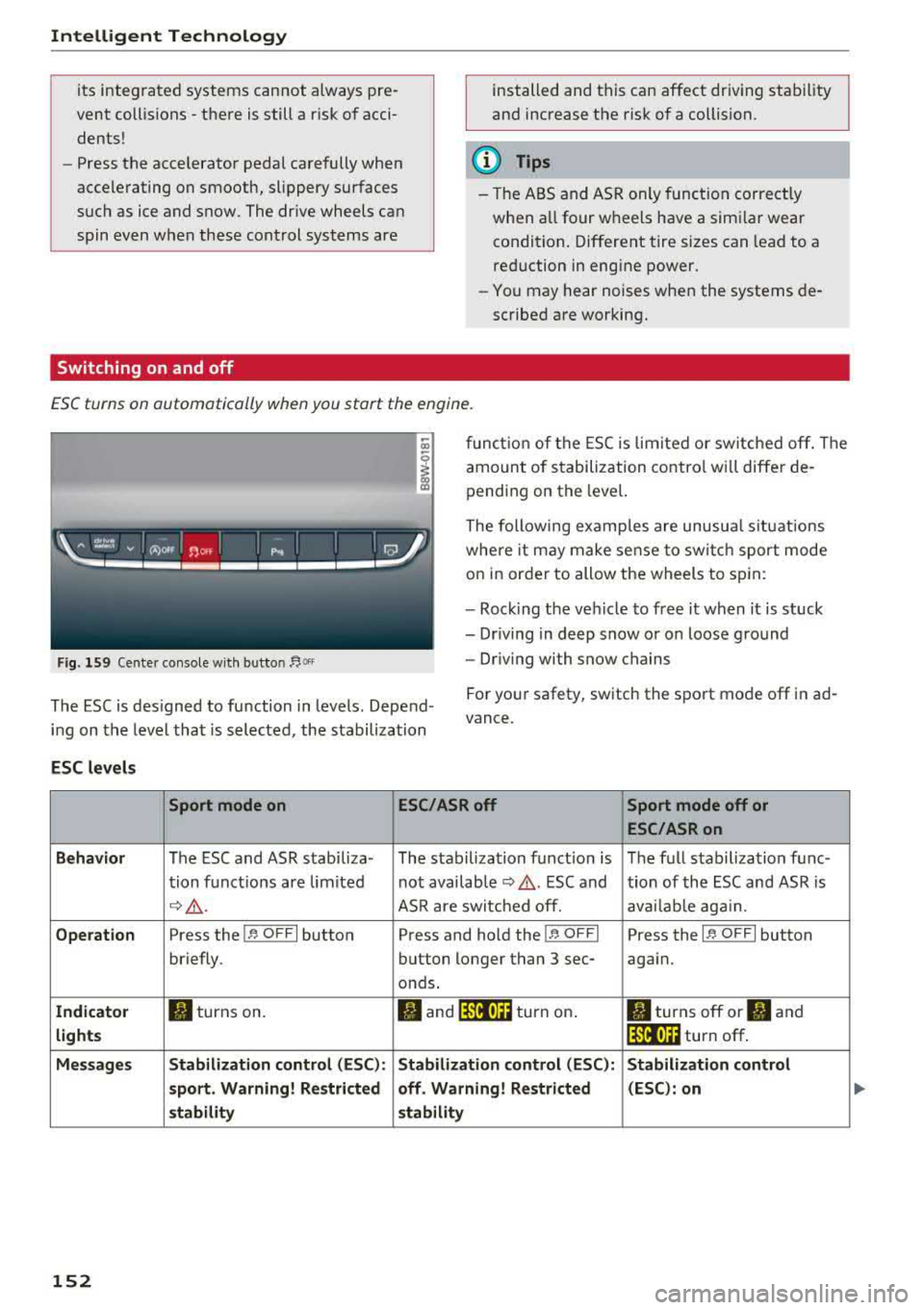
ESC turns on automatically when you start the engine.
Fig . 159 Cente r co nso le w it h button ~Of'
fun ct io n of the ESC is lim ited or switc hed off. The
amount of s tabilization contro l w ill differ de
pending on the leve l.
The following examp les are unusua l situat ions
whe re it may make se nse to sw itch sport mode
on in order to allow the wheels to sp in:
- Roc king the veh icle to free it when it is stuck
- Dr iving in deep snow or on loose g round
- Dr iving with snow chains
The ESC is des igned to function in levels . Depend
i n g on the level that is selected, the stabilization For you
r safety, switch the sport mode
off in ad
vance.
ESC levels
Sport mode on ESC/ASRoff Sport mode off or
ESC /ASRon
Behavior
The ESC and ASR stabiliza- The stabilization funct ion is The f ull s tabilization func-
t ion funct ions are lim ited not availab le
¢ .&. . ESC and tion of the ESC and ASR is
c;> .&. . ASR are switc hed off. ava ilab le aga in.
Operation Press the 11' OFF I button Press and hold the !1' O FFI Press the 11' OFFI button
briefly. button longer than 3 sec- aga in.
onds.
Indicator II turns on. fl and 14'tl•)H turn on . II turns off or II and
lights lf'tl•)H turn off .
Message s Stabilization control (ESC ): Stabilization control (ESC ): Stabilization control
sport . Warning! Restricted off . Warning! Restricted (ESC) : on
s tability stability
152
Page 155 of 409
<( a, .... N ,....
N .... 0 \0
3 a,
A WARNING
You should only switch sport mode on or switch ESC/ASR off if your driving abilities
and road conditions permit .
- The stabilization function is limited when
sport mode is sw itched on . T he driving
wheels co uld spin and the vehicle cou ld
swerve, espec ially on s lick o r sli ppery roa d
surf aces.
- T here is no vehicle stabilization when ESC/
ASR a re swi tched off .
Brakes
New brake pads
New brake pads do not ac hieve the ir full b raking
effect during the first 250 mi (400 km) . They
must be "broken
in " fi rst . However, you can com
pensate for the slightly reduced bra king fo rce by
pr ess ing firmly o n the bra ke pe dal. Avoid heavy
b ra king dur ing t he b reak -in per io d .
Wear
Brake pad wear depends largely o n the way the
ve hicl e is driven and on operat ing cond it ions .
This is especially t rue if you are d riving freque ntly
in t he c ity and on curves o r wi th a sporty driving
s tyle.
Operating noise
Noises may occur when braking depend ing o n the
speed , braking force and ou ts ide cond it ions such
as te m pe ra ture and humi dity .
Wet conditions or road salt
In certain situations, for example after driving
through water, in heavy ra in or after washing
your car, the braking ef fect may be reduced due
to mo isture or ice on the b rake roto rs and b rake
pads. The b rakes mus t be
"dried" firs t wi th a few
care ful bra ke app lic at ions.
At higher speeds and with t he windsh ie ld wipers
turned o n, the brake pads press against the bra ke
rotors for a s ho rt amoun t of time. This ac tion,
whi ch is not felt by the driver , happens at regul ar
i nte rvals an d ens ures a better reac tion time fo r
the brakes in wet weat her.
Intellig ent Technology
The brak ing effec t can a lso be reduced if yo u are
driving on salted roads and yo u do not app ly the
bra kes for long per iods o f time. The layer of sa lt
on the brake rotors and pads m ust be worn off
first whe n the brakes are applied .
Corrosion
Leaving t he vehi cle pa rked for long periods o f
time, low mileage and avoiding heavy b raking
can contrib ute to corros ion on the b rake roto rs
and to dirty brake pads.
If you usu a lly avoid heavy bra king or if there is
cor rosion prese nt, occasiona l heavy braking at
high speeds is recommended to clean the brake
roto rs and pads
c> ,& .
Brake system malfunction
If you notice that the bra ke pedal trave l has sud
denly in crease d, then a brake circuit in the dua l
circuit b rake system may have malfunctioned.
Drive to an authorized A udi dealer or authorized
Audi Se rvice Facility immed iate ly to have the
problem corrected. On the way there, d rive w ith
reduced speed and keep in mind that you will
need a longer distance to stop and you will need
to press the bra ke ped al ha rder.
Low brake fluid level
When the bra ke fluid level is low, malfu nctions in
the b rake system may occur . T h e brake fluid level
is e lec tron ically moni tored.
Brake booster
The brake booster ampli fies t he p ressure you ap
ply to the brake pedal.
A WARNING
- On ly app ly the brakes for the purpose of
cleaning the brake system when road and
traffic cond itions permi t. You must not en
da nger other road users. This inc reases the
ris k of an a ccid en t.
- Never let the vehicle roll while the engine is
sto pped bec ause t his increases the risk of an
a ccident.
153
Page 157 of 409
<( a, .... N ,....
N .... 0 \0
3 a,
snow and ice. Always read and follow safety
precautions¢.&. .
Winter tires
By using all wheel drive, your vehicle has good
forward motion with standard tires in winter con
ditions. However, using winter or all season tires
on
all four wheels in the winter is recommended,
because this will improve the
braking effect.
Snow chains
If there are snow chain laws, snow chains must
also be used on vehicles with all wheel drive
¢ page 358, Snow chains.
Replacing tires
For vehicles with all wheel drive, only wheels with
the same rolling circumference should be used.
Avoid using tires with different tread depths
¢ page 348, New tires or wheels.
Offroad vehicle?
Your Audi is not an offroad vehicle -there is not
enough ground clearance. For this reason, avoid
difficult terrain .
A WARNING
-Also, in vehicles with all wheel drive, adapt
your driving style to the current road and
traffic conditions. Do not let the increased
safety provided tempt you into taking risks,
because this increases the risk of an acci
dent .
- The braking ability of your vehicle is limited
to the traction of the wheels. In this way, it
is not different from a two wheel drive vehi
cle. Do not be tempted to accelerate to a
high speed when the road is slippery, be
cause this increases the risk of an accident .
- Note that on wet streets, the front wheels
can "hydroplane" if driving at speeds that
are too high. Unlike front wheel drive
vehicles, the engine does not rev higher sud
denly when the vehicle begins hydroplaning.
For this reason, adapt your speed to the
road conditions to reduce the risk of an acci
dent.
Intelligent Technology
Energy management
The starting ability is optimized
T he energy management system manages the
electrical energy distribution and optimizes the
availability of electrical energy for starting the
engtne.
When a vehicle with a conventional energy sys
tem is not driven for a long time, the vehicle bat
tery is drained by equipment (for example, the
immobilizer). In certain circumstances , there
could may not be enough energy to start the en
gine.
Your vehicle is equipped with an intelligent ener
gy management system for distributing electrici
ty. This significantly improves the starting ability
and increases the vehicle battery life.
The energy management system Is made up of
battery diagnosis, idling current management,
and dynamic energy management.
Battery diagnosis
The battery diagnosis determines the vehicle bat
tery charge level. The sensors determine the bat
tery voltage, the battery current, and the battery
temperature. The current charge level and the
performance of the vehicle battery are deter
mined based on this.
Idling current management
The idling current management decreases the
energy used while parked. With the engine
switched off, it manages the energy distribution
to the different electrical components . Data from
the battery diagnosis is taken into account for
this.
Depending on the vehicle battery charge level,
electrical equipment is switched off one item af
ter the other to prevent the vehicle battery from draining and to maintain the starting ability.
Dynamic energy management
While driving, dynamic energy management dis
tributes the appropriate amount of energy to the
electrical equipment.
It controls the battery
charge level so that the amount of energy is not
..,.
155
Page 160 of 409
Multi Media Interface
Multi Media Interface
Traffic safety information
Audi recommends performing certain Infotain
ment system functions, such as entering a desti
nation, only when the vehicle is stationary . Al
ways be prepared to stop operat ing the Infotain
ment system in the interest of your safety and
the safety of other road users.
_& WARNING
Only use the Infotainment system when traf
fic cond itions permit and always in a way that
allows you to maintain complete control over
your vehicle.
@ Tips
Certain funct ions are not available wh ile driv
ing .
Introduction
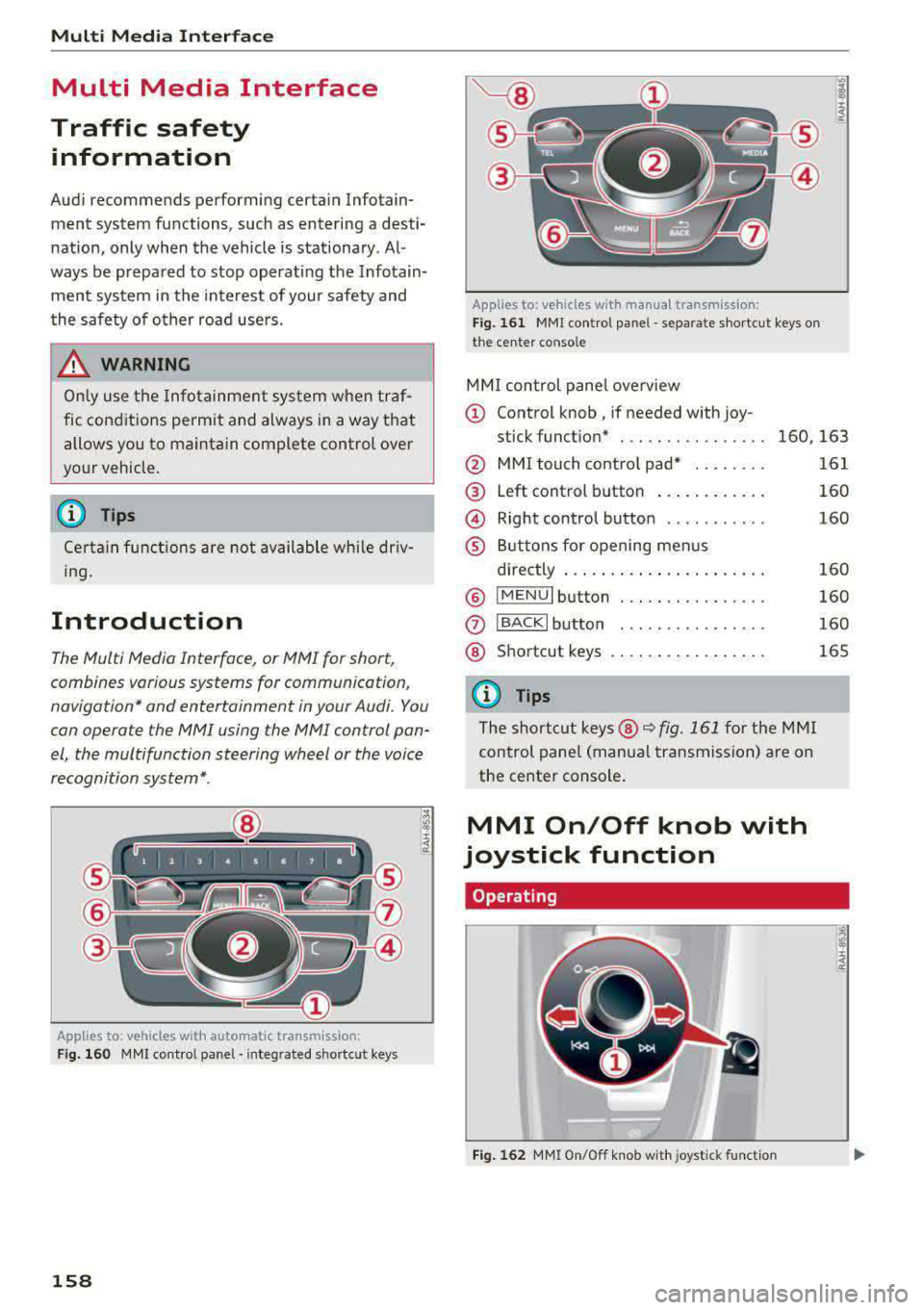
The Multi Media Interface, or MMI for short,
combines various
systems for communication,
navigation* and entertainment in your Audi . You
can operate the MMI using the MMI control pan
el, the multifunction steering wheel or the voice
recognition system* .
Applies to: vehicles with automatic transmission:
F ig. 160 MMI contro l panel· integ rated shortc ut keys
158
Applies to: ve hicles with manual transmission:
Fig. 161 MMI control pane l
-separate shortcut keys on
the ce nter conso le
MM I control panel overview
(D Control knob , if needed with joy-
stick function* . . . . . . . . . . . . . . . . 160, 163
@ MMI touch contro l pad* ....... .
@ Left control button ........... .
@ Right control button .......... .
® Buttons for opening menus
directly ..................... .
® IMENUI button ..... .... ...... .
0
®
IBACK I button
Shortcut keys
(0 Tips
The shortcut keys @¢ fig. 161 for the MMI
control panel (manua l transmission) are on
the center conso le .
MMI On/Off knob with
joystick function
Operating
•
Fig. 162 MMI On/Off knob w ith joystick function
161
160
160
160
160
160
165
Page 161 of 409
Switching the MMI on/off: the MMI can be
switched on/off manua lly.
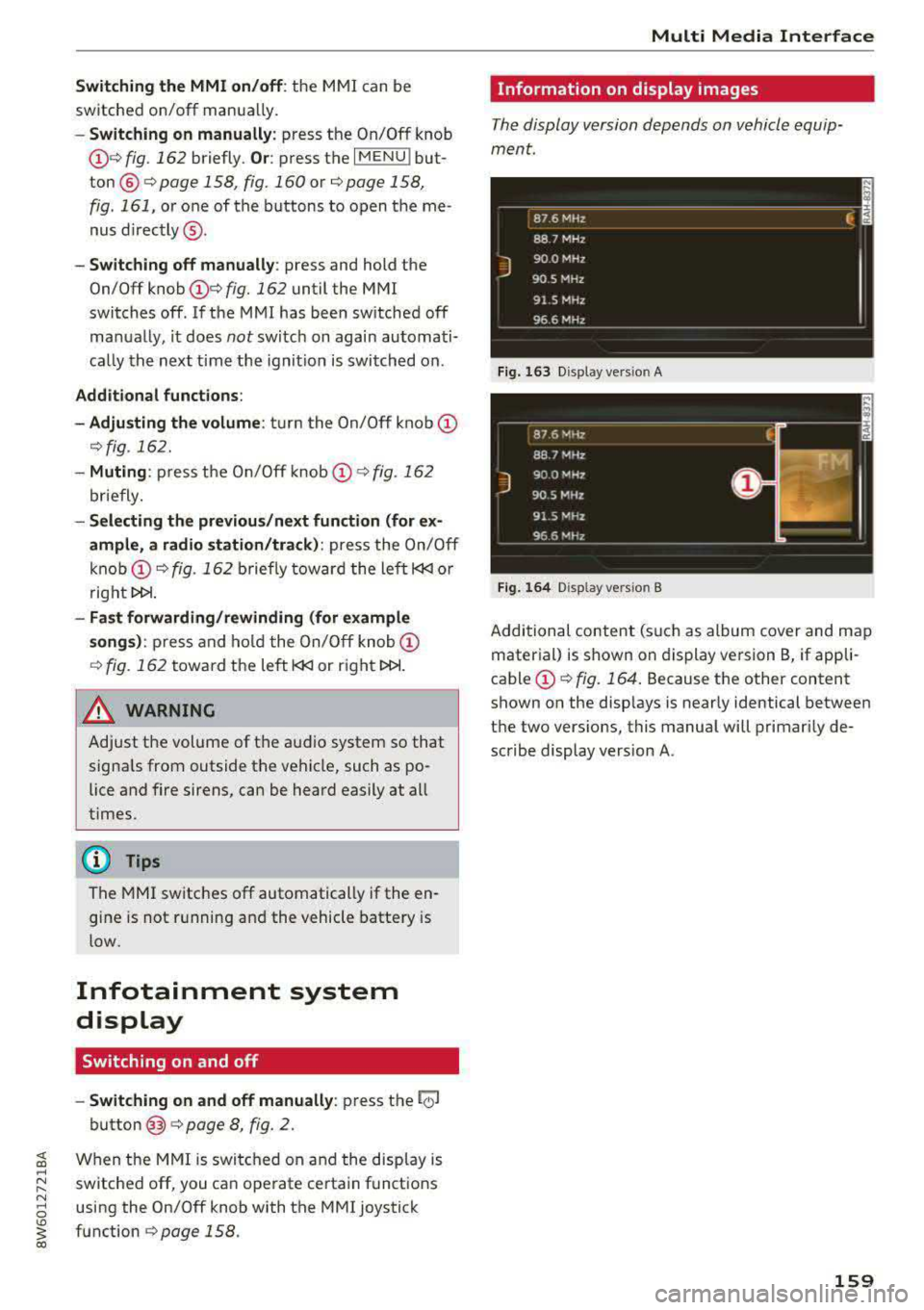
-Switching on manually : press the On/Off knob
(f)c:> fig . 162 briefly . Or: press the I MENU I but
ton @
c:>page 158, fig. 160 or c:>page 158,
fig. 161,
or one of the buttons to open the me
nus
directly @.
-Switching off manually : press and hold the
On/Off knob
(f) c::> fig. 162 until the MMI
switches off . If the MMI has been switched off
ma nually, it does
not sw itch on again automati
ca lly the next time the ignit ion is switched on .
Additional functions:
- Adjusting the volume:
turn the On/Off knob (f)
c::>fig. 162.
- Muting : press the On/Off knob (f) c:> fig. 162
briefly.
-Selecting the previous /next function (for ex
ample, a radio station/track) :
press the On/Off
knob
(f) c::> fig . 162 briefly toward the left l<3
t>l>I.
-Fast forwarding /rewinding (for example
songs):
press and hold the On/Off knob (f)
c::> fig. 162 toward the left l<3
A WARNING
Adjust the volume of the audio system so that
signa ls from outside the vehicle, such as po
lice and fire sirens, can be heard easily at all
times.
@ Tips
The M MI switches off automatically if the en
gine is not running and the vehicle battery is
low.
Infotainment system
display
Switching on and off
- Switching on and off manually :
press the l('.)J
button @ c> page 8, fig. 2.
When the MMI is switched on and the display is
switched off, you can operate certain functions
using the On/Off knob with the MMI joystick
function
c> page 158 .
Multi Media Interface
Information on display images
The display version depends on vehicle equip
ment.
Fig . 163 D isp lay ve rs io n A
Fig. 164 Disp lay ve rs io n B
Additional content (such as album cover and map
material) is shown on display version B, if appli
cable
(f) ~ fig. 164. Because the other content
shown on the disp lays is nearly identical between
the two vers ions, this manual will primarily de
scribe display version A .
159
Page 173 of 409
Voice recognition system Operating
Appl ies to: veh icles wit h vo ice recog nitio n system
You con operate many Infotainment functions
conveniently by speaking .
Requirements: the ignition and the MM I must be
switched on
~page 158, the re must not be any
phone call in progress and the park ing system
must not be active.
~ Switching on : press the 51 button@
~ page 15, fig. 11 or~ page 16, fig. 13 briefly
on the mu ltifunction steering wheel and say
the des ired command after the
Beep .
~ Switching off : press and hold the 51 button.
Or: press the [2] butto n.
~ Pau sing : say the command Pau se . To resume,
press the
l2;J button .
~ Correcting : say the command Corre ction . Or :
simply say a new command during an an
nouncement
<=> page 251.
Input assistance
The system gu ides you throug h the input with
v isua l and audio feedbac k.
- Vi sua l input as sistan ce: after switching on
vo ice recogn it io n, a display w ith a selection of
poss ible commands appears. This command
display can be sw itched on o r off. Se lect:
IMENU I button> Setting s> left cont rol button
> MMI setting s > Speech dialog system .
- Audio input a ssis tance :
to have the poss ible
commands read, tu rn the voice recognition sys
tem on and say
Help.
For the s yst em to understand you:
Speak clearly and dist inctly at a normal vo lume .
Speak louder when d riving faste r.
Emphasize the words in the commands evenly
and do not leave long pauses .
C lose the doors, the windows and the sunroof* to
reduce background noise . Make sure that passen-
;;!; gers are not speaking when you are giving a voice
;::; command. ,....
N .... 0 \0
3
Do not direct the air vents toward the hands-free
microphone, which is on the roof headliner near
t h e front inte rior lights .
Only use the system from the dr iver's seat be
ca use the hands -free microphone is directed to
ward that seat.
Additional settings
Seer=;, page 251, Spee ch dialog system .
A WARNING
-Direct your full attention to dr iv ing. As the
driver, you have complete responsibility for
safety in traffic . Only use the functions in
such a way that you a lways maintain com
p lete contro l over your vehicle in all traffic
situations.
-Do not use the voice recognition system in
emergencies beca use your voice may change
in stressful situations. It may take longer to
d ial the number or the system may not be
able to dial it at all. Dial the emergency
number manually.
@ Tips
- The d ialog pauses when there is an incom
ing phone call and will continue if you ig
nore the call. The d ialog ends if you answer
the ca ll.
- You can select an item in the list using ei
ther the vo ice recognit ion system or the
cont rol knob .
Command overview
information
Appl ies to: ve hicles w ith vo ice recognit ion system
T he following overv iews describe the comma nds
t h at can be used to operate the MMI using the
voice recognition system.
Alte rnative commands a re separate d using
a"/",
for example say: Telephone / (or) Navigation /
(or) Radio.
Sequences of commands used to perfo rm an ac
t ion are iden tified w it h
a"> ", fo r ex ample say:
Ente r addre ss > (t hen) Enter country /state . ..,.
171
Page 180 of 409
Telephone
Telephone Introduction
Applies to: vehicles with telephone
To make phone coils in your vehicle using the
/11/111, connect your cell phone to the /11/111 via
Bluetooth.
Hand sfree
Afte r you have connected you r ce ll phone to the
MMI via Bluetooth , you can use the handsfree
system and operate telephone functions through
your MMI. You can make calls using the antenna on your cell phone.
A WARNING
- Med ical experts warn that cell phones can
interfere w ith the funct ion of pacemakers .
Always mainta in a m inimum d istance of 20
cent imeters between the cell phone anten
na and the pacemaker.
- Do not carry the cell phone in a pocket di
rectly over the pacemaker when the phone
is switched on.
- Sw itch the cell phone off immediately if
you suspect it may be interfering w ith the
pacemaker.
- Do not use the vo ice recognit ion system*
Q poge 171 in emergencies because your
vo ice may change in stressful situations . It
may take longer to dial the number or the
system may not be able to dial it at all. Dial
the emergency numbe r manua lly.
- Switch your cell phone off in areas where
there is a risk of an exp losion . These loca
tions are not always clearly mar ked. This
may include gas stations, fuel and chemical
storage facilities or transport vehicles, or lo cations where fue l vapors (such as propane
or gaso line vapor in vehicles or bui ldings),
chemicals or large quantities of dust parti
cles (such as flour, sawdust or metal) may
be present in the air. This also applies to all
other locations where you would normally
turn yo ur vehicle engine off .
- The demands of traffic requ ire yo ur full at
tent ion . Always read the chapter
Q page 158, Traffic safety information.
178
-
(D Note
A lways fo llow the information found in Q @ in
Wi-Fi hotspot on page 197.
@ Tips
-The Bluetooth connect ion range is limited
to inside the vehicle. It can also be affected by local condit ions and interference with
other devices.
- To learn which Bluetooth connections and
wh ich of the funct ions in your cell phone are
supported, check with your cell phone serv ice provider or the database for mob ile devi
ces at
www .audiu sa.com /bluetooth .
Setup
Connecting a cell phone using Bluetooth
Applies to: vehicles with telephone
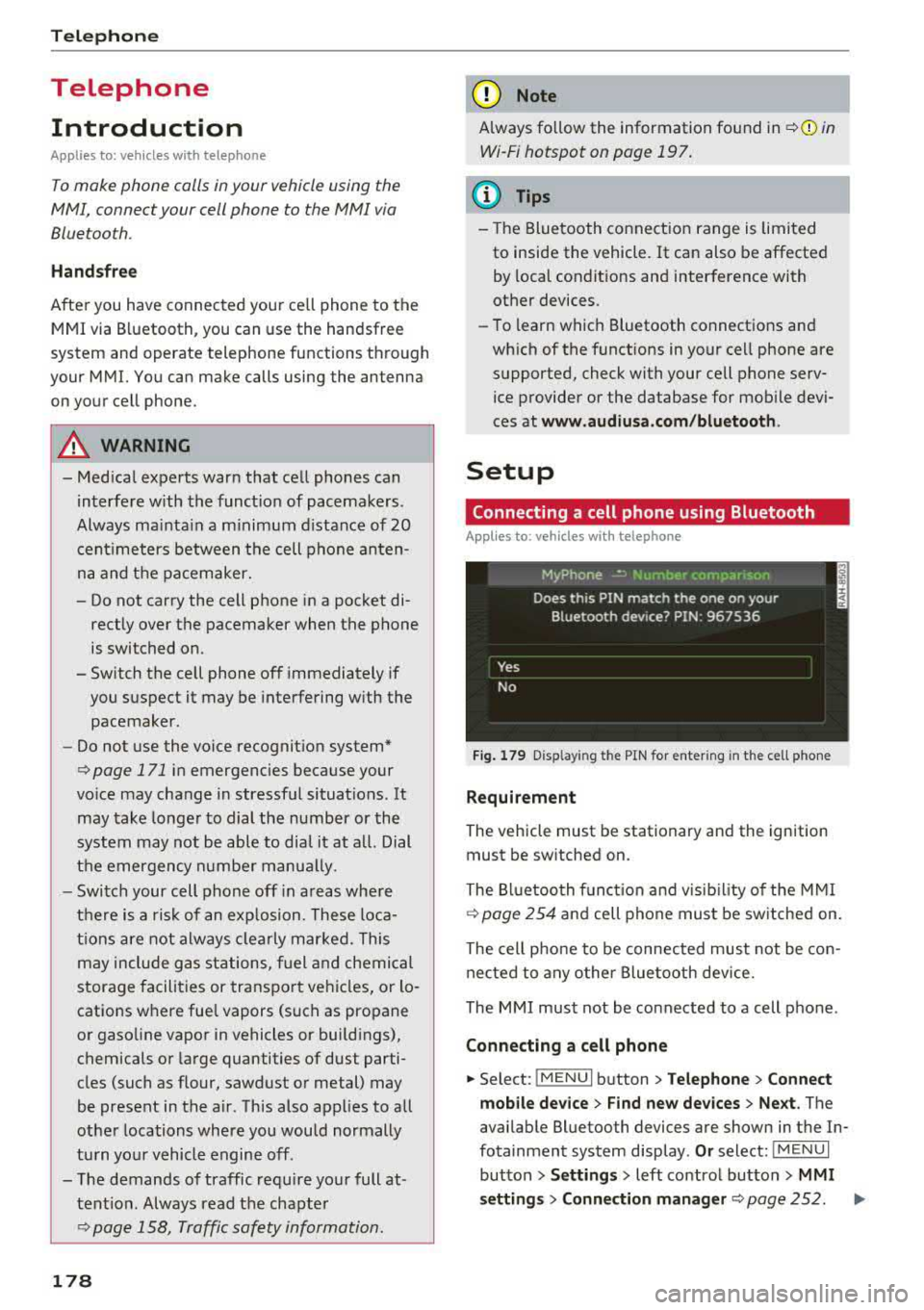
Fig. 1 79 D is pl ay ing the PIN for enter ing in t he cell p hone
Requirem ent
The vehicle must be stationary and the ignition
must be switched on.
The Bl uetooth funct ion and visib il ity of the MMI
Q page 254 and cell phone must be switched on.
The cell phone to be connected must not be con nected to any other Bluetooth device.
The MMI must not be connected to a cell phone .
Connecting a cell phone
... Select: !MENU I button> T el ephon e> Connect
mob ile de vice > Find ne w de vices > Next .
The
available Bluetooth devices are shown in the In
fotainment system display .
Or select: !M ENUI
button >Setting s> left control butto n> MMI
setting s> Connection manag er
Q page 252. ..,_