warning AUDI A5 COUPE 2018 Repair Manual
[x] Cancel search | Manufacturer: AUDI, Model Year: 2018, Model line: A5 COUPE, Model: AUDI A5 COUPE 2018Pages: 409, PDF Size: 67.63 MB
Page 97 of 409
<( a, .... N ,....
N .... 0 \0
3 a,
sounds when the C®> switch is pulled . Emergency
braking stops as soon as
the(®) switch is released
or the accelerator peda l is pressed.
Parking
.,. Press t he b rake peda l to stop the vehicle .
.,. Pull the(®) switc h to set the parking brake .
.,. Applies to: automatic transmission: Select the
P selector lever position .
.,. Turn the eng ine off c> & .
.,. Applies to: manual transmission: Engage 1st
gear .
.,. Turn the steer ing wheel when parking on in
clines so that the wheels will roll into the curb
i f the veh icle starts moving.
_& WARNING
- Never ac celer ate o r release the clutch pedal
carelessly when a gear or a selector lever
posit ion (automatic transm ission) is engag
ed wh ile the vehicle is stationary and the
en
gine is runn ing. Otherwise, the vehicle will
start to move immediately and this cou ld
re
sult in an accident.
- Emergency braking should only be used in an emergency, when the normal brake peda l
has failed or the brake pedal is obstructed.
During emergency braking, your veh icle will
bra ke sim ila r to heavy brak ing . ESC and the
associated components (ABS, ASR, EDL)
c annot overcome the laws of physics.
Around curves and when road or weather conditions are bad, a fu ll brake application
can cause the vehicle to skid or the rear end
to swerve, which increases the risk of an
ac
c ident.
- If the power supply fails, you cannot set the
park ing brake if it is released. If th is is the
case, stop the veh icle on leve l ground and
secure it by engaging 1st gear (manual
transmiss ion) or select ing the P selector lev
er position (automatic t ransm iss ion). See an
authorized Aud i dealer o r autho rized Aud i
Service Facility for assistance.
- Always take the vehicle key with you when
leaving your vehicle, even if for a short pe ri
od of time. Th is app lies p articu larly when
children rema in in the vehicle. Otherwise,
D riv ing
children could start the engine, release the
parking brake or operate e lectrical equip
ment such as power w indows, which
in
creases the risk of an accident.
- No one, especially children, should remain
in the vehicle when it is locked. Locked
doors make it more difficu lt for emergency
wo rkers to get into the vehicle, which puts
lives at risk .
(D Tips
Applies to: vehicles with automatic transmissions
When stopp ing at a t raff ic signa l or stopp ing
i n city traffic, yo u can set the park ing bra ke
manually. The vehicle does not have to be
held with the brake pedal. The park ing brake
eliminates the tendency to creep when a
se
l ector lever position is engaged. As soon as
you press the accelerator peda l, the parking
brake re leases automatically and your vehicle
starts to move
c>page 95.
(D Tips
- Occasional noises when the parking brake is
set and released are normal and are not a
cause for concern.
- The parking brake goes through a self-test cycle at regu lar intervals when the vehicle is
stopped. Any no ises assoc iated with th is are
normal.
- If there is a power failure, the parking brake
w ill not set if it is released, and it will not
release if it is set
c> A . See an a uthorized
Audi dealer or author ized Audi Service
Fa
cility for assis tance.
Starting to drive
Various convenience and safety funct ions may be
available when the vehicle begins driving,
de
pend ing on vehicle equipment.
Starting on hills w ith the pa rking brake set
Requirement: the driver's door must be closed .
.,. To start driving comfortably when on a hi ll, set
the parking brake and begin driving as usual.
The braking force of the parking brake does not
..,.
95
Page 98 of 409
Driving
release automatically until the wheels build up
enough driving force .
Starting on hills with hill hold assist
Hill hold ass ist makes it eas ier to start on hills.
Requirement: the driver 's door must be closed
and the eng ine must be running .
.,. To activate hill hold assist, press and hold the
brake pedal for several seconds. The vehicle
must be in an uph ill direction of travel.
After releasing the brake pedal, the braking pow
er is maintained for a brief moment
c;, .&. to pre
vent the vehicle from rolling back when starting. During this time, you can eas ily begin to move
your veh icle .
.&_ WARNING
-If you do not begin driving immediately or
the engine stalls after releas ing the b rake
pedal, your vehicle may begin to roll back
ward. Press the brake pedal or set the park
ing brake immediate ly.
- The intelligent technology of hill hold assist
cannot overcome the limitations imposed by
natural physical laws. The increased comfort
offered by hill hold assist should not cause
you to take safety risks.
-Hill hold assist cannot hold the vehicle in
place on all h ills (for example, if the ground
is slippery or icy).
-To reduce the risk of an accident, always make sure the vehicle is situated safely
wh ile stat ionary.
Automatic transmission
Introduction
Applies to: vehicles with automatic transmissions
.
The aut omat ic transmission is controlled elec
tronica lly. The transmission shifts up or down au
tomatically depending on which drive prog ram is
selected.
When a
moderate driving style is used, the
transmission se lects the most economical driving
mode. The transmission upshifts at a lower RPM
96
and downshifts at a higher RPM to improve fue l
effic iency.
The transmission switches to a sporty mode after
a kick-down or when the driver uses a
sporty
driving style
characterized by quick accelerator
pedal movements, heavy acceleration, frequent
changes in speed and traveling at the maximum
speed .
If desired, the driver can also select the gears
manually (tiptronic mode) c:;, page 99.
S tronic transmission
The S tron ic is a dual-clutch transmission. Power
i s transferred using two clutches that work inde
pendently from one another. They replace the
torque converter used in conventional automatic
transmissions and allow the vehicle to accelerate
without a noticeable interruption in traction .
tiptronic transmission
In the tiptronic transmission, power is transfer
red by a torque converter.
Selecting a selector lever position
Applies to: vehicles with auto matic transmissions
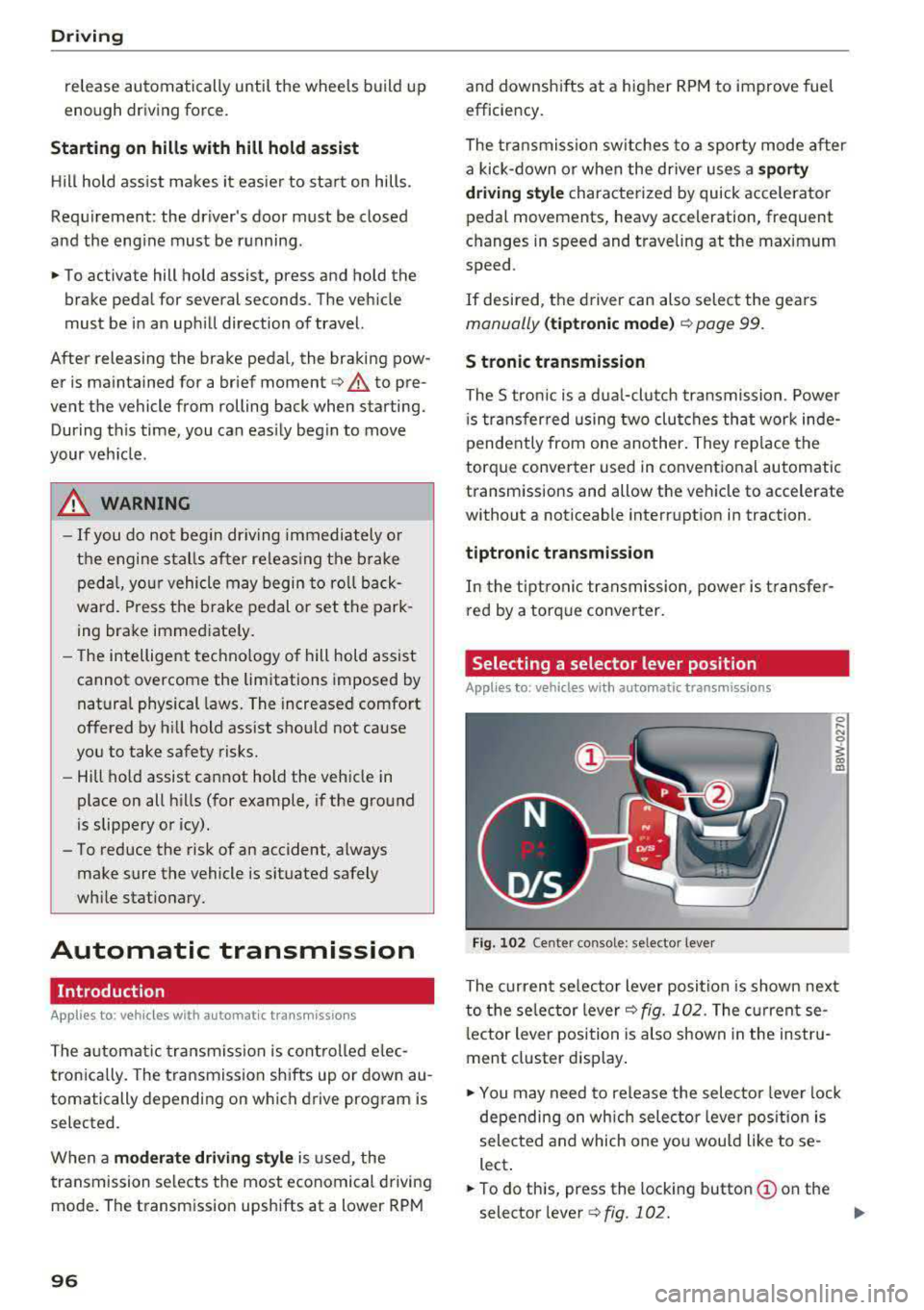
Fig. 102 Cente r console: se lector lever
The current se lecto r lever position is shown next
to the selector lever
c:;, fig. 102 . The current se
l ector lever position is also shown in the instru
ment cluster display .
.,. You may need to release the selector lever lock
depending on wh ich selector lever position is
selected and which one you would like to se
lect .
.,. To do this, press the locking button (!) on the
selector
l ever ¢fig .102. ..,_
Page 100 of 409
Driving
to engage the S sport mode. You can only select
the S selector lever position when the D or E posi
tion is selected. To select the Dor
E position
again when S is engaged, move the selector lever
back ¢,& . To shift from N to D when traveling at
speeds below
1 mph (2 km/h), press the brake
pedal and shift into the D
position ¢,& .
In the normal mode D, the transmission auto
matically selects the suitable gear ratio. It de
pends on engine load, vehicle speed and driving
style .
Select the
sport mode S for sporty driving. The
vehicle makes full use of the engine's power.
Shifting may become noticeable when accelerat
ing.
The S selector lever position engages automati cally when you select the
dynamic mode in drive
select* .
A WARNING
Read and follow all WARNINGS.
- The vehicle can roll even if the ignition is
switched off .
- Power is still transmitted to the wheels
when the engine is running at idle. To pre
vent the vehicle from "creeping", you must keep your foot on the brake in all selector
lever positions (except P and N) when the
engine is running.
- Before opening the hood, select the P selec
tor lever position and set the parking brake.
This reduces the risk of an accident. Always
read and follow the applicable warnings
¢ page 330, Working in the engine com
partment.
(D Tips
If
you accidentally select N while driving, take
your foot off the accelerator pedal and wait
for the engine to slow down to idle before se
lecting Dor S.
98
· Driving tips
App lies to: vehicles with automatic transmissions
Starting the engine
.,. The P or N position must be selected .
Starting from a stop
.,. Press and hold the brake pedal.
.,. Start the engine¢ page 89.
.,. Press the locking button (Don the selector lev
er and select the
D, E, Sor R position
¢ page 96 .
.,. Wait a moment until the transmission shifts.
You will notice a slight movement when the
gear engages .
.,. Release the brake pedal and press the accelera-
tor
pedal ¢ _A.
Various convenience functions are available for
starting on hills
¢ page 95.
Stopping temporarily
.,. Press the brake pedal to stop the vehicle, for
example at a traffic light . Do not press the ac
celerator pedal when doing this.
.,. To prevent the vehicle from rolling when you
start driving, set the parking brake when stop
ping on steep
hills ¢ _A.
.,. The parking brake will release automatically
and the vehicle will start moving once you press
the accelerator pedal.
Stopping/parking
If the selector lever is not in the P position when
you open the driver's door, the vehicle could roll.
.,. Press and hold the brake pedal ¢_& .
.,. Set the parking brake .
.,. To select the P selector lever position, press the
P button
@ on the selector lever ¢ page 96,
fig. 102.
Under certain conditions, such as driving in the
mountains or when towing a trailer, it may be
helpful to switch to manual mode temporarily
and shift
manually to adapt to the driving condi
tions
¢ page 99.
On hills, activate the parking brake first and then
shift into the P
position ¢ page 94. This prevents ..,.
Page 101 of 409
too much stress from being placed on the locking
mechanism .
A WARNING
-The vehicle can roll even when the engine is
switched off.
-U nintended vehicle movement can lead to
serious injuries.
-To reduce the risk of an accident, do not press the acce lerator pedal when changing
the selector lever position while the vehicle
is stationary and the engine is running.
-To reduce the risk of an accident, never se
lect the R or P posit ions while driving.
-Do not inadvertent ly press the acce le rator
peda l when the veh icle is stationary. Other
wise the risk of an accident increases be
cause the vehicle will start to move immed i
ately, eve n if the par king brake is set.
@ Tips
For safety reasons , the parking b rake on ly re
leases automatically when the driver's door is
closed.
Hill descent control
A ppl ies to: ve hicles with a utomat ic t ra nsmi ssio ns
The hill descent control system assists the driver
when driving down hills.
Hill descent control act ivates when the transmis
sion is in the Dor S posit ion and you press the
brake pedal. The t ransmission automat ically se
lects a gear that is suitab le for the hill . H ill de
scent contro l tries to ma inta in the speed ach
i eved at the time of braking, withi n phys ica l and
techn ica l limita tions. If may st ill be necessary to
a dj ust the speed wi th t he b rake pedal.
H ill descent control switches off once the hill lev
e ls out o r yo u press the accelerator pedal.
W hen operating the c ruise contro l system*
¢ page 10 7, hill descent contro l is also act ivated
when the speed is set .
Drivi ng
A WARNING
-Hill descent control cannot overcome physical
limitat io ns, so it may not be able to ma intain
a constant speed under all conditions. Always
b e ready to app ly the brakes.
Shifting manually (tiptronic mode)
A pp lies to : vehicles wi th automatic transmiss ions
The tiptronic mode allows the driver to shift the
gears manually .
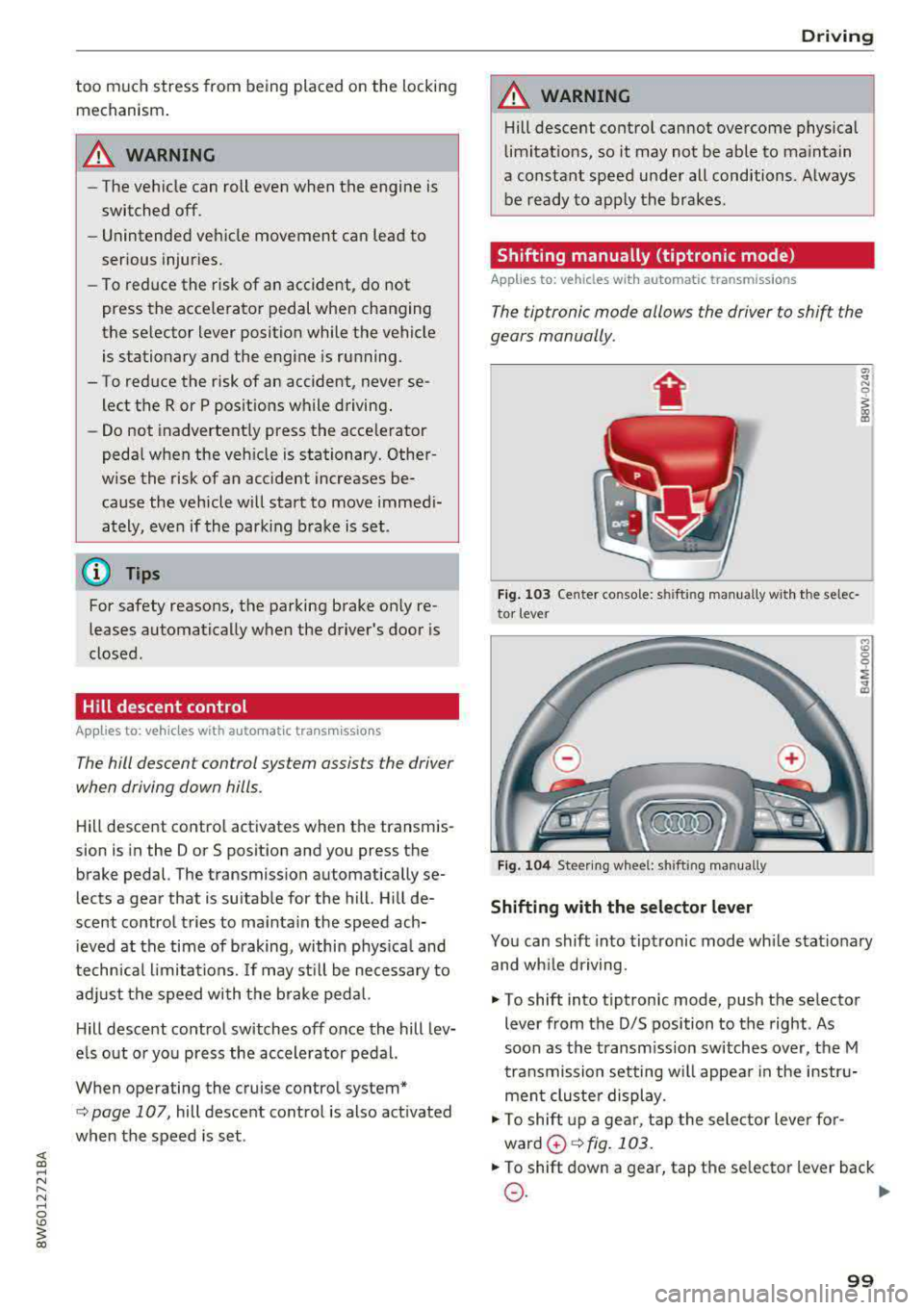
Fig. 103 Center console: s hiftin g man ually w it h th e se lec
to r lever
Fig. 1 04 Stee ring w hee l: sh ift ing man ually
Shifting with the selector lever
9 ~ ... CD
You can shift into tip tronic mode wh ile stat iona ry
and wh ile driving.
.,. To shift into tiptronic mode, push the selector
lever from the D/S position to the right . As
soon as the transm ission switches over, the M
tra nsmission setting w ill appear in the instr u
men t cluste r display .
.,. To shift up a gea r, t ap the sele ctor leve r fo r
ward
0 ¢ fig . 103 .
.,. To shift down a gear, tap the se lector lever back
0 -~
99
Page 102 of 409
Driving
"'T o switch tiptronic mode off, push the se lector
lever back into the D/S position.
Shifting with th e shift paddle s
You can operate the shift padd les in the D/S or M
selector lever posit ions.
"' To sh ift up a gear, tap the sh ift paddle 0
~ fig . 104.
"'T o shift down a gea r, tap the 0 sh ift paddle.
"'T o engage the lowest gear, ho ld the 0 shift
padd le.
"' If you do not press a shift button within a short
time whi le in the D/S position, the transmission
will return to automatic mode. To keep shifting
us ing the shift paddles, move the selector lever
to the right out of the D/S position.
"' When you want to shift out of tiptronic mode,
press and hold the
0 shift paddle for a longer
per iod of t i me or move the se lector lever back
and release it.
The transm ission automatically shifts up or down
before critical engine speed is reached .
The transm ission only allows manual shifting
when the engine speed is within the permitted
range.
@ Tips
- If you shift to the next lowest gear, the
transmission will only shift if the engine w ill
not be over-rewed .
- With kick-down, the transmission shifts to a
lower gear, depending on vehicle speed and
engine speed.
- tiptronic does not work if the transmiss ion
i s running in emergency mode.
Kick-down
A pp lies to: ve hicles w ith a utomat ic tra nsmi ssio ns
Kick-down enables maximum acceleration.
When you press the accele rator peda l down be
yond the resistance point, the automatic trans
miss ion downshifts into a lower gear and the en
g ine utilizes its full power, depending on vehicle
speed and engine RPM. It shifts up into the next
100
higher gear once the maximum specified engine
RPM is reached.
A WARNING
P lease note that the whee ls cou ld spin on
slick or slippery roads when kick-down is ac
tive.
Launch control program
App lies to : vehicles wi th S tron ic transmiss ion
-
The launch control program provides the best
possible acceleration when starting from a stop .
Requirement: the engine must be at operating
temperature and the steering wheel must not be
turned.
"' Deactivate the Star t/Stop system* ~ page 93.
T he LED in the l(A) "'I button turns on .
"'With the engine running, press the ,...
I .I' -
, O ..,...,,. F=F I but
ton
brief ly ~ page 152. The . indicator light
turns on and the message
Stabil ization cont rol
( E SC) : sport. Warning ! Re st ri ct ed stab ility
ap
pears in the instrument cluster display .
"' Pull the selector lever back out of the D/S pos i
tion briefly to select the S position or se lect the
D ynamic driving mode i n drive se lect*
~ page 139 .
"'Press the brake pedal firm ly with yo ur left foot
and hold it all the way down for at least one
second.
"' At the same time, press the gas peda l all the
way down with your right foot until the eng ine
reaches and stays at a high RPM level.
"' Remove your foot from the brake pedal w ith in
five
seconds ~,& .
A WARNING
-Always adapt your driving to the t raff ic flow.
- Only use the Launch cont rol program when
road and traffic condit ions allow it and oth
er d rivers will not be endange red or both
ered by your driving and the veh icle's accel
erat ion .
- Please note that the d rive wheels can spin
and the vehicle can b reak away when spo rt
mode is switched on, especially when the
road is slippery .
Page 105 of 409
<( a, .... N ,....
N .... 0 \0
3 a,
~ Keep the brake pedal pressed and engage the
fo llowing se lector lever positions one after the
othe r:
N, D and back to N.
~ Turn the eng ine off again .
~ Grasp the socket wrench w it h both hands and
pull it up and out carefu lly to remove
<=> (D .
~ Reinsert the cove r and rubbe r mat .
When t he parking lock emergency re lease is
used , the
mJ ind icator light and t he N selector
l eve r pos ition tu rn on in the instrument cluster .
The message
Danger of rolling away! P not pos
s ible . Please apply parking brake
a lso appea rs .
.&, WARNING
- O nly a ctiva te the e mergency re le as e w hile
o n a level s urfa ce o r a s lig ht slo pe.
- T he pa rking lock may only be released using
the e mergency rele ase i f th e parking br ake
is set. If i t i s no t fu nctioning, secure the ve
hicle from rolling using the brake peda l or
ot he r su ita ble means, such as blocking a
front and a rear wheel. An unsec ured veh icle
may roll away, w hich increases the r isk of an
acc ident.
- To red uce the risk of an accident, you must
not drive when the eme rgency release is ac
t ivated.
- Read and follow the impo rtant instructions
abo ut towing
<=> page 3 83.
- The risk of dama ge i ncreases if you do not
r emove the socket wrench carefully when
r esett ing t he pa rking loc k.
D riving
-
103
Page 106 of 409
Trailer towing
Trailer towing
Driving with a trailer
General information
Your Audi was designed primarily for passenger
transportation.
If you plan to tow a trailer, please remember that
the additional load will affect durability, econo
my and performance.
Trailer towing not on ly places more stress on the
ve hicle, it also ca lls for more concentration from
the dr iver.
F or this reason, always follow the operating and
driving instructions provided and use common
sense.
Technical requirements
Trailer hitch
Use a weight-carrying hitch conforming to the
gross tra iler weight. The hitch must be suitab le
for your veh icle and tra iler and must be mounted
securely on the vehicle's chassis at a technically
sound
locat ion . Use on ly a trailer hitch with a re
movable ba ll mount . Always che ck with the t rail
er hitch man ufac tur er to make s ure t hat you are
using the co rrect hi tc h.
Do not use a bumper hitch.
The hitch must be installed in such a way that it
does not interfere with the impact -absorbing
bumper system. No mod ificat ions should be
made to the vehicle exhaust and b rake systems .
Fr om t ime to t ime, che ck that all hitch mo unti ng
bol ts rem ain securely f aste ned.
W hen you are not tow ing a tra iler, remove the
tra ile r hitc h ba ll mount . This prevents the hit ch
from caus ing damage s hou ld your veh icle be
s truck from be hind
¢ ,&. .
Trailer brakes
If you r trailer is equipped with a brak ing system,
check to be su re that it conforms to all regula
tions .
104
The t rai ler hydraulic bra ke system must not be
directly connected to the vehicle's hydraulic
bra ke
system ¢&. .
Safety chains
Always use s afety chains be tween you r vehi cle
and t he tra ile r.
Trailer lights
Traile r lights must meet all regula tions . B e s ure
to check w ith your author ized Audi dealer for cor
r ec t wir ing, swi tches and relays.
Mirrors
If you are unable to see t he traffic behind you us
i ng t he regular outs ide mirrors, then yo u
must in
stall ex tended mirrors . It is impo rtant that you
al ways have clear vision to the rear.
.&_ WARNING
Afte r remov ing the tra ile r hi tc h, do not s tore
it i n y our vehicle. In case o f su dden brak ing,
the hitch could fly fo rward and injure you or
your passengers.
Operating instructions
Maximum trailer weight
A tra iler f or yo ur vehicle is lim ite d to a typical
class 1 or class 2 trailer.
Trailer load distribution
Be sure the load in the t rai le r i s he ld se curely in
pla ce to p reve nt i t from shi fting forwar d, bac k
ward or si deways.
Never allow a passenger to ride in a trailer ¢ &.
in Driver messages on page 105.
Engine cooling system
Towi ng a tra iler makes the engine work harder. It
is important that the cooling system's perform
ance is up to the additional load . Make sure tha t
the coo ling system has enoug h flu id.
Tire pressure
When towing a trailer, inflate the tires of your
vehicle to the tire p ressure listed under "Full
load" on the label
c> page 351. Inflate trailer
Page 107 of 409
<( a, .... N ,....
N .... 0 \0
3 a,
tires to trailer and tire manufacturers' specifica
tions.
Lights
The headlight settings should be checked with
the trailer attached before driving off. Check to
make sure both vehicle and trailer lights are
working properly.
Safety chains
Be sure trailer safety chains are properly connect
ed from the trailer to the hitch on the vehicle.
L eave enough slack in the chains to permit turn
ing corners . When you install safety chains, make
sure they will not drag on the road when you are
driving .
The cha ins shou ld cross under the trailer tongue
to prevent it from dropping in case of separat ion
from the hitch.
Driver messages
Driving with a trailer requires extra caution.
Weight distribution
Towing a loaded trailer with an empty car results
in a high ly unstable distribution of weight .
If this
cannot be avo ided, drive at very low speeds only
to avoid the risk of losing steering control.
A "balanced" rig is easier to operate and control.
This means that the tow vehicle should be loaded to the extent possible and permissible, whi le
keep ing the trailer as light as possible under the
circumstances . Whenever possible, transfer
some cargo to the luggage compartment of the
tow vehicle whi le observ ing tongue load require
ments and vehicle loading considerations.
Speed
The highe r the speed, the more difficult it be
comes for the driver to control the rig. Do not
drive at the maximum permissible speed. Reduce
your speed even more if load, weather or wind conditions are unfavorable
-particularly when
going downhill.
Tra iler towing
Reduce vehicle speed immediately if the trailer
shows the slightest sign of swaying.
Do not try
to stop the swaying by accelerating.
Observe speed limits. In some areas, speeds for
vehicles towing trailers are lower than for regular
vehicles .
Always apply brakes early. When driving down
hill, shift into a lower gear to use the engine
braking effect to slow the vehicle . Use of the
brakes alone can cause them to overheat and fail.
Coolant temperature
T he coo lant temperature gauge ~ page 11 must
be observed carefully. The coolant temperature
can increase if you drive on long inclines in a low
gear at high engine speeds . Reduce your speed
immediately if the LEDs in the top part of the dis
play turn on.
For more information about indicator lights, re
fer
to . ~page 30 .
A WARNING
=
Anyone not properly restrained in a moving
vehicle is at a much greater risk in an acci
dent. Never let anyone ride in your car who is
not properly wearing the restraints provided
by Aud i.
Trailer towing
information
Important to know
-
Your vehicle handles differently when towing a
trailer because of the addit ional weight and dif
ferent weight distribution . Safety, performance
and economy will greatly depend on how careful
ly you load your trailer and operate you r rig.
Before you actually tow your trailer, pract ice
turning, stopping and backing up in an area away
from traffic . Keep pract ic ing until you have be
come complete ly familiar w ith the way your vehi
cle-trailer combination behaves and responds.
105
Page 109 of 409
Assistance systems Electronic speed limiter
Your vehicle may be factory equipped with t ires
that are rated for a maximum speed of 130 mph (210 km/h). This is less than the maximum speed
of your vehicle. To reduce the risk of sudden tire
failure and loss of control if the vehicle is operat
ed at excessive speeds, your vehicle also has an
electronic speed limiter . The electronic speed
limiter prevents your vehicle from going faster
than the t ire speed rating. For mo re information
~page 341.
If the engine control unit receives faulty vehicle
road speed s ignals, the Malfunction Indicator
L amp
(MIL) ¢..ij will illuminate. If this occurs,
contact the nearest autho rized Audi dealer for
assistance.
_& WARNING
Always observe the posted speed limits and
adjust your speed to suit prevailing road, traf
fic and weather conditions. Never drive your
vehicle faster than the max imum speed rating
of the tires installed.
Speed warning system
Introduction
Applies to: vehicles with speed warning system
The speed warning system helps you to stay be
low a specified maximum speed that can be set,
changed or deleted in the Infotainment system.
-
The speed warning system warns you if you are
exceeding the maximum speed that you have set .
A wa rning tone will sound as soo n as yo ur speed
exceeds the s tored value sligh tly. The
[01 (USA
models)/
[01 (Canada models) indicator light
and a message appear in the instrument cluster
display at the same time. The
HI] / [0] indicator
light and the message turn off if the speed falls
back below the stored maximum speed.
Setting a threshold is recommended if you would l ike to be reminded when yo u reach a certain
maximum speed. Situations where you may want
to do so include driving in a country with a gen er-
Ass is ta nce syst ems
al speed limit or if there is a specified maximum
speed for winter tires.
Setting the warning threshold
Se lect in the Infotainment system: !MENU I b ut
ton
> Vehi cle > left contro l button > Driver a ss is
tance > S peed w arning > Manual.
(j) Tips
Regardless of t he speed warning system, you
shou ld always mon itor your speed using the
speedometer and make s ure yo u are fo llow ing
the lega l speed limit .
Cruise control system
Switching on
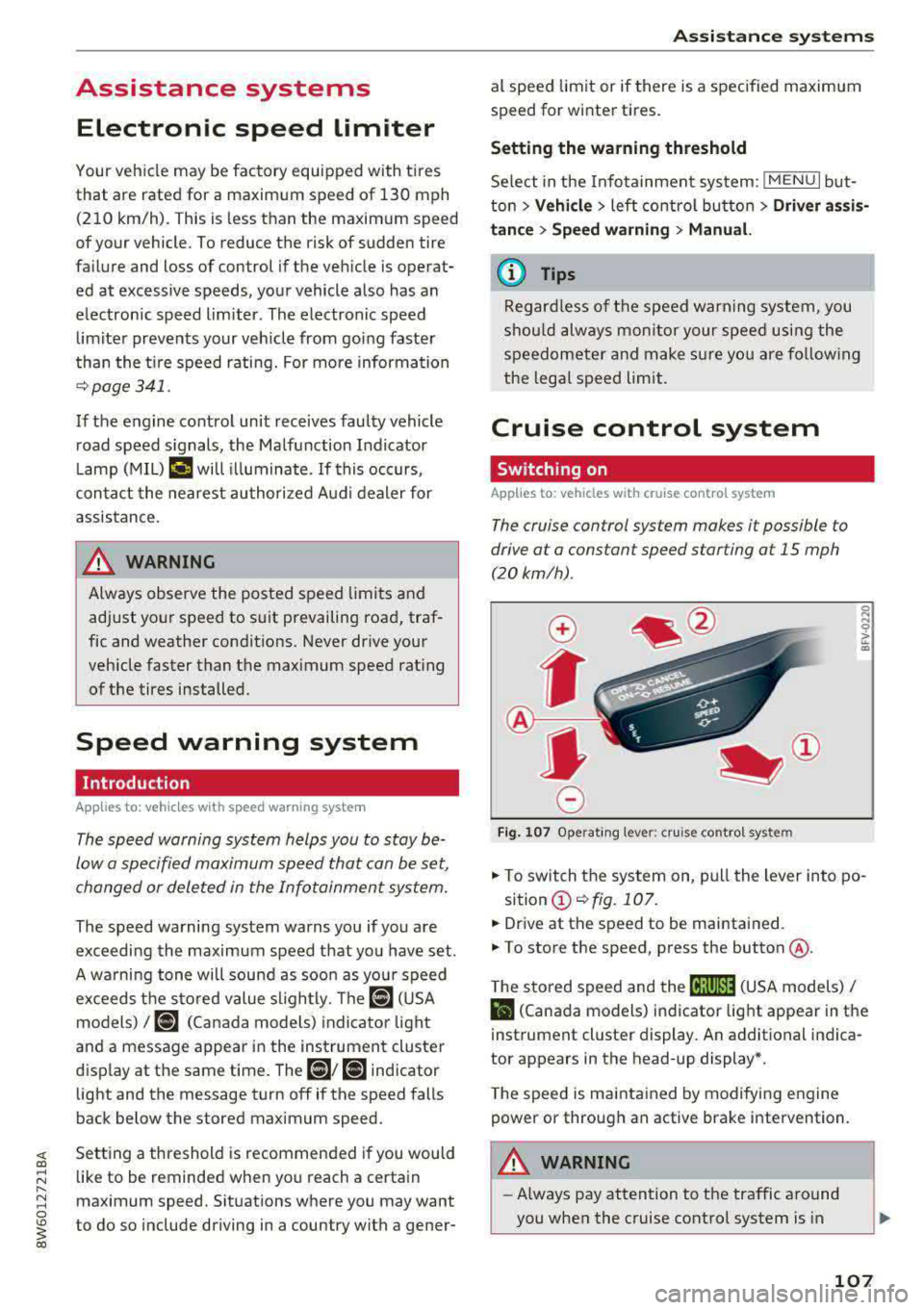
Applies to: vehicles with cruise control system
The cruise control system makes it possible to
drive at a constant speed starting at
15 mph
(20 km/h) .
0
f
~
0
Fig . 1 07 Operat ing lever: cruise control system
~
"' 0 > u. m
.. To switch the system on, pull the lever into po-
sition
(D ~ fig. 107 .
.. Dr ive at the speed to be maintained.
.. To store the speed, press the button @.
T he stored speed and the
cij;jl)~14 (USA models) /
Bl (Canada models) indicator light appear in the
instrument cluster display . An additional ind ica
tor appears in the head-up display *.
T he speed is maintained by modifying engine
power or through an active brake intervention.
A WARNING
-~
- Always pay attention to the traffic around
you when the cruise control system is in
107
Page 111 of 409
Switching off completely
• Press the lever into position @(clicked into
place), or
• Switch the ignition off .
The speed yo u stored w ill be mainta ined if the
cru ise control has been switched off tempora rily .
To resume the stored speed, release the brake or
clutch pedal and p ull the lever into
position (!).
Sw itching the ig nition off will erase the stored
speed .
A WARNING
You should only resume the stored speed if it
is not too high for existing traffic conditions .
Otherwise you can increase the r isk of an acci
dent.
Camera-based traffic
sign recognition
Description
A pp lies to: ve hicles with camera-based t raffic sign recogni
tion
~ 180 m, & I ~ IPFl '1 iJ
I I /I
:I)' mmml ll : I tm ,, '
) ' ' ' ,,' :
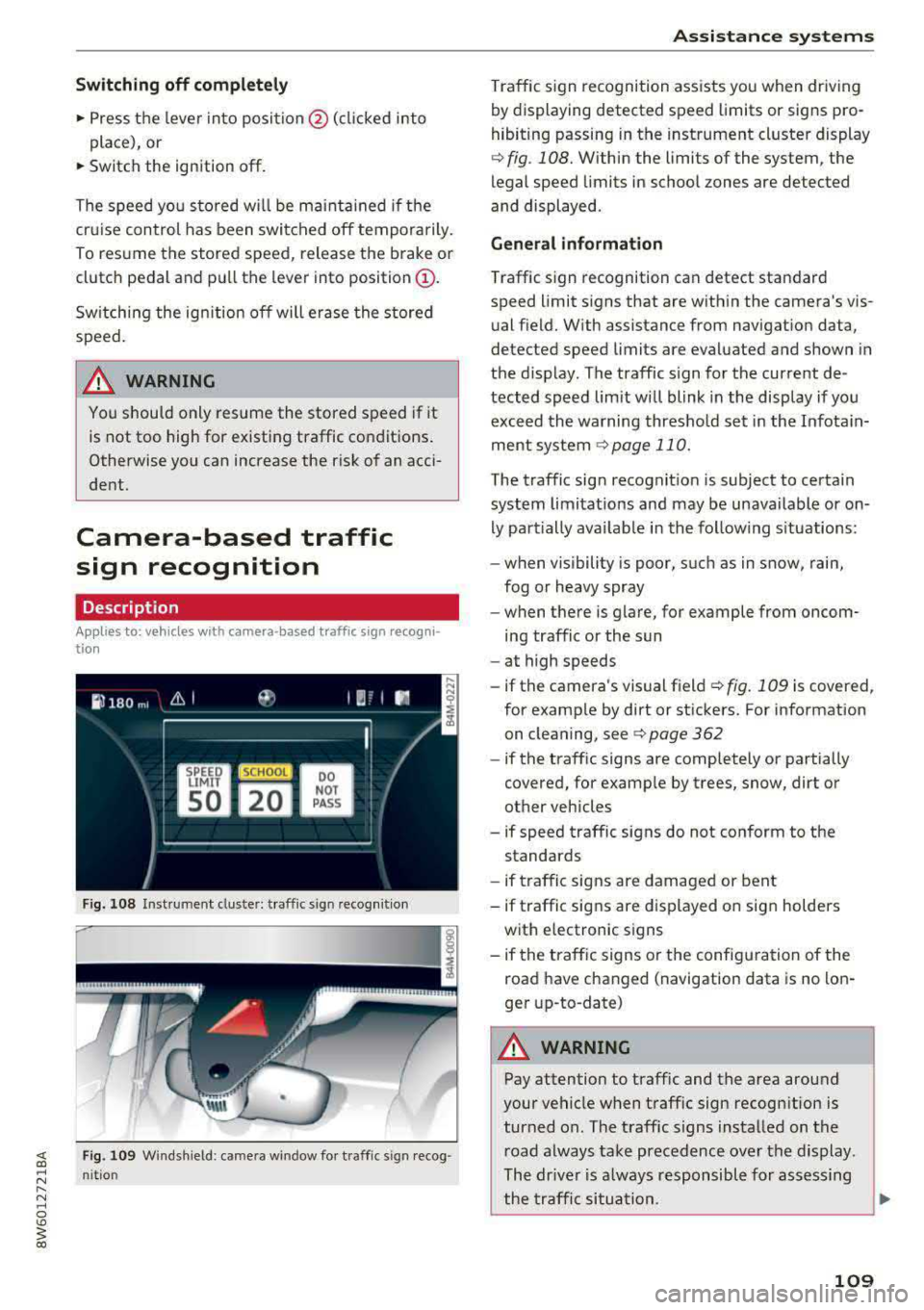
Fig. 108 Inst ru ment cluste r: traffic s ig n recognit ion
F ig. 109 Windshield : came ra window for traffic sign recog
n it io n
Assistance systems
Traffic sign recognition assists you when driving
by displaying detected speed limits or signs pro
hibiting passing in the instrument cluster display
¢ fig . 108. Within the limits of the system , the
legal speed limits in school zones are detected
and displayed.
General information
Traffic sign recognition can detect standard
speed limit signs that are within the camera's vis
ual field. With assistance from navigation data,
detected speed limits are evaluated and shown in
the display. The traffic s ign for the current de
tected speed lim it w ill blink in the disp lay if you
exceed the warning threshold set in the Infotain
ment
system ¢ page 110.
The traffic sign recognition is subject to certain
system limitat ions and may be unavailable or on
ly part ially ava ilable in the follow ing s ituations:
- when visibility is poor, such as in snow, rain,
fog or heavy spray
- when there is glare, for example from oncom
ing traffic or the sun
- at high speeds
- if the camera's visual
field ¢ fig. 109 is covered ,
for examp le by dirt or stickers. For information
on cleaning, see
¢ page 362
- if the traffic signs are completely or partially
covered, for examp le by trees, snow, dirt or
other vehicles
- if speed traffic signs do not conform to the standards
- if traffic signs are damaged or bent
- if traffic signs are displayed on sign holders
with electronic signs
- if the traffic signs or the configuration of the
road have changed (navigation data is no lon
ger up-to-date)
A WARNING
-Pay attention to traffic and the area around
your vehicle when traff ic sign recognition is
turned on. The traff ic signs installed on the
road always take precedence over the display.
The drive r is a lways responsible for assessing
the traffic situation .
-
109