ignition AUDI A5 COUPE 2018 User Guide
[x] Cancel search | Manufacturer: AUDI, Model Year: 2018, Model line: A5 COUPE, Model: AUDI A5 COUPE 2018Pages: 409, PDF Size: 67.63 MB
Page 45 of 409
triggered. The anti-theft alarm system is activat
ed when the vehicle is locked as usua l.
It
switches off when the vehicle is unlocked.
If the a larm is trigge red, it w ill shu t off automat
ically a fter a ce rtain amount of time . Switch the
ignition on or press
the m button on the remote
control key to turn
off the alarm.
Luggage compartment
Lid
Opening /closing the luggage compartment
lid
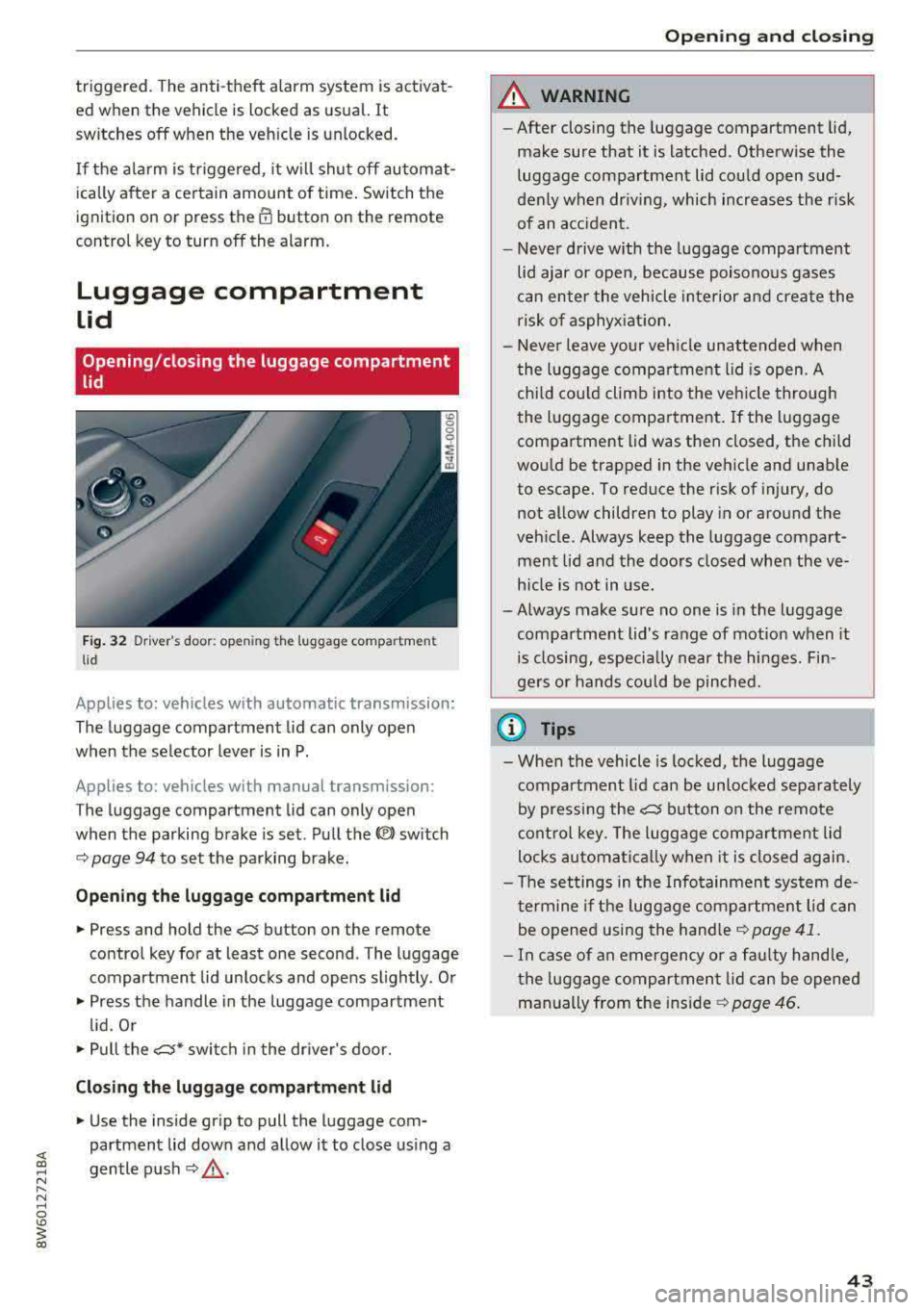
Fig . 32 Driver 's door: opening the luggage compartment
lid
Applies to: vehicles with automatic transmission:
The luggage compartment lid can only open
when the selector lever is in P.
Applies to: vehicles with manual transmission:
The luggage compartment lid can only open
when the parking brake is set. Pull the
«el) sw itch
~ page 94 to set the parking brake.
Opening th e luggage compartment lid
.,. Press and hold the c:;; button on the remote
contro l key for at least one second . The luggage
compartment lid unlocks and opens slightly . Or
.,. Press the handle in the luggage compartment
l id. Or
.,. Pull the c:>* switch in the dr iver's door.
Cl osing the luggage compartment lid
.,. Use the inside gr ip to pull the luggage com
partment lid down and allow it to close using a
gentle p ush
~ ,&. .
Op enin g an d clos ing
A WARNING
--After closing the luggage compartment lid,
make sure that it is latched . Otherw ise the
luggage compartment lid could open sud
denly when dr iving, which increases the r isk
of an a cc ident.
- Never drive with the luggage compartment
lid ajar or open, because poisono us gases
can enter the vehicle interior and create the
risk of asphyx iat ion.
- Never leave your veh icle unattended when
the luggage compartment lid is open. A
child cou ld climb into the veh icle through
the luggage compartment. If the luggage compartment lid was then closed, the child
would be trapped in the vehicle and unable
to escape. To reduce the risk of injury, do
not allow children to play in or around the
veh icle . Always keep the luggage compart
ment lid and the doors closed when the ve h icle is not in use.
-Always make sure no one is in the luggage
compartment lid's range of motion when it
is closing, especially near the hinges. Fin
gers or hands could be pinched.
© Tips
- When the vehicle is locked, the luggage compartment lid can be unlocked separately
by pressing the
c:5 button on the remote
control key. The luggage compartment lid
locks automa tically when it is closed again.
- T he settings in the Infotainment system de
termine if the luggage compartment lid can be opened using the
hand le~ page 41 .
- In case of an emergency or a fau lty handle,
t he luggage compartment lid can be opened
manually from t he
ins ide ~ page 46.
43
Page 46 of 409
Opening and clo sin g
Automatic luggage compartment lid
Applies to: vehicles with automatic luggage compartment lid
The luggage compartment lid can be opened and
closed electrically.
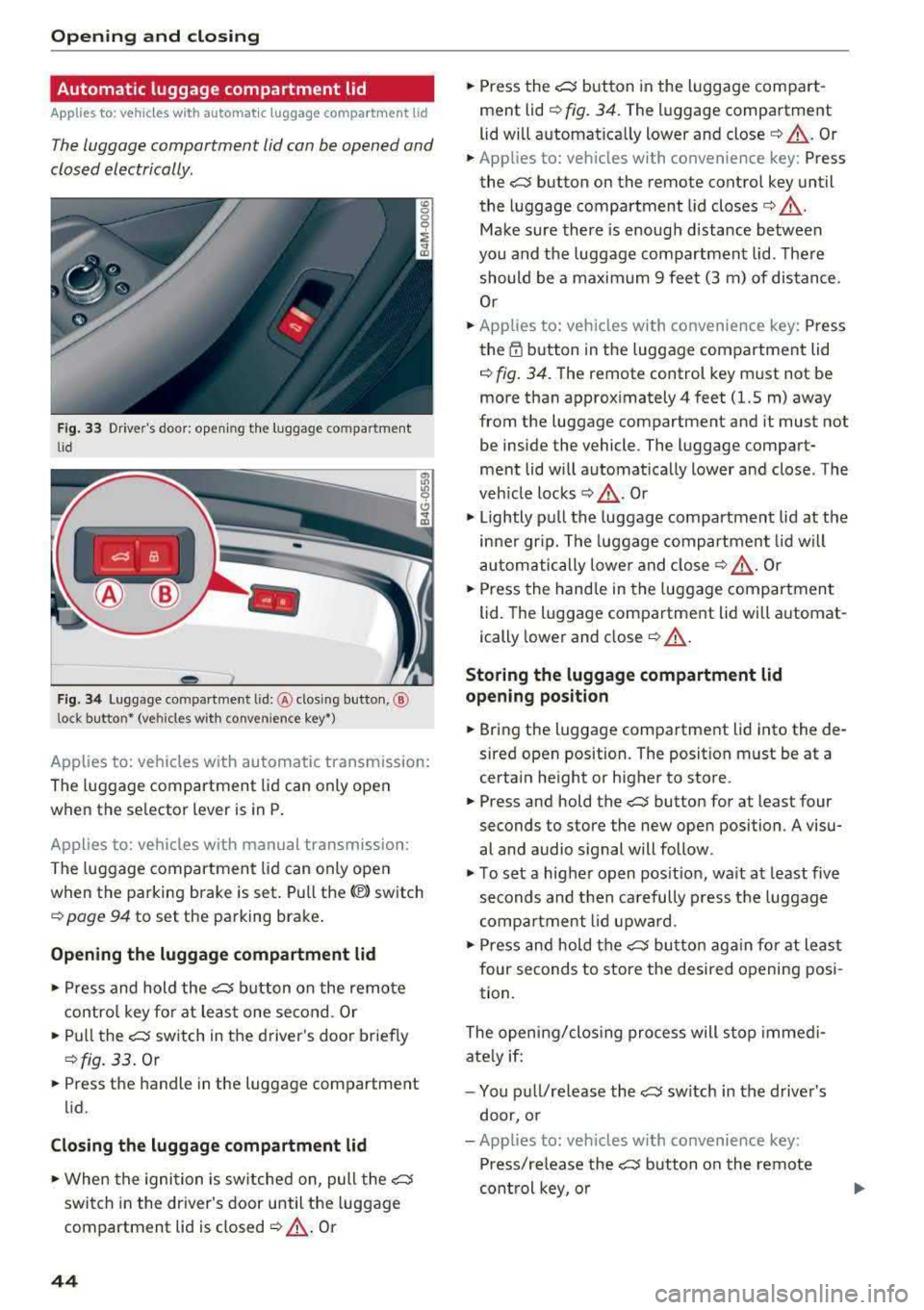
F ig. 33 Driver's doo r: opening the luggage compartment
lid
Fig. 34 Luggage compartment lid: @clos ing button, ®
lock button* (vehicles with convenience key*)
Applies to: vehicles with automatic transmission:
The luggage compartment lid can only open
when the se lector lever is in
P .
Applies to: vehicles with manual transmission:
The luggage compartment lid can only ope n
when the parking brake is set. Pull
the© switch
¢ page 94 to set the parking brake .
Opening the luggage compartment lid
... Press and hold the ~ b utton on the remote
contro l key fo r at leas t one second . Or
... Pu ll the~ switch in the driver 's door briefly
¢ fig. 33 . Or
... Press the handle in the luggage compartment
lid.
Cl osing th e luggage compartment lid
... When the ignition is sw itched on, pull the~
switch in the driver's door until the luggage
compartment lid is closed
¢ ,& . Or
44
... Press the~ button in the luggage compart
ment lid
¢ fig. 34. The luggage compartment
lid wi ll automat ica lly lower and
close¢ ,&. Or
... Applies to: vehicles with convenience key: Press
the~ button on the remote control key until
the luggage compartment l id
closes¢ .&,.
Make sure there is enough distance between
you and the luggage compartment lid . The re
should be a maxim um 9 feet (3 m) of distance.
Or
... Applies to: vehicles with convenience key: Press
the
tf) button in the luggage compartment lid
¢ fig. 34. The remote control key m ust not be
more than approx imately
4 feet (1.5 m) away
from the luggage compartment and it must not
be inside the vehicle. The luggage compart
ment lid will automatically lower and close. The
veh icle
locks ¢.&_ . Or
... Lightly p ull the luggage compartment lid at the
in ner gr ip. The luggage compartment lid wi ll
automatically lowe r and close
¢ .&_ . Or
... Press the hand le in the luggage compartment
lid. The luggage compartment lid will automat
ically lower and close
¢ .&, .
Storing the luggage compartment lid
opening position
... Bring the luggage compartment lid into the de
sired open position. The position must be at a
certain height or higher to store .
... Press and hold the~ button for at least four
seconds to store the new open position . A visu
al and audio s ignal will follow.
... To set a higher open pos it ion, wa it at least five
seconds and then carefully p ress the luggage
compa rtment lid upward .
... Press and hold the~ butto n aga in fo r at least
four seconds to store the desired opening posi
tion.
The opening/clos ing process will stop immedi
ate ly if:
- You pu ll/re lease
the~ sw itch in the drive r's
door, or
- Applies to: vehicles with convenience key:
Press/re lease
the~ b utton o n the remote
con trol key, o r
Page 52 of 409
Opening and clo sin g
Panorama glass roof
Panorama glass roof, opening /closing the
sunshade
Applies to: vehicles with panorama glass roof
The front segment can tilt and slide open.
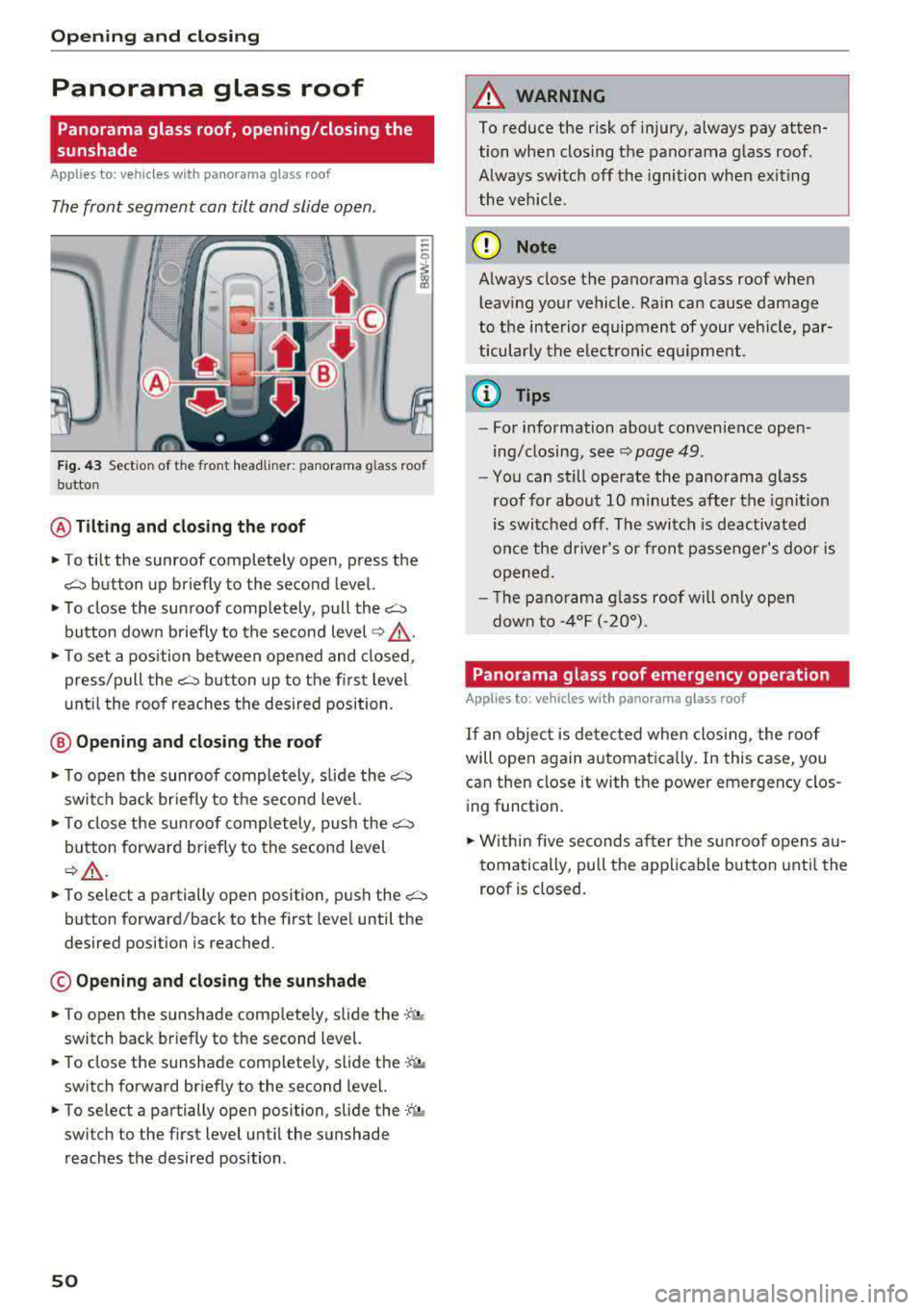
Fig . 43 Sect ion of the front headliner: panorama glass roof
button
@ Tilting and cl osing th e ro of
., To tilt the sunroof completely open, press the
~ button up briefly to the second level.
., To close the sunroof comp letely, pull the~
button down briefly to the second level ~ &
., To set a pos ition between opened and closed,
press/pull
the~ button up to the first level
unt il the roof reaches the desired position.
@ Opening and closing the roof
., T o open the sunroof completely, slide the~
switch back br iefly to the second level.
., To close the sunroof comp letely, push the~
button forward briefly to the second leve l
~A -
.. To se lect a partially ope n position, push the~
button forward/back to the first level until the
desired position is reached.
© Opening and clos ing the sunshade
., To open the sunshade comp letely, sli de the .;f",j,,
switch back briefly to the second level.
., To close the sunshade comp lete ly, slide the.-; ;, .
switch forward briefly to the second level.
., To select a partially open position, slide the -:a ,.
switch to the first level until the sunshade
reaches the desired position .
50
A WARNING
To reduce the risk of injury, always pay atten
tion when closing the panorama glass roof.
Always switch off the ignition when exit ing
the vehicle.
(D Note
Always close the panorama g lass roof when
leav ing your vehicle. Ra in can cause damage
to the i nterio r equipment of your veh icle, par
ticularly the electron ic equ ipment.
@ Tips
- For information about convenience open
ing/closing,
see~ page 49.
- You can still operate the panorama glass
roof for about 10 minutes after the ignition
is switched off. The switch is deactivated
once the dr iver's o r front passenger's door is
opened.
- T he pano rama g lass roof will on ly open
dow n to - 4°F (-20°).
Panorama glass roof emergency ope ration
Applies to : vehicles with panorama glass roof
If an object is de tected when clos ing, the roof
will open again automatica lly. In this case, you
can then close it with the power emergency clos
ing function .
., Within five seconds after the s unroof opens au
tomatically, pu ll the app licable button unti l the
roof is closed .
Page 53 of 409
Valet parking function
Applies to: vehicles wit h valet parking funct ion
The valet parking function protects the luggage
comportment from unauthorized access.
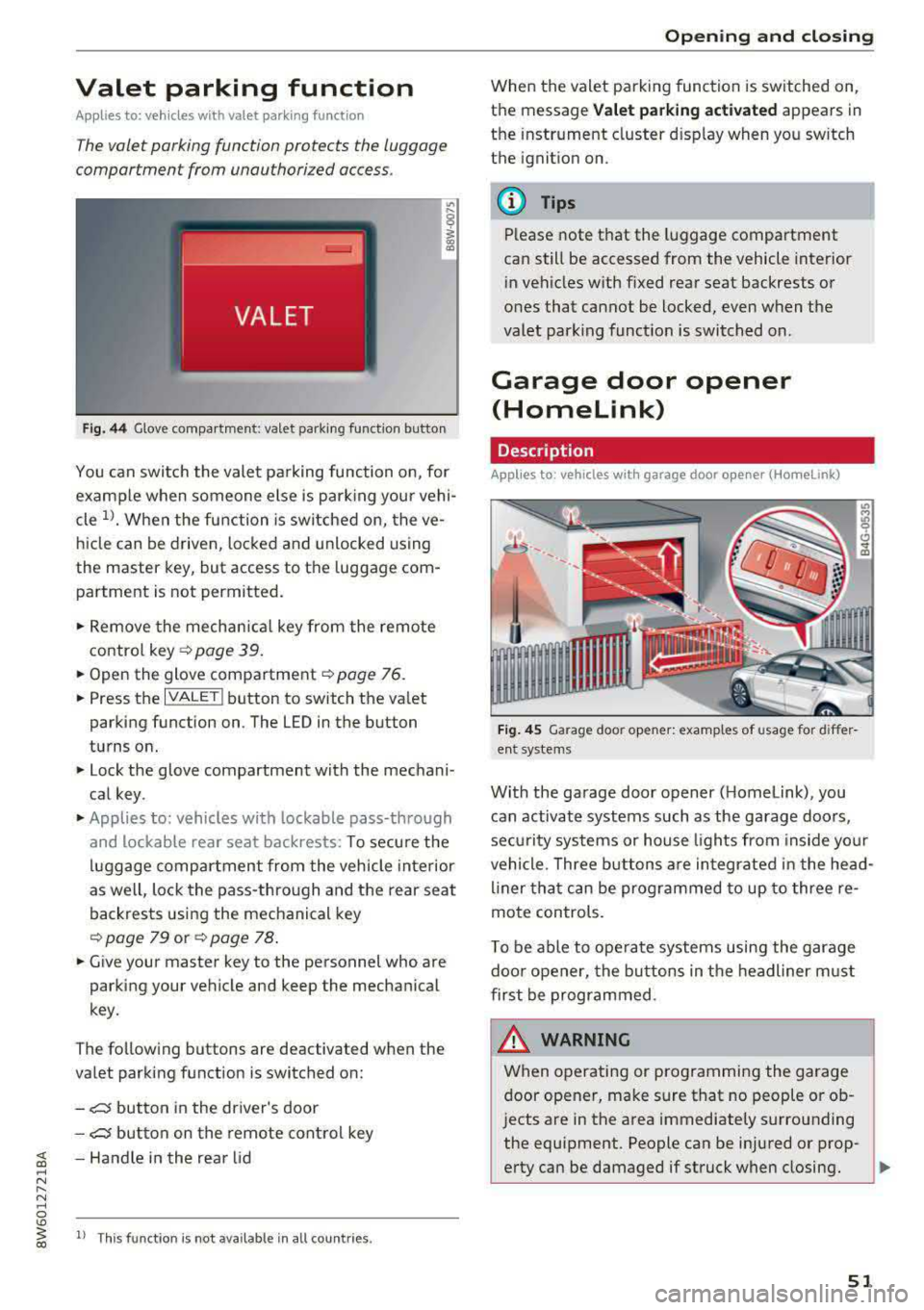
Fig. 44 Glove compartment: valet parking function butto n
You can switch the valet parking function on, for
example when someone else is parking your vehi
cle
l)_ When the function is switched on, the ve
hicle can be driven, locked and unlocked using
the master key, but access to the luggage com
partment is not permitted .
.,. Remove the mechan ical key from the remote
contro l
key~ page 39 .
.,. Open the glove compartment ~ page 76 .
.,. Press the IVALET I button to switch the valet
parking function on . The LED in the button
turns on.
.,. Lock the glove compartment with the mechani
cal key .
.,. Applies to: vehicles with lockable pass-through
and lockable rear seat backrests: To secure the
luggage compartment from the vehicle interior
as well, lock the pass-through and the rear seat
backrests using the mechanical key
~ page 79 or ~ page 78 .
.,. Give your master key to the personnel who are
parking your vehicle and keep the mechanical
key.
The following buttons are deactivated when the
va let parking function is switched on:
-,c:;5 button in the driver's door
-,c:;5 button on the remote control key
~ -Handle in the rear lid ..... N
" N ..... 0
'° ~ ll Th is function is not available in all countr ies . co
Open ing and closing
When the valet parking function is switched on,
the message
Valet parking activated appears in
the instrument cluster disp lay when you sw itch
the ignition on.
@ Tips
Please note that the luggage compartment
can still be accessed from the vehicle interior
in vehicles with fixed rear seat backrests or
ones that cannot be locked, even when the
valet park ing funct ion is switched on.
Garage door opener
(Homelink)
Description
Applies to: vehicles with garage door opener (Home Link)
Fig. 45 Garage door opener: examples of usage for differ
ent system s
With the garage door opener ( Homelink), you
can activate systems such as the garage doors,
sec urity systems or house lights from inside your
vehicle. Three buttons are integrated in the head
liner that can be programmed to up to three re
mote controls.
T o be able to operate systems using the garage
door opener, the buttons in the headliner must
first be programmed .
_& WARNING ~
When operating or programming the garage
door opener, make sure that no people or ob
jects are in the area immediately s urrounding
the equipment. People can be injured or prop-
erty can be damaged if struck when closing.
Ill>
51
Page 54 of 409
Opening and clo sin g
@ Tips
- For security reasons, we recommend that
you clear the programmed buttons before selling the vehicle.
- For additional information about HomeLin k,
vis it www.homelink.com.
- Fo r an explanation on conformity with the
FCC regulations in the United States and the
Industry Canada regu lations, see
¢ page 392.
Operation
Appl ies to: ve hicles w ith ga ra g e doo r opener (Homeli nk)
Requirements: the button in the headliner must
be programmed
c::> page 52 and the vehicle
must be within range of the sys tem, such as the
garage door.
• Press the button to open the garage door . The
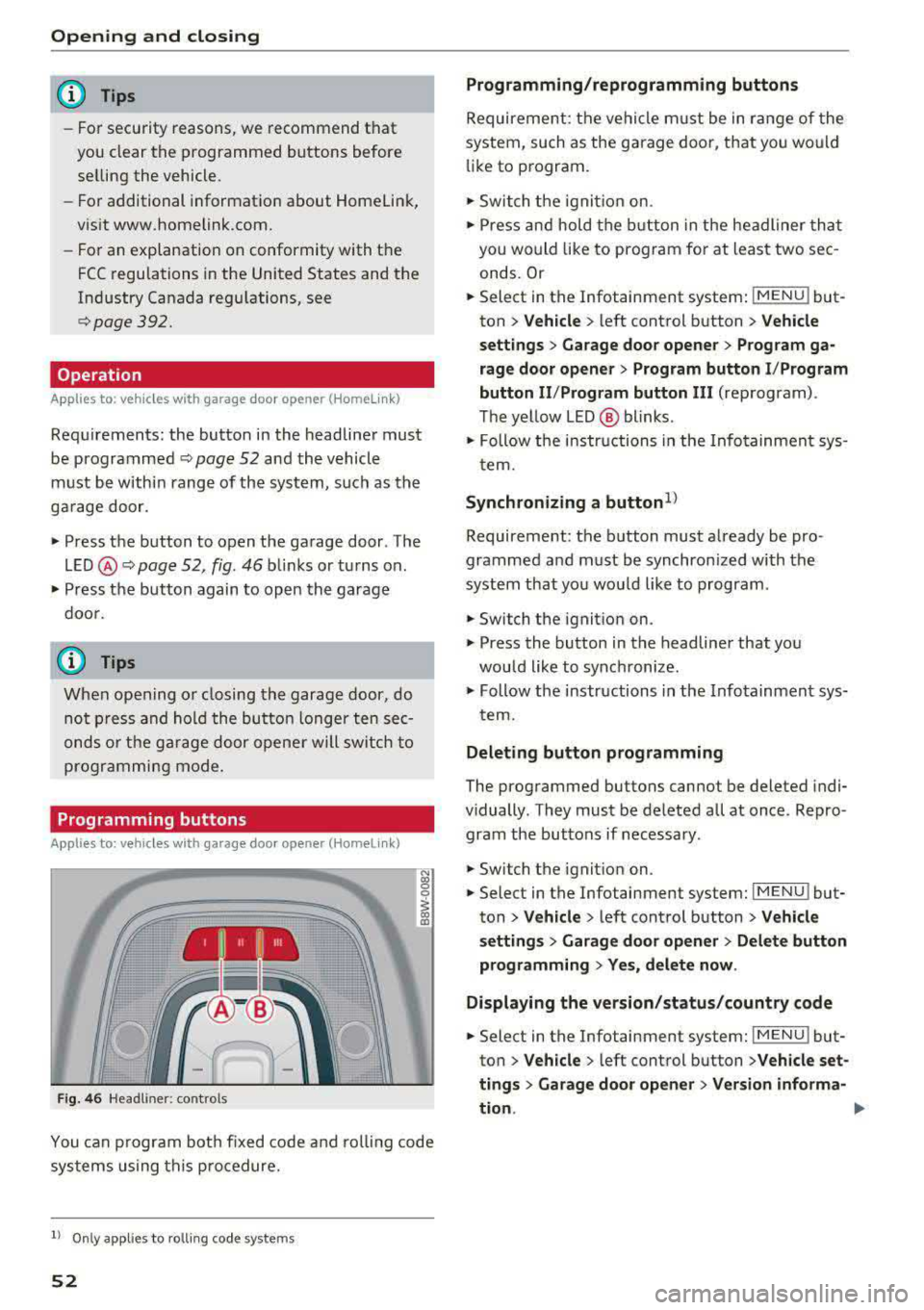
L E D @ c::> page 52, fig . 46 bli nks or turns on .
• Press the button again to open the garage
doo r.
@ Tips
When open ing o r closing the garage door, do
not p ress and hold the butto n longer ten sec
onds o r the ga rage door opene r will sw itch to
programmi ng mode.
Programming button s
App lies to: ve hicles w ith gara g e doo r opener (Homeli nk)
1 1 11~111
Fig . 4 6 Headliner: controls
N
"' 0
0
~ a,
You can p rogram bot h fixed code and roll ing code
sys tems using this procedure.
l) Only appl ie s to ro lli ng code system s
52
Programming /reprogramm ing buttons
Requireme nt: the vehicle m ust be in range of the
system, such as the garage door, that you would
li ke to program.
• Switch t he ignit io n on.
• Press and hold the b utton in the headliner that
you would like to program for at least two sec
onds. Or
• Select in the Infotainment system : IMENUj but
ton
> V ehicle > left control button > Vehicle
s e tting s> Garage door opener > Prog ram ga
rage door opener
> Prog ram bu tton I /P rogram
button II /Prog ram button
II I (reprogram) .
The ye llow LED @ blinks .
• Follow the in structions in the Info tainment sys-
tem.
Synchronizing a button1 )
Requireme nt: the button must already be pro·
grammed and must be synchronized with the
system that you wou ld like to program .
• Switch the ignition on .
• Press the button in the headliner that you
would like to synchronize.
• Follow the instructions in the Infotainment sys·
t ern.
Deleting button programming
The programmed buttons cannot be deleted indi·
vidually . They must be deleted all at once. Repro·
gram the buttons if necessary .
• Switch the ignit ion on.
• Select in the Infotainment system: IMENU j but·
ton
> Ve hicle > left control button > Vehicle
s etting s
> Garage door opener > Del ete button
programming
> Y es, del ete now .
Displa ying the version /status /country code
• Select in the Infotainment system: IMENUj but
ton
>V ehicle > left control button >V ehicle set·
ting s
> Garag e door opener > Version informa-
tion .
.,..
Page 56 of 409
Power top
Power top
Automatic power top
General information
Applies to: vehicles with power top
The power top opens and closes automat ically .
W hen open, the powe r top is stored comp lete ly
i n t he power top comp artmen t. T he power top
can be opened or closed at speeds up to 30 mph
(SO km/h).
Unde r no rma l condi tions, the powe r top is wind
and wa terp roof. In rare cases, small d rople ts of
water m ay form under ext reme wea ther condi
tions such as torrentia l or prolonged ra in. That is
norma l and no cause for concern .
F ollow t he care ins truct ions to keep the power
top free of leaks and to main tain i ts appearance
c::> page 362, Core and cleaning. Also observe the
following:
- Open and s tow t he power to p only whe n it is
cl ean and dry. Stowi ng the power top when it is
damp can create imp rints in it, and mi ldew and
othe r damage can res ult if it is left stowed
whi le damp for long periods of time. To prevent
scratc hing or damaging the power top, do not
use a ny sharp-edged objects to remove ice and
snow . The rear window may be clea red w ith a
standard ice scraper .
- Do not leave the power top open for several
weeks o r th e creases in it may become discol
o red .
- Do not ope n the power top when the tem pera
tu re is be low 32 °F (0 °C) . The fabric i n the
power top loses elast ic ity in s ub- zero tempera
tu res.
- The powe r top w ill not open when the tempera
tu re is be low- 5 °F (-1 5 °().
54
· Opening/closing the power top
Applies to: vehicles with power top
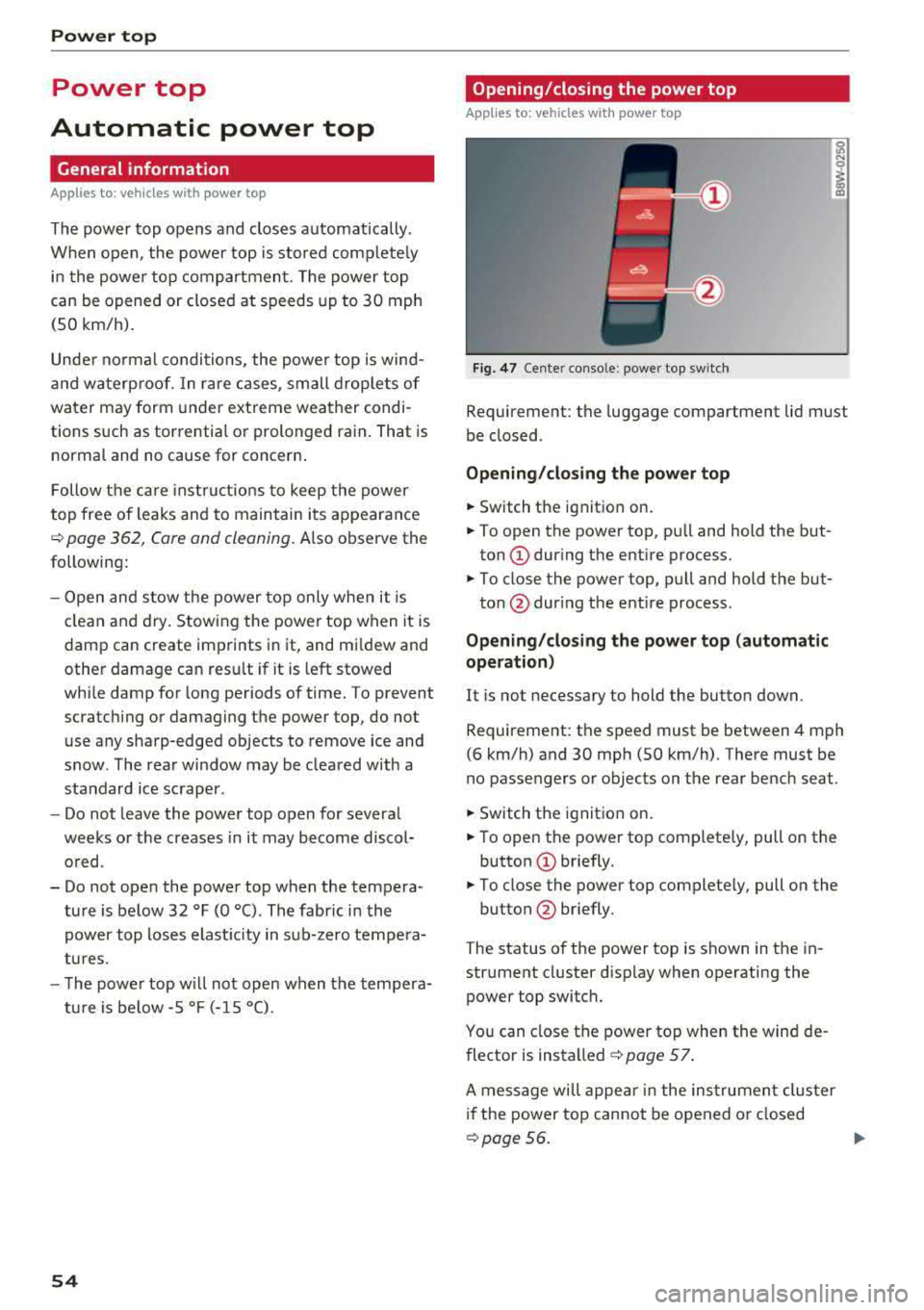
Fig. 47 Ce nte r co nso le : powe r top sw itc h
Requireme nt: the luggage compartment lid must
be closed .
Opening/closing the power top
.,. Switch the ignit io n on.
.,. To open the power top, pu ll and hold the but
ton
(D dur ing the entire process.
.,. To close the power top, pu ll and hold the but-
ton @dur ing the ent ire process .
Opening/cl osing the power top (automatic
operation)
It is not necessary to hold the butto n down.
Requirement: the speed must be between 4 mph
(6 km/h) and 30 mph (SO km/h). The re must be
no passengers or objects on the rear bench seat .
.,. Switch the ignition on.
.,. T o open the power top complete ly, pull on the
button
(D br iefly.
.,. To close the power top complete ly, pull on the
button @ briefly.
The status o f the power top is shown in the in
str ument cl uster d isplay when operating the
power top switch.
You can close the power top when the win d de
flector is installed
c::> page 57 .
A message wi ll appe ar in the ins trumen t clus te r
if the power top cannot be opened o r closed
c::> page 56. .,.
Page 60 of 409
Power top
Power top emergency
operation
Preparation
Applies to: vehicles with power top
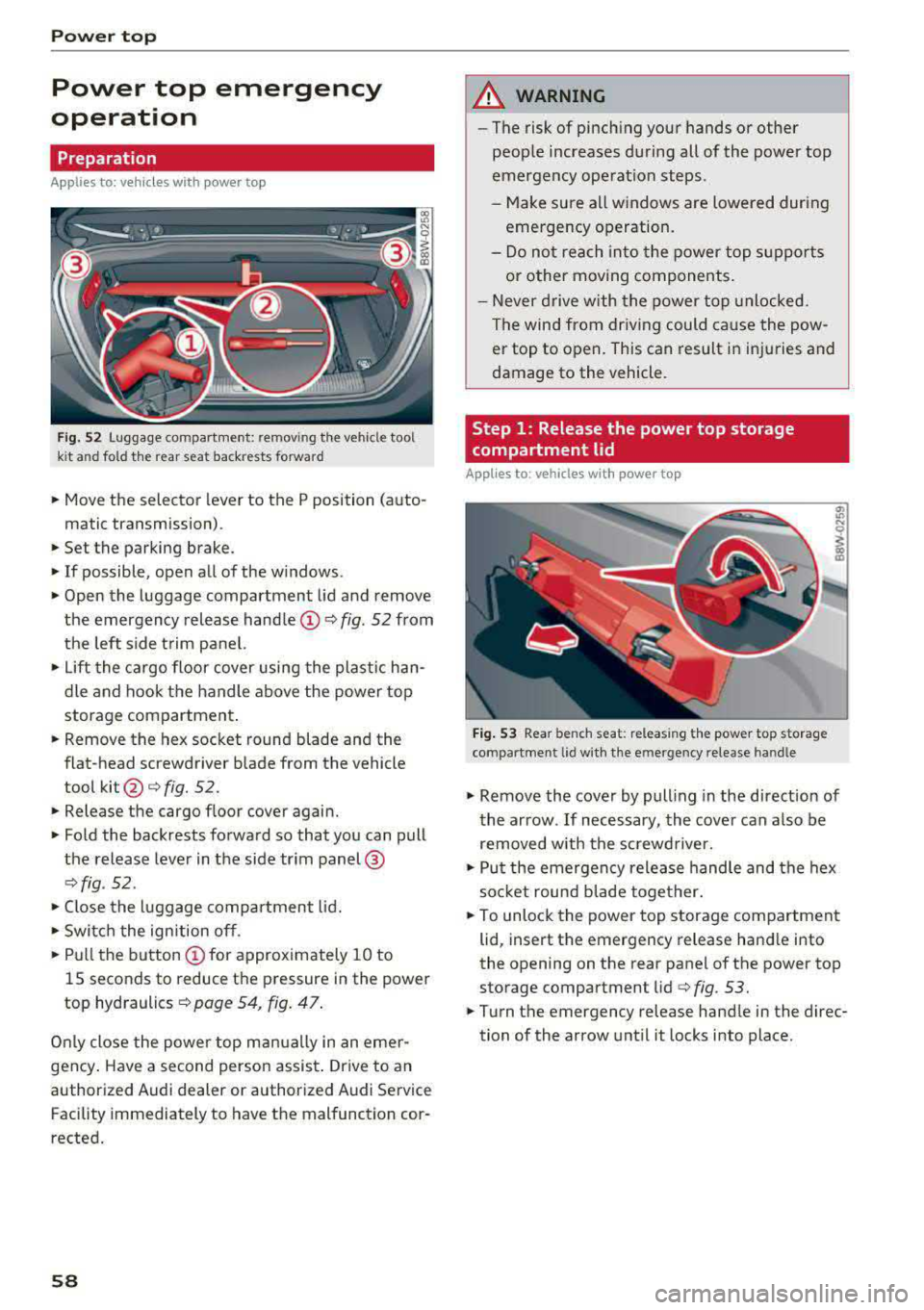
f ig. 52 Luggage compartme nt: remov ing the vehicle tool
k it a nd fo ld the rear seat back rests forward
• Move the selector lever to the P position (auto-
matic transmission) .
• Set the parking brake.
• If possible, open all of the w indows .
• Open the luggage compartment lid and remove
the emergency release
handle@Q fig. 52 from
the left side trim panel.
• Lift the cargo floor cover using the plastic han
dle and hook the handle above the power top
storage compartment .
• Remove the hex socket round blade and the
flat-head screwdriver blade from the vehicle
tool
kit @ c:> fig. 52.
• Release the cargo f loor cover again.
• Fold the backrests forward so that you can pull
the release lever in the side trim panel@
Qfig . 52 .
• Close the luggage compartment lid.
• Switch the ignition off.
• Pull the button @for approximately 10 to
15 seconds to reduce the pressure in the power
top hydraulics
c:> page 54, fig. 47 .
Only close the power top manually in an eme r
gency . Have a second person assist . Drive to an
authorized Audi dealer or authorized Audi Service Facility immediately to have the malfunction cor
rected.
58
A WARNING
- The risk of pinch ing your hands or other
people increases during all of the power top
emergency operation steps .
-Make sure all windows are lowered during
emergency operation.
-Do not reach into the power top supports
or other moving components.
- Never drive with the power top unlocked.
The wind from driving could cause the pow
er top to open. This can result in injuries and
damage to the vehicle.
Step 1 : Release the power top storage
compartment lid
Applies to : vehicles with power top
Fig. 53 Rear bench seat: releas ing the power top storage
compartment lid w ith the e mergency release han dle
"' Ill
I
"' Remove the cover by pulling in the direct ion of
the arrow . If necessary, the cover can a lso be
removed with the screwdriver.
• Put the emergency release handle and the hex
soc ket round b lade together.
• To unlock the power top storage compartment
lid, insert the emergency release handle into
the opening on the rear panel of the power top
storage compartment lid
c:> fig. 53.
• Turn the emergency release handle in the direc
tion of the arrow until it locks in to place.
Page 63 of 409
Lights and Vision
Exterior Lighting
Switching the lights on and off
--- ----~------'~
i
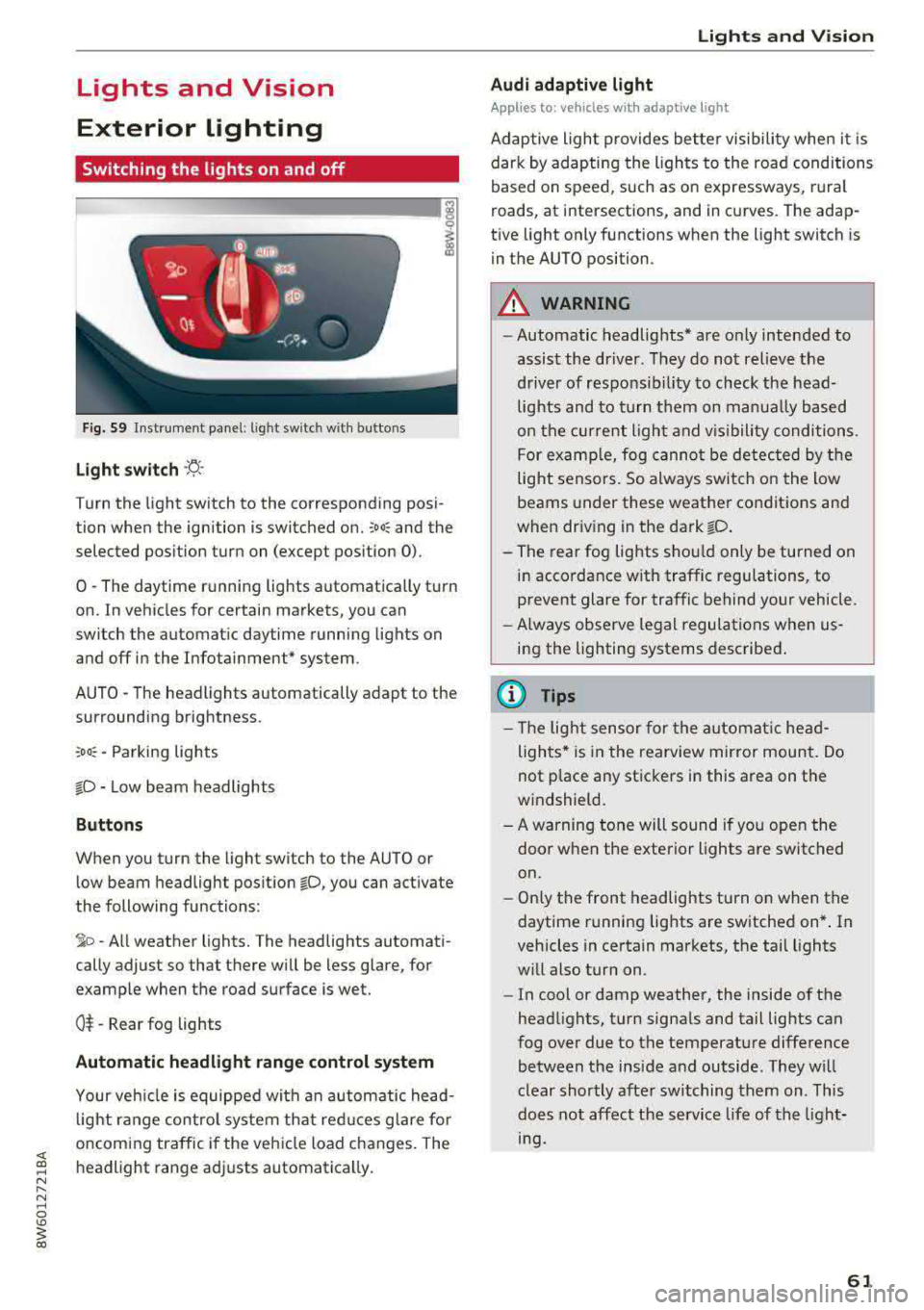
Fig . S9 Instrument panel: l ig ht sw itc h w ith buttons
Light switch ·'!;5- ·
Turn the light sw itch to the corresponding posi
tion when the ignition is switched on.
~oo: and the
selected pos ition turn on (except pos ition 0).
0 · The daytime r unning lights automat ica lly t urn
on. In veh icles for certain markets, you can
switch the automat ic daytime running lights on
and
off i n the Infotainment* system.
AUTO
-T he headlights automatically adapt to the
surrounding brightness.
~oo : -Parking lights
io -Low beam headlights
Buttons
When you turn the light switch to the AUTO or
l ow beam headlight pos it ion
io, you can activate
the following functions:
~ o -A ll weat her lights. The headlights automati
cally adjust so that there w ill be less glare, for
examp le when the road surface is wet.
0$ -Rear fog lights
Automatic headlight range control system
Your veh icle is equippe d with an autom atic head
l ight range contro l system that re duces glare fo r
oncoming traffic if the vehicle load c hanges. The
headlight range ad justs automatica lly.
Lights and V ision
Audi adaptive light
Appl ies to: vehicles wit h adaptive light
Ad aptive ligh t provides be tter visibili ty when i t is
dark by adapting the ligh ts to the road condi tions
based on speed, such as on e xpressways, rura l
roads, at intersections, and in c urves. The adap
t ive light only functions when the light switch is
i n the AUTO position .
A WARNING
--Automatic headlights* are on ly intended to
assist the driver. They do no t relieve the
driver of responsibil ity to check the head
lights and to turn t hem on manu ally b ased
on t he cur ren t ligh t and v is ibility conditi on s.
F o r e xamp le, fog canno t be de tec ted by t he
light sensors. So always swit ch o n the low
beams under these weather co nditions and
when dr iv ing in the dark
io .
- The rear fog lights s hou ld only be turned on
in acco rdance w ith traffic regulation s, to
prevent glare for traffic behind your vehicle.
- Always observe le g al regulations when
us
ing the lighting systems desc ribed .
(D Tips
- The lig ht sen sor for the automat ic he ad
ligh ts* is in the rearview mir ror mount. Do
not p lace any st ickers in this area on the
windshield.
- A warning tone will sound if yo u ope n the
door whe n the e xte rior lights a re switched
on .
- Only t he front headlights turn on when t he
daytime running lights are sw itche d on* . In
vehicles in certain markets, the tail lights
w ill also turn on.
- In cool or damp weather, the inside of the
head lights, turn signa ls and tail lights can
fog over due to the temperature diffe rence
b etween the insi de and outside . They wi ll
clear shortly afte r swi tching them on . This
does n ot aff ect the service life of the light
mg.
61
Page 64 of 409
Lights and Vi sion
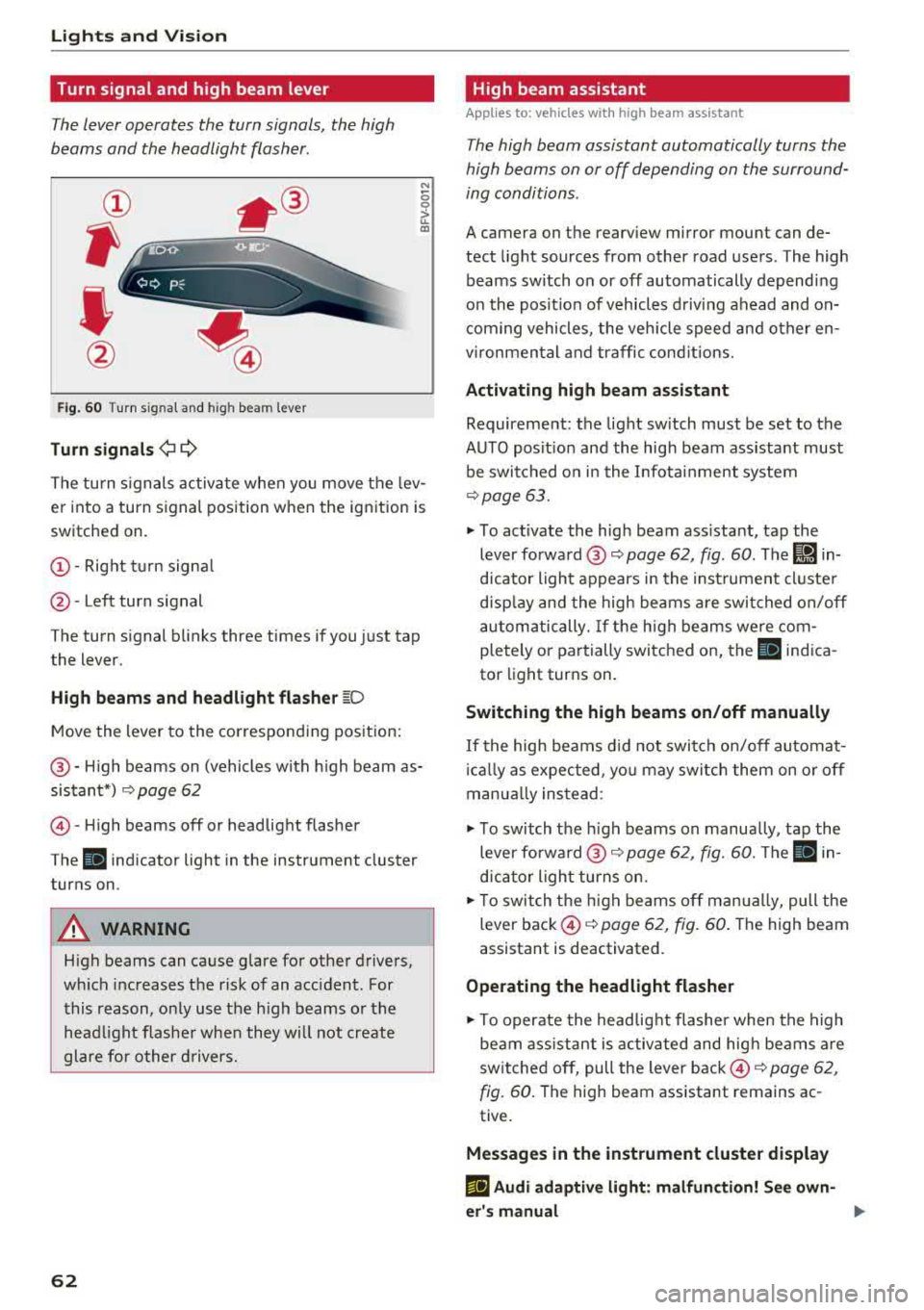
Turn signal and high beam lever
The lever operates the turn signals, the high
beams and the headlight flasher.
®
,
I
@
F ig . 60 Turn s ignal and high beam lever
Tu rn signals ¢ 9
N
0 0
> u. a,
The turn s ignals activate when you move the lev
er into a turn signal position when the ignition is
switched on.
@ -Right tu rn signa l
@-Left turn signal
The turn signal blinks three times if you just tap
the lever.
High b eams and h eadlight fl ash er ~D
Move the lever to the corresponding pos ition:
@ -High beams on (vehicles with h igh beam as
sistant*)
Q page 62
© -High beams off or headlight flasher
The
II indicator light in the instrument cluster
turns on.
A WARNING
High beams can cause glare for other drivers,
wh ich increases the risk of an accident. For
this reason, only use the h igh beams or the
head light f lasher when they will not create
glare for other d rivers.
62
· High beam assistant
Applies to: vehicles with high beam assistant
The high beam assistant automatically turns the
high beams on or off depending on the surround
ing conditions.
A camera on the rearview mirror mount can de
tect light sources from other road users. The high
beams switch on or off automatically depending
on the posit ion of vehicles d riving ahead and on
com ing vehicles, the veh icle speed and other en
vironmental and traffic cond itions.
Activ ating high b eam assistant
Requirement: the light sw itch must be set to the
AUTO posit ion and the high beam ass istant must
be switched o n in the Infota inment system
¢page 63.
~ To activate the high beam ass istant, tap the
lever forward @
c:> page 62, fig. 60 . The I!) in
dicator light appears in the inst rument cluste r
disp lay and the high beams a re swit ched on/off
automatically. If the h igh beams we re com
pletely or partially switched on, the II indica
tor light turns on.
Switching the high beams on /off manually
If the high beams d id not switch on/off automat
i ca lly as expected, yo u may switch them on or off
manua lly ins tead:
~ T o switch the h igh beams on manually, tap the
lever forward @
Q page 62, fig. 60. The Ill in
dicator light turns on.
~ T o switch the h igh beams off man ua lly, pull the
lever back ©
c:> page 62, fig. 60 . The high beam
assistant is deactivated.
Ope rating the headlight flasher
~ To operate the head lig ht flashe r when the high
beam ass istant is activated and hig h beams are
switched off, pull the lever back ©
c:> page 62,
fig. 60 .
The high beam assistant remains ac
tive.
Message s in the instrument cluster display
rlJ Audi adaptiv e light : malfun ction! See own
e r's manual
...
Page 66 of 409
Lights and Vision
The emergency flashers also work whe n the igni
tion is turned off.
@ Tips
You s hou ld sw itch the emergency flashers on
if:
- you are the last car in a traff ic jam so that
a ll other vehicles approaching from behind
can see you, or if
- your ve hicle has bro ke n down or you are
having an eme rgency, or i f
- you r vehicle i s being towed or if yo u are tow
ing another vehicle
Interior lighting
Front interior lighting
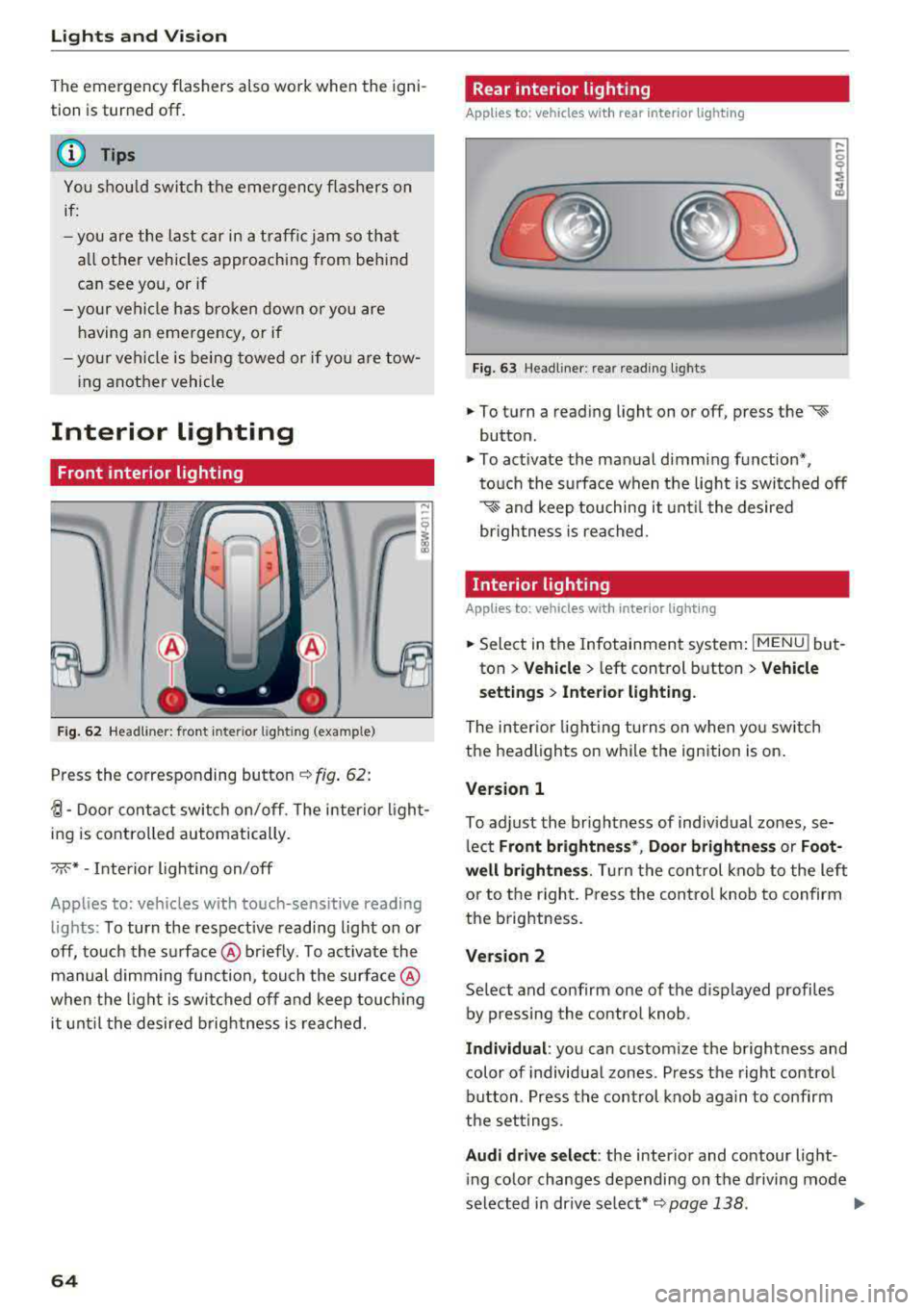
F ig. 62 Headliner: front inter ior l ight ing (example)
Press the corresponding button c::> fig . 62:
~-Door contac t switch on/off. The interior ligh t
ing is controlled automatically.
->;<-* -Inte rior l ighting on/off
Applies to: vehicles with touch-sensitive reading
lights: To turn the respect ive reading light on or
off, touch the surface @ briefly . To activate the
manual dimming function, touch the surface @
when the light is swi tched off and keep touching
it unt il t he desired brig htness is reached.
64
Rear interior lighting
Applies to: vehicles with rear interior lighting
Fig. 63 Headline r: rear reading lights
.,. To turn a reading light on or off, press the «~
button .
.,. To activate the ma nual dimming f unction*,
t o uch the s urface when the light is swi tc h ed off
'* and keep touching it unt il the desired
brightness is rea ched.
Interior lighting
Applies to: vehicles with interior lighting
.,. Select in the Infotainment system : IMENUj but
ton
> Vehicle > l eft control b utton > Vehicle
s etting s
> Interior lighting.
The inter io r l ight ing turns on when you sw itch
the headlights on w hile the ignition is on.
Version 1
To adjust the brightness of indiv idual zones, se
l ect
Front brightne ss*, Door brightnes s or Foot
well brightness .
Tur n the control kno b to the left
or to the right. Press the con trol knob to confirm
the b rightness.
Version 2
Se lect and confirm one of the d isplayed p rofiles
by pressing the con tro l knob.
Individual : you can custom ize the brightness and
color of individual zones. Press the right contro l
button. Press the control knob aga in to confirm
the set tings .
Audi driv e sel ect : the interio r and contour lig ht
i ng color changes depending on the d riving mode
selected in dr ive se lect*
c::> page 138 . ..,.