ignition AUDI A5 COUPE 2018 Owner's Manual
[x] Cancel search | Manufacturer: AUDI, Model Year: 2018, Model line: A5 COUPE, Model: AUDI A5 COUPE 2018Pages: 409, PDF Size: 67.63 MB
Page 67 of 409
@ Tips
The setting is automatica lly stored and as
signed to the remote control key that is be ing
used.
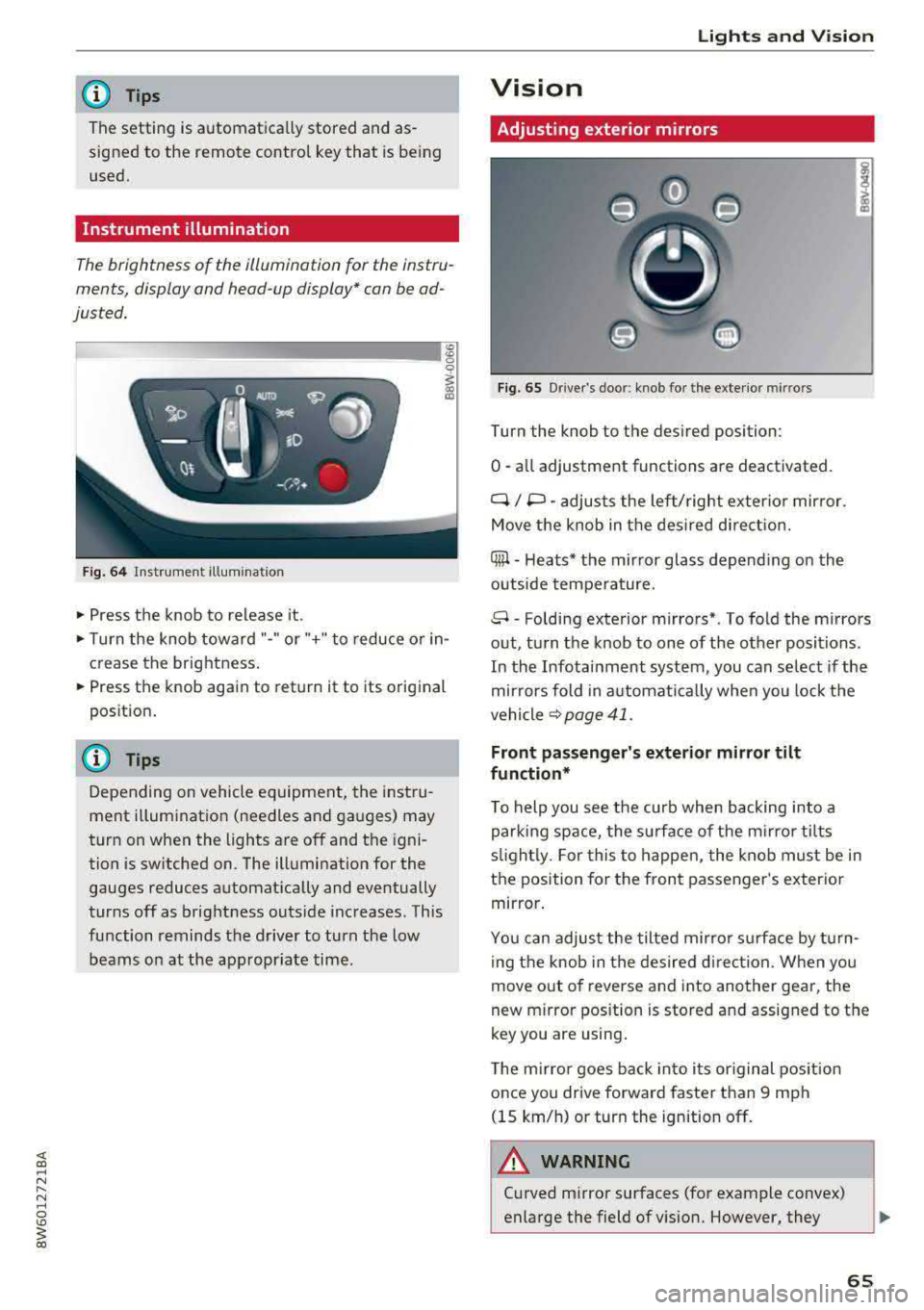
Instrument illumination
The brightness of the illumination for the instru
ments, display and head-up display* con be ad
justed.
Fig. 64 Instrument illum inatio n
~ Press the knob to release it.
~ Turn the knob toward "-" or"+" to reduce o r in
crease the brightness.
~ Press the knob again to return it to its original
position .
(D Tips
Depending on vehicle equ ipment, the instru
ment illumination (needles and gauges) may
turn on when the lights are off and the igni
tion is sw itched on. The illumination for the
gauges reduces automat ica lly and eventually
turns off as brightness outside increases. This
function reminds the driver to turn the low
beams on at the appropr iate time .
Lights and V ision
Vision
Adjusting exterior mirrors
Fig. 65 Driver's door: knob for the exterior mirrors
Turn the knob to the des ired position:
0
-a ll adjustment functions are deactivated.
q / P -adjusts the left/ right exter io r mirror.
Move the knob in the des ired direct ion.
Qiµ -Heats* the mirror glass depend ing on the
outside tempe rature.
8 -Folding exterior mirrors*. To fold the mirrors
out, turn the knob to one of the other positions.
In the Infotainment system, you can se lect if the
mir rors fold in a utomat ically when you lock the
vehicle
~ page 41.
Front passenger's exterior mirror tilt
function*
T o help you see the curb when backing into a
parking space, the surface of the mi rro r tilts
s lightl y. For this to happen, the knob must be in
the position for the front passenger 's exterio r
mirror .
You can adjust the tilted mirror s urfa ce by turn
i ng the knob in the desired direct ion. When you
move out of reverse and into another gear, the
new m irror pos ition is stored and assigned to the
key you are using .
The mirror goes back into i ts or iginal pos ition
once you drive forward faster than 9 mph
(15 km/h) or turn the ignition off .
.&_ WARNING
-C urved mirror surfaces (for example convex)
enlarge the field of vision. However, they
65
Page 70 of 409
Lights and Vi sion
CJ) Note
- If there is frost, make sure the windshie ld
wiper blades are not frozen to the wind
sh ield. Switching on the windshield wipers
when the blades are frozen to the wind
shield can damage the wiper blades.
- The windshield wiper system must be
switched off (lever in position 0) before
us
i ng a car wash. This prevents the wipe rs
from sw itching on unintentionally and caus
i ng damage to the w indshield wiper system.
(D Tips
- The windshield wipers switch off when the
ignition is switched off. You can act ivate the
windsh ield wipers after the ign ition is
switched back on by moving the windsh ield
wiper lever to any pos it ion.
- Wo rn o r dirty windshield wipe r blades result
i n streak ing. This can affect the ra in sensor
fun ct ion . Check your windshield wiper
blades regularly .
- The washer fluid nozzles fo r the windshie ld
washer system are heated at low tempera
tures when the ignition is on.
- When stopp ing temporarily, such as at a
traffic light, the speed of the windshie ld
wipers automatically reduces by one leve l.
Cleaning the wiper blades
Clean the wiper blades when you see wiper
streaks. Use a soft cloth and a glass cleaner .
~ Place the windshield wiper arms in the service
position
c::> page 68.
~ Fo ld the windshield wiper arms away from the
windshield.
A WARNING
Dirty windshield wiper blades can impair vi
sion, which increases the risk of an accident.
68
-
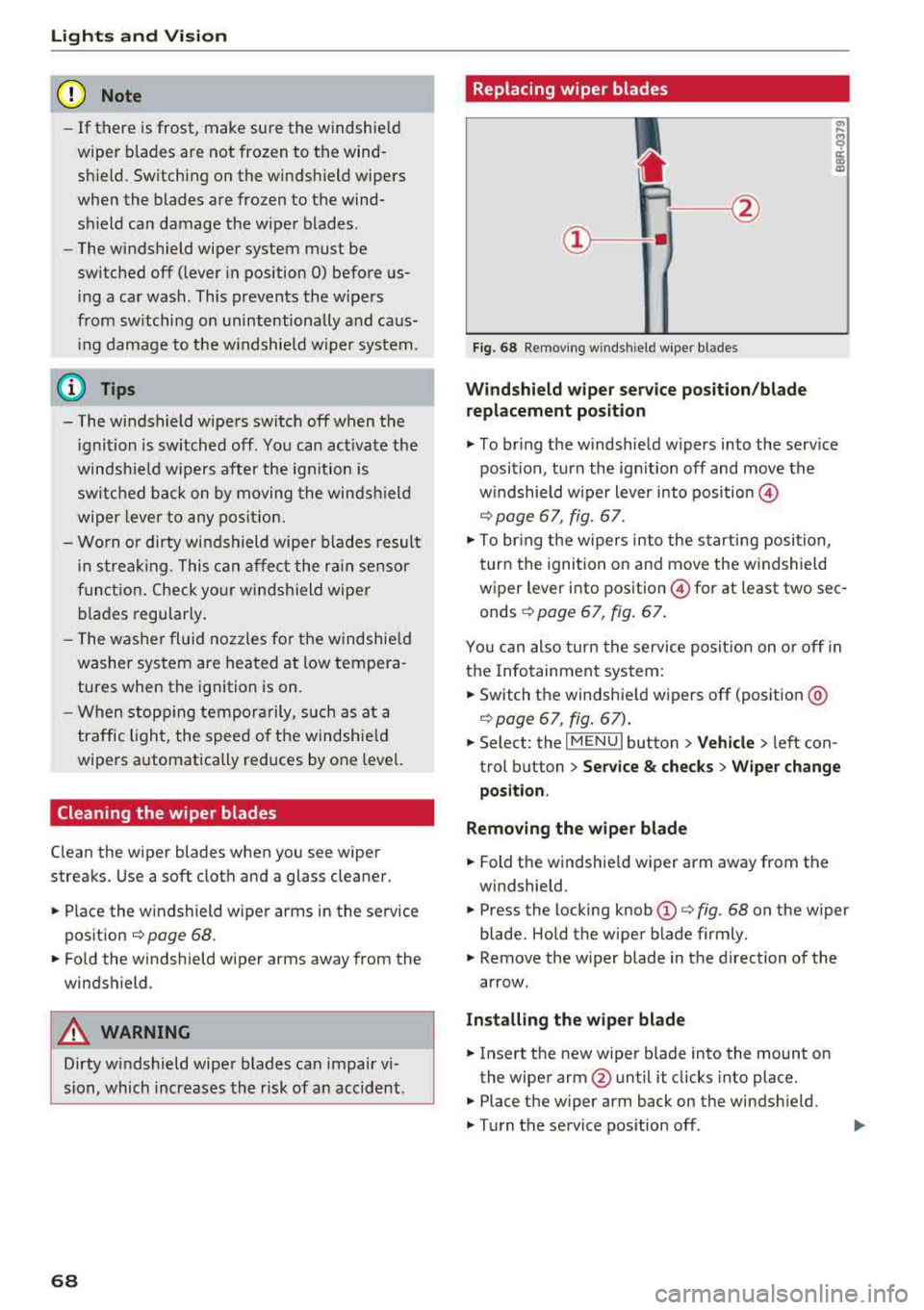
· Replacing wiper blades
Fig. 68 Removing windshield wiper blades
Windshield wiper se rv ice po sition /blade
repl acement position
~ T o br ing the windshield w ipers into the serv ice
position, turn the ign ition off and move the
w indshie ld wiper lever into position @
c::> page 67, fig. 67.
~ To bring the w ipers into the starting posi tion,
turn the ignition on and move the windshield
wiper lever into position
@for at least two sec
onds
¢ page 67, fig. 67.
You can also turn the service posit ion on or off in
the Infotainment system:
~ Switch the windshie ld wipers off (position @
c::>page 67, fig . 67) .
~ Select: the IM ENU I button > Veh icle > left con
trol button
> Serv ice & chec ks > W ip er change
position .
Removing the wipe r blade
~ Fold the windshie ld wiper arm away from the
windshield.
~ Press the locking knob (D c::> fig. 68 on the wiper
blade. Hold the wiper blade firmly.
~ Remove the wiper blade in the direction of the
arrow.
Install ing the wiper blade
~ Insert the new wiper blade into the mount on
the wiper arm@until it clicks into place.
~ Place the wiper arm back on the windsh ield.
~ Turn the service pos ition off .
Page 71 of 409
A WARNING
For safety reasons, the windshield wiper
blades should be replaced once or tw ice each
year .
(D Note
-Only fold the windshield wipers away when
they are in the service position . Otherwise,
you r isk damaging the paint on the hood or
the windshie ld wiper motor.
- You should not move your vehicle or operate
the windshield w iper lever when the wiper
arms are fo lded away from the w indshield.
The windshield wipers would move back in
to their original position and could damage
the hood and windshield.
- To reduce the risk of damage to the wiper
system, always loosen blades which are fro
zen to the windsh ield before operating the
wipe rs .
- To reduce the risk of damage to the wiper
blades, do not use gasoline, kerosene, paint
thinner, or other so lvents on or near the
wiper blades.
- To reduce the risk of damage to the wiper arms or other components, do not attempt
to move the wipers by hand.
@ Tips
- You can also use the service position, for ex
ample, if you want to protect the windsh ield
from icing by using a cover.
Lights and V ision
-You cannot activate the service position
when the hood is open .
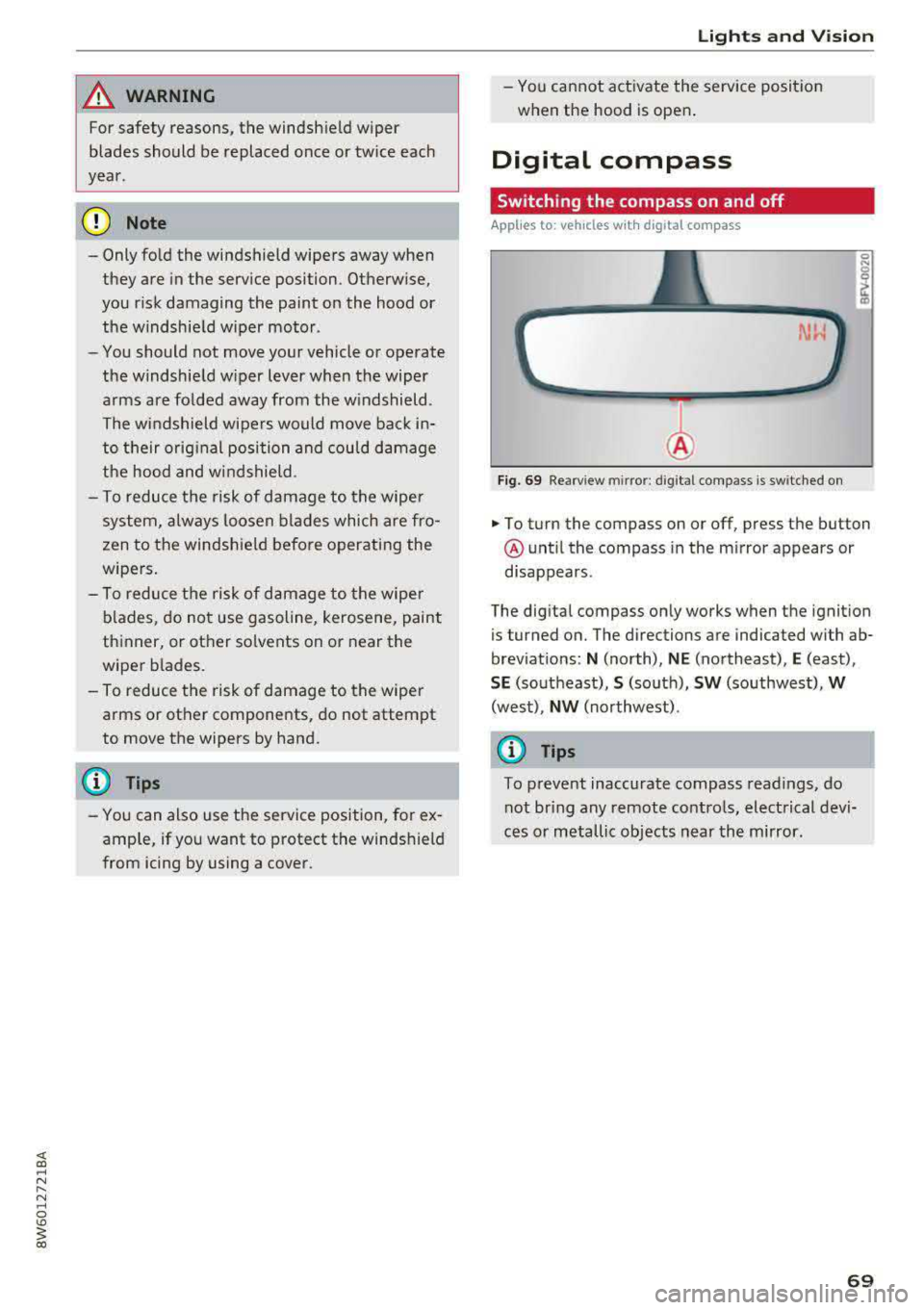
Digital compass
Switching the compass on and off
Applies to: vehicles wit h digita l compass
Fig. 69 Rearview mirror: digita l compass is switched on
0 N 0
~ a)
... To turn the compass on or off, press the button
@ until the compass in the m irror appears or
disappears.
The digital compass only works when the ignition
is tur ned on. The directions are indicated with ab
brev iat ions:
N (north), NE (northeast), E (east),
SE (southeast), S (so uth), SW (southwest), W
(west), NW (northwest) .
{D Tips
To prevent inaccurate compass readings, do
not br ing any remote controls, electrical devi
ces or metallic objects near the mirror.
69
Page 73 of 409
Seats and storage
General information
A WARNING
See ¢ page 258, Driving safety for important
information, tips, suggestions and warnings
that you should read and follow for your own
safety and the safety of your passengers.
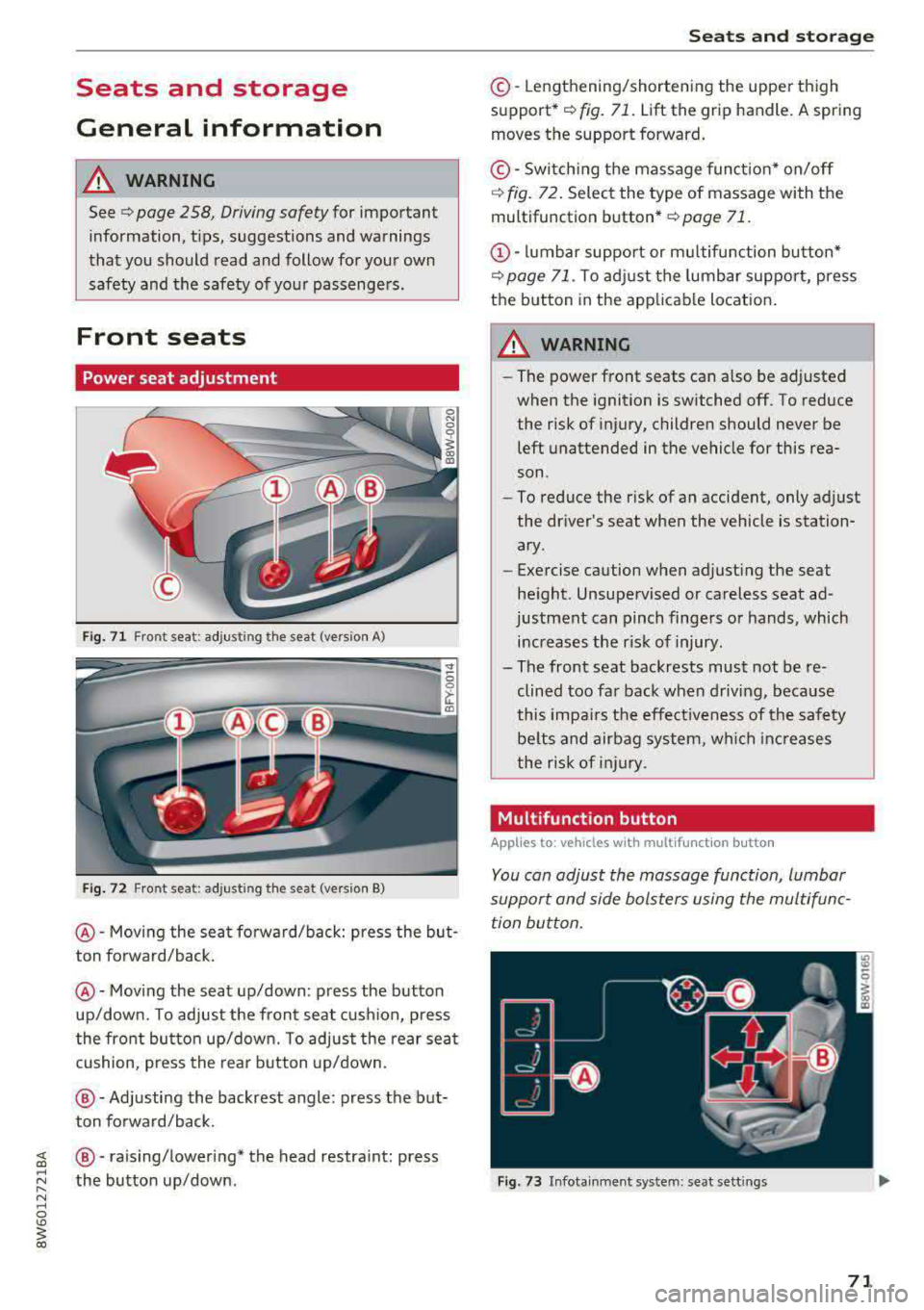
Front seats
Power seat adjustment
Fig. 71 Fro nt seat: adjus ting the seat (version A)
Fig. 72 Fro nt seat: adjust ing the sea t (version B)
@ -Moving the seat fo rward/back: press the but
ton forward/back.
@ -Moving the seat up/down: press the button
up/down. To adjust the front seat cush ion, press
the front button up/down. To adjust the rear seat
cushion, press the rear button up/down.
@-Adjusting the backrest angle: press the but
ton forward/back.
~ @ -raising/lowering* the head restra int: press
~ ~ the button up/down .
N ~ 0
'° ~ co
Seats and storage
©-Lengthening/shortening the upper thigh
support•¢ fig. 71. Lift the grip handle. A spring
moves the support forward.
© -Switching the massage function* on/off
¢ fig. 72. Select the type of massage with the
multifunction
button* ¢ page 71.
(D-lumbar support or multifunction button*
¢ page 71. To adjust the lumbar support, press
the button in the applicable location.
A WARNING
- The power front seats can also be adjusted
when the ignition is switched off. To reduce
the risk of injury, children should never be left unattended in the vehicle for this rea
son .
- To reduce the risk of an accident, only adjust
the driver 's seat when the vehicle is station
ary .
- Exercise caution when adjusting the seat
height. Unsupervised or careless seat ad
justment can pinch fingers or hands, which increases the risk of injury.
- The front seat backrests must not be re
clined too far back when driving, because
this impairs the effectiveness of the safety
be lts and airbag system, which increases
the risk of injury.
, Multifunction button
Applies to: vehicles with multifunction button
You can adjust the massage function, lumbar
support and side bolsters using the multifunc tion button.
Fig . 73 Infotainment sys te m : s eat sett in gs
71
Page 77 of 409
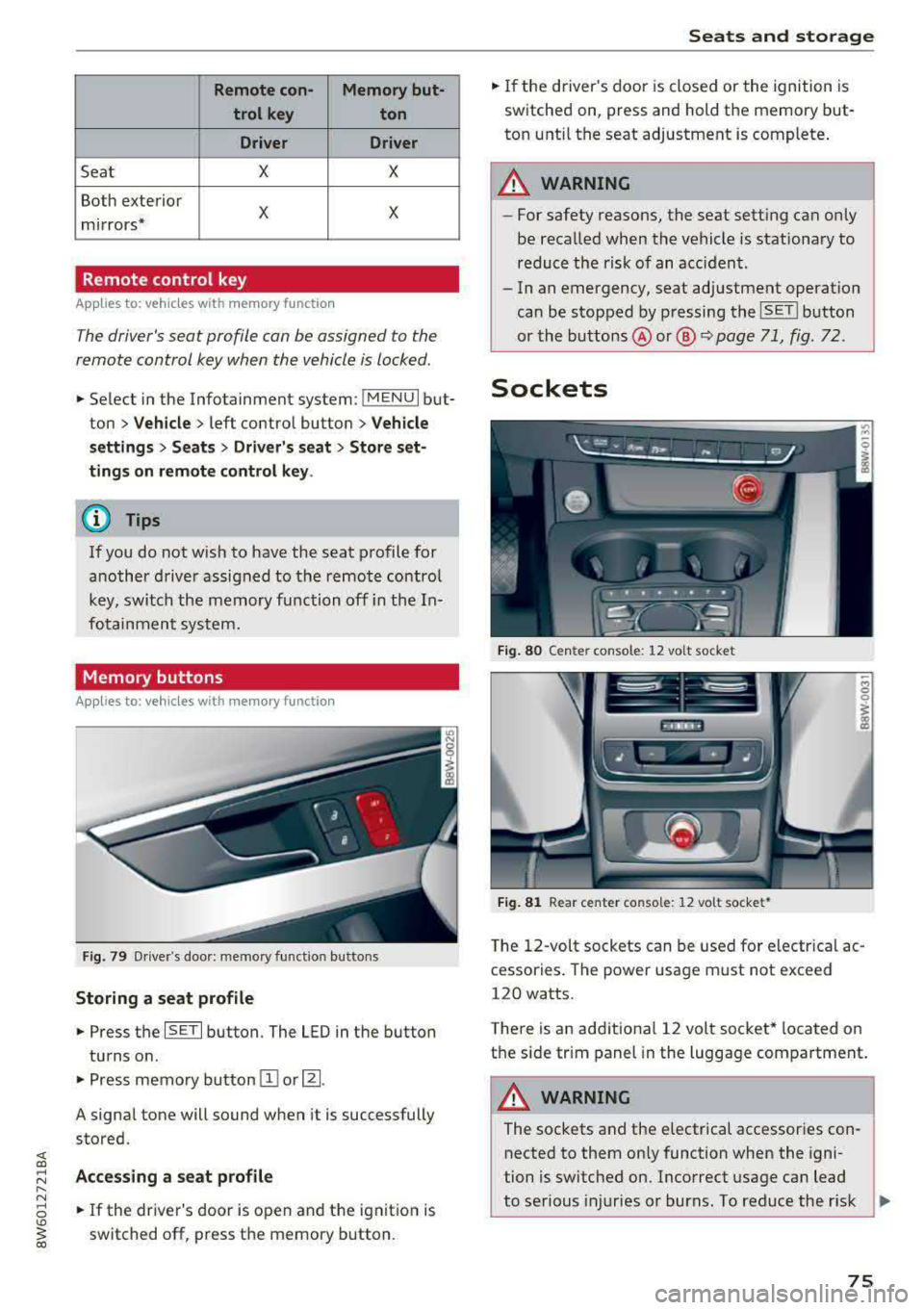
Remote con- Memory but-trol key ton
Driver Driver
Sea t X X
Both exterior
X X mirrors*
Remote control key
Applies to: vehicles with memory function
The driver's seat profile can be assigned to the
remote control key when the vehicle is locked .
.. Select in the Infotainment system: !MENUI but
ton
> Vehicle> left control button > Vehicle
settings
> Seats > Driver's seat > Store set
tings on remote control key.
@ Tips
If you do not wish to have the seat profile for
another driver assigned to the remote control
key, switch the memory function off in the In
fotainment system.
Memory buttons
Applies to: vehicles with memory function
Fig. 79 Driver's door: memory functio n buttons
Storing a seat profile
.. Press the ISET I button. The LED in the button
turns o n .
.. Press memory button IT] or~ -
A signal tone will sound when it is successfully
stored.
;:::: Accessing a seat profile ...... N
8 .. If the driver's door is open and the ignition is
'° ~ switched off, press the memory b utton. co
Seats and storage
.. If the driver's door is closed or the ignition is
switched on, press and hold the memory but
ton until the seat adjustment is complete .
_& WARNING
-For safety reasons, the seat setting can only
be recalled when the vehicle is stationary to
reduce the risk of an accident.
- In an emergency, seat adjustment operat ion
can be stopped by pressing the
ISE TI button
or the buttons @ or@
~ page 71, fig. 72.
Sockets
Fig. 80 Cen ter console : 12 vo lt socket
Fig. 81 Rear center console: 12 volt socket •
The 12-volt sockets can be used for electr ical ac
cessories . The power usage must not exceed
120 watts.
T here is an additiona l 12 volt socket* located on
the side tr im panel in the luggage compartment.
A WARNING
The sockets and the e lectrical accessories con
nected to them only function when the igni
tion is switched on. Incorrect usage can lead
to serious injuries or burns. To reduce the r isk
Ji--
75
Page 86 of 409
Warm and cold
3fx Defr os ting
The windshield and s ide windows are defrosted
or cleared of condensation as quickly as possible.
The maximum amount of air flows mainly from
the vents below the windshield. Recirculation mode switches off. The temperature shou ld be
set at
+72°F (+22°() or higher. The temperature
is controlled automatically.
You can switch the defroster on or off using the
~button.You can switch the function off by
pressing a
knob @.
Applies to vehicles with windshield defogger: the
windshield defogger switches on automatically
when outside temperatures are low. If you would
like to switch the windshield defogger on man
ually, press
the~ button. The LED in the button
blinks.
QID REAR Rear windo w def ogg er
You can switch the rear window defogger on by
pressing
the ~ button . It on ly operates when the
engine is running. It switches off automatically
after 10 to 20 minutes, depending on the outside
temperature.
To prevent the rear w indow defogger from
sw itching off automatically, press and hold the
CliP REAR button for more than three seconds.
This is stored until the ignition is switched off .
SYNC Synchroni zat ion
Use the rocker switch ® to select the function.
When synchronization is switched on, the set
tings for the driver's side are appl ied to the front
passenger's side and the rear (except for seat
heating/vent ilation*). When the sett ings on the
front passenger's side or in the rear are changed,
the synchron izat io n is automatically sw itched off
and
3 -zone appears in the d isplay.
SET REAR function
Use the rocker switch ® to select the funct ion .
When the function is switched on, you can adjust
all settings for the rea r us ing the climate cont rol
sys tem cont rols in the cockpit. The rear climate
con trol system cont rols cannot be operated at
the same time . This function switches off auto-
84
matically after a certain period of time or after
l eaving the menu.
Vents
You can open o r close the center and rear vents in
the cockpit and the vents in the rear center con
so le using the ridged thumbwheels . The levers
adjust the direction o f the airflow from the vents.
The wide vent is opened and closed using the rocker switch ®·
Residual heat
You can act ivate the residual he at function when
the ignition is switched off by pressing the knob
(D . The residual heat from the coolant is used to
heat the vehicle interior . The residual heat func
tion switches off automat ica lly after about 15
minutes.
A WARNING
- You shou ld not use the recirculation mode
for an extended period of time, because no
fresh air is drawn in and the windows can
fog when cooling mode is switched off. This
increases the r is k of an accident.
- I ndividuals w ith reduced sensit iv ity to pa in
or temperature co uld develop bu rns when
using the sea t heating* or neck heat ing*
functions. To reduce the risk of injury, these ind ividuals must not use the seat or neck
heating *.
- If the ai r vents in the seats are covered by
clothing or similar objects when the neck heating * is switched on, the output from
the neck heat ing may become very hot tem
porarily. This can cause burns on unprotect
ed skin exposed direct ly to the vents.
(D Note
To avoid damaging the seat heating* ele
ments, do not knee l on the seats or place
heavy pressure on one area of the seat.
(D Tips
- When the powe r top* is closed, the neck
heating* switches automatically from set
t ing 3 to setting 2 after approx imately six
mi nutes.
Page 90 of 409
Driving
unheeded. Extended idling also produces
heat, which could result in overheating or
other damage to the vehicle or other proper
ty.
(D Note
- Have your vehicle maintained properly and
in accordance with the service recommenda
tions in your Warranty
& Maintenance book
let . Lack of proper maintenance as well as
improper use of the vehicle will impair the
function of the emission control system and
could lead to damage.
- Do not alter or remove any component of the Emission Control System unless approved by the manufacturer .
- Do not alter or remove any device, such as
heat shields, switches, ignition wires,
valves, which are designed to protect your
vehicle's Emission Control System and other
important vehicle components.
(D Tips
The consumption estimates as published by
ENVIRONMENTAL PROTECTION AGENCY (EPA) and Transport Canada may not corre
spond to your actual consumption on the
road, which will vary depending upon vehicle
load and speed, road and weather conditions,
trip length, etc.
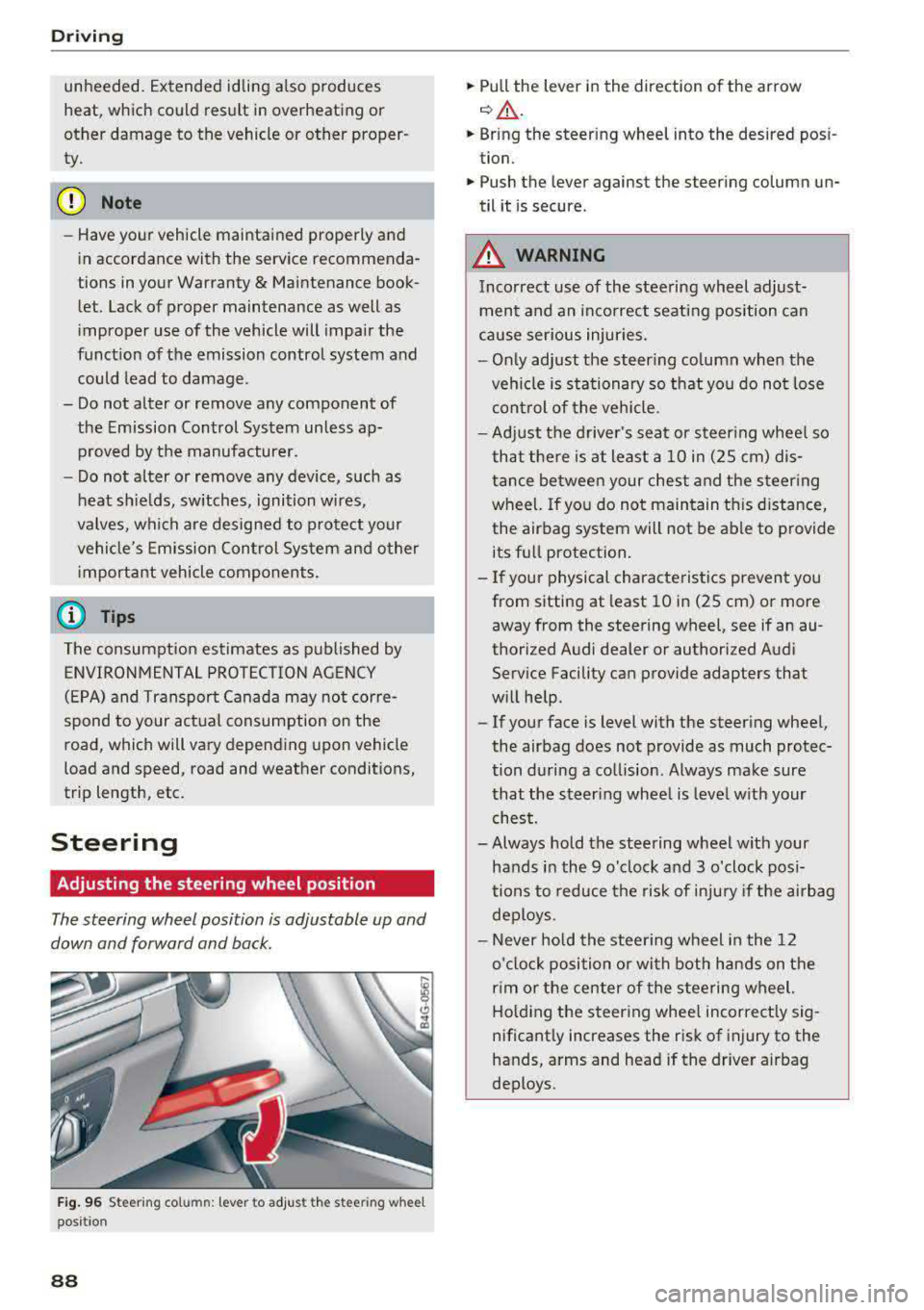
Steering
Adjusting the steering wheel position
The steering wheel position is adjustable up and
down and forward and back.
Fig. 96 S tee rin g col umn : le ver to adjus t the stee ring w heel
posit ion
88
.,. Pull the lever in the direction of the arrow
c::, A -
... Bring the steering wheel into the desired posi
tion .
.,. Push the lever against the steering column un
til it is secure .
_&. WARNING
Incorrect use of the steering wheel adjust
ment and an incorrect seating position can
cause serious injuries.
- Only adjust the steering column when the
vehicle is stationary so that you do not lose
control of the vehicle.
-
-Adjust the driver's seat or steering wheel so
that there is at least a 10 in (2S cm) dis
tance between your chest and the steering
wheel. If you do not maintain this distance,
the airbag system will not be able to provide
its full protection.
-If your physical characteristics prevent you
from sitting at least 10 in (2S cm) or more
away from the steering
wheel, see if an au
thorized Audi dealer or authorized Audi
Service Facility can provide adapters that
will help .
- If your face is level with the steering wheel,
the airbag does not provide as much protec
tion during a collision . Always make sure
that the steering wheel is level with your
chest.
- Always hold the steering wheel with your
hands in the 9 o'clock and 3 o'clock posi
tions to reduce the risk of injury if the airbag
deploys.
- Never hold the steering wheel in the 12
o'clock position or with both hands on the
rim or the center of the steering wheel.
Holding the steering wheel incorrectly sig
nificantly increases the risk of injury to the
hands, arms and head if the driver airbag
deploys .
Page 91 of 409
Starting and stopping
the engine
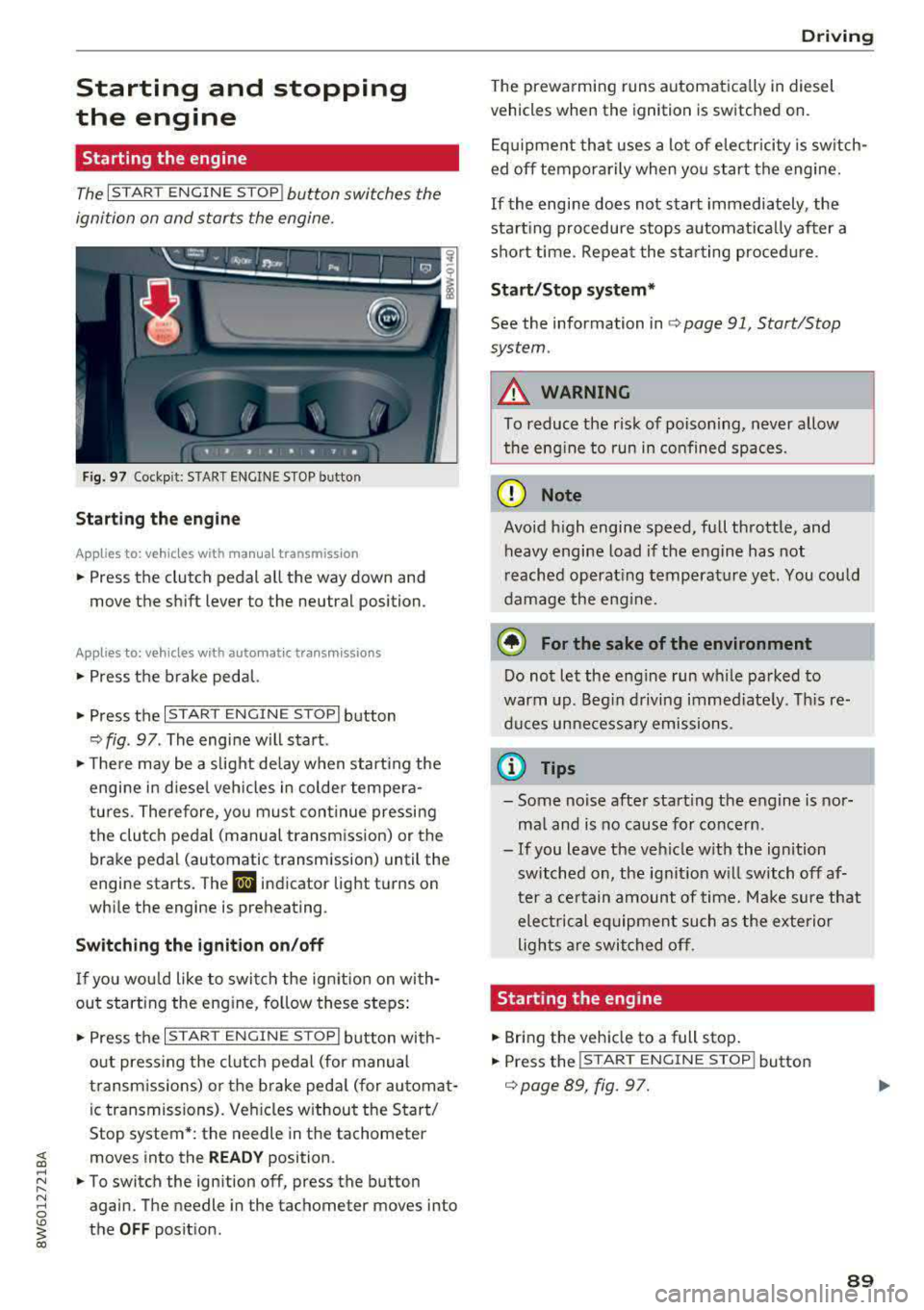
Starting the engine
The I S TAR T ENGIN E ST OP ! button switches the
ignition on and starts the engine.
F ig . 97 Cockp it: START ENGINE S TOP button
Starting the engin e
Applies to: vehicles with manual transmission
.. Press the clutch pedal all the way down and
move the sh ift lever to the neutr al position.
Applies to: vehicles with automatic transmissions
.,. Press the brake pedal.
.. Press the I START E NG IN E STOPI button
¢ fig . 97 . The engine will sta rt.
.,. T he re may be a s light de lay w hen start ing the
engine i n diese l vehicles in colder tempera
tures . Therefore, yo u must con tinue pressing
the clutch pedal (manual transmission) or the
brake pedal (automatic transmission) until the
engine starts. The
Iii indicator light t urns on
whi le the engine is preheating .
Switching the ignition on /off
If yo u wou ld like to swi tc h t he ign ition on wi th
out starting the engine, fol low these steps:
.,. Press t he I S T AR T ENG IN E ST OPI button with
o ut press ing the clutch pe dal (for manual
transm iss ions) or the brake peda l (f or au toma t
ic transmissions). Ve hicles w ithout the S tart/
Stop system *: the needle in the tachometer
~ moves into the READ Y position .
~ ~ .. To switch the ign ition off, press the button
N 8 again. The needle in the tachometer moves into
~ the OFF posit ion.
co
D rivi ng
The prewa rming runs automat ica lly in diesel
vehicles when the ign ition is switched on .
E q uipment tha t uses a lot of e lec tricity is sw itch
ed
off temporarily when you start the engine.
If the engi ne does not s tart immediately , the
sta rt ing procedure stops a utomat ica lly af ter a
sho rt time. Repea t the sta rting proced ure.
Start /Stop system*
See the information in c:> page 91, Start/Stop
system .
A WARNING
=
To reduce the risk of poisoning, never allow
the eng ine to run in co nfined spaces .
Q) Note
Avoid high engine speed, full th rottle, and
heavy engine load if the engine has not
r eached operat ing temperatu re ye t. You could
damage the eng ine.
@ For the sake of the environment
Do not let the e ngin e run wh ile pa rked to
warm up . Beg in dr iving immed iate ly . Thi s
re
duces un necessa ry emissions.
a) Tips
- Some noise afte r start ing the engine is nor
ma l and is no caus e for conce rn .
- If you leave t he ve hicle w ith the ignition
switched on, the ig nit ion w ill switch off af
ter a ce rtain amount of time . Ma ke sure t hat
elec trical e quipment such as the exterio r
ligh ts a re swi tched off .
Starting the eng ine
.. Bri ng the veh icle to a full sto p .
.. Press the !S TAR T ENGINE ST OP ! button
c:>
page 89, fig. 97.
-
89
Page 92 of 409
Driving
St ee ring lock1
)
The stee ring locks when you t urn the engine off
using the
! S T A RT ENGINE ST OP I button and
open the driver 's door. The locked steering helps
prevent v ehicle theft .
Emergency off function*
If it is abso lutely necessary, the engine can also
be turned off while dr iv ing at speeds star ting at
4 mph (7 km/h). To switch the eng ine off, press
the
! S TAR T ENGINE ST OP I button tw ice in a row
briefly or press and hold for longer than two sec
onds.
A WARNING
- Never turn off the engine before the veh icle
has come to a comp lete stop . The full func
t ion of the brake booster and the power
stee ring is not guaranteed. Yo u must use
more force to turn or b rake . Because you
cannot s teer an d brake as you usu ally
would, t his co uld lead to accidents and ser i
ous in juries.
- Alw ays t ake the key wi th you w henever you
leave you r vehicle . Othe rw ise, the engi ne
cou ld be started o r electrical equipment
s uch as the power windows cou ld be operat
ed . This can lead to se rious injury.
- For safety reasons, always park the vehicle
with the se lector lever in the P position
(a u
tomat ic transmission) or with 1st gear en
gaged (manual transmission). Otherwise
the vehicle could roll away u nintent ionally .
(D Note
If the eng ine has been under heavy load for
an extended per iod of t ime, heat builds up in
the engine compartment after the engine is
sw itched off and there is a risk of damaging
the engi ne . For this reason, let the engi ne run
for at idle for approximately two minutes
be
fore shutting it off.
l) Th is fun ction is not avai la bl e in al l co un tries.
90
(D Tips
Fo r u p to 10 minutes after stopping the en
g ine, the radiator fan may turn on again auto
matically or it may continue to r un (even if
the ig nition is switched off) for the following
r easons:
- The coolant temperature is increas ing due
to trapped heat.
- If the eng ine is wa rm and the eng ine com
partment a lso heats up from strong sun
light .
- Applies to: vehicles with diesel particulate
filter: The emissions control system is heat
ed through the regeneration process, even if
the engine has not reached its operat ing
tempe rature yet.
Messages
Engin e running . Warning! Turn off ignition be
fore leavin g vehicle
This message appears and a warning tone sounds
i f you open the drive r's door w hen the eng ine is
r un ning .
Applies to: vehicles with manual transmission
Please pres s clutch pedal
This message appears if you do not press the
clutch pedal to start the eng ine. The engine can
o nly be started w hen the clutch pedal is pressed.
Applies to: vehicles with automatic transmissions
Plea se pres s brake pedal
This message appears if you do not press the
bra ke peda l when sta rting t he eng ine .
Ill Remote control key : key not recognized. Is
the key still in the vehicle ?
This indicator light turns on and this message ap
pears if the ignition key was removed from the
vehicle when the engine was running . If the igni
tion key is no longer in the vehicle, you cannot
switch on the ignition or start the engine once
Page 93 of 409
you stop it. You also cannot lock the vehicle from
the outside .
Applies to: vehicles with au tomatic transm issions
Shift to P , otherwise vehicle can roll away.
Doors do not lock if gearshift is not in P
This message appears for safety reasons if the
selector lever is in the N position when you
sw itch the ignition off. Move the selector leve r to
the P position. Otherwise the vehicle is not pro
tected from ro lling and it cannot be locked .
DJ Remote control key: hold back of key
against the designated area . See owner 's man
ual
If the indicator light turns on and th is message
appears, there is a malfunction
c> page 91 .
Applies to: vehicles with automatic transmissions
Shift to P before leaving car, otherwise vehicle
can roll away
This message appears if the driver's door is
opened while the ignition is switched on and the
transmission has not been shifted to the P posi
tion . Sh ift the transmiss ion into the P position
and turn off the ignition if you are leaving the ve
hicle . Otherwise the vehicle could roll. Also see
c::> page93 .
Starting the engine when there is a
malfunction
It may not be possible to start the engine under
certain circumstances, for example if the battery
in the vehicle key is drained, if interference is af
fected the key or if there is a system malfunc
tion .
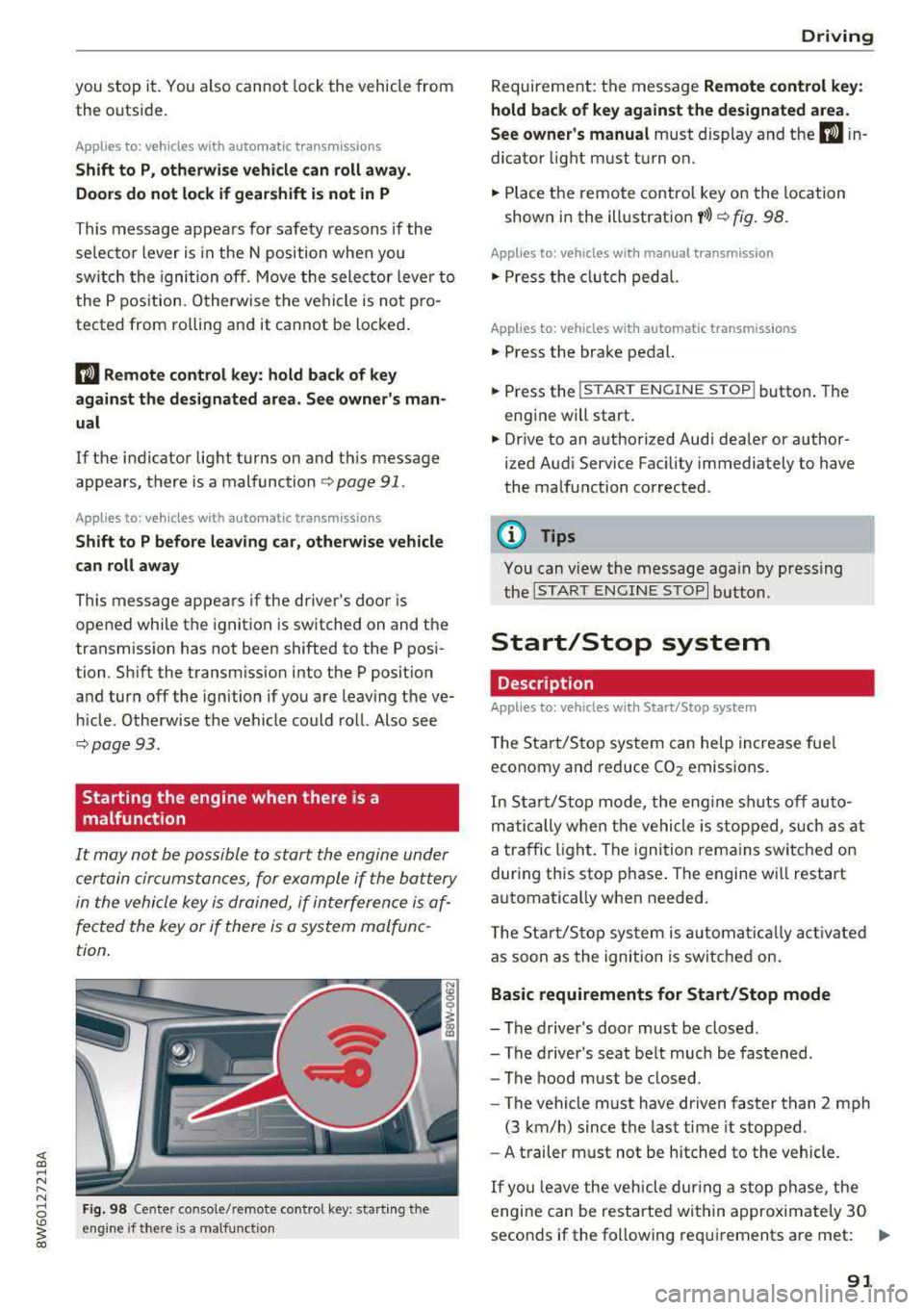
Fig. 98 Cente r console/ remote contro l key: starting t he
eng ine if there is a malfunc tion
Driving
Requirement: the message Remote control key:
hold back of key against the designated area .
See owner's manual
must display and the DJ i n
dicator light must turn on.
.,. Place the remote control key on the location
shown in the illustration
y >l) c::> fig . 98.
Applies to: vehicles with manual transmission
.,. Press the clutch pedal.
Applies to: vehicles with automatic transmissions
• Press the brake pedal.
.. Press the !START ENGINE STOP ! button. The
engine will start.
.,. Drive to an authorized Audi dea ler or author
ized Aud i Service Facility immediately to have
the malfunction corrected.
@ Tips
You can view the message again by pressing
the
I S TART ENGINE STOP I button.
Start/Stop system
Description
Applies to: vehicles with Start/Stop system
The Start/Stop system can help increase fue l
economy and reduce CO2 emissions.
In Sta rt/Stop mode, the engine shuts off auto
matically when the vehicle is stopped, such as at
a traffic light. The ignition remains switched on
during this stop phase . The engine wi ll restart
automatica lly when needed .
Th e Start/Stop system is a utomaticall y activated
as soon as the ignition is switched on.
Basic requirements for Start/Stop mode
-The driver's door must be closed .
-The driver's seat belt much be fastened.
- The hood must be closed.
- The vehicle must have driven faster than
2 mph
(3 km/h) since the last time it stopped .
- A trailer must not be hitched to the vehicle.
If you leave the vehicle during a stop phase, the
engine can be restarted within approximately 30
seconds if the following requi rements are met:
IJ>
91