ignition AUDI A5 COUPE 2018 Workshop Manual
[x] Cancel search | Manufacturer: AUDI, Model Year: 2018, Model line: A5 COUPE, Model: AUDI A5 COUPE 2018Pages: 409, PDF Size: 67.63 MB
Page 207 of 409
Emergency call
Introduction
The following functions may be available depend
ing on the vehicle and the market.
- Emergency
ca ll ¢ page 205.
- Online roads ide ass istance ¢ page 206 .
@ Tips
- The serv ices are provided through a SIM
card installed in the vehicle . The cost of the
call and data connections is included in the
price for the services . Services a re provided
assuming that the cell phone network re
quired for the installed S IM card is function
ing and ready to operate. The available serv
i ces set by Audi AG are only available within
the cell phone network coverage area for
the cell phone service provider selected by
Audi AG.
- You can find what data will be transferred
at www.aud iusa.com.
- These services cannot be deactivated using
the settings in the Infotainment system.
Emergency call
Description
Appl ies to: vehicles with emergency call function
You can request help when in an eme rgency or
dangerous situation using the emergency call
function
l) _ An emergency call is a combination
of data transmission and a phone call. The data
transmission from your vehicle forwards impor
tant information, such as the vehicle and position
data, to the emergency call center.
1l The av ailabilit y of the serv ices o ffere d d ep end s on t he
c o untry a nd may chang e over t ime.
Emergen cy call
Making an emergency call
App lies to: vehicles with emergency call function
The emergency coll con be mode two different
ways .
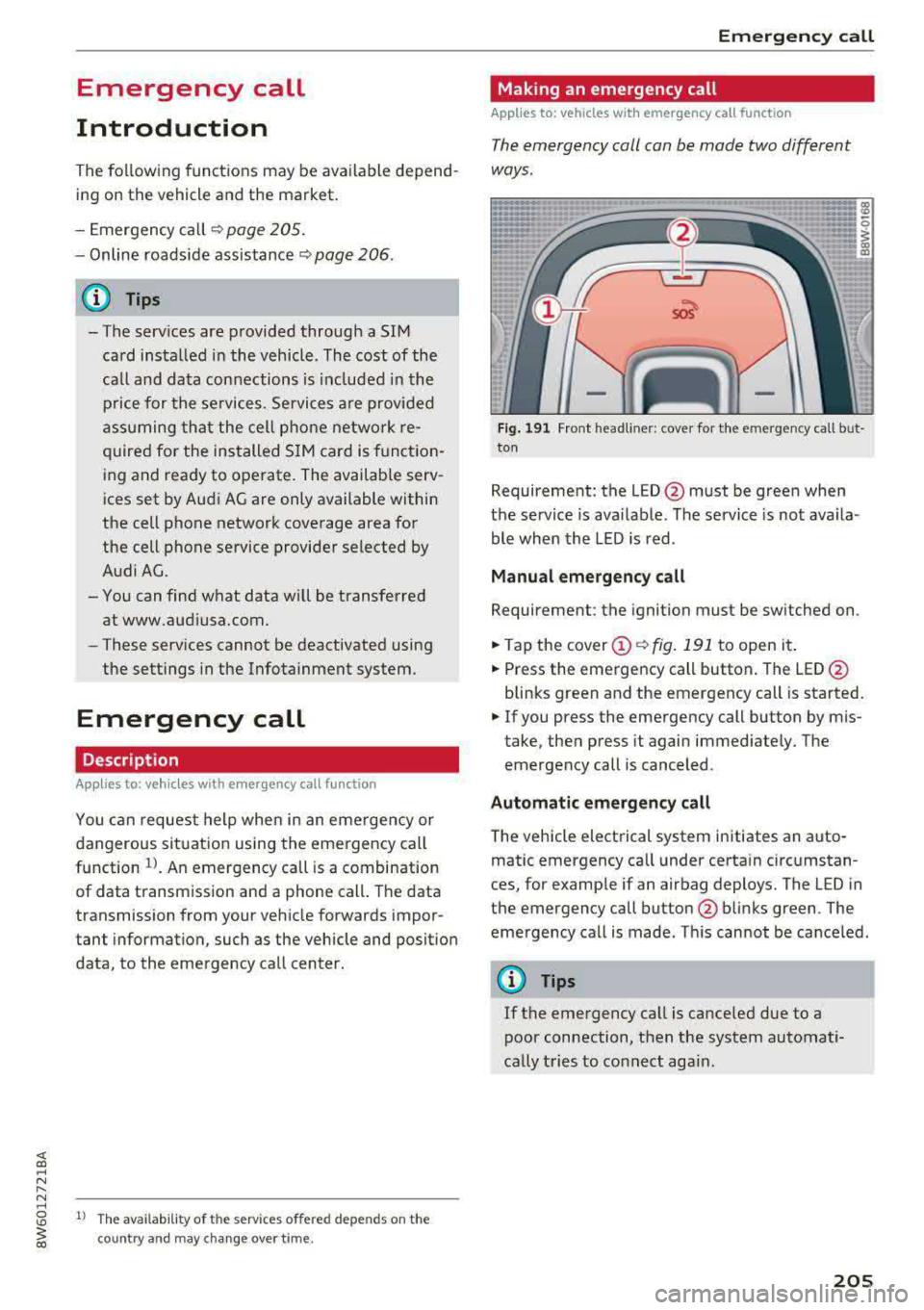
Fig. 191 Front head liner: cover for the e mergency call b ut
ton
Requirement: the L ED @ must be green when
the service is available . The service is not availa
ble when the LED is red .
Manual emergency call
Requirement: the ignition must be switched on .
.. Tap the cover (D ¢ fig. 191 to open it .
.. Press the emergency call button. The LED@
blinks green and the emergency call is started.
.. If you press the emergency call button by m is
take, then press it again immed iately. The
emergency call is canceled .
Automatic emergency call
The vehicle electrical system initiates an auto
matic emergency call under certa in circumstan
ces, for example if an airbag deploys. The LED in
the emergency call button@blinks green . The
emergency call is made . This cannot be cance led.
(D Tips
If the emergency call is canceled due to a
poor connection, then the system automati
cally tries to connect again.
205
Page 216 of 409
Navigation
with all applicable personal routes will be fac
tored into the trip aga in only after stopping the
vehicle and switching the ignition on again .
-Ignore all messages: all personal routes are no
longer factored into the current trip. No more
messages a re disp layed. Messages for personal
route s when there is increased traffic will ap
pear again after the vehicle is stopped and the
ignition is sw itched on again .
As soon as you switch off personal route assis
tance, the symbol in the status line turns
off and
your trips are no longer recorded. Trips that were
already stored remain stored .
Deleting personal routes:
-Select the desired personal route in the Enter
destination
menu q fig. 196.
-Select : right control button > Delete destina
tion.
Deleting all personal routes :
-Select: I MENU I button >Settings > left control
button >
MMI settings > Factory settings .
-Select: Navigation and on line memory > Re·
store factory settings
q page 2 52.
(D Tips
-Personal routes are learned based on the ve
hicle position. The route is prioritized ac
cording to how frequently you drive to a
destination .
- A maximum of three personal routes are
displayed in the
Enter destination menu.
Based on the current vehicle position, the
traffic situation for the route that is most
likely to be driven out of the three routes
will always be monitored.
- Please note that personal routes that have
already been stored will remain stored after
the ignition is switched off and they must
be deleted manually.
214
Alternative routes
Applies to: vehicles with navigation system
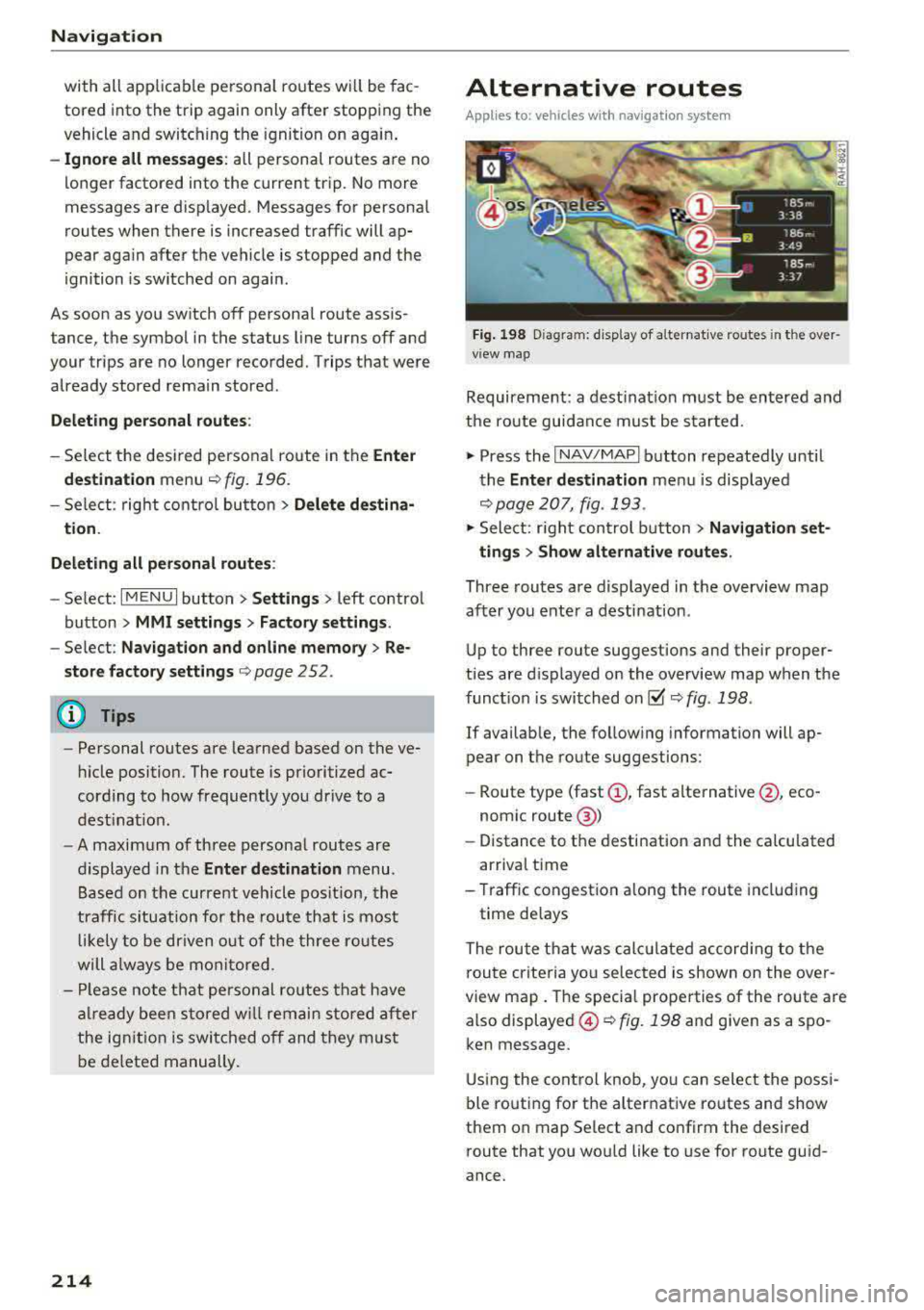
Fig. 198 Diag ram : disp lay of a lternat ive ro ute s in the over
view map
Requirement: a destination must be entered and
the route guidance must be started .
.,. Press the I NAV/MAPI button repeatedly until
the
Enter destination menu is displayed
qpage 207, fig . 193 .
.,. Sele ct: right control b utton> Navigation set·
ting s > Show alternative routes.
Three routes are displayed in the overview map
after you enter a destination .
Up to th ree route suggestions and their proper
ties are displayed on the overview map when the
funct io n is switched
on~ q fig . 198 .
If availab le, the follow ing information will ap
pear on the route suggestions :
-Route type (fast (D, fast alternative @, eco
nomic
route @)
-Distance to the desti nation and the calcu lated
arr ival time
- Traffic congestion along the route including
time delays
The route that was calc ulated according to the
route criteria you selected is shown on the over
view map. The specia l properties of the route are
also displayed @
Q fig. 198 and given as a spo
ken message .
Using the control knob, you can select the possi
ble routing for the alternative routes and show
them on map Se lect and confirm the desired
route that you would like to use for route guid
ance.
Page 223 of 409
Online map update
Applies to: vehicles with a nav igation system and Audi con
nect (Infotainment)
Using the online mop updote, you con update
the mop material in your navigation system di
rectly from your vehicle.
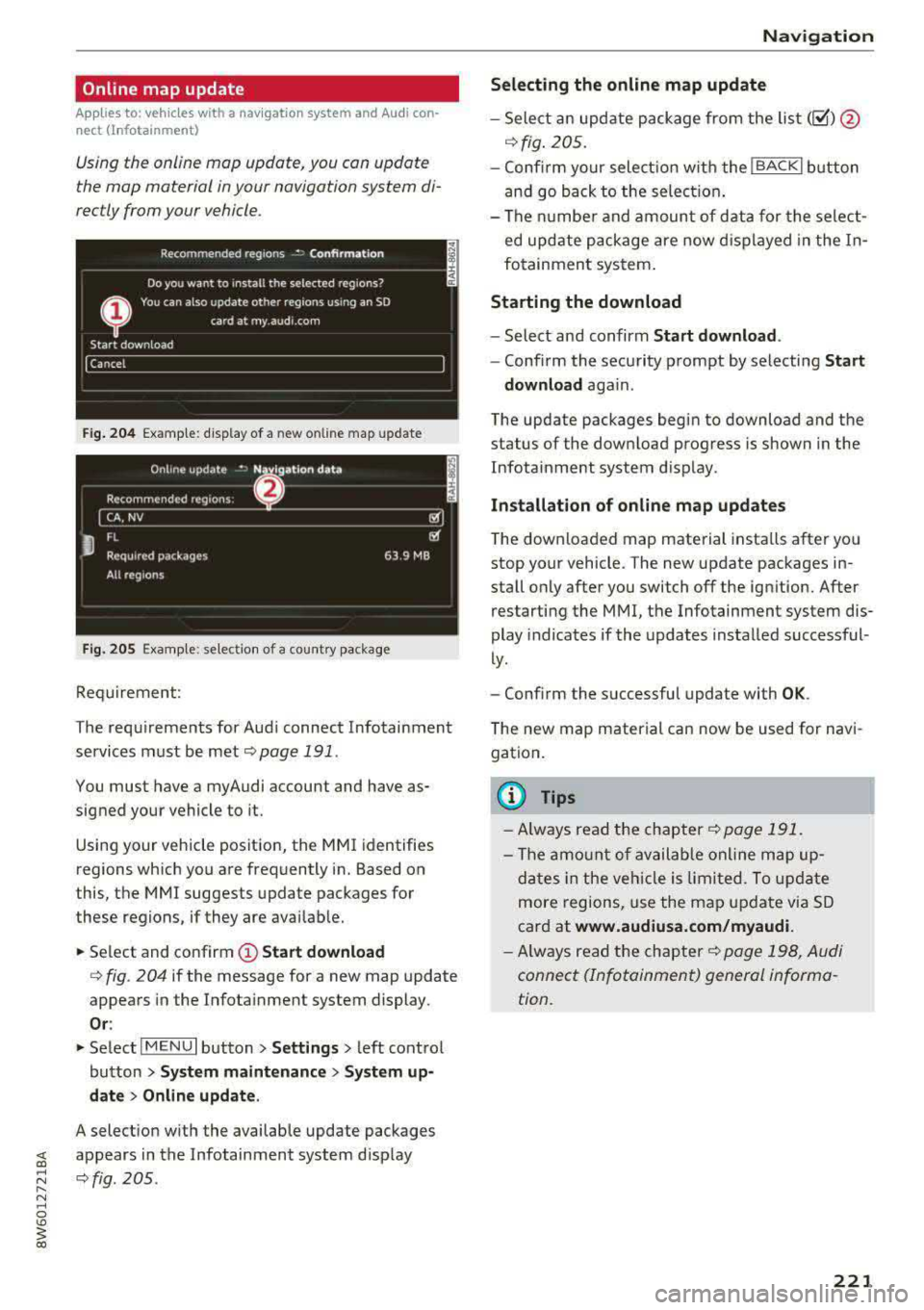
Fig. 204 Example: display of a new o nline map update
Fig. 205 Example : select ion of a count ry package
Requirement:
The requirements for Audi connect Infotainment services must be met
Qpoge 191 .
You must have a myAudi account and have as
signed your vehicle to it.
Using your vehicle position, the MMI identifies
regions which you are frequently in. Based on
this, the MMI suggests update packages for
these regions, if they are available.
• Select and confirm (!) Start download
Q fig. 204 if the message for a new map update
appears in the Infotainment system display.
Or :
• Select I MENU I button> Settings> left control
button >
System maintenance > System up
date > Online update .
A selection with the available update packages
~ appears in the Infotainment system d isplay
;:::: Qfig. 205 . ...... N .-, 0
'° ~ co
Navigation
Selecting the online map update
- Select an update package from the list (~) @
qfig. 205.
-Confirm your select ion with the IBACKI button
and go back to the selection.
- The number and amount of data for the select
ed update package are now displayed in the In
fotainment system .
Starting the download
-Select and confirm Start download .
-Confirm the security prompt by selecting Start
download
aga in .
The update packages begin to download and the
status of the download progress is shown in the
Infotainment system display.
Installat ion of online map updates
The downloaded map material installs after you
stop your vehicle . The new update packages in
stall only after you switch
off the ignition. After
restarting the
MMI, the Infotainment system dis
play indicates if the updates installed successful
ly.
- Confirm the successful update with
OK .
The new map material can now be used for navi
gation.
(D Tips
- Always read the chapter q page 191.
-The amount of available online map up-
dates in the vehicle is limited. To update
more regions, use the map update via SD
card at
www.audiusa.com/myaudi.
- Always read the chapter ¢page 198, Audi
connect (Infotainment) general informa
tion.
221
Page 239 of 409
Audi music interface
Connect your mobile devices to the Audi music
interface in order to operate them through the
MMI and charge the battery.
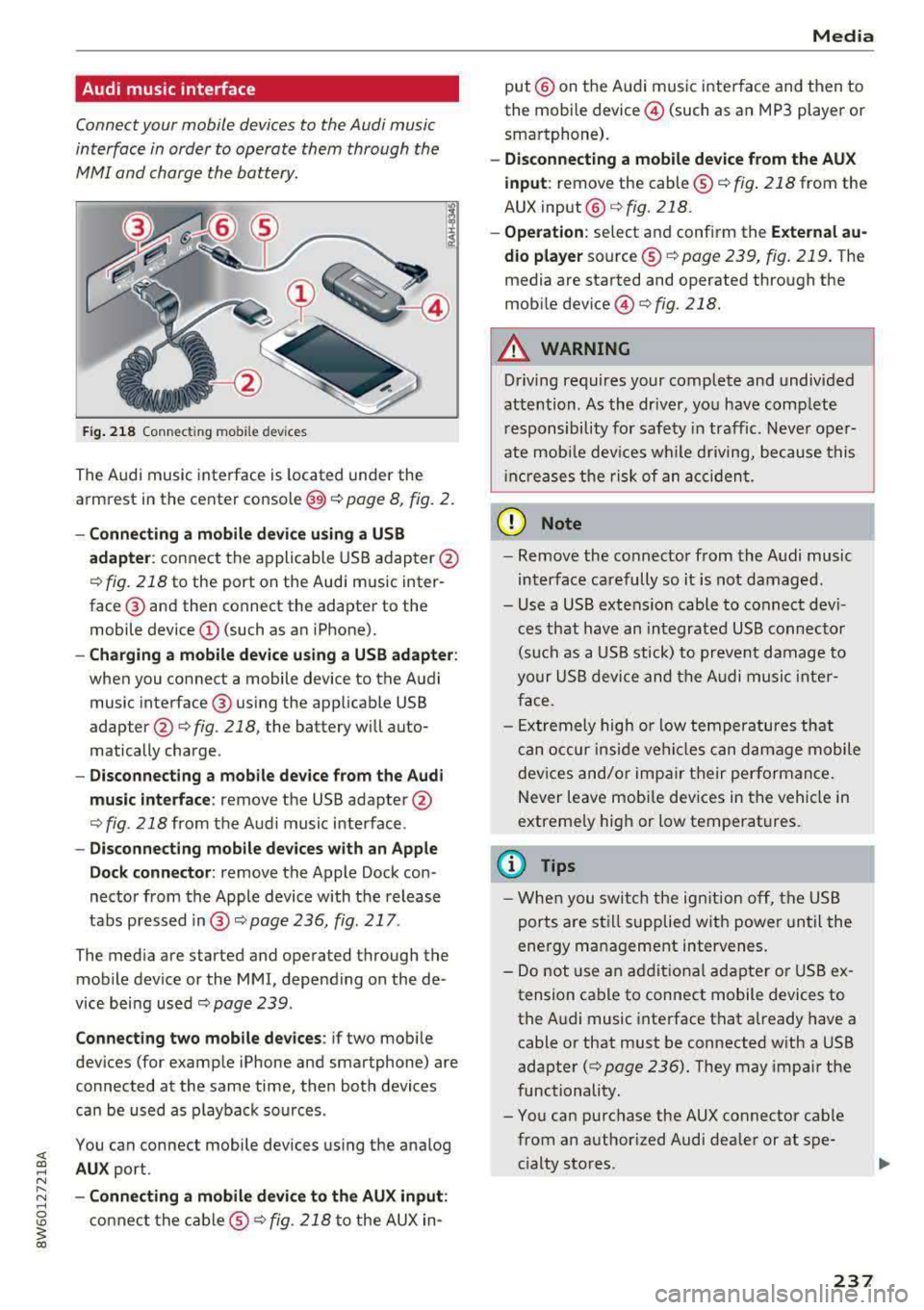
Fig. 218 Connectin g mob ile dev ices
The Audi music interface is located under the
armrest in the center
console @<=:> page 8, fig. 2.
-Connecting a mobile device using a USB
adapter: connect the applicable USB adapter@
c::> fig. 218 to the port on the Audi music inter
face @and then connect the adapter to the
mobile device
(D (such as an iPhone).
- Charging a mobile device using a USB adapter :
when you connect a mobile device to the Audi
music interface @ using the applicable USB
adapte r@
c::> fig . 218, the battery will auto
matically charge .
-Disconnecting a mobile device from the Audi
music interface :
remove the USB adapter @
c::>fig . 218from the Audi music interface .
-Disconnecting mobile devices with an Apple
Dock connector:
remove the Apple Dock con
nector from the Apple device with the release
tabs pressed
i n @ c::> page 236, fig . 217 .
The med ia are started and operated through the
mobile device or the MMI, depending on the de
vice being used
<=:> page 239 .
Connecting two mobile devices : if two mobi le
devices (for example iPhone and smartphone) are
connected at the same time, then both devices
can be used as playback sources .
You can connect mobile devices using the analog
AUX port.
-Connecting a mobile device to the AUX input:
connect the cable ® c::> fig. 218 to the AUX in-
Media
put@ on the Audi music interface and then to
the mobile device @ (such as an MP3 player or
smartphone).
-Disconnecting a mobile device from the AUX
input :
remove the cable@c::> fig. 218 from the
AUX
input @c::>fig. 218.
-Operation: select and confirm the External au
dio player
source @c::> page 239, fig. 219. The
media are started and operated through the
mobile
device @<=:> fig. 218.
A WARNING
-Driving requires your complete and undivided
attention . As the driver, you have complete
responsibility for safety in traffic. Never oper
ate mobile devices while driving, because this
i nc reases the risk of an accident.
(D Note
-Remove the connector from the Audi music
interface carefully so it is not damaged.
-Use a USB extens ion cable to connect devi
ces that have an integrated USB connector
(such as a USB stick) to prevent damage to
your USB device and the Audi music inter
face .
- Extremely high or low temperatures that
can occur inside vehi cles can damage mobile
devices and/or impair their performance.
Never leave mobi le dev ices in the vehicle in
extreme ly high or low temperat ures.
@ Tips
- When you switch the ignition off, the USB
ports are still supplied with power until the
energy management intervenes.
- Do not use an additional adapter or USB ex
tension cable to connect mobile devices to
the Audi music interface that already have a
cable or that must be connected with a USB
adapter
( c::> page 236). They may impair the
functionality.
-You can purchase the AUX connector cable
from an authorized Audi dealer or at spe
cialty stores .
237
Page 251 of 409
<( a, .... N ,....
N .... 0 \0
3 a,
Audi smartphone interface
Setup
App lies to: veh icles with Audi smartpho ne interface
You can connect your smartphone to the MMI us
ing the Audi smartphone interface . Certain con
tent on your smartphone is adapted to the Info
tainment system display while driving and can
be operated through the
MMI control panel.
R equirement
The vehicle must be stationary and the ignition
must be switched on.
iPhone generation 5 or higher with Lightning
connector and iOS 7.1.2 operating system or
h igher.
O r:
Smartphone with Android Auto app and Android
5 .0 Loll ipop operating system or higher.
.,. Connect your smar tphone to the Audi music in
te rface
c:> page 237 using a USB adapter
c:> page 236, fig. 217 .
.. Select and confirm A cti va te Apple CarPl ay or
Acti vate And roid Auto no w.
.. Follow the system instruct ions.
.,. Pay attention to any add itional system prompts
on your smartphone if applicable.
If you chose not to use Apple CarPlay or Android
Auto when connecting your smartphone for the
first time, you can start the Audi smartphone in
terface later on using the
Connection m an ager .
.. Select: I MENU I button > Audi smartphone in ·
terfa ce
> Change to connecti on manager .
.. Connect your smar tphone to the Audi music in
terface using a USB adapter
c:> page 236,
fig . 217.
.. Se lect and confirm Audi smartphone in the
Connection manager c:> page 252. You can se
lect your smartphone in the list of devices that
are already paired
c:> page 253.
.,. Follow the system instruct ions.
Always follow the informat ion found in
c:>(D in
Wi-Fi hotspot on page 197 .
Audi smartphon e int erfac e
{!) Tips
-The functions that can be used depend on
the fo llow ing factors, among others:
- the brand of your smartphone
- the vers ion of the operating system in
your smartphone
- the software ve rsion of the app used
- the USB adapter cab le and correct connec-
tion
- your cell phone se rvice provider
- the customized settings on your smart -
phone
- One of the factors
above or a combina tion
of any of them could cause your smartphone
to be incompatib le wit h the Audi smart
phone interface. Compatibility cannot be
guaranteed for all types of smartphones.
For more informat ion and assistance, refe r
to the use r guide and the manufactu rer of
your smartphone .
- If the connected smartphone has voice con
tr ol, you can operate your smartpho ne usi ng
t he external voice recognition system
c:> page 176.
- The menu language show n in the MMI is
based on the settings in you r smartphone .
- T he time d isplayed in the MMI is based o n
t he settings in your smartphone.
- Several MMI functions are not avai lab le
when Apple Car Play or Andro id Auto is ac
tive.
- You ca nnot co nnect any mob ile dev ices via
Bl uetooth when an App le CarPlay connec
tion is ac tive .
Operating
Applies to: vehicles wit h Audi smartp hone interface
Opening a menu
App le CarP lay :
you can go back to the Apple Car
Play main menu regardless of the se lec ted menu
item by p ressing and holdi ng the
I BACKI button .
Android Auto : to go back to the Android Auto
me nu bar, push the control knob down.
249
Page 273 of 409
Safety belts
-Always keep the belts clean. Dirty belts may not work properly and can impa ir the func
t ion of the inertia reel
¢ table Interior
cleaning on page 364 .
Safety belts
Belt positioner
Applies to: vehicles with belt positioners
Fig. 239 Driver 's seat: Belt pos it ione r (exa mple)
The front seats are equ ipped w ith belt pos ition
ers so it is easier to fasten the safety belts . The
belt positioners automatically extend when the
door closes or the igni tion switches on.
The belt positioner returns to its starting posi
tion again when
-the tongue in the belt la tch engages or the belt
was not fastened within 60 seconds .
- you switch the ignition off.
-you open the door .
A WARNING
The belt positioners could cause injury or
damage if they p inch people or objects when
extend ing or retracting.
272
Fastening safety belts
Safety first -everybody buckle up!
Fig. 240 Belt buckle and tongue on the driver's seat
To provide maximum protection, safety belts
must always be positioned correctly on the wear
er 's body .
.. Adjust the front seat and head restraint proper
ly¢ page 71, Front seats.
.. Make sure the seatback of the rear seat bench
is in an upright position and securely latched in
place before using the
belt ¢ _A.
.. Pull the safety belt evenly across the chest and
pelvis ¢ fig. 240, ¢ _A .
.. Insert the tongue into the correct buckle of
your seat until you hear it latch securely .
.. Pull on the belt to make sure that it is sec urely
latched in the buckle .
Automatic safety belt retractors
Every safety belt is equipped with an automatic
belt retractor on the shoulder belt . This feature
locks the belt when the belt is pulled out fast,
during hard brak ing and in an accident. The belt
may also lock when you drive up or down a steep
hill or through a sharp curve. During normal driv
ing the belt lets you move free ly.
Safety belt pretensioners
The safety belts are equipped w ith a belt preten
sioner that helps to tighten the safety belt and
remove slack when the pretensioner is activated
¢ page 2 75. The function of the pretensioner is
monitored by a warning
light ¢ page 32 . Iii>
Page 280 of 409
<( a, .... N ,....
N .... 0 \0
3 a,
about children and Advanced Airbags
¢page 302 .
Even though yo ur vehicle is equipped with an Ad
vanced Airbag System, make certain that all chil
dren, especially those 12 years and younger,
a l
ways ride in the back seat properly restrained for
their age and size. The airbag on the passenger
side makes the front seat a potentially dangerous
place for a child to ride. The front seat is not the
safest place for a child in a forward-facing child
safety seat .
It can be a very dangerous place for
a n infant or a child in a rearward-fac ing seat.
T he Advanced Airbag System in your veh icle has
been certified to comply with the requirements
of United States Federal Motor Vehicle Safety
Standa rd (FMVSS) 208, as well as Canada Motor
Veh icle Safety Standa rd (CMVSS) 208 as applica
b le a t the time your veh icle was m an ufact ured.
Accord ing to requirements, the front Advanced
Airbag System on the passenger side has been
certifi ed for "suppression" for infants of about
12 month old and younger and for "low risk
de
ployment" for children aged 3 to 6 years old (as
defined in the standard) .
T he
PASSENGER AIR BAG O FF ~ ; light in the
headliner tells you when the front Advanced Air
bag on the passenger side has been turned off by
the electronic control unit.
Each time yo u turn on the ignition, the
PASSEN
GER AIR BAG OFF
~ ; ON @ light will come on
for a few seconds and:
- PASSENGER AIR BAG OFF ~; will come on if
the front passenger seat is not occupied
- PASSENGER AIR BAG OFF ~; will come on if
the e lectrica l capacitance measured by the
ca
pacitive passenger detection system for the
front passenger seat equa ls the comb ined
ca
pacitance of an infant up to about one year of
age and one of the rearward-facing or forward
facing child restra ints listed i n Federa l Moto r
Vehicle Safety Standard ( FMVSS) 208 with
wh ich the Advanced Airbag System i n your veh i
cl e was certified . Fo r a listing of the child
re
straints that were used to ce rtify you r vehicle 's
compliance with the Safety Standard
¢ page 304 .
Airb ag sys tem
-PAS SENGER AIR BAG OFF ~; will come on if
there is a small chi ld or child restraint on the
front passenger seat
- PASSENGER AIR BAG ON @ will come on if the
front passenger seat is occupied by an ad ult as
registered by the capacit ive passenger detec
tion system
¢ page 289 , Monitoring the Ad
vanced Airbag System .
The PASSENGER AIR BAG OFF ~; light comes on
when e lectrical capacitance registered on the
front passenger seat is equal to or less than the
combined capacitance of a typical 1 year-old
in
fant and one of the rearward-facing or forward
facing child restrai nts listed in Federal Motor Ve
hicle Safety Standard ( FMVSS) 208 with wh ich
the Advan ced Airbag System in yo ur vehicle was
ce rtified.
If the total electr ical capacitance reg istered on
t h e front passenger seat is mo re than that of a
typ ical 1 year -old ch ild but less than the weight
of a sm all adult, the front air bag on the passen
ger side can deploy (the
PASSENGER AIR BAG
OFF ~; light does not come on) .
If the
PASSENGER AIR BAG OFF ~; light does
not come on, the front airbag on the p assenger
s ide has not been turned off by the electronic
contro l unit and can deploy if the contro l unit
senses an impact that meets the conditions stor
ed in its memory .
For example , the airbag may deploy if :
-a small c hild that is heav ier than a typ ica l 1
year -o ld child is on the front passenger se at
(regardless o f whethe r the child is in one o f the
child sa fe ty seats listed
¢ page 304), o r
- a child who has outgrown c hild rest raints is on
t he front passenge r seat .
If the front passenge r airbag is t urned off, the
PASSENGER AIR BAG OFF ~; light comes on i n
t h e headliner a nd stays o n.
If the front passenger a irbag deploys, the Feder
al Standard requi res the airbag to meet the "low
r isk " dep loymen t criteria to redu ce the r isk of
in
j u ry through interaction w it h t he airbag. "Low
risk" deployment oc curs in those crashes that
take place at lowe r decelerations as defined in
Ill>
279
Page 288 of 409
- You will also receive serious injuries and
could even be killed if you are up aga inst the
airbag or too close to it when it inflates
-
even with an Advanced Airbag 9 page 277.
More important things to know about front
airbags
F ig. 247 Inflated front a irbags
0 0 M
-.a ;z
Safety belts are important to help keep front
seat occupants in the proper seated position so
that airbags can unfold properly and provide sup p lemental protection in a frontal collision.
The front airbags are designed to provide addi
tional protect ion for the chest and face of the
driver and the front seat passenger when:
- safety belts are worn properly
- the seats have been positioned so that the
oc-
cupant is properly seated as far as possible
from the airbag
- and the head restraints have been properly ad-
justed
Because airbags inflate in the blink of an eye w ith
great force, things you have on your lap or have p laced on the seat could become dangerous pro
jectiles, and be pushed into you if the airbag in flates .
When an airbag deploys, fine dust is released.
This is normal and is not caused by a fire in the
veh icle. This dust is made up mostly of a powder
used to lubricate the airbags as they deploy . It
could irr itate skin .
It is important to remember that while the sup plemental airbag system is designed to reduce
the likelihood of ser ious injuries, other injuries,
for example swelling, bruising and minor abra-
Airb ag sys tem
sions, can also happen when airbags inflate. Air
bags do not protect the arms or the lower parts
of the body. Front airbags supp lement the three
point safety belts only in some frontal collisions
in which the vehicle dece leration is high enough
to deploy the airbags .
Front airbags will not depl oy :
- if the ignition is switched off when a crash oc-
curs
- in side co llisions
- in rear-end coll isions
- in rollovers
- when the crash deceleration measured by the
ai rbag system is less than the m inimum thresh
old needed for airbag dep loyment as registe red
by the electronic control un it
The front pass enge r airbag also w ill not
deploy:
- when the fron t passenger seat is not occupied,
- when the e lectr ical capacitance measured by
the capacit ive passenger detection system for
the front passenger seat ind icates that the pas
senger side frontal airbag m ust be switched off
by the electronic control unit (the
PASSENGER
AIR BA G OFF
"1; light 9 page 289 comes on
and stays on).
_& WARNING
Sitting in the wrong position can increase the
risk of ser ious injury in crashes.
- To reduce the risk of injury when the a irbags
inflate, the driver and passengers must al
ways sit in an upright posit ion, must not
lean aga inst or place any part of their body
too close to the area where the airbags are lo cated.
- Occupants who are unbelted, out of posit ion
or too close to the airbag can be serio usly
inj ured by an airbag as it unfolds wi th g reat
for ce in the blink of an eye
~ page 2 78.
_& WARNING
A child in a re arward-fa cing child safety seat
i nsta lled on t he front passenger sea t will be
serious ly in jured and can be ki lled if the front
Iii-
287
Page 290 of 409
Monitoring the
Advanced Airbag System
Airbag monitoring indicator light
Two separate indicators monitor the fun ction of
the A dvanced Airbag System : the
El ligh t and
t he
PASSENGER AIR BAG OFF ~ ; ON @ Light.
The Advanced Airbag System as we ll as the side
a ir bags and side c urta in air bags with ejec tion
m it iga tion fea tures ( in cludi ng the e lectro nic con
tro l uni t, sensors and sys tem wiring) are a ll
monitored co nti nu ously to ma ke sure that they
are funct ioning properly whenever the ignition is
on. Every t ime you turn on the ignition, the air
bag system ind icator
light E,lwill come on for a
few seconds (function check).
The system must be inspected when the
indicato r light
E,I:
- does not come on when the ignit ion is switched
on
- does not go out a few seconds after you have
switched on the ign ition, o r
- comes on w hile driving
If an airbag sys tem malf unct ion is de te cted, the
indicator light w ill come on to serve as a co nstant
remi nder to have the system inspected immedi
ately .
If a mal function occurs that turns the front air
bag on the passenger side off, the
PASSENGER
AIR BAG
OFF ~. lig ht w ill come o n an d stay on
whenever the ignit ion is on.
A WARNING
An airbag system that is not funct io ning prop
erly cannot provide supplemental p rotection
in a frontal crash .
- If the airbag indicato r
light¢ page 32
comes whe n the vehicle is be ing used, have
th e sys te m in spect ed immed iate ly by yo ur
au tho riz ed Aud i deale r.
It is possible that
th e air bag will i nflate w hen it i s n ot su p
p osed to, o r will not i nfla te whe n it shou ld.
Airbag system
PASSENGER AIR BAG OFF '1; ON @ light
Fi g. 248 Sect io n fro m th e headli ner: PASSENGE R AIR BAG
OFF~ ; ON @ lig ht
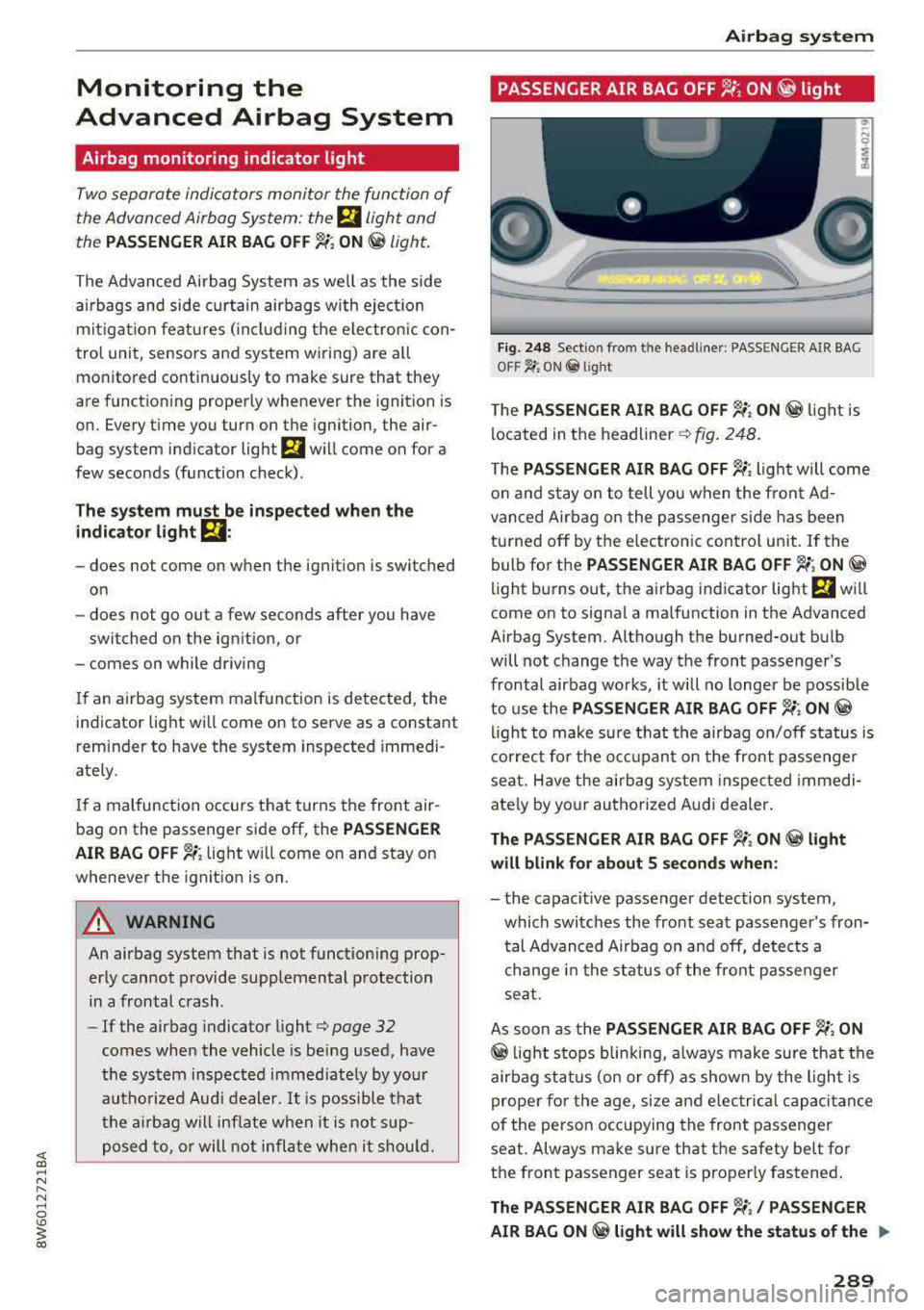
T he PASSENGER AIR BAG OFF ~; ON@ light is
located in t he
headliner ¢ fig. 248.
The PASSENGER AIR BAG OFF ~; light will come
o n and stay on to tell you w hen t he fro nt Ad
van ced Air bag o n the p assenge r side has been
tu rned off by t he e lec tron ic control unit . If the
bulb fo r the
PASSENGER AIR BAG OFF ~; ON@
light b urns o ut, t he a irbag ind icator light El w ill
come on to signal a ma lfunction in the Advanced
Airbag System. Altho ugh the burned-out b ulb
will not change the way the front passenger's
frontal a irbag works , it w ill no longer be possible
to use the
PASSENGER AIR BAG OFF ~; ON@
ligh t to make s ure that the airbag on/off s tatus is
c or rec t fo r th e o ccu pan t on the front passenge r
sea t. Have the airb ag system inspec ted immedi
ate ly by yo ur au thorized A udi d ealer .
The PASSENGER AIR BAG OFF~; ON@ light
will blink for about S seconds when:
- the capacit ive passenger detection system,
which switc hes the front sea t passe nger's fron
tal Advanced Airbag o n and off, detects a
change in the st atus of the front pa sse nger
se at.
As soon as the
PASSENGER AIR BAG OFF ~; ON
@ light s tops blin kin g, a lways make sure that the
air bag st atus (on o r off) as shown by the ligh t is
prope r for the age, size and e lec trica l capacitance
of t he perso n occ up ying the front passenger
seat . Always ma ke sure that the safety be lt fo r
t h e front passenger seat is proper ly fastened .
The PASSENGER AIR BAG OFF~;/ PASSENGER
AIR BAG ON
@ light will show the statu s of the ..,.
289
Page 291 of 409
Airbag syste m
front seat p assenge r's frontal Advanced Airbag.
Th e PAS SENGER AIR BAG
OFF ~; light:
-will come o n if the front pa ssenger seat is not
occupied;
- will come on if the e lectr ica l capacitance meas
u red by the c apac itive passenger detec tion sys
tem for the front passenger seat equals the
combined capacitance of an infant up to about
one year of age and one of the rearward-facing
or forward-facing child rest raints listed in Fed
eral Motor Vehicle Safety Standard 208 with
which the Advanced Ai rbag System in your veh i
cle was certif ied; Fo r a listing of the child re
straints that were used to cert ify your vehicle's
compliance with the U .S. Safety Standard
c=> page 304.
-will go out if the front passenger seat is occu
pied by an adult as reg istered by the capacitive
passenger detection system.
- T he
PAS SENG ER AIR BAG OFF ~; light must
come on and s tay o n if the ignition is on and . ..
- a car bed has been insta lled on the front pas
senger seat, o r
-a rearward-fac ing ch ild restrai nt has been in
stalled on the front passenger seat , or
- a forward-facing child restra int has bee n in stal
led on the front passenger seat,
- and if the e lectrical capacitance registered on
the front passenger seat is equa l to or less than
the comb ined capac itance of a typical 1 year
o ld infant and one of the rearward-fac ing o r
fo rward -fa cing chi ld restrain ts lis ted in Federal
Motor Veh icle Safety Standard 208 with w hich
the Advanced Airbag System in yo ur vehicle was
certified .
I f the fron t passe nger seat is no t occ upied, the
front ai rbag w ill not dep loy, and the
PASSENGER
AIR BAG
OFF ~; light wi ll stay on.
Never i nstall a rearward-facing child rest raint on
t he front passenge r sea t, the safes t place for a
chi ld in any kind of child restraint is at one o f the
seating positions on the rea r seat
¢ page 2 78,
Child restraints on the front seot
-some impor
tant things to know
and c:> page 302, Child safe
ty .
290
If the PASSENGER AIR BAG OFF ~; light
com es on ...
If the PASSENGER AIR BAG OFF ~; light comes
on when one of the condit ions listed above is
met, be sure to check the light regularly to make
certain t hat the
PASSENGER AIR BAG OFF ~;
light stays on cont inuously whenever the ign ition
i s on . If the
PASSENGER AIR BAG OFF ~; light
does not appear on and does not stay on all the
time, stop as soon as it is safe to do so a nd
- reactivate the system by tur ning the ignit ion
off for more than 4 seconds and then tur ning it
on
again;
- remove and re install the ch ild restraint. Make
sure that the child restra int is prope rly insta l
led and that the safety belt for the front pas
senge r sea t has bee n corre ct ly rou ted th rough
t he child restraint as desc ribed in the ch ild re
straint man ufact urer's inst ruc tions;
- ma ke sure that the convert ible loc king retr ac
to r on the safety belt for the front passenge r
seat has been activated and that the safety belt has been pulled tight .
- ma ke sure that no e lectrica l device (s uch as a
laptop , CD p layer , e lectronic games device,
power inverte r or seat heater for chi ld seats) is
placed or used on the front passenger seat if
the device is connected to the 12-volt socket or
the c igarette lighter socket;
- make sure that no seat heater has been retro
fitted or otherw ise added to the front passen
ger seat;
- make sure that noth ing can interfere with the
safety belt buckles and that they are not ob
struc ted;
- make sure that there are no wet objects (such
as a wet towe l) and no water or other liquids on
the front passenger seat cushion .
If the PASSENGER AIR BAG OFF~; light still
does not come on ...
If the PASSENGER AIR BAG OFF~; light st ill
does not come on and does not stay on cont in u
ous ly (when the ign ition is switched o n),
- take the child restra int off the front passenger
seat and install it properly at one of the rear
ll-