acc AUDI A7 2018 Workshop Manual
[x] Cancel search | Manufacturer: AUDI, Model Year: 2018, Model line: A7, Model: AUDI A7 2018Pages: 274, PDF Size: 42.77 MB
Page 90 of 274

Assistance systems
-With stationary objects ¢ page 89.
A WARNING
Always pay attention to traffic when adaptive
cruise control is switched on and braking
guard is active. As the driver, you are still re
sponsible for starting and for maintaining
speed and distance to other objects. Braking
guard is used to assist you . The driver must
always take action to avoid a collision. The
driver is always responsible for braking at the
correct time.
- For safety reasons, do not use adaptive
cruise control when driving on roads with
many curves, when the road surface is in
poor condition and/or in bad weather (such
as ice, fog, gravel, heavy rain and hydroplan
ing). Using the system under these condi
tions increases the risk of an accident.
- Switch adaptive cruise control off tempora
rily when driving in turning lanes, on ex
pressway exits or in construction zones. This
prevents the vehicle from accelerating to
the stored speed when in these situations .
- The adaptive cruise control system will not
brake by itself if you put your foot on the ac
celerator pedal. Doing so can override the
speed and distance regulation.
- When approaching stationary objects such
as stopped traffic, adaptive cruise control
will not respond and braking guard will have limited function.
- The adaptive cruise control system and
braking guard do not react to people, ani
mals, objects crossing the road or oncoming
objects.
- The function of the radar sensors can be af
fected by reflective objects such as guard
rails, the entrance to a tunnel, heavy rain or
ice.
A WARNING
- Improper use of adaptive cruise control can
cause collisions, other accidents and serious
personal injury.
- Never let the comfort and convenience that
adaptive cruise control and braking guard
88
offer distract you from the need to be alert
to traffic conditions and the need to remain
in full control of your vehicle at all times,
- Always remember that the adaptive cruise
control and braking guard have limits -they
will not slow the vehicle down or maintain the set distance when you drive towards an
obstacle or something on or near the road
that is not moving, such as vehicles stopped
in a traffic jam, a stalled or disabled vehicle.
If registered by the radar sensors, vehicles
or obstacles that are not moving can trigger
a collision warning and if confirmed by the
video camera, an acute collision warning.
- Never follow a vehicle so closely that you
cannot stop your vehicle safely. The adap
tive cruise control cannot slow or brake the
vehicle safely when you follow another vehi cle too closely. Always remember that the
automatic braking function cannot bring the
vehicle to a sudden or emergency stop un
der these conditions .
- To prevent unintended operation, always
switch ACC off when it is not being used .
@ Note
The sensors can be displaced by impacts or
damage to the bumper, wheel housing and
underbody. That could affect the adaptive
cruise control system and braking guard .
Have an authorized Audi dealer or authorized
Audi Service Facility check their function.
© Tips
For an explanation on conformity with the
FCC regulations in the United States and the
Industry Canada regulations, see
¢page 258.
Page 91 of 274
a co ,...,
N
" N ,...,
0 00 <..:l '
Applies to: ve hicles with Audi adaptive cruise co ntro l
Fig. 9 1 Example: dr iv ing into a curve
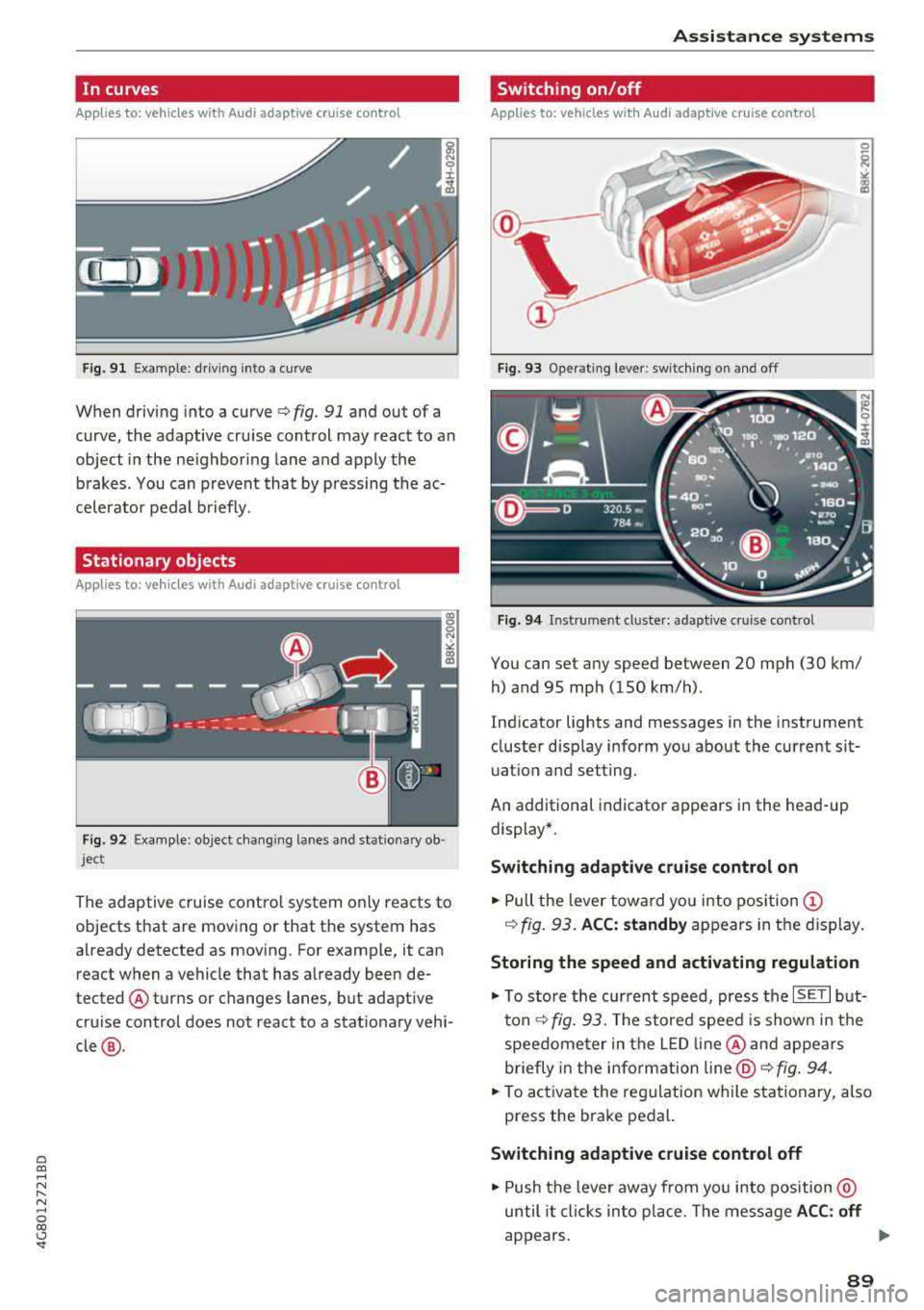
When driving into a curve ¢ fig. 91 and out of a
curve , the adaptive cruise control may react to an
object in the ne ighboring lane and apply the
b rakes. You can prevent that by p ressing the ac
celerator pedal b riefly.
Stationary objects
A pp lies to: ve hicles with Audi adaptive cruise contro l
Fig. 92 Example: object changi ng lanes and stationa ry ob
ject
The adaptive cruise contro l system only reacts to
objects that are mov ing or that th e system has
already detected as moving. For example, it can
react when a vehicle that has already been de
tected @turns or changes lanes, but adapt ive
cru ise control does not react to a stat ionary vehi
cle @.
Assi st a nce systems
Switching on/off
App lies to : vehicles wit h Audi ada ptive cr uise control
Fi g. 93 Operat ing lever : switch ing on and off
Fig . 94 Instrument clus te r: adaptive cru ise cont rol
You can set any speed between 20 mph (30 km/
h) and 95 mp h (150 km/h) .
Ind icator lights and messages in the instrument
cluster disp lay inform you about the current sit
uatio n and setting.
An additional indicator appears in the head-up display*.
Switching adaptive crui se control on
.,. Pull the lever towa rd yo u into pos ition (!)
¢ fig. 93. ACC: standby appears in the display .
Storing the speed and activating regulation
.,. To store the current speed, press the ISE TI but
ton ¢ fig. 93. The stored speed is show n in the
speedome ter in the LED line @and appears
briefly in the i nform ation
line @¢ fig. 94 .
... To activate the reg ulation while stationary, also
press the brake pedal.
Switching adaptive cruise control off
.,. Push the lever away from you into position @
until it cl icks in to p lace. The message
A CC: off
appears. ..,.
89
Page 92 of 274

Ass is tance sy stem s
@ Indicator light s
Ill -Adaptive cruise cont rol is switched on. No
objects a re detected ahead. The stored speed is
maintained.
• -An object ahead was detected. The adaptive
cruise control system regulates the speed and
distance to the object ahead and accelerates/
brakes automatica lly .
fai -Adaptive cruise control is switched on. An
object ahead was detected . Your vehicle rema ins
stopped and w ill not start driving automat ica lly.
• -The automatic braking is not enough to
maintain a suffic ient distance to a n object ahead.
You must intervene
¢ page 92, Request for
driver intervention.
© Instrument cluster display
I f adaptive cruise contro l is not shown in the in
strumen t cluster display, yo u can call it up using
the multifunction stee ring wheel b uttons
¢ page 20.
Based on the graphics in the d isp lay, you can de
termine if the system is ma inta ining a distance to
the object ahead and what that distance is.
No vehicl e -no object was detected ahead .
Whit e vehicle -an object was detected ahead.
Red veh icle -request for driver intervention
¢ page 92 .
Both
arrow s on the scale © indicate the distance
to the object ahead . No arrow appea rs when the
vehicle is on an open road and there is no obje ct
ahead. If an object is detected ahead, the arrow
moves on t he scale.
The green zone on the scale indicates the store
distance. For information on changing the dis
tance, refer to
¢ page 91. If the distance se
lected is exceeded or not reached, the arrow
moves into the red zone on the sca le.
A WARNING
If you press the ISE TI button when driving at
speeds below 20 mph (30 km/h), the vehicle
accelerates automat ically up to 20 mph (30
90
km/h), wh ich is the minimum speed that can
be set .
(D Tips
-If you switch the ign it ion or the adaptive
cruise control system off, the set speed is
erased for safety reasons .
- The electronic stabilization control (ESC) and the anti-slip-regulation (ASR) are auto
matically switched on when the adaptive
cruise control is switched on.
Changing the speed
Applies to: vehicles with Audi adapt ive cruise control
0
f
jJ
0
Fig . 95 Operat ing lever: chang ing the speed
.,. To increase or reduce the speed in increme nts,
tap the lever up or down.
.,. To increase or decrease the speed qu ickly, hold
the lever up or down until the red LED @ reach
es the des ired
speed ¢ page 89 , fig. 94.
After each change, the new stored speed appears
briefly in the information
line¢ page 89, fig. 94
@ .
Driving in stop-and-go traffic
App lies to: vehicles with Aud i adapt ive cru ise control
The adaptive cru ise cont rol system also assists
you in stop-and-go traffic.
Stopping automatically
If
an object ahead stops, your vehicle will brake
and stay at a stop, within the limits of the sys
tem . The Start/Stop system* can be used as usu-
al. ..,.
Page 93 of 274

a co ,...,
N
" N ,...,
0 00 <.,;) '
.,. Tap the accele rator pedal , o r
... pull the lever toward you into position @.
@ Tips
If an obstacle is detec ted when your veh icle
starts moving, the driver intervention request
appears
~ page 92. Your vehicle will drive
more slow ly when starting . This may also
happen in some situations when there is no
apparent obstacle.
Interrupting cruise control
App lies to: vehicles with Audi adaptive cruise contro l
Fig. 96 Sele ctor l eve r
Requirement: adaptive cruise contro l must be
sw itched on.
Overriding cruise control
.,. T o accelerate manually , p ull the lever toward
you into pos ition
@ and hold it there . T he mes
sage
ACC: over ride appears. Or
... Press the accelerator pedal.
... To resume c ru ise control, release the lever or
take your foot off the acce lerator pedal.
Canceling crui se control while dri ving
.,. Move the leve r into posit ion @. The message
ACC: standb y appears. Or
... Press the brake pedal.
... To resume the stored speed, move the lever in
to posit ion
@ .
Canceling cruise control when stopp ed
... Push the lever away from you into position @.
The message
ACC : standby appears.
A ssi st a nce systems
... To resume cru ise contro l, press the brake peda l
and pu ll the l ever toward you into pos ition @ .
A WARNING
It is dangerous to activate cruise control and
resume the stored speed when the current
road, traffic or weather cond itions do not per
mit this . This increases the risk of an accident .
Setting the distance
Applies to: vehicles with Audi adaptive cru ise control
F ig . 97 Operat ing lever: sett ing t he d ist ance
... T ap the switch to display the current set dis
tance ¢
fig. 97.
N (X) N 9 :I:
~
... To increase or reduce the d istance in incre
ments, tap the switch aga in to the r ight or left .
The distance between the two vehicles will change i n the inst rumen t cluste r display .
When approaching an object ahead , the adaptive
cruise contro l system brakes to match that speed
and then adjusts to the set d istance .
If the object
ahead accelerates, adaptive cruise contro l w ill al
so accelerate up to the stored speed .
The higher the speed, the greater the distance in
meters ¢.&. . The Distance 3 setting is recom
mended . That is equa l to the gene ral recommen
da tion of "half the speed shown on the speedom
eter" .
The distances provided a re specified values . De
pending on the driv ing s ituation and the way the
object ahead is dr iving, t he actual d istan ce may
be more or less tha n these ta rget distan ces .
The various symbo ls for the time increments ap
pears briefly in the info rmation line @
~ page 89, fig. 94 when you change the settings . .,.
91
Page 95 of 274

a co .... N
" N .... 0 00 \.J '
When detected in time, the system can assess
dangerous sit uat ions where an object a head
brakes suddenly or if your own vehicle is traveling
at a high speed and approaching an object that is
mov ing more slowly. The brak ing guard does not
react if it cannot detect the situation.
The system advises you of various dangero us sit
uations :
- T he
distan ce warning occurs if you d rive too
closely to the object ahead for a long period o f
time . If the object ahead brakes strongly, you
would not be able to avoid a collision .
The.
indicator light appears as an indication for th is.
- The
app roach wa rning occurs when an object
ahead is traveling more s low ly or brakes
strongly. When th is warning occurs, it may on ly
be poss ible to avoid a co llision by swerving or
braking strongly . The danger is indicated by the
• ind icator light ~ fig . 99 . An aud io signal w ill
also sound .
If you do not react early enough or at a ll to a dan
ge rous situation, the braking guard suppo rts you
w ith a brak ing intervent ion .
- If a co llision is imminent, the system will first
provide an
ac ute warning by braking sharply.
- If you do not react to the acute warning, the braking guard can increase the braking force
within the limits of the system
ll . Th is reduces
the veh icle speed in the event of a collision .
- The system can init iate comp lete decelerat ion
shortly before a collision
l l. Full deceleration at
high speeds occurs only in vehicles with adap
t ive cru ise control and s ide ass ist (pre sense
plus).
- If the braking gua rd determines that you are
not brak ing st rongly eno ugh whe n there is an
i mpending co llision, i t can increase the brak ing
fo rce .
- T he pre se nse functions also engage whe n
the re is an impend ing
collision ~ page 95.
ll This is not availa ble in so me co untrie s.
A ss istance systems
Which functions can be controlled?
Yo u can swit ch t he b raking guard and t he d is
tance/approach warning on or
off in the Infotain
ment system
~ page 94, Settings in the Info
tainment system .
A WARNING
--
Lack of attention can cause collisions, other
accidents and ser ious personal inj uries. The
braking guard is a n assist system and cannot
pr event a collision by itself . T he dr iver m ust
a lways inte rvene . The d river is always respon
s ib le for b raking at the co rrect t ime.
- Always pay close atten tion to traffic, even
when the b raking gua rd is switched on. Be
ready to in tervene and be rea dy to take
comp le te co ntro l wheneve r ne cess ary. A l
ways keep the sa fe and legal distance be
tween your vehi cle a nd ve hicl es up ahead .
- B raki ng g uard works w it hi n limi ts a nd will
not respond o uts ide the system limits, fo r
examp le when approach ing a stopped veh i
cle or stationary obstacle (end of a traff ic
jam or vehicle that has broken down in traf
fic).
- Always remember that the radar sensor for
the brak ing guard works only within def ined
detection and range limits that may prevent
the proper detect ion of other vehicles.
- The radar sensor's function and range can
be reduced by rain, snow and heavy spray.
Mov ing vehicles up ahead may not be
promptly de tected or may no t be detected
at a ll.
- Reflective surfaces includi ng crash ba rriers
or tunne l entra nces may impair the function
of t he ra da r se nso r.
(D Tips
- You can cancel the braking with increas ing
force tha t is initiated by t he sys tem by brak
ing yourse lf, by acce le ra ting not iceably or
by swe rving.
- Keep in mind that b raking gua rd can b rake
unexpectedly. A lways secure a ny cargo or
93
Page 96 of 274

Assistance systems
objects that you are transporting to reduce
the risk of damage or injury.
Settings in the Infotainment system
A pp lies to: ve hicles w ith Audi a daptive cruise co ntro l
~ Se lect : the ICARI function button > (Car)* Sys
tems
control button > Driver assistance > Audi
braking guard .
System -
switch the brak ing guard On /Off. When
you switch the ign ition on, the message
Braking
guard: Off
appears if the system is switched off.
Early warning -the distance and approach warn
ings in the display can be sw itched
On /Off .
(D Tips
-Your settings are automatically stored and
assigned to the remote control key being
u sed .
-If you restrict or switch off the ESC, the
braking guard also switches itse lf off
c;, page 121.
-Switch braking guard off when you are load
in g t he ve hicle onto a vehicle ca rr ier, t rain,
sh ip or other type of transportation. This
ca n prevent undesired warnings from the
braking guard system.
Messages
App lies to: ve hicles w ith Audi a daptive cruise co ntro l
Braking guard: Off
This message appears if the system is switched
off throug h the I nfota inment system . Otherwise,
if the system is turned off, the information ap
pears every time shortly after the start of the
trip.
The message also appears if the system is not
ava ilable due to a malfunct ion or if the ESC is
sw itched off
c:;, page 121 . If this is the case, the
system w ill not prov ide warnings about a possi
b le co ll ision.
Braking guard: engaged
This message appears if a sharp brake pressure
was applied due to an acute warning.
94
ACC : Unavailable!
ACC and Audi braking guard: Unavailable
The system cannot guarantee that it will detect objects correctly and is sw itched off. The sensors
have been moved or are faulty . The pre sense
functions may also be affected . Drive to an au
thorized Audi dea le r or aut horized Audi Service
Facility immediately to have the malfunction cor
rected.
ACC: Currently unavailable. No sensor vision
ACC and Audi braking guard: Currently unavail
able. No sensor vision
This message appears if the sensor v iew is ob
structed, for examp le by leaves, snow, heavy
spray or dirt . Clean the sensors
c:;, page 87,
fig . 90 .
ACC : Currently unavailable. Gradient too steep
The road exceeds the maxim um possible angle
for safe adaptive cruise control operation. Adap
tive cruise control is switched off.
ACC : Only available in D, Sor M
Select the D/S or M selector lever position.
ACC: Currently unavailable. Parking brake ap
plied
The adaptive cruise control system switches off
automat ica lly if the parking brake is set.
ACC : Currently unavailable. Stability control
(ESC) input.
This message appears if the electro nic stabiliza
tion control (ESC) is taking action to stab ilize the
vehicle. In th is case, adaptive cruise control
switches off automatically.
ACC off: Manual control!
This message appears when adaptive cruise con
trol cannot set the parking brake. Press the brake
pedal to prevent the vehicle from ro llin g.
• ••
Three white dots appear if a setting cannot be se
l ected w ith the operating lever. For example, this
happens if adaptive cru ise control cannot start
driv ing automat ically in stop-and-go traff ic
Page 98 of 274

Ass is tanc e system s
@ Note
The sensors can be displaced by impacts or
damage to the bumper, whee l housing and
underbody. Pre sense can be impa ired by th is.
Have an authorized Audi dea ler or author ized
Audi Serv ice Facility check their function .
(D Tips
-Certain pre sense front functions switch off
when sport mode is switched off or when
driv ing in reverse .
- The pre sense functions may not be availa
ble if there is a ma lfu nction in the ESC sys
tem or the airbag contro l module .
- The pre sense front/plus funct ions are not
available if there is a malf unction in the
adaptive cruise contro l*
system~ page 94.
-The pre sense rear/plus functions are not
available if the re is a malfunction in the s ide
ass ist* system
~ page 94 .
Audi active Lane assist
Description
Appl ie s to: ve hicles w ith Audi active lane assis t
Active lane assist det ects lane mark er lines with
in the limits of the system using a came ra in the
windshie ld. If you are approaching a detected
lane marker line and it appears likely that you
w ill leave the lane , the system will warn you w ith
correct ive steer ing . You can override t his steer ing
at any t ime . If yo u pass over a line, t he s teer ing
wheel will v ib rate l igh tly. In o rder for this wa rn
ing v ib ra tion to occur, i t mus t first be sw itche d
on in the Info tainmen t sys tem . Act ive lane assist
is ready for operation when the lane marke r line
is detected on at least one side of the vehicle.
T he system is designed fo r driving on express
ways and highways and therefore only activates
at speeds above approximate ly 40 mph (65 km/
h).
A pp lies to: ve hicles w ith s ide ass ist
If yo u ac tiva te a turn signa l when active lane as
sist is ready and it classifies a lane change as crit
ical because of ve hicles traveling a longside you or
approaching you, there will be noticeab le correc-
96
tive steer ing sho rt ly befo re yo u leave the lane.
This wi ll attempt to keep your ve hicle in the lane.
App lies to: vehicles wi thout s ide assis t
The system will not warn you befo re cross ing a
l ane mar ke r li ne if you have act ivated the t urn
s ignal. In this case, it assumes that you are
c h anging lanes intentionally.
App lies to: vehicles wit h adaptive c ruise contro l
The corrective steering is targeted based on the
driv ing situation . In add ition to the lane ma rke r
li nes , the system can a lso take into account other
objects such as guard rails . If they are detected in
close prox imity to the ve hicle, act ive lane ass ist
helps p reve nt the vehicle from dr iv ing too close
to t hem. The re is a lso pass ing ass ista nce. The
system does no t provide any co rrec tive steering if
i t detects that you are pass ing anot her vehicle.
A WARNING
- The system warns the drive r that the vehicle
is leaving the lane using cor rect ive steering.
The d rive r is always respons ible fo r keeping
the vehicle within the lane.
- The system can help you keep the vehicle in
the lane, b ut it does not d rive by itse lf. Al
ways keep your ha nds on the steering
wheel.
- Cor rective steering may not occur in certain
situations, such as d uring heavy braking .
- There may be cases where t he camera does
not recognize all la n e mar ker lines. Correc
tive steering can only take place on the s ide
of the vehicle where lane ma rker lines are
detec ted .
- Othe r road str uctures or objects could poss i
b ly be identified u nintent ionally as lane
ma rker lines. As a res ult, co rr ec tive stee rin g
m ay be u nexpec ted o r m ay n ot occur .
- The camera view ca n be res tricted, fo r ex
a mp le by ve hicles dr iving ahea d or by r ain,
snow, he avy spray or lig ht shin ing into t he
camera. This can resul t in a ctive lane ass ist
not detecting the lane ma rke r lines o r de
tect ing them inco rrectly.
Page 100 of 274
Assistance systems
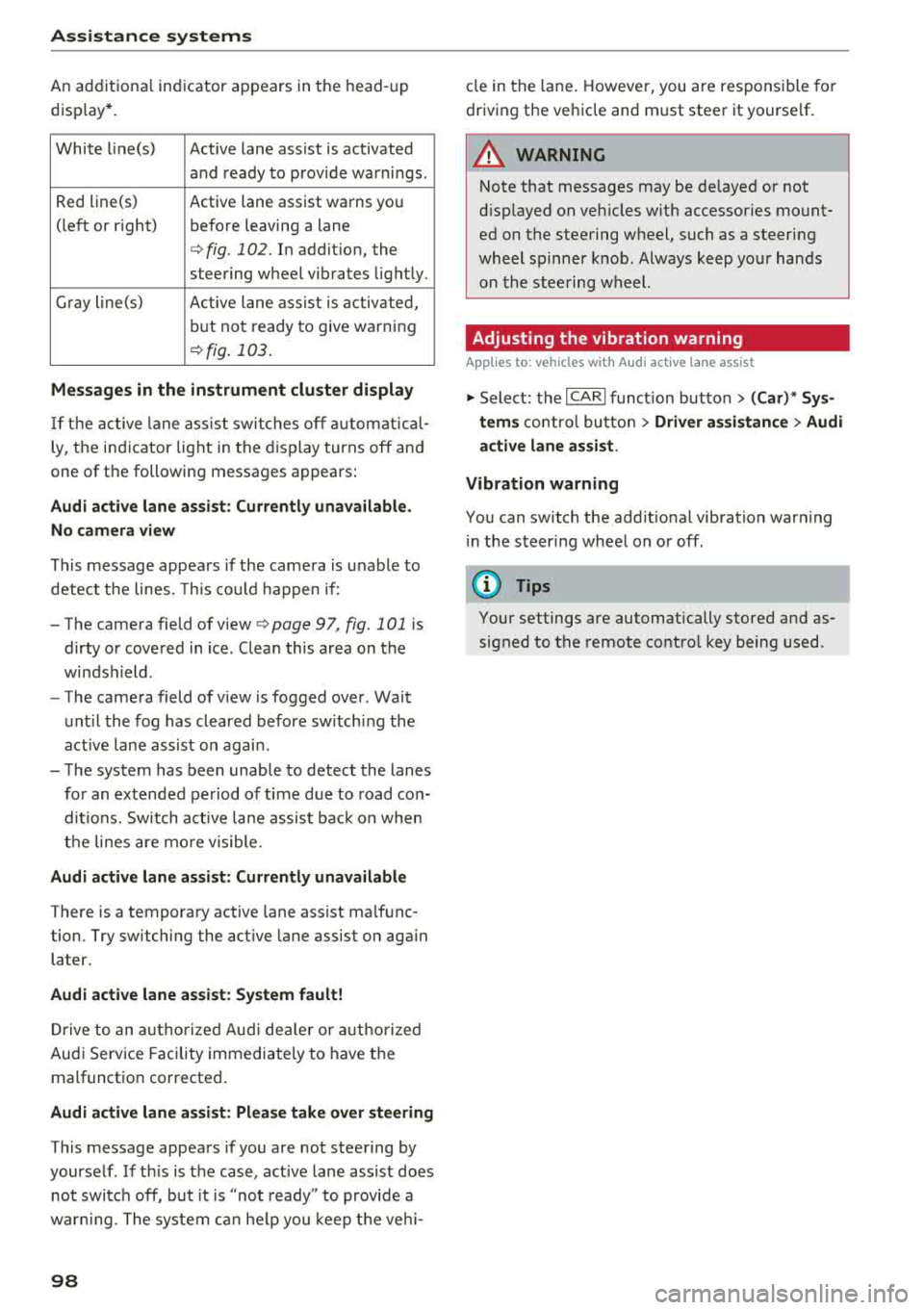
An additional indicator appears in the head-up
disp lay*.
White line(s) Active lane assist is activated
and ready to provide warnings .
Red line(s) Active lane assist warns you
(left o r right) before leaving a lane
c::>fig. 102. In addit ion, the
steering wheel vibrates lightly.
Gray line(s) Active lane assist is activated,
but not ready to give warning
c::>fig . 103.
Messages in the instrument cluster display
If the active lane assist swit ches off automat ical
ly, the indicator lig ht in the display turns off and
one of the following messages appears :
Audi active lane assist: Currently unavailable .
No camera view
This message appears if the came ra is unable to
detect the lines. This cou ld happen if :
- The camera field of v iew
c::> page 97, fig . 101 is
dirty or covered in ice. Clea n this area on the
windsh ield .
- The camera field of v iew is fogged over . Wait
until the fog has cleared before switch ing the
active lane assist on again .
- The system has been unable to detect the lanes
for an extended period of time due to road con
ditions. Sw itch act ive lane assist back on when
the lines are more visible.
Audi active lane assist : Currently unavailable
There is a temporary active lane assist ma lfunc
tion . Try sw itching the act ive lane assist on aga in
la ter.
Audi active lane assist : System fault!
Drive to an autho rized Aud i dealer or authorized
Audi Service Facility immediately to have the
malfunction corrected .
Audi active lane assist: Please take over steering
This message appears if you are not steering by
yourself . If th is is the case, active lane assist does
not switch off, but it is "not ready" to provide a
war ning. The system can help you keep the vehi-
98
cle in the lane . However, you are responsible for
driving the vehicle and must steer it yourse lf .
A WARNING
Note that messages may be de layed or not
displayed on vehicles with accessories mount
ed on the steering wheel, such as a steering
wheel spinner knob. Always keep your hands
on the stee ring wheel.
Adjusting the vibration warning
App lies to: vehicles wit h Audi active la ne ass ist
-
~ Select: the I CARI function button > (Car)* Sys
tems
contro l butto n > Driver assistance > Audi
active lane assist .
Vibration warning
You can switch the addit ional vibration warn ing
i n the steer ing wheel on or off .
(D Tips
Your settings are automatically stored and as
signed to the remote control key being used .
Page 103 of 274

a co ..... N
" N ..... 0 00 <..:l '
behind very quickly. The display may not
turn on in time.
- In poor weather conditions such as heavy
rain, snow or heavy mist.
- On very wide lanes, in tight curves, or if
there is a rise in the road surface. Vehicles
in the adjacent lane may not be detected
because they are outside of the sensor
range.
- Audi side assist cannot detect all vehicles
under all conditions, which can increase the
risk of accidents.
- Please note that side assist only displays ap
proaching vehicles or vehicles in your blind
spot if your vehicle is traveling at least 19 mph (30 km/h).
- In certain situations, the system may not
work or its function may be limited . For ex
ample:
- The display may not turn on at the right
time if vehicles are approaching or passing
very quickly.
- In poor weather conditions, such as heavy
rain, snow or fog.
- In very wide lanes, in tight curves or when
there are slopes in the roadway, vehicles
in the neighboring lanes may not be de
tected because they are outside of the
sensor range .
(D Note
The sensors can be displaced by impacts or
damage to the bumper, wheel housing and
underbody. This can impair the system. Have
an authorized Audi dealer or authorized Audi
Service Facility check their function.
(D Tips
- If the window glass in the driver's door or
front passenger's door has been tinted, the
display in the exterior mirror may be incor
rect.
- For an explanation on conformity with the
FCC regulations in the United States and the
Industry Canada regulations, see
¢page 258.
Assistance systems
Switching on and off
Applies to : veh icles w it h Audi s ide ass ist
Fig. 108 Driver 's door : side assist button
.,. Press the button to switch the system on and
off ¢.&. in General information on page 100 .
The LED in the button turns on when side assist
is switched on.
Adjusting the display brightness
App lies to: veh icles w ith Audi s ide ass ist
The display brightness can be adjusted in the In
fotainment system .
.,. Select: the I CARI function button > (Car)* Sys
tems control button > Driver assistance > Audi
side assist .
The display brightness adjusts automatically to
the brightness of the surroundings, both in the
information and in the warning stage. In very
dark or very bright surroundings, the automatic
adjustment will set the display to the minimum
or maximum level. In such cases, you may notice
no change when adjusting the brightness, or the
change may only be noticeable once the sur
roundings change.
Adjust the brightness to a level where the display
in the information stage will not disrupt your
view ahead. If you change the brightness, the dis
play in the exterior mirror will briefly show the
brightness level in the information stage . The
brightness of the warning stage is linked to the
brightness in the information stage and is adjust-
ed along with the information stage .
II>-
101
Page 106 of 274

Assistance systems
The following situations may affect the function
of t he night vision assist system:
- Poor visibility such as snow, rain , fog or heavy
spray
- Dirty lens on the night vision assist camera
Make sure the night vision ass ist camera
¢ fig. 113 is not covered by stickers, deposits or
any other obstructions because that can affect
the camera function. For information on clean
ing, see
¢ page 228.
The pedestrian and wild animal recognition de
pends on the temperature difference between
the person/wild animal and the background. Peo ple/wild animals may not be detected if the dif
ference is too small. The pedestrian/wild animal
marking and the marking light* deactivate at
temperatures above approximately 77 °F
(25 °()
and during daylight. If the night vision assist
im
age is selected in the instrument cluster display,
then the
II symbol appears at the top on the
right side.
..&_ WARNING
Pay attention to traffic and the area around
your vehicle when night vision assist is switch
ed on. The driver is always responsible for as
sessing the traffic situation.
- Night vision assist can only warn about peo
ple and wild animals located within the visu
al range of the infrared camera. The visual
range corresponds to the image in the in
strument cluster display.
- Night vision assist may not detect people or
wild animals and mark them if
- they are not in an upright position, for ex
ample if they are sitting or lying down
and/or
- the silhouette in the display appears in
complete or interrupted, for example be
cause the person is partially covered by a
vehicle or the animal is partially covered
by tall grass. This could increase the risk
of an accident.
- Never try to swerve around animals if doing
so will endanger you or other road users, be
cause this increases the risk of an accident.
104
@ Tips
- Even though the system evaluates the
shape and heat given off by all detected ob
jects, there are limits to the system. There
may be false warnings.
- For technical reasons, the image pauses in
split second intervals.
Switching on /off
Applies to: vehicles with night vision assist
Fig. 114 Area around the ligh t switc h: ni gh t vis ion assist
button
Requirement: switch the ignition on and turn the
light switch to the
AUTO position.
.,. Press the~ button ¢ fig. 114. The heat image
from the night vision camera appears in the in
strument cluster display .
.,. Press the~ button again to switch the night
vision assist off .
If conditions are bright enough, night vision as
sist can be switched on without moving the light
switch to the
AUTO position. Pedestrian and wild
animal highlighting and warnings are only active
when it is dark outside and the headlights are
switched on.
Adjusting the contra st
Applies to: vehicles with night vision assist
.,. Select: the I CARI function button > (Car)* Sys
tems
contro l button > Driver assistance >
Night vision assist contrast.
When the night vision assist is switched on and
the image is visible in the instrument cluster dis
play, you can adjust the contrast in the image
from
Min to Max .