radio AUDI A8 2017 User Guide
[x] Cancel search | Manufacturer: AUDI, Model Year: 2017, Model line: A8, Model: AUDI A8 2017Pages: 354, PDF Size: 88.68 MB
Page 138 of 354
Multi Media Interface
MMI touch
Applies to: vehicles with MMI touch cont rol pad
The MMI touch allows you to enter data on the
MMI touch control pod using handwriting recog
ni tion.
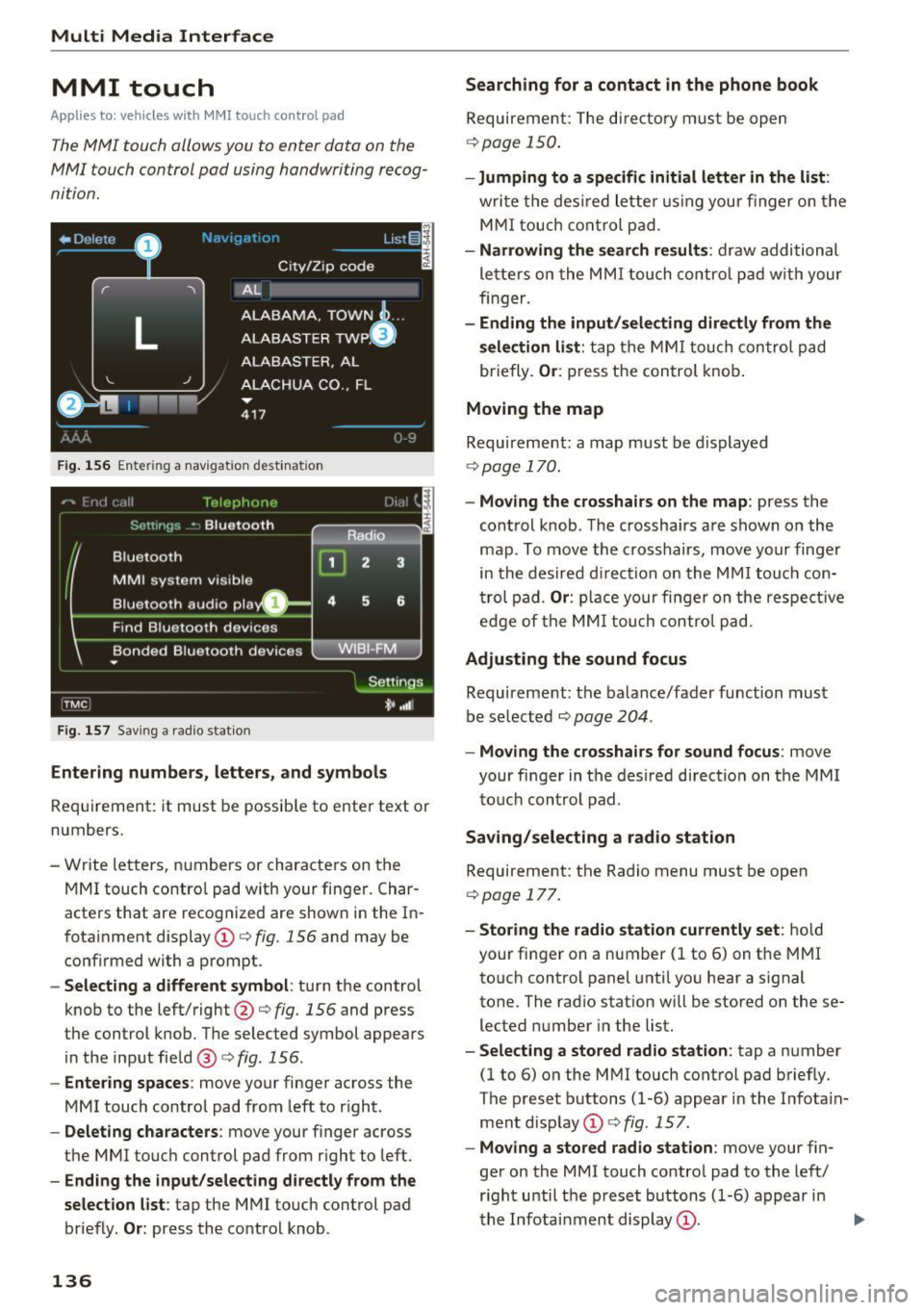
F ig. 1 56 Ente rin g a nav iga tion dest inat ion
F ig . 15 7 Sav ing a rad io st atio n
Entering number s, letters , and symbol s
Requirement: it must b e possib le to enter text or
numbers.
- Write lette rs, numbers or characters on t he
MM I touch contro l pad with your finger. Char
acters that are recog nized are shown i n the In
fotainment display © c:>
fig. 156 and may be
confirmed with a prompt .
-Selecting a different symbol : turn the control
knob to the left/right@c:>
fig. 156 and press
the control knob. T he se lected symbol appear s
in the input fie ld @ c:>
fig. 156 .
-Entering spaces : move your finger ac ross the
MMI touch control pad from left to r ight.
- Delet ing characters : move your finger across
the MMI touc h control pad from r ight to left.
- Ending the input /selecting directly from the
selection list :
tap the MMI touch control pad
briefly.
O r: press the control knob .
136
Searching for a contact in the phone book
Requirement: The di re ctory must be open
c:> poge 150.
-Jumping to a specifi c initial letter in the list :
writ e the des ired lette r using your finger on t he
M MI touch cont rol p ad.
- Narrowing the se a rch result s: draw additional
le tte rs o n the MMI touch co ntro l p ad w it h your
finger.
- Ending the input/selecting directly from the
selection list :
tap the MM I touch control pad
briefly.
Or : press t he control knob .
Moving the map
Requirement: a map must be displayed
c:>
page 1 70.
- Moving the cro sshairs on the map: press the
cont rol knob . T he crossha irs are shown on the
map . To move the crosshairs, move your finger
in the desired d irection on the MM I touch con
t rol pad .
Or : place your fi nger on the respe ct ive
edge of the MM I tou ch control pa d.
Adjusting the sound focus
Requireme nt: the balance/fader function must
be se lected c:>
page 204 .
-Moving the crossha irs for sound focus : move
your finger in the desired d irect ion on the MM I
to uc h control pad .
Saving /selecting a rad io st a tion
Requirement: the Radio menu must be open
c:>
page 177.
- Storing the radio station currently set : hold
your fi nger on a number (1 to 6) on the MMI
to uch control panel unti l you hear a s ignal
tone. The rad io stat ion w ill be stored on these
lected number in the list.
- Select ing a stored radio station : tap a number
(1 to 6) on the M MI touch control pad briefly.
The preset buttons (1-6) appear in the Infota in
ment disp lay © c:>
fig . 157 .
-Moving a stored radio station : move your fin
ger on the MMI touch contro l pad to the left/
r ight unti l th e p reset buttons (1-6) appear i n
the Infota inment display
(D . ..,.
Page 142 of 354
Voice recognition system
• l ELEPHONE
• NAVIGATION
• INFO
• RADIO
• MEDIA
• HELP
• HELP VOICE RECOGNlTION
• HELP TELEPHONE
• HELP NAVIGATION
• HE LP MAP
• HELP INFO
• HELP RADIO
• HELP MEDIA
liEttEPHONE
• ENTER NUMBER
• DIAL
• REPEAT
• CORRECTION
• DE LETE NUMBER
• REDIAL
• CAL L (XV)
(BUSINESS/ PRIVATE/ LAND LINE/ CELL)
• ENTER ADDRESS
• ENTER COUNTRY
• ENT ER ZIP CODE/ CITY
• ENTER STREET
• ENTER HOUSE NUMBER
• ENTER DOWNTOWN
• START/ CANCEL ROUTE GUIDANCE
• NAVIGATE
TO (XV)
• LAST DESTINATIONS
• FAVORITES
• HOME ADDRESS
• SHORT /FAST/ ECONOMY ROUTE
• DYNAMIC ROUTE ON / OFF
• ROUTE UST
• VOICE GUI DANCE ON / OFF
• ROUTE INFO ON/ OFF
• SCALE (XY) MILES / YARDS
I r-.1 F.O
• READ TRAFFIC REPORTS
RADIO
• SET STATION
• STATION (XV)
• SET FREQUE NCY
• SET BAND
• FM / AM/ SIRIUS
• STATION LIST
• READ STATION LIST
• PRESETS
• READ PRESETS
• UPDATE STATIO N LIST
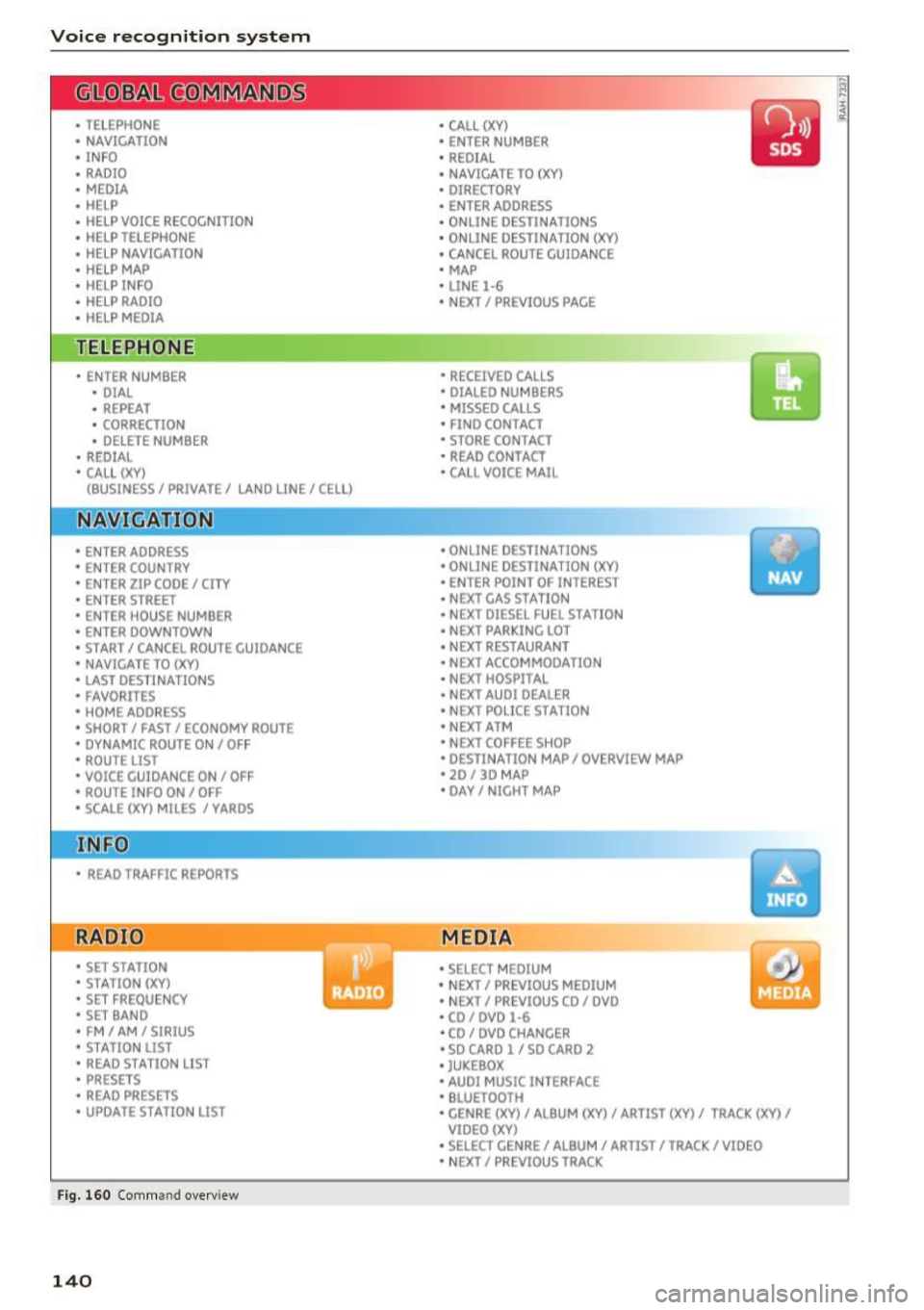
Fig. 160 Com mand overv iew
140
• CALL (XY)
• ENTER NUMBER
• REDIAL
• NAVIGATE TO (XY)
• DIRECTORY
• ENTER ADDRESS
• ON LINE DESTINATIONS
• ONLINE DESTINATION (XV)
• CANCEL ROUTE GUIDANCE
• MAP
• LINE
1·6
• NEXT/ PREVlOUS PAGE
• RECEIVED CALLS
• DIALED NUMBERS
• MISSED CALLS
• FIND CONTACT
• STORE CONTACT
• READ CONTACT
• CALL VOICE MAIL
• ONLINE DESTINATIONS
• ONLINE DESTINATION (XV)
• ENT ER POINT OF INTEREST
• NEXT GAS
ST A TION
• NEXT DIESEL FUEL STATION
• NEXT PARKING LOT
• N EXT RESTAURANT
• NEXT ACCOMMODATION
• NEXT HOSPITAL
• NEXT AUDI DEALER
• NEXT POLICE STATION
• NEXT ATM
• NEXT COFFEE S HOP
• DESTINATION MAP/ OVERVIEW MAP
• 20 / 30 MA P
• DAY/ NICHT MAP
MEDIA
• SELECT MEDIUM
• N EXT/ PREVIOUS MEDIUM
• NEXT/ PREVIOUS CO/ DVD
• CD/ DVD
1·6
• CD / DVD CHANCER
• SD CARD l / SD CARO 2
• JUKEBOX
• AUDI MUSIC INTERFACE
• BLUETOOTH
• CENRE (XV)/ ALB UM (XV)/ ARTIST (XV)/ TRACK (XV)
I
VIDEO (XV)
• SELECT CENRE /ALBUM/ ARTIST/ TRACK/ VIDEO
• NEXT/ PREVIOUS TRACK
Page 144 of 354

Voice recognition system
Sequences of comman ds used to perform an ac
tion are identified with a">", for examp le say: es
. For examp le, for bu siness address , you can
also say
busi ness, work, office or job .
Enter de stination
> (then) Ente r country .
The major ity shown are main comm ands. This
system also recognizes synonyms in certain cas -
Global commands
Applies to: vehicles with voice recognition system
You can always use the global commands, re
gardless of the men u selec ted.
Function Say:
Opening a menu Tel epho ne* I Dire ctory * I Navigation * I Map* I Radio I Media I
Info
Having the possible commands Help I Help voic e recognition I Help Telephon e* I Help Naviga-
read a loud tion * I Help Map* I Help Radio I Help Media I Help Info
Telephone functions* C all (X V) , for example Call John Smith I
Ente r numbe r I Redial I Directory
Navigation funct ions* Navigate to (XY), for examp le Navigate to John Smith I
Enter addre ss I Cancel route guidance I Map
Selecting an entry from a list Line (XV)
Scro lling thro ugh a lis t Next page I Previou s page
Switching the voice recogn ition sys-Cancel
tern off
Telephone
App lies to: veh icles with voice recognition system and telephone
Requirement: a cell phone must be connected to
the MMI
Q page 146 and the Telephone menu
m ust be open
Q page 147.
Function Say:
Call contact from directory Call (XV), for example Call John Smith
Selecting a specific contact number Call (XV ) bu siness I priv ate I land line I cell ,
for example, Call John Smith private
Selecting a phone number w ith a n Call I Call bus iness I Call private I Call l andl ine I Call busines s
address card open mobile
Show contact informat ion Directory I Find contact > the desired contact when prompted,
such as John Smith
Personalizing a contact with a Find contact> the desired contact when prompted, such as John
name tag Smith > Name contact > the personal name tag, such as Uncle
Jo hn
Dialing a phone number Enter number > After being prompted, say the telephone num-
ber in groups of individual numbers,
fo r example. 888 555
1212 > Dial
142
Page 146 of 354
Voice recognition system Function Say:
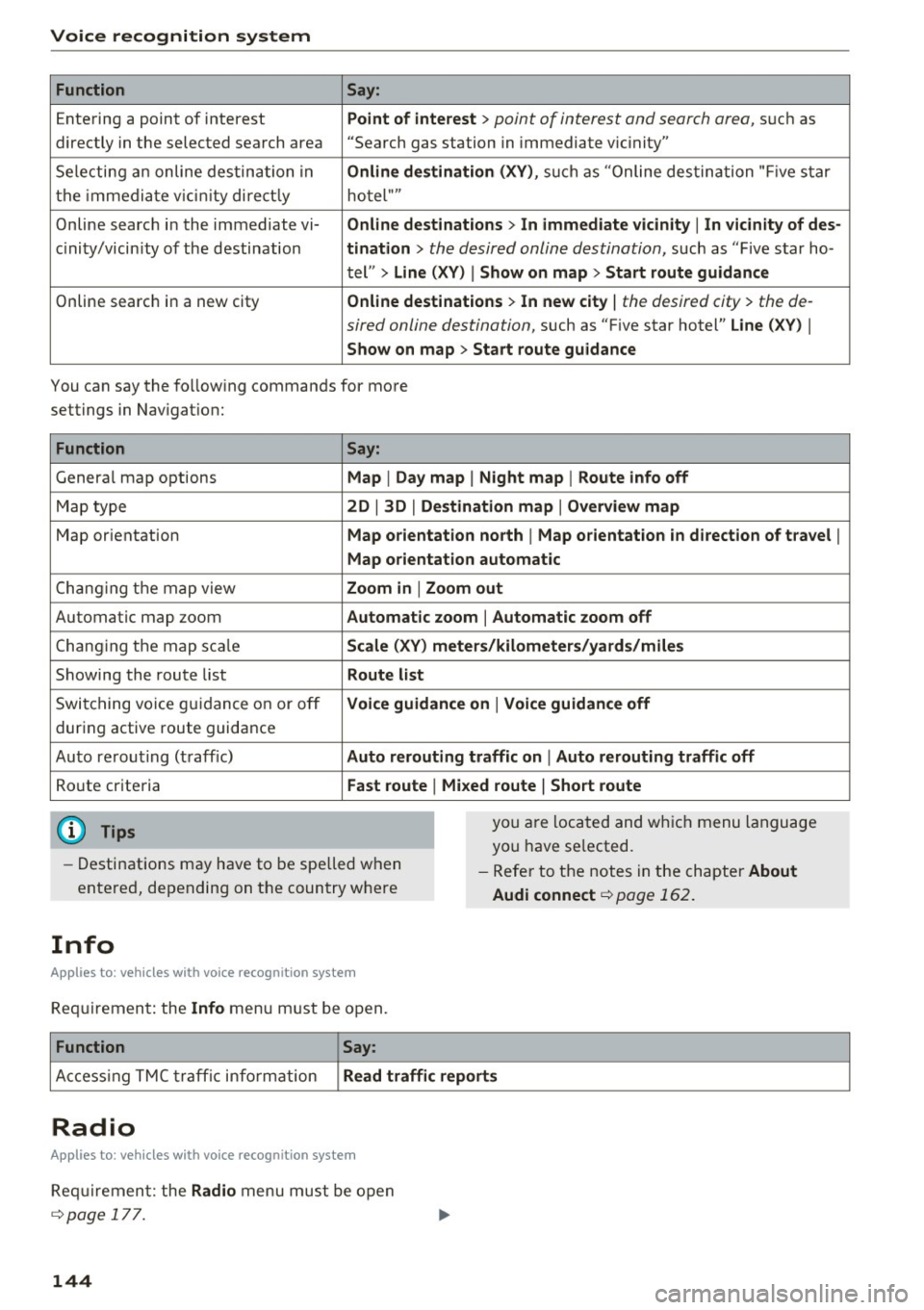
Entering a point of interest Point of interest
> point of interest and search area, su ch as
directly in the selected search area "Search gas station in immediate v ic inity"
Selecting an online destination in Online destination (XV), such as "Online destination "Five star
the imm ediate v icin ity directly hotel""
Online search in the immediate vi- Online destinations> In immediate vicinity
I In vicinity of des-
c in ity/vicin ity of the destination tination
> the desired online destination, such as "Five star ho-
tel"
> Line (XV) I Show on map > Start route guidance
Online search in a new city Online destinations > In new city
I the desired city> the de-
sired online destination,
such as "F ive star hotel" Line (XV) I
Show on map > Start route guidance
You can say the following commands for more
settings in Navigation:
Function
Genera l map options
Map type
Map orientation
Changing the map view
Automatic map zoom
C hang ing the map sca le
Showing the route list
Switching voice guidance on or off
dur ing active route guidance
Auto rerout ing (traff ic)
Route criteria
(D Tips
Say:
Map
I Day map I Night map I Route info off
2D
I 3D I Destination map I Overview map
Map orientation north
I Map orientation in direction of travel I
Map orientation automatic
Zoom in
I Zoom out
Automatic zoom
I Automatic zoom off
Scale (XV) meters/kilometers/yards/miles
Route list
Voice guidance on
I Voice guidance off
Auto rerouting traffic on
I Auto rerouting traffic off
Fast route
I Mixed route I Short route
you are located and which menu language
you have se lected.
- Destinations may have to be spelled when
entered, depending on the country where -
Refer to the notes in the chapter About
Audi connect
¢page 162.
Info
Applies to: vehicles with voice recognition system
Requirement: the Info menu must be open.
Function Say:
Access ing TMC traffic info rmation Read traffic reports
Radio
Applies to: vehicles with voice recognition system
Requirement: the Radio menu must be open
¢page 177.
144
Page 177 of 354
0 co .... N ,..... N .... 0 0 :c '
culates an alternative route .
The route to be avoided t hat you have ente red
appl ies on ly to the current rou te and must be set
again, if needed.
The areas you have se lected to avoid will appea r
with red and wh ite shad ing on the map.
{D) Tips
If the MMI does not calcu late an alte rnative
route, that means the re is no ne ava ilable.
Accessing traffic
information
Auto rerouting (traffic)
App lies to: vehicles with navigation system and Sirius (satel
li te radio)
By receiving traffic information from the TMC or
satellite -depending on ava ilability - the MMI cal
culates an optim ized route and the possib le t ime
saved for the current route guidance . You can de
cide yourse lf which route you would like to use.
Traffic information (TMC)
Applies to: ve hicles with navigation system and Sirius (satel
li te radio)
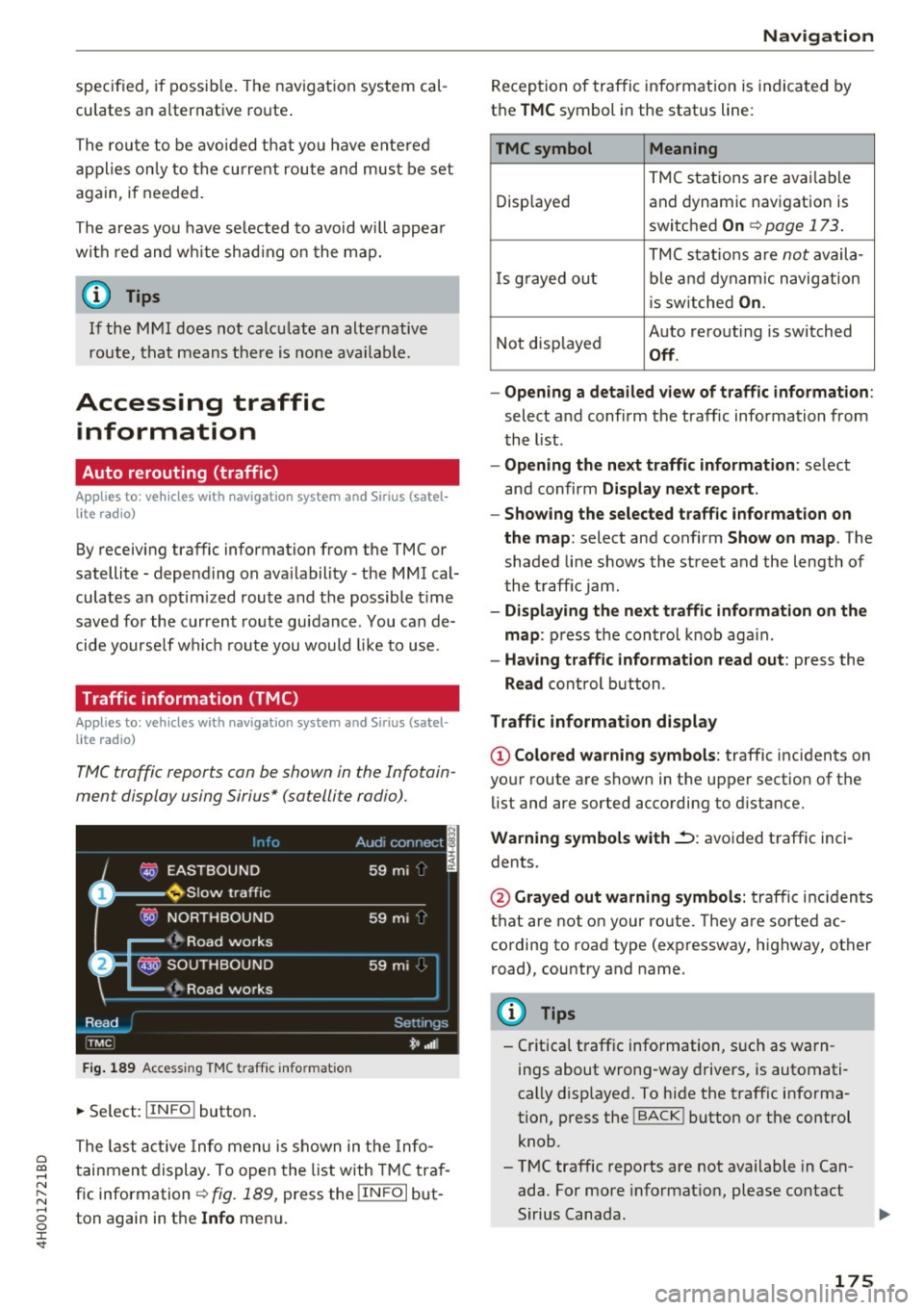
Tfv1C traffic reports can be shown in the Infotain
ment display using Sirius* (satellite radio).
Info Audi connect I
@ EASTBOUND 59 mi _ ·
D ~ Slow traffic
@ NORTHBOUND
59 mi
(~ Road works
fJ!: ~ SOUTHBOUND
59 mi·
(~ Road works
Read Settings
I_
TMC _ t• "'"
Fig. 189 Access ing TMC traff ic info rma tion
~ Se lect: IIN FO I button .
The last act ive Info menu is shown in the Info
tainment display . To open the list with TMC tra f
fic information¢
fig. 189, press the !IN FO I but
ton again in th e
Info menu.
Na vigation
Reception of traffic information is indicated by
the
T MC symbol in the status line:
TMCsymbol Meaning
TMC stations are avai lable
Disp layed and dynam ic navigation is
switched
On ¢ page 173.
TMC stat io ns are not availa -
I s g rayed out ble a nd dynam ic navigation
i s sw itched
On .
Not disp layed Auto rerouti
ng is switched Off .
- Opening a detailed vie w of traffic informat ion :
select a nd confirm the traffic information from
t he l ist .
-Opening the next tr affic information : select
and confirm
Display n ext report .
- Showing the selected traffic information on
th e map :
select and confirm Show on map . The
shaded li ne shows the stree t and the length of
the t raff ic jam .
-Displaying the ne xt tr affic information on the
map :
press the control k nob aga in .
- Having traffic information r ead out: press the
Read control button .
Traffic information display
© Colored warn ing symbols : traffic incidents on
your route are shown in the upper section of the
li st and are sorted according to distance.
Warning symbols with~: avoided traffic inci
dents.
@ Grayed out warning symbols: traffi c inc iden ts
that are not on your route. They are sorted ac
cording to road type (expressway, highway, other
road), country and name.
(D Tips
-Cr itica l t raff ic information, s uch as warn
ings about wrong-way drivers, is automati
cally disp layed. To hide the traffic info rma
tion, press the
I BACK I button or the control
knob.
- TMC traffic reports are not available in Can
ada. For more informat ion, please contact
Sirius Canada.
175
Page 179 of 354
C) C0 .--1
"' " "' .--1 0 0 :r
Accessing the radio
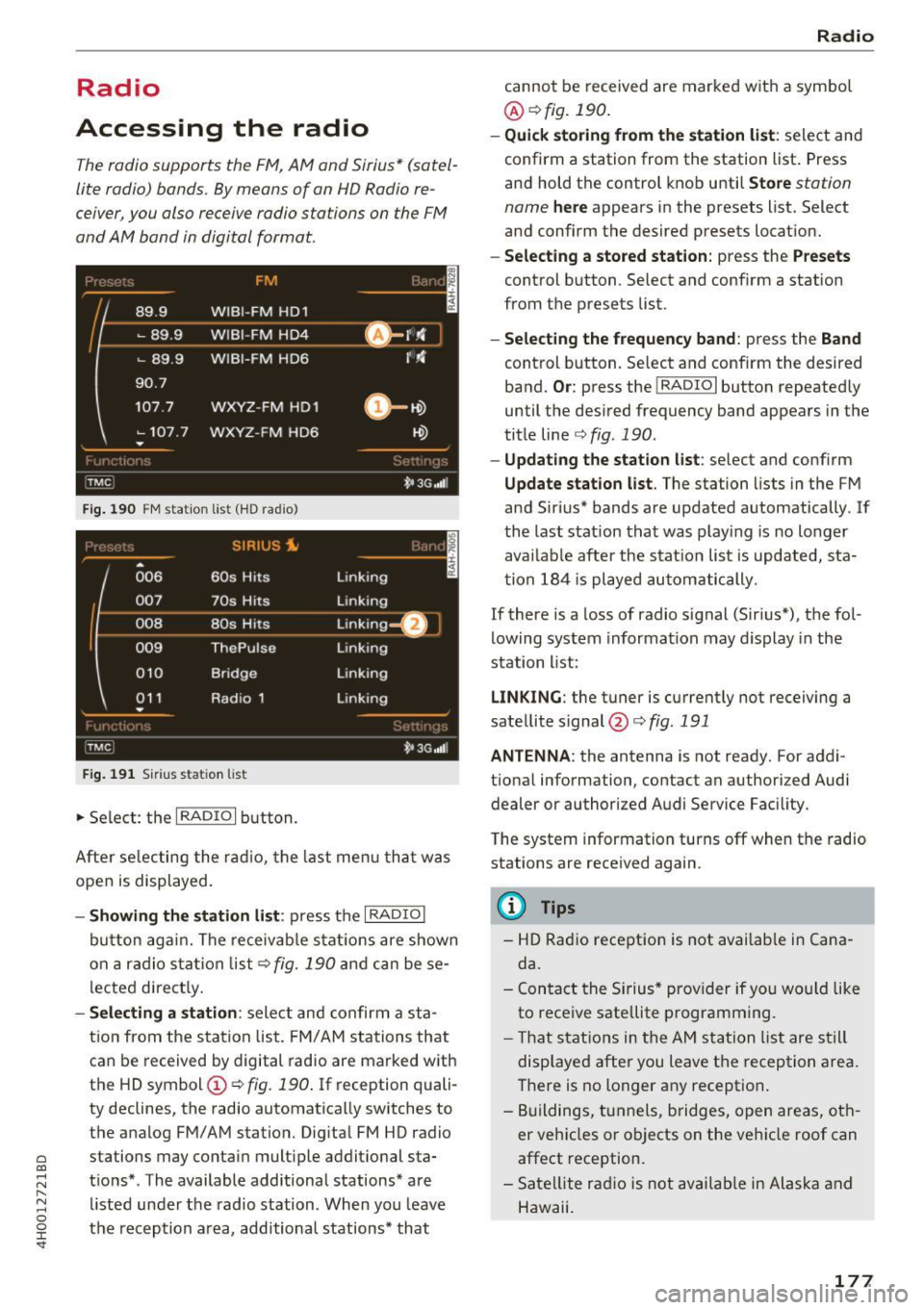
The radio supports the F M, A M and Sirius * (sate l
lite radio) bands. By means of an HD Radio re
ceiver, you also receive radio stations on the FM
and AM band i n digital format.
Fig. 190 FM stat ion list (H D radio)
• 006
SIRIUS i.
60s Hits
( -
007 ___ 70s Hits
008 80s Hits
009 ThePulse
010
011
•
Bridge
Radio 1
Fig. 191 S iri us stat io n list
~ Se lect: the I RADIO I bu tton.
- , I
Linking
Linking
Linking ~_:
Linking
Linking
Linking
t•JG ,,111
Af te r se le ct ing the radi o, the last m enu t hat was
ope n is displ ayed .
-Showing the station li st : p res s th e I RAD IO I
bu tton agai n. T he receiva ble s tat ion s are show n
on a rad io s ta ti on lis t¢
fig. 19 0 an d ca n be se
l ecte d direct ly .
- Selecting a station : sele ct and confir m a sta
tion from the s ta tion list. FM/ A M stations th at
can be received by digital radio are marked with
the HD symbol (!)
c:;, fig. 190 . If reception quali
ty declines, the radio automatica lly switches to
t h e a nalog FM/AM station. Digita l FM HD radio
stations may conta in mult iple addit io nal sta
t ions *. The available additiona l stations* are
listed un der t he radio station . When you leave
the reception a rea, additiona l stations* that
Radio
cannot be received are marked wit h a symbol
@ c:;,fig. 190 .
-Quick storing from the stat ion list : select and
confirm a station from the station list. Press
an d hold the control knob u nti l
Store station
name
here appears in the presets list. Select
and confirm the desired presets location.
- Selecting a stored station: press the Presets
control button . Select and confirm a stat ion
from the presets list.
-Selecting the frequency band : press the Band
control button. Select and conf irm the desired
band.
Or : press the IRADIOI button repeated ly
until the desired frequency band appears in the
title line
c:;,fig. 190.
-Updating the station list : select and conf irm
Update stat ion list . The station lists in the FM
and Sir ius* bands are updated automatically. If
the last stat ion that was play ing is no lo nger
ava ilab le afte r the stat ion lis t is updated, sta
t ion 184 is pl ayed automatically.
If there is a loss of radio signal (Sirius*), the fol
lowing system informat ion may display in the
station l ist:
LINKING : the tuner is currently not receiving a
satellite signal @c:;,
fig. 191
ANTENNA : the antenna is not ready. For addi
t iona l information, contact an authorized Audi
dealer or authorized Audi Service Facility.
T he system information turns off when the radio
stations are received again.
(D Tips
-HD Rad io reception is not availab le in Cana
da.
- Con tact the Si rius * prov ider if you wo uld like
to rece ive satellite p rogramming.
- Th at stat io ns in the AM station list are s till
displayed after you leave the reception area.
T here is no longer any reception .
- Bu ildings, tunnels, bridges, open areas, oth
er veh icles or objects on the veh icle roof can
affect reception.
- Sate llite rad io is not availab le in A laska and
Hawaii.
177
Page 180 of 354
Radio
Radio functions
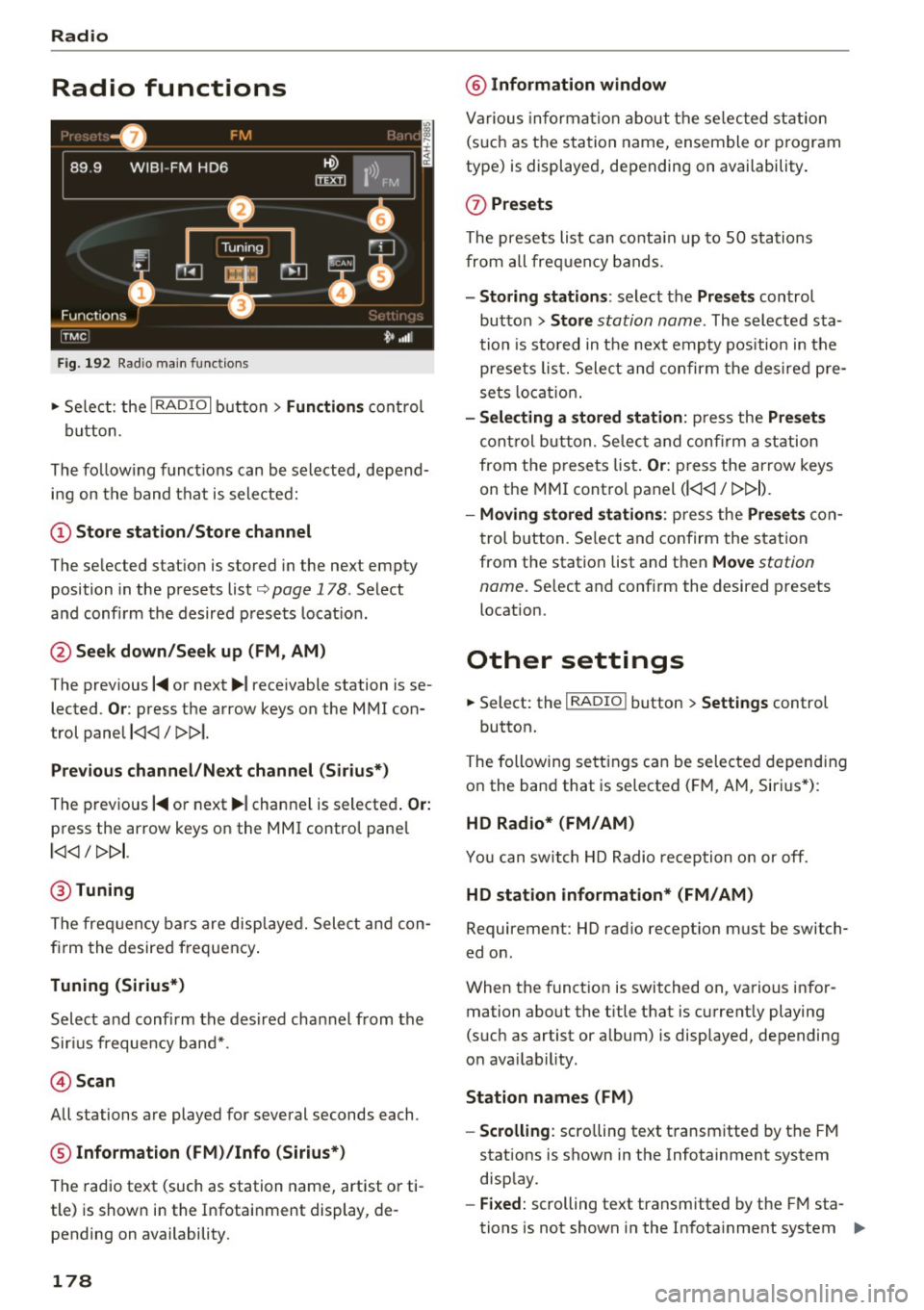
Fig . 192 Radio mai n functio n s
.. Se lect: the I RADIO I b utton> Functions cont rol
button.
The fo llow ing f unct io ns can be selected, depend
i n g on the band that is se le cted:
(!) Store station /Store channel
The se lected stat ion is stored in the next empty
position in the presets list
c:, page 178 . Select
a nd confi rm the desired p rese ts loca tion.
@ Seek down/Seek up (FM , AM)
The prev ious
I~ or next ~I receivable station is se
lected.
Or : press the arrow keys on the MMI con
trol pane l
l
Previou s channel /Next channel (Si rius*)
The prev ious I~ or next ~ I channel is selecte d. Or:
press the arrow keys on the MMI control pane l
l
@ Tuning
The frequ ency bars are disp laye d. Sele ct and con
fi rm the desired frequen cy .
Tuning (Sirius*)
Select a nd confirm the des ired channel from the
S ir iu s frequency ban d*.
@ Scan
All stations are played for several seconds each.
® Information (FM )/Info (Sirius*)
The radio text (such as station name, artist o r ti
tle) is show n in the Infotai nment display, de
pending on availability.
178
@ Information window
Va rious in forma tion about th e se lected st ation
(s uch as the sta tion name, ensemble or p rogram
type) is displaye d, depending on availability.
(J) Presets
The prese ts lis t can co nta in up to 50 sta tions
fro m al l frequency bands.
- Storing stations : select the Presets control
bu tton >
Store station name. The selected sta
tion is sto red in t he nex t emp ty pos ition in the
presets list. Sele ct and confir m th e des ired pre
se ts lo cati on .
- Selecting a stored station : press the Presets
control b utton. Selec t and con firm a st atio n
from t he p rese ts lis t.
Or: press the arrow keys
on the MMI cont rol panel
(l
-Moving stored station s: press the Presets con
t rol b utt on. Se lect and confirm the s tat ion
from the station list and then
Move station
name.
Se lect and conf irm the desired presets
location.
Other settings
.. Select: the I RADIO I button > Settings control
button.
The following se tt ings can be sele cte d d epend ing
o n the band that is selected ( FM, A M, Siri us*) :
HD Radio* (FM/AM)
Yo u can swit ch HD Radio reception o n or off.
HD station information* (FM/AM)
Requirement: HD radio recept io n must be switch
ed on .
When the funct ion is switched on, va rious i nfor
mation abo ut the t itle t hat is c urrent ly playing
(such as artist or album) is displayed, depending
o n ava ilab ility.
Station names (FM )
- Scrolling:
scro lling text t ransm itted by the FM
stat ions is shown in the Infotainment system
disp lay.
- Fixed : scrolling text transmitted by the FM sta
tions is not shown in the In fota inment system .,,.
Page 181 of 354
0 co .... N ,..... N .... 0 0 :c '
ing text displayed.
-Off: scrolling text transmitted by the FM sta
tions is not shown in the Infotainment display.
Scro lling text from HD stations is shown in the
Infotainment display.
Channel info (Sirius*)
If track informat ion is available for the current ti
tle (such as artist or album), it will be displayed
in a pop-up window if this function is activated.
Station sorting (Sirius*)
-Channel number : the stations are sorted in as
c ending order a ccording to their station num
ber.
- Channel name : the stations are listed in alpha
betical order.
- Category and channel number : the stations are
sorted according to their category and then ac
cording to their channel number.
- Category and channel name : the stations are
so rted according to their category and then ac
cording to their station name.
Troubleshooting
Problem Solution
Radio
Category filter (Sirius*)
The stations shown in the station list can be fil
tered by yo ur personal preferences and by pro
gram type . The program categories that you can
select depend on what is offered by your provid
er. Select the
Deactivate category filter option to
deact ivate all filter opt ions and disp lay all availa
ble stations in the satell ite stat ion list.
Receiver serial number (Sirius*)
The electronic seria l number (ESN) is d isp layed.
The number is required when logging in to Sir
ius*.
Deleting presets
Requirement: a station must be stored in the
presets list¢
page 178 .
Stored stations can be deleted Individually or All
at once .
A station with poor reception is no Store the station ahead of time and then select it from the pre-
longer disp layed in the station list sets list later
(z) ¢ page 178, fig. 192.
once you switch to a different sta-
t ion.
179
Page 195 of 354
C) C0 ....
"' " "' .... 0 0 :r
RSE components
overview
A ppl ies to: ve hicl es w ith Re ar Seat E nte rtainment
The Rear Seat Entertainment, abbreviated RSE ,
combines different entertainment systems . The
RSE control panel is located in the rear center
console .
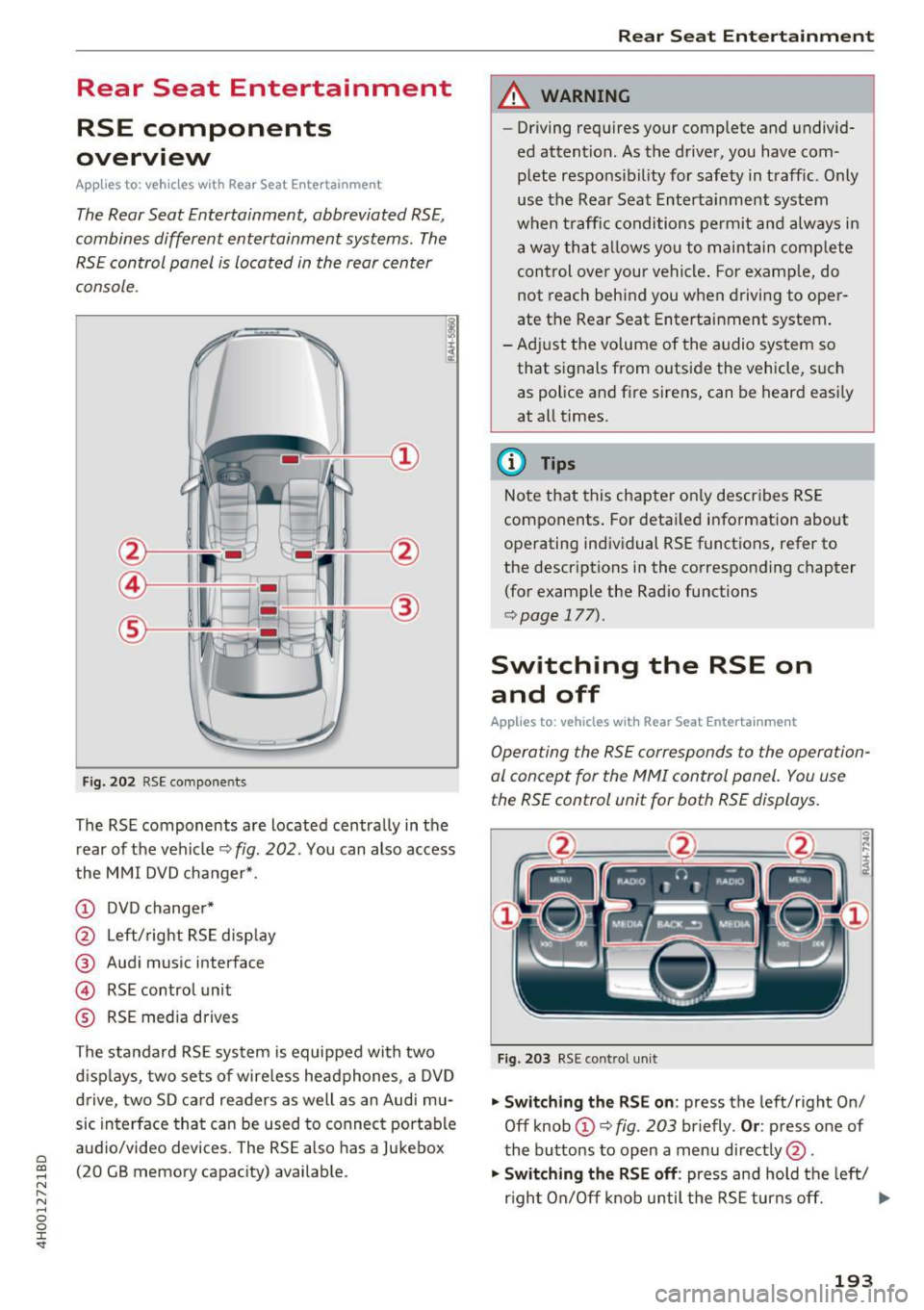
Fig . 202 RSE compo nen ts
The RSE components are located centra lly in the
rear of t he vehicle
9 fig. 202 . You can also access
the MMI DVD changer* .
CD DVD changer*
@ Left/right RS E disp lay
® Audi music interface
© RSE control unit
® RSE media drives
The standard RSE sys tem is equipped with two
d isp lays, two sets of wire less headphones, a DVD
drive, two SD card readers as well as an Audi mu
sic interface that can be used to connect portable
audio/video devices . The RSE also has a Jukebox
(20 GB memory capacity) available.
Rear Seat Entertainment
A WARNING
-- Driving requires your complete and undivid-
ed attention. As the drive r, you have com
plete responsib ility for safety in traff ic. Only
use the Rear Seat Entertainment system
when t raff ic conditions permit and always in
a way tha t allows you to maintain comp lete
control over your vehicle . For examp le, do
not reach behind you when driving to oper
ate the Rear Seat Entertainment system .
-Adj ust the volume of the audio system so
that signals from outside the vehicle, suc h
as police and fire sirens, can be heard easi ly
at all times.
(D Tips
Note that this chapte r on ly describes RSE
components . For deta iled information about
operating indiv idual RSE funct ions, refer to
the descriptions in the corresponding chapter
(for example the Radio functions
¢ page 177).
Switching the RSE on
and off
Applies to : vehicles wit h Rear Seat Enterta inment
Operating the RS E corresponds to the operation
al conc ept for the MMI control pan el. You us e
the RSE control unit for both RSE displays.
F ig . 203 RS E cont ro l un it
.,. Swit ching the RS E on : press the left/right On/
Off knob
CD ¢ fig . 203 briefly . Or: press one of
the buttons to open a menu direct ly @ .
"" Swit ching the R SE off : press and hold the left/
r igh t On/Off knob until the RSE turns off.
IJ,,
193
Page 197 of 354
C) C0 ....
"' " "' .... 0 0 :r
Applies to: veh icles with Rear Seat Entertainment
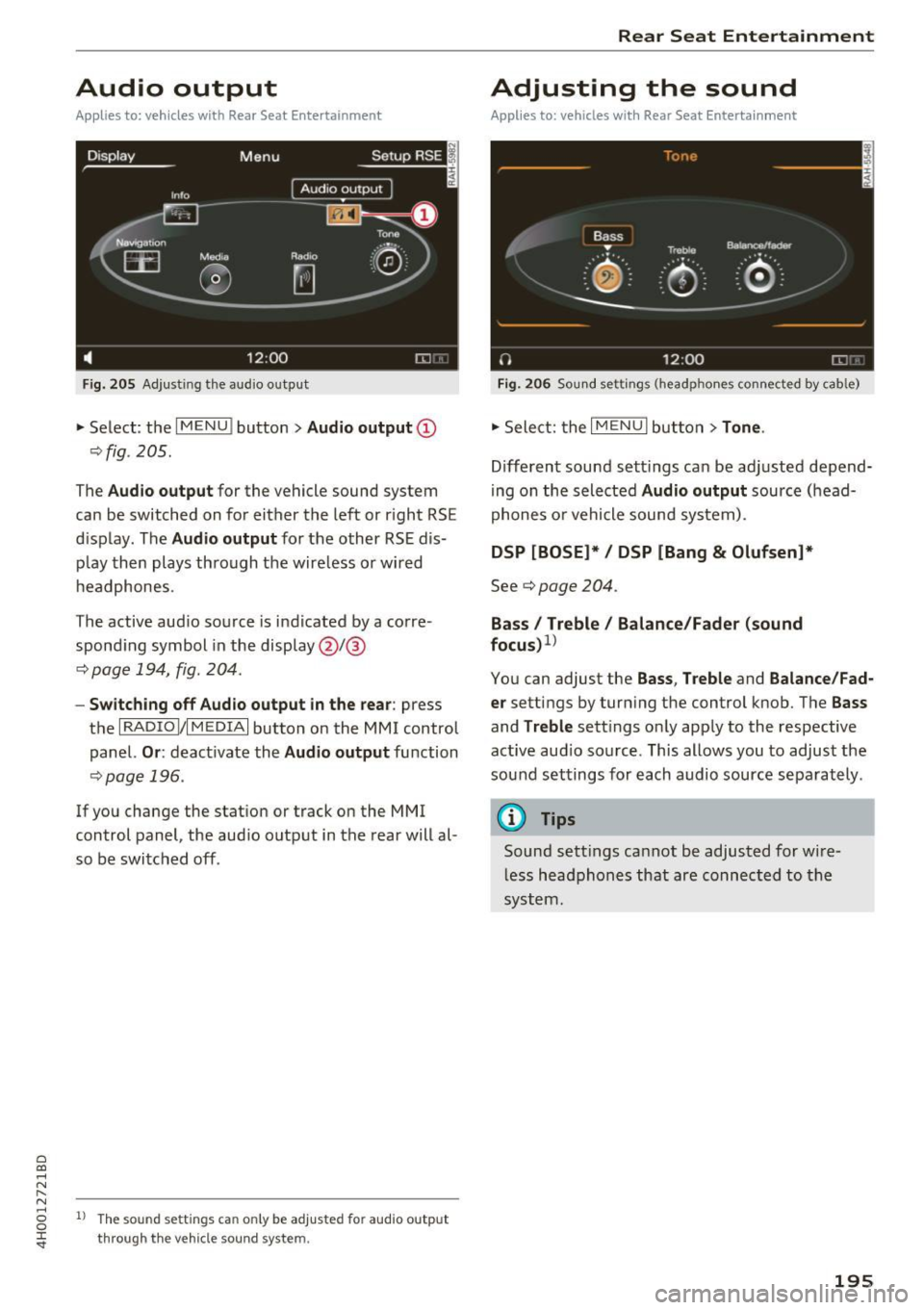
Fig. 205 Adju sting the aud io o utp ut
• Select : the I M ENU ! button > Audio outp ut @
¢ fig . 205.
The Audio outp ut for the vehicle sound sys tem
can be switched on for either the left or r ight RS E
display . The
Audio output for the other RSE dis
p lay then plays through the wire less or wired
h eadphones .
The active aud io source is indicated by a corre
spond ing symbol in the display @/@
¢ page 194, fig . 204 .
-Switching off Aud io output in the rear : press
t h e
I RADIO I/IM EDIA I button on the M MI control
panel.
Or : deactivate the Audio output function
¢page 196 .
If you change the stat ion or track on the MMI
control panel, the aud io outp ut in the rear will al
so be switched off .
1l The so un d sett ing s c an only be adjusted fo r au dio outp ut
thro ugh t he v eh icl e s ound sy ste m.
Rear Seat Entertainment
Adjusting the sound
Applies to: vehicles with Rear Seat Entertainment
Fig. 206 Sou nd set tings (headp ho nes conne cted by cab le)
• Sele ct: the I MENU I but ton > Tone .
Different sound sett ings can be ad justed depend
i ng on the selected
Audio output source (head
phones o r vehicle sound system) .
DSP [BOSE]* / DSP [Bang & Olufsen]*
See¢ page 204 .
Bass I Treble / Balance /Fader (sound
focu s)
1
>
You can adjust the Ba ss , T reble and Balance /Fad
er
settings by turn ing the control knob. The Bas s
and Treble sett ings on ly app ly to the respective
active aud io so urce . This allows you to adjust the
sou nd settings for each audio source sepa rately .
@ Tips
Sound sett ings cannot be adjusted for wi re
l ess headphones that are connected to the
system.
195