reset AUDI A8 2018 User Guide
[x] Cancel search | Manufacturer: AUDI, Model Year: 2018, Model line: A8, Model: AUDI A8 2018Pages: 356, PDF Size: 54.71 MB
Page 180 of 356
Radio
Radio
Accessing the radio
The radio supports the FM, AM and Sirius* (satel
lite radio) bands. By means of an HD Radio re
ceiver, you also receive radio stations on the FM
and AM band in digital format.
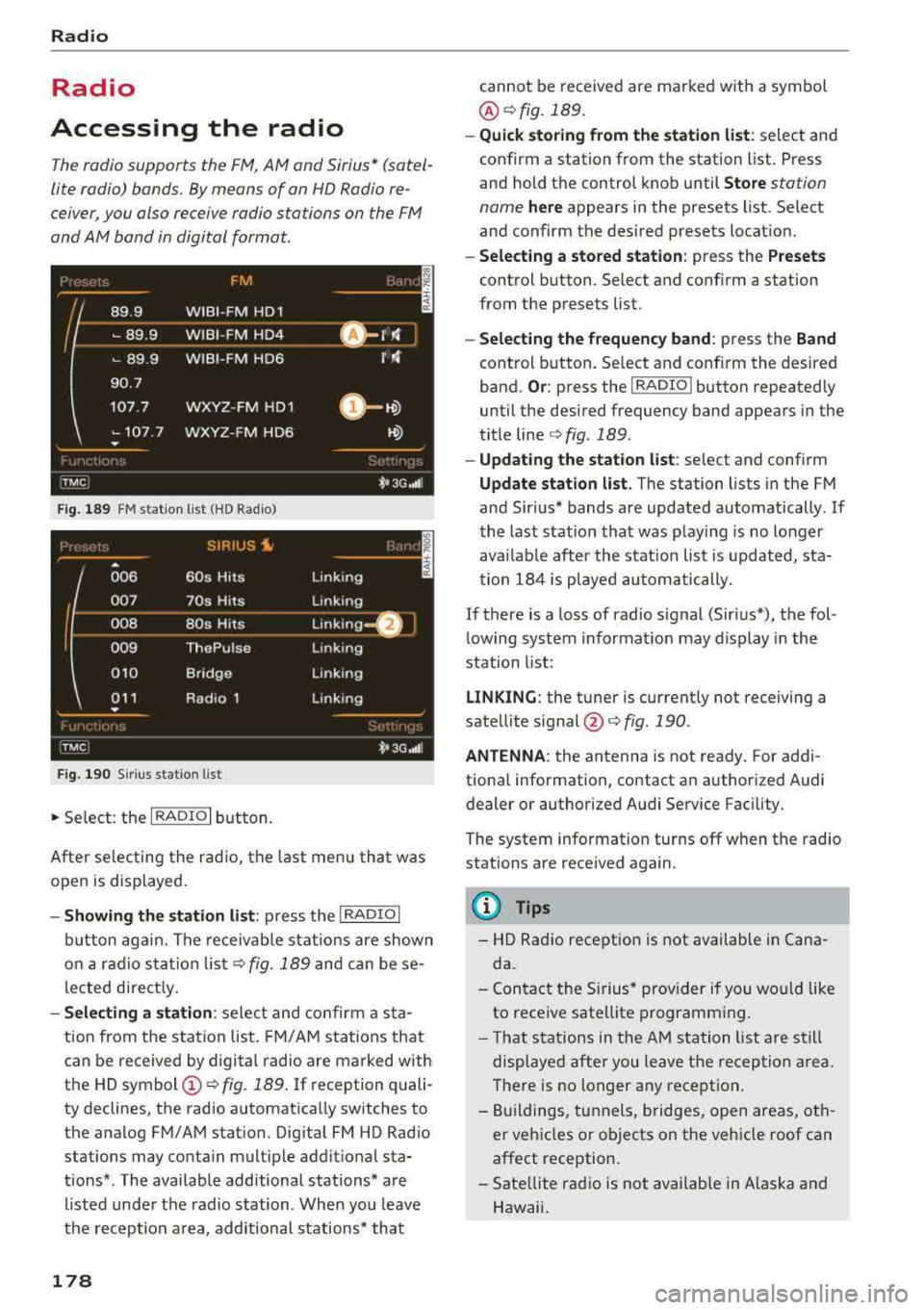
F ig. 1 89 FM stat ion lis t (H D Ra dio)
SIR IUS ~ ..
A
006 60s Hits Linking
(
007
70s Hits Linking ----~-- ---·
Linking _
008 80s Hits
009 ThePulse Linking
010 Bridge Linking
011 Radio 1 Linking
•
:fiv,cJ t• 3G,t1l l
F ig . 19 0
Sir iu s st ati on l ist
.,. Se lect: the I RADIO I button.
After se lecting the r ad io, the last menu th at was
open is displayed.
- Showing the station li st : p ress the I RADIO I
button aga in. The receivab le s tat ions are shown
o n a ra d io s ta tion lis t
c:> fig. 189 and can be se
lected direct ly.
- Selecting a station : select and confirm a sta
tion from the s tation list. FM/ A M stations that
can be received by digital radio are marked with
the HD
symbol @ c:> fig. 189 . If reception quali
ty declines, the radio automat ica lly switches to
the analog FM/AM stat ion. Dig ital FM HD Rad io
stations may contain multiple additional sta
tions* . The available additional stations* are
listed unde r the radio station . When you leave
the reception a rea, additional stations* that
178
cannot be received are marked w ith a symbol
@ c:>fig.189 .
-Quick storing from the station list : select and
confirm a station from the station list. Press
and hold the control knob until
Store station
name
here appears in the presets list. Select
and confirm the des ired presets location.
- Select ing a stored station : press the Presets
control b utton . Select and conf irm a station
from the presets list.
- Select ing the frequen cy band : press the Band
control button. Select and conf irm the desired
band.
Or : press the !RADIO I button repeated ly
until the des ired frequency band appears in the
tit le line
c:> fig . 189 .
-Updating the station list : select and confirm
Update station list . The station lists in the FM
and Sir ius* bands are updated automatically . If
the last station that was play ing is no longer
avai lab le after the stat ion list is updated, sta
t ion 18 4 is played au tomatically.
If there is a loss of radio signal (Sir ius*), t he fol
lowing system informat ion may display in the
station list:
LINKING : the tuner is current ly not receiving a
sate llite
s ignal @<=:> fig. 190.
ANTENNA : the antenna is not ready. For addi
tional information, contact an author iz ed Audi
dealer or authorized Audi Service Fac il ity .
The system information turns off when the radio
stations are rece ived again .
@ Tips
- HD Radio reception is not available in Cana
da.
- Con tact the Sirius * prov ider if you wo uld like
to receive satellite p rogramm ing .
- T hat stations in the AM station list are s till
displayed after you leave t he reception area.
There is no longer any reception .
- B uildings, tunnels, bridges, open areas, oth
er veh icles or objects on the veh icle roof can
affect reception.
- Sate llite radio is not availab le in Alaska and
Hawaii.
Page 181 of 356
u. co .... N
" N .... 0 0 :c '
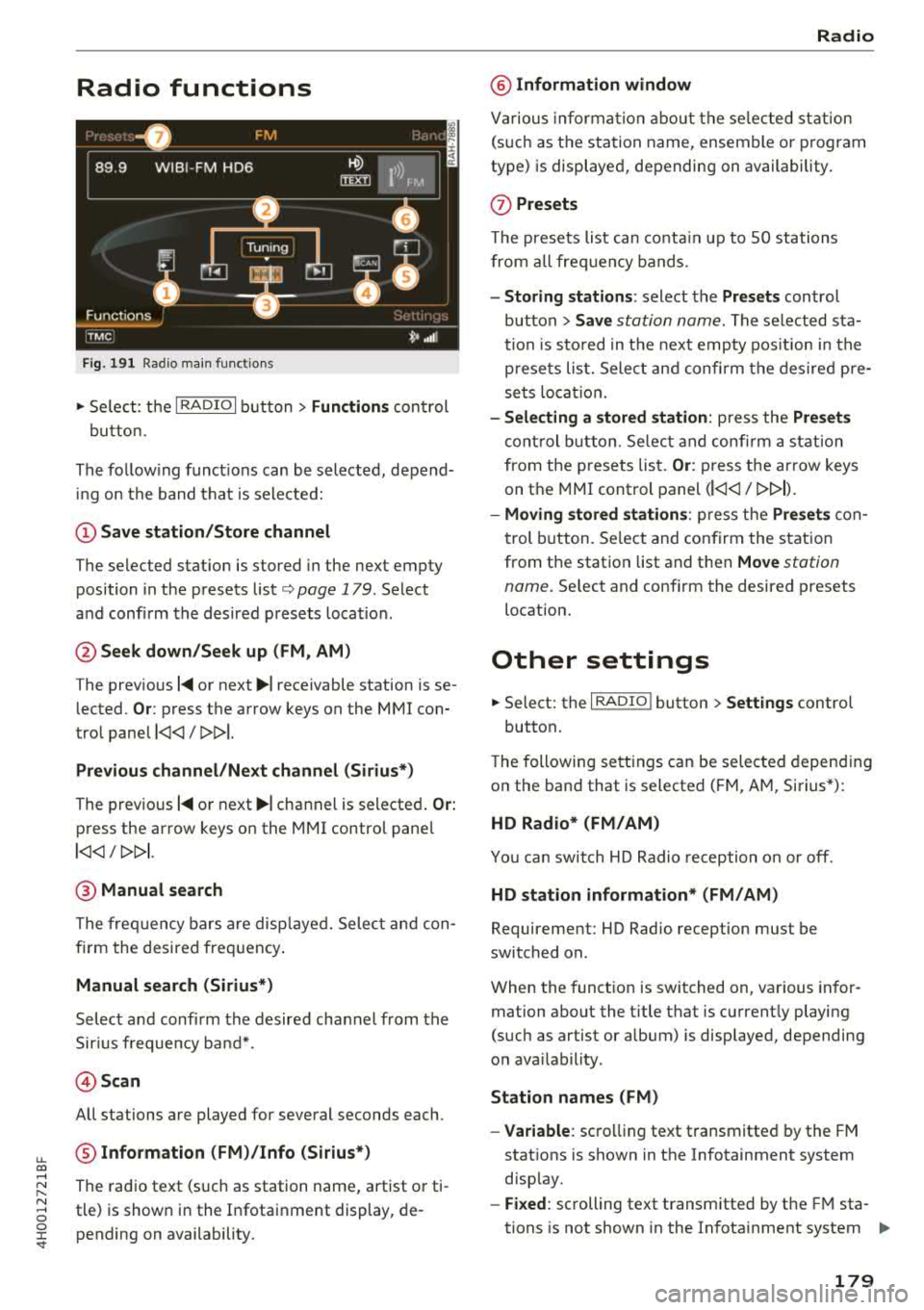
Fig . 19 1 Radio mai n fu nctio ns
.,. Se lect: t he I RADIO I b utt on> Functions con trol
bu tton.
The fo llow ing funct io ns can be selected, depend
in g o n the band that is selected:
(D Save station /Store channel
The selected stat ion is stored in the next empty
position in the presets list
c::> page 179 . Select
a n d confi rm the desired p resets loca tion.
@ Seek down /Seek up (FM , AM)
The prev ious 1<111 or next ~I receivable station is se
lected .
Or: press the arrow keys on the MMI con
tro l pane l
l
Previous channel /N ex t channel (Siriu s*)
The prev ious 1<111 o r next ~I channel is selecte d. Or:
press the ar row keys on the MMI contro l pane l
l
@ Manual search
The fre quency bars are disp laye d. Select and con
firm the desired freq uency .
Manual search (Sirius*)
Select a nd confi rm the desired cha nnel from the
Sir ius frequen cy ba nd* .
@ Scan
All stations are played for several seconds each .
® Information (FM)/Info (Sirius*)
The rad io text (such as station name, art ist o r ti
tle) is show n in the I nfotai nment display, de
pending on availability.
Radio
@ Information window
Va rious informa tion about the se lec ted stat ion
(s uch as t he s ta tion name, ensemble o r program
type) is displaye d, depending on availability.
(j) Presets
T he presets list can co nta in up to SO stations
from all fre quency bands .
-Storing stations : select the Presets control
button >
Save station name . The selected sta
t ion is s to red in t he nex t emp ty pos it ion in the
p rese ts lis t. Sele ct an d confi rm the des ire d pre
se ts lo cati on .
-Selecting a stored station : press the Presets
cont rol b utt on . Se lec t a nd con firm a stat ion
from t he p rese ts lis t.
Or : press the ar row keys
on the MMI cont rol panel
(l
-Moving stored stations : press the Presets con
t rol button. Se lect and confirm the s tat ion
from the station list and then
Move station
name .
Select and confi rm the desired presets
location.
Other settings
.,. Select: the I RADIO I button > Settings control
button.
T he following se tt ings ca n be selected depend ing
on the band that is selected ( FM, AM, Si rius *):
HD Radio* (FM/AM )
You can swi tch HD Radio reception o n or off.
HD station information* (FM /AM)
Requirement: HD Radio reception must be
switched on.
When the funct io n is switched on, va rious in fo r
mation about the t itle that is c urrent ly playing
(such as artist or a lbum) is disp layed, depending
o n ava ilab ility.
Station names (FM )
-Variable : scro lli ng text t ransmitte d by the FM
stat ions is shown in the Infotainment system
disp lay .
-Fixed : scrolling text transmitted by the FM sta
tions is not shown in the Infota inment system
.,..
179
Page 182 of 356
Radio
display. Only the curren t sec tion of the sc roll
ing text is displayed .
-Off : scr oll ing text tra nsmi tte d b y the F M sta
tions is not shown in the Infotainment display .
Scro lling text from HD stations is shown in the
Infotainment display.
Show channel information (Sirius*)
If tr ack info rm at ion is ava ilable fo r the cur rent ti
t le (such as a rtist or album), i t will be d isp layed
i n a pop -up win dow if this function is act ivated .
Station sorting (Sirius*)
- Channel number:
the sta tio ns are sorted in as
c ending ord er acc ording to their ch annel num
b er.
- Channel name : the stations a re listed in alpha
be tica l o rd er.
- Category and channel number: the stations are
so rted acc ordin g to their ca tegory a nd then ac
cordi ng to their ch annel number.
-Category and channel name : the sta tions are
sor ted a cco rdin g to their ca tegory a nd then ac
cording to their s ta tion name .
Troubleshooting
Problem Solution Category filter (Sirius*)
The s
tations shown in the st ation list c an be fil
te red by yo ur persona l pre ferences and b y pro
g ram type . The program cate gories that you can
se lect depen d on w hat is offere d by your provid
e r. Se lect the
Deact ivate category filter option to
deact ivate all filte r opt ions and disp lay all ava ila
ble stations in the sate llite station list.
Receiver serial number (Sirius*)
The elect ronic se rial num ber (ES N) is disp layed .
The number is requ ired w hen logg ing in to Si r
i us *.
Deleting presets
Require ment: a sta tion mus t be s to re d in th e
p resets list ¢ page
179 .
Store d sta ti ons can be dele ted Individually or All
at once .
A station with poo r reception is no Sto
re the station ahead of time and then se lect it from the pre -
longer disp laye d in the station list
sets list
later (z) <=>page 179, fig. 191 .
once you switch to a diff erent sta-
t io n.
180
Page 183 of 356
u. co .... N
" N .... 0 0 :c '
connections
Introduction
There are various media drives and connections
ava ilable i n the MMI. For example, you can play
aud io/video* f iles through the Jukebox, or you
can connect a portable device to the Audi music in te rface* a nd ope rate it throug h the MM I.
Notes
General information
Media and format restr ictions :
the MMI (includ
ing the SD card reader and the USB storage de
vice connect ion*) was tested w ith a var iety of
products and media on the market. However,
there may be cases where ind iv idual devices or
media and aud io/video files* may not be recog
niz ed, may play o nly w it h rest rictio ns, o r may no t
p lay at a ll.
The MM I media dr ives do not suppo rt W indows
M edia Audio 9 Vo ice, W indows Media Aud io 9
L oss less and Windows Media
9 Pr ofessional for
mats .
Digital Rights Management : please note that
the audio/v ideo* fi les are subject to copy right
p rotection.
The med ia drives do not play f iles that are pro
tected by DRM and that are ident ified w ith the
symbo l
i'.D.
Data se curity : Never store important data on the
memory cards, the Jukebox, CDs/DVDs or porta
b le aud io devices . Audi is not responsib le for
damaged or lost fi les and med ia.
Loading times : the more files/fo lders/playlists
that are on a storage medium, the longer it will
take to load the aud io/v ideo* fi les . Audi recom
mends us ing storage med ia that o nly conta in a u
d io/video files*. To de cre ase the time it takes to
l oad audio/v ideo f iles*, c reate subfo lders ( for ex
ample, for the a rtist o r album). The loading time
will also increase when importing fi les .
Additional information : when playing, aud io
fi les are a utomatica lly displayed with any addi -
Media drives and conn ection s
tiona l information t hat is stored (such as t he ar
tist, track and a lbum cover) . If this information is
not avai lab le on t he storage medium, the MMI
will check Gracenote . However, in some cases,
the addit ional information may not be d isplayed .
Restricted functionality : if functionality is re
stricted, reset the
Media setting s to the factory
defau lt settings
¢ page 207.
Reset the Jukebox to the factory defa ult settings
if functiona lity is
restricted ¢ page 207.
Fo r i nforma tion abo ut the p roper ties of support
ed med ia an d file forma ts , see
¢ page 187 .
(UJ) Note
Always fo llow the information fo und in ¢ (i} in
Wi -Fi
hot spo t on page 161.
CD/DVD operation
CD /DVD and format re striction s:
the functiona li
ty of individ ua l storage media may be limited due
to the va riety of b lank CDs/DVDs avai lab le and
the various capacities. Audio CDs or video DVDs
with copy protection, CDs/DVDs that do not con
form to the standard and mult i sess ion CDs may
have l imited playback or may not play at all. Audi
r ecommends finaliz ing the reco rding process
whe n creat ing mult isess ion C Ds. Mult isess ion is
not supported for DV Ds.
Handling CD s/DVDs and the DVD drive : to en
su re good, high-quality sound reproduction and
to prevent damage to the dr ive or d isc read ing er
r ors, always s to re CDs/DVDs in a protective
s leeve and do no t expose t hem to direct s unligh t.
Do
not u se :
- Damaged, dirty o r sc ratched CDs/ DVDs
- Single CDs/DVDs (3 inch/8 cm d iame ter)
- CD/DVDs tha t are not round
- CDs/DVDs w ith labe ls
- Protective rings
- Clean ing CDs
Thermal protection switch : CD/DV D playback
may be tempora rily unavai lab le if o uts ide tem
peratu res are extremely hot or co ld . A t hermal
181
Page 186 of 356
Media drive s and conn ection s
Cl earing the Juk ebo x
Req uirement: the J ukebox must con tain audio/
video fi les.
- Sele ctin g fil es/ fo ld ers: se lect the S ettings con
trol button
> Clear Juk ebo x > individual files or
folders.
Press the All control b utton to sele ct
all fi les or folders.
O r: se lect and confirm a
fo lder and press and hold the contro l knob . All
files in the folder are se lected for de leting .
-Delet ing file s and folder s: select the Start de
leting
control b utton > Ye s. The status of the
deleting process is shown in the Infotainment
display. Jukebox playback stops dur ing the de
leting process and starts again automatically
once the deletion is complete .
Showing memo ry cap acit y
Select : Settings control button > Jukebo x memo
r y.
The used/free Jukebox memory as well as the
number of stored tracks appear in the Infotain
ment d isplay.
The Jukebox is started and operated through the MMI
c>poge 190.
@ Note
Do not import audio/video files when the en
gine is turned off because this will drain the
veh icle battery.
(D Tips
- Tracks from audio CDs cannot be imported
to the J ukebox for legal reasons.
- Fil es a lready imported a re recognized and
will be grayed out when setting up a new
import.
- It is no t possib le to play audio/video fi les in
the DVD drive while importing them.
- The Jukebox does no t provide an export
function due to lega l reasons.
- F il es or tracks without s tored information
are listed as
Unknown . Audi recommends
adding additiona l information (s uch as 1D3
tags) to aud io files.
- Reset the Jukebox to the factory defau lt set
tings when sel ling your
vehicle¢ page 207.
184
Bluetooth audio player
App lies to : vehicles wi th Blue toot h int erface
You con ploy music wirelessly from your cell
phone through the
MMI using the Bluetooth au
dio player.
Requirement: the vehicle must be stationary. The
B luetooth function on the portab le aud io player
and the MMI
A ud io player must be switched on
c> poge 156.
.,. Select the I MEDIAi button > Source control but
ton
> Bluetooth audio player > Connect new
Bluetooth audio playe r.
The available Blue
tooth audio players are d isplayed.
.,. Select and confirm the des ired Bluetooth audio
player from the l ist .
.,. Sele ct and confirm Audio pla yer. Th e M MI gen
erates a PIN for the con nection.
.,. Sele ct and confirm Ye s.
.,. Enter the PIN for connecting on your cell
phone .
Or: if the PIN is already displayed on
your cell phone, confirm it in the ce ll phone and
in the MMI. The t ime allowed for entering the
PIN is limited to approximate ly 30 seconds.
The media are started and operated through the
portable device or the M MI, depending on the de
vice be ing used
¢ page 190.
(D Tips
-Be sure to pay attention to any possible con
nection prompts on your Bluetooth audio
player.
- You on ly have to pair your device one time .
Bluetooth devices that are already paired
are automatically connected to the MMI as
soon as they are in range.
- Severa l Bluetooth audio p layers can be con
nected to the MMI, but only one portab le
device can be active.
- Bluetooth A2DP and AVRCP (1.0/1.3) are
supported .
- The supported media functions depend on
the B luetooth aud io player be ing used.
- For more informat ion on the supported de
vices, v isit
www.audiusa .com/bluetooth or
contact an a uthorized Aud i dea ler or author
ized Aud i Serv ice Facility.
Page 189 of 356
u. co ..... N
" N ..... 0 0 :c '
cannot be connected to the iPod adapter
ca
b le (p lus)* . Connect these devices using the
optiona l 3.5 mm stereo jack adapter cable*.
-For video p layback, you ca n also connect
your iPod using the AV adapter cable*. You
also need an App le AV cable to do this. For
more information on the App le AV cable,
re
fer to your iPod user guide .
-The Apple Lightning connector does not
support v ideo p layback.
Media dr ives and conn ection s
-iPod/iPhone malfunctions also affect t he
operation of the MMI. Reset yo ur iPod/
iPhone if this happens.
-For important information on operating
your iPod/iPhone, refe r to the user g uide fo r
the device. A udi recommends updating the
iPod/ iPhone software to the latest version.
-For more in fo rmat io n about the Aud i music
interface and suppo rted devices, v is it
www .audi.com /bluetooth or contact an au
thorized A udi dealer .
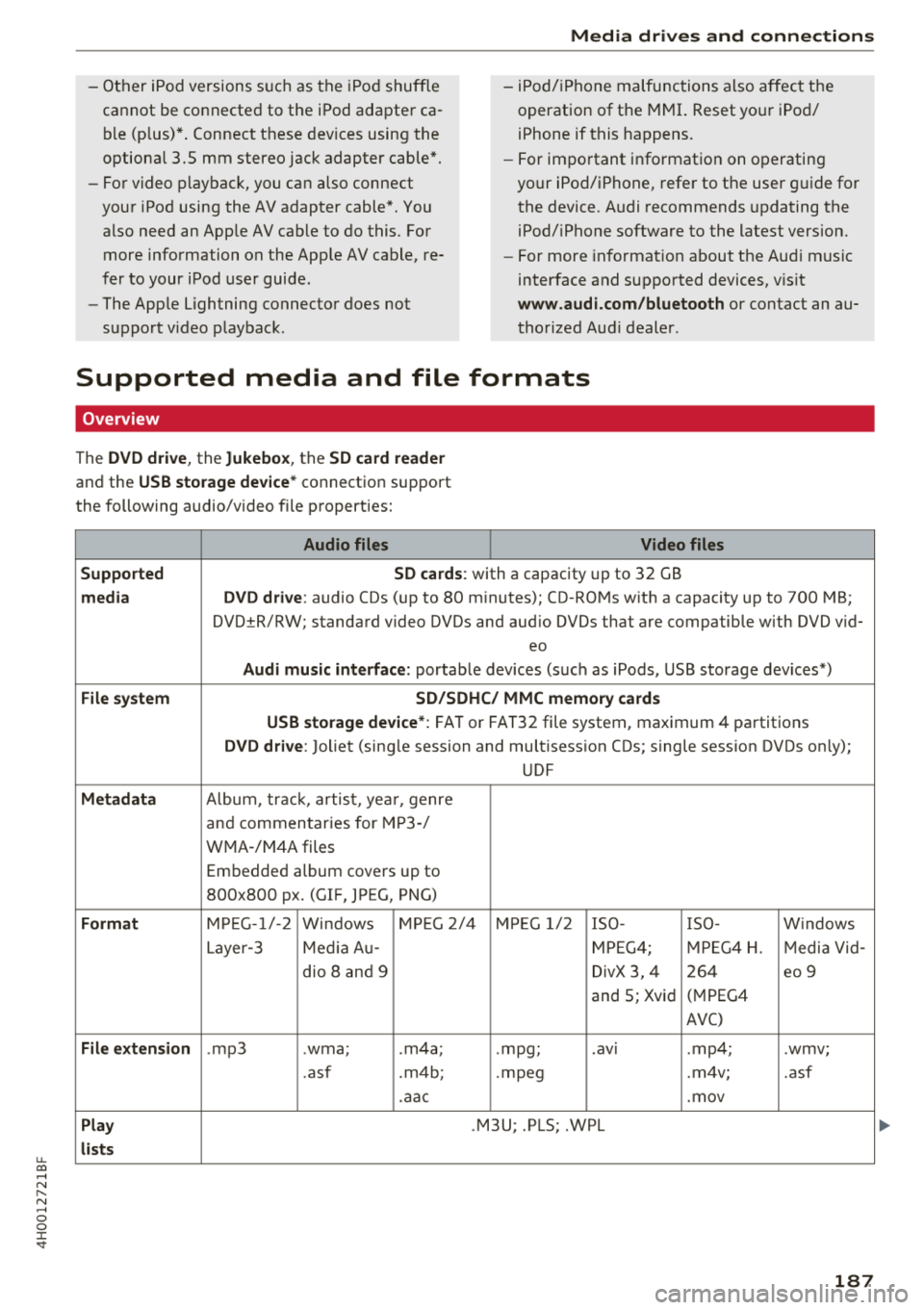
Supported media and file formats
Overview
The DVD drive , the Jukebox, the SD card reader
and the USB storage device* connectio n support
the following audio/video file properties:
Audio files Video files
Supported SD cards:
with a capacity up to 32 GB
media DVD drive: audio CDs (up to 80 m inutes); CD -RO Ms w ith a capacity up to 700 MB;
DVD±R/RW; standard video DVDs and audio DVDs that are compatible with DVD v id-
eo
Audi music int erface : portab le devices (such as iPods, USB storage dev ices*)
File system SD/SDHC/ MMC memory card s
USB storage device* :
FAT or FAT32 file system, maximum 4 partitions
DVD drive: Joliet (sing le session and multisess ion CDs; single sess ion DVDs on ly);
UDF
Metadat a Album, tra ck, artis t, ye ar, genre
and commen taries for M P3-/
W MA-/M4A files
Embedded album covers up to
800x800 px. (GIF, JPEG, PNG)
Format M PE G-1 /-2
Windows M PEG 2/4 M PEG 1/ 2 ISO- I SO - W indows
Layer -3 Me dia A u- MPEG4; MPE G4 H. Media Vid -
dio 8 an d 9 DivX 3, 4 264 eo 9
and 5; Xvid (
M PEG4
AVC)
File e xtension .mp3 .wma; .m4a; .mpg; .
av ,
.mp4; .wmv;
.asf .m4b; . mpeg .m 4v; .asf
.aa c .mov
Play .M3U; .PLS; .WPL
lists
187
Page 195 of 356
u. co .... N
" N .... 0 0 :c '
Requi rement : a vi deo DVD mus t be p layin g and
the passwo rd mus t be ente red (t he passwo rd se t
at t he factory is "1234").
Pl ayba ck of v ideo DV Ds can be res tricted using
par ent al contro l. Sele ct an d conf irm the co nt ent
r at ing (s uc h as
Level 5 ). E ight diffe rent Content
rating
l eve ls can be set for pa rental control. Fo r
e xamp le, if you se lect Leve l S* for the parenta l
control leve l, all DVDs from leve l 1-5 can be
p layed. Video DVDs with a higher leve l will not
p lay. All rest rict ions are ca nce led when the f unc
tion is sw itched
Off .
You can change t he cur rent password using the
Change password funct ion.
(D Tips
- Not a ll video DVDs have pa rental contro l.
- The
Repeat options and Random playback
fu nct ions sw itch off a utomat ica lly w hen the
source changes in the
Media men u.
- Password entry w ill be loc ke d for a pproxi
mately one m inute if you enter t he in co rrect
passw ord three times in a row . O nl y an au
thorized Audi dea ler ca n reset the parenta l
contro l password.
- The
Track display f unction is n ot ava ila ble
fo r th e Ju kebox o r a c onnected iP od
c::> pag e 192.
-The DV D drive only sup ports the D TS (D igi
ta l Theate r Systems) aud io for mat.
Play ing media
193
Page 197 of 356
u.
The last selected menu is displayed when it is
switched on.
When the ignition is switched off, a message in
d icat ing that the RSE is in standby mode appears
in the left or right RSE display. The RSE switches
off automatically if you do not press the left or
right On/Off knob while the system is in standby
mode.
(D Tips
- The RSE switches off automatically if the
engine is not running and the vehicle bat
tery is low.
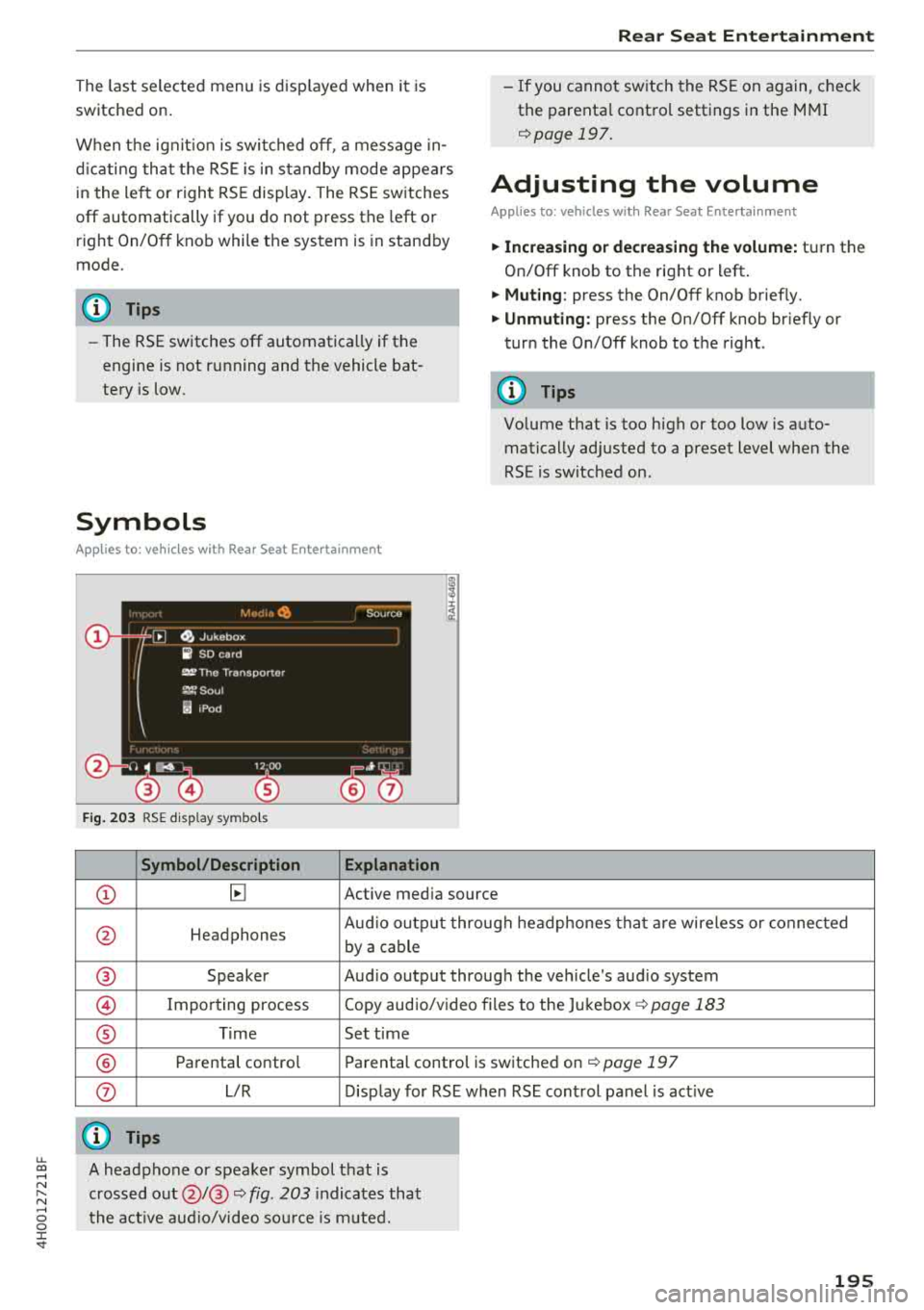
Symbols
Applies to: vehicles with Rear Seat Enter tainment
Fig. 203 RSE display symbols
Symbol/Description Explanation
Rear Seat Entertainment
- If you cannot switch the RSE on again, check
the parental control settings in the MMI
¢page 197.
Adjusting the volume
Applies to: vehicles with Rear Seat Entertainment
.,. Increasing or decreasing the volume: turn the
On/Off knob to the right or left .
.,. Muting : press the On/Off knob brief ly.
.,. Unmuting: press the On/Off knob briefly or
turn the On/Off knob to the right .
(D Tips
Volume that is too high or too low is auto
matically adjusted to a preset level when the
RSE is switched on.
CD ~ Active media source
0 Headphones Aud
io output through headphones that are wireless or connected
by a cable
® Speaker Audio output through the vehicle's audio system
@ Importing process Copy audio/video files to the Jukebox ¢
page 183
® Time Set time
® Parental control Parental control is switched on¢ page 197
0 L/R Display for RSE when RSE control panel is act ive
@ Tips
~ A headphone or speaker symbol that is
~ crossed out@/@ ¢ fig. 203 indicates that
...... o the active audio/video source is muted. 0 :c '
Page 199 of 356
lL t:0 ....
"' ......
"' .... 0 0 :c -
(reset)
Applies to: vehicl es with Rea r Seat E nte rtainment
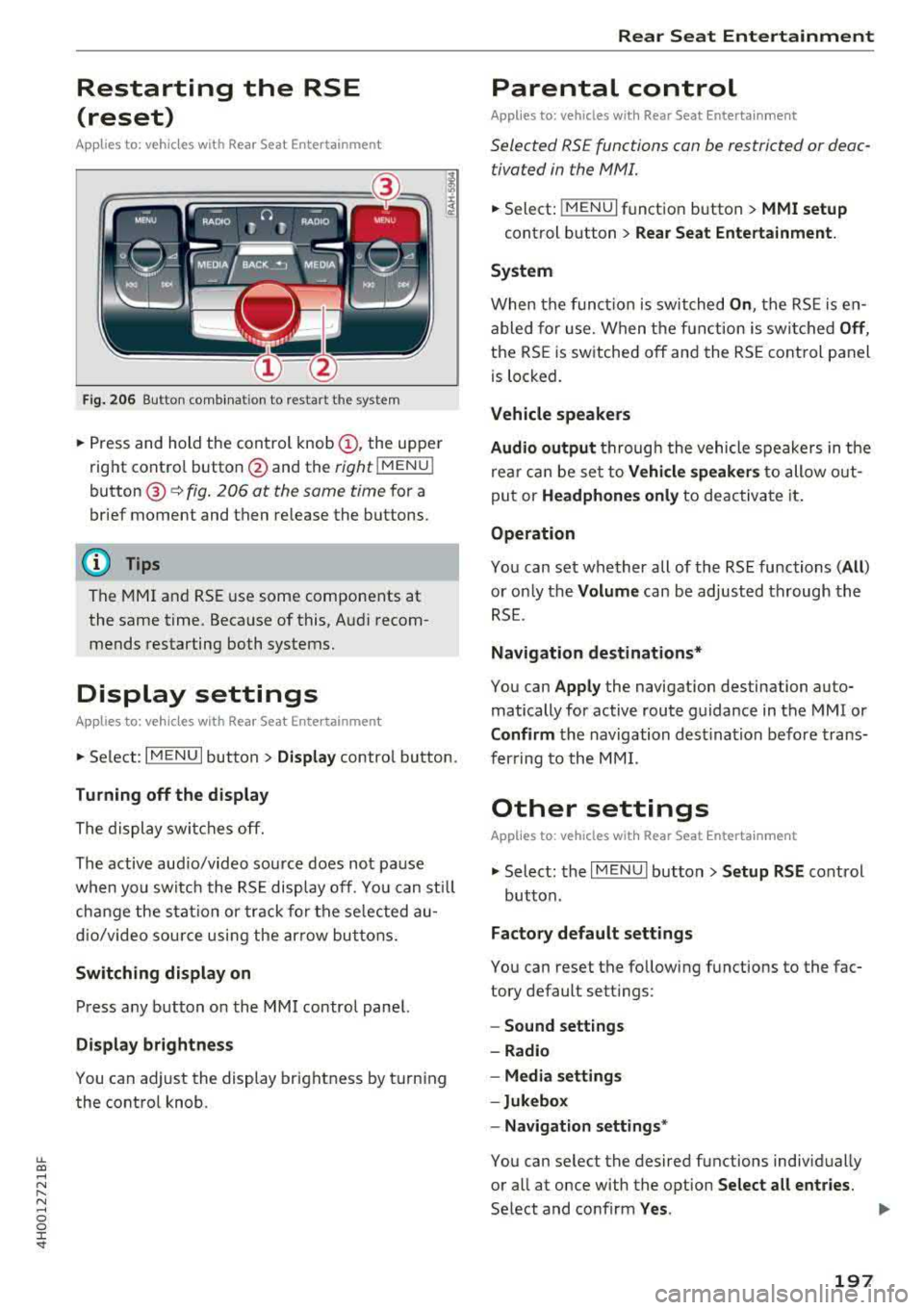
Fig. 206 Button comb inat ion to restart the system
• Press and hold the control knob (D, the upper
right control button @and the
right lMENU i
button @¢fig. 206 at the same time for a
brief moment and then release the buttons.
(D Tips
The MMI and RSE use some components at
the same time. Because of this, Audi recom
mends restarting both systems.
Display settings
Applies to: vehicles with Rea r Seat E nte rtainment
• Se lect : I MENU I button > Display control button.
Turning off the display
The display switches off.
The active aud io/video source does not pa use
when you switch the RSE display off. You can sti ll
change the stat io n or track for the selected au
dio/video source using the arrow buttons.
Switching display on
Press any button on the MMI control panel.
Display brightness
You can adjust the display brightness by turning
the control knob.
Rear Seat Entertainment
Parental control
Appl ies to: vehicles wit h Rear Seat Enterta inment
Selected RS£ functions can be restricted or deac
tivated in the
fv1fv11.
• Select: j MENUI f u nct ion button> MMI setup
control button > Rear Seat Entertainment.
System
When the function is switched On , the RSE is en
abled for use. When the function is switched
Off ,
the RSE is switched off and the RSE control panel
is locked.
Vehicle speakers
Audio output
thr ough the vehicle speakers in the
rear can be set to
Vehicle speakers to allow out
put or
Headphones only to deactivate it.
Operation
You can set whether all of the RSE functions (All )
or on ly the Volume can be adjusted through the
RSE .
Navigation destinations*
You can Apply the navigation destination auto
matically for active route guidance in the MMI or
Confirm the navigation destination before trans
ferring to the MMI.
Other settings
Applies to: vehicles with Rear Seat Entertainment
• Select: the I MENU I button> Setup RSE cont rol
button.
Factory default settings
You can reset the following functions to the fac
tory default settings:
- Sound settings
- Radio
- Media settings
-Jukebox
- Navigation
settings*
You can select the desired functions individually
or all at once with the option
Select all entries.
Select and confirm Yes . ..,
197
Page 200 of 356
Rear Seat Entertainment
If you reset the Jukeb ox to factory settings, all of
the music/video files are deleted and the
Media
setting s
are reset.
Resetting the funct ions to the facto ry defau lt
settings does not a ffect the MMI.
S ystem update
The RSE software can be updated by DVD, USB or
SD ca rd us ing the system update feature.
Contact an author ized Audi dealer or authorized
Aud i Serv ice Facility fo r additional information
about the
System updat e.
Data encryption
You can protect the list of destinations with a
personal password. If the unit is replaced, you
can only transfer your personal data to the new
RSE unit using your password . If you do not as
sign a persona l passwo rd, "MMI3G" is stored in
the RS E automatically as the password.
Version information
Information on the software version of the RSE
and the nav igat ion database is displayed.
Headphones
Wireless headphones
Applies to: vehicles with Rear Seat E nterta inment
T he wireless headphones must be paired with
the RSE one time and labeled.
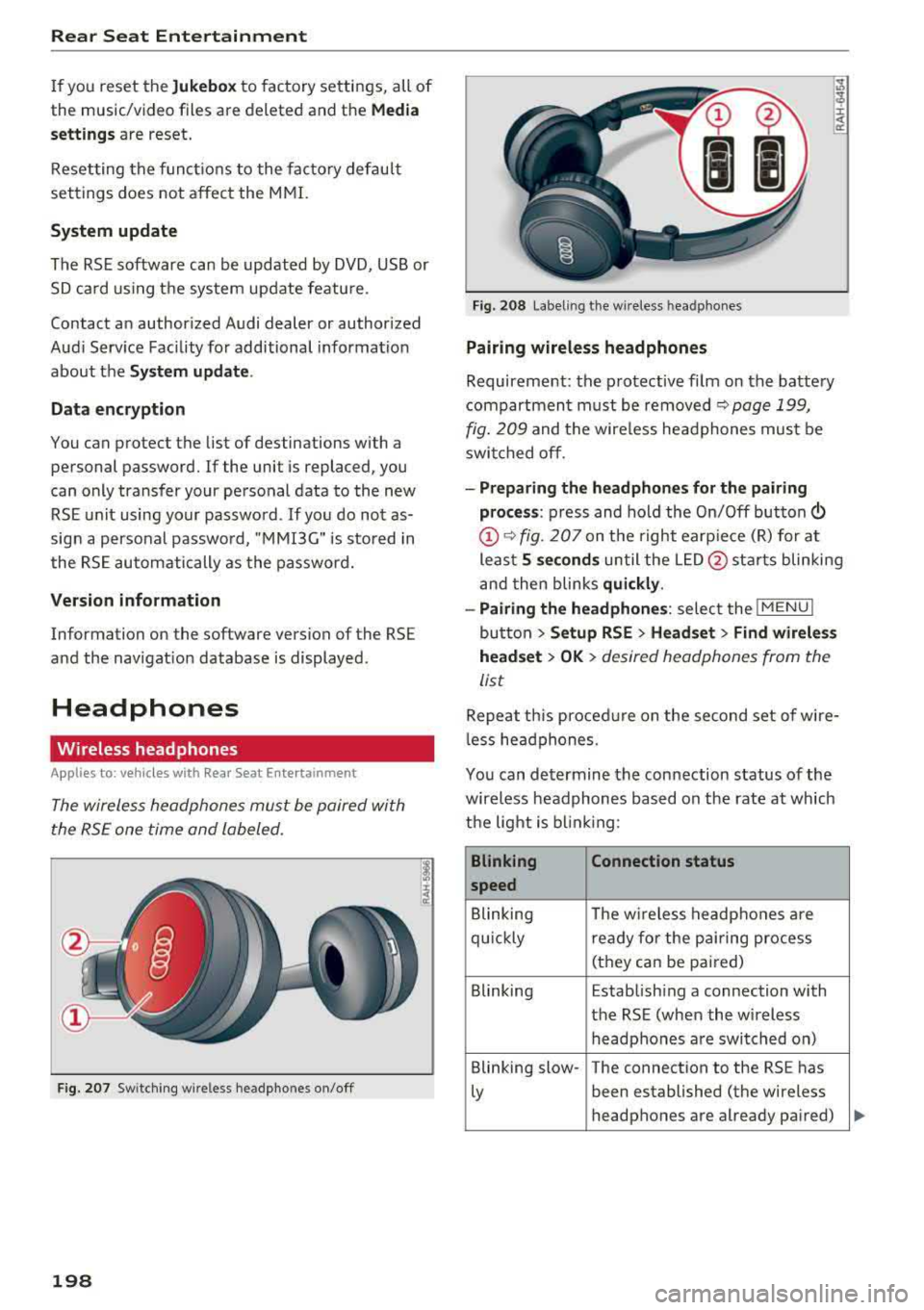
F ig . 207 Sw itc hi ng w ire less headpho nes on/off
198
F ig. 208 Label ing t he w ireless hea dpho nes
Pairing wireless headphones
Requirement: the protective fi lm on the battery
compartment must be removed
~ page 199,
fig. 209
and the wire less headphones mus t be
swit ched off .
-Preparing the headphones for th e pairing
pro ce ss :
press and hold the On/Off button
@~ fig. 207 on the right earp ie ce (R) for at
least
5 second s until the L ED @ starts blinking
and then blinks
qui ckly .
-Pairing the headphones : select the !MENUI
button > Setup RSE > Headset > Find wirele ss
head set
> OK > desired headphones from the
list
Repeat th is proced ure on the second set of wire
l ess he adphones.
You can de termine the con nection status of the
wireless headphones based on the rate at which
the light is b lin ki ng :
Blinking Connection status
speed
Blinking The w ireless headphones are
qu ickly rea dy for the p air ing process
(they can be pai red)
Blinking Establish ing a connection with
the RSE (when the wireless h eadphones a re switched on)
Blinking slow- The connection to the RS E has
Ly been established (the wire less
headphones are already pa ired)