ignition AUDI Q2 2021 Owner´s Manual
[x] Cancel search | Manufacturer: AUDI, Model Year: 2021, Model line: Q2, Model: AUDI Q2 2021Pages: 364, PDF Size: 87.77 MB
Page 331 of 364
Mobility
CO
rN
IV
rN
•-i
00
- Keep sparks, flame and lit cigarettes away
from vehicle batteries: the gases given off
can cause an explosion.
- Do not attach the negative cable to parts of
the fuel system or to the brake pipes.
© CAUTION
- The vehicles must not touch each other,
otherwise electricity could flow as soon as
the positive terminals are connected and
the boosting battery could be discharged.
- If the jump leads are not connected correct
ly this can result in serious damage to the
electrical system of the vehicle.
- The discharged vehicle battery must be
properly connected to the vehicle's electri
cal system.
- Please note that the method described
be
low for connecting the leads is intended for
jump-starting your vehicle. If jump-starting
another vehicle, you should not connect the
negative lead (-) to the negative terminal of
the discharged battery, but directly to the
engine block or
a
solid metal part bolted to
the engine block. If the battery of the other
vehicle does not have a gas vent, there is a
risk that
a
mixture of oxygen and hydrogen
gas can accumulate and cause an explosion.
© Note
Switch off the car telephone if necessary. De
tails will be given in the manufacturer's in
structions for the car telephone.
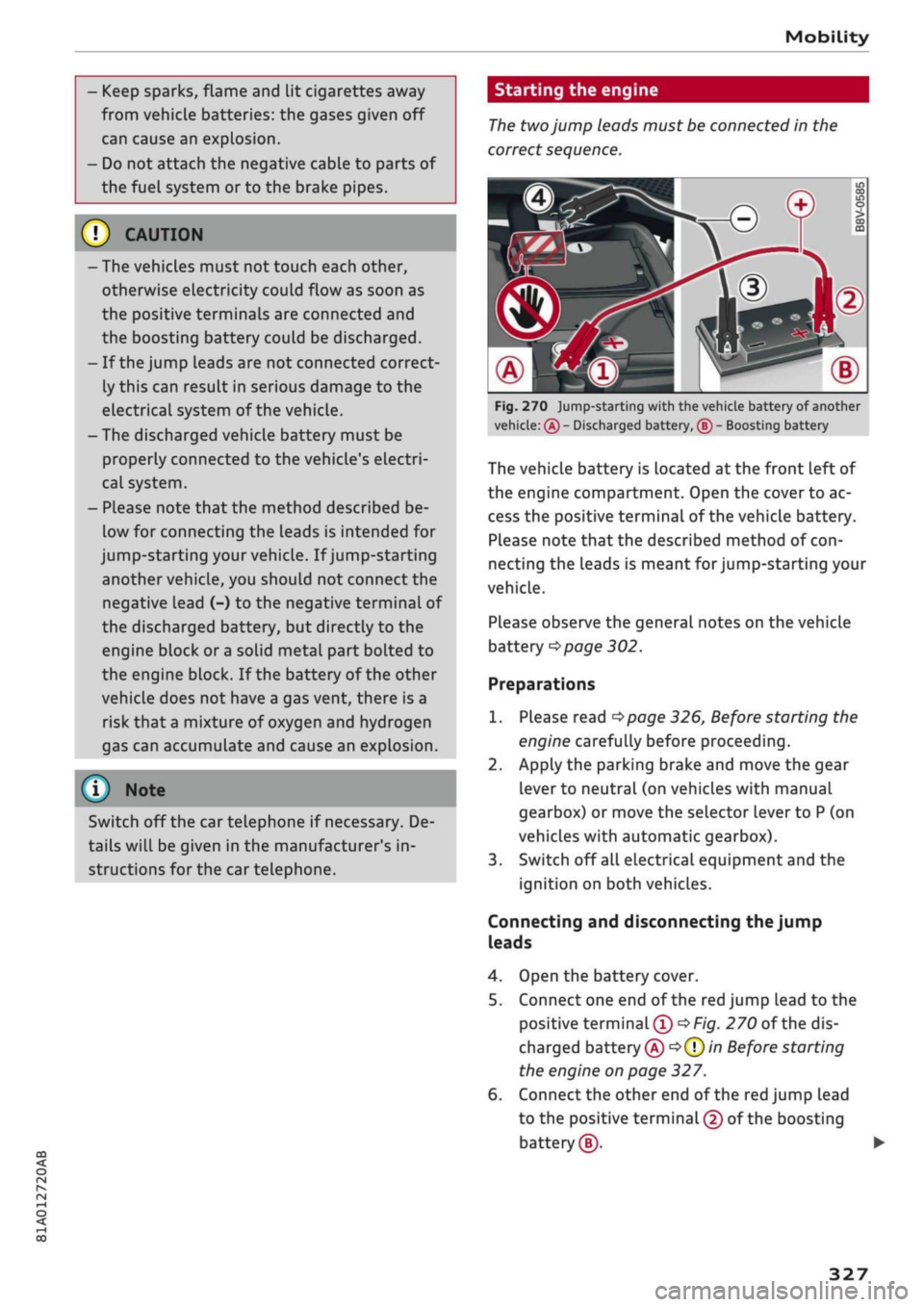
Starting the engine
The two
jump leads must be connected in the
correct
sequence.
Fig.
270 jump-starting with the vehicle battery of another
vehicle:
®
- Discharged battery, ® - Boosting battery
The vehicle battery is located at the front Left of
the engine compartment. Open the cover to ac
cess the positive terminal of the vehicle battery.
Please note that the described method of
con
necting the leads is meant for jump-starting your
vehicle.
Please observe the general notes on the vehicle
battery
*page
302.
Preparations
1.
Please read
*page
326, Before starting the
engine carefully before proceeding.
2.
Apply the parking brake and move the gear
lever to neutral (on vehicles with manual
gearbox) or move the selector lever to
P
(on
vehicles with automatic gearbox).
3. Switch off all electrical equipment and the
ignition on both vehicles.
Connecting and disconnecting the jump
leads
4.
Open the battery cover.
5. Connect one end of the red jump lead to the
positive
terminal®
*Fig.
270 of the dis
charged battery
© oQ)
in Before starting
the engine on page 327.
6. Connect the other end of the red jump lead
to the positive terminal
©
of the boosting
battery®.
327
Page 333 of 364

Mobility
CO
rN
IV
rN
•-i
00
Additional notes on towing by breakdown
truck
If one of the axles has to be raised in order to
tow the vehicLe, please refer to the following ta
ble to determine the appropriate axle
for
your
gearbox/drive combination:
Manual
gearbox
Automatic
gearbox
Front-wheel
drive
Front or rear
axle
Front axle
Four-wheel
drive
Front or rear
axle
Front axle
Applies to vehicles with four-wheel drive: If the
vehicle is to be towed with one of the axles
raised,
the ignition must be switched off; other
wise the drive train can be damaged.
Notes on tow-starting
Applies to vehicles with automatic gearbox: For
technical reasons, your vehicle must not be tow-
started.
Applies to vehicles with manual gearbox: As a
general rule, tow-starting is not recommended.
If the engine will not start, it is best to try start
ing it using the battery of another vehicle
*>page
326 before attempting to tow start. If
this is not possible, you can try to push-start or
tow-start the vehicle
*page
330, Tow-starting.
A WARNING
There is a high risk of accidents when towing/
tow-starting, as the towed vehicle can easily
be driven into the towing vehicle.
UTION
- If it is not possible to tow the vehicle as de
scribed above (e.g. due to a gearbox failure
or if the vehicle has to be towed further
than 50 km), it must be transported on a
special car transporter or trailer.
- Towing a vehicle with the wrong axle raised
can cause serious damage to the gearbox.
- Applies to vehicles with automatic gearbox:
It is not possible to move the selector lever
out of position
P
if the electrical power sup
ply fails. Before the vehicle can be recov
ered/manoeuvred you must manually re
lease the selector lever; left-hand drive
vehicles
*page
93, right-hand drive
vehicles
*page
94.
- Please observe the relevant regulations
when towing or tow-starting.
Towing away
Please observe the important safety warnings on
*
page 328.
Preparations
• Attach the tow-rope or the tow-bar only to the
towing anchorages provided
for
this purpose
opage
330,
*page
331.
• Please ensure that the tow-rope is not twisted
as it could otherwise unscrew the towline an
chorage while the vehicle is being towed.
• The hazard warning lights of both vehicles
must normally be switched on
*page
52. How
ever, observe any regulations to the contrary.
Towing vehicle (front)
• Ensure that the tow-rope is taut before you
drive off.
• Manual gearbox: Engage the clutch very gently
when starting to move and accelerate with par
ticular care.
• Automatic gearbox: Accelerate slowly and
grad
ually.
• Avoid unnecessary braking and manoeuvres.
Vehicle being towed (rear)
• Ensure that the ignition is switched on, the
steering wheel is not locked, and
that
you can
operate the turn signals, horn or windscreen
wipers if necessary
<=>/t\-
• The brake servo only works when the engine is
running.
The power steering only works when
329
Page 334 of 364

Mobility
the ignition is on and the vehicle is moving1'.
Otherwise you will need to press the brake
ped
al significantly harder and apply more force to
move the steering wheel.
• Please ensure that the steering wheel is un
locked and that it moves freely.
• Release the parking brake
*page
82.
• Applies to vehicles with manual gearbox: Put
the gear lever in neutral.
• Applies to vehicles with automatic gearbox:
Move the selector lever to position N.
• Ensure that the tow-rope remains taut at all
times when towing.
© CAUTION
A WARNING
If the vehicle has no electrical power, do NOT
use a tow-bar or tow-rope to tow the vehicle
© Note
You can use the turn signals to indicate a
change of direction (or lane) even when the
hazard warning lights are on. The hazard
warning lights will be interrupted temporari-
Ly.
Tow-starting
Please observe the important safety warnings on
*page
328.
Important: Your vehicle must be fitted with a
manual gearbox. If your vehicle has a petrol en
gine,
it must not be towed further than 50 me
tres
*(J).
• Attach the tow-rope or the tow-bar only to the
towing anchorages provided
for
this purpose
*page
330,
*
page 331.
• Engage second or third gear before moving off.
• Press the clutch and hold the pedal down.
• Switch on the ignition.
• Once both vehicles are moving, release the
clutch.
• As soon as the engine starts, press the clutch
pedal and put the gear lever in neutral.
When tow-starting the vehicle, do not tow it
further than 50 metres; otherwise the cata
lytic converter could be damaged.
Front towline anchorage
»
Fig.
271 Front bumper (right side): Removing cover cap
Fig.
272 Front bumper (right side): Towline anchorage
screwed in
The screw connection for the towline anchorage
is located behind a cover cap on the right side of
the front bumper.
• Take the towline anchorage out of the vehicle's
tool kit
*
page 319.
• Press the cover cap briefly but firmly inwards
-arrow-, detach it from the bumper and take it
out*Fig.
271.
• Screw the towline anchorage into the screw
connection as far as
it
will go
*Fig.
272 and
tighten it with the box spanner.
• Put the towline anchorage back in the tool kit
after use.
11
Important: The vehicle battery must be adequately charg
ed.
330
Page 336 of 364
Fuses and bulbs
Fuses and bulbs
Fuses
Changing fuses
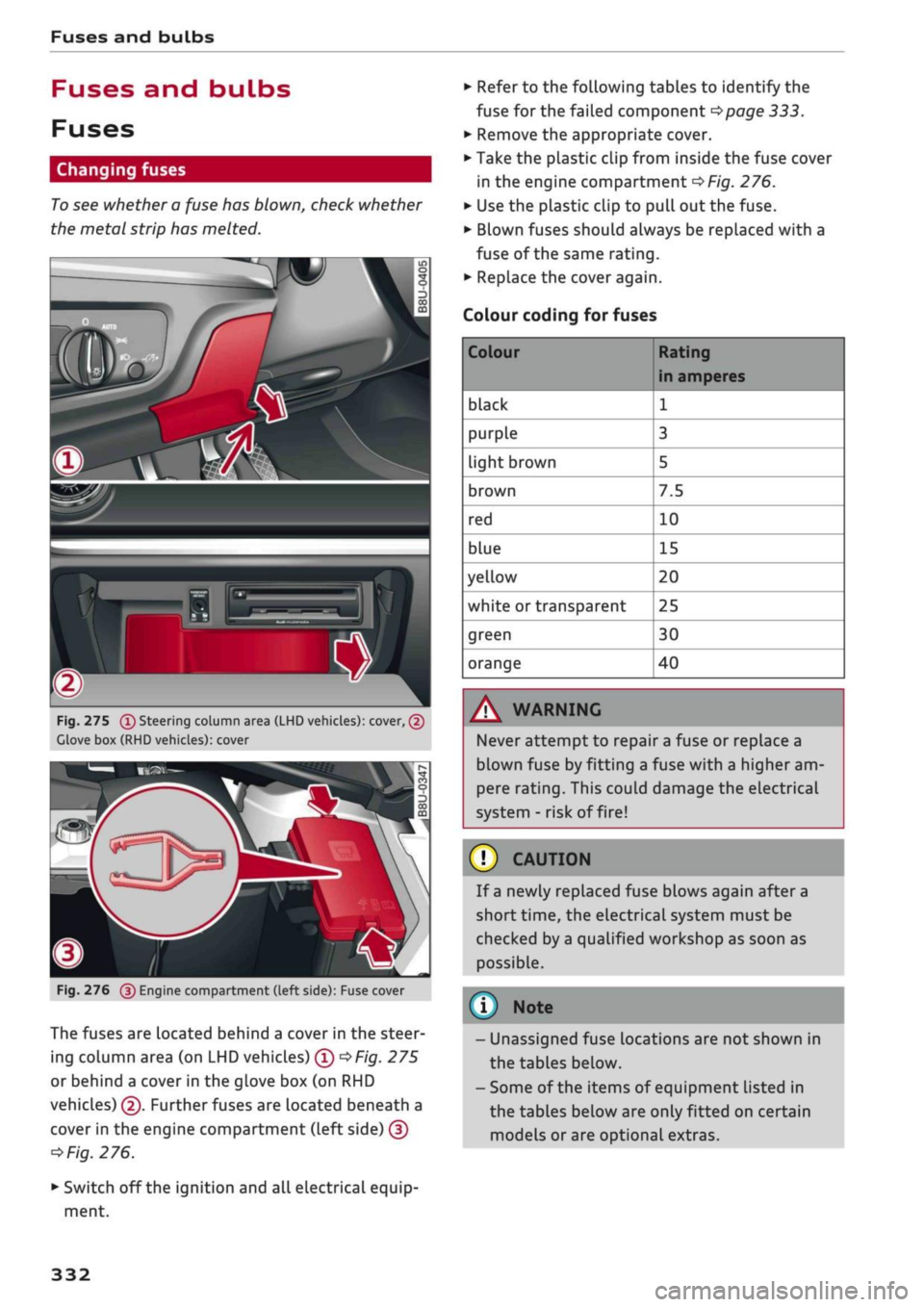
To see whether a fuse has blown, check whether
the metal strip has melted.
3
Fig.
275
(T)
Steering column area (LHD vehicles): cover, (2)
Clove box (RHD vehicles): cover
Fig.
276
@
Engine compartment (left side): Fuse cover
The fuses are located behind a cover in the steer
ing column area (on LHD vehicles) ©
*Fig.
275
or behind a cover in the glove box (on RHD
vehicles) ©. Further fuses are located beneath a
cover in the engine compartment (Left side) ©
*
Fig.
276.
• Switch off the ignition and all electrical equip
ment.
• Refer to the following tables to identify the
fuse for the failed component
*page
333.
• Remove the appropriate cover.
• Take the plastic clip from inside the fuse cover
in the engine compartment
*Fig.
276.
• Use the plastic clip to pull out the fuse.
• Blown fuses should always be replaced with a
fuse of the same rating.
• Replace the cover again.
Colour coding for fuses
Colour
black
purple
light brown
brown
red
blue
yellow
white or transparent
green
orange
Rating
in amperes
1
3
5
7.5
10
15
20
25
30
40
A WARNING
Never attempt to repair a fuse or replace a
blown fuse by fitting a fuse with a higher am
pere rating. This could damage the electrical
system - risk of fire!
© CAUTION
If a newly replaced fuse blows again after a
short time, the electrical system must be
checked by a qualified workshop as soon as
possible.
©
- Unassigned fuse locations are not shown in
the tables below.
- Some of the items of equipment listed in
the tables below are only fitted on certain
models or are optional extras.
332
Page 338 of 364
Fuses and bulbs
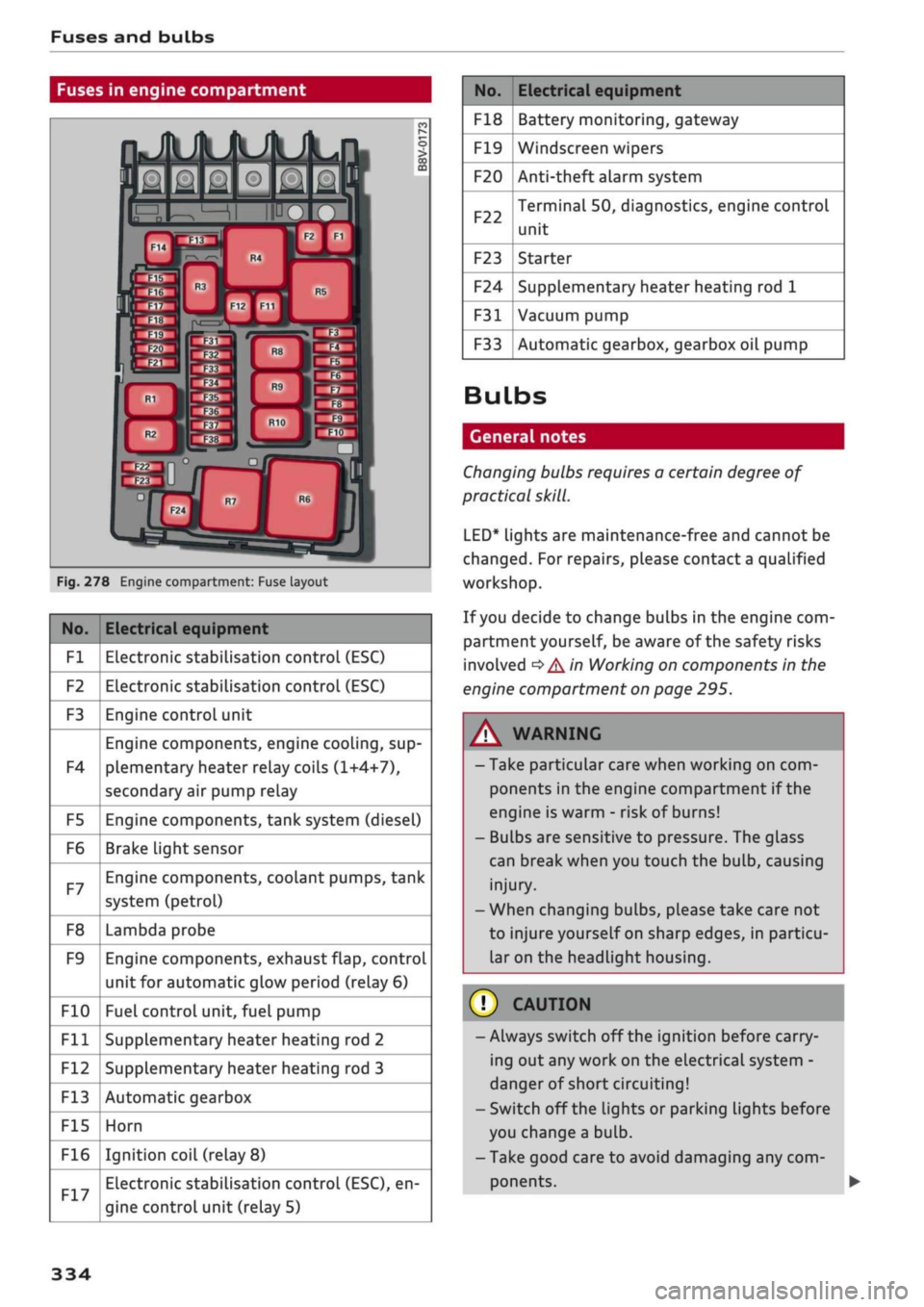
Fuses in engine compartment
Fig.
278 Engine compartment: Fuse layout
No.
Fl
F2
F3
F4
F5
F6
F7
F8
F9
F10
Fll
F12
F13
F15
F16
Electrical equipment
Electronic stabilisation control (ESC)
Electronic stabilisation control (ESC)
Engine control unit
Engine components, engine cooling, sup
plementary heater relay coils (1+4+7),
secondary air pump relay
Engine components, tank system (diesel)
Brake Light sensor
Engine components, coolant pumps, tank
system (petrol)
Lambda probe
Engine components, exhaust flap, control
unit for automatic glow period (relay 6)
Fuel control unit, fuel pump
Supplementary heater heating rod 2
Supplementary heater heating rod 3
Automatic gearbox
Horn
Ignition coil (relay
8)
Electronic stabilisation control (ESC), en
gine control unit (relay 5)
No.
F18
F19
F20
F22
F23
F24
F31
F33
Electrical equipment
Battery monitoring, gateway
Windscreen wipers
Anti-theft alarm system
Terminal 50, diagnostics, engine control
unit
Starter
Supplementary heater heating rod 1
Vacuum pump
Automatic gearbox, gearbox oil pump
Bulbs
General notes
Changing bulbs requires a certain degree of
practical
skill.
LED*
lights are maintenance-free and cannot be
changed.
For repairs, please contact a qualified
workshop.
If
you
decide to change bulbs in the engine com
partment yourself, be aware of the safety risks
involved
*
A in Working on components in the
engine compartment on page 295.
WARNING
- Take particular care when working on com
ponents in the engine compartment if the
engine is warm - risk of burns!
- Bulbs are sensitive to pressure. The glass
can break when you touch the bulb, causing
injury.
- When changing bulbs, please take care not
to injure yourself on sharp edges, in particu
lar on the headlight housing.
© CAUTION
-Always switch off the ignition before carry
ing out any work on the electrical system -
danger of short circuiting!
- Switch off the Lights or parking lights before
you change a bulb.
- Take good care to avoid damaging any com
ponents.
334
Page 340 of 364
Fuses and bulbs
You must only replace a bulb with a bulb of the
same type. Information regarding e.g. the wat
tage can be found on the glass or base of the
bulb.
The description for changing the bulb refers to
the Left rear light unit; the procedure for the
right rear Light unit is similar.
You can change the
foLLowing
bulbs yourself:
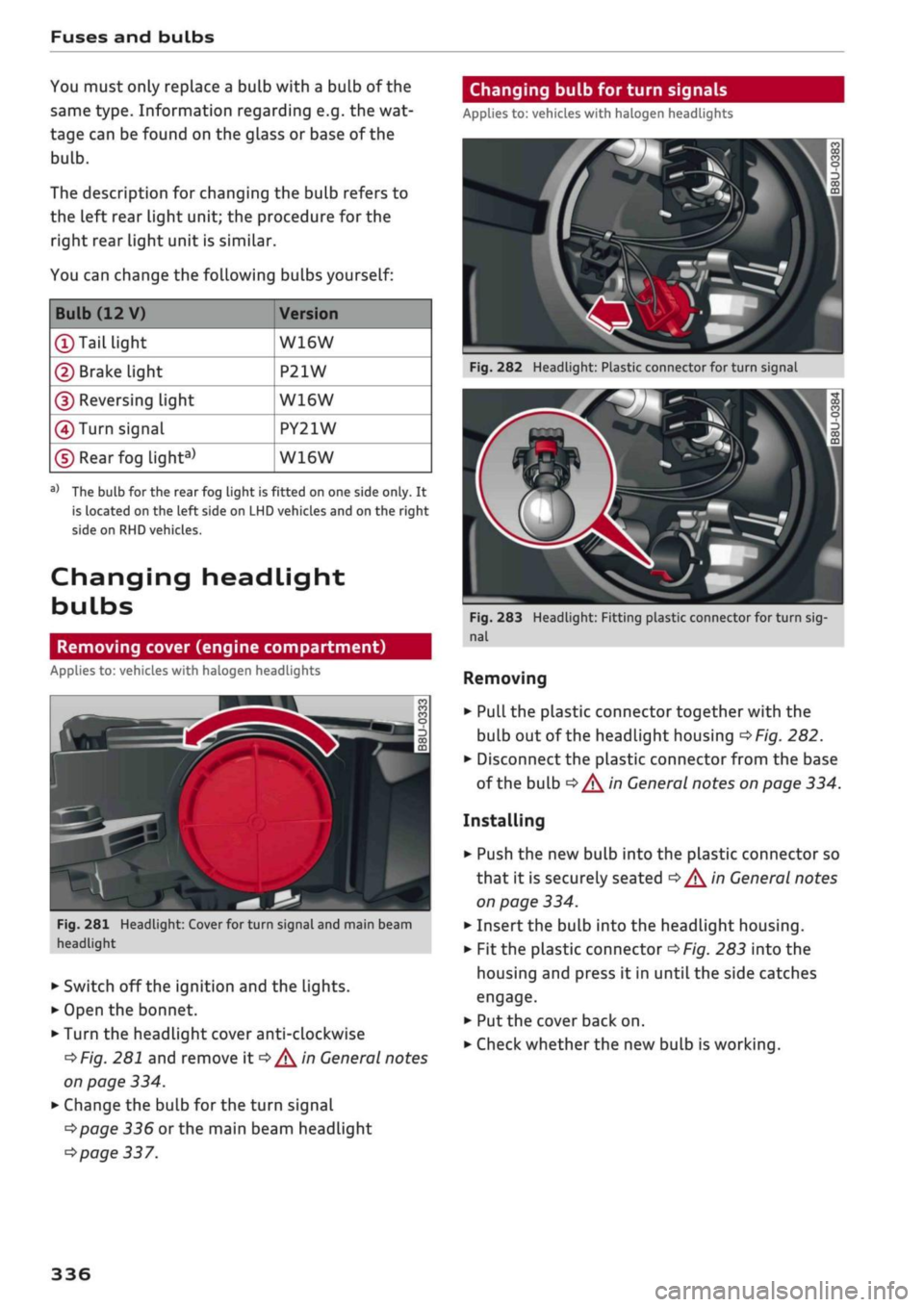
Changing bulb for turn signals
Applies to: vehicles with halogen headlights
Bulb (12 V)
©Tail
light
© Brake light
© Reversing Light
(4)
Turn signal
©Rearfog
light3'
Version
W16W
P21W
W16W
PY21W
W16W
a'
The bulb for the rear fog light is fitted on one side only. It
is located on the left side on LHD vehicles and on the right
side on RHD vehicles.
Changing headlight
bulbs
Removing cover (engine compartment)
Applies to: vehicles with halogen headlights
^
Fig.
281 Headlight: Cover for turn signal and main beam
headlight
• Switch off the ignition and the lights.
• Open the bonnet.
• Turn the headlight cover anti-clockwise
*Fig.
281 and remove it
*/^
in General notes
on page 334.
• Change the bulb for the turn signal
*page
336 or the main beam headlight
*page
337.
Fig.
282 Headlight: Plastic connector for turn signal
Fig.
283 Headlight: Fitting plastic connector for turn
sig
nal
Removing
• Pull the plastic connector together with the
buLb out of the headlight housing
*Fig.
282.
• Disconnect the plastic connector from the base
of the bulb
*^
in General notes on page 334.
Installing
• Push the new bulb into the plastic connector so
that it is securely seated
*^
in General notes
on page 334.
• Insert the bulb into the headlight housing.
•
Fit
the plastic connector
*Fig.
283 into the
housing and press it in until the side catches
engage.
• Put the cover back on.
• Check whether the new bulb is working.
336
Page 341 of 364

Fuses and bulbs
CO
rN
IV
rN
•-i
00
Changing bulb for main beam headlight
Applies to: vehicles with halogen headlights
Removing cover (wheel housing liner)
Applies to: vehicles with halogen headlights
y33pTCk
• **•** --•__
«flj \\
ÛV\-^
^L M
i
in
CO
ro
o
3
CO
m
k
|
Fig.
284 Headlight: Plastic connector for main beam
headlight
Fig.
285 Headlight: Fitting plastic connector for main
beam headlight
Removing
• Pull the plastic connector together with the
bulb out of the headlight housing
*Fig.
284.
• Disconnect the plastic connector from the base
of the bulb
^/K
in General notes on page 334.
Installing
• Push the new bulb into the plastic connector so
that it is securely seated
<=>^
in General notes
on page 334.
• Insert the bulb into the headlight housing.
• Press the plastic connector
*Fig.
285 into the
housing until it engages.
• Check that the bulb is seated correctly by look
ing through the headlight itself.
• Put the cover back on.
• Check whether the new bulb is working.
Fig.
286 Wheel housing liner: Access to daytime running
light and dipped headlight bulbs
Fig.
287 Headlight: Cover for daytime running light and
dipped headlight
• Turn the steering all the way to the right.
• Switch off the ignition and the lights.
• Reach into the opening
©*Fig.
286 and pull
in the direction of the arrow to open the cover
in the wheel housing Liner.
• Move the metal bar downwards -arrow-
*Fig.
287 and remove the plastic cover
*/^
in
General notes on page 334.
• Change the bulb for the daytime running light
©
*
page 338
or
the dipped headlight©
*
page 338.
337
Page 343 of 364
Fuses
and
bulbs
CO
rN
IV
rN
•-i
00
Changing bulbs
for
rear
Lights
Preparations
Applies
to: vehicles with bulbs
Changing
a
bulb
Applies
to: vehicles with bulbs
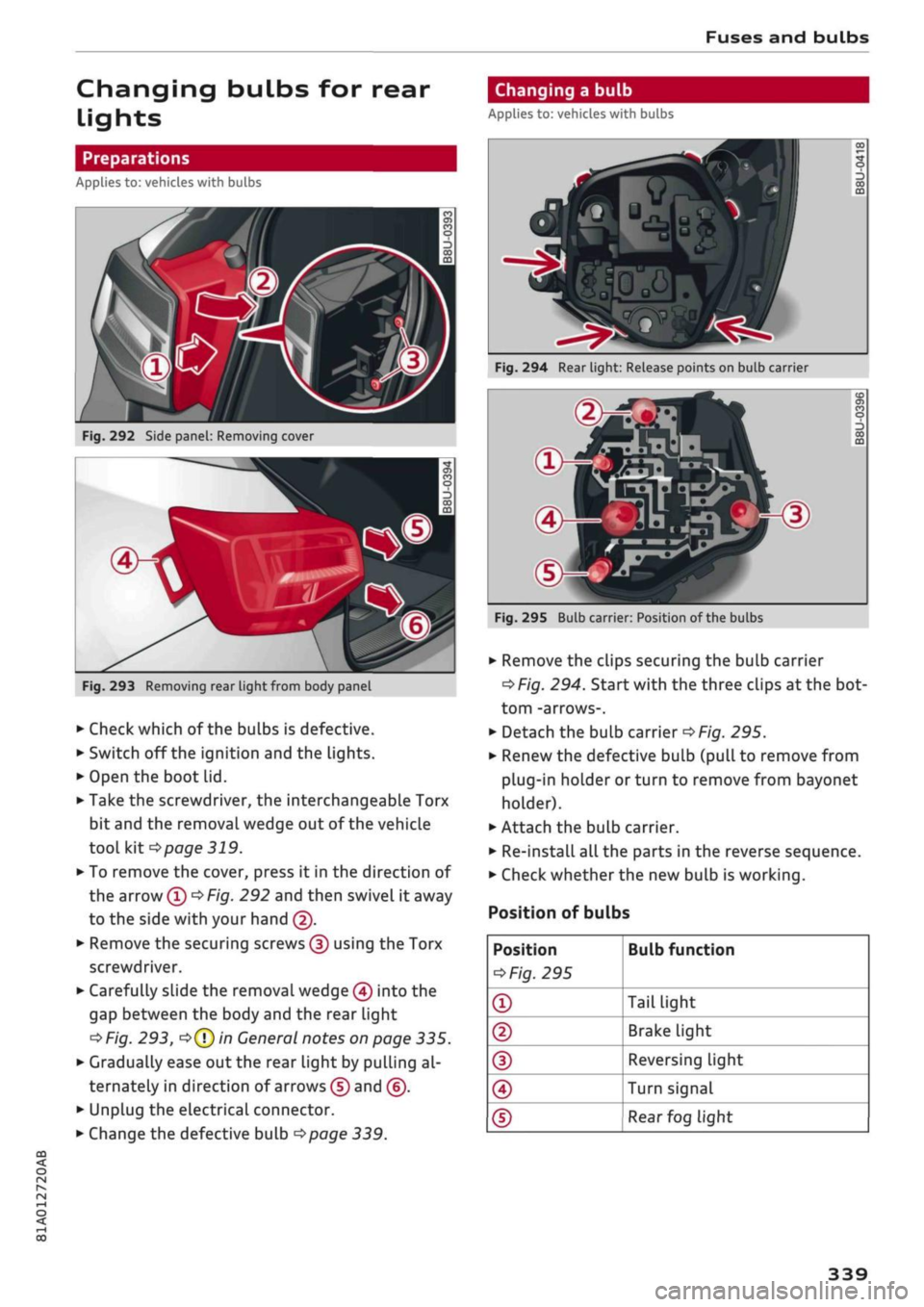
Fig.
292
Side
panel:
Removing cover
Fig.
293
Removing rear light from body panel
• Check which
of
the bulbs
is
defective.
• Switch
off
the ignition and
the
lights.
• Open
the
boot lid.
• Take
the
screwdriver,
the
interchangeable Torx
bit and
the
removal wedge
out of
the vehicle
tool
kit
*page
319.
• To remove
the
cover, press
it in the
direction
of
the arrow
©
*
Fig.
292
and then swivel
it
away
to
the
side with your hand
©.
• Remove the securing screws
©
using
the
Torx
screwdriver.
• Carefully slide
the
removal wedge
©
into
the
gap between
the
body and
the
rear light
•=>
Fig.
293,
o©
in
General notes on page
335.
• Gradually ease out the rear light
by
pulling
al
ternately
in
direction
of
arrows
©
and
©.
• Unplug
the
electrical connector.
• Change the defective bulb
*page
339.
1
u
f"
00
o
00 m
Fig.
294 Rear light: Release points on bulb carrier
^
®-g
Fig.
295
Bulbcarr
4B
&fï|
STPJ
ml
»Wm
er: Position
sio^
P*^^^HP^
of the bulbs
O)
CO
o
OQ
• Remove the clips securing
the
bulb carrier
*Fig.
294.
Start with
the
three clips
at
the bot
tom -arrows-.
• Detach
the
bulb carrier
*Fig.
295.
• Renew the defective bulb (pull
to
remove from
plug-in holder
or
turn
to
remove from bayonet
holder).
• Attach
the
bulb carrier.
• Re-install all the parts
in the
reverse sequence.
• Check whether the new bulb
is
working.
Position
of
bulbs
Position
*
Fig.
295
®
®
(D
©
®
Bulb function
Tail light
Brake light
Reversing Light
Turn signal
Rear
fog light
339
Page 354 of 364
Index
Folding down rear seats 63, 64
Four-wheel drive
see quattro (four-wheel drive) 148
Frequency band
see Waveband 228
Front seats 58
FueL 289
Consumption 342
Current fuel consumption 19,20
Ethanol 289
Fuel gauge 12, 14
Saving fuel 131
Tank capacity 343
FueL
economy
Coasting mode 91
Driving style 72
Recuperation 19
Fuel range 19, 20
Fuses 332
G
GALA
see Speed-dependent volume control ... 260
Gearbox malfunction 92
Glove box 61
Ground clearance 85
H
Halogen headlights
Changing bulbs 334
Handbrake
see Electro-mechanical parking brake .... 82
Handsfree 172
Hazard warning lights 52
Head-protection airbag 286
Head-up display 25
Adjusting brightness 53
Headlight range control 49
Headlights 49
Headlight range control 49
Washer system 55
Washing 313
Headlights (changing buLbs) 334
Head restraints
Adjusting 58,
59
Removing/installing 59
Head restraints, adjusting 266
Heated
Exterior mirrors 53
Rear window (automatic air conditioner) .. 70
Rear window (heating/ventilation system
and manual air conditioner) 68
Seats (automatic air conditioner) 70
Seats (heating/ventilation system and
man
ual air conditioner) 68
Washer
jets 55
Heater (supplementary heater for diesel en
gine) 66
Heating/ventilation system 66
Adjusting air outlets 71
Controls 67
Default settings 66
Description 66
Key-coded settings 66
Supplementary heater 66
Hill hold assist 83
Hill starting
see Hill hold assist 83
Hold assist 84
Hold assist (hill hold) 83
Home address 210, 215
Horn 10
Hubcaps, removing 321
I
i-Size
(securing child seats) 270
Ignition
Switching on/off (with button) 76
Switching on/off (with the key) 74
Immobiliser
see Electronic immobiliser 38
Importing/exporting contacts 187
Inflation pressure (tyres) 309
Input level (media) 246
Inspection intervals 304
Instrument cluster 12
Cleaning 314
Driver messages 26
350
Page 359 of 364
Index
CO
< o rN
iv
rN
t-H
o <
•H
00
Navigation 217
Radio 231
Speech dialogue system 256
System
(MMI)
255
Telephone 187
Shuffle
see Random playback 246
Side airbag 285
Side assist
see Audi side assist 127
Sidelights
49
SIM card
see Embedded SIM card 191
SIM card reader 176, 191, 192
Smartphone
see Telephone 172
SMS
see Text messages 182
Snow chains 309
Software update
see Map update 200
see System update (MMI) 259
Software (MMI)
Licence conditions 262
Update 259
Version 259
Sound settings 260
Source overview 243
Spanner 319
Spare key 38
Spare wheel 324
Special destination 211
Speech dialogue system 164
Commands 165
External 170
Multi-function steering wheel 17
Operation 164
Settings 256
Volume 262
Speed-dependent volume control 261
Speed limit display
see Traffic sign recognition 108
Speed limiter 106
Speed limits
see Traffic sign recognition 108
Speedometer 12
Speed warning 104
Speller 159
Start/stop system 79
START ENGINE STOP (convenience key) . 76,77
Starting with jump leads 326
Station memory
see Favourites 231
Station search (radio)
see Updating station list (radio) 231
Steering 148
Locking (button) 77
Locking (ignition lock) 75
Steering wheel
Adjusting 74
Paddle levers (automatic gearbox) 90
see also Multi-function
steering wheel
15,17,
18
Stopover (navigation) 213
Storage compartments 61
Streaming
see Online media 239
S tronic (automatic gearbox) 85
Subtitles (DVD) 246
Subwoofer 261
Sun roof
see Panorama sun roof 48
Sun visors 54
Supplementary heater (vehicles with diesel
engine) 66
Surround sound 261
Suspension control 131
Switching between calls 180
Switching between tabs
see Multi-function steering wheel . 15, 17, 18
Switching character sets (MMI touch) 155
Symbols 161
Navigation 219
Traffic 225
System settings (MMI)
255
System update (MMI) 259
System volume 261
T
TDI clean diesel
see AdBlue 292