steering wheel AUDI Q2 2021 Owner´s Manual
[x] Cancel search | Manufacturer: AUDI, Model Year: 2021, Model line: Q2, Model: AUDI Q2 2021Pages: 364, PDF Size: 87.77 MB
Page 23 of 364
Instruments and controls
CO
<
o
IV
tN
I-I
00
• To reset the figures in the selected memory to
zero,
press the left
thumbwheel (Î) •=>page
18,
Fig. 13 on the multi-function steering wheel for
one second.
Calling up vehicle functions
• Call up the first tab (on-board computer) using
the
0E]
button on the multi-function steering
wheel.
•
Press the
@
button on the multi-function
steering wheel and select Vehicle functions
from the menu.
The equipment installed on your vehicle deter
mines which of the following displays are availa
ble:
- On-board computer fl, B
opage
21
- Efficiency program
3
<^page
21
- Digital speedometer
- Assists
cépage
104
- Traffic signs
^>page
108
- Reduced display
On-board computer
On the on-board computer you can call up the
following displays in turn by scrolling the left
thumbwheel on the multi-function steering
wheel:
- Date
•=>
page 255
- Range
- AdBlue range*
^>page
292
-Short-term
memoryD
- Average fuel consumption
- Long-term memory B
The single journey memory processes the infor
mation on
a
journey from the time the ignition is
switched on until it is switched off. If the journey
is resumed within two hours after the ignition is
switched off, the new figures are automatically
included in the calculation.
Unlike the single journey memory, the
total
jour
ney memory is not erased automatically. In this
way, you can determine the period for which you
wish the on-board computer to supply driving in
formation.
The following additional display may be available
in the on-board computer, depending on the ve
hicle equipment:
- Active Cylinder Management: The engine auto
matically shuts down two cylinders when per
formance demand is low and certain other
con
ditions have been met. This process is imper
ceptible to the occupants. The driver message
2-cylinder
mode will appear if the current or
average fuel consumption display
oFig.
16 is
selected in the instrument cluster. The cylin
ders are reactivated under heavier load condi
tions.
Efficiency program
3
Applies to: vehicles with efficiency program
The efficiency program can help to save
fuel.
It
evaluates fuel efficiency data, shows a list of aux
iliary equipment affecting fuel consumption, and
suggests gear changes. It also provides economy
tips for saving
fuel.
The efficiency program uses the trip and fuel
con
sumption data from the short-term memory.
When you clear the data from the efficiency pro
gram,
the values in the short-term memory are
reset to zero.
The following additional displays are available in
the efficiency program, depending on the vehicle
equipment:
- Advanced gear-change indicator: The advanced
gear-change indicator is based on the same
log
ic as the "regular" gear-change indicator. The
"regular" gear-change indicator disappears
from the display when the advanced gear-
change indicator appears
^>page
14.
- Energy consumers: The efficiency program
shows a List of energy consumers currently af
fecting the vehicle's fuel consumption. The dis
play shows up to three energy consumers. The
energy consumer drawing the most power ap
pears at the top of the list. If more than three
energy consumers are switched on, the ones
currently using the most power are displayed.
In addition, a scale indicates the overall current
fuel consumption of all energy consumers.
- Economy
tips:
Economy tips will automatically
appear intermittently in the efficiency program •
21
Page 24 of 364
Instruments and controls
in certain situations. By following these econo
my tips, you can save
fuel.
To clear an economy
tip from the display immediately, press any of
the controls on the multi-function steering
wheel.
The date, the time and the time/date display
format can be changed via the infotainment
system
•=>
page 255.
Radio
Important: Radio mode must be activated
^>page
228, and the radio/media tab must be
displayed.
•
Press the
HH
button or the left control button
^>page
16, depending on the equipment in
your vehicle.
The following functions are available on the driv
er information system, depending on the vehicle
equipment:
- To set the waveband: Select and confirm the
waveband.
- To tune to a station from the memory list*:
Select Memory
>
desired radio station.
- To tune to a station from the station list*: Se
lect and confirm a radio station.
- To tune to a station from the favourites list:
Select Favourites > desired radio station.
- To call up a media source: Select and confirm
To media.
Other settings
Applies to: vehicles with Audi virtual cockpit
- SeLect: right control button > desired
entry.
The following settings are available depending
on which function is selected:
- Update station list*: see
<=>page
232.
- Detailed station information: See
opage
232.
Media
Important: A media drive must contain audio/
video files
^page
235, and the radio/media tab
must be displayed.
•
Press the
\M
button or the left control button
^page
16, depending on the equipment in
your vehicle.
The following functions are available on the driv
er information system, depending on the vehicle
equipment:
- To select a media source: Select and confirm a
media source, e.g. "SD
card".
- To play an audio/video file: Select and confirm
a track/file.
-To pause/resume playback: Press the right
thumbwheel (D^poge
17, Fig. 12. To continue
playback, press the right thumbwheel again.
- To restart playback of an audio file: Select the
track currently playing if it is not already selec
ted and press the left thumbwheel.
Applies to: vehicles with analogue instrument cluster
- To switch to the radio: Select and confirm a
waveband (e.g. FM).
Applies to: vehicles with Audi virtual cockpit
- To switch to radio: Select and confirm To radio.
- To call up detailed track information: SeLect
the right control button > Detailed track infor
mation.
For more information, please refer to
tapage
246.
® Note
- The MMI media drives do not support DRM-
protected files; these files are marked with
the
symbolS.
- Please note that when you are using the
driver information system to control play
back within a media source, only the playlist
selected on the MMI control console can be
played
^>page
244.
- Always note the information on the info
tainment display. It may be necessary to
use the MMI control console to operate cer
tain functions.
22
Page 25 of 364
Instruments and controls
CO
<
O
rN
r>
I-I
00
Telephone
Applies to: vehicles with telephone
Important: A mobile phone must be connected
to the MMI
^>page
173, and the telephone tab
must be displayed.
•
Press the
\M
button or the left control button
^>page
16, depending on the equipment in
your vehicle.
The following functions are available on the driv
er information system, depending on the vehicle
equipment:
- To call a contact: Select and confirm Call list /
Favourites / Directory. Select and confirm a
contact.
- Directory contacts: Only directory contacts for
which a telephone number is stored are dis
played in the driver information system. If sev
eral telephone numbers are stored for one
con
tact, the list of stored telephone numbers is
displayed first when the contact is selected. For
more information on the symbols displayed, re
fer to
^>page
185.
- Call list: The call lists contain all received,
placed and missed calls.
- Caller information*: Depending on whether the
caller is stored in the directory and whether the
telephone number is transmitted with the
call,
the name, the telephone number or Unknown
wilL
appear on the display of the driver informa
tion system.
Functions for an incoming call
- To answer a
call:
Press the left thumbwheel
when there is an incoming
call.
- To ignore a
call:
Select and confirm Ignore
when there is an incoming
call.
- To end a
call:
SeLect and confirm End
call.
Functions during a call
Applies to: vehicles with analogue instrument cluster
- To make a further
call:
Select Hold >
\M\
button
> Directory or Call list
>
entry in
list.
- To answer a further call when you are talking
on the phone and have another call on hold:
Select and confirm Replace. The current call
will be replaced by the incoming
call.
Applies to: vehicles with Audi virtual cockpit
- To make a further
call:
Select Hold > left
con
trol button > Directory or Call list
>
entry in
list.
- To answer a further call when you are talking
on the phone and have another call on hold:
Select and confirm Answer. The current call will
be replaced by the incoming
call.
Other functions are:
Microphone off: If
you
select and confirm this
option,
the caller will no longer be able to hear
you;
you will still be able to hear the caller.
Hold/Resume: You can put
a
call on hold and re
trieve
it
from the hold queue later.
Switch:
You can switch between two phone calls
(one of them will be on hold at any given time).
Select End call to end whichever call is active.
The call on hold will remain in the hold queue
and can be retrieved by selecting Resume.
Conference: Up to five callers and one caller on
hold can take part in a conference (depending on
the mobile network provider). To set up a further
call,
select Hold to place all the members of an
existing conference on
hold.
You can then press
the left control button to place another call to a
contact in the directory or the call list. Select Re
sume if
you
want to retrieve all participants in an
existing conference from the hold queue.
- The functions of the telephone can be oper
ated using the multi-function steering
wheel only if the telephone equipment was
installed at the factory.
- The functions of the telephone depend on
your mobile phone and whether they are
supported
by
your mobile network service
provider.
- The option Call waiting must be activated
on your mobile phone and on the MMI for
you to be made aware of incoming calls dur
ing a conversation. The call options depend
on your mobile network service provider.
For more information, contact your service
provider.
23
Page 28 of 364
Instruments and controls
Height adjustment
The height of the head-up display can be adjus
ted to your individual requirements.
•
Sit in the correct position in your seat
•=>
page 265.
• Turn the
Settings on infotainment system
•
Select the following on the infotainment sys
tem:
IMENU|
button > Car
>
left control button
> Driver assist
>
Head-up display.
Display contents
The settings on the infotainment system allow
you to specify which information is shown in the
display. Possible options include navigation mes
sages*, adaptive cruise control* and camera-
based traffic sign recognition*.
The display of certain information and some of
the red warning lamps cannot be deactivated on
the infotainment system.
Brightness
You can adjust the brightness of the display via
the infotainment system. In addition, the display
brightness is reduced automatically as the
day
light starts to fade. The basic level of brightness
is determined by the instrument lighting setting
•=>
page 53.
© CAUTION
Do not place any objects over the opening for
the head-up display to avoid scratching the
glass cover.
© Note
- The display may be harder to see in unfav
ourable light conditions or if
you
are wear
ing polarised sunglasses.
- To be able to see the display as clearly as
possible, adjust the position of your seat
and the height setting for the head-up dis
play.
- Notes on cleaning
^tab.
Cleaning the inte
rior on page 314.
Warning and indicator
Lamps
Description
The warning and indicator lamps light up or flash
in the instrument cluster to indicate functions or
faults.
Some of the warning and indicator lamps may be
accompanied by a driver message. The warning
display will be accompanied by the corresponding
warning chime. The warning/indicator lamps and
driver messages on the instrument
duster
dis
play can be masked by further displays. You can
have them displayed again on the driver informa
tion system* by calling up the second tab (driver
messages) via the
\<±\
button on the multi-func
tion steering wheel. If several malfunctions have
occurred,
you can use the Left thumbwheel to
scroll through them on the display.
Some of the warning lamps may be displayed in
different colours.
âs
Central warning/indicator lamps
If the warning/indicator lamp
|g or pq
lights
up,
observe the additional information on the in
strument cluster display.
Applies
to: vehicles with monochrome display
If
a
driver message appears and a central warn
ing [amp
Kfl/central
indicator
lamp^S
lights up,
the central warning/indicator lamp indicates the
priority level of the warning. If
a
white indicator
lamp also appears, the central warning/indicator
lamp indicates its actual colour. For example, if
g
lights up with
H.
read the description for
Overview
When you switch on the ignition, some of the
warning and indicator lamps Light up briefly to
show that the associated systems are working
properly. These systems are marked with a
•/
in
the following tables. If one of these warning/in
dicator lamps does not light up, there is a fault in
the associated system. •
26
Page 76 of 364

Driving
Steering
Adjusting the steering wheel position
The height and reach of the steering wheel can
be adjusted as required to suit the
driver.
Fig.
68 Steering column: Lever for steering column adjust
ment
•
Push the Lever
^>Fig.
68 down
<=> /\.
•
Move the steering wheel to the desired
posi
tion.
•
Then push the lever towards the steering
col
umn until the catch engages.
WARNING
- Never adjust the position of the steering
wheel when the vehicle is moving - this
could cause an accident.
- Press the lever upwards so it is secure and
so that the position of the steering wheel
cannot shift unexpectedly while the vehicle
is moving - risk of accident!
Starting and stopping
the engine (vehicles with
ignition Lock)
Starting the engine
Applies to: vehicles with ignition lock
Insert the key in the ignition lock to switch on
the ignition and start the engine.
Fig.
69 Ignition lock: Ignition key positions
Switching the ignition on/off
•
To switch on the ignition, turn the ignition key
to position ®. Vehicles without start/stop sys
tem*:
The rev counter needle will move to the
READY position.
• To switch off the ignition, turn the ignition key
to position ©. The rev counter needle will
move to the OFF position.
Diesel engines are automatically preheated when
you switch on the ignition.
Starting the engine
•
Manual gearbox: Press the clutch pedal all the
way down and move the gear lever into neutral.
•
Automatic gearbox: Press the brake pedal and
move the selector lever to position P or N.
•
Turn the ignition key briefly to position @. The
ignition key automatically returns to position
®. Do not press the accelerator.
Applies to: vehicles with diesel engine
•
The engine may take a few seconds Longer than
usual to start on cold days. Please keep your
foot on the clutch pedal (manual gearbox) or
brake pedal (automatic gearbox) until the en
gine starts. The indicator Lamp
E g
lights up
while the glow plugs are preheating.
74
Page 77 of 364

Driving
CO
<
O
rN
iv
rN
•-i
00
Electrical components with a high power
con
sumption are switched off temporarily while you
start the engine.
If the engine fails to start immediately, switch
off the starter by turning the ignition key to
posi
tion (5) and try again after about 30 seconds.
Start/stop
system*
Please note the information on
^>page
79,
Start/stop system.
A WARNING
- Never run the engine in confined spaces.
The exhaust gases are toxic - risk of poison
ing!
- Never remove the key from the ignition
while the vehicle is moving. The steering
lock would engage, and you would not be
able to steer the car - risk of accident!
© CAUTION
Avoid high engine speeds, full throttle and ex
treme load conditions until the engine has
reached its normal operating temperature;
otherwise this can damage the engine.
© For the sake of the environmen
Do not warm up the engine by running it with
the car stationary. You should drive off imme
diately whenever possible. This will help avoid
unnecessary exhaust emissions.
© Note
- If it is difficult to turn the ignition key to po
sition ®, move the steering wheel (to take
the load off the steering lock mechanism)
until the key turns freely.
- Any noises which may be heard when the
engine is started are quite normal and no
cause for concern.
Switching off the engine
Applies to: vehicles with ignition lock
Switching off the engine
•
Stop the vehicle.
•
Turn the ignition key to position
@.
The rev
counter needle will move to the OFF position.
Engaging the steering lock
Important: The selector lever must be in position
P (automatic gearbox*).
•
Remove the ignition key while it is in position
(§) ^>page
76, Fig. 70
=> A
•
Turn the steering wheel until you hear the
steering lock engage.
The steering lock acts as a theft deterrent.
A,
WARNING
- Never switch off the engine until the vehicle
is stationary. Otherwise you may not have
the full benefit of the brake servo and pow
er steering. You may need more strength to
steer and brake the vehicle than you nor
mally would. This would mean a greater risk
of accidents and serious injury, because you
cannot steer and brake in the normal
man
ner.
- Never remove the key from the ignition
while the vehicle is moving. The steering
lock could engage suddenly, and you would
not be able to steer the car.
- Always take the key with you when you leave
the vehicle. Otherwise the engine can be
started or power-operated equipment such
as the electric windows can be used. This
could result in serious injury.
- When parking, always move the selector
lever to position
P
to prevent the vehicle
from rolling back accidentally.
© CAUTION
If the engine has been working hard
fora
long
time,
there is a risk of heat building up in the
engine compartment after the engine has
been switched off; this could cause engine
damage. For this reason, you should Leave the
engine idling for about 2 minutes before
switching
it
off.
75
Page 78 of 364
Driving
©
y
Note
After the engine is stopped, the radiator fan
may remain on or turn itself back on for up to
10 minutes, even if the ignition is switched
off. This may occur for the following reasons:
- Residual heat has raised the coolant
tem
perature.
- Direct sunlight has additionally heated up
the engine compartment while the engine is
warm.
- Applies to vehicles with diesel particulate
filter: The emission control system is hot
because of the regeneration process, even
though the engine has
not
yet reached oper
ating temperature.
Starting and stopping
the engine (vehicles with
convenience key)
Starting the engine
Applies to: vehicles with convenience key
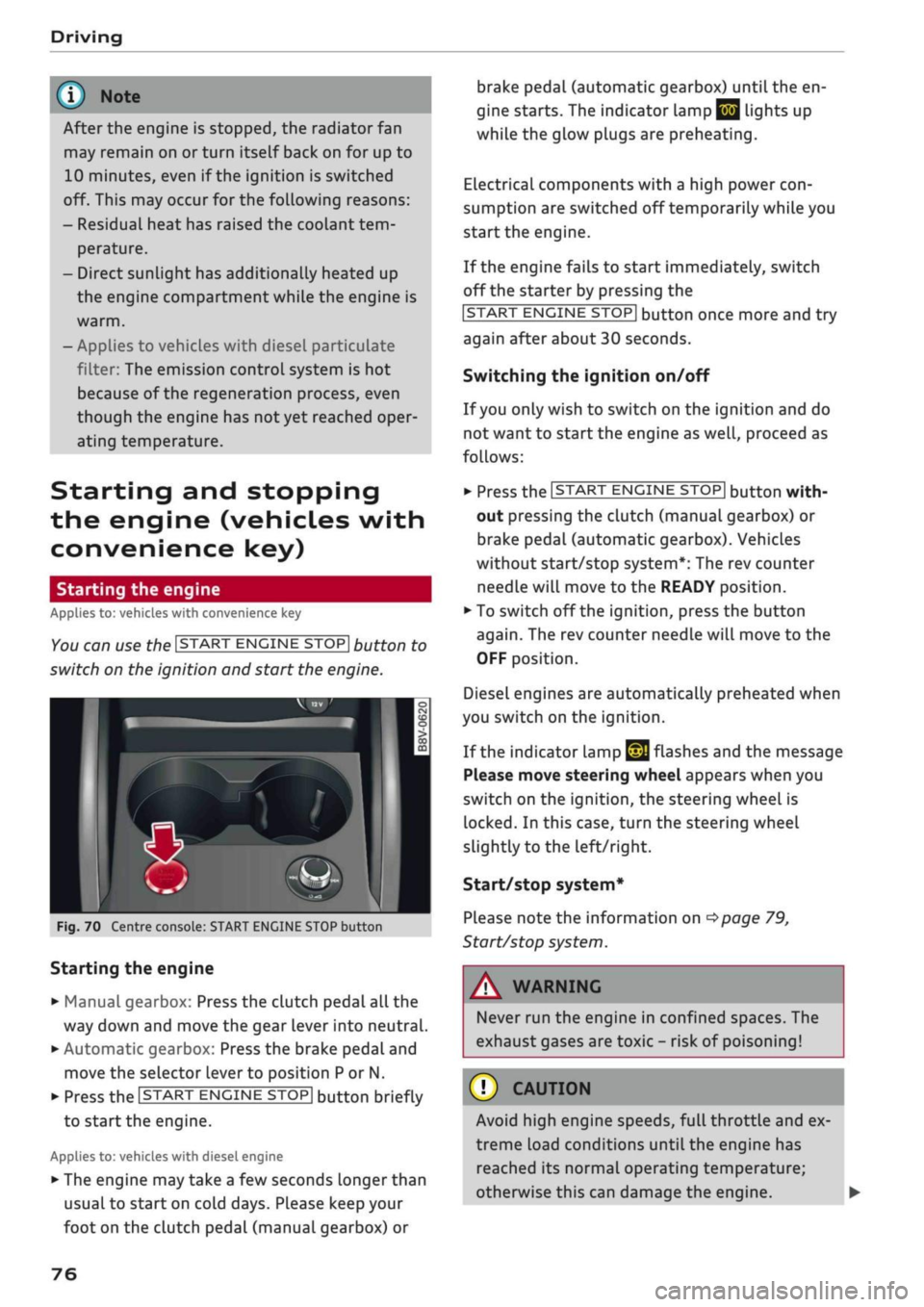
You can use the ISTART ENGINE STOP| button to
switch on the ignition and start the engine.
Fig.
70 Centre console: START ENGINE STOP button
Starting the engine
•
Manual gearbox: Press the clutch pedal all the
way down and move the gear lever into neutral.
•
Automatic gearbox: Press the brake pedal and
move the selector lever to position P or N.
•
Press the ISTART ENGINE
STOP!
button briefly
to start the engine.
Applies to: vehicles with diesel engine
•
The engine may take a few seconds longer than
usual to start on cold days. Please keep your
foot on the clutch pedal (manual gearbox) or
brake pedal (automatic gearbox) until the en
gine starts. The indicator Lamp
E 3
lights up
while the glow plugs are preheating.
Electrical components with a high power
con
sumption are switched off temporarily while you
start the engine.
If the engine fails to start immediately, switch
off the starter by pressing the
ISTART
ENGINE
STOPI
button once more and try
again after about 30 seconds.
Switching the ignition on/off
If you only wish to switch on the ignition and do
not want to start the engine as
well,
proceed as
follows:
•
Press the ISTART ENGINE STOP| button with
out pressing the clutch (manual gearbox) or
brake pedal (automatic gearbox). Vehicles
without start/stop system*: The rev counter
needle will move to the READY position.
•
To switch off the ignition, press the button
again.
The rev counter needle will move to the
OFF position.
Diesel engines are automatically preheated when
you switch on the ignition.
If the indicator lamp
£21
flashes and the message
Please move steering wheel appears when you
switch on the ignition, the steering wheel is
locked.
In this case, turn the steering wheel
slightly
to
the left/right.
Start/stop system*
Please note the information on
<^>page
79,
Start/stop system.
WARNING
Never run the engine in confined spaces. The
exhaust gases are toxic - risk of poisoning!
© CAUTION
Avoid high engine speeds, full throttle and ex
treme load conditions until the engine has
reached its normal operating temperature;
otherwise this can damage the engine. •
76
Page 82 of 364

Driving
display.
The rev
counter needle will also move
to
the
READY position.
•
The engine will start again automatically when
you press
the
clutch pedal.
The
indicator lamp
will
go out.
Applies to: vehicles with automatic gearbox
•
Brake
the
vehicle
to a
stop.
The
engine will
be
switched
off
shortly before
the
vehicle comes
to
a
standstill
or
when
the
vehicle
is
station-
aryx).
Keep your foot
on the
brake pedal.
The
indicator
lamp
@/
@
will appear
on the
dis
play.
The rev
counter needle will also move
to
the READY position.
•
The engine will start again automatically when
you take your foot
off
the brake pedal.
If the
parking brake
is
applied
or
hold assist*
is
switched on,
the
engine will only restart when
you press
the
accelerator pedal1).
The
indicator
lamp
will
go out.
Further information
for
automatic gearboxes
The engine will stop
if
the selector lever
is in po
sition
P, N or D.
The engine will start again
if
you move
the
selec
tor lever
to
R during
a
stop phase.
If you
do not
want
the
engine
to
start when mov
ing
the
selector Lever through
R,
move
the
lever
to P quickly.
You
can
control whether
or not the
engine
is
switched
off by
varying
the
amount
of
pressure
on
the
brake pedal.
For
instance,
if
you brake
gently
in
stop-and-go traffic
or
before turning
off
at a junction,
the
engine will remain
on
while
the
vehicle
is at
a standstill.
As
soon as you press
the
brake pedal harder,
the
engine will
be
switched
off.
be switched
off. The rev
counter needle will
move
to the
OFF position.
- Keep your foot
on the
brake pedal during
a
stop phase
to
prevent
the
vehicle from mov
ing.
-
If you press the
ISTART ENGINE STOP|
but
ton*
during
a
stop phase,
the
ignition will
Note
Applies to: vehicles with manual gearbox
If the engine stalls, you
can
start
it
again
di
rectly
by
pressing
the
clutch pedal immedi
ately.
General notes
Applies to: vehicles with start/stop system
Engine does
not
switch
off
The system checks that certain conditions
are
met before
and
during each stop phase.
If
the
in
dicator lamp
Ey
appears
on the
instrument clus
ter display,
the
engine will
not be
switched
off in
the following situations:
- The engine
has
not
yet
reached
the
minimum
temperature required
for
start/stop mode.
- The interior temperature selected
on the air
conditioner*
has
not
yet
been reached.
- The exterior temperature
is
very high/low.
- The windscreen
is
being defrosted
W.
-The parking
aid*
is
switched
on.
- The vehicle battery charge
is too low.
- The steering wheel
is
close
to
full lock
or the
vehicle
is
being steered.
- Reverse gear has just been selected.
- The vehicle
is on a
steep gradient.
-At high altitudes.
Engine cuts
in
again automatically
The stop phase
is
interrupted
in the
following sit
uations,
for
example.
The
engine cuts
in
auto
matically without intervention from
the
driver.
- The vehicle starts
to
roll (e.g.
on a
hiLl).
- The interior temperature deviates from
the air
conditioner setting.
- The windscreen
is
being defrosted
*$?.
- The brake pedal
is
pressed several times
in
suc
cession.
- The vehicle battery charge drops
to an
insuffi
cient level.
1'
May vary in different countries
80
Page 84 of 364
Driving
Electro-mechanical
parking brake
•_ -_-
:c
2C
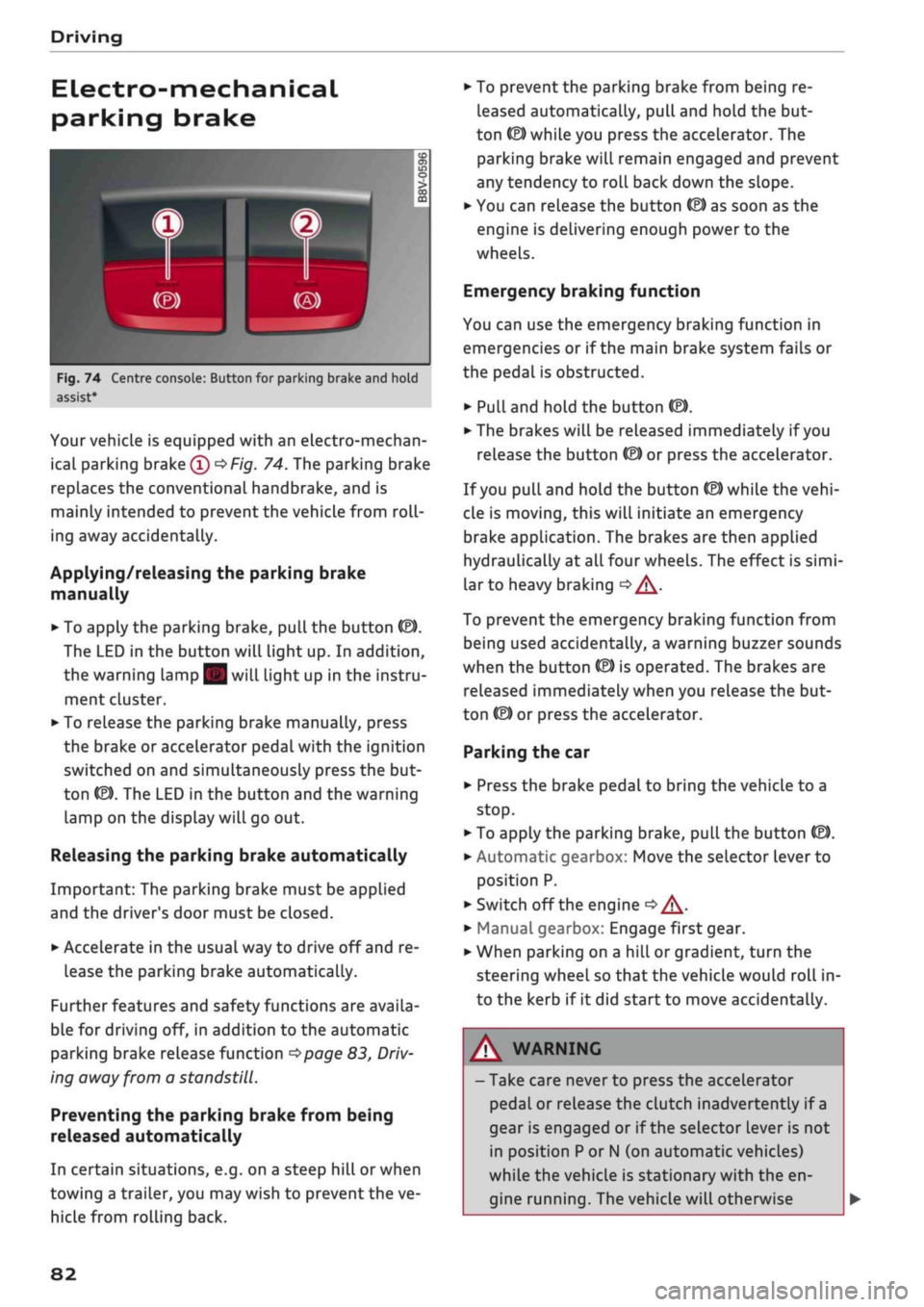
Fig.
74 Centre console: Button for parking brake and hold
assist
Your vehicle is equipped with an electro-mechan
ical parking brake
(l)
^>Fig.
74. The parking brake
replaces the conventional handbrake, and is
mainly intended to prevent the vehicle from
roll
ing away accidentally.
Applying/releasing the parking brake
manually
• To apply the parking brake, pull the button (®).
The LED in the button will light up. In addition,
the warning lamp || will light up in the instru
ment cluster.
•
To release the parking brake manually, press
the brake or accelerator pedal with the ignition
switched on and simultaneously press the but
ton
©).
The LED in the button and the warning
lamp on the display will go out.
Releasing the parking brake automatically
Important: The parking brake must be applied
and the driver's door must be closed.
•
Accelerate in the usual way to drive off and re
lease the parking brake automatically.
Further features and safety functions are availa
ble for driving off, in addition to the automatic
parking brake release function
^>page
83,
Driv
ing away from a standstill.
Preventing the parking brake from being
released automatically
In certain situations, e.g. on a steep hill or when
towing a trailer, you may wish to prevent the ve
hicle from rolling back.
•
To prevent the parking brake from being re
leased automatically, pull and hold the but
ton ©) while you press the accelerator. The
parking brake will remain engaged and prevent
any tendency to roll back down the slope.
•
You can release the button
(®)
as soon as the
engine is delivering enough power to the
wheels.
Emergency braking function
You can use the emergency braking function in
emergencies or if the main brake system fails or
the pedal is obstructed.
•
PuLl
and hold the button
«EJ.
• The brakes will be released immediately if you
release the button
®
or press the accelerator.
If
you
pull and hold the button
(®)
while the
vehi
cle is moving, this will initiate an emergency
brake application. The brakes are then applied
hydraulically at all four wheels. The effect is
simi
lar to heavy braking
<=> /\.
To prevent the emergency braking function from
being used accidentally, a warning buzzer sounds
when the button
(®)
is operated. The brakes are
released immediately when you release the but
ton (®) or press the accelerator.
Parking the car
•
Press the brake pedal to bring the vehicle to a
stop.
•
To apply the parking brake, pull the button
©).
• Automatic gearbox: Move the selector lever to
position P.
• Switch off the engine
•» A-
•
Manual gearbox: Engage first gear.
•
When parking on a hill or gradient, turn the
steering wheel so that the vehicle would roll in
to the kerb if it did start to move accidentally.
A
WARNING
- Take care never to press the accelerator
pedal or release the clutch inadvertently if
a
gear is engaged or if the selector Lever is not
in position
P
or
N
(on automatic vehicles)
while the vehicle is stationary with the en
gine running. The vehicle will otherwise
82
Page 85 of 364

Driving
start moving immediately and could cause
an accident.
- You should only use the emergency braking
function in a real emergency, for example if
the brake system were to fail or if the brake
pedal were to be obstructed. If
you
use the
emergency braking function by activating
the parking brake switch, this has the same
effect as heavy braking. Please remember
that the ESC (and the integrated ABS, EDL
and traction control functions) is still sub
ject to certain physical limits. In a corner or
in bad road or weather conditions an emer
gency stop can cause the vehicle to skid or
lose steering control.
- It is not possible to apply the parking brake
if the electrical power supply fails. In this
case,
park the vehicle on a
level
surface and
select 1st gear (manual gearbox) or move
the selector lever to position
P
(automatic
gearbox) to prevent
it
from rolling. Obtain
professional assistance.
- Always take the key with you when leaving
your
vehide
- even if
you
only intend to be
gone for
a
short time. This is especially im
portant if children are left in the car. They
might otherwise be able to start the engine,
release the parking brake or use power-op
erated equipment such as the electric
win
dows - this could lead to injuries.
- Do not leave anyone (especially children) in
the vehicle when it is locked. Locked doors
could delay assistance in an emergency, po
tentially putting lives at risk.
© Note
Applies to: vehicles with automatic gearbox
You can apply the parking brake manually or
switch on the hold assist* when stopping at
traffic lights, etc. You do not then have to
hold the car with the brake pedal, as the
brakes will stop it creeping forward while a
gear is engaged in the automatic transmis
sion.
When you drive off in the normal way,
co
the parking brake will be released automati-
<
° cally
and your vehicle will start moving
2 •=>
page 83. o < 00
O
Note
- Any slight noise which may be heard when
the parking brake is applied or released is
quite normal and no cause for concern.
- The parking brake runs an automatic test
cycle at regular intervals when the vehicle is
parked.
This may cause a slight noise, which
is normal.
- If the electrical power supply fails, it is not
possible to release the parking brake (if it
was applied) or to apply the parking brake
(if it was released)
•=> A-
Obtain professional
assistance.
Driving away from a
standstill
Various features and safety functions are availa
ble for driving off, depending on the equipment
in your vehicle.
Hill starting with the parking brake applied
Important: The driver's door must be closed.
•
To drive off more easily on a slope, apply the
parking brake and drive off just as you usually
would.
The parking brake will be released auto
matically, but not until there is enough power
at the wheels to make the vehicle move in the
desired direction.
Hill starting with the hill hold assist
The hill hold assist function makes it easier to
drive away on a slope.
Important: The driver's door must be closed and
the engine must be running.
•
To activate the hill hold assist, press and hold
the brake pedal for several seconds. The vehicle
must be on a slope and facing uphill.
When you release the brake pedal the braking
force will be maintained for
a
moment
^^
in
order to hold the vehicle and make it easier for
you to drive away. •
83