mode AUDI Q2 2021 Owner´s Manual
[x] Cancel search | Manufacturer: AUDI, Model Year: 2021, Model line: Q2, Model: AUDI Q2 2021Pages: 364, PDF Size: 87.77 MB
Page 310 of 364
Wheels
DOT ...2216...
means, for example, that the tyre was produced
in the 22nd week of 2016.
Audi Genuine Tyres
Audi Genuine Tyres with the marking "AO" are
specially matched to your Audi. When used prop
erly, these tyres meet the highest standards in
safety and handling. Your specialist retailer will
be glad to provide more information.
Tyre wear / damage
A
WARNING
- Use only tyre/rim combinations and match
ing wheel bolts approved by Audi. Otherwise
damage to the vehicLe and an accident could
result.
- For technical reasons, it is not possible to
use wheels from other vehicles. In certain
cases, it is not even possible to use wheels
from another vehicle of the same model.
- It is very important to ensure that the tyres
you have chosen have adequate clearance.
When selecting replacement tyres, do not
rely entirely on the nominal tyre size
marked on the tyre; with some makes of
tyre the effective tyre size can differ signifi
cantly from the nominal dimensions, even
though the tyres have the same size desig
nation.
Inadequate tyre clearance can result
in damage to the tyres or the vehicle, caus
ing a serious safety risk.
- Avoid running the car on tyres that are more
than 6 years old. If
you
have no alternative,
you should drive slowly and with extra care
at all times.
- The use of run-flat tyres on your vehicle is
NOT authorised! Unauthorised use can cause
an accident or damage your vehicLe.
- If wheel trims are fitted after the car is pur
chased,
ensure that there is an adequate
flow of air for cooling the brakes - risk of ac
cident!
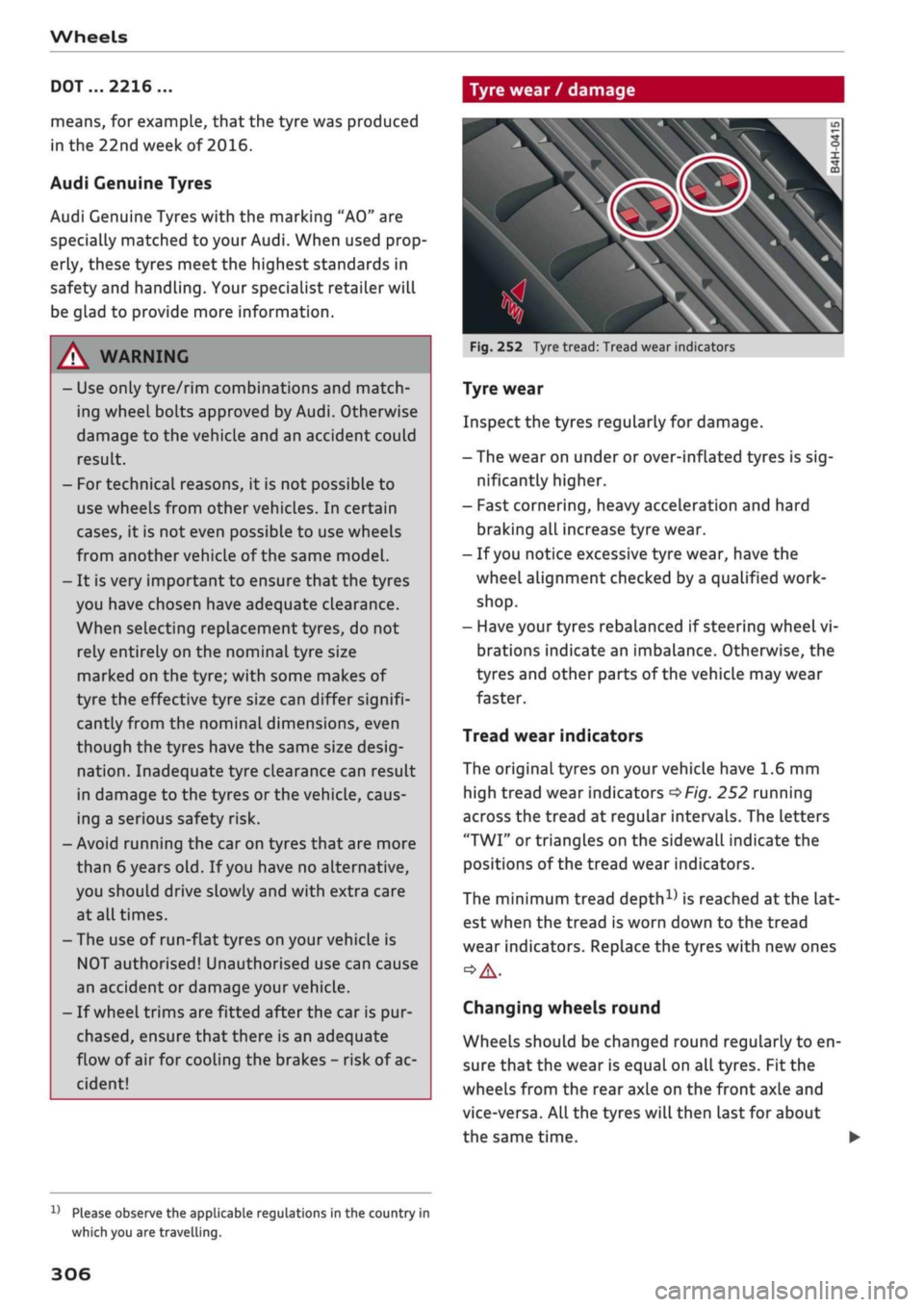
Fig.
252 Tyre tread: Tread wear indicators
Tyre wear
Inspect the tyres regularly for damage.
- The wear on under or over-inflated tyres is
sig
nificantly higher.
- Fast cornering, heavy acceleration and hard
braking all increase tyre wear.
- If
you
notice excessive tyre wear, have the
wheel alignment checked by a qualified work
shop.
- Have your tyres rebalanced if steering wheel vi
brations indicate an imbalance. Otherwise, the
tyres and other parts of the vehicLe may wear
faster.
Tread wear indicators
The original tyres on your vehicle have 1.6 mm
high tread wear indicators
^>Fig.
252 running
across the tread at regular intervals. The letters
"TWI"
or triangles on the sidewall indicate the
positions of the tread wear indicators.
The minimum tread
depth1)
is reached
at
the lat
est when the tread is worn down to the tread
wear indicators. Replace the tyres with new ones
Changing wheels round
Wheels should be changed round regularly to en
sure that the wear is equal on all tyres. Fit the
wheels from the rear axle on the front axle and
vice-versa. All the tyres will then last for about
the same time.
x)
Please observe the applicable regulations in the country in
which you are travelling.
306
Page 313 of 364
Wheels
CO
< o rN
iv
rN
i—i
o < 00
All-weather tyres can also be used instead of
winter tyres. Please note that winter tyres
with the
A
symbol are required by law during
the winter season in some countries.
Snow chains
Snow chains will improve braking ability as well
as traction in winter conditions.
• Snow chains can be used on the front wheels
only. This also applies to vehicles with four-
wheel drive*.
•
Check that the snow chains are correctly seated
after driving for
a
few yards; follow the instruc
tions given by the manufacturer.
•
Keep your speed below 50 km/h. Please ob
serve the applicable local regulations.
Only use snow chains with fine-pitch links. The
links must not protrude more than 13.5 mm
from the tyres (including tensioner).
You must remove the snow chains on roads which
are free of snow; otherwise the vehicLe handling
may be impaired and the tyres may be damaged.
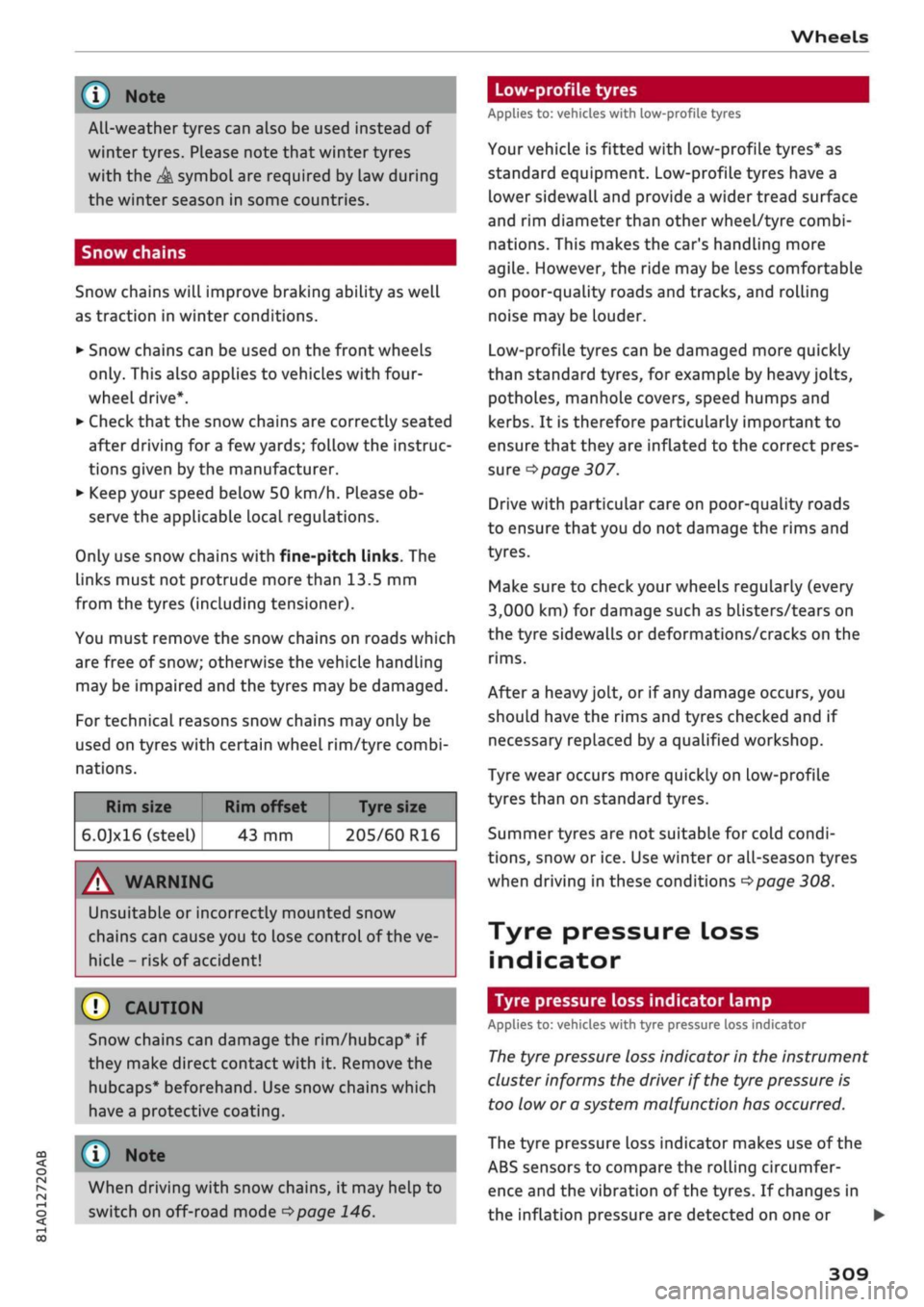
For technical reasons snow chains may only be
used on tyres with certain wheel rim/tyre combi
nations.
Rim size
6.0]xl6 (steel)
Rim offset Tyre size
43 mm 205/60 R16
A WARNING
UnsuitabLe
or incorrectly mounted snow
chains can cause you to lose control of the ve
hicLe-
risk
of accident!
© CAUTION
Snow chains can damage the rim/hubcap* if
they make direct contact with it. Remove the
hubcaps* beforehand. Use snow chains which
have a protective coating.
© Note
When driving with snow chains, it may help to
switch on off-road mode
^page
146.
Low-profile tyres
Applies to: vehicles with low-profile tyres
Your vehicLe is fitted with low-profile tyres* as
standard equipment. Low-profile tyres have a
lower sidewall and provide a wider tread surface
and rim diameter than other wheel/tyre combi
nations. This makes the car's handling more
agile.
However, the ride may be Less comfortable
on poor-quality roads and tracks, and rolling
noise may be louder.
Low-profile tyres can be damaged more quickly
than standard tyres, for example by heavy jolts,
potholes, manhole covers, speed humps and
kerbs.
It is therefore particularly important to
ensure that they are inflated to the correct pres
sure
o
page 307.
Drive with particular care on poor-quality roads
to ensure that you do not damage the rims and
tyres.
Make sure to check your wheels regularly (every
3,000 km) for damage such as blisters/tears on
the tyre sidewalls or deformations/cracks on the
rims.
After a heavy jolt, or if any damage occurs, you
should have the rims and tyres checked and if
necessary replaced by
a
qualified workshop.
Tyre wear occurs more quickly on low-profile
tyres than on standard tyres.
Summer tyres are not suitable for cold condi
tions,
snow or ice. Use winter or all-season tyres
when driving in these conditions
^>page
308.
Tyre pressure loss
indicator
Tyre pressure loss indicator lamp
Applies to: vehicles with tyre pressure loss indicator
The
tyre pressure loss indicator in the instrument
cluster informs the driver if the tyre pressure is
too low or a system malfunction has occurred.
The tyre pressure loss indicator makes use of the
ABS sensors to compare the rolling circumfer
ence and the vibration of the tyres. If changes in
the inflation pressure are detected on one or •
309
Page 328 of 364

Mobility
not possible to tighten the bolts to the re
quired torque using the hexagonal socket
risk
of accident!
© CAUTION
When removing/fitting the wheel the rim
may hit and damage the brake disc. For this
reason,
please take care and get
a
second per
son to assist you.
(T) Note
The wheel bolts are easier to remove from the
wheel rim if
you
use the hexagonal socket in
the screwdriver handle. The reversible screw
driver blade should be removed as a precau
tionary measure when the tool is used for this
purpose.
Tyres with directional tread pattern
A directional tread pattern can be identified by
arrows on the sidewall that point in the direction
of rotation. Always note the direction of rotation
indicated when mounting the wheel. This is im
portant so that these tyres can give maximum
grip and avoid excessive noise, tread wear and
aquaplaning.
If
you
ever have a puncture and need to fit the
spare wheel* in the wrong direction, please drive
with extra care because the tyre will not give op
timum performance in this situation. Bear this in
mind particularly when driving on wet roads.
To benefit from the advantages of tyres with this
type of tread pattern, the defective tyre should
be replaced and refitted as soon as possible so
that all tyres again rotate in the correct direction.
After changing a wheel
• Fit the hubcap or wheel bolt caps back on, as
required.
• Put the tools and jack back in the luggage com
partment.
• If the replaced wheel will not fit into the spare
wheel
well,
stow it safely in the luggage com
partment
*page
272.
• Check the tyre pressure of the fitted wheel as
soon as possible.
• On vehicles with tyre pressure loss indicator,
adjust the tyre pressures and store them via the
infotainment system
opage
311.
• The wheel bolts should be tightened to 140
Nm.
Have this checked as soon as possibLe with
a torque wrench. Until
then,
drive with caution.
• Have the flat tyre replaced as quickly as possi
ble.
Spare wheel
General notes
Applies to: vehicles with compact temporary spare wheel
Fig.
266 Luggage compartment: Floor panel folded up
Fig.
267 Compact temporary spare wheel (example)
The compact temporary spare wheel
*Fig.
267 is
only intended for temporary use over short dis
tances. Have the damaged wheel checked as soon
as possible by
a
qualified workshop and, if neces
sary, replaced.
PLease note the following restrictions when using
the compact temporary spare wheel. The com
pact temporary spare wheel is designed specifi
cally for this model. For this reason, do not use a
spare wheel from a different type of
vehicle.
•
324
Page 335 of 364
Mobility
CO
< o rN
iv
rN
•-i
00
A WARNING
If the towline anchorage is not screwed in as
far as the stop, there is a risk of the screw
connection shearing off during towing - risk
of accident!
Rear towline anchorage
&
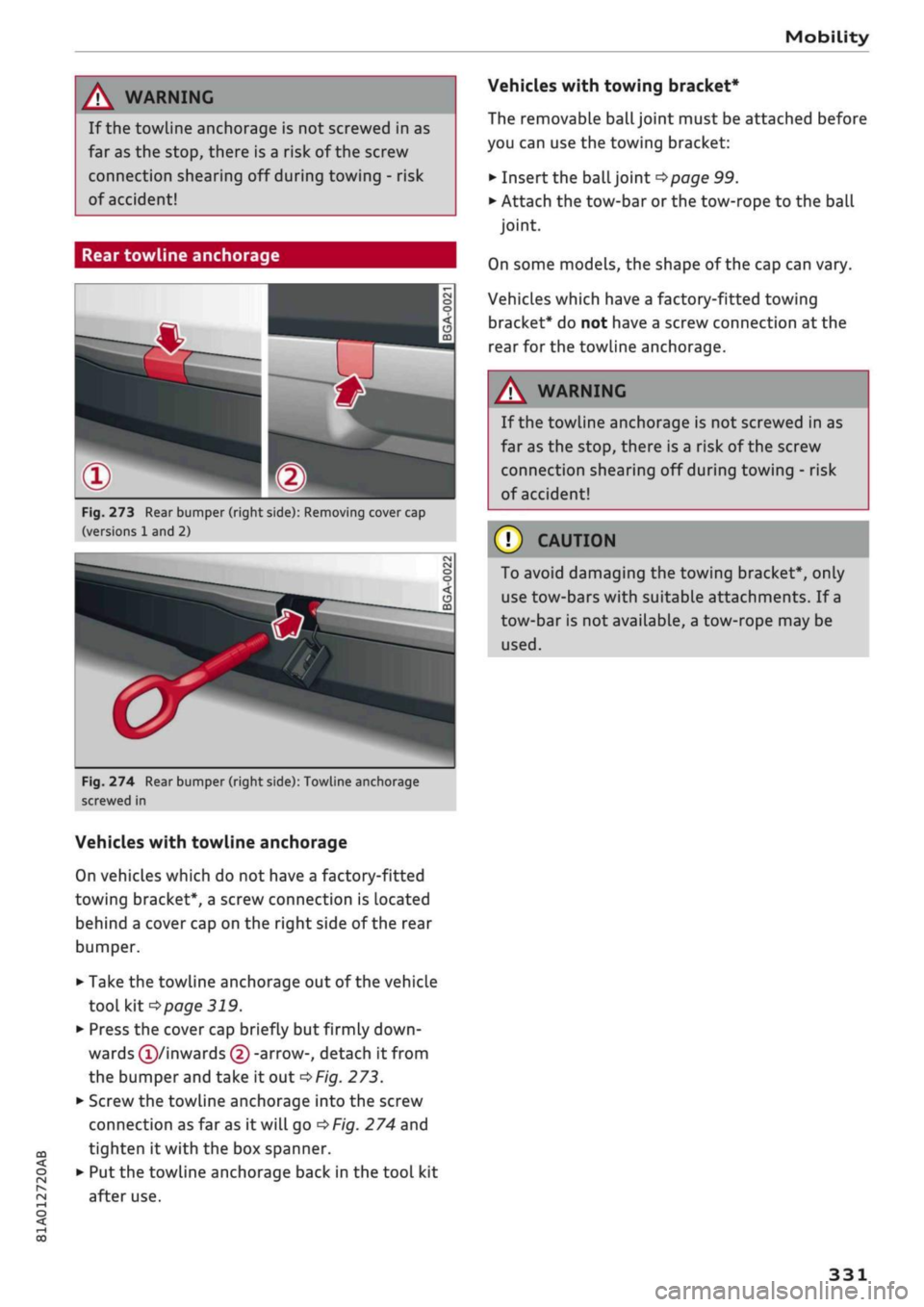
Fig.
273 Rear bumper (right side): Removing cover cap
(versions 1 and 2)
Si
Fig.
274 Rear bumper (right side): Towline anchorage
screwed in
Vehicles with towline anchorage
On vehicles which do not have a factory-fitted
towing bracket*, a screw connection is located
behind a cover cap on the right side of the rear
bumper.
• Take the towline anchorage out of the vehicle
tool kit
*page
319.
• Press the cover cap briefly but firmly
down
wards
(T)/inwards
© -arrow-, detach it from
the bumper and take it out
*Fig.
273.
• Screw the towline anchorage into the screw
connection as far as it will go
*Fig.
274 and
tighten it with the box spanner.
• Put the towline anchorage back in the tool kit
after use.
Vehicles with towing bracket*
The removable
ball
joint must be attached before
you can use the towing bracket:
• Insert the ball joint
*page
99.
• Attach the tow-bar or the tow-rope to the ball
joint.
On some models, the shape of the cap can vary.
Vehicles which have a factory-fitted towing
bracket* do not have a screw connection at the
rear for the towline anchorage.
WARNING
If the towline anchorage is not screwed in as
far as the stop, there is a risk of the screw
connection shearing off during towing - risk
of accident!
© CAUTION
To avoid damaging the towing bracket*, only
use tow-bars with suitable attachments. If
a
tow-bar is not available, a tow-rope may be
used.
331
Page 336 of 364
Fuses and bulbs
Fuses and bulbs
Fuses
Changing fuses
To see whether a fuse has blown, check whether
the metal strip has melted.
3
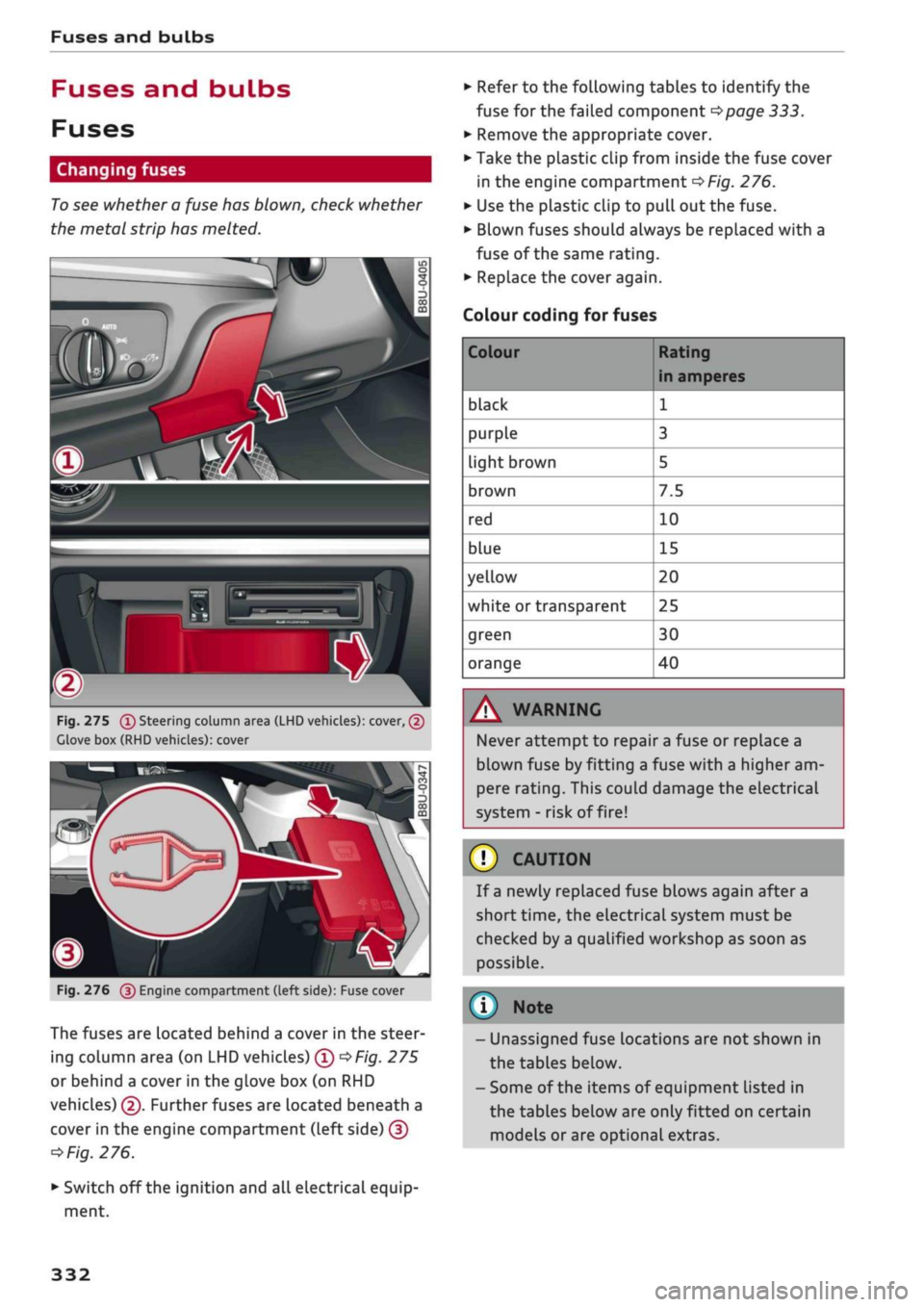
Fig.
275
(T)
Steering column area (LHD vehicles): cover, (2)
Clove box (RHD vehicles): cover
Fig.
276
@
Engine compartment (left side): Fuse cover
The fuses are located behind a cover in the steer
ing column area (on LHD vehicles) ©
*Fig.
275
or behind a cover in the glove box (on RHD
vehicles) ©. Further fuses are located beneath a
cover in the engine compartment (Left side) ©
*
Fig.
276.
• Switch off the ignition and all electrical equip
ment.
• Refer to the following tables to identify the
fuse for the failed component
*page
333.
• Remove the appropriate cover.
• Take the plastic clip from inside the fuse cover
in the engine compartment
*Fig.
276.
• Use the plastic clip to pull out the fuse.
• Blown fuses should always be replaced with a
fuse of the same rating.
• Replace the cover again.
Colour coding for fuses
Colour
black
purple
light brown
brown
red
blue
yellow
white or transparent
green
orange
Rating
in amperes
1
3
5
7.5
10
15
20
25
30
40
A WARNING
Never attempt to repair a fuse or replace a
blown fuse by fitting a fuse with a higher am
pere rating. This could damage the electrical
system - risk of fire!
© CAUTION
If a newly replaced fuse blows again after a
short time, the electrical system must be
checked by a qualified workshop as soon as
possible.
©
- Unassigned fuse locations are not shown in
the tables below.
- Some of the items of equipment listed in
the tables below are only fitted on certain
models or are optional extras.
332
Page 347 of 364
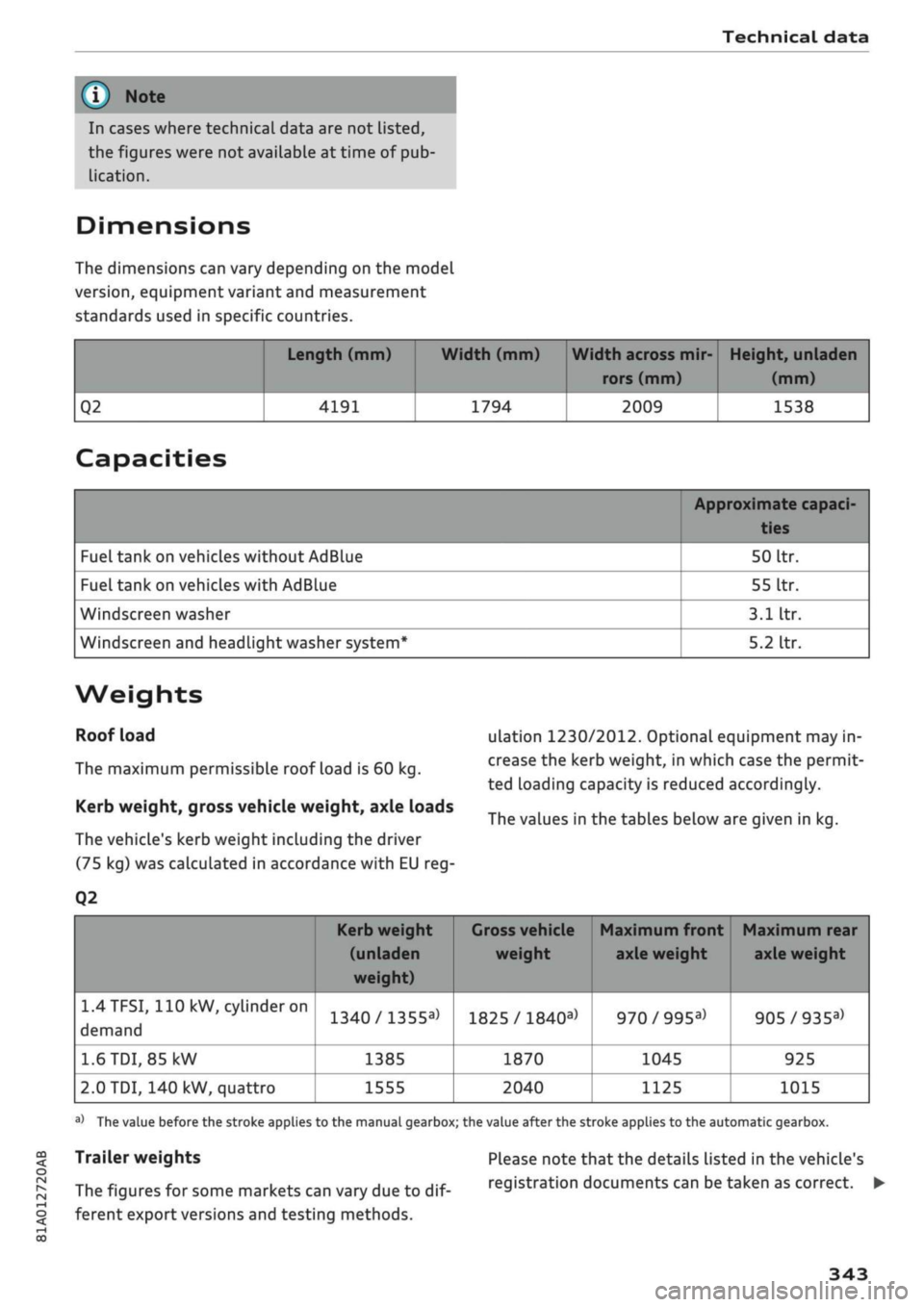
Technical data
In cases where technical data are not listed,
the figures were not available at time of pub
lication.
CO
< o rN
iv
rN
t-H
o < 00
Dimensions
The dimensions can vary depending on the model
version,
equipment variant and measurement
standards used in specific countries.
Q2
Length (mm)
4191
Width (mm)
1794
Width across mir
rors (mm)
2009
Height, unladen
(mm)
1538
Capacities
Fuel tank on vehicles without AdBlue
Fuel tank on vehicles with AdBlue
Windscreen washer
Windscreen and headlight washer system*
Approximate capaci-
50
Itr.
55
Itr.
3.1
Itr.
5.2
Itr.
Weights
Roof load
The maximum permissible roof load is 60 kg.
Kerb weight, gross vehicle weight, axle loads
The vehicle's kerb weight including the driver
(75 kg) was calculated in accordance with EU reg-
Q2
ulation 1230/2012. Optional equipment may in
crease the kerb weight, in which case the permit
ted loading capacity is reduced accordingly.
The values in the tables below are given in kg.
1.4TFSI,
110 kW,
cylinder
on
demand
1.6
TDI,
85 kW
2.0 TDI, 140 kW, quattro
Kerb weight
(unladen
weight)
1340/1355a>
1385
1555
1
Gross vehicle Maximum front Maximum rear
weight axle weight axle weight
1825 /
1840a)
1870
2040
970/995a)
1045
1125
905/935a)
925
1015
a)
The value before the stroke applies to the manual gearbox; the value after the stroke applies to the automatic gearbox.
Trailer weights
The figures for some markets can vary due to
dif
ferent export versions and testing methods.
Please note that the details listed in the vehicle's
registration documents can be taken as correct. •
343
Page 349 of 364
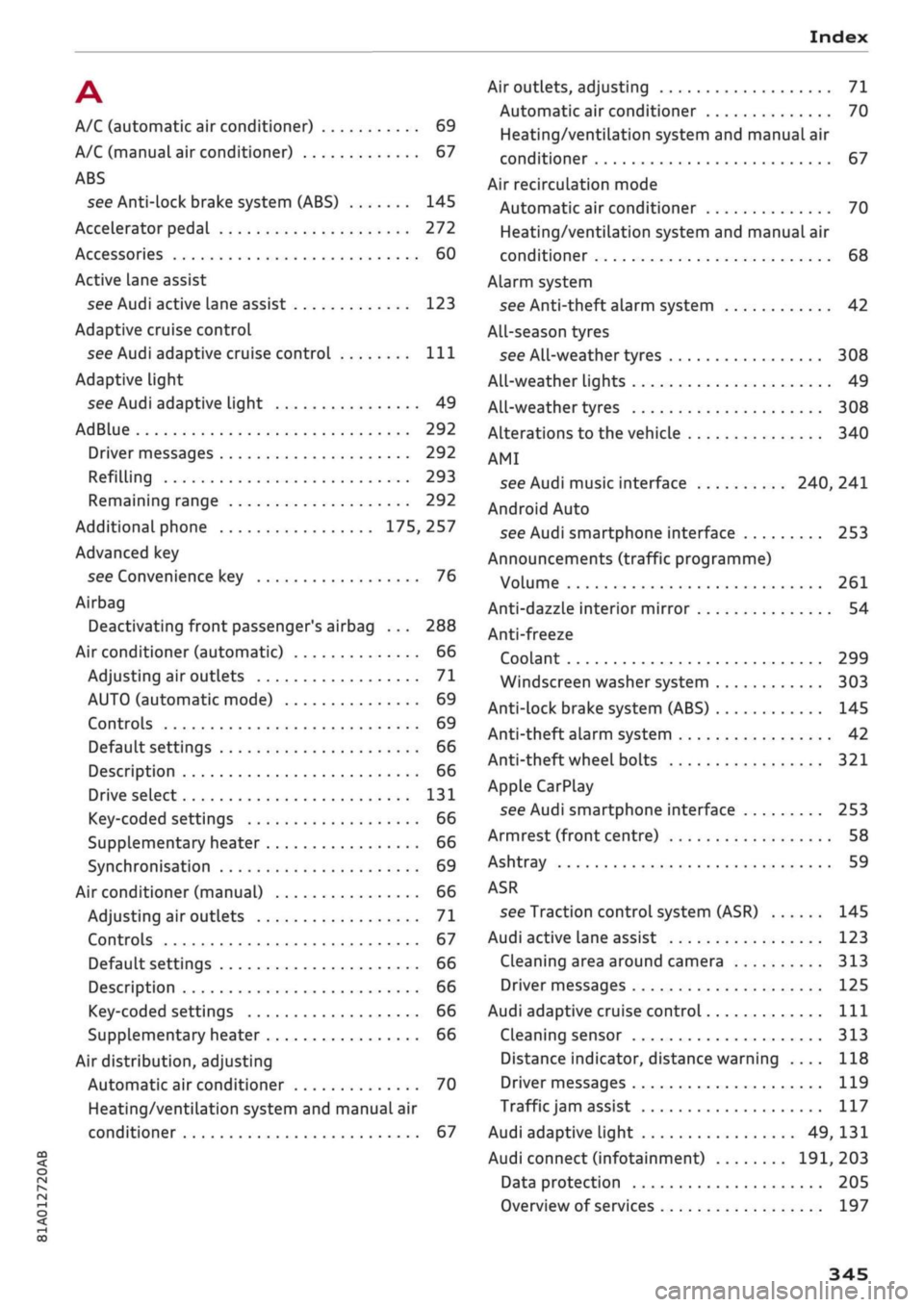
Index
A
A/C (automatic air conditioner) 69
A/C (manual air conditioner) 67
ABS
see Anti-lock brake system (ABS) 145
Accelerator pedal 272
Accessories 60
Active Lane assist
see Audi active lane assist 123
Adaptive cruise control
see Audi adaptive cruise control
Ill
Adaptive light
see Audi adaptive light 49
AdBlue 292
Driver messages 292
Refilling 293
Remaining range 292
Additional phone 175, 257
Advanced key
see Convenience key 76
Airbag
Deactivating front passenger's airbag ... 288
Air conditioner (automatic) 66
Adjusting air outlets 71
AUTO (automatic mode) 69
Controls 69
Default settings 66
Description 66
Drive select 131
Key-coded settings 66
Supplementary heater 66
Synchronisation 69
Air conditioner (manual) 66
Adjusting air outlets 71
Controls 67
Default settings 66
Description 66
Key-coded settings 66
Supplementary heater 66
Air distribution, adjusting
Automatic air conditioner 70
Heating/ventilation system and manual air
conditioner 67
CO
rN
IV
rN
i-H
00
Air outlets, adjusting 71
Automatic air conditioner 70
Heating/ventilation system and manual air
conditioner 67
Air recirculation mode
Automatic air conditioner 70
Heating/ventilation system and manual air
conditioner 68
Alarm system
see Anti-theft alarm system 42
All-season tyres
see All-weather tyres 308
All-weather Lights 49
All-weather tyres 308
Alterations to the vehicle 340
AMI
see Audi music interface 240, 241
Android Auto
see Audi smartphone interface 253
Announcements (traffic programme)
Volume 261
Anti-dazzle interior mirror 54
Anti-freeze
Coolant 299
Windscreen washer system 303
Anti-lock brake system (ABS) 145
Anti-theft alarm system 42
Anti-theft wheel bolts 321
Apple CarPlay
see Audi smartphone interface 253
Armrest (front centre) 58
Ashtray 59
ASR
see Traction control system (ASR) 145
Audi active lane assist 123
Cleaning area around camera 313
Driver messages 125
Audi adaptive cruise control
Ill
Cleaning sensor 313
Distance indicator, distance warning .... 118
Driver messages 119
Traffic
jam assist 117
Audi adaptive light 49, 131
Audi connect (infotainment) 191,203
Data protection 205
Overview of services 197
345
Page 350 of 364
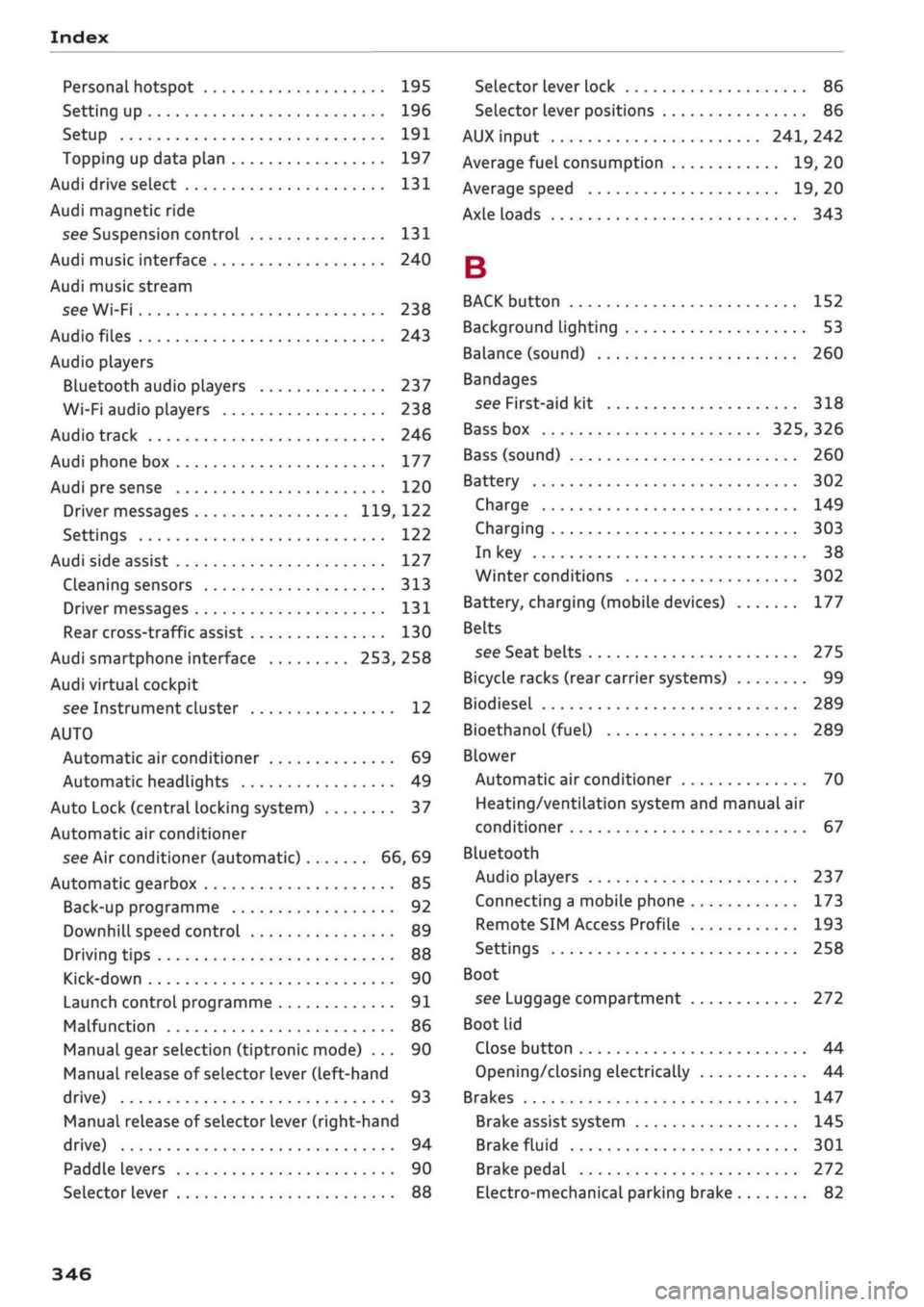
Index
Personal hotspot 195
Setting up 196
Setup 191
Topping up data plan 197
Audi drive select 131
Audi magnetic ride
see Suspension control
131
Audi music interface 240
Audi music stream
see Wi-Fi 238
Audio files 243
Audio players
Bluetooth audio players 237
Wi-Fi audio players 238
Audio track 246
Audi phone box 177
Audi pre sense 120
Driver messages 119, 122
Settings 122
Audi side assist 127
Cleaning sensors 313
Driver messages
131
Rear cross-traffic assist 130
Audi smartphone interface 253, 258
Audi virtual cockpit
see Instrument cluster 12
AUTO
Automatic air conditioner 69
Automatic headlights 49
Auto Lock (central locking system) 37
Automatic air conditioner
see Air conditioner (automatic) 66, 69
Automatic gearbox 85
Back-up programme 92
DownhilL
speed control 89
Driving tips 88
Kick-down 90
Launch control programme 91
Malfunction 86
Manual gear selection (tiptronic mode) ... 90
Manual release of selector Lever (left-hand
drive) 93
Manual release of selector Lever (right-hand
drive) 94
Paddle levers 90
Selector lever 88
Selector lever Lock 86
Selector lever positions 86
AUX input
241,
242
Average fuel consumption 19, 20
Average speed 19, 20
Axle loads 343
B
BACK button 152
Background lighting 53
Balance (sound) 260
Bandages
see First-aid kit 318
Bass box 325, 326
Bass (sound) 260
Battery 302
Charge 149
Charging 303
In key 38
Winter conditions 302
Battery, charging (mobile devices) 177
Belts
see Seat belts 275
Bicycle racks (rear carrier systems) 99
Biodiesel 289
Bioethanol (fuel) 289
Blower
Automatic air conditioner 70
Heating/ventilation system and manual air
conditioner 67
Bluetooth
Audio players 237
Connecting a mobiLe phone 173
Remote SIM Access Profile 193
Settings 258
Boot
see Luggage compartment 272
Boot lid
Close button 44
Opening/dosing
electrically 44
Brakes 147
Brake assist system 145
Brake fluid 301
Brake pedal 272
Electro-mechanical parking brake 82
346
Page 351 of 364

Index
CO
< o rN
iv
rN
t-H
o <
•H
00
Emergency braking function 82
New brake pads 147
Browser
see Media centre 244
Bulb failure
Changing bulbs 334
Bulbs,
changing 334
Buttons
Assigning functions (multi-function steering
wheel) 17
Multi-function steering wheel 15, 18
Operating unit (MMI) 152
C
Cables (USB adapter/AUX adapter) 240
Calling up media 243
Call
list 179
CalL
options 187
Capacities
AdBlue 292
Fuel
tank 343
Washer fluid reservoir 343
Caps for wheel bolts, removing 321
Car care
Washing/cleaning 312
Care
see Cleaning 312
Car phone
172,188
Catalytic converter 295
CD drive 236
Central locking system 37
Cetane number (diesel) 289
Changing settings for additional dispLay .... 19
Charging
see Power sources 60
Charging battery 242
Charging battery (mobile devices) 241
Chassis number 342
Child lock 46
DVD 246
Child seats 267
Fitting 270
Cigarette Lighter 60
Classic view 17
Cleaning 312
Cleaning/de-icing windows 314
Cleaning/treating leather 315
Cleaning Alcantara 315
Cleaning carbon parts 314, 315
Cleaning controls and displays 314
Cleaning fabrics 315
Cleaning leatherette 315
Cleaning plastic parts 314
Closing
Panorama sun roof 48
Windows 46
see also Unlocking/locking 39, 40
Closing/opening
see Unlocking/locking 39, 40
Coasting mode 91
Coat hooks 61
Colour code 342
Coming home/leaving home
see Entry/exit lights 51
Commands (speech dialogue system) 164
Compact temporary spare wheel 324
Compartments 61
Conference calls 180
Connection manager 257
Connections
see Media 234, 243
Consumption (fuel) 19, 20, 342
Contacts 185
From another directory 258
Importing/exporting 187
Memory capacity 189
Storing as a destination
216
Control buttons (MMI operation) 154
Controls and displays (overview) 10
Control units 150
Convenience key
Manual operation 79
Starting/stopping the engine 76
Unlocking/locking 39
Convenience open/close 47
Cooling mode
Automatic air conditioner 69
Manual air conditioner 67
Cooling system
Anti-freeze 299
Checking coolant level 300
347
Page 352 of 364
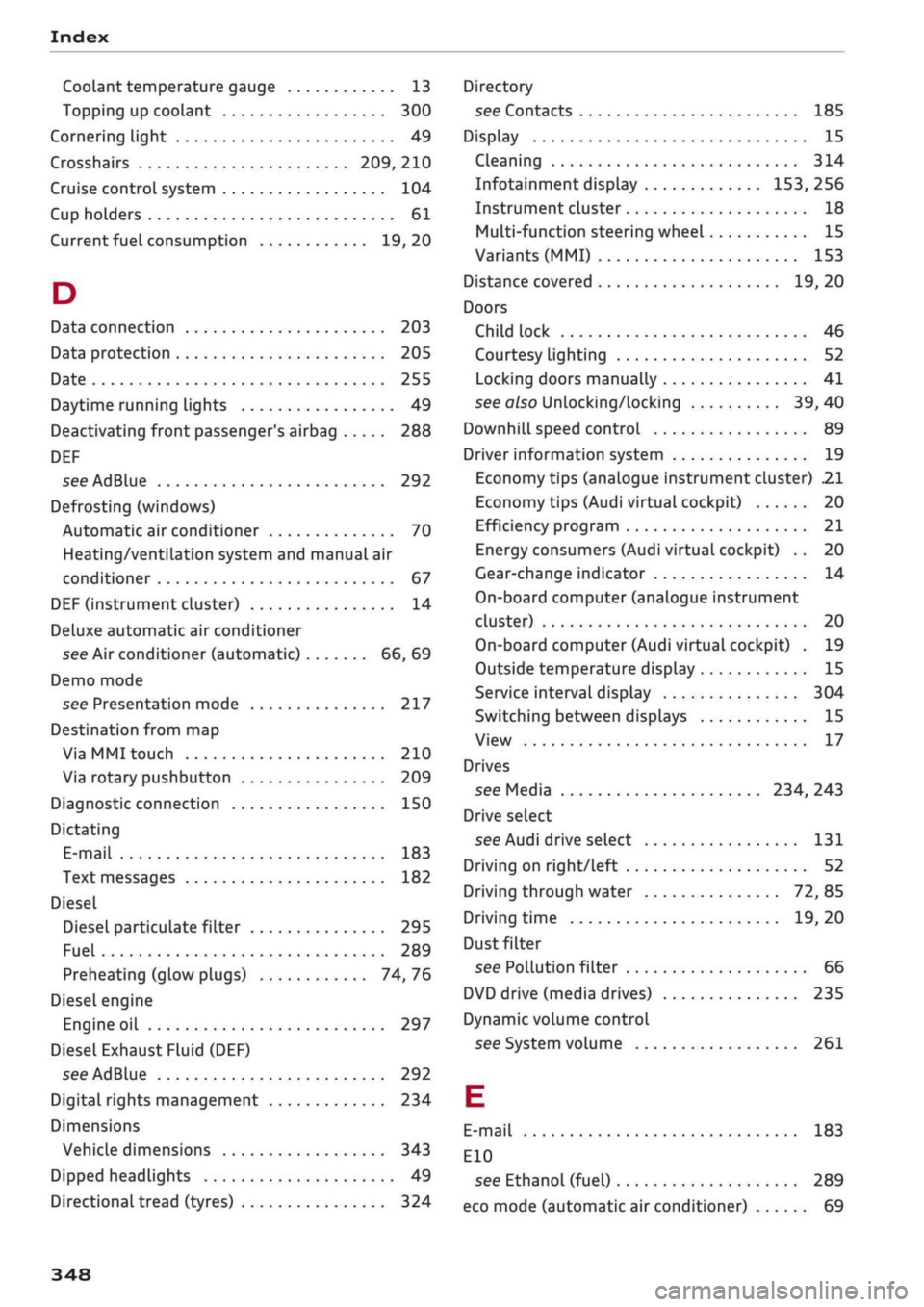
Index
Codant temperature
gauge 13
Topping up coolant 300
Cornering light 49
Crosshairs 209, 210
Cruise control system 104
Cup holders 61
Current fuel consumption 19,20
D
Data connection 203
Data protection 205
Date 255
Daytime running lights 49
Deactivating front passenger's airbag 288
DEF
see AdBlue 292
Defrosting (windows)
Automatic air conditioner 70
Heating/ventilation system and manual air
conditioner 67
DEF (instrument cluster) 14
Deluxe automatic air conditioner
see Air conditioner (automatic) 66, 69
Demo mode
see Presentation mode 217
Destination from map
Via
MMI touch 210
Via rotary pushbutton 209
Diagnostic connection 150
Dictating
E-mail
183
Text messages 182
Diesel
Diesel particulate filter 295
Fuel 289
Preheating (glow plugs) 74, 76
Diesel engine
Engine oil 297
Diesel Exhaust Fluid (DEF)
see AdBlue 292
Digital rights management 234
Dimensions
Vehicle dimensions 343
Dipped headlights 49
Directional tread (tyres) 324
Directory
see Contacts 185
Display 15
Cleaning 314
Infotainment display 153, 256
Instrument cluster 18
Multi-function steering wheel 15
Variants (MMI) 153
Distance covered 19, 20
Doors
Child lock 46
Courtesy lighting 52
Locking doors manually 41
see also Unlocking/locking 39, 40
Downhill speed control 89
Driver information system 19
Economy tips (analogue instrument cluster) 21
Economy tips (Audi virtual cockpit) 20
Efficiency program 21
Energy consumers (Audi virtual cockpit) .. 20
Gear-change indicator 14
On-board computer (analogue instrument
cluster) 20
On-board computer (Audi virtual cockpit) . 19
Outside temperature display 15
Service interval display 304
Switching between displays 15
View 17
Drives
see Media 234, 243
Drive select
see Audi drive select 131
Driving on right/left 52
Driving through water 72, 85
Driving time 19, 20
Dust filter
see Pollution filter 66
DVD drive (media drives) 235
Dynamic volume control
see System volume 261
E
E-mail
183
E10
see Ethanol (fuel) 289
eco mode (automatic air conditioner) 69
348