mode AUDI Q2 2021 Owner´s Manual
[x] Cancel search | Manufacturer: AUDI, Model Year: 2021, Model line: Q2, Model: AUDI Q2 2021Pages: 364, PDF Size: 87.77 MB
Page 91 of 364

Driving
A WARNING
- The driver should never get out of the
vehi
cle when the engine is running and a gear is
engaged.
If you have to leave your vehicle
while the engine is running, you must apply
the parking brake and engage the parking
lock P.
-If the engine is running and a gear is engag
ed (D/S or R) or the vehicle is in "tiptronic"
mode,
you will need to hold the car with the
footbrake. Otherwise, the car will "creep"
forwards as the power transmission is not
fully interrupted even when the engine is
idling.
- The accelerator pedal must on no account
be pressed inadvertently when the vehicle is
stationary. The vehicle could otherwise start
moving immediately (in some cases even if
the parking brake is engaged) and possibly
cause an accident.
- Do not press the accelerator while selecting
a gear with the vehicle stationary and the
engine running, as this could cause an
acci
dent.
- Never move the selector lever to R or P
when driving at normal speeds, as this could
cause an accident.
- Before you drive down a steep gradient, re
duce the speed and use "tiptronic" to select
a low gear.
- Never allow the brake to drag when driving
downhill and do not use the brake pedal too
often
or
for long periods. Constant braking
will cause the brakes to overheat and will
considerably reduce the effectiveness of the
brakes. It will increase the braking distance
and could cause the brake system to
fail.
- To avoid rolling back on gradients always
hold the vehicLe with the footbrake or park
ing brake if you have to stop.
- Never attempt to hold the vehicle with the
clutch when stopping on a gradient. The
clutch is disengaged automatically if it is
overloaded and becomes too hot - accident
risk! If the clutch is overloaded, the indica
tor lamp
0
will light up and a message will
appear
^>page
92.
© CAUTION
- When you have stopped on a gradient, do
not try to stop the vehicle rolling back by ac
celerating when a gear is engaged. This
could cause the automatic gearbox to over
heat and become damaged. Apply the park
ing brake or press the brake pedal in order
to prevent the vehicle from rolling back.
- If you allow the car to roll with the selector
lever in position N with the engine switched
off, the automatic gearbox will be damaged
as it will not be lubricated
^page
328,
Tow-starting / towing
away.
- In certain driving and traffic conditions, for
instance in stop-and-go traffic, if you have
to pull away frequently or if the vehicle
creeps forwards over a long distance, the
gearbox can overheat and become dam
aged.
If the indicator Lamp
[5J
or the warn
ing
lampH
Lights up, stop the vehicle at
the first opportunity and let the gearbox
cool down
^>page
92.
© Note
For safety reasons the parking brake will only
release automatically if the driver's door is
closed.
Downhill speed control
Applies to: vehicles with automatic gearbox
The downhill speed control function helps the
driver when driving down steep gradients.
Downhill speed control is activated on a downhill
gradient when the selector lever is in D/S and the
driver presses the brake pedal. The gearbox auto
matically selects a suitable gear for the gradient.
The downhill speed control function attempts to
maintain the speed at which the vehicLe was trav
elling when the foot brake was applied (subject
to the laws of physics and technical limitations of
the power train). It may be necessary to adjust
the speed again using the foot brake. The down
hill speed control can change down to 3rd gear
but no further, so it may be necessary to change
to tiptronic mode on very steep gradients. In this
case,
change down manually to 2nd or 1st gear in •
CO
89
Page 92 of 364
Driving
tiptronic mode to use the engine braking effect
and reduce the load on the brakes.
Downhill speed control is deactivated as soon as
the road Levels out again or you press the acceler
ator pedal.
On vehicles with cruise control system*
<^>page
104, downhill speed control is activated
when you set
a
cruising speed.
A WARNING
The downhill speed control function cannot
defy the Laws of physics and may therefore
not be able to maintain a constant speed in
certain circumstances. Always be prepared to
use the brakes!
Manual gear selection (tiptronic mode)
Applies to: vehicles with automatic gearbox
The
tiptronic feature allows the driver to also
change gear manually.
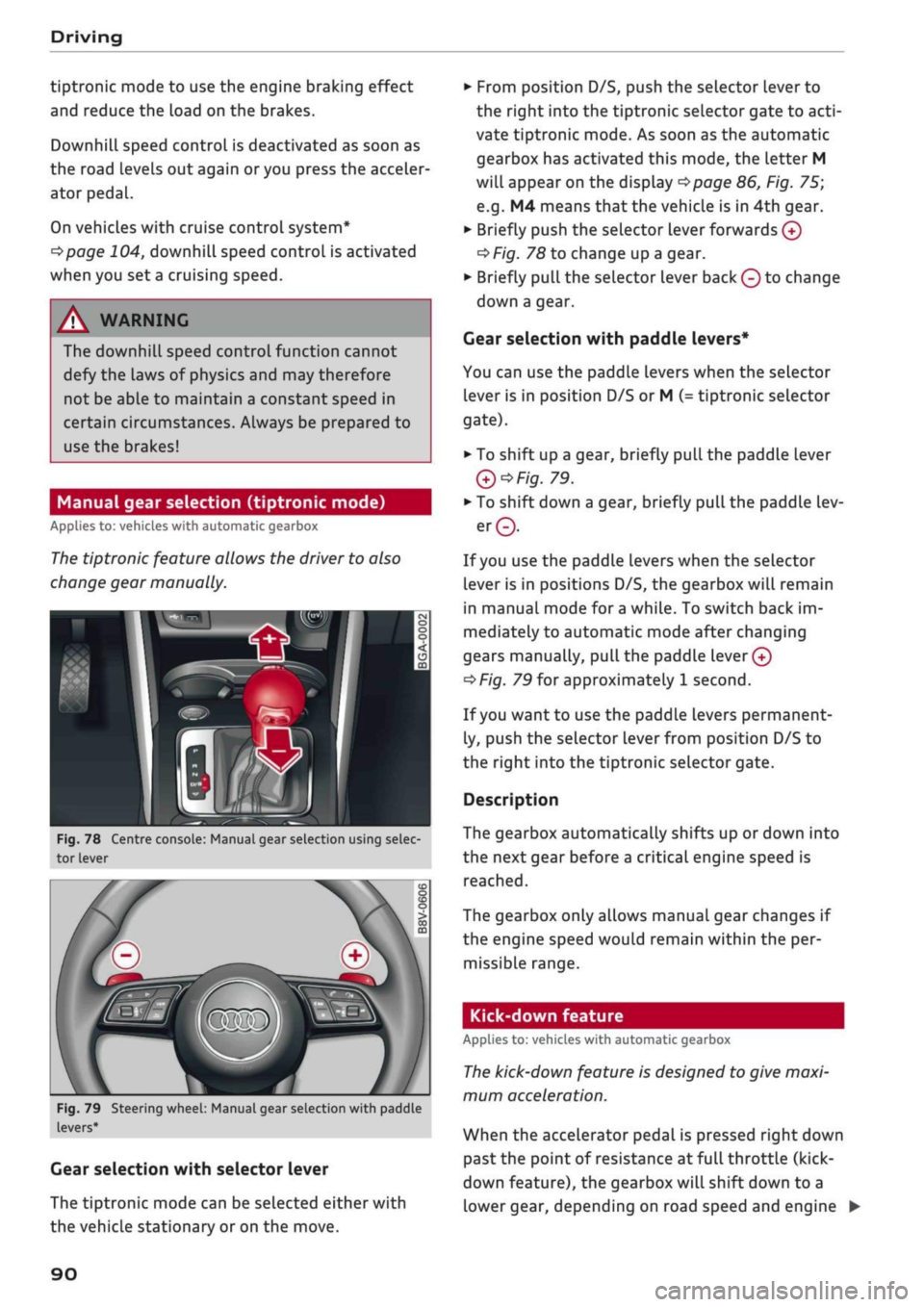
Fig.
78 Centre console: Manual gear selection using selec
tor lever
Fig.
79 Steering wheel: Manual gear selection with paddle
levers*
Gear selection with selector lever
The tiptronic mode can be selected either with
the vehicLe stationary or on the move.
•
From position D/S, push the selector lever to
the right into the tiptronic selector gate to
acti
vate tiptronic mode. As soon as the automatic
gearbox has activated this mode, the letter M
will appear on the display
opage
86, Fig. 75;
e.g.
M4 means
that
the vehicle is in 4th gear.
•
Briefly push the selector lever forwards
0
oF/'g.
78 to change up a gear.
•
Briefly pull the selector lever back
Q
to change
down a gear.
Gear selection with paddle levers*
You can use the paddle levers when the selector
lever is in position D/S or M
(-
tiptronic selector
gate).
• To shift up a gear, briefly pull the paddle lever
Q*Fig.
79.
•
To shift down a gear, briefly pull the paddle lev
er©.
If
you
use the paddle levers when the selector
lever is in positions D/S, the gearbox will remain
in manual mode for
a
while. To switch back im
mediately to automatic mode after changing
gears manually,
pull
the paddle
lever 0
^>Fig.
79 for approximately 1 second.
If
you
want to use the paddle levers permanent
ly, push the selector lever from position D/S to
the right into the tiptronic selector gate.
Description
The gearbox automatically shifts up or down into
the next gear before a critical engine speed is
reached.
The gearbox only allows manual gear changes if
the engine speed would remain within the per
missible range.
Kick-down feature
Applies to: vehicles with automatic gearbox
The
kick-down feature is designed to give maxi
mum acceleration.
When the accelerator pedal is pressed right down
past the point of resistance at full throttle (kick-
down feature), the gearbox
wilL
shift down to a
lower gear, depending on road speed and engine •
90
Page 93 of 364

Driving
speed.
The upshift to the next higher gear is de
layed until the engine reaches maximum rpm.
WARNING
Please note that if the road surface is slippery
or wet, the kick-down feature could cause the
driven wheels to
spin,
which could result in
skidding.
Coasting mode
Applies to: vehicles with S tronic gearbox and coasting mode
In coasting
mode1)
you can use the vehicle's mo
mentum to freewheel, for instance when ap
proaching a speed restriction in a built-up area.
The engine is disengaged from the gearbox. This
allows you to save fuel by anticipating the traffic
situation ahead.
Requirements for using coasting mode
•
Efficiency mode selected in drive select*
^>page
131.
*•
The selector lever must be in position D.
•
Road speed less than approx. 130 km/h.
•
Road relatively level.
Activating coasting mode
•
Take your foot off the accelerator.
The
message1)
Coasting will then appear in the
"on-board computer" display. The engine ticks
over at idling speed while the vehicLe is coasting.
Stopping coasting mode
•
Press the brake or accelerator pedal or briefly
pull the paddle lever
^page
90, Fig. 79.
A WARNING
- When coasting mode is activated, there is
no engine braking effect and the vehicle
does not slow down as quickly as usual or
may even pick up speed if
you
are driving
down a slope - risk of accident!
- If other people are using your car, you
should draw their attention to the coasting
mode.
© Note
- The gear is no longer displayed when you
are in coasting mode (e.g.
E
instead of E7).
- The coasting mode is deactivated tempora
rily on gradients of
15
% or greater.
- Coasting mode is not available while the
cruise control system* or adaptive cruise
control*
is switched on.
Launch control programme
Applies to: vehicles with S tronic gearbox and launch control
programme
The
launch control programme enables maxi
mum acceleration.
The launch control programme is not available
for all engine/gearbox combinations.
Important: The engine must be warm and the
steering wheel must be pointing straight ahead.
•
Deactivate^
the start/stop system*
^>page
81.
The LED in the
Sj
button will light up.
•
Deactivate25
the hold assist*
^page
84. The
LED in the button will go out.
•
Press the
|aQFF|
button once briefly while the
engine is running
3) 4).
CO
rN
IV
rN
t-H
o < 00
1)
Not available for all countries.
2)
The system does not need to be deactivated on all gearbox
versions.
3'
On vehicles with driver information system, the ESC lamp
lights up permanently and the message Stabilisation
con
trol (ESC): offroad. Warning! Restricted stability appears
temporarily in the instrument cluster to indicate the deac
tivation status.
4)
Vehicles without driver information system: The indicator
lamp flashes slowly.
91
Page 94 of 364
Driving
•
Briefly pull the selector lever back from
posi
tion D/S to select position S, or move the selec
tor lever to the right into the tiptronic gate, or
select dynamic mode in drive select*
^>page
131.
•
Press the brake pedal firmly with your
left
foot
and hold it down for at Least one second.
•
At the same time, press the accelerator all the
way down with your right foot until the engine
revs are high and steady.
• Take your
left
foot
off
the brake.
A WARNING
- Always adapt your driving style to the traffic
conditions.
- Only use the launch control programme
when road and traffic conditions permit,
and make
sure
your manner of driving and
accelerating the vehicle does not inconven
ience or endanger other road users.
- Please note that the driven wheels may
start to spin when the off-road mode is
switched on, causing the vehicle to Lose
grip,
in particular on slippery or wet roads -
danger of skidding!
- When acceleration has been completed, you
should deactivate the off-road mode again
by briefly pressing the
|flQFF|
button.
© Note
- The gearbox may be hot after you have used
the launch control programme. In this case,
the programme may not be available for
several minutes. The programme will be
available again after
a
cool-down period.
-Accelerating with the launch control pro
gramme places a heavy load on all parts of
the vehicLe. This can result in increased wear
and tear.
Gearbox malfunction
Applies to: vehicles with automatic gearbox
| Gearbox malfunction! Please stop the vehi
cle and select P
There is a malfunction in the gearbox. Park the
vehicle safely and do not drive on. Obtain profes
sional assistance.
| Gearbox overheating! Please stop the vehi
cle.
The gearbox is overheating and could be dam
aged.
Stop the vehicle and let the gearbox cool
down with the engine idling and the selector lev
er in position P. If the warning lamp and the
message disappear, drive to a qualified workshop
soon and have the fault rectified. Do not drive on
if the warning lamp stays on and the message
does not disappear. Obtain professional assis
tance.
E3
Gearbox malfunction: you can continue driv
ing
Drive to a qualified workshop soon and have the
fault rectified.
S3
Gearbox malfunction: no reverse gear (you
can continue driving)
A gearbox malfunction has occurred. The gearbox
will switch to the back-up programme. The pro
gramme will only move into certain gears or may
not be able to shift gears at all. The engine may
stall.
You can no longer engage reverse gear.
Drive to a qualified workshop without delay and
have the fault rectified.
jftj
Gearbox malfunction: you can continue driv
ing in D until engine off
Park your vehicle well away from moving traffic.
Obtain professional assistance.
ty
Gearbox overheating: please adapt driving
style
You can continue driving at moderate speed. You
can resume normal driving if the indicator lamp
goes out.
LQ]
Gearbox: please press brake pedal and select
gear again
If
a
gearbox malfunction has occurred due to
overheating, this message will appear once the
gearbox has cooled down again.
92
Page 98 of 364
Towing a trailer
Towing a trailer
Driving the vehicle with a
trailer or caravan
Technical requirements
The
towing bracket must comply with certain
technical requirements.
Your car is intended mainly for transporting pas
sengers and luggage. However, if suitably equip
ped,
it can also be used to tow a trailer or cara
van.
If the car is supplied with a factory-fitted towing
bracket it will already have the necessary techni
cal modifications and meet the statutory require
ments.
A 13-pin socket is provided to make the electrical
connection between the car and the trailer. If the
trailer you wish to tow has a 7-pin plug, the nec
essary adapter cable can be obtained from a spe
cialist retailer.
If
a
towing bracket is to be fitted after the car is
purchased,
this must be done according to the in
structions of the towing bracket manufacturer
^page
102.
A WARNING
If
a
towing bracket is retrofitted, the installa
tion should be carried out by
a
qualified work
shop.
- In particular in high outside temperatures it
is not possible to drive up long steep gradi
ents without
a
suitable cooling system. The
engine would then overheat.
- Incorrect installation can result in a safety
risk.
Points to check before towing
There are a number of points which need to be
checked before towing a trailer or caravan.
*•
Observe the maximum permitted trailer
weights
^>page
342.
Trailer weights
Never exceed the maximum permitted trailer
weights.
If
you
do not load the trailer up to the maximum
permitted trailer weight, you can then climb cor
respondingly steeper gradients.
The maximum trailer weights listed are only ap
plicable for altitudes up to 1000 m above sea
level.
With increasing altitude the engine power
and therefore the car's climbing ability are im
paired because of the reduced air density, so the
maximum trailer weight has to be reduced ac
cordingly. The weight of the car and trailer must
be reduced by about 10% for every further
1000 m (or part thereof). This figure refers to
the combined weight of the (loaded) vehicle and
(Loaded) trailer.
The figures for the draw bar weight that appear
on the identification plate of the towing bracket
are for certification purposes only. The correct
figures for your specific model, which may be
lower than these figures for the towing bracket,
are given in the registration documents and in
•=>
page 343.
Drive select*
Please note that the
efficiency*
mode is not
available in towing mode.
Exterior lights
Before starting
a
journey, make sure that all the
lights for the trailer are working properly.
Distributing the load
Distribute loads in the trailer so that heavy ob
jects are as near to the axle as possible. Loads
carried in the trailer must be secured to prevent
them slipping. A badly distributed load can also
affect handling. This can activate the trailer sta
bilisation feature and cause the vehicle to reduce
speed.
Where possible, operate the trailer with the max
imum permitted draw bar weight on the ball
joint of the towing bracket, but do not exceed the
specified limit. •
96
Page 108 of 364
Driver assist systems
Automatic deactivation
Cruise control system: currently unavailable.
See owner's manual
The cruise control system has been automatically
deactivated because the system has detected a
fault which could impair its function. Try switch
ing the cruise control system on again later.
A WARNING
Do not resume the programmed cruising
speed if this is too high
for
the traffic condi
tions - this can cause accidents.
Speed Limiter
Description
Applies to: vehicles with speed limiter
®
LIM
•
km/h
|
Fig.
95 Speed limiter:
©
LIM
100
km/h
illustration
BFV-0268
LIM
100
km/h
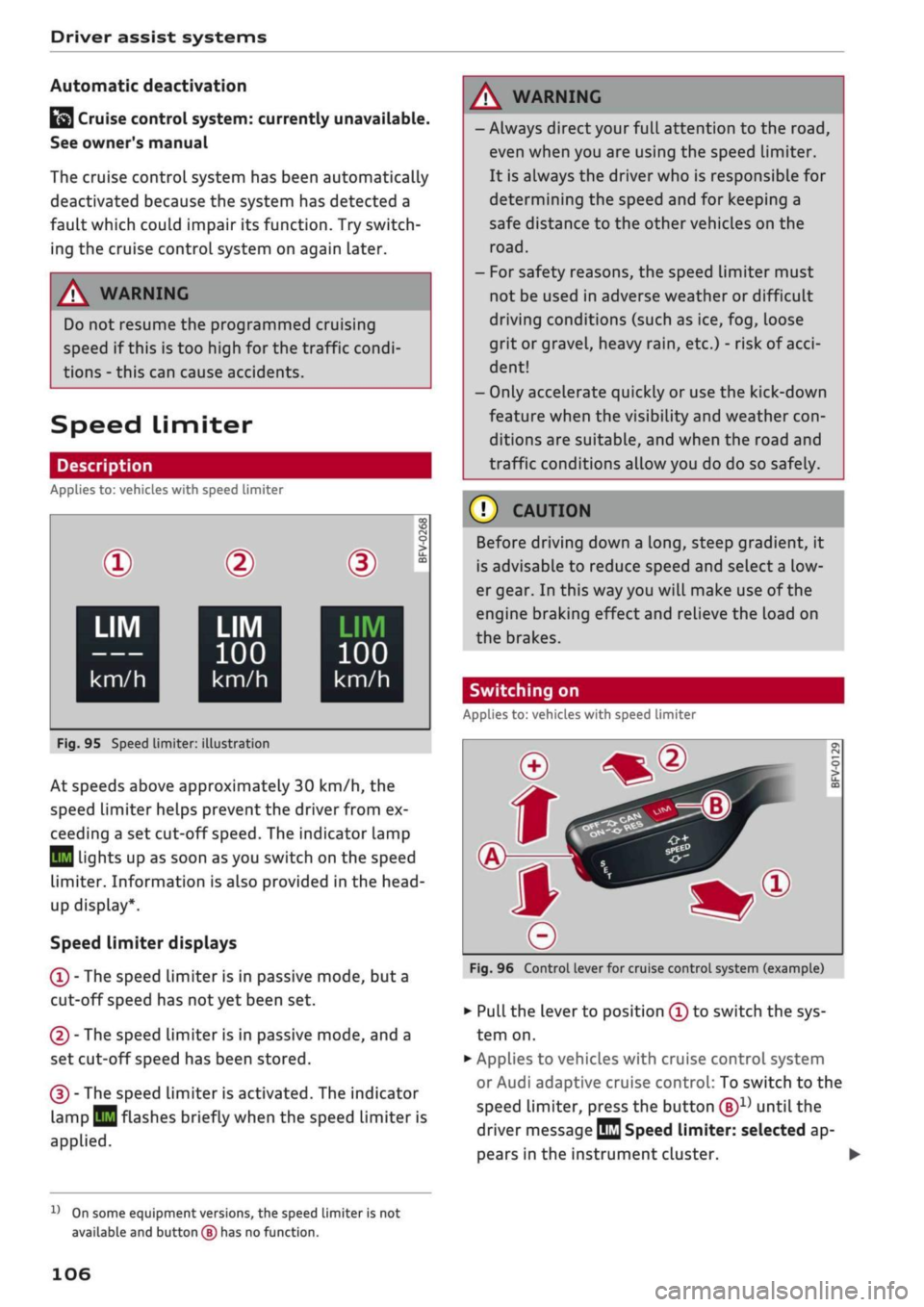
At speeds above approximately 30 km/h, the
speed limiter helps prevent the driver from ex
ceeding a set cut-off
speed.
The indicator lamp
Q
Lights up as soon as you switch on the speed
limiter. Information is also provided in the head-
up display*.
Speed limiter displays
© - The speed limiter is in passive mode, but a
cut-off speed has
not
yet been set.
®
- The speed limiter is in passive mode, and a
set cut-off speed has been stored.
® - The speed limiter is activated. The indicator
lamp
BH
flashes briefly when the speed limiter is
applied.
A WARNING
- Always direct your full attention to the
road,
even when you are using the speed limiter.
It is always the driver who is responsible for
determining the speed and for keeping a
safe distance to the other vehicles on the
road.
- For safety reasons, the speed limiter must
not be used in adverse weather or difficult
driving conditions (such as ice, fog, loose
grit or gravel, heavy
rain,
etc.) - risk of
acci
dent!
- Only accelerate quickly or use the kick-down
feature when the visibility and weather
con
ditions are suitable, and when the road and
traffic conditions allow you do do so safely.
Before driving down a
long,
steep gradient, it
is advisable to reduce speed and select a low
er gear. In this way you will make use of the
engine braking effect and relieve the Load on
the brakes.
Switching on
Applies to: vehicles with speed limiter
Fig.
96 Control lever for cruise control system (example)
•
Pull the lever to position © to switch the sys
tem on.
•
Applies to vehicles with cruise control system
or Audi adaptive cruise control: To switch to the
speed limiter, press the button
®1)
until the
driver message
QQ
Speed limiter: selected ap
pears in the instrument cluster. •
l)
On some equipment versions, the speed limiter is not
available and button
(B)
has no function.
106
Page 109 of 364
Driver assist systems
CO
<
O
rN
iv
rN
t-H
o < 00
•
Press button ® to store the cut-off speed while
the car is moving.
The instrument cluster display will indicate the
stored cut-off
speed,
and the indicator lamp
Q
will light up.
Applies to: vehicles with cruise control system or Audi adap
tive cruise control
While the speed Limiter is switched on, you can
switch to the cruise control
^>page
104 or adap
tive cruise control
^>page 111
systems. Press
button
®1)
until the corresponding system is
displayed in the instrument cluster.
The last cut-off speed set for the speed limiter
remains stored and can be applied again when
you switch back into speed limiter mode.
Changing the cut-off speed
Applies to: vehicles with speed limiter
•
Briefly push the Lever towards ©/©
^>page
106, Fig. 96 to increase or reduce the
cut-off speed in small steps.
•
To increase or reduce the cut-off speed in
big
ger steps, hold the lever towards ©/© until
you reach the desired cruising speed.
Overriding the cut-off speed
Applies to: vehicles with speed limiter
To override the speed limiter temporarily, press
the accelerator fully past the point of resistance
(kick-down feature).
Speed limiting is suspended temporarily. The in
dicator lamp
QB
flashes while the system is deac
tivated;
the cut-off speed setting will remain
stored.
The system is reactivated automatically
as soon as your speed drops below the original
stored setting.
Switching off
Applies to: vehicles with speed limiter
Switching off temporarily
•
Push the lever towards © (click stop not en
gaged)
^>page
106, Fig. 96. The instrument
cluster display will indicate the stored cut-off
speed,
and the indicator
lamp^will
light up.
Switching off completely
•
Push the lever to position © (click stop engag
ed),
or
•
Switch off the ignition.
The cut-off speed setting will remain stored after
the system is temporarily deactivated. To resume
the programmed cut-off
speed,
pull
the lever to
position ©. The vehicle speed is limited to the
stored cut-off setting as soon as your current
driving speed drops below the stored cut-off
speed.
The stored cut-off speed will be deleted once the
ignition is switched off.
Automatic deactivation
QQ
Speed limiter: currently unavailable. See
owner's manual
The speed Limiter has been automatically deacti
vated because the system has detected a fault
which could impair its function. Try switching on
the speed limiter again Later.
A WARNING
The speed limiter may be deactivated if a
fault occurs in the brake system (e.g. if the
brakes overheat) while the speed limiter is ac
tivated.
©
Not
If
a
system fault requires the speed limiter to
switch off automatically, for safety reasons it
does not switch off completely until the driver
releases the accelerator pedal once or deacti
vates the system manually.
l)
On some equipment versions, the speed limiter is not
available and button
(S)
has no function.
107
Page 119 of 364
Driver assist systems
CO
rN
rN
•-i
00
Setting the driving program
Applies
to: vehicles with Audi adaptive cruise control
The acceleration style ranges from dynamic to
comfortable, depending on the selected driving
program and the distance setting.
Selecting the driving program on vehicles
without drive select*
•
Select the following on the infotainment sys
tem:
|MENU|
button > Car
>
left control button
> Driver assist
>
Audi adaptive cruise control >
Driving program
>
comfort, standard or dy
namic.
Selecting the driving mode on vehicles with
drive select*
Refer to
^page
132.
© Note
Your personal settings are stored automati
cally and assigned to the remote control key
which is being used.
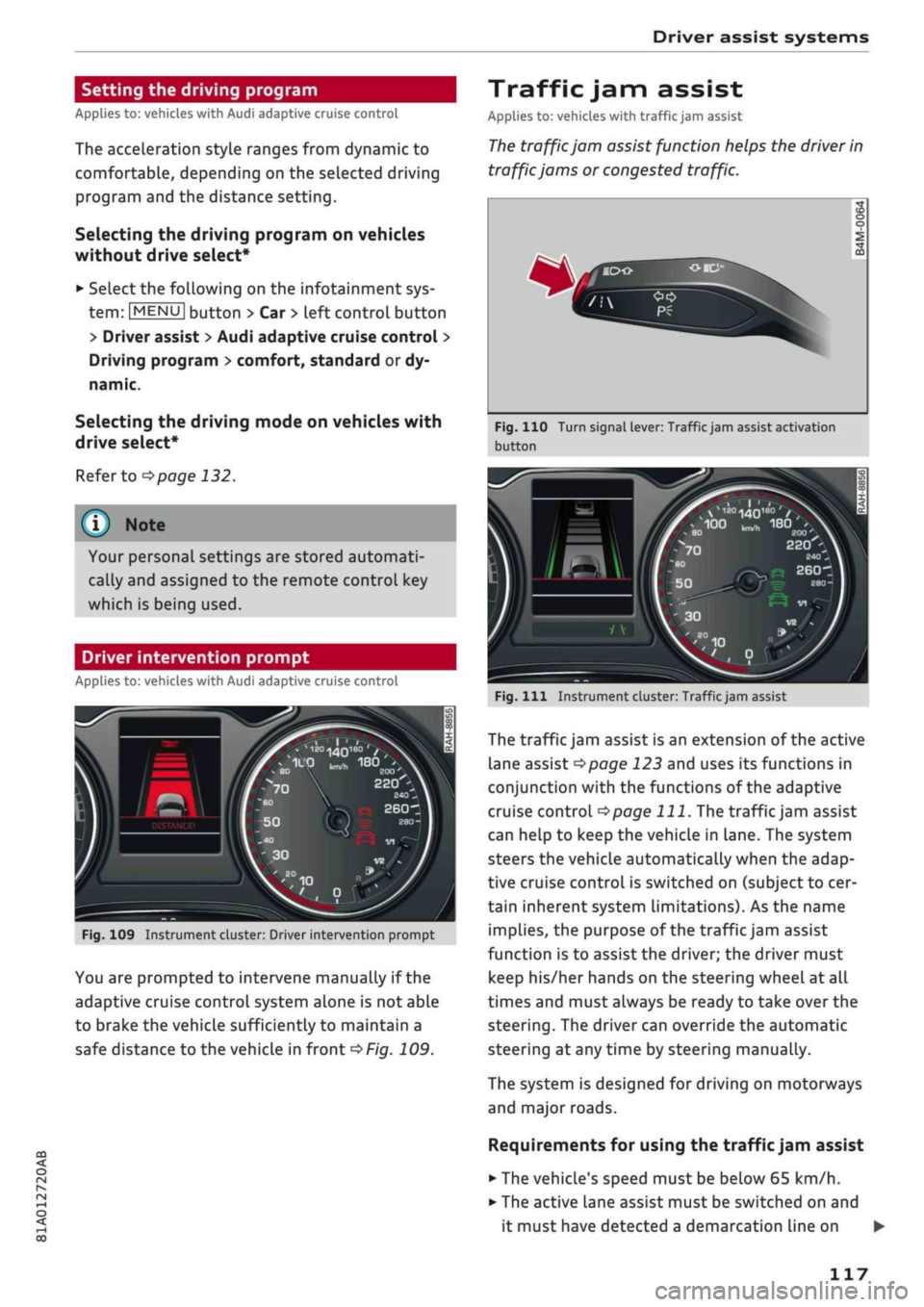
Driver intervention prompt
Applies
to: vehicles with Audi adaptive cruise control
Fig.
109 Instrument cluster: Driver intervention prompt
You are prompted to intervene manually if the
adaptive cruise control system alone is not able
to brake the vehicle sufficiently to maintain a
safe distance to the vehicle in front
^>Fig.
109.
Traffic jam assist
Applies
to: vehicles with traffic jam assist
The
traffic jam assist function helps the driver in
traffic jams or congested traffic.
Fig.
110 Turn signal lever: Traffic jam assist activation
button
20O'
220
-_
2401
260-1
Fig.
Ill
Instrument cluster: Traffic jam assist
The traffic jam assist is an extension of the active
lane assist
^>page
123 and uses its functions in
conjunction with the functions of the adaptive
cruise control
^>page
111.
The traffic jam assist
can help to keep the vehicle in Lane. The system
steers the vehicle automatically when the adap
tive cruise control is switched on (subject to cer
tain inherent system limitations). As the name
implies, the purpose of the traffic jam assist
function is to assist the driver; the driver must
keep his/her hands on the steering wheel at all
times and must always be ready to take over the
steering.
The driver can override the automatic
steering at any time by steering manually.
The system is designed for driving on motorways
and major roads.
Requirements for using the traffic jam assist
• The vehicle's speed must be below
65
km/h.
• The active lane assist must be switched on and
it must have detected a demarcation line on •
117
Page 121 of 364
Driver assist systems
© Note
The distance may be below the warning
threshold for a short time when overtaking or
approaching a slower vehicle quickly from be
hind.
In this case, no warning will be given. A
warning is only given if the distance is consis
tently below the threshold.
Driver messages
Applies to: vehicles with Audi adaptive cruise control
El
ACC:
not available
The system cannot detect vehicles reliably and
will be deactivated. The sensor is out of align
ment or defective. Drive to a qualified workshop
and have the fault rectified.
EH
ACC:
currently unavailable. No sensor vision
Eo3
ACC:
currently unavailable. Sensor view re
stricted due to surroundings. See owner's
man
ual
These messages appear if the radar sensor vision
is impaired, e.g. by leaves, snow, heavy road
spray or dirt. Clean the sensor
^>page
112,
Fig. 101.
E3
ACC:
currently unavailable. Speed too low
Manual gearbox: This message appears if the cur
rent speed is too low for
ACC
mode. You cannot
store speed settings below 30 km/h. The cruise
control system switches off if the speed falls
be
low 20 km/h.
Esi
ACC:
available from 2nd gear up
Manual gearbox: The adaptive cruise control only
operates in 2nd gear or higher.
B
ACC:
currently unavailable. Gradient too
steep
The maximum possible road gradient for safe op
eration of the adaptive cruise control has been
exceeded.
The adaptive cruise control cannot be
switched on.
ffl
Ea3
ACC:
only
available in D, S or M < o
PI
Automatic gearbox: Move the selector lever to
g
position D/S or M. <
00
Eol
ACC:
clutch pedal pressed
Automatic gearbox: Cruise control mode is deac
tivated if the clutch pedal is pressed for
a
rela
tively long period.
Bf
ACC:
engine speed
Manual gearbox: This message appears if the
driver does not change gear in time when the
adaptive cruise control accelerates or brakes the
vehicle and the engine speed is too high or low as
a result. The adaptive cruise control is switched
off.
EJACC:
parking brake applied
The adaptive cruise control system is deactivated
if the parking brake is applied. The adaptive
cruise control will be available again when the
parking brake is released.
Eo3
ACC:
currently unavailable. Stabilisation
control input
This message appears if the electronic stabilisa
tion control (ESC) intervenes. In this case, the
adaptive cruise control will automatically be
switched off.
Eo3 ACC
off: manual control!
This message appears if the vehicLe rolls back
wards when driving away on a slight gradient,
even though the adaptive cruise control is active.
Press the brake pedal to prevent the vehicle from
rolling back or colliding with an object behind.
EM
ACC:
currently unavailable. Park assist ac
tive
The systems are switched off when the park as
sist* is active. The systems will be available again
when the parking manoeuvre is finished.
Distance warning: fault. Please contact work
shop
The system cannot detect vehicles reliably and
will be deactivated. The radar sensor is out of
alignment or defective. Drive to a qualified work
shop and have the fault rectified.
Distance warning: currently unavailable. Sensor
view restricted due to surroundings •
119
Page 122 of 364
Driver assist systems
This message appears if the radar sensor vision is
impaired,
e.g. by leaves, snow, heavy road spray
or dirt. Clean the sensor
<^>page
112, Fig. 101.
Distance warning: currently unavailable. See
owner's manual
This driver message will appear if the system
fails temporarily. If the fault occurs repeatedly,
drive to a qualified workshop and have the fauLt
rectified.
Fasten seat belt
The system is not fully available when the driver's
seat belt is unfastened.
Stationary object ahead
This message appears if
you
try to switch on the
system when a stationary object is located imme
diately in front of your car.
Door open
The system is not available when the vehicle is
stationary and the driver's door is open.
Audi pre sense
Introduction
Applies to: vehicles with Audi pre sense
The pre sense functions can take action to pro
tect the vehicle occupants and other road users in
certain hazardous conditions within the system
limits.
- Because the different on-board systems are
networked,
pre sense basic can detect critical
situations and take preventive action to protect
the occupants.
- The pre sense front uses the data of the radar
sensor to calculate the probability of an
acci
dent
opage
112. It can detect an impending
collision with vehicles or
pedestrians1^
(subject
to general system limitations). In this case, the
system warns the driver visually, acoustically
and,
if necessary, with a short, sharp brake ap
plication.
If necessary, it can initiate a partial or
fuLl
brake application in order to reduce the im
pact speed or, in certain circumstances, to
avoid a collision. In conjunction with pre sense
basic, the reversible tensioners on the front
seat belts are also applied if necessary. Pre
sense front is active even when the adaptive
cruise control* is switched off.
Please observe the general safety warnings
•=>
A in General notes on page 112.
© Note
- Certain pre sense functions are deactivated
when reversing.
- The functions of the pre sense system may
also be unavailable if
a
fault develops in the
ESC
system or airbag control unit.
- Please note that, if the front passenger's
airbag has been deactivated, the reversible
belt tensioner on the passenger's side will
be deactivated as
well.
- Switch off pre sense on private roads and
while the vehicle is being loaded onto a car
transporter, train or ferry, etc. This prevents
the pre sense system from taking action in
an inappropriate situation.
Audi pre sense basic
Description
Applies to: vehicles with Audi pre sense basic
The pre sense basic functions are activated at
speeds above approximately 30 km/h.
The system can activate the following functions
in certain situations:
- Seat belt tensioning (e.g. during hard braking):
The seat belts on the front seats have reversi
ble tensioners. Provided an accident does not
occur, the belts are loosened again slightly and
kept ready for activation.
- Initiation of the closure process for the
win
dows and panorama sun roof* (e.g. if the
vehi
cLe understeers or oversteers).
Audi drive select*: the activation threshold
dif
fers according to the mode selected.
x)
Not available on vehicles for some markets.
120