warning AUDI Q5 2013 Owners Manual
[x] Cancel search | Manufacturer: AUDI, Model Year: 2013, Model line: Q5, Model: AUDI Q5 2013Pages: 316, PDF Size: 78.89 MB
Page 195 of 316
restraints that are not equipped with the low
er anchorage attachments can still be instal
led in compliance with the ch ild restra int
manufacturer's instructions on using vehicle
safety belts.
A WARNING
Improper use of LATCH lower anchorages
can cause serious personal injury in an ac
cident.
-Always carefully follow the ch ild re
straints manufacturer's inst ruct ions for
proper installation of the child restra int
and proper use of the lowe r anchorages
or safe ty belts in your vehicle.
- Never secure o r attach any luggage or
other items to the
LATCH lower ancho
rages.
- Always read and heed the important in
formation about ch ild restra ints in this
chapter and WARNINGS
~ page 178,
Child Safety.
Installing a child restraint with LATCH
lower anchorages
Whenever you install a child restraint always
follow the child restraint manufacturer's in
structions.
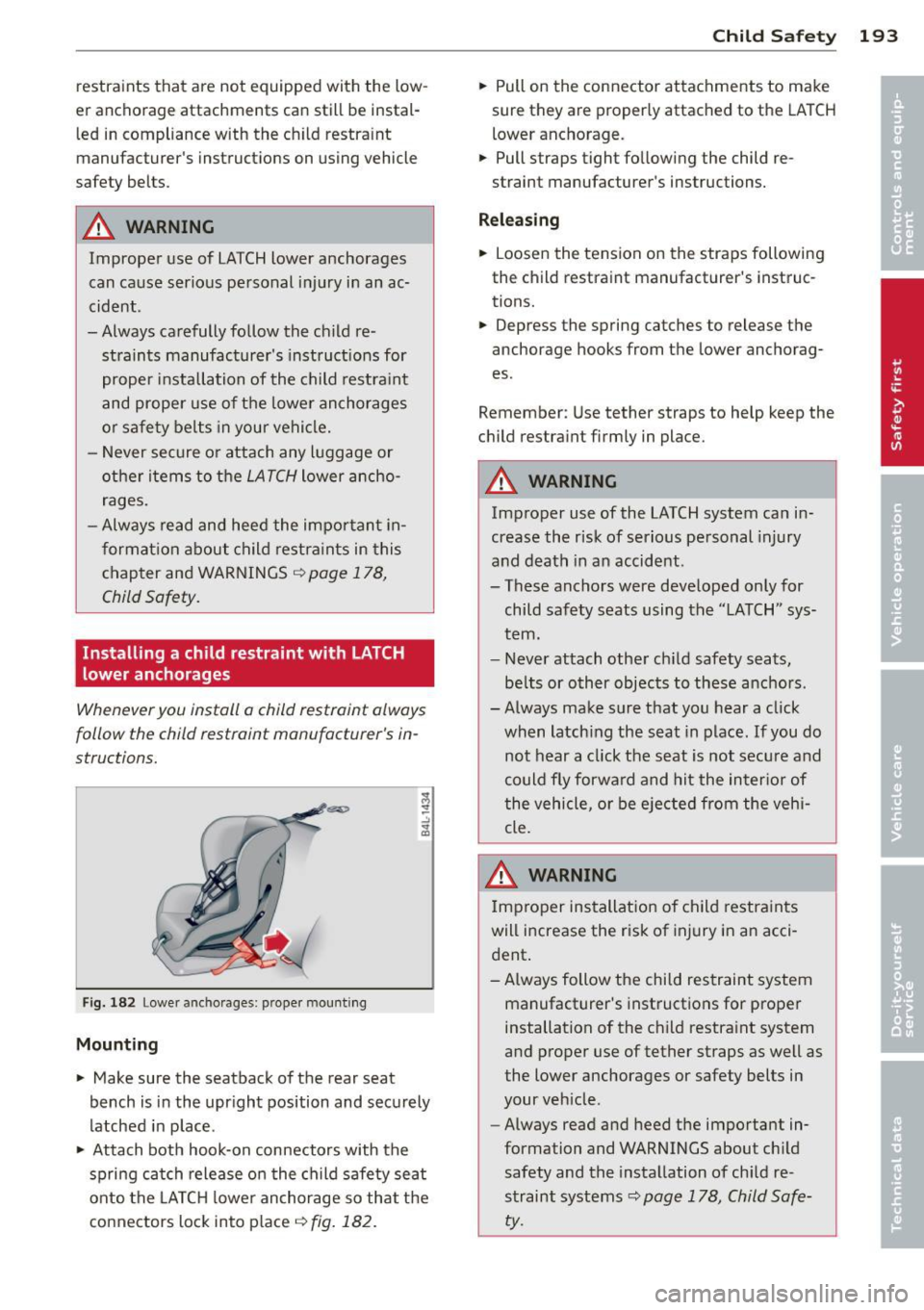
F ig. 182 Lower ancho rages: proper mount ing
Mounting
~ Make sure the seatback of the rear seat
bench is in the upr ight position and securely
latched in place.
~ Attach both hook-on connectors with the
spring catch release o n the child safety seat
onto the LATC H lower anchorage so that the
connectors lock into place
~ fig. 182.
Child S afety 193
~ Pull on the connector attachments to make
sure they are properly attached to the LATCH
lower anchorage.
~ Pull straps tight following the child re
straint manufacturer's instructions.
Relea sing
~ Loosen the tension on the straps following
the child restraint manufacturer's instruc
tions.
~ Depress the spring catches to release the
anchorage hooks from the lower anchorag
es .
Remember: Use tether straps to help keep the
ch ild restraint firmly in place.
A WARNING
Improper use of the LATCH system can in
crease the risk of serious personal injury
and death in an accident .
- These anchors were developed only for
child safety seats using the "LATCH" sys
tem.
- Never attach other ch ild safety seats,
be lts or other objects to these anchors.
- Always make sure that you hear a click when latch ing the seat in place. If you do
not hear a click the seat is not secu re and
could fly forwa rd and hit the inter ior of
the vehicle, or be e jected from the vehi
cle.
A WARNING
Improper installat ion of child restraints
will i ncrease the risk of injury in an acci
dent .
- A lways follow the child restraint system
manufacturer's instructions for proper
installation of the ch ild restra int system
and proper use of tether straps as well as
the lower anchorages or safety belts in
your veh icle.
- Always read and heed the important in
formation and WARNINGS about child
safety and the instal lation of ch ild re
straint systems~
page 178, Child Safe
ty.
-
Page 196 of 316
194 Child Safe ty
Tether anchors and tether straps
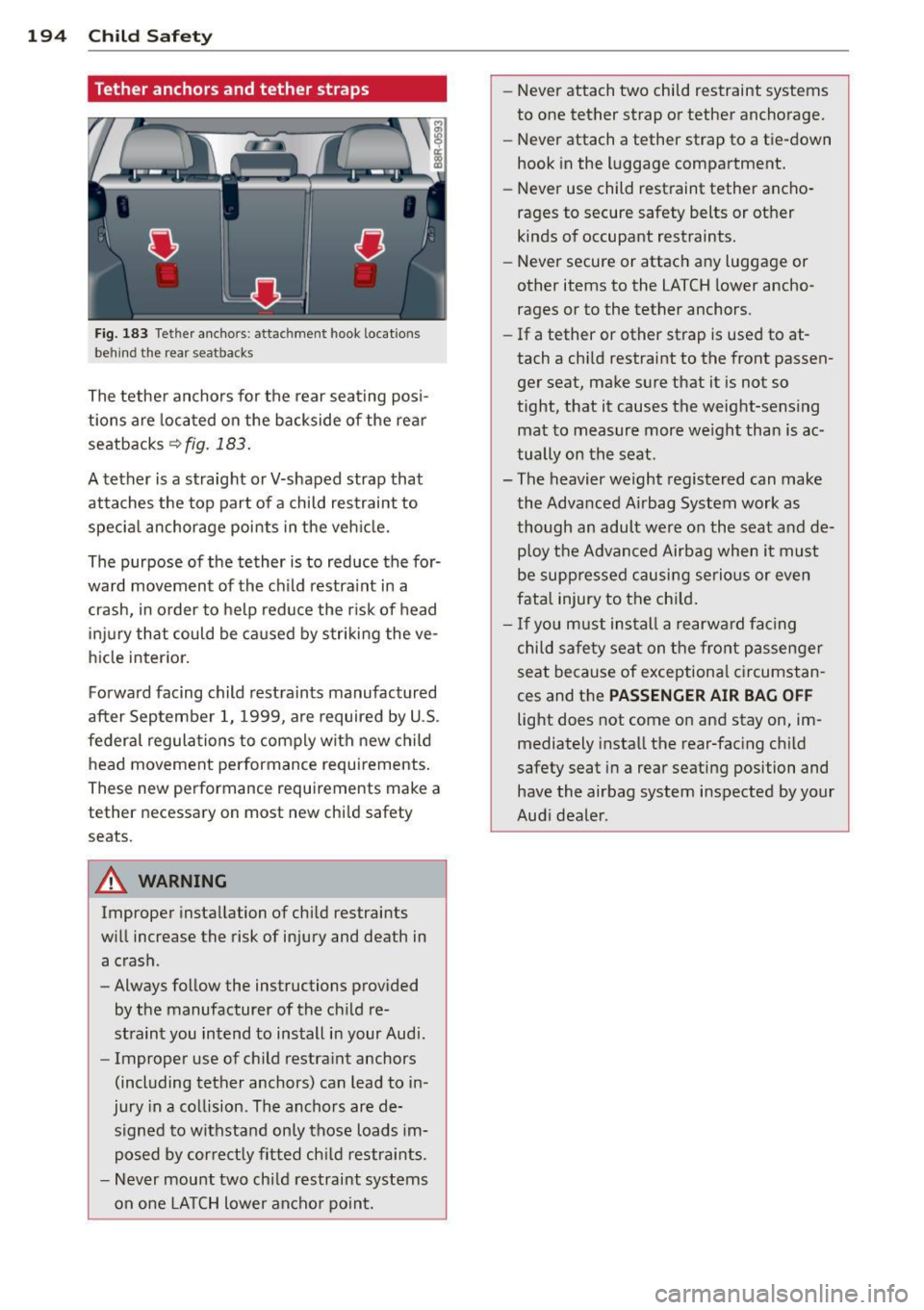
Fig. 183 Tethe r ancho rs: attachment hook locatio ns
behind the rea r sea tbacks
The tether anchors for the rear seating posi
tions are located on the backside of the rea r
seatbacks
~ fig. 183.
A tether is a straight or V-shaped strap that
attaches the top part of a child restraint to
specia l anchorage points in the veh icle.
The purpose of the tether is to reduce the for·
ward movement of the ch ild restra int in a
crash, in order to help reduce the r isk of head
in ju ry that could be ca used by striking the ve
hicle interior.
Forward facing child restra ints manufactured
after September 1, 1999, are required by U .S .
federal regulations to comply with new child
head movement performance requirements.
These new performance requ irements make a
tether necessary on most new chi ld safety
seats.
A WARNING
Improper insta llation of chi ld restraints
w ill increase the risk of injury and death in
a crash.
- Always follow the instructions prov ided
by the manufacturer of the ch ild re
stra int you intend to install in your Audi.
- Improper use of c hild restra int anchors
(including tether anchors) can lead to in ·
jury in a co llision. Th e anchors are de·
sign ed to withstand only those loads im
posed by cor rect ly fi tted ch ild restraints.
- Never mou nt two chi ld restraint systems
on one LA TCH lower anchor po int. -
Never attach two child restraint systems
to one tether strap or tether anchorage .
- Never attach a tether strap to a tie-down
hook in the luggage compartment.
- Never use child restraint tether ancho
rages to secure safety belts or other
kinds of occupant restraints.
- Never secure or attac h any luggage or
other items to the LATCH lower ancho
rages or to the tether anchors.
- If a tether or other strap is used to at
tach a chi ld restraint to the front passen
ger seat, make sure that it is not so
tight, that it causes the weight-sensing mat to measure more we ight than is ac
tually on the seat.
- The heavier weight registered can make the Advanced Airbag System work as
though an adult were o n the seat and de·
p loy the Advanced Airbag when it mus t
be supp ressed causi ng serio us or even
fatal injury to the ch ild .
- If you must ins tall a rearw ard fa cing
c h ild safe ty seat on the fro nt passenger
seat because of exceptiona l circumstan
ces and the
PASSENGER AIR BAG OFF
light does not come on and stay on , im
mediately insta ll the rear-fac ing child
safety seat in a rear seating position and have the airbag system inspected by your
Aud i deale r.
Page 197 of 316
Installing the upper tether strap on the
anchorage
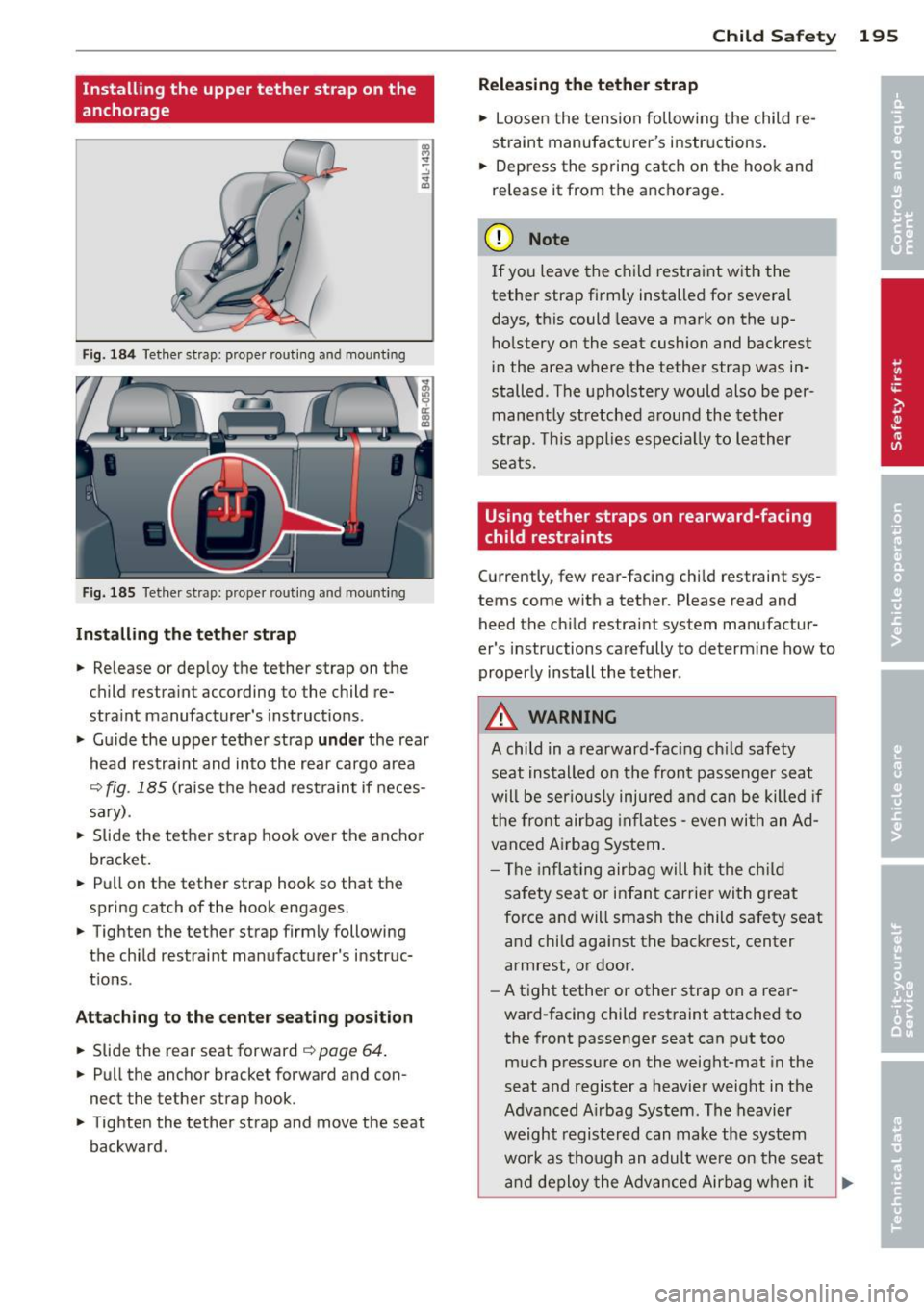
Fig. 184 Tether strap: proper routi ng and mounting
Fig. 185 Tether strap: proper rou ting and mounting
In sta ll ing the tether strap
• Release or deploy the tether strap on the
child restra int according to the child re
straint manufacturer's instructions .
• Gu ide the upper tether strap
under the rear
head restraint and into the rear cargo area
Q fig. 185 (raise the head restraint if neces
sary) .
• Slide the tether st rap hook over the ancho r
bracket.
• Pu ll on the tether strap hook so that the
spring catch of the hook engages.
• Tighten the tether strap firmly following
the child restrai nt manufacturer's instruc
t ions .
Attaching to the cent er seating po sition
• Slide the rear seat forward ¢ page 64.
• Pull the anchor bracket forward and con
nect the tether strap hook.
• Tighten the tether strap and move the seat
backward .
Child Safet y 195
Releasing th e teth er strap
• Loosen the tension following the child re
straint manufacturer's instructions.
• Depress the spring catch on the hook and
release it from the anchorage.
(D Note
If you leave the child restraint w ith the
tether strap firmly installed fo r several
days, t his could leave a mark on the up
holstery on the seat cushion and backrest
in the area where the tether strap was in
stalled . The upholstery would also be per
manently stretched around the tether
strap. This applies especia lly to leather
seats.
Using tether straps on rearward-facing
child restraints
Currently, few rear-facing child restraint sys
tems come with a tether. Please read and
heed the ch ild restraint system manufactur
er's instructions carefully to determine how to
properly install the tether .
A WARNING
A child in a rearward-fac ing ch ild safety
seat installed on the front passenger seat
will be ser ious ly injured and can be killed if
the front airbag inflates -even with an Ad
vanced Airbag System.
- The inflating airbag will h it the ch ild
safety seat or infant carrier with great
force and will smash the child safety seat
and child against the backrest, center
armrest, or door.
- A tight tether or other strap on a rear
ward-facing child restraint attached to
the front passenger seat can put too
much pressure on the weight-mat in the
seat and register a heavier weight in the
Advanced A irbag System. The heavier
weight registered can make the system
wo rk as though an adult we re on the seat
a nd deploy the Advanced Airbag when it
Page 200 of 316
198 Intelligent technology
Dynamic ste ering *
On vehicles with dynamic stee ring* , ES C helps
stabilize the st eering in critical s ituations .
Selective wh eel torque c ontrol
The selective whee l torque control operates
when dr iv ing through curves . T he front wheel
on the inside of the curve or both wheels on
the inside of the curv e are braked selective ly
as needed. This m inimizes sliding in the front
wheels and allows for more pr ecise driving
through curves . T he system may not act ivate
when driving in wet or snowy cond itions .
A WARNING
-ESC, ABS, ASR, EDL dynamic steering"
and the se lective wheel torque control
cannot overcome the laws of physics .
Th is is especially important on slippery
or wet roads.
If the systems begin act ing
to stabilize yo ur vehicle , you sho uld im
med iately change your speed to ma tch
the road and traffic condit ions. Do not
let the increased safety provided by
these systems tempt you to take risks. Do ing so wi ll increase the risk of a loss of
vehicle control, collision and serious per
sonal injuries .
- Always adapt your speed to road, traff ic
and weather condit ions. The risk of Los-
-
ing cont ro l of the veh icle increases when
dr iv ing too fast, especially th rough
c u rves and on slippery o r wet roads, and
when d riving too close to vehi cles up
ahead. ESC, A BS, the brake assis t sys
tem, AS R, EDL, dynamic steering* and
the se lective wheel torque control can
not prevent collis ions.
-Always acce lerate with specia l care on
even, smooth surfaces s uch as those that
are wet or covered with ice and snow.
The drive wheels can spin even with
these ass istance systems that cannot al
ways help to reduce the risk of loss of ve
hicle control.
(D Tips
- ABS and ASR only wo rk correctly when
all four wheels are equipped with identi
cal tires. Different tire si zes can lead to a
reduction in engine power .
- Yo u may hear noises when the systems
described are working.
- If the ind icator light
DJ or E (USA
mode ls)/ m] (Canada models) appears,
there may be a malfunction
q page 15 ,
q page 17.
-When i nstalling a factory -supplied roof
rack system on the roof railing, the ESC
will adapt itse lf to a different center of
gravity .
Switching on/off
ESC turns on automatically when you start
the engine.
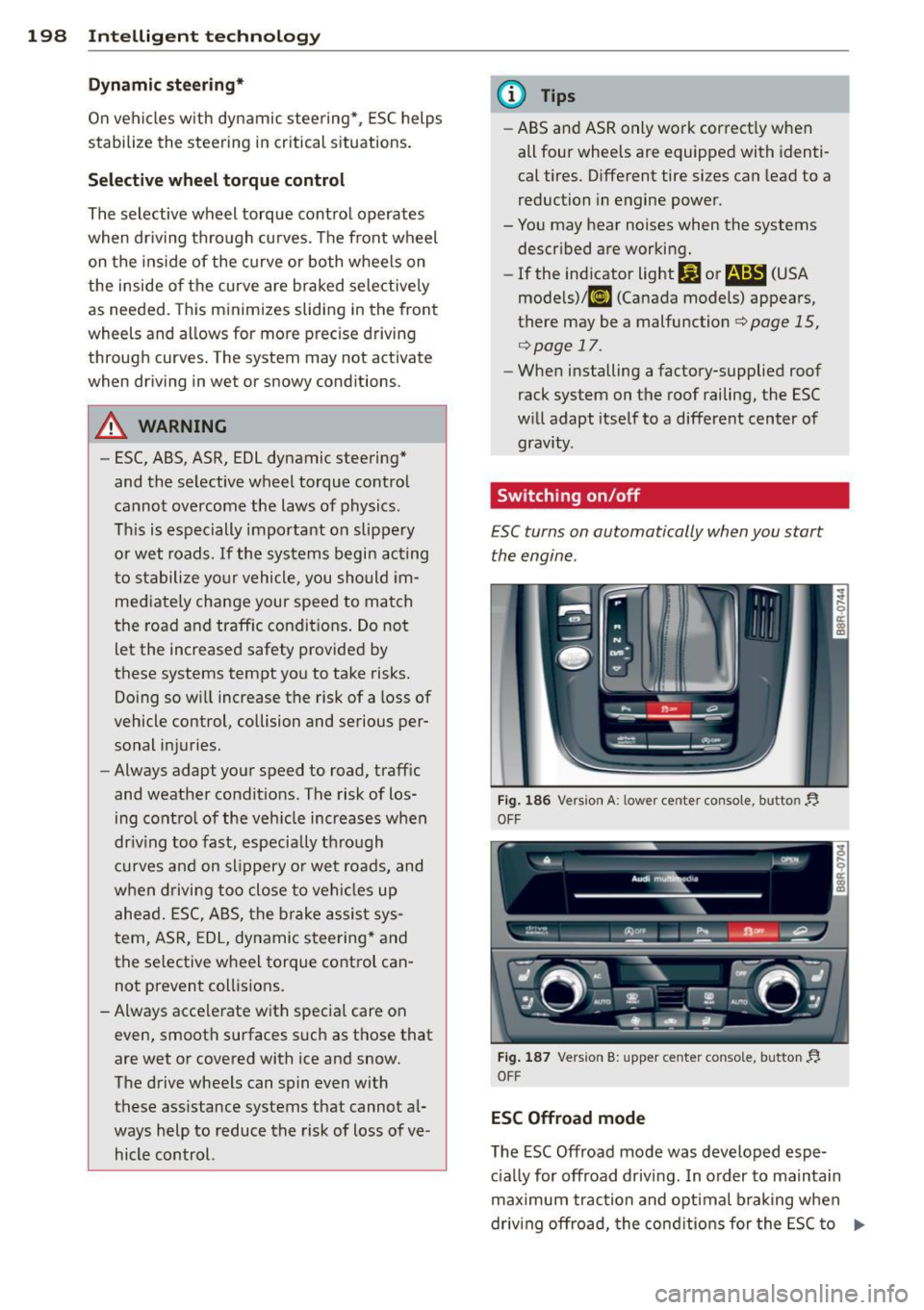
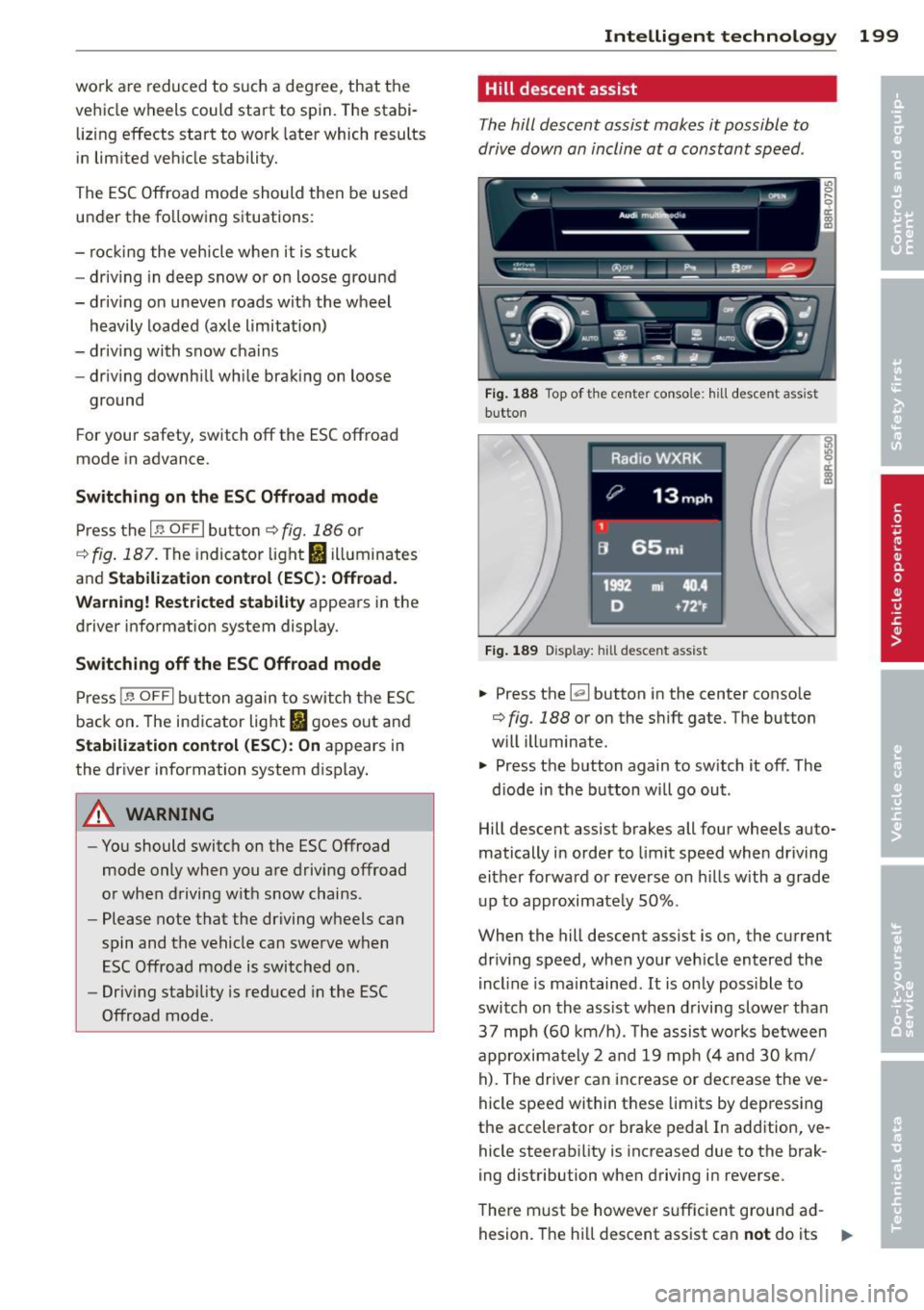
F ig. 1 86 Vers ion A: l owe r ce nte r con so le, butto n YJ
OFF
Fig. 1 87 Version B: upper cente r console, button YJ
OFF
ESC Offroad mode
The ESC Off road mode was developed espe
c ia lly for offroad driving . In o rder to maintain
max imum trac tion and optimal b raking when
driv ing offroad, the cond it ions for the ESC to
IJII,
Page 201 of 316
work are reduced to such a degree , that the
vehicle wheels could start to spin. The stab i
liz ing effects start to work later which results
in lim ited vehicle stability.
The ESC Offroad mode should then be used
under the fo llowing situat ions:
- rock ing the veh icle when it is stuck
- driv ing in deep snow or on loose ground
- dr iv ing on uneven roads w ith the wheel
heavily loaded (axle limitation)
- driv ing with snow chains
- driv ing downh ill wh ile braking on loose
ground
F or your safety, switch off the ESC offroad
mode in advance .
Switching on th e ESC Offroad mode
Press the I~ O FF I bu tton ¢ fig. 186 or
¢ fig . 187 . The indicator light fl illuminates
and
Stabil iz ation cont rol (ESC ): Off road.
W arning! Re stri cted stability
appears in the
driver information system display .
Switching off the ESC Offroad mode
Press 1-~ O FF I button again to switch the ESC
back on. The indicator light
fl goes out and
Stabilization control (ESC ): On appears in
the driver information system display.
A WARNING
- You should switch on the ESC Offroad
mode only when you are driving offroad
o r when driving w ith snow chains .
- Please note that the driving wheels can
spin and the vehicle can swerve when
ESC Offroad mode is switched on .
- Driv ing stability is reduced in the ESC
Offroad mode .
-
Intelligent technolog y 199
Hill descent assist
The hill descent assist makes it possible to
drive down an incline at a constant speed .
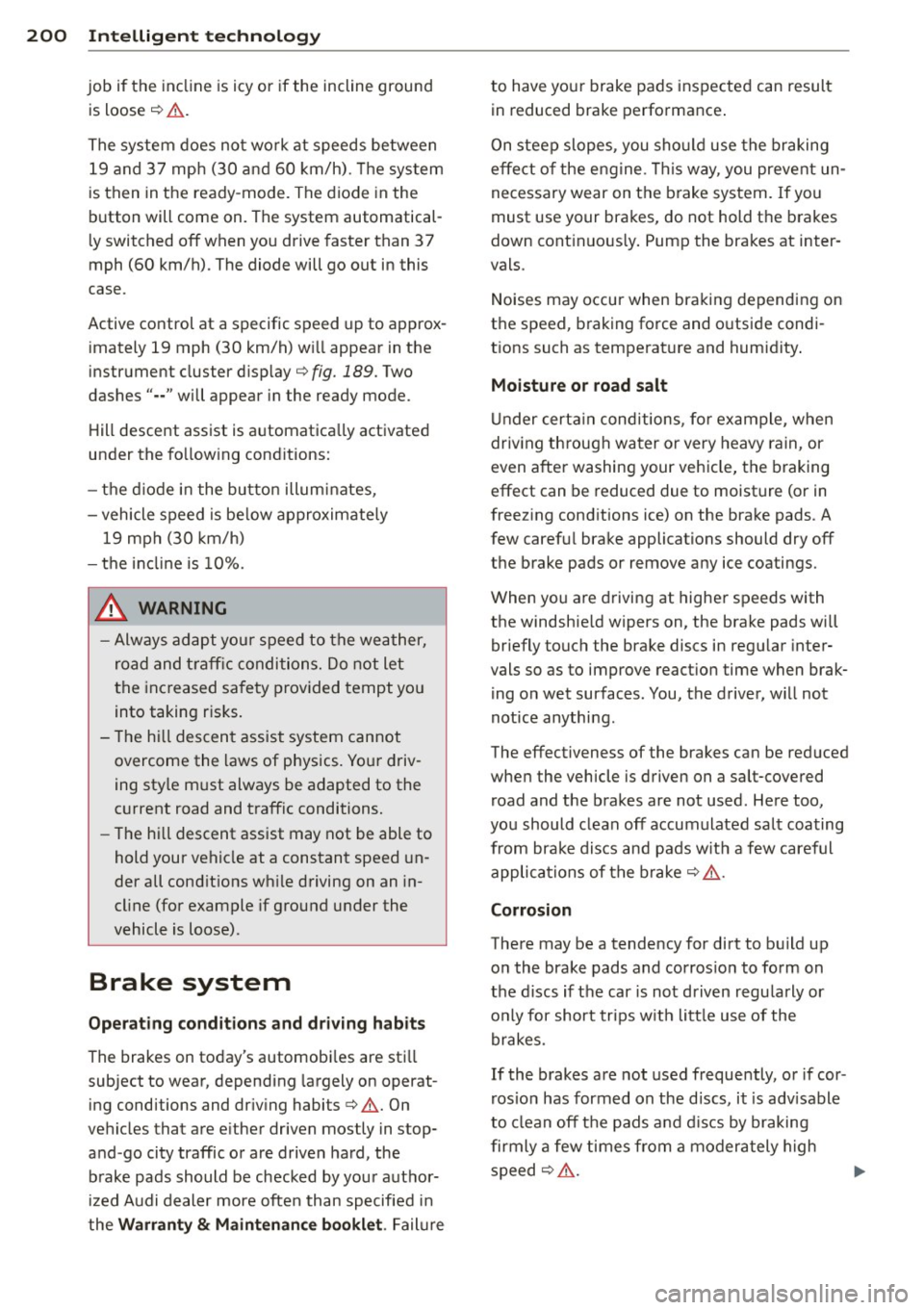
Fig . 1 88 Top of t he center conso le : h ill desce nt ass ist
button
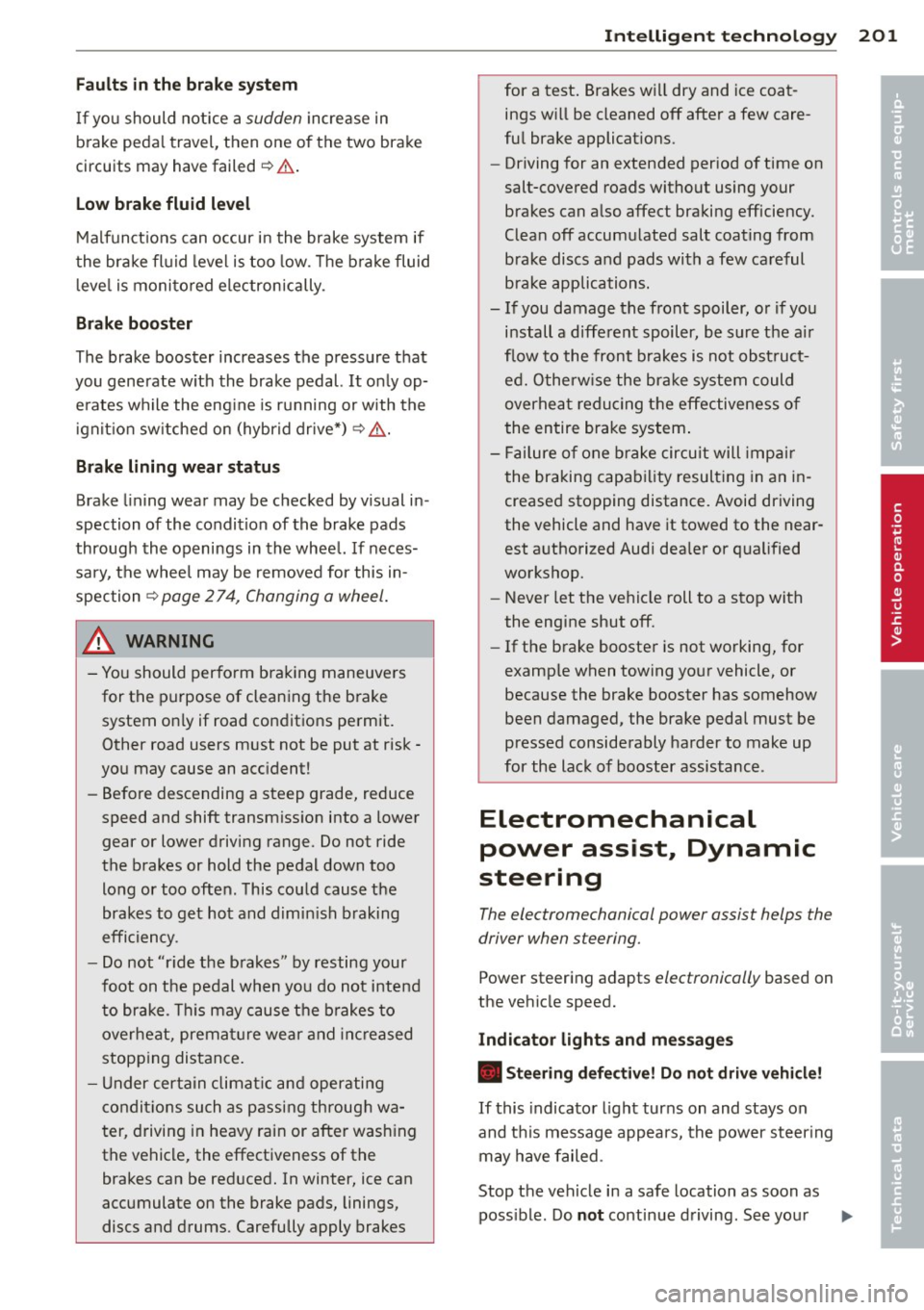
F ig . 1 89 Disp lay: h ill des cent ass ist
.. Press the [el button in the center conso le
¢ fig. 188 or on the shift gate . The button
w ill illuminate .
.. Press the button again to sw itch it off . The
diode in the button wi ll go out .
Hill descent assist brakes all four wheels auto
matically in order to limit speed when driving
either forwa rd or reverse on h il ls with a grade
up to approximate ly 50% .
When the hill descent assist is on, the current
driv ing speed, when your veh icle entered the
i ncl ine is maintained .
It is only possible to
switch on the ass ist when driving slower tha n
37 mp h (60 km/h). The assist wo rks between
approximately 2 and 19 mp h (4 and 30 km/
h). The driver can inc rease or dec rease the ve
hicle speed within these limits by dep ressing
the accelerator or brake pedal In add ition, ve
hicle steerability is increased due to the brak
i ng distribution when driving in reverse .
The re m ust be however s ufficient ground ad
hesion. The h ill descent assist can
not do its "'"
Page 202 of 316
200 Intelligent technology
job if the incline is icy or if the incline ground
is loose ¢&. .
The system does not work at speeds between
19 and 37 mph (30 and 60 km/h) . Th e system
is then in the ready-mode. The diode in the
button will come on. The system automatical
l y switched off when you drive faster than 3 7
mph (60 km/h). The diode will go out in this
case.
Active control at a specific speed up to approx
imately 19 mph (30 km/h) w ill appear in the
instrument cluster disp lay ¢
fig. 189. Two
dashes" •• " will appear in the ready mode.
Hill descent assist is automatica lly activated
under the fo llow ing cond itions:
- the diode in the button illuminates,
- vehicle speed is be low approximately
19 mph (30 km/h)
- the inclin e is 10%.
.&_ WARNING
-Always adapt your speed to the weather,
road and traffic conditions. Do not let
the increased safety provided tempt you
into taking risks.
- T he hill descent assist system cannot
overcome the laws of physics. Your driv
ing sty le m ust always be adapted to the
c u rrent road and traffic conditions.
- The hill descent assist may not be able to
hold your vehicle at a constant speed un
der all cond it ions wh ile driving on an in
cl ine (for example if ground under the
vehicle is loose) .
Brake system
Operating conditions and driving habits
The brakes on today's automobi les are sti ll
subject to wear, depending largely on operat
ing conditions and dr iv ing habits ¢&. . On
vehicles that are e ither driven mostly in stop
and -go city traffic or are driven hard, the
brake pads should be checked by your author
ized Audi dealer more often than specified in
the
Warranty & Maintenance booklet . Failure to have you
r brake pads inspected can result
in reduced brake performance.
On steep slopes , you should use the braking
effect of the engine . This way, you prevent un
necessary wear on the b rake system . If you
must use your brakes, do not hold the brakes
down cont inuous ly. Pump the brakes at inter
vals.
Noises may occur when braking depending on
the speed, braking force and outside condi
t ions such as temperature and humidity .
Moisture or road salt
Under certain conditions, for example, when
driv ing through water or very heavy rain, or
even after washing your vehicle, the braking
effect can be reduced due to moisture (or in
freezing conditions ice) on the brake pads. A
few careful brake applications should dry off
the brake pads or remove any ice coatings.
When you are driving at higher speeds with
the windshie ld wipers on, the brake pads will
briefly touch the brake discs in regu lar inter
vals so as to improve reaction time when brak
ing on wet surfaces . You, the driver, will not
notice anything .
The effectiveness of the brakes can be reduced
when the vehicle is driven on a salt-covered road and the brakes are not used . Here too,
you should clean off accumulated salt coating from brake discs and pads w ith a few careful
applications of the brake ¢.& .
Corrosion
There may be a tendency for dirt to build up
on the brake pads and corros ion to form on
the discs if the car is not driven regularly or
o n Ly for short trips with little use of the
brakes.
If the brakes are not used frequently, or if cor
r os ion has formed on the d iscs, it is adv isable
to clean off the pads and discs by braking
firmly a few times from a moderately high
speed¢ ,&. .,..
Page 203 of 316
Fa u lts in th e brake sy stem
If you should notice a sudden increase in
brake peda l travel, then one of the two brake
circuits may have failed~.&. .
Low brak e flu id level
Malfunct ions can occur in the brake system if
the brake fl uid leve l is too low . T he b rake fluid
l eve l is monito red electronically .
Brake booster
The brake booster increases the pressure that
you generate w ith the brake pedal.
It only op
e rates while the eng ine is running or with the
i gnit ion sw itched on (hybr id dr ive*) ~.&, .
Brake lining wear statu s
Brake lining wear may be checked by visual in
spection of the condition of the brake pads
through the openings in the whee l. If neces
sa ry, the wheel may be removed for this in
spection
~ page 2 74, Changing a wheel.
.&_ WARNING
=
- You should perform braking maneuvers
for the purpose of clean ing the brake
system on ly if road conditions permit.
Other road users must not be put at risk -
you may cause an acc ident!
- Before descending a steep grade, reduce
speed and shift transmiss ion into a lower
gear or lower driving range . Do not ride
the brakes or hold the pedal down too long or too often . This could cause the
brakes to get hot and dimin ish b raking
efficiency .
- Do not "ride the brakes" by resting your
foot on the pedal when you do not intend
to brake . Th is may cause the b rakes to
overheat, premat ure wear and increased
stopping distance .
- Under certain climat ic and operating
condit ions such as passing through wa
ter , driving in heavy rain or after wash ing
the vehicle, the effectiveness of the brakes can be reduced. In winter, ice can
accumulate on the brake pads, linings,
discs and drums . Carefully apply brakes
Int ellig ent technolog y 201
for a test. Brakes will dry and ice coat
ings w ill be cleaned off after a few care
ful brake applicat ions.
- Driving for an extended period of time on
salt-covered roads without using your
brakes can also affect braking efficiency.
Clean off accumulated salt coating from
brake discs and pads with a few careful
brake applications.
- If you damage the front spoiler, or if you install a different spoiler, be sure the air
f low to the front brakes is not obst ruct
ed. Otherw ise the brake system could
overhea t reducing the effectiveness of
the entire brake system .
- Failure of one brake circuit will impair
the braking capability resulting in an in
creased stopping distance . Avoid driving
the vehicle and have it towed to the near
est a uthori zed Audi dea ler or qualified
workshop.
- Never let the vehicle roll to a stop with
the engine shut off .
- If the brake booster is not working, for
examp le when towing your vehicle, or
because the brake booster has somehow
been damaged, the brake pedal must be
pressed considerably harder to make up
for the lack of booster assistance .
Electromechanical
power assist, Dynamic
steering
The electromechanical power assist helps the
driver when s teering.
Power ste ering adapts electronically based on
the vehicle speed.
Indicator lights an d m ess age s
• Steeri ng defe ctive ! D o n ot dr ive vehi cle!
If this indicator light turns on and stays on
and this message appears, the power steer ing
may have failed .
Stop the vehicle in a safe location as soon as poss ible . Do
no t continue driving . See your ..,.
•
•
Page 204 of 316
202 Intelligent technology
authorized Audi dealer or other qualified re
pair facility for assistance.
'I-ij Dynamic steering: System fault! You can
continue driving
If the indicator light turns on and the mes
sage appears, the steer ing may be more diffi
cul t to move or mo re sensitive than usual. The
steer ing may also be at an angle when driving
straight.
Drive slowly to your author ized Audi dealer or
qualified workshop to have the malfu nction
cor rected.
(;:r,ij Dynamic steering : Initializing
Aud i drive select": if the indicator light blinks
and the driver message appears, the dynam ic
steering* is reinitialized. Once you start the
engine after this is finished, the steering
wheel will be easy to move. Re-initialization might be necessary if the steering wheel was
moved hard to the left and right while the ve
hicle was not moving. The display turns off if
the initialization was successfu l.
(D Tips
-If the . or 'Tj indicator light only stays
on for a short time, yo u may continue
driving.
- The dynamic steering* stability systems
opoge 197 are not ava ilable in the event
of a system malfunction.
- For additional information on dynamic
steering*
o page 120 .
Driving with your
quattro ®
With all-wheel drive, all four wheels are driv
en .
General information
With all-wheel dr ive, power is distributed to
all four wheels. This happens automatically
depending on your dr iving style and the road
conditions at the time . See also ¢
page 197.
A center different ial distr ibutes the dr iv ing
power var iably to the front and rear axle.
It
works together with selective wheel torque
control, which activates when driving through
curves
¢ page 198.
The all-wheel drive concept is des igned for
high engine power. Your veh icle is exception
ally powerfu l and has excellent driving charac
teristics both under normal driving conditions
and on snow and ice. Always read and follow
safety precaut ions¢ &.
Winter tires
When driving in the winter, yo ur vehicle with
all -wheel drive has an advantage, even with
regular tires. In winter road conditions it may
be advisable to mount winter tires (or all-sea
son tires) for improved driveability and brak
ing: these tires must be mounted o n
all four
wheels .
See also¢ page 263, Winter tires.
Tire chains
Where tire chains are mandatory on certain
roads, this normally also app lies to veh icles
with all-wheel drive¢
page 264, Snow
chains.
Replacing wheels/tires
Vehicles with all -wheel drive must always
have tires of the same s ize. A lso avoid tires
with different tread depths. For deta ils see
page
o page 2 59, New tires and replacing
tires and wheels.
A WARNING
-Always adjust your dr iv ing to road and traf-
fic conditions. Do not let the extra safety
afforded by all-wheel drive tempt you into
taking extra risks.
- Altho ugh the all-wheel drive is very ef
fective, always remember that braking
capacity is limited by tire traction. You
should therefore not d rive at excessive
speeds on icy or slippery road surfaces.
- On wet road surfaces, be careful not to
drive too fast because the front wheels
could begin to slide on top of the water
(aquaplaning). If this should occur, you
Page 205 of 316
will have no warning from a sudden in
crease in engine speed as with a front
wheel drive vehicle. A lways drive at
speeds wh ic h are suited to the road con
ditions -risk of crash .
Energy management
Starting ability is optimized
Energy management controls the distribution
of electrical energy and thus optimizes the
availability of electrical energy for starting
the engine.
If a vehicle with a conventional energy system
i s not driven for a long pe riod o f time, the bat
tery is discharged by idling current consumers
(e .g. immobilizer) . In certain circumstances it
can result in there being insufficient energy
avai lab le to start the engine.
I ntelligen t energy management in your vehi
cle hand les the distribution of electrical ener
gy . Starting ability is marked ly improved and
the life of the battery is extended .
Basically, energy management consists o f
batter y diagno sis, idling cur rent man age
m ent
and dyn amic en e rg y m anagement.
Battery diagnosis
B attery d iagnosis continuously dete rmines
the state of the battery. Sensors determ ine
battery vo ltage, battery current and battery
temperature. This determines the current
state of charge and the power of the battery.
Idling curr ent management
Idling current management redu ces energy
consumption while the vehicle is stand ing.
With the ignition switched off, it contro ls the
energy supply to the various electrica l compo
nents . Data from battery diagnosis is consid
ered.
Depending on the battery's state of charge,
individual consumers are grad ually turned off
to prevent excessive discharge of the battery
and thus mainta in start ing capability.
Int ellig ent technolog y 203
Dynamic energy management
While the vehi cle is being driven, dynamic en
ergy management distrib utes the energy gen
erated according to the needs of the individ u
al components. It regulates consumption, so
that more e lectrical energy is not being used
than is being generated and ensures an opti
mal state of charge fo r the battery .
{!) Tips
- But even energy management cannot
negate the limits of physics. Consider
that the power and life of a battery are
limited .
- If start ing ability is threatened, the indi
cator light(•] appears ¢
page 34.
What you should know
The highest priority is given to maintaining
starting capability.
The battery is severe ly taxed in short -distance
driv ing, in city traff ic and during the cold time
of year. Abundant electrical energy is re
quired, but on ly a little is generated . It is also
c rit ical if the engine is not running and electri
ca l components are turned on . In this in
stance ene rgy is be ing consumed but none is
being genera ted .
It is in precisely these situations t hat you will
notice ene rgy management active ly regu lat
i ng the d istribu tion of ene rgy.
Vehicle stands for an extended period
If you do not drive your vehicle over a period
of several days or weeks, electr ical compo
nents are gradually cut back or switched off .
T h is reduces energy consumption and ma in
ta ins start ing capability over a longer pe riod .
Some of the convenience functions may not
operate, such as the interior ligh ts or the
power seat adjustment. The convenience
functions wi ll be available again when you
switch on the ignition and start the engine.
•
•
Page 206 of 316
204 Intelligent technology
With the engine turned off
If you listen to the radio, for example, with
the engine turned off or use othe r MMI* func
tions, the battery is being discharged .
If sta rting capability is jeopardized due to en
e rgy consumption, the following warning ap
pears in the radio or MMI* display:
Please start engine, otherwise system will
switch off in 3 minute s.
The warning ind icates that the system will be
turned off automatically after 3 m inutes .
If
you wish to continue using the functions , you
have to start the engi ne.
With the engine running
Although electrical energy is generated when
the vehicle is being driven, the battery can be
come discharged . This happens most ly when
l ittle energy is be ing generated and a great
deal consumed and the battery's state of
cha rge is not optimal.
To br ing the energy balance back into equili
brium, consumers which require especially
l arge amounts of energy are tempo rari ly cut
back or switched off. Heating sys tems in par
ticular requi re a great dea l of energy . If you
notice, for example , that the heated seats* or
the heated rear window are not heating, they
have been temporar ily cut back or switched
off. These systems will be ava ilable again as
soon as the energy balance has bee n restored.
You will a lso notice that engine idle speed has
been increased slightly. This is norma l and not
a cause for concern . By increasing engine idle
speed the add itional energy required is gener
ated and the battery is charged .