instrument cluster AUDI Q5 2014 Owner's Guide
[x] Cancel search | Manufacturer: AUDI, Model Year: 2014, Model line: Q5, Model: AUDI Q5 2014Pages: 316, PDF Size: 78.41 MB
Page 111 of 316
Audi adaptive cruise control and braking guard 109
Audi adaptive cruise
control
Description
A pp lies to vehicles: with Audi adaptive cruise control
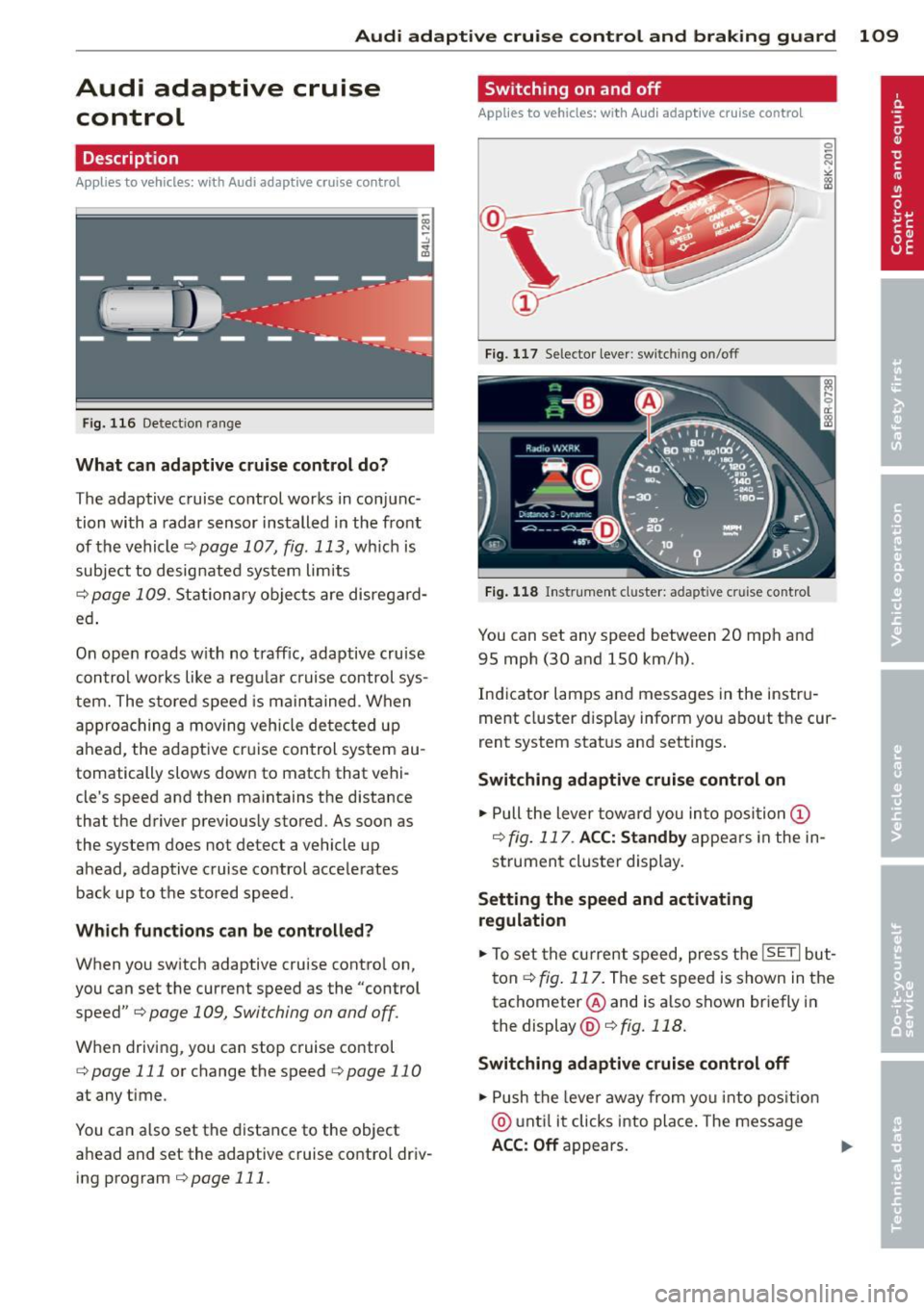
Fig. 116 Detect ion range
What can adaptive cruise control do?
The adaptive cruise control works in conjunc
tion with a radar sensor installed in the front
of the vehicle
¢page 107, fig. 113, which is
subject to designated system limits
¢page 109. Stationary objects are disregard
ed .
On open roads w ith no traffic, adaptive cruise
control works like a regular cruise control sys
tem. The stored speed is maintained. When
approaching a moving vehicle detected up
ahead, the adaptive cruise control system au
tomatically slows down to match that vehi
cle's speed and then maintains the distance
that the driver previously stored. As soon as
the system does not detect a vehicle up ahead, adaptive cruise control accelerates back up to the stored speed.
Which functions can be controlled?
When you switch adaptive cruise control on,
you can set the current speed as the "control speed" ¢
page 109, Switching on and off.
When driving, you can stop cruise control
¢
page 111 or change the speed ¢ page 11 0
at any time.
You can also set the distance to the object
ahead and set the adaptive cruise control driv ing program
¢ page 111.
Switching on and off
Applies to vehicles: wi th Aud i adap tive crui se contro l
Fig. 117 Selector lever: switch ing on/off
Fig. 118 Instrument cluster: adapt ive c ruise control
You can set any speed between 20 mph and
95 mph (30 and 150 km/h).
Indicator lamps and messages in the instru
ment cluster display inform you about the cur
rent system status and settings.
Switching adaptive cruise control on
.,. Pull the lever toward you into position (I)
¢fig. 117 . ACC: Standby appears in the in
strument cluster display.
Setting the speed and activating
regulation
.,. To set the current speed, press the ISETI but
ton ¢
fig. 117. The set speed is shown in the
tachometer @and is a lso shown briefly in
the display @¢fig.118.
Switching adaptive cruise control off
.,. Push the lever away from you into position
@ until it clicks into place. The message
ACC: Off appears. ..,.
Page 113 of 316

Audi adaptive cruise control and braking guard 111
Interrupting cruise control
Applies to vehicles: with Audi adaptive cruise control
Fig. 120 Selector lever
Requirement: adaptive cruise control must be
switched on
¢ fig. 120 (D .
Overriding cruise control
• To accelerate manually, press the accelera
tor pedal. The message
ACC: override ap
pears.
• To resume adaptive cruise control, remove
your foot from the gas pedal. The system re
turns again to the speed that was saved be
fore.
• You can save a new speed at any time by
pressing thelSETI button ¢fig. 120.
Canceling cruise control while driving
• Move the lever into position @. The mes
sage
ACC: Standby appears. Or
• press the brake pedal.
• To resume the stored speed, move the lever
into position @.
_& WARNING
Never resume the stored speed if the
speed is too high for prevailing road, traf
fic or weather conditions.
Setting the distance
App lies to vehicles: wit h Aud i adapt ive cr uise contro l
Fig. 121 Selector lever: setting the distance
• Tap the switch to display the current set dis
tance ¢fig. 121.
• To increase or reduce the distance by incre
ments, tap the switch again to the left or
r ight. The distance between the two vehicles
w ill c hange in the instrument cluster dis
p lay .
When approach ing a moving vehicle up ahead,
the adapt ive cruise control system brakes to
match that object's speed and then mainta ins
the stored distance. If the vehicle ahead ac
ce lerates, adaptive cruise control will also ac
celerate up to the stored speed.
T he higher the speed, the greater the distance
in yards (meters) ¢& .The
Distance 3 setting
is recommended.
T he distances provided are specified va lues .
Depend ing on the driv ing s ituation and the
how the vehicle ahead is driving, the actual
distance may be more or less than these tar
get distances.
T he var ious symbols for the time increments
appear briefly in the informat ion line @
¢ page 109, fig . 118 when you change the
settings.
c:::::,_c:::::, ___ Distance 1: This setting corre-
sponds to a distance of 92 feet/28 meters
when traveling at 62 mph (100 km/h), or a
time interval of 1 second.
c:::::, __ c:::::, __ Distance 2 : This setting corre
sponds to a distance of 118 feet/36 meters
when traveling at 62 mph (100 km/h), or a
time interval of 1.3 seconds.
Page 114 of 316

112 Audi adaptive cruise control and braking guard
<:::::> ___ <:::::>_ Distance 3: This setting cor re-
sponds to a distance of 164 feet/SO meters
when traveling at 62 mph (100 km/h), or a
time interval of 1.8 seconds.
<:::::> ____ <:::::> Distance 4: This setting cor re-
sponds to a distance of 210 feet/64 meters
when traveling at 62 mph (100 km/h), or a
time interva l of 2 .3 seconds.
A WARNING
Following other vehicles too closely in
creases the risk of collisions and serious
personal injury.
- Setting short distances to the traffic
ahead reduces the t ime and distance
available to br ing your vehicle to a safe
stop and makes it even more necessary
to pay close attention to traffic.
- Always obey applicable traffic laws, use
good judgment, and select a safe follow
ing distance for the traffic, road and
weather conditions.
(0 Tips
- Distance 3
is set automatically each time
you sw itch the ignition on.
- Your standa rd settings are automatically
stored and assigned to the remote con
trol key being used
c:::> page 36.
Setting the driving program
Ap plies to vehicles: with Audi adaptive cruise co ntrol
Depending on the selected dr iving program
and distance, driving behavior when accelerat
ing will vary from dynamic to comfortable.
Setting the driving program for vehicles
without Audi drive select*
• In the radio/MM I*, select: I CAR ! function
button >
adaptive cruise control > Driving
program
> Comfort, Standard or Dynamic .
Or
• Select :
I CAR I function button> Car systems *
control button > Driver assist > Adaptive
cruise control
> Driv ing program > Com
fort, Standard
or Dynamic . Setting the driving mode for vehicles with
Audi drive
select*
Refer to c:::> page 121.
(D Tips
Your settings are automatical ly stored and
assigned to the remote control key being
used
c:::> page 36 .
· Request for driver intervention
App lies to vehicles: wit h Audi adapt ive c ruise contro l
Fig. 122 Instr umen t cluster: request for dr iver inter
vent ion
In certain situations, the system will prompt
you to take action . This could happen, for ex
ample, if braking by the adaptive cruise con
trol system is not enough to mai ntai n enough
distance to the vehicle ahead.
The instrument cluster will warn you about
the danger
c:::> fig. 122:
- A red vehicle is p ictured in the display.
- The text
DISTANCE! appears in the stat us
bar .
- The red indicator light
I blinks.
- In addition, a warning tone sounds.
Page 121 of 316
@ Tips
-Side assist is not active whi le you are
making the adjustment.
- Your settings are automatically stored
and assigned to the remote control key
being used.
Driver messages
App lies to vehicles: with Audi side assist
If side ass ist switches off by itself, the LED in
the button turns off and a message will ap
pear in the instrument cluster d isplay:
Aud i side assist unavail able: S en sors
blocked
The radar sensors' vision is affected . Do not
cover the area in front of the senso rs with bike
wheels, st ickers, dirt or other objects . Clean
the area in front of the sensors, if necessary
~page 117, fig. 127.
Aud i side assis t: Currently un avail able
Side assist cannot be switched o n temporarily
because there is a malfunction (for example,
the battery charge leve l may be too low) .
Audi side assi st: S ystem fault!
The system cannot guarantee that it will de
tect vehicles correctly and it is switched off.
The sensors have been displaced or are faulty.
H ave the system checked by an authorized
Aud i dealer or authorized Aud i Service Fac ility
soon.
Audi side assist: Unav ailab le when towing
Side assist sw itches off automatically when a
factory- installed trailer h itch is connected to
the electrical connector on the trailer. There is n o guarantee the system will switc h off when
using a retrofitted tra iler hitch. Do not use
side assis t when towing a t railer.
Audi side a ssis t 119
Page 123 of 316
Selecting the driving mode
Applies to vehicles: with Audi drive select
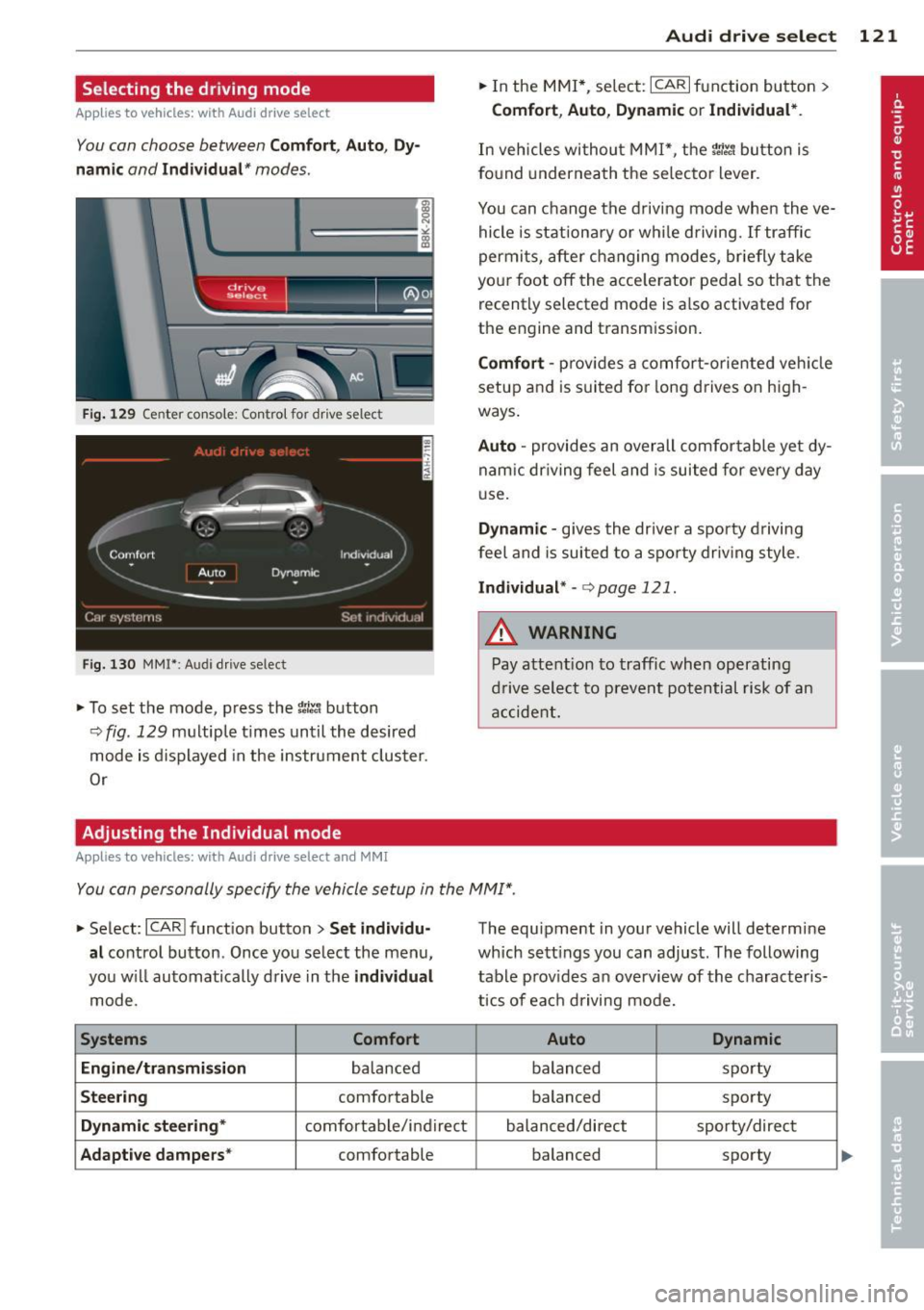
You con choose between Comfort, Auto, Dy
namic
and Individual* modes .
drive I I a,. selact ~
Fig. 129 Center co nsole: Con tro l for drive select
Fig . 130 MMI* : A udi drive select
,.. To set the mode, press the 1:i.l'.1 button
9fig. 129 multiple times until the desired
mode is displayed in the instrument cluster.
Or
Adjusting the Individual mode
Applies to vehicles: with Audi drive select and MMI
Audi drive select 121
,.. In the MMI*, select: ICARlfunction button>
Comfort , Auto , Dynamic or Individual *.
In vehicles without MMI*, the r.'i.l'.1 button is
found underneath the se lector lever .
You can change the driving mode when the ve
hicle is stationary or while driving. If traffic
permits, after changing modes, briefly take
you r foot off the acce le rator pedal so that the
recently selected mode is a lso activated for
the engine and transm ission.
Comfort -pro vid es a comfort-oriented vehicle
setup and is suited for long drives on high
ways .
Auto -provides an overall comfortable ye t dy
nam ic dr iving feel and is suited for every day
u se.
Dynamic -gives the driver a sporty driving
feel and is suited to a sporty driving style.
Individual* -c:> page 12 1 .
A WARNING
Pay attention to traffic when operating
drive select to prevent potential risk of an
accident.
-
You con personally specify the vehicle setup in the MMI".
,.. Select : ICARI function button> Set individu
al
control button . Once you select the menu,
you w ill automatically drive in the
individual
mode.
Systems Comfort
Engine/transmission
balanced
Steering comfortable
Dynamic steering* comfortable/ind ire ct
Adaptive dampers* comfortable The equipment
in your vehicle will determine
which sett ings you can adjust. The following
table prov ides an overview of the characteris
tics of each driving mode.
Auto Dynamic
balanced sporty
balanced sporty
balanced/direct sporty/direct balanced sporty
Page 125 of 316
Automatic
transmission
tiptronic
Introduction
The automatic transmission is controlled elec
tronically. The transmission upshifts or down
shifts automatically depending on which drive
program is selected. The power is transferred
by a torque converter .
When a
mode rate d riv in g s ty le is used, the
transmission selects the most econom ica l
driving mode. It w ill then change up early and
delay the downshifts to g ive better fuel econ
omy.
T he transmission switches to a sporty mode
after a k ick-down or when the driver uses a
spo rty driving sty le characterized by quick ac
celerator pedal movements, heavy accelera
tion, frequent changes in speed and traveling
at the maximum speed.
If desired, the driver can a lso select the gears
manually ( tiptronic mode ) c:> page 12 7.
Selector lever positions
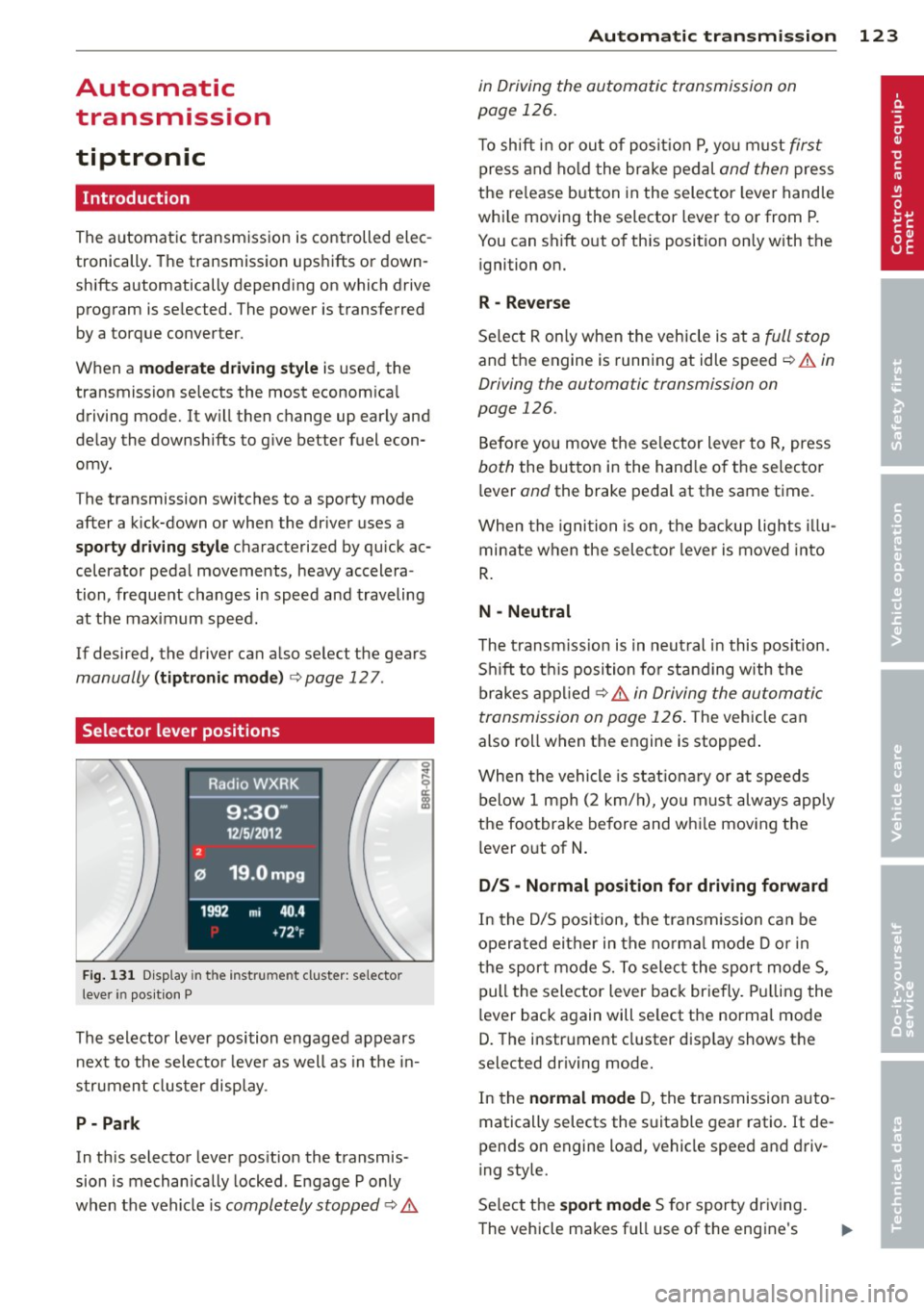
Fig . 131 D isp lay in t he i nst ru m en t cluster: selecto r
l ever in pos it ion P
The selector lever position engaged appears
next to the selecto r lever as well as in the in
strument clus ter disp lay.
P- P ark
In th is selector lever pos ition the transmis
sion is mechan ically locked . Engage P only
when the vehicle is
completely stopped c:> 11::..
Automa tic tran sm iss ion 123
in Driving the automatic transmission on
page 126.
T o shift in or out of posit io n P , yo u m ust first
press and ho ld the brake pedal and then press
the re lease button in the selector leve r handle
whi le moving the selector lever to or from P.
You can shift out of th is position only with the
ignition on.
R -Reverse
Se lect R on ly when the vehicle is at a full stop
and the engine is running at idle speed c:> 11::.. in
Driving the automatic transmission on
page 126.
Before you move the se lector lever to R, press
both the button in the hand le o f the selector
lever
and the brake pedal at the same t ime.
When the ignition is on, the backup lights illu
minate when the selecto r lever is moved into
R .
N -Neutral
The t ransm iss ion is in neut ral in this pos ition.
S hi ft to t his position fo r standing with the
brakes appl ied
c:> 11::.. in Driving the automatic
transmission on page 126 .
The vehicle can
also roll when the engine is stopped .
When the vehicle is stat iona ry or at speeds
below 1 mph (2 km/h), yo u m ust always apply
the footbrake before and whi le mov ing the
lever o ut of
N .
D/S -Normal position for driving forward
In the D/S pos ition, the transmission can be
operated either in the no rma l mode D or in
the sport mode S. To select the sport mode S,
pull the selector lever back briefly. Pulling the
lever back again will se lect the normal mode
D. The instrument cluster disp lay shows the
selected driving mode.
In the
normal mode D, the transmission auto
matically selects the s uitable gear ratio. It de
pends on engine load, vehicle speed and driv
ing style.
Se lect the
sport mode S for sporty dr iving .
The vehicle makes fu ll use of the engine's
Page 126 of 316
124 Autom atic tr an smi ssion
power . Shifting may become noticeable when
accelerat ing . Hybrid drive*: electric driving is
not possible .
When the veh icle is stationary o r at speeds
below 1 mph (2 km/h), you must always apply
the foot brake before and while moving the lever to D/S out of N.
A WARNING
Read and follow a ll WARNINGS c:> & in
Driving the automatic transmission on
page 126 .
@ Note
-
Coasting downhi ll with the transmission in
N and the engine not r unning w ill result in
damage to the automatic transmission
and possibly the catalytic converter .
(D Tips
- On vehicles with Audi drive select*, you
can adjust the sporty sh ift characteristics
i n the
Dynamic driving mode.Swill ap
pear in the instrument cluster display in
stead of D .
- If you accidenta lly select N while driv ing,
take your foot off the acce lerator pedal
i mmediately and wait fo r the engine to
s low down to idle before se le cting D/S .
- Hybrid drive* : if the
las vl button
c:> page 100 is pressed w hile in sport
mode S, the transm issio n sw itches auto
matically to the normal mode D.
- If there is a power failure, the se lector
l ever will not move out of the P posi tio n.
The eme rgency release can be used if
this happens
q page 1 28.
Automatic Shift Lock {ASL)
The Automatic Shift Lock safeguards you
against accidentally shifting into a forward or
the reverse gear and causing the vehicle to
move unintentionally.
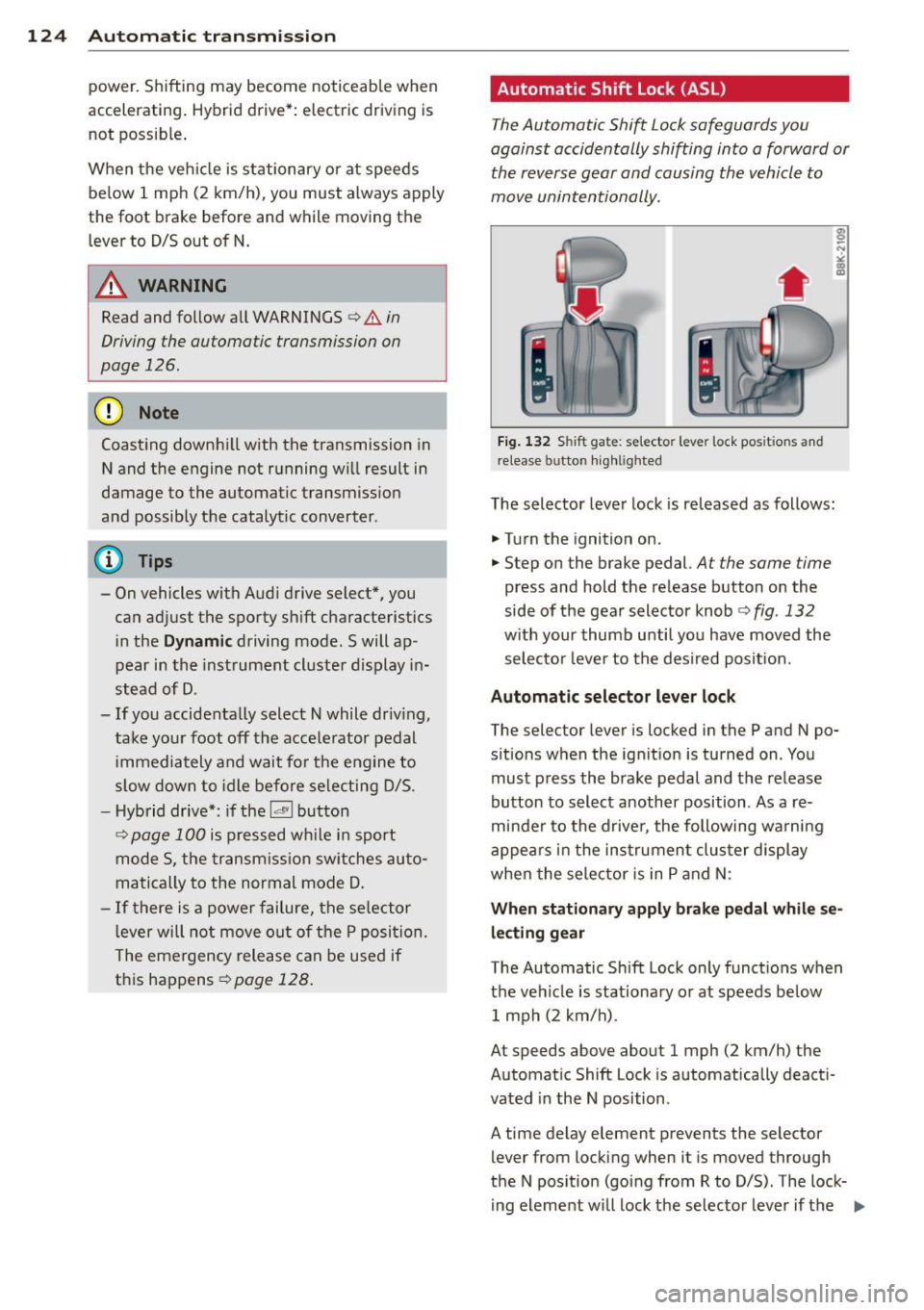
Fi g. 1 32 Shift gat e: selecto r lever lock pos it io n s and
r elease button highl ig h ted
The selector lever lock is released as follows :
.... Turn the ignition on.
.,.. Step on the brake pedal.
At the same time
press and hold the re lease button on the
side of the gear selector knob
c:> fig . 132
w ith your thumb until yo u have moved the
selecto r leve r to the desi red posit ion.
Automatic selector leve r lock
The selector lever is locked in the P and N po
s itions w hen the ign ition is turned on . You
must p ress the brake pedal and t he release
button to select another position . As a re
minde r to the drive r, the following wa rni ng
appea rs in t he instrumen t clus ter di splay
when the selector is in P and N:
When stationar y apply brak e pedal while se
lecting gear
The Automatic Shift Lock only funct ions when
t h e ve hicle is stationary or at speeds be low
1 mph (2 km/h) .
At speeds above about 1 mph (2 km/h) the
Automat ic Shift Lock is automatically deact i
vated in the N position .
A time delay element prevents the selector lever from locking when it is moved through
the N pos ition (going from R to D/S) . The lock
ing element w ill lock the selector lever if t he
Ill>
Page 129 of 316
conditions. Always be ready to apply the
brakes.
Manual shift program
Using the manual shift program you can
manually select gears.
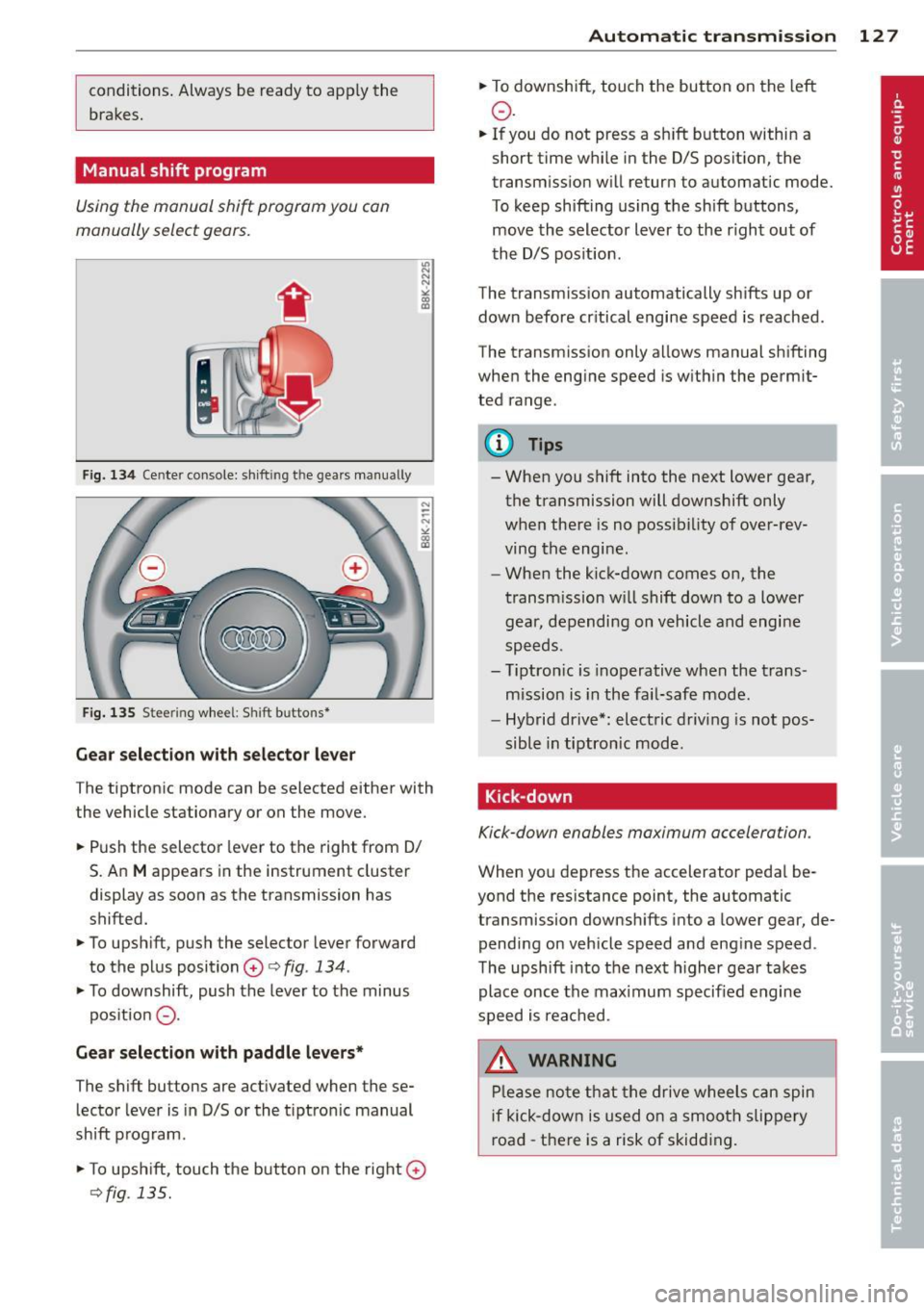
F ig. 134 Cente r console: sh ift in g t he gears manual ly
Fig. 135 S tee rin g wheel: S hift b utto ns*
Gear selection with selector lever
The tiptronic mode can be selected either with
the vehicle stationary or on the move.
.. Push the selector lever to the right from 0/
S. An
M appears in the instrument cluster
display as soon as the transmission has
shifted.
.. To upshift, push the selector lever forward
to the plus position
0 c:> fig. 134 .
.. To downshift, push the lever to the minus
pos ition
0 -
Gear selection with paddle levers*
The shift buttons are activated when these
lector lever is in D/S or the t iptron ic manual
shift program.
.. To upshift, touch the button on the right
0
c> fig . 135.
Autom atic transm ission 12 7
.. To downshift, touch the button on the left
0 .
.. If you do not press a sh ift button within a
short time while in the D/S position, the
transmission will return to automatic mode.
To keep shifting using the shift buttons,
move the selector lever to the r ight out of
the D/S position .
The transm iss ion automatically shifts up or
down before cr itical engine speed is reached.
The transmission only allows manual shifting
when the engine speed is within the permit
ted range .
@ Tips
-When you shift into the next lower gear,
the transmission will downshift only
when there is no possibility of over-rev
ving the engine.
- When the kick-down comes on, the
transmission will shift down to a lower
gear, depending on vehicle and engine
speeds.
- Tiptron ic is inoperative when the trans
mission is in the fail-safe mode.
- Hybrid drive*: electric driving is not pos
sible in tiptronic mode.
Kick-down
Kick-down enables maximum acceleration .
When you depress the accelerator pedal be
yond the resistance point, the automatic
transmission downsh ifts into a lower gear, de
pending on vehicle speed and engine speed .
The upshift into the next higher gear takes
place once the max imum specified engine
speed is reached .
_& WARNING
Please note that the drive wheels can spin
if kick-down is used on a smooth slippery
road -there is a risk of skidding .
Page 151 of 316

Safety belts
General notes
Always wear safety belts!
Wearing safety belts correctly saves lives!
This chapter explains why safety belts are nec
essary, how they work and how to adjust and
wear them correctly.
~ Read all the information that follows and
heed all of the instruc tions and WARNINGS.
A WARNING
Not wearing safety belts or wearing them
improperly increases the risk of serious
personal injury and death.
- Safety belts are the single most effective
means available to reduce the risk of se
rious injury and death in automobile acci
dents. For your protection and that of
your passengers, always correctly wear
safety belts when the vehicle is moving.
- Pregnant women, injured, or physically
impaired persons must also use safety
belts. Like all vehicle occupants, they are
more likely to be seriously injured if they
do not wear safety belts. The best way to
protect a fetus is to protect the mother -
throughout the entire pregnancy.
Number of seats
Your Audi has a total of five seating positions:
two in the front and three in the rear. Each
seating position has a safety belt.
A WARNING
Not wearing safety belts or wearing them
improperly increases the risk of serious
personal injury and death.
- Never strap more than one person, in
cluding small children, into any belt. It is
especially dangerous to place a safety
belt over a child sitting on your lap.
- Never let more people ride in the vehicle
than there are safety belts available.
Safety belts 149
-Be sure everyone riding in the vehicle is
properly restrained with a separate safe
ty belt or child restraint.
Safety belt warning light
Your vehicle has a warning system for the
driver and (on USA models only) front seat
passenger to remind you about the impor
tance of buckling-up.
Fig. 154 Safety belt warning light in the instrument
cl uster -enla rged
Before driving off, always:
~ Fasten your safety belt and make sure you
are wearing it properly.
~ Make sure that your passengers also buckle
up and properly wear their safety belts.
~ Protect your children with a child restraint
system appropriate for the size and age of
the children.
The warning light . in the instrument cluster
light s up when the ignition is switched on as a
reminder to fasten the safety belts. In addi
tion, you will hear a warning tone for a certain period of time.
Fasten your safety belt now and make sure
that your passengers also properly put on
their safety belts.
A WARNING
- Safety belts are the single most effective
means available to reduce the risk of se
rious injury and death in automobile acci
dents. For your protection and that of
your passengers, always correctly wear safety belts when the vehicle is moving.
•
•
Page 161 of 316

Even though your vehicle is equipped with an
Advanced Airbag System, make certain that
all ch ildren, especially those 12 years and
younger, a lways ride in the back seat properly
restrained for their age and size. The airbag
on the passenger side makes the front seat a
potentially dangerous place for a child to ride.
The front seat is not the safest place for a
child in a forward-facing child safety seat.
It
can be a very dangerous place for an infant or
a child in a rearward-facing seat.
The Advanced Airbag System in your veh icle
has been certified to comply w ith the Requ ire
ments of United States Federa l Motor Vehicle
Safety Standard 208 as applicable at the time
your vehicle was manufactured.
The Standard requires the front ai rbag on the
passenger side to be turned off ("sup
p ressed") if a ch ild up to about one year of
age restrained in one of the rear-facing or for
ward -facing infant restraints listed in Federal
Motor Vehicle Safety Standard 208 with wh ich
the Advanced Airbag System in your vehicle
was certified has been installed on the front passenger seat . For a listing of the child re
straints that were used to certify compliance
with the US Safety Standard
Q page 180.
The PASSENGER AIR BAG OFF light in the in
strument panel tells you when the front Ad
vanced A irbag on the passenger side has bee n
turned off by the electronic control unit.
Each t ime you turn on the ignition, the
PAS
SENGER AIR BAG OFF
light will come on for a
few seconds and :
- will stay on if the front passenger seat is not
occupied,
- will stay on if there is a small child or child restraint on the front passenger seat,
- will go off if the front passenger seat is oc
cupied by an adult as registered by the
weight-sensing mat
Q page 168, Monitor
ing the Advanced Airbag System .
The PASSENGER AIR BAG OFF light comes on
when the control un it detects a total weight
on the front passenger seat that requires the
front airbag to be turned off.
Airbag system 159
If the total weight on the front passenger
seat is more than that of a typical 1 year-o ld
c hild but less than the weight of a small
adult, the front airbag on the passenger side
can deploy (the
PASSENGER AIR BAG OFF
light does not come on). If the PASSENGER
AIR BAG OFF
light does not come on, the
front a irbag on the passenger side has not
been turned off by the electronic con trol unit
and can deploy if the contr ol unit senses an
impact that meets the cond itions stored in its
memory .
For example, the airbag may deploy if:
-a small ch ild that is heav ie r than a typical 1
year-old ch ild is o n the front passenger seat
(regard less of whether the child is in one of
the child safety seats listed
Q page 180), or
- a child who has outgrown child restraints is
on the front passenger seat.
If the front passenger airbag is turned off, the
PASSENGER AIR BAG OFF light comes on in
the instrument cluster and stays on.
The front airbag on the passenger side may
not deploy (the PASSENGER AIR BAG OFF
light does not illum inate and stay lit) even if a
small adult or teenager, or a passenger who is
not sitting uprig ht with their back against a
non-reclined backrest w ith their feet on the
vehicle floor in front of the seat is on the front
passenger seat~
page 140, Proper seating
position for the driver.
If the front passenger airbag deploys, the
Federal Standard requires the airbag to meet
the "low risk" deployment criteria to reduce
the risk of injury thro ugh interaction with the
airbag . "Low risk" deployment occ urs in those
crashes that take place at lower dece lerat ions
as defined in the electronic control unit
Q page 168, PASSENGER AIR BAG OFF light .
Always remember, a child safety seat or infant
carr ier installed on the front seat may be
struck and knocked out of posit ion by the rap
idly inflating passenger's airbag in a frontal
collision . The airbag could greatly reduce the
effectiveness of the child restraint and even
seriously injure the child during inflation. •
•