display AUDI Q5 2014 Workshop Manual
[x] Cancel search | Manufacturer: AUDI, Model Year: 2014, Model line: Q5, Model: AUDI Q5 2014Pages: 316, PDF Size: 78.41 MB
Page 136 of 316
134 Parking system
- On -when the parking system is switched
on, either the visua l d isplay or the picture
from the rearview camera is disp layed .
Warning tones
-Front volum e -front sensor vol ume
- Front frequ enc y-front sensor frequency
-Re ar volum e -rear sensor volume
- Rear frequenc y -rear sensor frequency
- In -ca r entertainme nt fader /Mu sic volume
w hile pa rking -
when the parking system is
switched on , the volume of the active audio
source is lowered .
The new ly adjusted value is briefly heard from
the signal generator.
@ Tips
- The warning tones can a lso be adjusted
directly by the v is ual disp lay or the p ic
ture from the rearview camera. Simp ly
press the
Sett ings contro l button.
- Changed settings are activated when
parking system is switched on again.
- The settings are automatically stored
and ass igned to the remote control key.
Trailer hitch
Applies to vehicles: with Audi parking system plus w ith
rea rview camera a nd trailer hitch
For vehi cles with a facto ry installed trai ler
hitch, or a trai ler hitch installed according to
factory specifications, the parking system rear
sensors do not come on whenever you shift in
to reverse gear or when you press the
P, #J\.
switch. Remember, there is no warning for
d istances to the rear . The front sensors re
main activated. The visual display switches to
the trailer towing mode. The picture from the
rearv iew camera will not show the orientation
l ines nor the blue su rfaces.
If you install a hitch yourself, th is function
may not work .
Error messages
Applies to vehicles: wi th Audi parking sys te m plus with
rearv iew camera
T he re is an error in the system if t he LED on
the
p, q~ switch is blinking and you hea r a con
t in uous alarm for a few se conds after switch
ing on the parking system or when the park
ing system is already activated . Have yo ur au
thorized Audi dea ler correct the error.
(D Tips
If the error is not corrected before you
switch off the ignition, when you switch on
the parking system again, the LED in the
Pw J\. switch will blink.
Page 138 of 316

136 Homelink
• To open the garage door, press the p rogram
med button . The LED @will light up or
flash.
• To close the garage door, pre ss the button
again.
@ Tips
To open the garage door, press the button,
but do not press it for longer ten seconds
or the Homelink module will switch to
programming mode.
Programming the transmitter (version A)
Appl ies to vehicles: with Home link and MMI
Fig. 149 Dista nce between t he ra d iato r grille and t he
hand tran sm itter
You can p rogram the fixed code and ro lling
code systems using the descr ibed procedure.
Programming the button
• Turn the ign ition on .
• The re a re two ways to program the button :
P res s the but ton ¢
page 135, fig. 148 tha t
you wou ld like to p rogram. Use the instruc
tions that appear in the MM I* to pe rform
the p rogramming. Or
• Se lect : ICAR ifunct ion button>
Car sy stems*
con trol but ton > Vehicle sett ing s> Garage
door opener
> Program garage door open·
er .
If this path is not ava ilable, program
Homelink as desc ribed in vers ion B
.;, page 137.
• Se lect t he button t hat yo u wo uld like to pro
gram.
• Fo llow the ins tructions in the MMI* .
• If the garage door open ing must also be
synchronized w it h the Homel ink modu le, refer to the owner
's manua l for the garage
door opener .
Remote con tro l unit s fo r garage door ope ne rs
in Canada are se t to stop t ransmi tting radio
frequency signa ls afte r two seconds . This time
may not be sufficient for the Homelink sys
tem to learn the radio frequency signa l. Per
form all other steps as described above.
Erasing /Clearing the programmed button
s etting s
• To erase all of the programmed buttons at
the same time, select : ICAR !function b utton
> Car systems * control button > Vehicle set·
tings
> Garag e door opener > Clear pro·
gram setting s> Yes .
The prog rammed but·
tons can not be erased individua lly. Repro·
gram the buttons if ne cess ary.
• Reprogram an individua l bu tton in the same
manner that you wou ld for the one-time
programming .
Displaying the version /status /country
code
• Sele ct: !CAR I function button > Car sy ste m s*
contro l but to n > Vehicle setting s > Garage
door opener
> Version information .
(D Tips
- Programming through the MMI* is not
possible with all infotainment systems.
If this is the case , program Homelink as
descr ibed in version B
c:) page 137.
-The required distance betwee n the hand
transm itter and the Homelink module in
the radiator gr ille¢
fig. 149 depends on
the system that you are prog ramming .
- Depending on the mode l of the garage
door opener, you may need to release the
butto n on the remote and press it again
w hen programming. When program ·
m ing a new device, keep the butto n
presse d for at least 15 seconds before
t ry ing ag ain w ith the transmit ter in a dif
fere nt posi tion. W atch o ut for the emer
gency flasher during tha t time.
Page 162 of 316

160 Airbag sys te m
For this reason, a nd because t he bac k seat is
the safest place for children - when prop erly
restra ined according to their age and size - we
strongly recommend that children always sit in the back seat
Q page 178, Child Safety.
A WARNING
-
A child in a rearward-facing child safety
seat installed on the front passenger seat
w ill be seriously injured and can be k illed if
t he front a irbag inflates - even wit h an Ad
v a nced Airb ag System.
- T he inflating a irbag will hit the child
safety seat or infant carrier with g reat
force and w ill smash the ch ild safety sea t
and child against the backrest, center
armrest, door or roof .
- Always install rear-facing child safety
seats on the rear seat .
-If you mus t inst all a rearwar d fa cing
child safety seat on the front passenger
seat because of exceptional circ umstan
ces and the
PASSENGER AIR BAG OFF
light does not come on and stay on , im
med iately install the rear-facing child
safety seat in a rear seating position and
have the a irbag system inspected by you r
au thorized Audi dealer .
- Forward-fac ing ch ild safety seats instal
led on the front passenger's seat may in
terfer e wi th the deployment of the air
bag and cause se rious personal injury to
the ch ild.
A WARNING
If, in exceptional c ircumstances, you mus t
install a forwa rd-facing child restra int on
the front passenger's seat:
- Always m ake su re the forw ard-fa cing
sea t has been des igned and certified by
its manufact urer for use on a front seat
with a passenger front and side airbag.
- Never put the forward -facing child re
st raint up aga inst or very near the inst ru
ment pane l.
- Always move the passenger seat into its
rearmost position in the seat's fore and aft ad
justment range, as fa r away from
the airbag as possible before installing
the forward-fac ing ch ild restra int. The
backrest must be ad justed to an upright
position .
- Make sure that the
PASSENGER AIR BAG
OFF
li ght comes on and stays on all the
time wheneve r the ignit ion is switched
on.
A WARNING
To reduce the risk of serious inju ry, ma ke
sure that the
PASSENGER AIR BAG OFF
lig ht w ill be displayed whenever a child re
straint is insta lled on the front passenger
seat and the ignition is switched on .
- If the
PASSENGER AIR BAG OFF light
does not stay on, per form the checks de
scribed
¢ page 168, Monitoring the Ad
vanced Airbag System.
- Take the chi ld restraint off the front pas
senger seat and install it properly at one
of the rear seat positions if the
PASSEN
GER AIR BAG OFF light does not stay on.
-Have the airbag system inspected by
your author ized Audi dealer immed iate
ly.
- Always carefully follow instr uctions from
child restraint manufacture rs when in
stalling ch ild restra ints.
A WARNING
-If, in except iona l circumstances, you must
i nstall a forward or rearwa rd -facing child
r estra int on t he front passenger's seat :
- Improper installation of ch ild restra ints
can reduce their effectiveness o r even
p revent them from providing any protec
tion.
- An improperly installed ch il d restra int
can inter fere with the airbag as it de
p loys and seriously injure o r even kill the
child -even with an Advance d Airbag
System.
- Always caref ully follow the m anu factur
er 's ins truc tio ns p rov ided with the ch ild
safety sea t or carrier .
Page 172 of 316
1 70 Airbag system
in the instrument cluster display. This is to in
form the driver of the current front passenger
airbag status.
Important safety instructions on
monitoring the Advanced Airbag System
A WARNING
An airbag system that is not functioning properly cannot provide supplemental pro
tection in a frontal crash.
- If the airbag indicator light¢
page 16
comes when the vehicle is being used,
have the system inspected immediately
by your authori zed Audi dealer. It is pos
sible that the airbag will inflate when it
is not supposed to, or will not inflate
when it should .
A WARNING
If the front airbag inflates, a child without
a child restraint, in a rearward-facing child
safety seat or in a forward-facing child re
straint that has not been properly installed
will be seriously injured and can be killed.
- Even though your vehicle is equipped
with an Advanced Airbag System, make certain that all children, especially 12
years and younger, always ride on the back seat properly restrained for their
age and size.
- Always install forward or rear-facing
child safety seats on the rear seat -even
with an Advanced Airbag System.
- If you must install a rearward-facing
child safety seat on the front passenger
seat because of exceptional circumstan
ces and the
PASSENGER AIR BAG OFF
light does not appear and stay on, imme
diately install the rear-facing child safety
seat in a rear seating position and have
the airbag system inspected by your au
thorized Audi dealer.
- A tight tether or other strap on a rear
ward-facing child restraint attached to
the front passenger seat can put too
much pressure on the weight-sensing
-
mat in the seat and register more weight
than is actually on the seat. The heavier
weight registered can make the system
work as though an adult were on the seat and deploy the Advanced Airbag when it
must be suppressed causing serious or
even fatal injury to the child.
- If, in exceptional circumstances, you
must install a forward-facing child re
straint on the front passenger seat, al
ways move the seat into its rearmost po
sition in the seat's fore and aft adjust
ment range, as far away from the airbag
as possible. The backrest must be adjust
ed to an upright position. Make sure that
the
PASSENGER AIR BAG OFF light
comes on and stays on all the time when
ever the ignition is switched on .
A WARNING
-
-
-If the PASSENGER AIR BAG OFF light
does not go out when an adult is sitting
on the front passenger seat after taking
the steps described above, make sure the
adult is properly seated and restrained at
one of the rear seating positions.
- Have the airbag system inspected by
your authorized Audi dealer before trans
porting anyone on the front passenger
seat.
(D Tips
If the weight-sensing mat in the front pas
senger seat detects an empty seat, the
front airbag on the passenger side will be
turned off, and
PASSENGER AIR BAG OFF
will stay on.
Repair , care and disposal of the airbags
Par ts of the airbag system are ins talled at
many different places on your Audi. Installing,
removing, servicing or repairing a part in an
area of the vehicle can damage a part of an
airbag system and prevent that system from
working properly in a collision. .,..
Page 202 of 316
200 Intelligent technology
There must be however sufficient ground ad
hesion . The hill descent assist can
not do its
job if the incl ine is icy or if the incline ground
is loose ¢,&..
The system does not work at speeds between
19 and 37 mph (30 and 60 km/h). The system
is then in the ready-mode. The diode in the
button will come on . The system automatical
ly switched
off when you drive faster than 37
mph (60 km/h) . The diode will go out in this
case.
Active control at a specific speed up to approx
imately 19 mph (30 km/h) w ill appear in the
instrument cluster display ¢
fig. 188. Two
dashes' '-- " w ill appear in the ready mode.
Hill descent assist is automatica lly act ivated
under the following cond itions:
- the diode in the button illuminates,
- vehicle speed is be low approximate ly
19 mph (30 km/h)
- the incline is 10%.
A WARNING
-Always adapt your speed to the weather,
road and traffic conditions . Do not let
the increased safety provided tempt you
into taking r isks.
- The hill descent assist system cannot
overcome the laws of physics. Your driv
ing style must always be adapted to the
current road and traffic conditions.
- The hill descent assist may not be able to
hold your vehicle at a constant speed un
der all condit ions wh ile driving on an in
cl ine (for example if ground under the
vehicle is loose).
Brake system
Operating conditions and driving habits
The brakes on today's automobiles are st ill
subject to wear, depending largely on operat
ing conditions and dr iv ing habits ¢& . On
veh icles that are e ither driven mostly in stop
and-go city traffic o r are driven hard, the
brake pads should be checked by your author- ized Audi dealer more often
than specified in
the
Warranty & Maintenance booklet. Failure
to have your brake pads inspected can result
in reduced brake performance.
On steep slopes, you should use the braking
effect of the engine. This way, you prevent un
necessary wear on the brake system. If you
must use your brakes, do not hold the brakes
down cont inuously. Pump the brakes at inter
vals .
Noises may occur when braking depending on
the speed, braking force and outside condi
tions such as temperature and humidity.
Moisture or road salt
Under certain conditions, for example, when
driving through water or very heavy rain, or
even after washing your vehicle, the braking
effect can be reduced due to moisture (or in
freezing cond itions ice) on the brake pads. A
few careful brake applications should dry
off
the brake pads or remove any ice coatings .
When you are driving at higher speeds with
the windshield wipers on, the brake pads will
briefly touch the brake discs in regular inter
vals so as to improve reaction time when brak
ing on wet surfaces. You, the driver, will not
notice anything.
The effectiveness of the brakes can be reduced
when the vehicle is driven on a salt-covered
road and the b rakes are not used. Here too,
you should clean
off accumulated sa lt coating
from brake discs and pads with a few careful
applications of the brake ¢& .
Corrosion
The re may be a tendency for dirt to build up
o n the brake pads and corrosion to form on
the discs if the car is not driven regularly or
only for short trips with littl e use of the
brakes.
If the brakes a re not used frequently, o r if cor
rosion has formed on the discs, it is adv isable
to clean
off the pads and discs by braking
firmly a few times from a modera tely high
speed ¢£ .
IJll-
Page 204 of 316
202 Intelligent technology
iT-ij Dynamic steering: System fault! You can
cont inue driving
If the indicator light turns on and the mes
sage appears, the steer ing may be more diffi
cult to move or more sensitive than usual. The
steering may also be at an angle when driving
straight.
Drive slow ly to your authorized Audi dealer or
qualified workshop to have the malfunction
corrected .
iT-ij Dynamic steering: Initializing
Audi drive select*: if the indicator light blinks
and the driver message appears, the dynamic
steer ing* is reinitialized. Once you sta rt the
engine after this is finished, the steering
wheel will be easy to move. Re-ini tialization
might be necessary if the steering wheel was
moved hard to the left and right while the ve
h icle was not moving . The display turns off if
the initiali zation was successful.
- If the . or
tTij indicator light on ly stays
on for a short time, you may continue
driving.
- The dynamic steering* stability systems
¢
page 197 are not available in the event
of a system malfunction.
- For additional information on dynamic
steering* ¢
page 120.
Driving with your
quattro
With all-wheel drive, all four wheels are driv
en.
General information
W ith all-wheel dr ive, power is distributed to
all four wheels. This happens automatically
depending on your driving sty le and the road
conditions at the time . See also ¢
page 197.
A center different ial distr ibutes the dr iv ing
power var iably to the front and rear axle . It
works together with se lective wheel torque control, which activates when driving through
curves
r=:>
page 198.
The all-wheel drive concept is designed for
high eng ine power. Your veh icle is except ion
ally powerfu l and has excellent driving charac
teristics both under normal driving conditions
and on snow and ice . Always read and follow
safety precaut ions r=;,
,&.
Winter tires
When driving in the winter, your vehicle with
all-wheel drive has an advantage, even with
regular tires. In winter road conditions it may
be advisable to mount winter tires (or all-sea
son tires) for improved driveability and brak
ing : these tires must be mounted on
all four
wheels.
See also r=;, page 262, Winter tires.
Tire chains
Where tire chains are mandatory on certain
roads, this norma lly also app lies to veh icles
with all-wheel driver=;,
page 263, Snow
chains .
Replacing wheels/tires
Vehicles with a ll-wheel drive must always
have tires of the same size. A lso avoid tires
with different tread depths. For deta ils see
page
r=;, page 2 SB, New tires and replacing
tires and wheels.
A WARNING
-Always adjust your dr iv ing to road and traf-
f ic conditions. Do not let the extra safety
afforded by all-wheel drive tempt you into
taking extra risks .
- Although the all-wheel drive is very ef
fective, always remember that braking
capacity is lim ited by tire traction. You
should therefore not drive at excessive
speeds on icy or slippery road surfaces.
- On wet road surfaces, be careful not to
drive too fast because the front wheels
could begin to slide on top of the water
(aquaplaning). If this should occur, you
will have no warning from a sudden in crease in eng ine speed as w ith a front
wheel drive veh icle. Always drive at
Page 206 of 316
204 Intelligent technology
If starting capability is jeopa rdized due to en
ergy consumption, the following warning ap
pears in the radio or MMI* display:
Please start engine, otherwise system will
switch off in 3 minutes.
The warning ind icates that the system will be
turned off automatically after 3 minutes. If
you wish to continue using the functions, you
have to start the engine .
With the engine running
Although electrical energy is generated when
the vehicle is be ing driven, the battery can be
come discharged . Thi s happens mostly when
little ene rgy is being generated and a great
deal consumed and the battery's state o f
charge is not optima l.
To bring the energy balance back into equili
brium, consumers which require especially
l arge amounts of energy are temporarily cut
back or switched off. Heating systems in par
ticular require a great dea l of energy. If you
notice, for example, that the heated seats* or
the heated rear window are not heating, they
have been temporar ily cut back or switched
off. These systems will be ava ilable again as
soon as the energy balance has been restored.
You will also notice that engine idle speed has been increased slightly. This is normal and not
a cause for concern . By increas ing engine idle
speed the add it iona l energy required is gener
ated and the battery is charged.
Page 221 of 316
Vehicle care and cleaning 219
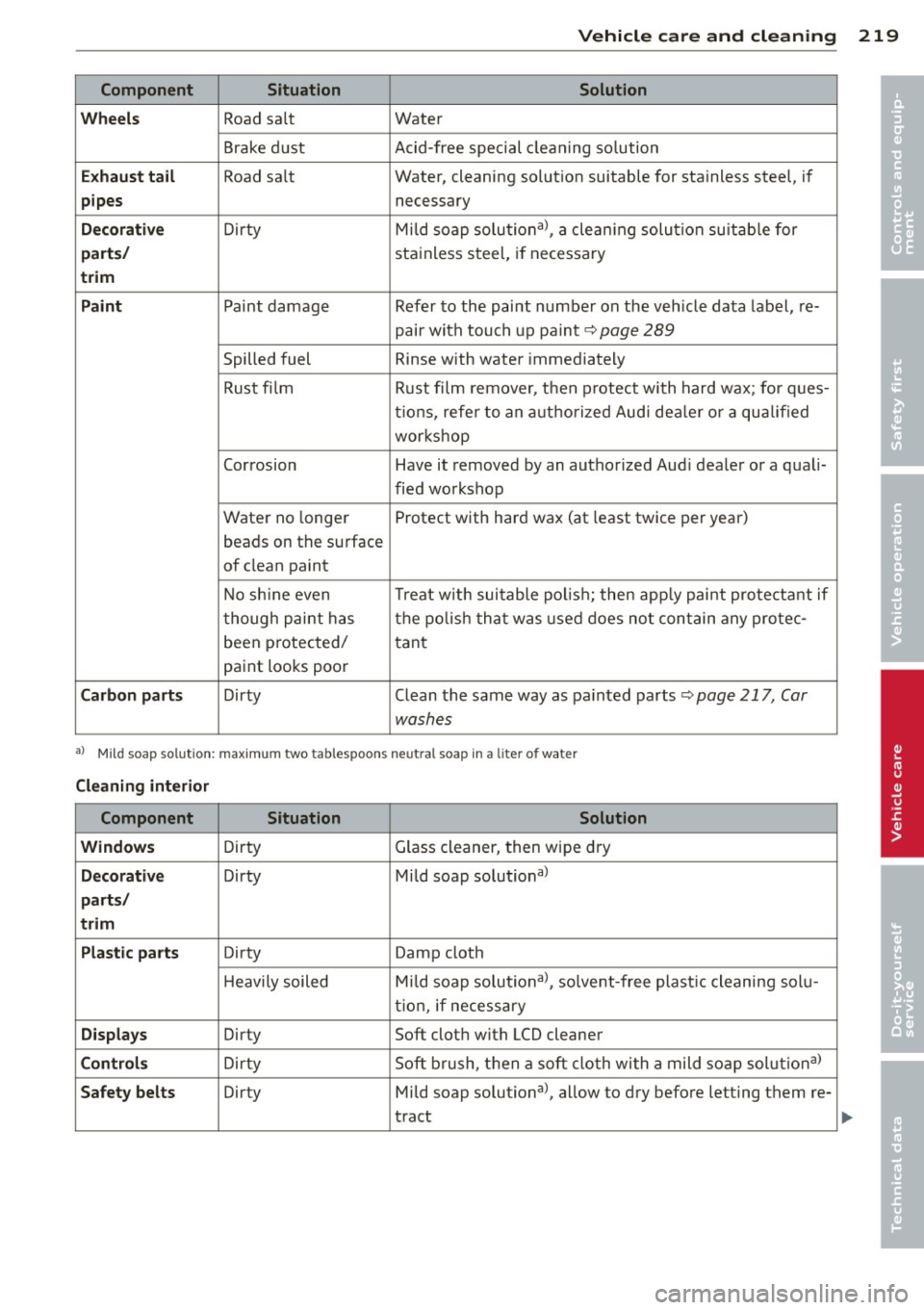
Component Situation Solution
Wheels
Road sa lt Water
Brake dust Acid-free special cleaning solution
Exhaust tail Road salt Water, cleaning solut ion suitable for stainless steel, if
pipes necessary
Decorative Dirty Mild soap
solutional, a cleaning solution suitab le for
parts/ stainless steel, if necessary
trim
Paint
Paint damage Refer to the paint number on the veh icle data label, re-
pair with touch up paint~
page 289
Spilled fuel R inse with water immediately
Rust fi lm Rust film1 remover, then protect with hard wax; for ques-
tions, refer to an authorized Audi dealer or a qualified
workshop
Corrosion Have it removed by an aut horized Audi dealer or a quali-
fied workshop
Water no longer Protect with hard wax (at least twice per year)
beads on th e surface
of clean paint
No shine even Treat
with suitable polish; then apply paint protectant if
though paint has the polish that was used does not contain any protec-
been protected/
tant
paint looks poor
Carbon parts Dirty Clean the same way as pa inted parts ~ page 217, Car
wash es
al Mild soap sol utio n: maximum two tablespoons neutral soap in a lite r of water
Cleaning interior
Component Situation Solution
Windows
D irty Glass
cleaner, then wipe dry
Decorative Dirty Mild soap solutional
parts/
trim
Plastic parts
Dirty Damp cloth
H eavily soiled Mild soap solutional, solvent-free plast ic cleaning solu-
tion, if neces sary
Displays Dirty Soft cloth with LCD cleaner
Controls Dirty Soft
bru5,h, then a soft cloth with a mild soap solut ional
Safety belts Dirty Mild soap solutional, allow to dry befo re letting them re-
tract
•
•
Page 223 of 316
-Never use abrasive cleaning materials
or alcohol to clean the camera lens.
Th is could cause scratches and cracks .
-Window s
-Remove snow and ice on w indows and
exterior mirrors with a plastic scraper.
To avoid scratches, move the scraper only in one direction and not back and
forth.
- Never remove snow or ice from w in
dows and m irrors using wa rm or hot
wate r because this cou ld cause crac ks
to form.
- To avoid damage to the rear window
defogger, do not apply any stickers on
the heating wires on the inside of the
w indow .
-Dec or ati ve p arts /trim
-Never use chrome care or cleaning
products.
-Paint
-To reduce the risk of scratches, the ve-
hicle must be free of dirt and dust be
fore polishing or waxing.
- To prevent paint damage, do not polish
or wax the veh icle in direct sunlight.
- To reduce the risk of paint damage, do
no t polish away rust film .
-Di splay s
-To avoid scratches, do not use dry
cleaning methods on displays .
-Controls
- Make sure that no flu ids enter the con-
trols, because this cou ld cause dam
age .
-Safet y belts
- Do not remove the safety belts to clean
t hem.
- Never clean safety belts or their com
ponents chemically or with cor ros ive
fluids or solvents and never a llow
sharp objects to come into contact
with the safety belts . This cou ld cause
damage to the belt webbing.
- If the re is damage to the webb ing, the
connections, the retractors or the buck
les, have them rep laced by an author-
V ehicl e ca re a nd cl eanin g 221
ized A udi dealer or a qualified work
shop.
- Te xtile s/Vin yl/ Alcant ara
- Never treat Vinyl/Alcantara w ith leath-
er care products, solvents, floor polish,
shoe polish, stain remover or s imilar
p rod ucts.
- To avoid damage, have stubborn stains
removed by an authorized Aud i deale r
or a qualif ied workshop.
- Never use steam cleaners, brushes,
hard sponges, etc. when cleaning.
- Objects w ith sharp edges such as zip
pers, rivets on clothing or be lts can
cause damage to the surface.
- Open hook and loop fastene rs, for ex
ample on cloth ing, can damage seat
covers. Make sure hook and loop fas
tene rs a re closed.
- Natural leather
- Neve r treat leather w ith solvents, floor
polish, shoe polish, stain remover or
similar products.
- Objects with sharp edges such as zip·
pers, rivets on clothing or be lts can
cause damage to the surface.
- Never use steam cleaners, brushes,
hard sponges, etc. when cleaning.
- To help prevent the leather from fad
ing, do not leave the vehicle in d irect
sunlight for long per iods of t ime. If
leaving the vehicle parked for long pe
riods of time, you should cover the
leather to protect it from d irect sun
light.
(D Tips
- Insects are easier to remove from paint
that has been freshly waxed.
- Regular waxing can prevent rust film
from forming.
•
•
Page 230 of 316
228 Fuel supply and filling your fuel tank
Selective catalytic
reduction
General information
Applies to vehicles: wit h diese l en gi ne
On vehicles with selective catalytic reduction,
an urea solution (Ad Blue) is injected into the
exhaust system before a nitrogen oxide cata
lytic converter to reduce nitrogen emissions.
The Ad Blue is stored in a separate tank in the
vehicle . The Ad Blue usage accounts for ap
proximately 0.5% to 1.2% of the diesel fuel
that is used.
You must refill the Ad Blue or have it refilled
by your authorized Audi dealer or qualified
workshop as soon as the AdBlue refill mes sage appears in the instrument cluster
c;,page229.
A WARNING
Failure to heed Ad Blue refill information in
the instrument cluster can prevent the ve
hicle from being started and driven. If the
vehicle cannot be driven and an emergency
arises, persona l inju ry can occur.
- Always have the Ad Blue tank refilled well
before the tank ru ns dry.
@ Tips
-The instrument cluster display indicates
the distance remaining that can be driv
en
c;, poge 228. If the Ad Blue tank is
completely empty, the engine will not
start again after the ignition is switched
off.
- AdBlue is required by law to operate this
vehicle.
Indicator in the instrument cluster
display
Applies to veh icles: w ith diesel en gine
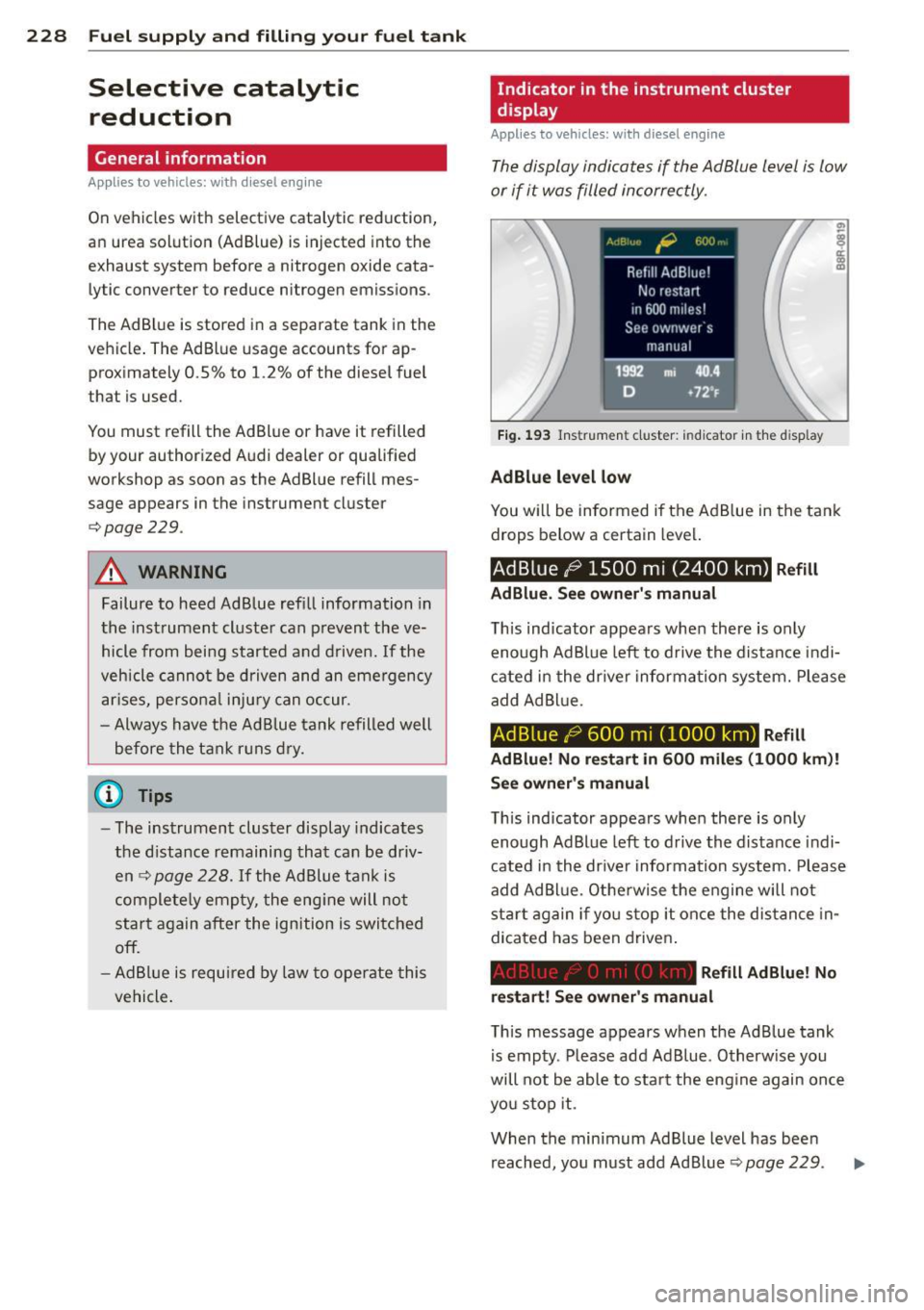
The display indicates if the Ad Blue level is low
or if it was filled incorrectly.
Fig. 193 Ins trumen t cluster : in d icato r in the d isp lay
AdBlue level low
You w ill be informed if the Ad Blue in the tank
drops below a certain level.
Ad Blue l;) 1500 m i (2400 km) Refill
AdBlue. See owner's manual
This indicator appears when there is only
enough Ad Blue left to drive the distance indi
cated in the driver information system. Please
add AdBl ue.
AdBlue l;; 600 mi (1000 km) Refill
AdBlue! No restart in 600 miles (1000 km)!
See owner 's manual
This indicator appears when there is only
enough Ad Blue left to drive the distance indi
cated in the driver information system. Please
add Ad Blue. Otherwise the engine will not
sta rt again if you stop it once the distance in
dicated has been driven .
Refill Ad Blue! No
restart! See owner's manual
This message appears when the Ad Blue tank
is empty. Please add Ad Blue. Otherwise you
will not be able to start the engine again once
you stop it.
When the minimum Ad Blue level has been reached, you must add Ad Blue
c;, page 229.