stop start AUDI Q5 2015 Owner's Manual
[x] Cancel search | Manufacturer: AUDI, Model Year: 2015, Model line: Q5, Model: AUDI Q5 2015Pages: 302, PDF Size: 75.01 MB
Page 103 of 302
M N
co
a:
co
,...., \!) 1.1"1
N 1.1"1 ,....,
Hybrid functions and operating modes
Appl ies to vehicles: with hybri d drive
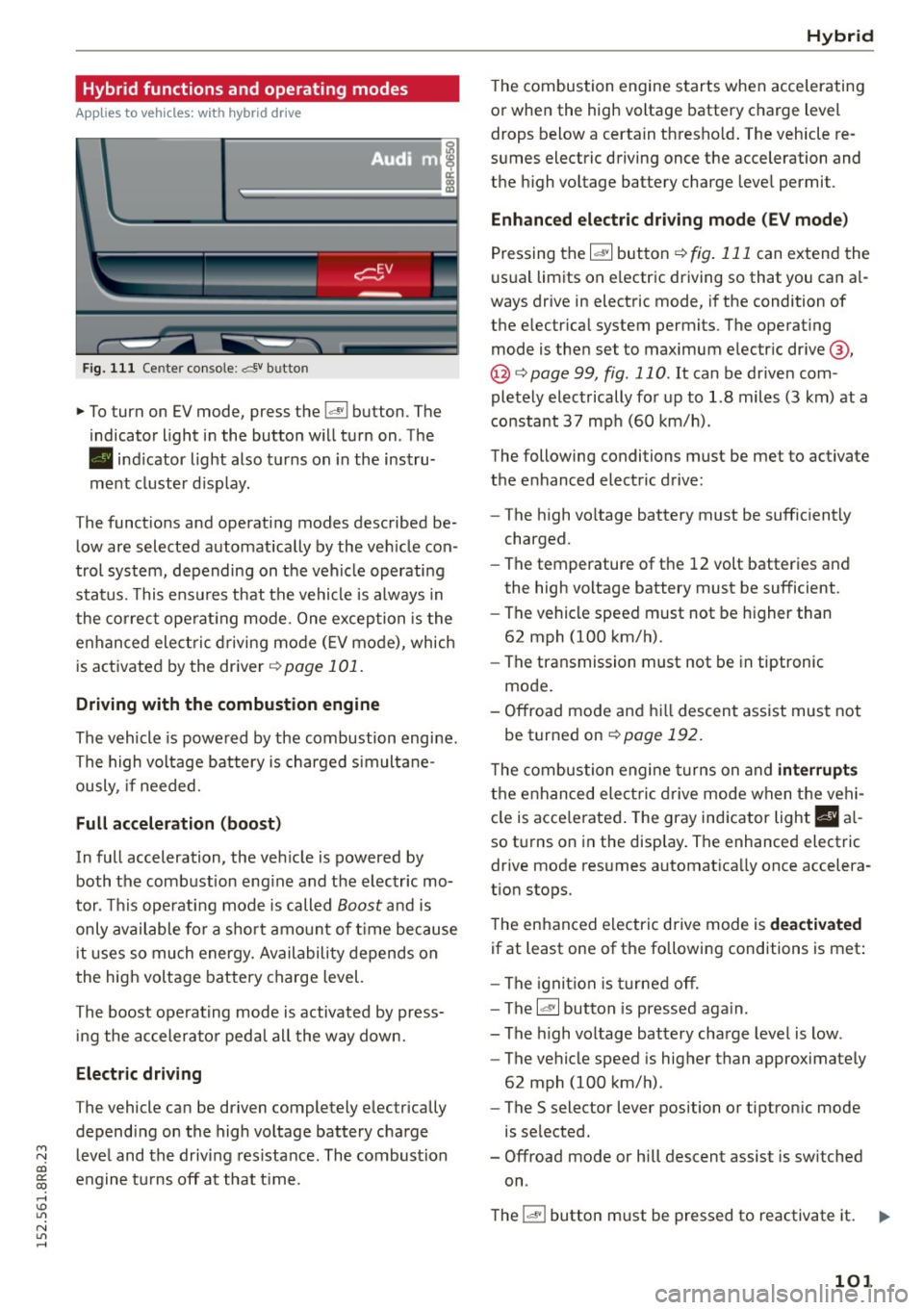
Fig. 111 Center console: av bu tton
.,. To turn on EV mode, press the l.,,;v l button. The
indicator light in the button will turn on. The
• indicator light also turns on in the instru
ment cluster display.
The functions and operating modes described be
low are selected automatically by the veh icle con
trol system, depending on the vehicle operating
status. This ensures that the vehicle is always in
the correct operating mode. One exception is the
enhanced elect ric driving mode
(E V mode), which
is activated by the driver ¢
page 101.
Driving with the combustion engine
The vehicle is powered by the combustion engine.
The high voltage battery is charged simultane
ously, if needed.
Full acceleration (boost)
In full acceleration, the vehicle is powered by
both the combustion eng ine and the electric mo
tor . This operating mode is called
Boost and is
only available for a short amount of time because
i t uses so much energy. Availability depends on
the high voltage battery charge level.
The boost operating mode is activated by press in g the accelerator peda l all the way down.
Electric driving
The vehicle can be driven completely electrically
depending on the high voltage battery charge
level and the driving res istance . The combustion
engine turns off at that t ime .
Hybrid
The combustion engine starts when accelerating
or when the high voltage battery charge level drops below a certain thresho ld. The vehicle re
sumes electric driving once the acceleration and
the high voltage battery charge level permit .
Enhanced electric driving mode (EV mode)
Pressing the 1~· 1 button r::!> fig. 111 can extend the
usual limits on e lectric driving so that you can a l
ways drive in electric mode, if the condition of
the electrical system permits. The operating
mode is then set to maximum electric drive @,
@ <:!> page 99, fig . 110. It can be driven com
pletely electrically for up to 1.8 miles (3 km) at a
constant
37 mph (60 km/h).
The following conditions must be met to activate
the enhanced electric drive:
- The high voltage battery must be sufficiently
charged.
- The temperature of the
12 volt batteries and
the high voltage battery must be sufficient.
- The vehicle speed must not be higher than
62 mph (100 km/h).
- The transmission must not be in tiptronic
mode.
- Offroad mode and hill descent assist must not
be turned on
r::!;>page 192.
T he combustion engine turns on and interrupt s
the enhanced ele ctric drive mode when the vehi
cle is acce lerated. The gray ind icator light
I§ a l
so turns on in the display. The enhanced electric
drive mode resumes automatica lly once accelera
tion stops.
The enhanced electric drive mode is
deactivated
if at least one of the following conditions is met :
- The ignition is turned off.
- The
l~ ·I button is pressed aga in.
- The high voltage battery charge level is low .
- The vehicle speed is higher than approximately
62 mph (100 km/h) .
- The
S selector lever position or tiptronic mode
is selected.
- Offroad mode or hill descent assist is switched
on .
The
l "'-'' I button must be pressed to reactivate it. 1iJ11-
101
Page 104 of 302
Hybrid
St art-Stop function
The combust ion engine is operated only as need
ed . Genera lly, the combustion engine turns
off
when the vehicle is stationary and the high volt
age battery powers the electrical vehicle sys
tems .
The purpose o f automatica lly shutting the com
bustion engine
off in hybrid drive mode is to save
fue l. All of the important vehicle systems, such
as steering, brakes and the A/C system, contin ue
to remain active. In some cases, systems may re
qu ire the combustion engine to continue running
when the vehicle is stationary. When driv ing in
congested traffic for long periods of t i me, the
combustion engine will cycle on when the veh icle
is stationa ry to keep the h igh voltage battery
charged .
Gliding
If the gas pedal is not pressed and the D position
is selected, the combustion engine rema ins
turned
off up to speeds of approximate ly 99 mph
(160 km/h). Dr iving conse rvative ly like this can
r educe fue l consumpt ion.
Energy recovery (recup eration )
When braking, the e lectr ic motor will act as a
generator creating electric energy that is then
s to red in the h igh voltage batte ry. This also oc
curs when the ve hicle is coas ting or dr iv ing down
hi ll. The combust ion engine is automatically
turned
off in t his case.
Tips for Driving Efficiently with your Hybrid
Applies to veh icles: w ith hybrid drive
Driving situa- Conditions
tions
- Shift into the D pos ition .
Starting from a -
Release the brake pedal.
stop -
Only press mode rate ly on the ac-
celer ator peda l.
102
The vehicle is braked with the electric motor by
applying early and even press ure to t he brakes
and us ing short pedal movements¢
page 99,
fig. 110@. By do ing th is, a large amount of the
k inet ic energy is recovered and may be stored as
electric energy in the high voltage batte ry. Dur
i ng heavy braking, the convent ional brakes are al
so act ivated
¢ page 99, fig . 110 @.
The energy recovery is shown in the MMI display
¢page 105 .
Automatic start of the combu stion engine
Various operating conditions cause the combus
tion eng ine to start a utomatica lly :
- T he high vo ltage battery charge leve l is low.
- T he temperature of the combustion engi ne is
low.
- Th e temperature of the cataly tic converte r is
low.
- T he power output needed for the A/C system is
high.
- T he veh icle speed is high .
- The vehicle acceleration is h igh .
- The incline is steep.
- High charge level for the high voltage battery
when coasting. In this case, the hig h voltage
battery cannot absorb any more ene rgy and so
the electric motor cannot s low down the veh i
cle. The combustion engine tur ns on (eng ine
brake) . In this situation the high voltage bat
tery will show a Max cha rge.
Vehicle behavior
In the D posit io n, the hybrid system adapts
to the driving s ituat ion by automatically
sw itch ing between the combust io n engine
a nd e lectr ic dr ive types or by combini ng
them.
Page 109 of 302

M N
co ~ co
rl I.O
"' N
"' rl
Audi adapt ive crui se cont rol and bra king gu ard
Audi adaptive cruise
control and braking
guard
Introduction
App lies to vehicles: with Audi adaptive cruise co ntrol
The adaptive cruise control system assists the
driver by regu lating vehi cle speed and helping to
maintain a set distance to the vehicle ahead,
within the limits of the system.
If the system de
tects a moving vehicle up ahead, adaptive cruise
control can brake and then accelerate your vehi
cle. This helps to make driving more comfortable
on long highway stretches.
The braking guard system can warn you about an impend ing collision and initiate braking maneu
vers
¢ page 113.
Adaptive cruise control and braking guard have
technical limitations that you must know, so
p lease read this section carefu lly, understand
how the system works and use them properly at
all times.
General information
General information
A pp lies to vehicles: with Audi adaptive cruise co ntrol
Fig. 116 Fro nt of the vehicle : Position of rada r sensor
The area that contains the radar sensor
¢ fig. 116 must never be covered by stickers or
other objects or obs tructed with dirt, insects,
snow or ice that w ill interfere with the adaptive
cru ise control system and braking guard. For in
formation on cleaning, refer to ¢
page 208. The
same applies for any modifications made in the
front area. T
he function of the adaptive cruise contro l sys
tem and braking guard is limited under some
condit ions:
- Ob jects can on ly be de tected when they are
within sensor range
¢ page 109, fig. 119.
-The system has a limi ted ability to de tect ob
jects that are a short d istance ahead, off to the
side of your vehicle or moving into your lane .
- Some kinds of veh icles are hard to detect; for
examp le motorcycles, vehicles with high
ground clearance or overhanging loads may be
detected when it is too late or they may not be
detected at all.
- When driving through curves
¢page 108 .
-Stationa ry objects ¢ page 108.
,&_ WARNING
-= -Always pay attention to traffic when adaptive
cruise control is switched on and braking
g uard is active. As the driver, you are sti ll re
sponsible for start ing and for maintaining
speed and distance to other objects. Braking
g uard is used to assist you . The drive r must
a lways take action to avo id a collision . Th e
d river is always responsible for bra kin g at the
correct t ime.
- I mproper use of adaptive cru ise control can
cau se collisions, o ther accidents and serious
pe rsonal injury.
- Neve r let the comfort and conve nience that
adap tive cr uise control and braking guard
o ff er distrac t you from the need to be alert
t o traffic con ditions and the need to remain
i n full control of your vehicle at all times,
- Always remember that the adaptive cruise
control and braking guard have limits -they
will not slow the vehicle down or maintain
the set distance when you dr ive towards an
obstacle or something on or near the road
that is not moving, such as vehicles stopped
in a traff ic jam , a sta lled or d isabled vehicle.
If registered by the radar sensor, vehicles or
obstacles that a re not moving can t rigger a
coll is io n warning and if confi rmed by the
video came ra, a n acute collision warning.
~
107
Page 122 of 302
Audi drive select
Audi drive select
Driving settings
Introduction
Applies to veh icles: w ith Audi drive select
Drive select provides the possibility to experience
d ifferent types of vehicle settings in one vehicle.
F or instance, using the three
Comfort, Auto and
Dynamic modes, the driver can switch from a
sporty to a comfortable driving mode with the press of a button.
Addit ionally, in vehicles with MM I*, the vehicle
setup for
Individual* mode can be customized by
you. This makes it possible to combine settings
such as a sporty engine tuning with comfortable
steering .
A WARNING
-
Improper use of the drive select can cause
collisions, other accidents and serious person
al injury.
Description
Applies to veh icles: w ith Audi dr ive select
The vehicle setup in each mode depends on the
veh icle's features . However, the engine, automat
ic transmission and steering are always involved.
Engine and automatic transmission
Depending on the mode, the engine and the au
tomatic transmission respond quicker or in a
more balanced manner to accelerator pedal
movements. In the sporty dynamic mode, the au
tomatic transmission shifts at higher RPMs.
Steering
The steering adapts in terms of steering effort and steering ratios. Indirect steer ing that moves
easily, like the steering in comfort mode, is best
suited to long drives on a highway. In contrast,
dynamic mode provides sporty, direct stee ring.
The follow ing applies to vehicles with dynam ic
steer ing*: the steering ratio changes based on ve
h icle speed in order to maintain optimum steer
ing effort for the dr iver at all times. This sets the
s teer ing to be less sensitive at higher speeds in
120
order to provide improved vehicle control. At re
duced speeds, however, steering is more direct in
order to keep the steer ing effort as m inima l as
possib le when the driver is maneuvering the vehi
cle. At low and average speeds, dynamic steering
additionally provides more responsive steering
performance.
Adaptive dampers*
The adaptive dampers* use sensors to record in
formation regarding steering movements, brak ing and acceleration operations by the driver,
road surface, driving speed, and load. This makes
i t possible to adapt damp ing to the driving situa
tion virtually in real t ime . Drive select also makes
i t possible to sat isfy the desire fo r sporty suspen
s ion (Dynamic) and comfortable suspension
(Comfo rt) without giving up ba lanced tuning (Au
to).
Engine sound*
T he sound of the engine is adapted to the select
ed mode and ranges from subtle to sporty.
Adaptive cruise control*
The behavior when accelerating can be adjusted
from comfortable to sporty, depending on the
drive select mode . Adaptive cruise control a lso
r esponds to the driving behavior of the vehicle
ahead in a more conse rvative or sporty manner.
@ Tips
- In some models, the maximum vehicle
speed can only be reached in the
Auto and
Dynamic modes.
- Selecting the
Dynamic mode resu lts in spor
ty shifting characteristics. The 5 gear pos i
tion engages automatical ly.
- In vehicl es that have dynamic stee ring*, op
erating noise is heard when starting or stop
ping the engine. This does not indicate a
problem .
Page 127 of 302
M N
co
a:
co
,...., \!) 1.1"1
N 1.1"1 ,....,
(Neutral) for more than approximately 1 second,
without the brake pedal being pressed.
Release button
The release button on the selector lever prevents
the lever from be ing acc identally shifted into cer
tain positions. Pressing this button deactivates
the selector lever lock . Depending on the direc
tion of the shift, the se lector lever locks at differ
ent positions. The positions are highlighted in
the illustration¢
fig. 135.
Ignition key safety interlock
The key cannot be removed from the igni tion un
l ess the se lector lever is in the P park position .
When the ignition key is removed, the selector
l ever will be locked in the P position.
Driving the automatic transmission
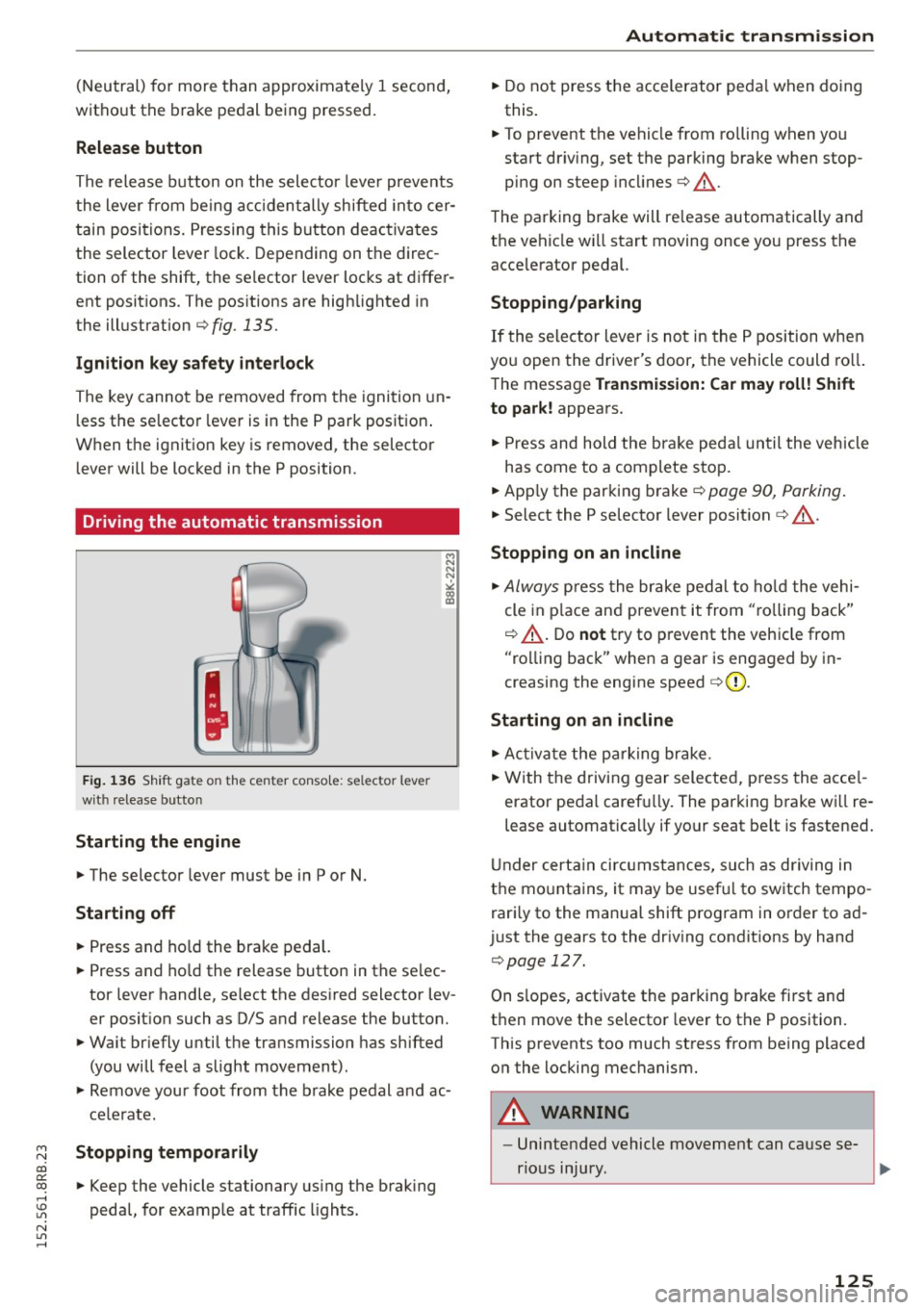
Fig. 136 Shift gate on the center conso le: selector lever
with release button
Starting the engine
.,. The selector lever must be in P or N.
Starting off
.,. Press and hold the brake pedal.
.,. Press and ho ld the release button in the se lec
tor lever handle, select the desired selector lev
er position such as D/S and release the button.
.,. Wait br iefly until the transmission has shifted
(you will feel a slight movement).
.,. Remove your foot from the brake pedal and ac
celerate.
Stopping temporarily
.,. Keep the vehicle stationary using the brak ing
pedal, for example at traffic lights.
Automatic transmission
.,. Do not press the accelerator peda l when doing
this.
.,. To prevent the vehicle from rolling when you
start dr iv ing, set the parking brake when stop
ping on steep incl ines¢ &_.
The parking brake will re lease automatically and
the vehicle wi ll start moving once you press the
acce lerator pedal.
Stopping/parking
If the selector lever is not in the P position when
you open the driver's door, the vehicle could roll.
The message
Transmission: Car may roll! Shift
to park!
appears.
.,. Press and hold the brake pedal until the vehicle
has come to a complete stop.
.,. App ly the parking brake¢
page 90, Parking .
.,. Select the P se lector lever position ¢ &_ .
Stopping on an incline
.,. Always press the brake pedal to hold the vehi
cle in place and prevent it from "ro lling back"
¢ &_ . Do
not try to prevent the vehicle from
"rolling back" when a gear is engaged by in
creasing the engine speed
c> (D .
Starting on an incline
.,. Activate the parking brake .
.,. With the driving gear selected, press the acce l
erator pedal carefu lly. The parking brake wi ll re
lease automatically if your seat belt is fastened.
Under certain circumstances, such as driving in
the mountains, it may be usefu l to switch tempo
rari ly to the manual shift program in order to ad
just the gears to the driving conditions by hand
¢page 127 .
On s lopes, activate the parking brake first and
then move the selector lever to the P position .
This prevents too much stress from being placed on the locking mechanism .
A WARNING ,_
-Unintended vehicle movement can cause se-
rious injury.
~
125
Page 135 of 302
M N
co ~ co
rl I.O
"'
Parallel Parking
Applies to vehicles: with Audi parking system p lus w ith rear
view came ra
Use parking mode 2 to help you parallel pork
along the side of o street.
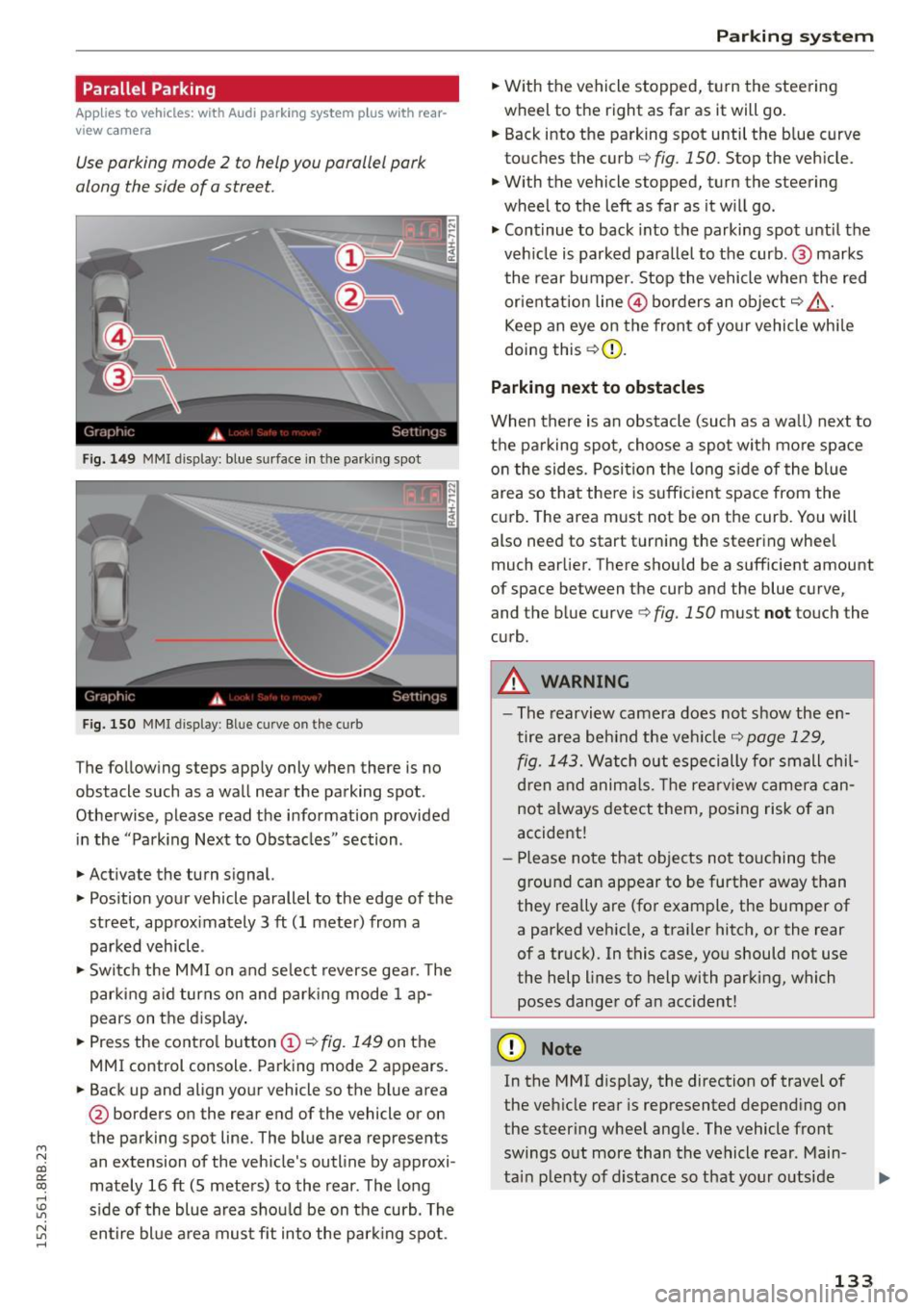
Fig. 149 MMI disp lay: blue surface in th e parking spot
Fig. 150 MMI display: Blue curve on th e curb
The follow ing steps app ly only when there is no
obstacle such as a wall near the parking spot.
Othe rwise, please read the informat ion provided
in the "Parking Next to Obstacles" section .
.,. Activate the turn s ignal.
.,. Position your vehicle parallel to the edge of the
street, approx imately 3 ft (1 meter) from a
parked vehicle .
.,. Swi tch the M MI on and se lect reverse gea r. T he
park ing a id turns on and park ing mode 1 ap
pears on the d isplay .
.,. Press the contro l button (!)¢
fig. 149 on the
MMI control console. Parking mode 2 appears.
.,. Back up and align your vehicle so the b lue area
@ borders on the rear end of the vehicle or on
the parking spot line. The blue area represents
an extension of the vehicle's outline by approxi
mately 16 ft (S meters) to the rear . The long
s ide of the blue area should be on the curb. The
~ entire bl ue a rea mus t fit into the par king spot .
Parking system
.,. With the vehicle stopped, t urn the steering
wheel to the right as far as it will go.
... Back into the parking spot until the b lue curve
to uches the curb
q fig. 150. Stop the vehicle.
.,. With the vehicle stopped, turn the steering
wheel to th e left as far as it w ill go .
.,. Cont inue to back into the parking spot until the
veh icle is parked para llel to the curb .@ marks
the rear bumper. Stop the vehicle when the red
or ientation line@ borders an obje ct
q .&, .
Keep an eye on the front of yo ur vehicle whi le
doing this ¢(D.
Parking next to obstacles
When there is an obstacle (such as a wall) next to
t h e pa rking spot, choose a spot with mo re space
o n the sides. Posi tion the long s ide of the blue
area so tha t the re is suff icient space from the
cu rb . T he area m ust not be on the curb. You will
also need to start t urn ing the steering wheel
much earlier. There should be a sufficient amount
of space between the curb and the blue curve
'
and the blue curve 9 fig. 150 must not touch the
c u rb .
A WARNING
-The rearvi ew camera does no t show the en
tire area be hind the veh icle
q page 129,
fig. 1 43.
Watch out especi ally for small chil
d ren and anima ls. The rearv iew camer a ca n
not always detect t hem, posing risk of a n
accident!
- Pl ease no te that objects no t to uch ing the
g round can appear to be further away than
they really are (for example, the bumper of
a parked vehicle, a traile r hitc h, or the rear
of a truck). In this case, you should not use
the help lines to help with parking, which
poses danger of an accident!
(D Note
In the MMI d isplay, the direction of travel of
the veh icle rear is represented depend ing on
the steer ing whee l ang le. The vehicle front
swings o ut more than the vehicle rear . Main
ta in plenty of d istance so that your o utside
133
Page 197 of 302
M N
co
a:
co
,...., \!) 1.1'1
N 1.1'1 ,....,
brake. This may cause the brakes to over
heat, premature wear and increased stop
ping distance.
- Under certain climatic and operating condi
tions such as passing through wate r, driving
in heavy rain o r after washing the vehicle,
the effectiveness of the brakes can be re duced. In w inter, ice can accumulate on the
brake pads, linings, discs and drums . Care
fully apply b rakes for a test. B rakes wi ll dry
and ice coatings wi ll be cleaned off after a
f ew caref ul bra ke applications .
- Dr iv ing for an extended period of time on
salt-covered roads w ithout using you r
brakes can also affect braking efficiency .
Clean off accumulated salt coating from
brake discs and pads w ith a few caref ul
brake applicat ions.
- If you damage the front spoiler, or if you in
stall a different spoi ler, be sure the air flow
to the front brakes is not obstructed. Other
wise the brake system could overheat reduc ing the effectiveness of the ent ire brake sys
tem .
- Failure of one brake c ircuit will impair the
braking capab ility result ing in an increased
stopp ing distance. Avoid driv ing the veh icle
and have it towed to the nearest authori zed
Audi dealer or qu alified workshop.
- Never let the vehicle roll to a stop w ith the
eng ine shut off.
- If the brake booster is not work ing, the
brake pedal must be pressed conside rably
harder to make up fo r the lack of booste r as
sist ance.
Electromechanical power
assist, Dynamic steering
The electromechanical power assist helps the
driver when steering.
Power stee ring adapts electronically based on
the vehicle speed.
Indicator light s and mess age s
• Stee ring def ective! Do not drive vehicle!
Smart T echno log y
If this indicato r light turns on and stays on and
t h is message appears, the power steering may
have failed.
Stop the vehi cle in a sa fe location as soo n as pos
s ible . Do
not cont inue driving . See yo ur author
ized Audi dea ler or other qualified repair facility
for assistance .
'Iij Dynamic steering: Sy stem fault! You c an
continue dri ving
If the indicato r light turns on and the message
appea rs, the stee ring may be more d ifficult to
move o r more sensit ive th an usua l. The steering
may also be at an angle when driving straight .
Drive slowly to you r authorized Audi dea le r o r
qualified wo rkshop to have the ma lf u nct ion co r
re cted.
,~n D ynamic steering: Initializing
Audi drive select*: if the indicator light blinks and
the driver message appears, the dynamic steer
i ng* is reinitialized. After starting the engine, the
stee ring wheel will move slightly . Re-in itia liza
t ion m ight be necessa ry if the stee ring wheel was
moved h ard to the left and r ight while the veh icle
was not moving. The disp lay t urns off if the ini ti
alization was success ful.
(D Tips
- If the . or
(~fl indica tor light only stays on
for a sho rt time, you may cont inue driving.
- T he dynamic s teering* stab ility systems
<:!> page 191 are no t available in the event of
a system mal func tion .
- For add ition al information on dynamic
steer ing*
<:!> page 120.
Driving with your quattro
With all -wheel drive, all four wheels are driven.
General information
With a ll-wheel d rive, power is distr ibuted to a ll
fo ur wheels. This happens automati ca lly depend
i ng on your d riving s tyle and the road condi tions
a t t he t ime . See a lso <:!>
page 191. .,.
195
Page 200 of 302
Driving and the environment
Driving and the
environment
Breaking in
New engine
The engine needs to be run-in during the first
1,000 miles (1,500 km).
For the first 600 miles (1,000 kilometers ):
.,. Do not use full throttle.
.,. Do not drive at engine speeds that are more
than 2/3 of the maximum permitted RPM .
From 600 to 1,000 miles (1,000 to 1,500
kilometers ):
.,. Speeds can gradually be increased to the maxi
mum perm issib le road or engine speed.
During and after break-in period
.,. Do not rev the engine up to high speeds when it
is cold. This applies whether the transmission is
in N (Neutral) or in gear .
After the break•in period
.,. Do not exceed maximum engine speed under
any circumstances.
.,. Upshift into the next higher gear
before reach
ing the red area at the end of the tachometer
scale
¢page 10.
During the first few hours of driving, the engine's
internal friction is higher than later when all the
moving parts have been broken in. How well this
break-in process is done depends to a cons idera
b le extent on the way the vehicle is driven dur ing
the first 1,000 miles (1,500 kilometers).
{[) Note
Extremely high engine speeds are automati
cally reduced. However, these rpm limits are
prog rammed fo r an engine well run-in, not a
new engine.
@ For the sake of the environment
Do not drive with unnecessarily high engine
speeds -upshifting early saves fuel, reduces
noise and protects the environment.
198
· New tires
If your vehicle is running on new tires, drive very
ca refully for the first 350 m iles (500 k ilometers)
after fitting.
_& WARNING
New tires tend to be slippery and must a lso
be "broken-in" . Be sure to remember this dur
ing the first 350 m iles (500 k ilometers).
Brake gently. Avoid following closely behind
other vehicles or other situations that might
require sudden, hard brak ing.
Catalytic converter
App lies to vehicles : wit h gasoli ne e ngi ne
It is very important that your emission control
system (catalytic converter) is functioning prop
erly to ensure that your vehicle is running in an
environmentally sound manner .
.,. Always use lead-free gasoline ¢page 213,
Gasoline .
.,. Never run the tank down all the way to empty.
.,. Never put too much motor oil in your engine
¢ page 22 5, Adding engine oil 9::r..
.,. Never try to push- or tow-start your vehicle .
The catalytic converter is an efficient "clean-up"
device b uilt into the exhaust system of the vehi
cle. The cata lytic converter burns many of the
po llutants in the exhaust gas before they are re
l eased into the atmosphere.
-
The exclusive use of unleaded fuel is c ritica lly im
portant for the life of the catalytic converter and
proper functioning of the engine.
A WARNING
The temperature of the exhaust system is
high, both when driv ing and after stopping
the eng ine.
-
- Never touch the exhaust tail pipes once they
have become hot. This could result in burns.
- Do not park or operate the vehicle in areas
where the hot exhaust system may come in
contact with dry grass, brush, fuel spill or
other material which can cause a fire.
Page 202 of 302
Driving and th e environment
consumption by 10-15 percent. This section will
give you some tips on how you can help the envi ronment and your pocketbook.
(D Tips
The consumption estimates as published by ENVIRONMENTAL PROTECTION AGENCY (EPA)
and Transport Canada may not correspond to
your actual consumption on the road, wh ich
w ill vary depend ing upon vehicle load and
speed, road and weather conditions, trip
length, etc .
Drive smoothly and keep a lookout ahead
Vehicles use the most fuel when they are acceler
ating .
"'Avoid unnecessary accelerating and braking.
Vehicles use the most fuel when they are acceler
ating . If you anticipate what is going to happen
next, you will need to brake less and, thus, accel
erate less. Let the vehicle coast whenever possi
ble -for example when you see that the next traf
fic light is red .
Avoid full throttle
Driving at moderate speeds saves fuel and im
proves your mileage.
"' Try and keep well be low your car's max imum
speed.
Accelerating gently reduces fuel consumption,
engine wear, and does not disturb the environ
ment.
Fue l consumption, exhaust emissions and engine
noise increase disproportionately at high speeds.
If you drive at approximately three quarters of
top speed, fuel consumpt ion w ill be reduced by
one half. Never dr ive faster than the posted
speed lim it and weather conditions permit .
200
· Reducing unnecessary idling
Even when your car is just idling it burns up fuel .
"'Shut the engine off when you are not driving
the vehicle.
"' Do not warm up the vehicle by letting the en-
gine run at idle .
The idling phase is automatically reduced for
vehicles with the Start-Stop-System*. It is effi c ient to sw itch off the eng ine in vehicles w ithout
the Start-Stop-System* when stopped at railroad
crossings and long red lights. Turn ing the engine
off for just 30-40 seconds saves more fuel than is
burned by start ing the eng ine again.
It takes a long t ime for the engine to warm up
fully when it is runn ing at id le . However, wear
and noxious emissions are especia lly high when
the engine is warming up. So you sho uld drive
away as soon as you start the eng ine and avoid
running at high rpms whi le the engine is s till
warming up.
Q) Note
Do not leave engine id ling unattended after
starting. If warning lights should come on to
indicate improper operation, they would go
unheeded. Extended idling also produces
heat, which could result in overheating or oth
er damage to the veh icle or other property.
· Regular maintenance
A badly tuned engine unnecessarily wastes a lot
of fuel.
"' Have your vehicle serviced at regu lar intervals.
By having your veh icle reg ularly serv iced by an
authorized Aud i dea le r helps to ensure that i t
runs proper ly and economica lly. The condition of
your vehicle not on ly affects its safety and ability
to hold its value, it also affects
fuel consump
t ion .
Chec k your oil ea ch t ime y ou fill your tank.
The amount of o il used is re lated to engine load
and speed. .,.
Page 205 of 302
M N
co
a:
co
,...., \!) ..,.,
N ..,., ,....,
-Ideal conditions do not prevail offroad . Nev
er utilize the maximum read ings to their
fullest, always leave a safety reserve.
Driving tips
On poor road and offroad, there is always only
one motto: Plan ahead and drive slowly!
P lease observe the followin g when driving away
from paved roads :
~ Drive only on roads and off road sections which
match the des ign of your veh icle and yo ur abili
t ies as a driver . Never take risks!
~ Drive slowly and plan ahead!
~ Take into consideration the gr ou nd cle aran ce of
your vehicle.
~ Activate the offroad mode c> page 191 as need
ed .
~ Use the hill des cent a ssi st <=:> page 193 when
dr iv ing down steep sections on hi lls.
Unp aved roads and offroad
Drive s low ly on unfami liar roads and unknown
offroad sections, and look out for unexpected ob
stacles (e.g . potho les, rocks, tree stumps, etc .) .
T o prevent the vehicle from bottoming and avoid
damage to the underbody, you should drive
straight across severe bumps in the ground with
only one side of the vehicle so that only two of
your wheels cross t he bumps.
Drive briskly through sandy or marshy offroad
sections and do not stop, if at all poss ible.
Driving through water
Note the following to avoid vehicle damage when
driving through water, for example on flooded roads:
- The water must not be any higher than the bot-
tom of the vehicle body .
- Do no t d rive fas ter than wa lking speed.
Driving on a slope
If you ever find yourself not ab le to climb a s lope,
do not try to turn around, drive back down in
re
ver se.
Othe rwise, you ru n the r isk of tipp ing ove r.
O ffro ad dri vin g
If the vehicle th reaten s to tip over when driving
acro ss a slope, you must immediately stee r
downhill in the direction of the slope.
Do not park you r vehi cle on steep s lopes or
grades.
T o reduce the risk of tipp ing ove r, d rive on s lopes
i n the d irection of t he downwa rd s lope (fall li ne) -
not cro sswi se .
& WARNING ~ -
After driving th rough water, mud, s lush, etc.,
the bra kes may be s low to take effect because
of wet bra ke rotors and pads. Dry the brakes
f irst by brak ing carefully to restore the full
braking effect.
(D Note
- Veh icle components s uch as the engine,
transm ission, suspension or electrical sys
tem can be severely damaged by driving
through water.
- Always switch off the Start-Stop-System *
when drivi ng throug h water
r=> page 94.
(D Tips
- Check t he depth of the water before driving
through it.
- Do not stop the vehicle, drive in reverse or
switch the engine off when driv ing through
water.
- Keep i n mind that oncoming veh icles may
create waves that raise the water level and
make it too deep for your vehicle to drive
through safely .
-Avo id driving through salt wate r because it
can cause corrosion .
203