light AUDI Q5 2018 Workshop Manual
[x] Cancel search | Manufacturer: AUDI, Model Year: 2018, Model line: Q5, Model: AUDI Q5 2018Pages: 392, PDF Size: 60.56 MB
Page 97 of 392
u co ..... N r-N .....
~ 0 co
Assistance systems Speed warning system
Description
App lies to: vehicles with speed warning system
The speed warning system helps you to stay be
low a specified maximum speed that can be set,
changed or deleted in the Infotainment system .
The speed warning system warns you if you are
exceeding the maximum speed that you have set .
A warning tone will sound as soon as your speed
exceeds the stored value slightly. The
(Ol (USA
models)/
(01 (Canada models) indicato r light
and a message appear i n the ins trumen t cluster
d isplay at the same time. The
(Sl / (Ol indicator
light and the message turn
off if the speed falls
back below the stored maximum speed .
Sett ing a threshold is recommended if you would
like to be reminded when yo u reach a certa in
maximum speed . Situations where you may want
to do so include driving in a country with a gener
al speed limit or if there is a specified maximum
speed for winter tires.
Setting the warning threshold
Select in the I nfotai nment system: IMENU I but
ton
> Ve hicle > le ft control button > Dri ver a ssis
tan ce
> Speed warning > Manual.
@ Tips
Regard less of the speed warning system, you
should always monitor your speed using the
speedometer and make sure you are following
the legal speed limit.
A ssi st a nce systems
Cruise control system
Switching on
Applies to: vehicles with cruise control system
The cruise control system makes it possible to
drive at a constant speed starting at 15 mph
(20 km/h).
0
f
~
0
Fig . 94 Operat ing leve r: cru ise control system
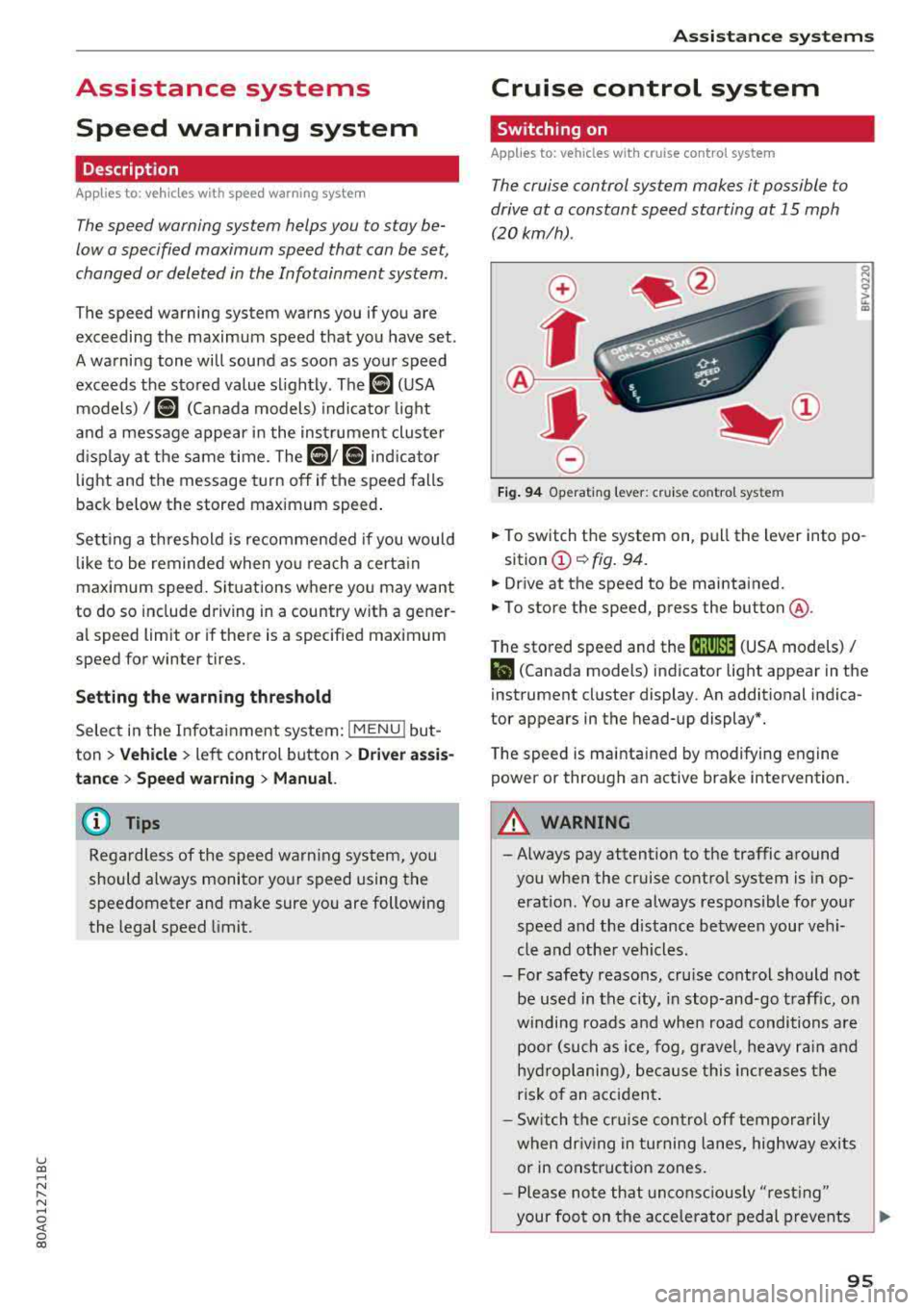
.,. To switch t he system on, pull the lever into po-
sition
(D ¢ fig. 94.
.,. Drive at the speed to be maintained.
.,. To store the speed, press the button @.
T he stored speed and the
@jltJ~i, (USA models) /
l'I (Canada models) ind icator lig ht appear in the
instrument cluster display. An additional indica
tor appears in the head-up display*.
T he speed is mainta ined by modifyi ng engine
power or through an active brake intervention.
A WARNING
-Always pay attention to the traffic around
you when the cruise control system is in op
eration. You are always responsible for you r
speed and the distance between your vehi
cle and othe r vehicles .
- For safety reasons, cru ise control should not
be used in the city, in stop -and-go t raff ic, on
winding roads a nd when road conditions a re
poor (such as ice, fog, g rave l, heavy ra in and
hy droplani ng), bec ause this in cr eases the
risk of an acciden t.
- S witch the cr uise con trol
off tempor arily
when dr iv ing in turning lanes, highway exits
or in construction zones.
- P lease no te th at unconsc iously
"rest ing"
your foot on the accelerator ped al prevents
95
Page 98 of 392
Ass is tanc e system s
the cruise control from braking. This is be
cause pressing the accelerator pedal over
rides the cruise contro l system .
- If a brake system ma lfunction such as over
heating occurs when the cruise control sys
tem is sw itched on, the braking function in
the system may be switched off . The rest of
the cruise control system functions remain act ive as long as
the @;\l)~ij (USA models) /
Bl (Canada models) indicato r light is on.
@ Note
Before driving downhill a long distance on a
steep hill, decrease you r speed and select a
lower gear. This makes use of the eng ine
brak ing effect and re lieves the bra kes.
(D Tips
The b rake l ights turn on w hen the brakes a re
app lied automat ically .
Changing the speed
Applies to: vehicles with cruise control system
.,. T o inc rease/decrease the speed in 1 mph (1
k m/h) increments, br ie fly
tap the leve r toward
0 10 ¢ page 95, fig. 94 to the f irst leve l.
.,. To increase/decrease the speed in S mph (10
km/ h) increments, br iefly
tap the leve r toward
0 10 to the second level.
.,. To increase or decre ase the speed quickly, hold
the lever toward
0 10 to the first or second
level until the des ired speed is reached .
Overriding the speed
Applies to: vehicles with cruise control system
You can p ress t he accelerator pedal to inc rease
your speed, for examp le if you want to pass
someo ne. The speed yo u se t earlier w ill res ume
as soon as yo u release the accelerator peda l.
H oweve r, if you are exceeding the stored speed
by a cons ider able amo unt for a long time , the
cr uise con trol sys tem w ill tempo rar ily switch off.
The
[ij;\l)~ij (USA models) tBI (Canada models) in
dicator light in the instrument cluster turns off
and the stored speed is maintained .
96
Preselecting a speed
Applies to: vehicles with cruise control system
You can pre-select your desired speed when the
vehicle is stationary .
.,. Switch the ignition on.
.,. Pull the lever into pos ition (D ¢ page 95,
fig . 94 .
.,. To increase or decrease the speed, tap the leve r
toward
0 10 .
This function makes it possible , for example , to
save the speed you want before driving on the highway . Once you are on the expressway, acti
vate the c ruise control system by pull ing t he lev
e r in to position
(D .
Switching off
Applies to: vehicles with cruise control system
Deactivating temporarily
.,. Press the br ake pedal, or
.,. Press the lever towar d@ (not loc ke d in to
place)
¢ page 95, fig. 94.
Switching off completely
.,. Press the lever into position @(clicked into
place), or
.,. Switch the ignit io n off.
The speed you stored will be ma intained if the
c ruise contro l has been switched off tempora rily .
To resume the stored speed, re lease the bra ke
pedal and pull the lever to posi tion
(D .
Switc hing the ignit ion off w ill erase the stored
speed .
.&_ WARNING
You sho uld only resume the s to red speed if i t
i s no t too h igh fo r exis ting traff ic condi tions .
Ot herwise you can increase the risk of an acci
dent .
Page 103 of 392

u co ..... N I' N ..... 0 <( 0 00
Description
The predictive cont rol 1 l uses the map info rma
tion from the navigation system in order to react proactive ly when driving. Information from the
cam era-based traffic sign recognition * is a lso ap
plied to recognize traffic
signs ¢ page 97. When
coming up to areas wi th speed limits or changes
in the course of the road (such as curves, inter
sections or traffic c ircles), the system brakes au
tomatically and then accelerates back up to the
set speed .
Overriding control
The driver can override the predict ive control at
a ny time by press ing the accelerator or brake
pedal. If the system changes the vehicle speed to
adapt to speed limits, you ca n cha nge the speed
usi ng the lever
¢ page 106, fig. 105 .
Always switch off the predictive control in
the following situations:
- When increased atte ntion is needed from the
drive r.
- In poor weat her cond it ions such as snow or
heavy ra in.
- When driving on roads in poor condition .
Indicator in the instrument cluster display
When switching on the adaptive cru ise cont rol
for the first time, the message
ACC: R + B ac
ti ve
in the instrument cluste r indicates the ava il
ab ility of the predictive control.
T he
'?·;SOmh symbo l appears when the system
is reg ulating the speed to match a speed lim it. If
this is the case, the system is regulating a speed
of SO mph (80 km/h) . The speed is then taken
over by the adaptive cru ise control. The speed in
the speedomete r LE D ring ad justs to the speed to
be maintained
¢ page 104, fig. 104 . The ..
¢fig. 98 sym bo l appe ars whe n there is an adap
ta tion to t he ro ute ahea d.
I f you are in the
Driver assistance d isp lay in the
in str ument cluster, then the fo llow ing symbols
w ill in dica te w hic h oc currence t he sys tem is cu r
r en tly responding to:
ll Thi s is not availa ble in so m e co untri es.
A ss istance systems
Symbol Meaning
MPH
USA models:
Speed limit
km/h
Canada model s:
Speed limi t
ll
Curve
_J!L Intersection
,:r
w
T raffic ci rcle
A WARNING
-
- Read the wa rnin gs on ¢ .&. in General infor
mation on page 103
and on¢ & in De
scription on page
97.
- Pay attent ion to traffic and the a rea around
your veh icle when pred ictive cont rol is
sw itched on. The driver is always responsi
ble for assessing the traffic situation.
- There is an increase in the risk of an acci
dent, because the system does not consider
"right of way" rules and also does not re
spond to traffic lights .
- The system only cons iders t raff ic signs that
g ive a speed lim it .
- The permitted speed can be exceeded if the
adaptation to a speed lim it is incorrect . The
d river is responsible for adher ing to the pe r
mitte d speed .
- The s peed at w hich a curve is dr iven th rough
does not necessarily match your own driving
s tyle. Brake the vehicle yo urself whe n need
e d t o redu ce the risk of an a ccid en t.
0) Tips
- If a speed lim it is detected, the stored
speed is also adjusted in the speedometer
LE D line when the ada ptive cru ise control is
n ot a ctive .
- The adaptat ion by the system depends on
t he driving mode se t in dr ive se lec t*.
- Switching off predict ive con trol, fo r exam
ple whe n driving in low t raff ic zones, does
101
Page 107 of 392

You can set any speed between 20 mph and 95 mph (30 km/h and 150 km/h).
I ndicato r lights and messages in t he i nstr ument
cluste r display inform you abou t the cur ren t sit
uation and setting.
An addit ional ind icator appears in the head- up
d isp lay* .
Switching adaptive cruise control on
"' Pull the lever toward you into position @
<=>fig . 103 .
Storing the speed and acti vating regul ation
"' To store the c urrent speed, press the !SE TI but
ton
<=> fig. 103. The stored speed is shown in the
speedometer in the LED
line @ and appears
briefly i n the status line @<=>
fig. 104 .
"'To activate the regu lation wh ile stat ionary, also
press the b rake peda l.
Switching adaptive cruise control off
"' Push the lever away from you into position @
unt il i t clicks i nto place . The message
ACC: off
appears .
® Indicator light s
II-Adaptive cruise control is switched on. No
ve hicles are detected ahead. The stored speed is
maintained.
•-A vehicle driving ahead was detected . The
adaptiv e cruis e control system regulates the
speed and distance to the vehicle dr iv ing ahead
and accelerates/brakes automatically.
•-Adaptive cruise control is switched on. Ave
h icle was detect ed ahead. You r vehicle is station
ary and will not start driving automatically.
ti)-Adaptive cru ise con trol is switched on. No
ve hicles were detected ahead. Yo ur vehicle is sta
tionary and will not start driving automatically .
•-The autom atic br aking is no t en ough to
main tain a sufficient distance to a veh icle dr iving
ahead. You must intervene
c:!;> page 108, Driver
u intervention request . co ..... N ,..._
N ..... 0 <( 0 00
Ass istance systems
© Instrument cluster display
If the Driver a ssistance displ ay is not shown in
the instr ument cluster d isp lay, you can open it
u sing the m ultif unction steering whee l buttons
c:!;> page 12.
Ba sed on the gr aphic disp lay, you c an dete rm ine
i f th e system is maintain ing a d istance to the ve
hicle driving a head and what t hat distance is .
No vehicle -no vehicle was detec ted dr iv ing
ahe ad.
Silver vehicle -a vehicle was detected driving
ahead.
Red v ehicle -reques t for driver interve ntion
<=> page 108 .
The five distan ce bars on the gauge © represent
the set distance (refer to
c:!;> page 107for infor
ma tion o n how to change t he d istance). If you
fall below the selected d ista nce, the distance
bars become red from the bottom upwa rd .
A WARNING
If yo u press the !SET I butto n w hen dr iv ing at
speed s below 20 mph (30 km/h), t he ve hicle
a ccelera tes au tom atic ally u p to 2 0 mph (30
k m/h), w hich is the minim um speed tha t can
b e set.
(D Tips
- If you swi tch t he ig nit io n o r th e adaptive
cr uise cont ro l sys tem o ff, t he set s peed is
erased fo r safe ty reasons .
- Th e Elect ronic S tab ili za tion Control ( ES C)
and the An ti- Slip -Reg ula tion (ASR) are a uto
matically swi tched o n when the adap tive
c ruise cont ro l is switched on .
105
Page 108 of 392
Assistance systems
Changing the speed
Applies to: vehicles with Audi adaptive cruise contro l
0
f
' 0
Fig. 105 Operat ing lever : c h ang ing the speed
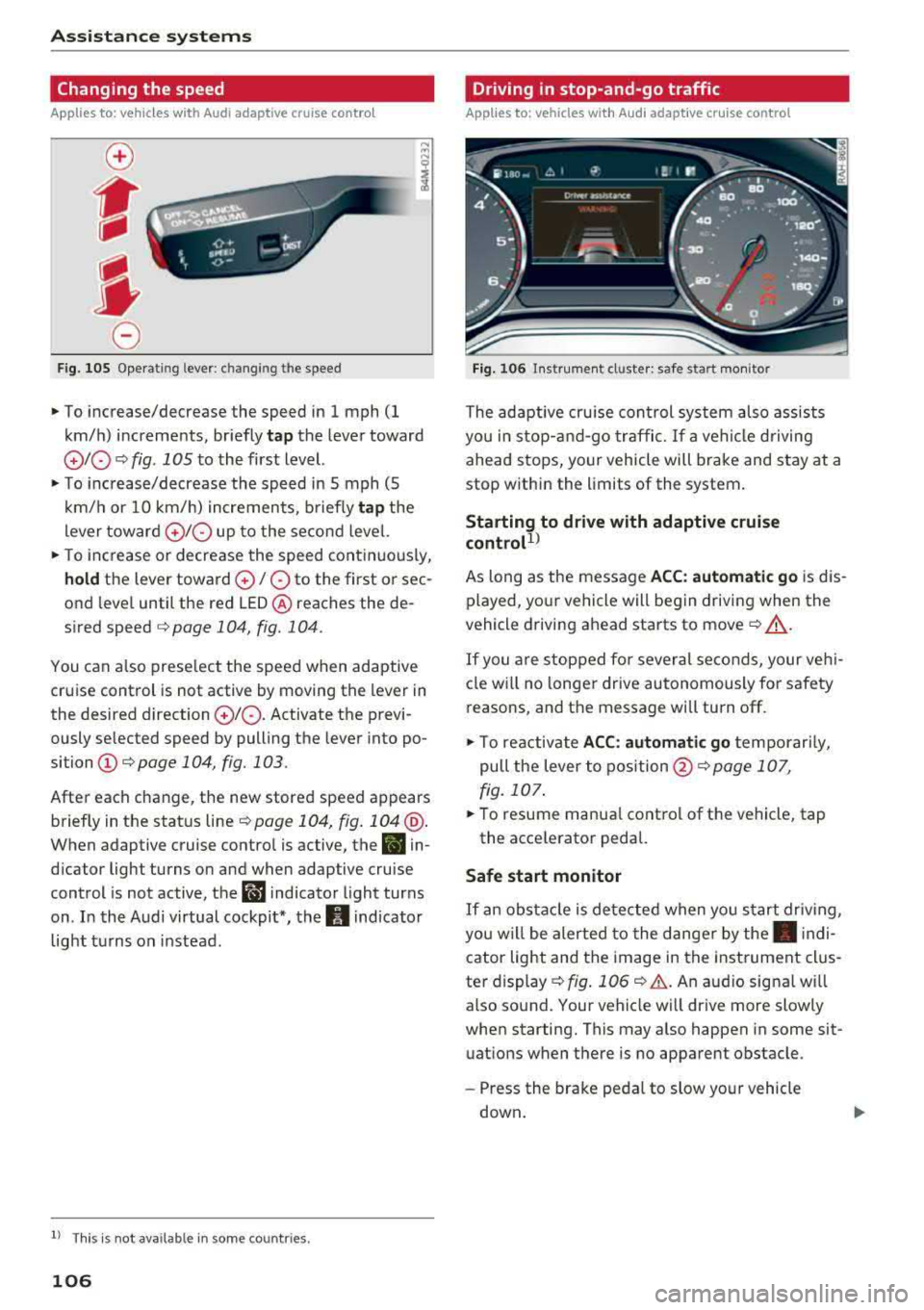
~ To increase/decrease the speed in 1 mph (1
km/h) increments, br iefly
tap the lever toward
010 ¢ fig . 1 OS to the first level.
~ To increase/decrease the speed in 5 mph (5
km/h or 10 km/h) increments, briefly
tap the
lever toward
0 10 up to the second level.
~ To increase or decrease the speed continuously,
hold the lever toward 0 / 0 to the first o r sec
ond level until the red
LED @ reaches the de
s ir ed speed
¢ page 104 , fig. 104 .
You can also preselect the speed when adaptive
cruise control is not active by moving the lever in
the desired direction
010 . Activate the previ
ously se lected speed by pulling the lever into po
sition
(D ¢ page 104, fig. 103.
After each change, the new stored speed appears
briefly in the status
line ¢ page 104, fig. 104 @.
When adaptive cruise control is active, the B in
dicator light turns on and when adaptive cruise
control is not active, the
ll'J indicator light turns
on . In the Audi virtual cockpit*, the
II indicator
light turns on instead.
ll Thi s is not ava ilab le in som e coun tri es .
106
Driving in stop-and-go traffic
Applies to: vehicles with Audi adaptive cruise control
Fig. 106 In strume nt cl uster: safe s tart mo nitor
The adaptive cruise con trol system also assists
you in stop-and-go traffic.
If a vehicle driving
ahead stops, your vehicle will brake and stay at a
stop within the limits of the system.
Starting to drive with adaptive cruise
controt1>
As long as the message ACC: automatic go is dis
played, your vehicle will begin driving when the
vehicle driving ahead starts to move
c::> A_.
If you are stopped for several seconds, your veh i
cle will no lon ger drive autonomously for safety
reasons, and the message will turn off.
~ To reactivate ACC: automatic go temporarily,
pull the lever to
position @¢ page 107,
fig. 107.
~ To resume manua l control of the vehicle, tap
the accelerator pedal.
Safe start monitor
If an obstacle is detected when you start driv in g,
you w ill be alerted to the danger by
the. indi
cator light and the image in the instrument clus
ter display
c::> fig. 106 c::> &. . An audio signa l w ill
also sound. Your vehicle will drive more slowly
when starting. This may also happen in some sit
uations when there is no apparent obstacle .
-Press the brake pedal to slow your vehicle
down .
Page 111 of 392
u co ..... N r-N .....
~ 0 co
Traffic jam assist
Applies to: ve hicles with traff ic jam ass ist
Traffic jam assist supports the driver when driv
ing in traffic jams or in heavy traffic.
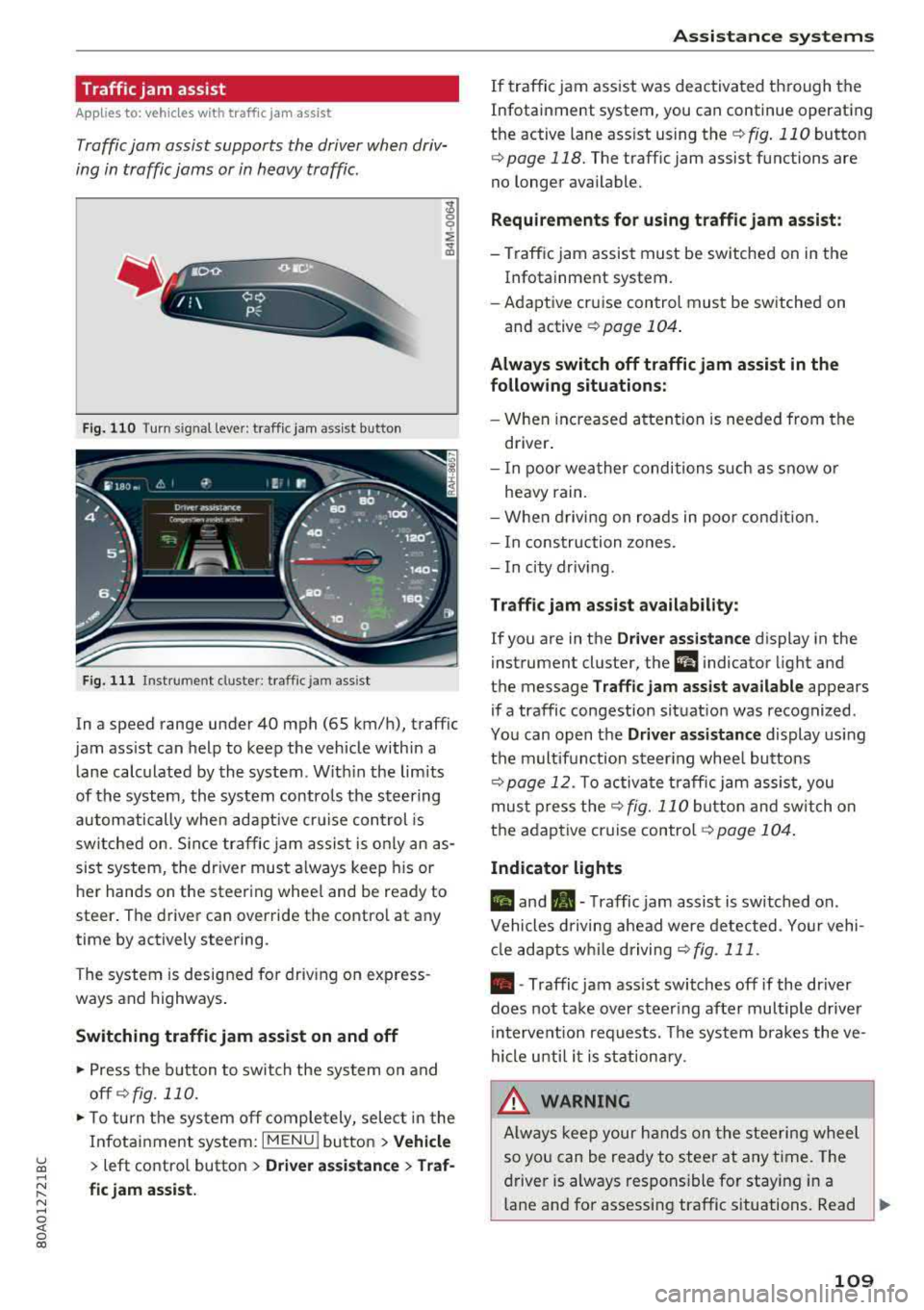
Fig. 110 Turn s ig n al leve r: traffic ja m ass ist button
F ig. 111 I nst ru ment duste r: tra ffic jam a ssist
In a speed range under 40 mph (65 km/h), traffic
jam ass ist can help to keep the vehicle within a
l ane calc ulated by the system . W ith in the lim its
of the system, the system contro ls the steering
automatically whe n adapt ive cr uise control is
switched on . S ince traffic jam assist is only an as
sist system, the dr iver must a lways keep his or
he r hands on the steer ing whee l and be ready to
steer . The driver can override the contro l at any
time by actively steering.
The system is designed for driv ing on express
ways and highways .
Switching traffic jam assist on and off
~ Press the b utton to switch the system on and
off ¢fig. 110.
~ To tu rn t he sys tem off comple tely, selec t in the
Infotai nment system:
I MENU ! button > Vehicle
> left contro l button > Driver a ssistance > Traf
fic jam assist.
A ssi st a nce systems
If traffic jam ass ist was deactivated through the
Infotainment system, you can continue operating
the active lane ass ist using
the ¢ fig. 110 button
¢ page 118. The traffic jam assist functions are
no longer available.
Requirements for using t raffic jam assi st :
-Traffic jam assist must be switched on in the
Infotainment system.
- Adapt ive cr uise con trol must be sw itched on
and active
r:::;, page 104 .
Always switch off traffic jam assist in the
following situations:
- When in cr eased a ttent ion is needed from the
driver .
- I n poor wea ther condi tions such as snow o r
heavy rain .
- When d riving on roads in poo r condit ion.
- I n construction zones.
- In city driv ing .
Traffic jam as sis t availabil ity :
If you are in the Dri ver assista nce display in the
instrument cluster, the
a i ndicator light and
the message
Traffi c jam as sist ava ilable appears
if a traffic congestion situat ion was recognized.
Yo u can open the
Driver assi stance display using
the m ultifunction steering whee l buttons
r:::;,page 12. To activa te traffic jam assist, you
mus t press the
r:::;, fig. 110 button and sw itch on
the adaptive cruise
contro l¢ page 104 .
Indicator lights
II and•-Traffic jam assist is switched on .
Vehicles d riving ahead were detected. Yo ur vehi
cl e adapts w hile driving
r:::;,fig . 111 .
•-Traffic jam ass ist switches off if the dr iver
does not take over steer ing after multiple driver
in terve ntion requests. The system b rakes the ve
hicle u nti l it is st ationary .
_& WARNING
Always keep y our hands on the stee ring whee l
so yo u can be ready to steer at any t ime . T he
driver is always respons ible fo r staying in a
lane and for assessi ng traffic situations . Read
..,.
109
Page 112 of 392
Ass is tance sy stem s
and follow the warni ngs on c::, &. in General
information on page 103.
N ever use traffic
jam assist in the following situat ions or you
w ill increase the risk of an accident .
- Drivi ng offroad or on unpaved roads . Traffic
jam assist is only designed for use on paved
roads .
- In city driving or in construction zones.
- On curving stretches of road.
- In narrow lanes .
- In unclear traffic situations s uch as a t inter-
sections or toll stations.
(D Tips
You are not necessarily gu ided to the cente r
of yo ur lane .
Distance display and distance warning
App lies to: ve hicles w ith Audi adaptive cruise co ntrol
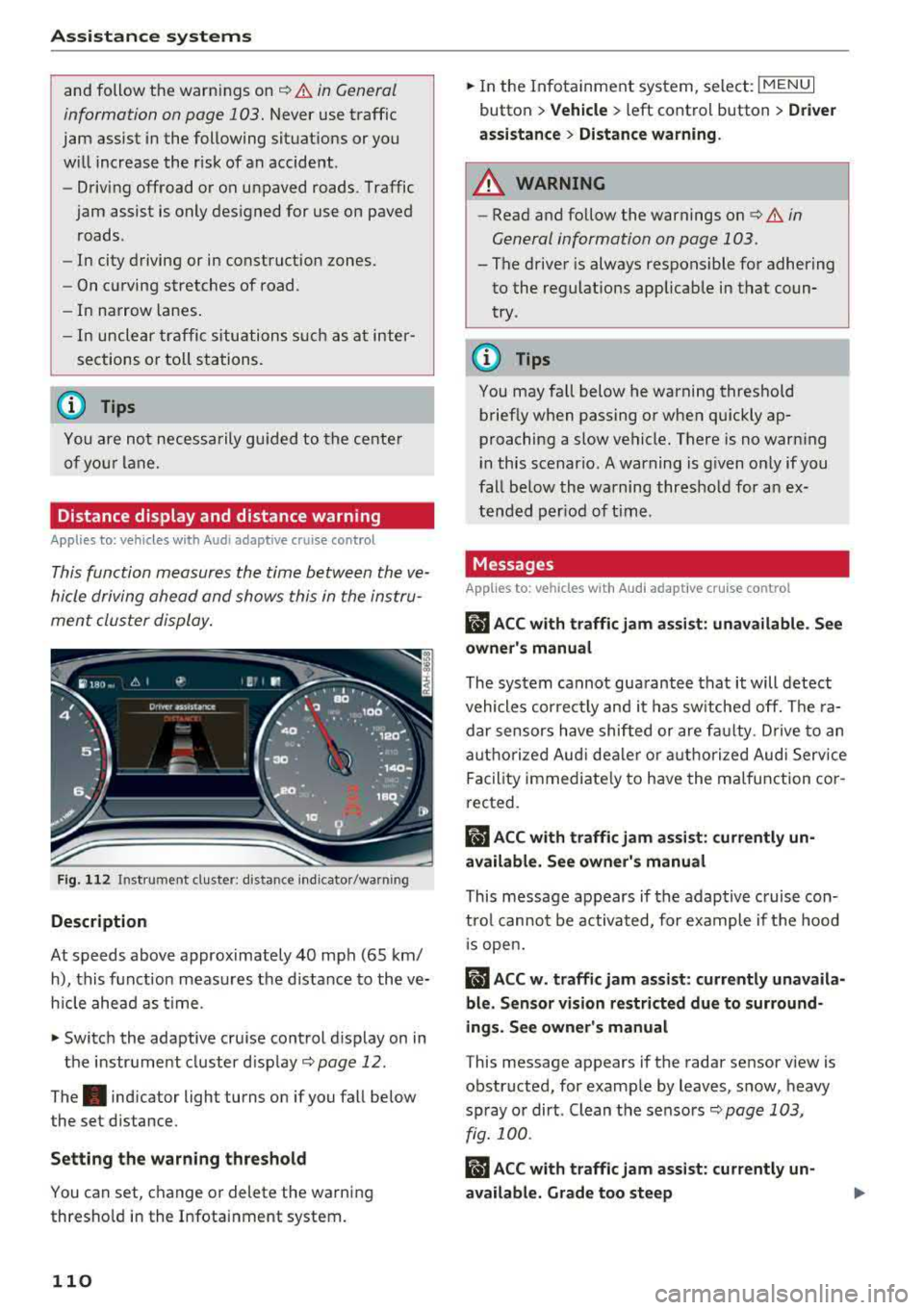
This function measures the time between the ve
hicle driving ahead and shows this in the instru
ment cluster display.
F ig . 11 2 Instru m ent clust er : di stance indic ato r/warn ing
Description
At speeds above approximately 40 mph (65 km/
h), this f unction meas ures the d istance to the ve
h icle ahead as time.
.,. Switch the adaptive cruise control d isplay on in
the instr ume nt cluster d isp lay
c::, page 12 .
The. indicator light turns on if you fall be low
the set distance.
Setting the warn ing threshold
You can set, c hange or delete the warning
thresho ld in the Infotainment system.
110
.,. In the In fotainment system, select : I MENU I
button > Vehicle > left control button > Dri ver
a ssi stan ce
> Di stan ce warning .
A WARNING
-Read and follow the warnings on c::, &. in
General information on page 103.
- The driver is always responsible for adhering
to the regulat ions applicab le in that coun
try .
(D Tips
You may fa ll below he warning threshold
brief ly when passing or when qu ickly ap
proaching a slow vehicle. There is no warn ing
i n this scenar io . A warning is g iven o nly if you
fall be low the warning thresho ld for a n ex
tended per iod of t ime .
Messages
App lies to: vehicles wi th Audi adap tive cru ise control
ii ACC with traffic jam assi st : unavailable . Se e
owner's manual
The system cannot gua rantee that it will detect
vehicles correc tly and it has sw itched off. The ra
dar sensors have shifted or are fa ulty . D rive to an
authorized Aud i dea le r o r a uthorized Aud i Serv ice
Facility immediate ly to have the ma lfunction co r
rected.
ii ACC with traffic jam assi st : c urrently un
available . See owner's manual
This message appears if the adap tive c ruise con
t rol canno t be activated, for example if the hood
1 s open.
ii ACC w . traffi c jam assist: currently unav aila
ble. Sensor vision re stricted du e to surround
ings. See owner's manual
T his message appears if the radar sensor v iew is
obstructed, for examp le by leaves, snow, heavy
spray or dirt . Clean the sensors
c::, page 103,
fig. 100 .
Rm ACC with traffic jam ass ist: currently un
available. Grade too steep
Page 113 of 392
u co ..... N r--N ..... 0 <( 0 00
The road exceeds the maximum possible grade
for safe operation. The systems cannot be switch
ed on.
Ill AC C with traffic jam a ssis t: only availabl e in
D, Sor M
Select the "D/S " or " M" selector leve r pos it ion.
Ill A CC w ith tr affic j am ass is t: currentl y un
available . Parking brake applied
The systems sw itch off if you set the parking
brake . The systems are available again after you
release the parking brake .
llJ ACC with traffic jam a ssist: currentl y un·
av ailable. Stabili zation cont rol (E SC) input
This message appears if the Ele ctronic Stabili za
tion Control (ESC) is taking action to stabilize the
ve hicle . The systems switch off in this scenario .
Ill ACC with traffic jam a ssis t: manu al control!
This message appea rs if the veh icle rolls back
when sta rting on a slight incl ine, even t hough the
systems are active . P ress t he b rake peda l to pre
vent the vehicle from rolling or sta rting to move.
IIJ ACC w ith tr affic jam a ssis t: curr entl y un
availabl e. Downhill a ssis t activated
You cannot activate the system when hill hold as
sist is act ive .
II!! ACC with traffic jam assist: manual control!
This message appears if the driver does not take
over steering after mu ltip le driver intervention
requests and the system switches off . The vehicle
brakes unt il it is stationary .
ii Traffic jam a ssis t : una vailable. S ee o wner' s
manual
The system can no longer ensure that t he ve hicle
w ill stay in the lane and sw itches off. Have yo ur
vehicle checked by an a uth orized Audi dea ler or
authorized Audi Service Facility if the ma lfunc
tion is continuous .
14§ Traffic jam assis t : Plea se take over steering!
This message appea rs as soon as the system
stops detecting steer ing activ ity when the system
limits are rea ched. Always keep yo ur hands on
Ass istance systems
the steering whee l so you can be ready to steer at
any time.
14§ Traffic jam a ssis t : currentl y unavailable .
Pl ea se f asten se at belt
T he system switches off when the drive r's safety
belt is unfastened.
Ill AC C: eff iciency assist not available in thi s
countr y
The adaptation to speed lim its and routes ahead
is not available in this country .
IIJ ACC: predictive control currentl y una vaila
ble . See owne r's m anual
T he ad aptation to speed lim its and routes ahead
swi tches off at speed limits under 20 mph
(30 km/h) .
T he message ca n also appear if the adaptation to
speed limi ts and routes a head has a temporary
f ailure . Have your vehicle checked by an autho r
ized Audi dea ler or authorized Audi Service Facili
ty if the malfunction is continuous .
Distance warning : malfunction! Please contact
S erv ice
T he system cannot gua rantee that it will detect
vehicles correct ly and it has switc hed off. The ra
dar sensors have shifted or are fa ulty . Drive to an
authorized Aud i dea ler o r authorized Audi Serv ice
Facility immediate ly to have the ma lfunction cor
rected .
Distance warning : currentl y unavailable . Sen sor
view re stricted due to surrounding s. See own
e r' s manual
T his message appears if the rada r senso r view is
obstructed, for examp le by leaves, snow, heavy
spray or dirt. Clean the sensors
¢ page 103,
fig . 100.
Distance warning : curr entl y unavailable . See
owner' s manual
This message appears if the system has a tempo
r a ry fa il ur e. If this occurs m ultip le t imes, drive to
an a uth orized Aud i dea le r o r auth o rized Aud i
Se rvice Facility immed iate ly to have the ma lfunc -
t ion corrected .
liJ,,
111
Page 117 of 392
u co .... N ,..._
N .... 0 <( 0 00
this. H ave an authorized A udi deale r or a u
thorized A udi Service Faci lity check their func
tion.
(D Tips
-The pre sense rear functions switc h off
when towing a trai ler .
-The pre sense rear functions may also
switch off if there is a malfunction in the
side assist* system.
Audi pre sense city
A ppl ies to: ve hicles w ith Audi p re se nse c ity
D esc ription
Wit hin the limits of the system, pre sense city
can warn you of impending coll is ions w ith
ve hicles and pedestrians and initiate the applica
b le brak ing maneuver if needed. Pre sense city is
active at speeds of approximate ly 6 mph (10 km/
h) and h igher .
A pedestrian warning can occu r at speeds up to
SO mph (85 km/h), and vehicle warn ings ca n oc
cur at speeds up to 155 mph (250 km/h) . A pre
sense city braking maneuver is poss ible at speeds
up to SO mph (85 km/h).
Warnings
The system recogni zes var ious dangerous situa
tions . The
early warning occurs if:
-a vehicle driving ahead brakes s uddenly
-yo ur own vehicle approaches a significantly
s lower vehicle or stationary vehicle in the direc
t ion of travel
-a pedestrian is standing in the lane or is moving
into the lane
When t his wa rn in g oc curs, it may on ly be poss i
b le to avoid a co llision by swerv ing or braking
strong ly . T he message
Audi pre sense.
~ page 113, fig . 113 and a warning tone will
warn you about the danger .
Addit iona lly, a jerk on the brakes may occur as an
acute warning when there is an impending colli
sion. If you do not react to the acut e warning, pre
sense city can brake to the point of comp lete de
celerat ion w it hi n the lim its of the system. This
A ss istance systems
red uces the vehicle speed in the event o f a co lli
sio n. The message
Audi pre sense. also ap
pears .
T he following fu nctions a re trigge red in con junc
t ion w it h pre sense bas ic/rear :
-Reversible tens ion ing of the front safety belts
-Clos ing the windows and sunroof*
Audi drive select*: the function is not act ive de
pending on the mode selected.
A WARNING
-
-Pre sense city ca nnot overcome the laws of
p hys ics .
It is a sys tem designed to ass ist and
it cannot preven t a coll is io n in every circ um
s tance . The dr iver m ust a lw ays in terve ne.
T he d rive r is always responsible fo r brakin g
a t t he co rre ct time . Do not let the in cr eased
safety prov ided tempt you into taking r isks.
This could inc rease your r is k of a col lision .
-The system can dep loy incorrectly due to
system -specific limits.
-T o redu ce the r is k of an accident, please
note that the camera does not a lways detect
eve ry o bject.
-Pre sense city does not reac t to an ima ls,
crossing or oncoming ve hicles, objects such
as bars, ra ilings or railcars, and ob jects that
are difficult to detect
c> A in General infor
mation on page 103.
-In trailer mode, the bra king behavior o f the
tra ile r can be d ifferent than usual du ring au
tomatic braking.
A WARNING
--
Pre sense city may be restr icted or not ava ila
b le in the fo llow ing example s ituations:
-in heavy fog, ra in, spray, or snow
- when there are v isua l obst ruct ions, such as
g lare, reflections or variations in light
-when it is dar k
-if the camera window or the windshield is
d irty, iced over, damaged or cove red
-when dr iv ing o n snow, ice o r loose groun d
-in c urve s
-if the ESC was rest ricted or sw itched off
-when towing a trailer
115
Page 119 of 392
u co ..... N r--N ..... 0 <( 0 00
This message appears if the pre sense functions
are switched off through the Infotainm ent sys
tem or if the system is not ready.
Audi active lane assist
Description
Applies to: vehicles with Audi active lane assist
Active lane assist (lane departure warning) de
tects lane marker lines within the limits of the
system using a camera in the windshield. If you
are approaching a detected lane marker line and
it appears likely that you will leave the lane, the
system will warn you with corrective stee ring .
You can override this steering at any time . If you
pass over a line, the steering wheel will vibrate
lightly . In order for this warning vibration to oc
cur, it must first be switched on in the Infotain
ment system. Active lane assist is ready for oper
ation when the lane marker line is detected on at
least one side of the vehicle.
The system is designed for driving on express
ways and highways and therefore only activates
at speeds above approximately 40 mph (65 km/
h).
Applies to: veh icles w ith side assist: if you acti
vate a turn signal when active lane assist is ready
and it classifies a lane change as critical because
of vehicles traveling alongside you or approach
ing you, there will be noticeable corrective steer
ing shortly before you leave the lane. This will at
tempt to keep your vehicle in the lane.
Applies to: veh icles w it h out s ide ass ist: the ready
system does not warn you if you activate a turn
signal before crossing the lane marker line. In
this case, it assumes that you are changing lanes
intentionally.
Applies to: vehicles with adaptive cruise control:
there is no corrective steering or warnings if the
syst em recognizes a distinct passing maneuver.
If the conditions are met, traffic jam assist
switches on at speeds under approximately
40 mph (65 km/h)
¢ page 109 .
Assistance systems
A WARNING
--
-The system warns the driver that the vehicle
is leaving the lane using corrective steering .
The driver is always responsible for keeping
the vehicle within the lane.
- The system can help you keep the vehicle in
the lane, but it does not drive by itself. Al
ways keep your hands on the steering
wheel.
- Corrective steering may not occur in certain
situations, such as during heavy braking.
- There may be cases where the camera does
not recognize all lane marker lines. Correc
tive steering can only take place on the side
of the vehicle where lane marker lines are
detected.
- Other road structures or objects could possi
bly be identified unintentionally as lane
marker lines. As a result, corrective steering
may be unexpected or may not occur.
- The camera view can be restricted, for ex
ample by vehicles driving ahead or by rain,
snow, heavy spray or light shining into the
camera. This can result in active lane assist
not detecting the lane marker lines or de
tecting them incorrectly .
- In certain situations where visibility is low,
the vehicle may switch from an "early" to
"late" steering correction.
- Under certain conditions such as ruts in the
road, an inclined roadway or crosswinds, the
corrective steering alone may not be enough
to keep the vehicle in the middle of the lane .
- For safety reasons, active lane assist must
not be used when there are poor road and/
or weather conditions such as slippery roads, fog, gravel, heavy rain, snow and the
potential for hydroplaning. Using active lane
assist under these conditions may increase
the risk of a crash.
117