wheel AUDI Q7 2009 Owner´s Manual
[x] Cancel search | Manufacturer: AUDI, Model Year: 2009, Model line: Q7, Model: AUDI Q7 2009Pages: 426, PDF Size: 97.13 MB
Page 78 of 426
Clear vision
[ i J Tips
With the switch in AUTO front fog lights and rear fog lights cannot
be turned on in addition.•
App lies to veh icles: with Adaptive Ligh t
Adaptive Light
When driving around bends, the relevant area of the road
is better illuminated.
Fig. 64 Adaptive light
when driving
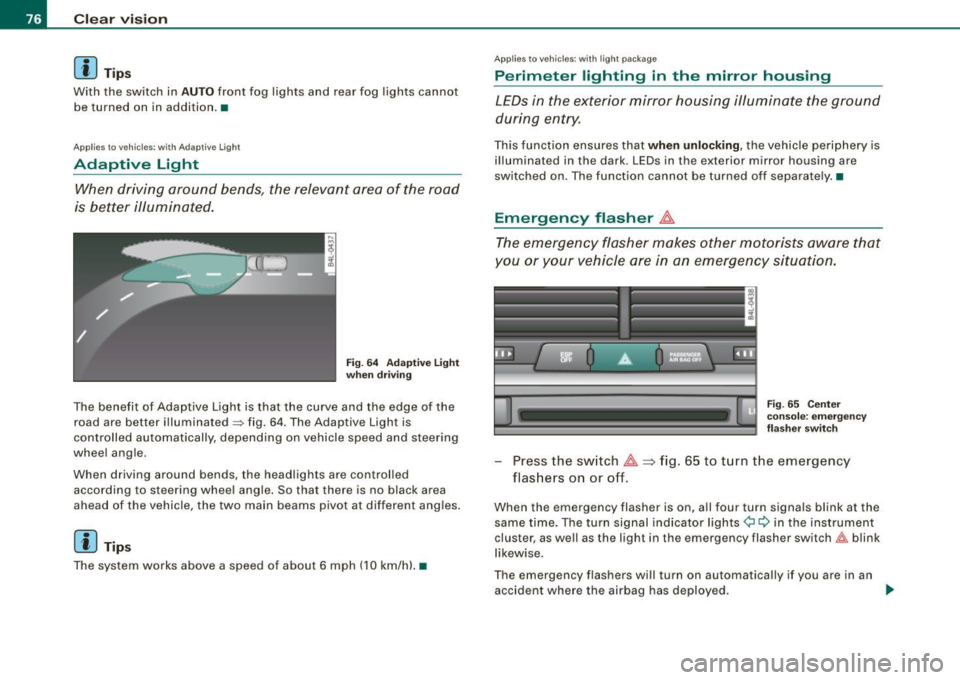
The benefit of Adaptive Light is that the curve and the edge of the
road are better illuminated~ fig. 64. The Adaptive Light is
controlled automatically, depending on vehicle speed and steering
wheel angle.
When driving around bends, the headlights are controlled
according to steering wheel angle. So that there is no black area
ahead of the vehicle, the two main beams pivot at different angles.
[ i J Tip s
The system works above a speed of about 6 mph (10 km/h) .•
Appl ies to vehicles: with light package
Perimeter lighting in the mirror housing
LEDs in the exterior mirror housing illuminate the ground
during entry.
This function ensures that when unlocking, the vehicle periphery is
illuminated in the dark. LEDs in the exterior mirror housing are
switched on. The function cannot be turned off separate ly .•
Emergency flasher J1.
The emergency flasher makes other motorists aware that
you or your vehicle are in an emergency situation.
Fig. 65 Center
console: emergency
flasher switch
-Press the switch J1. => fig. 65 to turn the emergency
flashers on or off.
When the emergency flasher is on, all four turn signals blink at the
same time. The turn signal indicator lights¢ Q in the instrument
cluster, as well as the light in the emergency flasher switch&:, blink
likewise.
The emergency flashers will turn on automatically if you are in an
accident where the airbag has deployed.
~
Page 79 of 426
[ i J Ti ps
You should turn on the emergency flashers when:
• you are the last vehicle standing in a traffic jam so that any other
vehicles coming can see you, or when
• your vehicle has broken down or you are in an emergency s itua
tion, or when
• your vehicle is being towed by a tow truck or if you are towing
another vehicle behind you .•
Turn signal ¢ ¢ and high beam ~D lever
The lever on the left side of the steering column is used to
operate the turn signals and the high beam as well as the
headlight flasher .
-"' M
-w ... m
Fig. 66 Tu rn sign al and
hig h bea m lever
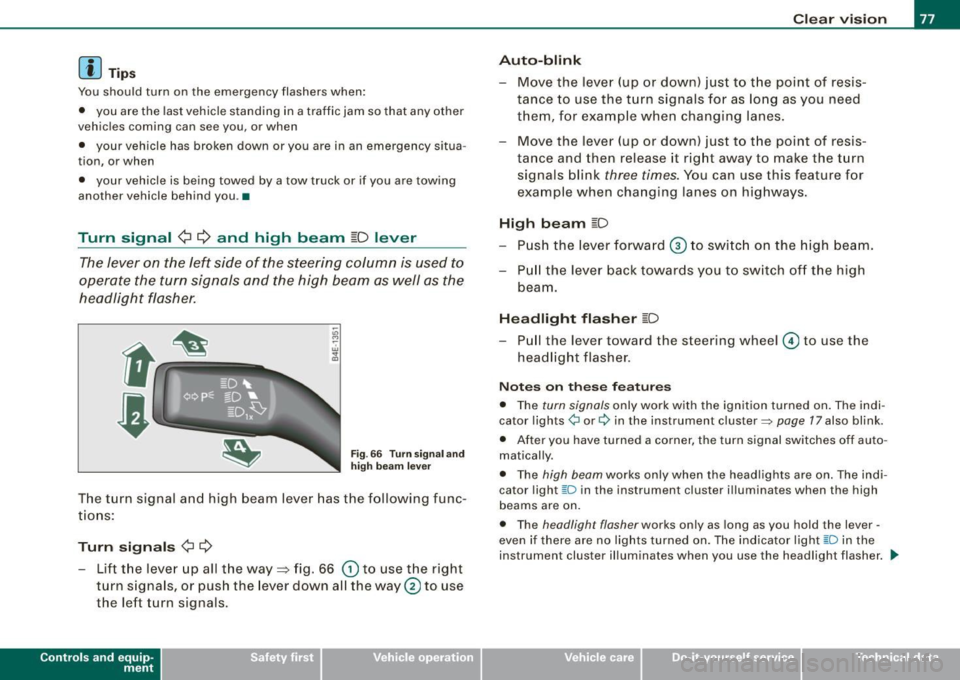
The turn signal and high beam lever has the following func
tions:
Turn sign als ¢ ¢
- Lift the lever up all the way=> fig. 66 (D to use the right
turn s ignals, or push the lever down all the way@ to use
the left turn signals.
Con tro ls and eq uip
ment
C lea r v is ion
Au to-blink
- Move the lever (up or down) just to the point of resis
tance to use the turn signals for as long as you need
them, for example when changing lanes .
- Move the lever (up or down) just to the point of resis
tance and then release it right away to make the turn signals blink
three times . You can use this feature for
example when changing lanes on highways.
High b eam ~D
- P ush the lever forward ® to switc h on the high beam.
- P ull the lever back towards you to switch off the high
beam.
H ea dlight fl asher ~D
Pull the lever toward the steering wheel © to use the
headlight flasher.
N otes o n these fea tures
• The turn signals only work with the ignition turned on . The indi
cator lights ¢ or¢ in the instrument cluster=> page 17 also blink.
• After you have turned a corner , the turn signal sw itches off auto
matically .
• The high beam works only when the head lights are on . The indi
cator light [D in the instru ment cluster i llum inates when the high
beams are on.
• The headligh t flash er works only as long as you hold the lever -
even if there are no lights turned on. The indicator light [0 in the
instrument cluster illuminates when you use the headlight flasher . .,,_
Vehicle care I I Technical data
Page 83 of 426
Wiper and washer system
Front windshield wipers ~
The windshield wiper lever controls both the windshield
wipers and the washer system.
Fig. 75 Windshield
wiper lever
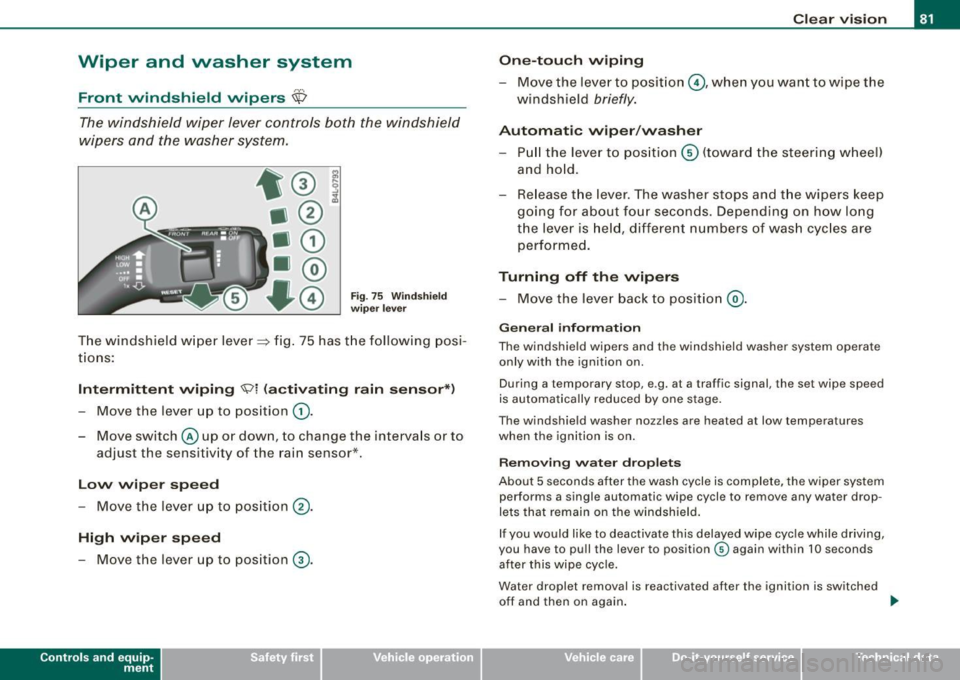
The windshield wiper lever~ fig. 75 has the following posi
tions:
Intermittent wiping <5;?1 (activating rain sensor*)
- Move the lever up to position 0).
- Move switch @up or down, to change the intervals or to
adjust the sensitivity of the rain sensor*.
Low wiper speed
-Move the lever up to position ®·
High wiper speed
- Move the lever up to position G).
Con tro ls and eq uip
ment
Clear vision
One-touch wiping
- Move the lever to position @, when you want to wipe the
windshield
briefly.
Automatic wiper/washer
- Pull the lever to position © (toward the steering wheel)
and hold.
- Release the lever. The washer stops and the wipers keep
going for about four seconds. Depending on how long
the lever is held, different numbers of wash cycles are
performed.
Turning off the wipers
- Move the lever back to position @).
General information
The windshield wipers and the windshield washer system operate
only with the ignition on.
During a temporary stop, e .g. at a tra ffic signal, the set wipe speed
is automatically reduced by one stage.
The windshield washer nozzles are heated at low temperatures
when the ignition is on.
Removing water droplets
About 5 seconds after the wash cycle is complete, the wiper system performs a single automatic wipe cycle to remove any water drop
lets that remain on the windshield.
If you would like to deactivate this delayed wipe cycle while driving,
you have to pull the lever to position © again within 10 seconds
after this wipe cycle.
Water droplet removal is reactivated after the ignition is switched off and then on again.
~
Vehicle care I I irechnical data
Page 94 of 426
Seats and storage
Seats and storage
General recommendations
Why is your seat adjustment so important?
The safety belts and the airbag system can only provide
maximum protection if the front seats are correctly
adjusted.
There are various ways of adjusting the front seats to provide safe
and comfortable support for the driver and the front passenger.
Adjust your seat properly so that :
• you can easily and quickly reach all the switches and controls in
the instrument panel
• your body is properly supported thus reducing physical stress
and fatigue
• the safety belts and airbag system can offer maximum protec
tion=>
page 241.
In the following sections , you will see exactly how you can best
adjust your seats.
There are special regulations and instructions for installing a child safety seat on the front passenger's seat. Always follow the informa
tion regarding child safety provided in=>
page 263, "Child Safety".
L1}. WARNING
Incorrect seating position of the driver and all other passengers
can result in serious personal injury.
• Always keep your feet on the floor when the vehicle is in motion
- never put your feet on top of the instrument panel, out of the
window or on top of the seat cushion. This applies especially to
the passengers. If your seating position is incorrect, you increase
the risk of injury in the case of sudden braking or an accident. If
& WARNING (continued)
the airbag inflates and the seating position is incorrect, this could
result in personal injury or even death.
• It is important for both the driver and front passenger to keep
a distance of at least 10 inches (25 cm) between themselves and
the steering wheel and/or instrument panel. If you're sitting any closer than this, the airbag system cannot protect you properly. In
addition, the front seats and head restraints must be adjusted to
your body height so that they can give you maximum protection.
• Always try to keep as much distance as possible between your
self and the steering wheel or instrument panel.
• Do not adjust the driver's or front passenger's seat while the
vehicle is moving. Your seat may move unexpectedly, causing
sudden loss of vehicle control and personal injury.
If you adjust
your seat while the vehicle is moving, you are out of position. •
Driver's seat
The correct seat position is important for safe and relaxed
driving.
We recommend that you adjust the driver's seat in the
following manner:
- Adjust the seat in fore and aft direction so that you can
easily push the pedals to the floor while keeping your
knees slightly bent=>&, in "Why is your seat adjustment
so important?".
Adjust the seatback so that when you sit with your back
against the seatback, you can still grasp the top of the
steering wheel. _..
Page 98 of 426
Seats and storage
Adjusting front passenger's seat manually
App lies to vehicles: with manually adjustab le passenger seal
Adjustment controls
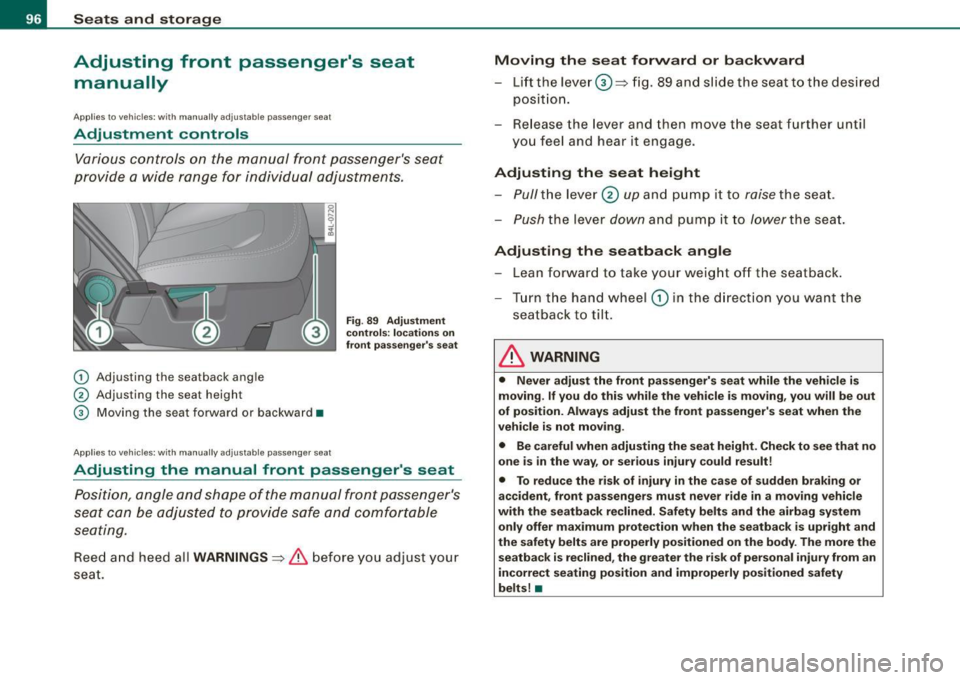
Various controls on the manual front passenger's seat
provide a wide range for individual adjustments.
G) Adjusting the seatback angle
0 Adjusting the seat height
G) Moving the seat forward or backward •
Applies to vehic les : with manua lly adjustab le passenger seat
Fig . 89 Adjustment
controls: locations on
front passenger's seat
Adjusting the manual front passenger 's seat
Position, angle and shape of the manual front passenger's
seat can be adjusted to provide safe and comfortable
seating.
Reed and heed all WARNINGS => & before you adjust your
seat.
Moving the seat forward or backward
-Lift the lever ©=> fig. 89 and slide the seat to the desired
position.
- Release the lever and then move the seat further until
you feel and hear it engage .
Adjusting the seat height
-Pull
the lever 0 up and pump it to raise the seat.
- Push the lever down and pump it to lower the seat.
Adjusting the seatback angle
-Lean forward to take your weight off the seatback.
- Turn the hand wheel
G) in the direction you want the
seatback to tilt.
& WARNING
• Never adjust the front passenger's seat while the vehicle is
moving. If you do this while the vehicle is moving, you will be out
of position. Always adjust the front passenger's seat when the
vehicle is not moving .
• Be careful when adjusting the seat height. Check to see that no
one is in the way, or serious injury could result!
• To reduce the risk of injury in the case of sudden braking or
accident, front passengers must never ride in a moving vehicle
with the seatback reclined. Safety belts and the airbag system
only offer maximum protection when the seatback is upright and
the safety belts are properly positioned on the body. The more the
seatback is reclined, the greater the risk of personal injury from an
incorrect seating position and improperly positioned safety
belts! •
Page 132 of 426
• ..__w_ a_ r_m _ a_ n_d_ c_ o_ ld __________________________________________________ _
Air outlets
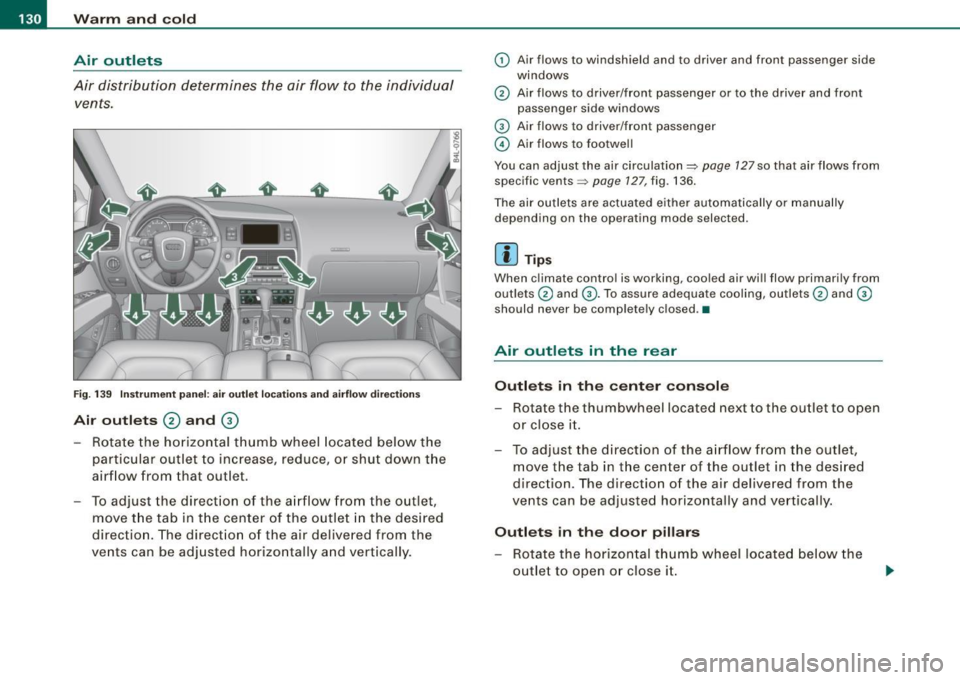
Air distribution determines the air flow to the individual vents .
•
•
Fig. 1 39 Instru me nt pan el: a ir outlet loca tio ns a nd airfl ow directions
Air outl ets 0 and 0
- Rotate the horizontal thumb wheel located be low the
particular out let to increase, reduce, or shut down t he
air flow from that out let.
- To adjust the direct ion o f the a irflow from the outlet,
move t he tab in t he center of the outlet in the desired
directio n. The direct ion of the air delivered from the
vents can be adjusted horizontally and vertically.
(D Air flows to windshield and to driver and front passenger side
windows
@ Air flows to driver/front passenger or to the driver and front
passenger side windows
G) Air flows to driver/front passenger
© Air flows to footwe ll
You can adjust the air circulation=>
page 127 so that air flows from
specific vents=>
page 127, fig. 136 .
The air out lets are actuated either automatically or manually
depending on the operating mode selected.
[ i ] Tip s
When climate control is working, coo led air wi ll flow primari ly from
outlets @ and
G). To assure adequa te cooling, outlets@ and G)
should never be completely c losed. •
Air outlets in the rear
Outlet s in the center console
- Rotate the thumbwheel located next to the outlet to open
or close it .
- To adjust the direction of the a irflow from the outlet,
move the tab in t he center of the outlet in the des ired
direction. The direction of the air delivered from the
vents can be adjusted horizontally and vertically .
Outlets in the door pillars
-Rotate the hori zontal thumb wheel located be low the
out let to open o r close i t.
Page 139 of 426
_________________________________________________ W_ a_ r_ m __ a_n_ d_ c_ o_ld _ __._
[ i J Tip s
Please note that the weight of objects placed on the seat will a lso
be detected . This weight may be enough to cause the seat heater to
turn on. •
App lies to vehicles: with heate d rea r seats
Heated rear seats
The seat cushions and seat backs of the two outer rear
seats can be heated electrically.
Fig . 146 Ce nter
co nso le rear : H eated
seats
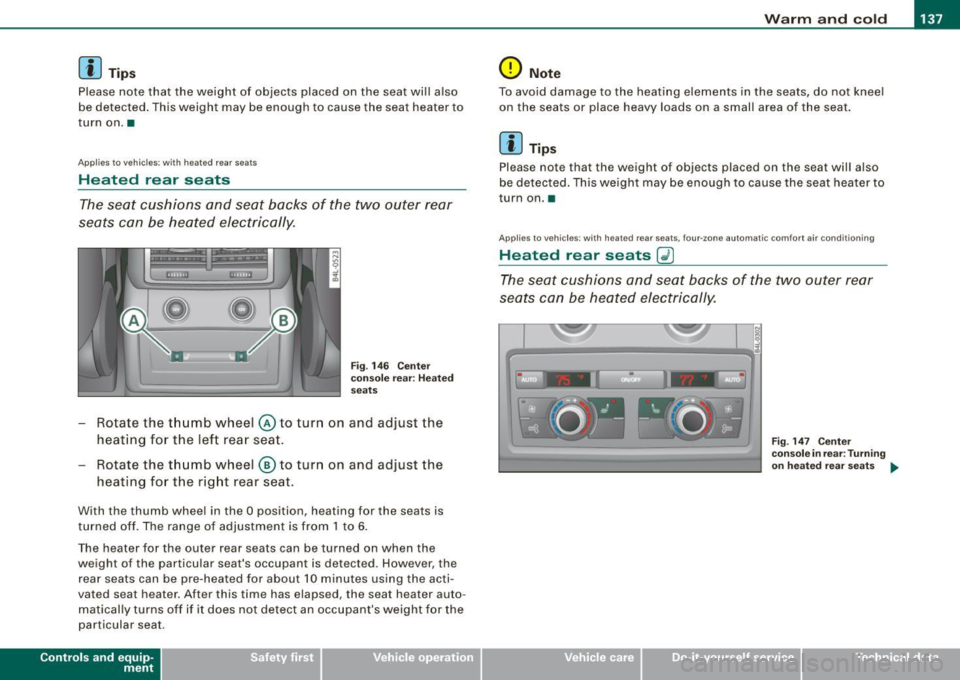
Rotate the thumb wheel © to turn on and adjust the
heating for the left rea r seat .
- Rotate the t humb wheel ® to turn on and adjust the
heating for the right rear seat .
With the thumb wheel in the O position , heating for the seats is
turned off . The range of adjustmen t is from 1 to 6.
The heater for the outer rear seats can be turned on when the
weight of the particu lar seat's occupant is detected. However, the
rear seats can be pre-hea ted for about 10 minutes using the acti
vated seat heater. After this time has elapsed, the seat heater auto
matical ly turns off if it does not detect an occupant's weight for the
particular seat .
Contro ls and eq uip
ment
0 Not e
To avoid damage to the heating elements in the seats, do not kneel
on the seats or place heavy loads on a small area of the seat .
[ i J Tip s
Please note that the weight of objects placed on the seat will a lso
be detected. This weight may be enough to cause the seat heater to
turn on. •
App lies to vehic les: with heated rear seats, four-.one automatic c omfo rt a ir co ndit ioning
Heated rear seats Gl)
The seat cushions and seat backs of the two outer rear
seats can be heated elec trically.
Vehicle care I I
F ig. 147 Ce nter
co nso le in rear : T urni ng
o n h eate d r ear seats
~
irechnical data
Page 140 of 426
• ..__w_ a_ r_m _ a_ n_d_ c_ o_ ld __________________________________________________ _
Fig. 14 8 Center
conso le in fron t:
T urni ng on hea te d rea r
sea ts
Adju sting h eat ed sea t settin gs on rear control
e le m ent
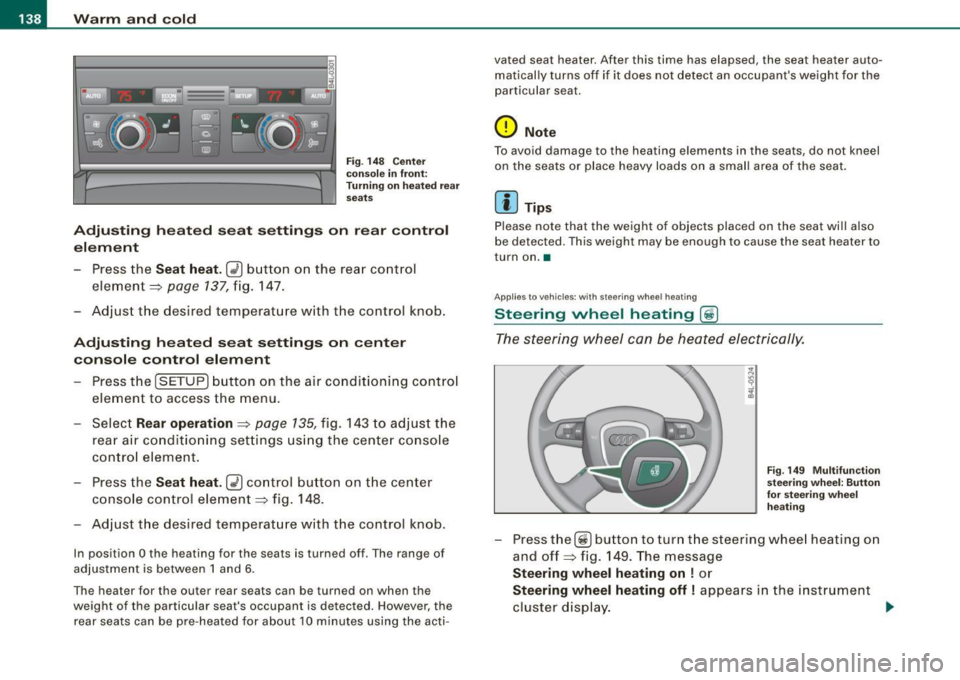
- Press the
Seat heat . Ii_] button on the rear control
element ~
page 137, fig. 147.
Adjust the desired temperature with the control knob .
Adjustin g he ated seat settings on center
console control element
Press the
I SETUP] button on the air conditioning control
element to access the menu.
- Select
Rear operation ~ page 135, fig. 143 to adjus t the
rear a ir condit io ning settings usi ng the center console
control element.
- Press the
Sea t he at. [i_] co ntrol button on the center
console control element~ fig.
148.
Adjust t he desired temperature with the control knob.
In position O the heating for the seats is turned off . The range of
adjustment is between 1 and 6 .
The heater for the outer rear seats can be turned on when the
weight of the particu lar seat's occupant is detected. However, the
rear seats can be pre-heated for about 10 minutes using the acti- vated seat heater. After this time has elapsed, the seat heater auto
matically turns off if it does not detect an occupant's weight for the
particular seat.
0 Note
T o avoid damage to the heating elements in the seats, do not kneel
on the seats or place heavy loads on a small area of the seat.
[ i ] Tips
Please note that the weight of objects placed on the seat will also
be detected. This weight may be enough to cause the seat heater to
turn on. •
Applies t o vehicles: with steering whee l heating
Steering wheel heating (j)
The s teering wheel can be heated electrically.
F ig . 149 Mult ifun ction
ste ering wheel : Bu tto n
for stee ring w hee l
h ea ting
- Press the[~] button to turn t he steering whee l heating on
and off~ fig .
149. The message
Steering wh eel h eating on ! or
Ste ering wheel hea ting off I appears in the instrument
cluster display.
~
Page 141 of 426
_________________________________________________ w_ a_ r_ m __ a_n_ d_ c_ o_ld __ lllll
When the steering wheel heating is switched on, the steering wheel
is heated to about 82 °F (28 °C) and held there.
The last setting se lected for the steering wheel heating (on or off) is
automatically saved when the vehicle is shut off and is assigned to
the remote key. •
Controls and equip
ment I • •
Page 142 of 426
• ..__O_ n_ t_h _e _ r_o _a _ d __________________________________________________ _
On the road
Steering
Applies to vehicles : w ith manua lly ad justab le steering whee l
Manually adjusted steering wheel
The height and reach of the steering wheel can be
adjusted.
First, adjust the driver's seat correctly.
Fig . 150 Lever under
the steering column
Pull the lever~ fig. 150 -Arrow -~&.
Move the steering wheel to the des ired position.
Push the lever against the steering column until it lock s.
There must be at leas t 10 inch es (25 cm) between your chest and the
center of the steering wheel. If you cannot sit more than 10 inches
(25 cm) from the steering wheel, see if adaptive equipment is avail
able to help you reach the pedals and increase the distance from the
steering wheel.
For detailed information on how to adjust the driver's seat, see
=> page 93.
The steering wheel can be adjusted even when the ignition is turned
Off. For vehicles with seat memory, the individual positions for the
steering wheel can be stored along with the seat position.
& WARNING
Improper use of steering wheel adjustment and improper seating
position can cause serious personal injury .
• Adjust the steering wheel column only when the vehicle is not
moving to prevent loss of vehicle control.
• Adjust the driver's seat or steering wheel so that there is a
minimum of 10 inches (25 cm) between your chest and the
steering wheel
=> page 222 , fig . 235 . If you cannot maintain this
minimum distance, the airbag system cannot protect you prop
erly .
• If physical limitations prevent you from sitting 10 inches (25
cm) or more from the steering wheel, check with your authorized
Audi dealer to see if adaptive equipment is available .
• If the steering wheel is aligned with your face , the supple
mental driver's airbag cannot provide as much protection in an
accident . Always make sure that the steering wheel is aligned with
your chest .
• Always hold the steering wheel with your hands at the 9 o'clock
and 3 o'clock positions to reduce the risk of personal injury if the
driver's airbag deploys .
• Never hold the steering wheel at the 12 o'clock position or with
your hands inside the steering wheel rim or on the steering wheel
hub. Holding the steering wheel the wrong way can cause serious
injuries to the hands, arms and head if the driver's airbag
deploys. •