seat AUDI Q7 2012 Owner´s Manual
[x] Cancel search | Manufacturer: AUDI, Model Year: 2012, Model line: Q7, Model: AUDI Q7 2012Pages: 342, PDF Size: 86.42 MB
Page 98 of 342
96 Warm and cold
Air outlets
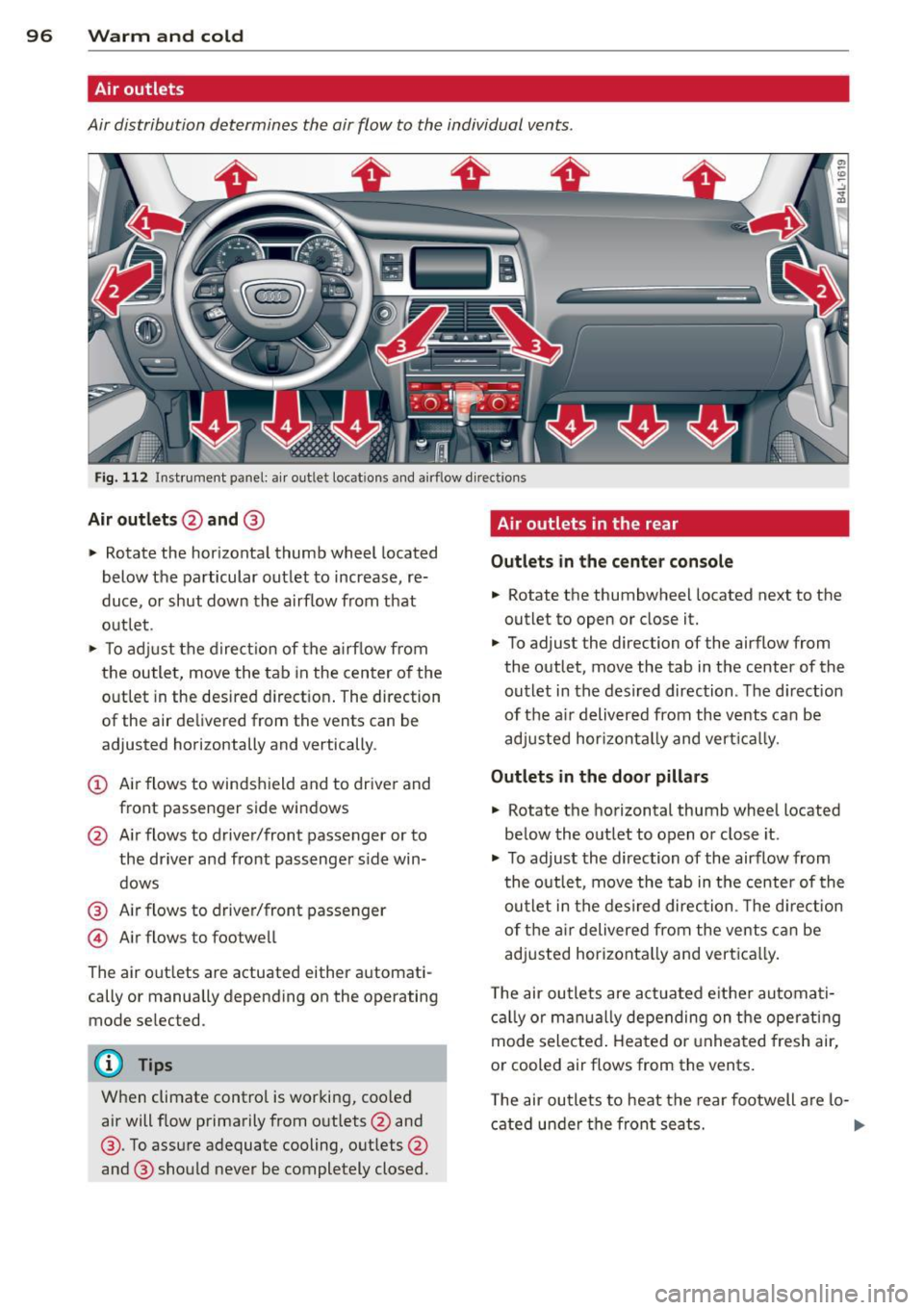
Air distribution determines the air flow to the individual vents .
Fig. 112 Instrument panel: a ir outlet locat ions and airf low d irections
Air outlets @and @
" Rotate the horizontal thumb wheel located
below the particular outlet to increase, re
duce, or shut down the a irflow from that
out let .
" To ad just the direc tion of the a irf low from
the outle t, move the tab in the center o f the
outlet in the desired d irect ion . The direction
of the air de livered from the vents can be
adjusted horizontally and vertically .
(D Air flows to windshield and to drive r and
front passenger side windows
@ Air flows to driver/front passenger or to
the driver and front passenger s ide win
dows
@ Air flows to driver/front passenger
© Air flows to footwell
The air out lets are actuated either automati
cally or manually depending on the operating
mode selected .
@ Tips
When climate control is working, coo led
air will f low primarily from outlets @and
@ . To assure adequate cooling, outlets @
and @ should never be completely closed.
Air outlets in the rear
Outlet s in the center con sol e
.. Rotate the thumbwheel located next to the
outlet to open or close it.
" To adjust the direction of the airflow from
the outlet, move the tab in the center of the
outlet in the desired direction . The d irection
of the a ir deliv ered from the vents can be
adj usted hor izontal ly and vert ica lly.
Outlets in the door pill ars
" Rotate the horizontal thumb wheel located
be low the outlet to open o r close it .
.. To adjust the direction of the airflow from
t he outlet, move the tab in the center of the
outlet in the desired direction . Th e d irect ion
of t he ai r delivered from the vents can be
adjusted horizonta lly and vert ica lly.
T he air ou tle ts are act uated e ither automati
c a lly or man ua lly depending on the operating
mode selected . Heated o r unheated fresh air,
or cooled air flows from the vents.
T he air ou tle ts to heat the rear footwell a re lo-
cated under the front seats.
1J11>
Page 99 of 342

@ Tips
If the climate control system is operating
in cooling mode, a ir flows primarily from
the outlets in the center conso le and in the
door pillars. To achieve adequate cooling,
you should never close the outlets com
pletely .
Using climate control economically
Using the climate controls prudently can help
save fuel.
When you use the air conditioner, engine pow
er is reduced and fuel consumption increases.
To save fuel, you should use the air condition
e r only when necessary. Also please note the
following points :
.,. To save fuel, turn off cooling mode by press
ing the
I AC ! button (indicator light goes
out) .
.,. In add ition, if you open the window or the
Panoramic sliding sunroof* while driving,
turn off cooling mode by p ress ing the
IACI
button (indicator light goes out).
.,. If the vehicle is extremely hot due to the
heat of the sun, briefly open doors and win
dows.
@ For the sake of the environment
By reducing the amount of fue l you use,
you also reduce the amount of poll utants
emitted into the air. W
arm and cold 9 7
Rear Air Conditioning
Rear air conditioning - controls
Applies to vehicles: with four-zone automatic comfort air
conditio nin g
This overview is to assist you in familiarizing
yourself with the rear air conditioning con
trols.
lll ... :;
- --- ------------....... ~
Fig . 113 Rea r air conditioning controls
The left display indicates the temperature se
lected for the rear left passenger, the right
display indicates the temperature selected for
the rear right passenger . If the settings for
seat heating *, air distribution or the air condi
tioning fan are changed, the relevant indica
tor will appear br iefly on the display .
Funct io ns are set by ro tating the control or
are switched on and off by tapping the but
tons. The indicator light in the button illumi
nates when the function is active.
Button (s) Function
ION/OFFI Climate control on/off
¢ page98
-
IAUTOI Automatic mode
¢page98
Regulatoral El Temperature selection
¢page98
Qi Seat heating *
¢page 101
~
Fan
¢page98
~
Air distribution
¢page99
a) The regu lator is also u sed to set the fan sp ee d, air dis-
tribut ion and seat heating .
IIJ,
Page 101 of 342

Rear air distribution ~
Applies to vehicles: with four-zone automatic comfort air
conditioning
The automatically controlled air distribution
con be changed manually.
.. Press the Gil button.
.. Rotate the regu lator to the desired setting .
You can adj ust the air circulation so that air
flows from specific vents .
- In position
:J, all air flows from the vents in
the center console and the outlets to the
door pilla rs.
- In position
:0, air flows from the outlets in
the door p illars.
- In position
!,8, air flows from the outlets un-
der the front seats.
There are additional combinations available to
adjust air d istr ibut io n as needed.
To regulate air distribution automatically,
sw itch to
IAU TO I.
Basic settings
General
The basic climate control settings con be ad
justed in the MMI.
.,. Select: Funct io n button ICAR I > Control but
ton
AC . Or
.,. Se lect: Funct ion button
ICAR I > Control but-
ton
Car sy stem s* > AC.
The follow ing funct ions can be selected :
- Auto recirculation
c> page 99
- Synchronization c> page 99
-Supplementary heater * ¢page 100
-Rear opera tion* c> poge 100
Warm and c old 99
Automatic recirculation mode
An air quality sensor detects increased con
centrations of pollutants in the outside air
and automatically switches to recirculation
mode .
We recommend that you always keep auto
matic a ir recirculation ON to p revent polluted
outside air from enteri ng the veh icle inter ior.
If the
a ir qu ality sensor l ocated in the air con
ditioning system detects polluted outs ide a ir,
the sensor dec ides whether the air pollut ion
can be reduced by the facto ry-installed pollu
ta nt fi lter or whethe r it is necessary to switc h
to air recirc ulation. With heavy conce ntra ti ons
of pollu tants, the a ir condit ion ing system is
switched automatica lly to recirc ulation mode
and the supp ly of outside air is blocked . As
soon as the concentration of pollutants in the
outside air drops, fresh air is supplied to the
vehicle interior aga in.
In the event that the windows fog up during
automat ic air rec irculat ion, you must press
the® button immediately.
Under certa in ope rating cond itions, a utomatic
air recirculation is switched off automatica lly.
With outside temperatures be low about 50 °F
(+10 °C), automatic air rec irculat ion is limited
to 30 seconds. W it h outside temperatures be
low about 30 °F ( -1 °C) a nd with the air condi
tione r switched off, the a utomatic air recircu
l ation is limited to 15 seconds.
Synchronization
One climate control setting for the driver and
front passenger seats .
With synchro nization active, the driver's set
tings a re adopted for the passenger o r vice
versa . All the othe r setti ngs that were made
are t ransferred to t he other seat . This in
cl udes all the cl ima te co ntro l settings, excep t
for the se at heating/ven tilat ion* .
If a different setting is selected at a
"synchron ized seat ", synchronization is can
c e lled.
Page 102 of 342

100 Warm and cold
Synchronization
Applies to vehicles: with four -zone automat ic comfort a ir
co ndit io ning
One climate control setting for all seats .
With synchronizat ion active, the driver's set
tings are adopted for the front passenger and
the rear left and right seats. A ll the other set
tings that were made are transferred to the
other seats. This includes all the climate con
trol settings, except for the seat heat ing/ven
tilation* .
If a different setting is se lected at a
"synchroni zed seat", synchron iz ation is can
celled.
Supplementary heater
App lies to vehicles: with d iesel eng ine
" Select : Funct ion button ICARI > Control but
ton
AC > SuppL heater. Or
" Select : Funct ion button
~IC_A_R~I > Control but-
ton
Car systems* > AC > SuppL heater.
Vehicles with diesel engines are equipped
with a supp lementary heater to warm the in
ter ior of the vehicle more quickly. The supp le
men tary heater switches itself on and off au
tomatically when the outside temperature is
be low SO °F (10 °C) and the engine is running,
depending on the coolant temperature, interi
or temperature and the se lected temperature.
Rear operation
Applies to vehicles: with four -zone automat ic comfo rt a ir
co nd it io nin g
The air conditioning in the rear of the vehicle
con be controlled from the cockpit .
" Se lect: Funct ion button ICARI > Contro l but
ton
AC > Rear operation . Or
" Select : Funct ion button
ICARI > Control but
ton
Car systems*> AC> Rear cabin set
tings.
The driver or front passenger can control the
air conditioning in the rear of the vehicle us
ing
his/her own controls.
Heated Seats
Heated front seats~
Applies to veh icles: w it h electrically heated fro nt seats
The sea t cushion and the seotbock of the
front seats con be heated electrically.
" Press the Ill button.
" Rotate the regulator to the des ired setting.
In position O the heating for the seats is
turned off. The range of adjustment is be
tween 1 and 6 .
The heater for the front seats can be turned on when the weight of the particular seat's oc
cupant is detected. However, the front seats
can be pre-heated for about 10 m inutes using
the activated seat heater. After th is time has
elapsed, the seat heater automatically turns
off if it does not detect an occupant's we ight
for the particular seat.
_&. WARNING
Individuals with reduced sensitiv ity to pain
or temperature could develop burns when
using the seat heating function . To reduce
the r isk of injury , these ind ividuals should
not use seat heating .
(D Note
To avoid damage to the heating elements
i n the seats, do not kneel on the seats or
place heavy loads on a small area of the
seat.
(D Tips
Please note that the weight of objects
placed on the seat wi ll also be detected.
This weight may be enough to cause the
seat heater to turn on.
Front seat ventilation ~
Applies to veh icles: w it h front seat ve ntil at ion
The seat cushion and the seatback on the
front seats con be ventilated .
" Press the~ button.
" Rotate the regulator to the desired setting .
ll-
Page 103 of 342
When the regulator is in the O position, the
seat ventilation is switched off. The range of
adjustment is between 1 and 6.
Heated rear seats~
Applies to vehicles: with heated rear seats
The seat cushions and seatbacks of the two
outer rear seats can be heated electrically.
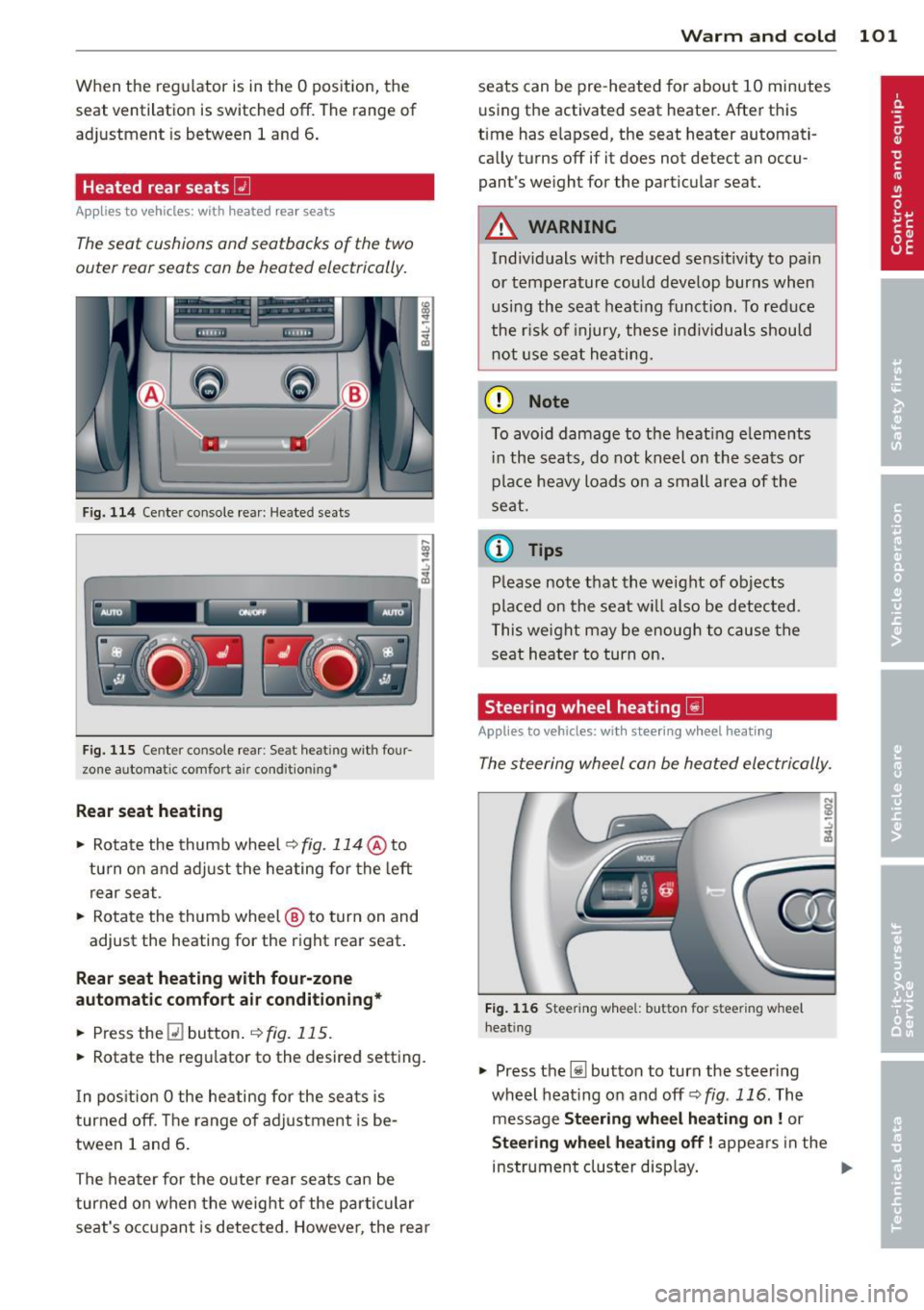
F ig. 114 Ce nter console rea r: Heated sea ts
i
-..:,
---------------<%
F ig. 1 15 Ce nter console rear : Se at heat ing with four
zone automat ic comfort a ir cond it ion ing•
Rear seat he ating
• Rotate the thumb wheel ~fig. 114 @to
turn on and adjust the heating for the left
rear seat .
• Rotate the thumb wheel @ to turn on and
adjust the heating for the right rear seat.
Rear seat heating w ith four-zone
automatic comfo rt air conditioning *
• Press the Q] button . ~ fig. 115.
• Rotate the regu lator to the desired setting .
I n pos ition O the heating for the seats is
turned off . T he range of ad justment is be
tween 1 and 6 .
The heater for the outer rear seats can be
turned on when the weight of the parti cular
seat's occ upant is detected. Howeve r, the rea r
Warm and cold 101
seats can be pre-heated for about 10 minutes
using the activated seat heater. After this
time has e lapsed, the seat heater automati
ca lly turns off if it does not detect an occu
pant's weight for the particular seat.
A WARNING
Individuals wit h reduced se ns itiv ity to pa in
or temperature could develop burns when
usi ng the seat heat ing funct ion . To reduce
the r isk of injury, these ind ividuals shou ld
not use se at hea ting.
(D Note
To avoid damage to the heat ing e lements
i n the seats, do not kneel on the seats or
place heavy loads o n a sma ll a rea of the
seat.
© Tips
P lease not e that the weight of objects
placed on the seat wi ll also be detected .
This weight may be enough to cause the
seat heater to turn on .
Steering wheel heating~
Applies to vehicles: with steering wheel heating
The steering wheel can be heated electrically.
F ig . 1 16 Steer ing wheel: button for steering whee l
heat ing
• Press the [j] button to turn the steer ing
whe el heat ing on and
off <=>fig . 116. The
message
Steering wheel h eating on! or
Steering wheel heating off! appears in the
instrument cluster disp lay. ..,.
Page 105 of 342
On the road
Steering
Manually adjustable steering wheel
Applies to vehicles: with manu ally adjustable steering
w hee l
The height and reach of the steering wheel
can be adjusted.
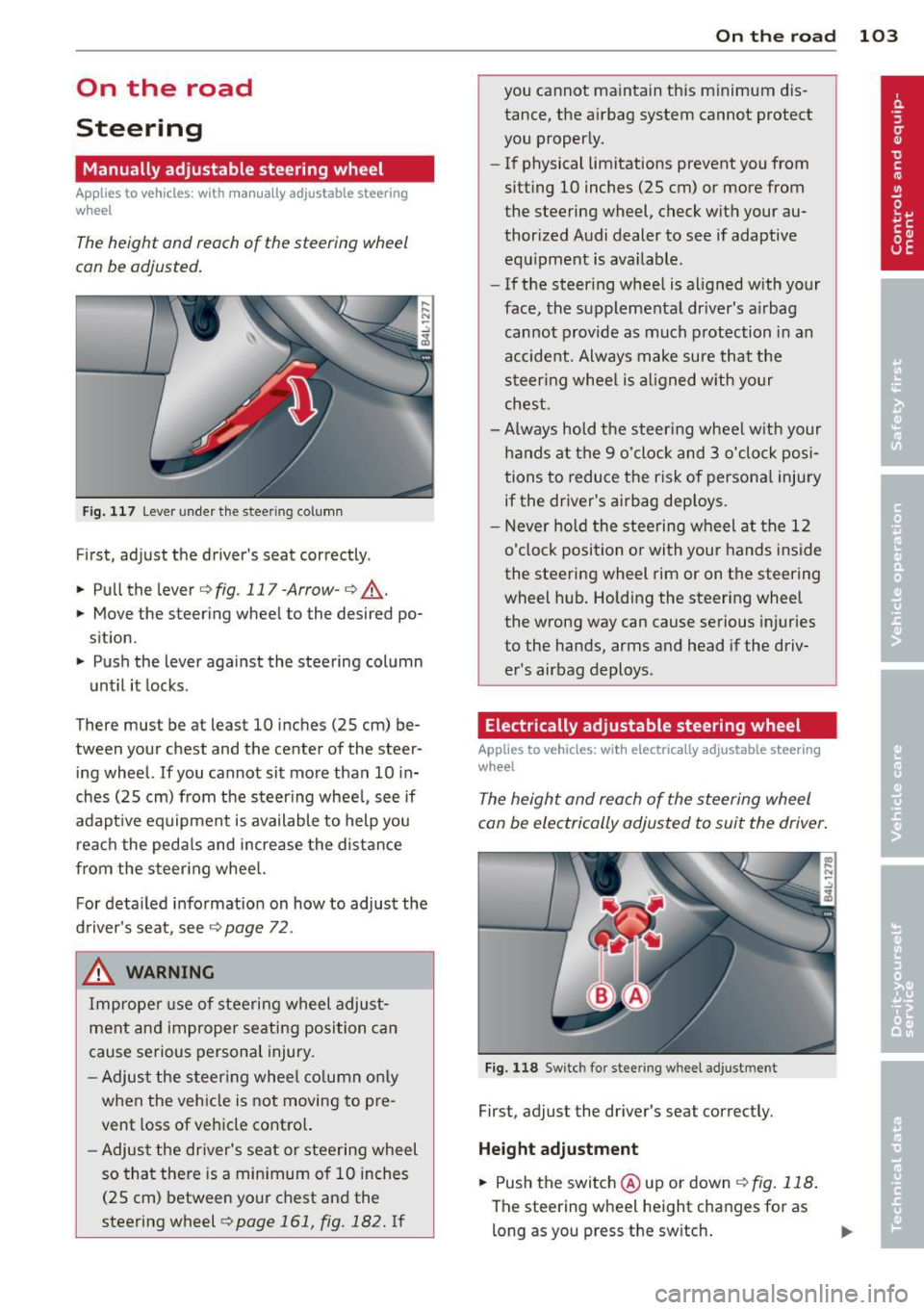
Fig. 117 Lever under the steer ing column
First, adjust the driver's seat correctly .
.. Pull the lever
c:>fig . 117-Arrow-c:> ,A .
.. Move the steering wheel to the desired po
sition.
.. Push the lever against the steering column
unt il it locks.
There must be at least 10 inches (25 cm) be
tween your chest and the center of the steer
ing wheel.
If you cannot sit more than 10 in
ches (25 cm) from the steering wheel, see if
adapt ive equipment is available to help you
reach the pedals and increase the distance
from the steering wheel.
For detailed information on how to adjust the
driver's seat, see
c:> page 72.
& WARNING
Improper use of steering wheel adjust
meht and improper seating position can
cause serious personal injury.
- Adjust the steering wheel column only
when the veh icle is not moving to pre
vent loss of vehicle control.
-
-Adjust the driver's seat or steering wheel
so that there is a minimum of 10 inches
(25 cm) between your chest and the
steering wheel
c:> page 161, fig. 182. If
On the road 103
you cannot maintain this minimum dis
tance, the airbag system cannot protect
you properly.
- If physical limitations prevent you from
sitting 10 inches (25 cm) or more from
the steering wheel, check with your au
thorized Audi dealer to see if adaptive
equipment is available.
- If the steering wheel is aligned with your
face, the supplemental dr iver's a irbag
cannot provide as much protection in an
accident. Always make sure that the
steering wheel is aligned with your
chest.
- Always hold the steer ing wheel w ith your
hands at the 9 o'clock and 3 o'clock posi
tions to reduce the risk of personal injury
if the driver's airbag dep loys .
- Never hold the steering wheel at the 12
o'clock position or with your hands inside
the steering wheel rim or on the steering
wheel hub. Holding the steering wheel
the wrong way can cause serious injuries
to the hands, arms and head if the driv
er's airbag deploys.
Electrically adjustable steering wheel
App lies to vehicles: with electrically adjustable steering
w heel
The height and reach of the steering wheel
can be electrically adjusted to suit the driver.
Fig. 118 Switch for stee ring wheel adjustment
First, adjust the driver's seat correctly.
Height adjustment
.. Push the switch @ up or down c:>fig. 118.
The steering wheel height changes for as
long as you press the sw itch. ..,.
Page 106 of 342
104 On the road
Reach adjustm ent
.. Push the sw itch @forward or bac kward
¢ fig. 118 . The steering whee l reach
changes for as long as yo u press the switch.
There must be at least 10 inches (25 cm) be
tween you r chest and the center of the steer
ing wheel. If you cannot sit more than 10 in
ches (25 cm) from the steering whee l, see if
adaptive equipment is available to help you
reach the pedals and increase the distance
from the steer ing wheel.
F or detai led informat ion on how to adjust the
driver's seat, see
¢ page 72.
The stee ring wheel can be adjusted even when
the ignition is turned
Off. For ve hicles with
seat memory, the individ ual positions for the
steering whee l can be stored along with the
seat posit ion.
A WARNING
Improper use of steering wheel adjust
ment and improper seating position can
cause se rious personal injury.
- Adjust the steer ing whee l co lumn on ly
when the veh icle is not moving to pre
vent loss of veh icle cont ro l.
- Adjust the driver's seat or steering wheel
so that the re is a min imum of 10 inches
(25 cm) between your chest and the
steeri ng wheel
¢ page 161, fig . 182. If
yo u ca nnot ma int ain this min imum d is
tan ce, the airbag system c annot pro tect
yo u properly.
- If phys ica l limitations prevent yo u from
sitting 10 inches (25 cm) or more from
the steering wheel, check with yo ur au
tho rized Audi dea le r to see if adaptive
equipment is availab le.
- If the steering wheel is aligned with your
face, the supp lemental driver's airbag
cannot prov ide as much protect ion in an
acc ident. A lways make sure that the
steeri ng wheel is aligned with your
chest.
- Always hold the steering wheel with your
hands at the 9 o'clock and 3 o'clock posi- tions to reduce the risk of persona
l injury
if the dr iver's airbag dep loys .
- Never hold the steering wheel at the 12
o'clock position or with your hands inside
the steering wheel rim or on the steering
wheel hub. Holding the steering wheel
the wrong way can cause serious injuries
to the hands, arms and head if the driv
er's airbag deploys.
Easy entry feature
The easy entry feature makes it easier to en
ter and exit the vehicle by automatically ad
justing the steering wheel.
Press the button @¢ page 103, fig. 118 to
turn the easy entry feature on or
off.
When the easy entry feature is turned on (but
ton depressed), the steering wheel moves up
to the parked pos ition when the ignit ion is
turned
off. After you enter the vehicle, the
stee ring wheel moves to the sto red pos it ion
as soon as you tu rn o n the ignition.
Easy ent ry feature on vehicles w ith
memory seat*
For t he stored steering wheel pos ition to be
re called, the dr iver's seat memory m ust be
swi tched on
(ION/OF F I swi tch in dep ressed po
s it ion).
If the easy ent ry feature is switched
off, t h e
stee ring wheel moves to the sto red pos ition
a s soon as you press the sea t memo ry bu tton.
Page 140 of 342
138 Automatic transmi ssion
co uld "creep" forward or backward.
When stopped, keep the brake pedal
fully depressed and use the parking brake if necessary to keep the vehicle
from ro lling .
- If the selector lever is unintentionally
moved into N wh ile you are driving, take
yo ur foot off the accele rato r pedal and
wa it for the engine to return to idle
speed befo re selecting a d rivi ng position .
- Never shift into "R" or "P" when the vehi
cle is in mot ion.
- Never get out of the dr iver 's seat when
the engine is runn ing .
- If you must get out of the vehicle, move
the se lector lever securely into the P po
sit io n and apply the par king brake f irm ly.
- If the eng ine must remain ru nning, never
hav e any driv ing pos ition engaged when
c hec king under the hood . M ake sure t he
sele ctor lever has securely eng aged and
is locke d in "P" with the par king brake
firmly set ¢
page 248, Engine compart
ment .
Otherw ise, any increase in eng ine
speed may set the vehicle in m otion,
even w ith the par kin g brake applied.
Selector lever positions
This section describes the selector lever posi
tions and driving ranges.
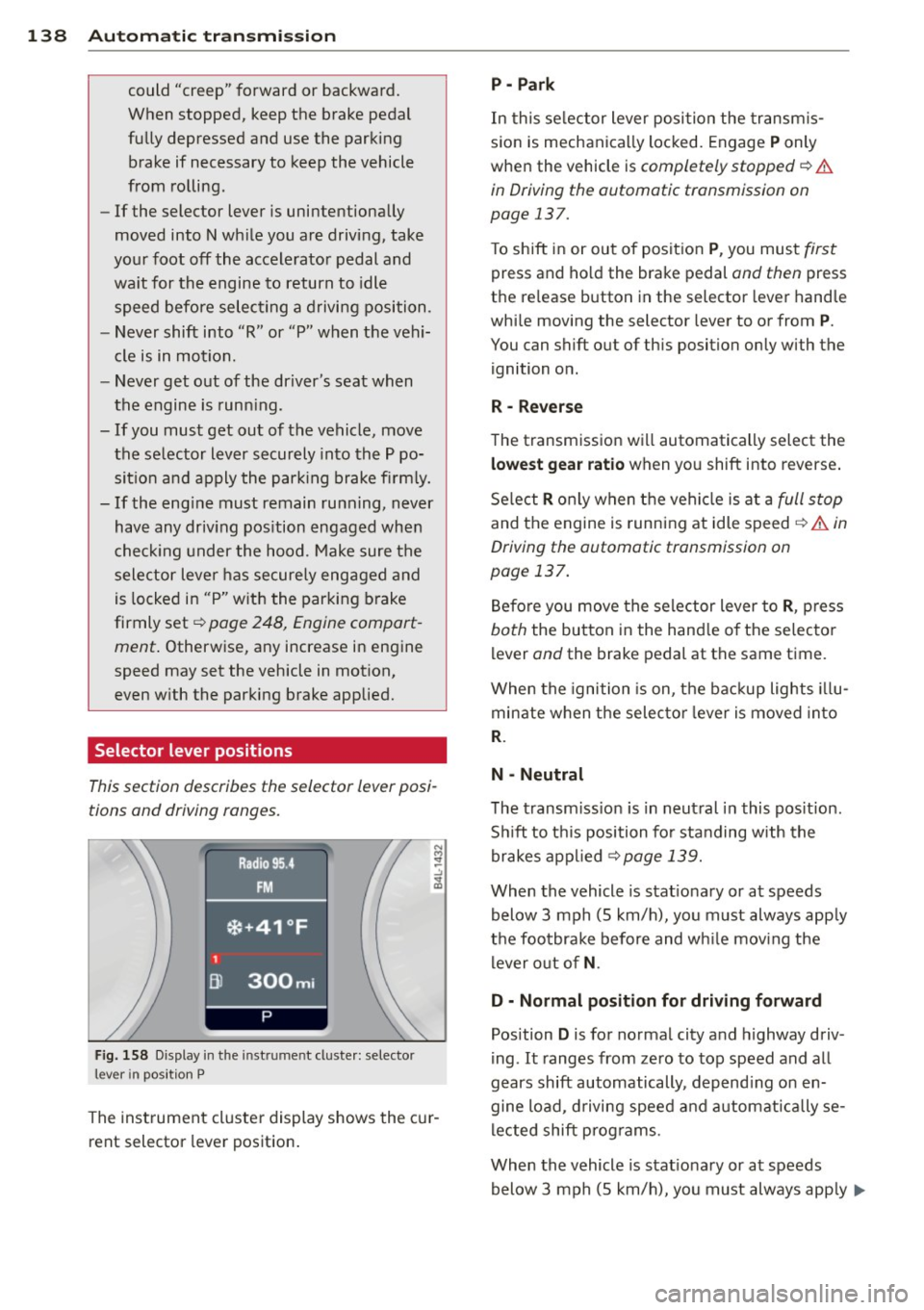
F ig. 158 Display in t he in st rum en t cluste r: selecto r
lev er in po sit ion P
The inst rumen t cluste r display shows the c ur
rent selector lever position .
P - Park
In this selector lever posi tion the transm is
s ion is mechanica lly locked. Engage
P only
whe n the vehicle is
completely stopped¢&.
in Driving the automatic transmission on
page 137.
T o shift in or out of posit ion P , you mus t first
press and ho ld the brake pedal and then press
the re lease button in the selector leve r hand le
whi le moving the selector lever to or from
P .
You can shift out of th is position only with the
ignition o n.
R • Reverse
The transm iss ion w ill automatically select the
lowest gear ratio when you shift into reverse .
Se lect
R o nly when t he vehi cle is at a full stop
and the engine is running at idle speed¢&. in
Driving the automatic transmission on
page 137.
B efore you move the se lector lever to R , press
both the button in the hand le o f the se lecto r
lever and the brake pedal at the same t ime.
W hen the ignition is on, the bac kup light s illu
minate w hen t he selec to r l ever is
moved in to
R .
N -Neutral
The transm iss io n is in neut ral in this pos it ion .
S hi ft to t his position fo r standing with the
brakes app lied
¢ page 139.
When the vehicle is stat iona ry or at speeds
below 3 mph (5 km/h) , you must always app ly
t h e foo tbrake before and wh ile mov ing the
l ever o ut o f
N.
D - Normal position for driving forward
Position D is for no rma l city and highway driv
ing . It ranges from zero to top speed and all
gears shift automatically , depend ing on en
gine load, d riving speed and a utomat ically se
l ected shift p rog rams.
When the vehicle is stat iona ry or at speeds
below 3 mph (5 km/h), you must always app ly
IJ,,
Page 162 of 342
160 Driving Safel y
Driving Safely
General notes
Safe driving habits
Please remember -safety first!
This chapter contains important information,
tips, instructions and warnings that you need
to read and observe for your own safety, the
safety of your passengers and others . We have
summarized here what you need to know
about safety belts, a irbags, ch ild restra ints as
well as child safety. Your safety is for us
priori
ty number 1.
Always observe the info rmat ion
and warn ings in th is sect ion -fo r yo ur own
safety as well as that of your passengers .
The information in this se ction app lies to all
model ve rsions of your veh icle . Some of the
feat ures desc ribed in this sec tions may be
standard equipment on some models, or may be optional equipment on others . If you are
not sure, ask your authorized Aud i dealer.
A WARNING
- Always make sure that you follow the in
struct ions and heed the WARNINGS in
this Manual. It is in your interest and in
the inte rest of you r passengers.
- Always keep the complete Owner's Liter
ature in your Audi when you lend or sell
yo ur vehicle so that this important info r
mation will always be ava ilable to the
dr iver and passengers.
- Always keep the Owner's literature handy
so that you can find i t eas ily if you have
ques tions.
Safety equipment
The safety features are part of the occupant
restraint system and work together to help
redu ce the risk of injury in a wide variety of
accident situations.
Your safety and the safety of your passenge rs
should not be left to chance. Advances in
technology have made a varie ty o f fea tures
avai la bl e to he lp re duce the risk of inj ury in an accident
. The following is a list of just a few of
the safety features in your Audi:
- sophis tic ated s afety be lts for d rive r and a ll
passenger sea ting pos it ions,
- be lt te nsione rs fo r th e fro nt sea ts a nd the
ou ter sea ting posit ions in the second row
seating,
- be lt h eight adjustment fo r th e front sea ts
an d the o ute r seat ing pos itions in the sec
ond row seating,
- he ad restra ints for e ach sea ting pos ition,
- front airbags,
- side airbags in the fro nt seats and the outer
seating positions in the second row seat ing*,
- side curta in ai rbags,
- specia l LATCH anchorages for child re-
st raints,
- ad justab le steering colum n.
These individual safety features, can work to gether as a system to he lp protect you and
your passengers in a wide range of accidents .
These features cannot work as a system if
they are not always correctly adjusted and cor rectly used .
Safety is everybody's responsibil ity!
Important things to do before driving
Safety is everybody 's job! Vehicle and occu
pant safety always depends on the informed
and careful driver.
For yo ur safety and the safety of your passen
gers,
before driving always:
.. Make s ure that all lights and signa ls a re op
erati ng correctly .
.. Ma ke s ure that the tire pressure is correct .
.. Make s ure that all windows are clean and
afford good v is ibility to the o utside.
.. Secure a ll luggage a nd other items carefu lly
¢ page 87.
.. Make su re that nothing can in terfe re with
the peda ls.
.. Adjust fron t se at, head restraint and mir
rors co rrec tly for you r heigh t.
Page 163 of 342
.. Instruct passengers to adjust the head re
straints according to their height.
.. Make sure to use the right child restraint
correctly to protect children
c:> page 200,
Child Safety .
.. Sit properly in your seat and make sure that
your passenge rs do the same
c:> page 71,
General recommendations .
.,. Fasten your safety belt and wear it properly.
Also ins truc t your passengers to fasten their
safety belts properly
c:> page 170.
What impairs driving safety?
Safe driving is directly related to the condi
tion of the vehicle, the driver as well as the
driver's ability to concentrate on the road
without being distracted.
The driver is respons ible for the safety of the
vehicle and a ll of its occupants . If your ability
to drive is impaired, safety risks for everybody
in the vehicle increase and you also become a
hazard to everyone else on the road
c:> .&,. .
Therefore:
.. Do not let yoursel f be distracted by passen
gers or by using a cellular telephone .
.. NEVER drive when your driving ability is im
paired (by medications, alcohol, drugs, etc.).
.. Observe all traffic laws, rules of the road
and speed limits and plain common sense .
.,. ALWAYS adjust your speed to road, traffic
and weather cond it ions .
.. Take frequent breaks on long trips. Do not
drive for more than two hours at a stretch.
.. Do NOT drive when you are tired, under
pressure or when you are stressed .
A WARNING
Impaired driving safety increases the risk
of serious personal injury and death when
ever a veh icle is being used.
Driving Safely 161
Proper occupant
seating positions
Proper seating position for the driver
The proper driver seating position is impor
tant for safe, relaxed driving.
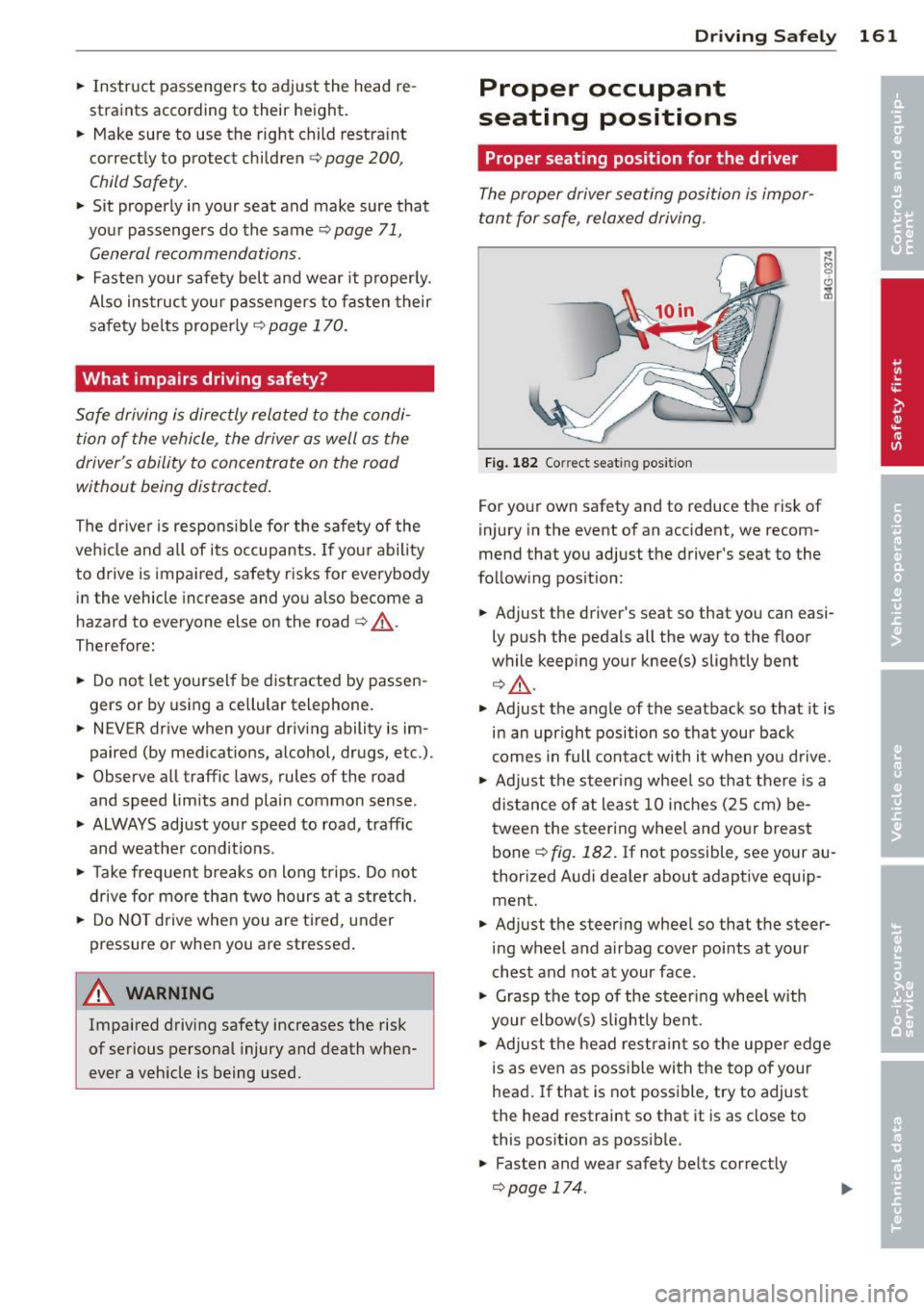
Fig. 182 Correct seat ing pos it ion
For your own safety and to reduce the risk of
injury in the event of an accident, we recom
mend that you adjust the driver's seat to the
follow ing position:
.. Adjust the driver's seat so that you can easi
ly push the pedals all the way to the floor
wh ile keeping your knee(s) slightly bent
c:> .&,. .
.. Adjust the angle of the seatback so that it is
in an upr ight position so that your back
comes in full contact w ith it when you drive .
.. Adjust the steering wheel so that there is a
distance of at least 10 inches (25 cm) be
tween the steering wheel and yo ur breast
bone ~
fig. 182. If not possible, see your au
thorized Audi dealer about adaptive equip
ment .
.. Adjust the steer ing wheel so that the steer
ing wheel and airbag cover points at your
chest and not at your face.
.,. Grasp the top of the steer ing whee l with
your elbow(s) slightly bent.
.. Adjust the head restraint so the upper edge
is as even as possible with the top of your
head. If that is not poss ible, try to adjust
the head restraint so that it is as close to
this position as possible .
.. Fasten and wear safety belts correctly
c:>page 174.