door AUDI Q7 2013 Owner´s Manual
[x] Cancel search | Manufacturer: AUDI, Model Year: 2013, Model line: Q7, Model: AUDI Q7 2013Pages: 348, PDF Size: 87.72 MB
Page 75 of 348
unattended in the vehicle -they could be
injured!
- Exercise caution when adjusting the seat
height. Unsupervised or careless seat ad
justment can pinch fingers or hands
causing injur ies.
- While the vehicle is moving, the seat
backs of the front seats must not be in
clined too far to the rear because the ef
fectiveness of the safety belts and the
airbag system is severely compromised -
there is a risk of injury.
- To reduce the r isk of injury in the case of
sudden braking or accident, front pas
sengers must never ride in a moving ve
hicle wi th the seatback reclined. Safety
belts and the airbag system only offer
maximum protection when the seatback
is upright and the safety be lts are prop
erly positioned on the body. The more
the seatback is reclined, the greater the
risk of personal injury from an incorrect
seating pos ition and improperly posi
t ioned safety belts.
Seat memory
Driver's seat memory
Ap plies to vehicles: with seat memo ry
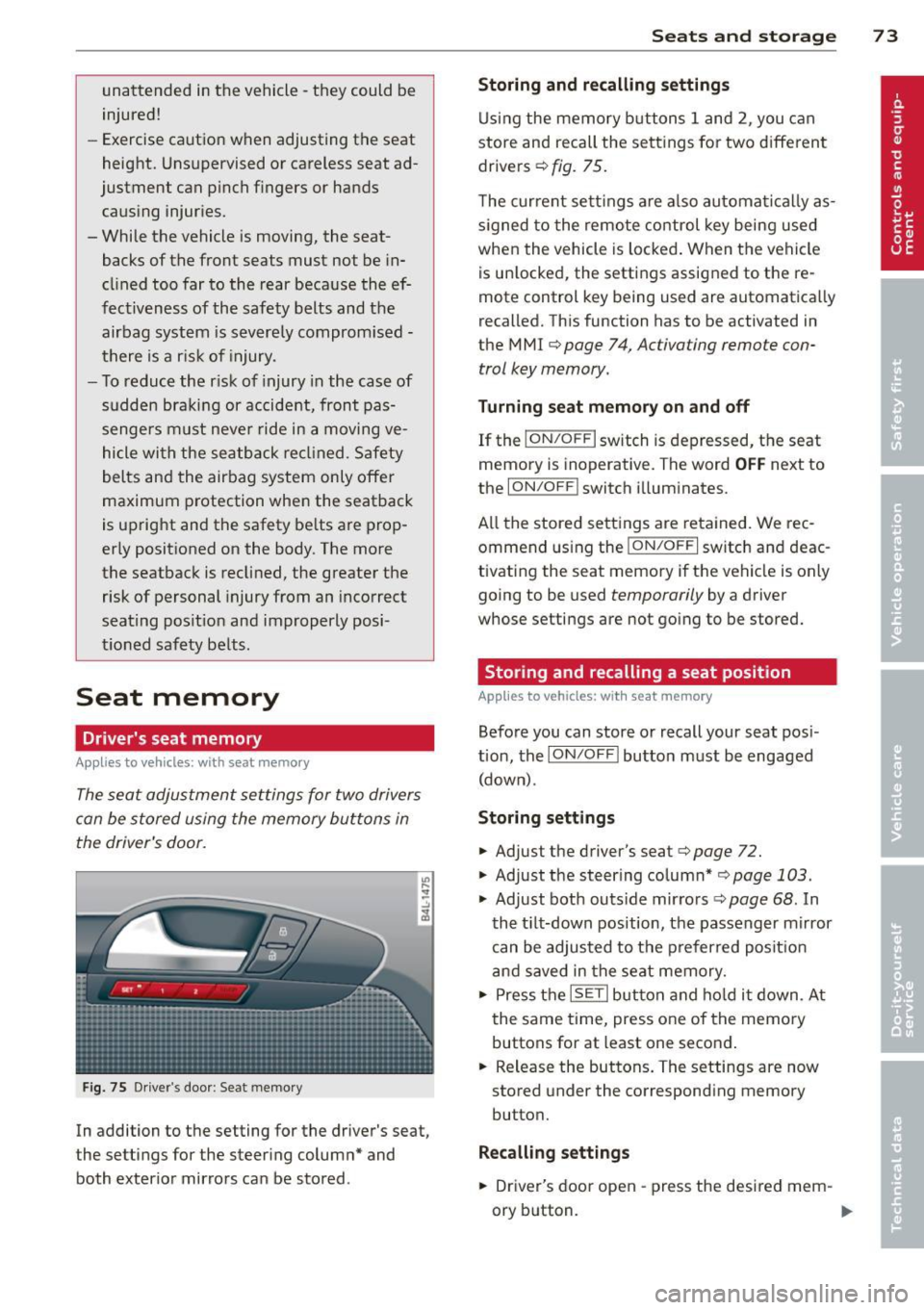
The seat adjustment settings for two drivers
can be stored using the memory buttons in
the driver's door.
F ig. 75 Driver's door : Seat memory
In addition to the setting for the driver's seat,
the settings for the steering column* and
both exterior mirrors can be stored .
Seats and storage 73
Storing and recalling settings
Using the memory buttons 1 and 2, you can
store and recall the settings for two different drivers ¢
fig. 75.
The current settings are also automatical ly as
s ig ned to the remote control key being used
when the vehicle is locked. When the vehicle
is un locked, the settings assigned to the re
mote control key being used are automatically
recalled. This function has to be activated in
the M MI ¢
page 7 4, Activating remote con
trol key memory.
Turning seat memory on and off
If the I ON/O FF I switch is depressed, the seat
memory is inoperative. The word
OFF next to
the
ION/O FF I switch illuminates.
All the stored settings are retained. We rec
ommend using the
ION/OF F I switch and deac
tivating the seat memory if the vehicle is only
going to be used
temporarily by a driver
whose settings are not going to be stored.
Storing and recalling a seat position
App lies to vehicles: wit h seat memory
Before you can store or recall your seat pos i
tion, the
ION /OFF! button must be engaged
(down) .
Storing settings
.,. Adjust the driver's seat¢ page 72 .
.,. Adjust the steer ing column* ,=;, page 103 .
.,. Adjust both outs ide mirro rs ¢ page 68 . In
the tilt-down position, the passenger mirror
can be adjusted to the preferred posit ion
and saved in the seat memory .
.,. Press the
ISETI button and hold it down . At
the same time, press one of the memory
buttons for at least one second .
... Release the buttons. The settings are now
stored under the corresponding memory
button.
Recalling settings
.,. Driver's door open -press the desired mem-
ory b utton.
ll-
Page 76 of 348
7 4 Seats and stor age
• Driver's door closed -press the correspond
ing memory button unti l the stored position
is reached.
Successf ul s torage is conf irmed a ud ibly and
by the l ight i n the
!SET ! button illuminating .
When the ve hicle is
locked , the cur rent set
tings are stored and ass igned to the remo te
control key. Bu t th e set tings stored on memo
ry buttons 1 and 2 are not deleted. They can
be reca lled at any time . When the vehicle is
unlocked , the settings assigned to the remote
control key are restored.
If you r vehicle is driven by other persons using
your remote control key, you should save yo ur
individua l seat position on one of the memory
buttons. You can reca ll your settings aga in
simply and conve niently by pressing the corre
spond ing memory butto n. When the vehicle is
l oc ked, these setti ngs are automatically re-as
signed to t he remote control key and stored.
.&_ WARNING
- F or safe ty re ason s, the sea t sett in g can
only be rec alled w hen the veh icle is st a
t ionary -othe rwise you r isk having an ac
cident.
- In an emergency, the recall operation
can be stoppe d by pressin g the
!ON/OFF I
button or by br iefly p ress ing any given
memory button.
Activating remote control key memory
A ppl ies to veh icles: with seat memo ry
To assign the driver's seat settings to the re
mote contro l key when locking the vehicle, the
function must be activated in the MMI.
• Se lect:
I CARI f u nct ion button > Systems *
control button > Seat adjustment > Driver 's
seat > Key mem. p rofile > On .
Or
• Se lect:
ICARI funct io n button > Car sy s
tems *
control bu tton > Vehicle settings >
Seats > Driver's seat > Remote control key
> On .
(D Tips
If you do not want anothe r driver's set
tings to be assigned to the remote control key, switch off the memory function using
the MMI or the
I ON/OF F! button
c> page 73.
Rear seats
General information
Safe transportation of passengers on the rear
seats requires proper safety pre cautions.
All passengers on the rear seats mus t be seat
ed in comp lian ce with the safety guide lines
exp lained in
c> page 175 and c>page 184.
T he co rrec t seating pos ition is cr it ic al f or the
sa fe ty of front
and rear seat passenge rs a like
c>page 168 .
A WARNING
--Occupants in the f ront and rear seats
m ust always be proper ly restrained.
- Do not let anyone ride in the ve hicle
witho ut the head restraints prov ided.
Head restraints help to reduce injuries.
- Loose items inside the passenge r com
pa rtment, can fly forward in a crash or
sudden maneuve r and injure occupants.
Always store a rticles i n the luggage com
pa rtment an d use the fastening eyes, es
pecially w he n the rea r seatbac ks hav e
been fo lded down.
- Read and heed all WARNI NGS
c> pag e 168, Proper s eating positions
for passengers in rear sea ts.
Page 81 of 348
Luggage compartment
Expanding luggage compartment
To expand the luggage compartment, the
seatbacks can be folded forward separately or together .
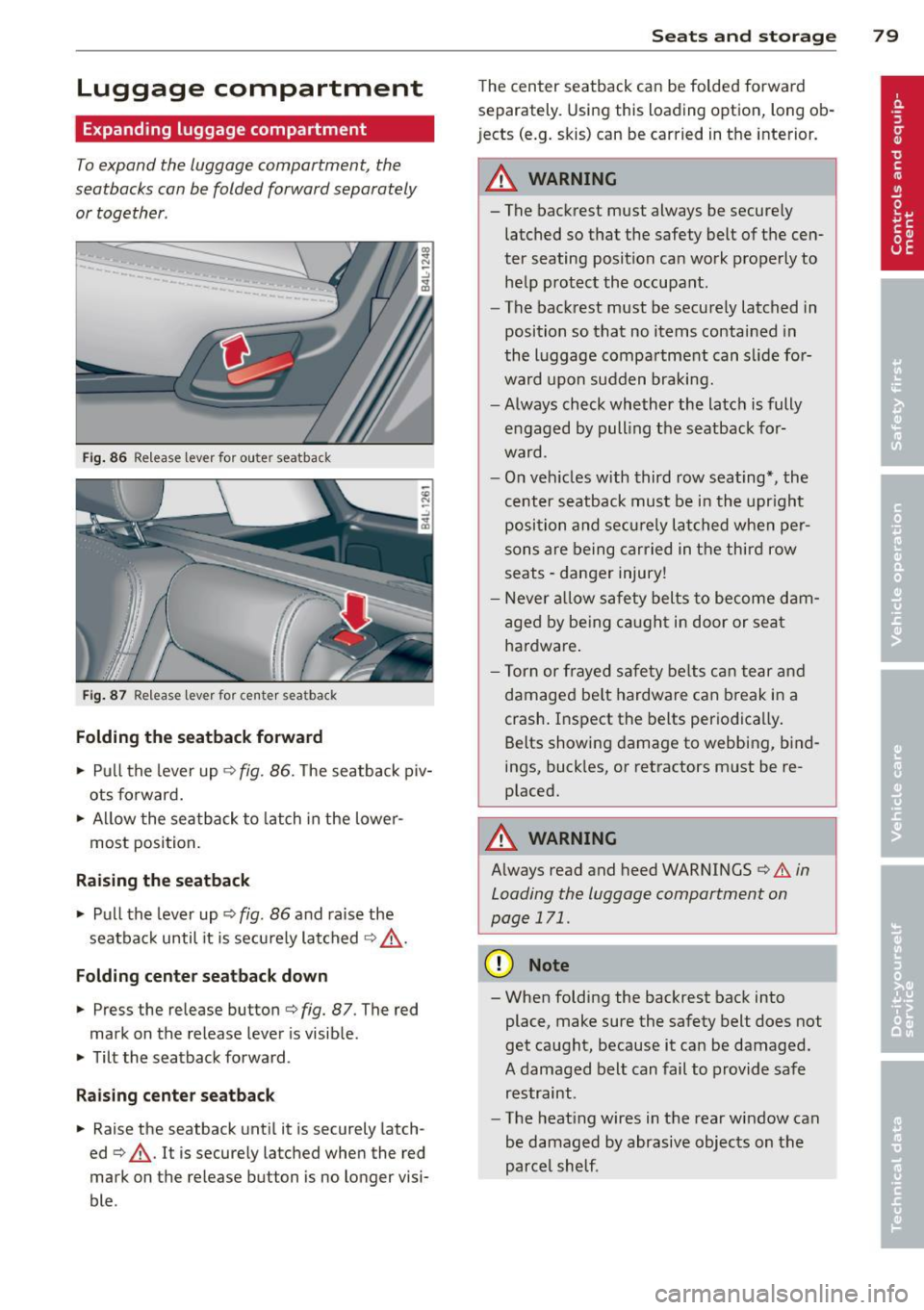
Fig. 86 Release lever for ou ter seatback
Fig. 87 Release leve r fo r cente r seatback
Folding the seatback forward
.. Pu ll the lever up ¢ fig. 86. The seatback piv
ots fo rward .
.. Allow the sea tba ck to latch in the lowe r
most posi tion.
Raising the seatback
.. Pull the lever up ¢ fig. 86 and ra ise the
seatba ck until it is secu rely latched ¢ _&. .
Folding center seatback down
.. Press the release button ¢ fig. 87. The red
mark on the release lever is visib le .
.. Tilt the seatback forward .
Raising c enter seatback
.. Raise the seatback unt il it is securely latch
ed ¢_&. . It is securely latched when the red
mark on the release button is no longer visi
ble .
Seats and storage 79
The cen ter seatback can be folded forwa rd
separately. Using this loading option, long ob
jects (e.g. skis) can be carried in t he interior.
_& WARNING
-
- The backrest must always be secure ly
latched so that the safety belt of t he cen
ter seating position ca n wo rk p roperly to
he lp p rot ect the occupant.
- The back rest must be securely latched in
position so that no items contai ned in
the l uggage compa rtment can s lide fo r
ward upon sudden braking.
- Always check whether the latc h is fully
e ngaged by pull ing t he seatback for
ward .
- On veh icles with third row seating*, the
cent er seatback must be i n the upr ight
posi tion and se curely la tched whe n pe r
sons are being carried in t he thir d ro w
seats -danger injury!
- Never a llow safety belts to become dam
age d by be ing c augh t in door or sea t
ha rdware .
- Tor n or frayed s afety be lts c an t ear and
damage d be lt hardware can break in a
crash. I nsp ect the belts per io d ica lly.
Belts showi ng damage to webbing, b ind
ings, buck les, or retractors m ust be re
placed.
_& WARNING
A lways read and heed WARNINGS ¢.&. in
Loading the luggage compartment on
page
171.
(D Note
- When fold ing the backrest back into
place, make sure the safety belt does not
get ca ught, because it can be damaged .
A damaged belt can fail to provide sa fe
restraint .
- The heat ing wires in the rea r window can
be damaged by abrasive objects on the
parce l shelf .
Page 88 of 348
86 Seats and storage
causing scald ing burns. Spi lled hot liq uid
can also cause an accident and personal
injury .
- Use only soft cups in the cupholder. Hard
cups and glasses can cause in jury in an
acc ident.
CD Note
On ly drink containers with Lids should be
carried in the cupholder . Liqu id could spill
out and damage your veh icle's e lectronic
equ ipment or sta in the upholstery, etc.
Beverage holders in the door pockets
There is a beverage holder in all four doors.
F ig . 98 Sect ion of doo r pa nel : Beve rage holder
The beverage ho lde rs in the door poc kets are
suitab le for 1 to l.S-lite r bottles.
A WARNING
Spilled hot liquid can cause an ac cident
and pe rsonal inj ury.
-
- Never carry any beve rage containe rs with
hot liquids, s uch as hot coffee or hot tea,
in the vehi cle w hile it is mov ing . In case
of an accident, s udden brak ing or other
vehicle movement, hot liquid could spill,
causing sca ld ing burns. Spi lled hot liq uid
can also cause an accident and personal
injury.
- Use only soft cups in the cupholder. Hard
cups and g lasses can cause in jury in an
acc ident.
CD Note
On ly drink containers with Lids should be
carried in the cupho lder . Liqu id could spill out and damage your vehicle
's elect ron ic
equipment or stain the upho lstery, etc.
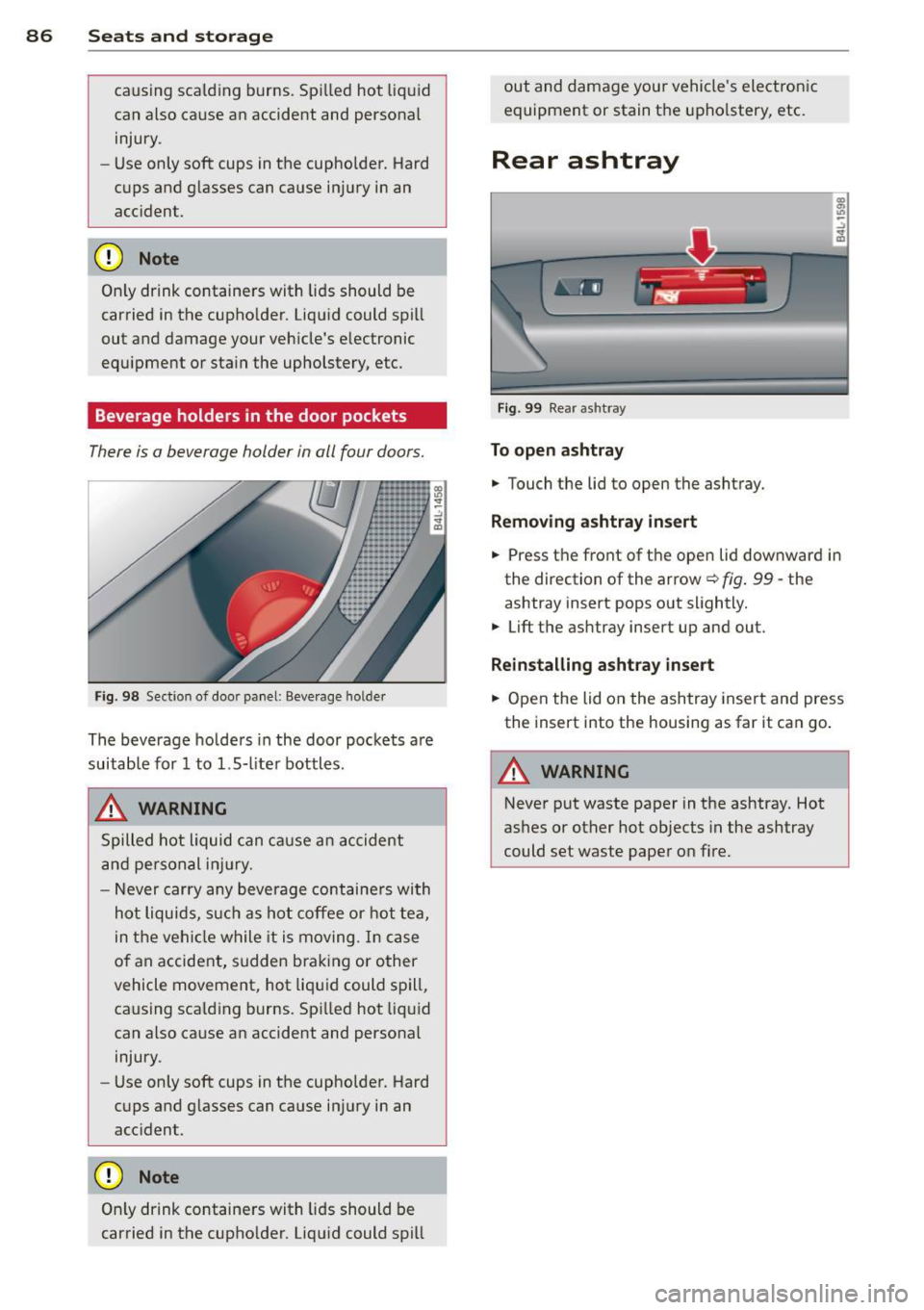
Rear ashtray
F ig . 99 Rea r as htray
To open ashtray
.,. Touch the lid to open the asht ray.
Removing ashtray insert
.,. Press the front of the ope n lid downward in
the direction of the arrow
c:::> fig . 99 -the
ashtray insert pops out slightly .
.,. Lift the ashtray insert up and out.
Reinstalling asht ray inse rt
.,. Open the lid on the ashtray insert and press
the insert into the housing as far it can go .
A WARNING
Never put waste paper in the ashtray. Hot
ashes or other hot objects in the ashtray
could set waste paper on f ire.
Page 89 of 348
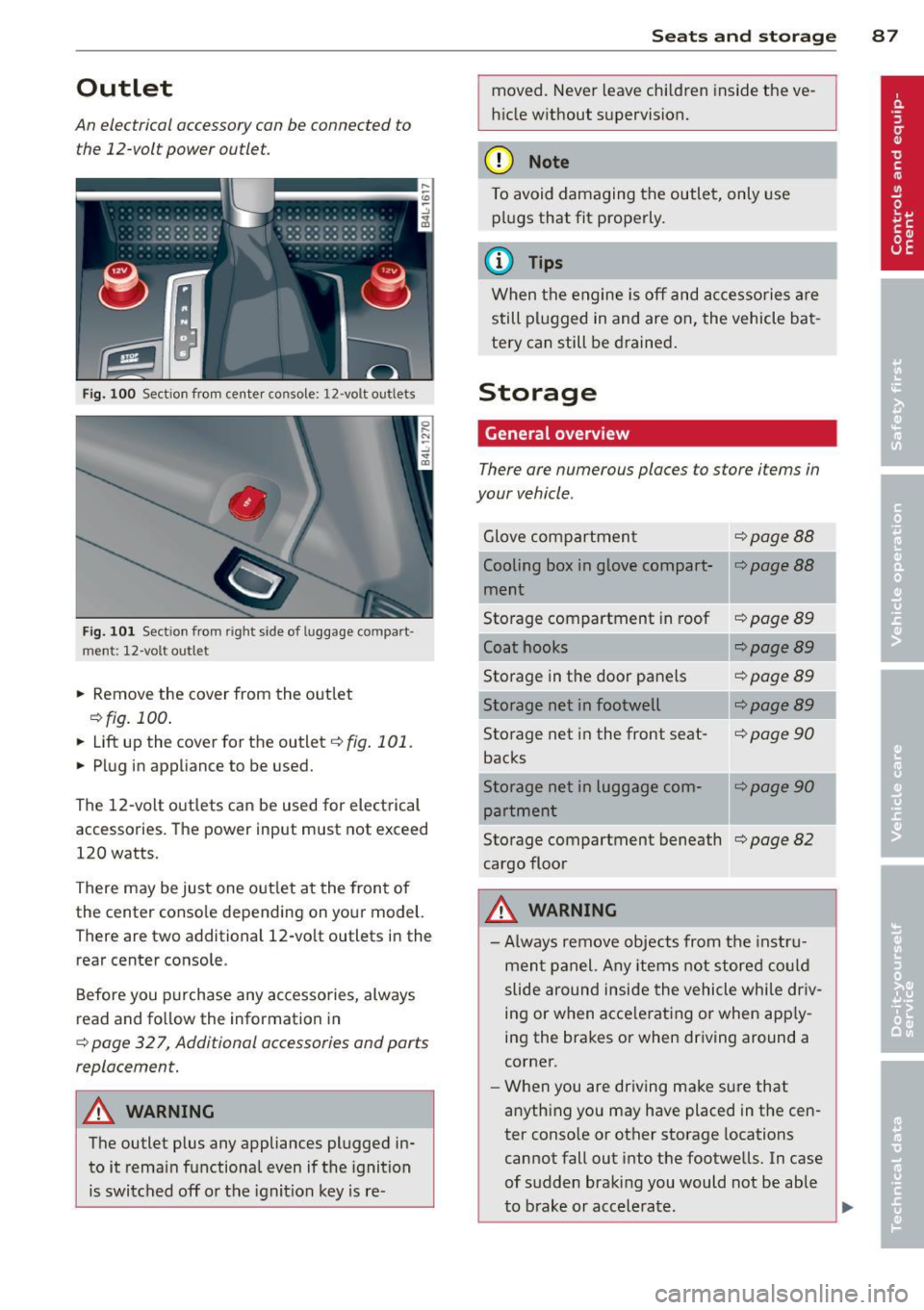
Outlet
An electrical accessory can be connected to
the 12-volt power outlet.
Fig. 100 Section from center console: 12 -volt outlets
Fig. 101 Sect ion from right side of luggage compart·
ment: 12-volt ou tlet
.. Remove the cover from the outlet
c::>fig. 100.
.. Lift up the cover for the outlet c::> fig. 101.
.. Plug in appliance to be used.
The 12-volt outlets can be used for electrical
accessories. The power input must not exceed
120 watts.
There may be just one out let at the front of
the center conso le depending on your model.
There are two additional 12-volt outlets in the
rear center console.
Before you purchase any accessories, always
read and follow the information in
c::> page 32 7, Additional accessories and ports
replacement.
A WARNING
The outlet plus any appliances plugged in
to it remain functional even if the ignition
is switched off or the ignition key is re-
S ea ts a nd s to rage 87
moved. Never leave chi ldren inside the ve
h icle without supervision.
(D Note
To avoid damaging the outlet, only use plugs that fit properly.
@ Tips
When the engine is off and accessories are
still plugged in and are on, the vehicle bat
tery can still be drained.
Storage
General overview
There ore numerous places to store items in
your vehicle .
Glove compartment c::>page88
Cooling box in glove compart-c::>poge88
ment
Storage compartment in roof
c::>poge89
Coat hooks c::>poge 89
Storage in the door panels c::>poge 89
Storage net in footwell <=:>page 89
Storage net in the front seat-c::> page 90
backs
Storage net in luggage com-
c::>poge90
partment
Storage compartment beneath
c::> page 82
cargo floor
A WARNING
- Always remove objects from the instru-
ment panel. Any items not stored co uld
slide around inside the vehicle while dr iv-
ing or when acce lerat ing or when app ly-
ing the brakes or when dr iving around a
corner.
- When you are dr iving make sure that
anything you may have placed in the cen-
ter conso le or other storage locations
cannot fall out into the footwells. In case
of sudden braking you would not be able
to b rake or accelerate.
I
.
...
Page 91 of 348
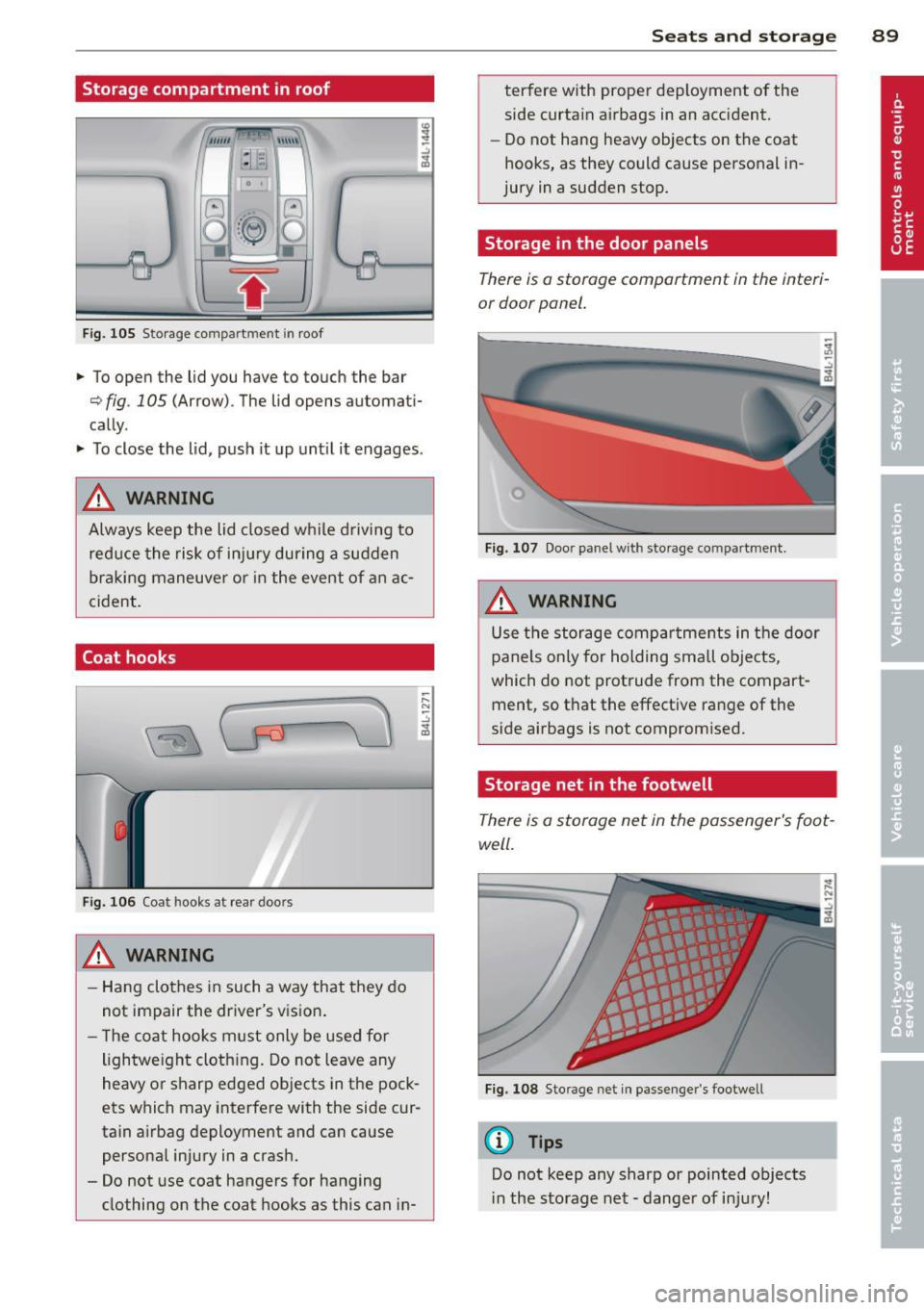
Storage compartment in roof
""'' \\\ \\
:1 :-1
F ig. 105 S torage co mpar tm en t in roof
.. To open the lid you have to touch the bar
¢ fig . 105 (Arrow) . The lid opens automati
cally .
.. To close the lid, push it up unt il it engages .
A WARNING
Always keep the lid closed while driving to
reduce the risk of injury during a sudden
braking maneuve r or in the event of an ac
cident.
Coat hooks
Fig. 106 Coat hooks at rear doors
A WARNING
- Hang clothes in such a way that they do
not impair the driver's vision .
- The coat hooks must only be used for
lightwe ight cloth ing. Do not leave any
heavy or sharp edged objects in the pock
ets which may interfere with the side cur
tain airbag deployment and can cause
persona l injury in a crash.
- Do not use coat hangers for hanging
clothing on the coat hooks as this can in-
;::: N ~ -" "' ID
Seats and storage 89
terfere with proper deployment of the
side curtain a irbags in an acc ident.
- Do not hang heavy objects on the coat
hooks, as they could cause personal in
jury in a sudden stop.
Storage in the door panels
There is a storage comportment in the interi
or door panel.
Fig. 107 Door pa nel w it h sto rage co mpartment.
A WARNING
Use the storage compartments in the door
panels only for holding sma ll objects,
which do not protrude from the compart
ment, so t hat the effective range of the
side airbags is not compromised.
Storage net in the footwell
There is a storage net in the passenger's foot
well.
Fig. 108 Storage net in passenge r's footwell
(D Tips
Do not keep any sharp or pointed objects
in the storage net - dange r of injury!
Page 97 of 348
~ Press the~ button again, or press the
IAUTOI button to turn it off.
Temperature is controlled automatically. The
maximum amount of air flows main ly from
the vents below the windshield.
To defog the rear side windows, the air ve nts
i n the door pillars shou ld be open and d irect
ed at the windows.
Manual air recirculation ~
Air recirculation prevents exhaust fumes or
other pollution from entering the vehicle.
Tu rning on air r ecircul ation
~ Press the 1.,..,1 button ~ .&
Tu rning off air recircul ation
~ Press the~ button again, or
~ press the IAUTO I button, or
~ press the~ button.
In the air recirculation mode, the air in the
passenger compartment is recirculated and
filtered to prevent exhaust fumes and other
pollution from entering the vehicle . We rec
ommend that you use the manual air recircu lation under the following conditions:
- when driving through tunnels
- in a traffic jam.
A WARNING
Do not use the air recirculation mode for
extended per iods of t ime. The windows
could fog up since no fresh a ir can enter
the vehicle.
If the windows fog up, press
the air recirculation button again immed i-
,
Warm and c old 95
ately to switch off the air recirculation
f u nction or select defrost.
Rear window defogger~
The rear window defogger clears the rear win
dow of condensation .
~ Press the QW button to turn the rear window
defogger on and
off.
T he rear window defogger wo rks only when
the engine is runn ing. The light in the sw itch
will i lluminate when the defogger is on.
T he rear window defogger w ill sw itch
off au
tomat ica lly after a short t ime. The t ime the
rear w indow defogger remains on w ill vary de
pending on the outside temperature.
At very low outs ide temperatures, the rear
window defogger can be sw itched on continu
o usly by pushing the
QW button for more than
2 seconds . This remains stored until the igni
tion is switched
off.
A rea r w indow defogger that was switched on
also remains stored for 15 m inu tes after the
ignition is switched
off . If the engine is re
started within these 15 min utes, the rear win
dow defogger is a lso activated, depending on
outside temperature. With a vehicle that is
parked for a short time, the rear window de
fogger does not need to be manually activat ed again.
@ For the sake of the environment
Turn the defogger off when the rear win
dow is clear. When you save electric ity, you
save fuel.
Page 98 of 348
96 Warm and cold
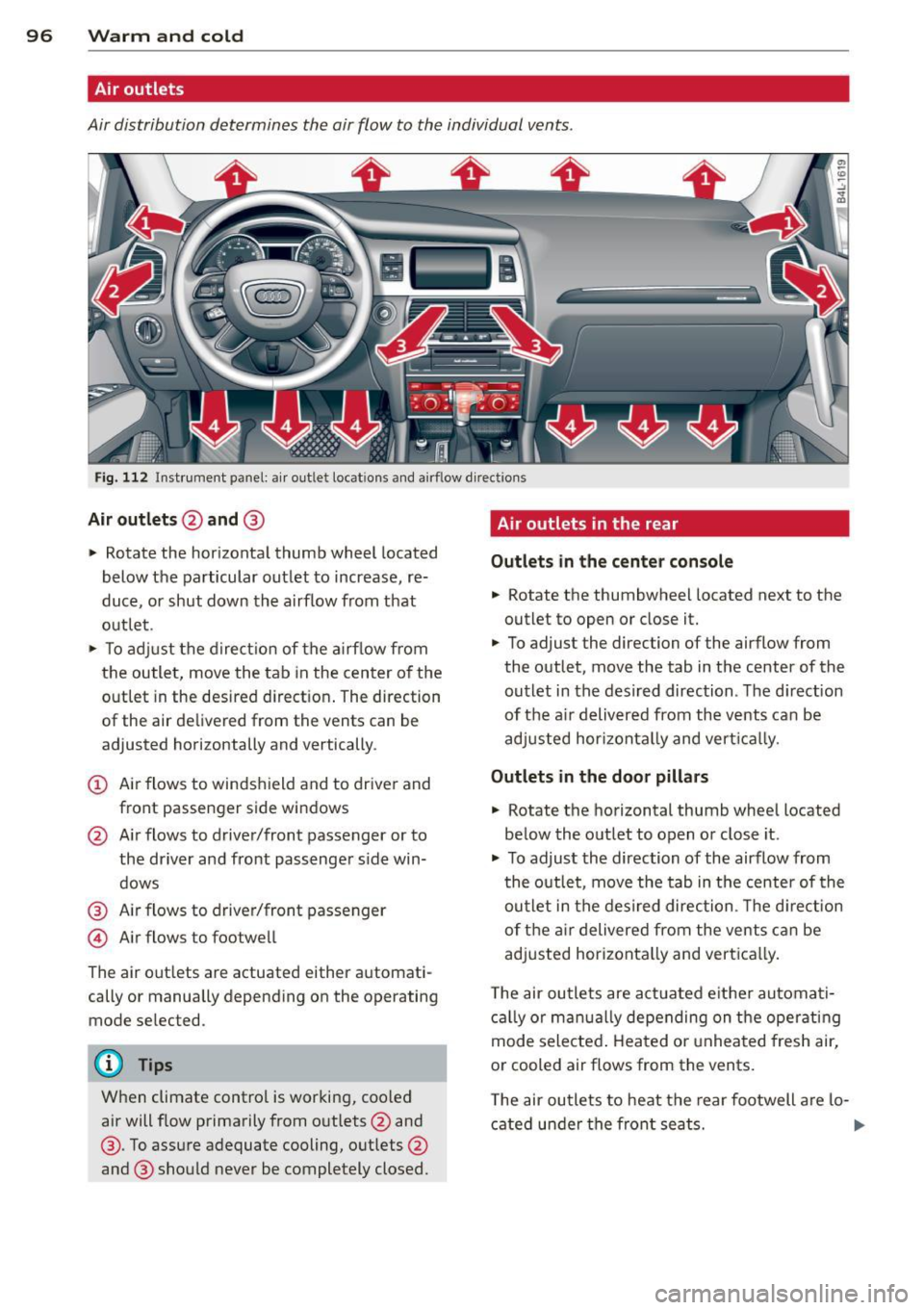
Air outlets
Air distribution determines the air flow to the individual vents .
Fig. 112 Instrument panel: a ir outlet locat ions and airf low d irections
Air outlets @and @
" Rotate the horizontal thumb wheel located
below the particular outlet to increase, re
duce, or shut down the a irflow from that
out let .
" To ad just the direc tion of the a irf low from
the outle t, move the tab in the center o f the
outlet in the desired d irect ion . The direction
of the air de livered from the vents can be
adjusted horizontally and vertically .
(D Air flows to windshield and to drive r and
front passenger side windows
@ Air flows to driver/front passenger or to
the driver and front passenger s ide win
dows
@ Air flows to driver/front passenger
© Air flows to footwell
The air out lets are actuated either automati
cally or manually depending on the operating
mode selected .
@ Tips
When climate control is working, coo led
air will f low primarily from outlets @and
@ . To assure adequate cooling, outlets @
and @ should never be completely closed.
Air outlets in the rear
Outlet s in the center con sol e
.. Rotate the thumbwheel located next to the
outlet to open or close it.
" To adjust the direction of the airflow from
the outlet, move the tab in the center of the
outlet in the desired direction . The d irection
of the a ir deliv ered from the vents can be
adj usted hor izontal ly and vert ica lly.
Outlets in the door pill ars
" Rotate the horizontal thumb wheel located
be low the outlet to open o r close it .
.. To adjust the direction of the airflow from
t he outlet, move the tab in the center of the
outlet in the desired direction . Th e d irect ion
of t he ai r delivered from the vents can be
adjusted horizonta lly and vert ica lly.
T he air ou tle ts are act uated e ither automati
c a lly or man ua lly depending on the operating
mode selected . Heated o r unheated fresh air,
or cooled air flows from the vents.
T he air ou tle ts to heat the rear footwell a re lo-
cated under the front seats.
1J11>
Page 99 of 348
@ Tips
If the climate control system is operating
in cooling mode, a ir flows primarily from
the outlets in the center conso le and in the
door pillars. To achieve adequate cooling,
you should never close the outlets com
pletely .
Using climate control economically
Using the climate controls prudently can help
save fuel.
When you use the air conditioner, engine pow
er is reduced and fuel consumption increases.
To save fuel, you should use the air condition
e r only when necessary. Also please note the
following points :
.,. To save fuel, turn off cooling mode by press
ing the
I AC ! button (indicator light goes
out) .
.,. In add ition, if you open the window or the
Panoramic sliding sunroof* while driving,
turn off cooling mode by p ress ing the
IACI
button (indicator light goes out).
.,. If the vehicle is extremely hot due to the
heat of the sun, briefly open doors and win
dows.
@ For the sake of the environment
By reducing the amount of fue l you use,
you also reduce the amount of poll utants
emitted into the air. W
arm and cold 9 7
Rear Air Conditioning
Rear air conditioning - controls
Applies to vehicles: with four-zone automatic comfort air
conditio nin g
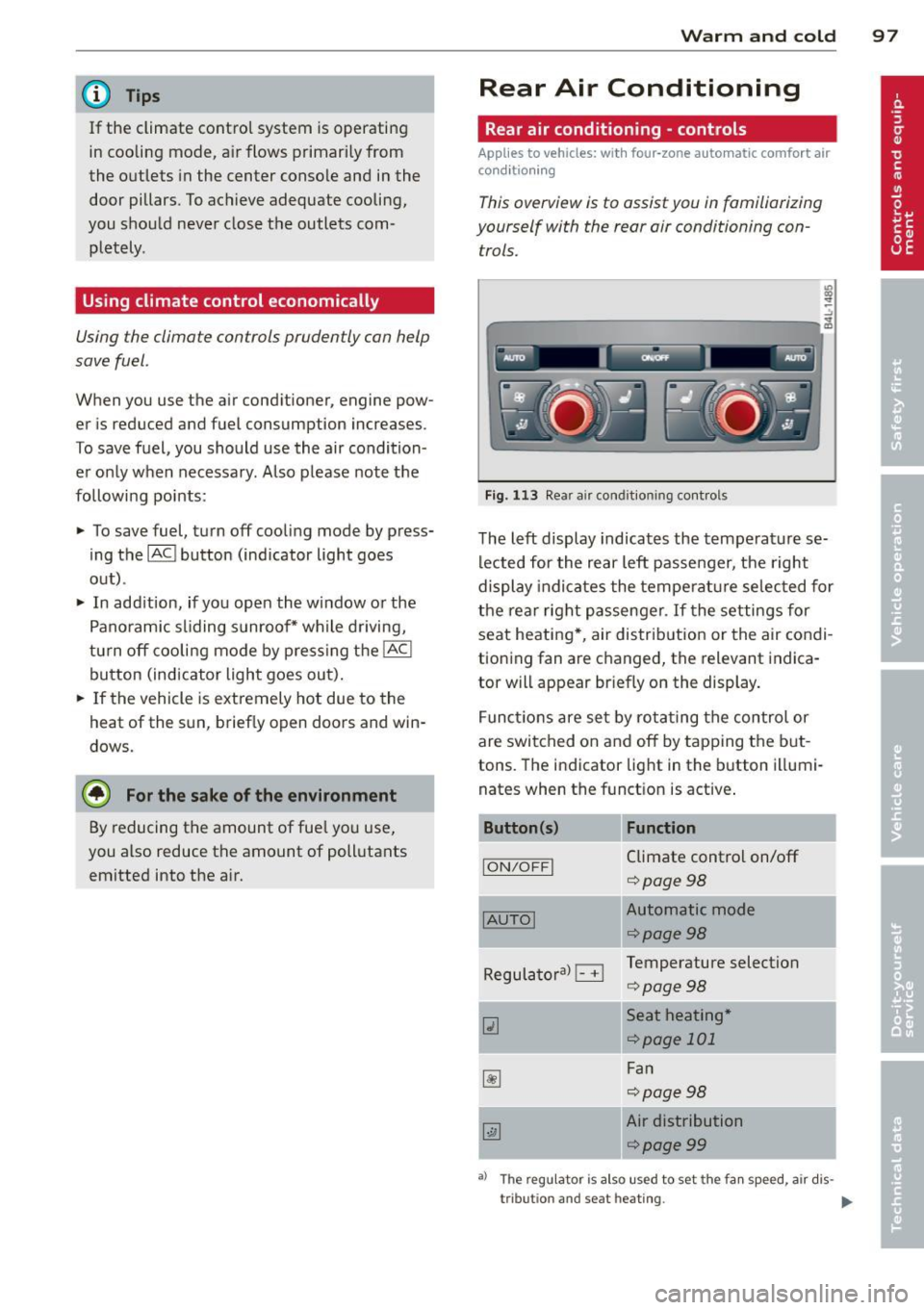
This overview is to assist you in familiarizing
yourself with the rear air conditioning con
trols.
lll ... :;
- --- ------------....... ~
Fig . 113 Rea r air conditioning controls
The left display indicates the temperature se
lected for the rear left passenger, the right
display indicates the temperature selected for
the rear right passenger . If the settings for
seat heating *, air distribution or the air condi
tioning fan are changed, the relevant indica
tor will appear br iefly on the display .
Funct io ns are set by ro tating the control or
are switched on and off by tapping the but
tons. The indicator light in the button illumi
nates when the function is active.
Button (s) Function
ION/OFFI Climate control on/off
¢ page98
-
IAUTOI Automatic mode
¢page98
Regulatoral El Temperature selection
¢page98
Qi Seat heating *
¢page 101
~
Fan
¢page98
~
Air distribution
¢page99
a) The regu lator is also u sed to set the fan sp ee d, air dis-
tribut ion and seat heating .
IIJ,
Page 101 of 348
Rear air distribution ~
Applies to vehicles: with four-zone automatic comfort air
conditioning
The automatically controlled air distribution
con be changed manually.
.. Press the Gil button.
.. Rotate the regu lator to the desired setting .
You can adj ust the air circulation so that air
flows from specific vents .
- In position
:J, all air flows from the vents in
the center console and the outlets to the
door pilla rs.
- In position
:0, air flows from the outlets in
the door p illars.
- In position
!,8, air flows from the outlets un-
der the front seats.
There are additional combinations available to
adjust air d istr ibut io n as needed.
To regulate air distribution automatically,
sw itch to
IAU TO I.
Basic settings
General
The basic climate control settings con be ad
justed in the MMI.
.,. Select: I CARI funct ion button > AC control
button . Or
.,. Se lect:
I CARI funct io n button > Car sys-
tem s*
control bu tton > A C.
The follow ing funct ions can be selected :
- Auto recirculation
c> page 99
- Synchronization c> page 99
-Supplementary heater * ¢page 100
-Rear oper ation* c> page 100
Warm and c old 99
Automatic recirculation mode
An air quality sensor detects increased con
centrations of pollutants in the outside air
and automatically switches to recirculation
mode .
We recommend that you always keep auto
matic a ir recirculation ON to p revent polluted
outside air from enteri ng the veh icle inter ior.
If the
a ir qu ality sensor l ocated in the air con
ditioning system detects polluted outs ide a ir,
the sensor dec ides whether the air pollut ion
can be reduced by the facto ry-installed pollu
ta nt fi lter or whethe r it is necessary to switc h
to air recirc ulation. With heavy conce ntra ti ons
of pollu tants, the a ir condit ion ing system is
switched automatica lly to recirc ulation mode
and the supp ly of outside air is blocked . As
soon as the concentration of pollutants in the
outside air drops, fresh air is supplied to the
vehicle interior aga in.
In the event that the windows fog up during
automat ic air rec irculat ion, you must press
the® button immediately.
Under certa in ope rating cond itions, a utomatic
air recirculation is switched off automatica lly.
With outside temperatures be low about 50 °F
(+10
°(), automatic air rec irculat ion is limited
to 30 seconds. W it h outside temperatures be
low about 30 °F ( -1 °C) a nd with the air condi
tione r switched off, the a utomatic air recircu
l ation is limited to 15 seconds.
Synchronization
One climate control setting for the driver and
front passenger seats .
With synchro nization active, the driver's set
tings a re adopted for the passenger o r vice
versa . All the othe r setti ngs that were made
are t ransferred to t he other seat . This in
cl udes all the cl ima te co ntro l settings, excep t
for the se at heating/ven tilat ion* .
If a different setting is selected at a
"synchron ized seat ", synchronization is can
c e lled.