door AUDI Q7 2013 Owner´s Manual
[x] Cancel search | Manufacturer: AUDI, Model Year: 2013, Model line: Q7, Model: AUDI Q7 2013Pages: 348, PDF Size: 87.72 MB
Page 54 of 348
52 Openin g and clo sing
opened are the power windows switched
off.
- Be careful when closing the windows .
Check to see that no one is in the way, or
serious injury could result!
- Always remove the ignition key whenever
you leave your vehicle.
- If you lock your vehicle from the outside,
no one, especia lly children, sho uld re
main in the vehicle .
- Do not stick anything on the windows or
the windshield that may interfere with
the driver's fie ld of vision.
In addition to t he switches in the drive r's
door there is a separate switch in each
door for the power window in that door
¢ page 53, fig. 47.
Switches in the driver's door
T he driver can operate all windows.
I f the respective switch is pushed or pulled
the w indow will open or close. The power win
dow switches have a
two -positi on fun ction :
Opening the windows
.. Push the sw itch to the fir st stop and hold it
there unt il the wi ndow has lowered to the
desired position.
.. Push the switch briefly to the
sec ond stop:
the window wi ll automatically open all the
way.
Closing the windows
.. Pu ll the switch up to the fir st stop and ho ld
it there until the window has risen to the de
sired position .
.. Pu ll the switch q uickly to the
second po si
tion :
the w indow w ill automatically close all
t he way ¢
A in Controls on page 5 l.
Activating /deactivating the r ear windows
.. Press the left [!I switch ¢ page 51 , fig. 46 to
deactivate on ly the window regulator in the
left door. The indicator light in the switch i l
luminates.
.. Press the right
[!I switch ¢ page 51, fig. 46
to
d eacti vate only the window regu lator in
the
right door. The ind icator light in the
sw itch illuminates .
.. Press the
[!I sw itch aga in to reactivate the
w indow regu lator . The indicato r light in the
sw itch goes out .
If you press both
[!I switches ® in succession,
the following funct ions are switched off in the
rear of the vehicle:
- The window regulator switches in the rear
doors .
- The buttons for the Panoramic slid ing su n
roof* .
- On veh icles with rear climate control*, oper
ation from the rear is blocked . Dashes" ---"
are show n in the displays for the rear cli
mate cont ro ls, and the rear air-cond ition ing
can only be operated from the climate con
trols in the cabin ¢page 97.
- I f
only th e left [!I sw itch was pressed, the
w indow regu lator in the
left rear do or and
t he buttons in t he rear for the Panoramic
sliding sunroof* are deactivated . In addi
t ion , the door is locked .
- If
o nly the right [!I switch was pressed, the
w indow regu lator in the
right re ar door and
the buttons in the rear for the Panoramic
sliding sunroof* are deactivated . In addi
tion, the door is locked.
T his feature has been provided for the safety
of small children riding in the rear of the ve hi
cle .
(D Tips
- T he windows can sti ll be opened and
closed for about ten minutes after the
ignition has been t urned off . The powe r
w indows are not shut off unt il one of the
front doors is opened.
- In order to act ivate the child safety lock
on the left and the right side, you have to
press the two safety switches in succes
sion . Make certa in that the check light
comes on the correspond ing safety
Page 55 of 348
switch when the chi ld safety lock is acti
vated .
Switch in the front passenger 's door and
on the rear doors
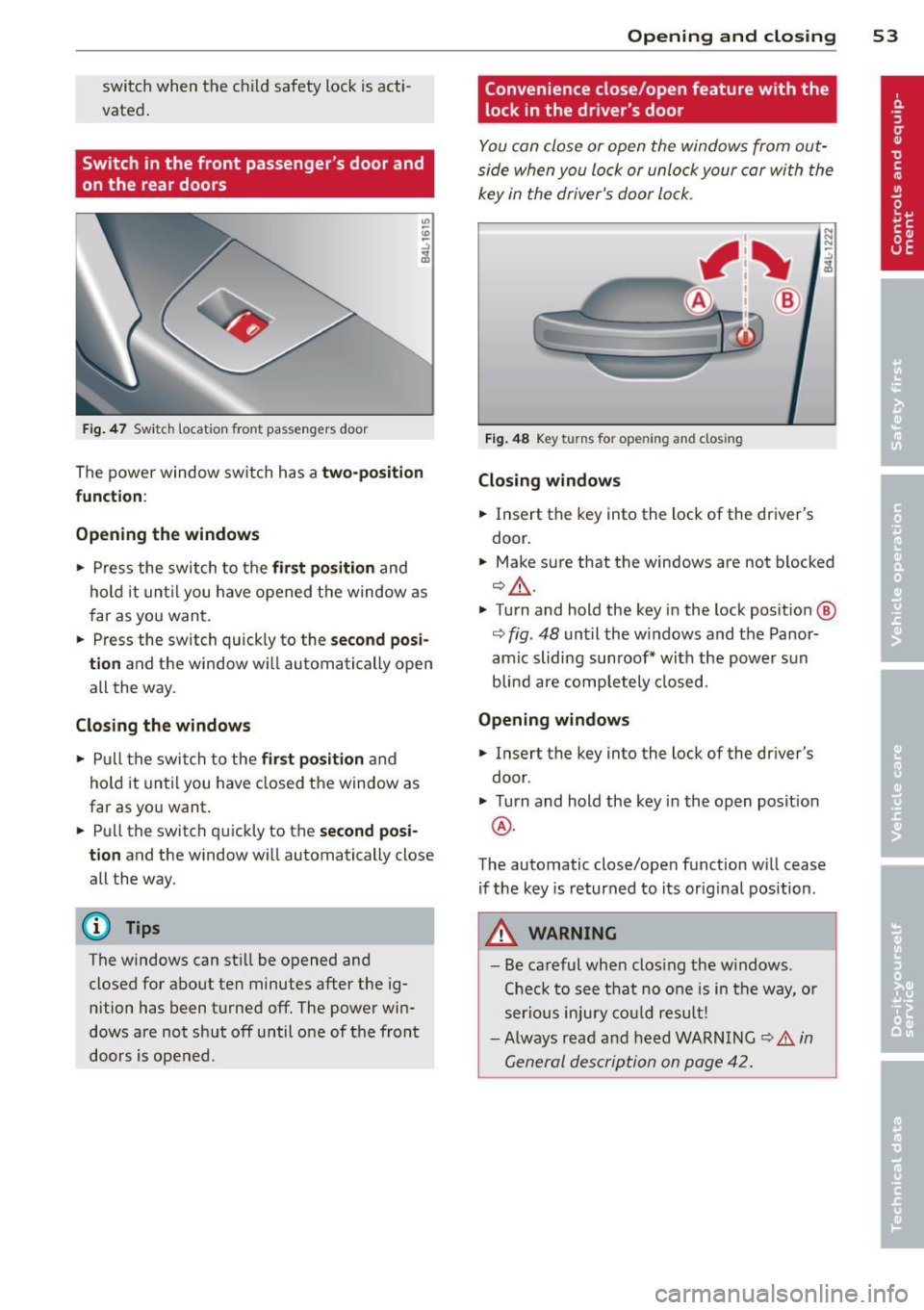
F ig. 4 7 Swit ch loca tion front pass engers door
The power window sw itch has a two-po sit ion
function :
Opening the windows
.. Press the switch to the fir st position and
hold it until you have opened t he window as
f ar as yo u wan t.
.. Press the sw itch quickly to the
second posi
tion
and the window w ill automatically open
all the way .
Closing the windows
.. Pull t he swi tch to the first position and
hold it until you have closed the window as
far as yo u want .
.. Pull the switch q uickly to the
second posi
tion
and the window wi ll automatically close
all the way.
(D Tips
The windows can st ill be opened and
closed for abo ut ten minutes after the ig
nition has been t urned off . The powe r win
dows are not sh ut off until o ne of t he front
doors is opened .
Opening and clo sin g 53
Convenience close/open feature with the
lock in the dr iver 's door
I
You can close or open the windows from out
side when you lock or unlock your car wi th the
key in the driver's door lo ck .
Fig. 48 Key turns for opening and closing
Closing windows
.. Insert the key into the lock of the dr iver's
door .
.. Make su re that the windows are not blocked
¢ _& .
.. Turn and hold the key i n the lock pos it io n @
¢ fig . 48 unt il the windows and the Panor
amic sliding sunroof * with the power s un
blin d are comp letely closed.
Opening windows
.. Insert the key into the lock of the driver's
door .
.. Turn and hold the key in the open posit ion
@ .
The automatic close/open f unction w ill cease
if the key is returned to its orig inal pos ition .
A WARNING
-
- Be careful wh en clos ing the w indows .
Che ck to see t hat no one is in the way, o r
ser ious injury could result!
- Always rea d an d h eed WARN ING
¢ A in
G eneral descrip tion on p age 42.
Page 56 of 348
54 Opening and closing
Reactivating the system after battery
disconnection
If the vehicle battery is disconnected and then
reconnected, the a utomatic closing and open
ing function wilt not work until it is reactivat
ed. To reactivate this feature, perform the fol
lowing steps:
Reactivating close /open feature
., Pull and hold the power window switch un
til the window is completely closed .
., Release the switch .
., Pull the switch again for one second. The
automatic closing/opening is now reactivat
ed .
Panoramic sliding
sunroof
Description
App lies to vehicles: with Pa noramic slidi ng sunroo f
The Panoramic sliding sunroof is comprised of
two individual g lass roof segments, which can
be adjusted electrically independently of each
other.
The front segment can be tilted and slid open.
The rear segment can be tilted, but it cannot
be slid open .
The Panoramic sliding sunroof is operated by
the driver or passenger when the ignition is on
with a rotary switch (for the front roof seg
ment) and a rocker switch (rear roof seg
ment).
After the ignition has been switched off, the Panoramic sliding sunroof can st ilt be opened
or closed for about 10 m inutes. However, as
soon as the driver's or passenger's door is
opened , the switches for the Panoramic slid
ing sun roof are inoperat ive.
CD Note
You should always close the Panoramic
sliding sunroof when you leave you r vehi
cle. Sudden rain can drench the interior
equ ipment and damage the electronic con
venience features in your vehicle .
(D Tips
If you park your vehicle in the sun, we rec
ommend that you close both sun blinds
c>page56.
Tilting/sliding open Panoramic sliding
sunroof
Applies to vehicles: w ith Panoramic sliding sunroof
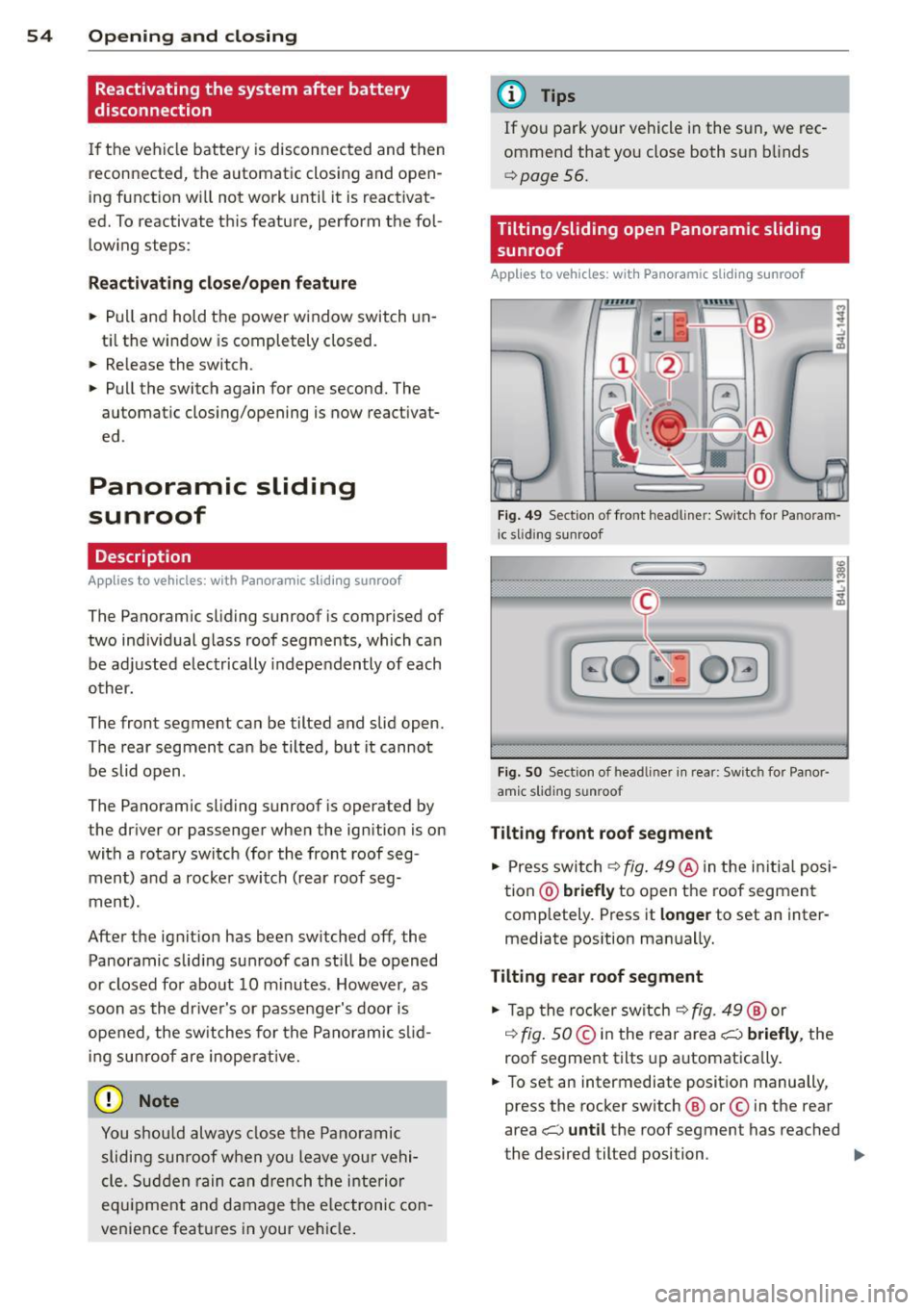
Fig. 49 Se ction o f fro nt headline r: Sw itch for Pa noram
i c slid ing sunroof
Fi g. SO Sect ion of head liner in rear : Switc h for Panor
amic s lidin g sunroof
Tilting front roof segment
., Press switch c>fig. 49@ in the in itia l posi
tion @)
briefly to open the roof segment
completely . Press it
longer to set an inter
mediate pos ition manually.
Tilting rear roof segment
., Tap the rocker switch c> fig. 49 ® or
,:¢, fig. SO@in the rear area i;:::) briefly, the
roof segment tilts up automatica lly .
., To set an intermediate position manually,
press the rocker switch ® or© in the rear
area
i;:::) until the roof segment has reached
the desired tilted position . ..,.
Page 57 of 348
Opening front r oof segment to comf ort
se ttin g
" Turn the rotary switch c::> fig. 49@ to posi
tion ©, you will feel the switch engage . The
roof segment is slid open only to a comfort
position w ith low wind noise. This is the rec
ommended standard sett ing for normal
driv ing cond itions .
Sliding front roof segment full y open
" Rotate and ho ld the switch @ in position @
unt il the roof segment has reached the de
s ired pos it ion. There may be increased wind
noise in this pos it ion.
(D Tips
- In posit ion @, the switch jumps back to
pos ition © again as soon as the switch is
released .
- When dr iv ing with the Panoramic slid ing
sunroof open, open the front roof seg
ment to the comfort setting to m inim ize
wind noise .
Closing Panoramic sliding sunroof
Applies to vehicles: with Panoram ic sliding sunroof
Clos ing tilted front roof segm ent
" Pull the switch c::> page 54, fig . 49 @ and
ho ld it until the roof segment has reached
the des ired pos ition.
" Pull the switch
bri efl y to close the roo f seg
ment automatica lly. By activating the switch
briefly again, the roof segment can be stop
ped in any position
c::, .,&_ .
Clos ing front r oof s egment wh en slid
o p en
" Rotate switch c::, page 54, fig. 49@ to posi
t ion @ to close the roof segment
c::> .,&_. To
move to an intermediate posit ion, rotate the
switch to the corresponding click-stop .
Clos ing tilt ed r ear roof segm ent
" Tap the rocker switch c::> page 54, fig . 49 ®
or c::> page 54, fig. 50 © in the front area Q
br iefl y to close the roof segment completely
c::> A.
Opening and clo sin g 55
" To set an intermediate position manually ,
press the rocker switch in the front area~
until the roof segment has reached the de
sired tilt posit ion
c::> .,&_ .
A WARNING
Improper use of the Panoram ic sliding
sunroof can cause serious personal injury.
- Be careful when closing the Panoramic
-
sliding sunroof . Not paying attention
could cause you or others to be trapped
and injured as the Panoram ic sliding sun
roof closes.
- Always take the key w ith you when you
leave the vehicle to prevent injur ies
caused by the Panoramic slid ing sunroof
clos ing
- Never leave children or persons requiring
assistance alone in the vehicle, especially
when they could access the vehicle keys .
Unsupervised use of the keys can result
in the engine being started or use of ve
hicle systems such as the power win
dows, etc. wh ich could result in serious
injury. The doors could be locked with
the remote key, de laying help in an
emergency.
- The Panoramic slid ing sunroof will con
tinue to operate until the ign ition key
has been removed and one of the front
doors has been opened.
Convenience closing feature
Applies to vehicles: wit h Pa noramic slid ing sunroof
The Panoramic sliding sunroof can be closed
from outside with the key in the driver's door lock .
" Insert the key into the dr iver's door lock .
" Tu rn and hold the key in the lock pos it ion @
c::> page 43, fig . 33 until the Panoramic slid
ing sunroof is complete ly closed
c::> .,&_ in
Closing Panoramic sliding sunroof on
page 55.
Th e power s un blind is a lso closed . .,..
Page 60 of 348
58 Clear vis ion
li g ht sensor checked as soo n as poss ible at an
author ized Audi dealer or qua lified wor kshop .
.&_ WARNING
-Daytime ru nning lights and automatic
headlights are only intended to assist
the driver. They do not relieve the driver
of his respons ib ility to check the head
lights and to turn them on manually ac
co rding to the current light and v is ibi lity
condit ions. For example, fog cannot be
dete cted by the light sensors*. So alw ays
switch on the headlights
io u nder these
weather conditions and when driving in
the dark.
- Crashes can happen when yo u cannot see
the road ahead and when you cannot be seen by other motorists. Always turn on
the headlights so that you can see ahead
and so that others can see yo ur car from
the back.
- Please obey a ll laws when using the
lighting systems described here.
@ Tips
- With the switch in AUTO front fog lights
and rear fog lights cannot be turned on in addition.
- The light senso r for headlight contro l is
l ocated in the rear view m irror mount.
You should therefore not app ly any st ick
ers to the windsh ield in this area in o rder
to preve nt ma lfunctions o r failures.
- Some exterior lighting functions can be
adjusted
c:> page 58.
-When you remove your key from the igni
tion while the vehicle's lights are turned
on, a buzzer sou nds as long as the driv
er's door is open .
- In coo l o r damp weather, t he ins ide of
t h e headlights, turn signa ls and tail
li ghts can fog ove r du e to t he tempera
tu re diffe re n ce between the inside and
outside. They will cle ar sho rtly after
swi tching them on. This does not affect
t h e service li fe of the lighting . -
In the event o f a light sensor malfunc
tion, the driver is notified in the instru
ment cl uster display
c:> page 35 .
Adjusting exterior lighting
The functions are set in the MMI.
• Select: I CAR I func tion button > Systems *
cont ro l but to n > Exterior lighting . Or
.. Select:
!CAR ! function b utton> Car sys
tem s* contro l button > Vehicle setting s >
Exterior lighting.
Coming home (Lights when leaving car ),
Leaving home (Lights when unlock ing car )
T he coming home f unction ill umi nates the
area o utside the vehicle when you tu rn the ig
nition off and open t he driver's door. Depend
ing on vehicle eq uipment, the f unction can be
switched on and off or the length of t ime the
lights remain on* can be adjusted .
The leaving home illum inates the area outside
the vehicle when you unlock the vehicle. This
funct ion can be switched on and off .
The Coming home and Leaving home func
tions only operate when it is dark and the light switch is in the AUTO position.
Daytime running lights
USA models: The daytime r unning lights can
be turned on or off using th is function.
Canad a model s: Th e fu nction ca n no t be
tu rned off .
It is activated automati cally each
time the ignition is t urned on. This menu item
is shown "greyed out" .
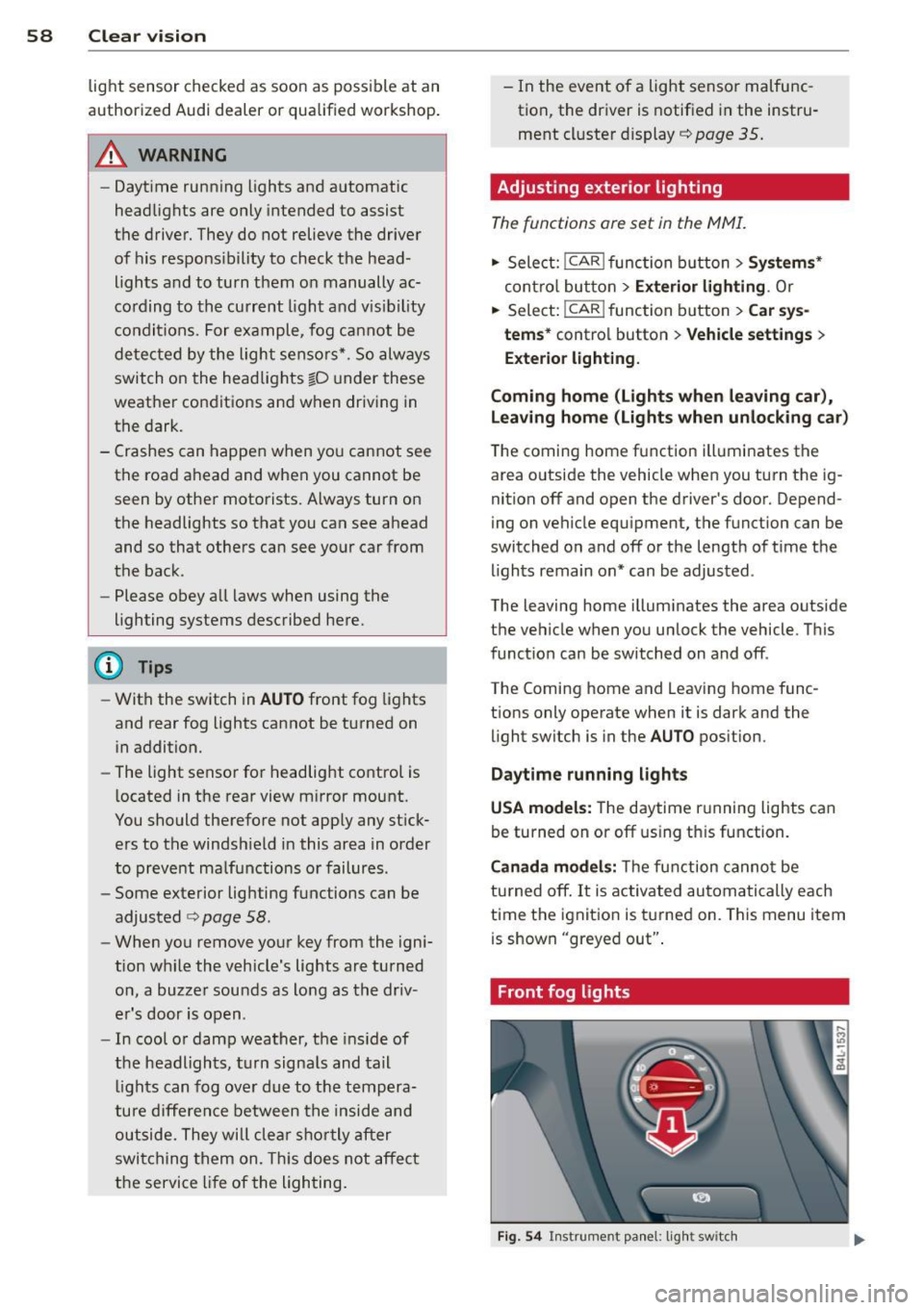
Front fog lights
Fig . 54 Instrument pa nel: light switch
Page 63 of 348
Notes o n these featur es
- The turn signals only work with t he ignition
turned on . T he indicator light s
II or Ill in
the instrument cluster
¢ page 14 also b link.
- After you have turned a corner , the tur n sig-
nal switches off automatica lly.
- The
high beam works only when the head
lights are on. The indicator light
II in t he
instrument cluster i lluminates when the
high beams a re on.
- The
headlight flasher wo rks only as long as
you hold the lever -even if there are no
lights turned on . The indicator light
II in
the ins trument cluster illuminate s when you
u se the headlight flasher .
A WARNING
-
Do not use the high beam or headlight
flasher if you know that thes e cou ld blind
oncoming traffic.
Interior lights
Front interior lights
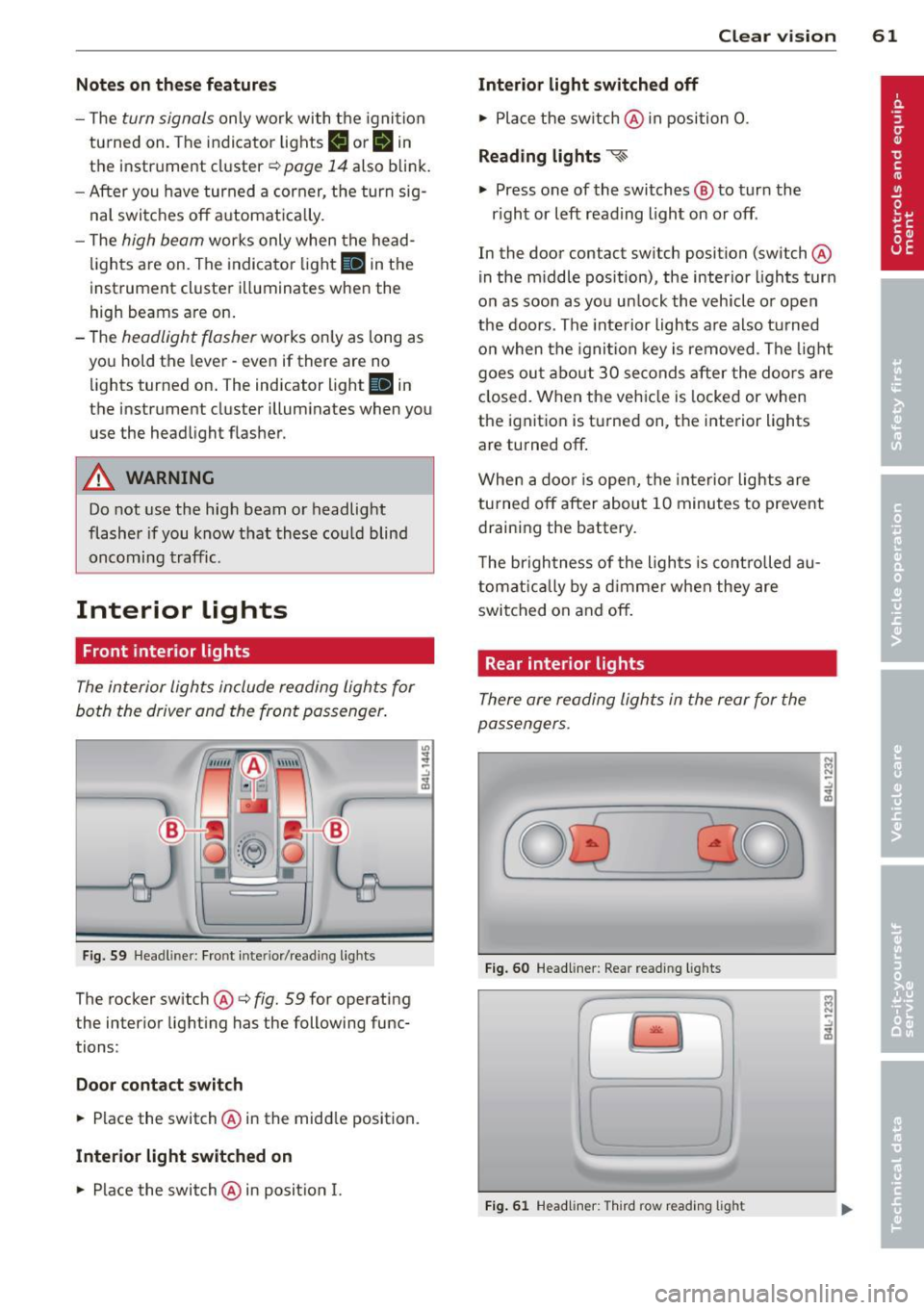
The interior lights include reading lights for
both the driver and the front passenger .
Fig. 59 Headlin er: Fro nt in te rior /re adi ng light s
The rocker switch @¢ fig. 59 for ope rating
the in ter ior lighting has the follow ing func
tions :
Door cont act switch
.,. Place the switch @ in the midd le position.
Interior light switched on
.,. Place the switch @ in posit ion I.
.,,
:! .:,
1A
Clear vision 61
Interior light switched off
.,. Place the sw itch @ in position 0.
Re ading lights ~
.,. Press one of the switches @ to turn the
r ight or left reading light on or off .
In the door contact swi tch position (switch @
in the m iddle position), the interior l ights tur n
o n as soon as you unlock the vehicle o r open
the doors . The inte rior lights are also turned
o n when the igni tion key is removed . The light
goes ou t about 30 seconds after the doo rs are
closed. When the veh icle is locked or when
the igni tion is turned on, the i nterior lights
are turned off .
When a door is open, the interior lights are
tu rned off after about 10 minutes to prevent
draining the battery.
T he brigh tness of the lights is cont rolled au
tomat ic all y by a d imme r when they are
switched on and off.
Rear interior lights
There are reading ligh ts in the rear for the
passengers .
0
...
Fig . 60 Headli ner: Rear read ing lig h ts
>l!i:.
r -
' \,
Fi g. 61 Headlin er: Third row r eading light
N .., N
.:,
1A
:::i N
-.:,
1A
Page 64 of 348
62 Clear vis ion
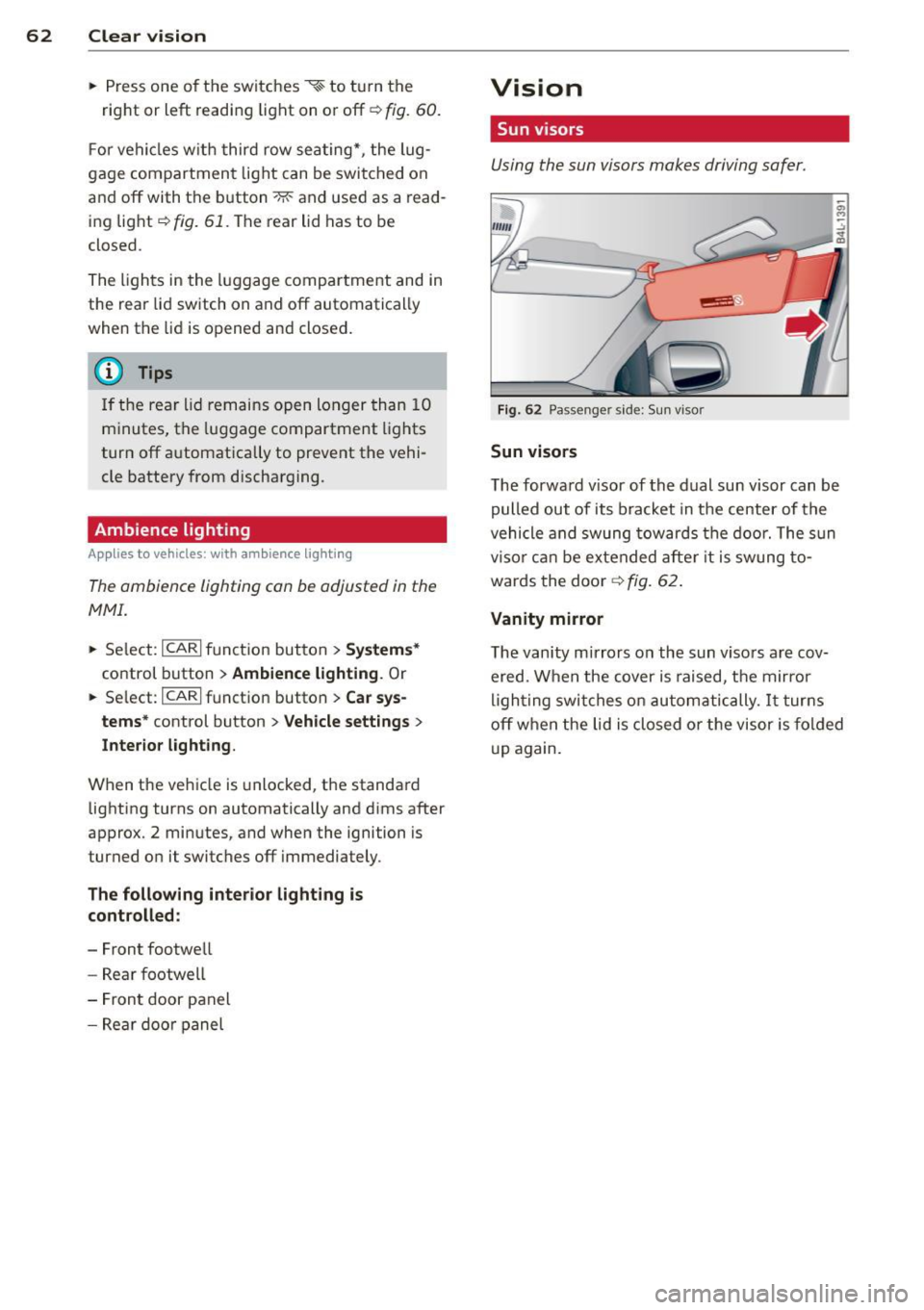
• Press one of the switches ~~ to tu rn the
right or left reading light on or off~
fig. 60.
For vehicles w ith third row seating*, the lug
gage compartment light can be switched on
and off with the button'*' and used as a read
ing light
~fig. 61. The rear lid has to be
closed.
The lights in the l uggage compartment and in
the rear lid sw itch on and off automatically
when the lid is opened and closed .
@ Tips
If the rear lid remains open longer than 10
minutes, the luggage compartment lights
turn off a utomatically to prevent the vehi
cle battery from discharging.
Ambience lighting
App lies to vehicles: with amb ience light ing
The ambience lighting con be adjusted in the
MMI .
• Se lect: ICARI f u nct ion button > Sy stem s*
control button > Ambience lighting . Or
• Se lect:
ICARI function button > Ca r sy s
tems*
control button > Vehicle settings >
Interior l ighting .
When the ve hicle is unlocked, t he standard
lighting turns on automatically and d ims after
approx. 2 minutes, and when the ignition is
turned on it switches off immediately .
The following interior lighting is controlled :
- Front footwe ll
- Rea r footwell
- Front door panel
- Rear doo r panel
Vision
Sun visors
Using the sun visors makes driving safer .
Fig . 62 Passe nger side: Su n visor
Sun visors
The forwa rd v isor of the dual sun visor can be
pulled out of its bracket in the center of the
vehicle and swung tow ards the door. The s un
vi so r ca n be e xtended afte r it is swung to
wards the door
~ fig. 62.
Vanity mirror
The vanity mirrors on the sun viso rs are cov
ered. When the cover is raised, the mirror
l igh ting swit ches on au tom atic ally.
It tur ns
off when the lid is closed or the visor is fol ded
u p again.
Page 65 of 348
Sun shade
App lies to vehicles: with s un shade
The windows in the rear doors and the rear
window ore each equipped with a sun shade.
Fi g. 63 Sun shade pulled up on a rea r window
Fig . 6 4 Sun shade pulled up on the rear lid window
Sun shade (rear doors )
~ Pull the shade out and hang it in the brack
et on the upper door frame
c::> fig. 63.
Sun sh ade (rear window )
~ Pull the shade out and hang it in the brack
et on the rear lid frame
c::> fig. 64.
Clear vi sion 63
Wiper and washer
system
Switching the windshield wipers on
The windshield wiper lever controls both the
windshield wipers and the washer system.
F ig . 65 W indsh ield wiper leve r
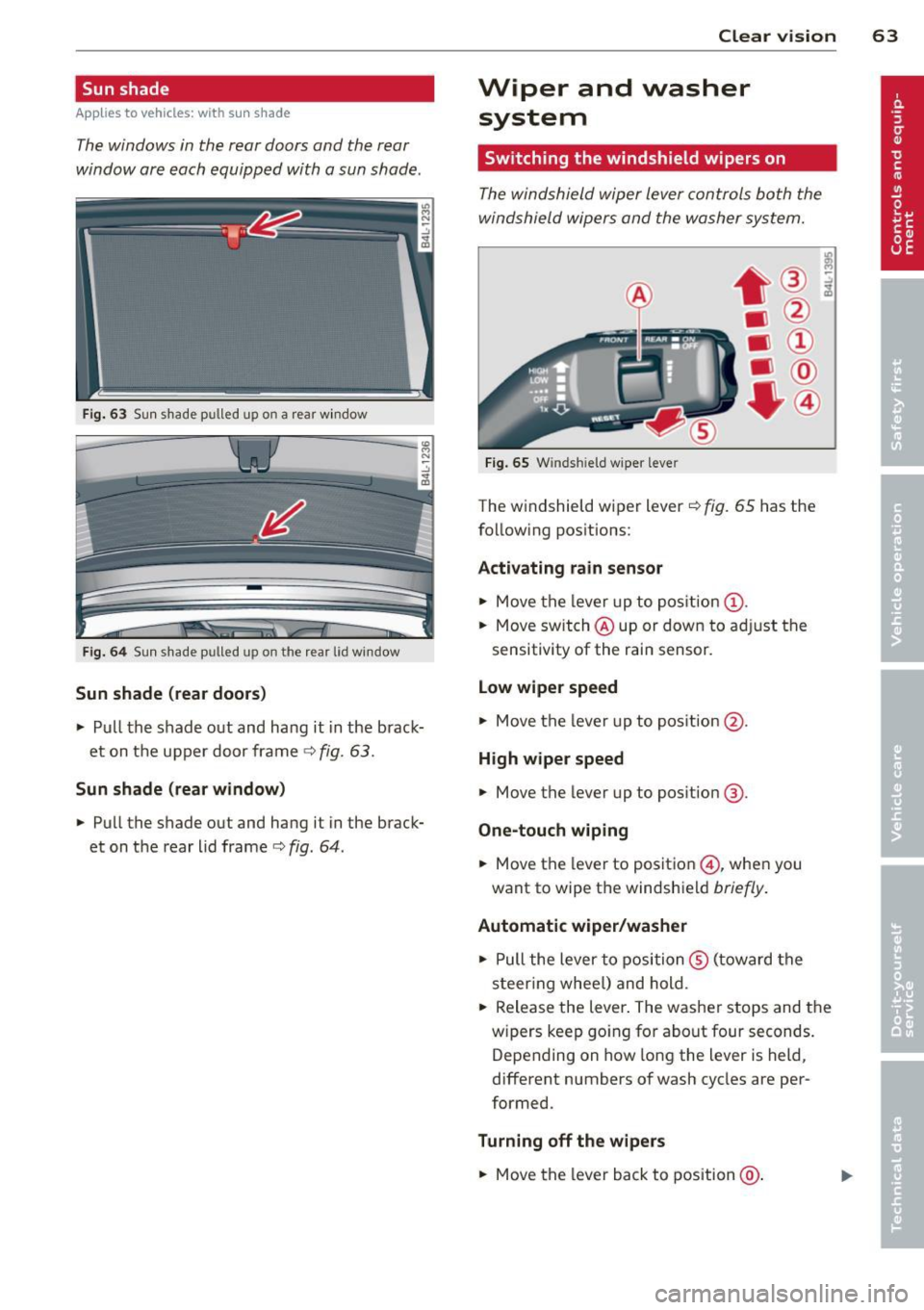
The windshield wiper lever c::> fig. 65 has the
follow ing pos itions:
Activating rain sensor
~ Move the lever up to pos ition (D .
~ Move switch @up or down to ad just the
sensitivity of the rain sensor.
Low wiper speed
~ Move the lever up to pos ition @.
High w ipe r speed
~ Move the lever up to pos ition @.
One-touch wiping
~ Move the lever to position @, whe n you
want to wipe the windshield
briefly .
Automatic wiper /washer
~ Pull the lever to position ® (toward the
s t eer ing whee l) and hold.
~ Release the lever . The washer stops and the
w ipers keep go ing for about four seconds .
Depending on how long the lever is held,
different numbers of wash cycles are per
formed.
Turning off the wipe rs
~ Move the lever back to position @ .
Page 70 of 348
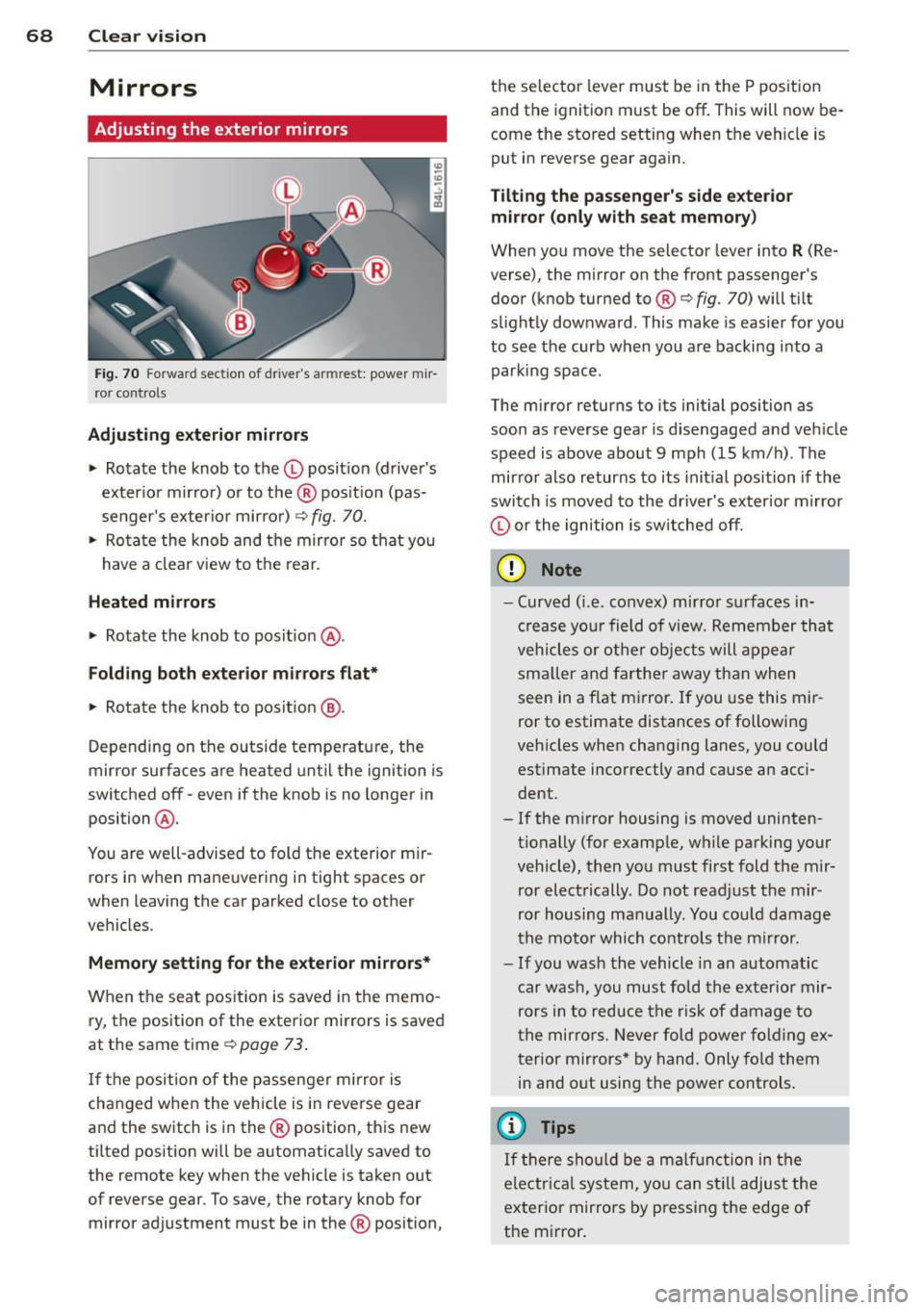
68 Clear vision
Mirrors
Adjusting the exterior mirrors
Fig. 70 Fo rwa rd sect ion of driver's armrest: powe r mir
ror controls
Adjusting exterior mirrors
.,. Rotate the knob to the© posit ion (driver's
exterio r mirror) or to the ® position (pas
senger's exterior mir ror)
9 fig. 70.
.,. Rotate the knob and the mirror so that you
have a clear view to the rear.
Heated mirrors
.,. Rotate the knob to pos it ion @.
Folding both exterior mi rrors flat*
.,. Rotate the knob to position @.
Depending on the outside temperature, the
mirror surfaces are heated until the ignition is
switched off -even if the knob is no longer in
position @.
You are well-advised to fold the exterior m ir
rors in when maneuvering in tight spaces or
when leaving the car parked close to other
vehicles .
Memory setting for the exterior mirrors*
When the seat position is saved in the memo
ry, the position of the exterior mirrors is saved
at the same time
9 page 73.
If the position of the passenger mirror is
changed when the vehicle is in reverse gear
and the switch is in the ® position, this new
tilted position will be automat ically saved to
the remote key when the vehicle is taken out
of reverse gear. To save, the rotary knob for
mirror adjustment must be in the ® position, the selector lever must
be in the P pos ition
and the ignition must be off. This will now be
come the stored setting when the vehicle is
put in reverse gear again.
Tilt ing the passenger's side exterior
mirror (only with seat memory)
When you move the selector lever into R (Re
verse), the mirror on the front passenger's door (knob turned to® ¢
fig. 70) will tilt
s light ly downward . This make is easier for you
to see the curb when you are backing into a
parking space .
The mirror returns to its initial position as
soon as reverse gear is d isengaged and veh icle
speed is above about 9 mph (15 km/h). The
mirror also returns to its initial position if the
switch is moved to the driver's ex ter ior mirror
© or the ignition is switched off .
(D Note
-Curved (i .e . convex) mirror surfaces in
crease your field of view. Remember that
vehicles or other objects will appear
smaller and farther away than when
seen in a flat mirror. If you use this mir
ror to estimate distances of following
vehicles when changing lanes, you could estimate incorrectly and cause an acci
dent.
- If the mirror housing is moved uninten
tionally (for example, while parking your
vehicle), then you must first fold the mir
ror electrically. Do not readjust the mir
ror housing manually. You could damage
the motor which controls the mirror.
-If you wash the vehicle in an automatic
car wash, you must fold the exter ior mir
rors in to reduce the risk of damage to
the mirrors. Never fold power folding ex
terior mirrors* by hand. Only fold them
in and out using the power controls.
(D Tips
If there should be a malfunction in the
electr ical system, you can still adjust the
exterior mirrors by pressing the edge of
the mirror .
Page 71 of 348
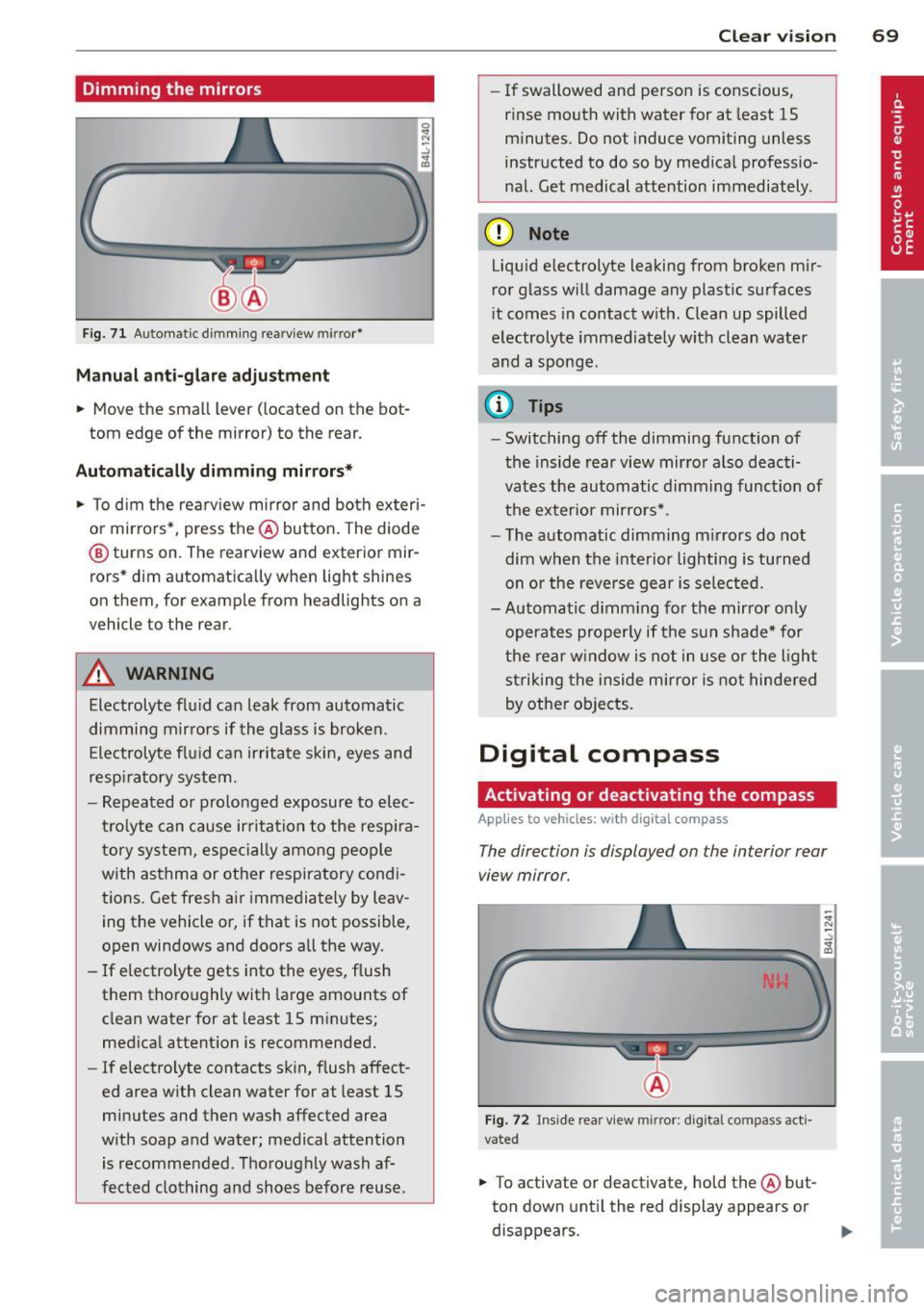
Dimming the mirrors
Fig. 71 Automatic d imm ing rearv iew mir ror*
Manu al ant i-glar e adjustment
.. Move the small lever (located on the bot
tom edge of the mirror) to the rear.
Automatically dimming mirror s*
.. To d im the rearview mirror and both ex teri
o r mirro rs*, press the @button . The diode
@ turns on. The rearview and exterior mir
rors* dim a utomatically when light shines
on them, for example from headlights on a
vehicle to the rear .
&_ WARNING
Electrolyte flu id can leak from automatic
dimming mirrors if the glass is broken.
Electrolyte flu id can irritate s kin, eyes and
respi ratory system.
- Repeated or prolonged exposure to elec
tr olyte can cause ir ritation to the resp ira
tory system, espec ially among people
with asthma or other respiratory cond i
tions. Get fres h air immedia tely by leav
ing the vehicle or, if that is not possible,
open windows and doors a ll the way.
- If electrolyte gets into the eyes, flush
them thoroughly with large amounts of
clean water for at least 15 m inutes;
med ica l attent ion is recommended.
- If electrolyte contacts skin , flush affect
ed area with clean water for at least 15
minutes and then wash affected area
w ith soap and water; medical attention
is recommended. T ho roughly wash af
fected clothing and sho es before reuse.
Clear vi sion 69
- If swallowed and perso n is conscious,
rinse mouth with water for at least 15
m inutes. Do not induce vomiting unless
instructed to do so by med ica l professio·
nal. Get medical attention immediately .
(D Note
Liquid e lectrolyte leaking from broken m ir
ror glass w ill damage any plastic surfaces
i t comes in contact wit h. Clea n up spilled
electrolyte immediately w it h clean water
and a sponge.
@ Tips
- Switching off the dimming function of
the inside rear view mir ro r also deacti·
vates the automatic dimming function of t he exter ior mirro rs*.
- T he automatic dimming m irrors do not
dim when the inte rior lighting is tu rned
on or the reve rse gear is sele cted.
- Automatic d imm ing fo r the mirror only
operates proper ly if the sun shade* for
t he re ar w indow is not in use or the ligh t
st riking the inside mirror is not hindered
by othe r objects.
Digital compass
Activating or deactivating the compass
App lies to vehicles: with digital compass
The direction is displayed on the interior rear
view mirror .
Fig. 72 Inside rear view mirror: digita l compass act i·
vated
.. To activate or deactivate, hold the @but
ton down unt il the red display appears or
disappears .