steering AUDI Q7 2018 Owner´s Manual
[x] Cancel search | Manufacturer: AUDI, Model Year: 2018, Model line: Q7, Model: AUDI Q7 2018Pages: 398, PDF Size: 185.58 MB
Page 61 of 398
• Press the release point c::> fig . 61 using the me
chanical key
c::> page 30, Key set and press the
button -arrow-
c::> fig . 60 . Pull the head restraint
out of the backrest at the same time
c::> ,&. .
In stall ing th e head rest raints
• Slide the posts on the head restraint dow n into
the guides until the posts click into place.
• Press the b utton -arrow-
c::> fig. 60 and slide the
head restraint all the way down. You should not
be able to remove the head restraint from the
backrest without pressing the button .
A WARNING
-Always read and follow the applicable warn
ings
c::> page 255 , Proper adjustment of
head restraints.
- Only remove the head restraints fo r the sec
ond row seats when it is necessary for in
sta lling a child safety seat
c::> page 291,
Child safety.
Install the head restraint agai n
immediately once the child safety seat is re
moved. Driving with the head restraints re
moved or not in the upr ight position in
creases the risk of serious injury.
Memory function
Description
Applies to: vehicles with memory function
Using the memo ry function, you can qu ick ly and
eas ily store a pe rsonal seat profile for the driver
and recall the settings later. The memory func
tion is controlled by the remote control key and
the memory buttons in the driver's door.
The drive r's seat profile is stored again and as
signed to the remote contro l key each time the
vehicle is locked. When you open the door, the
seat profi le is automat ica lly reca lled . If two peo
p le use the vehicle, it is recommended that each
person always uses their "own" remote control
key.
Two seat profiles can be stored each us ing the
~ memory buttons. Once they are stored, these
...... N seat prof iles can be se lected at any time. r--. N ...... g The fo llowing settings are stored :
:E '
Remote con- Memory but-
trol key ton
Driver Drive r
Seat X X
Steering
X X wheel*
Both exterior
mirrors*
X X
Remote control key
Applies to : vehicles with memory function
The driver's seat profile con be assigned to the
remote control key when the vehicle is locked.
• Select in the Infotainment system: I MENU ! but
ton
> Vehicle > l eft control button > Vehicle
s etting s
> Seats > Driver 's seat > Store set
ting s on r emote cont rol ke y.
(D Tips
If you do not wish to have the seat profi le for
another driver assigned to the remote control key, sw itch the memory f unction off in the In
fotainment system.
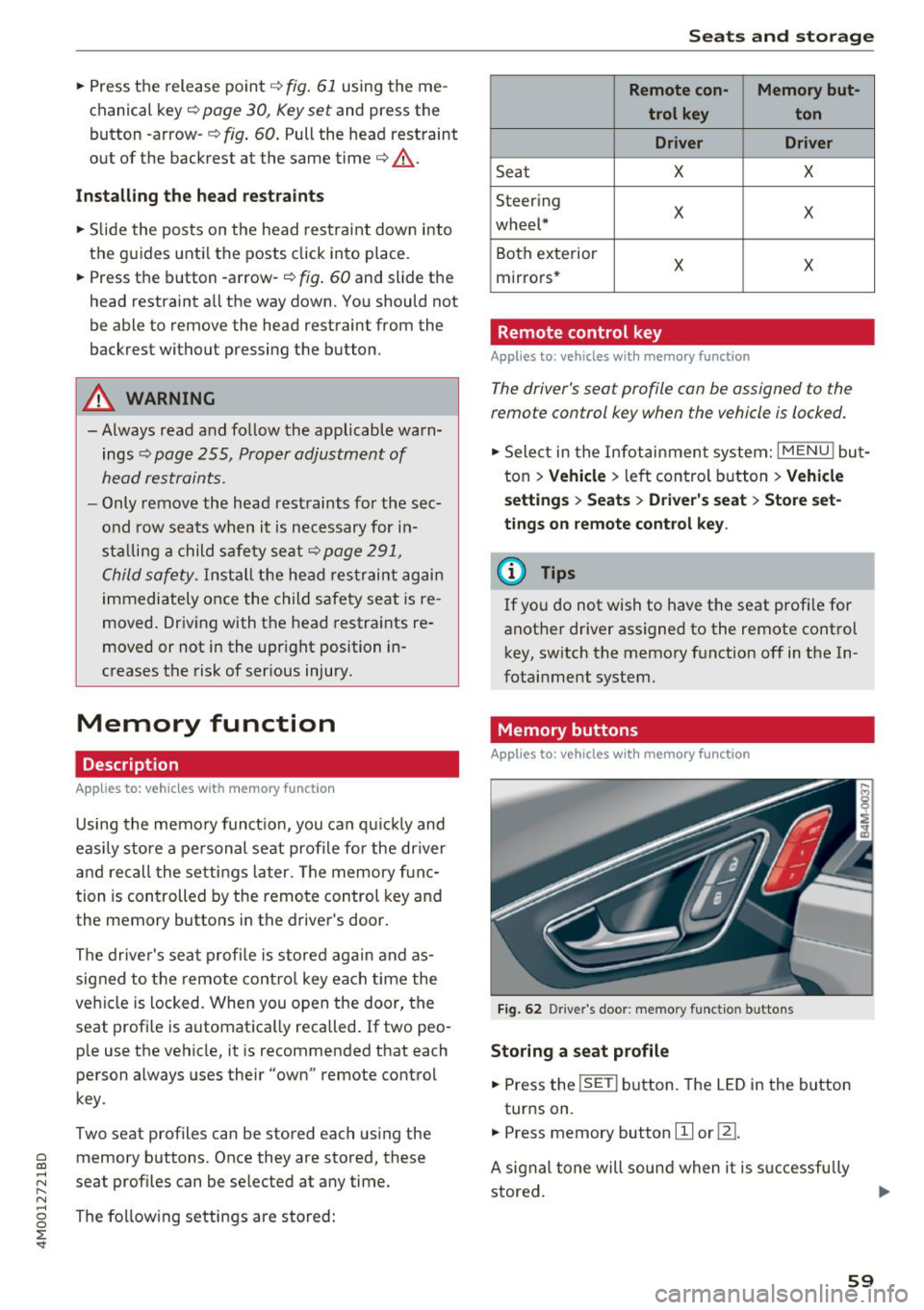
Memory buttons
Applies to : vehicles with memory function
F ig . 62 Driver 's door : memo ry f unc tion buttons
Storing a seat p rofil e
• Press the !SET I button. The LED in the button
turns on.
• Press memory button
[II or ill.
A signal tone will sound when it is s uccessfu lly
stored.
59
Page 74 of 398
Warm and cold
SYNC Syn chr oniz ation
Use t he rocker sw itc h CD to select the f unct ion.
When synchronization is switched on, the set
tings for the driver's side are applied to the front
passenger's side and the rear (except for seat
heating/venti lation*). When the settings on the
front passenger's side or in the rear are changed,
the synchron izat ion is automatically switched off
and
4- zone appears in the display .
SET REAR function
Use the rocker switch CD to select the function .
When the function is switched on, you can adjust
all settings for the rear us ing the climate control
system controls in the cockpit . The rear climate
control system controls cannot be operated at
the same time . T his function switches off auto
mat ica lly after a ce rtain per iod of t ime or after
leav ing the menu.
Vents
You can open or close the center and rear vents in
the cockpit and the vents in the rear center con
sole and door p illars using the r idged thumb
wheels. The levers adjust the d irect io n of the a ir
flow from the vents. The w ide vent is opened and
closed using the~ button ~
page 8, fig. 2@ .
Residual heat
You can activate the residual heat function when
the ignition is switched off by pressing the knob
© (left side). The residual heat from the coolant
is used to heat the ve hicle in ter io r. The res id ual
heat function switches off automatically after
about 15 minutes.
A WARNING
- You should not use the recirculation mode
for an extended period of time, because no
fresh air is drawn in and the windows can
fog when cooling mode is sw itched off . This
i ncreases the risk of an accident .
- Individuals with reduced sensitivity to pain
or temperature could develop burns when
us ing the seat heating function . To reduce
the risk of injury, these ind iv iduals should
not use seat heat ing.
72
@ Note
To avoid damage to the heating elements in
the seats, do not knee l on the seats or p lace
heavy loads on a small area of the seat.
(D Tips
It is not possib le to operate the rear climate
control system controls when the power chi ld
safety lock is switched on. W ith the SET REAR
funct ion, you can apply all settings to the rear
using the climate control system controls in
the cockp it~
page 38 .
Setup
Applies to: vehicles with 4 -zone de luxe automat ic climate
contro l
The climate control system basic settings are ac
cessed in the Infotainment system.
.. Select in the Infotainment system : IMENU! but
ton
> V eh icle > left control button > Air condi
t ioning
Seat heating /seat ventilation *
You can adjus t the seat heat ing/vent ilat io n ba l
an ce for t he d river, front passenger and rear pas
sengers .
Footwell temperature
You can adjust the footwell temperature so that
i t is cooler or wa rme r.
Auto recir culat ion
When switched on, automat ic recirculation con
trols the recirculation mode automatically . You
must press the®
MAX button if fog forms on
the w indows .
Automat ic au xili ary heater *
The aux iliary heater he lps to warm the vehicle in
terior more qu ickly.
Steering wheel heating
App lies to: vehicles wit h stee ring w heel heat ing
The steering wheel rim can be heated .
.. Press the button on the multifunction steering
wheel to switch the steering wheel heating on .,..
Page 75 of 398
Cl a:, ...... N
" N ...... 0
0
::r '
Steering wheel heating: on /Steering wheel
heating: off
appears in t he instr ument cluster
display.
The temperat ure is maintaine d at a constant lev
e l w hen steering w heel heating is switched on.
The stee ring w heel hea ting setti ngs are store d
autom atically and ass igned to the remote cont ro l
k ey that is in use .
Warm and cold
73
Page 78 of 398
Driving
(D Note
-Have your vehicle maintained properly and
in accordance with the service recommenda ·
tions in your Warranty & Maintenance book
let . La.ck of proper maintenance as well as
improper use of the vehicle will impair the
function of the emission control system and
could lead to damage.
- Do not alter or remove any component of the Emission Control System unless ap·
proved by the manufacturer .
- Do not alter or remove any device, such as
heat shields, switches, ignition wires,
valves, which are designed to protect your
vehicle's Emission Control System and other
important vehicle components.
(0 Tips
The consumption estimates as published by
ENVIRONMENTAL PROTECTION AGENCY
(EPA) and Transport Canada may not corre
spond to your actual consumption on the
road, which will vary depending upon vehicle
load and speed, road and weather conditions,
trip length, etc.
Steering
Manual steering wheel position adjustment
Applies to: vehicles with manual steering wheel adjustment
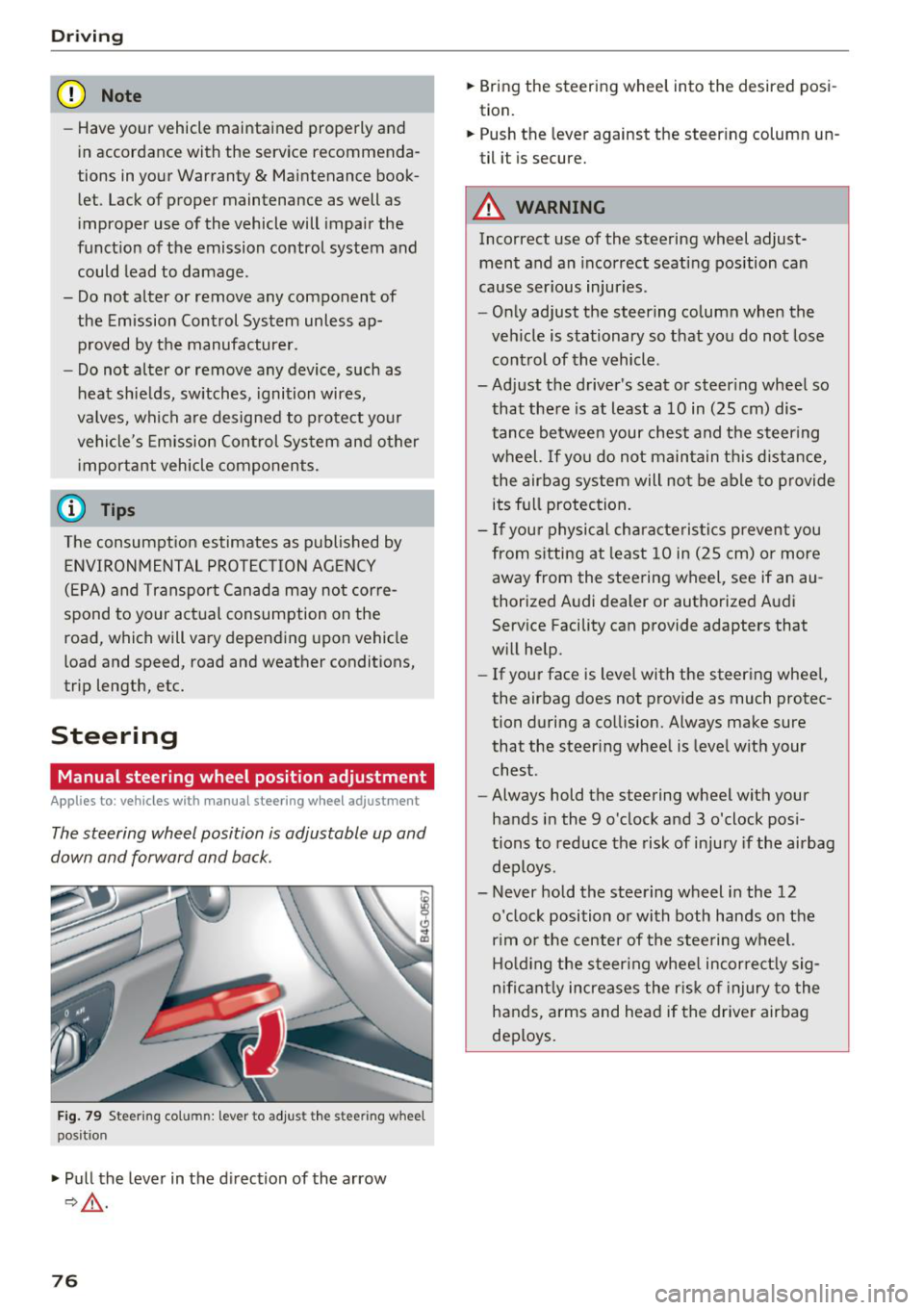
The steering wheel position is adjustable up and
down and forward and back.
Fig. 79 Ste eri ng col umn : lev er to adjus t the stee rin g whe el
p os it ion
.,. Pull the lever in the direction of the arrow
9,&. .
76
.,. Bring the steering wheel into the desired posi
tion.
.,. Push the lever against the steering column un
til it is secure.
A WARNING
Incorrect use of the steering wheel adjust ment and an incorrect seating position can
cause serious injuries.
- Only adjust the steering column when the
vehicle is stationary so that you do not lose control of the vehicle .
-
-Adjust the driver's seat or steering wheel so
that there is at least a 10 in (25 cm) dis
tance between your chest and the steering wheel. If you do not maintain this distance
I
the airbag system will not be able to provide
its full protection.
- If your physical characteristics prevent you
from sitting at least 10 in (25 cm) or more
away from the steering wheel, see if an au
thorized Audi dealer or authorized Audi
Service Facility can provide adapters that
will help.
- If your face is level with the steering wheel,
the airbag does not provide as much protec
tion during a collision. Always make sure
that the steering wheel is level with your
chest .
- Always hold the steering wheel with your
hands in the 9 o'clock and 3 o'clock posi
tions to reduce the risk of injury if the airbag
deploys .
- Never hold the steering wheel in the 12 o'clock position or with both hands on the
rim or the center of the steering wheel.
Holding the steering wheel incorrectly sig
nificantly increases the risk of injury to the
hands, arms and head if the driver airbag
deploys.
Page 79 of 398
a co .... N r--. N .... 0
0
:E '
Applies to: vehicles with power steering wheel adjustment
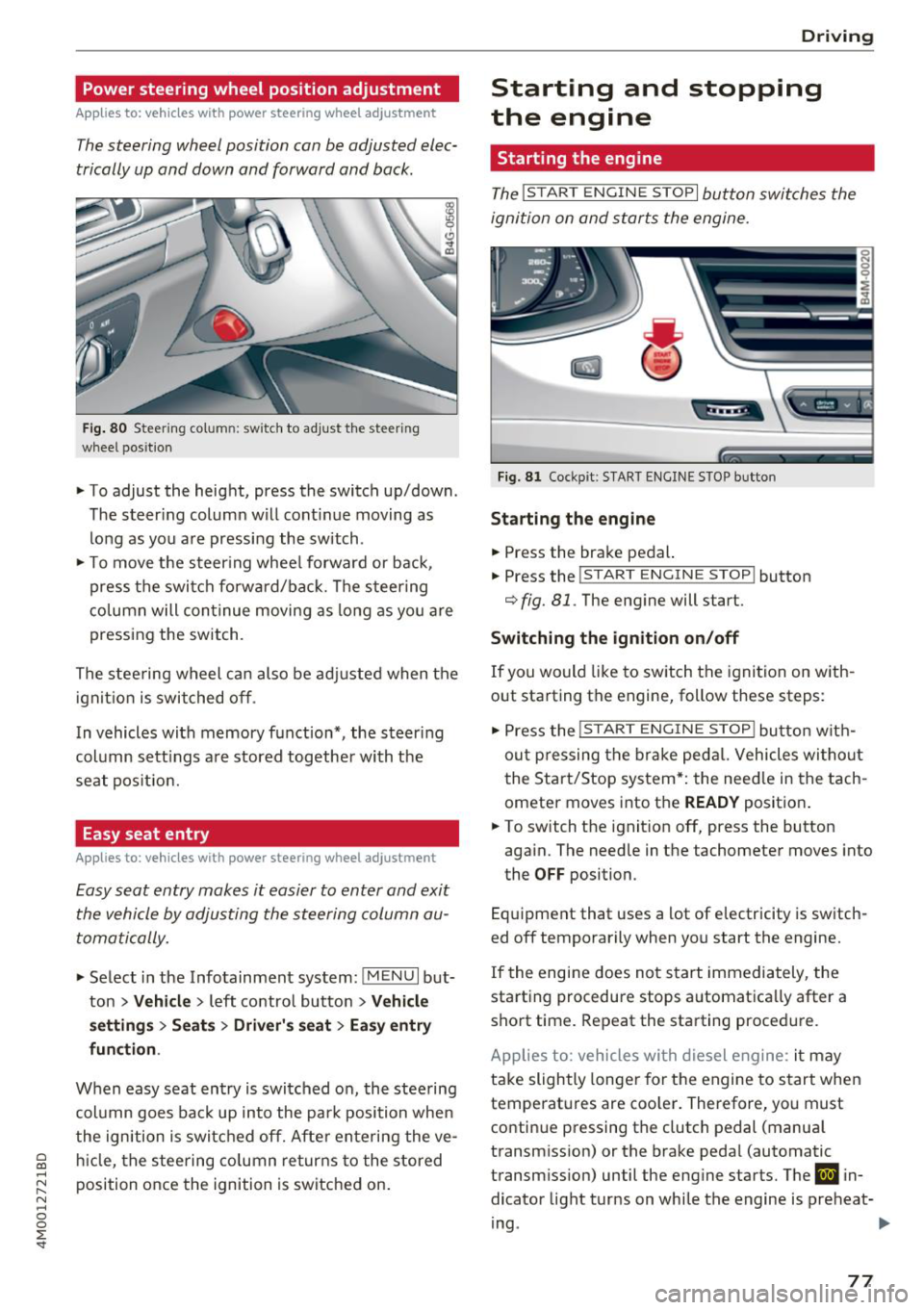
The steering wheel position con be adjusted elec
trically up and down and forward and bock.
Fig. 80 Steerin g co lu m n: sw itch to adjust th e steeri ng
whee l pos ition
.. To adjust the height, press the switch up/down .
The steer ing column will cont inue moving as
long as you are pressing the switch .
.. To move the steering wheel forward or back,
press the switch forward/back. The steering
column will continue moving as long as you are
pressing the switch.
The steering wheel can also be adjusted when the
ignition is switched off .
In vehicles with memory function*, the steer ing
column sett ings are stored together with the
seat position.
Easy seat entry
Applies to: vehicles with power steering wheel adjustment
Easy seat entry makes it easier to enter and exit
the vehicle by adjusting the steering column au
tomatically.
.. Select in the Infotainment system: !MENUI but
ton
> Vehicle > left contro l button > Vehicle
settings> Seats> Driver's seat> Easy entry
function .
When easy seat entry is switched on, the steering
column goes back up into the park position when
the ignition is switched off. After entering the ve
hicle, the steering column returns to the stored
position once the ignition is switched on.
Driving
Starting and stopping
the engine
Starting the engine
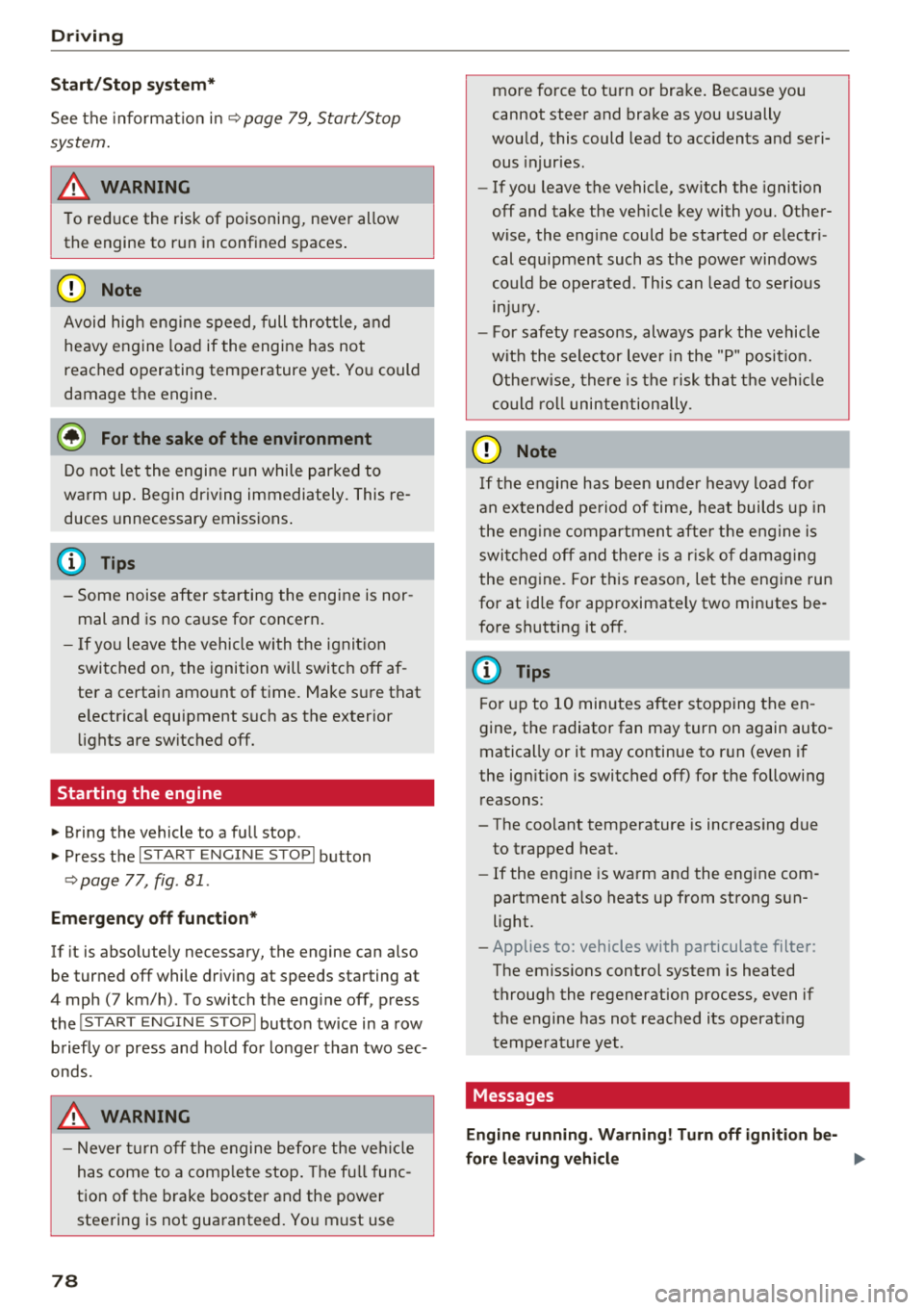
The ! STAR T ENGINE ST OPI button switches the
ignition on and starts the engine.
Fig. 81 Cockpit : S TART ENGINE STOP butto n
Starting the engine
.. Press the brake pedal.
.. Press the
!START ENGINE STOP ! button
c;, fig. 81. The engine will start.
Switching the ignition on/off
If you would like to switch the ignition on with
out starting the engine, follow these steps:
"' Press the
!S T AR T ENGINE S T OP I button with
out pressing the brake pedal. Vehicles without
the Start/Stop system*: the need le in the tach
ometer moves into the
READY position .
.. To switch the ignition off, press the button
again. The needle in the tachometer moves into
the
OFF position.
Equipment that uses a lot of electricity is switch
ed off temporarily when you start the engine.
If the engine does not start immediately, the
starting procedure stops automatica lly after a
short time. Repeat the starting procedure.
Applies to: vehicles with diesel engine: it may
take slightly longer for the engine to start when
temperatures are coo ler. Therefore, you must
continue pressing the clutch pedal (manual
transmission) or the brake pedal (automatic
transmission) until the engine starts. The
IJ in
dicator light turns on while the engine is preheat-
ing .
IJJI>
77
Page 80 of 398
Drivin g
Start /Stop syst em *
See the informat io n in q page 79 , Start/Stop
syst em .
A WARNING
To reduce the risk of poisoning, never allow
the engine to run in confined spaces .
(LlJ) Note
Avoid high eng ine speed, full throttle, a nd
heavy engine load if the engine has not
reached operating temperature yet. You could
damage the engine .
@ For the sake of the environment
Do not let the engine run while parked to
warm up . Begin driving immediately. This re
duces unnecessary emissions .
(D Tips
-Some noise after s tarting the engine is nor
mal and is no ca use fo r concern .
- If yo u leave the vehicle with t he ignit ion
switched on, the ignition will switc h off af
ter a certain amo unt of time. Make s ure that
e lectr ica l equipment s uch as the exterior
li ghts are switched off.
Starting the engine
"' Bring the vehicle to a fu ll stop .
"' Press the I STAR T
EN GI NE ST OPI button
r::!) page 77 , fig . 81 .
Emergency off function*
-
If it is abso lutely necessary, the engine can also
be turned off while driv ing at speeds starting at
4 mph ( 7 km/h) . To switch the eng ine off , press
the lSTART
E NGINE STOPlbutto n tw ice in a row
briefly o r press and hold fo r lo nger than two sec
onds.
A WARNING
- Never turn off the engine befo re the ve hicle
has come to a comp lete stop . The full func
tion of the brake booster and the powe r
steering is not guaranteed. Yo u must use
78
more force to turn or brake . Because you
cannot steer and brake as you usually
wou ld, this could lead to accidents and seri
ous injuries .
- If you leave the vehicle, sw itch the ignition
off and take the ve hicle key with you. Other
wise, the eng ine could be started or electr i
cal equipment such as the powe r windows
could be ope rated . This can lead to se rious
lnJ Ury.
- For safety reasons, always park the vehicle
w it h the sele ctor lever in the "P " pos it io n.
Othe rw ise, there is the risk that t he veh icle
co uld r oll uninte ntionally .
(0} Note
If the engine has been unde r heavy load for
an extended pe riod of time, heat builds up in
the eng ine com partmen t afte r th e e ng ine is
swi tched o ff and the re is a ris k of damag ing
the eng ine. For t his reason, let the engine run
for at id le for approximate ly two min utes be
fo re shutting it off .
(D Tips
For up to 10 minutes a fter stopping the en
gine, t he radiator fan may turn on again auto
matically or it may continue to r un (even if
the ign it ion is switched off) fo r the following
reasons :
- The coo lant temperature is increas ing due
to trapped heat.
- If the eng ine is wa rm and the eng ine com
partment a lso heats up from strong sun
light.
- Applies to: vehicles with particulate filter:
The emissions control system is heated
throug h the regeneration process, even if
the engine has not reached its operat ing
tempe ra ture yet .
Messages
Engine running . Warning! Turn off ignition be -
fore leaving vehicle
II>-
Page 81 of 398
a co ...... N r--. N ...... 0
0
:E '
if you open the d river's doo r when the engine is
running .
Please press the brake pedal
This message appea rs if you do no t press the
b ra ke pedal whe n star tin g the eng ine.
Ill Remote control key : key not detected. Is the
key still in the vehicle?
This indicato r light turns on and t his message ap
pears if the ignit ion key was removed from the
ve hicle when the e ngine was ru nning. If the ign i
tion key is no longe r in the ve hicle, yo u ca nn ot
sw itch on t he ign it ion or s tart the e ngine once
you s top i t. You also canno t lock the vehicle from
the outs id e.
Shift to P, otherwise vehicle can roll away.
Doors do not lock if gearshift is not in P
This message appea rs for safety reasons if the
selecto r lever is in the "N" pos ition w hen you
sw itch the ign ition off. Move the selector leve r to
the "P " pos it io n. Otherwise the vehicle is no t pro
tec ted fro m rol ling an d it ca nnot be lo cke d.
II Remote control key : hold back of key
against the designated area . See owner's man
ual
If t he indicator lig ht turns on and th is message
appears , th ere is a mal function
c:> page 79 .
Shift to P before leaving vehicle , otherwise vehi
cle can roll away
This message appears if the driver's door is
opened while t he ignitio n is switched on and t he
transmission has not been shifted to the "P" pos i
tion. Sh ift the transmiss ion i nto the "P" position
and turn off the ignition if you are leav ing t he ve
h icle. Otherwise t he ve hicle could ro ll. Also see
c:> page 80 .
Driving
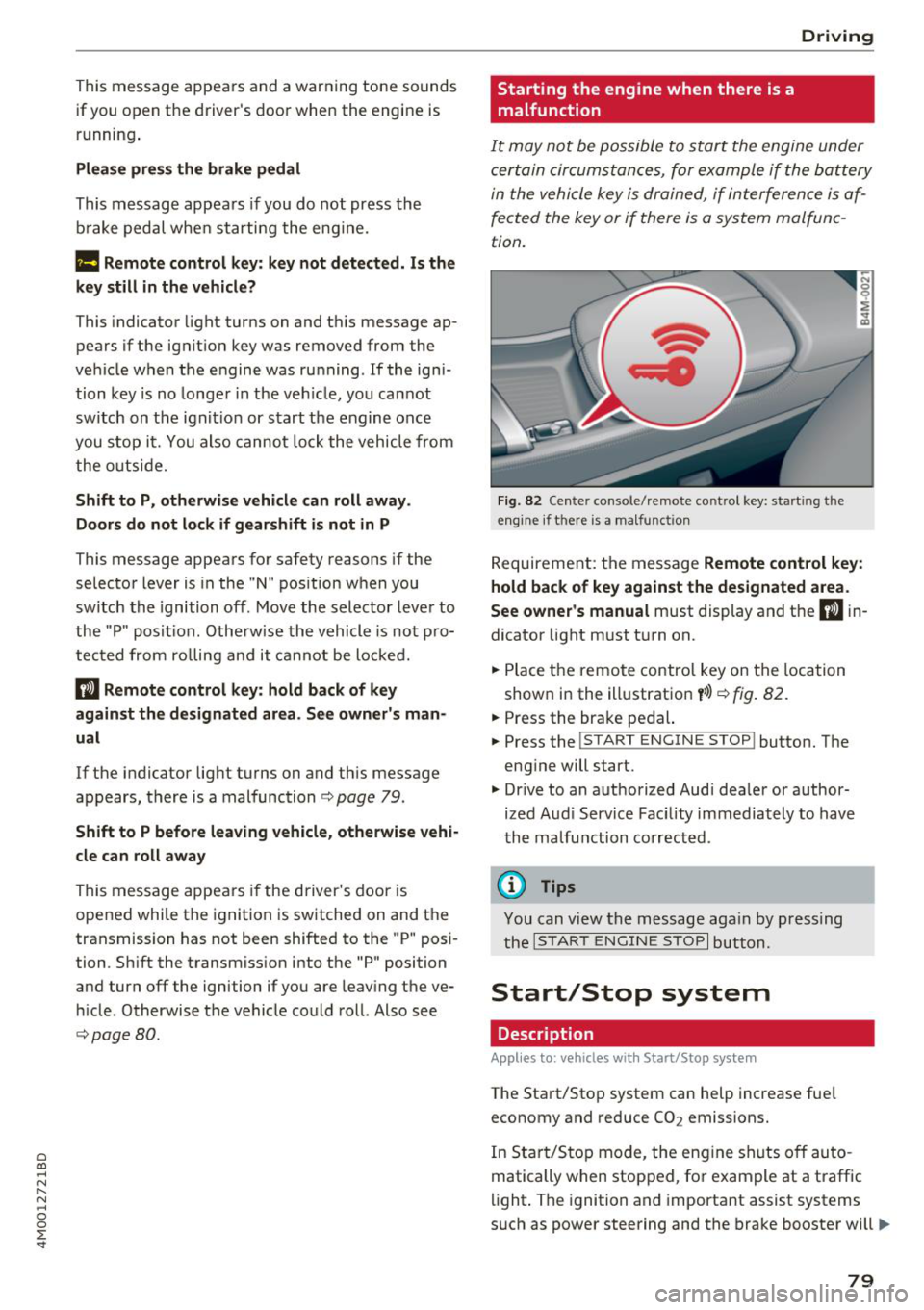
Starting the engine when there is a malfunction
It may not be possibl e to sta rt the e ngine under
ce rta in circ um stance s, for exam ple if the bat te ry
in the vehicle key is dr ained, if in terfere nce is af
fected the key or if there is a system malfunc
tion.
Fig . 82 Ce nter console/ re m ote contro l key: starting the
e n g in e if there is a ma lfunction
R eq uirement: the message Remote control key :
hold back of key against the designated area .
See owner's manual
must display and the II i n
dicator light m ust t urn on.
.. Place t he remote contro l key on the loc ation
show n in the illustrat ion
y >l) c:> fig . 82.
.. Press the bra ke pe dal.
.. Press the
!S TART ENGINE STOP ! button. T he
eng ine will start.
.,. Dr ive to an a uth orized Audi dea ler or a uthor
ized Aud i Serv ice Fac ility immediately to have
t he ma lfu nction corrected.
(D Tips
You can view the message aga in by pr essing
th e
I S TA RT ENGI NE ST OP I button.
Start/Stop system
Description
Applies to: vehicles wi th Start/Stop syste m
The Start/Stop system can help increase fue l
economy and reduce CO
2 emissions.
In Sta rt/S to p mode, the eng ine shuts o ff au to
matically when stop ped, fo r example at a t raff ic
li ght . The ignition and importa nt assist systems
s uch as power steering and the brake booste r will
IJI,,,
79
Page 82 of 398
Drivin g
remain avai lable during the "stop" phase . The en
gine will restart automatica lly when needed.
The Start/Stop system is automatically activated
as soon as the ignit ion is switched on .
Basic requirements
- The driver's door and hood must be closed .
- The "P", "N" or "D" selector lever posit ion must
be engaged .
- The steering wheel must not be sharp ly turned.
- The vehicle must have driven faster than 2 mph
(3 km/h) s ince the last time it stopped.
- A trailer must not be hitched to the vehicle .
@ Note
Always switch the Start/Stop system off when
driving throug h water ~
page 81.
(D Tips
-Depend ing on the driv ing s ituation, t he e n
gine may already stop when
coa sting before
the ve hicle has come to a comp lete stop
ll.
- If yo u se lec t the " D" sele ctor lever pos ition
a fter shifting into reverse, the vehicle mus t
be driven faster than 6 mph ( 10 km/h) in or
der for the Start/Stop system to be active
again.
Stopping/starting the engine
A pp lies to: ve hicles w ith S ta rt/S top system
"' Apply the brakes and keep your foot on the
brake pedal until the veh icle has stopped . The
[I] ind icator light appears in the instrument
cluster once t he e ngine stops automatically.
"'T he eng ine starts aga in when yo u take yo ur
f oot off t he b rake pedal. The ind ica tor light
turns off .
(D Tips
- The ign ition w ill tu rn off if you press the
I START ENGINE STOP! button dur ing a stop
phase.
- You can determ ine for yo urself if the engine
will stop or not by reducing or increasing
1 ) Ma rket -spe cific
80
the amount of force you use to press the
brake pedal. For examp le, if yo u on ly lightly
press on the b rake peda l in stop -and -go
t raffic or when turning, the engine w ill not
switch off when the vehicle is stat ionary. As
soo n as yo u press the brake down harder,
the engine w ill switch off .
- Press the brake peda l during a Stop phase
to keep the vehicle from rolling .
Starting/stopping the engine automat
ically
App lies to: vehicles wi th Start/ Stop sys te m
The sys tem chec ks if cer tain condit ions a re me t
before and d uring the "stop" p hase, and dete r
mines if and how long the engine is stopped de
pending on the situation. For example, if power
u sage is high, the eng ine will not be stopped.
Along with other conditions, the following fac
tors influence the automatic engine start or stop:
- Environmental conditions (slopes, inclines, ele-
vation, temperat ure)
- Battery (cha rge status, temperature, powe r us -
age)
- Engine temperature
- Assistance systems
- Dr iv ing behav ior
If the
rjj ind icator light appears in the instru
ment cluster d isplay, the engi ne w ill not be stop
ped .
Switching the ignition off automatically
App lies to: vehicles wi th Start/ Stop sys te m
If you leave the veh icle dur ing a "stop" phase, the
engine can be res tarted w ithin approximate ly 30
seconds if the doors are closed, the driver's safe
ty be lt is fastened and the brake pedal is pressed.
If you leave the veh icle longer than 30 seconds,
t h e ign it io n will sw itch o ff automa tica lly to pre
vent the vehicle battery from draining. If t his is
the case, the message
Start /stop system: igni
tion will be switched off in 30s
w ill appear in the
i nstrument cluster and, if the low beam
1111-
Page 84 of 398
Drivin g
are available when you start driving r=:> poge 83,
Starting to drive .
Preventing th e automatic parking brake
r e leas e
The vehicle could begin rolling unintentiona lly,
depending on the hill or if towing a trailer .
.,. To preve nt the parking b rake from releasing au
tomat ica lly, pull and hold the© switch and
press the acce lerator pedal. The parking brake
remains set and prevents the vehicle from ro ll
ing backward.
.,. You can release the(®) switch again once you
are sure that you are g iv ing enough dr iv ing
force to the wheels by pressing the accelerator
pedal.
Emer gency br aking fun ction
You can use the emergency braking function in an
emergency situation, or if the standard brake op
eration malfunctions or is disabled.
.,. Pu ll and hold the(®) switch.
.,. As soon as you release the © switch or acceler -
ate, the braking stops .
Pulling and holding the<®> switch while driving
the vehicle activates the emergency braking func
tion . The vehicle is braked at all four wheels by
activating the hydraulic brake system. The brak ing effect is s imilar to heavy braking
r=:> ,&. .
To reduce the risk of activating the emergency
braking by mistake, a warning tone (buzzer)
sounds when the(®) switch is pulled. Emergency
braking stops as soon as the(®) switch is released
or the accelerator pedal is pressed .
Parking
.,. Press the brake peda l to stop the vehicle.
.,. Pu ll the(®) switch to set the parking brake.
.,. Se lect the "P" selector lever pos it ion.
.,. Turn the eng ine off
r=:> ,&. .
.,. Turn the steering wheel when parking on in
clines so that the wheels will roll into the curb
i f the veh icle sta rts mov ing .
82
A WARNING
-Do not press the accelerator pedal inadver
tently if a gear is selected when the vehicle
is stationary and the eng ine is runni ng . Oth
erwise, the vehicle will start to move imme
d iate ly and this could result in an accident.
- Eme rgency brak ing shou ld only be used in
a n emergency, when the no rma l bra ke pedal
h as fa iled or the bra ke peda l is obstr ucted.
Dur ing eme rgency brak ing, you r vehicle w ill
brake s imilar to heavy b raking. ESC and the
associated components (ABS, ASR, EDL)
cannot overcome the laws of physics.
Around curves and when road or weather
conditions are bad, a full brake applicat ion
can cause the veh icle to skid or the rear end
to swerve, wh ich increases the risk of an ac
cident .
- If the power supply fails, you cannot set the parking brake if it is released . In this case,
pa rk the veh icle on leve l ground and secure
it by p lac ing the sele ctor l eve r in the "P " po
si tion. See an au thor ized A udi dealer o r au
thorized A udi Se rvice Fac ility for assis tance.
- Always set the pa rking brake when leaving
your veh icle, even if for a sho rt period of
time . Otherwise the vehicle could roll away,
increasing the risk of an accident.
- If you leave the vehi cle, sw itch the ignition
off and take the ve hicle key with you . This
applies partic ularly when children remain in
the vehicle. Otherwise, chi ldren co uld start
the engine, release the parking brake or op
erate e lectr ica l equipment such as power
w indows, wh ich increases the r isk of an acci
dent.
- No one, especially ch ildren, should remain
in the vehicle when it is locked . Locked
doors make it more diff icu lt for eme rgency
wo rkers to get into the vehicle, which puts
lives at r is k .
0) Tips
When stopp ing at a traff ic signa l or stopp ing
i n city traffic, you can set the park ing brake
manua lly . The veh icle does not have to be
h eld wi th the b rake pedal. The par king b rake
Page 87 of 398
Difficult terrain and off-road
When driving in unfamiliar areas and offroad,
drive slowly and keep on the watch for unexpect
ed obstacles (such as potholes, rocks, tree
stumps, etc.).
To prevent the vehicle from bottoming out and to
reduce the risk of underbody damage, you should
drive across uneven ground on only one side of
the vehicle so that only two of your wheels cross
the uneven area, instead of driving across the
center of the uneven area with all four wheels.
Drive quickly through sandy or marshy off-road
sections and do not stop , if at all possible.
Driving through water
Also read the information found in r=;, page 74.
Driving on a slope
If you are ever unable to drive up a hill, do not try
to turn around . Drive back down in
reverse in
stead . Otherwise you run the risk of t ipping over.
If the vehicle threatens to tip over when driving
across a slope, you must immediately steer
downhill in the direction of the slope.
Do not park your vehicle on steep hills .
To reduce the r isk of tipping over, drive on hills in
the direction of the downward slope (fa ll line) -
never crosswise.
Tilt angle display
Description
Applies to: vehicles wit h a tilt ang le display
110 · I l 1ft / offrnortr1 ( ~ ....
All road
!r
-
Q
l " __,.._
Comfort 4 ~
J
ll" 11• Auto O" •
Dynamic
~ ~
Individual 11• I/"
~t-;s
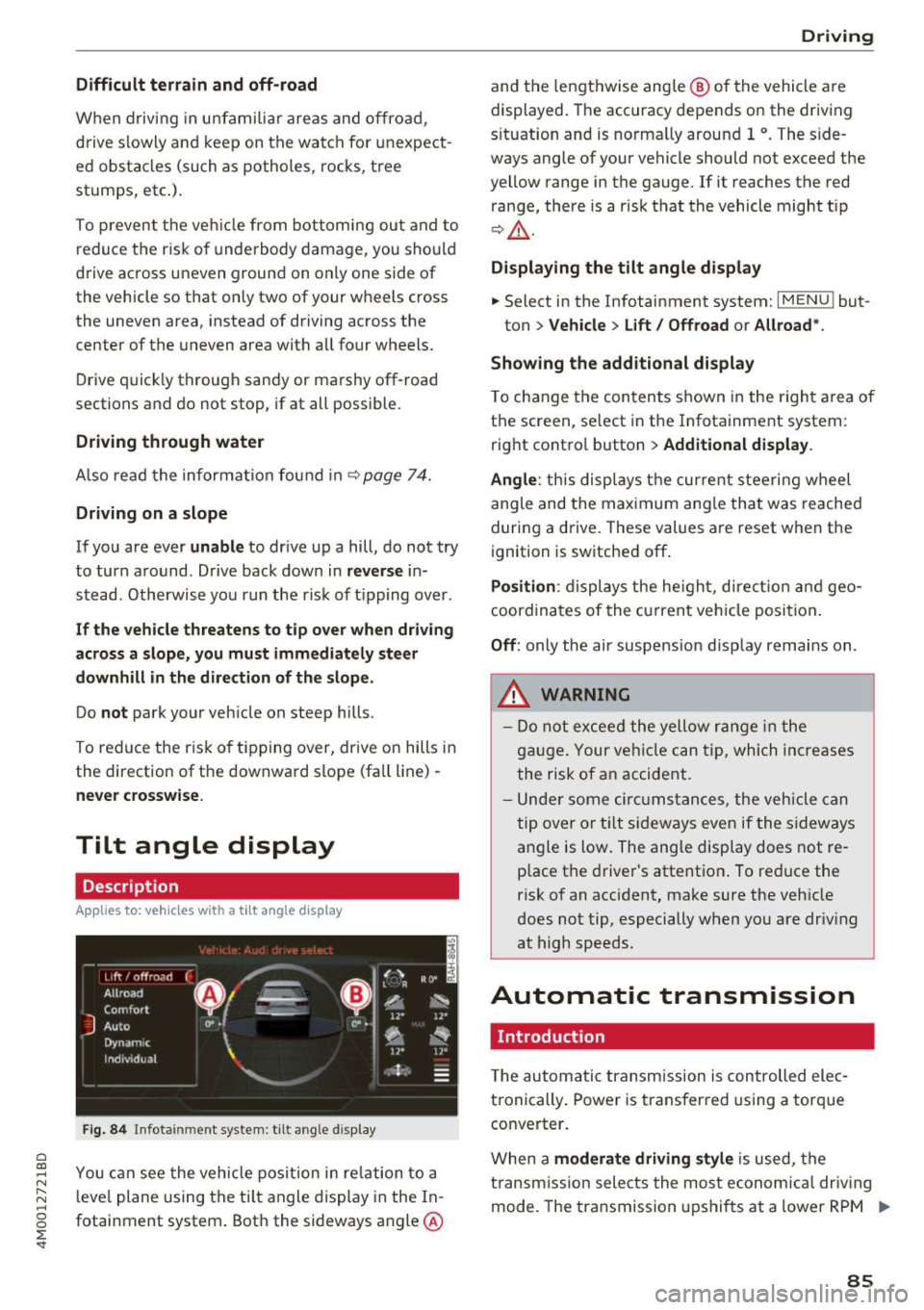
Fig. 84 Infotainment system : tilt angle d isplay
a
~ You can see the vehicle position in relation to a N
~ leve l plane using the tilt angle display in the In-~
g fotainment system . Both the sideways angle @
:E '
and the lengthwise ang le @ of the vehicle are
displayed. The accuracy depends on the driving
s ituation and is norma lly around 1
°. The side
ways angle of your vehicle should not exceed the
yellow range in the gauge. If it reaches the red
range, there is a risk that the vehicle might tip
r=;,_& .
Displaying the tilt angle display
.. Select in the Infotainment system: I MENU ! but-
ton>
Vehicle > Lift/ Offroad or Allroad*.
Showing the additional display
To change the contents shown in the right area of
the screen, se lect in the Infotainment system:
right control button>
Additional display.
Angle :
this disp lays the current steering wheel
angle and the maximum angle that was reached
during a drive . These values are reset when the
ignition is switched off .
Position: displays the height, direct ion and geo
coordinates of the current vehicle posit ion.
Off : only the air suspension display remains on .
.&_ WARNING
- Do not exceed the yellow range in the
gauge. Your vehicle can tip, which increases
the risk of an accident.
- Under some circumstances , the vehicle can
tip over or tilt sideways even if the sideways
angle is low. The angle display does not re
p lace the driver's attention . To reduce the
risk of an accident, make sure the vehicle
does not tip, especially when you are driv ing
at high speeds.
Automatic transmission
Introduction
T he automatic transmission is controlled elec
tronically . Power is transferred using a torque
converter.
When a
moderate driving style is used, the
transmission selects the most economical driving
mode. The transmission upshifts at a lower RPM .,.
85