wheel AUDI R8 COUPE 2020 User Guide
[x] Cancel search | Manufacturer: AUDI, Model Year: 2020, Model line: R8 COUPE, Model: AUDI R8 COUPE 2020Pages: 308, PDF Size: 82.41 MB
Page 37 of 308
4S1012721BA
Power top
AN WARNING
— Do not use the wind deflector to secure car-
go.
—To reduce the risk of an accident, pay atten-
tion to traffic when installing the wind de-
flector.
(i) Tips
— The wind deflector works best when all of
the windows are rolled up while driving.
—To prevent mildew, do not store the wind
deflector when it is damp.
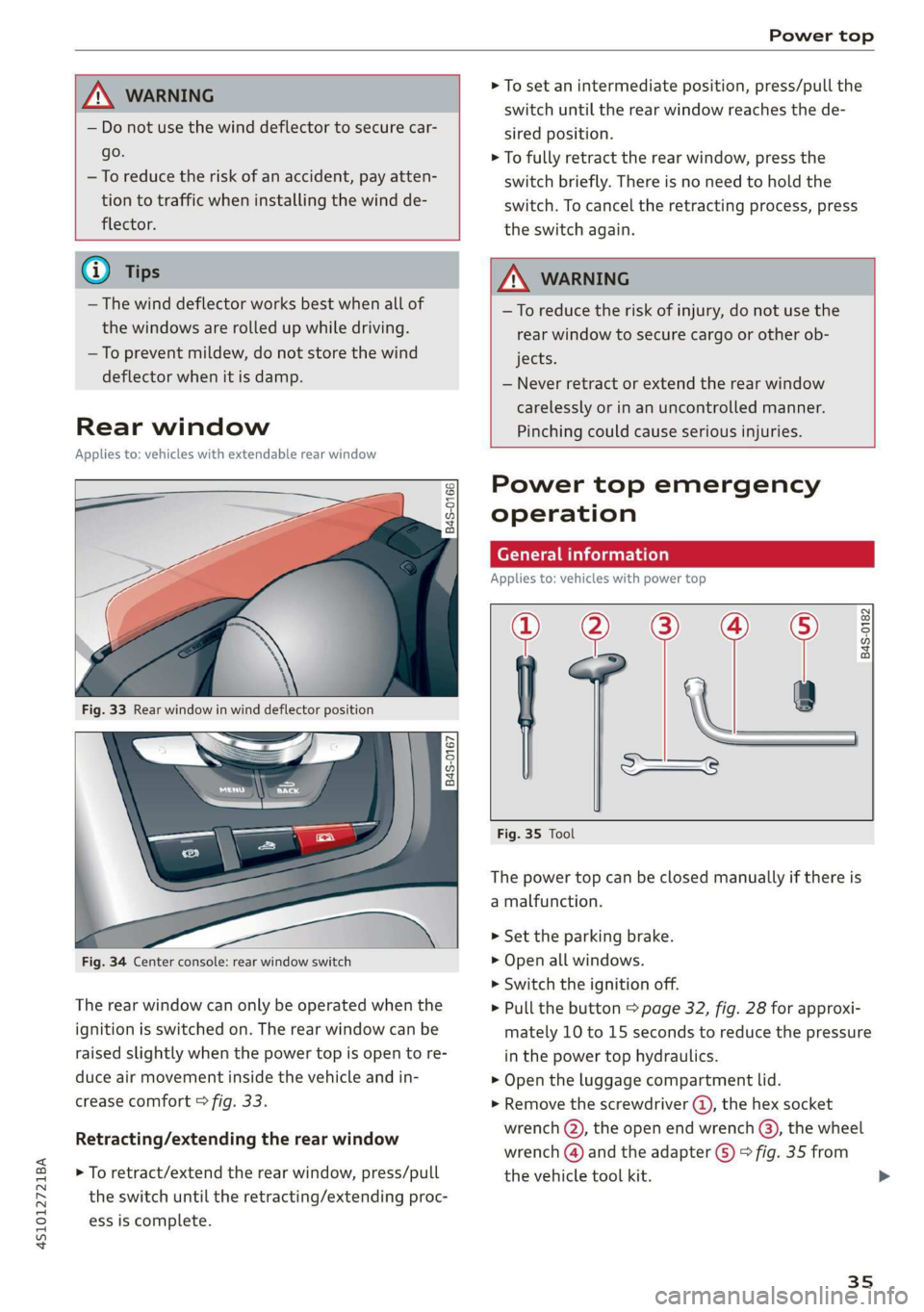
Rear window
Applies to: vehicles with extendable rear window
oO oS
8 a + a
Fig. 33 Rear window in wind deflector position
|
848-0167]
Fig. 34 Center console: rear window switch
The rear window can only be operated when the
ignition is switched on. The rear window can be
raised slightly when the power top is open to re-
duce air movement inside the vehicle and in-
crease comfort © fig. 33.
Retracting/extending the rear window
> To retract/extend the rear window, press/pull
the switch until the retracting/extending proc-
ess is complete.
> To set an intermediate position, press/pull the
switch until the rear window reaches the de-
sired position.
> To fully retract the rear window, press the
switch briefly. There is no need to hold the
switch. To cancel the retracting process, press
the switch again.
ZA WARNING
—To reduce the risk of injury, do not use the
rear window to secure cargo or other ob-
jects.
— Never retract or extend the rear window
carelessly or in an uncontrolled manner.
Pinching could cause serious injuries.
Power top emergency
operation
General information
Applies to: vehicles with power top
a
| 9
——s
Fig. 35 Tool
B4S-0182
The power top can be closed manually if there is
a malfunction.
> Set the parking brake.
> Open all windows.
> Switch the ignition off.
> Pull the button > page 32, fig. 28 for approxi-
mately 10 to 15 seconds to reduce the pressure
in the power top hydraulics.
> Open the luggage compartment lid.
> Remove the screwdriver ®, the hex socket
wrench (Q), the open end wrench (3), the wheel
wrench () and the adapter (5) > fig. 35 from
the vehicle tool kit.
35
Page 40 of 308
Power top
> Move the cover up and down carefully until it
can be pulled downward from the teeth @).
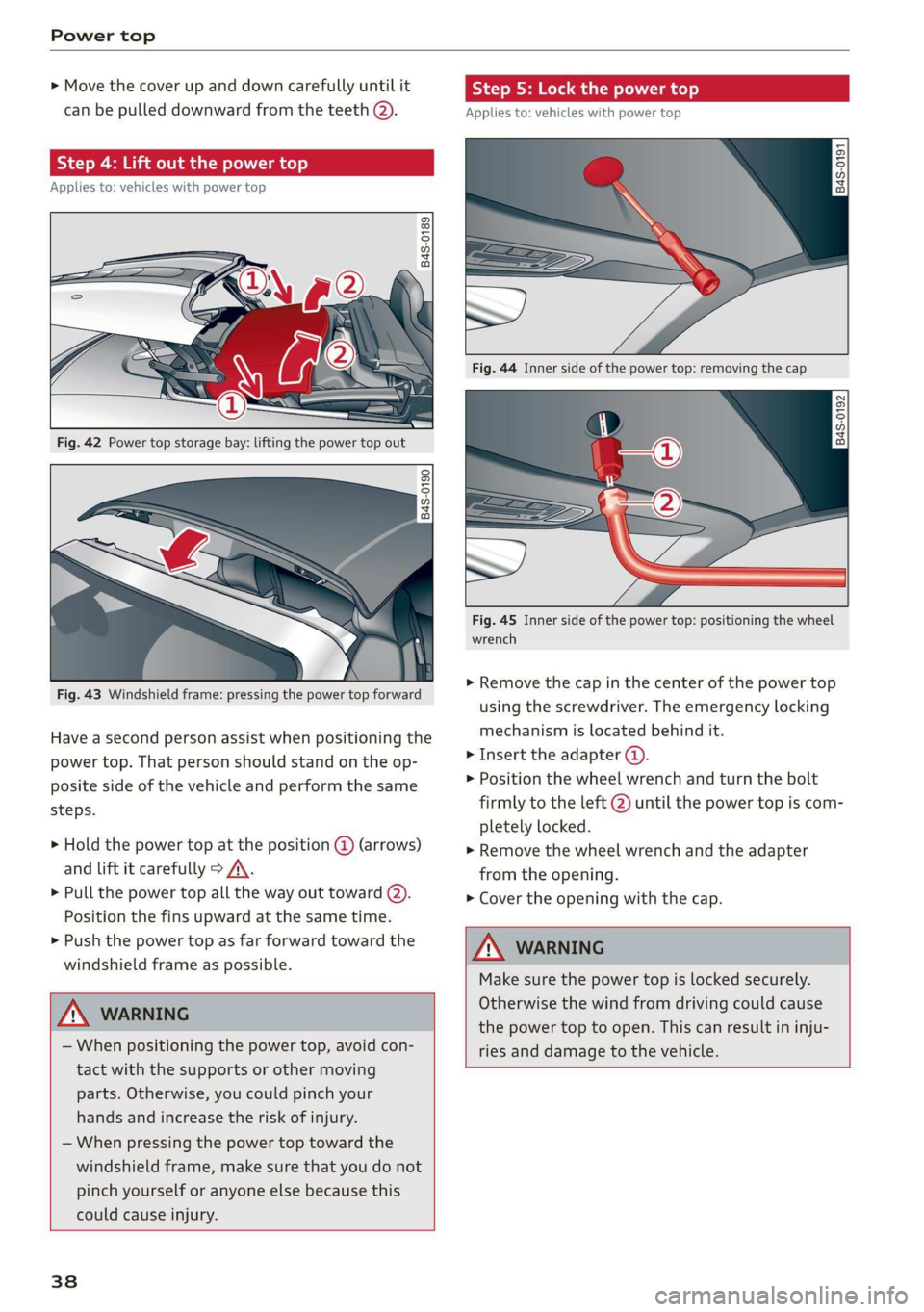
Step 4: Lift out the power top
Applies to: vehicles with power top
Q ©
5 Q + ao
Fig. 42 Power top storage bay: lifting the power top out
B4S-0190
Fig. 43 Windshield frame: pressing the power top forward
Have a second person assist when positioning the
power top. That person should stand on the op-
posite side of the vehicle and perform the same
steps.
> Hold the power top at the position @ (arrows)
and lift it carefully > A\.
> Pull the power top all the way out toward (2).
Position the fins upward at the same time.
> Push the power top as far forward toward the
windshield frame as possible.
ZX WARNING
— When positioning the power top, avoid con-
tact with the supports or other moving
parts. Otherwise, you could pinch your
hands and increase the risk of injury.
— When pressing the power top toward the
windshield frame, make sure that you do not
pinch yourself or anyone else because this
could cause injury.
38
Step 5: Lock the power top
Applies to: vehicles with power top
2
2 Q
+ a
B4s-0192
Fig. 45 Inner side of the power top: positioning the wheel
wrench
> Remove the cap in the center of the power top
using the screwdriver. The emergency locking
mechanism is located behind it.
> Insert the adapter ().
> Position the wheel wrench and turn the bolt
firmly to the left @ until the power top is com-
pletely locked.
> Remove the wheel wrench and the adapter
from the opening.
> Cover the opening with the cap.
WARNING
Make sure the power top is locked securely.
Otherwise the wind from driving could cause
the power top to open. This can result in inju-
ries and damage to the vehicle.
Page 42 of 308
Lights and Vision
Lights and Vision
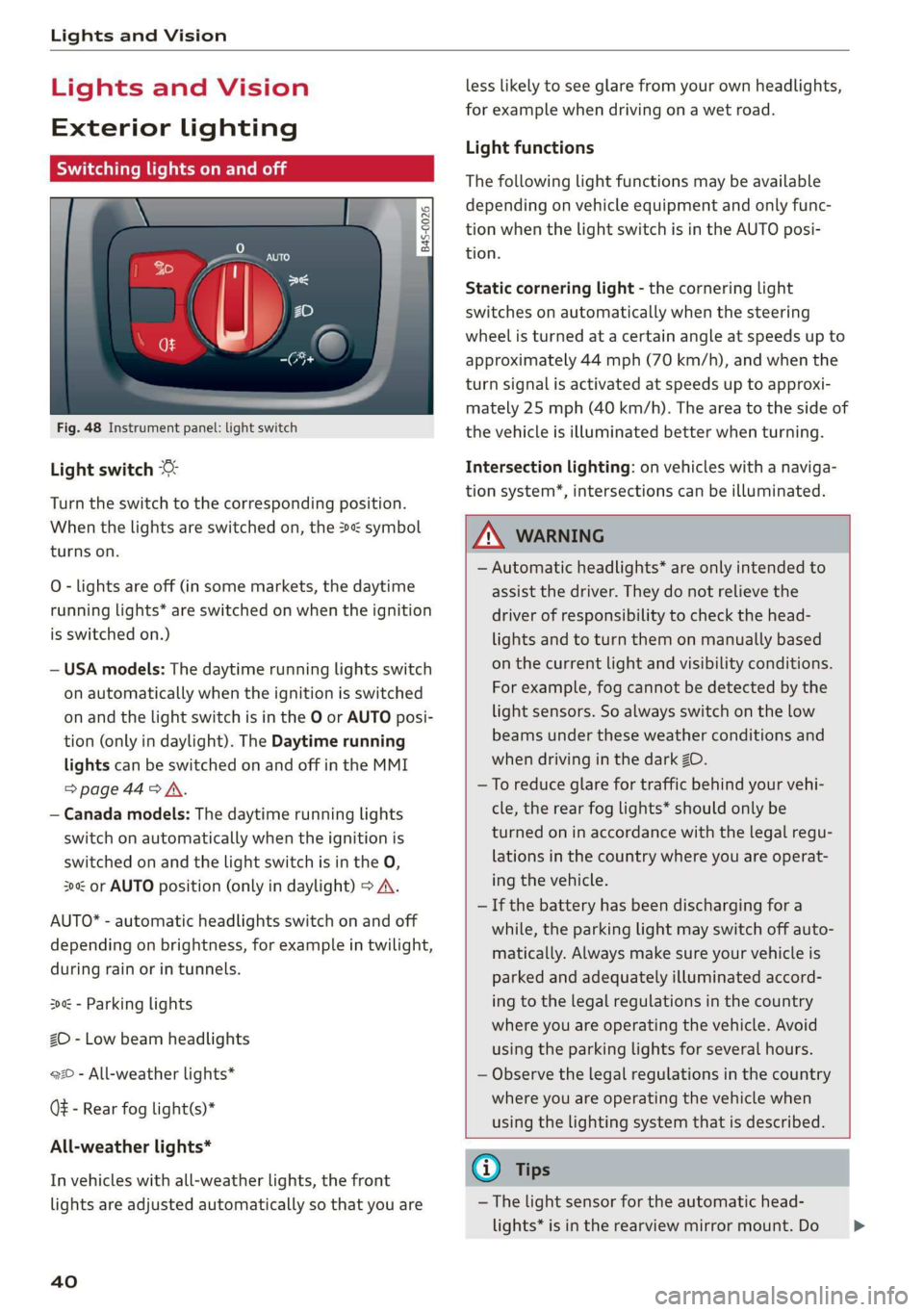
Exterior lighting
Sitar MeL Lats eal
© S
Ss $
db + a
Fig. 48 Instrument panel: light switch
Light switch ©
Turn the switch to the corresponding position.
When the lights are switched on, the 2» symbol
turns on.
O - lights are off (in some markets, the daytime
running lights* are switched on when the ignition
is switched on.)
— USA models: The daytime running lights switch
on automatically when the ignition is switched
on and the light switch is in the O or AUTO posi-
tion (only in daylight). The Daytime running
lights can be switched on and off in the MMI
>page 44> A.
— Canada models: The daytime running lights
switch on automatically when the ignition is
switched on and the light switch is in the O,
300 or AUTO position (only in daylight) > A\.
AUTO* - automatic headlights switch on and off
depending on brightness, for example in twilight,
during rain or in tunnels.
300: - Parking lights
ZO - Low beam headlights
220 - All-weather lights*
Q# - Rear fog light(s)*
All-weather lights*
In vehicles with all-weather lights, the front
lights are adjusted automatically so that you are
40
less likely to see glare from your own headlights,
for example when driving on a wet road.
Light functions
The following light functions may be available
depending on vehicle equipment and only func-
tion when the light switch is in the AUTO posi-
tion.
Static cornering light - the cornering light
switches on automatically when the steering
wheel is turned at a certain angle at speeds up to
approximately 44 mph (70 km/h), and when the
turn signal is activated at speeds up to approxi-
mately 25 mph (40 km/h). The area to the side of
the vehicle is illuminated better when turning.
Intersection lighting: on vehicles with a naviga-
tion system’, intersections can be illuminated.
Z\ WARNING
— Automatic headlights* are only intended to
assist the driver. They do not relieve the
driver of responsibility to check the head-
lights and to turn them on manually based
on the current light and visibility conditions.
For example, fog cannot be detected by the
light sensors. So always switch on the low
beams under these weather conditions and
when driving in the dark 2D.
—To reduce glare for traffic behind your vehi-
cle, the rear fog lights* should only be
turned on in accordance with the legal regu-
lations in the country where you are operat-
ing the vehicle.
— If the battery has been discharging for a
while, the parking light may switch off auto-
matically. Always make sure your vehicle is
parked and adequately illuminated accord-
ing to the legal regulations in the country
where you are operating the vehicle. Avoid
using the parking lights for several hours.
— Observe the legal regulations in the country
where you are operating the vehicle when
using the lighting system that is described.
G) Tips
— The light sensor for the automatic head-
lights* is in the rearview mirror mount. Do >
Page 62 of 308
Driving
@ Tips
The amount of noise produced by the vehicle
can increase significantly when driving with a
sporty style. Show respect to others around
you and the environment with the way you op-
erate your vehicle, especially at night.
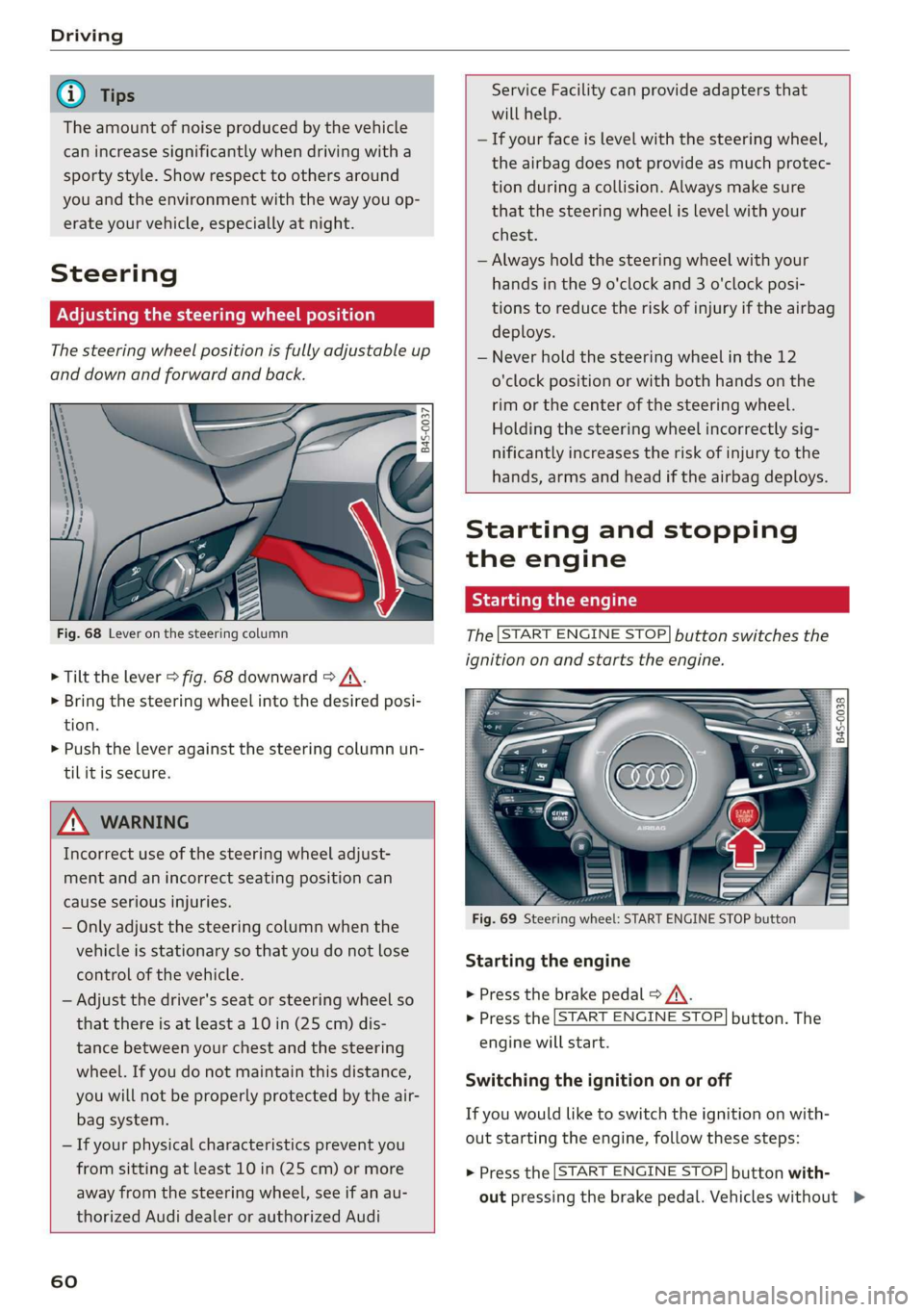
Steering
Adjusting the steering wheel position
The steering wheel position is fully adjustable up
and down and forward and back.
5 s
2 db t a
Fig. 68 Lever on the steering column
> Tilt the lever > fig. 68 downward > /\.
> Bring the steering wheel into the desired posi-
tion.
> Push the lever against the steering column un-
tilit is secure.
ZA WARNING
Incorrect use of the steering wheel adjust-
ment and an incorrect seating position can
cause serious injuries.
— Only adjust the steering column when the
vehicle is stationary so that you do not lose
control of the vehicle.
— Adjust the driver's seat or steering wheel so
that there is at least a 10 in (25 cm) dis-
tance between your chest and the steering
wheel. If you do not maintain this distance,
you will not be properly protected by the air-
bag system.
— If your physical characteristics prevent you
from sitting at least 10 in (25 cm) or more
away from the steering wheel, see if an au-
thorized Audi dealer or authorized Audi
60
Service Facility can provide adapters that
will help.
— If your face is level with the steering wheel,
the airbag does not provide as much protec-
tion during a collision. Always make sure
that the steering wheel is level with your
chest.
— Always hold the steering wheel with your
hands in the 9 o'clock and 3 o'clock posi-
tions to reduce the risk of injury if the airbag
deploys.
— Never hold the steering wheel in the 12
o'clock position or with both hands on the
rim or the center of the steering wheel.
Holding the steering wheel incorrectly sig-
nificantly increases the risk of injury to the
hands, arms and head if the airbag deploys.
Starting and stopping
the engine
Starting the engine
The [START ENGINE STOP] button switches the
ignition on and starts the engine.
utton
Starting the engine
> Press the brake pedal > A\.
> Press the [START ENGINE STOP] button. The
engine will start.
Switching the ignition on or off
If you would like to switch the ignition on with-
out starting the engine, follow these steps:
> Press the [START ENGINE STOP] button with-
out pressing the brake pedal. Vehicles without >
Page 67 of 308
4S1012721BA
Driving
Messages in the instrument cluster display
Applies to: vehicles with Start/Stop system
Start/stop system: deactivated. Please start
engine manually
This message appears when specific conditions
are not met during a Stop phase. The Start/Stop
system will not be able to restart the engine. The
engine must be started with the
START ENGINE STOP] button.
Start/stop system: malfunction! Function
unavailable. Please contact Service
There is a malfunction in the Start/Stop system.
Drive the vehicle to an authorized Audi dealer or
authorized Service Facility as soon as possible to
have the malfunction corrected.
Electromechanical
parking brake
The ©) switch is located under the selector lever
in the center console.
Your vehicle is equipped with an electromechani-
cal parking brake. The parking brake is designed
to prevent the vehicle from rolling unintentional-
ly and replaces the hand brake.
Setting/manually releasing the parking
brake
> Pull the @) switch to set the parking brake. The
LED in the switch turns on. The Zw (USA mod-
els)/[@) (Canada models) indicator light also
turns on in the instrument cluster display.
> To release the parking brake manually, press
the brake or accelerator pedal while the igni-
tion is switched on and press the ©) switch at
the same time. The LED in the button and the
indicator light in the display turn off.
Releasing the parking brake automatically
Requirement: The driver's door must be closed.
> To start driving and release the parking brake
automatically, press the accelerator pedal as
usual.
In addition to releasing the parking brake auto-
matically, other convenience and safety functions
are available when you start driving > page 66,
Starting to drive.
Emergency braking function
You can use the emergency braking function in an
emergency situation, or if the standard brakes
are malfunctioning or the pedal is obstructed.
> Pull and hold the ©) switch.
>» As soon as you release the (©) switch or acceler-
ate, the braking stops.
Pulling and holding the ©) switch while driving
the vehicle activates the emergency braking func-
tion. The hydraulic brake system will brake all
four wheels. The braking effect is similar to heavy
braking > A\.
To reduce the risk of activating the emergency
braking by mistake, a warning tone (buzzer)
sounds when the ©) switch is pulled. Emergency
braking stops as soon as the ©) switch is released
or the accelerator pedal is pressed.
Parking
> Press the brake pedal to stop the vehicle.
> Pull the ©) switch to set the parking brake.
> Select the "P" selector lever position.
> Turn the engine off > /\.
> Turn the steering wheel when parking on in-
clines so that the wheels will roll into the curb
if the vehicle starts moving.
ZA WARNING
— If a gear is engaged while the vehicle is sta-
tionary and the engine is running, do not
press the accelerator pedal inadvertently.
Otherwise, the vehicle will start to move im-
mediately and this could result in an acci-
dent.
— Emergency braking should only be used in
an emergency, when the when the standard
brake pedal is malfunctioning or obstructed.
During emergency braking, your vehicle will
brake similar to heavy braking. ESC and the
associated components (ABS, ASR, EDL) can-
not overcome the laws of physics. In corners
and when road or weather conditions are
bad, a full brake application can cause the
65
Page 68 of 308
Driving
vehicle to skid or the rear end to swerve,
which increases the risk of an accident.
— If the power supply fails, you cannot set the
parking brake once it is released. In this
case, park the vehicle on level ground and
secure it by placing the selector lever in the
"P" position. See an authorized Audi dealer
or authorized Audi Service Facility for assis-
tance.
— If you leave the vehicle, switch the ignition
off and take the vehicle key with you. This
applies particularly when children remain in
the vehicle. Otherwise children could start
the engine, release the parking brake or op-
erate electrical equipment such as power
windows, which increases the risk of an acci-
dent.
— No one should remain in the vehicle when it
is locked - especially children. Locked doors
make it more difficult for emergency work-
ers to get into the vehicle, which puts lives
at risk.
@) Note
Do not leave your vehicle unattended while
the engine is running, because this increases
the risk of an accident.
@) Tips
When stopping at a traffic signal or stopping
in city traffic, you can set the parking brake
manually. The vehicle does not have to be
held with the brake pedal. The parking brake
eliminates the tendency to creep when a se-
lector lever position is engaged. As soon as
you press the accelerator pedal, the parking
brake releases automatically and the vehicle
starts to move > page 66.
G@) Tips
— Occasional noises when the parking brake is
set and released are normal and are not a
cause for concern.
— The parking brake goes through a self-test
cycle at regular intervals when the vehicle is
stopped. Any noises associated with this are
normal.
66
— If there is a power failure, the parking brake
will not set if it is released, and it will not
release if it is set > A\. See an authorized
Audi dealer or authorized Audi Service Fa-
cility for assistance.
Starting to drive
Various convenience and safety functions may be
available when the vehicle begins driving, de-
pending on vehicle equipment.
Starting on hills with the parking brake set
Requirement: the driver's door must be closed.
> To start driving comfortably when on a hill, set
the parking brake and begin driving as usual.
The braking force of the parking brake does not
release automatically until the wheels build up
enough driving force.
Starting on hills with hill hold assist
Hill hold assist makes it easier to start on hills.
Requirement: the driver's door must be closed
and the engine must be running.
> To activate hill hold assist, press and hold the
brake pedal for several seconds. The vehicle
must be facing uphill.
After releasing the brake pedal, the braking pow-
er is maintained briefly > A\ to prevent the vehi-
cle from rolling back when starting. This allows
you to begin driving more easily.
Z\ WARNING
Applies to: vehicles with hill hold assist
— If you do not begin driving immediately or
the engine stalls after releasing the brake
pedal, your vehicle may begin to roll back-
ward. Press the brake pedal or set the park-
ing brake immediately.
— The intelligent technology of hill hold assist
cannot overcome the limitations imposed by
natural physical laws. The increased comfort
offered by hill hold assist should not cause
you to take safety risks. >
Page 70 of 308
Driving
lever positions, you must press the release but-
ton @ on the selector lever and/or press the
brake pedal > fig. 73.
You must press the brake pedal to engage a se-
lector lever position when the engine is running
and the vehicle is stationary.
You do not have to press the brake pedal if you
shift from "D" to "R" within one second. This al-
lows you to “rock” the vehicle to free it when it is
stuck.
P - Park
The wheels are locked in this position. Only shift
into park when the vehicle is stationary > A\. To
select the "P" selector lever position, press the
"P" button 2) on the selector lever > fig. 73. P
appears next to the selector lever.
You can only shift out of park when the engine is
running and you are pressing the brake pedal. To
release the parking lock, press the brake pedal,
press the locking button @ on the selector lever
and select the desired selector lever position
> fig. 73.
P engages automatically when you switch the en-
gine off while D, S or R is engaged or in manual
mode.
If you switch the engine off when the N position
is selected, the transmission remains in N for ap-
proximately 20 minutes and then P is engaged.
You must use the parking lock emergency release
before towing the vehicle > page 73.
R - Reverse
The reverse gear is engaged in this position. Only
select reverse gear when the vehicle is stationary
and the engine is running at idle speed > A. To
engage the "R" selector lever position, press the
brake pedal, press the release button (@) on the
selector lever, and select the "R" position
> fig. 73.
A tone will sound when the reverse gear is engag-
ed.
68
N - Neutral (idle)
The transmission is in idle in this position. To en-
gage the N selector lever position, press the lock-
ing button @ on the selector lever and select the
N position > fig. 73 or pull both shift paddles at
the same time > page 71, fig. 75.
If you switch the engine off when the N position
is selected, the transmission remains in N for ap-
proximately 20 minutes and then P is engaged.
You cannot select the "N" position when the igni-
tion is switched off. When driving through an au-
tomatic car wash, first select the "N" position and
then turn the engine off.
For safety reasons, the vehicle cannot be locked
when the transmission is in the "N" position.
D/S - Driving forward
When the transmission is in the "D/S" position, it
can be operated either in the normal "D" mode or
in the "S" sport mode. Move the selector lever
back to engage the "S" sport mode. You can only
select the S selector lever position when "D" is
engaged. To select the "D" selector lever position
again when "S" is engaged, move the selector lev-
er back > A\. To shift from "N" to "D" when travel-
ing at speeds below 1 mph (2 km/h), press the
brake pedal and shift into the "D" position > A.
In the normal mode "D", the transmission auto-
matically selects the correct gear. It depends on
engine load, vehicle speed and driving style.
Select the sport mode "S" for sporty driving. The
vehicle makes full use of the engine's power.
Shifting may become noticeable when accelerat-
ing.
The "S" selector lever position engages automati-
cally when you select the dynamic mode in drive
select.
Additional driving programs are available when
you select the performance mode* > page 79.
Z\ WARNING
— Before starting to drive, check if the desired
selector lever position is displayed next to
the selector lever.
Page 71 of 308
4S1012721BA
Driving
— The vehicle can roll even if the ignition is
switched off.
— Power is still transmitted to the wheels
when the engine is running at idle. To pre-
vent the vehicle from “creeping”, you must
keep your foot on the brake in all selector
lever positions (except "P" and "N") when
the engine is running.
— Before opening the engine compartment lid,
select the "P" selector lever position and set
the parking brake. This reduces the risk of
an accident. Always read and follow the ap-
plicable warnings > page 229, General in-
formation.
@ Tips
If you accidentally select "N" while driving,
take your foot off the accelerator pedal and
wait for the engine to slow down to idle be-
fore selecting "D" or "S".
Starting the engine
> The Por N position must be selected.
Starting from a stop
> Press and hold the brake pedal.
> Start the engine > page 60.
> Press the locking button @ on the selector lev-
er and select the D/S or R position > page 67.
> Wait a moment until the transmission shifts.
You will notice a slight movement when the
gear engages.
> Release the brake pedal and press the accelera-
tor pedal > A\.
Various convenience functions are available for
starting on hills > page 66.
Stopping temporarily
> Press the brake pedal to stop the vehicle, for
example at a traffic light. Do not press the ac-
celerator pedal when doing this.
> To prevent the vehicle from rolling when you
start driving, set the parking brake when stop-
ping on steep hills > A\ and >@).
> The parking brake will release automatically
and the vehicle will start moving once you press
the accelerator pedal.
Stopping or parking
If the selector lever is not in the "P" position
when you open the driver’s door, the vehicle
could roll.
> Press and hold the brake pedal > A\.
> Set the parking brake.
> To select the "P" selector lever position, press
the "P" button (2) on the selector lever
=> page 67, fig. 73.
Under certain conditions, such as driving in the
mountains, it may be helpful to switch to manual
mode temporarily to adapt to the driving condi-
tions manually > page 71.
On hills, activate the parking brake first and then
shift into the "P" position. This prevents too
much stress from being placed on the locking
mechanism.
ZA WARNING
— Do not press the accelerator pedal when
changing the selector lever position while
the vehicle is stationary and the engine is
running. This could result in a crash.
— To reduce the risk of an accident, never se-
lect the "R" or "P" positions while driving.
— Do not inadvertently press the accelerator
pedal when the vehicle is stationary. Other-
wise the vehicle will start to move immedi-
ately, even if the parking brake is set. This
could result in a crash.
@) Note
— When stopping on an incline, do not try to
hold the vehicle in place by pressing the ac-
celerator pedal while a driving gear is se-
lected. This can cause the automatic trans-
mission to overheat and can damage it. Set
the parking brake or press the brake pedal
to prevent the vehicle from rolling.
— Allowing the vehicle to roll when the engine
is stopped while the selector lever is in the
"N" position will damage the automatic
69
>
Page 72 of 308
Driving
transmission, because it is not lubricated
under those circumstances > page 278,
Towing.
— The transmission can overheat and be dam-
aged under certain driving and traffic condi-
tions such as frequent starts, creeping for a
long time, or stop-and-go traffic. When the
fs} or i] indicator light turns on, stop the
vehicle at the next opportunity and let the
transmission cool > page 72.
G) Tips
For safety reasons, the parking brake only re-
leases automatically when the driver's door is
closed.
Launch Control Program
The Launch Control Program enables maximum
acceleration.
Requirement: the engine and transmission must
be at operating temperature and the steering
wheel must not be turned. The performance
mode* must be selected or dynamic mode must
be selected in Audi drive select.
> With the engine running, press the |SOFF] but-
ton briefly one time).
> Press the brake pedal firmly with your left foot
and hold it all the way down for at least 1 sec-
ond.
> Press the accelerator pedal down completely at
the same time until the engine reaches a high
RPM that remains constant and the message
appears Launch control program: activated ap-
pears.
> Remove your left foot from the brake.
ZA WARNING
— Always adapt your driving to the traffic flow.
— Only use Launch Control when road and traf-
fic conditions allow it and other drivers will
D_ The ESC light turns on and stays on, and the message Sta-
bilization control (ESC): sport. Warning! Limited stabili-
ty appears temporarily in the Infotainment system to indi-
cate that the system was deactivated.
70
not be endangered or impacted by your driv-
ing and the vehicle's acceleration.
— Please note that the drive wheels can spin
and the vehicle can break away when ESC
sport mode is switched on, especially when
the road is slippery.
— Once the vehicle has started moving, press
the |[& OFF] button briefly to turn the ESC
sport mode off again.
G@) Tips
— The transmission temperature may increase
significantly after using the launch control
program. If that happens, the program may
not be available for a few minutes. It will be
available again after a cool-down period.
— When accelerating using the launch control
program, all vehicle parts are subject to
heavy loads. This can lead to increased wear.
Page 73 of 308
4S1012721BA
Driving
Shifting manually (tiptronic mode)
The tiptronic mode allows the driver to shift the
gears manually.
Fig. 74 Center console: shifting manually with the selector
lever
B4S-0044
Shifting with the selector lever
You can shift into tiptronic mode while the vehi-
cle is stationary or while driving.
> To shift into tiptronic mode, push the selector
lever from the "D/S" position to the right. As
soon as the transmission switches over, the "M"
selector lever position will appear in the Info-
tainment system display.
> To shift up a gear, tap the selector lever for-
ward @) © fig. 74.
> To shift down a gear, tap the selector lever
backward (©).
> To switch tiptronic mode off, push the selector
lever back into the "D/S" position.
Starting to drive using the shift paddles
You can operate the shift paddles in the "P" or "N"
selector lever positions.
> Press and hold the brake pedal.
>» Start the engine > page 60.
> To engage a gear, tap the @) shift paddle
> fig. 75.
> Release the brake pedal and press the accelera-
tor pedal > A\ in Driving tips on page 69.
> To engage the "N" position, tap both shift pad-
dles at the same time.
Shifting with the shift paddles
You can operate the shift paddles in the "D/S" or
"M" selector lever positions.
> To shift up a gear, tap the shift paddle @)
> fig. 75.
> To engage the highest gear, hold the @) shift
paddle.
> To shift down a gear, tap the () shift paddle.
> To shift into the lowest gear, hold the © shift
paddle.
When accelerating, the transmission does not
automatically shift to the next gear shortly be-
fore the maximum permitted engine RPM is
reached. Shift to the next highest gear at the
right time.
The transmission only allows manual shifting
when the engine speed is within the permitted
range.
Kick-down enables maximum acceleration.
When you press the accelerator pedal down be-
yond the resistance point, the automatic trans-
mission downshifts into a lower gear and the en-
gine utilizes its full power, if the vehicle speed
and engine RPM permit. It shifts up into the next
higher gear once the maximum permitted engine
RPM is reached.
Z\ WARNING
Please note that the wheels could spin on
slick or slippery roads when kick-down is ac-
tive.
@) Tips
Kick-down is only available in manual mode
when the “comfort” or “auto” driving pro-
gram is selected. Likewise, an upshift occurs >
71