instrument cluster AUDI RS7 SPORTBACK 2014 User Guide
[x] Cancel search | Manufacturer: AUDI, Model Year: 2014, Model line: RS7 SPORTBACK, Model: AUDI RS7 SPORTBACK 2014Pages: 292, PDF Size: 73.56 MB
Page 31 of 292
Instrument s and warning /indicator lights 29
.. Turn the menu thumbwheel on the steering
whee l until
Lap time r appears in the instru
ment cluster disp lay .
@ Boost pressure indicator
The current engine load (meaning the current
boost p ressure) is indicated by a bar.
@ Shifting indicator
The shifting i ndicator is only visib le when
shifting gears with the selector lever in tip
tronic mode
c> page 108. Green LEDs turn on
as the engine RPMs increase. The LEDS flash
red at speeds near the RPM lim it.
I n vehicles with a head-up d isplay, the shifting
indicator is shown in the head-up display in
stead of the instr ument cluster. The head-up
display must be switched on in orde r to do
this
c> page 28.
© Engine oil temperature indicator
I f the engine oil temperature is below 60 °(,
the G¥J symbol followed by three hyphens" --
-" and the °C unit is shown.
The engine has reached its operating temper
ature when the engine o il temperature is be
tween 60
· c and 120 °C under normal driv ing
conditions. The eng ine oi l temperature may
be h igher if there is heavy engine load and
high temperatures outside. This is not a cause
for concern as long as the. ~
page 17 or
l!I c> page 17 warning light in the display
does not flash.
Lap timer
Introduction
You can record and eva luate lap times with
the lap timer in the display
c> page 29,
fig. 17 . The time is measured in minutes, sec
onds and 1/10 seconds . The hours are also
shown when the lap time exceeds 60 minutes.
The maximum individual measurement is
99
hours . A maximum of 50 laps may be record
ed .
A WARNING
Please devote your full attention to driv
ing . As the driver, you have complete re
sponsib ility for safety in traffic. Only use
the functions in such a way that you always
maintain complete control over your vehi
cle in all traffic situations.
(D Tips
When the lap timer stopwatch is running,
you can call up the on-board computer in
formation.
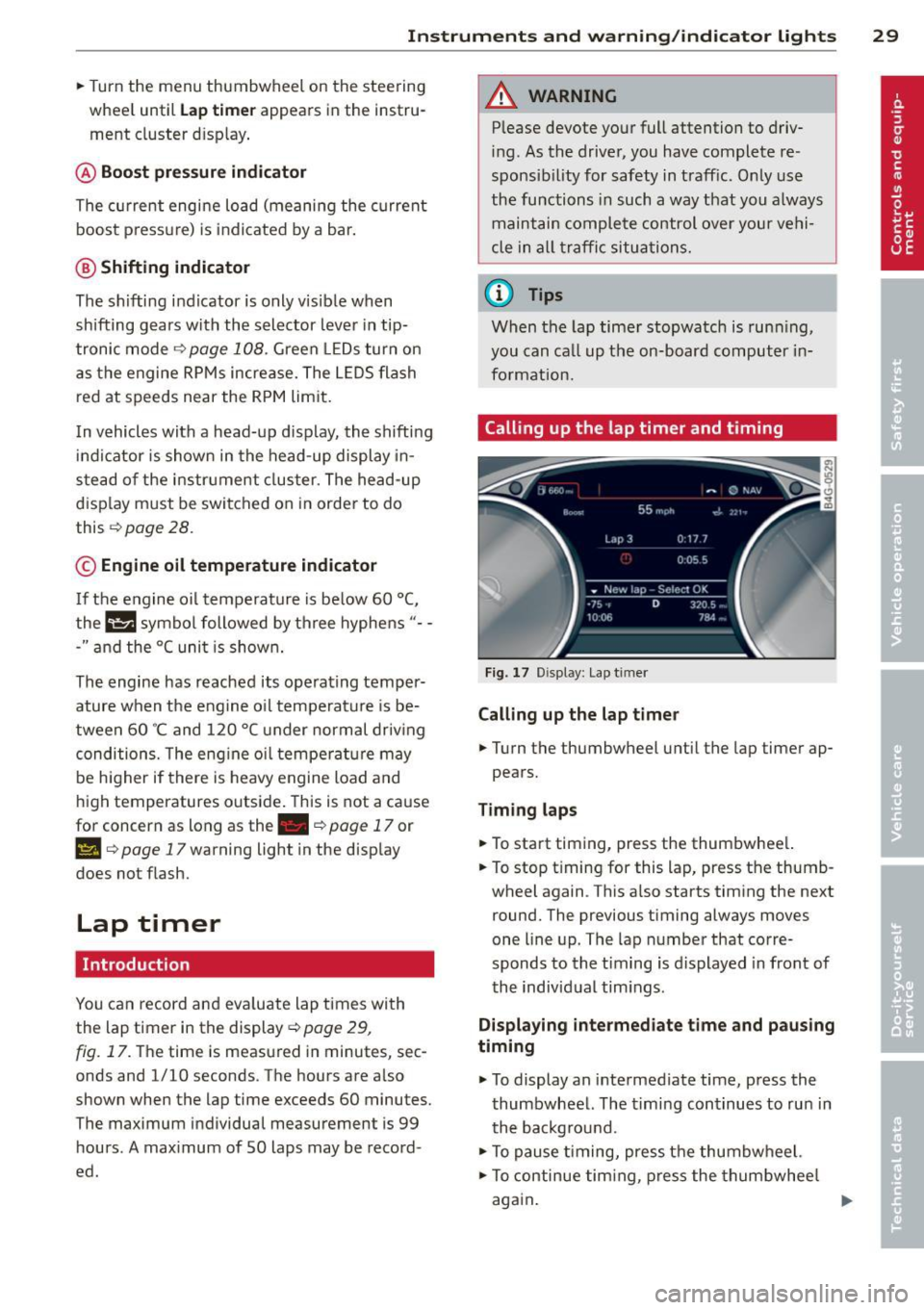
Calling up the lap timer and timing
Fig. 17 Display: Lap t imer
Calling up the lap timer
.. Turn the thumbwheel until the lap timer ap-
pears.
Timing laps
.. To start t iming, press the thumbwhee l.
.. To stop t iming for this lap, press the thumb
wheel again . This also starts timing the next
round. The previous timing always moves
one line up. The lap number that corre
sponds to the timing is displayed in front of
the individual tim ings .
Displaying intermediate time and paus ing
timing
.,. To display an intermediate time, press the
thumbwheel. The timing continues to run in
the backg round.
.. To pause timing, press the thumbwheel.
.. To continue timing, press the thumbwheel
again.
Page 32 of 292
30 Instruments and warning/indicator lights
If timing is paused, you can continue it late r
even if you sw itch the ignition off .
Evaluating times and continuing or
resetting timing
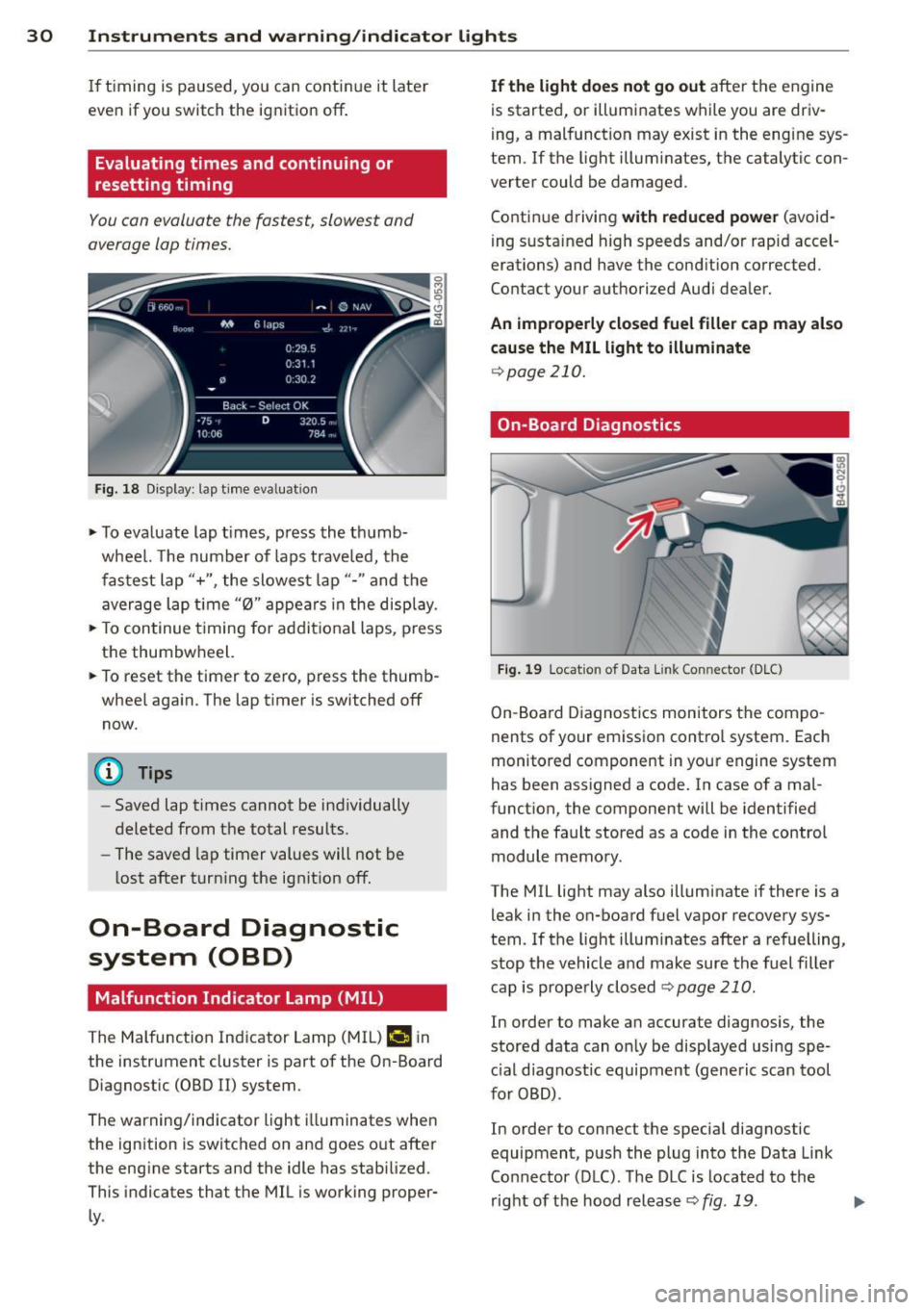
You can evaluate the fastest, slowest and
average lap times.
Fig. 18 Dis play : lap time eva luat ion
.,. To evaluate lap times, press the thumb
wheel. The number of laps traveled, the
fastest lap"+", the slowest lap"- " and the
average lap t ime "0" appears in the display .
.,. To continue t iming for addit ional laps , press
the thumbwheel.
.,. To reset the timer to zero, press the thumb
wheel again. The lap timer is switched off now.
@ Tips
- Saved lap times cannot be individually
deleted from the total results.
- The saved lap timer values will not be
lost after turning the ignit ion off.
On-Board Diagnostic
system (OBD)
Malfunction Indicator Lamp (MIL)
The Malfunction Indicator Lamp (MIL) ¢4 in
the instrument cluster is part of the On-Board Diagnostic (OBD
II) system.
The warning/indicator light illuminates when
the ignition is switched on and goes out after
the engine starts and the idle has stabilized .
This indicates that the MIL is working proper
ly .
If the light does not go out after the engine
is started, or illuminates while you are driv
ing, a malfunction may exist in the eng ine sys
tem . If the light illuminates, the catalytic con
verter could be damaged .
Continue driving
with reduced power (avoid
ing sustained high speeds and/or rapid accel
erations) and have the condition corrected.
Contact your authorized Audi dealer.
An improperly closed fuel filler cap may also
cause the MIL light to illuminate
¢page 210.
On-Board Diagnostics
Fig. 19 Locat io n of Data Link Co nnector (D LC)
On-Board Diagnostics monitors the compo
nents of your emission control system . Each
monitored component in your engine system
has been assigned a code. In case of a mal
function, the component will be identified
and the fault stored as a code in the control
module memory.
The MIL light may also illuminate if there is a leak in the on-board fuel vapor recovery sys
tem. If the light illuminates after a refuelling,
stop the vehicle and make sure the fuel filler
cap is properly closed
Q page 210 .
In order to make an accurate diagnosis, the
stored data can only be displayed using spe
c ial d iagnostic equipment (generic scan tool
for OBD) .
In order to connect the special diagnostic
equipment, push the plug into the Data Link
Connector (DLC). The DLC is located to the
right of the hood release
Q fig . 19 . liJJ,
Page 35 of 292
Removing the mechanical key
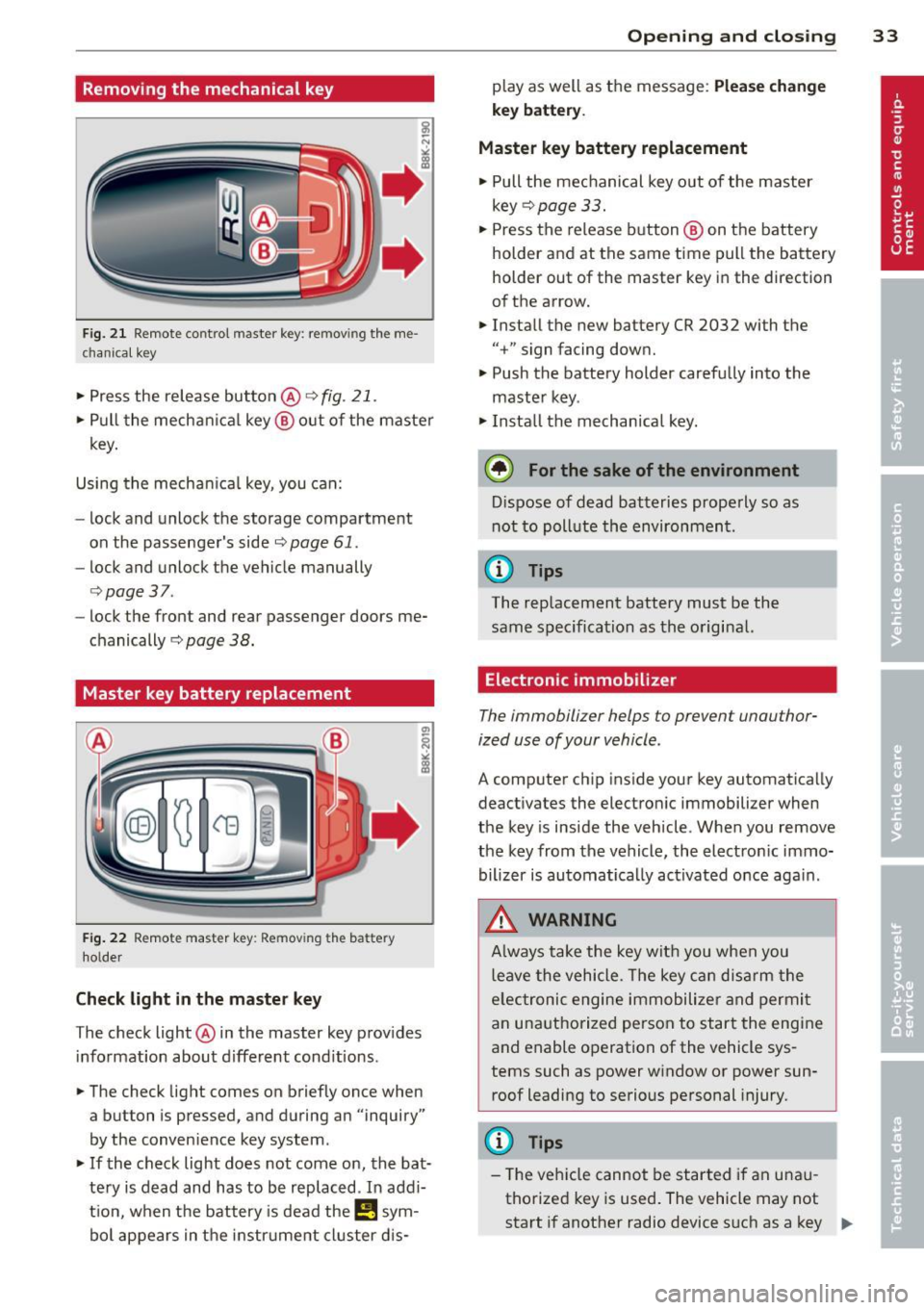
Fig. 21 Remote control maste r key : re mov ing the me
c han ical key
• Press the release button @ c:> fig. 21.
• Pull the mechanica l key @ out of the master
key.
Using the mechan ica l key, you can:
- lock and unlock the storage compartment
on the passenger's side
c::> page 61.
- lock and unlock the vehicle manually
c::>page 37 .
-lock the front and rear passenger doors me
chanically
c:> page 38.
Master key battery replacement
Fig . 22 Remote master key : Re mov ing the ba ttery
holde r
Check light in the master key
The check light @ in the master key provides
information about different cond itions .
• The check light comes on briefly once when
a button is pressed, and during an "inquiry"
by the conven ience key system .
• If the check light does not come on, the bat
tery is dead and has to be replaced . In add i
t ion, when the battery is dead the
I!! sym
bol appears in the instrument cluster dis-
Opening and closing 33
play as well as the message : Please change
key battery .
Master key battery replacement
• Pull the mechanical key out of the master
key
c::> page 33.
• Press the release button @ on the battery
holder and at the same time pull the battery
holder out of the master key in the direction
of the arrow.
• Install the new battery CR 2032 with the
"+ " sign facing down.
• Push the battery holder carefully into the
maste r key .
• Install the mechanical key.
@ For the sake of the environment
Dispose of dead batteries properly so as
not to poll ute the environment .
(D Tips
The replacement battery must be the
same specification as the original.
, Electronic immobilizer
The immobilizer helps to prevent unauthor
ized use of your vehicle .
A computer chip inside your key automatically
deactivates the electronic immobilizer when
the key is inside the vehicle. When you remove
the key from the vehicle, the electronic immo
bilizer is automatically activated once again .
A WARNING
-
Always take the key with you when you
leave the vehicle. The key can disarm the
e lectronic engine immobilizer and permit
an unauthorized person to start the engine
and enable operation of the vehicle sys
tems such as power window or power sun
roof leading to serious personal injury.
(D Tips
- Th e veh icle cannot be started if an unau
thorized key is used. The vehicle may not
start if another radio device such as a key .,.
Page 44 of 292
42 Opening and clo sing
• Re lease the switch and then pu ll it again for
at least one second.
Valet parking
T he valet parking feature protects the lug
gage comportment from unauthorized access from the outside.
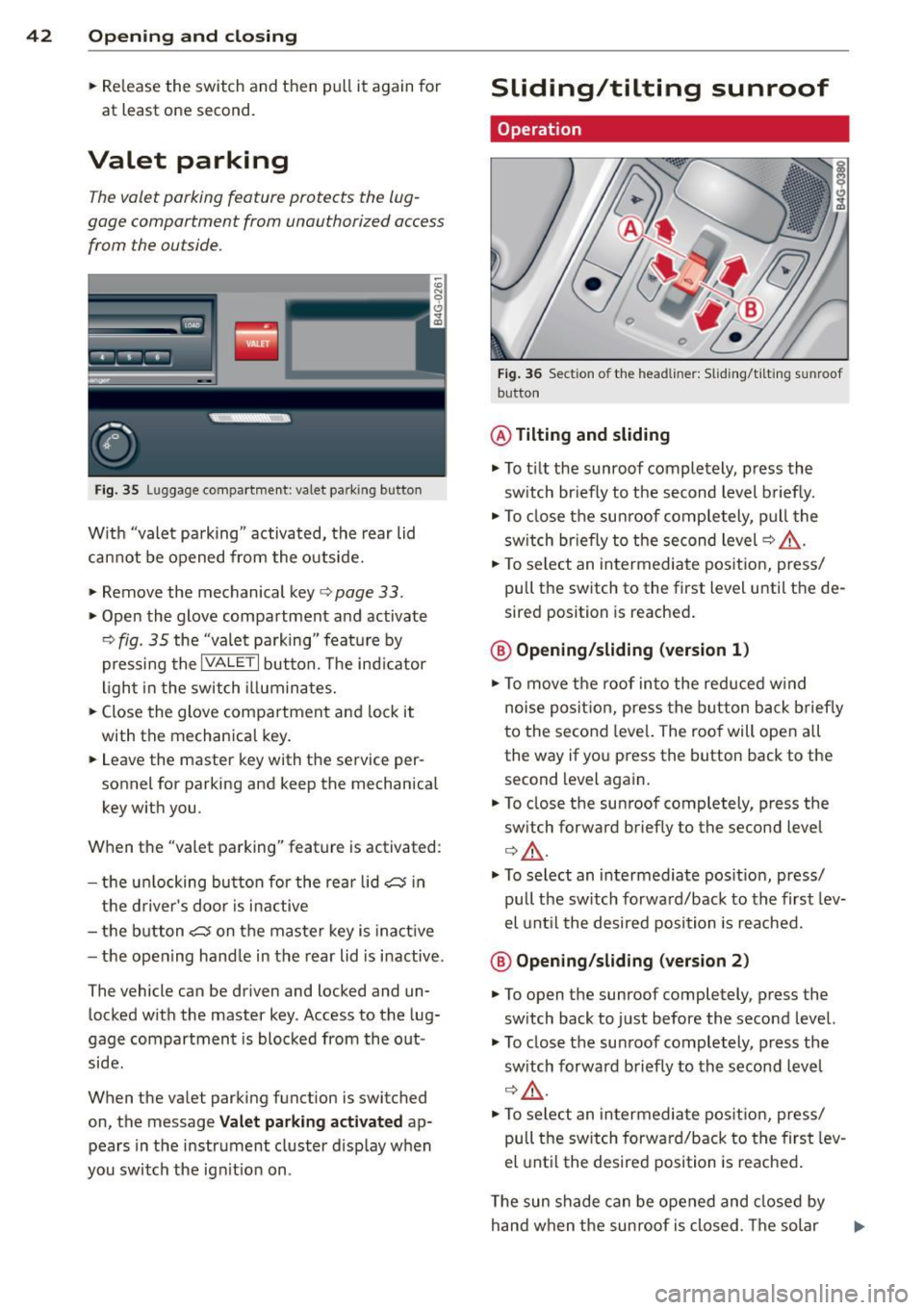
Fig . 35 Lu ggage compartment : valet park ing bu tton
W ith "valet pa rking" activated, the rear lid
cannot be opened from the outside.
• Remove the mechanical key
c> page 33 .
• Open the glove compartment and activate
c> fig . 35 the "valet parking " feature by
pressing the
I VA LE T I button. The ind icator
light i n the switch illuminates.
• Close the glove compartment and lock it
with the mechanical key .
• Leave the master key with the service per
sonnel for parking and keep the mechanical
key w ith you.
When the "valet parking" feature is activated :
- the un locking bu tton for the rea r lid~ in
the d river 's doo r is i nactive
- the button~ on the maste r key is inactive
- the open ing hand le in the rear lid is i nactive.
The vehicle can be driven and locked and un locked with the master key . Access to the lug
gage compartment is blocked from the out
side.
When the valet parking function is switched
on, the message
V al et parking a ctivated ap
pears in the instrument cluster disp lay when
you switch the ign it io n on .
Sliding/tilting sunroof
Operation
Fig . 36 Section o f th e head line r: Sliding/t ilti ng sunroof
button
@ Tilting and sliding
• To t ilt the sunroof completely, press the
sw itch br iefly to the second level briefly.
• To close the sun roof comp letely, pull the
sw itch br iefly to the second level
c> A_ .
• To select an intermediate pos it ion, press/
pull the switch to the first level unti l the de
sired position is reached .
@ Opening /sliding (version 1 )
• To move the roof into the reduced w ind
noise posit ion, press the button back briefly
to the second leve l. The roo f will open all
the way if you press the button back to the
second level again.
• To close the sunroof comp letely, press the
sw itch forward briefly to the second level
Q A_ .
• To se lect an intermediate pos it ion, press/
pull the sw itch forward/back to the first lev
el unt il the desired position is reached.
@ Op ening /sliding (version 2 )
• To open the sunroof completely, press the
sw itch back to just before the seco nd level.
• To close the su nroof completely, press the
sw itch forwa rd briefly to the second level
c> ,& .
• To select an in termediate pos it ion, press/
pull the sw itch forward/back to the first lev
el unt il the desired position is reached .
T he sun shade can be opened and closed by
hand when the sunroof is closed . T he solar
Page 47 of 292
visibility conditions. For example, fog cannot be detected by the light sensors.
So always switch on the headlights 1§.D under these weather conditions and
when driving in the dark.
- Crashes can happen when you cannot see
the road ahead and when you cannot be
seen by other motorists . Always turn on
the headlights so that you can see ahead
and so that others can see your car from
the back.
- Please observe legal regulations when
using the light ing systems descr ibed .
(D Note
The rear fog lights should only be turned
on in accordance with traffic regulation, as
the lights are bright for following traffic.
@ Tips
- The light sensor* for automatic head light range control* is located in the rear
view mirror mount. You should therefore not apply any stickers to the windshield
in this area in order to prevent malfunc
tions or failures.
- In the event of a light sensor malfunc
tion, the driver is notified in the instru
ment cluster display
¢ page 22 .
-You will hear a warning tone if you open
the driver door when the exterior lights
are switched on .
- In cool or damp weather, the inside of
the headlights, turn signals and tail
lights can fog over due to the tempera
ture difference between the inside and
outside. They will clear shortly after
switching them on. This does not affect
the service life of the lighting .
Clear vision 45
Emergency flasher
The emergency flasher makes other motorists
aware that you or your vehicle are in an emer
gency situation .
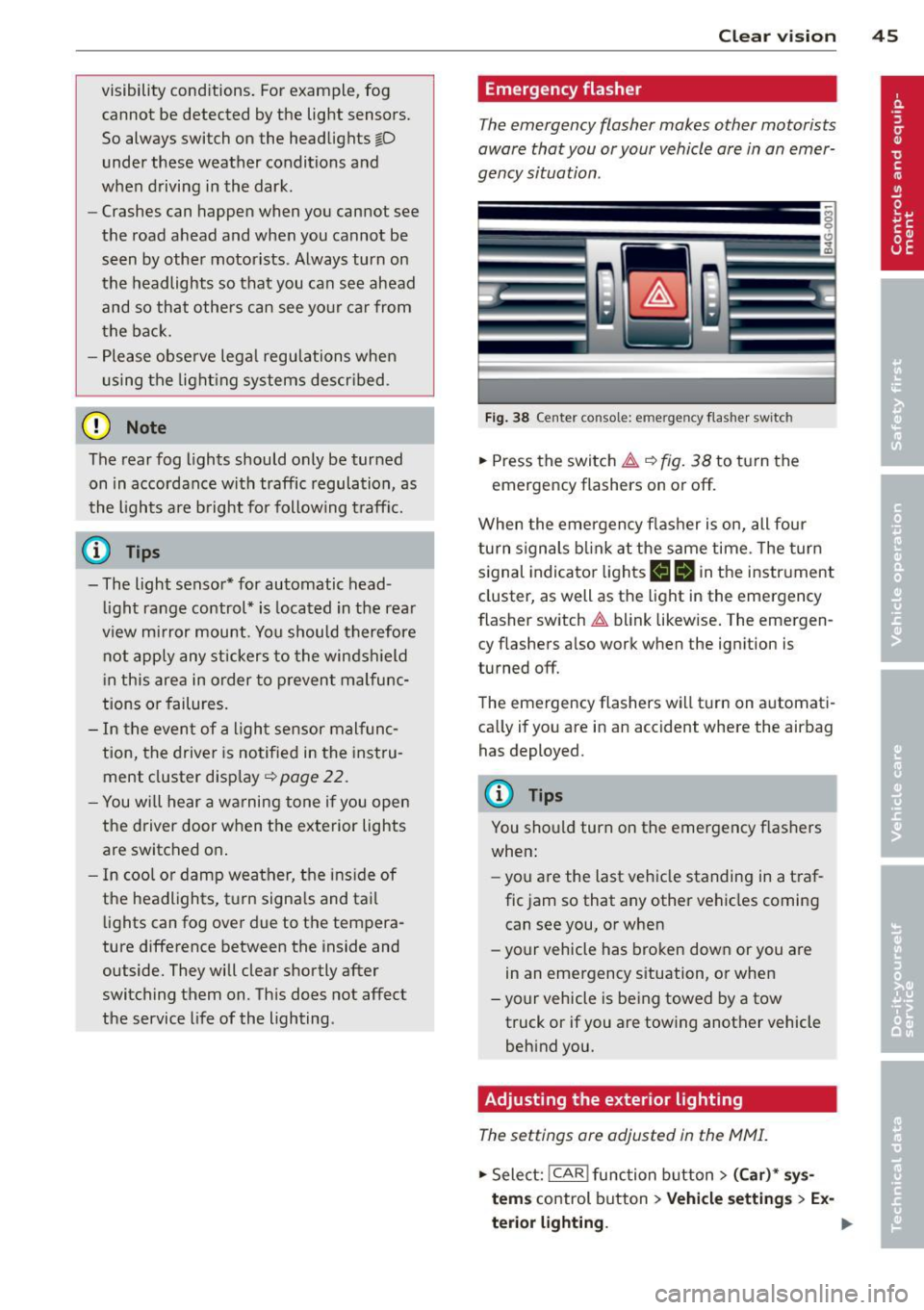
Fig. 38 Ce nt er co nsol e: em erge ncy flash er sw itc h
.,. Press the switch & ¢ fig. 38 to turn the
emergency flashers on or off.
When the emergency flasher is on, all four
turn signals blink at the same time . The turn
signal indicator lights
II Nin the instrument
cluster, as well as the light in the emergency
flasher switch
& blink likewise. The emergen
cy flashers also work when the ignition is
turned off.
The emergency flashers will turn on automati
cally if you are in an accident where the airbag has deployed.
@ Tips
You should turn on the emergency flashers
when:
- you a re the last vehicle standing in a traf
fic jam so that any other vehicles coming
can see you, or when
- your vehicle has broken down or you are
in an emergency situation, or when
- your vehicle is being towed by a tow
truck or if you are towing another vehicle
behind you.
Adjusting the exterior lighting
The settings are adjusted in the MMI .
.,. Select: !CAR ! function button> (Car)* sys
tem s
control button > Vehicle settings > Ex-
terior lighting. ..,.
Page 48 of 292
46 Clear vision
Automatic headlights
You can adjust the following settings in the
Automatic headlights menu:
Headlights a ctivation time -You can adjust if
the head lights switch on
Early , Med. or Late
according to the sensitivity of the light sensor.
Audi adaptive light* -You can switch adaptive
light
On and Off.
Daytime running lights
USA models :
You can switc h the dayt ime run
ning lights
on and off .
Canada models:
The function cannot be
turned off . It is activated automatica lly each
time the ign ition is switched on. This menu
item is shown "greyed out".
Coming home, Leaving home
The coming home function illuminates the
area outside the vehicle when yo u switch the
ignition off and open the driver's door. To turn
the function on, select
Lights when leaving
car > On .
The leaving home function illuminates the
area outside the vehicle when you un lock the
vehicle. To turn the funct ion on, select
Lights
when unlocking car > On .
The coming home and leaving home functions
only operate when it is dark and the light
switch is in the
AUTO pos ition.
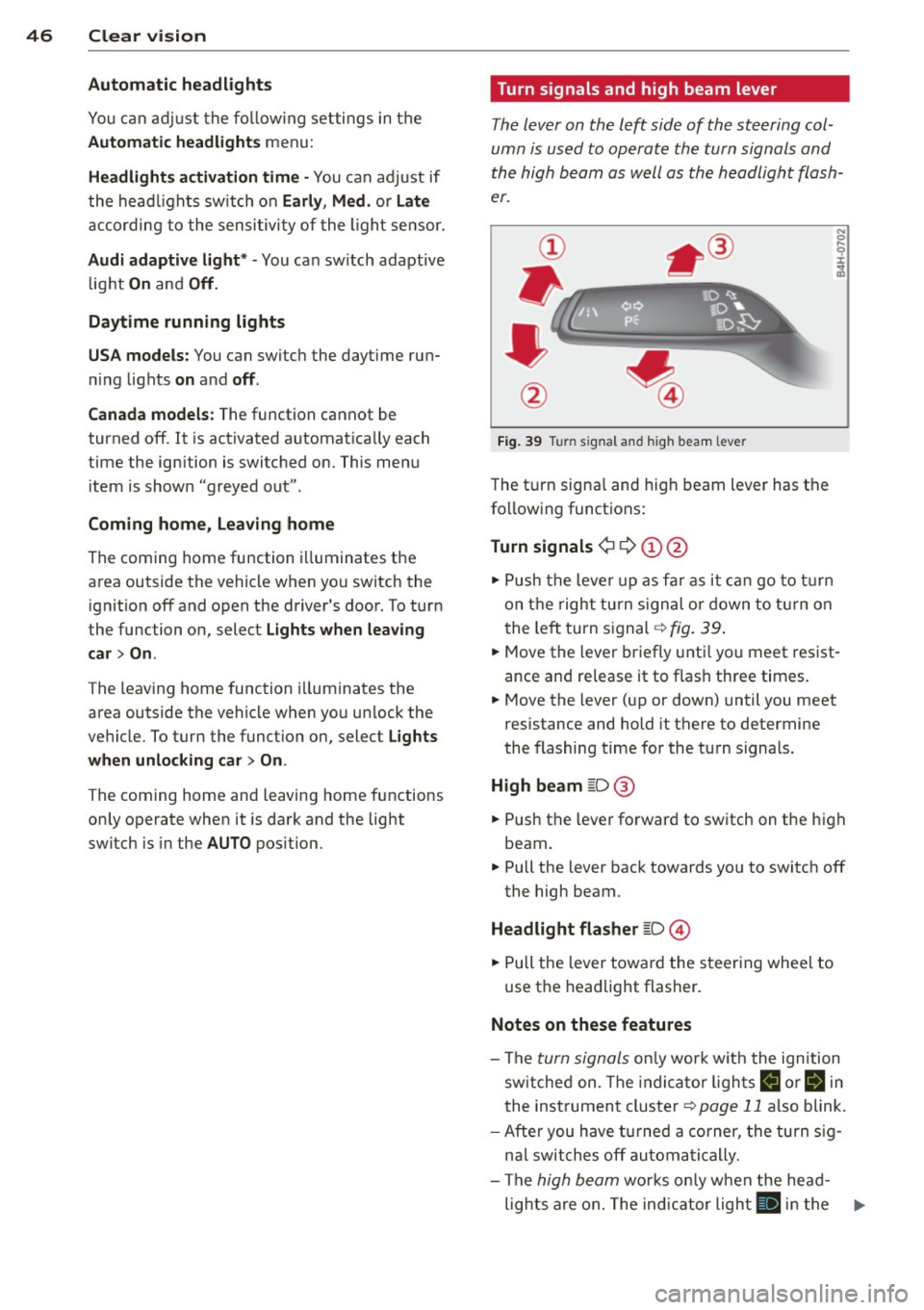
Turn signals and high beam lever
The lever on the left side of the steering col
umn is used to operate the turn signals and
the high beam as well as the headlight flash
er.
Fig. 39 Turn signal and high beam lever
The turn signa l and hig h beam lever has the
following functions:
Turn signals ¢ 9 (D@
.. Push the lever up as far as it can go to turn
on the right turn signal or down to turn on
t he left turn signal ¢
fig. 39.
N 0 ... 'i' :r
~
.. Move the lever briefly until you meet res ist
ance and re lease it to flash three times.
.. Move the lever (up or down) until you meet
resistance and hold it there to determine
the flashing time for the turn signals.
High beam [D @
.. Push the lever forward to switch on the high
beam.
.. Pull the lever back towards yo u to switch off
the high beam.
Headlight flasher [D ©
.. Pull the lever toward the steering whee l to
use the headlight flasher.
Notes on these features
-The turn signals only work w ith the ignition
switched on. The indicato r lights
B or ii in
the instrument cluster¢
page 11 also blink.
- After you have turned a corner, the turn sig-
nal switches off automatically.
- The
high beam works only when the head-
lights are on. The indicator light
II in the ...
Page 49 of 292
instrument cluster illuminates when the
high beams are on.
- The
headlight flasher works only as long as
yo u hold the lever -even if there are no
l ights turned on . The indicator light
El in
the instrument cluster illuminates when you
use the headlight flasher.
A WARNING
Do not use the hig h beam or headlight
flasher if you know that these could blind
oncoming traffic .
Interior lights
Front and rear interior lighting
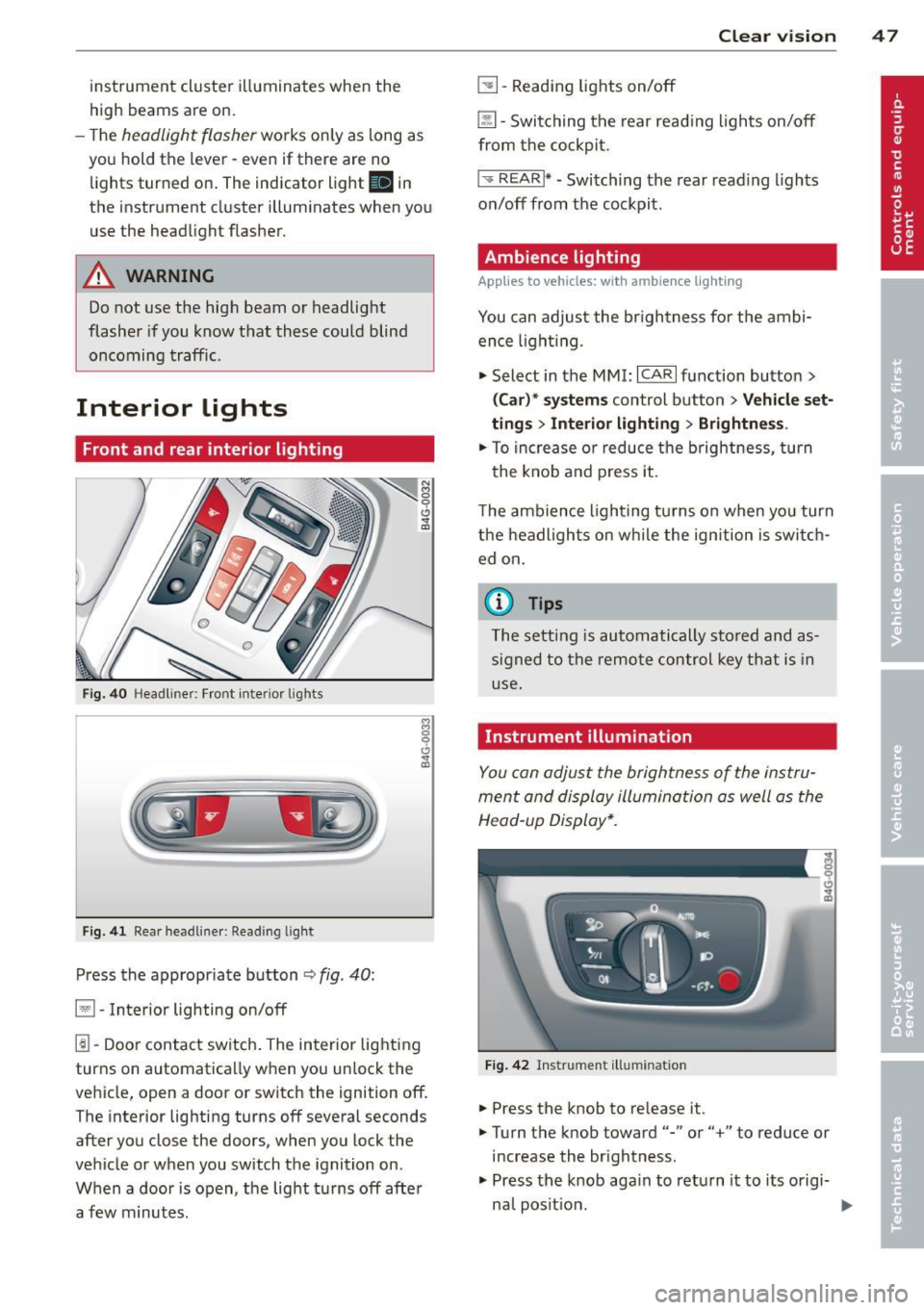
Fig. 40 Headl iner: Front interior l ights
F ig . 41 Rear headl iner: Read ing light
Press the appropriate button ¢ fig. 40:
§1 -Interior lighting on/off
1!1-Door contact switch . The interior lighting
turns on automatica lly when you unlock the
vehicle, open a door or switch the ignition off. The interior lighting turns off several seconds
after you close the doors, when you lock the
vehicle or when you switch the ignition on.
When a door is open, the light tu rns off afte r
a few minutes .
Clear vision 4 7
~ -Reading lights on/off
@ill-Switching the rear reading lights on/off
from the cockpit.
I ',; REARI* -Switching the rear read ing lights
on/off from the cockpit.
Ambience lighting
Applies to veh icles: w ith amb ience lighting
You can adjust the br ightness fo r the ambi
ence light ing.
.,. Select in the MMI:
ICARI function button >
(Car)* systems control button > Vehicle set
ting s
> Interior lighting > Brightnes s.
.,. To increase o r reduce the b rightness , turn
the knob and press it .
The ambience lighting turns on when yo u turn
the headlights on while the ign ition is swi tch
ed on.
(0 Tips
The setting is automatically stored and as
signed to the remote control key that is in
use.
Instrument illumination
You can adjust the brightness of the instru
ment and display illumination as well as the
Head-up Display*.
Fig. 42 Instrument illumina tion
.,. Press the knob to re lease it .
.,. Turn the knob toward"-" or"+" to reduce or
increase the br ightness.
.,. Press the knob aga in to return it to its origi-
na l posit ion .
~
Page 74 of 292
7 2 Warm and cold
(D Note
To avoid damage to the heating e lements
in the seats, do not kneel on the seats or
place heavy loads on a small area of the
seat .
Setup
Applies to vehicles: with four-zone a utomat ic clima te con·
tro l
The climate control system setup is accessed
through the MMI .
.,. Se lect : I CAR I func tion button> (Car )* sys·
terns
con trol but ton > AC .
Rear cabin settings*
When th is fu nction is selected, all sett ings for
the rear can be adjusted through the climate
control sys tem in the cockpit. The cl imate
con trol sys tem se tt ings cannot be adjusted in
the rea r seat at the same time. This func tion
switches
o ff after a certain period of time or
when one of the dia ls in the cockp it is press
ed .
Auto recirculation*
The sensit ivity level of the au tomatic rec ircu
lation mode can be set at vario us leve ls from
off to sensit ive. The recirculation mode is con
trolled a utomat ica lly. You must p ress the ~
button if fog forms on the windows.
Footwell temperature
You can adju st the footwell temperat ure so
that it is cooler or wa rme r.
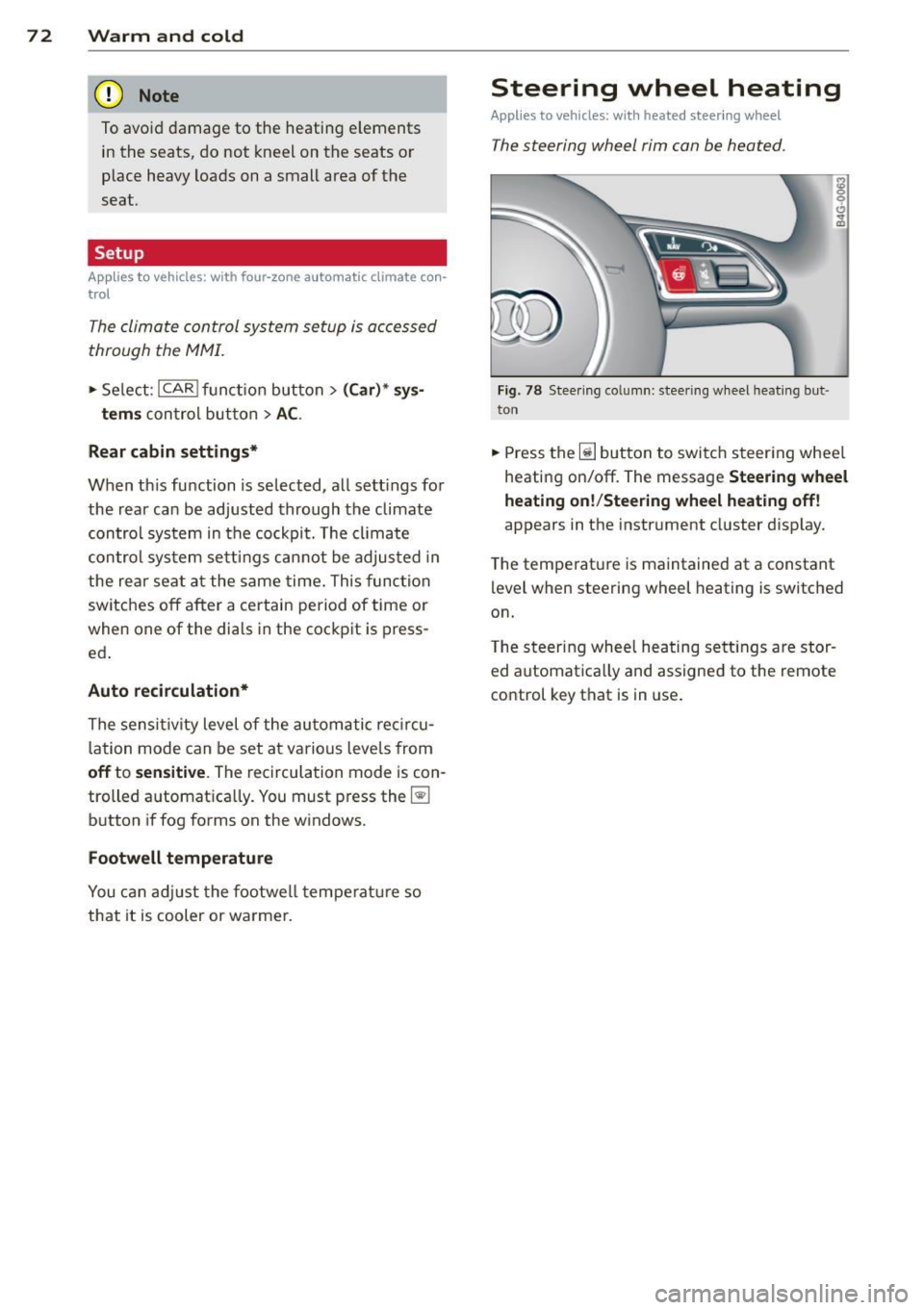
Steering wheel heating
Applies to vehicles: wi th hea ted s tee rin g wheel
The steering wheel rim can be heated .
Fig. 78 Stee ring co lu mn : steeri ng w heel hea tin g but ·
ton
.,. Press the~ button to switch steering whee l
heating on/off. The message
Steering wheel
heating on !/Steering wheel heating off !
appears in the instrument cluster d isp lay.
T he temperat ure is maintained at a constant
l evel when steering wheel heating is switched
on.
T he steering wheel hea ting se tt ings are stor
ed automat ica lly and assigne d to the remote
control key that is in use .
Page 78 of 292
76 On the road
Driver message in the instrument
cluster display
Turn off ignition befor e le a v ing car
This message appears and a warning tone
sounds if yo u open the dr iver's door when the
ignition is switched on.
Press brake p edal to start engin e
This message appears if you press the
I STAR T ENGINE ST OP ! button to start the en
g ine and do not depress the brake pedal. The
engine can on ly be started if the brake pedal
is depressed.
!I I s ke y in th e vehicle?
If the indicator light turns on and the mes
sage appears, the remote control key was re
moved from the vehicle while the engine was
running. If the ignit ion key is not in the vehi
cle you w ill not be able to sw itch on the ign i
tion or resta rt the engine after it has been
switched off. You w ill also not be ab le to lock
the veh icle from the outside.
Shift to P , oth erwise vehicl e can roll away.
Doors do not lo ck if lever i s not in P .
This message appears for safety reasons
along w ith an audib le warn ing tone if the P
selecto r lever posit io n is not engaged when
stopping the engine with the
I STAR T ENGINE ST OP ! button. Select the P se
lector lever pos it ion. Othe rwise the veh icle
could ro ll and it cannot be locked.
(I Key is n ot recogn iz e d . Ho ld b ack o f key
ag ain st marked ar ea . Se e owner's manual.
If the indicator light tu rns on and th is mes
sage appears, there is a malfunction
c::>page 76. Starting the engine if there is a
malfunction
It may not be possible to start the engine un
der certain circumstances, for example if the
battery in the vehicle key
is drained, if inter
ference has affected the key or if there
is a
system malfunction .
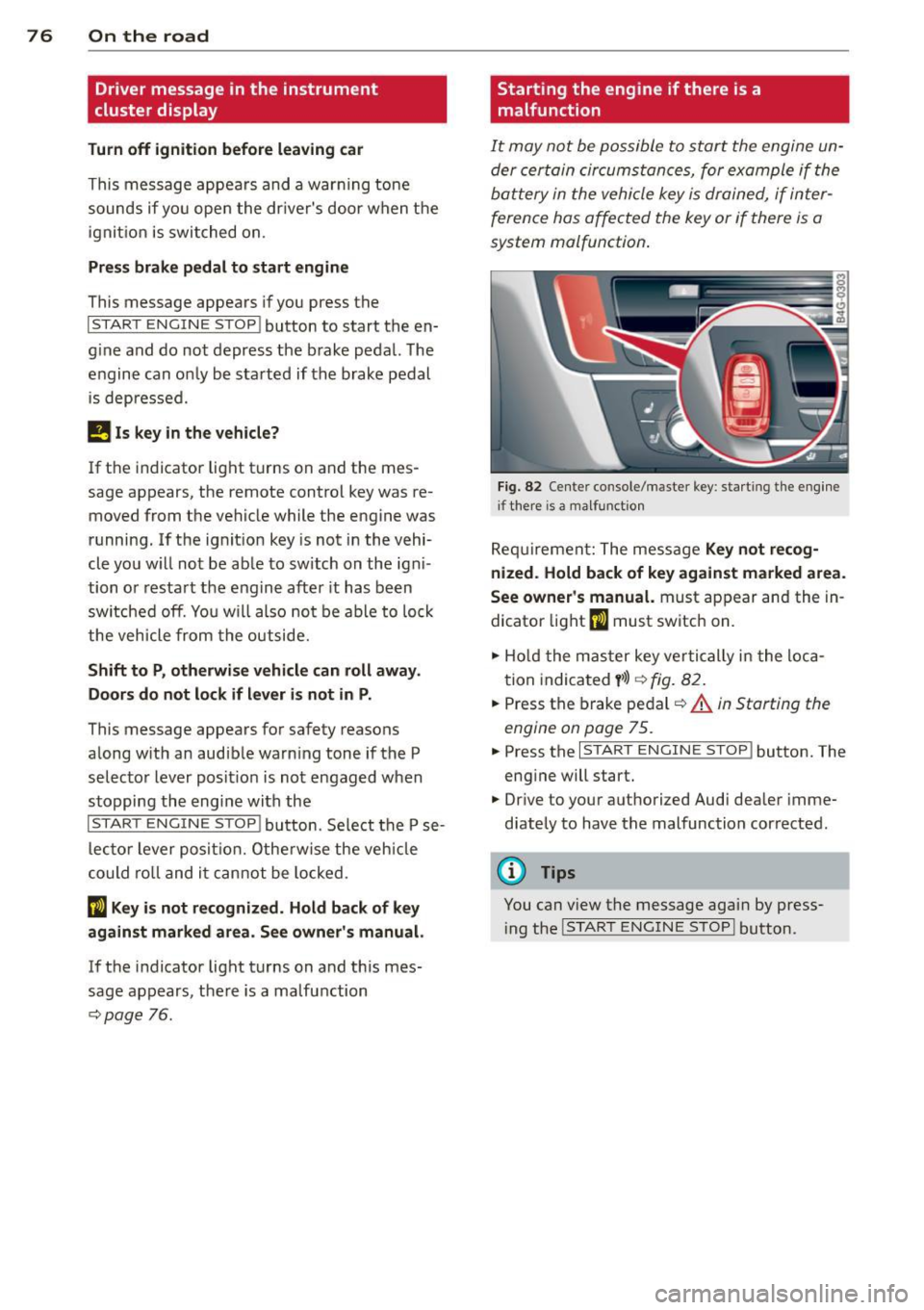
Fig . 82 Center console/master key: starting the eng ine
i f there is a malfunction
Req uirement: The message Ke y not r ecog
ni ze d. H old back of key aga inst ma rked are a.
Se e owne r's manual.
must appear and the in
dicator
light (I must switch on.
.,.. Ho ld the mas ter key vertically in the loca
tion indicated
y >l) r=:>fig. 82.
.,.. Press the brake pedal c::> A in Starting the
engine on page 75.
.,.. Press the I START ENGINE S T OP ! button. The
eng ine will start.
.,.. Dr ive to your authorized Audi dealer imme
diately to have the malfunction corrected.
(D Tips
You can v iew the message again by press
i ng the
I STAR T ENGINE STOP I button.
Page 79 of 292
Electromechanical
parking brake
Operation
The electromechanical parking brake replaces
the hand brake.
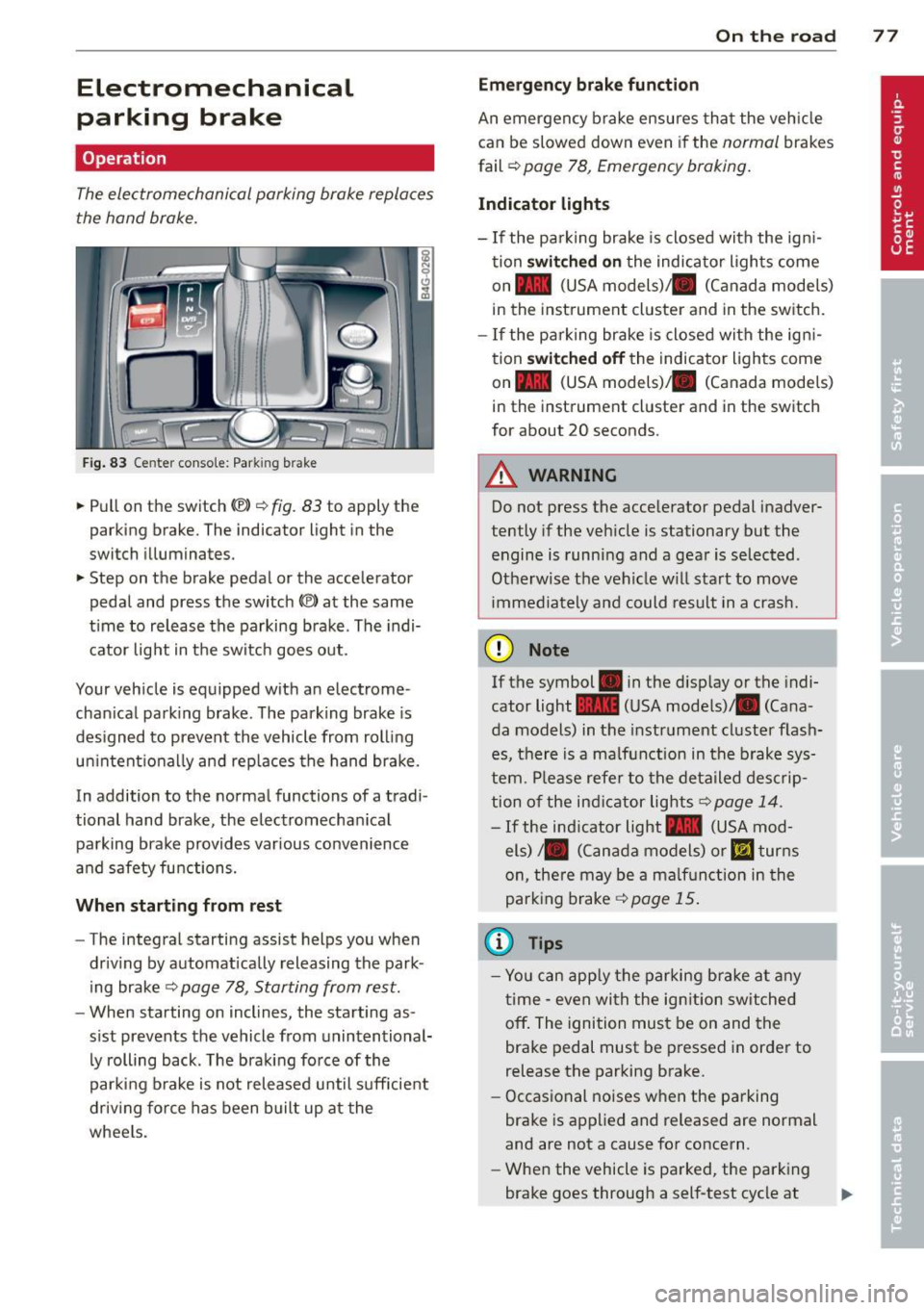
Fig. 83 Center conso le: Park in g brake
.. Pull on the switch (®) c:::> fig . 83 to apply the
parking brake. The indicator light in the
switch illuminates.
.. Step on the brake pedal or the accelerator
pedal and press the switch
(®) at the same
t ime to release the parking brake. The indi
cator light in the switch goes out.
Your vehicle is equipped with an electrome
chan ical park ing brake . The parking brake is
designed to prevent the vehicle from rolling
un intent ionally and rep laces the hand brake.
In addition to the normal functions of a tradi
tional hand brake, the electromechan ical
parking brake provides var ious convenience
and safety functions.
When starting from rest
-The integral starting assist helps you when
driving by automat ically releasing the park
ing brake ¢
page 78, Starting from rest.
- When starting on inclines, the starting as
sist prevents the vehicle from unintentional
ly rolling back . The braking force of the
parking brake is not released until suff icient
driv ing force has been built up at the
wheels.
On the road 77
Emergency brake function
An emergency brake ensures that the vehicle
can be slowed down even if the
normal brakes
fail ¢
page 78, Emergency braking.
Indicator lights
-If the parking brake is closed with the ign i
tion
switched on the indicator lights come
on - (USA
models) ,1111 (Canada models)
in the instrument cluster and in the switch.
- If the parking brake is closed with the ign i
tion
switched off the indicator lights come
on - (USA
models) ,1111 (Canada models)
in the instrument cluster and in the switch
for about 20 seconds.
A WARNING
Do not press the accelerator pedal inadver
tently if the veh icle is stationary but the
engine is running and a gear is selected .
Otherwise th e vehicle w ill start to move
immediately and could result in a crash.
(D Note
If the symbol . in the disp lay or the indi
cator light
1111 (USA models)/ . (Cana
da models) in the instrument cluster flash
es, there is a malfunction in the brake sys
tem. Please refer to the deta iled desc rip
tion of the indicat or lights
r::::>page 14.
-If the ind icator light - (USA mod-
els) /. (Canada models) or
mJ turns
on, there may be a malfunction in the
parking brake
c:::> page 15.
(0 Tips
-Yo u can apply the parking brake at any
time -even with the ignition switched
off. The ignition must be on and the
brake pedal must be pressed in order to
release the parking brake.
- Occasional noises when the parking
brake is applied and released are normal
and are not a cause for concern.
- When the vehicle is parked, the parking
brake goes through a self-test cycle at