brake AUDI RS7 SPORTBACK 2015 Owner's Guide
[x] Cancel search | Manufacturer: AUDI, Model Year: 2015, Model line: RS7 SPORTBACK, Model: AUDI RS7 SPORTBACK 2015Pages: 302, PDF Size: 74.76 MB
Page 108 of 302
106 Automatic Tran sm iss ion
activate the parking brake and move the
selector lever to P.
- Power is sti ll transmitted to the whee ls
when the engine is running at idle. To
prevent the vehicle from "creeping", you
must keep your foot on the brake when
the engine is runn ing and the selector
lever is in D/S or R or "tiptronic" mode is
selected.
- Do not press the accelerator pedal when changing the selector lever pos ition
wh ile the vehicle is stat ionary and the
eng ine is running.
- Never shift into
R or P wh ile driving.
- Before driv ing down a steep slope, re-
duce your speed and shift into a lower
gear with "tip tronic".
- Do not ride the brakes or press the brake
peda l too often or too long when dr iving
down a hill. Constant braking causes the
brakes to ove rheat and s ubstant ially re
duces braking per formance, increases
braking distance or causes comp lete fail
ure of the brake system.
- To prevent the veh icle from rolling back
when stopping on inclines, a lways hold it
in place with the brake peda l o r parking
brake.
- Never hold the ve hicle on an incl ine with
a slipping clutch . The clutch opens auto
matically when it becomes too hot from
the overload. An indicator lamp
ml illu
minates and a dr iver message appears
¢ page 1O7when the clutch is overload
ed.
- If the engine must remain running, never
hav e any driv ing pos ition engaged when
c heck ing under the hood . M ake sure the
selector lever has securely engaged and
is locke d in P with the parking brake se t
¢page 211. Otherwise, any increase in
engine speed may set the vehicle in mo
t ion, eve n with the park ing brake ap
plied.
Qd) Note
- When stopping on an incline, do not try to hol d the vehicle in place by pressing the acce
lerator pedal while a d riving gear
is se lected. This can cause the transmis
sion to ove rheat and can damage it. Acti
vate the parking brake or press the brake peda l to prevent the vehicle from rolling.
- Allowing the vehicle to ro ll when the en
gine is stopped and the selector lever is
in N will damage the transmission be
cause it is not lubricated under those cir
cumstances .
(D Tips
For safety reasons, the parking brake is re
leased automatically only when t he driv
er's safety belt is engaged in the buckle.
Hill descent control
The hill descent control system assists the
driver when driving down declines .
Hill descent control is activated when these
lector lever is in D/S and you press the brake
pedal. The transmission automatically selects
a gear that is suitable fo r the incline . H ill de
scent cont ro l tries to ma inta in the speed ach
ieved a t the time o f braking, with in phys ica l
and tec hni cal lim it a tions. If may st ill be nec
essary to ad just the speed with the brakes.
Hill descent contro l sw itches off once the de
cl in e leve ls o ut o r yo u press the a cce le rato r
peda l.
On vehicles with the cru ise cont ro l system*
~ page 79, hill descent control is also activat
ed whe n the speed is set.
A WARNING
-
Hill desce nt cont ro l cannot overcome
physical lim itations, so it may not be a ble
to maintain a constant speed unde r a ll
conditions. A lways be ready to apply the
brakes .
Page 109 of 302
"' N
a:: I.J "". rl I.O
"' rl
"' rl
Manual shift program
Using the manual shift program you can
manually select gears.
,
Ir_
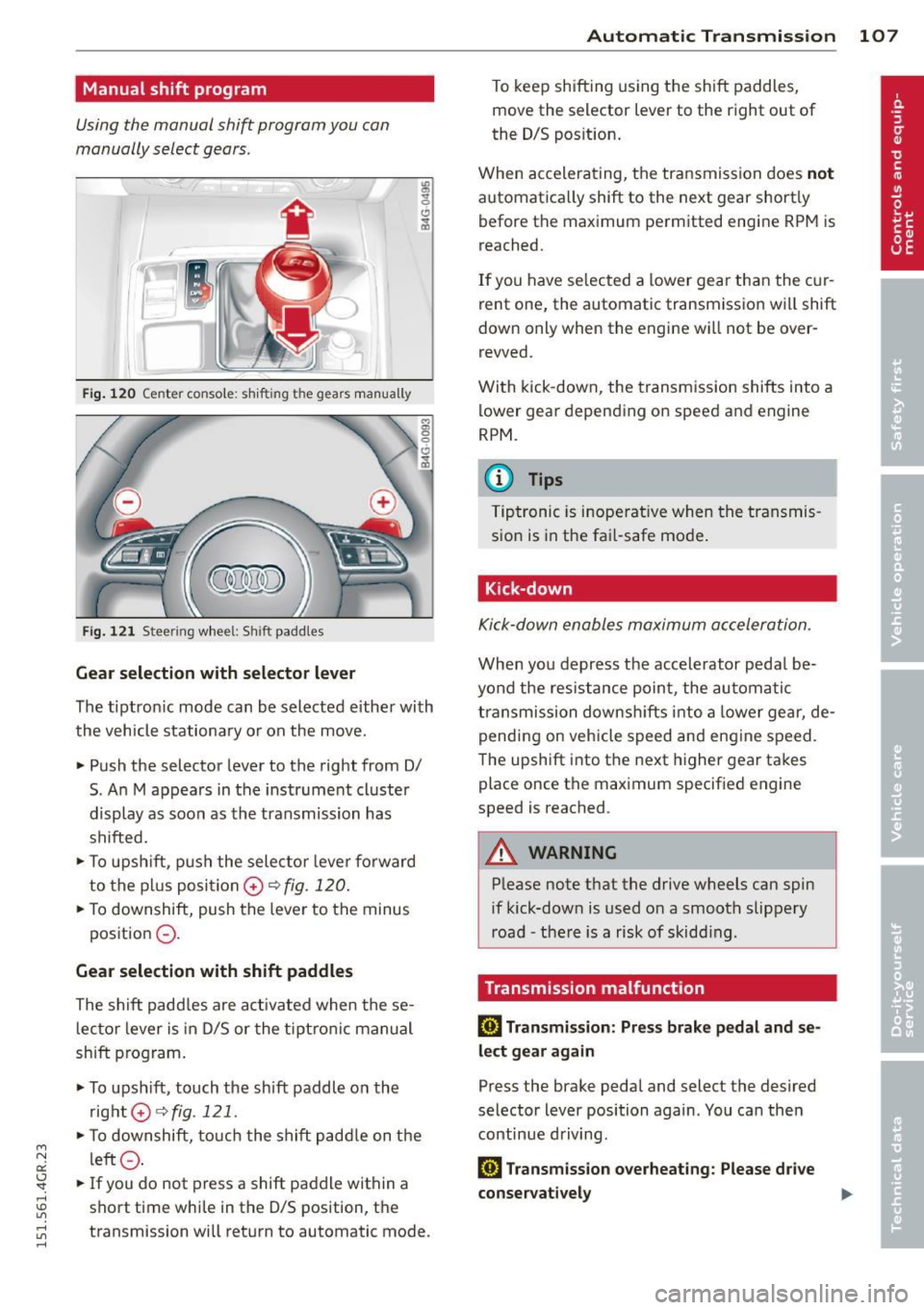
Fig. 120 Ce nter console : sh ift ing the gears manually
Fig. 121 Stee rin g wheel : S hi ft paddles
Gear selection with selector lever
The t iptron ic mode can be selected eithe r with
the vehicle stationary or on the move.
• Push the selector lever to the right from
0/
S. An M appears in the instrument cluster
display as soon as the transmission has
shifted.
• To upshift, push the selector lever forward
to the plus posi tion 0
~ fig. 120.
• To downshift, push the lever to the minus
position
0 -
Gear selection with shift paddles
The shift paddles are activated when these
lector lever is in D/S or the tiptron ic manual
shift program.
• To upsh ift, touch the shift paddle on the
right 0~fig.121 .
• To downshift, touch the shift paddle on the
left
0 .
• If you do not press a shift paddle within a
short time while in the
0/5 posit ion, the
transmission will return to automatic mode .
Automatic Transmission 107
To keep shifting using the shift paddles,
move the selector lever to the right out of
the D/S pos ition.
When accelerating, the transmission does
not
automatically shift to the next gear shortly
before the maximum permitted engine RPM is
reached.
If you have se lected a lower gear than the cur
rent one, the automatic transmission will shift
down only when the engine will not be over
revved.
With kick-down , the transmission shifts into a
lower gear depending on speed and engine
RPM.
(D Tips
Tiptronic is inoperat ive when the transmis
sion is in the fa il-safe mode.
Kick-down
Kick-down enables maximum acceleration.
When you depress the accelerator peda l be
yond the resistance point, the automatic
transmission downshifts into a lower gear, de
pending on vehicle speed and engine speed .
The upshift into the next higher gear takes
place once th e maximum specified engine
speed is reached .
A WARNING
Please note that the drive wheels can spin
if kick-down is used on a smooth slippery
road - there is a risk of skidd ing.
Transmission malfunction
[!l Transmission : Press brake pedal and se
lect gear again
Press the brake pedal and select the desired
selector lever position again . You can then
continue driving.
[!l Transmission overheating: Please drive
conservatively
Page 127 of 302
M N
0:: <.J 'SI: ,...., \!) 1.1"1 ,...., 1.1"1 ,....,
-never lean up against the instrument pane l
- never sit on the edge of the seat
- never sit s ideways
- never lean out the w indow
- never put your feet out the window
- never put your feet on the instrument panel
- never rest your feet on the seat cushion or
back of the seat
- never ride in the footwe ll
- never ride in the cargo area
A WARNING
Improper seat ing positions increase the
risk of serious personal injury and death
whenever a veh icle is being used.
- Always make sure that all vehicle occu
pants stay in a proper seating posit ion
and are properly restra ined whenever the
vehicle is be ing used.
Driver and passenger
side footwell
Important safety instructions
Applies to vehicles: with knee airbags
A WARNING
Always make su re that the knee a irbag can
inflate without inte rfe rence . Objects be
tween yourse lf and the airbag can inc rease
the risk of in jury in an ac ciden t by interfer
ing w ith the way the a irbag deploys or by
being p ushed into you as the airbag de
ploys .
- No persons (ch ild ren) or animals should
ride in the footwell in front of the pas
senger seat. If the airbag deploys, this can res ult in se rious or fata l injuries.
- No objects of any kind sho uld be car ried
in the footwe ll area in front of the driv
er's or passenger's seat. Bulky objects
(shopping bags, for example) can ham
per or preven t proper deployment of the
airbag. Small objects can be thrown
through t he vehicle if the airbag deploys
and injure you o r your passengers.
-
Dr iving S afel y 125
Pedal area
Pedals
The pedals must always be free to move and
must never be interfered with by a floor mat
or any other object.
Make sure that a ll peda ls move free ly without
interfe rence and that nothing prevents them
from return ing to their orig inal positions .
Only use floor mats t hat leave t he pedal area
free and can be secured with floor mat fasten ers .
If a brake circ uit fai ls, increased brake pedal
trave l is required to b ring the vehicle to a f ull
stop.
A WARNING
Pedals that cannot move free ly can cause
loss of vehicle co ntrol and increase the risk
of s erious injury.
- Never p lace any objects in the drive r's
footwell. An ob ject cou ld get into the
pe dal area and inte rfe re with pedal func
tion. In case of sudden brak ing o r an ac
cident, yo u wo uld not be able to b rake or
accelerate!
- Always ma ke sure tha t no thing can f all
or move into the driver's footwel l.
Floor mats on the driver side
Always use floor mats that can be securely
attached to the floor ma t fasteners and do
not in terfere with the free movement of the
pedals.
"' Ma ke su re t hat the floor mats are prope rly
secured and cannot move and in terfere with
t he peda ls ¢ ..&_ .
U se only floor mats that leave the peda l area
u nobst ructed and th at are firmly secu re d so
that they c annot slip o ut o f posi tion. You c an
obta in suitab le floor mats from yo ur aut ho r
ized Audi Dealer.
Floor mat fastene rs a re in stall ed in your Aud i.
1111>
•
•
Page 128 of 302
126 Driving Saf ely
Fl oor mats used in your vehicle must be at
tached to these fasteners. Proper ly securing
the floor mats will prevent them from s liding
into pos itions that could interfere with the
pedals or impair safe operation of your vehicle
in other ways .
A WARNING
Pedals that cannot move freely can result
in a loss of veh icle contro l and increase the
r isk of serious personal injury .
- Always make sure that floor mats are
properly secured.
- Never place or insta ll floor mats or other
floor coverings in the vehicle that cannot be properly secured in place to prevent
them from slipping and interfering w ith
the pedals or the ability to control the
vehicle.
- Never place o r insta ll floor ma ts or other
floor coverings on top of a lready insta l
led floor mats. Additional floor mats and
other coverings w ill reduce the size of
the pedal area and interfere with the
pedals.
- Always properly reinstall and secure floor
mats that have been taken out for clean
ing.
- Always make sure that objects cannot fall into the driver footwell wh ile the ve
hicle is moving. Objects can become
trapped under the brake pedal and accel
erator peda l causing a loss of veh icle
control.
Stowing luggage
Loading the luggage compartment
All luggage and other objects must be prop
erly stowed and secured in the luggage com
partment.
L oose items in the luggage comp art ment can
shift suddenly, changing veh icle hand ling
characteristics. Loose items can also increase
the risk of serious personal injury in a sudden
vehicle maneuver or in a collision . ..
Distribute the load evenly in the luggage
compartment .
.. Always place and proper ly secure heavy
items in the luggage compartment as far
forward as possible .
.. Secure luggage using the tie -downs p rov id
ed
¢ page 64, Luggage compartment.
.. Make su re that the rear seatback is securely
la tc hed in place.
A WARNING
Imp roperly store d luggage or other items
can fly thro ugh the vehi cle causing ser ious
personal injury in the event of hard brak
i ng or an accident. To help reduce the risk
of ser ious personal in jury:
- Always put objects, fo r example, luggage
or other heavy items in the luggage com pa rtment.
- Always secure objects in the luggage
compartment using the t ie-down hooks
and suitable straps.
A WARNING
=
Heavy loads w ill influence the way your ve-
hi cle handles . To help reduce the risk of a
l oss of contro l leading to serious pe rsonal
i njury :
-Always keep in mind when transporting
heavy objects, that a change in the cen
ter of gravity can also cause changes in
veh icle ha ndling :
- Always distribute the load as evenly as
poss ible.
- Place heavy objects as far forward in
the luggage compartment as possible .
- Never exceed the Gross Axle Weight Rat
ing or the Gross Vehicle We ight Rating
specified on the safety compliance stick
er on the left door jamb. Exceed ing per
miss ible weight standards can cause the
veh icle to slide and handle differently .
- Please observe information on safe dr iv
ing¢
page 120.
Page 188 of 302
186 Intelligent technology
Intelligent technology
Notice about data
recorded by the Event
Data Recorder and
vehicle control modules
E ve nt Dat a Recorder
This vehicle is equipped with an Event Data
Recorder (EDR) . The main purpose of an EDR
is to record, in certain crash or near crash-like
situations, such as an airbag deployment or h itting a road obstacle, data that will ass ist in
understand ing how a veh icle's systems per
formed. The EDR is designed to record data
re lated to vehicle dynamics and safety sys
tems for a short period of time, typically
30 seconds or less. The EDR in this vehicle is
designed to record such data as:
- How various systems in you r vehicle were
operating;
- Whether or not the d river a nd passenger
safety belts were buckled/fastened;
- How far ( if at all) the dr iver was dep ress ing
the accelerator and/or brake peda l; and,
- How fast the ve hicle was traveling.
These data can help provide a better under
stand ing of the c ircumstances in which crash
es and injuries occur . NOTE : EDR data a re re
corded by your veh icle only if a non-trivial
crash sit uat ion occ urs; no data are recorded by
the EDR under normal driving cond itions and
no personal data (e.g., name, gender, age,
and crash location) are recorded. However,
other parties, such as law enforcement, co uld
comb ine the EDR data with the type of per
sonally identify ing data routinely acquired
during a crash invest igation .
To read data recorded by an EDR, special
equ ipment is required, and access to the veh i
cle or the EDR is needed. In add ition to the ve
h icle manufacturer, other parties, such as law
e nfo rcement, that have the special equip
ment, can read the information if they have
access to the ve hicl e or the EDR. Some state
laws restrict the retrieval o r down
loading of data stored by ED Rs insta lled in a
vehicle for the express purpose of retrieving data after an accident or crash event w ithout
the owner's consent .
Audi will not access the EDR and/or simi lar
data or g ive it to others -
- un less the vehi cle owner (or lessee if the ve
hicle has been leased) agrees; or
- upon the officia l request by the police ; or
- upon the o rder of a court of law or a govern-
ment agency; or
- for the defense of a lawsuit through the ju
dicia l discovery p rocess.
- Aud i may also use the data for research
about vehicle ope rat ion and safety perform
ance or provide the da ta to a third party fo r
research purposes without iden tif ying the
specif ic vehicle or in formation about the
identity of its owner or lessee and only after
the recorded vehicle data has been ac
cessed .
Vehicle control modul es
Your vehicle is also equ ipped with a n umber of
electron ic control modules for various vehicle
systems, such as engine management, emis
sion contro l, airbags, and safety belts.
T hese electronic con trol mod ules record data
during norma l vehicle operation that may be
needed by trained technicians for diagnostic
and repair purposes. The recording capability
of these modu les is limited to data (no sound
is recorded). Only a small amount of data is
actually recorded over a very lim ited period of
t ime, or stored when a system fault is detect
ed by a contro l modu le. Some of the data
stored may re late to vehicle speed, direction,
o r braking, as well as restraint system use and
performance in the event of a crash. Stored
data can also only be read and dow nloaded
with special eq uipment that is directly con-
nected to the vehicle. .,..
Page 189 of 302
M N
0:: <.J 'SI: ,...., \!) ..,.,
,...., ..,., ,....,
@ Tips
Your vehicle may be equipped with Audi
connect. Your use of certain Aud i connect
features req uires wireless serv ices that are
provided by a third party wireless telecom
municat ions provider. For details regard
ing how information obtained through
Aud i connect is collected, processed,
transmitted, used, and shared, please see
your contra ct w ith the wire less telecom
municat ions provider and the "About A udi
connect" tab in your vehicle's MMI:
!MENU !
button > Audi connect > About Audi con·
nect .
Electronic Stabilization
Control (ESC)
Description
ESC helps to improve road holding and vehicle
dynamics to help reduce the probability of
skidd ing and loss of veh icle control. It works
only when the eng ine is running. ESC detects
certain difficult driv ing s ituations, including
when the vehicle is beginning to spin (yaw)
out of cont ro l and helps you to get the vehicle
back under control by select ively brak ing the
wheels, and/or red ucing engine powe r and
p roviding steering assistance to help hold the
ve hicle on the driver's intended course . The in
dicator light
m in the instrument cluster
blinks when ESC is taking action to help you
control the vehicle.
ESC has limitations.
It is important to remem
ber that ESC cannot overcome the laws of
phys ics. It will not a lways be able to help out
under all conditions you may come up against.
For example, ESC may not always be able to
h elp you master situat ions where there is a
sudden change in the coefficient of fr iction of
the road surface. When there is a sect io n of
d ry road that is s udden ly cove red with water,
slush o r snow, ESC canno t perform the same
way it would on the dry su rface.
If the vehicle
hydroplanes (rides on a c ush ion of wate r in
stead of the road surface), ESC wi ll not be
ab le to he lp you steer the veh icle because con-
Int ellig ent technolog y 187
tact with the pavement has been interrupted
and the vehicle cannot be braked or steered .
D uring fast corner ing, particular ly on wind ing
roads, ESC cannot always deal as effectively
with difficult dr iv ing s ituations than at lower
speeds.
A lways adjust your speed and driving style to
road, traffic and weather condit ions. ESC can
not override the vehicle's physical lim its, in
crease the availab le tract ion, or keep a veh icle
o n the road if road departu re is a result of
drive r inattent io n. Instead, ESC imp roves the
poss ibility of keep ing the vehicle unde r con
trol and on the road dur ing extreme maneu
vers by using the driver's steering inp uts to
help keep the vehicle going in the intended di
rection . If you are traveling at a speed that
causes you to run off the road before ESC can
provide any assistance, you may not experi
ence the benefits of ESC.
ESC is switc hed on all the time . In certain sit
uat ions when you need less traction, yo u can
switch off ASR by pressing the button
[&I
c::> page 189, fig. 180. Be sure to switch ASR
o n again when you no longer need less t rac
t ion.
The following systems are integrated in the
ESC:
Anti-lock bra king sy stem (ABS )
ABS prevents the whee ls from locking up
whe n brak ing. The vehicle can sti ll be stee red
even dur ing hard braking. App ly steady pres
s u re to the brake pedal. Do not pump the ped
al. A pulsing in the brake pedal indicates that
the system is helping you to brake the vehicle.
Brake as sist sy stem
The brake assist system can decrease braking
distance. It increases brak ing power when the
driver presses the brake peda l quickly in emer
gency s ituations. You must press and hold the
brake pedal until the situation is over. In
vehicles with adapt ive c ruise control*, the
brake assist system is more sensitive if the
distance detected to the vehicle ahead is too
small.
•
•
Page 190 of 302
188 Intelligent technology
Anti-slip regulation (ASR )
ASR reduces engine power when the drive
wheels begin to spin and adapts the force to
the road conditions. This makes it easier to
start, accelerat e and drive up hills .
Electronic differential lock (EDL )
The ED L brakes wheels that are spinn ing and
transfers the drive powe r to the o ther wheels.
This function is not availab le at higher speeds.
I n extreme cases , ED L automat ica lly switches
off to help keep the brake on the braked whee l
from ove rheating. EDL wi ll sw itch on aga in au
tomatically when conditions have returned to
norma l.
Steering recommendation
The ESC helps to stabilize the ve hicle by
changing the steering to rque.
In vehicles with dynam ic steering*, ESC also
he lps to stabilize the stee ring in critical s itua
tions.
Selective wheel torque control
Selective wheel torque control is used when
driving on curves . The front wheel on the in
side of the curve o r both wheels on the inside
of the curve are braked selective ly as needed.
This a llows more prec ise driving in curves. The
appl icable system may no t activ ate when driv
ing in wet or snowy condi tions .
A WARNING
- The ESC and its integrated systems can
not overcome the lim its posed by natural
physical laws. This is especia lly impor- tant on slippery or wet roads
. If the sys
tems beg in acting to stabilize your vehi
cle, you should immediately change your
speed to match the road and traffic con
ditions . Do not let the increased safety
provided by these systems tempt you to
take risks. Do ing so will increase the risk
of a loss of veh icle contro l, collision and
serio us pe rsonal inj uries.
- Always ad apt your speed to road, traffic
a nd wea ther conditions. The risk of los
ing con trol of the vehicle increases when
driving too fast, especially through
curves and on slippe ry or wet roads, and
when dr iv ing too close to vehicles up
ahead . The ESC and its integrated sys
tems cannot a lways prevent collisions -
there is still a risk of acc idents!
- Always accelerate with special care on
even, smooth su rfaces such as those that
are wet or covered with ice and snow.
The drive wheels can spin even w ith
these assistan ce sys tems that cannot al
ways he lp to re duce the risk of loss of ve
h icle control.
(D Tips
- ABS and ASR o nly wo rk correctly when
all four wheel s are equipped with identi
c al tires . D iffe ren t tire sizes can lead to a
reduction in engine power.
- Yo u may hear noises when the systems
descr ibed are working.
- If the ind icator lig ht
BJ or rJlll (USA
mode ls)/ l§J (Can ada models) appears,
t here may be a malfunction ¢
page 18,
r:!>page 18.
Page 193 of 302
M N
Braking
General information
What affects braking efficiency?
Operating condi tions and d riv ing hab it s
The brakes on today's automobi les are sti ll
subject to wear, depending largely on operat
ing conditions and driving habits
c:> A . On
vehicles that are either driven mostly in stop
and-go city traffic or are driven hard, the brake pads should be checked by your author
i zed Audi dealer more often than specified in
the
Warr ant y & Maint enan ce bookle t. Failure
to have your b rake pads inspected can res ult
i n red uced brake performance.
On steep slopes, you should use the brak ing
effect of the engine. This way, you prevent un
necessa ry wea r on the brake system.
If you
must use yo ur brakes, do not ho ld the brakes
down continuously. Pump the brakes at inter
va ls.
Moistu re or road salt
Unde r ce rtain conditions, for example, when
driving through wate r or very heavy rain, or
even after washing your vehicle, the braking
effect can be reduced d ue to moisture (or in
freezing conditions ice) on the brake pads . A
few careful brake app lications should dry
off
the brake pads or remove any ice coatings.
When you are driving at higher speeds with
the windshield wipers on, the brake pads will
briefly touch the brake discs in regular inter
vals so as to improve reaction t ime when brak
ing on wet surfaces . You the driver w ill not no
tice anything .
The effectiveness of the brakes can be reduced
when the vehicle is driven on a salt-covered
road and the brakes are not used . Here too,
you should clean
off accumulated salt coat ing
from b rake discs and pads with a few careful
applications of the brake
c:> ,&. .
t5 Cor ro sion
'SI: ,...., \!) 1.1'1 ,...., 1.1'1 ,....,
There may be a tendency for dirt to build up
on the brake pads and corrosion to form on
Int ellig ent technolog y 191
the d iscs if the car is not driven regu larly or
only for short trips with litt le use of the
brakes.
If the brakes a re not used frequently, o r if cor
rosion has formed on the discs, it is adv isable
to clean
off the pads and discs by braking
firmly a few times from a moderately high
speed
c:> ,&. .
Fault s in the brak e syste m
If you shou ld notice a sudden increase in
brake pedal trave l, then one of the two brake
circuits may have fai led ¢
A.
Low brake fluid lev el
Malfunctions can occu r in the bra ke system if
the brake fluid level is too low. The brake flu id
level is monitored elect ronica lly.
Brake booster
The brake booster works with vacuum pres
su re which is created only whe n the engine is
runn ing ¢,&. .
Brake lining we ar s tatus
Brake lining wear may be checked by visual in
spection of the condition of the brake pads
through the open ings in the wheel. If neces
sary, the wheel may be removed fo r thi s in
spection ¢
page 263, Changing a wheel.
_& WARNING
-You should perform braking maneuvers
for the purpose of cleaning the brake system only if road conditions permit .
Other road users must not be put at risk -
you may ca use an accident!
- Before descending a steep grade, reduce
speed and sh ift transmission into a lower
gear or lower dr iving range. Do not ride
the brakes or hold the pedal down too long or too often . Th is could cause the
brakes to get hot and diminish braking
efficiency.
- Do not "ride the brakes" by rest ing your
foot on the pedal when you do not intend
to b rake. This may cause the brakes to
•
•
Page 194 of 302
192 Intelligent technology
overheat, premature wear and increased
stopp ing distance.
- Under certain climatic and operating
condit ions such as passing through wa
ter, driving in heavy ra in or after wash ing
the vehicle, the effect iveness of the
brakes can be reduced. In winter, ice ca n
accumulate on the brake pads, linings ,
discs and d rums . Carefully apply brakes
for a test . B rakes wi ll dry a nd ice coat
ings will be cleaned off after a few c are
f ul brake app lications .
- Dr iv ing fo r an ex tende d pe riod of time on
salt-covere d roads w ithout us ing yo ur
brakes can also affect braking efficiency.
Clean off accumulated salt coating from
bra ke discs and pads w ith a few caref ul
brake applicat ions.
- If you damage the front spoiler, or if you
install a different spoiler, be sure the air
flow to the front brakes is not obstruct ed. Otherwise the brake system could
over heat reducing the effectiveness of
the ent ire brake system .
- Failure of one brake c ircuit will impair
the braking capability res ulting in an in
creased stopp ing distance. Avoid driv ing
the vehicle and have it towed to t he near
est Aud i dea le r o r q ualified w ork sho p.
- Never let the vehicle ro ll to a stop w ith
the e ngine shu t off.
- If the brake booster is not working, the
brake pedal must be p ressed conside ra
bly harder to make up for the la ck of
booster assistance.
Electromechanical
power assist, dynamic
steering
The electromechanical power assist helps the
driver when steering .
Power stee ring adapts electronically based on
the vehicle speed .
Indicator lights and messages
• Steer ing defective! Stop the vehicle
If this indicato r light turns on and stays on
and this message appears, the power steering
may have failed.
Do
not con tinue dr iv ing . See your author ized
Audi dealer or other qualified repair facility
for assistance .
l;r-ij Steering: System fault You can continue
driving
If the indicato r light turns on and the mes
sage appea rs, the stee ring may be more diffi
cul t to move o r more sensi tive th an usua l. The
steering wheel may a lso be at an ang le when
driving straight .
Drive slowly to you r authorized Aud i dea le r o r
qualified wo rks hop to have the ma lf u nct ion
corre cted.
l;r,ij Dynamic steering: Initializing
If this driver message appears and t he indica
tor light is f lashing on the instrument panel,
dynam ic steer ing* is being rei nitia lized. Afte r
sta rting the engine, the stee ring wheel will
move s ligh tly. Re- ini tiali zation mig ht be ne c
e ssa ry if the stee ring wheel was moved h ard
to the left an d right wh ile the vehicle was not
moving . The display goes out as soon as initi
alization is complete.
D rive slowly to you r aut horized Audi de aler or
qualified wo rkshop to have the ma lf u nct ion
corrected.
A WARNING
Have t he dynamic stee ring * system mal
f u nction repa ired as soon as possib le by an
a uthorized Audi dealer or qua lified wor k
shop - risk of accident !
(D Tips
If the . or@ indicator light on ly stays
on for a short time, yo u may continue driv
i ng.
- The dynamic steering * sta bility systems
are not avai lab le in the event of a system
ma lf u nction.
- For add itiona l information on dynamic
steering *, refer t o
c> page 96.
Page 198 of 302
196 Driving and environment
Driving and
environment
The first 1,000 miles
(1,500 km) and
afterwards
New engine
The engine needs to be run-in during the first
1,000 miles (1,500 km).
For the fir st 600 miles (1,000
kilometers ):
.,. Do not use full throttle.
... Do not d rive at engine speeds that are more
than 2/3 of the max imum permitted RPM.
... Avoid high engine speeds.
From 600 to 1,000 mile s (1 ,000 to
1,500 kilometers):
... Speeds can gradually be increased to the
max imum pe rm iss ible road or eng ine speed .
During and after break-in period
.,. Do not rev the eng ine up to high speeds
when it is cold. Th is app lies whether the
transm ission is in N (Neutra l) or in gear.
After the break-in period
... Do not exceed maximum engine speed un
der any circumstances.
.,. Upshift into the next hig her gear
before
reaching the red area at the end of the tach
ometer scale
c:> page 10.
During the first few hours of driving, the en
g ine's interna l friction is higher than later
when all the moving parts have been broken
in . How well this break- in process is do ne de
pends to a conside rable extent on th e way the
ve hicl e is driven during the first 1,0 00 miles
(1, 500 k ilome ters).
0 Note
E xtremely high engi ne speeds are auto
mat ica lly reduced. However, these rpm
lim its are progr amme d for an engine well
r u n- in, not a new engine .
{® For the sake of the environment
Do not drive with unnecessarily high en
g ine speeds - upshifting ear ly saves fuel,
reduces no ise and protects the environ
ment.
, New tires
If your vehicle is runni ng on new tires, drive
part icularly caref ul for the first 350 miles
(500 kilomete rs) afte r fitt ing.
A WARNING
N ew tires tend to be sl ippery and mus t al
so be "b roken -in" . Be s ure to remember
this dur ing the fi rst 350 mi les ( 500 kilo
meters) . Brake gently . Avoid fo llow ing
closely behind other vehicles or other sit
uations that m ight require sudden, hard
braking .
New brake pads
Remember that new brake pads do not have a
full bra king effect dur ing the fi rst 250 m iles
(400 kilomete rs) afte r they a re insta lled.
New brake pads have to be "burnished in" be
fo re t hey have optima l grab
c:> A .
During the break- in period, you should avoid
putting severe loads on the brakes. Severe
l oads include, for example, sudden hard brak
i ng, in particular at very high speeds or, for
example, on mounta in passes .
A WARNING
New b rake pa ds don't have t he bes t stop
pi ng power and m us t be "broke n-in " dur
i ng the in itial 1 00 to 150 mi les (15 0 to
2 00 k ilometers) of no rma l city driving . You
can compensate for this by pressing th e
br ake peda l mo re f irm ly . This also applies
l ater when new pads are installed.