auto AUDI S3 SEDAN 2018 Owner's Manual
[x] Cancel search | Manufacturer: AUDI, Model Year: 2018, Model line: S3 SEDAN, Model: AUDI S3 SEDAN 2018Pages: 404, PDF Size: 62.3 MB
Page 54 of 404
Lights and Vision
turn signal lever. The emergency flashers stop
temporarily .
The emergency flashers also wo rk when the igni
tion is turned off.
Interior lighting
Front interior lighting
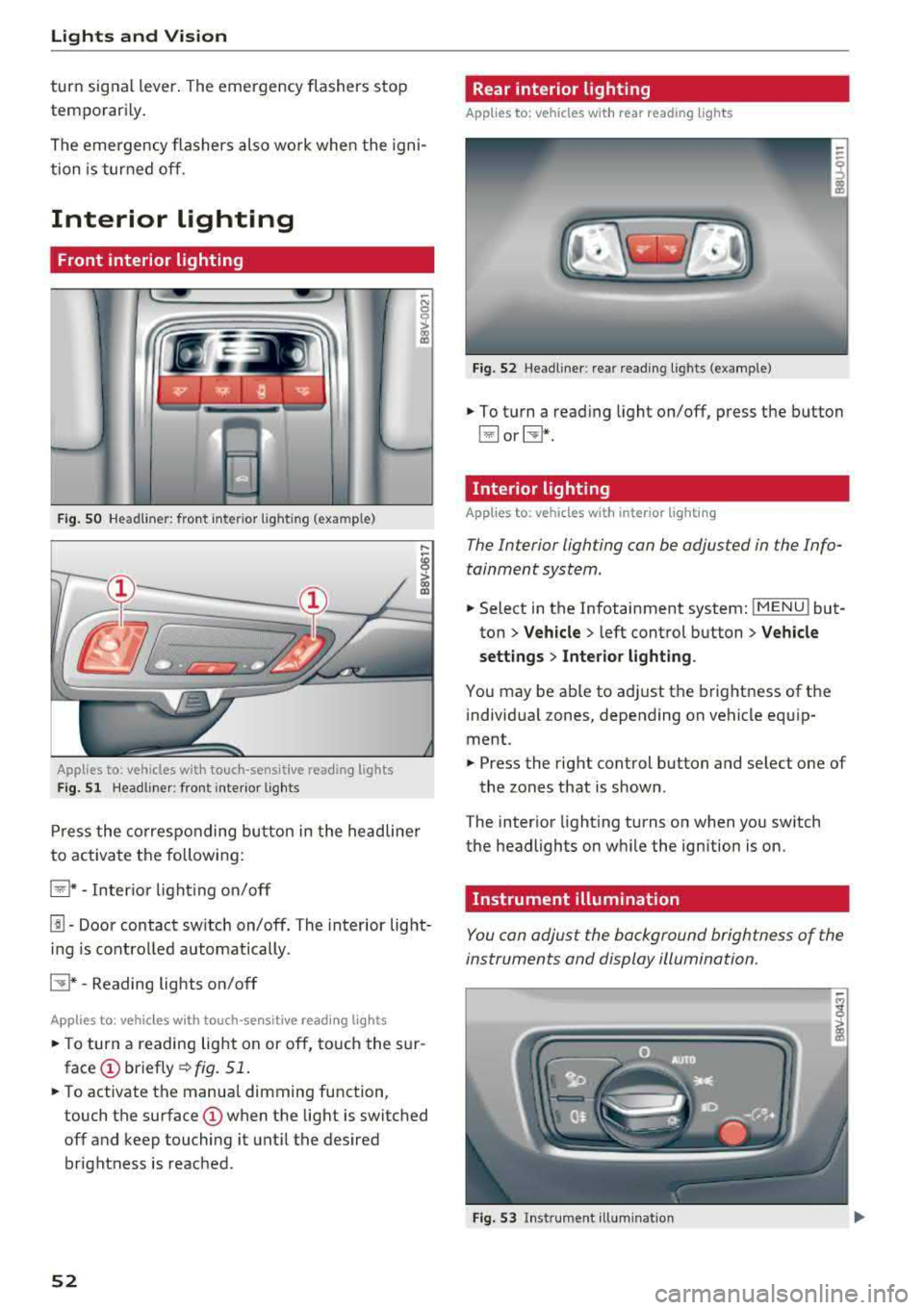
F ig . SO Headl iner: fr ont inte rior lig htin g (exa mple)
:ti ?
Applies to: vehicles with touch-sensitive reading lights
F ig. 51 Headli ner: front inte rior lig hts
Pr ess the co rres ponding bu tton in the he adline r
to activate the following:
~ * -Inter io r li ght ing o n/off
[!] -Door contact sw itch on/off. The interior light
i n g is controlled automatically.
CTI* -Reading lights on/off
App lies to: veh icles with touch-sensitive reading lights
.. T o turn a reading lig ht on or off, to uch the s ur
face (!) briefly ¢fig. 51 .
.. To activate the manua l dimming function ,
touch the
surface (!) when the light is switched
off and keep touching it unt il the desired
brightness is reached .
52
Rear interior lighting
Applies to: vehicles with rear reading lights
Fi g. 52 Headli ne r: re ar reading l ights (example)
.. To t urn a read ing light on/off, press the button
~ or~ *-
Interior lighting
Applies to: vehicles with interior lighting
The Interior lighting can be adjusted in the Info
tainment system .
.. Select in the Infotainment system: IMENU ! but
ton
> Vehicle > l eft cont rol button > Vehicle
settings
> Inte rior light ing .
You may be ab le to ad just the brightness of the
i ndivid ua l zones, depending on vehicle eq uip
ment .
.. Press the right control button and se lect one of
the zones that is shown .
The inter ior light ing turns on when you sw itch
the headlights on w hile the ign ition is on.
Instrument illumination
You can adjust the background brightness of the
instruments and display illumination.
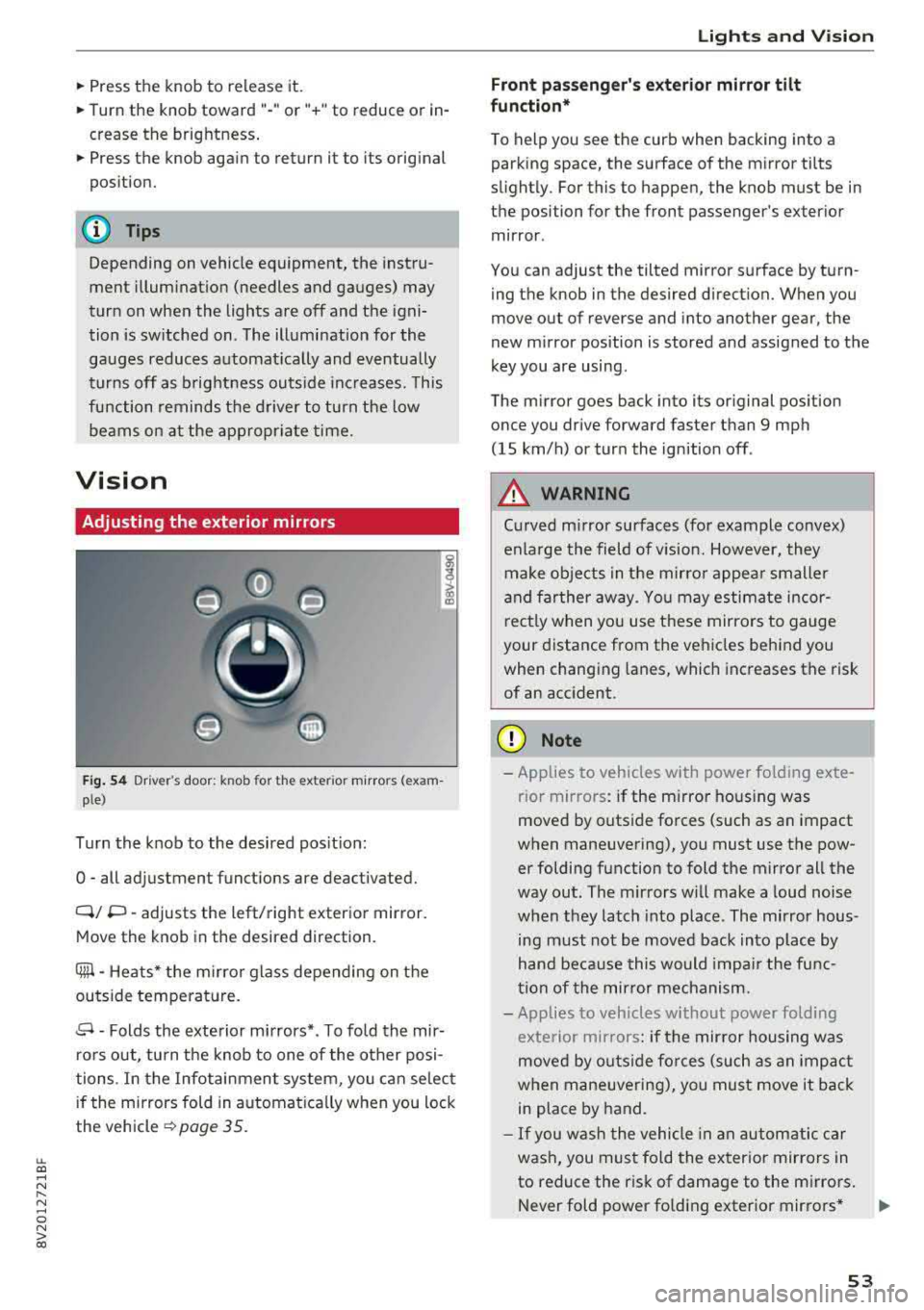
Fi g. 53 In st ru m en t ill uminat ion
Page 55 of 404
LL co ..... N
" N ..... 0 N > co
~ Press the knob to release it.
~ Turn the knob toward "-"or"+" to reduce or in
crease the brightness.
~ Press the knob again to return it to its original
position.
(l') Tips
Depending on vehicle equipment, the instru
ment illumination (needles and gauges) may
turn on when the lights are off and the igni
tion is sw itched on . The illumination for the
gauges reduces automat ica lly and eventually
turns off as brightness outside increases. This
function reminds the driver to turn the low
beams on at the appropriate time.
Vision
Adjusting the exterior mirrors
Fig. 54 Driv er's door: k n ob for the ex ter ior mirrors (exam
p le)
Turn the knob to the desired position:
0
-all adjustment functions are deactivated.
Q/ P -adjusts the left/right exterio r mirror.
Move the knob in the desired direction .
Cilll -Heats* the mirro r glass depending on the
outside temperature.
.9 -Folds the exterior mirrors* . To fold the mir
rors out, turn the knob to one of the other posi
tions . In the Infotainment system, you can select
if the mirrors fold in automat ically when you lock
the vehicle
~ page 35.
Lights and Vision
Front passenger 's exterior mirror tilt
function*
To help you see the curb when backing into a
parking space, the surface of the mirror tilts
slightly. For this to happen, the knob must be in the position for the front passenger's exterior
mirror .
You can adjust the tilted mirror surface by turn ing the knob in the desired direction. When you
move out of reverse and into another gear, the
new mirror position is stored and assigned to the
key you are using.
The mirror goes back into its original position
once you drive forward faster than 9 mph
(15 km/h) or turn the ignition off .
A WARNING
Curved mirror surfaces (for example convex)
enlarge the field of v is ion. However, they
make objects in the mirror appear smaller
and farther away . You may estimate incor
rectly when you use these mirrors to gauge
your distance from the vehicles behind you when changing lanes, which increases the risk
of an accident .
(D Note
-Applies to vehicles with power fo lding exte
r ior mirrors : if the mirror hous ing was
moved by outside forces (such as an impact
when maneuvering), you must use the pow er folding function to fold the mirror all the
way out. The mirrors will make a loud noise
when they latch into place. The mirror hous
ing must not be
moved back into place by
hand because this would impair the func
tion of the mirror mechanism.
- Applies to veh icles without power folding
exterior mirrors : if the mirror housing was
moved by outside forces (such as an impact
when maneuvering), you must
move it back
in place by hand.
- If you wash the vehicle in an automatic car
wash, you must fold the exterior mirrors in
to reduce the risk of damage to the mirrors .
Never fold power fo lding exterior mirrors*
.,.
53
Page 56 of 404
Lights and Vision
by hand. Only fo ld them in and out using
the power controls.
(D Tips
If the power adjustment fails, both mirrors
can be adjusted by hand by pressing on the
edge of the mirror surface .
Dimming the mirrors
Your vehicle is equipped with a manual or auto
matic* dimming rearview mirror .
Manual dimming rearview mirror
~ Pull the lever on the bottom of the mirror back .
Automatic dimming rearview mirror*
~ The interior and exterior mirrors dim automati
cally when light shines on them, for example
from headlights on a vehicle behind you .
.&_ WARNING
Applies to: vehicles with automa tic dimming rearview
m irror
Electro lyte fluid can leak out from broken
m irror glass. This liquid can irritate the skin,
eyes and resp iratory system.
If there is con
tact with the fluid, flush immediate ly with
plenty of water. Consult a physician if neces
sary.
- Repeated or long-term exposure to electro
lyte fluid can lead to irritation of the air
ways, especially in peop le with asthma or
other respiratory condit ions. Take deep
breaths immediate ly after leaving the vehi
cle or, if this is not possible, open all of the
doors and windows as wide as possible.
- If electrolyte fluid enters the eyes, flush
them thoroughly with a large amount of
clean water for at least 15 minutes and then
seek medical attention .
- If electrolyte flu id comes into contact w ith
the skin, flush the affected area with clean
water for at least 15 minutes and then clean
with soap and water and seek med ica l at
tention. Clean affected clothing and shoes
tho roughly before wearing again.
54
-
-If the fluid was swallowed and the person is
conscious, flush the mouth w ith water for at
least 15 minutes. Do not induce vomiting
unless this is recommended by medical pro
fessionals . Seek medical attention immedi
ately .
(D Note
Applies to: veh icles with automatic d imming rearv iew
mirro r
Electrolyte fluid can leak out from broken
mirror glass. This liquid damages plastic sur
faces . Clean this liquid as quickly as possible
with a wet sponge.
@ Tips
App lies to: veh icles with automatic d imm ing rearv iew
mirro r
-If the light reaching the rearview mirror is
obstructed, the automatic d imm ing mirror
will not function correctly,
- The automatic dimming m irrors do not dim
when the interior lighting is turned on or
the reverse gear is selected.
Sun visors
(~--- )
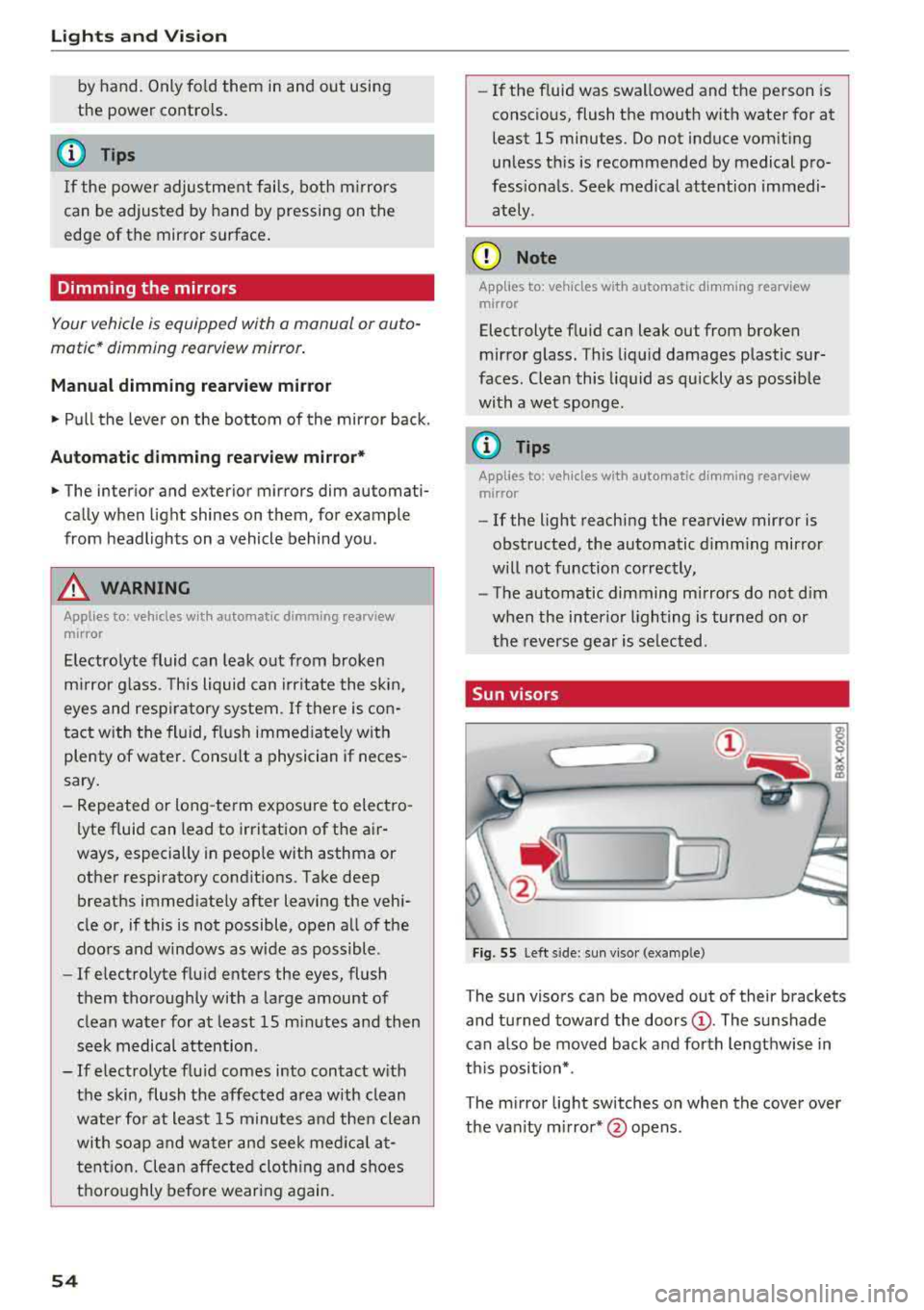
Fig. 55 Left side: sun viso r (example)
The sun visors can be moved out of their brackets
and turned toward the doors
(D. The sunshade
can a lso be moved back and forth lengthwise in
th is position*.
The mirror light switches on when the cover over
the van ity m irror* @opens .
Page 57 of 404
LL co .... N
" N .... 0 N > co
Windshield wipers
Switching the windshield wipers on
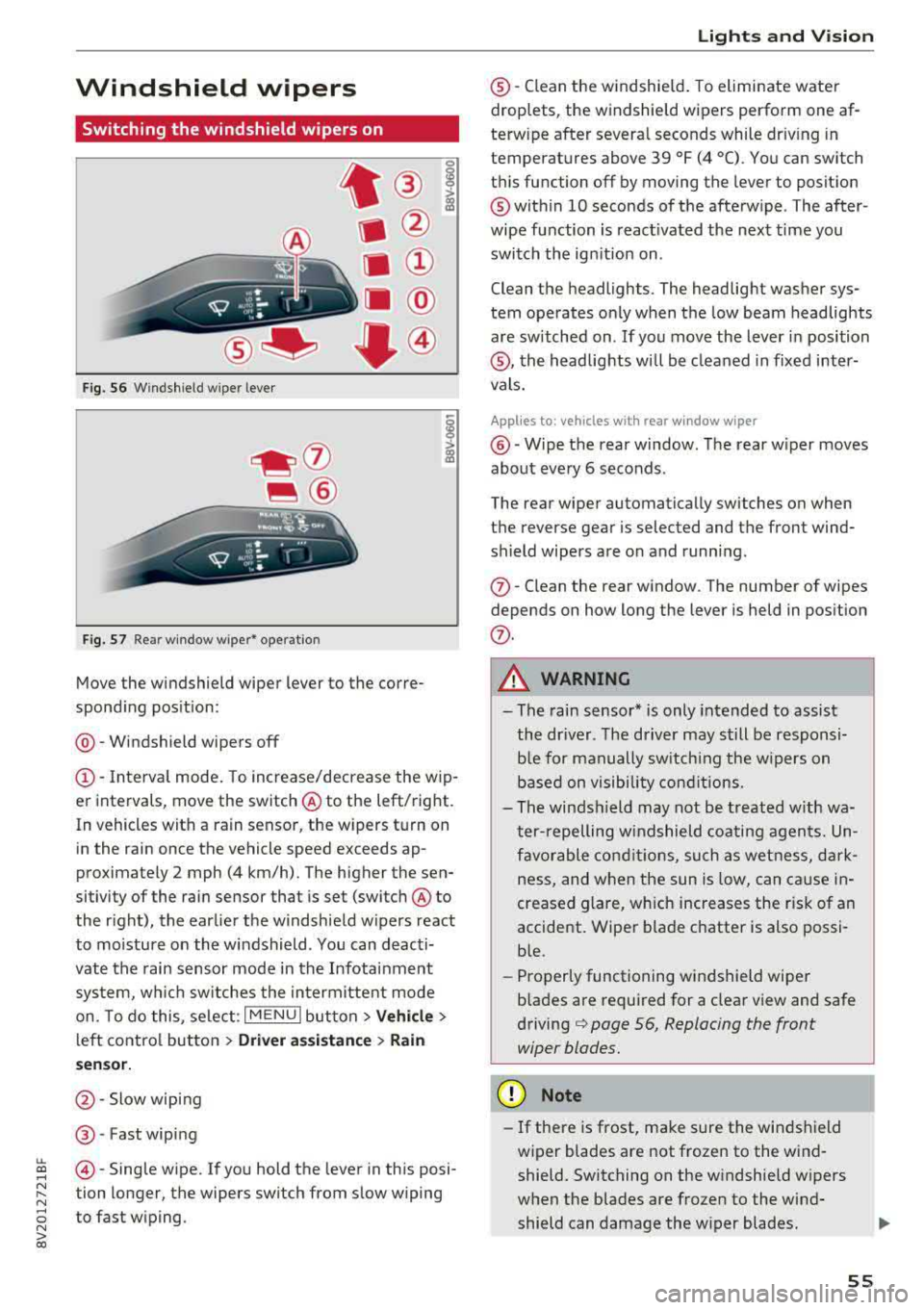
Fig. S6 Windshield wiper lever
Fig. S7 Rear window wiper• operatio n
t® I
a @
lll ®
Iii @
•®
Move the windshield wiper lever to the corre
spond ing pos ition:
@ -Windshield wipers off
(D-Interval mode. To increase/decrease the wip
er intervals, move the switch
@ to the left/right.
In vehicles with a rain sensor, the wipers turn on in the rain once the vehicle speed exceeds ap
proximately 2 mph (4 km/h). The higher the sen
sitivity of the rain sensor that is set (switch
@ to
the right), the earlier the w indshield w ipers react
to moisture on the windshield . You can deacti
vate the rain sensor mode in the Infotainment
system, wh ich switches the intermittent mode
on. To do this, select :
I MENU I button> Vehicle>
left control button > Driver a ssistance > Rain
se nsor.
@ -Slow wiping
@ -Fast wiping
@-Single wipe. If you hold the lever in this posi
tion longer, the wipers switch from slow wiping
to fast wiping.
Lights and Vision
®-Clean the windshield. To eliminate water
droplets, the windshield wipers perform one af
terw ipe after several seconds while dr iv ing in
temperatures above 39 °F (4 °C). You can switch
this function off by moving the lever to position
@within 10 seconds of the afterwipe . The after
wipe function is react ivated the next time you
switch the ignition on .
Clean the headlights. The headlight washer sys
tem operates only when the low beam headlights
are sw itched on . If you move the lever in position
®, the headlights will be cleaned in fixed inter
vals.
Applies to: vehicles wi th rear window wiper
@ -Wipe the rear window. The rear wiper moves
about every 6 seconds .
The rear wiper automatically switches on when
the reverse gear is selected and the front wind
sh ield wipers are on and running.
(j)-Clean the rear window . The number of wipes
depends on how long the lever is held in position
(j) .
A WARNING
-The rain sensor* is only intended to assist
the driver. The driver may still be responsi
ble for manually switch ing the w ipers on
based on visibility conditions.
-The windsh ield may not be treated w ith wa
ter-repelling windshield coating agents. Un
favorable conditions, such as wetness, dark
ness and when the sun is low, can cause in-
'
creased glare, which increases the r isk of an
accident. Wiper blade chatter is also possi
ble.
-Properly functioning windshield wiper
b lades are required for a clear view and safe
driving¢ page 56, Replacing the front
wiper blades.
(D Note
- If there is frost, make sure the windshield
wiper blades are not frozen to the wind
shield. Switching on the windshield wipers
when the blades are frozen to the wind
shield can damage the wiper blades .
-
55
Page 58 of 404
Lights and Vi sion
-The windshield wiper system must be
switched off (lever in position @) before us
i ng a car wash. This prevents the wipe rs
from sw itching on unintentionally and ca us
i ng damage to the w indshie ld w iper system .
(D Tips
-The windshield wipe rs switch off w hen t he
i gnition is switched off. Yo u can act ivate the
windsh ield wipers after the ign ition is
switched back on by moving the windsh ield
wiper leve r to any pos it io n.
-Worn or dirty windshield wiper blades result
i n streak ing . This can affect the ra in se nsor
f u nct io n. Check yo ur windsh ield wiper
blades regularly.
-The washer fl uid nozzles in the w indshield
washer system are heated* a t low tempera
tures whe n the ignition is on .
-When stop ping tempora rily, such as at a
traffic light, the speed of the windsh ie ld
wiper s automat ica lly re d uces by o ne leve l.
Cleaning the wiper blades
Clea n the w ipe r blades when you see wipe r
strea ks. Use a so ft clot h and a glass cleaner .
Windshield wiper
"' Place the windshield wipe r arms in the se rvice
pos it ion
<=> page 56.
"' Fo ld t he w indshield wipe r arms away from the
winds hield.
Rear window wiper
Applies to: vehicles with rear window wiper
"'Fold the wi per arm away from the rear w indow .
A WARNING
Dirty w indshield wi pe r blades can impair vi
sio n, which incre ases the risk of an accident.
«1j) Note
If you see streaks aga in a fter cleaning the
w iper blades, the blades mus t be replaced
<=> page 56.
56
-
Replacing the front wiper blades
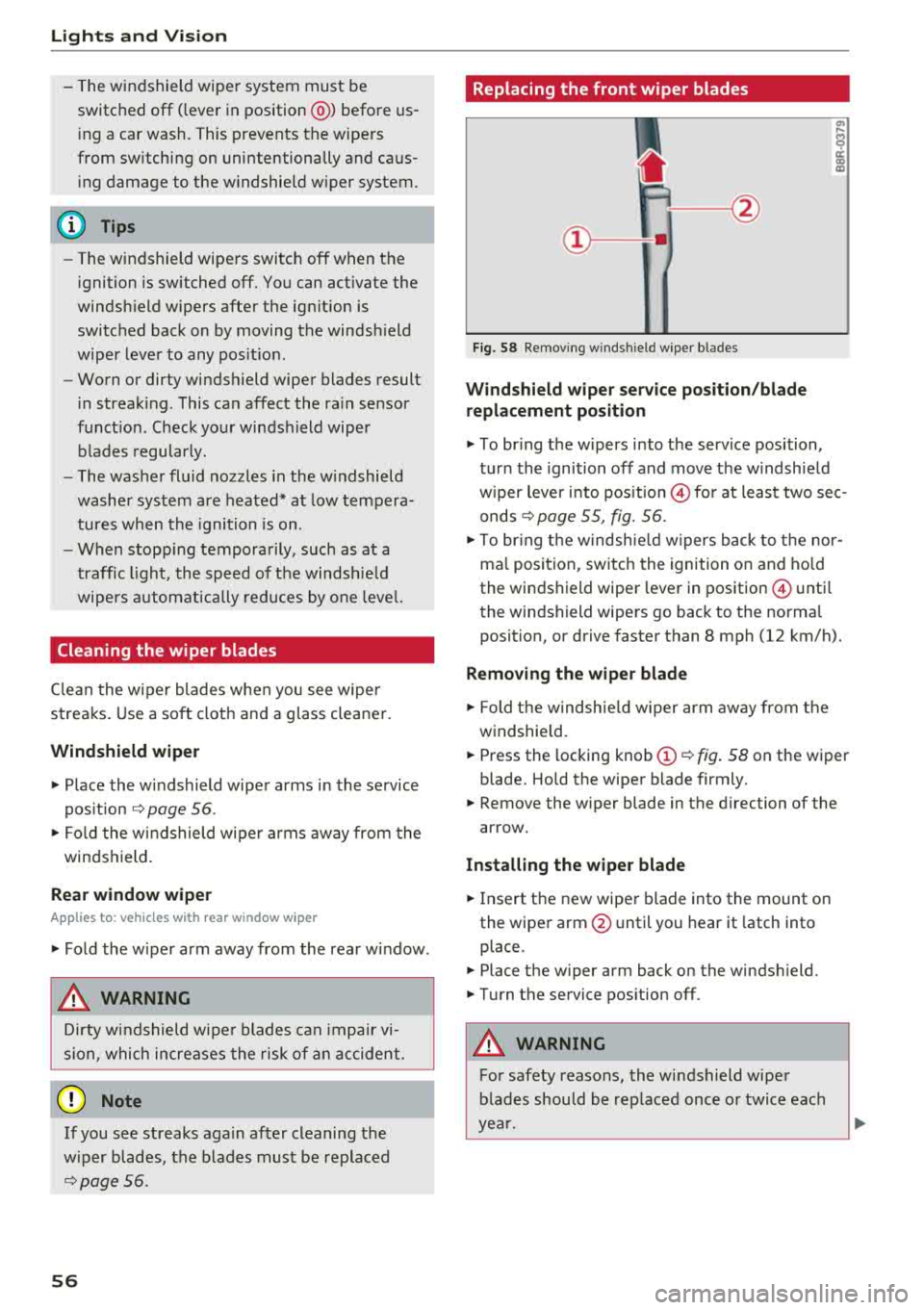
Fig. 58 Removin g windsh ie ld wiper bl ades
Windshield wiper service po sition /blade
replacement position
a, ... M 9
I
"' To br ing the w ipers into the service position,
tur n the ignition off and move t he w indsh ie ld
w iper lever into pos it ion
@ for at least two sec
onds
c:> page 55, fig. 56.
"' To bring t he w indsh ie ld w ipers b ack to t he nor
ma l posi tion, switc h the ignition on and ho ld
the windshield wiper lever in position @ unti l
the windshi eld wipe rs go back to t he normal
position, or drive faster than 8 mph (12 km/h).
Removing the wiper blade
"' Fold th e w indsh ie ld w iper arm aw ay from t he
windshie ld.
"' Press the locking knob (D <=> fig . 58 on the wiper
blade. Ho ld the wipe r blade firmly.
"' Remove the w iper blade in the d irection of the
ar row.
Installing the wiper blade
"' Insert t he new wiper blade into the mount on
the wipe r
arm@ until you hear it latch into
place .
"'Place the wiper arm back on the winds hield.
"'Turn the service pos ition off .
A WARNING -
For safety reasons, the wi ndshield wipe r
b lades should be rep laced once o r twice eac h
ye ar.
Page 61 of 404
LL co .... N
" N .... 0 N > co
Seats and storage
General information
A WARNING
Refer to the chapter Driving Safely
~ page 249, Driving safety for important in
formation, tips, suggestions and warnings that you should read and follow for your own
safety and the safety of your passengers.
Front seats
Manual seat adjustment
Applies to vehicles with manual adjustable seats
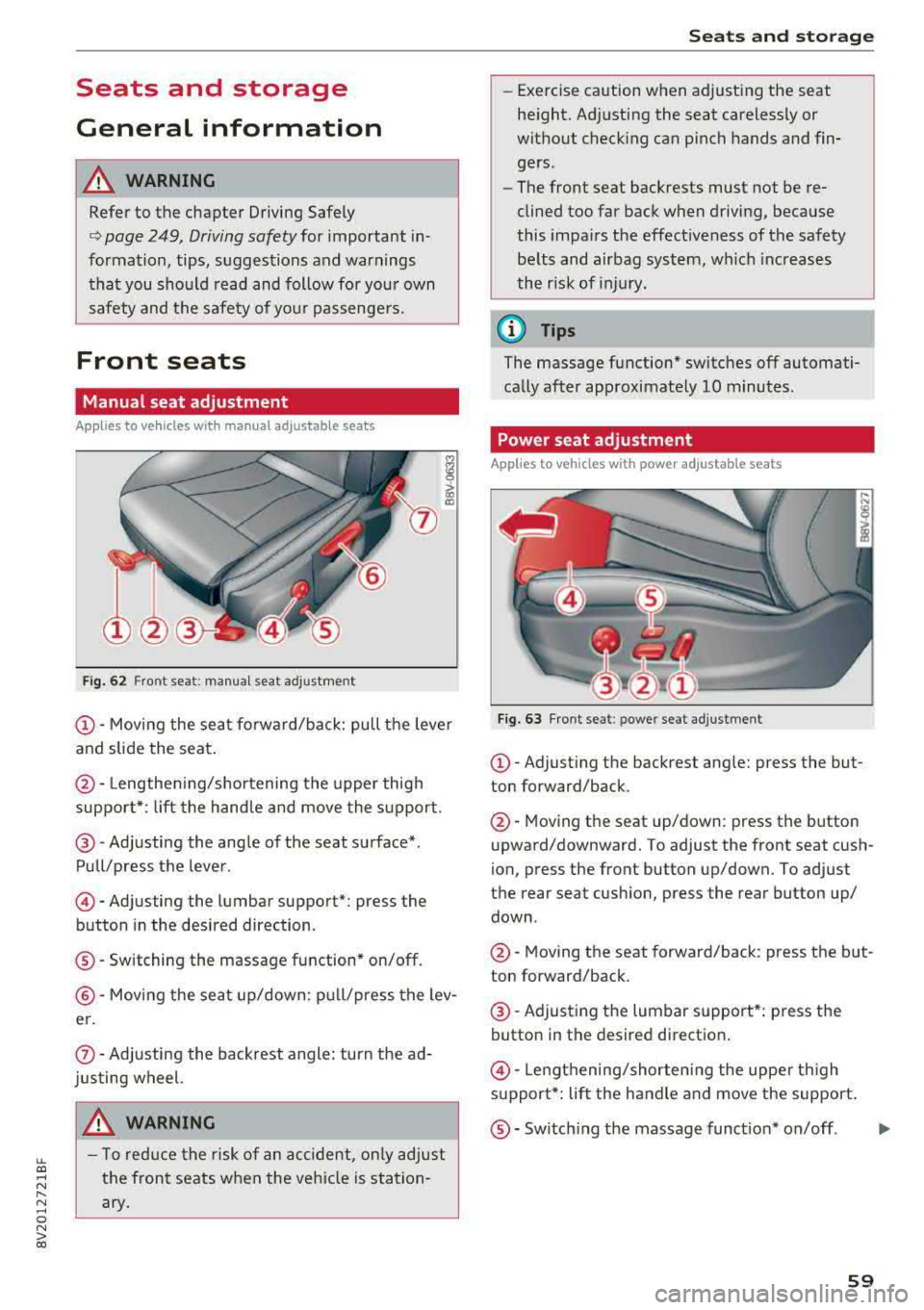
Fig. 62 Fro nt seat: manual seat ad justment
@ -Moving the seat fo rward/back: pu ll the leve r
and slide the seat .
@-Lengthen ing/shortening the upper thigh
support* : lift the handle and move the support.
@-Adjusting the angle of the seat surface* .
Pull/press the lever .
©-Adjusting the lumbar support* : press the
button in the desired direction .
®-Switching the massage function* on/off .
@-Moving the seat up/down: pull/press the lev
er.
(J) -Adjusting the backrest angle : turn the ad
justing wheel.
A WARNING
- T o reduce the risk of an accident , only adjust
the front seats when the vehicle is station
ary.
Seats and storage
-Exercise caution when adjusting the seat
height. Adjusting the seat carelessly or
without checking can pinch hands and fin
gers .
- The front seat backrests must not be re
clined too far back when driving, because
this impairs the effectiveness of the safety
be lts and airbag system, which increases
the risk of injury.
(D Tips
The massage function* switches off automati
cally after approximately 10 minutes .
Power seat adjustment
Applies to vehicles w it h power adjustab le seats
Fig. 63 Front se at: p ower seat adj ustmen t
@-Adjust ing the backrest ang le: press the but
ton forward/back .
@-Moving the seat up/down: press the button
upward/downward. To adjust the front seat cush
ion, press the front button up/down. To adjust
the rear seat cushion, press the rear button up/
down .
@-Moving the seat forward/back : press the but
ton forward/back .
@-Adjusting the lumbar support*: press the
button in the desired direction .
©-Lengthening/shorten ing the uppe r th igh
s u pport*: lift the handle and move the support.
®-Switch ing the massage funct ion* on/off .
59
...
Page 68 of 404
Seats and storage
Pass-through
Applies to: vehicles with pass-through
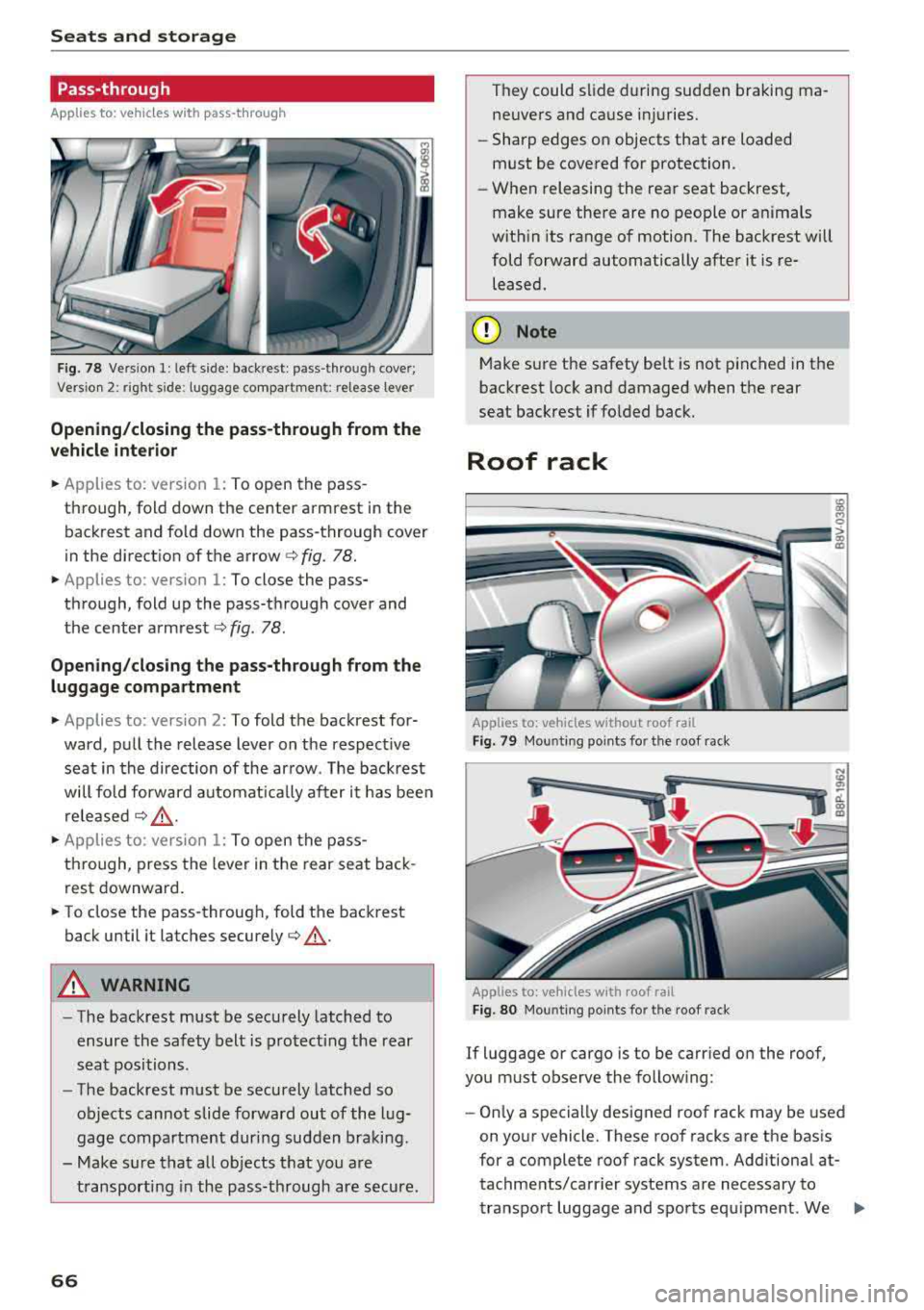
Fig. 78 Vers ion 1: left side: backrest: pass-through cover;
Vers io n 2: right side : luggage co mpartment: relea se lever
Opening/closing the pass-through from the
vehicle interior
.,. Applies to: version 1: To open the pass
through, fold down the center armrest in the backrest and fo ld down the pass-through cover
in the direct ion of the arrow
c:> fig. 78 .
.,. Applies to: version 1: To close the pass
through, fold up the pass-through cover and
the center
armrest¢ fig. 78.
Opening/closing the pass-through from the luggage compartment
.,. Applies to: version 2: To fold the backrest for
ward, pull the release lever on the respect ive
seat in the direction of the arrow. The backrest
will fo ld forward automat ically after it has been
released
¢ &_ .
.,. Applies to: version 1: To open the pass
through, press the lever in the rear seat back
rest downward .
.,. To close the pass-through, fold the backrest
back until it latches
securely¢ &_.
A WARNING
-The backrest must be securely latched to
ensure the safety belt is protecting the rear
seat positions .
- The backrest must be securely latched so
objects cannot slide forward out of the lug
gage compartment during sudden braking .
- Make sure that all objects that you are
transporting in the pass-through are secure.
66
They could slide during sudden braking ma
neuvers and cause injuries.
- Sharp edges on objects that are loaded
must be covered for protection.
- When releasing the rear seat backrest,
make sure there are no people or anima ls
with in its range of motion. The backrest will
fold forward automatically after it is re leased.
(D Note
Make sure the safety belt is not pinched in the
backrest lock and damaged when the rear
seat backrest if folded back.
Roof rack
Applies to: vehicles without roof rail
Fig. 79 Mounting po ints for the roof rack
Applies to: vehicles with roof rail
Fig. 80 Moun ting points fo r the roof rack
If luggage or cargo is to be carried on the roof,
you must observe the following:
- Only a specially designed roof rack may be used
on your vehicle. These roof racks are the basis
for a complete roof rack system. Additional at
tachments/carr ier systems are necessary to
transport luggage and sports equipment. We
..,.
Page 71 of 404
Warm and cold
Automatic climate control system
Applies to: ve hicles with a utomat ic climate contro l system
Pressing AUTO button and setting the temperature to 72 °F (22 °C) is recommended.
LL co .... N
" N
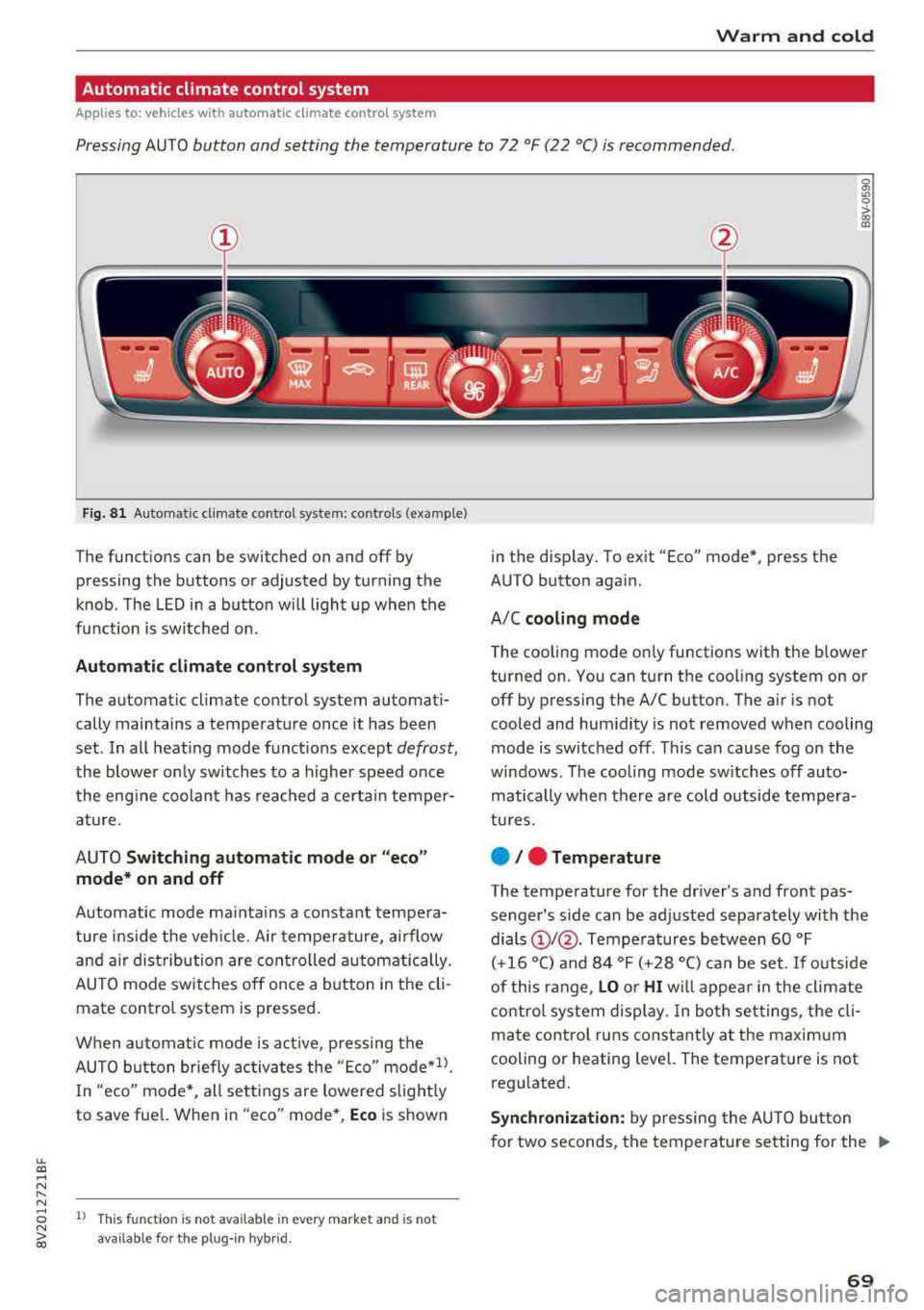
Fig. 8 1 Automatic climate control system: controls (example)
The funct ions can be switched on and off by
pressing the buttons or adjusted by turning the
knob. The LED in a button w ill light up when the
f u nction is switched on.
Automatic climate cont rol system
The automat ic climate control system automati
cally maintains a temperature once it has been
set . In all heat ing mode funct ions except
defrost,
the blower on ly switches to a higher speed once
the eng ine coolant has reached a certain temper
ature.
AUTO
Switching aut omatic mode or "ec o"
mode * on and off
Automatic mode ma inta ins a constant tempera
ture ins ide the veh icle. Air tempe rature, airflow
and a ir distribution are controlled a utomatically.
AUTO mode switches off once a b utton in the cli
mate control system is pressed.
When a utomat ic mode is act ive, pressing the
AUTO b utton briefly activa tes the
" E co" mode*1l.
In "eco" mode *, all sett ings are lowered slight ly
to save fuel. When in
"eco" mode*, Eco is shown
8 1l This fu nct ion is not available in every market and is not N ii'i available for the plug- in hybr id.
in the display. To ex it "Eco" mode*, press the
AUTO button aga in.
A/C
cooling mod e
The cooling mode on ly functions with the blower
turned on. You can turn the cooling system on or
off by pressing the A/C button. The air is not
cooled and humidity is not removed when cooling
mode is switched off. This can cause fog on the
windows . The cooling mode sw itches off auto
matically when there are cold outside tempera
tu res.
e / e Temperature
The temperature for the driver's and front pas
senger's s ide can be adjusted separately with the
dials
(D I@ . Tempera tures between 60 °F
(+16 °() and 84 °F (+28 °() ca n be set. If outside
of this range,
LO or HI w ill appea r in the climate
contro l system display. In both settings, the cli
mate contro l runs constant ly at the maxim um
cooling or heating level. The temperature is not
regulated.
S ynchr oniza tion : by pressing the AU TO butto n
for two seconds, the temperature setting for the
..,.
69
Page 72 of 404
Warm and cold
driver 's side is transferred to the front passeng
er's side. This applies a temperature change to
the front passenger 's side .
8/r Blower
Using the regu lator 8f?, you ca n manually adjust
the vo lume of a ir generated by the blower to your
p reference . The blowe r shou ld always run at a
low setting to prevent the windows from fogging
and to ensure a continuous exchange of air inside
t he vehicle . To h ave the blower regu lated au to
mat ically , press the AUTO button.
~/ :01 ~ Air distribution
The air distribution can adjusted with t he but
tons. To have the air distribution regulated auto matica lly, press the AU TO button.
The round air vents in t he cockpit are adjustable
q page 71 .
To keep the front s ide windows from fogging up
in damp weathe r, we recommend opening the
side air vents and tilting them to the side .
Foot vents are located under the front seats and
adjustab le vents o n the end of t he center console
t o heat the re ar of the vehicle .
3fx Defrosting
The windshield and s ide windows are defrosted
or cleared of condensation as qu ickly as possible .
The max imum amo unt of air flows ma inly from
the vents below the w indshield. Recircu lation
mode switches off. The temper ature s hou ld be
set at +72°F (22°() or higher. The temperat ure is
controlled automatica lly. In the
;Ix setting, the
A/C cooling mode switches on a utomatically , de
pending on the outside air temperature.
The A UTO button switches the defroster off.
~ Recirculation mode
The recircu lation mode can be turned on manua l
ly or automat ica lly*.
- Swi tc h ing man ua l rec irculat ion mode on and
off: press
t h e ~ button .
70
-Automatic * reci rcu lat ion mode : auto recircula
tion needs to be activated in the Infotainment
system. Se lect in the Infotainment system:
I MENU I button > Veh icle > left control button >
Air cond itioning > Aut o recircul ation
The air
quality sensor that is designed for d iesel and
gasoline exhaust automatically sw itches the re
circulation mode on or off depending on the level of pollutants in the o utside air.
In rec irculat ion mode, the air inside the vehicle is
c ir culated and filte red . T his prevents the unfil
te red air outs ide t he ve hicle from enteri ng the
vehicle inte rior. Switching rec irculat io n mode on
whe n driving throug h a tu nnel o r whe n sitting in
traffic is recommended
q & .
Pressing the~ button, A UTO o r the ;Ix button
switches recirculation mode off .
T he system switches to recirculation mode when
driv ing in reverse when the engine is cold .
SP. Rear window defogger
If the rear window defogger is act ivated when
the ignit ion is swi tched on, the battery manage
ment determines based on the battery charge if
i t is possible to turn on . Otherwise, the rear w in
dow defogger funct ions w it h the eng ine runni ng
and switches off automat ically after approxi
mately 1 0 - 20 m inutes, depending on the out
s ide temperat ure.
To p reve nt the rear window defogger from
switching off automat ica lly, press and hold the
!fP. button for more tha n two seconds. This re
mai ns sto red up to approxim ate ly lS m in utes af
te r turning off the ignition.
J Seat heating*
P ressing the J button switches the seat heat ing
o n at t he hi ghest sett ing (level 3) . The L EDs ind i
c a te the temperat ure level. To reduce the tem
per atu re , press t he button again . T o swi tc h t he
seat heating off, press the bu tton repeatedly un
ti l the LED turns off .
After approximate ly 10 m inu tes, the sea t heat ing
a utomat ic all y switches from leve l 3 to leve l 2.
..,_
Page 73 of 404
LL co .... N
" N .... 0 N > co
_& WARNING
-You should not use the recirculation mode
for an extended period of time, because no
fresh a ir is drawn in and the windows can
fog when coo ling mode is sw itched off. This
increases the risk of an accident .
-Individuals with reduced sensitivity to pain
o r temperature could develop burns when
using the seat heating function. To reduce
the risk of injury, these indiv iduals should
not use seat heating.
(D Note
To avoid damage to the heat ing elements in
the seats, do not kneel on the seats or place
heavy loads on a small area of the seat.
@ Tips
-The setting for the seat heating on the driv
er's side is ass igned to the key that is in use .
-If the front passenger's seat heating is
turned on, it will not turn on again automat
icall y if more than 10 minutes have passed
between switching the ign ition off and
switching it on again.
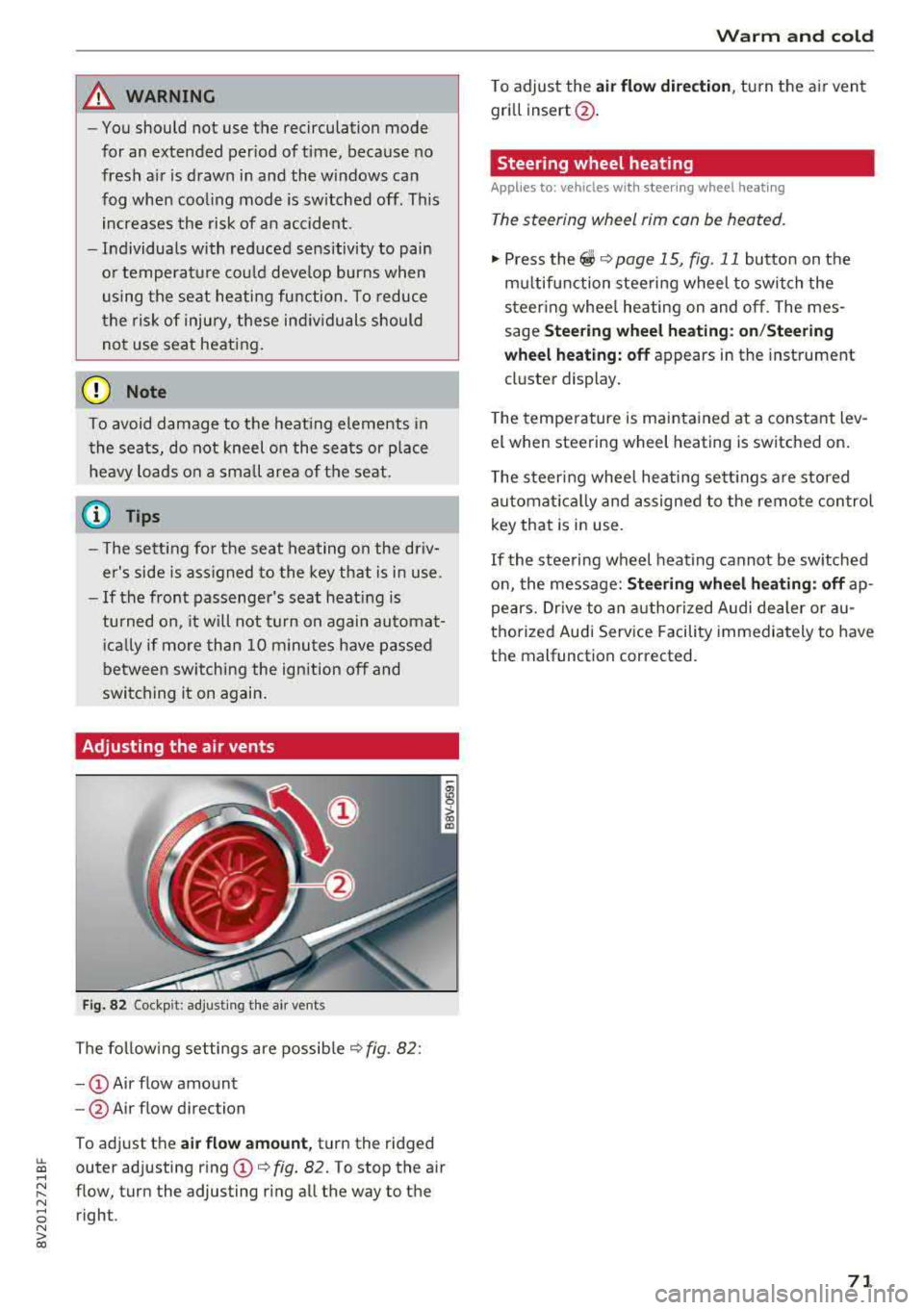
Adjusting the air vents
Fig. 82 Cockp it: adjust ing the a ir vents
The following settings are possible ¢ fig. 82 :
-CD Air flow amount
- @ Air flow direction
To adjust the
air flow amount, turn the ridged
outer adjusting ring
CD ¢ fig. 82. To stop the air
flow, turn the adjusting ring all the way to the right .
Warm and cold
To adjust the air flow dire ction , turn the air vent
gri ll insert @.
Steering wheel heating
Applies to: veh icles w ith steering whee l heating
The steering wheel rim can be heated.
"' Press the ~ ¢ page 15, fig. 11 button on the
mu ltifunction steering wheel to switch the
steering whee l heating on and off. The mes
sage
Steering wheel heating: on/Steering
wheel heating: off
appears in the instrument
cluster display.
T he temperature is maintained at a constant lev
el when steering wheel heating is switched on .
The steering wheel heating sett ings are stored
automat ically and assigned to the remote control
key that is in use .
If the steering wheel heating cannot be switched
on, the message:
Steering wheel heating : off ap
pears. Drive to an authorized Audi dealer or au
thorized Audi Service Facility immediately to have
the malfunction corrected.
71