auto AUDI S3 SEDAN 2018 Workshop Manual
[x] Cancel search | Manufacturer: AUDI, Model Year: 2018, Model line: S3 SEDAN, Model: AUDI S3 SEDAN 2018Pages: 404, PDF Size: 62.3 MB
Page 102 of 404
e-tron
Driving situations Conditions Vehicle behavior
-Intentionally take your foot off of The gasoline engine turns off automati-
the gas pedal to allow for pro- cally and disengages when you release the longed coasting. accelerator pedal completely. The veh icle
Driving on highways glides without being propelled
.
- Reduce the vehicle speed by re-Fuel consumption can be reduced by
and expressways
leasing the accelerator pedal and coasting.
not by braking.
- Use the "S" selector lever position A sporty driving style increases fue l con-
and tiptron ic mode sparingly.
sumption.
- Do not run the gasoline engine to The temperature of the gasoline engine
warm the engine while the vehicle rises very s lowly and the fuel consump-
is parked tion increases considerably.
- Use the rear window/exterior This conserves the energy in the high-volt-
Driving in cold weath- mirror defogger and the seat heat-
age battery so that it is availab le to run
ing sparing ly. the vehicle in electric mode.
er
- Park the vehicle in a garage over-This reduces exposure of the high-voltage
n ight battery to cold temperatures. The re-
quired temperature range for the high-
voltage battery will then be reached more quickly after you start dr iving.
Energy flow display
Applies to : vehicles with plug-in hybrid drive
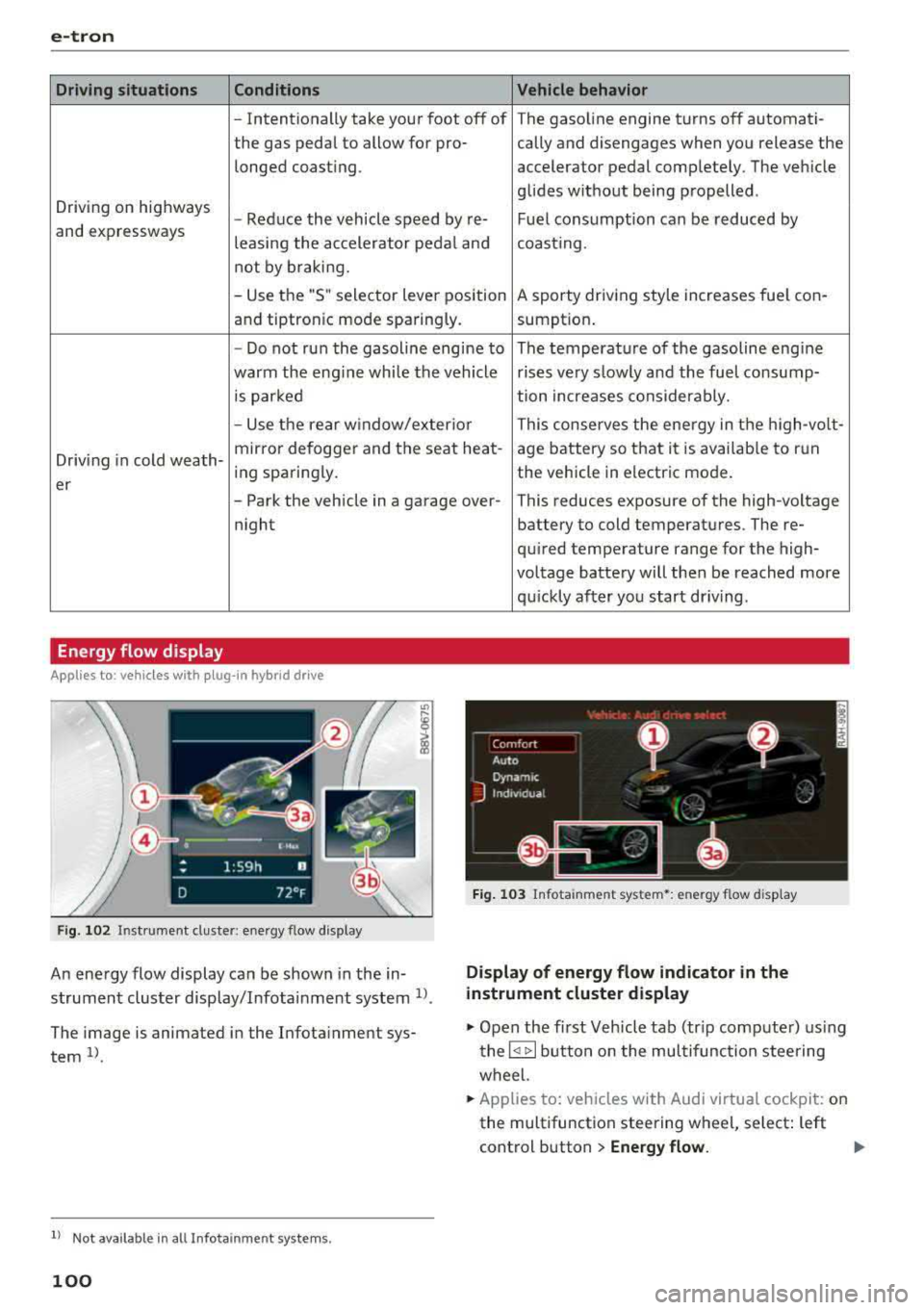
Fig. 102 Inst rument duster: energy flow display
An energy flow display can be shown in the in
strument cluster display/Infotainment system
1>.
The image is animated in the Infota inment sys
tem
1> .
l l Not available in all Infota inme nt syste ms.
100
Fig. 103 Infota inment system•: energy flow disp lay
Display of energy flow indicator in the
instrument cluster display
.,. Open the first Veh icle tab (tr ip compute r) using
the
l q 1> I button on the multifunction steering
wheel.
.,. Applies to: vehicles with Audi virtual cockpit: on
the multifunction steering wheel, select: left
control button
> Energy flow.
Page 103 of 404
LL co .... N
" N
~ Applies to: vehicles with analog instrument cluster: open the
Energy flo w ind icator disp lay
by turning the left thumbwhee l on the mult i
function steering wheel.
Component Color
(D Gasoline engine Orange
Gray
@ High-voltage battery Green
Green
(animated in the
Infota inment sys-
tern
al)
Gray
(§) Motion arrow Green
Orange
Green -orange
@ Motion arrow Green
a) Not avail ab le in all Infot ainmen t systems.
The power currently available in the electric drive
sys tem is displayed when you open the energy
flow disp lay.
The bars are filled in with different colors based
on the power
status @~ fig. 102:
- White : electric power currently availab le
- Green: electric power currently being used
The more ba rs that are filled in the E-max section
@ , the longe r the maximum power can be utiliz
ed . The bars turn off in the E-max section when
the maximum power can no longer be utilized.
When the elec tric dr ive power is greatly red uced,
the drive mode will automatically switch to using
the gasoline engine.
The availability of power is genera lly restr icted
under the fo llow ing cond itions:
- The temperature of the high-voltage battery is
very co ld or very hot.
- The high-voltage battery charge level is low.
.... 0 N ii'i l) Not availab le in al l Infota inment system s.
e-tron
Image in the Infota inment display1
)
~ In the Infotainment system, select: I MENU I
button > Veh icl e > left control button >Audi
d rive select .
M eaning
The gasoline engine is running
The gasoline engine is off
High-voltage battery charge level
The high-voltage battery is charging
The vehicle is not in drive ready mode
E lectric driv ing
Driving w ith the gasoline engine
Driving with the gasoline engine and electric mo-
tor (boost)
Recuperation
The power availability is not v is ible if the
111 ind i
cator light turns on.
(0 Tips
High power availability is necessary, for exam
ple, when need ing to acce lerate q uickly wh ile
i n e lectric driving mode to pass another vehi
cle.
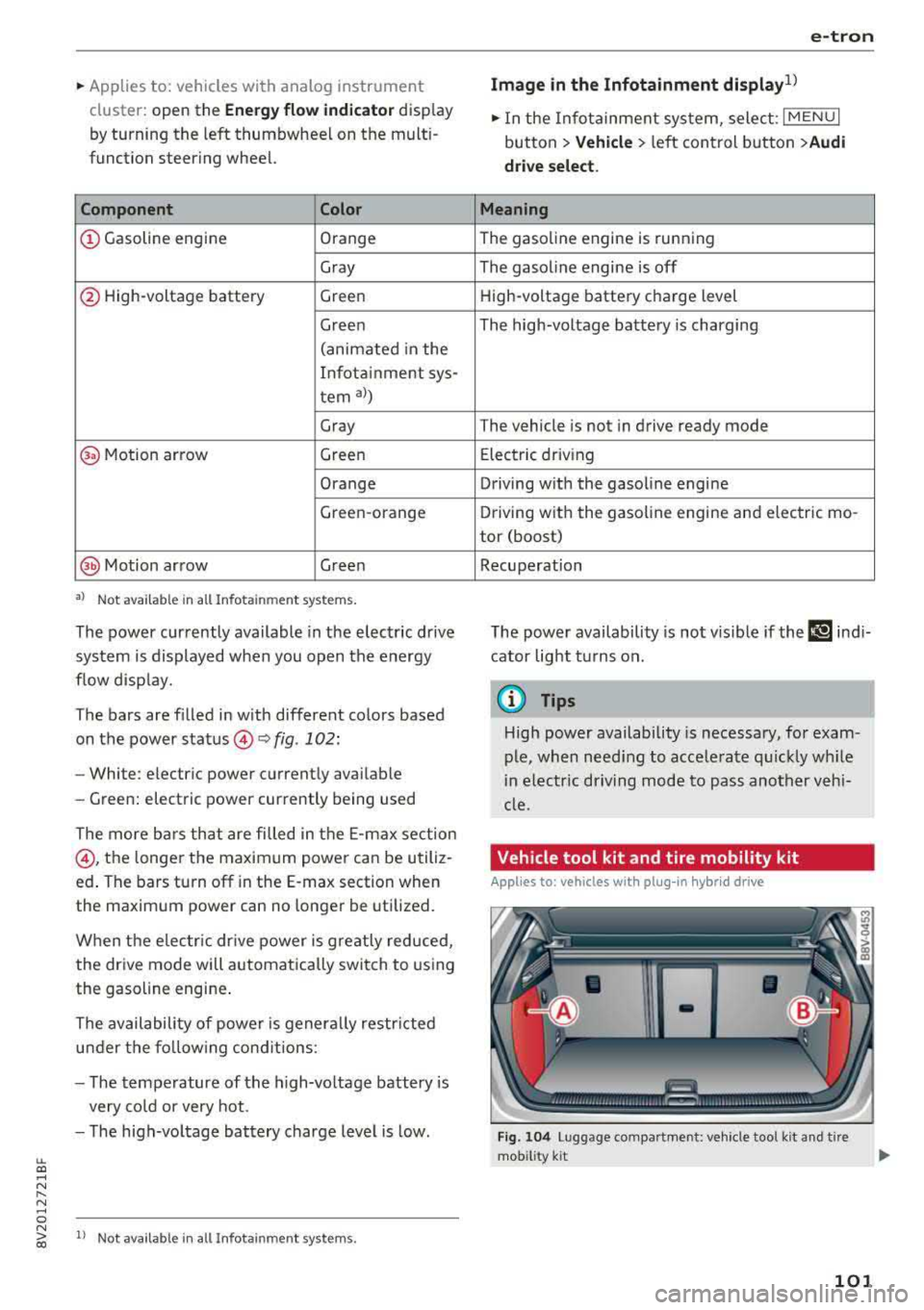
Vehicle tool kit and tire mobility kit
Applies to: vehicles wit h plug -in hybr id drive
F ig. 104 Lu ggage compartment: veh icle tool kit and tire
mob ility k it
101
Page 105 of 404
LL co ..... N
" N ..... 0 N > co
~ When you fill coolant in t he expansion tank @,
please refer
to ¢ page 324, Cooling system.
~ Do not drive any fart her if t he coo lant leve l in
the expansion tank @ is low . Contact an au
t h orized Audi dea ler or authorized Audi Service
Facility
immed iate ly ¢ .&, .
A WARNING
-Read and follow t he war nings in
¢ page 318, Working in the e ngine com
partme nt
before ope ning t he hood an d
ch ecking t he co ola nt level.
- T he e xp ansion ta nk @ may only be opened
a nd filled by an authoriz e d Aud i de aler or
au thorize d Au di Service Fac ility.
- Co olan t can en ter the ins ide of the hig h
volt age b attery w hen filling t he expa nsion
tank @ and cause a s hort c ircui t, which in
c reases the risk of fire.
Refueling
Opening the fuel filler door
App lies to: vehicles with p lug-in hybrid drive
F ig. 10 7 Drive r's door: butto n ii
The tank system must be vented be fore refueling
~ Swi tch the ign ition off with the
I S T AR T EN GINE ST OP ! button .
~Pullon th e~ switch.
~ The fue l filler door will open automat ica lly af-
te r venting is comp lete.
R ead and fo llow the directions for inserti ng the
f u e l pump nozzle
¢ page 103 .
Read and fo llow the inst ru ct io n s for re fueling
¢ page 315.
e-tron
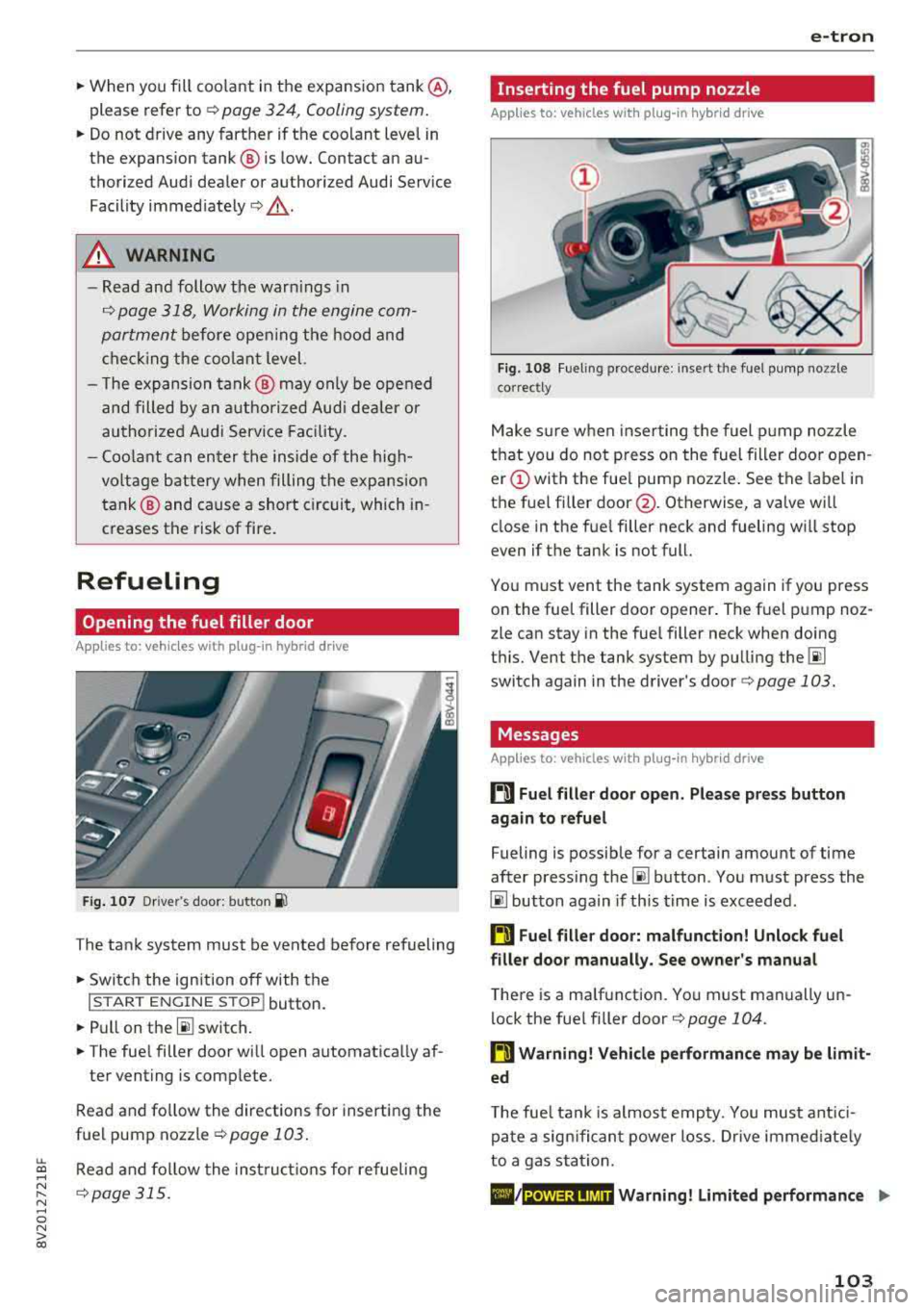
Inserting the fuel pump nozzle
Applies to: vehicles with plug -in hybrid drive
Fig. 108 Fueling proced ure: in sert t he fue l p ump nozz le
correct ly
M ake s ure w hen inserting the fuel pump noz zle
t h at you do no t press o n the fuel filler door o pen
er (!) with the fue l pump nozzle . See the label in
the fue l fi ller
door @. Otherwise, a valve wi ll
close in the fue l filler neck and fueling w ill stop
even if t he tank is not full.
Yo u m ust vent the tank system again if you press
o n the fue l filler doo r opener . The fuel p ump noz
zle can stay in the fuel filler neck when doing
t hi s. Vent the tank system by pu lling the
00
switch again in the d river's doo r¢ page 103.
Messages
Applies to: vehicles with plug-in hybrid drive
ti Fuel filler door open_ Please press button
again to refuel
Fueling is possib le for a certain amount of time
after press ing
the~ button . Yo u m ust press the
00 button aga in if th is time is exceeded .
ti Fuel filler door: malfunction! Unlock fuel
filler door manually. See owner's manual
T he re is a ma lfunction. Yo u must manually un
lock the fue l fi ller door
<=> page 104.
ti Warning! Vehicle performance may be limit
ed
T he fue l tank is almos t emp ty. You must ant ici
pa te a sig nificant power lo ss. Dr ive imme diate ly
to a gas sta tion.
./ Warning! Limited performance .,. POWER LIMIT
103
Page 106 of 404
e-tron
The gaso line engine is no longer ava ila b le be
cause there is not enough fue l. Drive immediate ly
to a gas station.
Fuel filler door emergency release
A pp lies to : ve hicles w ith plug- in hybrid drive
You must use the emergency re lease to open the
fue l filler door when there is a malfunct io n
c::;, page317 .
The tank is not vented. You can only f ill a small
amount of fuel in the tank.
~ Fill only unti l the automatic fue l pump nozzle
turns off for the first time when it is operated correctly.
Drive to an a utho rized Aud i de aler or a uth o rized
Audi Service Facility immediately to have the
malfunctio n corrected .
(D Tips
Pressure can escape if you open the tank ca p
after using the emergency release . This can
create noises.
Charging
General information
A pp lies to: ve hicles w ith plug -in hybrid drive
Two options are ava ilab le for cha rging the vehi
cle:
- Charge at a p ublic charging stat ion w ith a spe
c ia l charging cable*
c::;, page 106 .
-Charge with ho useho ld and industrial power
sockets using the Audi e-t ron c harg ing system
¢ page 106.
Environmental condition s when using the
Audi e-tron charging system
- Operat ing temperatu re : -13 °F (-25 °C) to 95 °F
(+35 °C)
- Humidity: 5% to 95%, non-co ndensing
- 13,000 feet (4,000 meters) maximum above
sea leve l
- Protected against dust and spray (IP54 (USA:
enclosure 3 R))
104
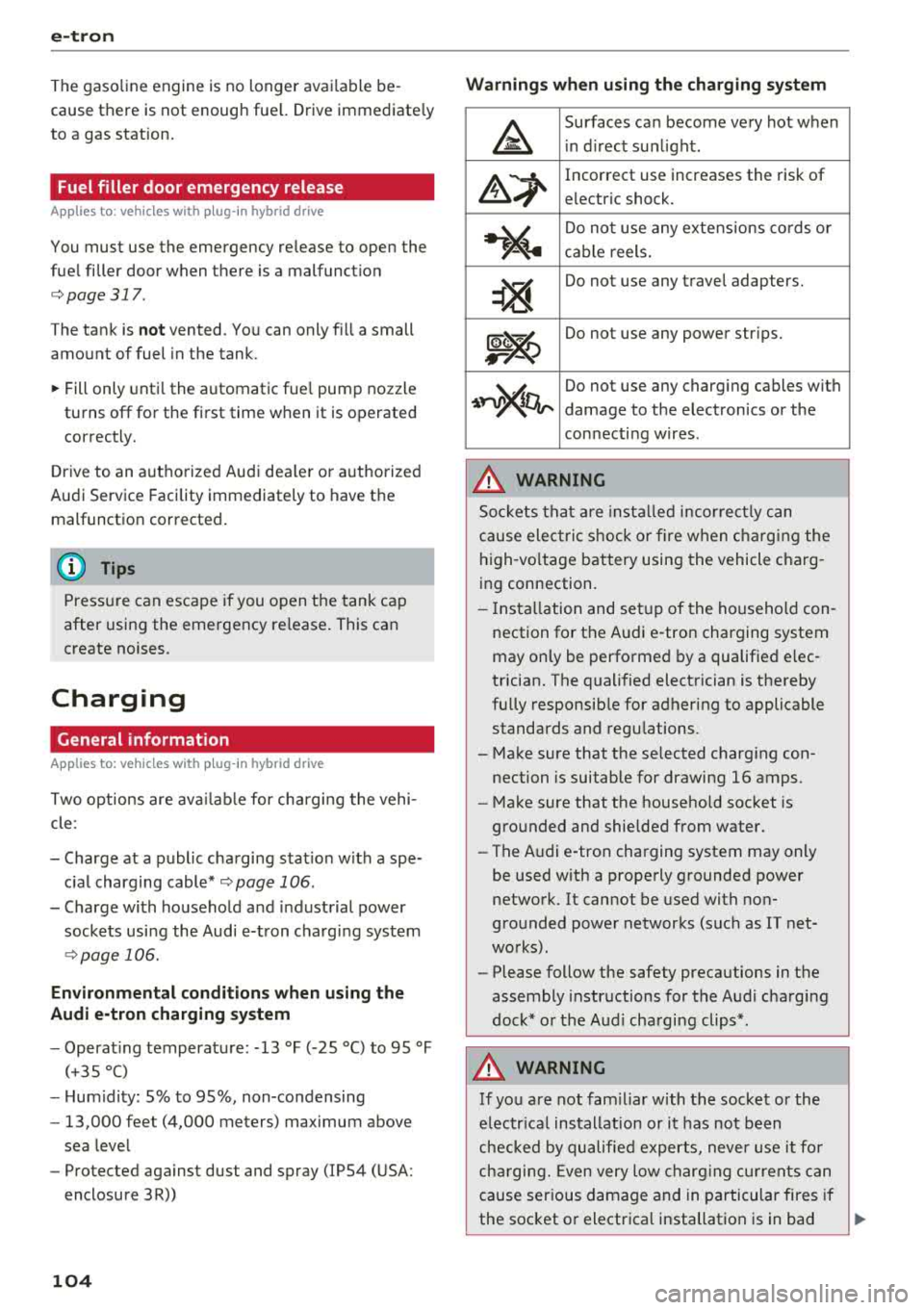
Warnings when using the charging system
&
Surfaces ca n become very hot when
i n d irect su nlight .
&~
Incorrect use increases the risk of
electric shock.
~¼
Do not use any extens ions co rds o r
c abl e reels.
~
Do not use any travel adapters.
~~
Do not use any power str ips.
~~~
Do not use any charg ing cables with
damage to the electronics or the
con necti ng w ires .
.&_ WARNING -
Sockets that are inst alled incorrect ly can
cause elect ric shock or fire when charging the
h igh -vo ltage battery using the vehicle charg
ing connection .
- Installation and set up of the household con
nection for the Audi e-tron charging system
may only be performed by a qualified e lec
trician. The q ualified electrician is thereby
fully responsib le for adhering to applicable
standards and regu lations.
- Make sure that the selected charg ing con
nection is suitable for drawing 16 amps .
- Make sure that the household soc ket is
grounded and shielded from water.
- The A udi e-tron charging system may only
be used with a prope rly grounded power
network. It cannot be used with non
gro unded power networks (s uch as IT net
wo rks) .
- Please follow the safety precautions in the
assembly instr uctions for the A udi cha rging
dock* or the Audi cha rging clips* .
.&_ WARNING
If you are not fam il iar with the socke t or the
e lectr ica l installation or it has not been
checked by qualified e xperts, never use i t fo r
cha rging. Even very low ch arg ing cu rrents can
cause ser ious damage and in particular fires if
the socket or electrical installation is in bad
Ill>
Page 108 of 404
e-tron
-When charging the high-vo ltage battery us
ing househo ld/industrial sockets, the elec
trical installat ion can be used at full capaci
ty. Having a qualified electrician regularly
inspect the electrical installations that are
used for charging is recommended.
- The vehicle radio and TV systems may have
limited reception when charging the vehi
cle .
Charging at public
charging stations
Applies to: vehicles with plug-in hybrid drive
Use the charging cable supplied at the public
charging stat ion for charging. Contact an author
ized Audi dealer or authorized Aud i Service Facili
ty for more information.
• Follow the operating instr uctions at the charg
ing station to charge the high-vo ltage battery .
• Unlock the vehicle if necessary ¢ page 31.
• Make sure that the selector lever is in the P po
sition and drive ready mode is switched
off.
• Turn the lock until it is vertical to open the cov
er on the charging unit <:!;> page 110 , fig . 117.
• Slide the cover carefully to the side if necessa
ry .
• Remove the lock on the charg ing port
<:!;>page 110, fig . 118.
• Remove the cap from the charging cable.
• Connect the cable to the veh icle charging port .
• If a charging timer is not set, the charging
process will start automatically depending on
the charging station
¢ page 110, Setting the
charging timer.
• The vehicle operating status is indicated by the status
LED @¢ page 109, fig. 116 or q table
on page 113 .
• Also read the information found in
<:!;>page 112, After charging .
(J) Tips
Only charge your vehicle at charging stations
that conform to the follow ing standards, de
pending on the co untry:
- GB/T 18487 .1 and GB/T 20234 (China)
- IEC 61851 and IEC 62196 (Europe)
- SAE Jl 772 (North America, Japan)
106
@ Tips
-It is not possible to charge using the charg
ing timer at some charg ing stations.
- You can use your Audi e-tron charging sys
tem if there is a househo ld or industrial con
nection available at the charging station.
Charging the battery
with the Audi e-tron
charging system
Charging system overview
Applies to: vehicles with plug-in hybr id drive
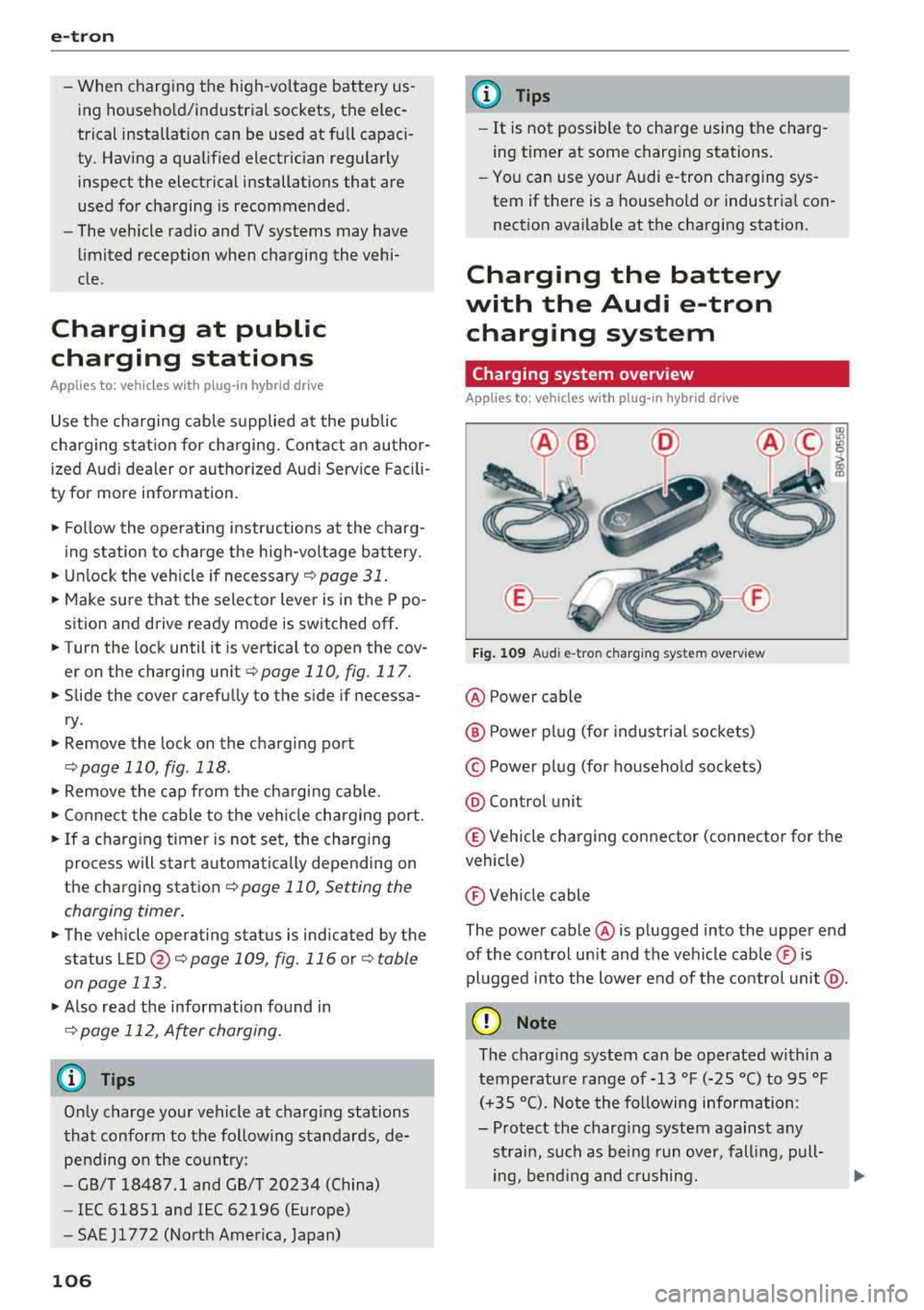
Fig. 109 A udi e-tro n charging sys te m overv iew
@ Power cable
@ P ower pl ug (for industrial sockets)
© Power plug (for household sockets)
@ Control unit
® Vehicle charging connector (connector for the
vehicle)
® Veh icle cable
The power cable @ is plugged into the upper end
of the control unit and the vehicle cable ® is
pl ugged into the lower end of the control unit @.
(D Note
The charg ing system can be operated within a
temperature range of-13
°f (-25 °C) to 95 °f
(+35 °C). Note the following information:
- Protect the charg ing system against any
st rain, such as being run over, falling, pull-
ing, bending and crushing.
Ill-
Page 109 of 404
LL co ..... N
" N ..... 0 N > co
-Using the control unit while operating the
charging dock*
c;, page 108 or charging
clip*
c;, page 108 is recommended .
-Do not immerse the control un it in water or
cover with snow or ice.
(D Tips
-Always place the Audi e-tron charging sys
tem on a secure surface when charg ing.
-To reduce the risk of overheat ing during op
eration, do not place the Audi e -tron charg
i ng system in direct sunlight for long peri
ods of time.
-If the temperature inside the control unit rises above 176 °F (80 °C), the charging
process will stop automatically unti l the
temperature decreases back down to the normal range.
Changing/attach ing the power/vehicle
cable
Ap plies to: ve hicles with p lug -in hybrid drive
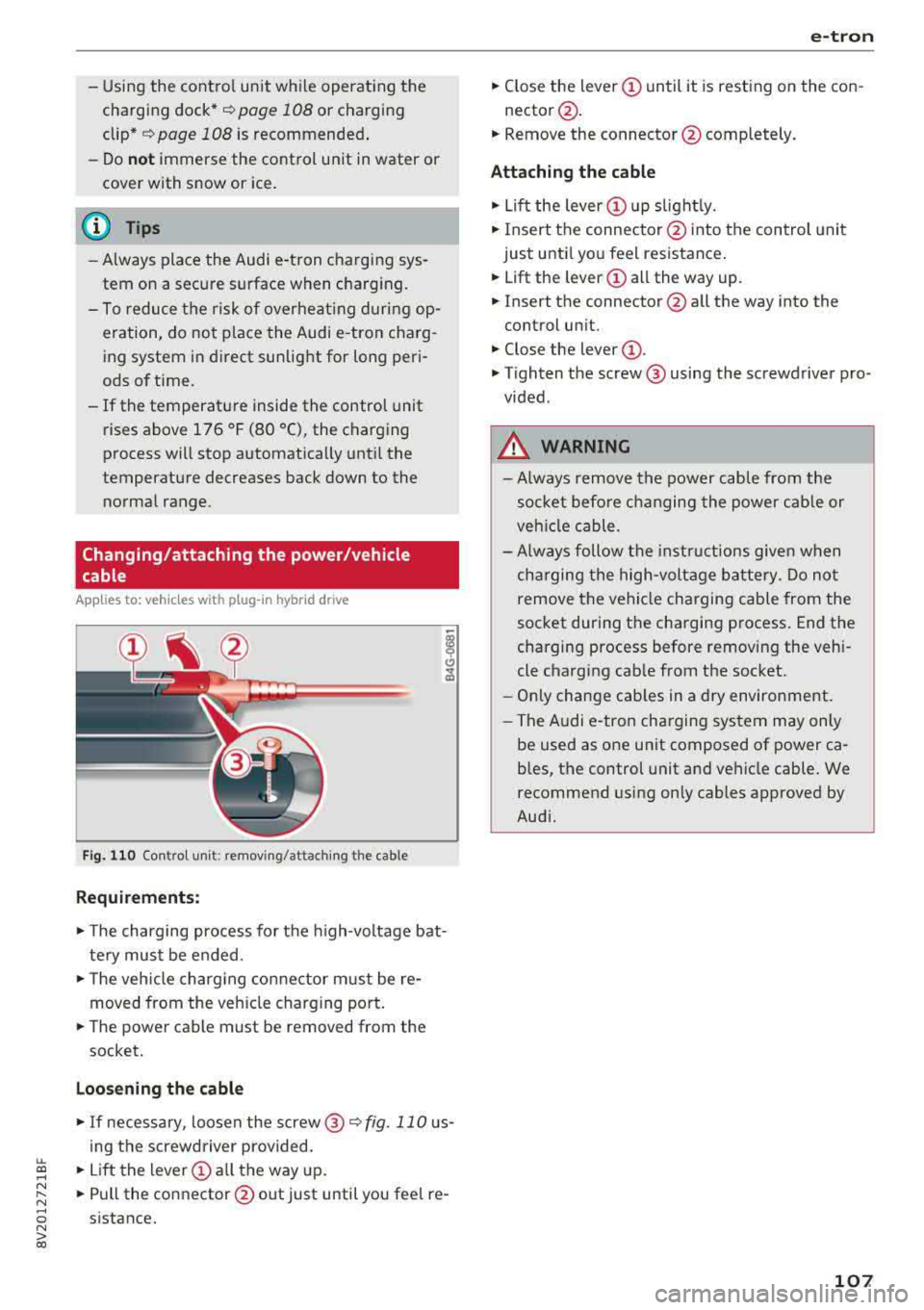
Fig. 110 Co ntro l u nit: remov ing/attac hing the cable
Requirement s:
.,. The charging process for the h igh-voltage bat
te ry must be ended .
.,. The veh icle charg ing connector m ust be re
moved from the veh icle charging port.
.,. The power cable must be removed from the
socket.
Loo sening the cable
.,. If necessary, loosen the screw @ c;, fig. 110 us
ing the screwdriver provided.
.,. Lift the lever CD a ll the way up.
.,. Pull the connector @out just until you fee l re
sistance.
e-tron
.,. Close the lever CD until it is resting on the con-
nector @.
.,. Remove the connector @completely.
Attachin g the cable
.,. Lift the lever CD up slight ly.
.,. Insert the connector @ into the control unit
just until you feel resistance .
.,. Lift the lever CD all the way up.
.,. Insert the connector@all the way into the
control un it.
.,. Close the lever CD -
.,. Tighten the screw @ using the screwdriver pro
vided.
A WARNING
-Always remove the power cable from the
socket before changing the power cab le or
veh icle cable.
-Always follow the instructions given when
charging the high-voltage battery. Do not remove the vehicle charging cable from the
socket during the charging process. End the
charging process before removing the vehi
cle charging cable from the socket.
-Only change cab les in a dry environment.
-The Audi e-tron charging system may only
be used as one unit composed of power
ca
b les, the control unit and vehicle cable. We
recommend using on ly cables approved by
Audi.
-
107
Page 113 of 404
u. 00 .-< N l' N .-< 0 N > 00
A./ appears in the box. This activation is sepa
rate from the Infotainment system settings in
the climate control menu
¢ page 116.
~ Press the I BACKI button.
~ To activate the desired timer, confirm the set
ting with the control knob.
A,/ appears in the
box .
Power save mode
Power save mode is automatically switched on
when the control unit has not been operated for
more than one minute. The
LEO @¢ page 109,
fig. 115 stays on. All other displays turn off.
~ To switch power save mode on or off, press the
~ button @¢page 109, fig. 115.
Power save mode ends automatically when the
vehicle charging connector is plugged into the ve
hicle.
The high-voltage battery is charging when the
LED@ blinks.
(D Tips
-Auxiliary climate control is powered electri
cally if you select climate control using the
charging timer. This may also be used in
confined spaces such as garages.
- Using the auxiliary air conditioning while
charging can also reduce the charge level of
the high-voltage battery.
- The high-voltage battery also charges in
power save mode.
- If the charging process is in progress, it will
not be interrupted when power save mode
switches on.
- The charging process can be interrupted at
any time. Press the active button on the ve
hicle to do this
¢page 109, fig. 116.
-The climate control output while charging
depends on the capacity of the electrical
connection. Additional information on cli
mate control can be found under
¢page 116.
e-tron
Setting the charging power level
App lies to : veh icles w it h pl ug-in hybr id drive
The control unit automatically recognizes the
voltage and the available current strength. You
can set whether you would like to charge with the
full or half of the charging power.
~ Press the I OKI@ ¢ page 109, fig. 115 button
on the control unit.
~ Enter the PIN if necessary.
~ POWER and SET PIN appear in the display
field.
~ Select POWER with the arrow button @.
~ Press the I OK I button @.
~ The charging power display appears. The cur
rent set value (50% or 100%) is marked with a
frame.
~ If necessary, change the setting using the ar
row button © to move downward or upward.
~ Press the I OK I button @.
(D Tips
- If a household socket is used for the charg
ing process, the charging power level is au
tomatically set to 100%. If multiple electri
cal consumers are connected to a circuit
'
the charging power may be limited to 50%
when charging with a household socket in
order to relieve the load on the electrical in
stallation.
- If an industrial socket is used for the charg
ing process, the charging power level is au
tomatically set to 50%. To receive the maxi
mum charging power, the value must be set
to 100% .
- A selected value remains set until the power
cable is connected again.
111
Page 119 of 404
air conditioning also switches o ff immedi
ate ly.
Setting the timer
A ppl ies to: ve hicles w ith plug- in hybrid drive
By setting the departure time, you determ ine
when your vehicle shou ld reach the desired tem
perature. You ca n set the timer in the auxiliary air
conditioning menu in the Infota inment system .
Auxili ary climate c ontrol : sett ing the t imer
~ Se lect : IMENUI button> Vehicle > left control
button >
Au xiliar y A/C > right control b utton>
Program t imer .
~ Set the time and the date.
~ Press the I BACKI button .
~ Confirm the setting w ith the contro l knob to ac-
t ivate the t imer.
A./ appea rs i n the box .
When you reprogram a t imer, the next calendar
day is automat ically entered in the Infota inment
system. To act ivate the aux iliary climate control
fo r the next day, confirm t he sett ing(./ in the In
fotainmen t system).
Error messages
ea -The high -voltage battery charge level is too
low to heat/air condition the veh icle using only
e lectr ic powe r.
If one of the follow ing symbols appears in the
d isplay, then you cannot switch on the aux iliary
climate cont rol:
,....c -There is a system ma lfunction.
Bu -The fue l level is too low.
(D Tips
- You can set the t imer a m axim um of seve n
days in advan ce.
- You can operate the clima te con trol in the
vehicle inte rior w hen the h igh -vo ltage bat
tery is charging using the c harging timer
¢ page 110 . The climate cont rol output de
pends on the powe r socket capac ity.
::li -M ake s ure the time and date match in the .-<
~ Infotainment system settings so that the
N 8 timer can function properly¢ page 243.
N > 00
e-tron
- T he auxiliary climate contro l can contin ue to
ru n after the departure time is reached .
Cleaning/maintenance
information
App lies to : vehicles wi th plug-in hybrid drive
When was hing your vehicle with a pressure wash
er, always follow the operat ing instruct ions pro
v ided w ith the pressure washer. This is especially
i mportant in regard to the pressu re and spray ing
distance. Do not direct cleaning spray at the
c h arg ing unit in the rad iator g rille or at t he
c h arg ing dock*/charging cl ip*. Keep a d istance of
at least 16 in (40 cm) .
Do not remove snow and ice with a p ressure
washe r.
Never use cone nozzles or high pressu re nozzles .
The water temperature must not be above 60
°C.
Remove contaminants on the Audi e -tron system
with a dry towel.
Remove contaminants on the charging dock*/
c h arg ing clip* wi th a wet towe l dampened w ith
alcohol-free clean ing solution .
& WARNING
=
-Never immerse the Audi e-tron charging
system and connectors in water.
-
- The A udi e -tron charging system must on ly
be cleaned when the control unit is com
p letely disconnected from the power supp ly
and from the vehicle.
@ Note
To dec rease the risk of discolora tion, never
clean the charging doc k*/charging clip * with
harsh cleaning sol utions or so lutions that
contain alcoho l.
117
Page 121 of 404
Outside mirrors
If yo u cannot see the traffic behind the tra iler
with the standard exterior mirrors, then you
must attach additiona l exterior mirrors . Adj ust
them so you have a sufficient visibility behind
you .
Exterior lighting
Follow the legal regulat ions regard ing the light
ing equipment on your trailer . Contact an author
ized Audi dealer or authorized Audi Service Facili
ty for more information.
Before starting to drive, check all lighti ng equip
ment on the hitched trailer.
The headlight range contro l adjusts automatical
l y to the light range of the headl ights.
Safety chains
Make sure the safety chains are correctly applied
when pull ing a trailer . The chains should hang
enough so that the trailer can dr ive around
curves. However, they must not touch the
g ro und .
(D Tips
-Use chocks whe n parking on incl ines if the
trailer is load ed.
- We recommend also hav ing the veh icle in
spected between the inspect ion intervals if
you are towing a trailer frequently.
- Avo id driving with a trailer during the vehi
cle break- in period .
Driving with a trailer
Driving with a trailer requires extra caution.
Speed
Adhere to the legal speed limits. Follow the legal
regulations specific to the country.
As the speed increases, the driving stability of
the trai ler decreases. Therefore you should not
exceed the maximum legal speed limit when
u. there are unfavorable road, weather and/or wind 00
~ conditions . This especially applies when driving
~ downhill.
0 N > 00
Trailer towing
You m ust always reduce your speed as soon as
you notice even the slightest swinging motion of
the tra iler. Never try to "stra ighten out" the tra il
er by acce lerating.
T he weight distribution is very poor if the vehicle
is empty and the trai ler is loaded . However if you
must drive under these circumstances, then dr ive
especially slowly .
Brakes
Brake in a timely manner. Downshift before driv
ing down hill so that t he engine can assist with
braking ~.&. .
When using a trailer w it h overrun brakes, first
brake gently then quickly. This reduces the r isk of
jerking while braking if the trailer wheels lock up .
Engine coolant temperature
Pay attention specifically to the coo lant tempera
ture display when there are high outside temper
a tur es, and when driving on long inclines
~page 11. Shift to a hig her gear in a timely man
ner .
A WARNING
= -
Constant braking causes the brakes to over-
heat and substantially reduces braking per
formance, increases braking distance or caus
es complete failure of the brake system.
119
Page 123 of 404
u. 00 .-< N l' N .-< 0 N > 00
the cruise control from braking. This is be
cause p ressing the acce lerato r pedal over
rides the cruise contro l system.
- If a brake system ma lf u nction such as over
heating occurs when the cruise contro l sys
tem is switched on , the braking function in
the system may be switched off . The rest of
the cr uise control system f unctions remain
act ive as long as
the @;(i)~14 (USA models) /
lll (Can ada models) indicato r light is o n.
@ Note
Before driving downhill a long distance on a
s teep hill, decrease yo ur speed and select a
lower gear. This makes use of the eng ine
b rak ing effect and re lieves the bra kes.
(D Tips
The b rake ligh ts turn on w hen the brakes a re
act ivated .
Changing the speed
Applies to: vehicles with cruise control system
"'T o inc rease o r decrease the speed in incre
ments,
tap t he lever in the 0 10 d irec tion
Q page 12 0, fig. 1 21 .
.. To increase or decrease the speed quickly, hold
the leve r in the 0 / 0 di rect io n until t he de
s ired speed is reached.
Overriding the speed
Applies to: vehicles with cruise control system
You can press the accelerator pedal to increase
your speed, for example if you want to pass someo ne. The s peed yo u set ea rlier will resume
as soo n as yo u release the accelerator pedal.
H owever, if you are driving cons iderably faster
tha n the stored s peed for a long period of time,
the c ruise cont rol system will tempora rily switch
off.
Th e@;(l)~i4 (USA models) 1B (Canada mod
e ls) indica to r li ght in the ins trumen t cluste r
turns off and t he stored s peed is main taine d.
A ss istance systems
Preselecting a speed
Applies to: vehicles with cruise control system
You can pre-select your desired speed when the
vehicle is stationary .
"'Switch the ignit ion on.
"' Pull the lever into pos ition (D Q page 120 ,
fig . 121 .
.. To increase or decrease the speed, tap the lever
in the
0 10 d irection .
This function makes it possible, for example, to
save the speed you want before driving on the highway . Once on the highway, activate the
cr uise co ntro l system by p ulling the lever towa rd
t h e position
(D .
Switching off
Applies to: vehicles with cruise control system
Deactivating temporarily
"' Press the br ake pe dal, or
"' Press the lever into position @(not clicked in to
p lace)
Qpage 1 2 0, fig. 1 21, or
Switching off completely
"' Press the lever into pos ition @(clicked into
p lace), o r
"'Swi tch the ignit ion off.
T he speed you stored will be ma intained if the
cr uise co ntro l has been switche d off tempora rily.
T o resume the sto red speed, re lease the br ake
ped al and pull the lever to posi tion
(D .
Switch ing the ignition off w ill erase the stored
speed.
Switching off automatically
[~;(1)~14 ( USA models )/EI (Canada models )
Crui se control syst em: currently unavailable .
Se e owner's manual
The cruise cont rol system was automatically
turned off because the system has detected a
malfu nction th at is impa iring the c ruise control
func tion. Try switching the cruise contro l system
o n aga in later .
.,.
121