ignition AUDI S8 2008 Repair Manual
[x] Cancel search | Manufacturer: AUDI, Model Year: 2008, Model line: S8, Model: AUDI S8 2008Pages: 404, PDF Size: 52.7 MB
Page 136 of 404
___ O_ n_t_ h_ e_ ro_ a_d __________________________________________________ _
Electromechanical parking brake
Operation
The electromechani ca l parking brake replaces the hand
brake.
F ig. 148 C enter
co nso le: P arki ng b ra ke
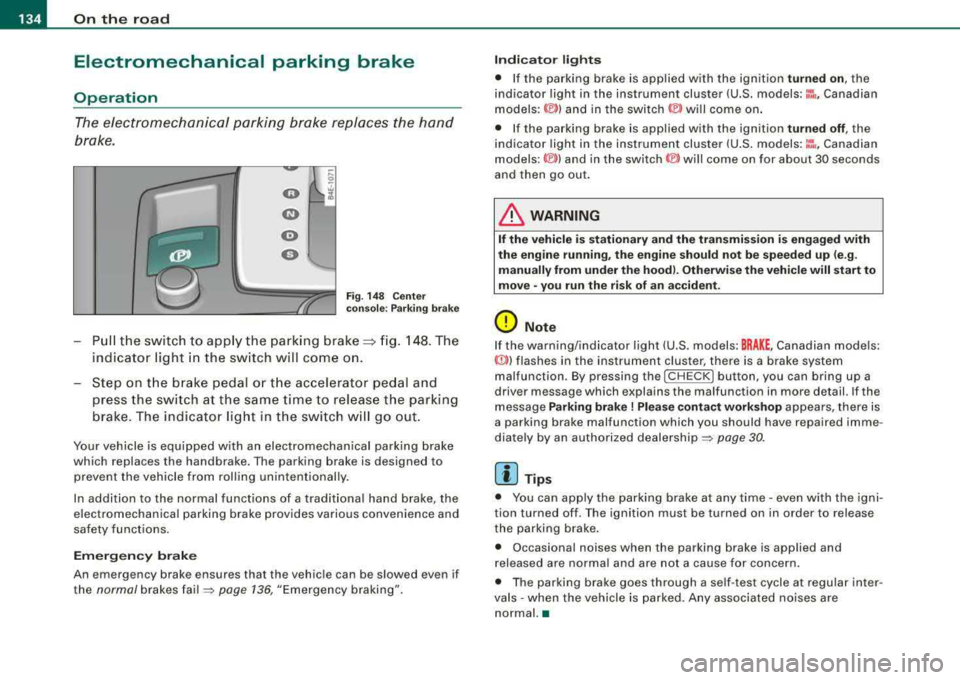
Pu ll the switch to app ly the parking brake==> fig. 148. The
indicator light in the sw itch will come on.
Step on t he brake pedal o r th e acce lerator pedal and
press th e switch at the s am e time to rel eas e the parking
brake . The indicator light in t he switch w ill go out .
Your vehicle is equ ipped w ith an electromechanical parking brake
which replaces the handbrake . The parking brake is designed to
prevent the vehicle from rolling unintentionally .
In addition to the norma l functions of a trad itiona l hand brake, the
e lectromechanical parking brake provides various convenience and
safety functions.
Em erg ency brake
An emergency brake ensures that the vehicle can be slowed even if
the
normal brakes fa il=> page 136, "Emergency braking".
Indi cat or light s
• If the pa rking brake is app lied with the ignition turned on , the
indicator light in the instrument cluster (U.S. models:
::i , Canadian
models: ©) and in the switch © will come on .
• If the parking brake is applied with the ignition
tu rn ed off , the
indicator light in the instrument cluster (U .S .
models :~~ . Canadian
models :(®) ) and in the
switch (®) will come on for about 30 seconds
and then go out.
& WARNING
I f the vehicle i s stati onary and the transmis sion i s engaged with
the eng ine runnin g, the engine should n ot b e speeded up (e .g .
manu ally from under the ho od). Otherw ise th e vehi cle w ill start to
mo ve
-you r un the ris k of an ac cident .
0 Note
If the warning/indicator light (U .S . models: BRAKE , Canadian models:
«D>) flashes in the instrument cluster, there is a brake system
malfunction . By pressing the
I CH ECK] button , you can bring up a
driver message which explains the malfunction in more detail. If the
message
Parking brake! Plea se conta ct w ork shop appears, there is
a parking brake malfunction which you should have repaired imme
diate ly by an authorized dealership =>
page 30.
[ i] Tips
• You can app ly the parking brake at any time -even with the igni
tion turned off . T he ignition must be turned on in order to release
the parking brake.
• Occasional noises when the parking brake is applied and
released are norma l and are not a cause for concern .
• The parking brake goes through a se lf -test cycle at regular inter
va ls
-when the vehicle is parked. Any associated no ises are
normal. •
Page 137 of 404
On the road -----------------
Parking
To prevent a parked vehicle from rolling away, there are a
few things you should do.
When you park your vehicle, do the following
- Stop the vehicle using the brake pedal.
- Pull the switch to apply the electromechanical parking
brake.
- Move the selector lever into the
P position => &.
- Switch off the engine and remove the ignition key from
the ignition lock.
When you park your vehicle on hills, do the
following
- Stop the vehicle using the brake pedal.
- Pull the switch to apply the electromechanical parking
brake.
- If you are parking headed
downhill, turn the front wheels
toward the curb.
- If you are parking headed
uphill, turn the front wheels
awayfrom the curb.
- Move the selector lever into the
P position.
- Switch off the engine and remove the ignition key from
the ignition lock.
& WARNING
This is how you can reduce the risk of injury when leaving your
vehicle.
Controls and equip ment
&, WARNING (continued)
• Never park the vehicle where it can come in contact with dry
grass, spilled fuel or any other flammable materials.
• When parking on hills, always turn the wheels so that the front
wheels will first roll into the curb, if the vehicle should start to roll.
• Never allow anyone -especially small children -to remain
in the
vehicle when it is locked. Locked doors make it more difficult for
rescuers to access the passenger compartment in the event of an
emergency. Danger to life!
• Never leave children unsupervised in the vehicle. Children
could release the parking brake or move the gearshift lever out of
gear. The vehicle could start to roll away and cause an accident.
• No matter what the season is, the temperature in a parked
vehicle can reach dangerous levels.
0 Note
• Please exercise care when you park your vehicle in parking areas
with parking barriers or curbs . Parking barriers and curbs vary in
height and could damage your bumper and related components as
the front of your vehicle moves over a barrier or curb that is too high, as you park or as you back out of a parking spot. In order to be
sure that no such damage can occur, you may wish to stop short of
having the front tires of your car touch the parking barrier or curb.
• Please also exercise exceptional care when you drive up or down
steep ramps or drive over curbs or other obstacles, for which the
vehicle is not designed , because components of the vehicle close to
the ground, such as bumper covers, spoilers and suspension and
exhaust system components, may become damaged. •
Page 140 of 404
___ o_ n_ t_
h _e _ ro_ a_d __________________________________________________ _
&, WARNING (continued)
• Please note that inadvertently "resting" your foot on the accel
erator pedal causes the cruise control not to brake . This is because
the cruise control is overridden by the driver's acceleration.
[ i] Tips
The brake lights illumin ate as soon as the brakes decelerate
automatically. •
Changing speed
-Press lever@in the 0 or Q direction=> page 137,
fig. 149 to increase or decrease your speed.
-Release the lever to save that speed.
Change speed in increments of 1 mph (1 km/h) by lightly pressing
the lever . If you keep the lever pressed down, you will alter your
speed in 5 mph (10 km/h) increments.
You can also press the accelerator pedal down to increase your
speed, e.g. if you want to pass someone. The speed you saved
earlier will resume as soon as you release the accelerator pedal.
If, however, you exceed your saved speed by 5 mph (10 km/h) for
longer than 5 minutes, the cruise control will turn off temporarily.
The green symbol in the
display=> page 137, fig . 150 is replaced
with a white symbol. The saved speed remains the same. •
Presetting your speed
You can preset your desired speed while the vehicle is not
moving.
-Turn on the ignition .
-Pull lever@ into position G) => page 137, fig. 149 .
-Press the lever in the 0 or Q direction to increase or
decrease your speed.
-Release the lever to save that speed.
This function makes it possible, for example, to save the speed you
want before driving on the highway. Once on the highway, activate
the cruise contro l by pulling the lever toward
G). •
Switching the system off
Temporary deactivation
-Press the brake pedal, or
-Press the lever @into position ® (not clicked into place)
=> page 137, fig. 149, or
-Drive for longer than 5 minutes at more than 5 mph
(10 km/h) above the stored speed.
Switching off completely
-Press lever@ into position ® (clicked into place), or
-Switch the ignition off.
The system retains the saved speed if you deactivate the cruise
control temporarily . To resume the saved speed , release the brake
pedal and pull the lever to position
G) .
Switching the ignition off erases the saved speed.
& WARNING
You should only return to the saved speed if it is not too fast for
the current traffic conditions -risk of an accident!
•
Page 167 of 404
_________________________________________________ A_ u_t_ o_ m_ a_t _i _c _ t
_ ra_ n_s_ m __ is_s_ io_ n _ ___.1111
Select R only when the vehicle is at a full stop and the engine is
running at idle
speed => & in "Driving the automatic transmission"
on
page 763 .
Before you move the selector lever to R, press both the button in the
handle of the selector lever
and the brake peda l at the same time .
When the ignition is on, the backup lights illuminate when the selector lever is moved into
R.
N -Neutral
The transmission is in neutral in this position. Shift to this position
for standing with the brakes applied =>
page 165.
When the vehicle is stationary or at speeds below 3 mph (5 km/h),
you must always apply the footbrake before and while moving the lever out of
N.
D -Normal position for driving forward
Position Dis for normal city and highway driving. It ranges from zero
to top speed and all six gears shift automatically, depending on
engine load, driving speed and automatically selected shift
programs.
When the vehicle is stationary or at speeds below 3 mph (5 km/h),
you must always apply the foot brake before and while moving the
lever to
D out of N .
In certain circumstances it may be advantageous to temporarily
switch to the manual shift program to manually select gear ratios to
match specific driving
conditions => page 167.
S -Sport position
Select this position for sportier performance. In this position, the
transmission will not upshift as soon, allowing the vehicle to use the increased power available at higher engine speeds to achieve live
lier acceleration.
When the vehicle is stationary or at speeds below 3 mph (5 km/h),
you must always apply the foot brake before and while moving the
lever to
S out of N.
Contro ls a nd eq uip
ment
& WARNING
Read and follow all WARNINGS => & in "Driving the automatic
transmission " on
page 163.
0 Note
Coasting downhill with the transmission in N and the engine not
running will result in damage to the automatic transmission and
possibly the catalytic converter. •
Automatic Shift Lock (ASL)
Automatic shift lock prevents you from accidentally
shifting into a forward gear or into reverse, thus causing
the vehicle to move unintentionally.
Fig . 185 Shift gate
selector lever lock
positions and interlock
button highlighted
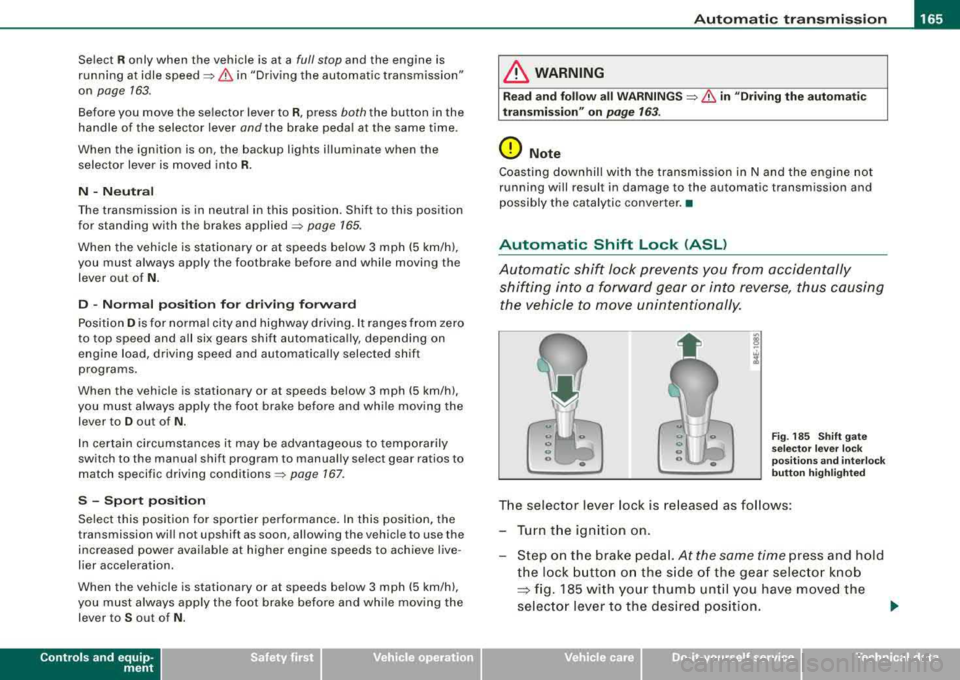
The selector lever lock is released as follows :
Turn the ignition on.
Step on the brake pedal.
At the same time press and hold
the lock button on the side of the gear selector knob
=:> fig. 185 with your thumb until you have moved the
selector lever to the desired position.
~
Vehicle care I I Technical data
Page 168 of 404
___ A_ u_ t
_ o_ m_ a_ t_ i_ c _ t_r _a _n_ s_ m_ is_ s_io _ n ________________________________________________ _
Aut om at ic se lec tor l ever lock
The se lector lever is locked in the P and N pos itions when the ign i
tion is turned on. To move the lever from these positions the driver
must depress t he brake peda l. As a reminder to t he driver, the
follow ing warn ing appears in the instrument c luster disp lay when
the selector is in
P and N :
When stationar y appl y foot brak e while selecting gear
A time de lay e lement prevents the selector lever from lock ing when
it is moved through the
N position (going from R to D l. The locking
e lement will lock the selector lever if the lever is left in N (Neutral)
for more than approximate ly 1 second, without the brake peda l
being pressed.
At speeds above about 3 mph (5 km/h) the Automatic Shift Lock is
automatically deactivated in the
N pos ition .
Interlock button
The lock button on t he se lector lever prevents the lever from being
accidentally shifted into certain positions. Pressing this button
deactivates the selector lever lock. Depending on the direction of
the shift, the selector lever locks at different positions . The positions
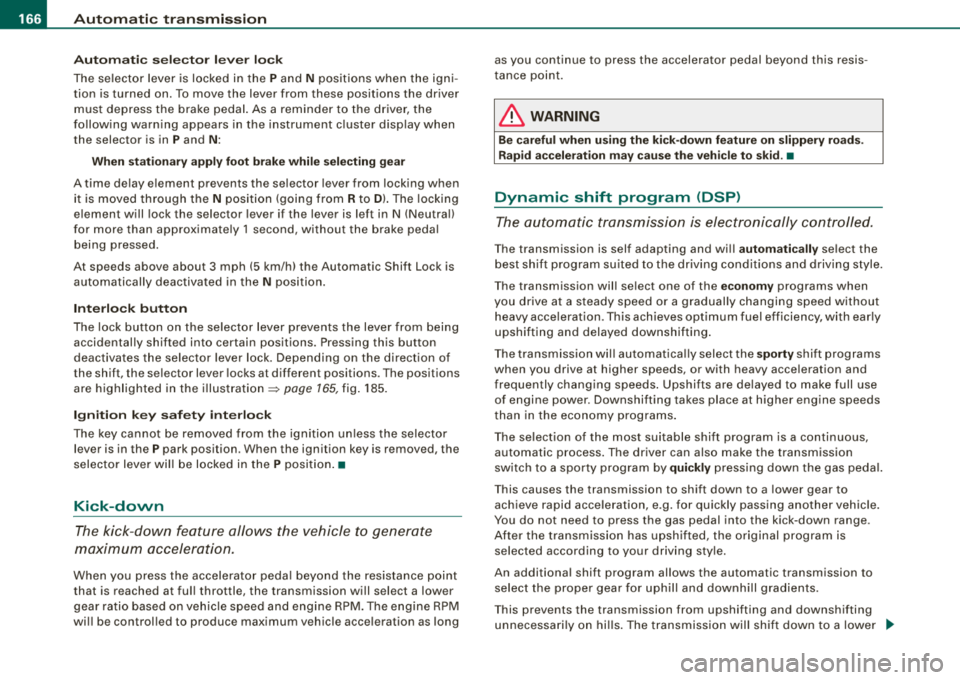
a re h igh lighted in the
il lustration => page 165, fig. 185.
Igniti on k ey sa fe ty in te rlock
The key cannot be removed from the ignition un less the selector
lever is in the
P park position. When the ignition key is removed, the
selector leve r wil l be locked in the
P posi tion .•
Kick-down
T he kick-down feature allows the vehicle to generate
maximum acceleration.
When you press t he accelerator peda l beyond the resistance point
that is reached at ful l throttle, the transmission will select a lower
gear ratio based on vehic le speed and engine RPM. The engine RP M
wi ll be control led to produce maximum vehicle acce leration as long as you continue to press the accelerator pedal beyond this resis
t ance po int.
& WARNING
Be careful when u sing th e kick -down feature on slippery road s.
R apid ac cel erat ion m ay ca use th e ve hic le to skid . •
Dynamic shift program (DSP)
T he aut omatic transmission is electronically controlled.
T he transmission is self adapting and wi ll autom ati ca lly select the
best shift program suited to t he driving condi tions and drivi ng s tyle.
The transmission will se lect one of the
eco nom y programs when
you drive at a steady speed or a gradual ly changing speed without
heavy acce leration . T his achieves optimum fuel efficiency, with ear ly
upshifting and delayed downshifting .
T he trans mission wil l automat ica lly select the
s porty shift programs
when you drive at higher speeds, or with heavy acce leration and
frequen tly changing speeds . Upshifts are de layed to make full use
of engine power. Down shifting takes place at higher engine speeds
t han in the economy programs .
The selection of the most suitab le shift program is a continuous,
automatic process . The driver can also make the transmission
switch to a sporty program by
quickl y pressing down the gas peda l.
T his causes the transmission to shift down to a lower gear to
achieve rapid acceleration, e.g . for quickly passing ano ther veh ic le .
You do not need to press the gas pedal into the kick-down range .
After the transmission has upshifted, t he original program is
selected according to your driving style.
An additional shift program allows the automatic transmission to select the proper gear for uph ill and downh ill gradients.
T his prevents the transmission from upshifting and downshifting
unnecessa rily on hi lls. The transmiss ion will shift down to a lower
~
Page 171 of 404
_______________________________________________ A_ u_t _o _m_ a_ t_ i_ c _ t_r _
a _n _s_ m_ i_ s _ s_ i_ o _ n _ ___.ltllll
Fig . 190 Emergency
release for selector
lever
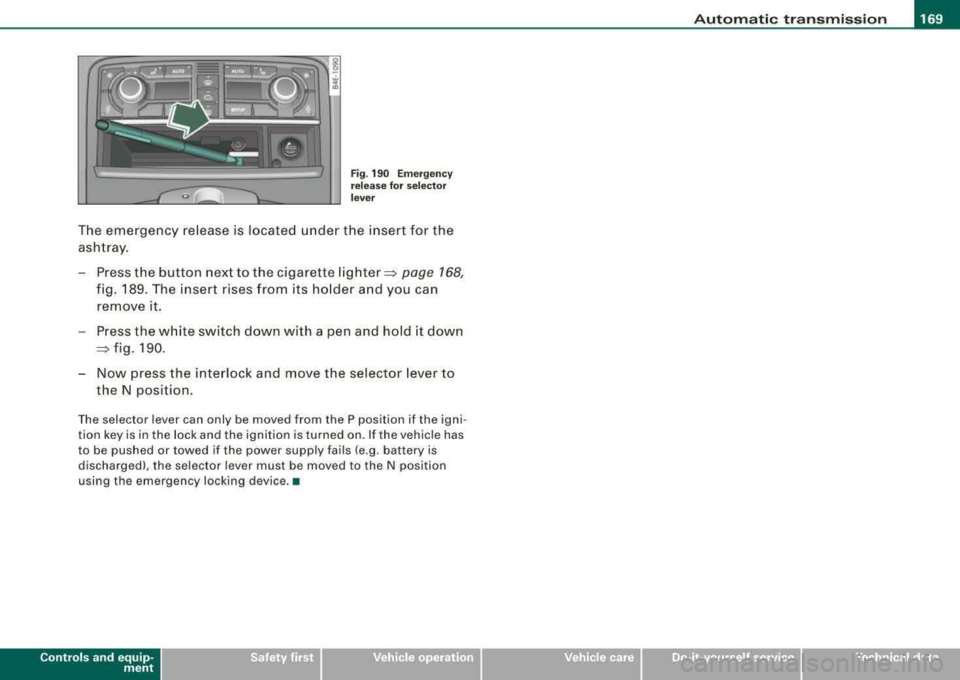
The emergency release is located under the insert for the
ashtray.
- Press the button next to the cigarette
lighter~ page 168,
fig. 189. The insert rises from its holder and you can
remove it.
- Press the white switch down with a pen and hold it down
~ fig. 190.
- Now press the interlock and move the selector lever to
the N position.
The selector lever can only be moved from the P position if the igni
tion key is in the lock and the ignition is turned on. If the vehicle has
to be pushed or towed if the power supply fails (e .g . battery is
discharged), the selector lever must be moved to the N position
using the emergency locking device. •
Controls a nd eq uip
ment Vehicle care I I irechnical data
Page 173 of 404

Advan ce d Parkin g Sy ste m Ill
-------------~--
-Press the sw it c h P111! in t he cen ter console =:> page 170,
fig. 192 to activate the Aud i pa rking system manually.
Activation of the acoustic park ing system is confirmed by
a brief acknowledgement sound. The indicator light in
the switc h lights up.
De activation
-If yo u drive forwa rds faster t han approx. 6 mph (1 0 km/h},
or
-if you switc h the ignition off, the entire acoustic parking
assist is automatically deactivated, or
-you can press the switch P111A. in the center console
=:> page 170, fig. 192 to deact ivate the Audi parking
system. The indicator light in the switch goes out.
You have to turn on the acoustic parking assist manuall y if you wish
to park the vehicle forwards or if you wish to approach an obstacle
forwards and want a distance warning .
The range at whic h the sensors start to measure is about:
Front
Rear
W arn in g tone s side
cen ter
side
cen ter 3
ft
(0 .90 ml
4f t
(1 .20 ml
2 ft (0.60 ml
Dis tance wa rn ing is given by chimes which are generated by a
signal generator . The volume and the pitch of the chimes can be
adjusted in the MM I
=> page 180.
Mute
I n t he case of vehic les with automatic transmission, an acoustic
distance warning is discontinued when the transmission selector
Controls and equip ment lever is moved to the P position
. However, the system remains
active . As soon as the selector lever is moved fro m the
P pos it ion
and the vehicle approaches an obstacle, the acoustic distance
warning resumes.
Dr iving fo rw ard /b ac kw ard
Dista nce warn ing w hen driving fo rward/ backward is based on
detection of an obstac le in the range of the parking assist. As the
distance decreases, t he time interval betwee n the aud ible t ones
becomes shorter.
When the distance is less than approx .
1 ft (0.30 m), the tone
becomes cont inuous. At th is po int you shou ld stop backing up or
driving forward .
I f the distance to an obstacle re m ains the same, the vo lume of the
distance warning is gradua lly reduced after about
4 seconds (does
not app ly to the zone for the continuous tone). If you start to
approach the detected obstacle again, the distance warning will
sound at the norma l volume again.
P arking
When you se lect another gear when park ing (e .g . reverse/forwa rd),
the warning tones are temporarily suppressed, but the visua l
display remains on the MMI display . If you start approaching a
detected obstac le again, the distance warning wi ll sound at the
normal volume again .
Vi su a l displa y
The segments on t he MMI d isp lay indicate a change in the distance
between the vehicle and an obstacle . The number of segments
displayed depends on the obstac les in front of or behind the
vehic le. The c loser the vehic le comes to the obstacle, the closer t he
segments approach the
vehic le => page 170, fig. 193. When the
seg ment before last is d isplaye d, the ve hicle has reac hed the coll i
sion zone. At this point you should stop backing up or driving
f orward
=> & . ~
Page 190 of 404
___ A_ d_a_ p=--- t_iv _ e_ A
_ i_ r _ S_ u_s--= p'--- e_n _ s_ i
_ o _ n _____________________________________________ _
Setting the Driving Modes
The driving modes are set in MM/.
F ig . 2 10 MM I d is pl ay:
Setti ngs
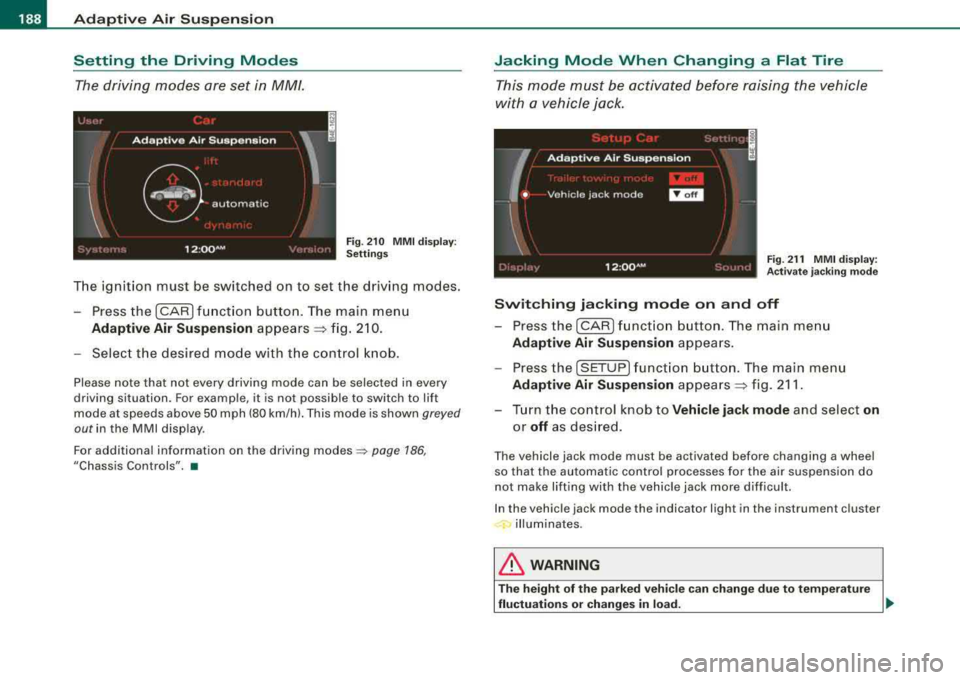
The ignition must be switched on to set the driving modes .
- Press the (CAR] f unction button . The main menu
Ad aptive Air Suspension appears ~ fig. 2 10.
- Select the desired mode with the c ontrol k nob .
Please note that not every driving mode can be selected in every
driving situation. For examp le, it is not possible to switch to lift
mode at speeds above 50 mph (80 km/h). This mode is shown
greyed
out in the MMI disp lay .
For additional information on the driving
modes ~ page 186,
"Chassis Controls". •
Jacking Mode When Changing a Flat Tire
This mode must be activated before raising the vehicle
with a vehicle jack .
Fig. 21 1 MMI displ ay:
Ac tivat e ja ckin g m od e
Switching jacking mod e on and off
- Press the
I CAR ) fu nct io n bu tton. The main me nu
Adaptive Air Su spen sion appea rs .
- Press the
[SETUP] f unct io n button . The main menu
Adaptive Air Su spen sion appea rs ~ fig. 211 .
- Turn the co ntrol knob to
Vehicle jack mode and select on
or off as des ired .
The vehicle jack mode must be activated before changing a wheel
so that the automatic control processes fo r the air suspension do
not make lifting with the vehicle jack more difficult.
In the vehic le jack mode the indicator light in the instrument cluster
illuminates.
& WARNING
T he height of the p arked vehic le c an change du e to te mpera ture
fluctu ation s or change s in lo ad.
~
Page 194 of 404
--~H~o~m~e:_!L~i~n~k~®~ ----------------------------------------------
Fig. 214 Front bumper,
driver side: location of
transmitter unit
Phase 1: programming the overhead keypad
1. Make sure your vehicle is w ithin operat ing range of the
remote controlled garage door opener .
2. Set the parking
brake ::::,&, in "General information".
3. Turn the ignition on. Do not start the engine!
4. Press and hold the two outside Homelink ® buttons
(D
and @ for approxim~tely 20 sec _onds until indicator
light @::::,
page 191, fig. 213 begins to flash. Then
release both buttons. Do not hold the buttons for longer
than
30 seconds.
- This procedure only needs to be performed
once. It
erases the factory-set default codes and does not have to
be repeated to program add itional remote controls.
5. Press and hold the Homelink ® button
(D , ® or @ until
the indicator light @starts flashing
slowly. Release the
button.
- The system will remain in programming mode for 5
minutes.
Go to the front of the vehicle and proceed with
phase 2.
Phase 2:
programming the bumper mounted transmitter
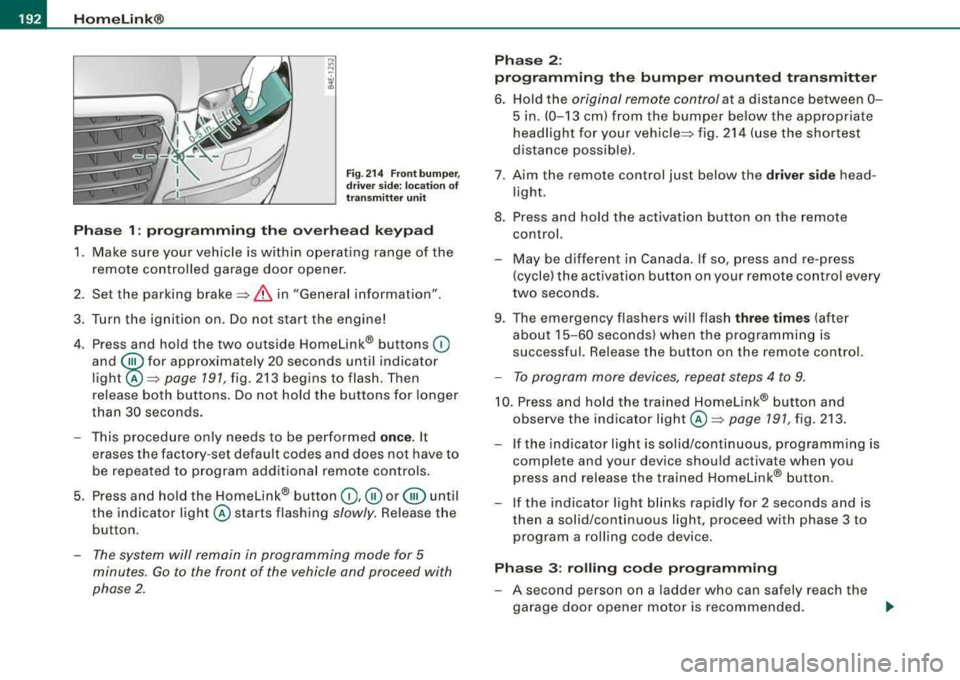
6. Hold the original remote control at a d istance between 0 -
5 in. (0-13 cm) from the bumper below the appropriate
headlight for your
vehicle ::::, fig. 214 (use the shortest
distance possible).
7 . A im the remote control just below the
driver side head
l ight.
8. Press and hold the activation button on the remote control.
- May be different in Canada. If so , press and re-press
(cycle) the activation button on your remote control every
two seconds .
9. The emergency flashers will flash
three times (after
about
15-60 seconds) when the programming is
successful. Release the button on the remote control.
- To program more devices, repeat steps 4 to 9.
10. Press and hold the trained Homelink® button and
observe the indicator
light @=:> page 191, fig. 213.
If t he indicator light is solid/continuous, programming is
complete and your device should activate when you
press and release the tra ined Homelink® button.
-If the indicator light blinks rapidly for 2 seconds and is
then a solid/continuous light, proceed with phase 3 to
program a roll ing code device.
Phase 3: rolling code programming
-A second person on a ladder who can safely reach the
garage door opener motor is recommended.
..,
Page 212 of 404
___ s_a_ f_ e_ t-= y_ b_e_ l_ t _s _______________________________________________ _
-Make sure that your passengers also b uckle up and pro p
erly wea r th eir sa fety be lts.
Protect children wit h a c hild restraint sys tem appropriate
for the size and age.
The warning light ~ in the instrument cluster lights up when the
ignition is switched on as a reminder to fasten the safety belts. In
addition , you will hear a warning tone.
After the ignition is switched on, the warning light in the instrument cluster will a lways come on for about 6 seconds and if the driver has
not fastened the safety belt, a warning tone will also sound for
about 6 seconds . As soon as the driver has fastened the safety belt,
the warning tone will stop and the warning light will go out .
If the driver or front seat passenger have not buckled -up within
about 10 seconds after the warning tone has stopped and the
vehicle is moving faster than about 15 mph, the warning tone will
sound again for about 6 seconds and then s top for 24 seconds and
then repeat this reminder sequence for a maximum of 2 minutes. At
speeds be low 5 mph, the warning to ne will not sound.
Fa sten your safe ty belt and make su re that your p assengers al so
properl y put on their s afet y belts .
& WARNING
• Safety belts are the single mo st effective mean s available to
reduce th e risk of ser ious in jur y a nd death in aut omobile acci
dent s. For your prote ction and that of your pas sengers , alway s
c orrectly wear safety belt s when t he v ehicle is moving .
• Failure t o pay attention to th e warning light that come on,
c ould lead to per sonal injur y.•
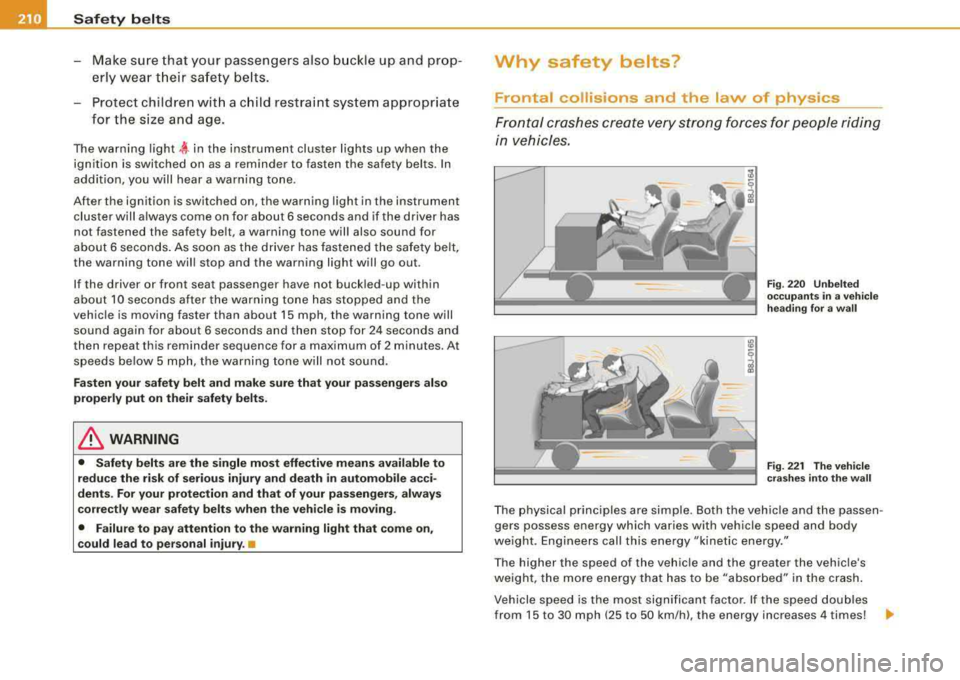
Why safety belts?
Frontal collisions and the law of physics
Frontal cras hes cre ate very strong forces for people ridi ng
in vehicles.
F ig . 22 0 Unbel te d
occ upants in a ve hicle
h ead ing for a w all
F ig . 22 1 The vehi cle
c ras hes in to th e wa ll
The physical principles are simple. Both the vehicle and the passen
gers possess energy which varies with vehicle speed and body
we ight . Engineers call this energy "kinetic energy ."
T he higher the speed of the vehicle and the greater the vehic le's
we ight, the more energy that has to be "absorbed" in the crash .
Vehicle speed is the most signi fican t factor. If the speed doubles
from 15 to 30 mph (25 to 50 km/h), the energy increases 4 times!
.,