suspension AUDI S8 2010 User Guide
[x] Cancel search | Manufacturer: AUDI, Model Year: 2010, Model line: S8, Model: AUDI S8 2010Pages: 384, PDF Size: 90.95 MB
Page 179 of 384
____________________________________________ A_ d_a_ p ,_ t_iv _ e_ A _ i_ r _ S_ u_s_, p __ e_n _ s_ i _o_ n __ ffllll
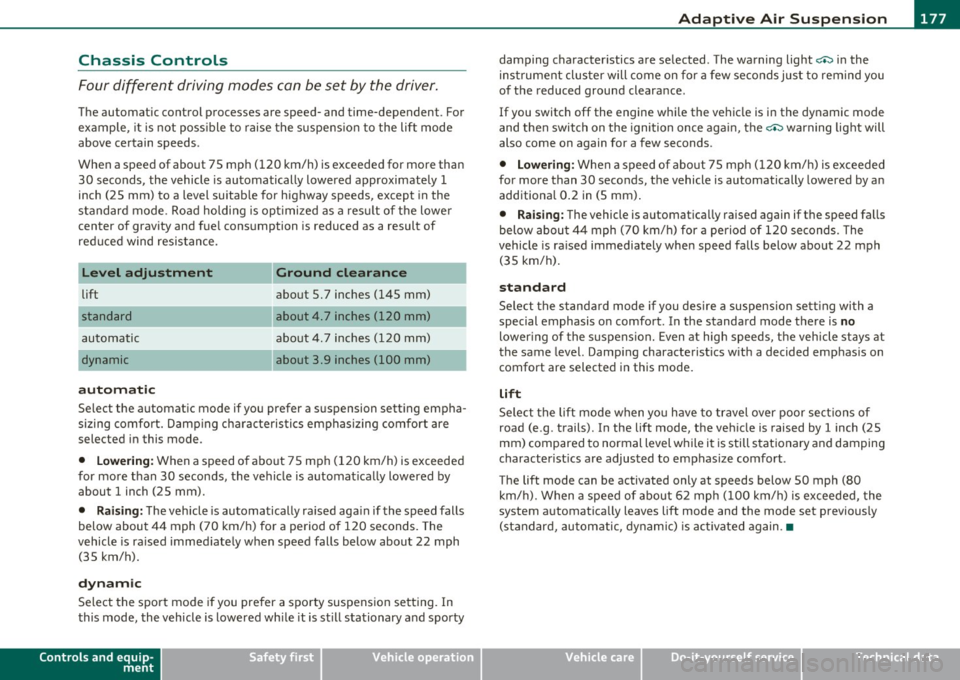
Chassis Controls
Four different driving modes can be set by the driver .
The automatic control processes are speed- and time-dependent . For
example, it is not poss ible to raise the suspension to the lift mode
above certain speeds .
When a speed of about 75 mph (120 km/h) is exceeded for more than 30 seconds, the vehicle is automatically lowered approximately 1
inch (25 mm) to a level suitable for highway speeds, except in the
standard mode . Road ho ldi ng is opt imized as a result of the lowe r
center of gravity and fue l consumption is reduced as a result of
reduced wind resistance.
Level adjustment
lift
automatic
dynamic
automatic Ground clearance
about 5. 7 inches (145 mm)
about
4. 7 inches (120 mm)
about 4. 7 inches (120 mm)
about 3.9 inches (100 mm)
Select the automatic mode if you prefer a suspension setting empha
sizing comfort. Damping characteristics emphasizing comfort are
selected in this mode .
• Lowering : When a speed of about 75 mph (120 km/h) is exceeded
for more than 30 seconds, the vehicle is automatically lowered by about 1 inch (25 mm).
• Raising: The vehicle is automatically ra ised aga in if the speed falls
below about 44 mph (70 km/h) for a period of 120 seconds. The
vehicle is ra ised immediately when speed falls below about 22 mph
(35 km/h).
dynamic
Select the sport mode if you prefer a sporty suspension setting . In
this mode, the vehicle is lowered wh ile it is st ill stationary and sporty
Controls and equip
ment Safety first
damping characteristics are selected
. The warning light c.::> in the
instrument cluster will come on for a few seconds just to remind you
of the reduced ground clearance.
If you switch off the engine whi le the vehicle is in the dynamic mode
and then switch on the ignition once aga in, the
c.::> warning light will
also come on again for a few seconds.
• Lowering : When a speed of about 75 mph (120 km/h) is exceeded
for more than 30 seconds, the vehicle is automatically lowered by an
additional 0.2 in (5 mm) .
• Raising: The vehicle is automatically raised again if the speed falls
below about 44 mph (70 km/h) for a period of 120 seconds. The
vehicle is ra ised immediately when speed falls below about 22 mph
(35 km/h).
standard
Select the standard mode if you desire a suspension sett ing with a
special emphasis on comfort . In the standard mode there is
no
lower ing of the s uspens ion. Even at high speeds, the vehicle stays at
the same level. Damping characteristics with a decided emphasis on
comfort are selected in this mode.
lift
Select the lift mode when you have to travel over poor sections of
road (e .g . trails) . In the lift mode, the vehicle is raised by 1 inch (25
mm) compared to normal level while it is still stationary and damping
characterist ics are adjusted to emphasize comfort .
The lift mode can be activated only at speeds below 50 mph (80 km/h). When a speed of about 62 mph (100 km/h) is exceeded, the
system automatica lly leaves lift mode and the mode set previously
(standard, automatic, dynamic) is activated again .•
Vehicle care Technical data
Page 180 of 384
lffll.___A_ d_ a_,_ p_t _i_ v _e _ A_i_ r_ S_ u_ s ... p,_ e_n_ s_ io_ n __________________________________________ _
Applies to vehicl es: w ith Adaptive Air Sus pension -Sport
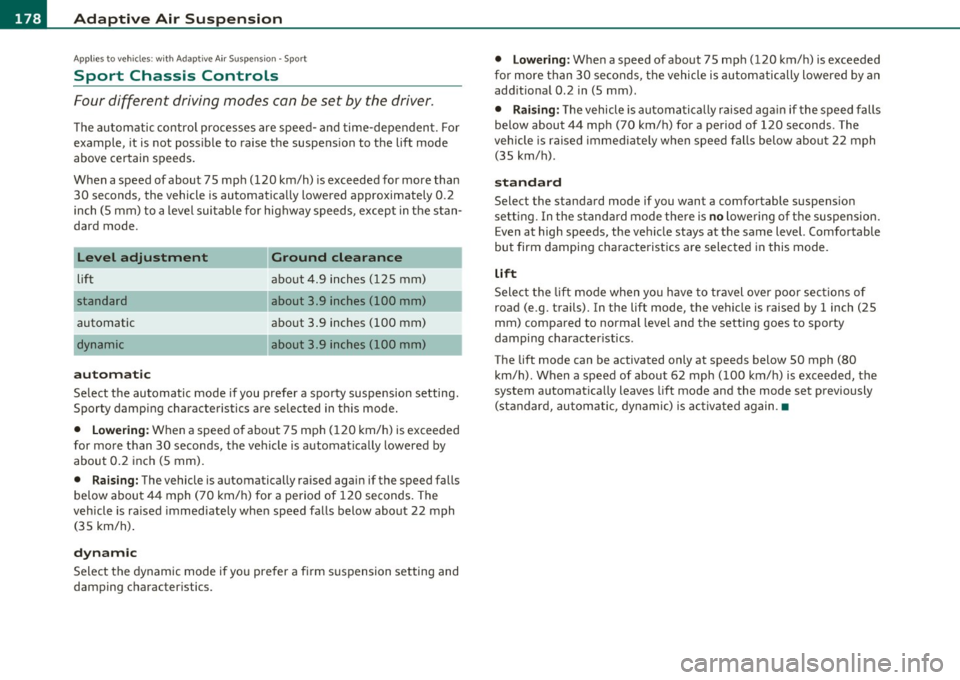
Sport Chassis Controls
Four different driving modes can be set by the driver .
The automatic control processes are speed- and time-dependent. For
example, it is not poss ible to raise the suspension to the lift mode
above certain speeds.
When a speed of about 75 mph (120 km/h) is exceeded for more than
30 seconds, the vehicle is automatically lowered approximately 0.2
inch (5 mm) to a level suitable for highway speeds, except in the stan
dard mode .
Level adjustment
lift
standard
automatic
automatic Ground clearance
about 4.9
inches (125 mm)
about 3.9 inches (100 mm)
about 3 .9 inches (100 mm)
about 3.9 inches (100 mm)
Select the automatic mode if you prefer a sporty suspension setting.
Sporty damping characteristics are selected in this mode.
• Lowering : When a speed of about 75 mph (120 km/h) is exceeded
for more than 30 seconds, the vehicle is automatically lowered by
about 0.2 inch (5 mm).
• Raising: The vehicle is automatically raised again if the speed falls
below about 44 mph (70 km/h) for a period of 120 seconds. The
vehicle is ra ised immediately when speed falls below about 22 mph
(35 km/h).
dynamic
Select the dynamic mode if you prefer a firm suspension setting and
damping characteristics.
• Lowering: When a speed of about 75 mph (120 km/h) is exceeded
for more than 30 seconds, the vehicle is automatically lowered by an
additional 0.2 in (5 mm) .
• Raising : The vehicle is automatically raised aga in if the speed falls
below about 44 mph (70 km/h) for a period of 120 seconds . T he
vehicle is raised immediately when speed falls below about 22 mph
(35 km/h).
standard
Select the standard mode if you want a comfortable suspension
sett ing. In the standard mode there is
no lowering of the suspension.
Even at high speeds, the vehicle stays at the same level. Comfortable
but firm damping characteristics are selected in this mode.
lift
Select the lift mode when yo u have to travel over poor sections of
road (e .g. trails). In the lift mode, the vehicle is raised by 1 inch (25
mm) compared to normal level and the setting goes to sporty
damping character istics .
The lift mode can be activated only at speeds below SO mph (80
km/h) . When a speed of about 62 mph (100 km/h) is exceeded, the
system automatically leaves lift mode and the mode set previously
(standard, automatic, dynamic) is activated again.•
Page 181 of 384

____________________________________________ A_ d_a_ p ,_ t_iv _ e_ A _ i_ r _ S_ u_s_, p __ e_n _ s_ i _o_ n __ _
Setting the Driving Modes
The driving modes are set in MMI.
Fig. 1 94 MMI d isplay:
Se tti ngs
The ignition must be switched on to set the driving modes.
- Press the [ CAR]function button. The main menu
Adaptive
Air Suspension
appears::::> fig. 194.
- Select the desired mode with the control knob .
Please note that not every driving mode can be selected in every
driving situation . For examp le, it is not possible to switch to lift mode
at speeds above 50 mph (80 km/h). This mode is shown
greyed out in
the MMI display.
For additiona l information on the driving modes=>
page 177,
"Chass is Controls" . •
Jacking Mode When Changing a Flat Tire
This mode must be activated before raising the vehicle
with a vehicle jack .
Switching jacking mod e on and off
- Select: Function button [CAR]> Adaptive Air Suspension
> function button [SETUP].
Controls and equip
ment Safety first
-
Turn the control knob to Veh icl e jac k mode and select on
or off as desired.
The vehicle jack mode must be act ivated before changing a whee l so
that the automatic control processes for the air suspension do not
make lifting with the vehicle jack more difficult.
In the veh icle jack mode the indicator light in the instrument cluster
w v illuminates.
& WARNING
The hei ght of the parked vehi cle ca n c hange due to te mp erature
fluc tu at ions or c ha ng es in l oad .
[I) Tips
The vehicle jack mode is switched off automatically at speeds above 9
mph (15 km/h). •
Towing a Trailer
Automatic lowering is not desirable when towing a
trailer.
If you are going to tow a trailer, you must activate the tra iler
towing mode .
Switching the trail er towing mode on and off
manually
- Select: Function buttont( CAR]> function button [SETUP].
- Select Trailer towing mode on or off as desired .
Level Adjustm ent when T ow ing a Trail er
The following applies to vehicles with Adaptive Air Suspension:
Vehicle care Technical data
Page 182 of 384
1111....__A_ d_ a_,_ p_t _i_ v _e _ A_i_ r_ S_ u_ s ... p,_ e_n_ s_ io_ n __________________________________________ _
• Before h itching up the trailer and before adjust ing the tongue
we igh t a t the trailer, t he automat ic o r st and ard mode
must be
selected, so that the vehicle is at normal level=:>
page 1 79, "Setting
the Driving Modes".
• If dr iv ing in dynamic mode is desired, this mode
must be selected
befo re hitch ing up the trailer and before adjus ting the tongue
we ight. However, note that your veh icle is lowered and ground clear
ance is reduced.
• If you have to drive under difficult road conditions, you can select
lift mode af ter hitching up the tra iler o r af ter adjusting the tong ue
we ight.
T he following applies to vehicles wit h
sport suspension Adaptive Air
S uspens ion - Spo rt* :
• Before hitching up the trailer
and before adjust ing the tongue
we igh t at the t railer, the a utomatic, standard or dynamic mode
must
be selected, so that the vehicle is at normal level=:> page 179,
"Setting the Driving Modes" .
• If you have to drive under difficult road conditions, you can select
li ft mode a fter hitching up the tra ile r or aft er ad justing the tong ue
we ight .
Restrictions when Operating with a Trailer
When ope rating with a trailer, the lift mode can only be selected up
t o about 25 mph ( 40 km/h). The system automat ic all y goes o ut o f lift
mode when speed exceeds about 31 mph (SO km/h) .
If the ve hicle is in automatic , standard or lift mode before t he trailer
towing mode is act ivated, the dynam ic mode cannot be activated -
except on vehicles with
s po rt suspension Adaptive A ir Suspension -
Sport*.
If the veh icle is in dynamic mode before towing operation is act i
va ted, it can be dr iven in t his mode. If the suspe ns io n is shifted from
this mode to automatic mode, dynamic mode ca nnot be re -selected .
W Tips
The vehicle w ill not lower to t he dynamic leve l w he n operat ing in t he
trai ler towing mode. •
Page 223 of 384

______________________________________________ ___:.A:::::.:.: ir:....: b~ a~g !....= s:ly '..:s~ t~ e~ m~ ---
& WARNING (co ntinued )
• Always make sure that the side airbag can inflate without
interference:
-Never install se at covers or replacement upholstery over the
front seatbacks that have not been specifically approved by
Audi .
- Never use additional seat cushions that cover the areas
where the side airbags inflate .
- Damage to the original seat covers or to the seam in the area
of the side airbag module must always be repaired immedi
ately by an authorized Audi dealer.
• The airbag sy stem can be activated only once. After an airbag
has inflated, it must be replaced by an authorized Audi dealer or
qualified technician who has the technical information , training
and special equipment necessary.
• The airbag sy stem can be deployed only onc e. After an airbag
has been deployed, it must be replaced w ith new replacement
parts de signed and approved es pecially for your Audi model
version . Replacement of complete airbag systems or airbag
components must be performed by qualified workshops only.
Make sure that any airbag service action is entered in your Audi
Warranty
& Maintenance booklet under AIRBAG REPLACEMENT
RECORD.
• For safety reasons in severe accidents, the alternator and
starter are separated from the vehicle battery with a pyrotechni c
circuit interrupter .
- Work on the pyrotechnic circu it interrupter must only be
performed by a qualified dealer -risk of an a ccident!
- If the vehicle or the circu it interrupter is scrapped, all appli
cable safety precautions must be followed .
Controls and equip ment Safety first Vehicle operation
<£' For the sake of the environment
U
ndeployed airbag modules and pretens io ners mig ht be classified as
Perch lorate Material -sp ec ial handling may a pply, see
www.d ts c. ca.gov/ha za rdouswaste/pe rchlorate . W he n t he vehicle or
parts of the restraint system including airbag modules and safety
bel ts wi th prete nsio ners are scra pped, all applica ble laws an d regula
tions m ust be observed. Your authorized Aud i dea ler is familiar with
t hese requireme nts and we recommend tha t you have you r dealer
perform this service for you. •
Other things that can affect Advanced
Airbag performance
Chang ing the ve hicle's suspension system can change the way that
t he Adv anced Airbag System pe rforms in a crash . For example, using
tire-r im combinations not approved by Aud i, lower ing t he veh icle,
c hang ing the st iffness o f the suspe nsio n, incl uding the s prings,
s u spension str uts, shoc k absorbe rs etc. can change the forces that
are meas ured by the airb ag sensors and sen t to the ele ctron ic con trol
uni t. Some suspension changes ca n, for examp le, increase the force
levels measu red by t he sensors and ma ke the airbag sys tem dep loy in
crashes in which it wou ld not deploy if the changes had not bee n
made . Other kin ds of c hanges may re duce the force levels meas ured
by the senso rs and p revent the airbag from dep loyi ng when it should .
The sensors in the safety belt buckle for the d river and front
p assenger se at tell the e le ct ro nic co ntro l mo dule if the sa fe ty belt is
latc hed or not . If the safety be lt is be ing used, the fron t airbag w ill
dep loy at a s ligh tly hig her ra te o f ve hicl e decelerat io n t han if the
safety belt is not be ing us ed. T he refo re, in a part icular collis io n, it is
poss ible that an a irbag wi ll not deploy at a seating posit ion where the
safety belt is being used but wi ll inflate at the posi tion whe re the
safety belt is not bei ng used. It is important that not hing interfere
w ith the s afe ty be lt bu ckles so t hat th e sensor s can sen d the correct
information about safety belt use to the electronic contro l unit. ..
Vehicle care Do-it-yourself service Technical data
Page 224 of 384

-Airbag system PHI- --=--=----------------
& WARNING
Changing th e vehicle 's su spension including use of unappro ved
tire -rim c ombination s can change Advan ced Airbag performan ce
and increas e the risk of serious personal injury in a cra sh .
• Never install suspension component s that do not have the
same performance characteristics as the components or iginally
installed on your veh icle.
• Never u se tir e-rim combinations that have not been approved
by Audi.
& WARNING
Item s stored be tween the safety belt buckl e and the center
console can cause the sensors in the buckle to send the wrong
information to the ele ctroni c control module and prevent the
Advanced Airbag System from w orking properl y.
• Always make sure that nothing can interfere with the safety
belt buckles and that they a re not obstru cted .
<£> For the sake of the environment
Undeployed airbag modu les and pretensioners might be class ified as
Perc hlorate Mate rial -spe cial ha ndling may apply , see
www.dtsc.ca.gov/hazardouswaste/pe rchlorate . When the vehicle or
p arts of t he rest raint sys tem including a irbag mod ules and safe ty
belts with pretensioners are scrapped, all applicable laws and regula
tions must be observed . Your authorize d Audi dea ler is familiar with
these requirements and we recommend that you have yo ur dealer
perform this serv ice for you. •
Knee airbags
Description of knee airbags
The airbag system can provide supplemental protect ion
to properly re str ained f ro n t seat occupants.
0
Fig. 21 6 Driv er' s
a ir ba g
The a irbag for the dr iver is located in the inst rument pane l under
neath the steering wheel~ fig . 216, t he airbag for the passenger is
at abo ut the same height in t he instr ument panel underneath the
glove compartment.
Th e knee airbag offers addit ional protec tion to the dr ive r's and
passenger's knees and upper and lower thigh areas as a s upplement
t o the sa fety bel ts.
If the front a irbags dep loy, the knee airbags a lso deploy i n frontal
co llisions above a certain severity~
page 215, "More importan t
t hings to know abou t front airbags ".
Besides the ir no rma l safety function , safety belts work to help keep
t he drive r o r front passenger in po sit ion in c ase of a frontal collision
so that the a irbags can provide protection .
Th e airbag system is not a substitute for your safety belt . Rather, it is
pa rt of the ove rall occ upant re st ra int system in your veh icle. Always
remember t hat the airbag system can on ly help to protect you if you
are wearing your safety be lt and wear ing it pr operly . T his is why you ..
Page 319 of 384

________________________________________________ T_ i_ re _ s_ a_ n_d_ w_ h_ e_ e_l _s _ ....... JIII
Tire service Life
The service life of tires depends on a lot of different
things including proper installation and balancing,
correct tire pressure and driving style.
_/l
l '-------- ,)
Tread Wear Indic ator (TWI )
Fig. 2 54 T ir e t read :
t rea d we ar i ndicators
( T WI)
Fig . 255 Rotati ng
t ir e s fo r mo re e ve n
w ea r
Th e or iginal t ires on your veh icle have 1/16 inch ( 1.6 mm) high "wear
ind icators"=> fig . 254 running across the tread . Depending on the
make, there w ill be six to e ight of them evenly placed around the tire.
Marks on the t ire sidewall (for example "TWI" or other symbols) indi
cate the posit ions of the tread wear indicators . Worn tires must be
replaced. Different fig ures may apply i n other countr ies => ,& .
Vehicle OP-eration
Tire pres sur e
Incorrect tire pressure ca uses premature wear and can cause sudden
tire blow-out . For this reason, tire pressure m ust be checked at least
once a mo nth =>
page 313.
Driv ing style
Driving fast around curves, heavy acceleration and hard braking
increase tire wear .
Rotating tires for more even wear
For all four tires on your vehicle to have the same service life, we
recommend that the fron t and rear tires a re rotated accord ing to the
t ire manufact urer's suggested tire rotation intervals . Please
remember the follow ing:
• T ire ro tat ion interva ls may differ from the ve hicle service in tervals
outlined in your Warranty
& Maintenance book let.
• The longer one tire is used in one location on the veh icle, the more
i t wears at certain points; therefore, we recommend that you follow
the t ire manufacturer's suggested tire rotation intervals.
• Vehicles with front-whee l drive experience more tread wear on the
front wheels compared to all-wheel dr ive (quattro
® ).
• Please rotate tires as sh own => fig. 255.
• Extra care must be taken when rotat ing d irection-spec ific tires
=:> page 341.
Wheel balancing
The w heels on new vehicles are balanced . H oweve r, various sit uat ions
dur ing everyday dr iving can cause them to become unbalanced,
resulting in vibrations yo u can usu a lly fee l through the s teering
wheel.
Unbalanced whee ls must be rebalanced to avoid excessive wear on
steering, suspension and t ires . A wheel must also be rebalanced
when a new tire is installed. _,,
Vehicle care Do-it-yourselt service iTechnical data
Page 338 of 384

-What do I do now? ..._ __________________________________________ _
& WARNING (conti nued)
Tra nsmissi on i n " P" ( Park) wi ll not preve nt th e vehicle from
m ov ing.
• Befor e you chan ge a wh eel, be s ure th e grou nd i s lev el and
firm . If n ece ssa ry , us e a s turdy board under th e j ack .
• Afte r in stalling the sp are whee l, make su re that you r eplace
the flat tire /wh ee l i n it s storage are a properly and t ight en th e
knu rled ret ain in g sc rew s ecu rely .
[ i J Tips
Before changing the wheel, you must activate the jacking mode, so
that the automatic contro ls for the Adaptive A ir Suspension do not
make it more difficult to
lift the vehicle with the jack=> page 179. •
Changing a wheel
When you change a wheel, follow the sequence described
below step-by-step and in exactly that order.
1. Activate the vehicle jacking mode==> page 179.
2 . Remove the decorati ve wheel cover* . For more details see
also ==>
page 33 7, "Decorative wheel covers" or
==>
page 337, "Wheels with wheel bolt caps".
3 . Loosen the
wh eel bolts ==> page 338.
4. L ocate the proper mounting point for the jack and align
the jack below that point==>
page 338 .
5. Lift the car with the jack==> page 338.
6. Remove the wheel with the flat tire and then install the
spare ==>
page 340.
7. Tighten all wheel bolts lightly . 8
.
Lower the vehicle with the jack.
9. Use the wheel bolt wrench and
firmly tighten all wheel
bolts==>
page 338.
10. Replace the decorative wheel cov er*.
11. Deactivate the vehicle jacking mode==> page 179.
& WARNING
A lw ays rea d and f ollow all W ARNING S and inf ormation => & in
" Rai sing th e vehicl e" on
page 33 8 and => pag e 341. •
After changing a wheel
A wheel change is not complete without the doing the
following .
-Store and secure the whe el you rep laced in the spare
wheel well.
- Replace the tools and the jack in their proper location.
- Check the
tire pre ssure on the spare wheel immediately
after mounting it .
- As soon as possible, have the
tighten ing torques on all
wheel bolts checked with a torque wrench . The correct
tightening torque is 90 ft lb (120 Nm).
- Have the flat tire
re placed as soon as possible .
[ i J Tips
• If you notice that the wheel bolts are corroded and diff icult to turn
wh ile chang ing a tire, they shou ld be rep laced before you check the
tightening torque. .,_
Page 347 of 384

________________________________________________ F_ u_s _e_ s_ a_ n_ d_ b_u_ lb_ s _ __.lftll
No. Equipment
9
10
11
13
14
15
16
17
Climate control front/rear, dash panel buttons
Suspension level control system
(Adaptive Air Suspension)
Light and rain sensor
Display-/control unit
Roof electronics control unit
CD/DVD drive Energy management
Vacant
Radiator fan electronics
Airbag front passenger recognition (weight sensor)
19 Vacant
20 Heated/ventilated seats
21 Engine control module
22 Vacant
23 Parking brake (switch)
24 Vehicle electrical system
25
26 Automat
ic transm ission
Air conditioning water valves water pump, rear climate control
27 Sunroof
28 Engine control module
29 Fuel injectors
30 Ignition coils
31 Fuel pump, r ight/fuel pump e lectron ics
Amps
5
10
5
5
10
5
5
5
5
5
5
5
10
15
10
20
5
15
30
20/40
-
Vehicle OP-eration
No ... Equipment
32
33
34
35
36
39
40
41
Automatic transmission
Right rear foo twell heater
Heated/ventilated seats, rear
Heated/venti lated seats, front
Cigarette lighter, front
Cigarette lighter, rear/socket, rear
Auxiliary cooler fan Door cont rol un it, front r ight
Brake booster
Door control un it, rear right
42 Vacant
43 Headlight washer system
Air conditioning heater fan
Amps
5
25
20
20
20
20/25
20
7.5
15
7.5
30
30
•
Fuse Location , Luggage Compartment left
0
Fig . 28 0 Fuse pan el
l a yo ut ..
Vehicle care Do-it-yourself service iTechnical data
Page 355 of 384

Emergency situations --------------=---:.-----JftFI
Loading the vehicle onto a flat bed truck
Front hook up
"' .... N
Fig. 288 Vehicle on
flat bed truck
- Align the vehicle with the centerline of the car carrier
ramp.
- Attach the winch hook to the front towline eye previously
installed.
Re ar hoo k up
Align the vehicle with the centerline of the car carrier
ramp .
- Attach the winch hook to the rear towline eye previously installed .
[ i ] Tips
Check carefully to make sure the hook-up is secure before moving the
car up the flatbed truck ramp .•
Vehicle OP-eration
Vehicle transport
Whenever you have your vehicle transported, be sure to
note the following:
0 Note
Mount the tie-down chains/cables over the running surface (circum
ference) of the tires. Never secure the vehicle by the axle , the suspen
sion struts or the front or rear towline eye . For technical reasons, the
pressure in the suspension struts may change during the transport
and this will adve rsely affect veh icle handling. •
Lifting vehicle
Lifting with workshop hoist and with floor
jack
The vehicle may only be lifted at the lifting points illus
trated.
--1------------- ~
'-l.=c==;;;;;;;;;;===-cl i
Fig. 289 Fron t li fting
p oint
~
Vehicle care Do-it-yourself service iTechnical data