ignition AUDI S8 2010 Repair Manual
[x] Cancel search | Manufacturer: AUDI, Model Year: 2010, Model line: S8, Model: AUDI S8 2010Pages: 384, PDF Size: 90.95 MB
Page 125 of 384

On the road -
----------------
Electromechanical parking brake
Operation
The electromechanical parking brake replaces the hand
brake.
Fig. 135 Center
console: Parking brake
- Pull the switch to apply the parking brake~ fig. 135. The
indicator light in the switch will come on.
- Step on the brake pedal or the accelerator pedal and press
the switch at the same time to release the parking brake.
The indicator light in the switch will go out.
Your vehicle is equipped with an electromechanical parking brake
which replaces the handbrake. The parking brake is designed to
prevent the vehicle from rolling unintentionally.
In addition to the normal functions of a traditional hand brake, the
electromechanical parking brake provides various convenience and
safety functions.
Emergency brake
An emergency brake ensures that the vehicle can be slowed even if
the normal brakes fail~ page 125, "Emergency braking".
Controls and equip
ment Safety first
Indicator lights
•
If the parking brake is applied with the ignition turned on, the
indicator light in the instrument cluster (U.S. models:=.., Canadian
models: ©) and in the switch
«el) will come on.
• If the parking brake is applied with the ignition turned off, the
indicator light in the instrument cluster (U.S. models:=., Canadian
models: ©) and in the switch
«fl) will come on for about 30 seconds
and then go out.
& WARNING
If the vehicle is stationary and the transmission is engaged with
the engine running, the engine should not be speeded up (e.g.
manually from under the hood). Otherwise the vehicle will start to
move -you run the risk of an accident.
0 Note
If the warning/indicator light (U.S . models: BRAKE, Canadian models:
«I» ) flashes in the instrument cluster, there is a brake system
malfunction . By pressing the [CHECK! button, you can bring up a
driver message which explains the malfunction in more detail. If the
message
Parking brake ! Please contact workshop appears, there is
a parking brake malfunction which you should have repaired immedi
ately by an authorized dealership~ page 28.
[ i] Tips
• You can apply the parking brake at any time -even with the igni
tion turned off . The ignition must be turned on in order to release the
parking brake.
• Occasional noises when the parking brake is applied and released
are normal and are not a cause for concern.
• The parking brake goes through a self-test cycle at regular inter
vals -when the vehicle is parked. Any associated noises are normal. •
Vehicle care Technical data
Page 126 of 384

1111....__0_ n_ t_h_ e_ r_ o_ a _ d _________________________________________________ _
Parking
To p revent a parked vehicle from rolling away, there are
a fe w things you should do.
When you park your vehicle , do the following
- Stop t he veh icle us ing the bra ke pedal.
- Pull the switch to apply t he electromechanica l parking
brake .
- Move th e se lector lev er in to the
P position ~& .
- Switch off the e ngine and remove the ignition key from
the ignition lock.
When you park your vehicle on hills, do the
following
- Stop the veh icle us ing the bra ke pedal.
- Pull the switch to apply t he e lectromechanica l parking
brake .
- I f you a re parkin g h eaded
downhill , turn the front w heels
toward th e curb .
- I f you are parking headed
uphill , turn t he fro nt wh eels
away from t he curb.
- M ove the selector lever into the
P position.
- Switch off the e ngine and remove the ign it ion key from
the ignition lock.
& WARNING
Thi s is how you can reduce the risk of injury when lea ving your
vehicle.
& W ARNING (continued )
• Never park the vehicle where it can come in contact with dry
grass , spilled fuel or any other flammable material s.
• When parking on hills, always turn the wheel s so that the front
wheel s will fir st roll into the curb, if the vehicle should start to
roll.
• Never allow anyone · especially small children· to remain in
the vehicle when it i s locked. Locked door s make it more difficult
fo r rescu ers to acce ss the passenger compartment in the event of
an emergency. Danger to life!
• Never leave children unsuperv ised in the vehicle. Ch ildren
could relea se the parking brake or move the gear shift lever out of
gear. The vehicle could start to roll away and cau se an accident .
• No matter what the season i s, the temperature
in a parked
v ehicle can reach dangero us le vels .
0 Note
• Please exercise care when you pa rk your veh icle in parking areas
w ith park ing barriers o r cur bs. Parking barriers and curbs vary in
he ight and could damage your bumpe r and related components as
the front of your vehicle moves over a ba rrier or curb that is too high,
as you park or as you back out of a pa rking spot. In order to be sure
that no such damage can occur, yo u may wish to stop short of having
t he fro nt t ires of you r car touch t he p arking bar rie r or curb.
• Please a lso exerc ise except iona l care when you drive up or down
steep ramps or drive over curbs or o ther obstacles, for which the
vehicle is not des igned, because components of the vehicle close to
t he ground, s uch as bumpe r covers, spoilers and suspension and
exhaust system components, may become damaged. •
Page 129 of 384

_________________________________________________ O_ n_t_ h _ e_ ro_ a_d __ ffllll
& WARNING (continued)
• Please note that inadvertently "resting" your foot on the accel
erator pedal causes the cruise control not to brake. This is because
the cruise control is overridden by the driver's acceleration.
[ i] Tips
The brake lights illuminate as soon as the brakes decelerate automatically. •
Changing speed
-Press lever in the
0 or O direction=> page 126, fig. 136
to increase or decrease your speed.
- Release the lever to save that speed.
Change speed in increments of 1 mph (1 km/h) by lightly pressing the
lever. If you keep the lever pressed down, you will alter your speed in
S mph (10 km/h) increments.
You can also press the accelerator pedal down to increase your speed,
e.g. if you want to pass someone. The speed you saved earlier will
resume as soon as you release the accelerator pedal.
If, however, you exceed your saved speed by S mph (10 km/h) for
longer than S minutes, the cruise control will turn off temporarily .
The green symbol in the display~
page 126, fig. 13 7 is replaced with
a white symbol. The saved speed remains the same.•
Presetting your speed
You can preset your desired speed while the vehicle is not
moving .
-Turn on the ignition.
Controls and equip
ment Safety first
- Pull lever
into position ©=> page 126, fig. 136.
- Press the lever in the
0 or O direction to increase or
decrease your speed.
- Release the lever to save that speed .
This function makes it possible, for example, to save the speed you
want before driving on the highway. Once on the highway, activate
the cruise control by pulling the lever toward
(D . •
Switching the system off
Temporary deactivation
- Press the brake pedal, or
- Press the lever into position@ (not clicked into place)
=> page 126, fig. 136, or
- Drive for longer than 5 minutes at more than 5 mph
(10 km/h) above the stored speed.
Switching off completely
- Press lever into position @ (clicked into place), or
- Switch the ignition off .
The system retains the saved speed if you deactivate the cruise
control temporarily. To resume the saved speed, release the brake
pedal and pull the lever to position
(D.
Switching the ignition off erases the saved speed.
& WARNING
You should only return to the saved speed if it is not too fast for
the current traffic conditions -risk of an accident! •
Vehicle care Technical data
Page 131 of 384

__________________________________________ A_ d_ a_,_ p_t _iv _ e_C_ r_u _i _ s _e _C_ o_n_ t_ r_ o_ l __ _
& WARNING (continued)
slow your veh icle safely. If clos ing speed is too high , you must
apply the brake s your self to reduc e the ri sk of a rear-end cra sh .
• Never re st you r foot on the accelerator pedal , especially when
the Adaptive Cruise Control is being used. Pressure on the acceler
ato r will override the ACC braking function and prevent the brakes
from being applied when ACC detects a situation when the brakes
must be applied.
• Never use Adaptive Cruise Control when you cannot drive safely
at a steady speed, including on city st reets , on winding roads or
when road conditions are poor (for example , on ice, gravel , in fog,
heavy rain or on wet roads that increase the ris k of hydroplaning ).
• The radar sensor's
vision can be reduc ed by rain, snow and
heavy road spray . These and similar conditions can prevent vehi
cle s up ahead from being accurately detected and in some cases
they may not be detected at all . Do not use ACC when the radar
sen sors cannot ac curately detect vehicles moving ahead of you in
traffic .
• Alway s turn off Adaptive Crui se Control when entering turn
lanes , exit lanes and construction zones o r in similar situat ions
because the vehicle will automatically ac celerate to the stored
speed when the road ahead is clear .
• To prevent unintended operation , always switch ACC off when
it is not being used .
[ i] Tips
• For safety reasons, the stored speed is deleted when the ignition
i s turned o ff.
• When Adapt ive Cruise Control is switched on, the Electronic Stabi
li zation Program ( ESP) is also automa tica lly activ ated.
• Damage caused by accidents and some minor collisions can affect
th e rad ar senso r se ttings and ca use the syste m to m alfunction o r
switch off completely.
Controls and equip
ment Safety first
•
In winter conditions, you should check the radar sensor cover
be fore drivi ng to m ake su re it is free of i ce and s now. If ne cessa ry,
clean the area near the radar sensor carefully=>
page 128, fig. 138 .
• T o ensure th at the radar sensor is not blo cked, fore ign objects
(e .g . stickers, larger license plate mo unts, add-on parts) mus t not
c ove r th e ar ea ne ar the ra dar sensor =>
page 12 8, fi g. 13 8. T he area
near the radar sensor must not be painted, e ither.
• F or Declar ation o f Compliance to United Sta tes FCC and I ndus try
Canada regulations=>
page 364 . •
App lies to vehicles: with Adapt ive Cru is e Co ntr ol
How does Adaptive Cruise Control work?
Vehicl es traveling ahead are d etected with th e aid of the
radar sensor.
Fig. 139 Radar sen sor
m easur em ent range
Adaptive C ruise Con trol uses a radar se nsor in t he front o f the vehi cle
=> fig . 139 . The system has limitations=>
page 139. Things that are
not moving in your lane and in yo ur direction o f travel will no t be
detected . The sensor measures the distance to reflective su rfaces
that m ust have a certain s ize. The system responds only after the
distance measu remen t has been made . If a measurement is not
poss ible, the system cannot res pond and w ill not react to a vehicle or
s o me thing el se up ah ead. .,_
Vehicle care Technical data
Page 158 of 384
1111....__A_ u_ t_o _m_ a_ t_ic _ t_ r_ a_ n_s _m_ i _s_ s_ i_ o_ n ____________________________________________ _
Select R only when the vehicle is at a full stop and the engine is
running at id le speed =>
& in "Driving the automatic transmission"
on
page 154.
Before you move the selector lever to R , press both the button in the
hand le of the selector lever
and the brake pedal at the same time.
When the ignition is on, the backup lights illuminate when the
selector lever is moved into
R .
N -Neutral
The transmission is in neutral in this position. Shift to this position
for standing with the brakes applied =>
page 156.
When the vehicle is stationary or at speeds be low 3 mph (5 km/h),
you must always apply the footbrake before and while mov ing the
lever out of
N.
D -Normal position for driving forward
Posit ion Dis fo r normal city and highway driving . It ranges from zero
to top speed and all six gears shift automatically, depending on
engine load, driving speed and automat ica lly se lected shift
programs.
When the vehicle is stationary or at speeds below 3 mph (5 km/h),
you must always apply the foot bra ke before and while moving the
lever to
D out of N .
In certa in circumstances it may be advantageous to temporarily
switch to the manual sh ift program to manually select gear ratios to
match specific driving conditions =>
page 158.
S -Sport position
Select this position for sportie r performance. In this position, the
transmission will not upshift as soon, allowing the vehicle to use the
increased power available at higher engine speeds to achieve livelier
acceleration .
When the vehicle is stationary or at speeds be low 3 mph (5 km/h),
you must always apply the foot bra ke before and while moving the
lever to
S out of N .
& WARNING
Read and follow all WARNINGS=> & in "Driving the automatic
transmi ssion" on
page 154.
0 Note
Coasting downhill with the transmission in N and the engine not
running will result in damage to the automatic transmission and
possibly the catalytic converter. •
Automatic Shift Lock (ASL)
Automatic shift lock prevents you from accidentally
shifting into a forward gear or into reverse, thus causing
the vehicle to move unintentionally.
0
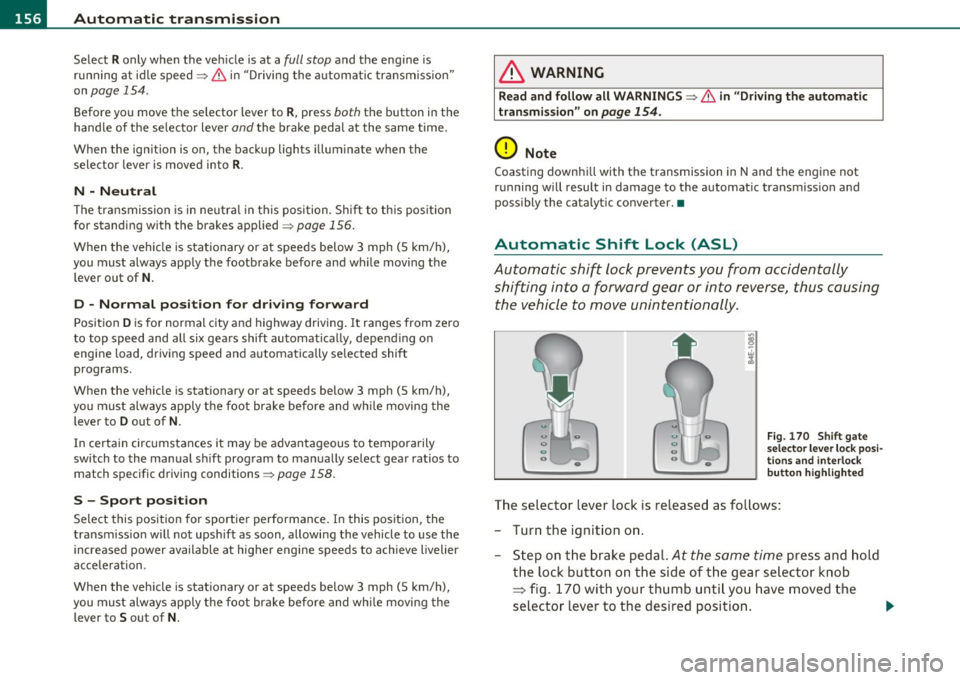
Fig . 170 Shift gate
se lector lever lock posi
tions and interlock
button highlighted
The selector lever lock is released as follows:
- Turn the ignition on .
- Step on the brake pedal.
At the same time press and hold
the lock button on the side of the gear selector knob
=:> fig. 170 with your thumb until you have moved the
selector lever to the desired position. .,_
Page 159 of 384

______________________________________________ A_ u_ t_ o _ m_ a_ t_ ic_ t_r_a _ n_ s_m_ i_ s _s_ i_ o _ n __ ffllll
Automatic selector lever lock
The se lector lever is locked in the P and N positions when the ignition
is turned on. To move the lever from these posit ions the driver must
depress the brake pedal. As a reminder to the driver, the following
warning appears in the instrument cluster display when the selector
is in
P and N:
When stationary apply foot brake while selecting gear
A time delay element prevents the selector lever from lock ing when
it is moved through the
N position (going from R to D). The locking
element will lock the selector lever if the lever is left in N (Neutra l) for
more than approximately
l second, w ithout the brake pedal being
pressed.
At speeds above about 3 mph (5 km/h) the Automat ic Shift Lock is
automatically deactivated in the
N position.
Interlock button
The lock button o n the selector lever prevents the lever from being
accidentally shifted into certain positions. Pressing this button deac
tivates the selector lever lock . Depending on the direction of the
shift, the selector lever locks at different positions . The pos itions are
highlighted in the illustration ~
page 156, fig. 170.
Ignition key safety interlock
The key cannot be removed from the ignition un less the selector lever
is in the
P park position. When the ignition key is removed, the
selector lever will be locked in the
P position.•
Kick-down
The kick-down feature allows the vehicle to generate
maximum acceleration.
When you press the accelerator pedal beyond the resistance point
that is reached at full throttle, the transmission will select a lower
gear ratio based on vehicle speed and engine RPM. The engine RPM
will be controlled to produce maximum vehicle acceleration as long
Controls and equip
ment Safety first
as you cont
inue to press the accelerator pedal beyond this resistance
point.
& WARNING
Be careful when using the kick -down feature on slippery roads.
Rapid acceleration may cause the vehicle to skid. •
Dynamic shift program (DSP)
The automatic transmission is electronically controlled.
The transmission is self adapting and will automatically select the
best sh ift p rogram su ited to the driv ing cond it ions and driving style.
The transmission will select one of the
economy programs when you
drive at a steady speed or a gradually changing speed without heavy
acceleration . This ach ieves optimum fuel efficiency, with early
upshifting and delayed downshifting.
Th e transmission will automatically select the
sporty shift programs
when you dr ive at higher speeds, or w ith heavy acceleration and
frequently changing speeds. Upshifts are delayed to make full use of
engine power . Downshifting takes place at higher engine speeds than
in the economy programs .
The select ion of the most suitable shift program is a cont inuous,
automatic p rocess. The driver can also make the transmission switch
t o a spo rty program by
quickly pressing down the gas pedal.
Th is causes the transmission to shift down to a lower gear to achieve
rap id acceleration, e.g . for quickly passing another vehicle. Yo u do
not need to press the gas pedal into the kick -down range . After the
transmission has upshifted, the original program is selected
according to your driving style.
An additional shift program allows the automatic transmission to select the proper gear for uph ill and downhill gradients.
Th is prevents the transmission from upshifting and downshifting
unnecessari ly on hills. The transmission will shift down to a lower _,.
Vehicle care Technical data
Page 162 of 384
ffl..__A_ u_t_ o_ m_ a_t _i _c _t_ r_ a_ n_s _m _ i_ s _s _ i_o _n ___________________________________________ _
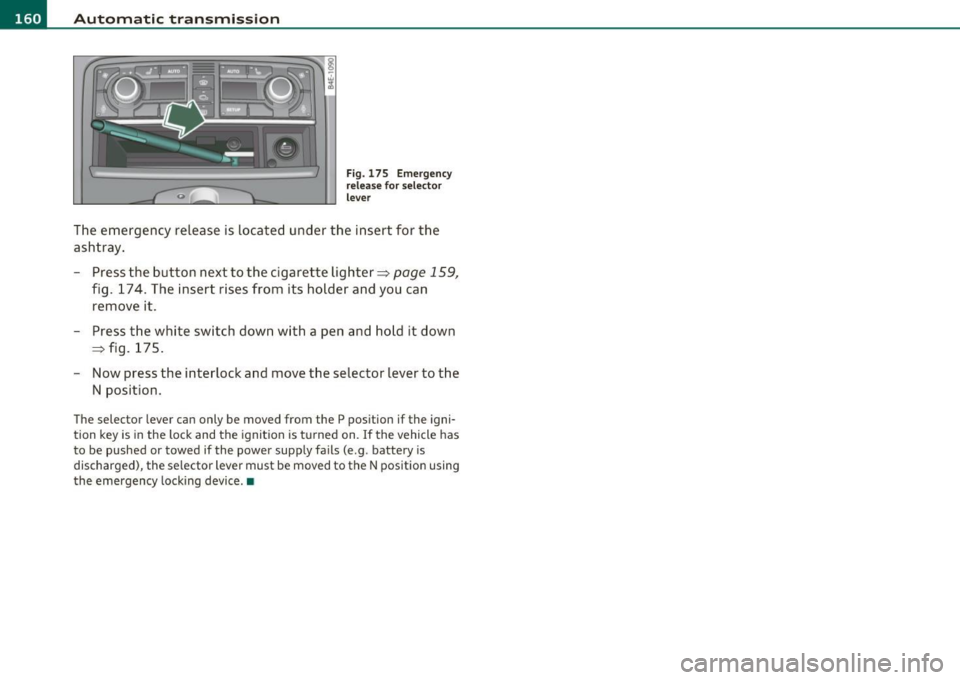
Fig. 175 Emergency
release for selector
lever
The emergency release is located under the insert for the
ashtray.
- Press the button next to the cigarette lighter~
page 159,
fig. 174. The insert rises from its holder and you can
remove it.
- Press the white switch down with a pen and hold it down
~ fig. 175.
- Now press the interlock and move the selector lever to the
N position.
The selec tor lever can only be moved from the P position if the igni
tion key is in the lock and the ignition is turned on. If the vehicle has
to be pushed or towed if the power supply fails (e .g . battery is
discharged), the selector lever must be moved to the N position using
the emergency locking device.•
Page 164 of 384

IIII.___A_ d_v_ a_ n _ c_e _d _ P_ a_ rk_ in--= g'-S -=- y_s_t_ e_ m _________________________________________ _
- Press the switch P1JJ! in the center console=:, page 161,
fig. 177 to activate the Audi parking system manually.
Activation of the acoustic parking system is confirmed by
a brief acknowledgement sound. The indicator light in the
switch lights up.
Deactivation
- If you drive forwards faster than approx. 6 mph (10 km/h), or
- if you switch the ignition off, the entire acoustic parking
assist is automatically deactivated, or
- you can press the switch
Pw! in the center console
=:, page 161, fig. 177 to deactivate the Audi parking
system. The indicator light in the switch goes out.
You have to turn on the acoustic parking assist manually if you wish
to park the vehicle forwards or if you wish to approach an obstacle
forwards and want a distance warning.
The range at which the sensors start to measure is
about :
Front
Rear
Warning tones
side
center
side
center 3 ft (0.90 m)
4 ft (1.20 m)
2 ft (0.60 m)
5.2 ft (1.60 m)
Distance warning is given by chimes which are generated by a signal
generator . The volume and the pitch of the chimes can be adjusted in
the MMI =>
page 171.
Mute
In the case of vehicles with automatic transmission, an acoustic
distance warning is discontinued when the transmission selector lever is moved to the P position
. However, the system remains active.
As soon as the selector lever is moved from the
P position and the
vehicle approaches an obstacle, the acoustic distance warning
resumes.
Driving forward/backward
Distance warning when driving forward/backward is based on detec
tion of an obstacle in the range of the parking assist . As the distance
decreases, the time interval between the audible tones becomes
shorter.
When the distance is less than approx. 1 ft (0.30 m), the tone
becomes continuous. At this point you should stop backing up or
driving forward .
If the distance to an obstacle remains the same, the volume of the
distance warning is gradually reduced after about
4 seconds (does
not apply to the zone for the continuous tone). If you start to
approach the detected obstacle again, the distance warning will
sound at the normal volume again.
Parking
When you select another gear when parking (e.g. reverse/forward),
the warning tones are temporarily suppressed, but the visual display
remains on the MMI display. If you start approaching a detected
obstacle again, the distance warning will sound at the normal volume
again.
Visual display
The segments on the MMI display indicate a change in the distance
between the vehicle and an obstacle . The number of segments
displayed depends on the obstacles in front of or behind the vehicle.
The closer the vehicle comes to the obstacle, the closer the segments
approach the vehicle=>
page 161, fig. 178. When the segment
before last is displayed, the vehicle has reached the collision zone. At
this point you should stop backing up or driving forward=>& .
The image in the visual display can be switched off on the MMI display
=>
page 173 . The acoustic distance warning remains active. .,,
Page 176 of 384

IIII.___A_ d_v_ a_ n _ c_e _d _ P_ a_ rk_ in--= g'-S -=- y_s_t_ e_ m _________________________________________ _
switch PwA flashes when you engage the reverse gear, there is a
ma lf u nct ion in the acous tic p arking ass ist.
T hi s system error is immediately output after:
• Every manua l activat ion via the switch
P '".li => page 161,
• Reverse gear is engaged for the first time duri ng an ignition cycle,
or
• An error is detected during operation .
(I] Tips
If the system reports an error, have an Audi dealer o r an authorized
dea lership correct this system error .•
A pplies to veh icles : wit h Adva nced Park in g S ystem with rear view c amera
Rear-view camera tips
We recommend that you practice parking w ith the rear-v iew camera
in a traffic -free location, o r parking lot, to become familiar with the
system, the or ient atio n lines , and the ir fun ct ion. W hen do ing t his,
there should be good light and weather cond itions.
In the MM I Display, objec ts or vehicles appe ar close r or f urther aw ay
if:
• you are driving in reverse gear from a level surface onto an incline,
or a downwa rd slope,
• you are driv ing in reverse gear towar d prot ruding objects,
• the vehicle is carry ing too much load in the rear .
T he accuracy of the orientatio n lines and blue su rfaces diminishes if :
• t he Ad aptive Air S uspension is defective, o r th e dynamic o r lift
mode is switched on,
• the rear-v iew camera does not provide a reliable image, for
example, in poor visib ility conditions or if the lens is dirty, •
the image on the screen is not v is ib le due to sun glare and reflec
tion .
Caring for the rear-view camera lens:
• Dampen the lens with a household alcoho l-based glass cleaner,
a nd clean the lens wi th
a d ry cl oth.
• Remove snow w ith a hand br ush .
• Remove ice, preferab ly with de-icing spray=>
0 .
& WARNING
• The rea r-view camera does not replace the view to the rear and
the rear view mirror s.
• The rear-view camera -because of technical limitations -does
not show the entire area behind the vehicle=> page
165, fig. 182.
Be especially careful to check for small children and animals
before ba cking up . Small children and animals will not always be
shown in the r ear-view display.
• The Audi parking sys tem is not a sub stitute for being careful
and alert when backing up. Be especially careful during park ing
and similar maneuvers . Always watch where you are driving and
make sure that nothing is in the way.
• Do not allow your self to be distracted from traffi c by the rear
view camera pictures.
• When maneuvering or parking, do not only u se the MMI
Display for orientat ion. Certa in objects -depending on the sc reen
resolution -may not, or not entirely, be di splayed ; for example
trailer hitches , chains, na rrow posts, or fences.
• Only use the rear-view camera for aid if it shows a good, clear
picture. The image may be obscured , for e xample, by the sun
shining into the len s, dirt on the len s, or a s the re sult of a defect -
danger of accident!
• If the imag e is hazy when the MMI Display is swit ched on or the
area behind the vehicle is not vis ible (for example , as the result of .,_
Page 179 of 384
____________________________________________ A_ d_a_ p ,_ t_iv _ e_ A _ i_ r _ S_ u_s_, p __ e_n _ s_ i _o_ n __ ffllll
Chassis Controls
Four different driving modes can be set by the driver .
The automatic control processes are speed- and time-dependent . For
example, it is not poss ible to raise the suspension to the lift mode
above certain speeds .
When a speed of about 75 mph (120 km/h) is exceeded for more than 30 seconds, the vehicle is automatically lowered approximately 1
inch (25 mm) to a level suitable for highway speeds, except in the
standard mode . Road ho ldi ng is opt imized as a result of the lowe r
center of gravity and fue l consumption is reduced as a result of
reduced wind resistance.
Level adjustment
lift
automatic
dynamic
automatic Ground clearance
about 5. 7 inches (145 mm)
about
4. 7 inches (120 mm)
about 4. 7 inches (120 mm)
about 3.9 inches (100 mm)
Select the automatic mode if you prefer a suspension setting empha
sizing comfort. Damping characteristics emphasizing comfort are
selected in this mode .
• Lowering : When a speed of about 75 mph (120 km/h) is exceeded
for more than 30 seconds, the vehicle is automatically lowered by about 1 inch (25 mm).
• Raising: The vehicle is automatically ra ised aga in if the speed falls
below about 44 mph (70 km/h) for a period of 120 seconds. The
vehicle is ra ised immediately when speed falls below about 22 mph
(35 km/h).
dynamic
Select the sport mode if you prefer a sporty suspension setting . In
this mode, the vehicle is lowered wh ile it is st ill stationary and sporty
Controls and equip
ment Safety first
damping characteristics are selected
. The warning light c.::> in the
instrument cluster will come on for a few seconds just to remind you
of the reduced ground clearance.
If you switch off the engine whi le the vehicle is in the dynamic mode
and then switch on the ignition once aga in, the
c.::> warning light will
also come on again for a few seconds.
• Lowering : When a speed of about 75 mph (120 km/h) is exceeded
for more than 30 seconds, the vehicle is automatically lowered by an
additional 0.2 in (5 mm) .
• Raising: The vehicle is automatically raised again if the speed falls
below about 44 mph (70 km/h) for a period of 120 seconds. The
vehicle is ra ised immediately when speed falls below about 22 mph
(35 km/h).
standard
Select the standard mode if you desire a suspension sett ing with a
special emphasis on comfort . In the standard mode there is
no
lower ing of the s uspens ion. Even at high speeds, the vehicle stays at
the same level. Damping characteristics with a decided emphasis on
comfort are selected in this mode.
lift
Select the lift mode when you have to travel over poor sections of
road (e .g . trails) . In the lift mode, the vehicle is raised by 1 inch (25
mm) compared to normal level while it is still stationary and damping
characterist ics are adjusted to emphasize comfort .
The lift mode can be activated only at speeds below 50 mph (80 km/h). When a speed of about 62 mph (100 km/h) is exceeded, the
system automatica lly leaves lift mode and the mode set previously
(standard, automatic, dynamic) is activated again .•
Vehicle care Technical data