light AUDI S8 2010 Repair Manual
[x] Cancel search | Manufacturer: AUDI, Model Year: 2010, Model line: S8, Model: AUDI S8 2010Pages: 384, PDF Size: 90.95 MB
Page 107 of 384

_________________________________________________ W_ a_ r_m _ a_ n_d_ c_ o_ ld _ ___.llfflll
Controls
This overview will help you to familiarize yourself with the
air conditioning controls.
Fi g. 11 8 Air cond itioning con tro l ele m en ts
T he left display indicates the tempe rat ure sele cted fo r the driver 's
side, the r ight d isplay ind icates the temperature se lected for the
passenger's side .
T he sett ings you make are show n in the MMI display fo r a few se conds
when MMI is turned on.
Each func tion is turned on or off by briefly press ing the corresponding
button. The indicato r light in the button illuminates when the func
tion is act ive.
Con tro ls a nd e quip
m en t Vehicle
OP-eration
But- Function Page
ton(s)
ION/O FF) Tur ning on and off => page 106
!AUTO) Automatic mode => page 106
Cont rol Temperatu re selection => page 106
knob
Heated seats*
(W Ventilated sea ts * => page 107
ffi Air distribution => page 109
~ D efrost => page 109
=> page 112
@ Fan => page 109
~ Manual rec irculat io n => page 109
~ Heated rear window => page 113
!SETU P] Basi c settings => page 115
(I) Tips
• Residual heat: With the ignition turned off, you can activate the
resid ua l heat f unct ion by p ressing the
I ON/OFF) bu tto n. T he resid ua l
heat from the coolant can be used to heat the vehicle interior. The
resid ual he at func tion is tu rned off automat ica lly a fter 30 m inutes.
• Synchron izing climate control: By press ing and hold ing the
cont rol knob on the driver's side, the temperatu re setting on the
dr iver's side can be sw itched to the passenger's side, and v ice versa.
In the case of veh icles wi th rear a ir condition ing *, the se lec ted
temperature set ting is also app lied to the outer rear seats. The new
temperature is shown in the disp lay. •
Vehicle care Do-it-yourselt service iTechnical data
Page 114 of 384
-Warm and cold .,.,..__ ______________ _
(I) Tips
If the climate control system is operating in cooling mode , air flows
p rima rily from th e outlets in the center console and in the door
pillars . T o ach ieve adequa te cooling, you should never close the
ou tle ts completely. •
Using climate controls economically
Using the climate controls prudently can help save fuel.
When you use the a ir conditioner, e ngine power is reduced
and fuel consumption increa ses. To save fu el, you should use
the air co nditioner o nly when necessary. Also please note the
following points :
If you want to save fuel , activate ECON .
If you are going to drive with the wi ndows open, use ECO N.
~ For the sake of the environment
By reducing t he amount of fuel you use, you also reduce the amou nt
of pollutants emitted into the air .•
A ppli es to vehicl es : w ith sola r sliding /til tin g sunroof
Solar blower fan /solar roof
With sufficient sunlight, the blower fan continues to
operate with solar energy to bring in fresh air after the
ignition has been switched off
The fan motor is operated by solar energy throug h the solar roof after
t he ignition is tur ned off . P lease make certai n that vents @ and ©
are ope n to ach ieve op timal ventilation =:,
page 111, fig. 124.
The venti lation operates on ly with the sunroof closed or in the ti lted
position. If the veh
icle was switched off in the rec irculat ion mode, the air
condi tioning au tomatically sw itches to fresh a ir operation .
Solar operation is not activated at low outside temperatures .•
Windshield defogging/defrosting
A pp lie s t o v eh icles: w it h win dshie ld defo gger/ defrost er
Windshield defogger/defroster ®
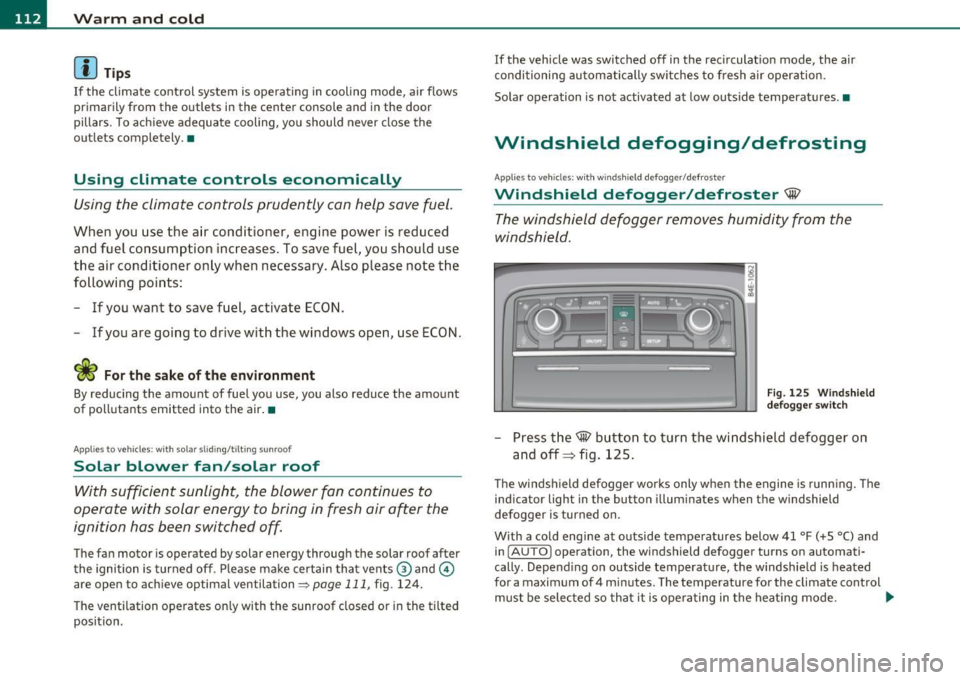
The windshield defogger removes humidity from the
windshield .
Fig. 12 5 Wi ndshie ld
def ogger switch
- Press the~ button to turn the wi ndsh ield defogger on
and off=> fig. 125.
T he windsh ield defogger works only when the engine is runn ing . T he
ind icator light in the button illum inates when the windshield
defogger is turned on.
With a cold engine at outside temperatures below 41 °F (+5 °C) and i n
( AU TO] operation, the windshield defogger turns on automati
cally . Depend ing o n outside temperat ure, the w indshie ld is heated
for a maximum of 4 m inutes. The temperature for the climate control
must be selected so tha t it is ope ra ting in the heat ing mode . .,_
Page 115 of 384
Warm and cold -_______________ __.
When selecting the program setting®, the windshield
defogger/defroster is switched on automatically at outside tempera
tures below 41
°F (+5 °(). Depending on outside temperature, the
windshield is heated from 2 up to a maximum of 4 minutes .
Th e windshield defogger is deactivated in ECON mode.
(I] Tips
• If a crack forms in the windshie ld due to a foreign object (e.g. a
stone chip), the defogger/defroster is not turned on. This prevents
the crack from spreading.
• We recommend that you locate an Audi dealership immediately to
have the windshie ld replaced. •
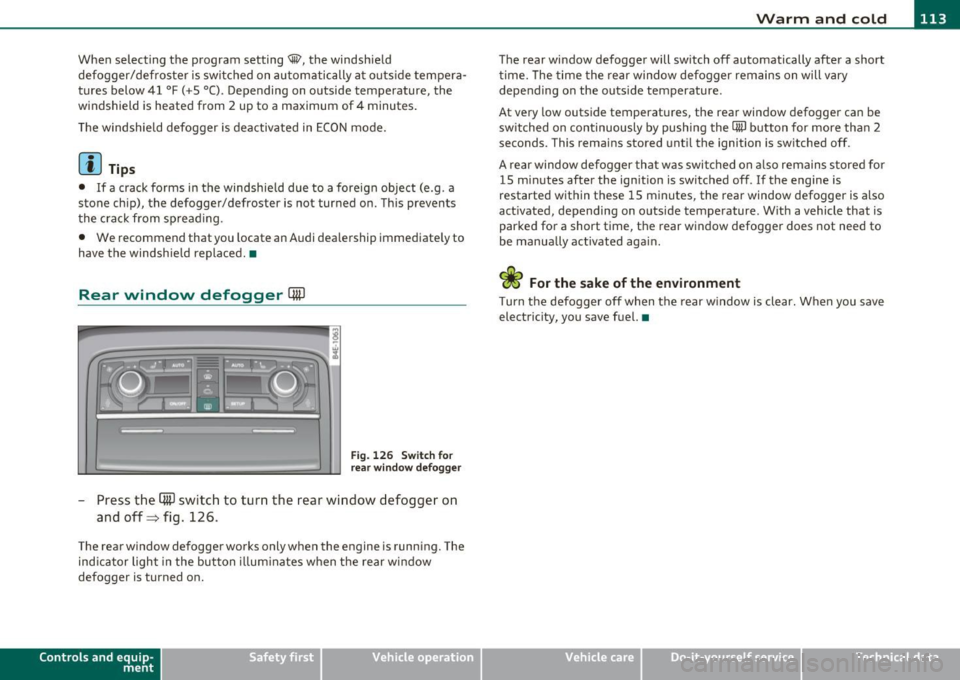
Rear window defogger QuJ
Fig. 126 Switch for
rear window defogger
- Press the (ffi) switch to turn the rear window defogger on
and off=> fig. 126 .
The rear window defogger works only when the engine is running. The
ind icator light in the button illum inates when the rear w indow
defogger is turned on.
Con tro ls a nd e quip
m en t Vehicle
OP-eration
The rear window defogger will switch off automatically after a short
time. The time the rear window defogger remains on will vary
depending on the outs ide temperature.
At very low outside temperatures, the rear window defogger can be
switched on continuously by push ing the
CiiiJ button for more than 2
seconds. This rema ins stored until the ignition is switched off.
A rear window defogger that was switched on also remains stored for
15 m inutes after the ignition is switched off . If the engine is
restarted within these 15 minutes, the rear window defogger is a lso
act ivated, depending on outside temperature . W ith a vehicle that is
parked for a short time, the rear window defogger does not need to
be manually activated again.
<£> For the sake of the environment
T urn the defogger off when the rear w indow is clear. When you save
electricity, you save fuel. •
Vehicle care Do-it-yourselt service iTechnical data
Page 122 of 384

1111..__0_ n_ t_h _e_ r_o _ a_ d _________________________________________________ _
Stopping the engine
-Turn the ignition key to position @::::} page 119, fig. 132.
& WARNING
• Never turn off the engine until the vehicle has come to a
complete stop.
• The brake booster and servotronic only work when the engine
is running. With the ignition turned off, you have to apply more
force when steering or braking. Since you cannot steer and stop
normally, this can lead to accidents and serious injuries.
• The radiator fan can continue to run for up to 10 minutes even
after you have turned off the engine and removed the ignition key.
The radiator fan can also turn on again if the engine coolant heats up because of intense sunlight or heat build-up in the engine
compartment.
0 Note
Do not stop the engine immediate ly after hard or extended driving .
Keep the engine running for approximately two minutes to prevent
excessive heat build-up. •
Starting and stopping the engine
using the Convenience key
Applies to veh icles: with Conven ience ke y
Starting the engine using the [START]
button
Using this button, you can switch on the ignition and start
the engine.
C,
0
Fig. 133 Convenience
key :
START button
The [ST ART] button has a two position feature. ::::} fig . 133.
Switching on the ignition
- Press the [ST ART ) button to the first position. Only the
ignition switches on.
Starting the engine
- Depress the foot brake.
- Move the selector lever into the P or N position ~,& .
- Press the
[ST ART ) button to the second position. The
engine starts.
Page 124 of 384
-On the road •m ___________________ _
& WARNING (continued)
• The brake booster and the servotronic only work when the
engine is running. If you turn off the engine, more force will be
required to steer or brake the vehicle. If you are not prepared, this
could result in a collision and serious personal injury.
• For your safety, move the selector lever to the P position, then
turn off the engine. Otherwise the vehicle could inadvertently roll
away.
• After turning off the engine, the radiator fan can come on and
run for up to 10 minutes -even if the ignition is switched off. Like
wise, the fan could come on if the temperature in the engine
compartment raises due to heat build up or if you leave the vehicle
standing in direct sunlight.
0 Note
After driving at high engine load, heat can build up in the engine
compartment after you have turned off the engine. This can damage
t he engine. Let the vehicl e stand and run in idl e for about 2 minutes
before turning off the engine. •
App lies to ve hicles : w ith Conve nie nc e key
Driver's messages in the instrument
cluster
Messages appear in the instrument cluster to let the
driver know if something is missing or if something must
be done.
No key identified
This message appears when you press the [START) button, but there
is no remote contro l key inside the vehicle or if the system does not
recognize the key. For example, if your key is
shielded by an object or
encased, i .e . in side an aluminum briefcase, the signal from the key cannot be detected
. Electron ic devices such as cell phones can also
in terfere w ith the radio signal.
Press brake pedal to start engine
This message appears when you press the !S T ART ) butto n when
starting the engine but you have not depressed the brake pedal.
Engage N or P to start engine
This message appears when you start the engine but the selector
lever is not in the P or N position . The engine can be started only if the
selector lever is in one of these two positions .
Key not in vehicle
This message appears together with the 7 symbol when the remote
control key is removed from the vehicle while the engi ne is running.
Th is is to remind you that you should not cont inue your tr ip without
your key.
If the key is no longer inside the vehicle when you turn off the engine,
you will not be able to switch on the ignition or restart the engine.
Also, you will not be able to lock the vehicle from the outs ide .
Shift to P, otherwise vehicle can roll away. Doors do not lock if lever
is not in P.
Thi s message appears for your safety together with an audible
warning signal when you press the
[STOP) button but the selector
lever is not in the P position and you open the driver's door. Move the
selector leve r in to P, otherwise the vehicle could roll away. I n addi
tion, you will not be able to lock the ve hicle with either the lock
button located on the door hand le or the remote control.
To engage steering lock, press and hold STOP button
Th is message appears for your personal safety if you switch off the
engine and the ignition by pressing the
[STOP) button and then open
the driver's door. In this case, the steering will still not be locked. The
steering wheel will lock:
• If you press the
I STO P I button for longer than 1 second.
• If you lock the vehicle from the outside .•
Page 125 of 384

On the road -
----------------
Electromechanical parking brake
Operation
The electromechanical parking brake replaces the hand
brake.
Fig. 135 Center
console: Parking brake
- Pull the switch to apply the parking brake~ fig. 135. The
indicator light in the switch will come on.
- Step on the brake pedal or the accelerator pedal and press
the switch at the same time to release the parking brake.
The indicator light in the switch will go out.
Your vehicle is equipped with an electromechanical parking brake
which replaces the handbrake. The parking brake is designed to
prevent the vehicle from rolling unintentionally.
In addition to the normal functions of a traditional hand brake, the
electromechanical parking brake provides various convenience and
safety functions.
Emergency brake
An emergency brake ensures that the vehicle can be slowed even if
the normal brakes fail~ page 125, "Emergency braking".
Controls and equip
ment Safety first
Indicator lights
•
If the parking brake is applied with the ignition turned on, the
indicator light in the instrument cluster (U.S. models:=.., Canadian
models: ©) and in the switch
«el) will come on.
• If the parking brake is applied with the ignition turned off, the
indicator light in the instrument cluster (U.S. models:=., Canadian
models: ©) and in the switch
«fl) will come on for about 30 seconds
and then go out.
& WARNING
If the vehicle is stationary and the transmission is engaged with
the engine running, the engine should not be speeded up (e.g.
manually from under the hood). Otherwise the vehicle will start to
move -you run the risk of an accident.
0 Note
If the warning/indicator light (U.S . models: BRAKE, Canadian models:
«I» ) flashes in the instrument cluster, there is a brake system
malfunction . By pressing the [CHECK! button, you can bring up a
driver message which explains the malfunction in more detail. If the
message
Parking brake ! Please contact workshop appears, there is
a parking brake malfunction which you should have repaired immedi
ately by an authorized dealership~ page 28.
[ i] Tips
• You can apply the parking brake at any time -even with the igni
tion turned off . The ignition must be turned on in order to release the
parking brake.
• Occasional noises when the parking brake is applied and released
are normal and are not a cause for concern.
• The parking brake goes through a self-test cycle at regular inter
vals -when the vehicle is parked. Any associated noises are normal. •
Vehicle care Technical data
Page 128 of 384

1111..__0_ n_ t_h _e_ r_o _ a_ d _________________________________________________ _
0 Note
If the warn in g/i nd icator lig ht ( U.S . models: BRAKE , Canadia n mode ls:
«D> ) flashes in the instrument cluster, t here is a b rake system
ma lf u nct ion. By p ress ing t he [
C H E CK i button, yo u can br ing up a
dr iver message which explains the ma lfunction in more detail. If the
mes sage
Parking brake ! Please conta ct work shop appe ars, there is
a park ing brake ma lfunction which you s hou ld have repaired immedi
a tely by an au thor ized deale rship =>
page 28. •
Cruise control
Switching the system on
The cruise contr ol syst em makes it possib le to drive at a
constant speed starting at 2 0 m ph ( 30 km/h).
Fig. 136 Co ntrol lever
w ith set button Fig. 137 D
ispl ay:
Se lec ted speed
- Pull the lev er to positio n (D ~ fig. 136 to switc h th e
syst em on.
- Drive at th e speed you wis h to s et.
- Press button
© to set t hat speed .
The display => fig. 137 will show the set speed. The d isp lay may vary
depe nding on the ty p e of displa y in yo ur vehicle. The indica to r li gh t
CRUISE (US mode l)/ 0 (Canadian mode l) wi ll also light up in the
in st rumen t clu ste r.
T he speed is kept constant via an eng ine output adjustment or act ive
brake intervention.
& WARNING
• Alway s pay attention to traffic even when the cruise control i s
switched on. You are always responsible for your speed and the
di stan ce between your vehicle and other vehicles.
• For safety r easons , the cruise control should not be used in the
city, in stop-and-go traffic , on twisting roads and when road
conditions are poor ( such as ice , fog, gravel, heavy rain and hydro
planing ) -risk of accident .
• Turn off the cruise control temporarily when enter ing turn
lanes , highway exit lane s or in construction zone s.
Page 129 of 384

_________________________________________________ O_ n_t_ h _ e_ ro_ a_d __ ffllll
& WARNING (continued)
• Please note that inadvertently "resting" your foot on the accel
erator pedal causes the cruise control not to brake. This is because
the cruise control is overridden by the driver's acceleration.
[ i] Tips
The brake lights illuminate as soon as the brakes decelerate automatically. •
Changing speed
-Press lever in the
0 or O direction=> page 126, fig. 136
to increase or decrease your speed.
- Release the lever to save that speed.
Change speed in increments of 1 mph (1 km/h) by lightly pressing the
lever. If you keep the lever pressed down, you will alter your speed in
S mph (10 km/h) increments.
You can also press the accelerator pedal down to increase your speed,
e.g. if you want to pass someone. The speed you saved earlier will
resume as soon as you release the accelerator pedal.
If, however, you exceed your saved speed by S mph (10 km/h) for
longer than S minutes, the cruise control will turn off temporarily .
The green symbol in the display~
page 126, fig. 13 7 is replaced with
a white symbol. The saved speed remains the same.•
Presetting your speed
You can preset your desired speed while the vehicle is not
moving .
-Turn on the ignition.
Controls and equip
ment Safety first
- Pull lever
into position ©=> page 126, fig. 136.
- Press the lever in the
0 or O direction to increase or
decrease your speed.
- Release the lever to save that speed .
This function makes it possible, for example, to save the speed you
want before driving on the highway. Once on the highway, activate
the cruise control by pulling the lever toward
(D . •
Switching the system off
Temporary deactivation
- Press the brake pedal, or
- Press the lever into position@ (not clicked into place)
=> page 126, fig. 136, or
- Drive for longer than 5 minutes at more than 5 mph
(10 km/h) above the stored speed.
Switching off completely
- Press lever into position @ (clicked into place), or
- Switch the ignition off .
The system retains the saved speed if you deactivate the cruise
control temporarily. To resume the saved speed, release the brake
pedal and pull the lever to position
(D.
Switching the ignition off erases the saved speed.
& WARNING
You should only return to the saved speed if it is not too fast for
the current traffic conditions -risk of an accident! •
Vehicle care Technical data
Page 133 of 384

Adaptive Cruise Control -____________ ___,__ __ ____.
Switching the system off
-Press the lever to position@ (latched). •
Applies to v ehi cle s: w ith Ad ap tiv e Cruis e Cont ro l
How is the speed stored?
Fig . 141 Control
leve r: Stor in g spee d
With the system sw itched on the speed is stored as follows:
- Drive at the speed you want. The speed must be between
20 and 95 mph (30 and 150 km/h) .
- Press the SET button to store the desired speed .
After the [SE TI button is released, the current speed is stored and
ma intained .
The ins trument clus ter displ ay show s the stored speed wi th a red
ind icator light~
page 135.
(I] Tips
For safety reasons, the stored speed is erased when the ig nit ion or
the ACC is turned off .•
Con tro ls a nd e quip
m en t Vehicle
OP-eration
Applies to vehicles : w ith A dapt ive Cruise Cont rol
Changing stored speed
Speed can be changed without touching the accelerator
or brake pedal .
Increasing speed
...
"' M
w .., a,
Fig. 142 Con tro l
lever: Chan ging spee d
-Press the lever briefl y upwards G). USA models: Speed
increases by about 2.5 mph. Canada models: speed will
increase by one mark on the speedometer scale.
- Press the lever upwards
0 and hold it. As long as you hold
the lever up, the light diode display in the speedometer
LED display moves forward and the speed is increased .
Reducing speed
-Press the lever briefly downwards Q. Speed decreases by
2.5 mph. Canada models: speed will decrease by one mark
on the speedometer scale.
- Press the lever downwards
O and hold it. As long as you
hold the lever down, the light diode display in the speed
ometer LED display moves backward and the speed is reduced .
~
Vehicle care Do-it-yourselt service iTechnical data
Page 136 of 384
1111....__A_ d_ a_,_ p_t _i_ v _e _ C_r_ u_ i_ s_ e_ C_ o_ n_ t_ r_ o_ l __________________________________________ _
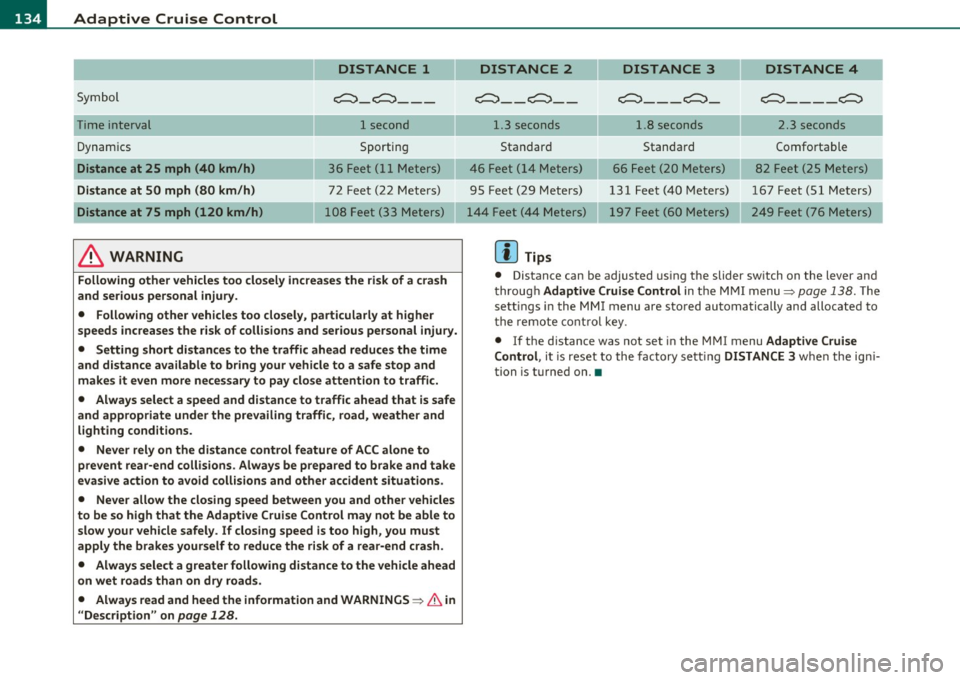
DISTANCE 1
Symbol ~-~---
Time interval 1 second
Dynamics Sporting
Distance at 25 mph (40 km/h ) 36 Feet (11 Meters)
Distance at SO mph (80 km /h ) 72 Feet (22 Meters)
Distance at 75 mph (120 km /h) 108 Feet (33 Meters)
& WARNING
Following other vehicles too closely increase s the risk of a crash
and ser ious personal injury.
• Following other vehicles too closely, particularly at higher
speeds inc reases the r isk of collisions and serious personal injury.
• Setting short distances to the traffic ahead redu ce s the time
and d istance available to br ing your vehicle to a safe stop and
make s it even more ne ce ss ary to pay clo se attention to traffi c.
• Always select a speed and distance to traffic ahead that is safe
and appropriate under the prevailing traffi c, road, weather and
lighting cond itions.
• Never rely on the distance control feature of ACC alone to
prevent rear -end collisions . Always be prepared to b rake and take
ev asive action to avoid collisions and other accident situ ations .
• Never allow the closing speed between you and other vehicles
to be so high that the Adaptive Cruise Contr ol may not be able to
slow your vehicle safely . If closing speed is too high , you must
apply the brake s yourself to reduce the ri sk of a rear -end cra sh.
• Always select a g reate r following di stance to the vehicle ahead
on wet road s than on dry road s.
• Always read and heed the information and WARNINGS~
& in
" Description " on
page 128 .
DISTANCE 2 DISTANCE 3 DISTANCE 4
c::::::> __ c::::::> __ ~---~- ~----~
1.3 seconds 1.8 seconds 2.3 seconds
Standard Standard Comfortable
46 Feet ( 14 Meters) 66 Feet (20 Meters) 82 Feet (25 Meters)
95 Feet (29 Meters) 131 Feet (40 Meters) 167 Feet (51 Meters) 197 Feet (60 Meters) 249 Feet (76 Meters)
[ i ] Tips
• Distance can be adjusted us ing the slider sw itch on the leve r and
throug h Adaptive Crui se Control in the M MI menu~
page 138. The
sett ings in the MMI menu are sto red automatically and allocated to
t he remote cont ro l key .
• If the distance was not set in the MMI menu Adapt ive Cruise
Control , it is reset to the factory sett ing DISTANCE 3 when the ign i
tion is turned on. •