AUDI TT 2013 Owner´s Manual
Manufacturer: AUDI, Model Year: 2013, Model line: TT, Model: AUDI TT 2013Pages: 262, PDF Size: 65.91 MB
Page 61 of 262
Luggage compartment
Expanding the luggage compartment
You can increase the available luggage space
by folding the rear seatback down .
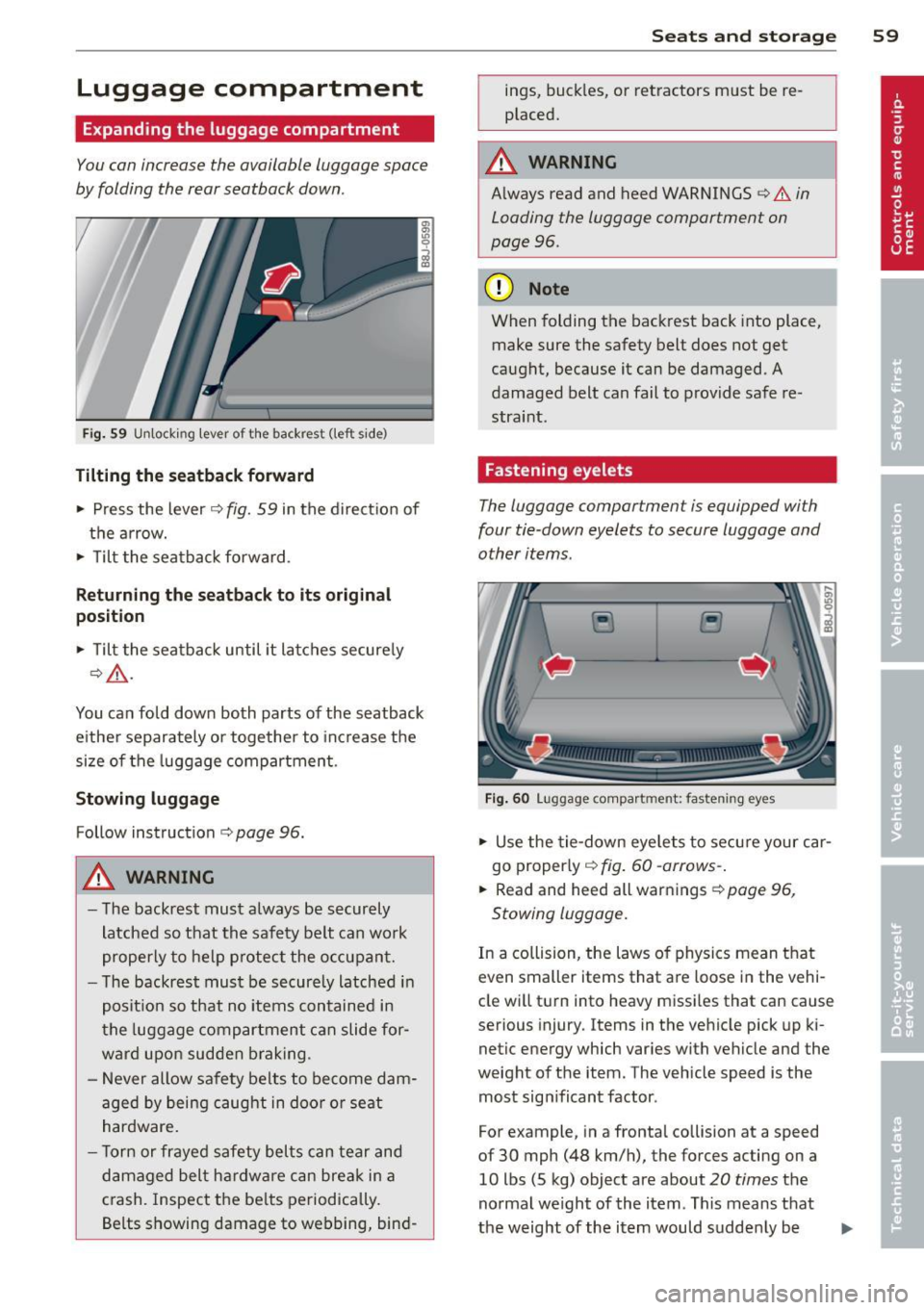
Fig. 59 Unlocking lever of the backrest (left sid e)
Tilting the seatback forward
~ Press the lever c:> fig. 59 in the direction of
the arrow.
~ T ilt the seatback forward .
Returning the seatback to its original
position
~ T ilt the seatback until it latches securely
¢ _&..
You can fold down both parts of the seatback
either separately or together to increase the
size of the luggage compartment .
Stowing luggage
Follow instruction c:> page 96.
A WARNING
- The backrest must always be securely
latched so that the safety belt can work
properly to help protect the occupant.
- The backrest must be securely latched in
position so that no items contained in
the luggage compartment can slide for
ward upon sudden braking .
- Never allow safety belts to become dam
aged by being caught in door or seat
hardware.
- T orn or frayed safety belts can tear and
damaged belt hardware can break in a
crash. Inspect the belts periodically.
Belts showing damage to we .bbing, bind-
Seats and storage 59
ings, buckles, or retractors must be re
placed.
A WARNING
Always read and heed WARNINGS <:> A in
Loading the luggage compartment on
page 96 .
(D Note
When folding the backrest back into place,
make sure the safety belt does not get
caught, because it can be damaged. A
damaged belt can fail to provide safe re
straint .
Fastening eyelets
The luggage compartmen t is equipped wi th
four tie-down eyelets to secure luggage and
other items .
Fig. 60 Lugg ag e compar tmen t: fa st enin g eyes
~ Use the tie-down eyelets to secure your car
go properly <:>
fig. 60 -arrows-.
~ Read and heed all warnings c:> page 96,
Stowing luggage.
In a collision, the laws of physics mean that
even smaller items that are loose in the vehi
cle will turn into heavy missiles that can cause
serious injury. Items in the vehicle pick up ki
netic energy which va ries with vehicle and the
weight of the item. The vehicle speed is the
most sign ificant factor .
For example, in a frontal collision at a speed
of 30 mph (48 km/h), the forces acting on a 10 lbs (5 kg) object are about
20 times the
normal weight of the item . This means that
the weight of the item would suddenly be
Page 62 of 262
60 Seats and st o rage
about 200 lbs (90 kg). One can easi ly imagine
the injuries that an item of that weight flying
freely through the passenger compartment can cause in a co llision at a speed considered
relative ly low .
A WARNING
Weak, damaged or improper straps used
to secure items to t ie-downs can fail du r
ing hard b rak ing or in a col lision and cause
ser ious personal inju ry.
- Always use suitable mounting straps and
properly secure i tems to the tie-downs in
the luggage compar tment to help pre
vent items from shifting or flying for
wa rd as dangerous missiles .
- When the rear seat back rest is folded
down, always use su itab le mount ing
st raps and proper ly secure items to the
t ie-downs in the luggage compartment
to help prevent items from flying for
ward as dangerous miss iles into the pas
senger compartment.
- Never attach a child safety seat tether strap to a tie-down.
Luggage compartment cover removal
and installat ion
The luggage compar tment cover preven ts
people from looking into the luggage com
partment.
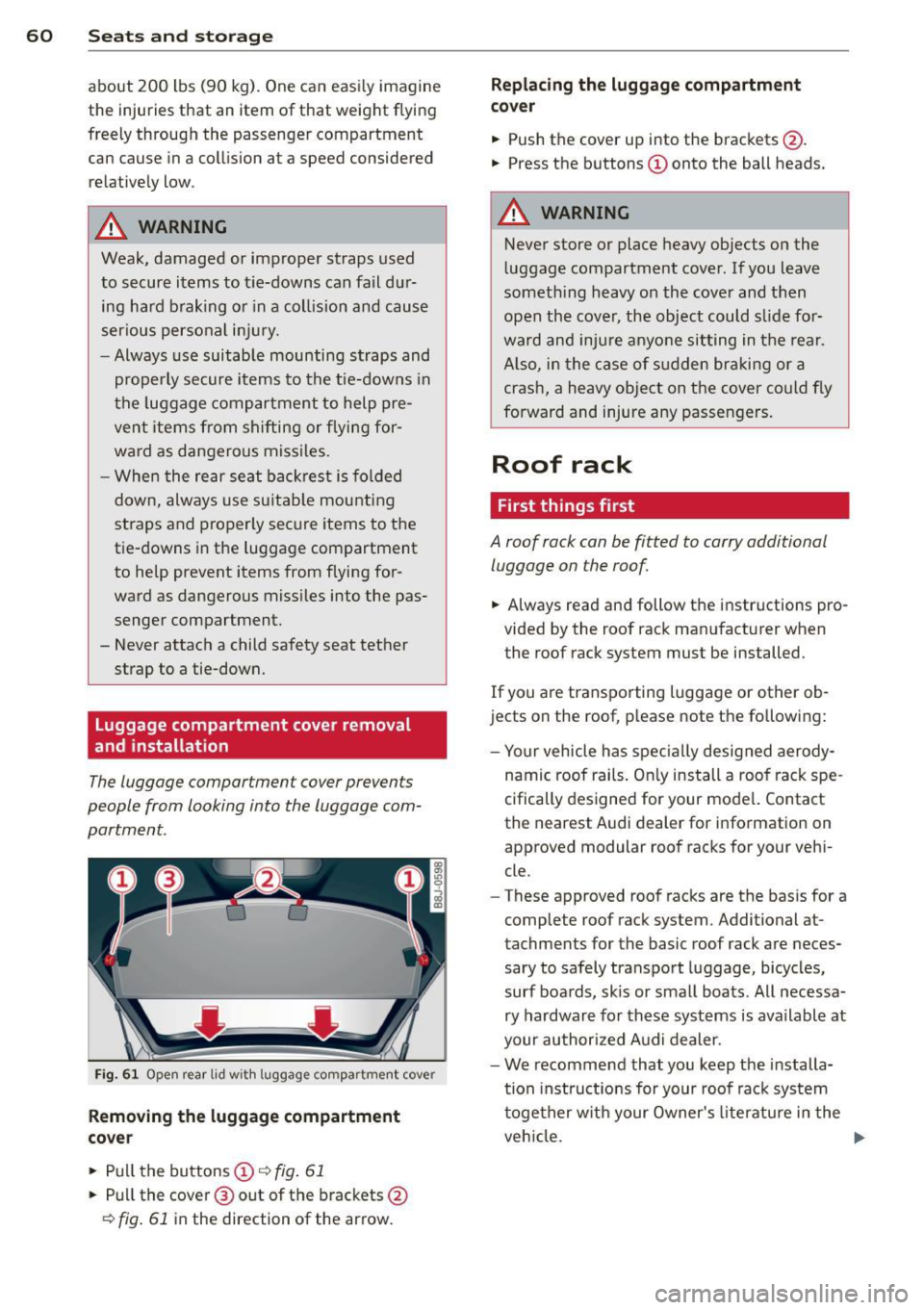
Fi g. 61 O pen rear lid w it h l uggage co m partment cove r
Removing the luggage compartment
co ve r
• Pu ll the buttons (D r::;, fig. 61
• Pull the cover @out of the brackets @
r::;, fig. 61 in the direction of the arrow.
Repl acing the luggage compartment
co ve r
• Push the cover up into the brackets @.
• Press the buttons
(D onto the ball he ads.
A WARNING
-Never store or place heavy objects on the
luggage compartment cover . If you leave
somet hing heavy o n the cove r and then
open the cover, the object could s lide fo r
ward and inju re anyo ne sit ting in t he rea r.
A lso, in the case of s udden br aking or a
crash, a heavy object on the cover could fly
fo rward and injure any passen gers.
Roof rack
First things first
A roof rack can be fitted to carry additional
luggage on the roof
• Always read and follow the instructions pro
vided by the roof rack man ufacturer when
the roof rack sys tem must be installed.
If you are transporting luggage or other ob
jects on the roof, p lease note the fo llowing:
- Yo ur vehicle has spec ially designed aerody-
namic roof rails . On ly install a roof rack spe
cifically designed for your model. Contact
the nearest Aud i dealer for information on
approved modul ar roo f racks for your vehi
cle .
- T hese approved roof racks are the basis for a
comp lete roof rack system . Additional at
tachments for the basic roof rack are neces sary to safely tran spo rt luggage, bicycles,
surf boards, skis or small boats. All necessa ry hardwar e fo r these syst ems is available at
your authorized A udi dealer.
- We recommend that you keep the installa
tion instruct ions for your roof rac k system
together w ith your Owner's literatu re i n t he
veh icle. .,.
Page 63 of 262
When should the roof rack be removed?
-Before going through an automatic car wash
(it is best to ask the car wash operator for
advice).
- When not in use, to reduce fuel consump
tion, wind noise and to guard against theft.
_& WARNING
- Use of an unapproved roof rack or incor
rect mounting of an approved roof rack
can cause the roof rack or the items at
tached to it to fall off the roof onto the road .
- Objects falling from the roof of a vehicle
can cause a crash and personal injury .
- Only mount the system between the
markings shown in
¢ page 61, fig. 62.
- The roof rack system must be installed
exactly according to the instructions pro
vided.
(D Note
- Your vehicle warranty does not cover any
damages to the vehicle caused by using
roof racks or mounting structures not
approved by Audi for your vehicle. The
same applies to damage resulting from
i ncorrect roof rack installation.
- Always check the roof rack mountings
and hardware before each trip and dur
ing a trip to make sure everything is se
curely tightened.
If necessary, retighten
the mount ings and check the entire sys
tem from time to time.
- After mounting a roof rack system, or
whe n you transport objects on the roof
of your vehicle, the height of the vehicle
is naturally increased. Be careful when
driving under low br idges or in parking
garages for example. This could cause
damage to the load and even the vehicle
i tself .
Seats and storage 61
Mounting locations
The roof rack must be attached only at the
positioning bolts.
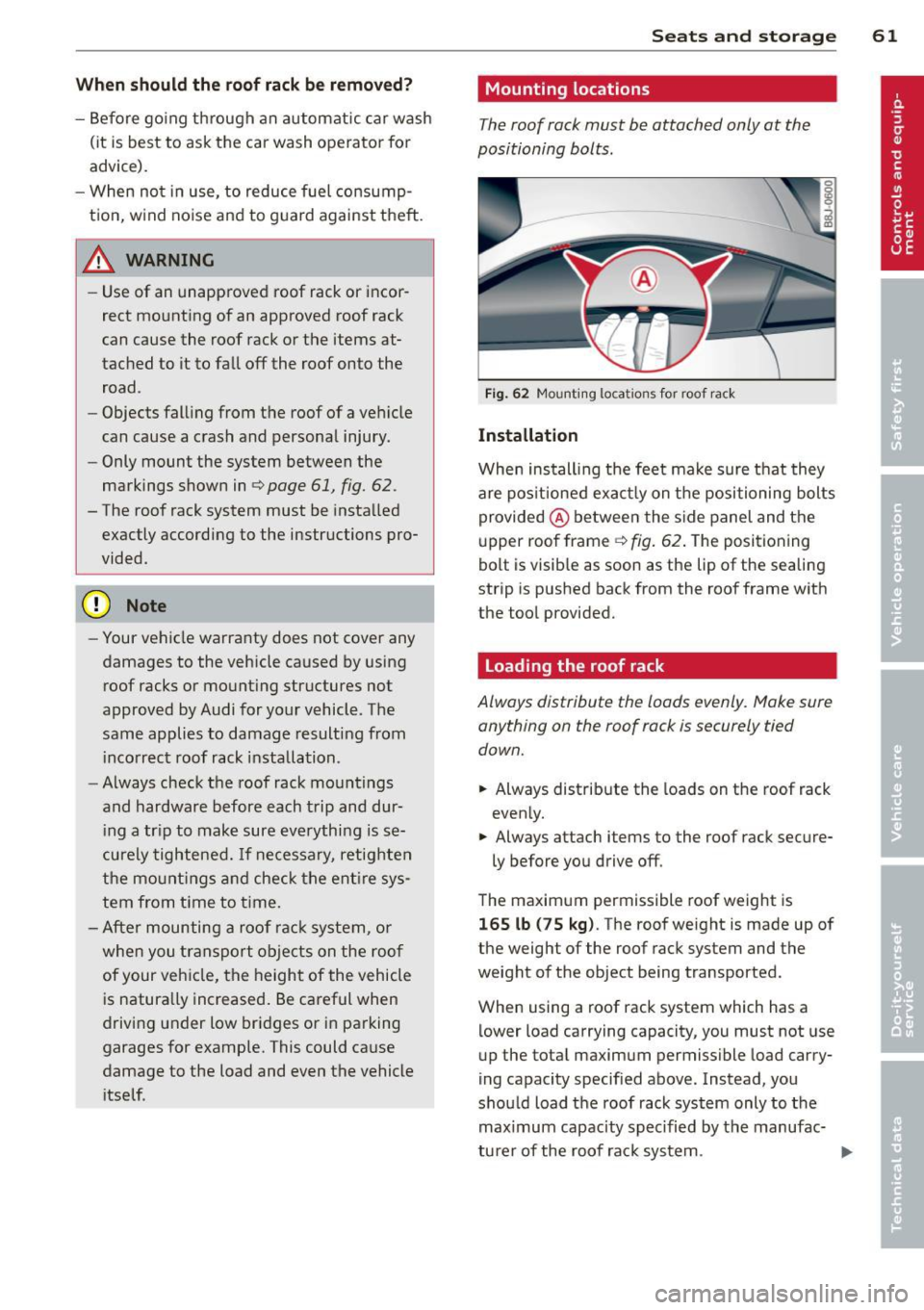
Fig. 62 Mounting locat ions for roof rac k
Installation
When installing the feet make sure that they
are pos itioned exact ly on the positioning bolts
provided @ between the side panel and the
upper roof frame ¢
fig. 62. The positioning
bolt is visib le as soon as the lip of the sealing
strip is pushed back from the roof frame with
the tool provided.
Loading the roof rack
Always distribute the loads evenly. Make sure anything on the roof rack is securely tied
down.
.,. Always distribute the loads on the roof rack
evenly.
.,. Always attach items to the roof rack secure-
ly before you drive off .
The maximum permissible roof weight is
165 lb (75 kg). The roof weight is made up of
the weight of the roof rack system and the
weight of the object being transported.
When using a roof rack system which has a
lower load carrying capacity, you must not use
up the total maximum permissible load carry
ing capacity specified above. Instead, you
should load the roof rack system only to the maximum capacity spec ified by the manufac-
turer of the roof rack system . ..,.
Page 64 of 262
62 Seats and storage
A WARNING
Weak, damaged or improper straps used
to secure items to the roof rack can fa il
during hard braking or in a collision and
cause se rious personal injury .
- Make sure the roof rack is installed exact
ly as specified above
c> page 61 .
-Always use suitable mounting straps for
sec uring items to the roof rack to help
preve nt items from shift ing o r fly ing for
wa rd.
- Items on the roof rack must always be
se cu rely mo unted.
- The use of a roof rack can negat ive ly af
fect the way a vehicle handles. Ca rgo
that is large, heavy, b ulk y, long o r flat
wi ll h ave a g reater neg ative inf luence on
t he vehicle 's aerodynamics, cen ter of
gravity and overall handling . Always
dr ive slow ly, avoid sudden braking and
maneuvers when transporting cargo on
the roof of your vehicle.
- Never e xceed the maximum permissib le
load carrying capacity of the roof o f your
vehicle, the perm issib le a xle weights and
the permiss ible total weight of your veh i
cle
c> page 238, Weights .
@) For the sake of the environment
As a result of the increased wind resist
ance created by a roof rack , your veh icle is
using fue l unnecessar ily. So remove the
roof rack after using it .
Cup holder
Fig. 63 Cup ho ld er
A WARNING
-Spilled hot liquid can cause an accident
and personal injury .
- Never carry any beverage conta iners with
hot liquids , such as hot coffee o r hot tea,
i n the vehicle while it is moving. In case
of an acc ident, sudden braking or othe r
veh icle movement, hot liquid could spill,
c a using scalding burns. Spilled hot liquid
can also cause an acci dent and personal
i njur y.
- Use o nly soft c ups in the cupholder . H ard
cups and glasses can cause injury in an
accident.
- Never use the cup hol der or adapter as an
ashtray -ris k of fire.
(D Note
Only d rink conta iners with lids should be
ca rr ied in the cuph older. Liquid could spill
out and damage you r vehicles elec tronic
equipmen t or s tain t he upho lstery, etc.
Ashtray
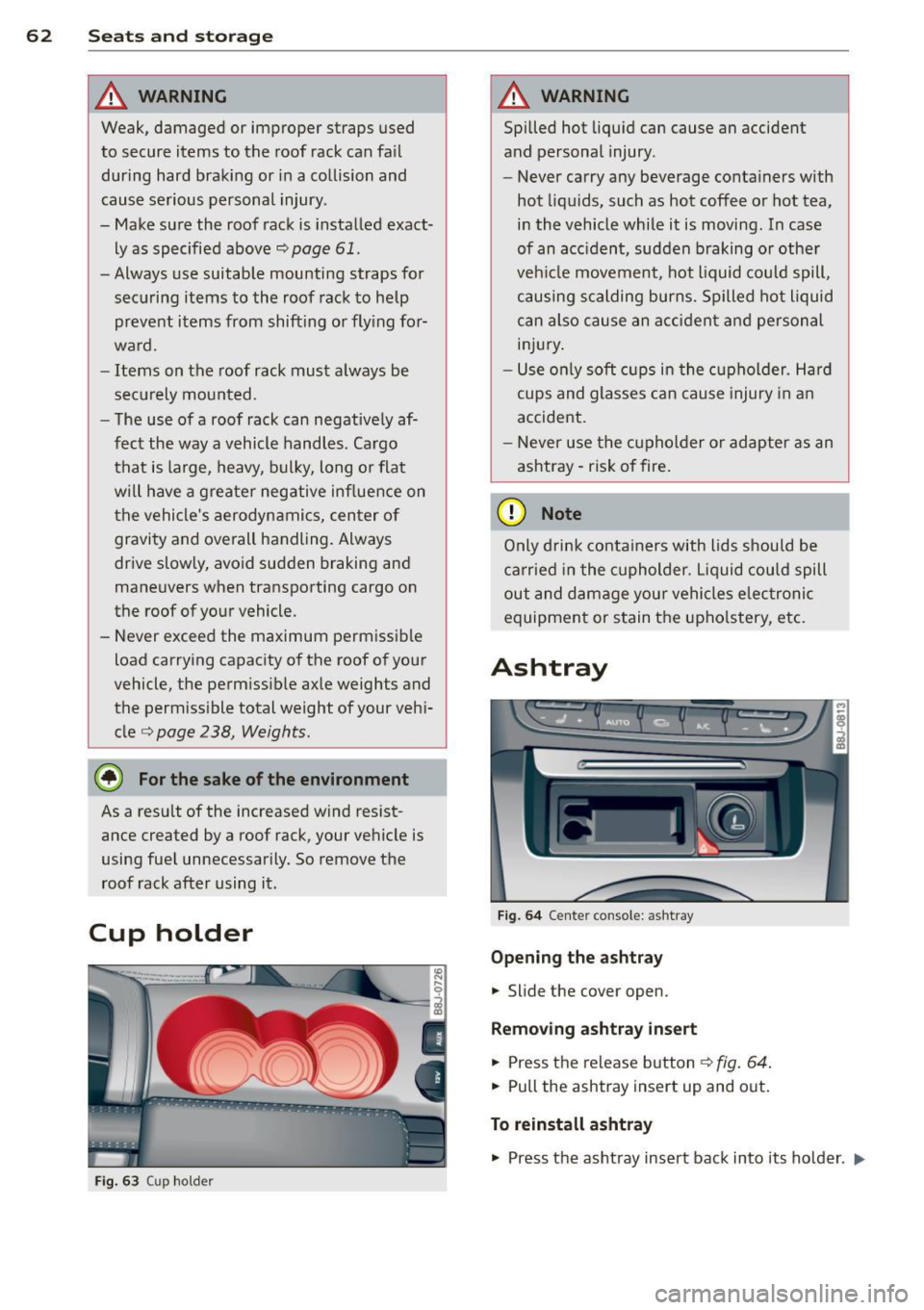
Fig . 64 Center co nsole : a shtr ay
Opening the ashtray
.,. Slide the cover open.
Removing ashtray insert
.,. Press t he re lease b utton c> fig. 64 .
.,. Pull the ashtray insert up and o ut.
To reinstall ashtray
.,. Press the as htray insert back into its ho lder . ..,.
Page 65 of 262
_& WARNING
Never put waste paper in the ashtray. Hot
ashes or other hot objects in the ashtray
could set waste paper on fire.
Cigarette lighter/
socket
Cigarette lighter
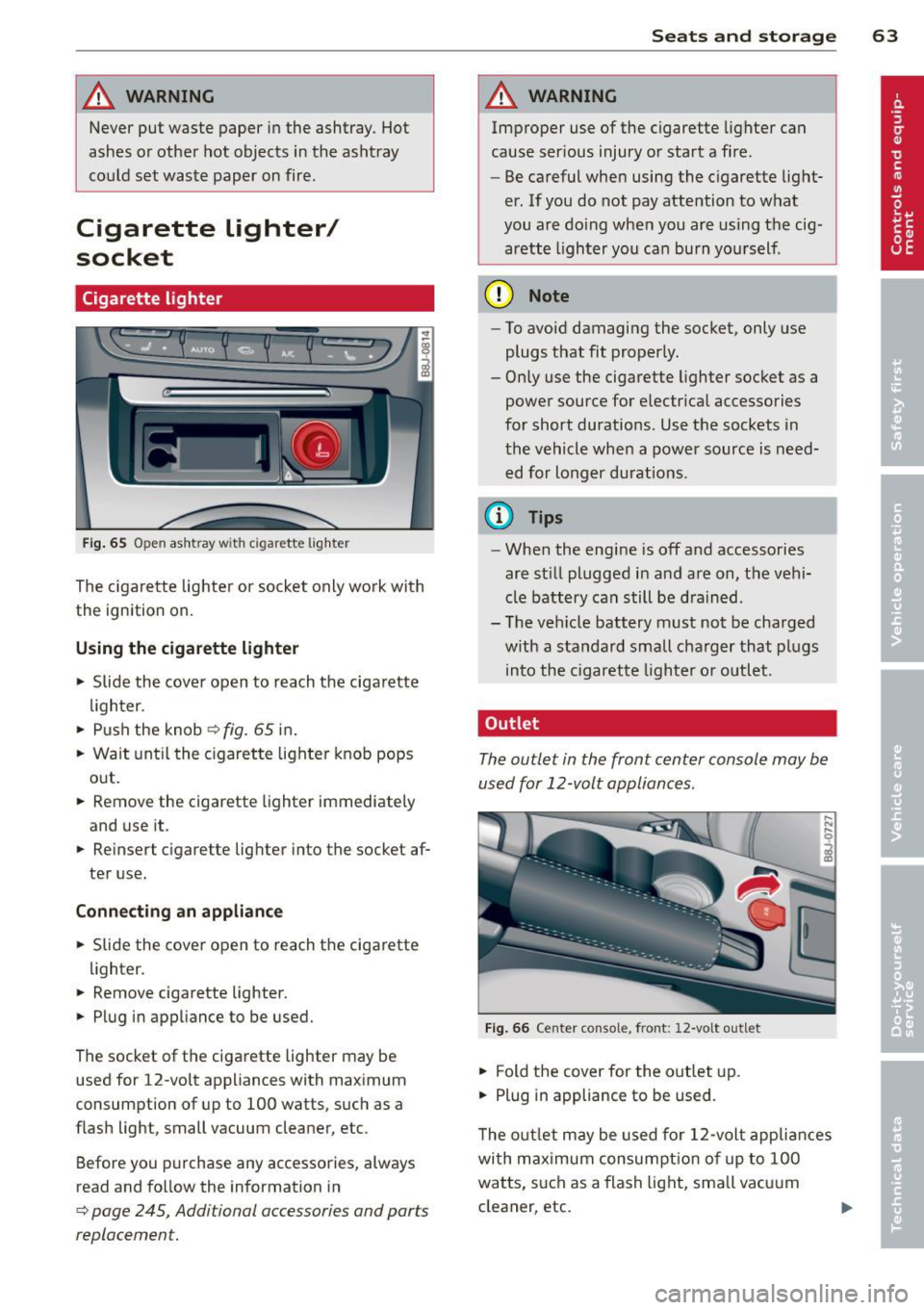
Fig . 65 O pen ash tr ay with c igare tte li ghter
The cigarette lighter or socket only work with
th e ignition on.
Using the cigarette lighter
• Slide the cover open to reach the cigarette
l igh ter .
• Push the knob
¢fig. 65 in.
• Wait unt il the cigarette lighter knob pops
out.
• Remov e the ciga rette lighter immedia tely
a nd use it .
• Reinsert cig are tte ligh ter in to the socke t af
ter use.
Con nect ing an appli ance
• Slide the cover open to reach the cigarette
lighter .
• Remove cigarette lighter.
• Plug in appliance to be used.
The socket of the cigarette lighter may be
used fo r 12-volt appliances with maximum
consumption of up to 100 watts, such as a
flash light, small vacuum cleaner, etc .
Before you purchase any accessories, always
read and fo llow the information in
¢ page 245, Addi tional accessories and par ts
replacemen t.
S ea ts a nd s to rage 63
A WARNING
Improper use of the cigarette lighter can
cause ser ious injury or start a fire .
- Be careful when using the cigarette light
er. If you do not pay attention to what
you are do ing when you are using the cig
arette lighter you can burn yourself .
(D Note
-To avoid damaging the socket, only use
plugs that fit properly.
- Only use the cigarette lighter socket as a
power source for e lectr ica l accessories
for short durations . Use the sockets in
the vehicle when a power source is need
ed for longer durations .
(D Tips
-When the engine is off and accessories
are st il l plugged in and are on, the vehi
cle battery can still be d rained .
- The ve hicle battery must not be charged
w ith a standard small charger that pl ugs
into the cigarette lighter o r outlet .
Outlet
The outlet in the front center console may be
used for 12-volt appliances .
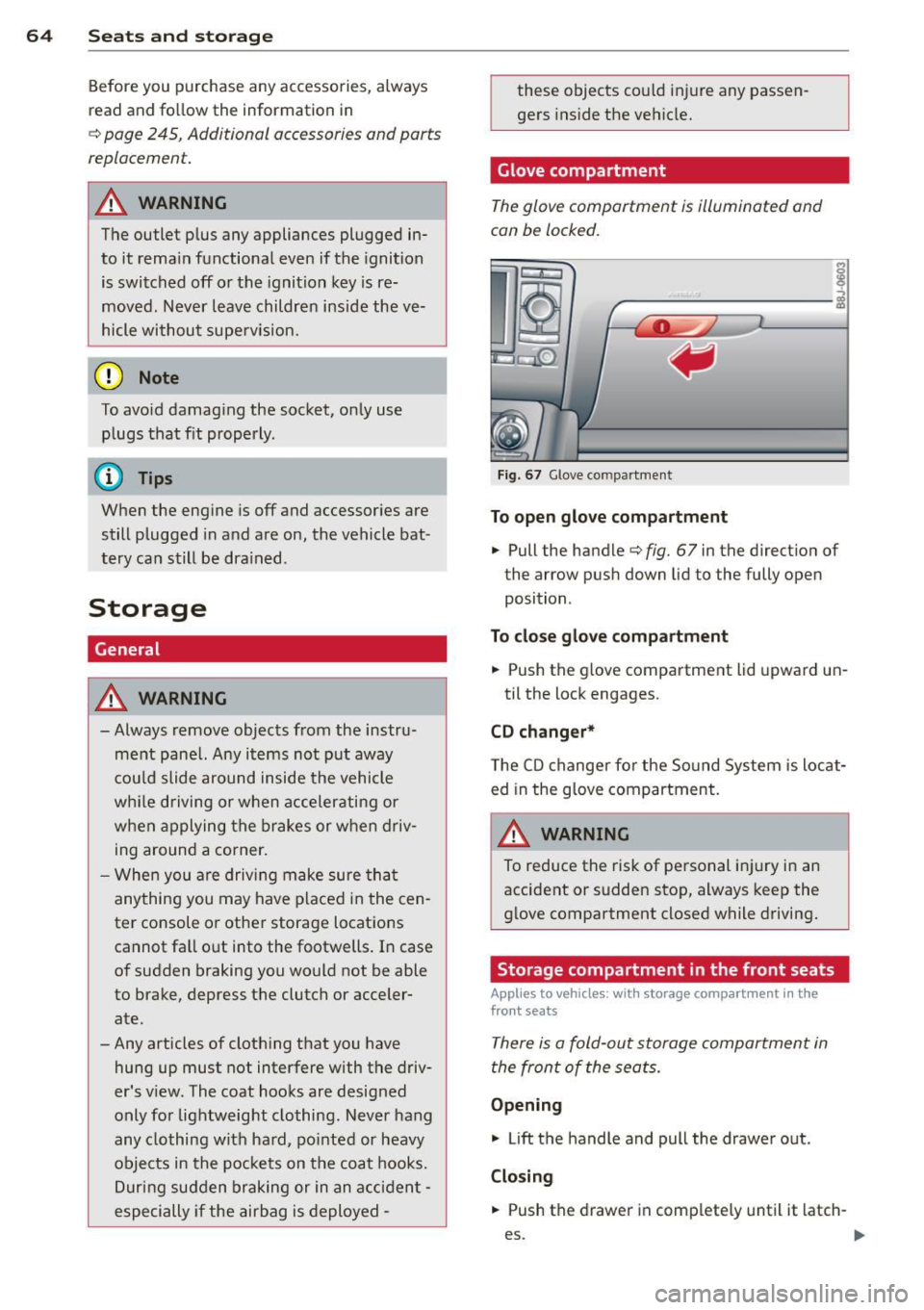
Fig . 66 Ce n te r co n sol e, fro nt: 12-volt outlet
• Fold the cover for the outlet up.
• Plug in appliance to be used .
T he out let may be used fo r 12-volt appliances
with maximum consumpt ion of up to 100
watts, s uch as a flash light, sma ll vacu um
cleaner , etc.
Page 66 of 262
64 Seats and storage
Before you purchase any accessories, a lways
read and fo llow the information in
c::> page 245, Additional accessories and parts
replacement.
A WARNING
The outlet p lus any appliances plugged in
to it rema in functional even if the ignition
is switched off or the ignition key is re
moved. N ever leave children inside the ve
hicle withou t supe rv ision.
Q) Note
To avo id damag ing the socket, only use
plugs that fit properly .
(D Tips
When the engine is off and accessor ies are
still plugged in and are on, the vehicle bat
tery ca n still be dra ined .
Storage
General
A WARNING
-Always remove objec ts from the instru
ment panel. Any items not put away
cou ld slide around inside the vehicle
wh ile driving or when acce lerating or
when applying the brakes or when driv
ing around a corner.
- When you are drivi ng make sure tha t
anything you may have placed in the cen
ter console or other storage lo cations
cannot fa ll out into the footwells . In case
of sudden braking you would not be able
to brake, depress th e clutch or acceler
ate.
-Any articles of cloth ing that you have
hung up must not interfere with the driv
er's v iew. The coat hooks are desig ned
only for lightweight clothing. Never hang
any clothing with ha rd, po inted or heavy
objects in the pocke ts on the coat hooks.
Dur ing sudden braking or in an acciden t -
especially if the airbag is deployed -
-
these objects co uld injure any passen
gers inside the vehicle.
Glove compartment
The glove compartment is illuminated and
can be locked.
I i I
I
ij
----------- i
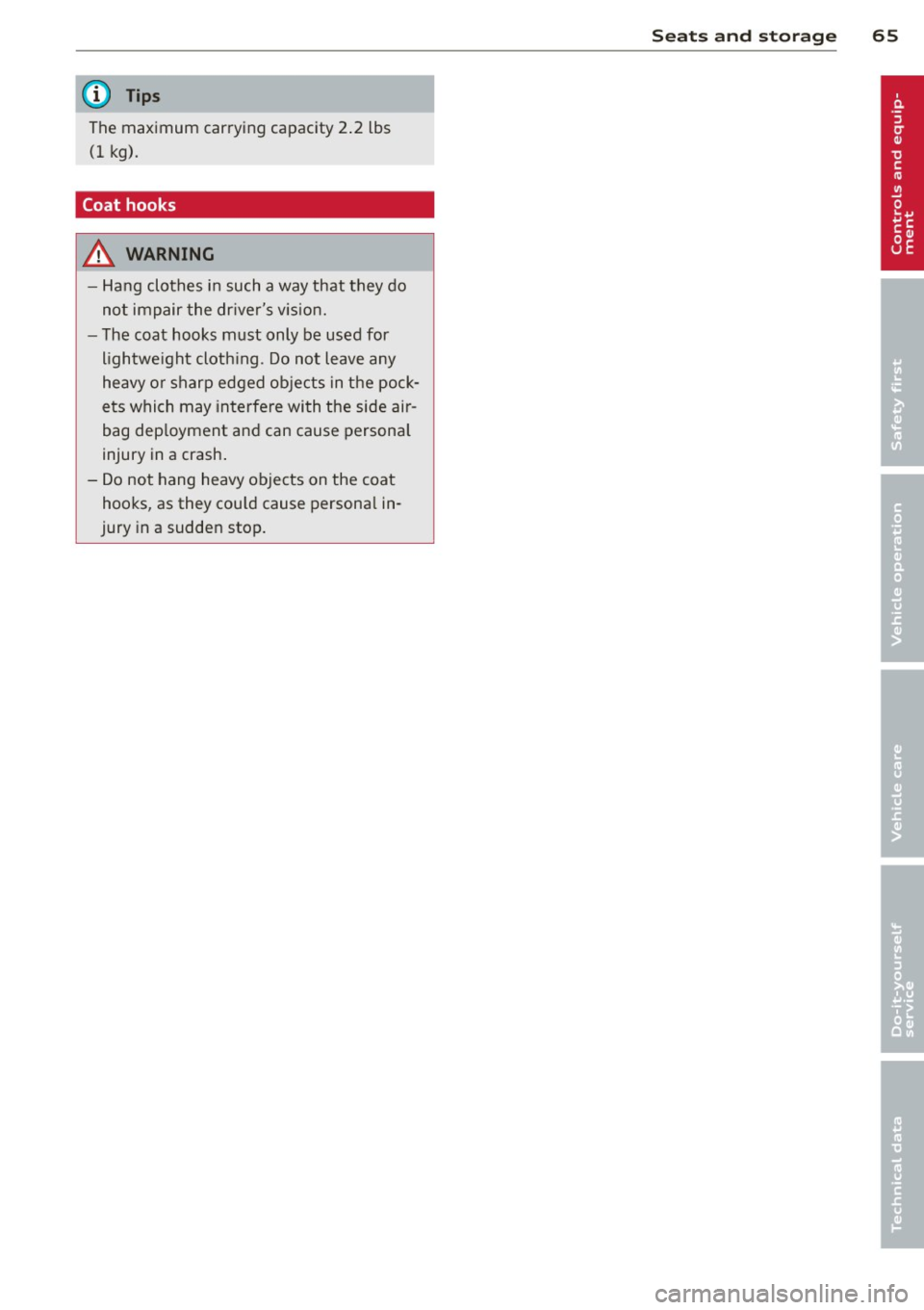
Fig. 67 Glove compa rt me nt
To open glo ve com partment
.. Pull the handle c::>fig. 67 in the direction of
the arrow push down lid to the fully open
position .
To close gl ove c ompa rtment
.. Push the glove compartment lid upward un-
til the lock engages.
CD changer *
The CD changer fo r the Sound System is locat
ed in the g love compartment.
A WARNING
To reduce the risk of pe rsonal injury in an
accident or sudden stop, always keep the
glove compartment closed while driving.
Storage compartment in the front seats
App lies to veh icles : w it h storage compart men t in the
fro nt seats
There is a fold-out storage compartment in
the front of the seats.
Opening
.. Lift the handle and pull the drawer out.
Closing
-
.. Push the drawer in complete ly until it latch -
es. .,.
Page 67 of 262
@ Tips
The maximum carrying capacity 2.2 lbs
(1 kg) .
Coat hooks
A WARNING
-Hang clothes in such a way that they do
not impair the dr iver's v is ion.
- The coat hooks must only be used for
l ightwe ight cloth ing . Do not leave any
heavy or sharp edged objects in the pock
ets which may interfere with the side air
bag dep loyment and can cause persona l
injury in a crash .
- Do not hang heavy objects on the coat hooks , as they cou ld cause persona l in
jury in a sudden stop.
S eat s an d sto rage 65
Page 68 of 262
66 Warm and cold
Warm and cold
Climate controls
Controls
The air conditioning automatically maintains the selected temperature in the vehicle interior
throughout each season .
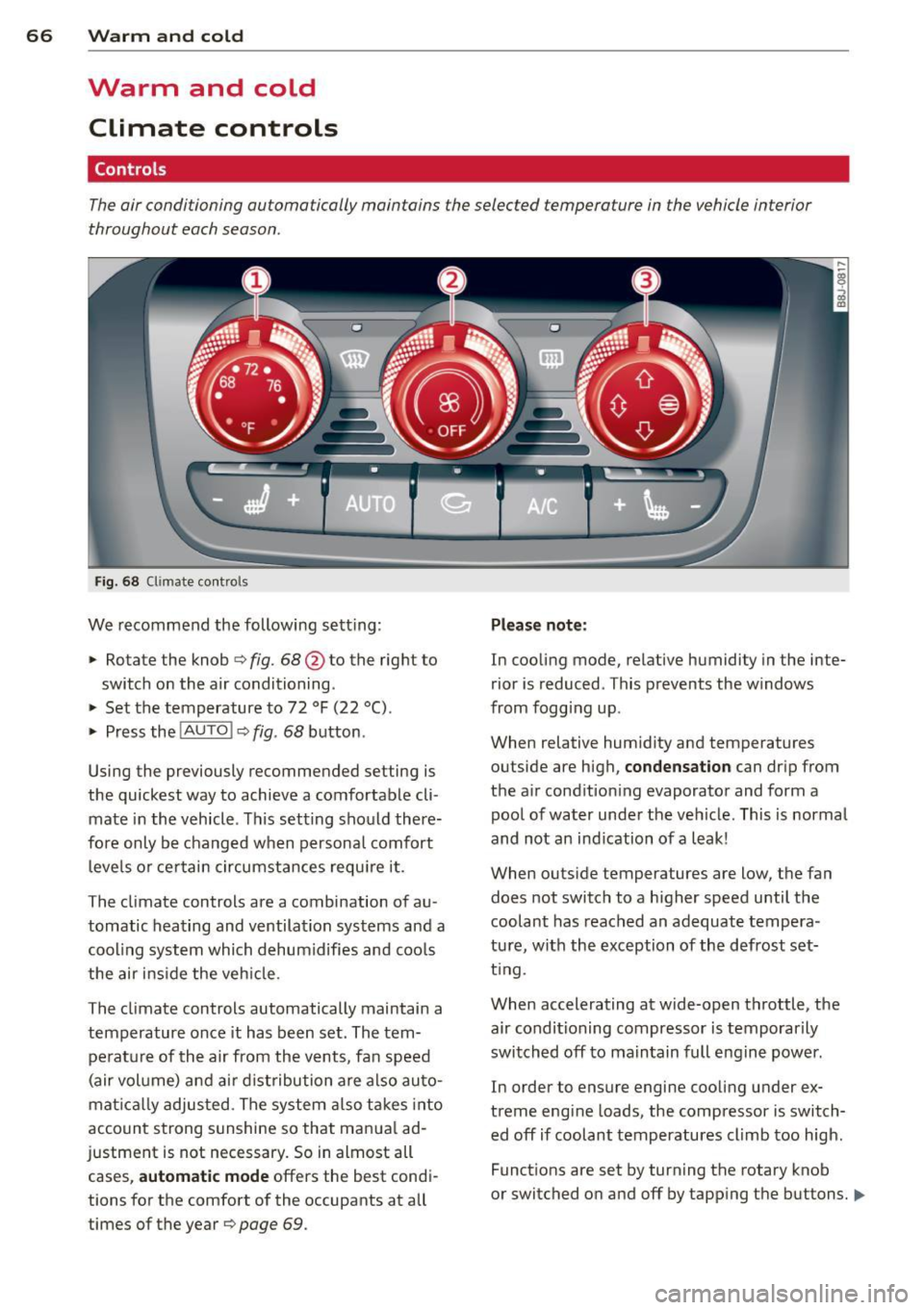
Fig. 68 Climate contro ls
We recommend the following sett ing :
> Rotate the knob ¢ fig. 68 @to the right to
switch on the air conditioning .
> Set the temperature to 72 °F (22 °() .
> Press the !AUTO I ¢ fig . 68 button .
Using the previously recommended setting is
the quickest way to achieve a comfortable cli
mate in the vehicle . This setting should there
fore only be changed when persona l comfort
l eve ls or ce rtain circumstances requi re it .
The climate controls are a combination of au
tomatic heating and ventilation systems and a
coo ling system which dehumidifies and coo ls
the air ins ide the veh icle.
The climate controls automatically maintain a temperature once it has been set . The tem
perat ure of the air from the vents, fan speed
(air vol ume) and ai r d ist ribution are also auto
mat ical ly adjusted . The system also takes into
account strong s unshine so that manua l ad
justment is not necessary. So in almost all cases,
a ut om at ic mode offers the best cond i
tions for the comfort of the occupants at all
times of the year ¢
page 69.
Please not e:
In cooling mode , relative humidity in the inte
rior is reduced . This prevents the w indows
from fogg ing up.
When relative hum idity and temperatures
outside are high ,
conden sati on can drip from
the a ir condition ing evaporator and form a
pool of water under the vehicle. This is normal
and not an ind ication of a leak!
When outs ide temperatures are low, the fan
does not switch to a higher speed until the
coolant has reached an adequate tempera
tu re, with the exception of the defrost set
t ing.
When accelerating at wide-open throttle, the air conditioning compressor is temporarily
switched off to ma intain full engine power .
In order to ensure engine cooling under ex
treme engine loads, the compressor is switch ed off if coolant temperatures climb too high.
Funct ions are set by turning the rotary knob
or switched on and off by tapp ing the buttons.
II>
Page 69 of 262
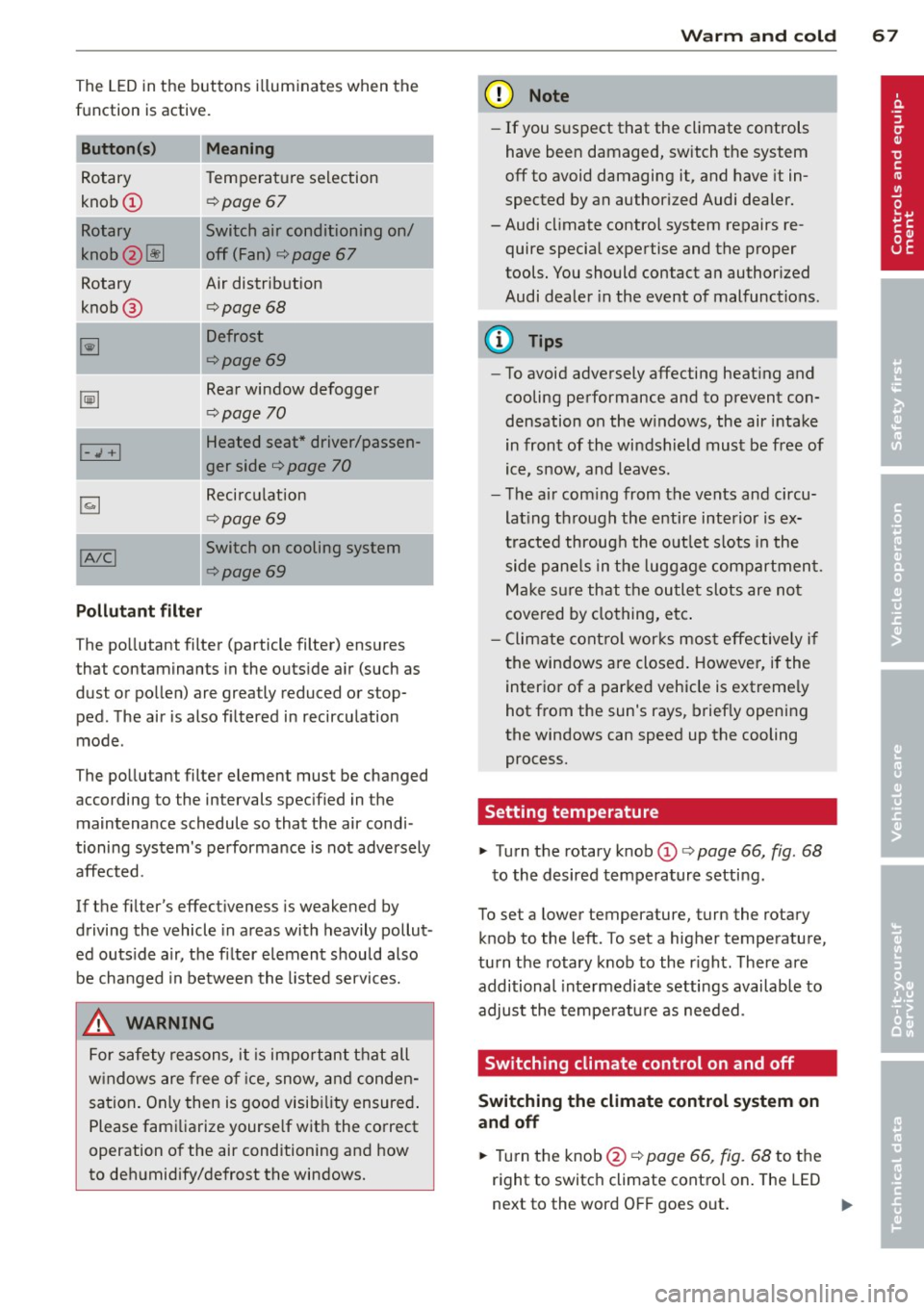
The LED in the buttons illum inates when the
function is active.
Button (s) Meaning
Rotary Tem
perature selection
knob
CD r=;, poge 67
Rotary Switch air cond itioning on/
knob
2 ~ off (Fan) ¢ page 67
Rotary Air distribution
knob @
¢page 68
~
Defrost
r=;,page69
~
Rear window defogger
¢page 70
Heated seat * driver/passen-I-.,; +I
ger side ¢ page 70
~
Recirculation
¢page 69
!AIC! Switch on cooling system
r=;, page69
Pollutant filter
The po llutant filter (particle filter) ensures
that contaminants in the outs ide a ir (such as
dust or pollen) are greatly reduced or stop ped. The air is also f iltered in recirculation
mode .
The pollutant filter element must be changed according to the intervals spec ified in the
maintenance schedule so that the air cond i
tioning system's pe rformance is not adversely
affected.
If the filter's effect iveness is weakened by
driving the vehicle in areas with heavily pollut
ed outs ide a ir, the fi lter element should also
be changed in between the listed services.
,&. WARNING
For safety reasons, it is impo rtant that all
w indows are free o f ice, snow, a nd conden
sation . Only then is good visib ility ensured .
Please fami liarize yourse lf wit h the correct
operation of the air conditioning and how
to deh umidify/defrost the windows.
Warm and c old 67
@ Note
-If you s uspect that the climate controls
have been damaged, switch the system
off to avoid damaging it, and have it in
spected by an authorized Audi dealer.
-Audi cl imate control system repairs re
quire special expertise and the proper
tools. You should contact an author ized
Audi dealer in the event of malfunctions.
(D Tips
- To avoid adversely affecting heat ing and
cooling performance and to prevent con
densation on the w indows, the air i ntake
in front of the windshield must be free of
ice, snow, and leaves.
- T he a ir com ing from the vents and circu
lat ing th rough the e ntire interior is ex
tracted throug h the o utlet s lots in the
side p ane ls in the luggage compartmen t.
Ma ke s ure th at the outlet slots are no t
cove red by clo thing, e tc.
- C limate cont ro l wor ks mos t effectively i f
t he windows are closed. Howeve r, if the
interior of a par ked vehicle is extreme ly
hot from the sun's rays, brief ly opening
the windows can speed up the cooling
process.
Setting temperature
"' Turn the rotary knob CD ¢ page 66, fig. 68
to the desired temperature setting.
To set a lower temperature, turn the rotary
knob to the left . To set a higher temperatu re,
turn the rotary knob to the r ight . There are
additional inte rmediate settings available to
adjust the tempe ratu re as needed .
Switching climate control on and off
Switching the climate control system on
and off
"' Turn the knob@ r=;, page 66, fig. 68 to the
right to switc h climate contro l on . The LED
next to the word OFF goes o ut. ..,.
Page 70 of 262
68 Warm and cold
• Turn the knob@c:> page 66, fig. 68 to the
l eft to switch the climate contro l system off.
T he LED next to the word OFF comes on .
Setting fan speed ~
• Turn the knob@c:> page 66, fig. 68 to the
setting you want to adjust fan speed (ai r
quantity).
I n automat ic mode the cl imate control sys
tem automatically regulates fan speed de
pending on interior temperature . You can ad-
Air distribution
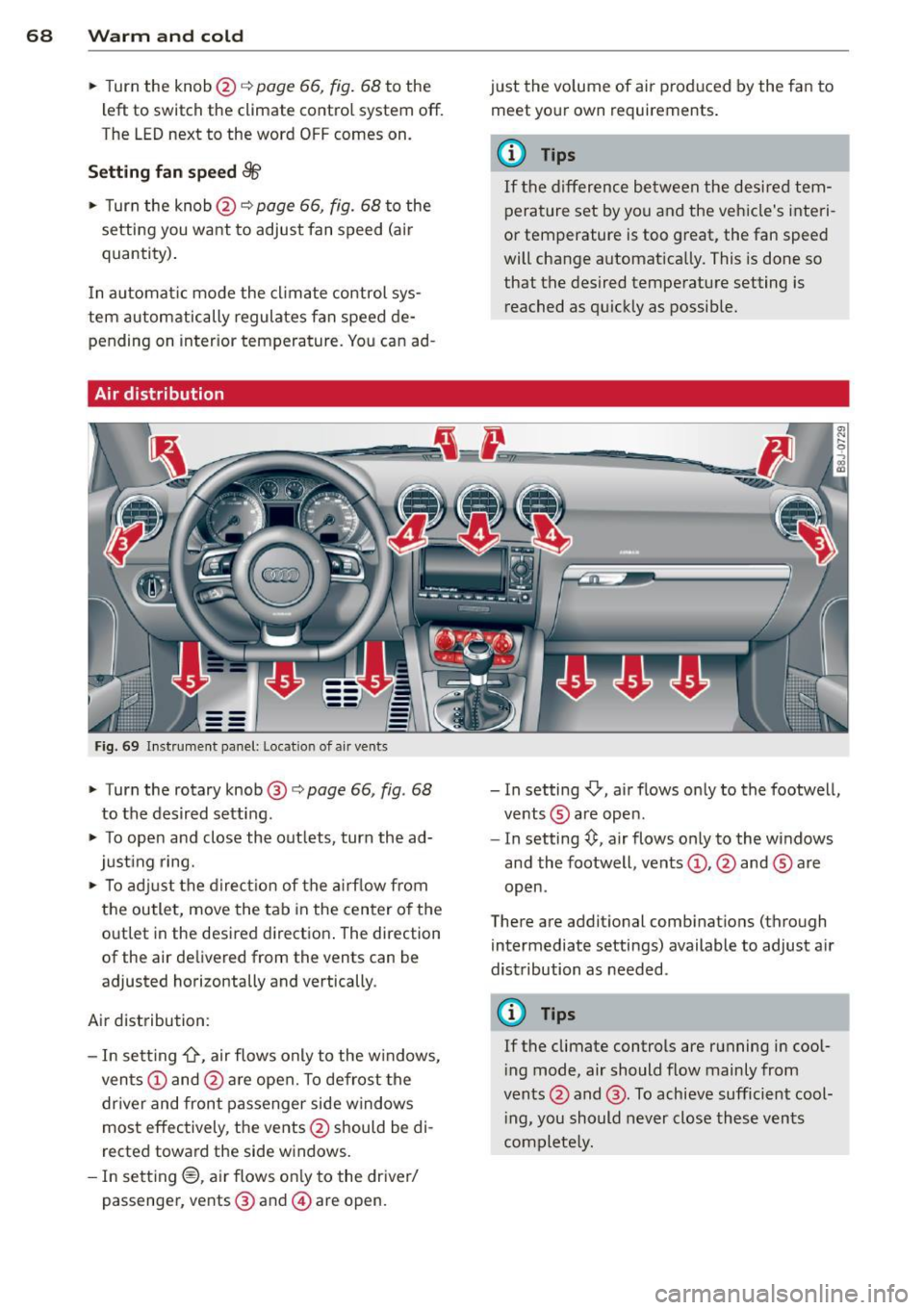
F ig. 6 9 In st ru m ent panel: Locat io n of air ven ts
• Turn the rotary knob @ c:> page 66, fig . 68
to the desired setting.
• To open and close the out lets, turn the ad
just ing ring.
• To adj ust the direct ion of the a irf low from
the outlet, move the tab in the center o f the
outlet in the desired d irection . The direction
of the air delivered from the vents can be
adjusted horizontally and vertically .
Air distribution:
- In sett ing
-0-, air flows only to the w indows,
ven ts @ and @are open. To defrost the
dr iver and front passenger side windows
most effectively, the vents @should be di
rected toward the side w indows.
- In sett ing®, ai r flows on ly to the dr iver/
passenger , vents @ and @are open. just the volume of air produced by the fan to
meet your own requirements .
(D Tips
If the d ifference between the desired tem
pera ture set by you and the vehicle's interi
or temperature is too great, the fan speed
will change automat ically. This is done so
that the desired temperature setting is
reached as quickly as possib le.
- In setting
-0, air flows only to the footwell,
ve nts ® are open.
- In setting~. air flows only to the windows
and the footwell , vents @, @ and ® are
open .
There are additional comb inations (through
intermediate settings) available to adjust a ir
distribution as needed .
(D Tips
If the climate controls are running in cool
i ng mode, air should flow mainly from
vents @and @. To achieve sufficient cool
i ng, you should never close these vents
complete ly.