light AUDI TT COUPE 2016 Workshop Manual
[x] Cancel search | Manufacturer: AUDI, Model Year: 2016, Model line: TT COUPE, Model: AUDI TT COUPE 2016Pages: 322, PDF Size: 52.86 MB
Page 90 of 322
Downloaded from www.Manualslib.com manuals search engine Intelligent Technology
its integrated systems cannot always pre
vent collisions -there is still a risk of acci
dents!
-Press the accelerator pedal carefully when
accelerating on even, slippery surfaces such
as ice and snow. The drive wheels can spin
even when these control systems are instal-
Switching on and off
led and this can affect driving stability and
increase the risk of a collision.
@ Tips
-ABS and ASR only function correctly when
all four wheels are equipped with identical
tires. Different tire sizes can lead to a reduc
tion in engine power.
-You may hear noises when the systems de
scribed are working.
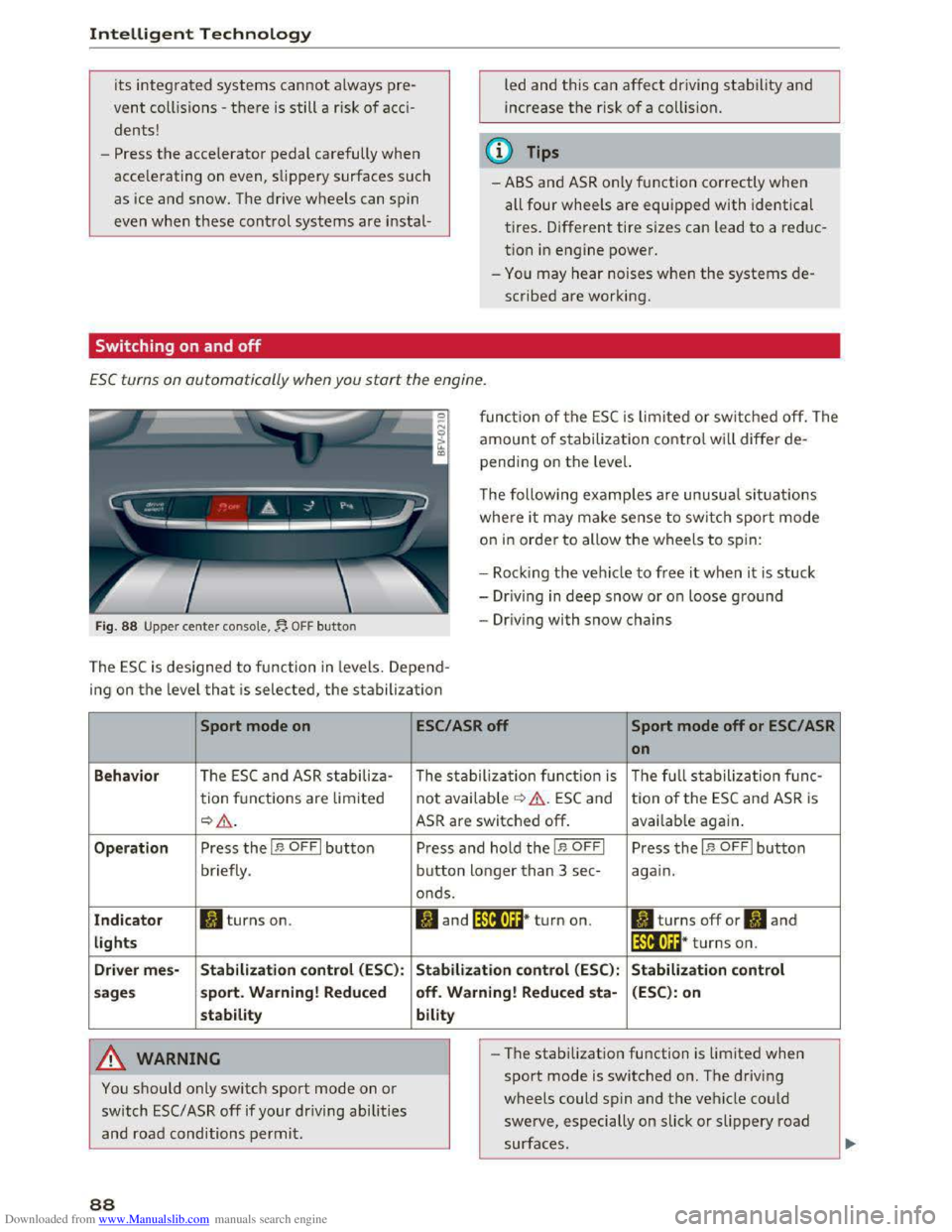
ESC turns on automatically when you start the engine .
Fig. 88 Upper center console,~ OFF button
function of the ESC is limited or switched off. The
amount of stabilization control will differ de
pending on the level.
The following
examples are unusual situations
where it may make sense to switch sport mode
on in order to allow the wheels to spin:
- Rock i
ng the vehicle to free it when it is stuck
-Dr iving in deep snow or on loose ground
-Driving with snow chains
The ESC is designed to function in levels. Depend
ing
on the level that is selected, the stabilization
Sport mode on
Behavior The ESC and ASR stabiliza-
tion functions are lim ited
~&.
Operation Press the I.$ OFFI button
briefly .
Indicator II turns on.
lights
Driver
mes-Stabilization control (ESC):
sages sport.
Warning! Reduced
stability
A WARNING
You should only switch sport mode on or
switch ESC/ ASR off if your driving abilities
and road conditions permit.
88
ESC/ASR off Sport mode off or ESC/ ASR
on
The stabilization function is The full stabilization func-
not available ¢ &. ESC and tion of the ESC and ASR is
ASR are switched off. available again.
Press and hold the I.$ OFFI Press the I.$ OFFI button
button longer than 3 sec-again.
onds.
II and lfif1U~* turn on. II turns off or II and
lfil•l~~* turns on.
Stabilization control (ESC): Stabilization control
off. Warning! Reduced
sta-(ESC): on
bility
- I
-The stabilization function is limited when
sport mode is switched on. The driving
wheels could spin and the vehicle could
swerve, especially on slick or slippery road
surfaces.
Page 91 of 322
Downloaded from www.Manualslib.com manuals search engine ...... N
> u. CX> ...... u:>
"' ...... u:> ......
-There is no vehicle stabilization when ESC/
ASR are switched off.
(D Tips
-When the cruise control system is switched
on, ESC/ ASR cannot be switched off or sport
mode cannot
be switched on.
- Malfunctions in the rear spoiler
or the Audi
magnetic ride may make
it impossible to
switch the ESC/ ASR off or to switch sport
mode on.
Brakes
New brake pads
New brake pads do not achieve their full braking
effect during the first 250 mi (400 km) . They
must be "broken in" first. However, you can com
pensate
for the slightly reduced braking force by
pressing
firmly on the brake pedal. Avoid heavy
braking during the break-in period.
Wear
Brake pad wear depends largely on the way the
vehicle is driven and on operating conditions.
This is especially true
if you are driving frequently
in
the city and on curves or with a sporty driving
style.
Operating noise
Noises may occur when braking depending on the
speed, braking force and outside conditions such
as temperature and humidity.
Effect of water and road salt
In certain situations, for example after driving
through water, in heavy
rain, after overnight con
densation
or after washing your car, the braking
effect can be reduced by moisture or ice on the
brake rotors and brake pads. The brakes
must be
"dried" first with a few careful brake applica
tions.
At higher speeds and with the windshield wipers
turned
on, the brake pads press against the brake
rotors
for a short amount of time. This action
which is
not felt by the driver happens at regular
Intelligent Technology
intervals and facilitates a better reaction time for
the brakes in wet weather.
T
he braking effect can also be reduced if you are
driving on salted roads and you do
not apply the
brakes for Long periods of time. The Layer of salt
on the brake rotors and pads must be worn off
first when the brakes are applied.
Corrosion
Leaving the vehicle parked for Long periods of
time, Low mileage and avoiding heavy braking
can contribute
to corrosion on the brake rotors
and
dirty brake pads.
If you usually avoid heavy braking or ifthere is
corrosion present, occasiona l heavy braking
at
high speeds is recommended to clean the brake
rotors and
pads¢.&..
Brake system malfunction
if you notice that the brake pedal travel has sud
denly gotten Larger, then a brake circuit may have
failed. Drive
to an authorized Audi dealer or au
thorized Audi Service Facility immediately to have
the problem corrected. On the way there, drive
with reduced speed and keep in mind that a Long
braking distance and increased pressure on the
brake pedal will be necessary.
Low brake fluid level
When the brake fluid Level is Low, malfunctions in
the brake system may occur. The brake fluid Level
is electronically monitored.
Brake booster
The brake booster amplifies the pressure you ap
ply to the brake pedal. It only works when the en
gine is running.
A WARNING
-New brake pads do not achieve their full
braking effect during the first 250 mi
(400 km). They must be "broken in" first.
However, you
can compensate for the
slightly reduced braking force by pressing
firmly on the brake pedal. Avoid heavy brak-
ing during
the break-in period. ~
89
Page 92 of 322
Downloaded from www.Manualslib.com manuals search engine Intelligent Technology
-Only apply the brakes for the purpose of
cleaning the brake system when road and
traffic conditions permit. You must not en
danger other road users. This increases the
risk of an accident.
-
On steep slopes, reduce the speed and se
lect a lower gear or lower selector lever po
sition . Drive
as little as possible while press
ing the brake pedal and avoid putting your
left foot on the brake pedal while driving.
This could
cause the brakes to overheat and
impair the efficiency of the brakes.
-
Do not let the brakes "grind" by always
keeping
your foot on the brake pedal. This
can
cause the brakes to over heat, increase
wear and increase brak ing distance u nneces
sari ly.
-
Certa in weather and operating cond it io ns
such as driving through water, driving in
heavy rain or driving after washing your ve
hicle
can impair the effectiveness of the
brakes. In the winter, ice may build up on
the brake pads, rotors and drums. Check
these components by braking carefully. Ap
plying
the brakes carefully several times
dries the brakes and removes ice build-up.
- The efficiency
of the brakes can also be im
paired by driving
for long stretches on roads
covered with salt without using the brakes.
You can remove salt deposits from the
brake rotors and pads by carefully applying
the brakes several times.
-If the front spoiler is damaged or you install
another spoiler, make sure the front wheel
brakes are ventilated properly. Otherwise,
the brake system could overheat, wh ic h re
duces
thei r effectiveness.
- Failure
of a brake circuit impairs braking
performance, which increases braking dis
tance.
Avoid driving the vehicle and have it
towed it to the nearest authorized Audi
dealer or authorized Audi Service Facility.
- Never
let the vehicle roll while the engine is
stopped because this increases the risk of an
accident.
-
If the brake booster is not working, you will
have
to press much harder on the brake
90
pedal to compensate for the lack of the
booster.
@ Note
-Never let the brakes "rub" by pressing the
pedal lightly when braking is not really nec
essary. This
causes the brakes to overheat
and increases braking distance and causes
wear.
- Before driving a long
distance on a steep
slope, decrease your speed and select a low
er driving gear. This makes use of the en
gine braking effect and relieves the brakes.
If you need to brake additionally, brake in
interva ls and not continuously.
(D Tips
-Ifthe brake booster is not work ing, you
must press the brake pedal w ith much more
force than normal.
-
If you retrofit your vehicle with a front spoil
er wheel covers or similar items, make sure '
that the air flow to the front wheels is not
interrupted. Otherwise the brake system
can become too hot.
Electromechanical
steering
The electromechanical steering supports the
driver's steering movements.
Power steering adapts electronically based on
the vehicle speed.
Indicator lights and messages
• Steering: malfunction! Please stop vehicle
If this indicator light turns on and stays on and
this message appears, the power steering may
have failed.
Stop the vehicle in a safe location as soon as pos
sible.
Do not continue driving. See an authorized
Audi dealer or authorized Audi Service Facility for
assistance.
i:t-D Steering: malfunction! You may continue
driving
Page 93 of 322
Downloaded from www.Manualslib.com manuals search engine ..... N
G: CX)
.....
"' U"I
.....
"' .....
If the indicator light turns on, the steering wheel
may be more difficult to move or more sensitive
than usual. The steering wheel may also be at an
angle when driving straight.
Drive slow ly to an authorized Audi dealer or au
thorized Audi Service Facility to have the mal
function corrected.
@ Tips
If the. or '~ij indicator light only stays on
for a short time, you may continue driving.
ALL wheel drive (quattro)
In all wheel drive, all four wheels ore powered.
General information
In all wheel drive, the driving power is divided be
tween all four wheels. This happens automatical
ly depending on your driving behavior as well as
the current road conditions. c::> page 87, Electron
ic
stabilization control (ESC).
The all wheel drive concept is designed for high
engine power. Your vehicle is exceptionally pow
erful and has excellent driving characteristics
both under normal driving conditions and on
snow and ice. Always read and follow safety pre
cautions c::> &..
Winter tires
By using all wheel drive, your vehicle has good
forward motion with standard tires in winter con
ditions. However,
in winter we recommend using
winter or all season tires on all four wheels, be
cause this will improve the broking effect.
Snow chains
If there are snow chain laws, snow chains must
also be used on vehicles with all wheel drive
c::> page 265, Snow chains.
Replacing tires
For vehicles with all wheel drive, only wheels with
the same rolling circumference should be used.
Avoid
wheels with different tread depths
c::> page 257, New tires or wheels.
Intelligent Technology
Offroad vehicle?
Your Audi is not an offroad vehicle -there is not
enough ground clearance. For this reason, avoid
difficult
terrain.
&,,!!_ARNING
-I
-Also, in vehicles with all wheel drive, adapt
your driving style to the current road and
traffic conditions. Do not let the increased
safety provided tempt you into taking risks,
because this increases the risk of an acc i
dent.
- The braking ability
of your vehicle is limited
to the traction of the wheels. In this way, it
is not different from a two wheel drive vehi
cle.
Do not be tempted to accelerate to a
h
igh speed when the road is slippery this in
creases the risk of an accident.
- Note
that on wet streets, the front wheels
can "hydrop lane" if driving at speeds that
are too high. Unlike front wheel drive
veh icl
es, the engine does not rev higher sud
denly when the vehicle begins hydroplaning .
For
this reason, pay attention to the road
conditions
regard less of your speed.
Rear spoiler
The extendoble rear spoiler increases driving sta
bility.
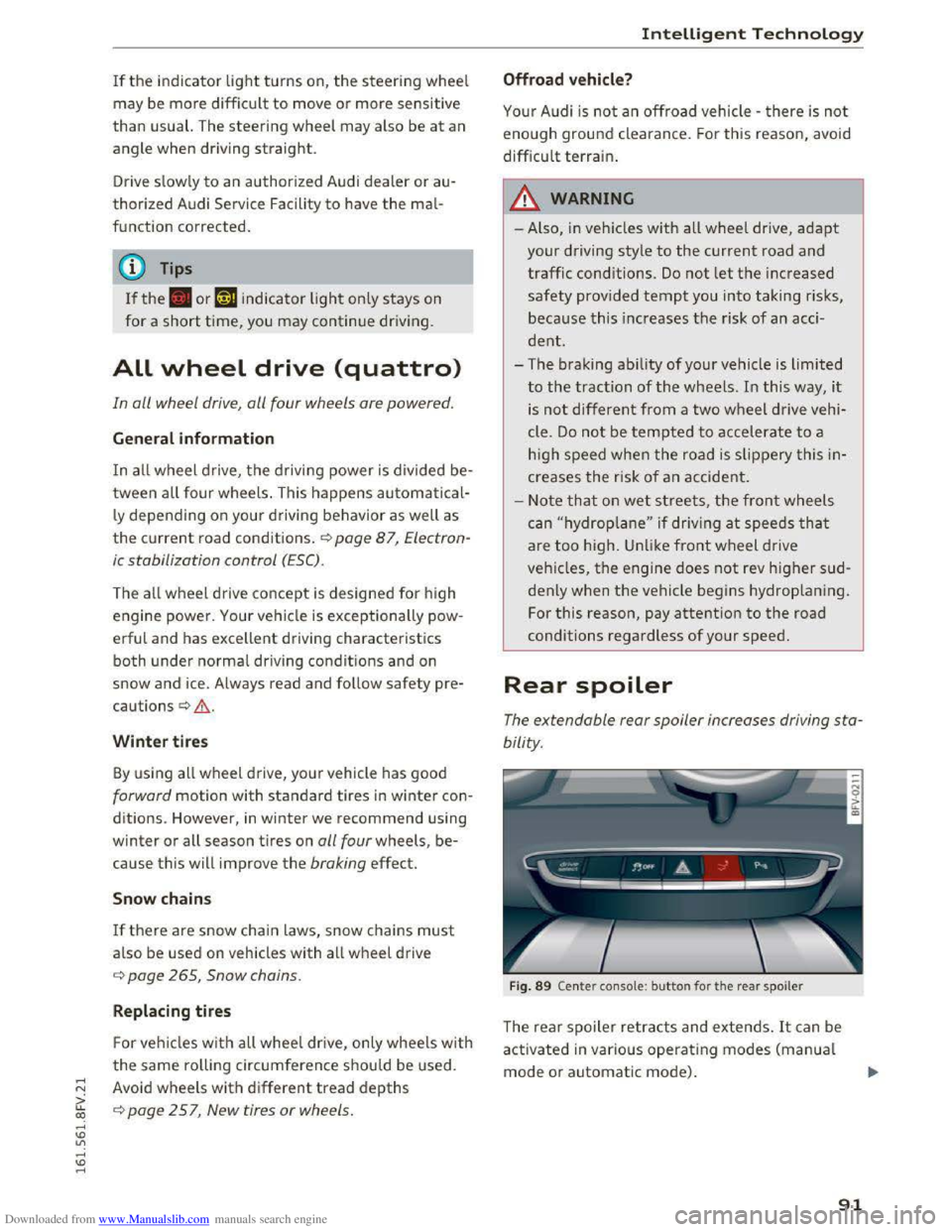
Fig. 89 Center console: button for the rear spoiler
The rear spoiler retracts and extends. It can be
activated in various operating modes (manual
mode or automatic mode) .
91
Page 94 of 322
Downloaded from www.Manualslib.com manuals search engine Intelligent Technology
Automatic mode (normal operation)
-Automatic extension: the rear spoiler will auto
matically extend when speeds exceed approxi
mately 75 mph (120 km/h)
-Automatic retraction: the rear spoiler will auto
matically retract when speeds decrease to un
der approximately 50 mph (80 km/h).
Manual mode
-Extending manually: briefly tap the~ fig. 89
button to fully extend the rear spoiler.
- Retracting manually:
when driving at speeds
below approximately 10 mph (20 km/h), press
and hold the button to retract the rear spoiler.
When at speeds between 10 mph (20 km/h)
and 75 mph (120 km/h), the rear spoiler will
completely retract when you tap the button.
Indicator lights
Ii) I. Rear spoiler: malfunction!
The
rear spoiler may not have extended due to a
malfunction.
This could change the veh icle's driv
ing characteristics
at high speeds. Do not drive
faster than 85 mph (140 km/h). Drive to an au
thorized Audi dealer or authorized Audi Service
Facility
immediately to have the malfunction cor
rected. The color
of the indicator light depends
on the vehicle speed.
..&. WARNING
-
Driving at higher speeds without the rear
spoiler deployed can impair handling charac
teristics, making
the vehicle harder to con
trol.
- Always
make sure that the spoiler is de
ployed when driving at
speeds ove r 85 mph
(140 km/h). If the rear spoiler warning/indi
cator light in the instrument cluster comes
on, the rear spoiler may not have deployed.
- Never drive
at speeds higher than 85 mph
(140 km/h) ifthe spoiler is not deployed.
Have
the spoiler inspected as soon as possi
ble by an
authorized Audi dealer or qualified
workshop.
- Always obey
speed limits and other traffic
laws.
92
..&. WARNING
Improper operation of the rear spoiler can
cause crushing injuries.
-Always make sure that nobody, especially
children, is
in the way when the rear spoiler
is deployed or retracted.
«J:) Note
-Never push on the vehicle on the rear spoil
er. This could
cause damage.
- To
prevent damage to the rear spoiler do
not lean or place anything on it.
-
-Only operate the rear spoiler manually when
the luggage compartment lid is close and
the rear spoiler moving parts are not
blocked. Otherwise, damage could occur.
(D Tips
Clean the rear spoiler compartment every 2 to
3 months. To function correctly, the rear
spoiler must be free of ice, snow and leaves.
Energy management
The starting ability is optimized
The energy management system manages the
electrical energy distribution
and optimizes the
availability
of electrical energy for starting the
engine.
When a vehicle with a conventiona l energy sys
tem is not driven for a long time, the battery is
drained by equipment (for example the immobil
izer). In
certain circumstances, there could may
not be enough energy to start the engine.
Your vehicle
is equipped with an intelligent ener
gy
management system for distributing electrici
ty. T his sign ificant
ly improves the starting ability
and increases the battery life.
The
energy management system Is made up of
battery diagnosis, Idling current management
and dynamic energy management.
Battery diagnosis
The battery diagnosis determines the battery
charge level. The sensors determine the battery Ill>
Page 95 of 322
Downloaded from www.Manualslib.com manuals search engine voltage, the battery current, and the battery
temperature. The current charge level and the
performance of the battery are determined based
on this.
Idling current management
The idling cur
rent management decreases the
energy used w hile parked. With the engine
switched off, it manages the energy distribution
to the different electrical components. Date from
battery diagnosis is taken into account for this.
Depending
on the battery charge level, electrical
equipment is switched off one item after the oth
er, to prevent the battery from draining and to
retain the starting ability.
Dynamic energy manage
ment
While driving, dynamic energy management dis
tributes the appropriate amount of energy to the
electrical equipment. It controls the battery
charge level so that more energy is not used then
is being generated in order to maintain an opti
mal battery charge level.
(!) Tips
-Energy management cannot overcome the
laws of physics. Note that the charge level
and
length of the battery life are limited.
-
When the starting ability is jeopardized, the
r-1 indicator light turns on ~page 13.
What you should know
Maintaining the starting ability is the highest
priority.
A lot of stress is placed on the battery when driv
ing
short distances, in traffic, and at cold times
of the year. A lot of energy is used but little is
generated. It is also critical when the engine is
not running but electrical equipment is switched
on . In this case, energy is used but none is gener
ated.
In situations like this, energy management will
actively regu l
ated the distribution of energy.
Intelligent T echnology
Long periods without use
If you do not drive your vehicle for several days or
weeks, electrical consumers are gradually scaled
back
or switched off. This reduces energy use and
ensures the vehicle will be able to start after long
periods
of time. Some convenience functions
such
as opening with the remote control key may
not be available. These convenience functions
will be available again once you switch
the igni
tion on and start the engine.
With the engine switched off
The battery will drain if you use Infotainment
functions such as listening to the radio while the
engine is switched off.
The vehicle's
ability to start may be impa ired by
the energy use, a message will appear in the In
fotainment system display. The message indi
cates that the system will switch off automatical
ly soon. If you would like to continue using the
functions, you must start the engine.
With the engine running
Although electrical
energy is generated while
driv ing,
the battery can drain. This can happen
when little energy is generated, and much is used
and the charge level of the battery is not optimal.
To
restore the balance of energy, components
that require large amounts of energy are tempo
rarily scaled back or switched off. Heating sys
tems in particular require a great deal of energy.
If you notice, for example, that the seat heating*
or rear window defroster is not working, then it
has been temporarily re d uced or sw itched off.
T
hese systems are availab le again as soon as the
energy balance has been restored.
In addition, you may notice that the idle speed
has slightly increased. That is normal and no
cause for concern. Due to the increased idling
speed, the additional required energy will be
generated and the battery will be charged.
93
Page 102 of 322
Downloaded from www.Manualslib.com manuals search engine Multi Media Interface
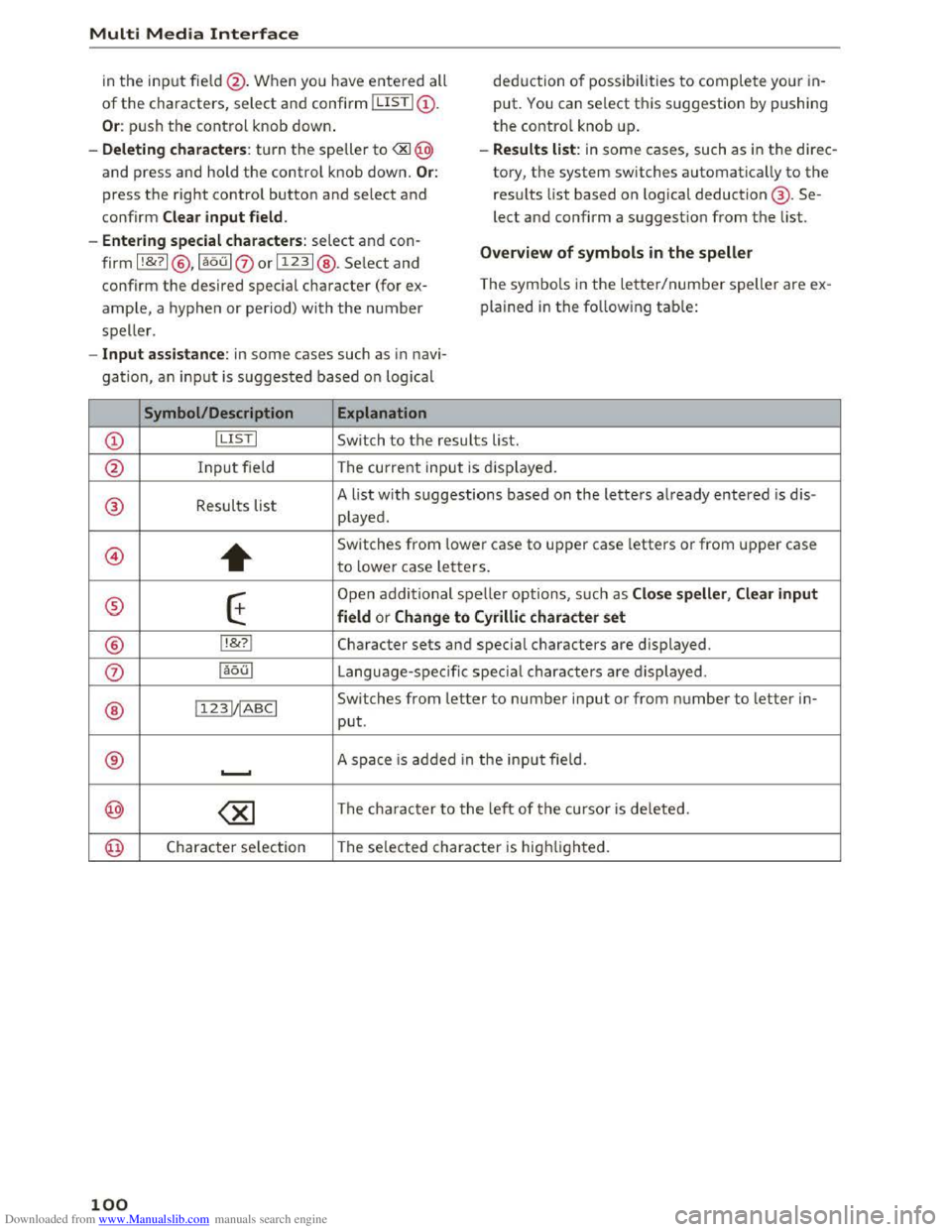
in the input fie ld @ . When you have entered all
of the characters, select and confirm I LISTI(!).
Or: push the control knob down.
- Deleting characters : turn the speller to
press the right control button and select and
confirm Clear input field.
- Ente ring special cha
racters: select and con
firm
I !&?I@ , laou 10orI123 I@ . Select and
confirm the desired special character (for ex
ample, a hyphen or period) with the number
speller.
-Input assistance: in some cases such as in navi
gation, an input is suggested based on logical
Symbol/Description Explanation
deduction of possibilities to complete your in
put. You can select this suggestion by pushing
the control knob up .
- Results list: in some cases, such as in the direc
tory,
the system switches automatically to the
results list based on l ogical deduction@ . Se
lect and confirm a suggestion from the list.
Overview of symbols in the speller
The symbols in the letter/number speller are ex
plained
in the fo llowing table:
CD ! LISTI Switch to the results list.
@ Input fie ld The current input is displayed.
® Results list
A list with suggestions based on the letters already entered is dis -
played .
@
+
Switches from lower case to upper case letters or from upper case
to lower case letters.
® E
Open additional spelle r options, such as Close speller , Clear input
field
or Change to Cyrilli c character set
® lt&?I Character sets and special characters are displayed .
0 iaoul Language-sp ecific special characters are displayed.
11231/IABCI Switches from letter to number input or from number to letter in-
® put.
® ............. A space is added i n the input fie ld .
@
100
Page 105 of 322
Downloaded from www.Manualslib.com manuals search engine • Telephone
• Audi connect
• Navigation
• Directory
• Radio
•Media
· Sound
•
Help
• Help Speech dialog system
• Help Telephone
• Help Audi connect
• Help Navigation
• Help Map
• Help Radio
·Help Media
TEbEP:HONE
• Enter number
•Delete number I correc tion
• Directory
• Call (XY)
·business I private I land line I mobile
NAVIG:ATI0N
• N avigate to CXYl
·Business address I Private address
• Start I cancel route guidance
· Directory
• Last destinations
• N avigation favorites
· Drive
home
• Enter address
• Enter country I town I street I state
• Exclude routt I Exclude route for (XY) km Im
·Map
• Day map I Night map
Voice recognition system
• Favorites
• Call (XY)
• Enter number
• Redial
• Read new text message
• Navigate to (XY)
• Enter address/destination
• Onhne destinations
• Cancel route guidance
·Map
• Line (XY)
• Next page I previous page
• Cancel
•
No. l meant ()(Y)
• Correction
• Call
lost
• Redial
• Call mailbox
• Enter PIN I delete PIN
•
Telephone favorites
• Exclude next route section I Exclude
nex t
street
• Route list
• Calculate alternative routes
· Online destinations
• Special destination
• 20 driving position map/ 20 north position map/ 30 map I Destination map I Overview map
• Audi connect
• Travel information I Parking Information
•
Fuel prices
·Weather
RADIO
• Radio presets
• Last stations
•FM
• FM I AM I SIRIUS XM
• Station (XY) I Frequency (XY)
• T raffic announcement on I off
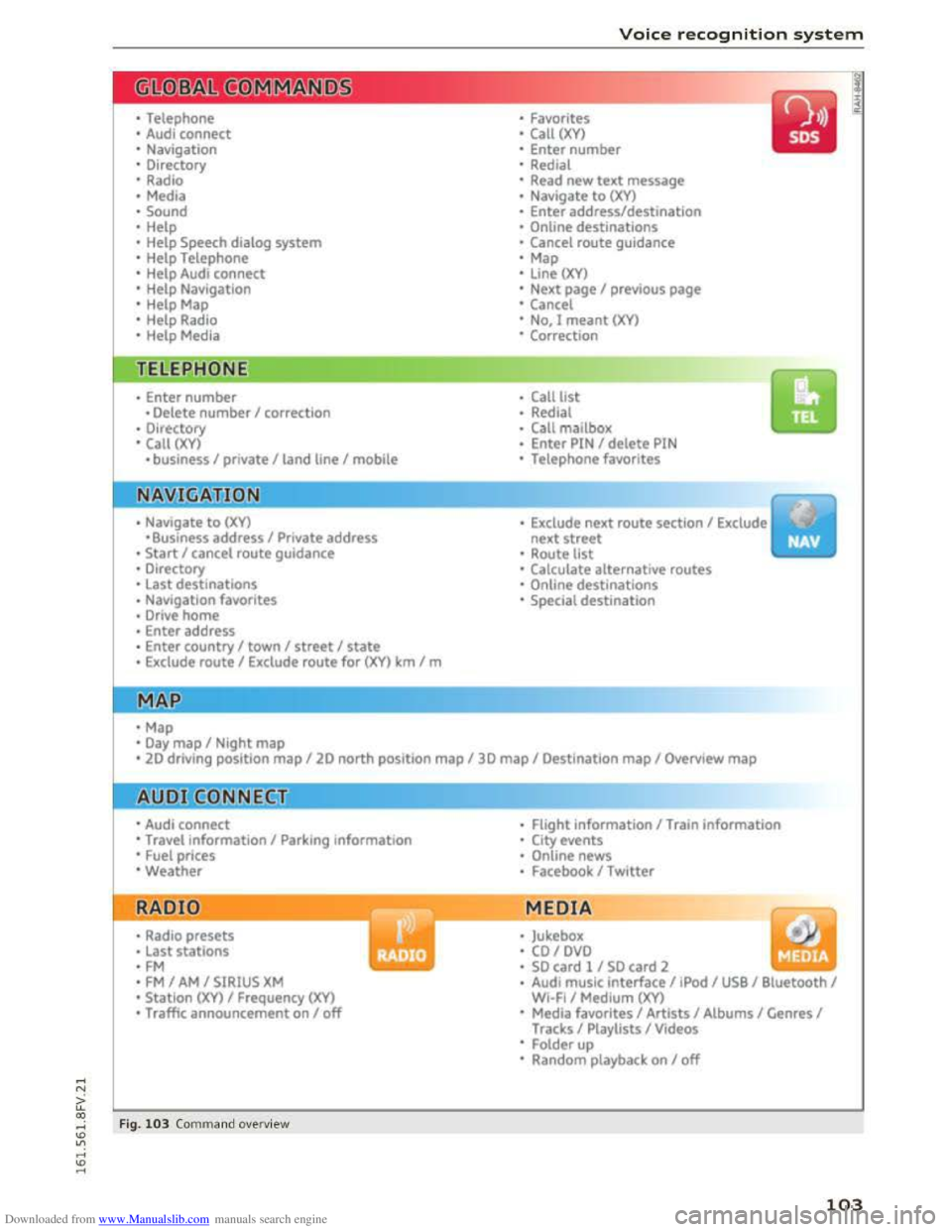
Fig. 103 Comm and ove rvie w
• Flight Information I Train information
• City events
• Online news
• Facebook I Twl tter
MEDIA
y • Jukebox
• CO I DVD
• SO card l / SD card 2
· Audi music interface I !Pod I USB I Bluetooth I
WI-Fi I Medium (XV)
• Media favorites I Artists I Albums I Genres I
Tracks I Playlists I Videos
• Folder up
· Random playback on I off
103
Page 114 of 322
Downloaded from www.Manualslib.com manuals search engine Telephone
For ease of use, Audi offers a special USB adapt
er* ~page 155, fig. 132. The following USB
adapters are availab le at this time:
CD USB adapter for cell phones wit h a micro USB
connection*
@ USB adapter for cell phones with an Apple
Lightn ing connection*
® USB adapter for cell phones with an Apple
Dock connector*
.&. WARNING
Loose objects can be thrown around the vehi
cle
inter ior during sudden driving or braki ng
maneuvers. T his can cause serious inj uries
and loss of control of the vehicle. Always keep
the center armrest closed while driving.
- The Audi
phone box is not availab le in all
countries. Contact your authorized A udi
dealer for additional information.
-If the cell phone is placed in a bag or protec
tive sleeve inside the Audi phone box, this
can interfere with the connection to the ex
ternal antenna.
-
Strong transmission quality cannot be guar
anteed if more than one cel l phone is insert
ed.
- Audi recommends using original Audi acces
sories. Audi
has established their reliability,
safety and suitability.
-
You can purchase a USB adapter from an au
thorized Audi dealer or authorized Audi
Service Facility,
or at specialty stores.
-To prevent malfunctions, make sure the cell
phone is positioned correctly in the Audi
phone box .
- The Audi
phone box is only availab le in the
Canadian market.
112
Using the telephone
Accessing the telephone
Applies to: vehicles with telephone
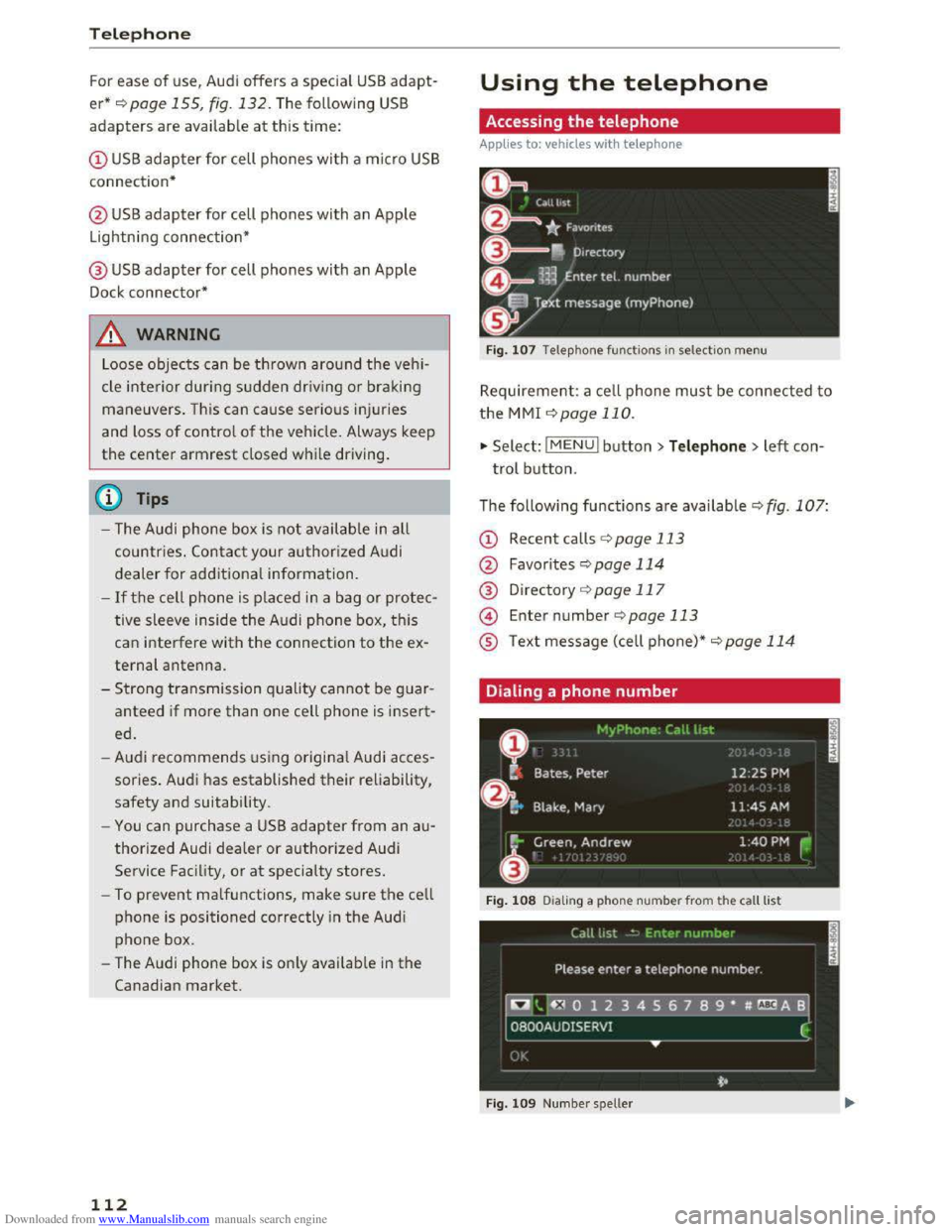
Fig. 107 Telephone functio ns in selection menu
Requirement: a cell phone must be connected to
the MMI ~page 110.
.,. Select: l M ENUI button> Telephone > left con
trol button.
The following
functions are available Q fig. 107:
CD Recent calls ¢ page 113
@ Favorites ¢page 114
® Directory ¢page 117
@ Enter number ¢page 113
® Text message (cell phone)*~ page 114
Dialing a phone number
Fig. 108 Dia ling a phone nu mber from the call list
Fig.
109 Numbe r sp eller
Page 125 of 322
Downloaded from www.Manualslib.com manuals search engine ..... N
G: CX)
.....
"' U"I
.....
"' .....
Overview of Audi
connect services
Basic functions
Applies to vehicles with Audi connect
F i
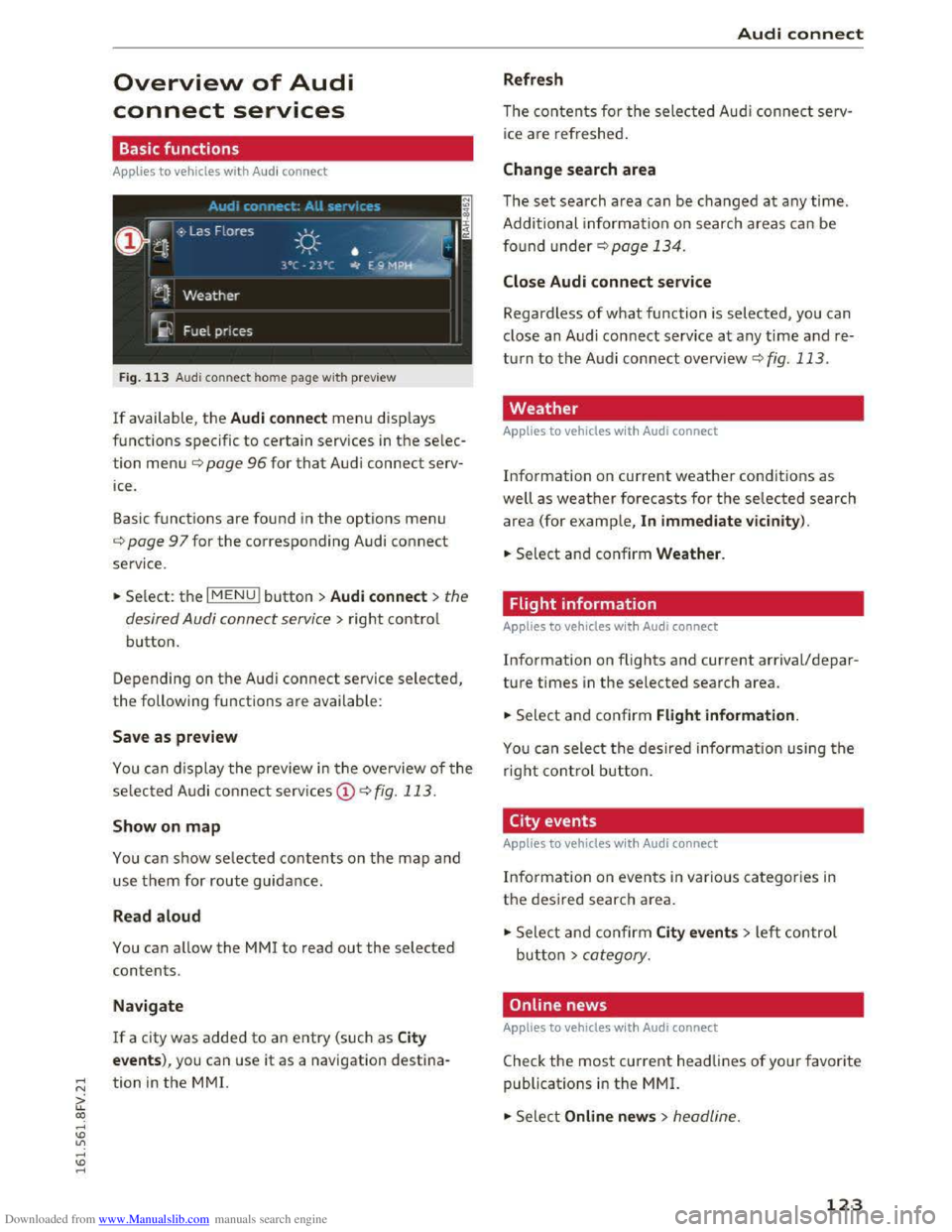
g. 113 Audi con nect home page with preview
If available, the Audi connect men u disp lays
functions specific
to certain services in the selec
tion menu¢ page 96 for that Audi connect serv
ice .
Basic functions
are found in the options menu
¢page 97 for the corresponding Audi connect
service .
.. Se lect: the I MENU! button >Audi connect> the
desired Audi connect service
> right contro l
button.
Depending on th e A udi connect service selected,
the following functions are available:
Save as preview
You can display the preview in the ove rview of the
selec ted Audi co nnect serv ices CD¢ fig. 113.
Show on map
You can show selected contents on the map and
use them for route guidance.
Read aloud
You can allow the MM! to read out the selected
contents.
Navigate
If a city was added to an entry (such as City
events), you can use it as a navigation destina
tion
in the M M!.
Audi connect
Refresh
The contents for the selected Audi connec t serv
ice are refreshed .
Change search area
The set search area can be changed at any time.
Additional informa tion on searc h
areas ca n be
found under¢ page 134.
Close Audi connect service
Regardless of what function is selected, you can
close an Audi connect service
at any time and re
turn to the A udi connect overview ¢ fig. 113.
Weather
Applies to vehicles with Audi connect
Information on current weather condit ions as
well as weather forecasts for the selected search
area (for ex
ample, In immediate vic inity).
.. Select and confirm Weather.
Flight information
Applies to vehicles with Audi connect
Information on flights and current arrival/depar
ture times in the selected sear ch area.
.. Select and confirm Flight information.
You ca n sele ct the desire d in fo rmation using the
r
igh t control button.
City events
Applies to vehicles with Audi connect
Inform ation on even ts in vario us ca tegories in
the desired searc h area.
.,. Sele ct a nd confir m City events> left control
butto n > category.
Online news
Applies to vehicles with Audi connec t
Check the most current headlines of your favorite
publicat i
ons in the MMI.
.,. Select Online news> headline.
123