lock AUDI TT COUPE 2017 User Guide
[x] Cancel search | Manufacturer: AUDI, Model Year: 2017, Model line: TT COUPE, Model: AUDI TT COUPE 2017Pages: 322, PDF Size: 79.73 MB
Page 32 of 322
Opening and clo sin g
Emergency unlocking and locking the doors
----
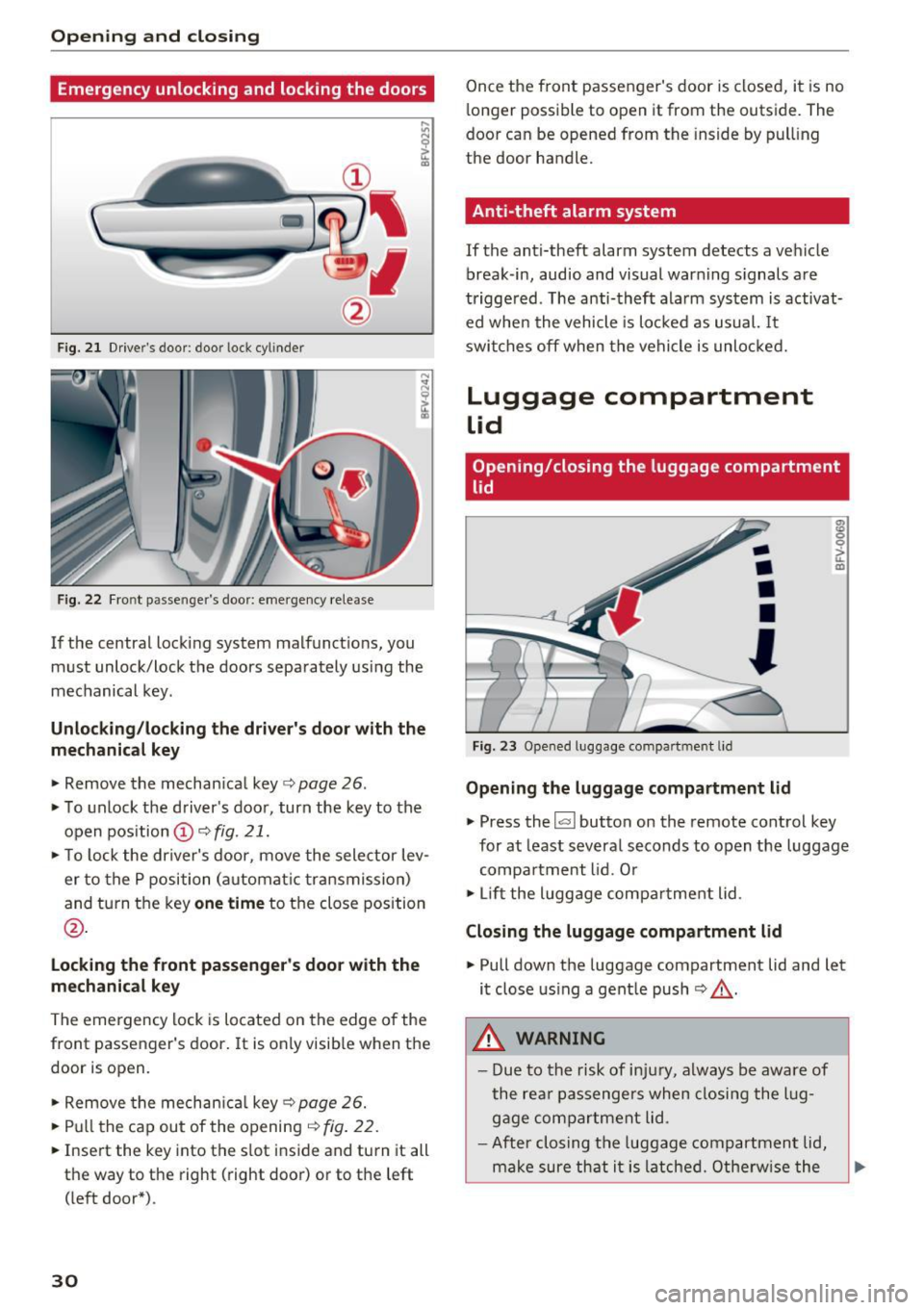
F ig. 2 1 Drive r's door : door lock cy linder
F ig. 22 Fr ont p asse nge r's door: eme rgency release
If the central locking system malfunct ions, you
must unlock/lock the doors separately using the
mechanical key .
Unlocking /locking the dri ver's door with the
mechanic al key
• Remove the mechan ical key ¢ page 26.
• To unlock the driver's door, turn the key to the
open position @¢
fig. 21.
• To lock the dr iver's door, move the selector lev
er to the P position (automat ic transmission)
and turn the key
one time to the close position
@ .
Locking the front passenger's door with the
me chanic al key
The emergency lock is located on the edge of the
front passenger 's door.
It is only visible when the
door is open.
• Remove the mechan ica l key ¢
page 26.
• Pull the cap out of the opening¢ fig. 22.
• Inse rt the key into the slot inside and turn it all
th e way to the right (right door) or to the left
( left door*) .
30
Once the front passenger's door is closed, it is no
longer possible to open it from the outside. The
door can be opened from the inside by pul ling
the door handle.
Anti-theft alarm system
If the anti-theft alarm system detects a vehicle
break -in, audio and visual warn ing s ignals are
triggered . The anti-theft alarm system is activat
ed whe n the vehicle is locked as usual. It
switches off when the vehicle is unlocked.
Luggage compartment
lid
Opening/closing the luggage compartment
lid
F ig. 23 Opened luggage compa rtmen t lid
-
•
•
•
'
Opening the luggage compartment lid
m 0 0
~ m
• Press the l<.::< I button on the remote control key
for at least several seconds to open the luggage compa rtment lid . O r
• Lift the luggage compa rtment lid .
Closing the luggage compartment lid
• Pull down the luggage compartment lid and let
it close us ing a gent le push ¢.&, .
.&_ WARNING
-Due to the risk of in ju ry, a lways be aware of
the re ar passengers when closi ng the lug
gage compartment lid .
- After closing the luggage compartment lid,
make sure that it is latche d. Othe rw ise the
Page 33 of 322
CD
CD
.... N
" N ,....,
0
0
Ill co
luggage compartment lid could open sud
denly when driving, which increases the risk
of an accident.
- Never drive with the luggage compartment
lid ajar or open, because poisonous gases
can enter the vehicle interior and create the
risk of asphyxiation.
- Never leave your vehicle unattended when
the luggage compartment lid is open. A
child could climb into the vehicle through
the luggage compartment. If the luggage
compartment lid was then closed, the child
would be trapped in the vehicle and unable
to escape. To reduce the risk of injury, do
not allow children to play in or around the
vehicle. Always keep the luggage compart
ment lid and the doors closed when the ve
hicle is not in use.
- Always make sure no one is in the luggage
compartment lid's range of motion when it
is closing, especially near the hinges. Fin
gers or hands could be pinched.
@ Tips
- When the vehicle is locked, the luggage
compartment lid can be unlocked separately
by pressing the~ button on the remote
control key. The luggage compartment lid
locks automatically when it is closed again.
- In case of an emergency or a faulty handle,
the luggage compartment lid can be opened
manually from the inside¢
page 31.
Opening and closing
Luggage compartment lid emergency
release
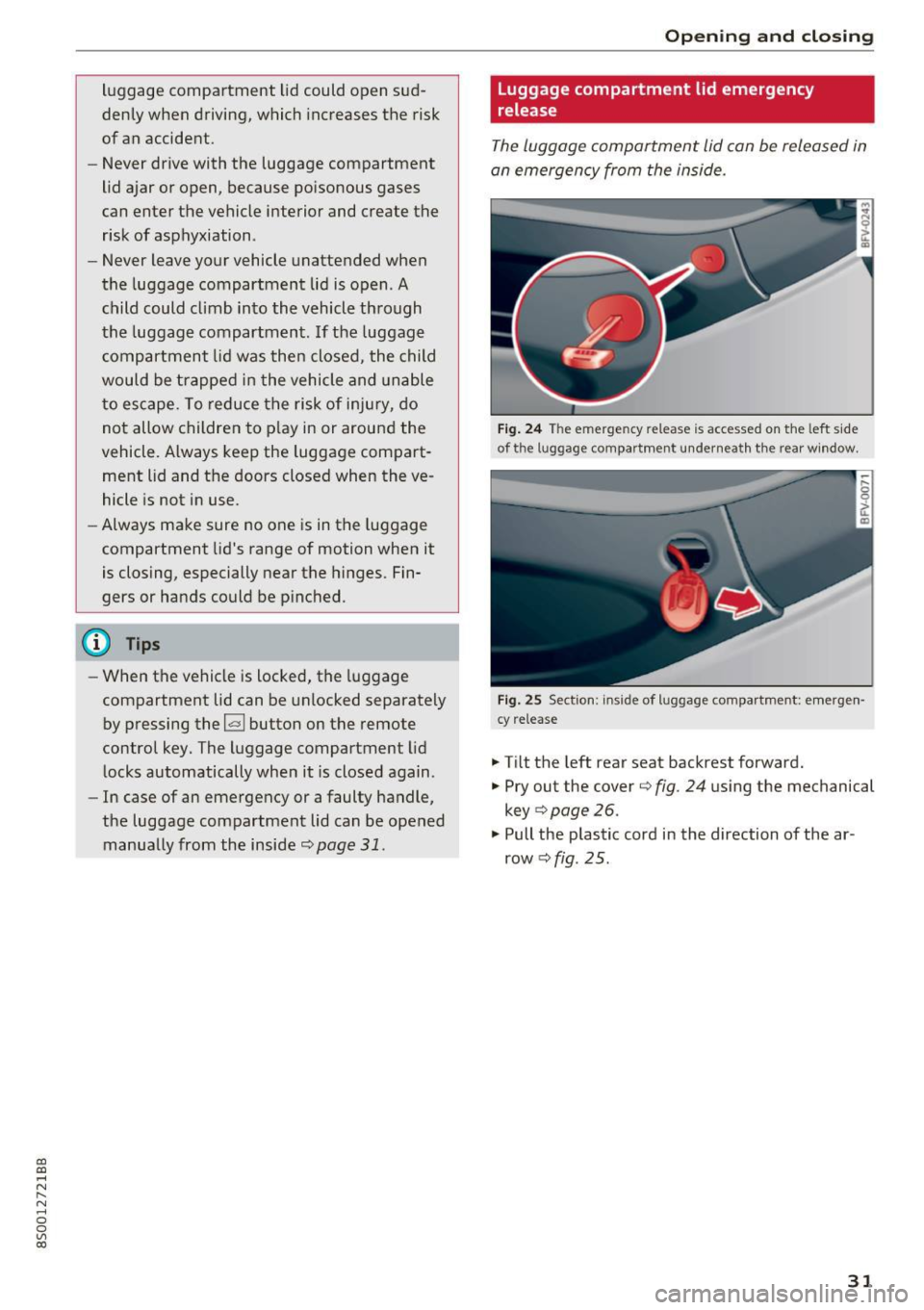
The luggage compartment lid can be released in
an emergency from the inside.
Fig. 24 The emergency release is accessed on the left side
of the luggage compartment underneath the rear window.
Fig. 25 Section: inside of luggage compartment: emergen
cy release
.. Tilt the left rear seat backrest forward.
• Pry out the cover¢
fig. 24 using the mechanical
key
9 page 26.
.. Pull the plastic cord in the direction of the ar
row¢
fig. 25.
31
Page 34 of 322

Opening and closing
Power window
Controls
The driver can control all power windows.
Fig. 26 Driver's door: power w indow controls
All power window sw itches have a two-stage
function:
Opening and closing the windows
N
N
M 0 ::':, (X) m
"'To open or close the w indow completely, press
the switch down or pu ll the switch up br iefly to
the second level. The operation will stop if the
switch is pressed/p ulled aga in.
.. To se lect a position in between opened and
closed, press/pull the switch to the first level
until the desired window position is reached.
Power window switches
(D Left doo r
@ Right door
A WARNING
- Pay careful attention when closing the win
dows. Pinching could cause serious injur ies.
- When locking the vehicle from outside, the
vehicle must be unoccupied since the win dows can no longer be opened in an emer
gency .
(D Tips
- You can still open and close the windows for
approximately 10 minutes after turning the i gnition
off. The power windows do not
switch
off until the driver's door or front
passenger's door has been opened.
- When you open the doors, the w indows au
tomatically lower approximately 10 mm.
32
· Convenience opening/closing
All windows can be opened and closed at the
same time.
Convenience opening feature
.. Press the~ button on the remote control key
until all windows reach the desired position.
Convenience closing feature
.. Press the (TI button on the remote control key
until a ll windows are closed~&. or
Convenience closing with the convenience
key*
.. Touch the sensor* on the door handle long
enough until all windows are closed . Do not
place your hand in the door handle when doing
this.
Setting convenience opening in the
Infotainment system
.. Select in the Infotainment system : IMENU! but
ton
>Ve hicle > left control button >V ehicle set
t in gs .
To enable the convenience window opening func
tion, the
Long press to open windows function
must be switched
on .
A WARNING
-Never close the w indows carelessly or in an
uncontrolled manner, because this increas
es the risk of injury.
- For security reasons, the windows can only
be opened and closed with the remote con
trol key at a maximum distance of approx i
mate ly 6 ft (2 m) away from the vehicle.
When pressing the~ button, always watch
the windows while they are closing so that
no one is pinched in the window. The closing
process will stop immediately when the~
button is released.
Page 40 of 322
Lights and Vision
Canada models : this function cannot be switched
off . They activate automatica lly each time the ig
n ition is switched on . T his menu item is shown
with a "gray background".
Com ing home , Lea ving home
The com ing home function illum ina tes the area
outside the vehicle when you turn the ignition off
and open the driver 's door . To switch o n the func
tion, select
Entry /ex it lighting .
The leav ing home ill umin ates t he a re a out side
the vehicle when you unlock the vehicle . To
switch on the function, select
Entr y/exi t light
ing .
The com ing home and leaving home f unctions
only operate when it is dark and the lig ht switch
is in the
AU TO position.
Emergency flasher
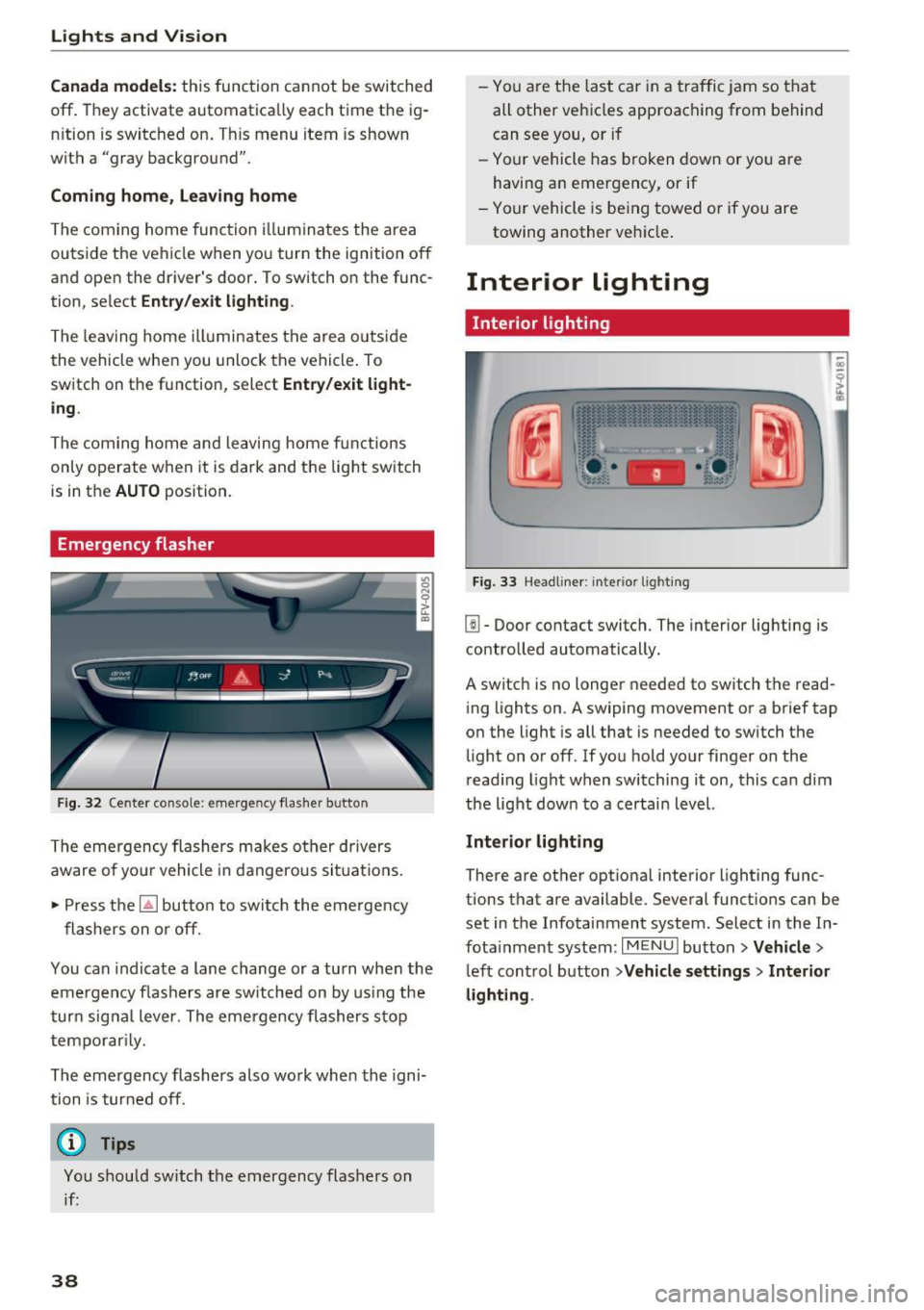
Fig. 32 Cente r conso le : eme rge ncy f las her button
The emergency flashers makes other drivers
aware of yo ur vehicle in dangerous si tuat ions .
• Press the ~ button to switc h the eme rgency
flashers on or off.
You can indicate a lane change or a tu rn when the
em ergency fl ash ers are sw itched on by us ing the
tur n sig nal lever. The emergency flashers s top
tempo rar ily.
The emergency flashers also work when the igni
tion is tur ned off.
(D Tips
You s hou ld switch the emergency flashers on
if:
38
- You a re the last c ar in a tra ffic j am so that
all other vehi cles approaching from behind
can see you, or if
- Your vehicle has broken down or yo u are
having an emergency, or if
- You r vehicle is be ing towed or if you are
towing another vehicle .
Interior lighting
Interior lighting
Fig. 33 Head line r: i nte rior light ing
l!I -Door contact switch. The interior lighting is
contro lled automatically.
A switch is no longer needed to switch the read
ing lights on . A swiping movement or a brief tap
o n the light is all that is needed to switch the
li ght on or off. If yo u hold your finger on the
r ead ing light when switching it on, this ca n dim
the light dow n to a certai n level.
Interior light ing
There are othe r optional interior lighting func
tions that are available . Several funct ions can be
set in the Infotainment system . Select in the In
f ota inment system :
I MENU I button >Vehicle >
left con trol button >Vehicle settings > Interior
lighting .
Page 41 of 322
CD
CD
.... N
" N .... 0
0
Ill co
Instrument illumination
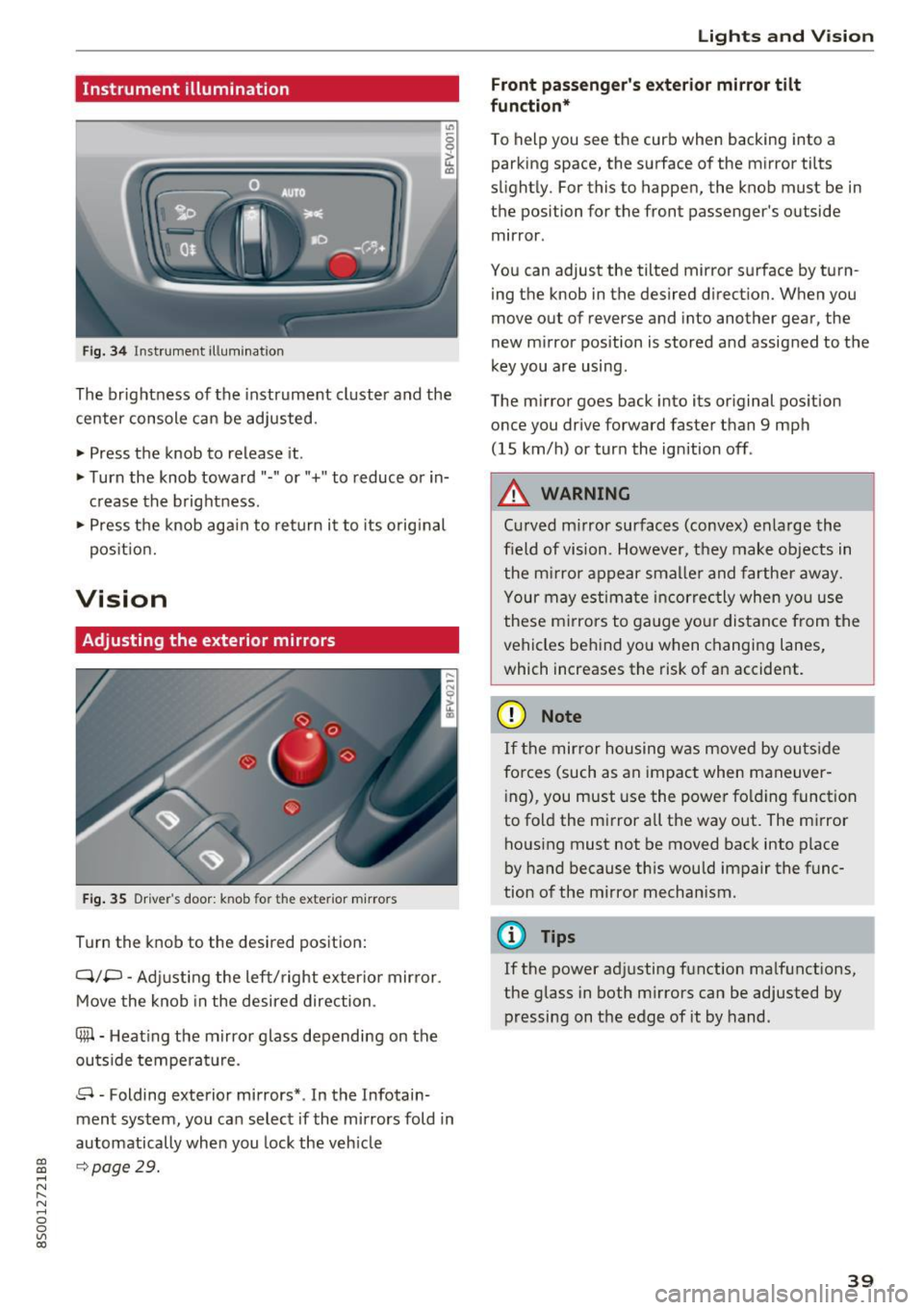
Fig. 34 Instrument illum inatio n
The brightness of the instrument cluster and the
center console can be adjusted.
~ Press the knob to release it .
~ Turn the knob toward"·" or"+" to reduce or in
crease the b rightness .
~ Press the knob aga in to return it to its original
pos it ion.
Vision
Adjusting the exterior mirrors
F ig. 35 Driver 's door: knob for the exter ior mirrors
Turn the knob to the desired pos ition:
Q/P -Adjusting the left/ right exter io r mir ror.
Move the knob in the desired direction .
4lil-Heating the mirror glass depending on the
outside temperat ure.
8 • Folding exterior mirrors* . In the Infotain
ment system, you can select if the mirrors fold in
automatically when you lock the vehicle
9 page 29.
Lights and V ision
Front passenger 's e xterior mirror tilt
function*
T o help you see the curb when backing into a
parking space, the surface of the mirror ti lts
slight ly. For this to happen, the knob must be in
the position for the front passenger's outside
mirror .
You can adjust the tilted mirror s urface by turn
ing the knob in the desired d irection. When you
move out of reverse and into another gear, the
new mirror position is stored and assigned to the
key you are using .
The m irror goes back into its or iginal position
once you drive forward faster than 9 mph
(15 km/h) or turn the ignition off .
A WARNING
Curved m irror surfaces (convex) enlarge the
field of vision. However, they make objects in
the m irror appear smalle r and farthe r away.
Your may estimate incorrec tly when you use
these m irrors to gauge your distance from the
vehicles behind yo u when changing lanes,
which increases the risk of an accident.
(D Note
If t he mir ror housing was moved by outs ide
fo rces (such as an impact when maneuver
i ng), you must use the power fo ld ing funct ion
to fold the mirror a ll the way out . The mirror
housing must not be moved back into place
by hand because th is would impair the func
tion of the mirror mechanism.
(D Tips
If the power ad justing function ma lfunctions,
the glass in both m irrors can be adjusted by
pressing on the edge of it by hand .
39
Page 44 of 322
Lights and Vi sion
- When stopping temporarily, such as at a
traffic light, the speed of the windshie ld
wipers automatica lly reduces by one level.
Cleaning windshield wiper blades
Clean the wiper blades when you see wiper
streaks . Clean the wiper blades with a soft towel
and glass cleaner.
~ Pl ace the windshield wiper arms in the service
position ¢
page 42.
~ Fold the windshield wiper arms away from the
windshield .
A WARNING
,--
Dirty windshield wiper blades can impair vi-
sion , which increases the risk of an accident .
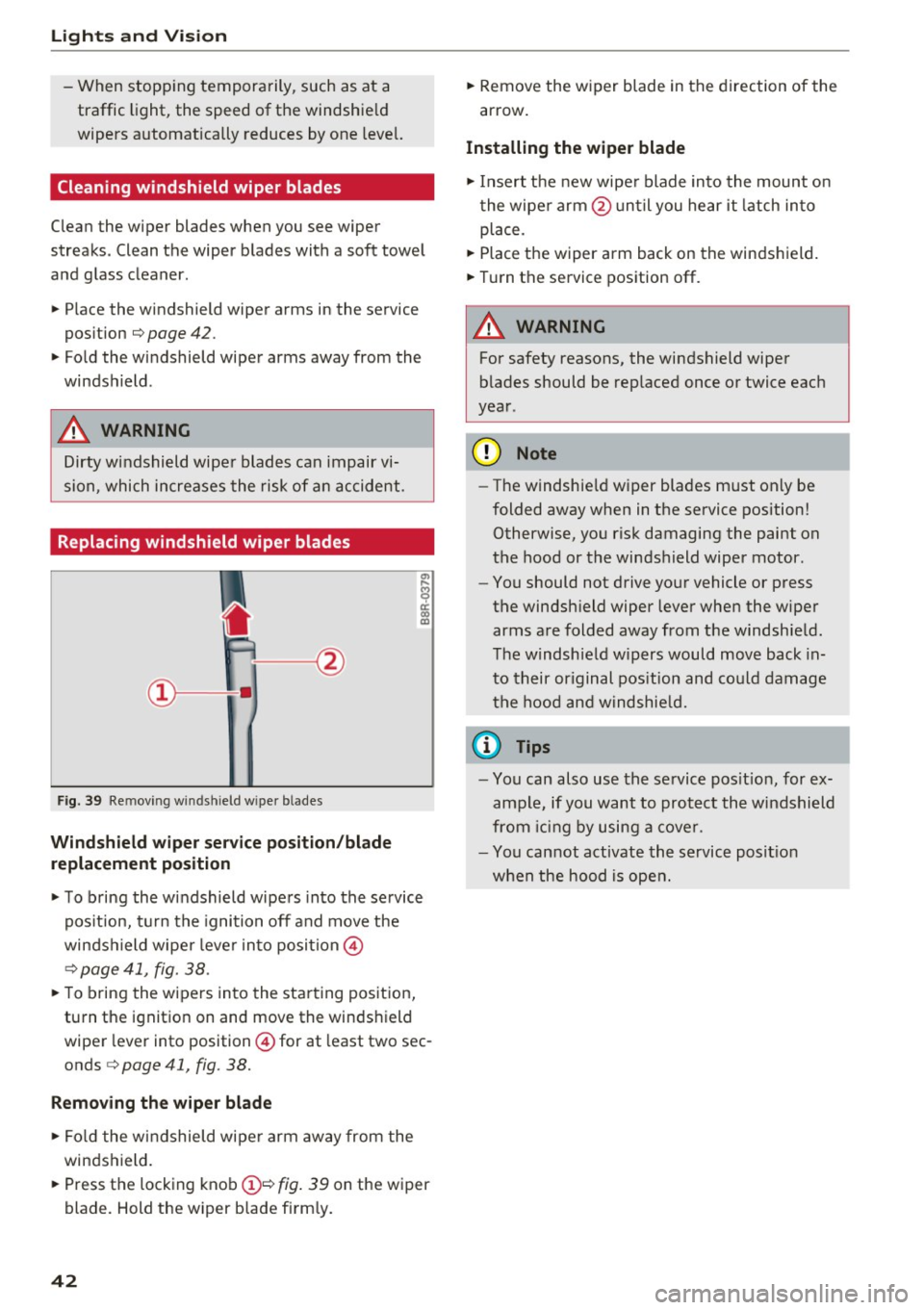
Replacing windshield wiper blades
Fig. 39 Re mov ing w indshi eld w iper b lade s
Wind shield wiper ser vice po sition /blade
replacement po sition
~ To b ring the windshield wipers into the service
pos ition, turn the ignition off and move the
windshield wiper lever into position @
¢ page 41, fig. 38.
~ To bring the wipers into the starting position,
turn the ignit ion on and move the windshield
wiper lev er into position @ for at least two sec
onds ¢
page 41, fig. 38.
Remov ing th e wip er bl ade
~ Fo ld the windshield wiper arm away from the
windshield.
~ Press the locking knob(!)¢ fig. 39 on the wiper
blade . Hold the wiper blade firm ly.
42
~ Remove the wiper blade in the direction of the
arrow .
Installing the wipe r blade
~ Insert the new wipe r blade into the mount on
the wipe r arm @un ti l you hear it latch into
place.
~ Place the wiper arm back on the windshield.
~ Turn the service position off.
A WARNING
-
For safety reasons, the windshield wiper
blades should be rep laced once or twice each
year .
@ Note
-The windshield w iper blades must only be
folded away when in the service position!
Otherwise, you risk damaging the paint on
the hood or the windshield wiper motor.
- You should not drive your vehicle or press
the windsh ield wiper lever when the wiper
arms are folded away from the windshield.
T he windshield w ipers would move back in
to their or iginal pos it ion and could damage
the hood and windshie ld.
(D Tips
- You can also use the se rvice pos it ion, for ex
ample, if you want to protect the windshield
from ic in g by using a cover.
- You cannot activate the service posit io n
when the hood is open.
Page 47 of 322
CD
CD
.... N
" N ...... 0
0
Ill co
Easy seat entry
Applies to: vehicles with entry assistance
Easy seat entry makes it easier to get into the
back seats .
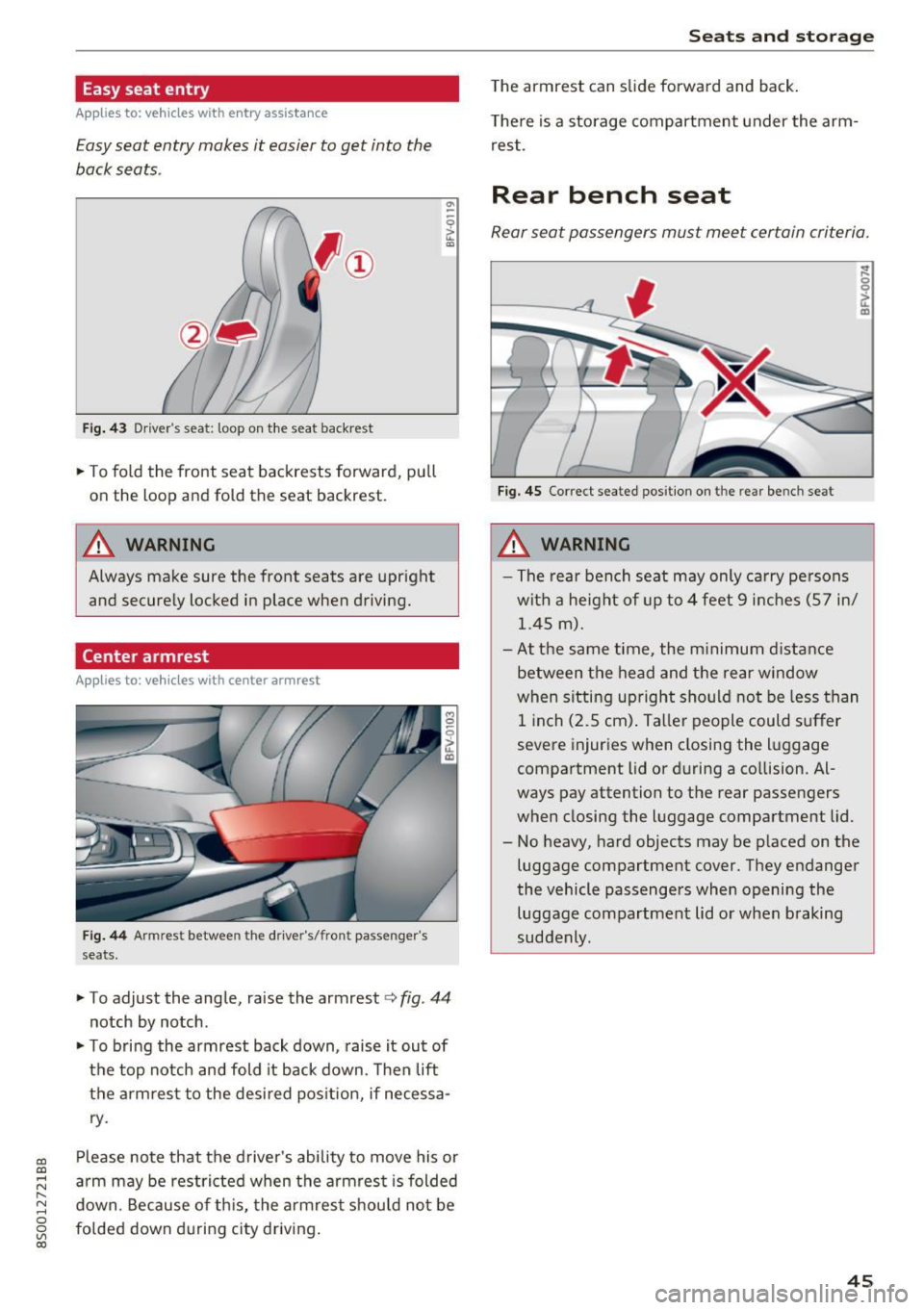
Fig. 43 Driver 's sea t: loop on the seat backr est
~ To fold the front seat backrests forward, pull
on the loop and fold the seat backrest.
A WARNING
Always make sure the front seats are upright
and securely locked in place when driving.
Center armrest
Applies to: vehicles with center arm rest
Fig . 44 A rmr est b etw een the driver's/fr ont passen ger's
seats .
°' -
~ To ad just the angle, raise the armrest <=> fig. 44
notch by notch .
~ To bring the armrest back down , raise it out of
the top notch and fold it back down . T hen lift
the armrest to the desired position, if necessa
ry .
Please note that the driver's ability to move his or
arm may be restricted when the armrest is folded
down . Because of this, the armrest should not be
folded down during c ity driving.
Seats and storage
The armrest can slide forward and back.
There is a storage compartment under the arm
rest.
Rear bench seat
Rear seat passengers must meet certain criteria .
Fig. 45 Correct sea ted pos it io n on t he re ar bench seat
_&. WARNING
- The rear bench seat may only carry persons
with a height of up to 4 feet 9 inches (57 in/
1.45
m).
- At the same time, the minimum distance
between the head and the rear window
when sitting upright should not be less than
1 inch (2.5 cm) . Taller people could suffer
severe injuries when closing the luggage
compartment lid or during a collision. Al
ways pay attention to the rear passengers
when closing the luggage compartment lid.
- No heavy, hard objects may be placed on the
luggage compartment cover. They endanger
the vehicle passengers when opening the luggage compartment lid or when braking
suddenly .
45
Page 49 of 322
CD
CD
.... N
" N ...... 0
0
Ill co
Storage
Beverage holders
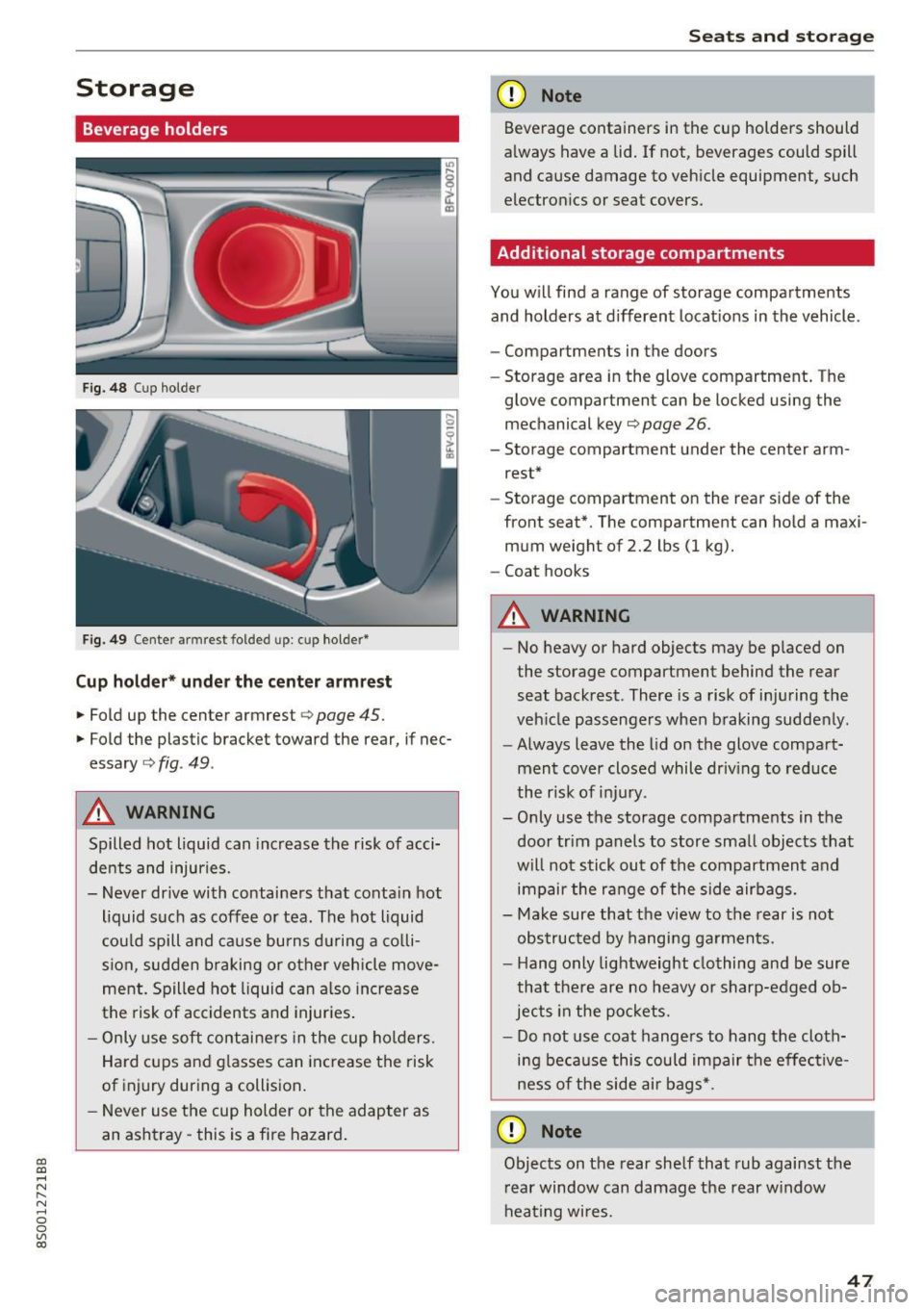
Fig. 48 Cup holder
Fig. 49 Center armrest folded up: cup holder*
Cup holder* under the center armre st
.,. Fold up the center armrest c> page 45.
.,. Fold the plastic bracket toward the rear, if nec
essary
c::> fig . 49 .
A WARNING
Spilled hot liquid can increase the risk of acci
dents and injuries.
- Never drive with containers that conta in hot
liquid such as coffee o r tea. The hot liquid
cou ld spill and ca use bu rns d uring a co lli
sion, sudden braking or other vehicle move
ment. Spilled hot liquid can a lso in crease
the risk of accidents and injur ies .
- Only use soft contai ne rs in the cup ho lders.
Hard cups and g lasses can increase the risk
of injury during a collision .
- Never use the cup holder or the adapter as
an ashtray -this is a fire hazard .
Seats and storag e
(D Note
Beverage containers in the cup holders should
a lways have a lid . If not, beverages could spill
and cause damage to veh icle equipment, such
electron ics or seat covers.
Additional storage compartments
You w ill find a range of storage compartments
and holders at d ifferent locat ions in the vehicle.
- Compartments in the doors
- Storage area in the glove compartment . The
glove compartment can be locked using the
mechanical key¢
page 26.
-Storage compartment under the center arm
rest*
- Storage compartment on the rear side of the
front seat*. The compartment can hold a maxi
mum weight of 2.2 lbs (1 kg).
- Coat hooks
A WARNING
- No heavy or hard objects may be p laced on
the storage compartment behind the rear
seat backrest. There is a risk of inju ring the
veh icle passengers when braking sudde nly .
- Always leave the lid on the glove compa rt
ment cover closed whil e driv ing to red uce
the r isk of inju ry.
- O nly use the storage compartments in the
door trim panels to store sma ll objects tha t
will not stick out of the compartment a nd
impair the ra nge of the side airbags.
- Make sure that the v iew to the rear is not
obs truc ted by hanging ga rments.
- H ang o nly lightweight clothing and be sure
that the re are no heavy or sharp-edged ob
jects in the po ckets.
- Do not use coat hange rs to hang the cloth
ing be ca use this could impair the effec tive
ness of the side air bags*.
(D Note
Objects on the rear she lf that rub against the
r ear window can damage the rear w indow
hea ting wi res .
47
Page 51 of 322
CD co .... N
" N ...... 0
0
Ill co
Luggage compartment cover
The luggage compartment cover blocks the view
into the luggage compa rtment.
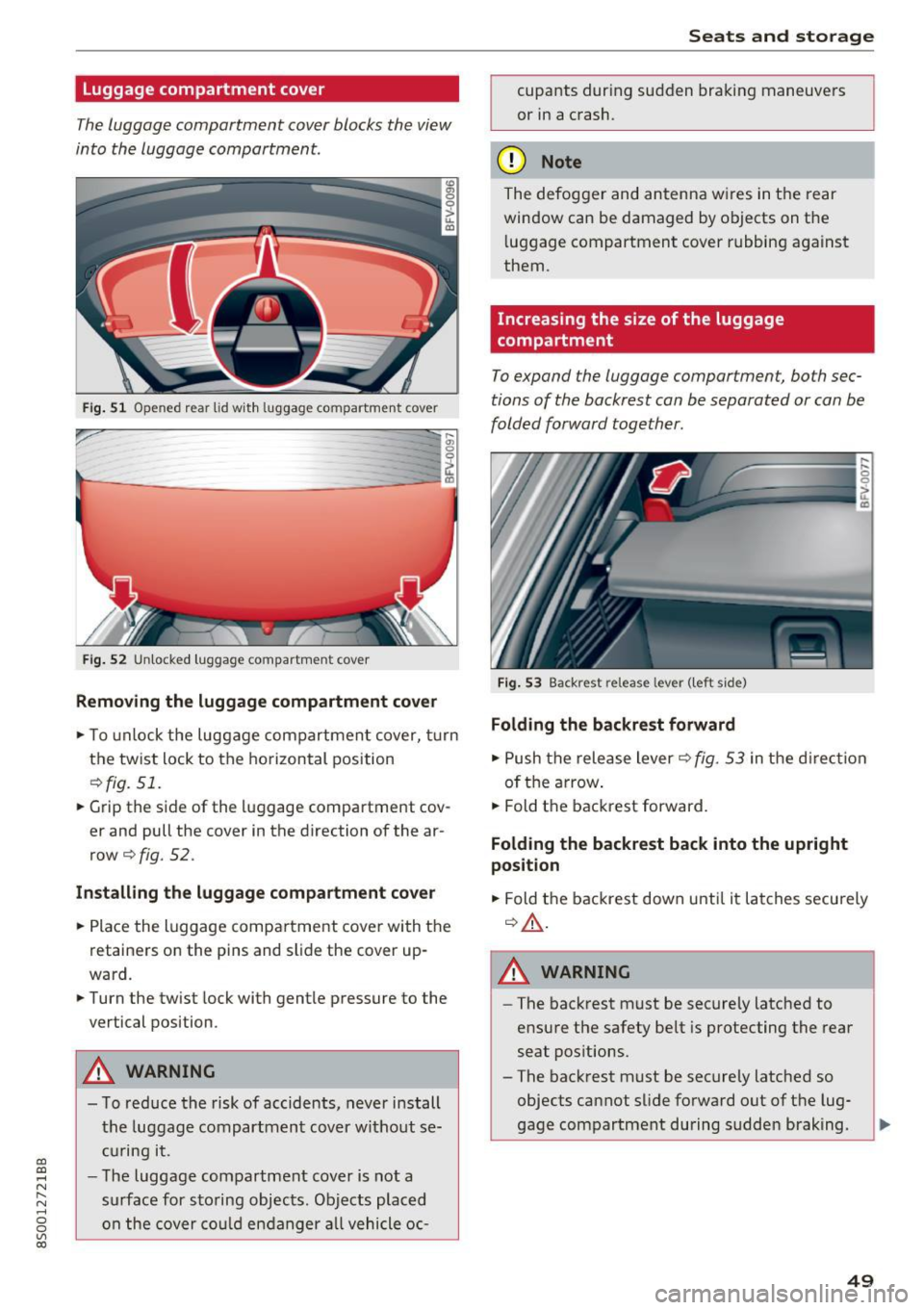
Fi g. 51 Opened rear lid wit h luggage compartment cover
... gi 0
~
ir----- ----------- ------CD
Fig. 52 Unlocked luggage compartment cover
Removing the luggag e compartment cover
.,. To unlock the luggage compartment cover, turn
the twist lock to the horizontal position
¢fig. 51.
.. Grip the s ide of the luggage compartment cov
er and pull the cover in the direction of the ar
row¢
fig. 52.
Install ing the luggage compartment cover
.. Place the luggage compartment cover with the
retainers on the pins and slide the cover up
ward .
.. Turn the twist lock with gentle pressure to the
vertical position.
_&. WARNING
- To red uce the risk of accidents, never install
the luggage compartment cover without se
c ur ing it.
- The luggage compartment cover is not a
surface for s to ring objects. Objects placed
on the cover cou ld en danger a ll vehicle oc-
Seats and storag e
cupants during sudden bra king maneuvers
or in a crash.
(D Note
The defogge r and antenna w ires in t he rear
window can be damaged by objects on t he
l uggage compartment cover rubbing against
them.
Increasing the size of the luggage
compartment
To expand the luggage compartment, both sec
tions of the backrest can be separated or can be
folded forward together .
Fig . 53 Backrest release lever ( left side)
Folding the backrest forward
.. Push the rele ase lever¢ fig. 53 in the d irection
of t he arrow .
.. Fold t he backrest forward .
Folding the backrest back into the upright
position
.,. Fold the backrest down u ntil it la tches secu rely
¢ _&. .
_&. WARNING
-The back rest must be securely latched to
ensure the safety be lt is protecting the rear
seat pos itions.
- The back rest must be securely latched so
objects cannot slide fo rward out of the lug
gage compartment during sudden braking.
49
Page 52 of 322
Sea ts and stor age
(D Note
Make sure the safety belt is not pinched in the
backrest lock and damaged when the rear
seat backrest if folded back.
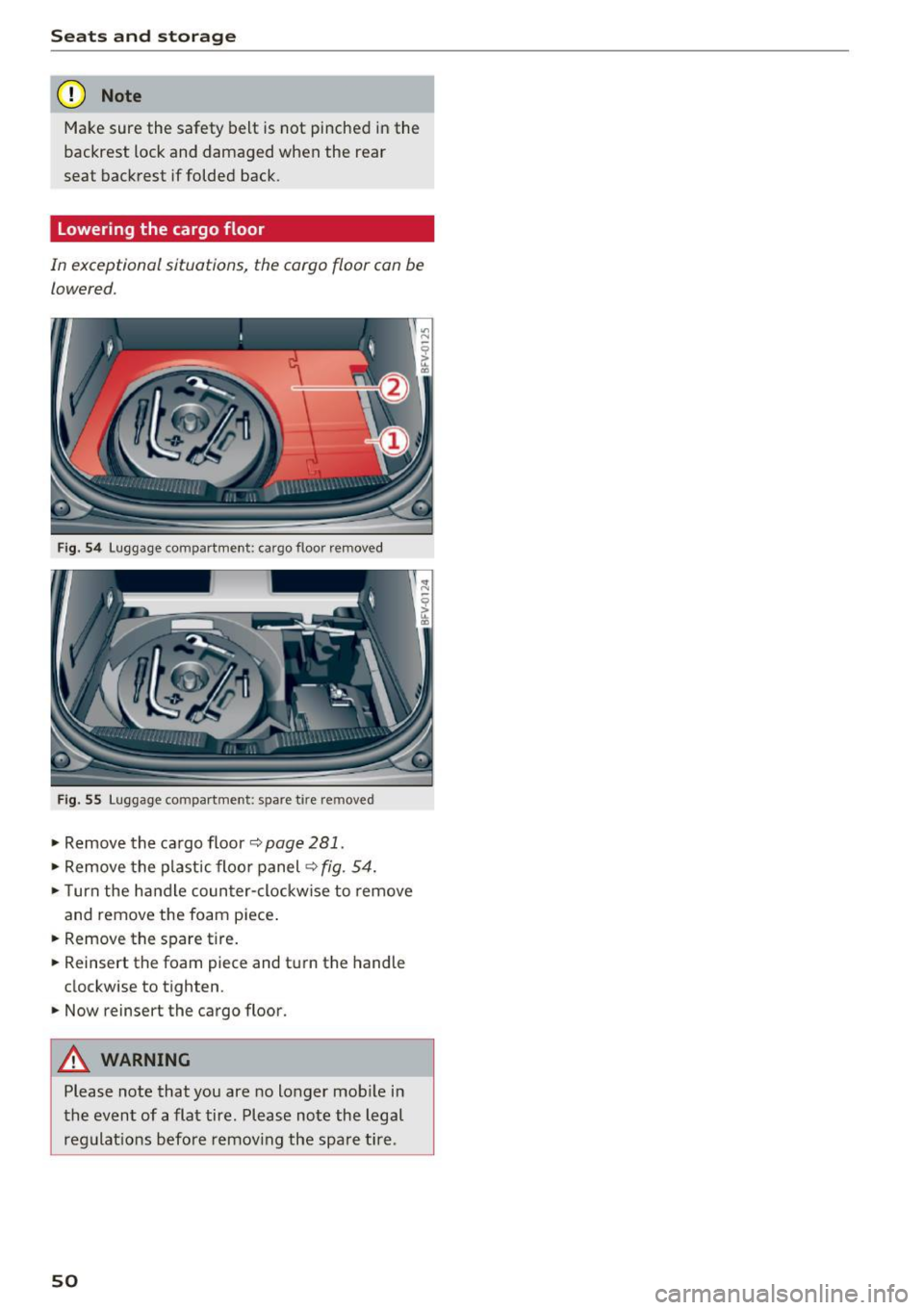
Lowering the cargo floor
In exceptional situations, the cargo floor can be
lowered.
F ig. 54 Luggage compartme nt: cargo floor removed
Fig. 55 Luggage compartment: spare tire removed
• Remove the cargo floor¢ page 281.
• Remove the plastic floo r panel ¢ fig. 54.
• Turn the handle counter-clockwise to remove
and remove the foam piece .
• Remove the spare tire.
• Reinsert the foam piece and tu rn the handle
clockwise to tighten .
.,. Now reinsert the cargo floor.
A WARNING
Please note that you are no longer mob ile in
the event of a flat tire. Please note the legal
regulat ions before remov ing the spare tire .
50