lock AUDI TT COUPE 2017 Owner's Guide
[x] Cancel search | Manufacturer: AUDI, Model Year: 2017, Model line: TT COUPE, Model: AUDI TT COUPE 2017Pages: 322, PDF Size: 79.73 MB
Page 90 of 322
Intelligent Technology
Intelligent Technology
Electronic stabilization
control (ESC)
Description
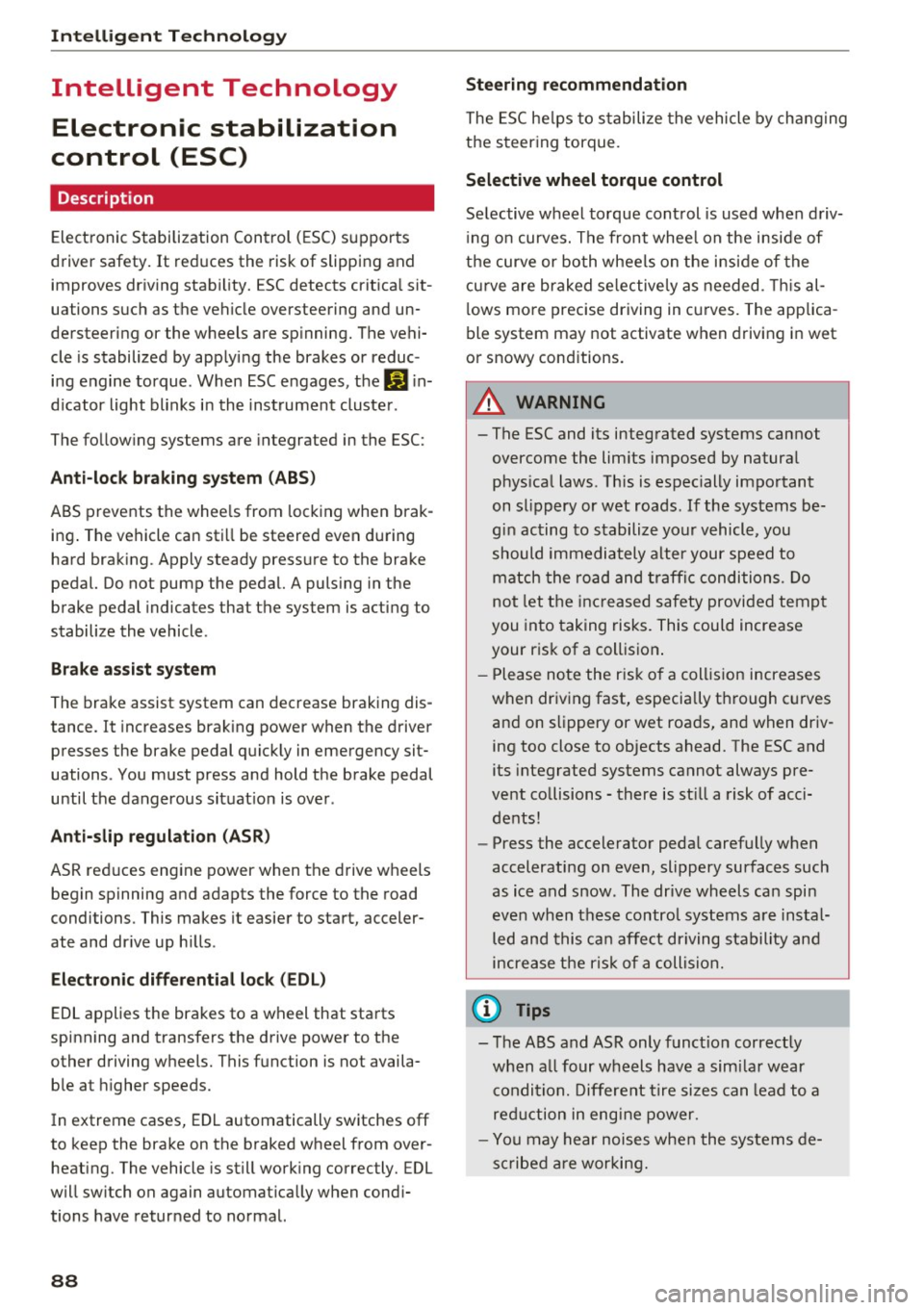
Electronic Stabilization Control (ESC) supports
driver safety.
It reduces the risk of slipping and
improves driving stability. ESC detects critical sit
uations such as the vehicle oversteering and un
dersteering or the wheels are spinning. The vehi
cle is stabilized by applying the brakes or reduc
ing engine torque. When ESC engages, the
G1 in
dicator light blinks in the instrument cluster.
The following systems are integrated in the ESC:
Anti-lock braking system (ABS)
ABS prevents the wheels from locking when brak
ing. The vehicle can still be steered even during
hard braking. Apply steady pressure to the brake
pedal. Do not pump the pedal. A pulsing in the
brake pedal indicates that the system is acting to
stabilize the vehicle .
Brake assist system
The brake assist system can decrease braking dis
tance. It increases braking power when the driver
presses the brake pedal quickly in emergency sit
uations . You must press and hold the brake pedal
until the dangerous situation is over .
Anti-slip regulation (ASR)
ASR reduces engine power when the drive wheels
begin spinning and adapts the force to the road
conditions. This makes it easier to start, acceler
ate and drive up hills .
Electronic differential lock (EDL)
EDL applies the brakes to a wheel that starts
spinning and transfers the drive power to the
other driving wheels. This function is not availa
ble at higher speeds.
In extreme cases, EDL automatically switches
off
to keep the brake on the braked wheel from over heating. The vehicle is still working correctly. EDL
will switch on again automatically when condi
tions have returned to normal.
88 Steering
recommendation
The ESC helps to stabilize the vehicle by changing
the steering torque.
Selective wheel torque control
Selective wheel torque control is used when driv
ing on curves. The front whee l on the inside of
the curve or both wheels on the inside of the
cu rve are braked selectively as needed. This al
lows more precise driving in curves. The applica
ble system may not activate when driving in wet
or snowy conditions.
A WARNING
- The ESC and its integrated systems cannot
overcome the limits imposed by natural physical laws. This is especially important
on slippery or wet roads. If the systems be
gin acting to stabilize your vehicle, you
should immediately alter your speed to
match the road and traffic conditions. Do
not let the increased safety provided tempt
you into taking risks. This could increase
your risk of a collision .
- Please note the risk of a collision increases
when driving fast, especially through curves
and on slippery or wet roads, and when driv ing too close to objects ahead. The ESC and
its integrated systems cannot always pre
vent collisions -there is still a risk of acci
dents!
- Press the accelerator pedal carefully when
accelerating on even, slippery surfaces such
as ice and snow. The drive wheels can spin
even when these control systems are instal
led and this can affect driving stability and
increase the risk of a collision.
(j) Tips
-The ABS and ASR only function correctly
when all four wheels have a similar wear
condition. Different tire sizes can lead to a
reduction in engine power.
- You may hear noises when the systems de
scribed are working.
Page 95 of 322

co
co
.... N
" N .... 0
0
Vl c:o
Facility immediately to have the malfunction cor
rected. The color of the indicator light depends
on the vehicle speed.
A WARNING
-
Driving at higher speeds without the rear
spoiler deployed can impair handling charac teristics, making the vehicle harder to con
trol.
- Always make sure that the spoiler is de
ployed when driving at speeds over 85 mph
(140 km/h). If the rear spoiler warning/indi
cator light in the instrument cluster comes
on, the rear spoiler may not have deployed.
- Never drive at speeds higher than 85 mph
(140 km/h) if the spoiler is not deployed .
Have the spoiler inspected as soon as possi
ble by an authorized Audi dealer or qualified
workshop.
- Always obey speed limits and other traffic
laws.
A WARNING t =
Improper operation of the rear spoiler can
cause crushing injuries.
-
- Always make sure that nobody, especially
children, is in the way when the rear spoiler
is deployed or retracted.
(D Note
- Never push on the vehicle on the rear spoil
er. This could cause damage.
- To prevent damage to the rear spoiler do
not lean or place anything on it.
- Only operate the rear spoiler manually when
the luggage compartment lid is close and
the rear spoiler moving parts are not
blocked. Otherwise, damage could occur.
@ Tips
Clean the rear spoiler compartment every 2 to
3 months. To function correctly, the rear
spoiler must be free of ice , snow and leaves.
Intelligent Technology
Energy management
The starting ability is optimized
The energy management system manages the
electrical energy distribution and optimizes the
availability of electrical energy for starting the
engtne.
When a vehicle with a conventional energy sys
tem is not driven for a long time, the vehicle bat
tery is drained by equipment (for example, the
immobilizer). In certain circumstances , there
could may not be enough energy to start the en
gine.
Your vehicle is equipped with an intelligent ener
gy management system for distributing electrici
ty. This significantly improves the starting ability
and increases the vehicle battery life.
The energy management system Is made up of
battery diagnosis, idling current management
and dynamic energy management.
Battery diagnosis
The battery diagnosis determines the vehicle bat
tery charge level. The sensors determine the bat
tery voltage, the battery current, and the battery
temperature. The current charge level and the
performance of the vehicle battery are deter
mined based on this.
Idling current management
The idling current management decreases the
energy used while parked. With the engine
switched off , it manages the energy distribution
to the different electrical components. Data from
the battery diagnosis is taken into account for
this.
Depending on the vehicle battery charge level,
electrical equipment is switched off one item af
ter the other to prevent the vehicle battery from draining and to maintain the starting ability.
Dynamic energy management
While driving , dynamic energy management dis
tributes the appropriate amount of energy to the
electrical equipment.
It controls the battery
charge level so that the amount of energy is not ..,_
93
Page 114 of 322
Voice recognition system Function
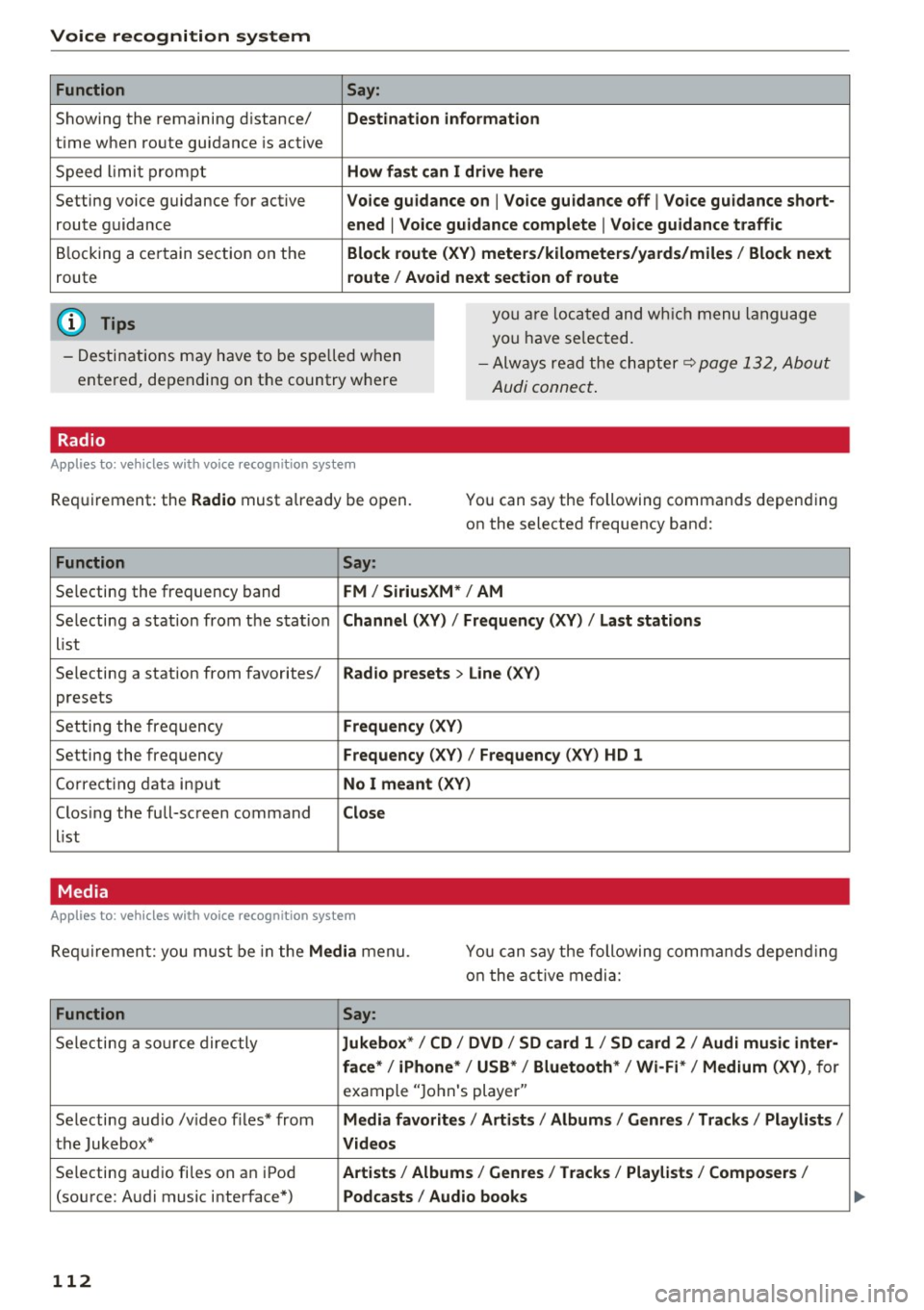
Showing the remaining distance/
t ime when route guidance is active
Speed lim it prompt
Setting voice guidance for active
route guidance
Blocking a certain section on the
route
(D Tips Say:
Destination information
How fast can I drive here
Voice guidance on
I Voice guidance off I Voice guidance short-
ened
I Voice guidance complete I Voice guidance traffic
Block route (XV) meters/kilometers/yards/miles / Block next
route / Avoid next section of route
you are located and which menu language
you have se lected.
- Destinations may have to be spe lled when
entered, depending on the country where -
Always read the chapter~
page 132, About
Audi connect.
Radio
Applies to: vehicles with voice recognition system
Requirement: the Radio must already be open. You can say the following commands depending
on the selected frequency band:
Function Say:
Selecting the frequency band FM/ SiriusXM * / AM
Selecting a station from the station Channel (XV) / !Frequency (XV) / Last stations
list
Selecting a station from favorites/
Radio presets > Line (XV)
presets
Setting the frequency
Frequency (XV)
Setting the frequency Frequency (XV) / Frequency (XV ) HD 1
Cor recting data input No I meant (XY)
Clos ing the full-screen command Close
list
Media
Applies to: vehicles with voice recognition system
Requirement: you must be in the Media menu. You can say the following commands depend ing
o n t he active media:
Function Say:
Selecting a source directly Jukebox*/ CD / DVD / SD card 1 / SD card 2 / Audi music inter-
face*
I iPhone* / USB* / Bluetooth* I Wi-Fi* / Medium (XV), for
example "Jo hn's player "
Selecting aud io /v ideo files* from
Media favorites / Artists / Albums / Genres / Tracks / Playlists /
the Jukebox* Videos
Selecting aud io fi les on a n iPod Artists / Album 1s / Genres / Tracks / Playlists / Composers I
(source: Audi music interface*) Podcasts / Audio books
112
Page 163 of 322
CD
CD
.... N
" N .... 0
0
Ill co
@ Tips
-Depending on the Internet connection and
network traffic, a connection loss can occur
during playback of on line media services.
-Online media and Internet radio usage de
pends on the service availability of the third
party provider.
- Audi AG simply makes the access to online
media services possible through the MMI
and does not take any responsibility for the
contents of the online media services.
- Always read the chapter ¢ page 132, About
Audi connect.
- Depending on the mobile device used, there
may be interruptions during media playback
and when using the
Audi MMI connect app.
To avoid interruptions when using a mobile device, do not lock the screen on your mo
bile device and keep the
Audi MMI connect
app in the foreground.
- Contact your authorized Audi dealer or au
thorized Audi Service Facility for additional
information about online media.
Multimedia connections
USB adapter for Audi music interface or
USB charging port
Depending on the vehicle equipment, you can
connect your mobile devices (such as a smart
phone or MP3 player) to the Audi music interface
or a USB charging port using a special USB
adapter.
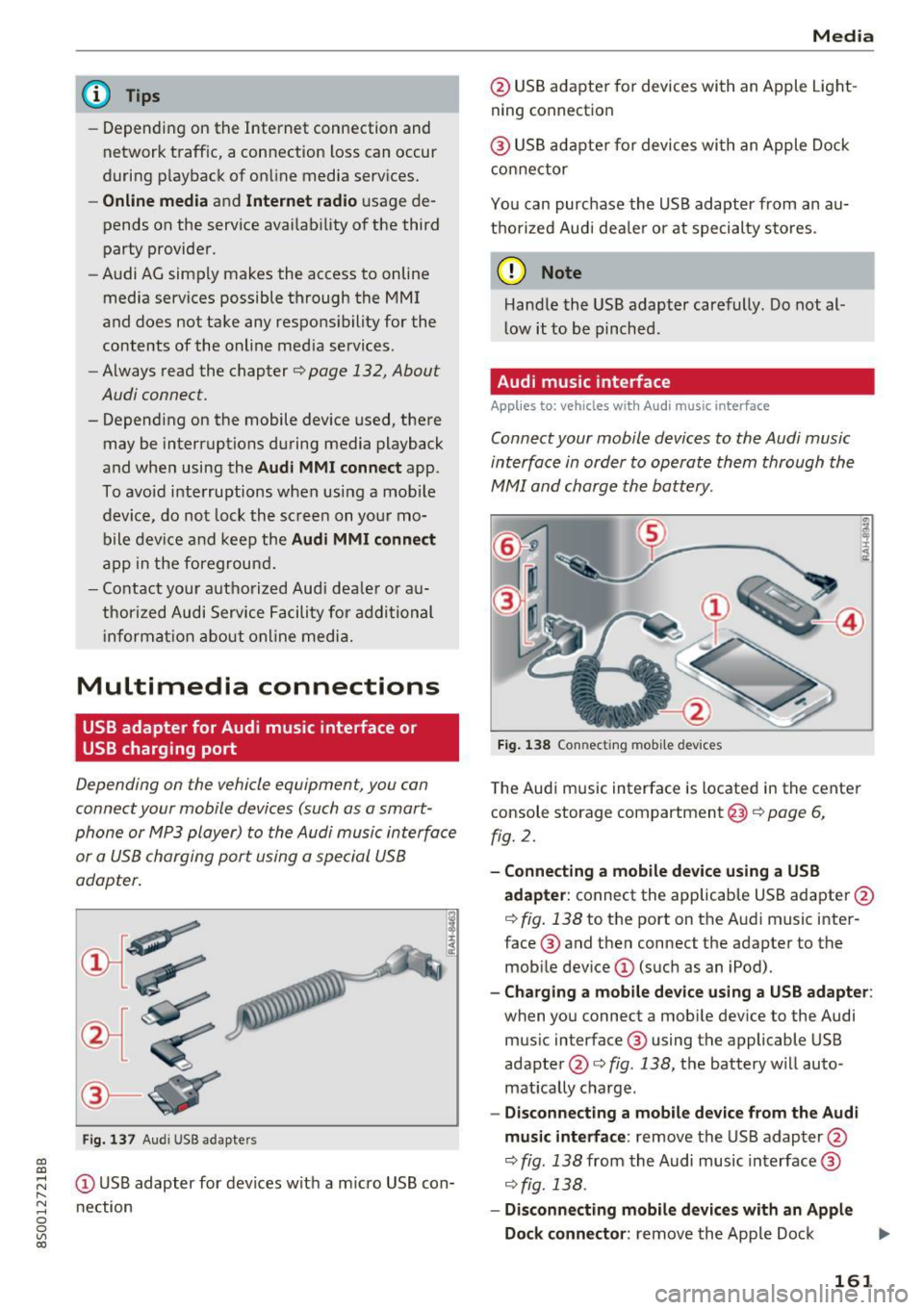
I
Fig. 137 Audi USS adapters
(D USB adapter for devices with a micro USB con
nection
Media
@ USB adapter for devices with an Apple Light
ning connection
@ USB adapter for devices with an Apple Dock
connector
You can purchase the USB adapter from an au
thorized Audi dealer or at specialty stores.
(D Note
Handle the USB adapter carefully. Do not al
low it to be pinched.
Audi music interface
App lies to: vehicles wi th Audi music interface
Connect your mobile devices to the Audi music
interface in order to operate them through the
MMI and charge the battery .
Fig. 138 Connecting mobile devices
The Audi music interface is located in the center
console storage compartment@¢ page 6,
fig. 2.
-Connecting a mobile device using a USB
adapter:
connect the applicable USB adapter@
¢ fig. 138 to the port on the Audi music inter
face @ and then connect the adapter to the
mobile device
(D (such as an iPod).
-Charging a mobile device using a USB adapter :
when you connect a mobile device to the Audi
music interface ® using the applicable USB
adapter @¢ fig. 138, the battery will auto
matically charge .
-Disconnecting a mobile device from the Audi
music interface :
remove the USB adapter@
¢ fig . 138 from the Audi music interface @
¢ fig. 138.
-Disconnecting mobile devices with an Apple
Dock connector :
remove the Apple Dock .,,.
161
Page 170 of 322
Media
Picture for-
mat
4:3
16:9
(D Tips Information
The
image is fixed in the 4:3 pie-
ture format . Black bars are shown
on the sides of the Infotainment
system display .
The image is fixed in the 16:9 pie-
ture format. Black bars are shown
in the upper and lower edges of the
Infotainment system display. -
Th e security levels for the
Parental control
are based on the US standards from the Mo
t ion Picture Association of America (MPAA).
Note that the age levels for v ideo DVDs in
European countries may differ.
- Password entry for
Parental control will be
locked for approximately one minute if you
enter the incorrect password three times in
a row. The password can only be reset by an
authorized Audi dealer.
- Not all video DVDs have parental control.
Supported media and file formats
Overview
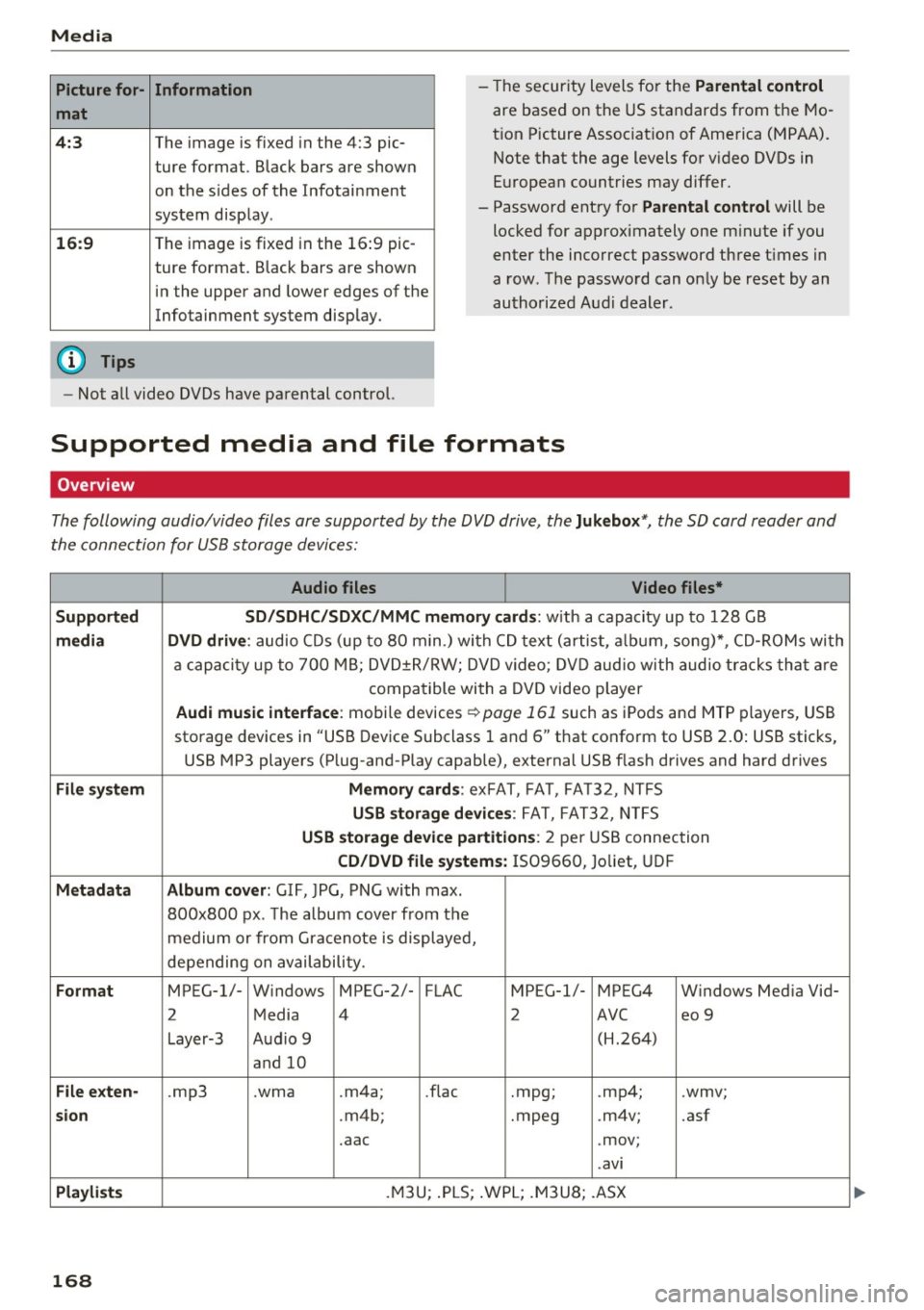
The following audio/video files are supported by the DVD drive, the Jukebox* , the SD card reader and
the connection for USB storage devices:
Audio files Video files*
Supported SD/SDHC/SDXC/MMC mem1ory cards:
w ith a capacity up to 128 GB
media DVD drive : audio CDs (up to 80 min.) with CD text (artist, album, song)*, CD-ROMs with
a capacity up to 700 MB; DVD±R/RW; DVD video; DVD audio with audio tracks that are
compatible with a DVD video player
Audi music interface : mobile devices ~page 161 such as iPods and MTP players, USB
storage devices in "USB Device Subclass 1 and 6" that conform to USB 2.0: USB sticks,
USB MP3 players (Plug-and-Play capable), external USB flash drives and hard drives
File system Memory cards: exFAT, FAT, FA T32, NTFS
USB storage devices: FAT, FAT32, NTFS
USB storage device partitions: 2 per USB connection
CD/DVD file systems: IS09660, Joliet, UDF
Metadata Album cover: GIF, )PG, PNG with max.
800x800 px. The album cover from the
medium or from Gracenote is displayed,
depending on availability.
Format MPEG-1/- Windows MPEG-2/- FLAC MPEG-1/- MPEG4 Windows Media Vid-
2 Media 4
2 AVC
eo 9
Layer-3 Audio 9 (H.264)
and 10
File exten-.mp3 .wma .m4a; .flac
.mpg; .
mp4; .wmv;
sion .m4b; .mpeg .m4v; .asf
.aac .mov;
.avi
Playlists .M3U; .PLS; .WPL ; .M3U8; .ASX
168
...
Page 176 of 322
System settings
System settings
Setting the date and
time
You con set the clock time manually or using the
CPS .
"'Select: I MENU I button> Settings> left control
button >
MMI settings > Date & time .
"'Or: select: I MENU I button> Vehicle> left con-
trol button >
Vehicle settings > Date & time .
Automatic setting
When this function is switched on~. the time
and date are automatically set.
Time
Requirement: the Automatic setting must be
switched off .
Press the control knob. You can set the
Time
manually by turning and pressing the control
knob.
Date
Requirement: the Automatic setting must be
sw itched off.
Press the control knob . You can set the
Date
manually by turning and press ing the control
knob.
Time zone
When selecting the appropriate time zone, a
sampling of countries in this zone will be listed .
Automatic time zone*
When this function is switched on~, the time
will automatically adjust to the corresponding
time zone.
Time format
If you select 24h , the clock will display, for ex
ample,
13:00 . If you se lect AM/PM , the clock
w ill disp lay, for examp le,
1:00 PM.
Date format
If you select DD.MM .YYYY, the date display will
show, for examp le,
31.08.2017 . If you select
MM/DD/YYYY , the date display will show, for ex -
174
ample, 08/31/2017. If you select YYYY-MM
DD ,
the date display will show, for example,
2017-08-31.
MMI settings
"'Select: !MENUI button> Settings > left control
button >
MMI settings .
Language
You can change the display language as well as
the language for the voice guidance* and voice
recognition system*.
The number of languages available depends on
the market .
Measurement units
The following units can be selected:
-Speed (mph or km/h)
-Distance (miles or kilometers)
-Temperature (°For 0
()
-Fuel consumption (l/l00km, mpg (US), mpg
(UK) or km/l)
- Volume (liters, ga llons)
Tool tips
When this function is switched on~. your MMI
shows you tips for input . The frequency of how
often it displays decreases with time. You can
switch off the operating tips at any time.
Speech dialog system
Applies to : vehicles wit h voice re cog nitio n syste m
Command display: when this function is switch
ed on~. the MMI will show you the possible
commands for voice input in the respective
menu. You can sw itch the funct ion off at any
time .
Short dialog: when this function is switched on
~. a shorter form of the prompts is used. You
can switch the function off at any time .
Speech dialog system volume: you can adjust
the volume of the prompts by turning the control
knob.
ll-
Page 184 of 322
Safe driving
A WARNING
Drivers who are unbelted, out of position or
too close to the airbag can be seriously in
jured by an airbag as it unfolds . To help re
duce the risk of serious personal injury:
- Always adjust the driver's seat and the steering wheel so that there are at least 10 in (25 cm) between your breastbone and
the steering wheel.
- Always adjust the driver's seat and the
steering wheel so that there are at least 4 in
(10 cm) between the knees and the lower
part of the instrument panel.
- Always hold the steering wheel on the out
side of the steering wheel rim with your
hands at the 9 o'clock and 3 o'clock posi
tions to help reduce the risk of personal in
jury if the driver's airbag inflates.
- Never hold the steering wheel at the 12 o'clock position or with your hands at
other positions inside the steering wheel
rim or on the steering wheel hub. Holding
the steering wheel the wrong way can cause
serious injuries to the hands, arms and head if the driver's airbag inflates
- Pointing the steering wheel toward your
face decreases the ability of the supplemen
tal driver's airbag to protect you in a colli
sion.
- Always sit in an upright position and never
lean against or place any part of your body
too close to the area where the airbags are
located.
- Before driving, always adjust the front seats
properly and make sure that all passengers
are properly restrained.
- Never adjust the seats while the vehicle is
moving. Your seat may move unexpectedly
and you could lose control of the vehicle.
- Never drive with the backrest reclined or
tilted far back! The farther the backrests are
tilted back, the greater the risk of injury due
to incorrect positioning of the safety belt
and improper seating position.
- Children must always ride in child seats ¢
page 221. Special precautions apply
182
when installing a child seat on the front passenger seat¢
page 197.
Proper seating position for the front
passenger
The proper fron t passenger sea ting posi tion is
impor tan t for safe , relaxed driving.
For your own safety and to reduce the risk of in
jury in the event of an accident, we recommend
that you adjust the seat for the front passenger
to the following position:
.,. Adjust the angle of the seatback so that it is in
an upright position and your back comes in full
contact with it whenever the vehicle is moving.
.,. Keep both feet flat on the floor in front of the
front passenger seat.
.,. Fasten and wear safety belts correctly
¢ page 193.
For detailed information on how to adjust the
front passenger's seat, see ¢
page 44.
.&, WARNING
Front seat passengers who are unbelted, out
of position or too close to the airbag can be
seriously injured or killed by the airbag as it
unfolds. To help reduce the risk of serious
personal injury:
- Passengers must always sit in an upright po
sition and never lean against or place any
part of their body too close to the area
where the airbags are located.
- Passengers who are unbelted, out of posi tion or too close to the airbag can be seri
ously injured by an airbag
as it unfolds with
great force in the blink of an eye.
- Always make sure that there are at least
10 in (25 cm) between the front passen
ger's breastbone and the instrument panel.
- Always make sure that there are at least 4 in
(10 cm) between the front passenger's
knees and the lower part of the instrument
panel.
- Each passenger must always sit on a seat of
their own and properly fasten and wear the safety belt belonging to that seat .
~
Page 188 of 322
Safe dri ving
- Please observe information on safe driving
c>page 180.
A WARNING
To help prevent poisonous exhaust gas from
being drawn into the vehicle, always keep the
rear lid closed whi le driving.
- Never transport objects larger than those
fitting completely into the luggage area be cause the rear lid cannot be fully closed .
- If you absolutely must drive with the rear lid
open, observe the following notes to reduce
the risk of poisoning:
- Close al l w indows,
- Open all air outlets in the instrument pan-
el,
- Switch off the air recirculation,
- Set the fresh air fan to the highest speed.
A WARNING
Always make sure that the doors, all windows
and the rear lid are securely closed and locked
t o reduce the ris k of injury when the vehicle is
not be ing used.
- After closing the rear lid, always make su re
that it is properly closed and locked.
- Never leave yo ur vehicle unattended espe
cially with the rear lid left open. A chi ld
could crawl into the vehicle through the lug
gage compartment and close the rear lid be
coming trapped and unable to get out. Be
ing trapped in a vehicle can lead to serious
persona l injury.
- Never let children play in or around the ve hi
cle .
- Never let passengers ride in the luggage
compartment. Veh icle occupants must al
ways be properly restrained in one of the ve
hicle's seating positions.
@ Tips
- Air circulation helps to reduce window fog
ging. Stale air escapes to the outside
through vents in the trim panel, on the left
side of the luggage compartment. Be sure
to keep these slots free and open.
186
- Th e tire pressure must correspond to the
load. The tire pressure is shown on the tire
pressure label. The tire pressure label is lo
cated on the driver's side B-pillar. The tire
pressure label lists the recommended cold
tire inf lation pressures for the vehicle at its
maximum capac ity we ight and the tires that
were on your vehicle at the time it was man
ufactured. For recomme nded t ire pressures
for normal load condi tions, please see chap
ter
c> page 266.
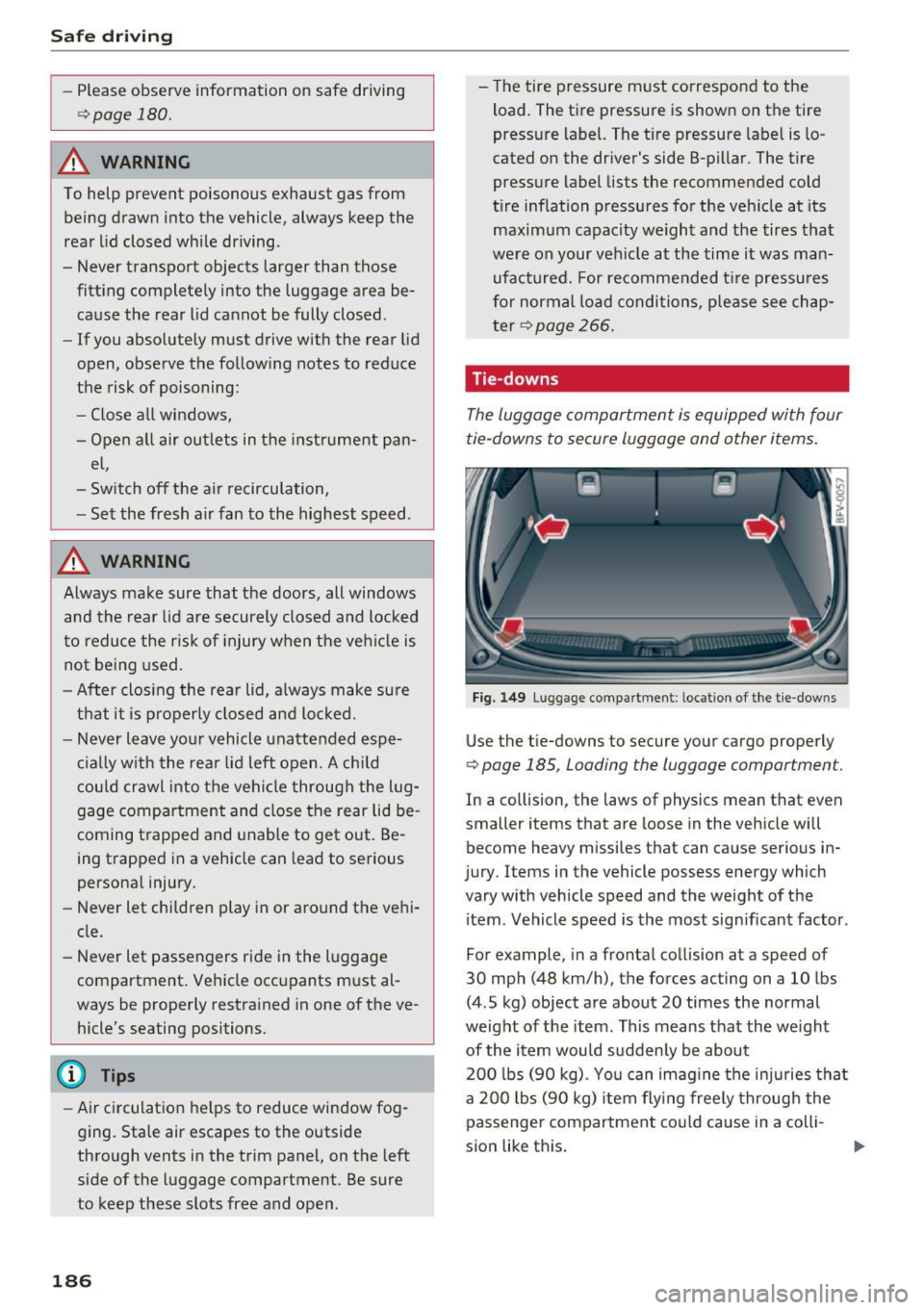
Tie-downs
The luggage compartment is equipped with four
tie -downs to secure luggage and other items.
Fig. 149 Luggage compartment : location of the tie- downs
Use the tie-downs to secure your cargo properly
c> page 185, Loading the luggage compartment.
In a co llision , the laws of physics mean that even
smaller items that are loose in the vehicle will
become heavy missiles that can cause serious in
jury . Items in the vehicle possess energy which
vary with vehicle speed and the weight of the i tem . Vehicle speed is the most significant factor.
For example, in a frontal collision at a speed of
30 mph (48 km/h), the forces acting on a 10 lbs
(4 .5 kg) object are about
20 times the normal
weight of the item. This means that the weight
of the item would sudden ly be about
200 lbs (90 kg) . You can imag ine the injuries that
a
200 lbs (90 kg) item flying freely through the
passenger compartment could cause in a colli
sion like th is .
Page 195 of 322
CD
CD
.... N
" N ...... 0
0
Ill co
-Always keep the belts clean . Dirty be lts may
not work properly and can impair the func
tion of the inertia reel ¢
table Interior
cleaning on page
277 .
Safety belts
Fastening safety belts
Seat first -everybody buckle up!
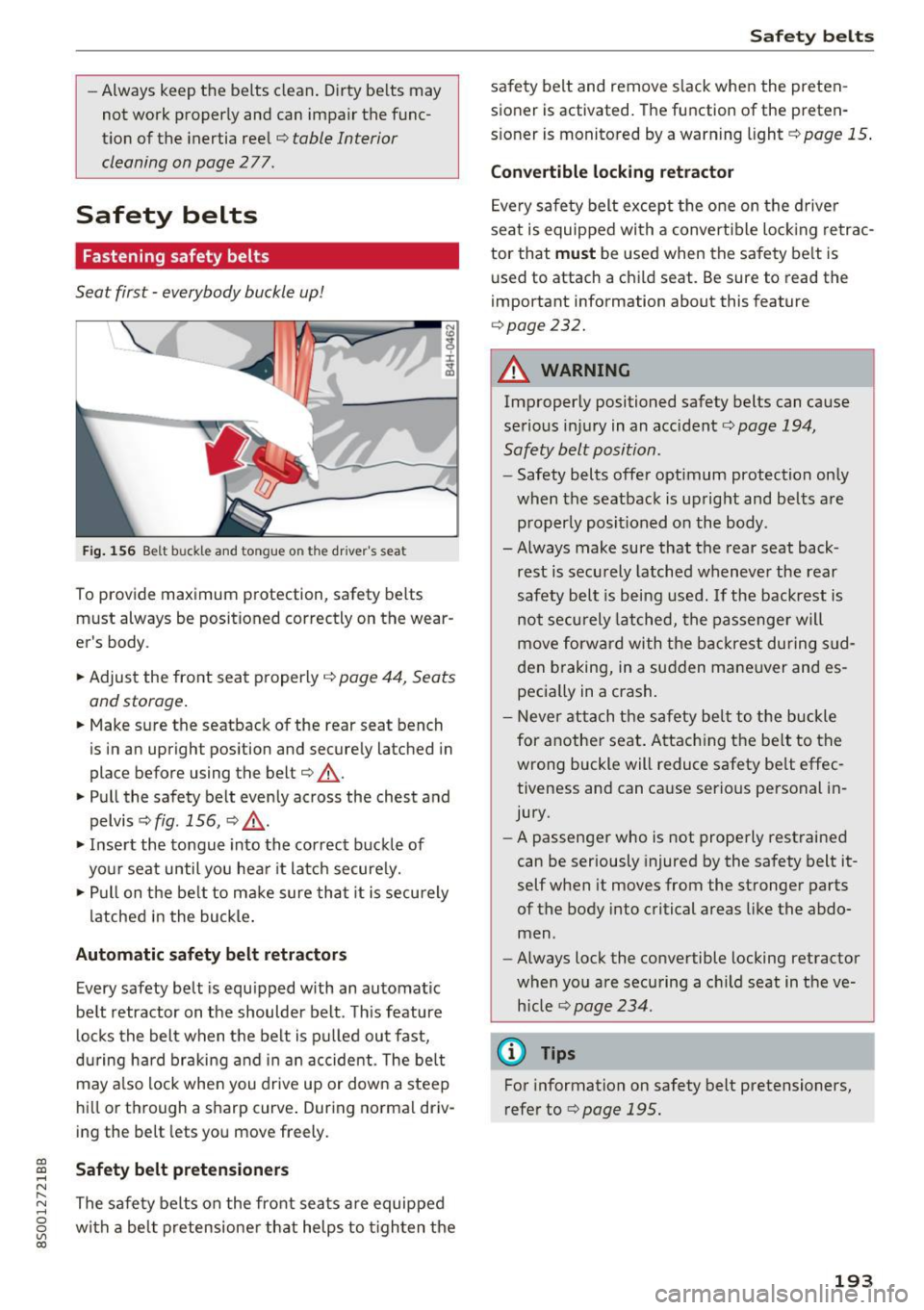
Fig . 156 B elt b uck le and tongue o n the drive r's sea t
To provide maximum protect ion, safety belts
must always be position ed correctly on th e wear
er's body .
.. Adjust the front seat properly
¢ page 44 , Seats
and storage.
.. Make sure the seatback of the rear seat bench
is in an upright pos ition and securely latched in
place before using the belt ¢
&_.
.. Pull the safety belt evenly across the chest and
pelvis ¢
fig. 156, ¢ ,&. .
.. Inse rt the tongue into the correct buckle of
your seat until you hea r it latch secure ly.
.,. Pull on the be lt to make sure that it is securely
latched in the bu ckle .
Automatic safety belt retractors
Every safety belt is equipped with an automatic
belt retractor on the shoulder belt . Th is feature
l ocks the belt when the be lt is p ulled out fast,
during hard braking and i n an accide nt. T he belt
may a lso lock when you drive up or down a steep
hi ll or through a sharp curve . During no rma l driv
ing the be lt lets you move freely.
Safety belt pretensioners
The safe ty belts on the front sea ts are equipped
with a be lt pretensione r that helps to t igh ten the
Safet y bel ts
safety belt and remove s lack when the preten
sioner is activated. The function of the preten
s ioner is monitored by a warn ing light ¢
page 15 .
Convertible locking retractor
Eve ry safe ty belt except the one on the drive r
seat is equipped with a convertible loc king retrac
tor that
must be used when the safety be lt is
u sed to attach a child seat. Be sure to read the
impo rtant information about this feature
¢ page 232.
A WARNING
-Improperly positioned safety belts can cause
serious injury in an accident¢
page 194,
Safety belt position.
- Safety belts offer optimum protection on ly
when the seatback is upright and belts are properly posit ioned on the body .
- Always make sure that the rear seat back
rest is secu rely latched whenever the rear
safety belt is being used . If the backrest is
not securely latched, the passenge r will
move forw ard with the backrest during s ud
den braking, in a sudden mane uver and es
pecia lly in a crash.
- Neve r attach the safety bel t to the buckle
for anot her seat . Attac hing the be lt to the
wrong buckle will reduce safety be lt effec
tiveness and can cause serious personal in
jury.
- A passenger who is not properly rest rained
can be seriously injured by the safety belt it
self when it moves from the stronger parts
of the body into critical areas like the abdo
men .
- Always lock the convertible locking retractor
when yo u are securing a c hild seat in the ve
h icle
¢ page 234.
@ Tips
For information on safety belt pretensioners,
refer to¢
page 195 .
193
Page 203 of 322
-Always carefully follow the manufacturer's
instructions provided w ith the child seat or
carrier.
- Always make sure that there is nothing on
the front passenger seat that will cause the
capacitive passenger detection system in
the seat to signal to the Airbag System that
the seat is occupied by a person when it is
not, or to signa l that it is occ upied by some
one who is heavier than the pe rson actua lly
s itting on the seat. The p resence of addi
tional objects could cause the passenger
fro nt airbag to be turned on when it shou ld
be off, or could cause the airbag to work in a
way that is different from the way it would
have worked without the object on the seat .
Front airbags
Description of front airbags
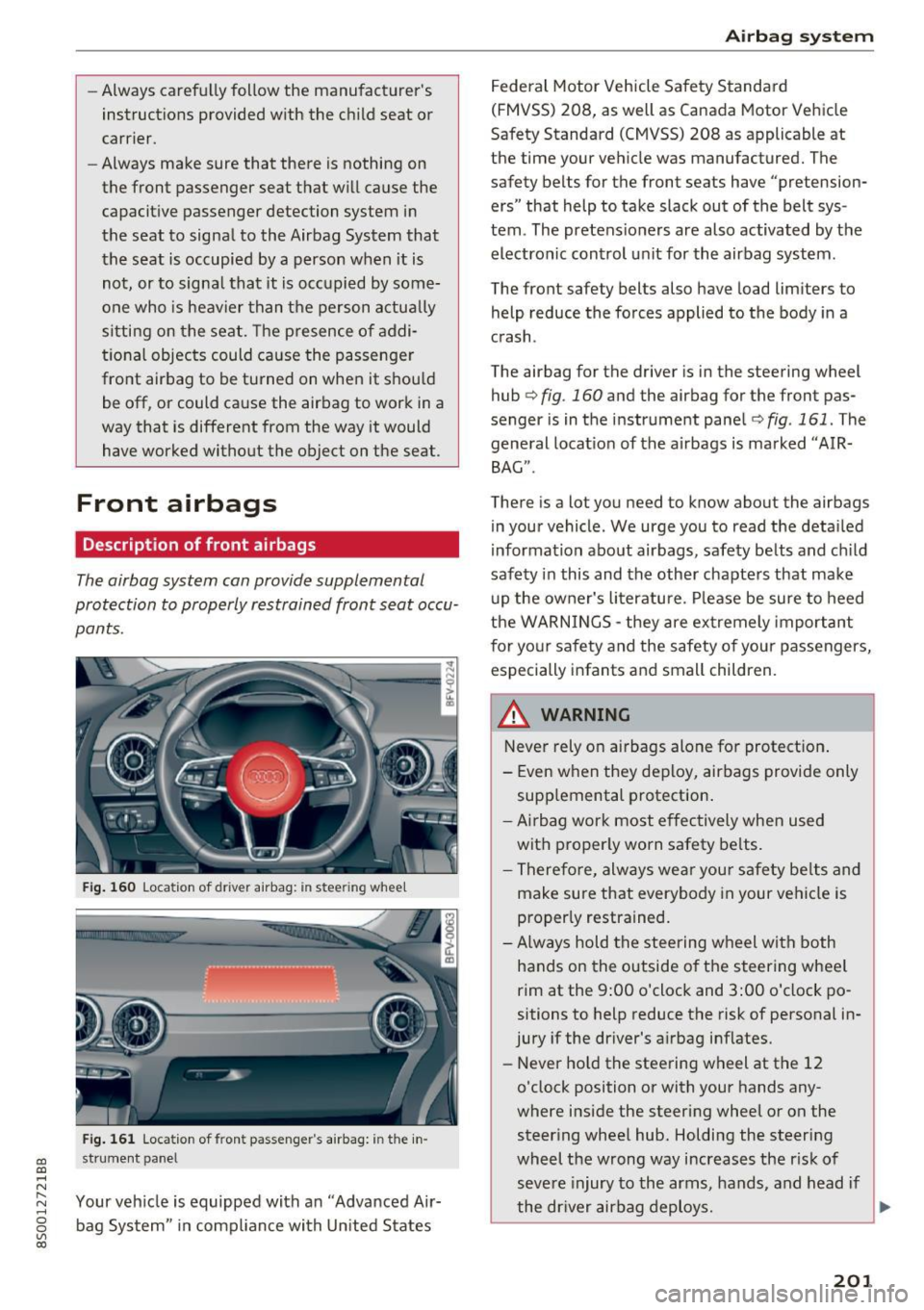
The airbag system can provide supplemental
protection to properly restrained front seat occu
pants.
F ig . 160 Locat ion of driver a irbag: in stee ring wheel
Fig . 1 61 Locat ion of front passenger's airbag: i n the in -
CD st rume nt panel CD ,-t N
" ~ Your veh icle is equipped with a n "Adva nced Air-
~ bag System" in compl iance wi th Un ited States
co
Airb ag sys tem
Federal Motor Vehicle Safety Standa rd
(FMVSS) 208, as well as Canada Motor Vehicle
Safety Standard (CMVSS) 208 as applicable at
the time your ve hicle was manufactured. The
safety belts for the front seats have "pretension
ers" that help to take slack out of the belt sys
tem . The pretens ioners are also activated by the
electronic control unit for the airbag system.
The front safety belts also have load limiters to
help reduce the fo rces applied to the body in a
crash.
The airbag for the driver is in the steering wheel
hub ¢
fig. 160 and the airbag for the front pas
senger is in the instrument panel¢
fig . 161. The
general locat io n of the a irbags is marked "AIR
BAG" .
There is a lot you need to know about the airbags
in you r vehicle. We urge you to read the deta iled
information about airbags, safety be lts and c hild
safety in this and the other chapte rs that make
u p the ow ner's literature. Please be sure to heed
the WARNINGS - they are ex tremely important
for yo ur safety and the safety of your passengers,
especially infants and small children.
A WARNING
-
Never rely on airbags alone fo r protect ion .
- Even when they deploy, airbags provide only
supp lemental protection .
- Ai rbag work most effectively when used
with proper ly worn safety be lts.
- T herefo re, always we ar you r safe ty be lts and
make sure that everybody in your vehicle is
proper ly restrained.
- Always hold the stee ring w heel with both
hands on the outside o f the steering wheel
rim at the 9 :00 o'clock and 3:00 o'clock po
sitions to help reduce the risk of personal in
jury if the driver's a irbag inflates.
- Never ho ld the steering wheel at the 12
o'clock position or with your hands any
where inside the steering wheel o r on the
steer ing whee l hub. Holding the steering
wheel the wrong way increases the r is k of
seve re injury to the arms, hands, and head if
the dr iver airbag deploys.
~
201