ESP AUDI TT ROADSTER 2018 Owner's Manual
[x] Cancel search | Manufacturer: AUDI, Model Year: 2018, Model line: TT ROADSTER, Model: AUDI TT ROADSTER 2018Pages: 310, PDF Size: 46.95 MB
Page 79 of 310
Cl 00 ... N r-N ... 0 r-Vl 00
system may have detected a vehicle in another
l ane that is
not adjacent to your current lane .
- If you are dr iving t hrough a curve . Side assist
may react to a vehicle that is one lane over
from the adjacent lane .
- If side assist reacts to other objects (such as
high or displaced guard rails) .
- In poor weat her condit ions . The side assist
functions a re limited.
D o no t cove r the radar
sensors ¢ fig. 84 wit h
sticke rs, deposits, bicycle whee ls o r othe r ob
jects , beca use they w ill impai r the f unct ion . For
information on cleaning,
see¢ page 266 .
A WARNING
-Always pay atte ntion to traffic and to the
area aro und yo ur vehicle. Side assist cannot
rep lace a dr ive r's attention. The dr ive r alone
is a lways responsib le for lane changes and
s imi lar driving maneuvers .
- In some situat ions, the system may not
function or its funct io n may be limited . For
example:
- If vehicles a re a ppro ac hi ng o r being le ft
behind very quickly. The display may not
tur n on in t ime .
- I n poo r weather cond itions s uch as heavy
rain, snow o r heavy mist .
- On very wide lanes, in t ight curves, o r if
there is a rise in the road s urface. Vehicles
in the adjacent lane may not be detected
beca use they are outs ide of the sensor
range.
{Ll) Note
The sensors can be disp laced by im pacts o r
damage to the bumpe r, whee l housing and
underbody. Th is can impa ir the system. Have
an authorized A udi dealer or autho rized Audi
Serv ice Facility c heck their fu nction.
(D Tips
- If the window g lass in the d river 's doo r or
front passenger 's doo r has been t inted, the
display in the exterior mirror may be i ncor
r ect .
-
Ass istance systems
- F or an exp lanat ion on co nf orm ity w it h t he
FCC regulat ions in the Un ite d States an d the
Indust ry Canada regulat ions, see
¢ page 293.
Switching on and off
App lies to : vehicles wi th Audi side ass ist
.. Select in the Infotainmen t system: I M ENU ! but
ton
> Vehicle > left control b utton > Driver a s
s istance > Audi side a ssist
If the system is activated, the disp lays in the ex
terior m irrors w ill turn on briefly when the igni
t ion is switched on .
Adjusting the display brightness
Applies to : vehicles wit h Audi s ide ass ist
The display brightness con be adjusted in the In
fotainment system .
.. Select in the Infotainment system: I MENU! but
ton
> Vehicle > left control button >Dri ver as
sistance > Audi side assist
The disp lay br ightness adjusts automatically to
the brightness of the surroundings, both in the
i nformation and in the wa rn ing stage. I n very
dark or very br ight surround ings, the automatic
adjustment w ill set the display to t he m inimum
o r max imum level. In such cases, yo u may notice
no ch ange when adj usting the br igh tne ss, or the
c h ange m ay only be noticeab le on ce t he sur
r oundings change.
Adjust the br ightness to a leve l w he re the d isplay
in th e i nfo rm atio n stage will not disrupt yo ur
v iew ahe ad. If yo u change the br igh tness , the d is
play in the exterio r mirror wi ll briefly show the
brightness leve l in the information stage . The
brig htness of th e warning stage is linked to the
brightness in the information stage and is adjust
ed along with the information stage.
(D Tips
- Side ass ist is not act ive while you are mak
ing the adjustment.
- Yo ur settings a re automat ica lly stored and
assigned to the remote control key be ing
used.
77
Page 80 of 310
Assistance systems
Messages
App lies to: ve hicles w ith Aud i side ass ist
If th e side assist sw itches off automatically, a
message appears in the Infotainment system dis
p la y.
@j Audi side assist: currently unavailable.
Sensor vision restricted due to surroundings.
See owner's manual
The radar sensor vision is impaired . Do not cover
the area in front of the sensors with bike wheels,
stickers, dirt or other objects. Clean the area in
front of the sensors, if necessary
c:> page 76,
fig . 84 .
@j Audi side assist: currently unavailable.
See owner's manual
Side assist cannot be switched on at th is time be
cause there is a malfunction (for example, the battery charge level may be too low) .
@j Audi side assist: malfunction! Please
contact Service
The system cannot guarantee that it will detect
veh icles correctly and it has switched off . The
sensors have been moved or are faulty. Have the
system checked by an author ized Audi deale r or
authorized Audi Service Facility soon.
Audi drive select (drive
settings)
Introduction
A pp lies to: ve hicles w ith Aud i d rive select
Drive select makes it possible to expe rience d if
fe rent types of vehicle settings in one vehicle.
The driver can select from three modes, Comfort,
Auto and Dynamic , using the
i:l:ta button in the
center console or by using the Infotainment sys
tem . T his allows you to switch between a sporty
and a comfortab le driving mode, for examp le. In
the Indi vidual mode, the settings can be adjust
ed to your personal preferences. This makes it
possible to combine sett ings such as a sporty en
g ine setting w ith light steering.
78
A WARNING
Using Aud i drive select incorrectly can lead to
coll is ions, other accidents and serious inju
ries.
Description
App lies to: vehicles with A udi drive se lect
The veh icle setup in each mode depends on the
vehicle's features.
Engine and automatic transmission
Depending on the mode, the engine and auto
matic transmission respond more quickly or in a
more balanced manner to accelerator pedal
movements.
Suspension control (Audi magnetic ride)*
The suspension control uses sensors to record in
format ion regarding steering movements, brak
i ng and acceleration operations by the driver, as
well as information about the road surface, driv
i ng speed, and load. W ith dr ive se lect, you can
adjust the suspension control to sporty (dynam
ic ), comfortable (comfort) or balanced (auto).
Steering
The power steering adapts . Indirect steering that
moves eas ily as in comfort mode is espec ially
su ited to long drives on a highway . The dynamic
mode provides sporty, direct steering.
Engine sound*
The engine sound adapts to the current mode
and can be subtle to sporty .
(D Tips
In some models, the maximum vehicle speed
can only be reached in the auto and dynamic
modes .
Page 82 of 310
Parking syste m s
Parking systems
General information
A pplies to: ve hicles w ith rear park in g syste m/pa rk in g system
p lus
Depending on your vehicle 's equipment , various
parking aids will help you when parking and ma
neuvering.
The
r ea r p arki ng sys te m is an aud ible parking a id
that warns you of obstacles
behind the vehicle
¢ page 81.
The parki ng sys te m plu s assists you when park
ing by aud ibly and visually indicating objects de
tected
in front of and behind the veh icle
¢ page 81.
The rea rv iew ca mera shows the area behind the
veh icle in the Infotainment system d isplay . The
lines in the rearv iew camera image he lp you to
pa rk or maneuve r
¢page 82.
_& WARNING
-Always look for traff ic and check the area
around your vehicle by looking at it direct ly
as well. The parking system cannot replace
the driver's attention . The driver is always
responsib le when entering or leaving a park
ing space and during similar maneuvers.
- Please note that some surfaces, such as
clothing, are not detected by the system.
-
- Sensors and cameras have blind spots in
which people and objects cannot be detect
ed . Be especially cautious of small children
and animals.
- The sensors can be displaced by impacts or
damage to the radiator gr ille, bumper,
wheel housing and the underbody . The park
i ng system may be impa ired as a result .
Have an authorized Audi dealer or author
ized Audi Serv ice Facility check their func
t ion.
- Make su re the senso rs a re not obst ructed by
st ickers, depos its or othe r ma ter ia ls.
If they
are, the senso r funct io n could be impai red .
For additiona l information on cleaning, see
¢ page 266 .
80
@ Note
-Some objects are not detected or disp layed
by t he system under certain c ircumstances:
- objects such as barrier cha ins, tra iler draw
bars, vertical po les or fences
- objects above the sensors such as wall ex
tensions
- objects with certain surfaces or structures
such as cha in link fences or powder snow
- If you continue driving closer to a low ob
ject, it may disappear from the sensor range . Note that you will no longer be
wa rned about th is obstacle.
- Keep enough distance from the curb to re
duce the risk of damage to the rims .
(D Tips
-The system may provide a warning even
though there are no obstacles in the cover
age area in some situations, such as :
- certain road surfaces or when there is tall grass
- externa l ultrasonic sources such as from
cleaning vehicles
- in heavy rain, snow, or th ick vehicle ex
h a u st
- We recommend that you practice par king in
a traffic -free location or parking lot to be
come familiar with the system . When doing
this, there shou ld be good light and weath
er conditions.
- You can change the vo lume of the signa ls.
- What appea rs in the disp lay is slight ly de -
layed.
- Th e sensors m ust be kept clean and free of
snow and ice for the parking aid to operate .
Page 88 of 310
Intelligent Technology
Intelligent Technology Electronic stabilization
control (ESC)
Description
Elect ronic stabili zation control ( ESC) suppo rts
driver safety. It red uces the risk of slipping and
improves dr iving stabi lity. ESC detects crit ica l sit
uations such as the vehicle overstee ring and un
dersteeri ng or the w heels are sp inning. The vehi
cle is stabilized by app lying the brakes or reduc
i n g e ngine torque . When the ESC engages, the
liJ indicato r light bli nks in t he instr ument clus
t er.
The fo llow ing systems are in tegrated in the ESC:
Anti-lock braking system (ABS)
ABS p reve nts the whee ls from lock ing whe n brak
ing. The vehicle can st ill be steered even d uring
hard brak ing. Apply steady press ure to the bra ke
pedal. Do not pump the pedal. A puls ing in t he
b rake pedal indicates that the system is act ing to
s tabili ze the vehicle .
Brake assist system
The brake assist system can decrease brak ing dis
tance . It inc reases brak ing power when the d river
presses the brake pedal q uick ly in eme rgency sit
uations . You must press and hold t he b rake pedal
until the dangerous si tuatio n is ove r.
Anti-slip regulation (ASR)
ASR red uces eng ine power when the d rive wheels
begin sp inning a nd adapts the force to the road
conditions . This makes it easie r to start, acceler
ate and dr ive u p hill s.
Electronic differential lock (EDL)
E DL applies the brakes to a wheel that sta rts
spi nning and t ransfe rs the d rive power to the
other driving wheels. This f unction is not availa
b le at higher speeds.
In extreme cases, EDL automatically sw itches off
to keep the brake on the b raked wheel from over
heati ng. The vehicle is st ill work ing correctly. EDL
86
will swi tc h on again automatically when condi
tions have retu rned to normal.
Power steering
The ESC can also support veh icle stab ility
t hr ough stee rin g.
Selective wheel torque control
Se lective wheel to rque con trol is used when d riv
i ng on curves . The front whee l on the ins ide of
t h e curve or bo th whee ls on the i nside of th e
cu rve are braked se lective ly as needed. This al
l ows mo re pre cise dr iving in curves .
_&. WARNING
-The E SC and i ts in teg ra ted systems cannot
overcome the lim its imposed by natura l
phys ica l laws. This is es pec ially important
on s lippery or wet roa ds.
If the systems be
gin acting to stabilize yo ur vehicle, you
should immediately a lter your speed to
match the road and traffic conditions. Do
no t le t the inc reased safety p rovi ded tempt
you into taking risks. This could increase
y o ur r is k of a c oll is ion.
- Please note the r is k of a coll is ion increases
w hen dr iv in g fast, especially t hrough curves
a nd on sl ippery or wet r oads, and w hen dr iv
ing to o cl ose to obje cts ahead. T he ES C and
it s i ntegrated systems cannot a lways pre
vent co llisions
-there is st ill a risk of acci
dents!
- Press the accelerator peda l caref ully when
accelerating on even, slippery sur faces such
as ice and snow. The drive wheels can spin
even when these control systems a re instal
led and this can affect driving stability and
increase the risk of a collision.
(0 Tips
- The ABS and ASR only funct ion correctly
when a ll four wheels have a sim ila r wear
co nditio n. D iffere nt tire sizes can lead to a
red uction in engin e power.
- You may hear noises when the systems de
sc ribed are working .
Page 89 of 310
Cl co .... N ,....
N .... 0 ,....
Vl co
Intelligent Technology
Switching on and off
ESC turns on automatically when you start the engine.
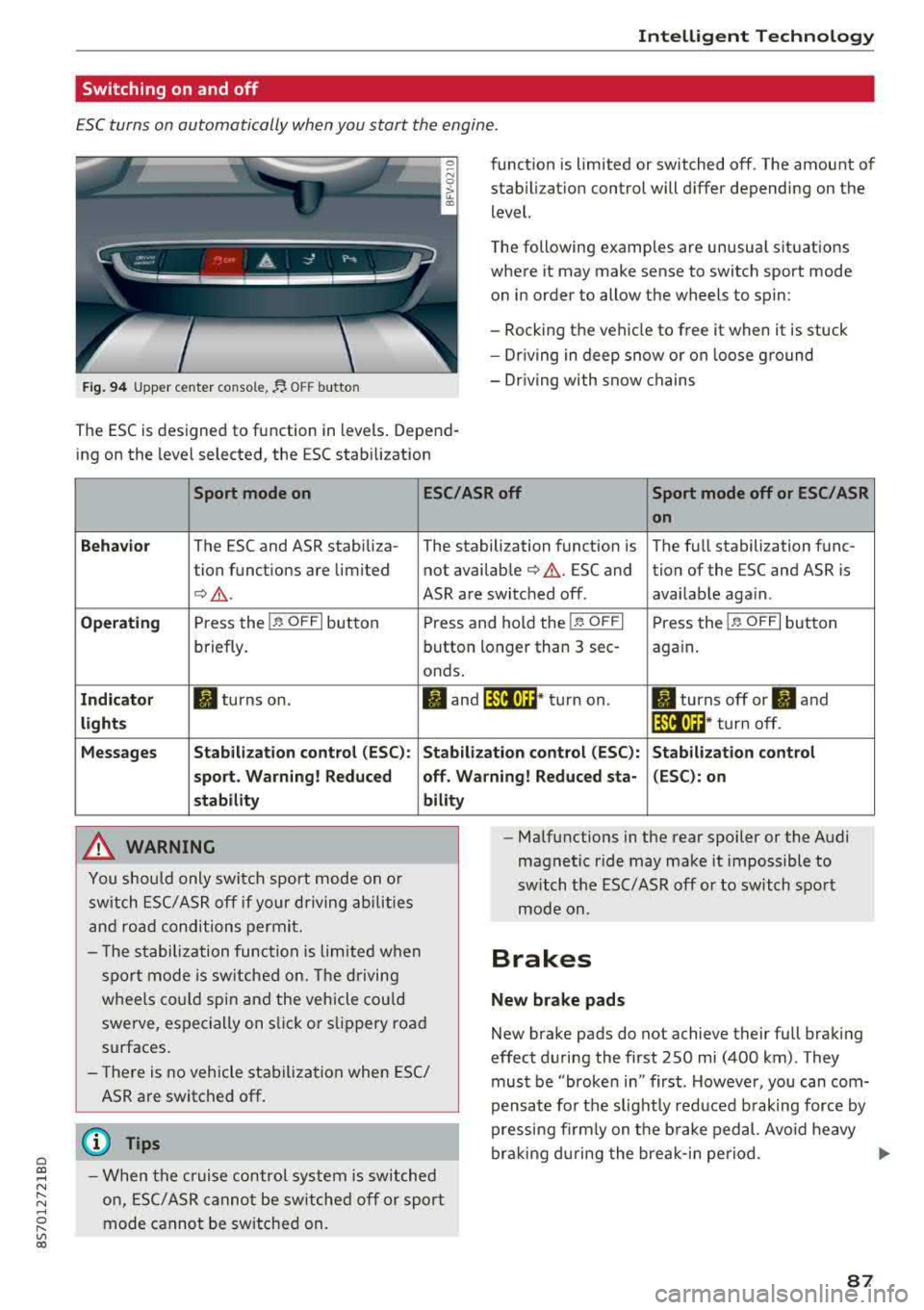
Fig . 9 4 Upper center console, fJ. OFF b utton
The ESC is designed to function in levels . Depend
ing on the level selected, the ESC stabilization funct
ion is limited or switched off. The amount of
stab ilizat ion control will differ depending on the
level.
T he following examples are unusua l situations
where it may make sense to switch sport mode
o n in order to allow the wheels to spin:
- Rocking the vehicle to free it when it is stuck
- Dr iving in deep snow or on loose ground
- Dr iving with snow chains
Sport mode on ESC/ASR off Sport mode off or ESC/ASR
on
Behavio r
The ESC and ASR stabiliza- The stabilization funct ion is The full stabilization func-
tion funct ions are limited not availab le
¢ & . ESC and tion of the ESC and ASR is
¢ &. ASR are switched off. availab le aga in.
Operating Press the i.i, OFFI but ton Press and hold the 1-~ OFFI Press the j.i, OFFI but ton
briefly. button longer than 3 sec- aga in .
onds .
Indicator II turns on. Iii and 14-'ll•)H* tu rn on. II turns off or II and
light s 14-'ll•IH * tu rn off.
Messages Stab
ilization control (ESC ): Stab ilization con trol (ESC ): Stab ilization control
sport . Warning! Reduced off. Wa rning! Reduced sta -(ESC): on
stability
A WARNING
You shou ld only swit ch sport mode on or
switch ESC/ ASR off if your driving abilities
an d roa d conditions permi t.
bility
- T he stabilization func tion is limited w hen
sport mode is sw itched on. The driving
whee ls co uld spi n and the vehicle cou ld
swerve, espec ially on s lick or s lippery roa d
surfaces.
- There is no vehicle stabilization when ESC/
ASR are switched off.
(D Tips
- When t he cr uise control system is sw itched
on, ES C/ ASR cannot be sw itched off or sport
mode cannot be sw itche d on. -
Ma lfunctions in the rear spoiler or the A udi
magnetic ride may make it impossible to
switch t he ESC/ ASR off or to switch sport
mode on .
Brakes
New brake pads
New brake pads do not achieve their full braking
effect d uring the first 250 mi (400 km) . They
must be "broken in" first . Howeve r, you can com
pensate fo r th e slig htly reduced b raking force by
pressing fi rm ly on t he b rake ped al. Avo id heavy
bra king d uring the brea k-i n pe riod .
.,.
87
Page 90 of 310
Intelligent Technology
Wear
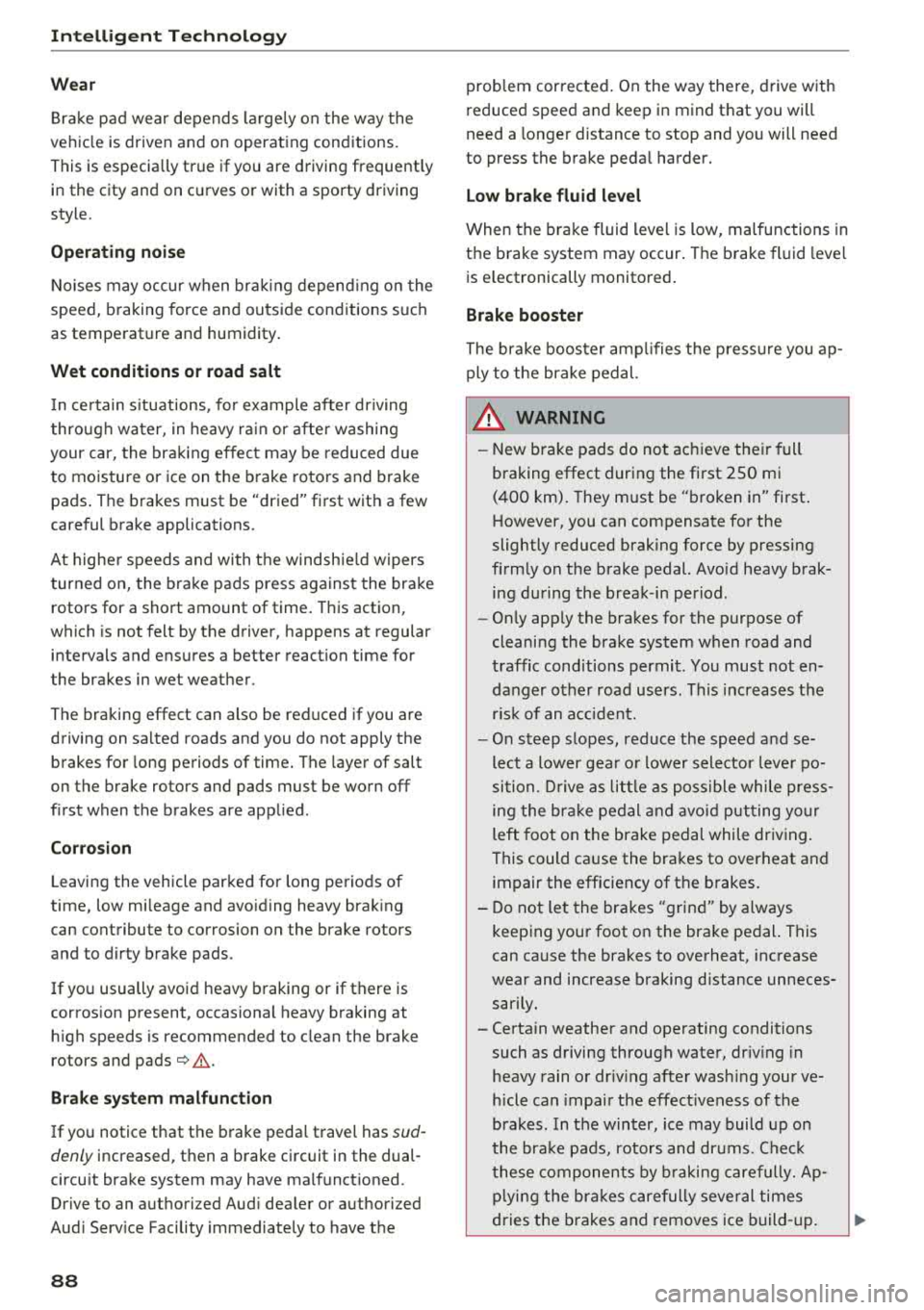
Brake pad wear depends largely on the way the
vehicle is driven and on operating conditions.
This is especially true if you are driving frequently
in the city and on curves or with a sporty driving
style.
Operating noise
Noises may occur when braking depending on the
speed, braking force and outside conditions such
as temperature and humidity.
Wet conditions or road salt
I n certain situations, for example after dr iving
through water, in heavy ra in or after washing
your car, the braking effect may be reduced due
to moisture or ice on the brake rotors and brake
pads . The brakes must be "dried" first with a few
careful brake applications.
At higher speeds and with the windshie ld wipers
turned on, the brake pads press against the brake
rotors for a short amount of time . This action,
which is not felt by the driver, happens at regular
intervals and ensures a better reaction time for
the brakes in wet weather .
The braking effect can also be reduced if you are
driving on sa lted roads and you do not apply the
brakes for long periods of time. The layer of salt
on the brake rotors and pads must be worn off
first when the brakes are applied.
Corrosion
Leaving the vehicle parked for long periods of
time, low mi leage and avoiding heavy braking
can contribute to corrosion on the brake rotors
and to dirty brake pads.
If you usually avoid heavy braking or if there is
corrosion present, occasional heavy braking at
h igh speeds is recommended to clean the brake
rotors and
pads¢ &.
Brake system malfunction
If you notice that the brake pedal travel has sud
denly increased, then a brake circuit in the dual
circuit brake system may have malfunctioned. Drive to an authorized Aud i dea ler or authorized
Aud i Serv ice Facility immediately to have the
88
problem corrected. On the way there, drive with
reduced speed and keep in mind that you will
need a longer distance to stop and you will need
to press the brake pedal harder.
Low brake fluid level
When the brake fluid level is low, malfunctions in
t h e brake system may occur . The brake fluid leve l
is electronically monitored .
Brake booster
The brake booster amplifies the pressure you ap
ply to the brake pedal.
& WARNING
- New brake pads do not achieve their full
braking effect during the first 250 mi
-
(400 km). They must be "broken in" first .
However, you can compensate for the
slightly reduced braking force by pressing
firm ly on the brake pedal. Avoid heavy brak
ing during the break-in period.
- On ly app ly the brakes for the purpose of
cleaning the brake system when road and
traffic conditions permit. You must not en
danger other road users . This increases the
r is k of an accident.
- On steep slopes, reduce the speed and se
lect a lower gea r or lower selector leve r po
sition. Drive as lit tl e as possible while press
ing the brake pedal and avo id putting yo ur
left foot on the brake pedal while driv ing .
This could ca use the brakes to overheat and
impair the efficiency of th e brakes.
- Do not let the brakes "grind" by always
keeping your foot on the brake pedal. This
can cause the brakes to overheat, increase
wear and increase braking distance unneces
sarily.
- Certain weather and operating conditions such as driving through water, dr iv in g in
heavy rain or driv ing after wash ing your ve
h icle can impair the effectiveness of the
brakes. In the winter, ice may build up on
the brake pads, rotors and drums. Check
these compon ents by braking carefully. Ap
plying the brakes carefully several times
dries the brakes and removes ice build-up.
Page 93 of 310
Cl 00 .-< N r-N .-< 0 r-Vl 00
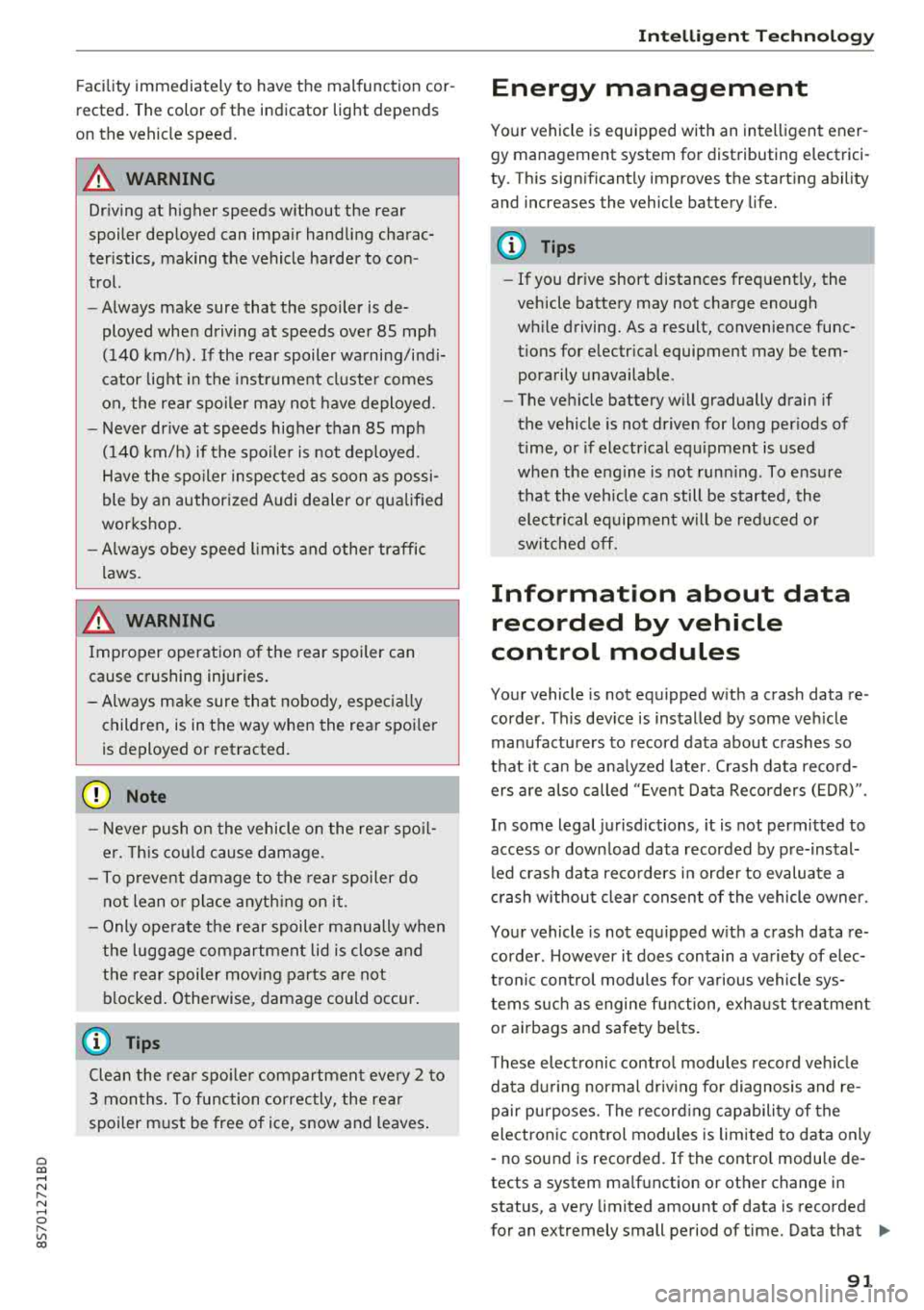
Facility immediately to have the malfunction cor
rected. The color of the indicator light depends
on the vehicle speed.
A WARNING
-
Driving at higher speeds without the rear
spoiler deployed can impair handling charac
teristics, making the vehicle harder to con
trol.
- Always make sure that the spoiler is de
ployed when driving at speeds over 85 mph
(140 km/h) . If the rear spoiler warning/ind i
cator lig ht in the instrument cluste r comes
on, the rear spoiler may not have deployed.
- Never drive at speeds higher than 85 mph
(140 km/h) if the spoile r is not deployed.
Have the spo iler inspected as soon as possi
ble by an author ized Audi dealer or qua lified
works hop .
- Always obey speed l imits and othe r traffic
laws .
A WARNING
Improper operation of t he rear spoiler can
cause crushing injuries.
- Always make sure that nobody, especia lly
children, is in the way when the rear spoi ler
is deployed or retracted .
(Llj) Note
-Never push on the vehicle on the rear spo il
er. This cou ld cause damage.
- To p reve nt damage to the rear spoiler do
not lean o r place anyt hing on it.
-
- Only ope rate the rear spoiler manually when
the luggage compartment lid is close and
the rear spoiler mov ing parts are not
blocked. Otherwise, damage could occur .
(j) Tips
Clean the rear spoiler compartment eve ry 2 to
3 months . To function co rrectly, the rear
spoiler must be free of ice, snow and leaves .
Intellig ent T echn olo gy
Energy management
Your vehicle is equipped with an intelligent ener
gy management system for distributing electrici
ty. This significantly improves the starting ability
and increases the vehicle battery life.
(D Tips
- If you drive short distances frequent ly, the
vehicle battery may not charge enough
wh ile driving. As a result, convenience func
tions for electr ical equipment may be tem
pera rily unavailable .
- The vehicle battery w ill gradually drain if
the vehicle is not driven for long per iods of
t ime, or if electr ical equ ipment is used
when the engine is not runn ing. To ensure
that the veh icle can still be started, the
elect rical eq uipment w ill be red uced or
sw itched
off.
Information about data
recorded by vehicle
control modules
Your vehicle is not equipped with a crash data re
corder . This dev ice is installed by some veh icle
manufacturers to record data about crashes so
t h at it can be ana lyzed later. Crash data reco rd
ers are also called " Event Data Recorders (EDR)".
In some legal jurisdictions, it is not permitted to
access or down load data recorded by pre-instal
led crash data recorders in orde r to evaluate a
crash without clear consent of the vehicle owner.
Your vehicle is not equ ipped w ith a crash data re
corder . However it does contain a variety of e lec
tronic control modules for various vehicle sys
tems such as engine function, exha ust treatment
or airbags and safety belts.
T hese electronic contro l modu les record veh icle
data du ring normal driv ing fo r diagnosis and re
pair purposes. The record ing capability of the
electronic control modules is limited to data only
-no sound is recorded . If the contro l module de
tects a system ma lfunction or other change in
status, a very limited amount of data is recorded
for an extremely small period of time. Data that
..,.
9 1
Page 112 of 310
Voice recognition s ystem
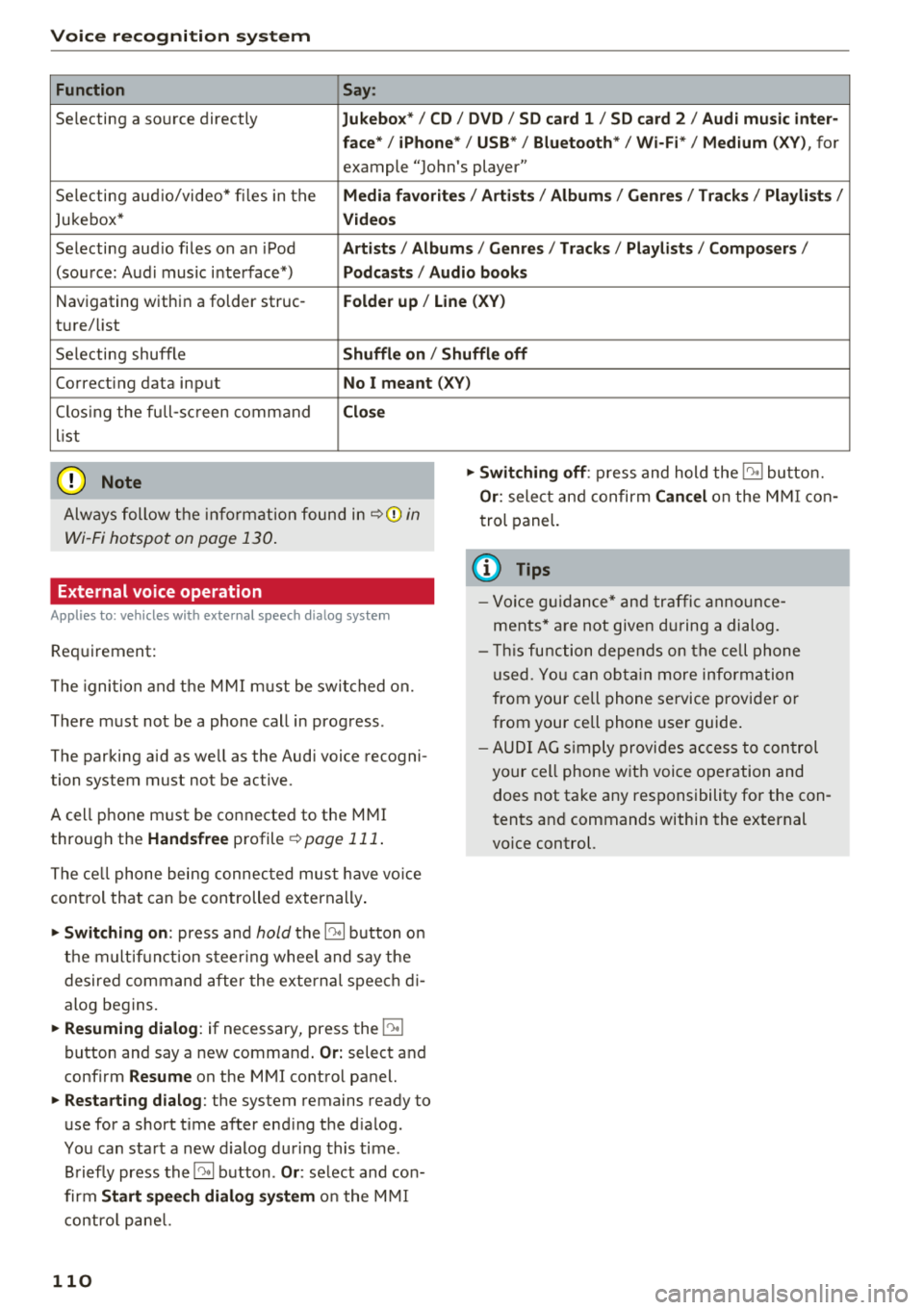
Function Say:
Selecting a so urce directly Jukebo x*/ CD/ DVD/ S D card 1 / SD card 2 / Audi mu sic inter·
face */ iPhone * / USB* / Bluetooth * / Wi -Fi * / Medium
(XV), for
example "Jo hn's player"
Selecting aud io/video* fi les in the
Media fav orites / Arti sts/ Album s/ Genr es I Track s/ Playli st s /
Jukebox* Vid eos
Selecting aud io files on an iPod Artists / Albu m is / Genre s/ Track s/ Playlists /Compo ser s/
(sou rce: Aud i music interface*) Podca sts / Aud io bo oks
Navigating within a folder struc -Folder up / Line (XV)
ture/ list
Selecting shuffle
Shuffl e on / Shuffle off
Correcting data input No I meant (XV)
Clos ing the full-sc reen command Clo se
list
(Ud) Note
Always follow t he info rmat ion found in ~ @ in
Wi -Fi hotspot on page 130 .
External voice operation
Applies to: vehicles with external speech dialog system
Requirement:
The ignition and t he M MI m ust be switched on.
There must not be a phone call in progress .
The parking aid as we ll as the Audi voice recogni
tion system must not be active.
A cell phone must be connected to the M MI
through the
Handsfree profile ~ page 111 .
The ce ll phone being connec ted must have vo ice
con trol that can be controlled externally .
"'Switching on: press and hold the 10° 1 button o n
the m ult if u nct ion steer ing whee l and say the
desired command after the external speech d i
alog begins.
"'Re suming dialog : if necessary, press the l')•I
button and say a new command . Or: select and
confirm
Re sume on the MMI contro l panel.
"'Restart ing dialog : the system remains ready to
use for a short t ime after end ing the d ialog.
You can start a new d ialog during this time.
Briefly press the
5] button . Or: select and con
firm
Start speech dialog sy stem o n the M MI
contro l pane l.
110
"'Swit ching off : press and hold the 5] button.
Or : select and confirm Can cel on the M MI co n
trol panel.
{i) Tips
- Vo ice g uidance* and tra ffic anno un ce
ments* a re not give n during a dialog.
- Thi s function depe nds on the ce ll phone
used. Yo u ca n ob ta in more info rmation
from your cell phone service provider or
from your ce ll phone use r guide .
- AUDI AG s imply provides ac cess to con trol
your cell phone w it h voice operation and
does not take any responsibility for the con
tents and commands within the external
vo ice control.
Page 123 of 310
Cl 00 ... N r--N ... 0 r--Vl 00
-Selecting all contacts at once to import /e x
port :
select and confirm Import contacts /E x
port conta cts > SD card 1 /50 card 2 or USB de
v ice 1 /USB device 2
> All > Start import /Start
e x port .
(D Tips
-Always rea d the chapter ¢ page 131, About
Audi connect.
- Fo r additional informat io n on t he myAudi
account, v is it www.au diusa.com/mya udi .
- The impo rted contacts a re store d in the lo
ca l memo ry
o f the di rectory .
- A maxim um of 1, 000 contacts can be im
p orted . You can c hec k the directory memory
capac ity at any
time ¢ page 121.
-Neve r save important data o n memory cards
or USB storage devices . Audi is not respons i
b le for damaged or lost fi les and med ia.
- Contacts that we re down loade d from a ce ll
p ho ne cannot be e xported .
- The re s hou ld be no othe r files or folde rs on
the sto rage medium co ntainin g th e contacts
to be imported .
Settings
Telephone settings
Applies to: vehicles with telephone
.,. S e lect : I MENU I button> Telephone > rig ht co n-
t ro l but ton >
Telephone settings .
Call options* Multi-party calling :
can be switched on /off.
Ringtone and volume settings
1>
Using the Mute telephone f unct ion, you can
sw itch the ringtone on yo ur MMI on or off . You
can play the ringtones using the
Ringtone func
tion . Se lect and confirm a n entry from the list .
For the
Ringtone volume /Message volume set
t ings,
see ¢ page 177. The Microphone input
level
can be adjus ted dur ing a pho ne call us ing
t he cont ro l knob .
ll Depends on th e co nnect ed cell p ho ne.
Telephone
(D Tips
- Severa l cell p hones can be paired to t he
MM I, but only two * ce ll phones can be ac
t ively connected.
- To delete a ll paired B luetoot h dev ices, the
Bluetooth function can be reset to the fac
to ry default
settings¢ page 174.
Additional options
Applies to: vehicles with te lephone
.,. Select: ! M EN UI button> Telephone > right con-
t rol button .
Connection manager
See ¢page 174.
Bluetooth settings
See ¢ page 17 5.
Online settings *
See¢ page 1 76 .
Wi-Fi settings
See ¢ page 129, Wi -Fi hotspot .
Directory settings
Applies to: vehicles with telephone
.,. Select: !ME NUI button> Telephone > left con
trol button >
Directory > right control button >
Directory settings .
Memory capacity
S hows the Memory capacity fo r th e d irecto ry.
Yo u can m anage up t o 17 ,0 00 cont acts wi th t he
MM I direc to ry. Yo u ca n lo ad up to 4,0 00 conta cts
from your cell phone into each directo ry . Yo u ca n
also im port up to 1,000 contacts from a storage
device .
Sort order
You can so rt the cont acts in you r directo ry alph a
be tica lly ac co rdin g to
Last name or First name. ..,.
121
Page 128 of 310
Audi connect
Audi connect services
Basic functions
Applies to: vehicles with Audi connect
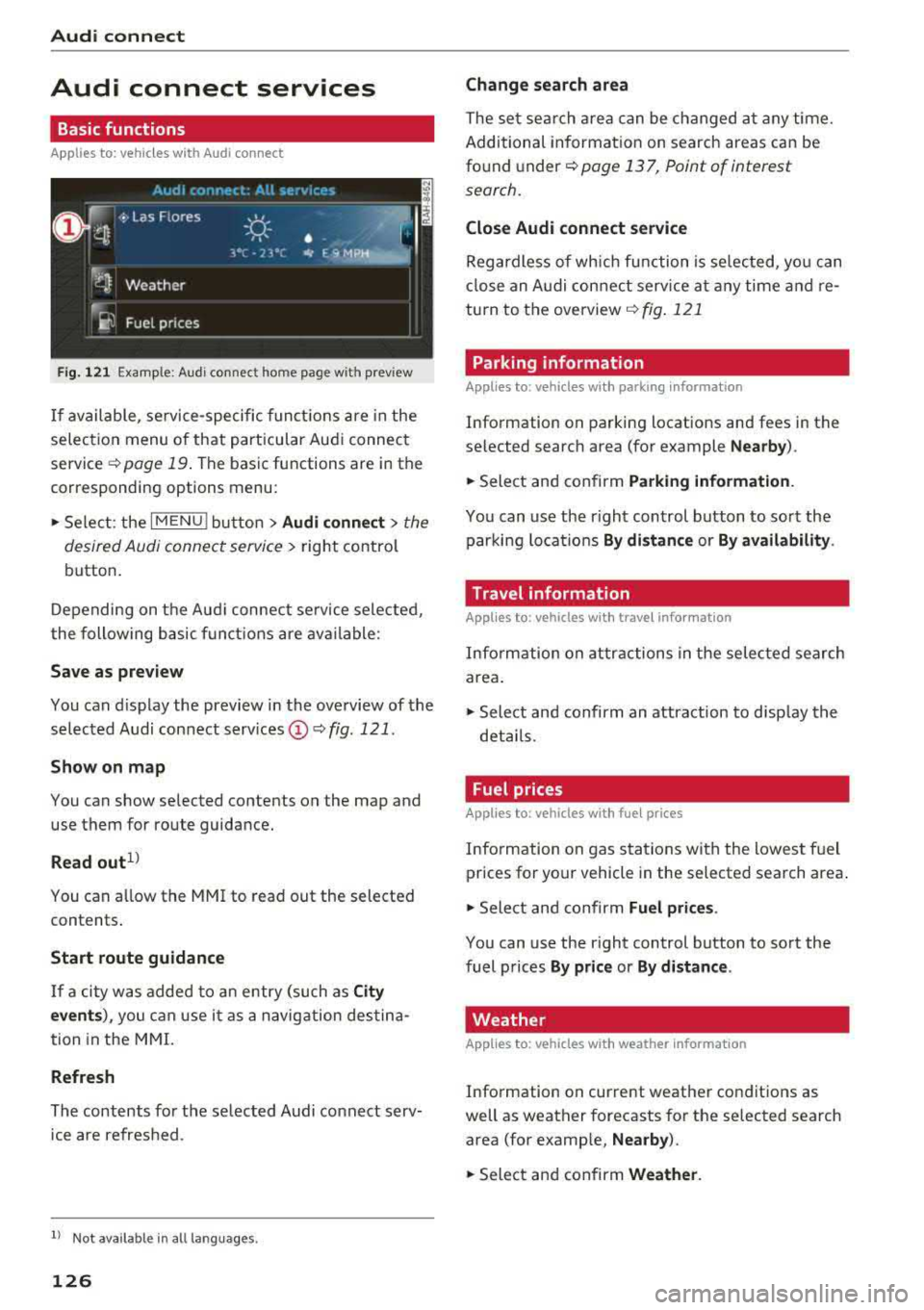
Fig. 121 Example: Aud i connect home page with preview
If available, service-specific functions are in the
selection menu of that particular Audi connect
service
q page 19 . The basic functions are in the
corresponding options menu:
,,. Select: the IMENU ! button> Audi connect> the
desired Audi connect service
> right control
button.
Depending on the Audi connect service selected,
the following basic functions are available:
Save as preview
You can d isplay the preview in the overview of the
selected Audi connect services
(D q fig . 121.
Show on map
You can show selected contents on the map and
use them for route guidance.
Read out1 )
You can a llow the MM I to read out the selected
contents .
Start route guidance
If a city was added to an entry (such as City
events),
you can use it as a navigation destina
tion in the MMI.
Refresh
The contents for the selected Audi connect serv
ice are refreshed .
ll Not availab le in a ll languages .
126
Change search area
The set sea rch area can be changed at any time.
Additional information on search areas can be
found under
<:!;> page 13 7, Point of interest
search.
Close Audi connect service
Regardless of wh ich function is selected, you can
close an Audi connect service at any time and re
turn to the overview
<:!> fig . 121
Parking information
Applies to: vehicles with parking information
Information on parking locations and fees in the
selected search area (for example
Nearby ).
,,. Select and confirm Parking information .
You can use the right control button to sort the
parking locations
By distance or By availability.
Travel information
Applies to: vehicles with travel information
Information on attractions in the selected search
area.
,,. Select and confirm an attract ion to disp lay the
details .
Fuel prices
Applies to: vehicles with fuel prices
Information on gas stations with the lowest fuel
prices for your vehicle in the selected search area .
,,. Select and confirm Fuel prices .
You can use the right control button to sort the
fuel prices
By price or By distance .
Weather
Applies to: vehicles with weather information
Information on current weather conditions as
well as weather forecasts for the selected search
area (for example,
Nearby ).
,,. Select and confirm Weather .