ESP CADILLAC ESCALADE 2010 3.G User Guide
[x] Cancel search | Manufacturer: CADILLAC, Model Year: 2010, Model line: ESCALADE, Model: CADILLAC ESCALADE 2010 3.GPages: 616, PDF Size: 39.41 MB
Page 154 of 616
2. If the engine does not start after 5!10 seconds,especially in very cold weather (below 0°F or!18°C), it could be flooded with too much gasoline.Try pushing the accelerator pedal all the way to thefloor and holding it there as you hold the key inSTART for up to a maximum of 15 seconds. Wait atleast 15 seconds between each try, to allow thecranking motor to cool down. When the enginestarts, let go of the key and accelerator. If thevehicle starts briefly but then stops again, do thesame thing. This clears the extra gasoline from theengine. Do not race the engine immediately afterstarting it. Operate the engine and transmissiongently until the oil warms up and lubricates allmoving parts.
Notice:The engine is designed to work with theelectronics in the vehicle. If you add electricalparts or accessories, you could change the waythe engine operates. Before adding electricalequipment, check with your dealer/retailer. If youdo not, the engine might not perform properly.Any resulting damage would not be covered bythe vehicle warranty.
Adjustable Throttle and Brake Pedal
The vehicle has adjustable throttle and brake pedalsthat allow you change their positions.
The feature will not operate when the vehicle is inR (Reverse) or while using the cruise control.
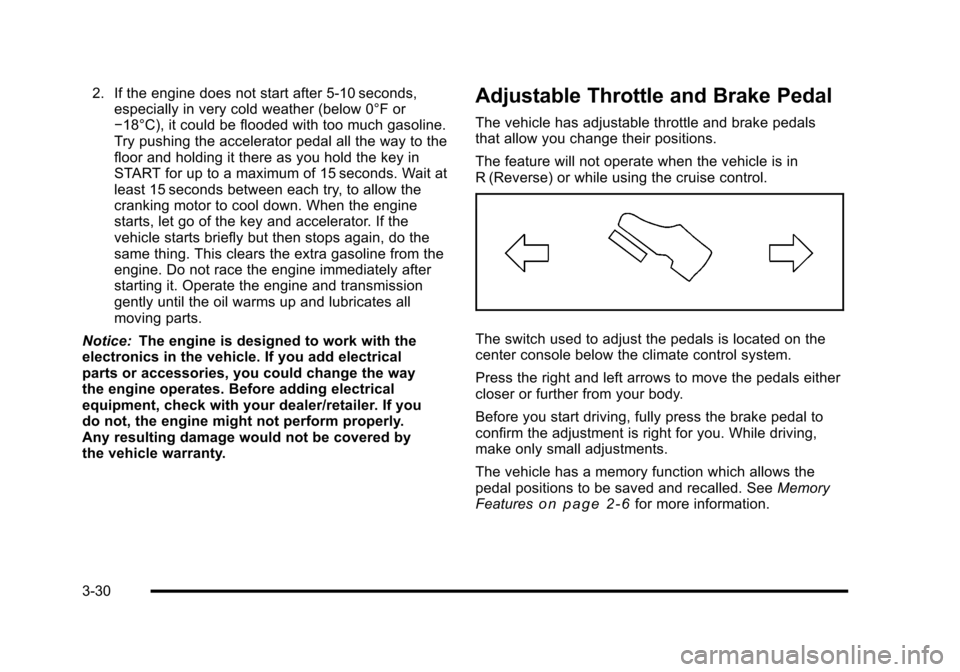
The switch used to adjust the pedals is located on thecenter console below the climate control system.
Press the right and left arrows to move the pedals eithercloser or further from your body.
Before you start driving, fully press the brake pedal toconfirm the adjustment is right for you. While driving,make only small adjustments.
The vehicle has a memory function which allows thepedal positions to be saved and recalled. SeeMemoryFeatureso n p a g e 2!6for more information.
3-30
Page 157 of 616
When parked on a hill, especially when the vehicle hasa heavy load, you may notice an increase in the effortto shift out of P (Park). See Torque Lock (AutomaticTransmission) underShifting Into Parkon page 3!39for more information.
{WARNING:
It is dangerous to get out of the vehicle if the shift
lever is not fully in P (Park) with the parking brake
firmly set. The vehicle can roll.
Do not leave the vehicle when the engine is
running unless you have to. If you have left the
engine running, the vehicle can move suddenly.
You or others could be injured. To be sure the
vehicle will not move, even when you are on fairly
level ground, always set the parking brake and
move the shift lever to P (Park). SeeShifting Into
Parkon page 3!39. If you are pulling a trailer,
seeTowing a Trailer on page 6!42.
R (Reverse) :Use this gear to back up.
Notice:Shifting to R (Reverse) while the vehicle ismoving forward could damage the transmission.The repairs would not be covered by the vehiclewarranty. Shift to R (Reverse) only after the vehicleis stopped.
To rock the vehicle back and forth to get out of snow,ice, or sand without damaging the transmission, seeIfYour Vehicle is Stuck in Sand, Mud, Ice, or Snowonpage 6!30.
3-33
Page 175 of 616

FCC Information
SeeRadio Frequency Statementon page 9!20forFCC information.
Frequency of operation: 24.05GHz–24.25GHz.
Field Strength: Not greater than 2.5V/m peak(0.25V/m average) at a distance of 3 m.
The manufacturer is not responsible for any radio orTV interference caused by unauthorized modificationsto this equipment. Such modifications could void theuser's authority to operate the equipment.
Rear Vision Camera (RVC)
This vehicle may have a Rear Vision Camera system.Read this entire section before using it.
The rear vision camera system is designed to helpthe driver when backing up by displaying a view of thearea behind the vehicle. When the driver shifts thevehicle into R (Reverse), the video image automaticallyappears on the navigation screen. Once the driver shiftsout of R (Reverse), the navigation screen will go back tothe last screen that had been displayed, after a delay.
Turning the Rear Vision Camera System
On or Off
To turn the rear vision camera system on or off:
1. Shift into P (Park).
2. Press the CONFIG hard key to enter the configuremenu options, then press the CONFIG hard key toselect Display or touch the Display screen button.
3. Select the Rear Camera Options screen button.The Rear Camera Options screen will display.
4. Select the Video screen button. When the Videoscreen button is highlighted the RVC system is on.
3-51
Page 202 of 616
Increasing Speed While Using Cruise
Control
To increase the cruise speed while using cruise control:
.Press and hold the +RES button on the steeringwheel until the desired speed is reached, thenrelease it.
.To increase vehicle speed in small increments,press the +RES button. Each time this is done,the vehicle goes about 1.6 km/h (1 mph) faster.
Reducing Speed While Using Cruise
Control
To reduce the vehicle speed while using cruise control:
.Press and hold the SET–button on the steeringwheel until the desired lower speed is reached,then release it.
.To slow down in very small amounts, press theSET–button on the steering wheel briefly. Eachtime this is done, the vehicle goes about 1.6 km/h(1 mph) slower.
Passing Another Vehicle While Using
Cruise Control
Use the accelerator pedal to increase the vehiclespeed. When you take your foot off the pedal, thevehicle will slow down to the previous set cruise speed.
Using Cruise Control on Hills
How well the cruise control will work on hills dependsupon the vehicle speed, load, and the steepness of thehills. When going up steep hills, you might have to stepon the accelerator pedal to maintain the vehicle'sspeed. When going downhill, you might have to brakeor shift to a lower gear to keep the vehicle's speeddown. When the brakes are applied the cruise controlturns off.
Ending Cruise Control
There are three ways to end cruise control:
.Step lightly on the brake pedal.
.Press the[button on the steering wheel.
.Press theIbutton on the steering wheel.
Erasing Speed Memory
The cruise control set speed memory is erased whenthe cruise control or the ignition is turned off.
4-10
Page 236 of 616
Transmission Temperature
Press the trip/fuel button until TRANS TEMP displays.This display shows the temperature of the automatictransmission fluid in either degrees Fahrenheit (°F) ordegrees Celsius (°C).
Instantaneous Economy
If your vehicle has this display, press the trip/fuel buttonuntil INST ECON displays. This display shows thecurrent fuel economy at a particular moment and willchange frequently as driving conditions change. Thisdisplay shows the instantaneous fuel economy in milesper gallon (mpg) or liters per 100 kilometers (L/100 km).Unlike average economy, this screen cannot be reset.
The display may also show if the vehicle is currentlyin V4, V6 or V8 mode.
Average Vehicle Speed
Press the trip/fuel button until AVERAGE SPEEDdisplays. This display shows the average speed inmiles per hour (MPH) or kilometers per hour (km/h).
Blank Display
This display shows no information.
Vehicle Information Menu Items
T(Vehicle Information):Press this button to scrollthrough the following menu items:
Oil Life
Press the vehicle information button until OIL LIFEREMAINING displays. This display shows an estimateof the oil's remaining useful life. If you see 99% OILLIFE REMAINING on the display, that means 99% ofthe current oil life remains. The engine oil life systemwill alert you to change the oil on a schedule consistentwith your driving conditions.
When the remaining oil life is low, the CHANGEENGINE OIL SOON message will appear on thedisplay. See“CHANGE ENGINE OIL SOON”underDICWarnings and Messageson page 4!48. You shouldchange the oil as soon as you can. SeeEngine Oilonpage 7!17. In addition to the engine oil life systemmonitoring the oil life, additional maintenance isrecommended in the Maintenance Schedule in thismanual. SeeScheduled Maintenanceo n p a g e 8!3formore information.
4-44
Page 250 of 616
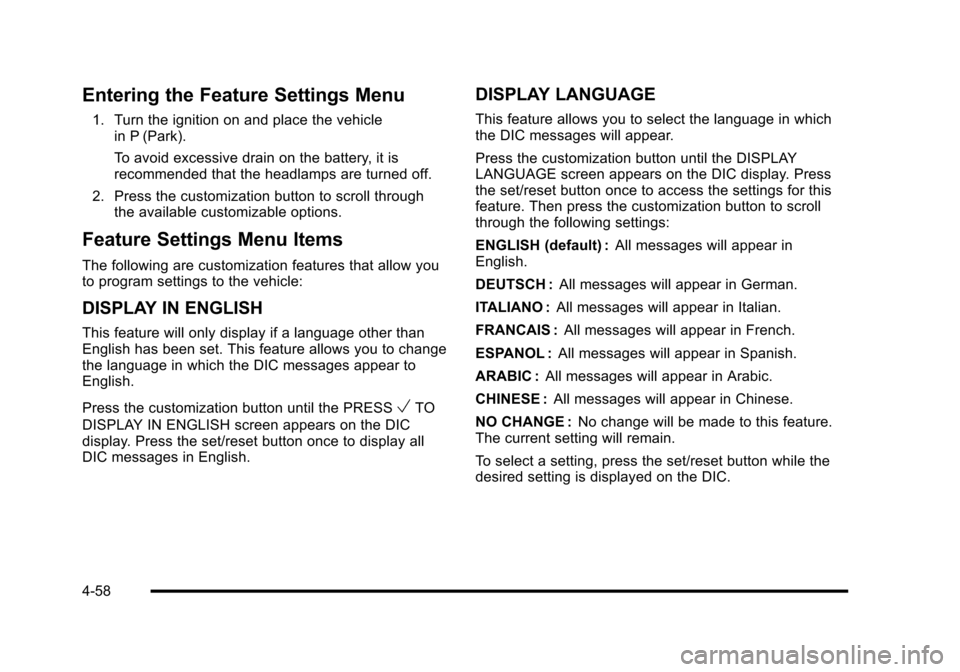
Entering the Feature Settings Menu
1. Turn the ignition on and place the vehiclein P (Park).
To avoid excessive drain on the battery, it isrecommended that the headlamps are turned off.
2. Press the customization button to scroll throughthe available customizable options.
Feature Settings Menu Items
The following are customization features that allow youto program settings to the vehicle:
DISPLAY IN ENGLISH
This feature will only display if a language other thanEnglish has been set. This feature allows you to changethe language in which the DIC messages appear toEnglish.
Press the customization button until the PRESSVTO
DISPLAY IN ENGLISH screen appears on the DICdisplay. Press the set/reset button once to display allDIC messages in English.
DISPLAY LANGUAGE
This feature allows you to select the language in whichthe DIC messages will appear.
Press the customization button until the DISPLAYLANGUAGE screen appears on the DIC display. Pressthe set/reset button once to access the settings for thisfeature. Then press the customization button to scrollthrough the following settings:
ENGLISH (default) :All messages will appear inEnglish.
DEUTSCH :All messages will appear in German.
ITALIANO :All messages will appear in Italian.
FRANCAIS :All messages will appear in French.
ESPANOL :All messages will appear in Spanish.
ARABIC :All messages will appear in Arabic.
CHINESE :All messages will appear in Chinese.
NO CHANGE :No change will be made to this feature.The current setting will remain.
To select a setting, press the set/reset button while thedesired setting is displayed on the DIC.
4-58
Page 260 of 616

Voice Recognition
The Bluetooth system uses voice recognition tointerpret voice commands to dial phone numbers andname tags.
Noise :Keep interior noise levels to a minimum. Thesystem may not recognize voice commands if there istoo much background noise.
When to Speak :A short tone sounds after the systemresponds indicating when it is waiting for a voicecommand. Wait until the tone and then speak.
How to Speak :Speak clearly in a calm and naturalvoice.
Audio System
When using the in!vehicle Bluetooth system, soundcomes through the vehicle's front audio systemspeakers and overrides the audio system. Use theaudio system volume knob, during a call, to change thevolume level. The adjusted volume level remains inmemory for later calls. To prevent missed calls, aminimum volume level is used if the volume is turneddown too low.
Bluetooth Controls
Use the buttons located on the steering wheel tooperate the in!vehicle Bluetooth system. SeeAudioSteering Wheel Controlson page 4!105for moreinformation.
bg(Push To Talk) :Press to answer incoming calls,to confirm system information, and to start speechrecognition.
cx(Phone On Hook):Press to end a call, reject acall, or to cancel an operation.
Pairing
A Bluetooth enabled cell phone must be pairedto the in!vehicle Bluetooth system first and thenconnected to the vehicle before it can be used. See thecell phone manufacturers user guide for Bluetoothfunctions before pairing the cell phone. If a Bluetoothphone is not connected, calls will be made usingOnStar®Hands!Free Calling, if available. Refer to theOnStar owner's guide for more information.
Pairing Information:
.Up to five cell phones can be paired to thein!vehicle Bluetooth system.
.The pairing process is disabled when the vehicle ismoving.
4-68
Page 261 of 616

.The in!vehicle Bluetooth system automatically linkswith the first available paired cell phone in theorder the phone was paired.
.Only one paired cell phone can be connected tothe in!vehicle Bluetooth system at a time.
.Pairing should only need to be completed once,unless changes to the pairing information havebeen made or the phone is deleted.
To link to a different paired phone, see Linking to aDifferent Phone later in this section.
Pairing a Phone
1. Press and holdbgfor two seconds. The system
responds with“Ready”followed by a tone.
2. Say“Bluetooth”. The system responds with“Bluetooth ready”followed by a tone.
3. Say“Pair”. The system responds with instructionsand a four digit PIN number. The PIN number willbe used in Step 4.
4. Start the Pairing process on the cell phone that willbe paired to the vehicle. Reference the cell phonemanufacturers user guide for information on thisprocess.
Locate the device named“General Motors”in thelist on the cellular phone and follow the instructionson the cell phone to enter the four digit PINnumber that was provided in Step 3.
5. The system prompts for a name for the phone. Usea name that best describes the phone. This namewill be used to indicate which phone is connected.The system then confirms the name provided.
6. The system responds with“
7. Repeat Steps 1 through 7 for additional phones tobe paired.
Listing All Paired and Connected Phones
1. Press and holdbgfor two seconds. The system
responds with“Ready”followed by a tone.
2. Say“Bluetooth”. The system responds with“Bluetooth ready”followed by a tone.
3. Say“List”. The system lists all the paired Bluetoothdevices. If a phone is connected to the vehicle, thesystem will say“Is connected”after the connectedphone.
Deleting a Paired Phone
1. Press and holdbgfor two seconds. The system
responds with“Ready”followed by a tone.
2. Say“Bluetooth”. The system responds with“Bluetooth ready”followed by a tone.
3. Say“Delete”. The system asks which phone todelete followed by a tone.
4-69
Page 262 of 616

4. Say the name of the phone to be deleted. If thephone name is unknown, use the“List”commandfor a list of all paired phones. The system respondswith“Would you like to delete
5. Say“Yes”to delete the phone. The systemresponds with“OK, deleting
Linking to a Different Phone
1. Press and holdbgfor two seconds. The system
responds with“Ready”followed by a tone.
2. Say“Bluetooth”. The system responds with“Bluetooth ready”followed by a tone.
3. Say“Change phone”. The system responds with“Please wait while I search for other phones”.
.If another phone is found, the response will be“
.If another phone is not found, the originalphone remains connected.
Storing Name Tags
The system can store up to thirty phone numbers asname tags that are shared between the Bluetooth andOnStar systems.
The system uses the following commands to store andretrieve phone numbers:
.Store
.Digit Store
.Directory
Using the Store Command
The store command allows a phone number to bestored without entering the digits individually.
1. Press and holdbgfor two seconds. The system
responds with“Ready”followed by a tone.
2. Say“Store”. The system responds with“Store,number please”followed by a tone.
3. Say the complete phone number to be stored atonce with no pauses.
.If the system recognizes the number itresponds with“OK, Storing”and repeats thephone number.
.If the system is unsure it recognizes the phonenumber, it responds with“Store”and repeatsthe number followed by“Please say yes or no”.If the number is correct, say“Yes”. If thenumber is not correct, say“No”. The system willask for the number to be re!entered.
4-70
Page 263 of 616
4. After the system stores the phone number, itresponds with“Please say the name tag”followedby a tone.
5. Say a name tag for the phone number. The nametag is recorded and the system responds with“About to store
.If the name tag does not sound correct, say“No”and repeat Step 5.
.If the name tag sounds correct, say“Yes”andthe name tag is stored. After the number isstored the system returns to the main menu.
Using the Digit Store Command
The digit store command allows a phone number to bestored by entering the digits individually.
1. Press and holdbgfor two seconds. The system
responds with“Ready”followed by a tone.
2. Say“Digit Store”. The system responds with“Please say the first digit to store”followed bya tone.
3. Say the first digit to be stored. The system willrepeat back the digit it heard followed by a tone.Continue entering digits until the number to bestored is complete.
.If an unwanted number is recognized by thesystem, say“Clear”at any time to clear the lastnumber.
.To hear all of the numbers recognized by thesystem, say“Verify”at any time and the systemwill repeat them.
4. After the complete number has been entered, say“Store”. The system responds with“Please say thename tag”followed by a tone.
5. Say a name tag for the phone number. The nametag is recorded and the system responds with“About to store
.If the name tag does not sound correct, say“No”and repeat Step 5.
.If the name tag sounds correct, say“Yes”andthe name tag is stored. After the number isstored the system returns to the main menu.
4-71