service CADILLAC ESCALADE 2021 Owner's Guide
[x] Cancel search | Manufacturer: CADILLAC, Model Year: 2021, Model line: ESCALADE, Model: CADILLAC ESCALADE 2021Pages: 492, PDF Size: 7.92 MB
Page 126 of 492
Cadillac Escalade Owner Manual (GMNA-Localizing-U.S./Canada/Mexico-
13690472) - 2021 - CRC - 8/10/21
INSTRUMENTS AND CONTROLS 125
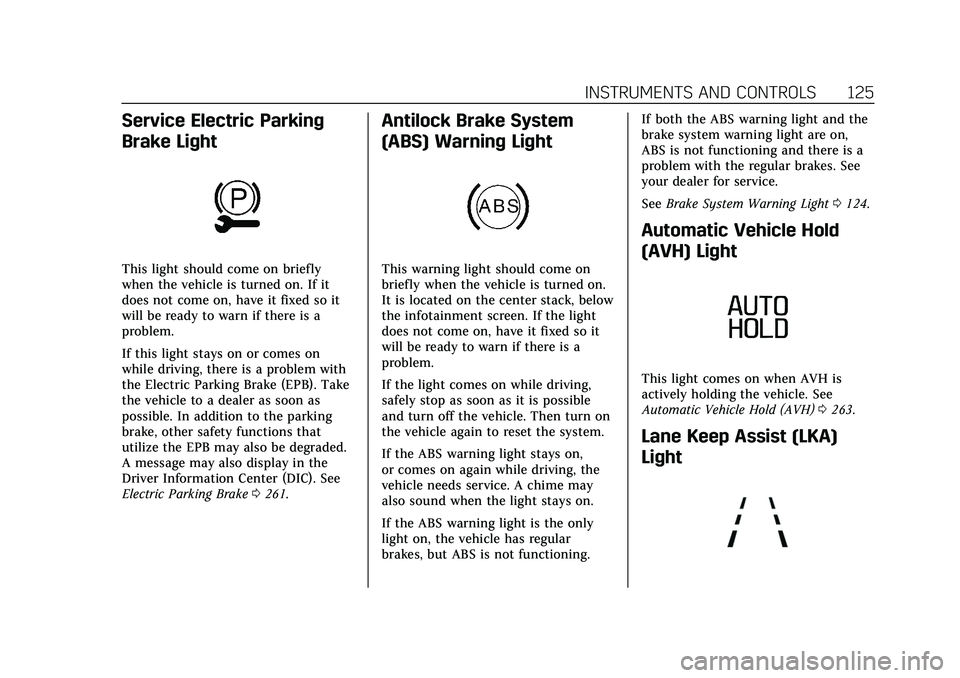
Service Electric Parking
Brake Light
This light should come on briefly
when the vehicle is turned on. If it
does not come on, have it fixed so it
will be ready to warn if there is a
problem.
If this light stays on or comes on
while driving, there is a problem with
the Electric Parking Brake (EPB). Take
the vehicle to a dealer as soon as
possible. In addition to the parking
brake, other safety functions that
utilize the EPB may also be degraded.
A message may also display in the
Driver Information Center (DIC). See
Electric Parking Brake0261.
Antilock Brake System
(ABS) Warning Light
This warning light should come on
briefly when the vehicle is turned on.
It is located on the center stack, below
the infotainment screen. If the light
does not come on, have it fixed so it
will be ready to warn if there is a
problem.
If the light comes on while driving,
safely stop as soon as it is possible
and turn off the vehicle. Then turn on
the vehicle again to reset the system.
If the ABS warning light stays on,
or comes on again while driving, the
vehicle needs service. A chime may
also sound when the light stays on.
If the ABS warning light is the only
light on, the vehicle has regular
brakes, but ABS is not functioning. If both the ABS warning light and the
brake system warning light are on,
ABS is not functioning and there is a
problem with the regular brakes. See
your dealer for service.
See
Brake System Warning Light 0124.
Automatic Vehicle Hold
(AVH) Light
This light comes on when AVH is
actively holding the vehicle. See
Automatic Vehicle Hold (AVH) 0263.
Lane Keep Assist (LKA)
Light
Page 128 of 492

Cadillac Escalade Owner Manual (GMNA-Localizing-U.S./Canada/Mexico-
13690472) - 2021 - CRC - 8/10/21
INSTRUMENTS AND CONTROLS 127
Traction Off Light
This light comes on briefly when the
vehicle is turned on. If it does not,
have the vehicle serviced by your
dealer. If the system is working
normally, the indicator light then
turns off.
The traction off light comes on when
the Traction Control System (TCS) has
been turned off. If StabiliTrak/
Electronic Stability Control (ESC) is
turned off, TCS is also turned off. To
turn TCS and ESC off and on, see
Traction Control/Electronic Stability
Control0264.
If TCS is off, wheel spin is not limited
unless necessary to help protect the
driveline from damage. Adjust driving
accordingly.
StabiliTrak OFF Light
This light comes on briefly when the
vehicle is turned on. It is located on
the center stack, below the
infotainment screen. If the light does
not come on, have the vehicle serviced
by your dealer. If the system is
working normally, the indicator light
then turns off.
This light comes on when the
StabiliTrak/Electronic Stability Control
(ESC) system is turned off.
If StabiliTrak/ESC is off, the Traction
Control System (TCS) is also off. To
turn ESC off and on, see Traction
Control/Electronic Stability Control
0 264.
If ESC and TCS are off, the systems do
not assist in controlling the vehicle.
Adjust driving accordingly.
Traction Control System
(TCS)/StabiliTrak Light
This light comes on briefly when the
vehicle is turned on. It is located on
the center stack, below the
infotainment screen.
If the light does not come on, have
the vehicle serviced by your dealer.
If the system is working normally, the
indicator light turns off.
If the light is on and not flashing, the
TCS and potentially the StabiliTrak/
ESC system are not fully operational
and may not assist in maintaining
control. Adjust driving accordingly.
If the condition persists, see your
dealer as soon as possible. A Driver
Information Center (DIC) message
may display.
Page 129 of 492
Cadillac Escalade Owner Manual (GMNA-Localizing-U.S./Canada/Mexico-
13690472) - 2021 - CRC - 8/10/21
128 INSTRUMENTS AND CONTROLS
The light flashes when the TCS and/or
the StabiliTrak/ESC system is actively
working.
SeeTraction Control/Electronic Stability
Control 0264.
Engine Coolant
Temperature Warning Light
This light comes on briefly while
starting the vehicle.
If it does not, have the vehicle
serviced by your dealer. If the system
is working normally the indicator light
goes off.
Caution
The engine coolant temperature
warning light indicates that the
vehicle has overheated. Driving with
this light on can damage the engine
(Continued)
Caution (Continued)
and it may not be covered by the
vehicle warranty. SeeEngine
Overheating 0375.
The engine coolant temperature
warning light comes on when the
engine has overheated.
If this happens, pull over and turn off
the engine as soon as possible. See
Engine Overheating 0375.
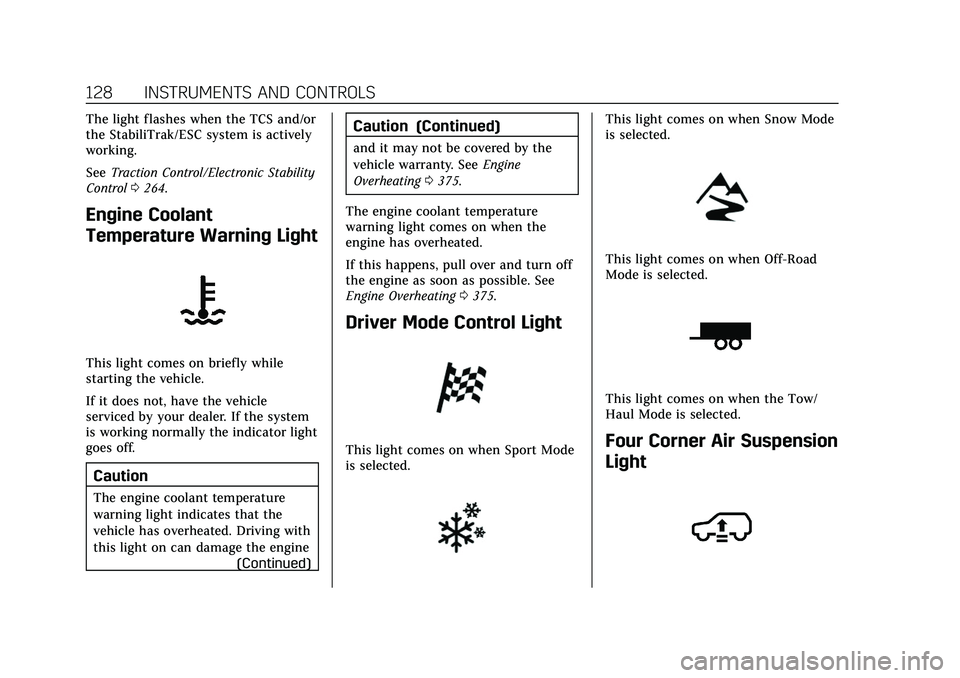
Driver Mode Control Light
This light comes on when Sport Mode
is selected.
This light comes on when Snow Mode
is selected.
This light comes on when Off-Road
Mode is selected.
This light comes on when the Tow/
Haul Mode is selected.
Four Corner Air Suspension
Light
Page 130 of 492

Cadillac Escalade Owner Manual (GMNA-Localizing-U.S./Canada/Mexico-
13690472) - 2021 - CRC - 8/10/21
INSTRUMENTS AND CONTROLS 129
This light comes on when the air
suspension is raised to maximum
ground clearance height.
This light comes on when the air
suspension is raised to increased
ground clearance height.
This light comes on when the vehicle
is changing to a higher ride height.
This light comes on when the air
suspension is lowered for easy entry
and exit from the vehicle.
It will also come on when the vehicle
is changing to a lower ride height.
This light comes on when the air
suspension is in Service Mode or
Alignment Mode.
SeeFour Corner Air Suspension System
0 268.
Tire Pressure Light
If equipped with the Tire Pressure
Monitor System (TPMS), this light
comes on briefly when the vehicle is
started. It is located on the center stack, below the infotainment screen.
It provides information about tire
pressures and the TPMS.
When the Light Is On Steady
This indicates that one or more of the
tires are significantly underinflated.
A Driver Information Center (DIC) tire
pressure message may also display.
Stop as soon as possible, and inflate
the tires to the pressure value shown
on the Tire and Loading Information
label. See
Tire Pressure 0400.
When the Light Flashes First and
Then Is On Steady
If the light flashes for about a minute
and then stays on, there may be a
problem with the TPMS. If the
problem is not corrected, the light will
come on every time the vehicle is
started. See Tire Pressure Monitor
Operation 0403.
Page 131 of 492
Cadillac Escalade Owner Manual (GMNA-Localizing-U.S./Canada/Mexico-
13690472) - 2021 - CRC - 8/10/21
130 INSTRUMENTS AND CONTROLS
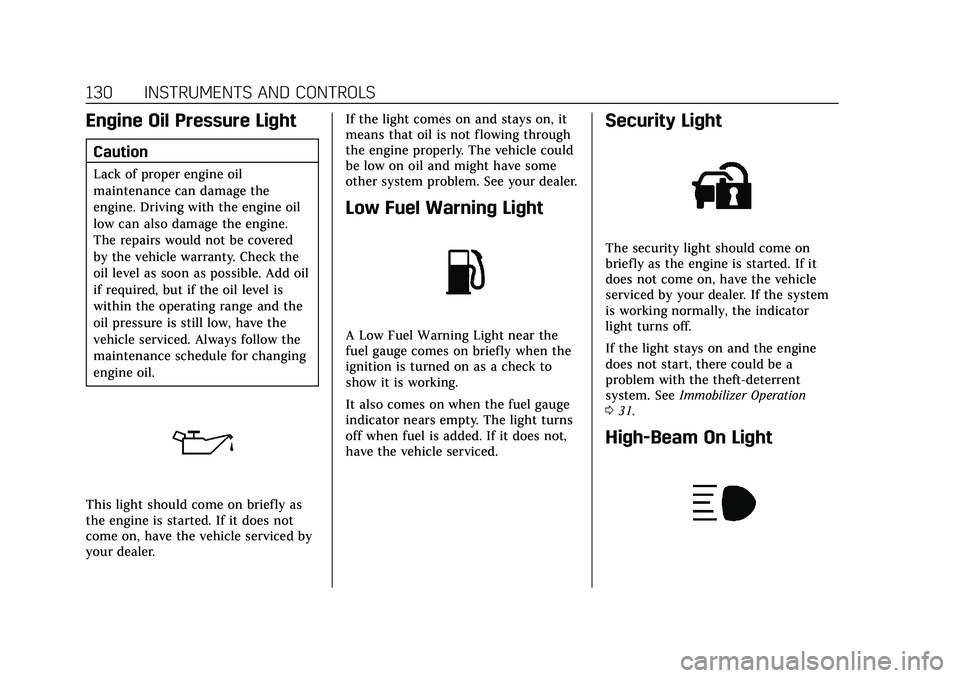
Engine Oil Pressure Light
Caution
Lack of proper engine oil
maintenance can damage the
engine. Driving with the engine oil
low can also damage the engine.
The repairs would not be covered
by the vehicle warranty. Check the
oil level as soon as possible. Add oil
if required, but if the oil level is
within the operating range and the
oil pressure is still low, have the
vehicle serviced. Always follow the
maintenance schedule for changing
engine oil.
This light should come on briefly as
the engine is started. If it does not
come on, have the vehicle serviced by
your dealer.If the light comes on and stays on, it
means that oil is not flowing through
the engine properly. The vehicle could
be low on oil and might have some
other system problem. See your dealer.
Low Fuel Warning Light
A Low Fuel Warning Light near the
fuel gauge comes on briefly when the
ignition is turned on as a check to
show it is working.
It also comes on when the fuel gauge
indicator nears empty. The light turns
off when fuel is added. If it does not,
have the vehicle serviced.
Security Light
The security light should come on
briefly as the engine is started. If it
does not come on, have the vehicle
serviced by your dealer. If the system
is working normally, the indicator
light turns off.
If the light stays on and the engine
does not start, there could be a
problem with the theft-deterrent
system. See
Immobilizer Operation
0 31.
High-Beam On Light
Page 139 of 492

Cadillac Escalade Owner Manual (GMNA-Localizing-U.S./Canada/Mexico-
13690472) - 2021 - CRC - 8/10/21
138 INSTRUMENTS AND CONTROLS
Vehicle Messages
Messages displayed on the DIC
indicate the status of the vehicle or
some action that may be needed to
correct a condition. Multiple messages
may appear one after another.
The messages that do not require
immediate action can be
acknowledged and cleared by pressing
the thumbwheel. The messages that
require immediate action cannot be
cleared until that action is performed.
All messages should be taken
seriously; clearing the message does
not correct the problem.
If a SERVICE message appears, see
your dealer.
Follow the instructions given in the
messages. The system displays
messages regarding the following
topics:
.Service Messages
.Fluid Levels
.Vehicle Security
.Brakes
.Ride Control Systems
.Driver Assistance Systems
.Cruise Control
.Lighting and Bulb Replacement
.Wiper/Washer Systems
.Doors and Windows
.Seat Belts
.Airbag Systems
.Engine and Transmission
.Tire Pressure
.Battery
Engine Power Messages
REDUCED ACCELERATION DRIVE
WITH CARE
This message displays when the
vehicle's propulsion power is reduced.
A reduction in propulsion power can
affect the vehicle's ability to
accelerate. If this message is on, but
there is no observed reduction in
performance, proceed to your
destination. Under certain conditions
the performance may be reduced the
next time the vehicle is driven. The
vehicle may be driven while this
message is on, but maximum
acceleration and speed may be
reduced. Anytime this message stayson, or displays repeatedly, the vehicle
should be taken to your dealer for
service as soon as possible.
Under certain operating conditions,
propulsion will be disabled. Try
restarting after the ignition has been
off for two minutes.
Vehicle Speed Messages
SPEED LIMITED TO XXX
KM/H (MPH)
This message shows that the vehicle
speed has been limited to the speed
displayed. The limited speed is a
protection for various propulsion and
vehicle systems, such as lubrication,
thermal, brakes, suspension, Teen
Driver if equipped, or tires.
Vehicle Personalization
The following are all possible vehicle
personalization features. Depending
on the vehicle, some may not be
available.
For System and Search functions, see
Settings
0203.
Page 146 of 492
Cadillac Escalade Owner Manual (GMNA-Localizing-U.S./Canada/Mexico-
13690472) - 2021 - CRC - 8/10/21
INSTRUMENTS AND CONTROLS 145
Touch Off or On.
Ride Height
Touch and the following may display:
.Automatic Entry/Egress
Automatic Entry/Egress
This feature specifies if the vehicle
will automatically lower to make it
easier to enter or exit the vehicle.
Touch Off or On.
Running Boards
Touch and the following may display:
.Automatic Running Boards
.Deploy Running Boards
Automatic Running Boards
This feature specifies the position and
use of the running boards.
Touch Off or On.
Deploy Running Boards
This feature moves the running
boards to a deployed position so they
can be used with the doors closed.
Touch Off or Deploy.
Seating Position
Touch and the following may display:
.Seat Entry Memory
.Seat Exit Memory
Seat Entry Memory
This feature automatically recalls the
previously stored 1 or 2 button
positions when the ignition is changed
from off to on or ACC/ACCESSORY.
See Memory Seats 045.
Touch Off or On.
Seat Exit Memory
This feature automatically recalls the
previously stored exit button position
when the ignition is changed from on
or ACC/ACCESSORY to off and the
driver door is open. See Memory Seats
0 45.
Touch Off or On.
Suspension
Touch and the following may display:
.Service Mode
.Alignment Mode Service Mode
This feature disables the air
suspension system and is used to
prevent unintended raising or
lowering of the suspension.
Touch Off or On.
Alignment Mode
This feature will optimize the vehicle
height to provide the most accurate
wheel alignment.
Touch Off or On.
Remote Key Relearn
This sets up a new or forgotten key
for use in the vehicle. Place the key in
the transmitter pocket. Make sure
vehicle is parked and touch Start.
Universal Remote
System
See
Radio Frequency Statement 0467.
Page 158 of 492
Cadillac Escalade Owner Manual (GMNA-Localizing-U.S./Canada/Mexico-
13690472) - 2021 - CRC - 8/10/21
INFOTAINMENT SYSTEM 157
Infotainment System
Introduction
Introduction . . . . . . . . . . . . . . . . . . . . . . 158
Overview . . . . . . . . . . . . . . . . . . . . . . . . . . 158
Steering Wheel Controls . . . . . . . . . 160
Using the System . . . . . . . . . . . . . . . . . 160
Software Updates . . . . . . . . . . . . . . . . . 163
Radio
AM-FM Radio . . . . . . . . . . . . . . . . . . . . . 163
HD Radio Technology . . . . . . . . . . . . 165
Radio Data System (RDS) . . . . . . . . 166
Satellite Radio . . . . . . . . . . . . . . . . . . . . 166
Radio Reception . . . . . . . . . . . . . . . . . . 168
Multi-Band Antenna . . . . . . . . . . . . . 168
Audio Players
Avoiding Untrusted MediaDevices . . . . . . . . . . . . . . . . . . . . . . . . . . 169
USB Port . . . . . . . . . . . . . . . . . . . . . . . . . . 169
Bluetooth Audio . . . . . . . . . . . . . . . . . . 171
OnStar System
OnStar System . . . . . . . . . . . . . . . . . . . . 172
Rear Seat Infotainment
Rear Seat Infotainment (RSI) System . . . . . . . . . . . . . . . . . . . . . . . . . . 173
Navigation
Using the Navigation System . . . . 180
Maps . . . . . . . . . . . . . . . . . . . . . . . . . . . . . . 183
Navigation Symbols . . . . . . . . . . . . . . 184
Destination . . . . . . . . . . . . . . . . . . . . . . . 184
Global PositioningSystem (GPS) . . . . . . . . . . . . . . . . . . . 189
Vehicle Positioning . . . . . . . . . . . . . . . 189
Problems with Route Guidance . . . . . . . . . . . . . . . . . . . . . . . . 190
If the System Needs Service . . . . . 190
Map Data Updates . . . . . . . . . . . . . . . 190
Database Coverage Explanations . . . . . . . . . . . . . . . . . . . . 191
Voice Recognition
Voice Recognition . . . . . . . . . . . . . . . . 191
Phone
Bluetooth (Overview) . . . . . . . . . . . . . 196
Bluetooth (Pairing and Using aPhone) . . . . . . . . . . . . . . . . . . . . . . . . . . . 197
Apple CarPlay and Android Auto . . . . . . . . . . . . . . . . . . . 202
Settings
Settings . . . . . . . . . . . . . . . . . . . . . . . . . . . 203
Teen Driver . . . . . . . . . . . . . . . . . . . . . . . 207
Trademarks and License
Agreements
Trademarks and LicenseAgreements . . . . . . . . . . . . . . . . . . . . . 211
Page 162 of 492
Cadillac Escalade Owner Manual (GMNA-Localizing-U.S./Canada/Mexico-
13690472) - 2021 - CRC - 8/10/21
INFOTAINMENT SYSTEM 161
Phone
Touch the Phone icon on the
infotainment display or
6on the MFC
to display the Phone menu. See
Bluetooth (Pairing and Using a Phone)
0 197 or
Bluetooth (Overview) 0196.
Vehicle Information
TouchTon the infotainment
display or press
Ton the MFC. See
Vehicle Information 0134.
Apple CarPlay
Touch the Apple CarPlay icon to
activate Apple CarPlay (if equipped)
after a supported device is connected.
See Apple CarPlay and Android Auto
0 202.
Android Auto
Touch the Android Auto icon to
activate Android Auto (if equipped)
after a supported device is connected.
See Apple CarPlay and Android Auto
0 202.
Users
Touch the Users icon to sign in or
create a new user profile, and follow
the on-screen instructions.
Only four user profiles can be active at
one time in the vehicle. It may be
necessary to remove a profile from the
menu before creating or signing into
an existing profile. The removed
profile can be logged into at a
later time.
Settings
Touch the Settings icon to display the
Settings menu. See Settings0203.
Apps
If equipped, in-vehicle apps are
available for download. Touch the
Apps icon on the Home Page to begin.
Downloading and using in-vehicle
apps requires Internet connectivity
which can be accessed with a data
plan through the vehicle’s built-in 4G
LTE Wi-Fi hotspot, if equipped, or a
compatible mobile device hotspot. On
most mobile devices, activation of the
Wi-Fi hotspot is in the device’s Settings menu under Mobile Network
Sharing, Personal Hotspot, Mobile
Hotspot, or similar.
Availability of apps and connectivity
varies by vehicle, conditions, and
location. Data plan rates apply.
Features are subject to change. For
more information, see
www.my.cadillac.com/learn for US/
Canada and see my.cadillac.com.mx.
for Mexico.
OnStar Services
If equipped, touch the OnStar Services
icon to display the OnStar Services
and Account pages. See
OnStar
Overview 0471 and
OnStar System 0172.
Camera
Touch the Camera icon to access the
camera application. See Assistance
Systems for Parking or Backing 0299.
Rear Media
If equipped, touch the Rear Media
icon to access the Rear Seat
Infotainment application. See Rear
Seat Infotainment (RSI) System 0173.
Page 166 of 492
Cadillac Escalade Owner Manual (GMNA-Localizing-U.S./Canada/Mexico-
13690472) - 2021 - CRC - 8/10/21
INFOTAINMENT SYSTEM 165
Fade/Balance :Touch to adjust by
using the controls on the
infotainment display.
Sound Mode : Touch to select Front
or Rear and to adjust Surround or
Surround 3D.
Adaptive Volume
This feature will automatically adjust
the audio volume based on vehicle
speed and road noise.
Touch Off or On.
HD Radio
Enhances AM and FM radio with
digital channels for better sound
quality and information.
Touch Off or On.
RDS
Radio Data System (RDS) displays
information about the currently
playing radio content such as song or
program name.
Touch Off or On. Manage Phones
Select to manage the vehicles phone
connections such as Near Field
Communication (NFC) pairing or
Bluetooth pairing.
Metadata Corrector
This feature, when on, will add and
correct information associated with
the media files on connected devices.
Touch Off or On.
Reset Music Index
Select to clear the metadata from the
connected USB devices.
Lighting Effect
This feature animates the radio
background in the color associated
with the currently playing content.
Touch Off or On.
Favorites
From the active audio source page,
choose
qFavorites from the list at
the left side to display a list of audio
favorites. Favorites are stored by touching
H.
This will highlight indicating that it is
now saved as a favorite.
HD Radio Technology
If equipped, HD Radio is a free service
with features such as digital quality
sound, more stations available on a
single frequency such as HD2 and
HD3, and display information such as
artist and song title.
From the Now Playing display, touch
the HD Radio icon to turn HD on
or off.
Station Access
To access HD Radio stations:
1. Tune the radio to the station. If HD Radio is turned on and the station
is broadcasting in HD Radio, the
radio will automatically tune to the
HD version of the current channel
(HD1) after several seconds. The
radio will also display icons
representing additional channels
(HD2, ...HD8), that may be
available. When the radio