service CADILLAC ESCALADE 2021 Repair Manual
[x] Cancel search | Manufacturer: CADILLAC, Model Year: 2021, Model line: ESCALADE, Model: CADILLAC ESCALADE 2021Pages: 492, PDF Size: 7.92 MB
Page 282 of 492

Cadillac Escalade Owner Manual (GMNA-Localizing-U.S./Canada/Mexico-
13690472) - 2021 - CRC - 8/10/21
DRIVING AND OPERATING 281
Curves in the Road
{Warning
On curves, ACC may not detect a
vehicle ahead in your lane. You
could be startled if the vehicle
accelerates up to the set speed,
especially when following a vehicle
exiting or entering exit ramps. You
could lose control of the vehicle or
crash. Do not use ACC while driving
on an entrance or exit ramp. Always
be ready to use the brakes if
necessary.
{Warning
On curves, ACC may respond to a
vehicle in another lane, or may not
have time to react to a vehicle in
your lane. You could crash into a
vehicle ahead of you, or lose control
of your vehicle. Give extra attention
in curves and be ready to use the
brakes if necessary. Select an
appropriate speed while driving in
curves.ACC may operate differently in a
sharp curve. It may reduce the vehicle
speed if the curve is too sharp.
The curve speed control indicator
n
may illuminate green when ACC is
actively controlling the vehicle speed
and detects a sharp curve on the road
ahead.
ACC automatically slows the vehicle
down while navigating the curve and
may increase speed out of the curve,
but will not exceed the set speed.
When following a vehicle and entering
a curve, ACC may not detect the
vehicle ahead and accelerate to the set
speed. When this happens, the vehicle
ahead indicator will not appear.
ACC may detect a vehicle that is not
in your lane and apply the brakes.
ACC may occasionally provide an alert
and/or braking that is considered
unnecessary. It could respond to
vehicles in different lanes, signs,
guardrails, and other stationary
objects when entering or exiting a
curve. This is normal operation. The
vehicle does not need service.
Page 284 of 492
Cadillac Escalade Owner Manual (GMNA-Localizing-U.S./Canada/Mexico-
13690472) - 2021 - CRC - 8/10/21
DRIVING AND OPERATING 283
Do not modify the hood, headlamps,
or fog lamps, as this may limit the
camera’s ability to detect an object.
Cleaning the Sensing System
The camera sensor on the windshield
behind the rearview mirror and the
radar sensors on the front of the
vehicle can become blocked by snow,
ice, dirt, mud, or debris. These areas
need to be cleaned for ACC to operate
properly.
If ACC will not operate, regular cruise
control may be available. See
“Switching Between ACC and Regular
Cruise Control”previously in this
section. Always consider driving
conditions before using either cruise
control system.
For cleaning instructions, see
“Washing the Vehicle ”under Exterior
Care 0432.
System operation may also be limited
under snow, heavy rain, or road spray
conditions.Super Cruise
If equipped, Super Cruise can steer to
maintain lane position under certain
conditions on Super Cruise-enabled
roads that are separated from
opposing traffic.
Super Cruise can also steer to perform
a lane change under certain
conditions on Super Cruise-enabled
roads when a lane change is initiated
by the driver using the turn signal
lever. See “Super Cruise Lane Change ”
later in this section and Turn and
Lane-Change Signals 0153.
{Warning
Super Cruise can only assist to
maintain lane position, or steer to
change lanes, when driving on
compatible roads. You must
supervise the driving task and
monitor the road conditions. You
may need to respond to traffic
events by steering, braking,
or accelerating. See Defensive
Driving.
(Continued)
Warning (Continued)
Super Cruise is:
.Not a self-driving system
.Not a crash avoidance or warning
system
.Not a substitute for proper
supervision of the driving task.
Super Cruise uses the following to
detect the current lane position and
lane markings ahead on compatible
roads under certain conditions:
.Cameras
.Global Positioning System (GPS)
sensing
.A high-precision map
.GPS-enhancement data downloaded
through Connected Services
Super Cruise works with Adaptive
Cruise Control (ACC), which controls
acceleration and braking while Super
Cruise is enabled and operating.
Review and understand both this
section and the ACC section before
using Super Cruise. See Adaptive
Cruise Control (Advanced) 0274.
Page 285 of 492

Cadillac Escalade Owner Manual (GMNA-Localizing-U.S./Canada/Mexico-
13690472) - 2021 - CRC - 8/10/21
284 DRIVING AND OPERATING
An active Super Cruise service plan is
required to use Super Cruise.
{Warning
Super Cruise does not perform all
aspects of driving, nor does it do
everything a driver can do. Super
Cruise only steers to maintain
vehicle position in the current lane
or, under some circumstances, to
change lanes. Super Cruise can only
be used with Adaptive Cruise
Control.
Super Cruise does:
.Not prevent crashes or warn of
possible crashes.
.Not steer to avoid stopped or
slow-moving vehicles,
cross-traffic, construction
barriers or cones, motorcycles,
children, pedestrians, animals,
or other objects on the road.
.Not steer in response to vehicles
or objects next to your vehicle,
including vehicles attempting to
enter your lane.(Continued)
Warning (Continued)
.Not respond to traffic lights, stop
signs, or other traffic control
devices.
.Not respond to crossing traffic.
.Not make turns.
.Not steer to merge onto or to
exit highways.
.Not detect, steer to avoid,
or steer through construction
zones.
.Not function on surface streets.
.Not respond to crossing or
oncoming traffic.
.Not function in city driving
conditions.
{Warning
Some state and local laws may
require hands to be kept on the
steering wheel at all times. Only
remove your hands from the
steering wheel if Super Cruise is
engaged, it is safe to do so, and it is
(Continued)
Warning (Continued)
permitted by state and local laws.
Failure to do so may result in a
crash involving serious injury or
death.
{Warning
Failure to supervise the driving task
and to respond appropriately, even
while Super Cruise is operating, can
cause a crash. Super Cruise may not
respond as you would to all driving
situations and may not maintain
lane position under all conditions.
It is extremely important to pay
attention to the operation of the
vehicle, even while using Super
Cruise. Do not use a hand-held
device while driving, even with
Super Cruise engaged. To prevent
serious injury or death:
.Always remain properly seated in
the driver seat with your seat
belt fastened.(Continued)
Page 286 of 492

Cadillac Escalade Owner Manual (GMNA-Localizing-U.S./Canada/Mexico-
13690472) - 2021 - CRC - 8/10/21
DRIVING AND OPERATING 285
Warning (Continued)
.Never remove your hands from
the steering wheel when Super
Cruise is not operating.
.Always make sure traffic
conditions are safe before using
Super Cruise.
.Always keep the entire vehicle
and the sensors clean. Sensors
are on the front, sides, and rear
of the vehicle.
.Always observe posted speed
limits. Only use Super Cruise at
or below the posted speed limit.
Super Cruise should not be used in
complex or uncertain driving
conditions, including:
.Not in construction zones.
.Not when approaching or exiting
toll plazas.
.Not when approaching an
intersection that is controlled
with a traffic light, stop sign,
or other traffic control device. (Continued)
Warning (Continued)
.Not when lane markings are not
present or cannot be detected.
For example, there is too much
glare, weather conditions are
poor, or lanes are poorly marked.
.Not on slippery or icy roads.
.Not in adverse weather
conditions, including rain, sleet,
fog, ice, or snow.
.Not on winding or hilly roads.
.Not for city driving.
.Not during heavy or emergency
braking.
.Not on surface streets.
.Not on a road shoulder, service
drive, or under an elevated
freeway.
.Not when towing a trailer.
.Not in a highway exit lane. When Super Cruise is Available
Super Cruise Indicator
Super Cruise is designed to operate
only when:
.ACC is on. See Adaptive Cruise
Control (Advanced) 0274.
.Teen Driver is not active.
.The GPS detects the vehicle is on a
compatible highway.
.Both the camera and the radar
sensors are functioning and not
covered, obstructed, or damaged.
.The Driver Attention System (DAS)
detects the driver's head and eyes
are directed toward the road.
.The lane markings are clearly visible
and able to be detected by the
system.
Page 292 of 492
Cadillac Escalade Owner Manual (GMNA-Localizing-U.S./Canada/Mexico-
13690472) - 2021 - CRC - 8/10/21
DRIVING AND OPERATING 291
Stationary or Very Slow-Moving
Objects; Cross-Traffic
{Warning
Super Cruise is not a crash
avoidance system and will not steer
or brake to avoid a crash. Super
Cruise does not steer to prevent a
crash with stopped or slow-moving
vehicles. You must supervise the
driving task and may need to steer
and brake to prevent a crash,
especially in stop-and-go traffic or
when a vehicle suddenly enters
your lane. Always pay attention
when using Super Cruise. Failure to
do so could result in a crash
involving serious injury or death.
Curves in the Road
{Warning
The vehicle could drift out of your
lane of travel. To prevent crashes,
always be ready to manually steer. (Continued)
Warning (Continued)
Super Cruise may not detect your
lane on curves in the road. Super
Cruise may not detect the markings
that show your lane. You may not
have time to react to a vehicle in
the lane next to your vehicle while
on curves in the road.
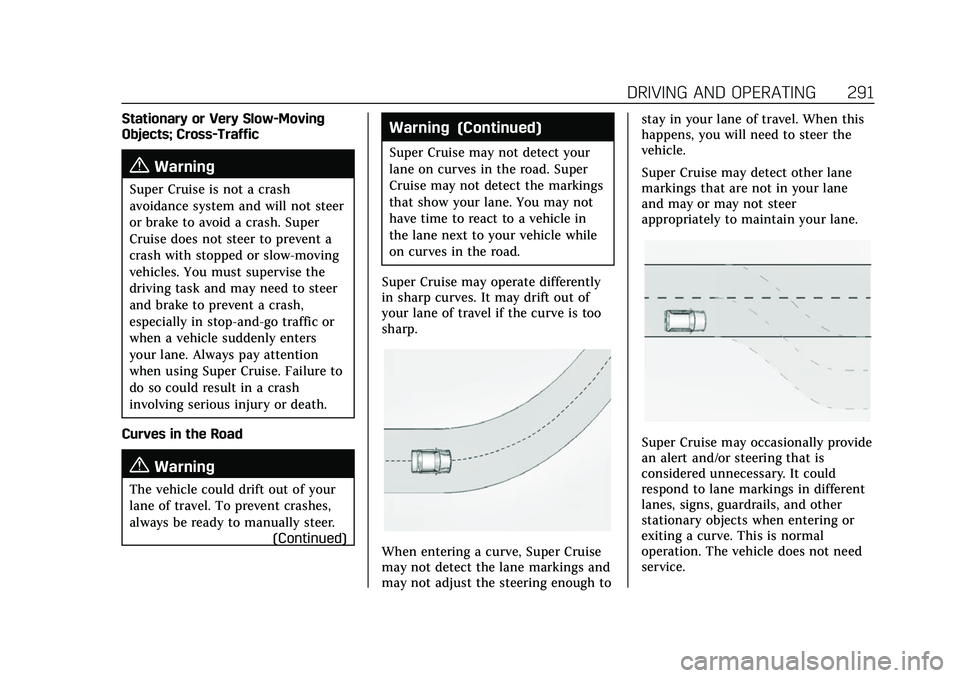
Super Cruise may operate differently
in sharp curves. It may drift out of
your lane of travel if the curve is too
sharp.
When entering a curve, Super Cruise
may not detect the lane markings and
may not adjust the steering enough to stay in your lane of travel. When this
happens, you will need to steer the
vehicle.
Super Cruise may detect other lane
markings that are not in your lane
and may or may not steer
appropriately to maintain your lane.
Super Cruise may occasionally provide
an alert and/or steering that is
considered unnecessary. It could
respond to lane markings in different
lanes, signs, guardrails, and other
stationary objects when entering or
exiting a curve. This is normal
operation. The vehicle does not need
service.
Page 298 of 492

Cadillac Escalade Owner Manual (GMNA-Localizing-U.S./Canada/Mexico-
13690472) - 2021 - CRC - 8/10/21
DRIVING AND OPERATING 297
Super Cruise Message Summary (cont'd)
Unavailable Sensor BlockedClear snow, ice, dirt, or other contaminants from the front
and rear areas of the vehicle.
Unavailable Sharp Curve Some curves are too sharp to be navigated by the Super
Cruise system. Super Cruise will be available after the curve
is traveled.
Super Cruise Unavailable Super Cruise is unavailable for reasons not described in
other messages.
Super Cruise Locked Out See Owner’s Manual The driver did not take control of the vehicle when
prompted by the Super Cruise system. The Super Cruise
system will be disabled until the ignition is turned off and
back on.
Map Updates
Super Cruise map information must
be periodically updated at least once
every seven months to determine
whether Super Cruise is available on
certain roads. See the following
website for Super Cruise map open
source compliance documentation,
including the license information:
http://oss.veoneer.com/ Data Download
If the vehicle is equipped with OnStar
and has an active service plan,
additional data may be collected
through the OnStar system. This
includes information about: the
vehicle’s operation; a crash involving
the vehicle; the use of the vehicle and
its features; and, in certain situations,
the location and approximate GPS
speed of the vehicle. Refer to theOnStar Terms and Conditions and
Privacy Statement on the OnStar
website.
Location Services
This setting enables or disables
sharing of vehicle location outside the
vehicle for certain purposes. Even if
the Location Services setting is
disabled, vehicle location information
will continue to be shared for
emergency services and Super Cruise,
if equipped.
Page 299 of 492

Cadillac Escalade Owner Manual (GMNA-Localizing-U.S./Canada/Mexico-
13690472) - 2021 - CRC - 8/10/21
298 DRIVING AND OPERATING
System Care
The camera on the steering column
has a lens cover that may become
dirty over time and affect camera
performance. Clean the lens cover
with a soft cloth sprayed with glass
cleaner. Wipe the lens gently, then dry
it. Never use abrasive cloths/cleaners
or corrosive chemicals of any kind on
the lens cover.
Super Cruise uses the front radar,
front camera, and 360 degree cameras
for its operation. Clean surfaces are
required for Super Cruise operation.
SeeAdaptive Cruise Control (Advanced)
0 274, “Surround Vision Camera ”
under Assistance Systems for Parking
or Backing 0299, and Lane Keep Assist
(LKA) 0324 for care information.
Caution
The Super Cruise system is a highly
sophisticated system and should
only be serviced by technicians
with the proper training, tools, and
safety instructions, which your
(Continued)
Caution (Continued)
dealer has. Without proper training
and tools the vehicle may become
damaged.
Driver Assistance
Systems
This vehicle may have features that
work together to help avoid crashes or
reduce crash damage while driving,
backing, and parking. Read this entire
section before using these systems.
{Warning
Do not rely on the Driver
Assistance Systems. These systems
do not replace the need for paying
attention and driving safely. You
may not hear or feel alerts or
warnings provided by these
systems. Failure to use proper care
when driving may result in injury,
death, or vehicle damage. See
Defensive Driving0231.
(Continued)
Warning (Continued)
Under many conditions, these
systems will not:
.Detect children, pedestrians,
bicyclists, or animals.
.Detect vehicles or objects outside
the area monitored by the
system.
.Work at all driving speeds.
.Warn you or provide you with
enough time to avoid a crash.
.Work under poor visibility or bad
weather conditions.
.Work if the detection sensor is
not cleaned or is covered by ice,
snow, mud, or dirt.
.Work if the detection sensor is
covered up, such as with a
sticker, magnet, or metal plate.
.Work if the detection sensor
viewing zone is interrupted by an
installed accessory, such as a
bike rack, or hitch mounted
cargo carrier. (Continued)
Page 309 of 492

Cadillac Escalade Owner Manual (GMNA-Localizing-U.S./Canada/Mexico-
13690472) - 2021 - CRC - 8/10/21
308 DRIVING AND OPERATING
When the System Does Not Seem to
Work Properly
The following messages may be shown
on the display:
SERVICE PARK ASSIST
If this message displays, check the
following conditions:
.The sensors may not be clean. Keep
the vehicle's front and rear bumpers
free of mud, dirt, snow, ice, and
slush. For cleaning instructions, see
Exterior Care0432.
.The Park Assist sensors may be
covered by frost or ice. Frost or ice
can form around and behind the
sensors and may not always be
seen; this can occur after washing
the vehicle in cold weather. The
message may not clear until the
frost or ice has melted.
If this message displays and the above
conditions do not exist, take the
vehicle to your dealer for repair. PARK ASSIST OFF
If the Park Assist System does not
activate due to a temporary condition,
this message is shown on the display.
This can occur under the following
conditions:
.The driver has disabled the system.
.An object is currently blocking the
rear sensors (for example, bike rack,
tailgate, trailer hitch, etc.) Once the
object is removed, Park Assist will
return to normal operation.
.The bumper is damaged. Take the
vehicle to your dealer for repairs.
.Other conditions, such as vibrations
from a jackhammer or the
compression of air brakes on a very
large truck, are affecting system
performance.
Backing Warning and Reverse
Automatic Braking (RAB)
Vehicles with Adaptive Cruise Control
(ACC) have the Backing Warning
System and Reverse Automatic
Braking (RAB) system. When in
R (Reverse), Backing Warning alerts of
rear objects at vehicle speeds greaterthan 8 km/h (5 mph), and RAB may
automatically brake hard at speeds
between 1–32 km/h (0.5–20 mph).
RAB may activate unintendedly if
there is an object attached to vehicle.
To disable RAB, press the
Xbutton.
The Backing Warning System will
beep once from the rear when an
object is first detected, or pulse twice
on both sides of the Safety Alert Seat.
When the system detects a potential
crash, beeps will be heard from the
rear, or five pulses will be felt on both
sides of the Safety Alert Seat. There
may also be a brief, sharp application
of the brakes.
Page 316 of 492

Cadillac Escalade Owner Manual (GMNA-Localizing-U.S./Canada/Mexico-
13690472) - 2021 - CRC - 8/10/21
DRIVING AND OPERATING 315
When your vehicle approaches
another detected vehicle too rapidly,
the red FCA display will flash on the
windshield. Also, eight rapid
high-pitched beeps will sound from
the front, or both sides of the Safety
Alert Seat will pulse five times. When
this Collision Alert occurs, the brake
system may prepare for driver braking
to occur more rapidly which can cause
a brief, mild deceleration. Continue to
apply the brake pedal as needed.
Tailgating Alert
The vehicle ahead indicator will
display amber when you are following
a vehicle ahead much too closely.
Selecting the Alert Timing
The Collision Alert control is on the
steering wheel. Press
[to set the
FCA timing to Far, Medium, or Near.
The first button press shows the
current setting on the DIC. Additional button presses will change this
setting. The chosen setting will
remain until it is changed and will
affect the timing of both the Collision
Alert and the Tailgating Alert features.
The timing of both alerts will vary
based on vehicle speed. The faster the
vehicle speed, the farther away the
alert will occur. Consider traffic and
weather conditions when selecting the
alert timing. The range of selectable
alert timings may not be appropriate
for all drivers and driving conditions.
Unnecessary Alerts
FCA may provide unnecessary alerts
for turning vehicles, vehicles in other
lanes, objects that are not vehicles,
or shadows. These alerts are normal
operation and the vehicle does not
need service.
Cleaning the System
If the FCA system does not seem to
operate properly, this may correct the
issue:
.Clean the outside of the windshield
in front of the rearview mirror.
.Clean the entire front of the vehicle.
.Clean the headlamps.
Automatic Emergency
Braking (AEB)
The AEB system may help avoid or
reduce the harm caused by front-end
crashes. AEB also includes Intelligent
Brake Assist (IBA). When the system
detects a vehicle ahead in your path
that is traveling in the same direction
that you may be about to crash into, it
can provide a boost to braking or
automatically brake the vehicle. This
can help avoid or lessen the severity
of crashes when driving in a forward
gear. Depending on the situation, the
vehicle may automatically brake
moderately or hard. This Automatic
Emergency Braking can only occur if a
vehicle is detected. This is shown by
the FCA vehicle ahead indicator being
lit. See
Forward Collision Alert (FCA)
System 0313.
The system works when driving in a
forward gear between 8 km/h (5 mph)
and 80 km/h (50 mph), or on vehicles
with Adaptive Cruise Control (ACC)
Page 318 of 492

Cadillac Escalade Owner Manual (GMNA-Localizing-U.S./Canada/Mexico-
13690472) - 2021 - CRC - 8/10/21
DRIVING AND OPERATING 317
{Warning
Using AEB or IBA while towing a
trailer could cause you to lose
control of the vehicle and crash.
Turn the system to Alert or Off
when towing a trailer.
A system unavailable message may
display if:
.The front of the vehicle or
windshield is not clean.
.Heavy rain or snow is interfering
with object detection.
.There is a problem with the
StabiliTrak/Electronic Stability
Control (ESC) system.
The AEB system does not need
service.
Front Pedestrian Braking
(FPB) System
If equipped, the FPB system may help
avoid or reduce the harm caused by
front-end crashes with nearby
pedestrians when driving in a
forward gear. FPB displays an amber
indicator,
~, when a nearby pedestrian is detected ahead. When
approaching a detected pedestrian too
quickly, FPB provides a red flashing
alert on the windshield and rapidly
beeps or pulses the driver seat. FPB
can provide a boost to braking or
automatically brake the vehicle. This
system includes Intelligent Brake
Assist (IBA), and the Automatic
Emergency Braking (AEB) system may
also respond to pedestrians. See
Automatic Emergency Braking (AEB)
0
315.
The FPB system can detect and alert
to pedestrians in a forward gear at
speeds between 8 km/h (5 mph) and
80 km/h (50 mph). During daytime
driving, the system detects
pedestrians up to a distance of
approximately 40 m (131 ft). During
nighttime driving, system performance
is very limited.
{Warning
FPB does not provide an alert or
automatically brake the vehicle,
unless it detects a pedestrian. FPB
may not detect pedestrians,
including children:
.When the pedestrian is not
directly ahead, fully visible,
or standing upright, or when part
of a group.
.Due to poor visibility, including
nighttime conditions, fog, rain,
or snow.
.If the FPB sensor is blocked by
dirt, snow, or ice.
.If the headlamps or windshield
are not cleaned or in proper
condition.
Be ready to take action and apply
the brakes. For more information,
see Defensive Driving 0231. Keep
the windshield, headlamps, and FPB
sensor clean and in good repair.