display CADILLAC ESCALADE ESV 2009 Owners Manual
[x] Cancel search | Manufacturer: CADILLAC, Model Year: 2009, Model line: ESCALADE ESV, Model: CADILLAC ESCALADE ESV 2009Pages: 602, PDF Size: 5.18 MB
Page 315 of 602
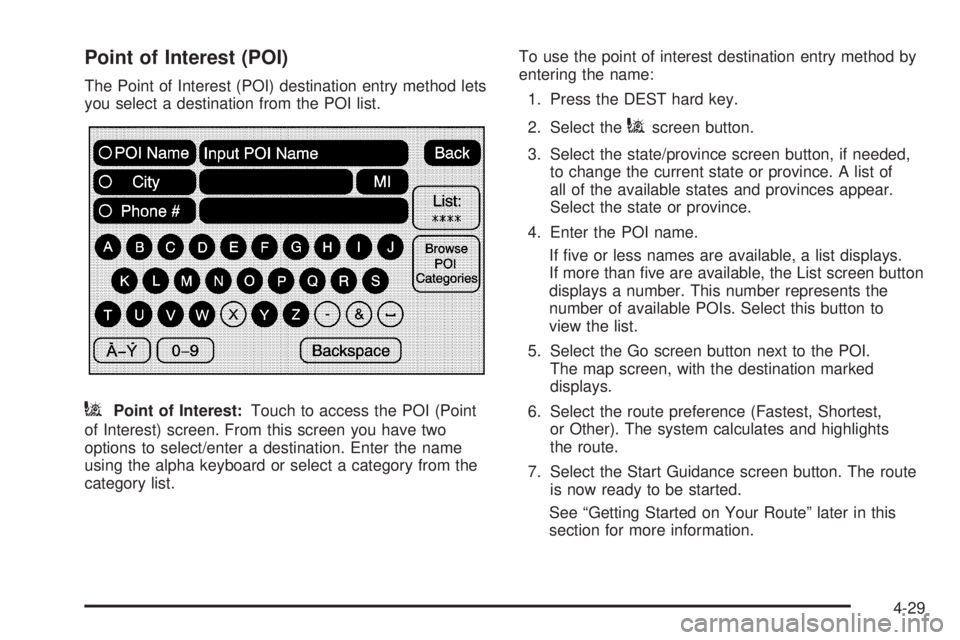
Point of Interest (POI) The Point of Interest (POI) destination entry method lets
you select a destination from the POI list.
i Point of Interest: Touch to access the POI (Point
of Interest) screen. From this screen you have two
options to select/enter a destination. Enter the name
using the alpha keyboard or select a category from the
category list. To use the point of interest destination entry method by
entering the name:
1. Press the DEST hard key.
2. Select the
i screen button.
3. Select the state/province screen button, if needed,
to change the current state or province. A list of
all of the available states and provinces appear.
Select the state or province.
4. Enter the POI name.
If ve or less names are available, a list displays.
If more than ve are available, the List screen button
displays a number. This number represents the
number of available POIs. Select this button to
view the list.
5. Select the Go screen button next to the POI.
The map screen, with the destination marked
displays.
6. Select the route preference (Fastest, Shortest,
or Other). The system calculates and highlights
the route.
7. Select the Start Guidance screen button. The route
is now ready to be started.
See “Getting Started on Your Route” later in this
section for more information.
4-29
Page 316 of 602
To use the point of interest destination entry method by
selecting a category:
1. Press the DEST hard key.
2. Select the
i screen button.
3. Select the Browse POI Categories screen button to
view the list of POI categories.
4. Select a category.
The system displays available POI names in the
selected category.
5. Select the Go screen button next to the POI.
The map screen, with the destination marked
displays.
6. Select the route preference (Fastest, Shortest,
or Other). The system calculates and highlights
the route.
7. Select the Start Guidance screen button. The route
is now ready to be started.
See “Getting Started on Your Route” later in this
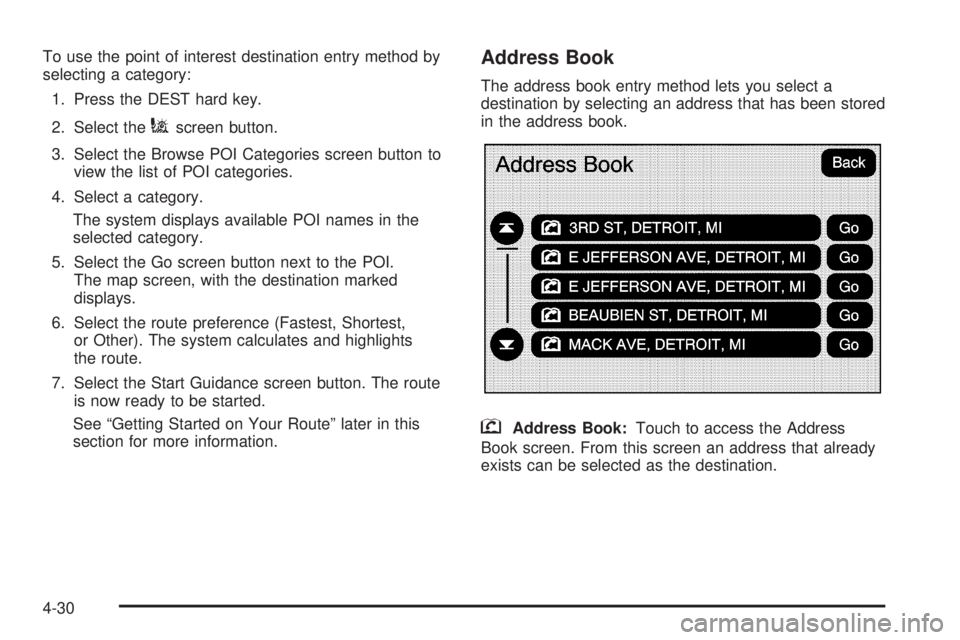
section for more information. Address Book The address book entry method lets you select a
destination by selecting an address that has been stored
in the address book.
g Address Book: Touch to access the Address
Book screen. From this screen an address that already
exists can be selected as the destination.
4-30
Page 317 of 602
To use the address book entry method:
1. Press the DEST hard key.
2. Select the
g screen button.
A list of the address book addresses display.
3. Select the Go screen button next to the destination.
The map screen, with the destination marked
displays.
4. Select the route preference (Fastest, Shortest,
or Other). The system calculates and highlights
the route.
5. Select the Start Guidance screen button. The route
is now ready to be started.
See “Getting Started on Your Route” later in this
section for more information.
See “Adding Destinations to the Address Book”
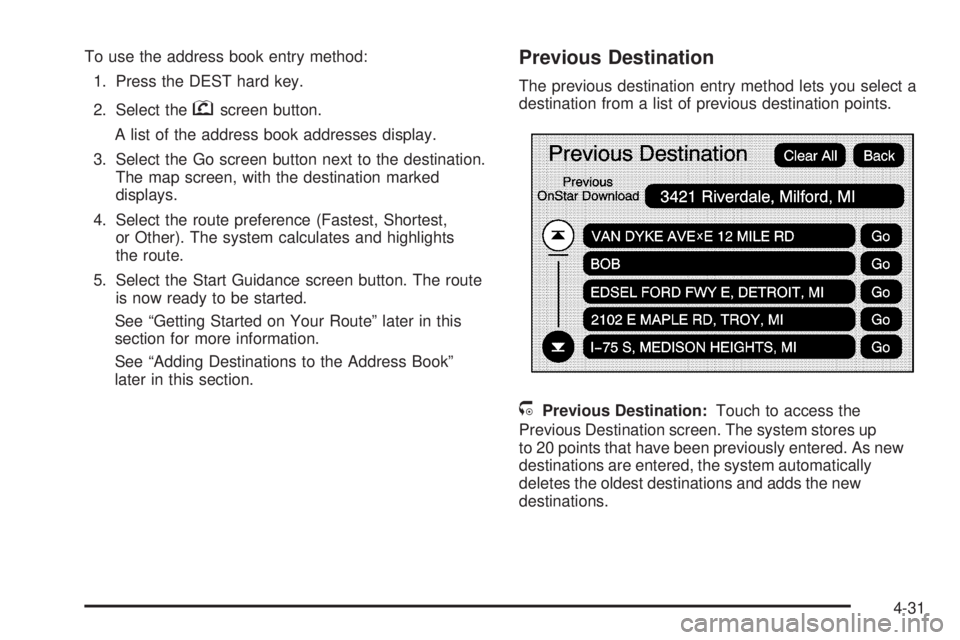
later in this section. Previous Destination The previous destination entry method lets you select a
destination from a list of previous destination points.
/ Previous Destination: Touch to access the
Previous Destination screen. The system stores up
to 20 points that have been previously entered. As new
destinations are entered, the system automatically
deletes the oldest destinations and adds the new
destinations.
4-31
Page 318 of 602
To use the previous destination entry method:
1. Press the DEST hard key.
2. Select the
/ screen button.
3. Select a previous destination from the list. Use the
arrow to the right of the destination to view the entire
destination name as necessary. Use the scroll
arrows to the left to scroll through the list.
4. Select the Go screen button next to the destination.
The map screen, with the destination marked
displays.
5. Select the route preference (Fastest, Shortest, or
Other). The system calculates and highlights the
route.
6. Select the Start Guidance screen button. The route
is now ready to be started.
See “Getting Started on Your Route” later in this
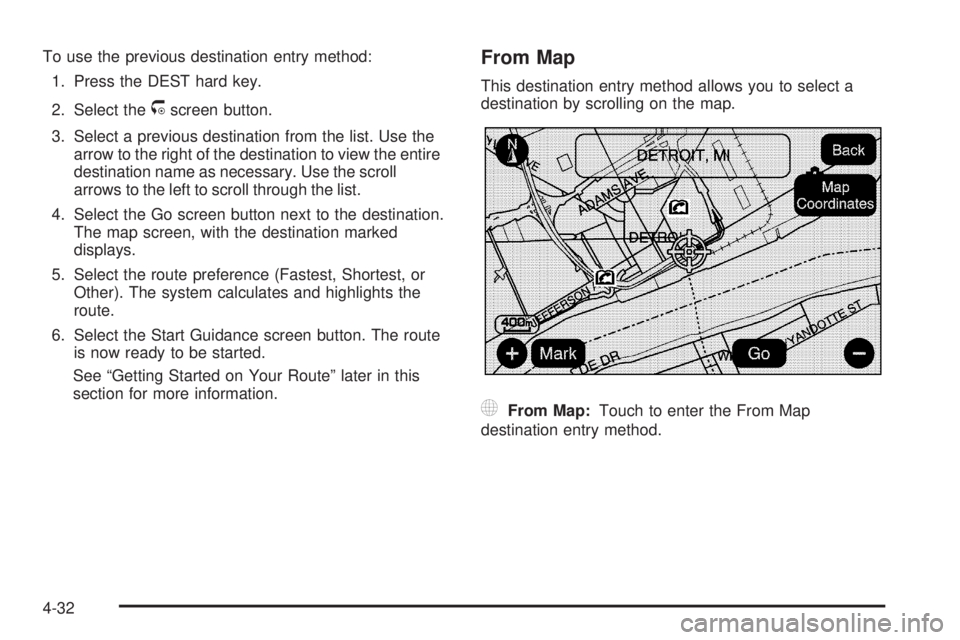
section for more information. From Map This destination entry method allows you to select a
destination by scrolling on the map.
) From Map: Touch to enter the From Map
destination entry method.
4-32
Page 319 of 602
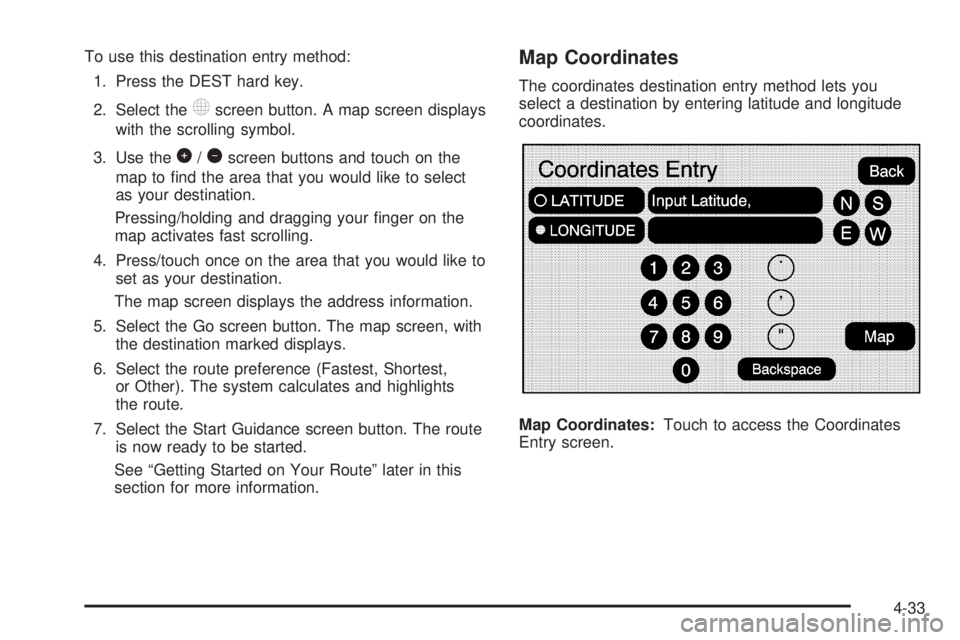
To use this destination entry method:
1. Press the DEST hard key.
2. Select the
) screen button. A map screen displays
with the scrolling symbol.
3. Use the
0 /
1 screen buttons and touch on the
map to nd the area that you would like to select
as your destination.
Pressing/holding and dragging your nger on the
map activates fast scrolling.
4. Press/touch once on the area that you would like to
set as your destination.
The map screen displays the address information.
5. Select the Go screen button. The map screen, with
the destination marked displays.
6. Select the route preference (Fastest, Shortest,
or Other). The system calculates and highlights
the route.
7. Select the Start Guidance screen button. The route
is now ready to be started.
See “Getting Started on Your Route” later in this
section for more information. Map Coordinates The coordinates destination entry method lets you
select a destination by entering latitude and longitude
coordinates.
Map Coordinates: Touch to access the Coordinates
Entry screen.
4-33
Page 320 of 602
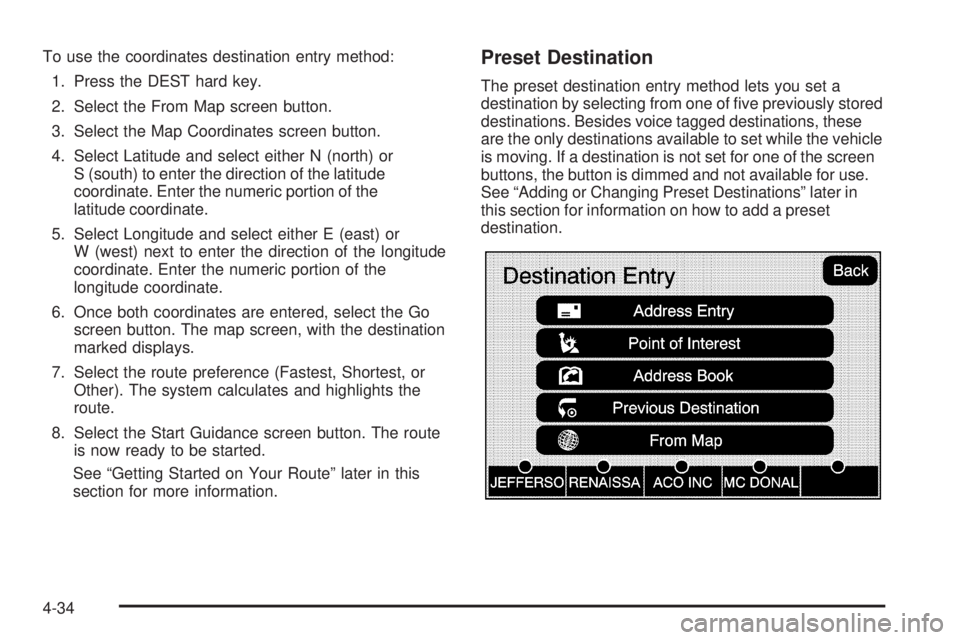
To use the coordinates destination entry method:
1. Press the DEST hard key.
2. Select the From Map screen button.
3. Select the Map Coordinates screen button.
4. Select Latitude and select either N (north) or
S (south) to enter the direction of the latitude
coordinate. Enter the numeric portion of the
latitude coordinate.
5. Select Longitude and select either E (east) or
W (west) next to enter the direction of the longitude
coordinate. Enter the numeric portion of the
longitude coordinate.
6. Once both coordinates are entered, select the Go
screen button. The map screen, with the destination
marked displays.
7. Select the route preference (Fastest, Shortest, or
Other). The system calculates and highlights the
route.
8. Select the Start Guidance screen button. The route
is now ready to be started.
See “Getting Started on Your Route” later in this
section for more information. Preset Destination The preset destination entry method lets you set a
destination by selecting from one of ve previously stored
destinations. Besides voice tagged destinations, these
are the only destinations available to set while the vehicle
is moving. If a destination is not set for one of the screen
buttons, the button is dimmed and not available for use.
See “Adding or Changing Preset Destinations” later in
this section for information on how to add a preset
destination.
4-34
Page 321 of 602
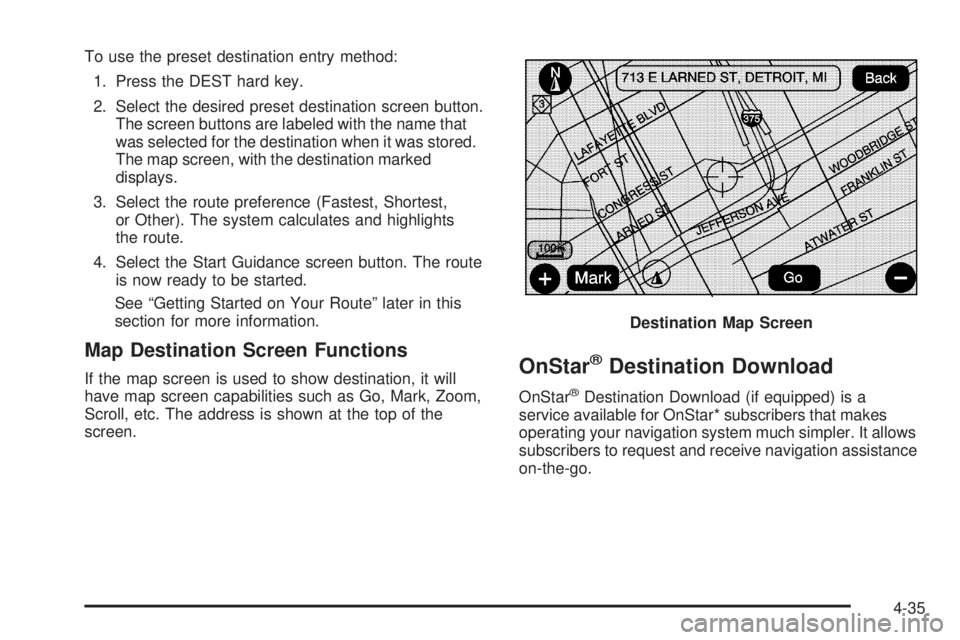
To use the preset destination entry method:
1. Press the DEST hard key.
2. Select the desired preset destination screen button.
The screen buttons are labeled with the name that
was selected for the destination when it was stored.
The map screen, with the destination marked
displays.
3. Select the route preference (Fastest, Shortest,
or Other). The system calculates and highlights
the route.
4. Select the Start Guidance screen button. The route
is now ready to be started.
See “Getting Started on Your Route” later in this
section for more information.
Map Destination Screen Functions If the map screen is used to show destination, it will
have map screen capabilities such as Go, Mark, Zoom,
Scroll, etc. The address is shown at the top of the
screen.
OnStar ®
Destination Download OnStar ®
Destination Download (if equipped) is a
service available for OnStar* subscribers that makes
operating your navigation system much simpler. It allows
subscribers to request and receive navigation assistance
on-the-go. Destination Map Screen
4-35
Page 322 of 602

Using OnStar ®
Destination DownloadPress the blue OnStar button and an Advisor can
locate a point-of-interest or an address and download
the necessary information or coordinates to your
navigation system. Once the destination is downloaded,
the navigation system will search for the address in the
mapping disc’s database. When the address is found, it
will be shown on your navigation system’s screen along
with the buttons described below. Select Go, the navigation system calculates
route(s). Select a route (i.e. Shortest Route),
and Start Guidance.
Select Map, the navigation system displays the
Destination Map Screen.
Select Call, the navigation system initiates a
call to your destination with your Bluetooth phone
(if available) or OnStar Hands-Free Calling
(if minutes are available).
Select Add to Address Book, the navigation system
copies the downloaded destination to the address
book and displays the new address book entry.
Select Back, the navigation system cancels your
OnStar Destination Download and returns to the
previous screen. The downloaded address will not
be added to the previous destinations.
OnStar Download Screen
4-36
Page 323 of 602

Route Guidance Not Active If an OnStar destination is downloaded while route
guidance is not active, the navigation system displays
an OnStar Destination Download Screen and operations
will continue as outlined in the Using OnStar Destination
Download section:
Route Guidance Active If OnStar downloads a destination while route
guidance is already active, the navigation system
adds the downloaded destination as the next waypoint in
the existing route. All features such as Call and Add to
Address Book will be available for the waypoint. Refer
to the section on Waypoints for more information.
Previous Destinations Previous OnStar Destination Downloads are
saved under Previous Destinations in the navigation
system where they can be accessed or saved to the
address book. Important Notes regarding OnStar Destination
Download:
If the navigation system is turned off when the
destination download is attempted, the navigation
system will automatically turn on and display the
OnStar Destination Download Screen. The radio
will remain on after the download occurs.
If OnStar downloads a destination and the address is
not found in the mapping disc’s database and routing
by coordinates is not available, the Go and Map
buttons gray out and routing will not be available.
Press the blue OnStar button for further assistance.
The Call button grays out when there is no phone
number available for your destination and while
connected to OnStar.
4-37
Page 325 of 602

Turn List Turn List: Touch to view the list of turn maneuvers for
the entire route and to avoid turns on the route.
r /
q (Scroll Arrows): Touch the up and down
arrows to scroll through the list of maneuvers.
Avoid: Touch this screen button, next to the adjacent
street name, to avoid the maneuver.
The map screen displays. The route recalculates
without this maneuver. Route Preview: Select to preview the entire route in
either direction.
t (Reverse Skip): Select to go back to the start point
or previous stopover.
q /
r (Reverse Scroll): Select to scroll to the start
point or previous stopover. The
t (reverse skip) button
changes to a fast reverse screen button.
j (Pause): Select to pause the route preview, while in
reverse or fast forward scroll.
4-39