brake CADILLAC XLR 2008 1.G Owner's Guide
[x] Cancel search | Manufacturer: CADILLAC, Model Year: 2008, Model line: XLR, Model: CADILLAC XLR 2008 1.GPages: 470, PDF Size: 8.39 MB
Page 188 of 470
HIGH VOLTAGE
This message displays when the electrical charging
system is overcharging. To avoid being stranded, have
the electrical system checked by your dealer/retailer.
You can reduce the charging overload by using
the accessories. Turn on the lamps and radio, set the
climate control on AUTO and the fan speed on HI,
and turn the rear window defogger on. You can monitor
battery voltage on the DIC by pressing the information
button. The normal range is 11.5 to 15.5 volts when the
engine is running.
HOT ENGINE–A/C OFF
This message displays when the engine coolant
becomes hotter than the normal operating temperature.
You can continue to drive your vehicle. If this message
continues to display, have the system repaired by
your dealer/retailer as soon as possible to avoid
compressor damage.
ICE POSSIBLE
This message displays when the outside air temperature
is cold enough to create icy road conditions.
Adjust your driving accordingly.
LEFT DOOR AJAR
This message displays anytime the engine is running,
the transmission is not in PARK (P), and the driver door
is open or ajar. A chime sounds when the vehicle’s
speed is greater than 3 mph (5 km/h).
LOW BRAKE FLUID
This message displays if the engine is running to inform
the driver that the brake uid level is low. Have the
brake system serviced by your dealer/retailer as soon
as possible. See “Brake Fluid” underBrakes on
page 6-37.
LOW COOLANT
This message displays when there is a low level of
engine coolant. Have the cooling system serviced by
your dealer/retailer as soon as possible. SeeEngine
Coolant on page 6-24.
LOW FUEL
This message displays when the fuel supply is less
than 5 gallons (18.9 L) and the display is turned off.
A single chime also sounds when this message is
displayed.
3-66
Page 191 of 470
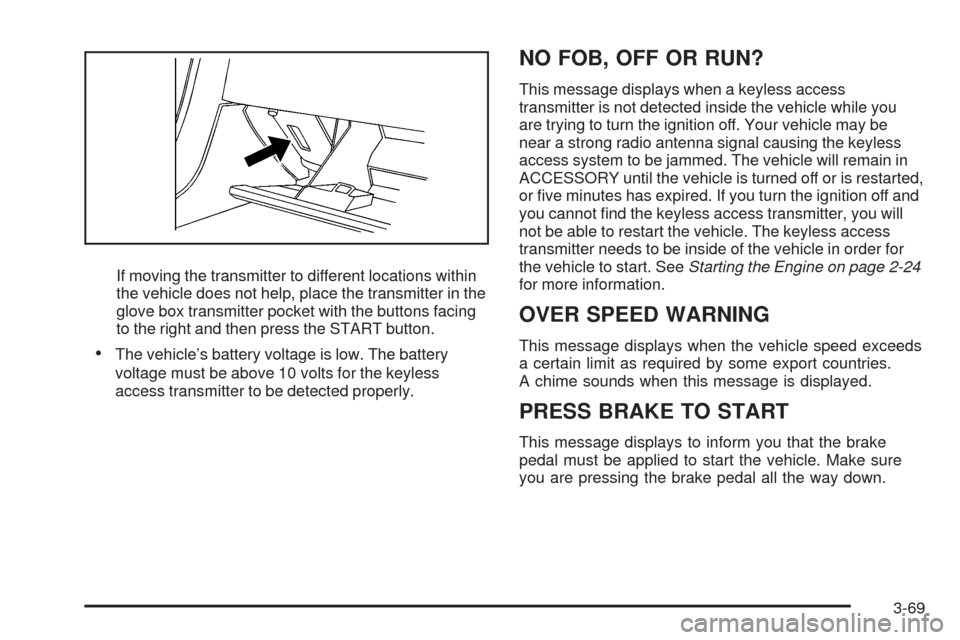
If moving the transmitter to different locations within
the vehicle does not help, place the transmitter in the
glove box transmitter pocket with the buttons facing
to the right and then press the START button.
The vehicle’s battery voltage is low. The battery
voltage must be above 10 volts for the keyless
access transmitter to be detected properly.
NO FOB, OFF OR RUN?
This message displays when a keyless access
transmitter is not detected inside the vehicle while you
are trying to turn the ignition off. Your vehicle may be
near a strong radio antenna signal causing the keyless
access system to be jammed. The vehicle will remain in
ACCESSORY until the vehicle is turned off or is restarted,
or ve minutes has expired. If you turn the ignition off and
you cannot nd the keyless access transmitter, you will
not be able to restart the vehicle. The keyless access
transmitter needs to be inside of the vehicle in order for
the vehicle to start. SeeStarting the Engine on page 2-24
for more information.
OVER SPEED WARNING
This message displays when the vehicle speed exceeds
a certain limit as required by some export countries.
A chime sounds when this message is displayed.
PRESS BRAKE TO START
This message displays to inform you that the brake
pedal must be applied to start the vehicle. Make sure
you are pressing the brake pedal all the way down.
3-69
Page 192 of 470
REDUCED ENGINE POWER
This message displays when the vehicle is reducing
engine power because the transmission is being placed
in gear under conditions that may cause damage to
the vehicle’s engine, transmission, or ability to
accelerate. Reduced engine power can affect the
vehicle’s ability to accelerate. If this message is on,
but there is no reduction in performance, proceed
to your destination. The performance may be reduced
the next time the vehicle is driven. The vehicle may
be driven at a reduced speed while this message is on,
but acceleration and speed may be reduced. Anytime
this message stays on, the vehicle should be taken
to your dealer/retailer for service as soon as possible.
RIGHT DOOR AJAR
This message displays anytime the engine is running,
the transmission is not in PARK (P), and the passenger
door is open or ajar. A chime sounds if the vehicle’s
speed is greater than 3 mph (5 km/h).
SERVICE A/C
This message displays when the electronic sensors that
control the air conditioning and heating systems are
no longer working. Have the climate control system
serviced by your dealer/retailer if you notice a drop in
heating and air conditioning efficiency.
SERVICE ABS (Antilock Brake System)
If this message displays when you are driving, stop
as soon as possible and turn the ignition off. Then start
the engine again to reset the system. If the message
stays on, or comes back on again while you are driving,
your vehicle is in need of service. See your
dealer/retailer.
If the SERVICE ABS message is being displayed, the
Traction Control System (TCS) and StabiliTrak
®System
will also be disabled. The Driver Information Center
will scroll three messages: SERVICE ABS, SERVICE
TRACTION SYS, and SERVICE STABILITRAK, and the
antilock brake system and traction control warning
lights on the instrument panel cluster will be illuminated.
SeeAntilock Brake System Warning Light on page 3-51
andTraction Control System (TCS) Warning Light on
page 3-52. The driver can acknowledge these messages
by pressing the RESET button three times. When the
service message is displayed, the computer controlled
systems will not assist the driver and you should
have the system repaired by your dealer/retailer as
soon as possible. Adjust your driving accordingly.
3-70
Page 194 of 470

SERVICE VEHICLE SOON
This message displays when a non-emissions related
powertrain malfunction occurs. Have your vehicle
serviced by your dealer/retailer as soon as possible.
SHIFT TO PARK
This message displays if the vehicle is not in PARK (P)
when the engine is being turned off. The vehicle will
be in accessory mode. Once the shift lever is moved
to PARK (P), the vehicle will turn off.
STABILITRAK ACTIVE
You may see this message on the DIC. It means that
an advanced, computer-controlled system has come on
to help your vehicle continue to go in the direction in
which you are steering. This stability enhancement
system activates when the computer senses that your
vehicle is just starting to spin, as it might if you hit
a patch of ice or other slippery spot on the road.
When the system is on, you may hear a noise or
feel a vibration in the brake pedal. This is normal.When this message is on, continue to steer in the
direction you want to go. The system is designed to
help you in bad weather or other difficult driving situations
by making the most of whatever road conditions will
permit. If this message comes on, you will know that
something has caused your vehicle to start to spin,
so consider slowing down. A single chime also sounds
when this message is displayed.
STABILITRAK READY
If this message displays and a chime sounds, the
system has completed the functional check of the
StabiliTrak
®System.
STABILITRAK WARMING
When you rst start your vehicle and drive away,
especially during cold winter weather, this message
may display along with a chime and the traction control
warning light. This is normal. You can acknowledge
this message by pressing the RESET button. The
StabiliTrak
®System performance is affected until the
STABILITRAK READY message is displayed in the DIC,
which can take up to 15 minutes.
3-72
Page 293 of 470
Your Driving, the Road, and Your Vehicle..........5-2
Defensive Driving...........................................5-2
Drunk Driving.................................................5-2
Control of a Vehicle........................................5-3
Braking.........................................................5-4
Antilock Brake System (ABS)...........................5-5
Braking in Emergencies...................................5-5
Traction Control System (TCS).........................5-6
Magnetic Ride Control.....................................5-7
Limited-Slip Rear Axle.....................................5-7
StabiliTrak
®System........................................5-8
Steering........................................................5-9
Off-Road Recovery.......................................5-11
Passing.......................................................5-12
Loss of Control.............................................5-12Racing or Other Competitive Driving (XLR-V)......5-13
Driving at Night............................................5-14
Driving in Rain and on Wet Roads..................5-14
Before Leaving on a Long Trip.......................5-15
Highway Hypnosis........................................5-16
Hill and Mountain Roads................................5-16
Winter Driving..............................................5-17
If Your Vehicle is Stuck in Sand, Mud,
Ice, or Snow.............................................5-21
Rocking Your Vehicle to Get It Out.................5-22
Loading Your Vehicle....................................5-22
Towing..........................................................5-27
Towing Your Vehicle.....................................5-27
Recreational Vehicle Towing...........................5-27
Towing a Trailer...........................................5-27
Section 5 Driving Your Vehicle
5-1
Page 295 of 470

Police records show that almost 40 percent of all motor
vehicle-related deaths involve alcohol. In most cases,
these deaths are the result of someone who was
drinking and driving. In recent years, more than
17,000 annual motor vehicle-related deaths have been
associated with the use of alcohol, with about
250,000 people injured.
For persons under 21, it is against the law in every
U.S. state to drink alcohol. There are good medical,
psychological, and developmental reasons for
these laws.
The obvious way to eliminate the leading highway
safety problem is for people never to drink alcohol
and then drive.
Medical research shows that alcohol in a person’s
system can make crash injuries worse, especially
injuries to the brain, spinal cord, or heart. This means
that when anyone who has been drinking — driver
or passenger — is in a crash, that person’s chance of
being killed or permanently disabled is higher than if the
person had not been drinking.Control of a Vehicle
The following three systems help to control your
vehicle while driving — brakes, steering, and
accelerator. At times, as when driving on snow or ice,
it is easy to ask more of those control systems than the
tires and road can provide. Meaning, you can lose
control of your vehicle. SeeTraction Control System
(TCS) on page 5-6andStabiliTrak
®System on
page 5-8.
Adding non-dealer/non-retailer accessories can affect
your vehicle’s performance. SeeAccessories and
Modifications on page 6-3.
5-3
Page 296 of 470
Braking
SeeBrake System Warning Light on page 3-50.
Braking action involves perception time and reaction
time. First, you have to decide to push on the brake
pedal. That is perception time. Then you have to bring
up your foot and do it. That is reaction time.
Average reaction time is about three-fourths of a
second. But that is only an average. It might be less
with one driver and as long as two or three seconds or
more with another. Age, physical condition, alertness,
coordination, and eyesight all play a part. So do alcohol,
drugs, and frustration. But even in three-fourths of a
second, a vehicle moving at 60 mph (100 km/h) travels
66 feet (20 m). That could be a lot of distance in an
emergency, so keeping enough space between
your vehicle and others is important.
And, of course, actual stopping distances vary greatly
with the surface of the road, whether it is pavement
or gravel; the condition of the road, whether it is
wet, dry, or icy; tire tread; the condition of the brakes;
the weight of the vehicle; and the amount of brake
force applied.Avoid needless heavy braking. Some people drive
in spurts — heavy acceleration followed by heavy
braking — rather than keeping pace with traffic. This is
a mistake. The brakes might not have time to cool
between hard stops. The brakes will wear out much
faster if you do a lot of heavy braking. If you keep pace
with the traffic and allow realistic following distances,
you will eliminate a lot of unnecessary braking.
That means better braking and longer brake life.
If your vehicle’s engine ever stops while you are driving,
brake normally but do not pump the brakes. If you do,
the pedal could get harder to push down. If the
engine stops, you will still have some power brake
assist. But you will use it when you brake. Once the
power assist is used up, it can take longer to stop and
the brake pedal will be harder to push.
Adding non-dealer/non-retailer accessories can affect
your vehicle’s performance. SeeAccessories and
Modifications on page 6-3.
5-4
Page 297 of 470
Antilock Brake System (ABS)
Your vehicle has the Antilock Brake System (ABS), an
advanced electronic braking system that will help
prevent a braking skid.
When you start the engine and begin to drive away,
ABS will check itself. You might hear a momentary
motor or clicking noise while this test is going on, and
you might even notice that the brake pedal moves
a little. This is normal.
If there is a problem with
ABS, this warning light will
stay on. SeeAntilock
Brake System Warning
Light on page 3-51.
Let us say the road is wet and you are driving safely.
Suddenly, an animal jumps out in front of you. You slam
on the brakes and continue braking. Here is what
happens with ABS:
A computer senses that wheels are slowing down.
If one of the wheels is about to stop rolling, the computer
will separately work the brakes at each wheel.ABS can change the brake pressure faster than any
driver could. The computer is programmed to make the
most of available tire and road conditions. This can
help you steer around the obstacle while braking hard.
As you brake, the computer keeps receiving updates on
wheel speed and controls braking pressure accordingly.
Remember: ABS does not change the time you need to
get your foot up to the brake pedal or always decrease
stopping distance. If you get too close to the vehicle
in front of you, you will not have time to apply the brakes
if that vehicle suddenly slows or stops. Always leave
enough room up ahead to stop, even though you
have ABS.
Using ABS
Do not pump the brakes. Just hold the brake pedal
down rmly and let antilock work for you. You might hear
a motor or clicking noise and feel the brake pedal
move a little during a stop, but this is normal.
Braking in Emergencies
With ABS, you can steer and brake at the same time.
In many emergencies, steering can help you more than
even the very best braking.
5-5
Page 298 of 470

Traction Control System (TCS)
Your vehicle has a traction control system that limits
wheel spin. This is especially useful in slippery
road conditions. The system operates only if it senses
that one or both of the rear wheels are spinning or
beginning to lose traction. When this happens,
the system works the rear brakes and reduces engine
power to limit wheel spin.
The TRAC SYSTEM ACTIVE message will display on
the Driver Information Center (DIC) when the traction
control system is limiting wheel spin. SeeDIC Warnings
and Messages on page 3-63. You may feel or hear
the system working, but this is normal.
If your vehicle is in cruise control when the traction
control system begins to limit wheel spin, the cruise
control will automatically disengage. When road
conditions allow you to safely use it again, you may
reengage the cruise control. SeeAdaptive Cruise
Control on page 3-15orCruise Control on page 3-12for
more information.This warning light will
come on to let you know
if there is a problem
with your traction
control system.
SeeTraction Control System (TCS) Warning Light on
page 3-52. When this warning light is on, the system will
not limit wheel spin. Adjust your driving accordingly.
The traction control system automatically comes
on whenever you start your vehicle. To limit wheel spin,
especially in slippery road conditions, you should
always leave the system on. But you can turn the
traction control system off if you ever need to. You
should turn the system off if your vehicle ever gets stuck
in sand, mud or snow and rocking the vehicle is
required. SeeRocking Your Vehicle to Get It Out on
page 5-22andIf Your Vehicle is Stuck in Sand,
Mud, Ice, or Snow on page 5-21for more information.
5-6
Page 300 of 470
StabiliTrak®System
The StabiliTrak®System is a computer controlled
system that helps the driver maintain directional control
of the vehicle in difficult driving conditions. This is
accomplished by selectively applying any one of the
vehicle’s brakes.
When you rst start your vehicle and begin to drive
away (6 mph (10 km/h)), especially during cold weather,
the message STABILITRAK WARMING may be
displayed in the Driver Information Center (DIC), the
instrument panel cluster light will be on, and a chime
will sound. This is normal. You can acknowledge
this message by pressing the RESET button.
The StabiliTrak
®System performance is affected until
the message, STABILITRAK READY, is displayed in the
DIC. This can take up to 15 minutes.
The WAIT FOR STABILITRAK message may be
displayed in the DIC after exceeding 19 mph (30 km/h)
for 10 seconds if the steering is not centered.
The system is off until the STABILITRAK ACTIVE
message is displayed.The STABILITRAK ACTIVE message will come on
when the system is operating. SeeDIC Warnings and
Messages on page 3-63for more information. You
may also feel or hear the system working. This
is normal.
The instrument panel
cluster light will come on
and a chime will sound
to let you know if there is a
problem with the system.
The SERVICE STABILITRAK message will also be
displayed. SeeDIC Warnings and Messages on
page 3-63for more information.
When this light and the SERVICE STABILITRAK
message are on, the system is not operational.
Adjust your driving accordingly.
5-8