ABS CHEVROLET CAMARO 1967 1.G Chassis Repair Manual
[x] Cancel search | Manufacturer: CHEVROLET, Model Year: 1967, Model line: CAMARO, Model: CHEVROLET CAMARO 1967 1.GPages: 659, PDF Size: 114.24 MB
Page 502 of 659
CHASSIS SHEET METAL 11-15
FRONT FENDER TRIM
If fender spear molding is to be replaced without re-
moving fender from vehicle, proceed as follows:
1.
Perform Operations 2 and 5 only of Front Fender
Assembly—Removal.
2.
Pull rear* end of fender away from body far enough
to insert a short piece of 2 x 4 between lower rear
corner of fender and rocker panel extension.
3.
It should now be possible to gain access to first and
second retaining nuts forward of rear end of fender.
All other nuts can be reached from front wheel
opening.
SKIRT ASSEMBLY
Removal
1.
Remove hood and hinge assemblies as outlined in
this section.
2.
Remove grille and radiator support as outlined in
Section ia.
3.
Remove fender assembly as outlined in this section.
4.
Raise car from floor and place jack stands under
rocker panel extension.
5.
Remove suspension bumper support, shock absorber,
front spring and stabilizer link as outlined in Section
3.
6. If removing left skirt assembly, remove steering
gear mounting bolts, power steering hose clamp (if
so equipped) and outer (left) clutch cordon shaft
bracket (if so equipped).
7.
Remove tie rod ball stud from steering arm as out-
lined in Section 9.
8. Support engine and remove engine mount cushion as
outlined in Section 6.
9. Remove spring clip from brake line junction which
passes through skirt and remove junction from skirt
(see Section 5).
10.
Remove four bolts retaining front crossmember to
skirt.
11.
Remove four bolts retaining skirt assembly to dash
front brace. Remove 3 bolts retaining upper end of
skirt to dash (fig. 26); record shims removed.
12.
Remove skirt assembly with remaining suspension
parts attached as shown in Figure 27.
13.
Suspension parts may be detached as outlined in
Section 3.
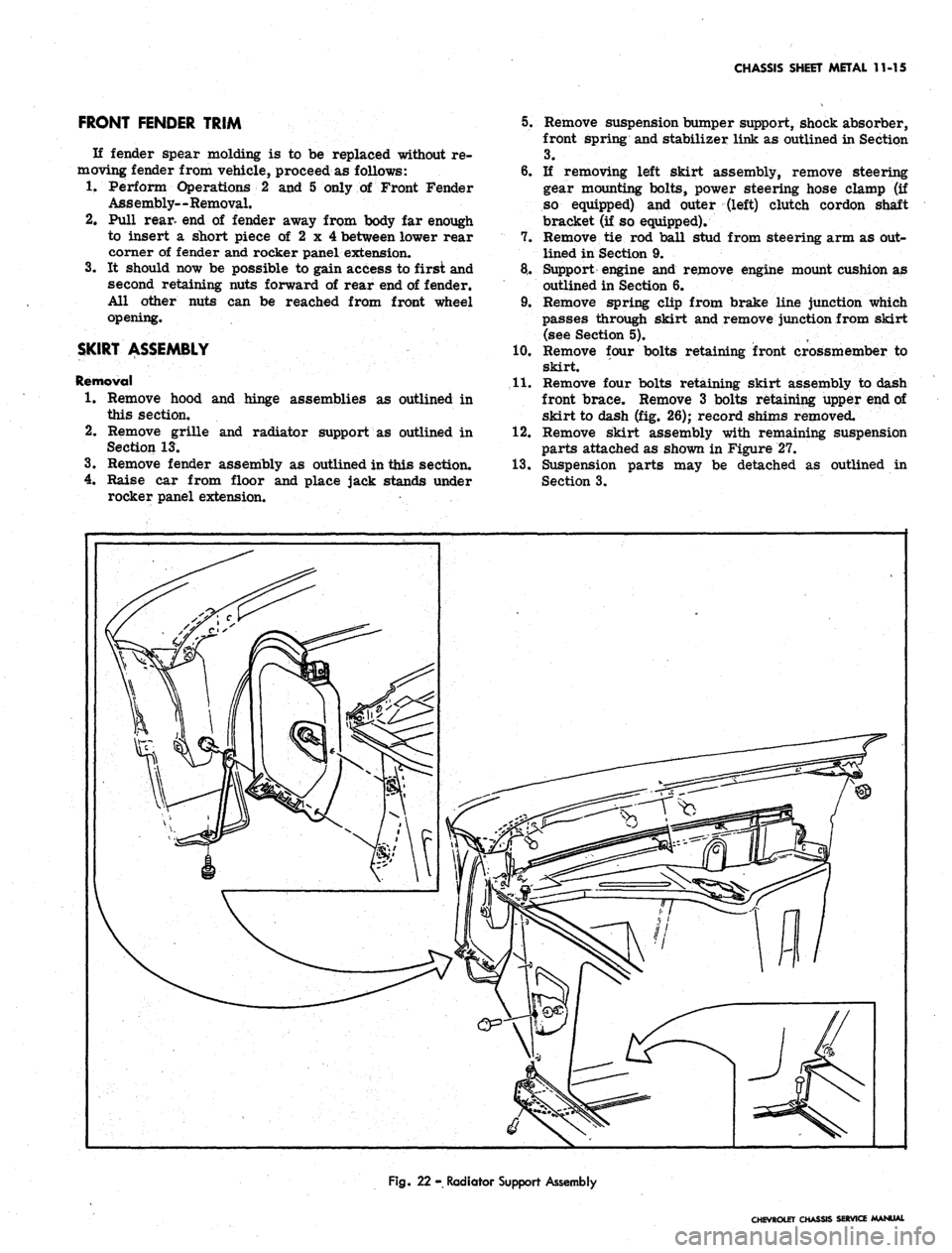
Fig.
22 - Radiator Support Assembly
CHEVROLET CHASSIS SERVICE MANUAL
Page 516 of 659
ELECTRICAL-BODY AND CHASSIS 12-4
b.
hand lamp until the string is positioned over the
crossarm centerline. Turn the screw clockwise
in making the final adjustment to take up play in
the headlamp mechanism.
Repeat the above procedure on the right-hand
lamp to complete the horizontal adjustment of the
headlamps.
VERTICAL ADJUSTMENT
8. a. Numeral "2" (fig. 5) should appear in the "down"
window of each aimer. If not, loosen knob at
underside of aimer arm and slide back and forth
until the numeral does appear.
NOTE:
This setting will give a 2" drop of the
headlamp high beam spot centerline on a screen
placed 25 feet forward of the vehicle. Check
state laws for proper vertical setting.
b.
Turn headlamp vertical aim screw (fig. 5) on left-
hand unit counter-clockwise until the bubble is at
the inner end of the glass tube. Then turn screw
clockwise until bubble is centered in tube.
c. Repeat this procedure on right-hand headlamp
unit to complete vertical adjustment of lamps.
9. Recheck the string at the ends of each crossarm for
correct setting and the bubble on each aimer for
centered position.
10.
Remove the aimers by pulling on the suction cup tabs
through the openings in the aimers (fig. 6).
11.
With headlamps properly aimed, replace headlamp
bezels.
HOW TO SELECT A LEVEL AIMING AREA
1.
Select area you believe to be level.
2.
Remove headlamp bezels and install Aimers on each
headlamp (fig. 3) making sure aiming lugs engage
smoooth inner ring of the Aimer.
"
To install Aimer,
press firmly on the knob extending out from the cen-
ter of the Aimer base. This forces the suction cup
into place on the Sealed Beam unit.:
3.
Loosen the slider knob beneath the aimer arm and
set the numeral "2" in the DOWN view window (fig.
7).
Back vertical lamp adjustment out on each lamp
until bubble is outside of black line of vial, then cen-
ter bubble in between black line of vial by turning
clockwise.
VERTICAL AIMING SCREW
VIEW WINDOWS
BUBBLE
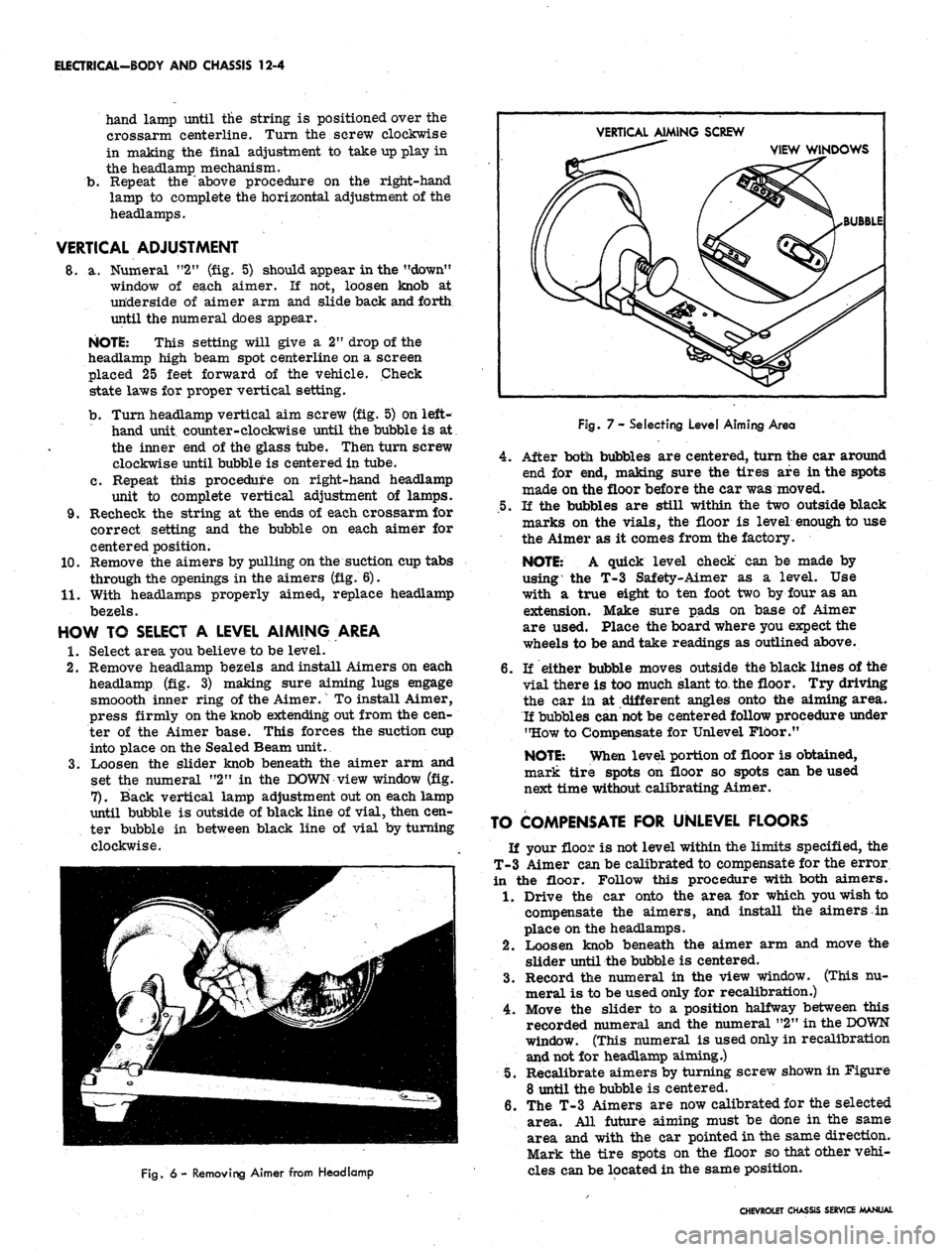
Fig.
6 - Removing Aimer from Headlamp
Fog.
7- Selecting Level Aiming Area
4.
After botli bubbles are centered, turn the car around
end for end, making sure the tires are in the spots
made on the floor before the car was moved.
.5.
If the bubbles are still within the two outside black
marks on the vials, the floor is level enough to use
the Aimer as it comes from the factory.
NOTE:
A quick level check can be made by
using the T-3 Safety-Aimer as a level. Use
with a true eight to ten foot two by four as an
extension. Make sure pads on base of Aimer
are used. Place the board where you expect the
wheels to be and take readings as outlined above.
6. If either bubble moves outside the black lines of the
vial there is too much slant to the floor. Try driving
the car in at different angles onto the aiming area.
If bubbles can
not
be centered follow procedure under
"How to Compensate for Unlevel Floor."
NOTE:
When level portion of floor is obtained,
mark tire spots on floor so spots can be used
next time without calibrating Aimer.
TO COMPENSATE FOR UNLEVEL FLOORS
If your floor is not level within the limits specified, the
T-3 Aimer can be calibrated to compensate for the error
in the floor. Follow this procedure with both aimers.
1.
Drive the car onto the area for which you wish to
compensate the aimers, and install the aimers in
place on the headlamps.
2.
Loosen knob beneath the aimer arm and move the
slider until the bubble is centered.
3.
Record the numeral in the view window. (This nu-
meral is to be used only for recalibration.)
4.
Move the slider to a position halfway between this
recorded numeral and the numeral "2" in the
DOWN
window. (This numeral is used only in recalibration
and not for headlamp aiming.)
5.
Recalibrate aimers by turning screw shown in Figure
8 until the bubble is centered.
6. The T-3 Aimers are now calibrated for the selected
area. All future aiming must be done in the same
area and with the car pointed in the same direction.
Mark the tire spots on the floor so that other vehi-
cles can be located in the same position.
CHEVROLET CHASSIS SERVICE MANUAL
Page 517 of 659
ELECTRICAL-BODY AND CHASSIS 12-5
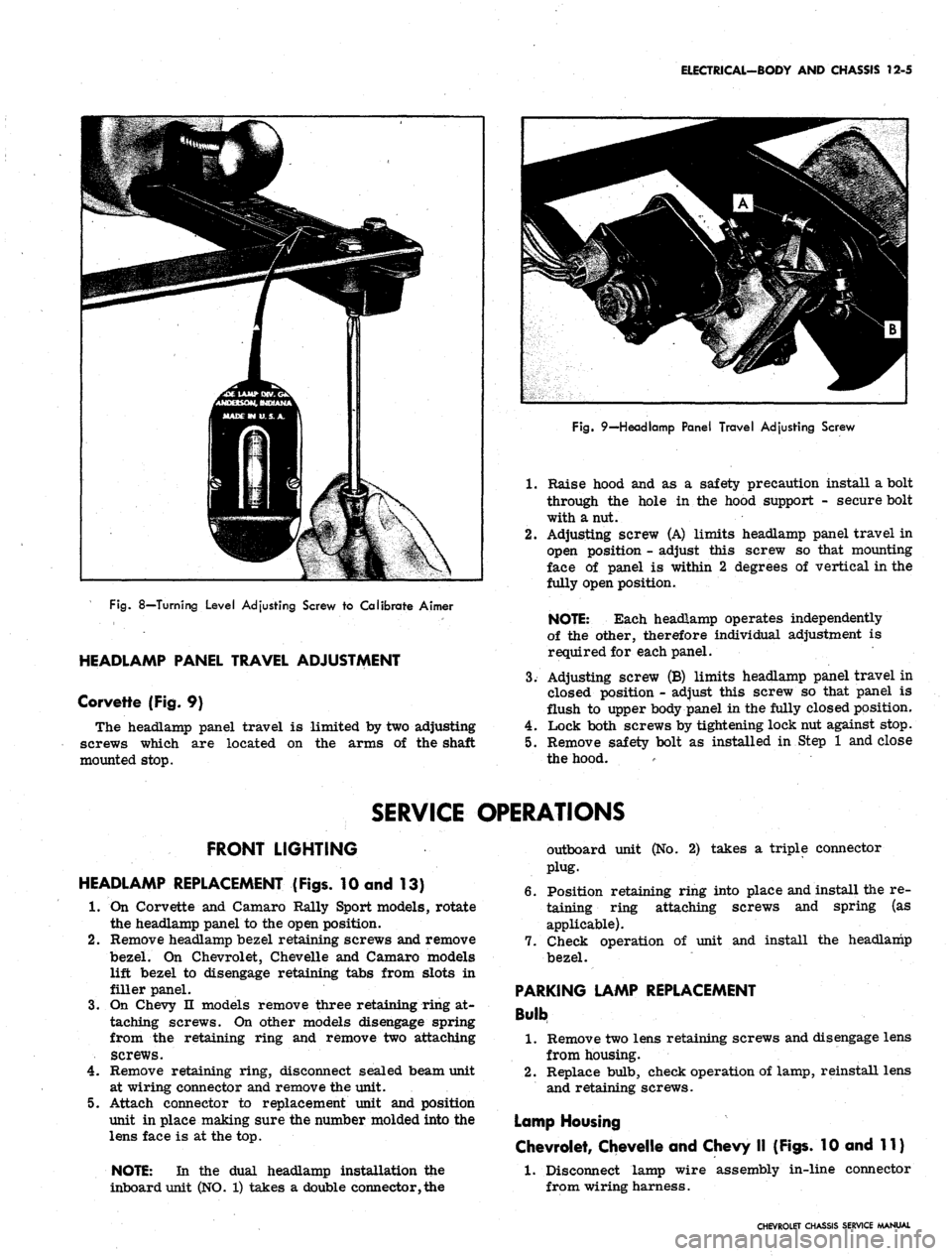
Fig.
8—Turning Level Adjusting Screw to Calibrate Aimer
HEADLAMP PANEL TRAVEL ADJUSTMENT
Corvette (Fig. 9)
The headlamp panel travel is limited by two adjusting
screws which are located on the arms of the shaft
mounted stop.
Fig.
9—Headlamp Panel Travel Adjusting Screw
1.
Raise hood and as a safety precaution install a bolt
through the hole in the hood support - secure bolt
with a nut.
2.
Adjusting screw (A) limits headlamp panel travel in
open position - adjust this screw so that mounting
face of panel is within 2 degrees of vertical in the
fully open position.
NOTE: Each headlamp operates independently
of the other, therefore individual adjustment is
required for each panel.
3.
Adjusting screw (B) limits headlamp panel travel in
closed position - adjust this screw so that panel is
flush to upper body panel in the fully closed position.
4.
Lock both screws by tightening lock nut against stop.
5.
Remove safety bolt as installed in Step 1 and close
the hood.
SERVICE OPERATIONS
FRONT LIGHTING
HEADLAMP REPLACEMENT (Figs. 10 and 13)
1.
On Corvette and Camaro Rally Sport models, rotate
the headlamp panel to the open position.
2.
Remove headlamp bezel retaining screws and remove
bezel. On Chevrolet, Chevelle and Camaro models
lift bezel to disengage retaining tabs from slots in
filler panel.
3.
On Chevy n models remove three retaining ring at-
taching screws. On other models disengage spring
from the retaining ring and remove two attaching
screws.
4.
Remove retaining ring, disconnect sealed beam unit
at wiring connector and remove the unit.
5.
Attach connector to replacement unit and position
unit in place making sure the number molded into the
lens face is at the top.
NOTE: In the dual headlamp installation the
inboard unit (NO. 1) takes a double connector, the
outboard unit (No. 2) takes a triple connector
plug.
6. Position retaining ring into place and install the re-
taining ring attaching screws and spring (as
applicable).
7.
Check operation of unit and install the headlamp
bezel.
PARKING LAMP REPLACEMENT
Bulb
1.
Remove two lens retaining screws and disengage lens
from housing.
2.
Replace bulb, check operation of lamp, reinstall lens
and retaining screws.
Lamp Housing
Chevrolet, Chevelle and Chevy II (Figs. 10 and 11)
1.
Disconnect lamp wire assembly in-line connector
from wiring harness.
CHEVROLET CHASSIS SERVICE MANUAL
Page 534 of 659
ELECTRICAL-BODY AND CHASSIS 12-22
SERVICE OPERATIONS
INSTRUMENT CLUSTER
Removal and Installation (Figs. 36 thru 40)
I. Disconnect battery ground cable.
2:
Remove four screws retaining instrument bezel to
top edge of instrument console. Disengage tabs on
bezel lower section from clips on instrument console
and remove bezel.
3.
Protect mast jacket to prevent scratching when re-
moving cluster assembly.
4.
Remove eight screws securing leading edges of in-
strument cluster to console and pull cluster forward
from console opening.
5. Reaching behind cluster disconnect speedometer ca-
ble,
chassis harness connector, clock and speed
warning device connections (if so equipped) at rear of
cluster.
NOTE:
On models- with gauge pack, disconnect
oil pressure line also.
6. When all disconnects are made, remove cluster as-
sembly from vehicle.
7. To install, position cluster assembly to console
opening and connect speedometer cable, chassis
harness connector and other electrical connections
as required.
8. Position cluster in console opening and install eight
retaining screws.
NOTE:
Make sure ground strap between
cluster case and center right lower attachment
is properly installed.
9. Engage tabs on instrument bezel with clips on con-
sole and position bezel in console opening, then in-
stall four retaining screws.
10.
Install speed warning device control attaching nut and
knob,
if so equipped.
II.
Connect battery ground cable and check operation of
cluster assembly.
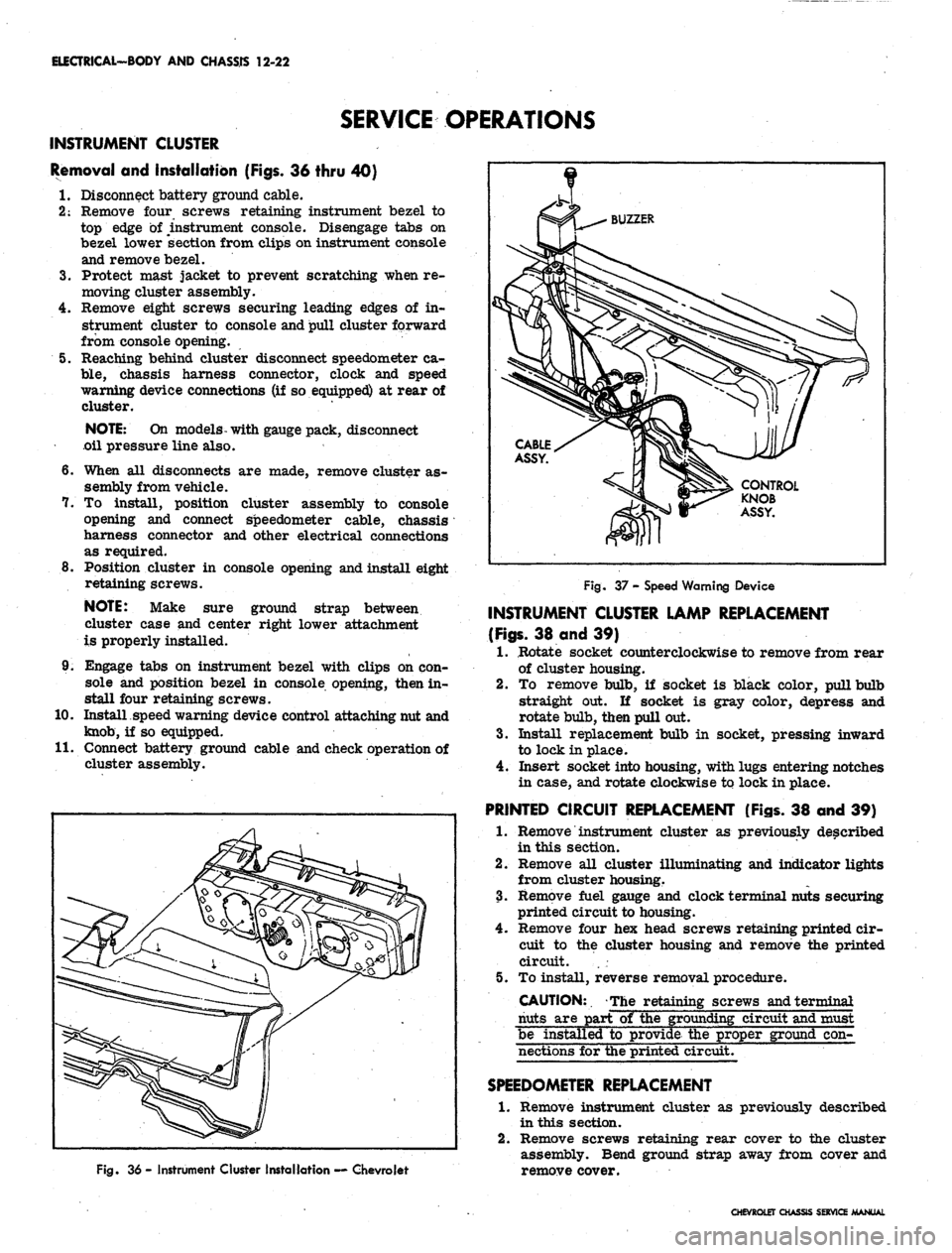
Fig. 36 - Instrument Cluster Installation — Chevrolet
Fig. 37 - Speed Warning Device
INSTRUMENT CLUSTER LAMP REPLACEMENT
(Figs.
38 and 39)
1.
Rotate socket counterclockwise to remove from rear
of cluster housing.
2.
To remove bulb, if socket is black color, pull bulb
straight out. If socket is gray color, depress and
rotate bulb, then pull out.
3.
Install replacement bulb in socket, pressing inward
to lock in place.
4.
Insert socket into housing, with lugs entering notches
in case, and rotate clockwise to lock in place.
PRINTED CIRCUIT REPLACEMENT (Figs. 38 and 39)
1.
Remove instrument cluster as previously described
in this section.
2.
Remove all cluster illuminating and indicator lights
from cluster housing.
3.
Remove fuel gauge and clock terminal nuts securing
printed circuit to housing.
4.
Remove four hex head screws retaining printed cir-
cuit to the cluster housing and remove the printed
circuit. . .
5. To install, reverse removal procedure.
CAUTION:. The retaining screws and terminal
nuts are part of the grounding circuit and must
be installed to provide the proper ground con-
nections for the printed circuit.
SPEEDOMETER
REPLACEMENT
1.
Remove instrument cluster as previously described
in this section.
2.
Remove screws retaining rear cover to the cluster
assembly. Bend ground strap away from cover and
remove cover.
CHEVROLET CHASSIS SERVICE MANUAL
Page 552 of 659
ELECTRICAL-BODY AND CHASSIS 12-40
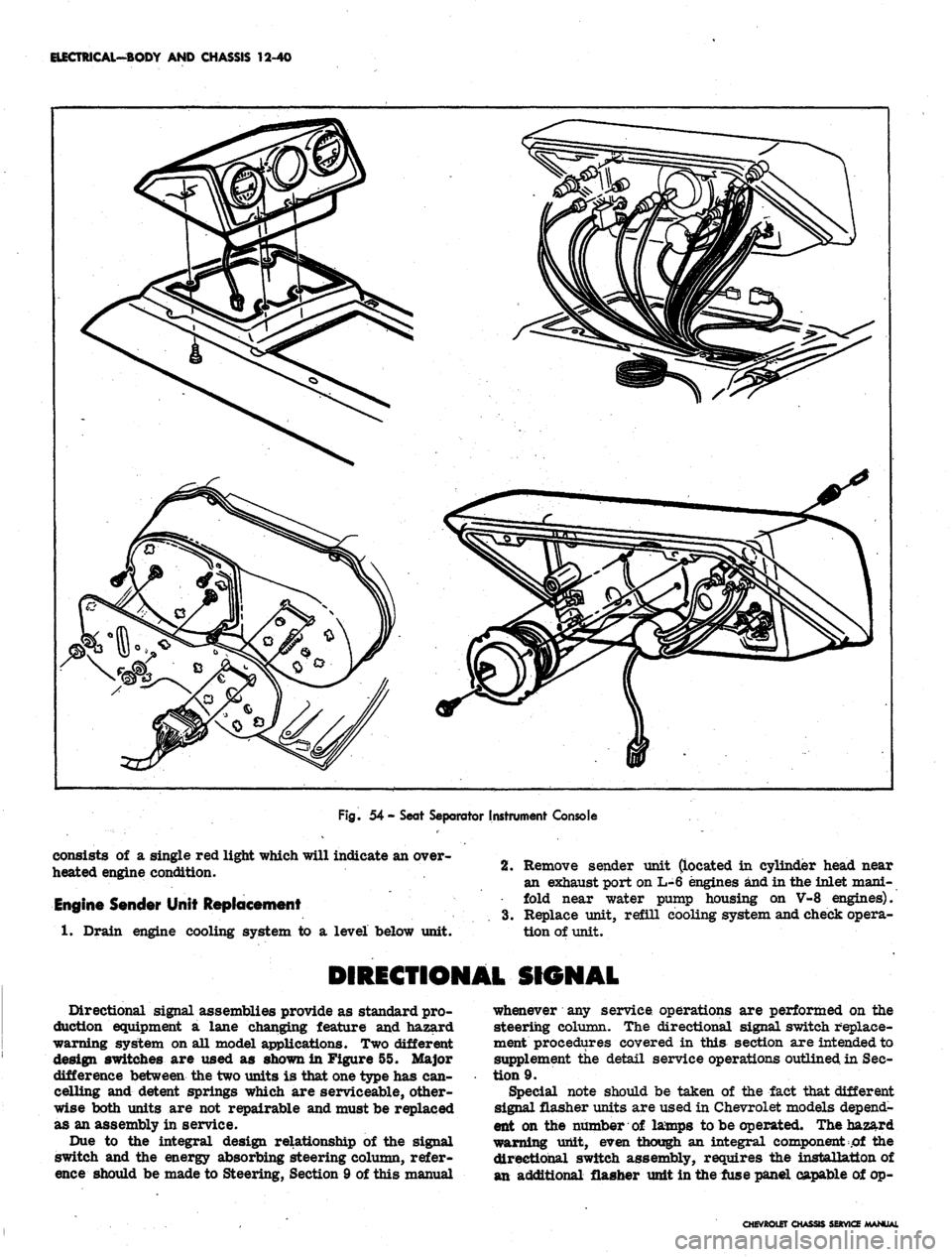
Fig.
54 - Seat Separator Instrument Console
consists of a single red light which will indicate an over-
heated engine condition.
Engine Sender Unit Replacement
1.
Drain engine cooling system to a level below unit.
2.
Remove sender unit (located in cylinder head near
an exhaust port on L-6 engines and in the inlet mani-
fold near water pump housing on V-8 engines).
3.
Replace unit, refill cooling system and check opera-
tion of unit.
DIRECTIONAL SIGNAL
Directional signal assemblies provide as standard pro-
duction equipment a lane changing feature and hazard
warning system on all model applications. Two different
design switches are used as shown in Figure 55. Major
difference between the two units is that one type has can-
celling and detent springs which are serviceable, other-
wise both units are not repairable and must be replaced
as an assembly in service.
Due to the integral design relationship of the signal
switch and the energy absorbing steering column, refer-
ence should be made to Steering, Section 9 of this manual
whenever any service operations are performed on the
steering column. The directional signal switch replace-
ment procedures covered in this section are intended to
supplement the detail service operations outlined in Sec-
tion 9.
Special note should be taken of the fact that different
signal flasher units are used in Chevrolet models depend-
ent on the number of lamps to be operated. The hazard
warning unit, even though an integral component of the
directional switch assembly, requires the installation of
an additional flasher unit in the fuse panel capable of op-
CHEVROtET CHASSIS SERVICE MANUAL
Page 562 of 659

ELECTRICAL-BODY AND CHASSIS 12-50
SERVICE OPERATIONS
MOTOR SECTION
DISASSEMBLY
NOTE:
Motor section
may be
disassembled
independently
of
the gear box.
Brush Plate and Circuit Breaker Removal
1.
Scribe
a
reference line along the side of the casting
and end cap to insure proper re-assembly.
2.
Remove the two motor thru bolts.
3.
Feed exposed excess length
of
motor leads thru the
casting grommet
and
carefully back
the
case
and
field assembly plus
the
armature away from
the
casting (fig. 76).
NOTE:
It may be
necessary
to
remove
the
armature end play adjusting screw and insert
a
rod thru
the
opening
in
order to apply pressure
against the end of the armature.
4.
Unsolder
the
black lead from circuit breaker
(fig.
77).
5.
Straighten
out the 4
tabs that secure the brush plate
to the field coil retainers (fig. 77).
CAUTION:
Be
careful
not to
break
any of
the
retainer tabs.
6. Install
"U"
shaped brush retainer clip over brush
holder that has brush lead attached to circuit breaker
(fig. 78).
7.
Holding
the
opposite brush from that retained in Step
6, carefully lift
the
brush holder
off the
mounting
tabs
far
enough
to
clear
the
armature commutator
(fig. 78).
8. Allow
the
brush, held
in
Step
7, to
move out
of its
holder. Remove
the
brush spring
and
lift the brush
holder
off
the armature shaft.
Armature Removal
1.
Follow Steps
1
thru
8
under brush plate removal.
2.
Lift armature out
of
case and field assembly.
3.
Remove thrust ball from
end of
armature shaft
as
PUMP
ASSEMBLY
CAM SLOT
DRIVE PLATE
AND
ASSEMBLY
RELAY SWITCH
ASSEMBLY
WASHER PUMP
DRIVE
PIN
Fig.
75
-
Wiper and Washer
Pump
Mechanism
required and save
for
reassembly.
NOTE: Thrust ball
may be
easily removed
with
a
magnet.
MOUNTING
GROMMET
WASHER PUMP COVER
RETAINING RING
STAKE MARKS -
CASE
TO
FIELD
LAMINA
(4
PLACES)
Fig. 74 - Depressed Park 2-Speed Wiper
Fig. 76 - Wiper Motor Separation
CHEVROLET CHASSIS SERVICE MANUAL
Page 564 of 659
ELECTRICAL-BODY AND CHASSIS 12-52
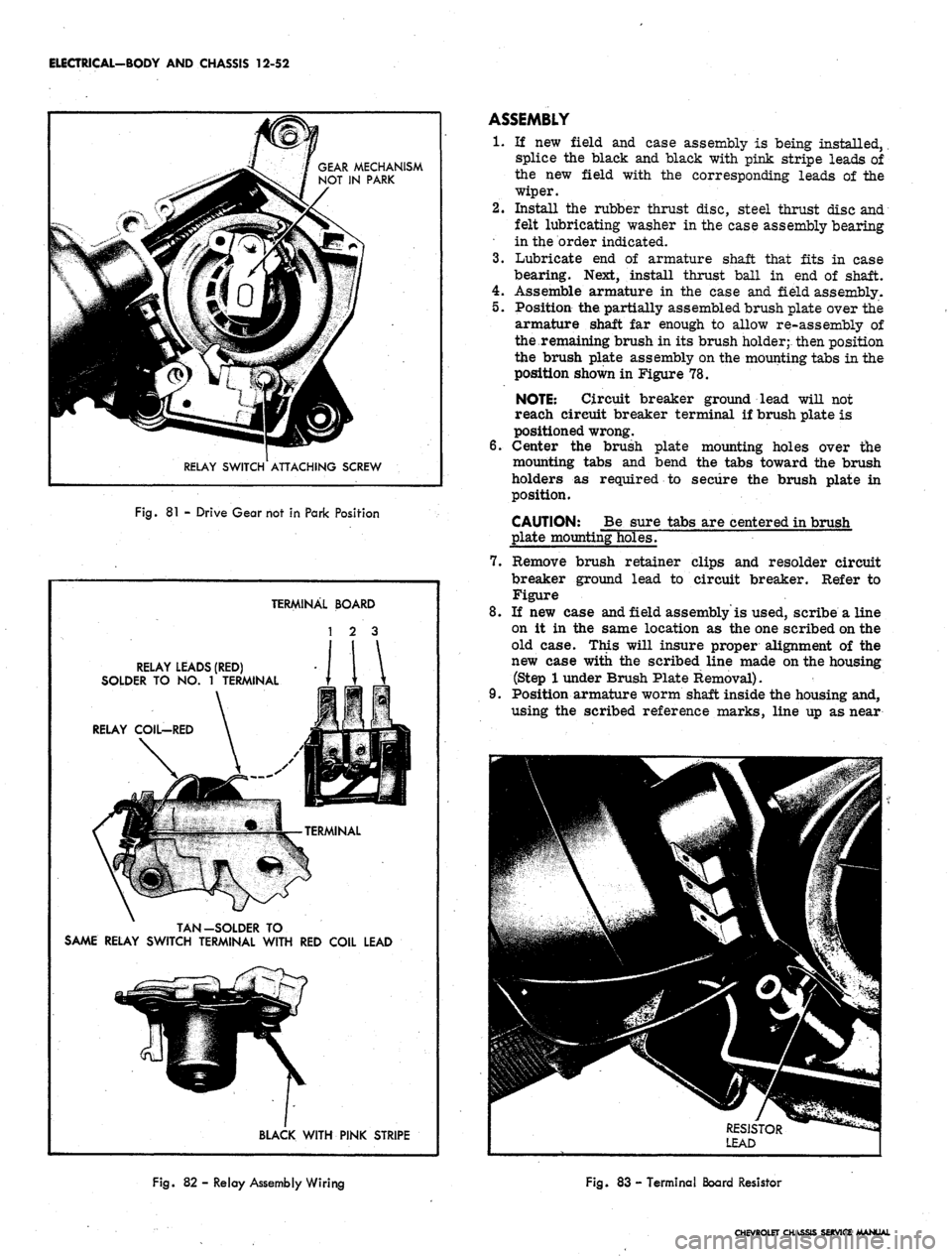
GEAR MECHANISM
NOT IN PARK
RELAY SWITCH ATTACHING SCREW
Fig.
81 -
Drive Gear not
in
Park Position
TERMINAL BOARD
1 2 3
RELAY LEADS (RED)
SOLDER TO NO. 1 TERMINAL
RELAY
COIL-RED
TAN-SOLDER TO
SAME RELAY SWITCH TERMINAL WITH RED COIL LEAD
BLACK WITH PINK STRIPE
ASSEMBLY
1.
If new field and case assembly is being installed,
splice the black and black with pink stripe leads of
the new field with the corresponding leads of the
wiper.
2.
Install the rubber thrust disc, steel thrust disc and
felt lubricating washer in the case assembly bearing
in the order indicated.
3.
Lubricate end of armature shaft that fits in case
bearing. Next, install thrust ball in end of shaft.
4.
Assemble armature in the case and field assembly.
5.
Position the partially assembled brush plate over the
armature shaft far enough to allow re-assembly of
the remaining brush in its brush holder;- then position
the brush plate assembly on the mounting tabs in the
position shown in Figure 78.
NOTE: Circuit breaker ground lead will not
reach circuit breaker terminal if brush plate is
positioned wrong.
6. Center the brush plate mounting holes over the
mounting tabs and bend the tabs toward the brush
holders as required to secure the brush plate in
position.
CAUTION: Be sure tabs are centered in brush
plate mounting holes.
7.
Remove brush retainer clips and resolder circuit
breaker ground lead to circuit breaker. Refer to
Figure
8. If new case and field assembly'is used, scribe a line
on it in the same location as the one scribed on the
old case. This will insure proper alignment of the
new case with the scribed line made on the housing
(Step
1
under Brush Plate Removal).
9. Position armature worm shaft inside the housing and,
using the scribed reference marks, line up as near
Fig.
82 - Relay Assembly Wiring
Fig.
83 -
Terminal Board Resistor
CHEVROLET CHASSIS SERVICE MANUAL
Page 603 of 659
BUMPERS 14-2
placed in the tab of each bumper bracket. Dial the
adjustment washers in the tabs as required to posi-
tion the bumper at the correct mounted height
3.
Tighten all bolts securely, connect parking lamp wir-
ing, and lower vehicle.
REAR BUMPER ASSEMBLY (Fig. 2)
Removal
1.
Raise and support rear end of vehicle.
2.
Disconnect rear license plate lamp wiring.
3.
On Caprice models, disconnect back-up lamp wiring.
4.
Remove center face bar to frame attaching bolts lo-
cated behind license plate door.
5. Remove bolts from each side "attaching bumper
brackets and braces to frame.
6. Remove bumper from vehicle.
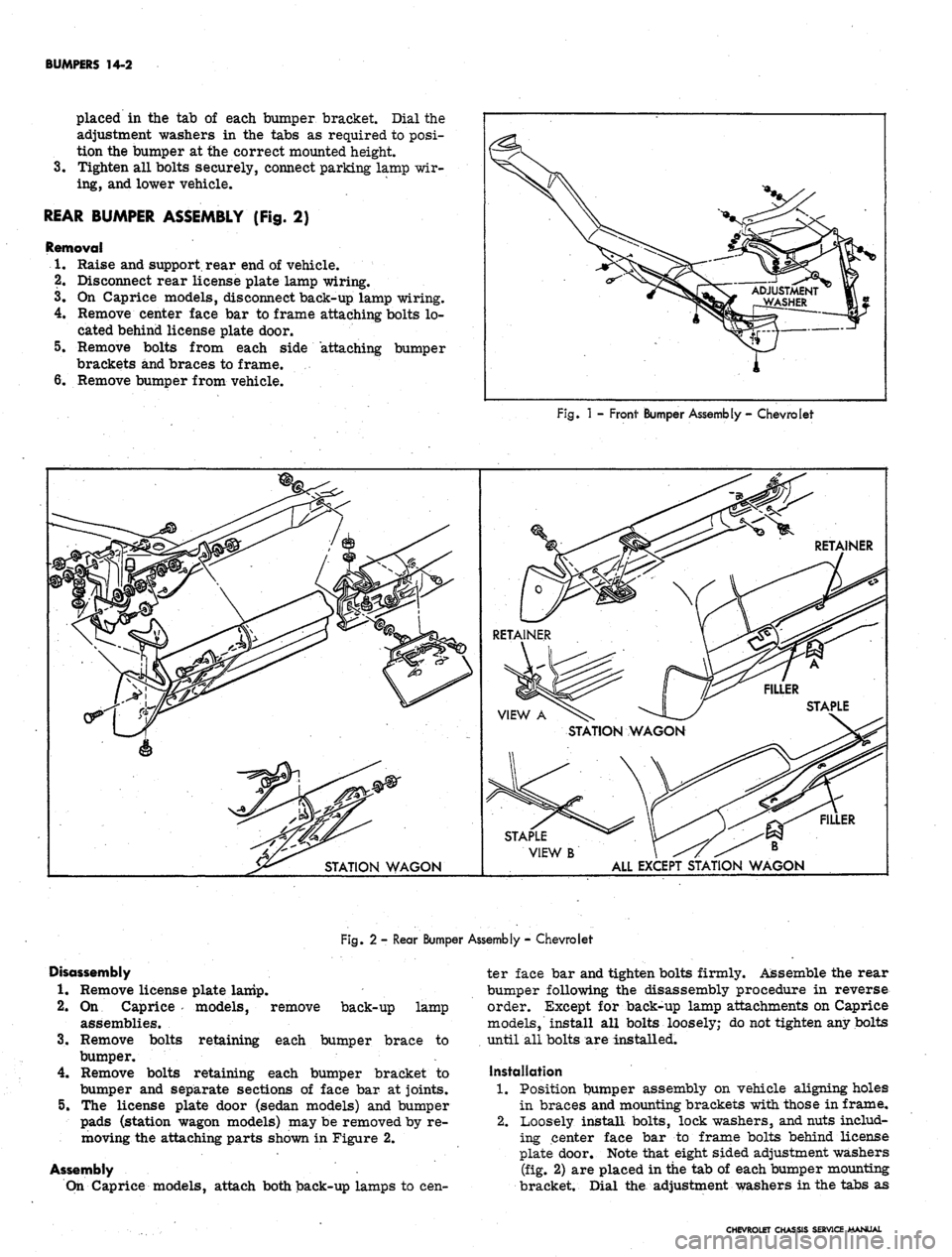
Fig.
1 -
Front Bumper Assembly
-
Chevrolet
FILLER
STAPLE
VIEW
B \ ^7 ^^ B
ALL EXCEPT STATION WAGON
Fig. 2 - Rear Bumper Assembly - Chevrolet
Disassembly
1.
Remove license plate lamp.
2.
On Caprice models, remove
assemblies.
Remove bolts
3.
back-up lamp
each bumper brace to
retaining
bumper.
4.
Remove bolts retaining each bumper bracket to
bumper and separate sections of face bar at joints.
5.
The license plate door (sedan models) and bumper
pads (station wagon models) may be removed by re-
moving the attaching parts shown in Figure 2.
Assembly
On Caprice models, attach both back-up lamps to cen-
ter face bar and tighten bolts firmly. Assemble the rear
bumper following the disassembly procedure in reverse
order. Except for back-up lamp attachments on Caprice
models, install all bolts loosely; do not tighten any bolts
until all bolts are installed.
Installation
1.
Position bumper assembly on vehicle aligning holes
in braces and mounting brackets with those in frame,
2.
Loosely install bolts, lock washers, and nuts includ-
ing center face bar to frame bolts behind license
plate door. Note that eight sided adjustment washers
(fig. 2) are placed in the tab of each bumper mounting
bracket. Dial the adjustment washers in the tabs as
CHEVROLET CHASSIS SERVICE MANUAL
Page 604 of 659
BUMPERS 14-3
required to position the bumper at the correct
mounted height. ,
3.
Tighten all mounting bolts securely and connect li-
cense plate lamp wiring. On Caprice models, con-
nect back-up lamp wiring. Lower vehicle.
GENERAL DESCRIPTION-CHEVELLE
The new front bumper is of a one piece design with the
parking and turn signal lamp assemblies attached to each
outboard end of the bumper.
The rear bumper is also of a one piece design with
provisions for rear gas fill. The back-up lamp assem-
blies are attached near the center of the bumper.
SERVICE OPERATIONS
FRONT BUMPER ASSEMBLY
Removal
1.
Raise and support front of vehicle.
2.
Disconnect parking lamp wiring. -
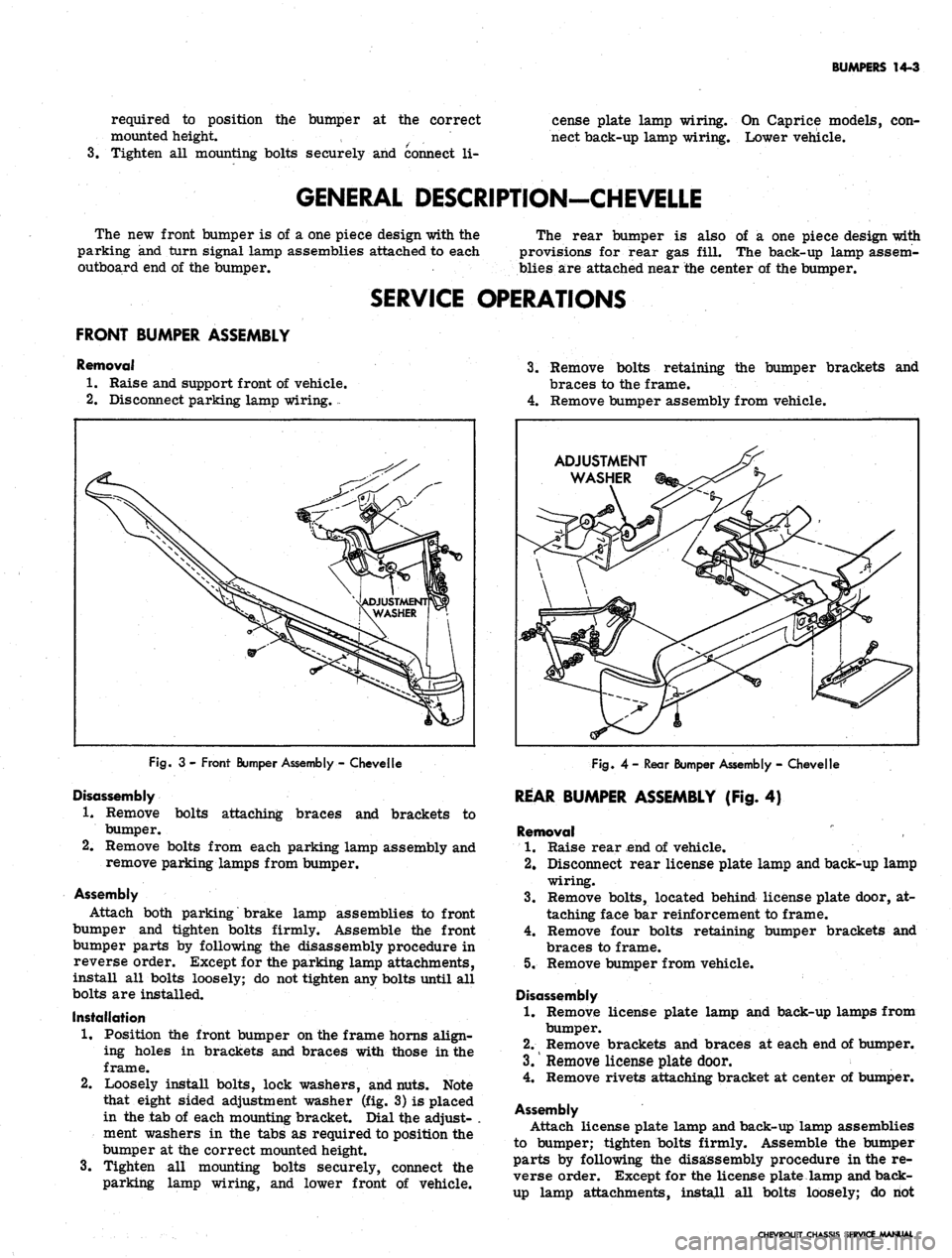
Fig.
3 - Front Bumper Assembly - Chevelle
Disassembly
1.
Remove bolts attaching braces and brackets to
bumper.
2.
Remove bolts from each parking lamp assembly and
remove parking lamps from bumper.
Assembly
Attach both parking brake lamp assemblies to front
bumper and tighten bolts firmly. Assemble the front
bumper parts by following the disassembly procedure in
reverse order. Except for the parking lamp attachments,
install all bolts loosely; do not tighten any bolts until all
bolts are installed.
Installation
1.
Position the front bumper on the frame horns align-
ing holes in brackets and braces with those in the
frame.
2.
Loosely install bolts, lock washers, and nuts. Note
that eight sided adjustment washer (fig. 3) is placed
in the tab of each mounting bracket. Dial tjie adjust- .
ment washers in the tabs as required to position the
bumper at the correct mounted height.
3.
Tighten all mounting bolts securely, connect the
parking lamp wiring, and lower front of vehicle.
3.
Remove bolts retaining the bumper brackets and
braces to the frame.
4.
Remove bumper assembly from vehicle.
ADJUSTMENT
WASHER
Fig.
4-Rear Bumper Assembly - Chevelle
REAR BUMPER ASSEMBLY (Fig. 4)
Removal
1.
Raise rear end of vehicle.
2.
Disconnect rear license plate lamp and back-up lamp
wiring.
3.
Remove bolts, located behind license plate door, at-
taching face bar reinforcement to frame.
4.
Remove four bolts retaining bumper brackets and
braces to frame.
5. Remove bumper from vehicle.
Disassembly
1.
Remove license plate lamp and back-up lamps from
bumper.
2.
Remove brackets and braces at each end of bumper.
3.
Remove license plate door.
4.
Remove rivets attaching bracket at center of bumper.
Assembly
Attach license plate lamp and back-up lamp assemblies
to bumper; tighten bolts firmly. Assemble the bumper
parts by following the disassembly procedure in the re-
verse order. Except for the license plate lamp and back-
up lamp attachments, install all bolts loosely; do riot
CHEVROLET CHASSIS SERVICE MANUAL
Page 608 of 659

BUMPERS 14-7
only and the distance between inner upper brace and
frame filled in with shims. Bolts may then be installed
to secure brace to frame.
REAR LICENSE PLATE HOUSING
The rear license plate housing may be removed from
the vehicle by removing the license plate and removing
the retaining screws as shown in Figure 9.
Fig.
9- Rear License Plate Housing
GENERAL DESCRIPTION-CAMARO
The Camaro front and rear bumpers are of a single
piece wrap around design. The front license plate bracket
functions as a bumper support between the valance panel
and bumper. Holes in the underside of bumpers, slightly
inboard of lower bumper bracket bolt, provide for new
jack load rest stud for jacking purposes.
SERVICE OPERATIONS
FRONT BUMPER ASSEMBLY (Fig. 10)
Removal
1.
Raise and support front end of vehicle.
2.
Remove bolts securing bumper support brackets to
frame.
3.
Remove bolts, one on each side at fender extension
panels, securing bumper to outer bumper bracket.
4.
Remove screws and nuts securing license plate
bracket to valance panel and remove bumper from
vehicle.
Disassembly
1.
Remove bolts attaching two support brackets to
bumper.
2.
Remove screw and nut securing license plate bracket
to bumper.
Assembly
Assemble the front bumper following the disassembly
procedure in reverse order. Install all bolts loosely; do
not tighten any bolts until all bolts are installed.
Installation
1.
Position assembled bumper on frame horns aligning
holes in bumper brackets with those in frame.
2.
Loosely install bolts, lock washers, and nuts. .Note
3.
the eight sided adjustment washers (fig. 10) are
placed in the tab of each bumper bracket. Dial the
adjustment washers in the tabs as required to posi-
tion the bumper at the correct mounted height.
Tighten all bolts securely and lower vehicle.
REAR BUMPER ASSEMBLY (Fig. 11)
Removal
1.
Raise and support rear end of vehicle.
2.
Remove bolts securing bumper brackets to frame
and rear fenders.
3.
Remove screws securing license plate bracket to
body and remove bumper from vehicle.
Disassembly
1.
Remove bolts securing four support brackets to
bumper.
2.
Remove rivets securing license plate bracket to
bumper.
Assembly
Assemble the rear bumper following the disassembly
procedure in reverse order. Install all bolts loosely; do
not tighten any bolts until all bolts are installed.
CHEVROLET CHASSIS SERVICE MANUAL