torque CHEVROLET DYNASTY 1993 Service Manual
[x] Cancel search | Manufacturer: CHEVROLET, Model Year: 1993, Model line: DYNASTY, Model: CHEVROLET DYNASTY 1993Pages: 2438, PDF Size: 74.98 MB
Page 524 of 2438
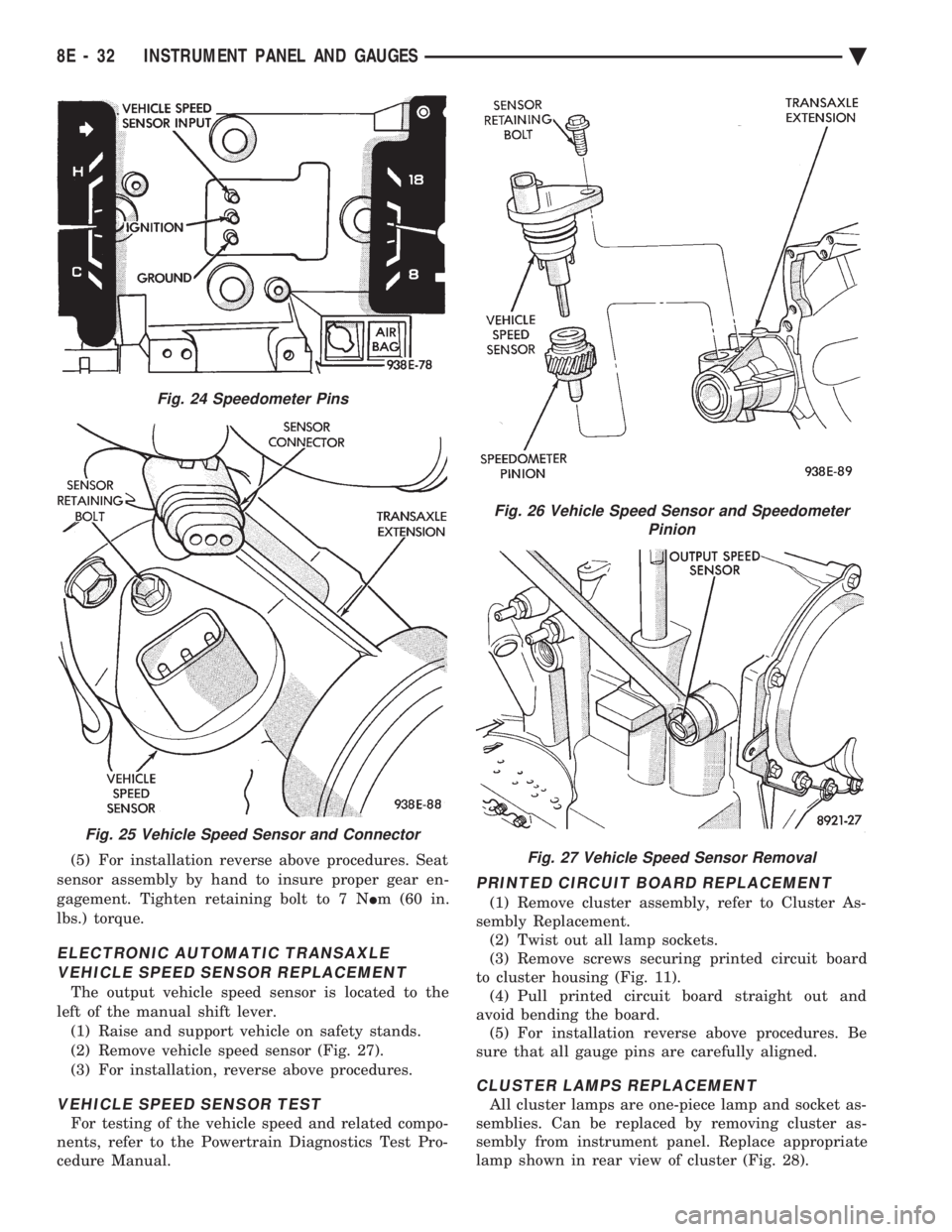
(5) For installation reverse above procedures. Seat
sensor assembly by hand to insure proper gear en-
gagement. Tighten retaining bolt to 7 N Im (60 in.
lbs.) torque.
ELECTRONIC AUTOMATIC TRANSAXLE VEHICLE SPEED SENSOR REPLACEMENT
The output vehicle speed sensor is located to the
left of the manual shift lever. (1) Raise and support vehicle on safety stands.
(2) Remove vehicle speed sensor (Fig. 27).
(3) For installation, reverse above procedures.
VEHICLE SPEED SENSOR TEST
For testing of the vehicle speed and related compo-
nents, refer to the Powertrain Diagnostics Test Pro-
cedure Manual.
PRINTED CIRCUIT BOARD REPLACEMENT
(1) Remove cluster assembly, refer to Cluster As-
sembly Replacement. (2) Twist out all lamp sockets.
(3) Remove screws securing printed circuit board
to cluster housing (Fig. 11). (4) Pull printed circuit board straight out and
avoid bending the board. (5) For installation reverse above procedures. Be
sure that all gauge pins are carefully aligned.
CLUSTER LAMPS REPLACEMENT
All cluster lamps are one-piece lamp and socket as-
semblies. Can be replaced by removing cluster as-
sembly from instrument panel. Replace appropriate
lamp shown in rear view of cluster (Fig. 28).
Fig. 24 Speedometer Pins
Fig. 25 Vehicle Speed Sensor and Connector
Fig. 26 Vehicle Speed Sensor and Speedometer Pinion
Fig. 27 Vehicle Speed Sensor Removal
8E - 32 INSTRUMENT PANEL AND GAUGES Ä
Page 535 of 2438
ELECTRONIC DIGITAL CLOCK
The electronic digital clock is in the radio. The
clock and radio each use the display panel built into
the radio. A digital readout indicates the time in
hours and minutes whenever the ignition switch is in
the ON or ACC position. When the ignition switch is in the ON or OFF po-
sition, or when the radio frequency is being dis-
played, time keeping is accurately maintained. The procedure for setting the clock varies slightly
with each radio. The correct procedure is described
under the individual radio operating instructions re-
ferred to in the Owner's manual supplied with the
vehicle.
WARNING LAMPS
The AG & AJ Body instrument clusters have warn-
ing lamps or indicators with the electronic cluster for
six different systems. These include low oil pressure,
check gauges, brake system, air bag, seat belt, mal-
function indicator (check engine) lamp.
CLUSTER AND GAUGE SERVICE AND TESTING
CAUTION: Disconnect negative battery cable, in en-
gine compartment, before servicing instrument
panel. When power is required for test purposes,
reconnect battery cable for test only. Disconnect negative battery cable after test and be-
fore continuing service procedures. It is not necessary to remove instrument cluster
from vehicle for gauge replacement. Gauges must be pulled straight out, when remov-
ing or pins may be damaged.
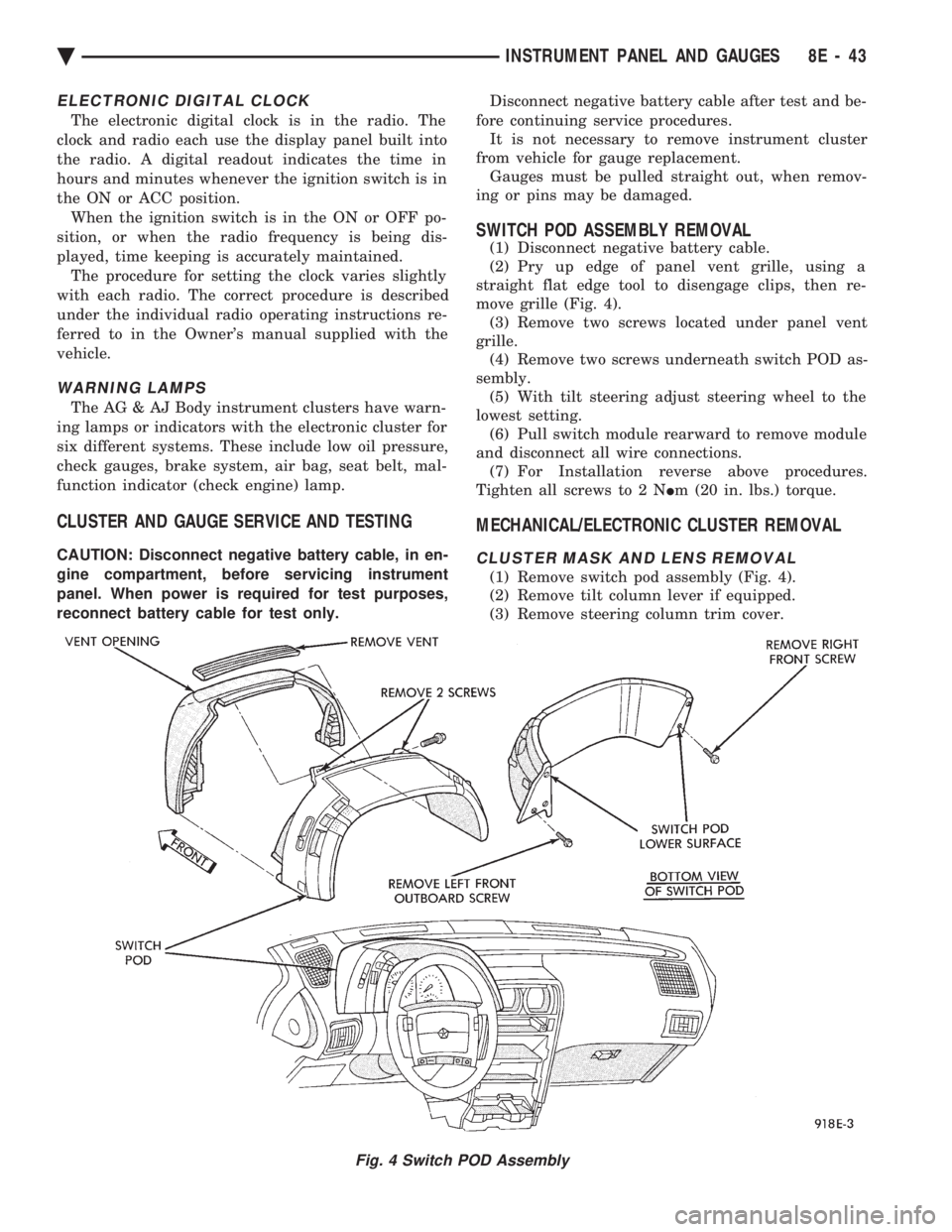
SWITCH POD ASSEMBLY REMOVAL
(1) Disconnect negative battery cable.
(2) Pry up edge of panel vent grille, using a
straight flat edge tool to disengage clips, then re-
move grille (Fig. 4). (3) Remove two screws located under panel vent
grille. (4) Remove two screws underneath switch POD as-
sembly. (5) With tilt steering adjust steering wheel to the
lowest setting. (6) Pull switch module rearward to remove module
and disconnect all wire connections. (7) For Installation reverse above procedures.
Tighten all screws to 2 N Im (20 in. lbs.) torque.
MECHANICAL/ELECTRONIC CLUSTER REMOVAL
CLUSTER MASK AND LENS REMOVAL
(1) Remove switch pod assembly (Fig. 4).
(2) Remove tilt column lever if equipped.
(3) Remove steering column trim cover.
Fig. 4 Switch POD Assembly
Ä INSTRUMENT PANEL AND GAUGES 8E - 43
Page 541 of 2438
SPEEDOMETER/ODOMETER ASSEMBLY REMOVAL
(1) Remove switch pod assembly.
(2) Remove cluster, refer to Cluster Removal.
(3) Remove mask and lens assembly.
(4) Remove tachometer, turbo gauge.
(5) Remove volt, temperature, oil and fuel gauge
assemblies. (6) Remove the speedometer/odometer assembly
from the cluster housing. (7) Disconnect pigtail connector from the cluster
printed circuit board. (8) For installation reverse above procedures. Lis-
ten for the pigtail connector to snap in place.
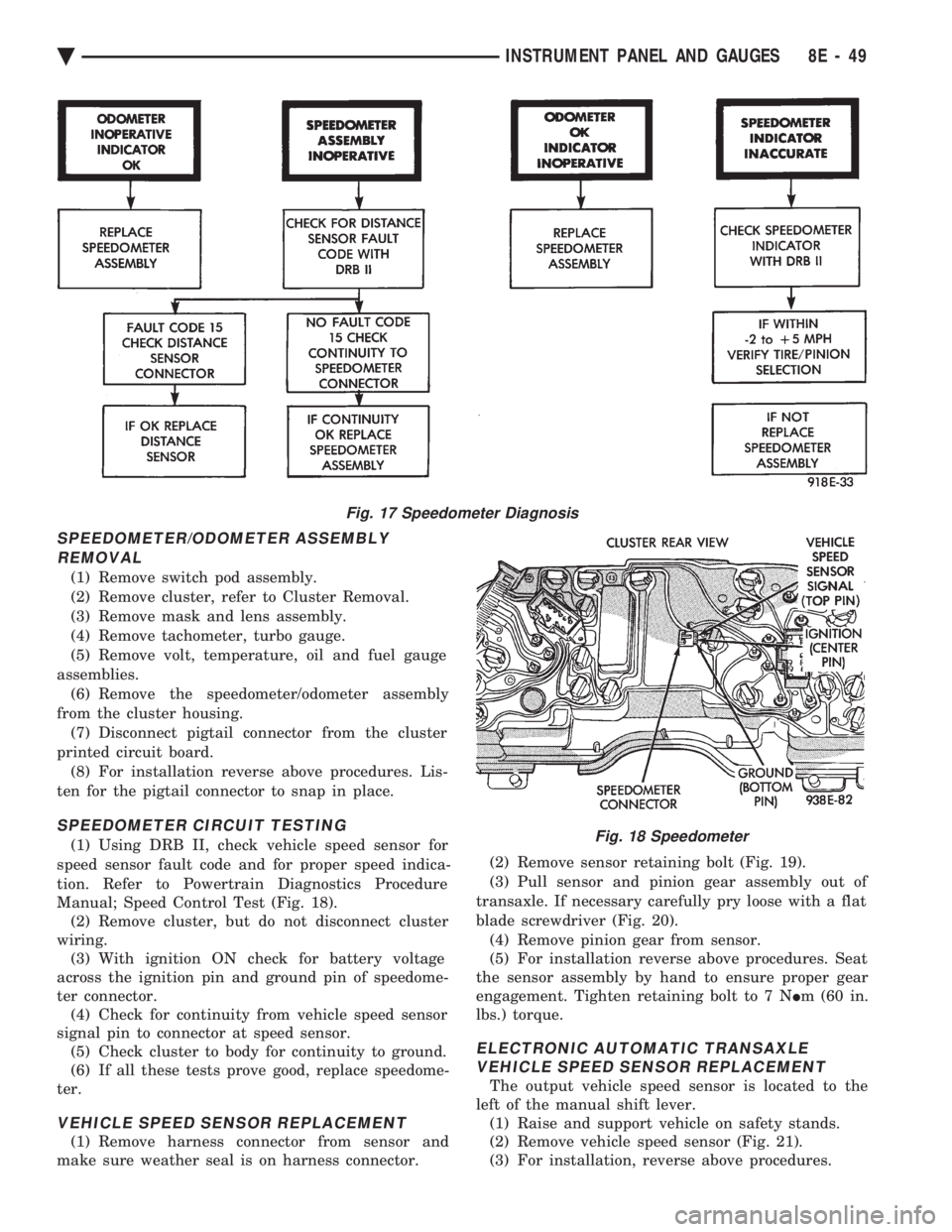
SPEEDOMETER CIRCUIT TESTING
(1) Using DRB II, check vehicle speed sensor for
speed sensor fault code and for proper speed indica-
tion. Refer to Powertrain Diagnostics Procedure
Manual; Speed Control Test (Fig. 18). (2) Remove cluster, but do not disconnect cluster
wiring. (3) With ignition ON check for battery voltage
across the ignition pin and ground pin of speedome-
ter connector. (4) Check for continuity from vehicle speed sensor
signal pin to connector at speed sensor. (5) Check cluster to body for continuity to ground.
(6) If all these tests prove good, replace speedome-
ter.
VEHICLE SPEED SENSOR REPLACEMENT
(1) Remove harness connector from sensor and
make sure weather seal is on harness connector. (2) Remove sensor retaining bolt (Fig. 19).
(3) Pull sensor and pinion gear assembly out of
transaxle. If necessary carefully pry loose with a flat
blade screwdriver (Fig. 20). (4) Remove pinion gear from sensor.
(5) For installation reverse above procedures. Seat
the sensor assembly by hand to ensure proper gear
engagement. Tighten retaining bolt to 7 N Im (60 in.
lbs.) torque.
ELECTRONIC AUTOMATIC TRANSAXLE VEHICLE SPEED SENSOR REPLACEMENT
The output vehicle speed sensor is located to the
left of the manual shift lever. (1) Raise and support vehicle on safety stands.
(2) Remove vehicle speed sensor (Fig. 21).
(3) For installation, reverse above procedures.
Fig. 17 Speedometer Diagnosis
Fig. 18 Speedometer
Ä INSTRUMENT PANEL AND GAUGES 8E - 49
Page 557 of 2438
ment cluster and pin 43 of the powertrain control
module connector, replace the powertrain control
module. (8) If all tests performed test good replace the ta-
chometer drive module. (9) If the tachometer continues to be inoperative,
replace the tachometer assembly.
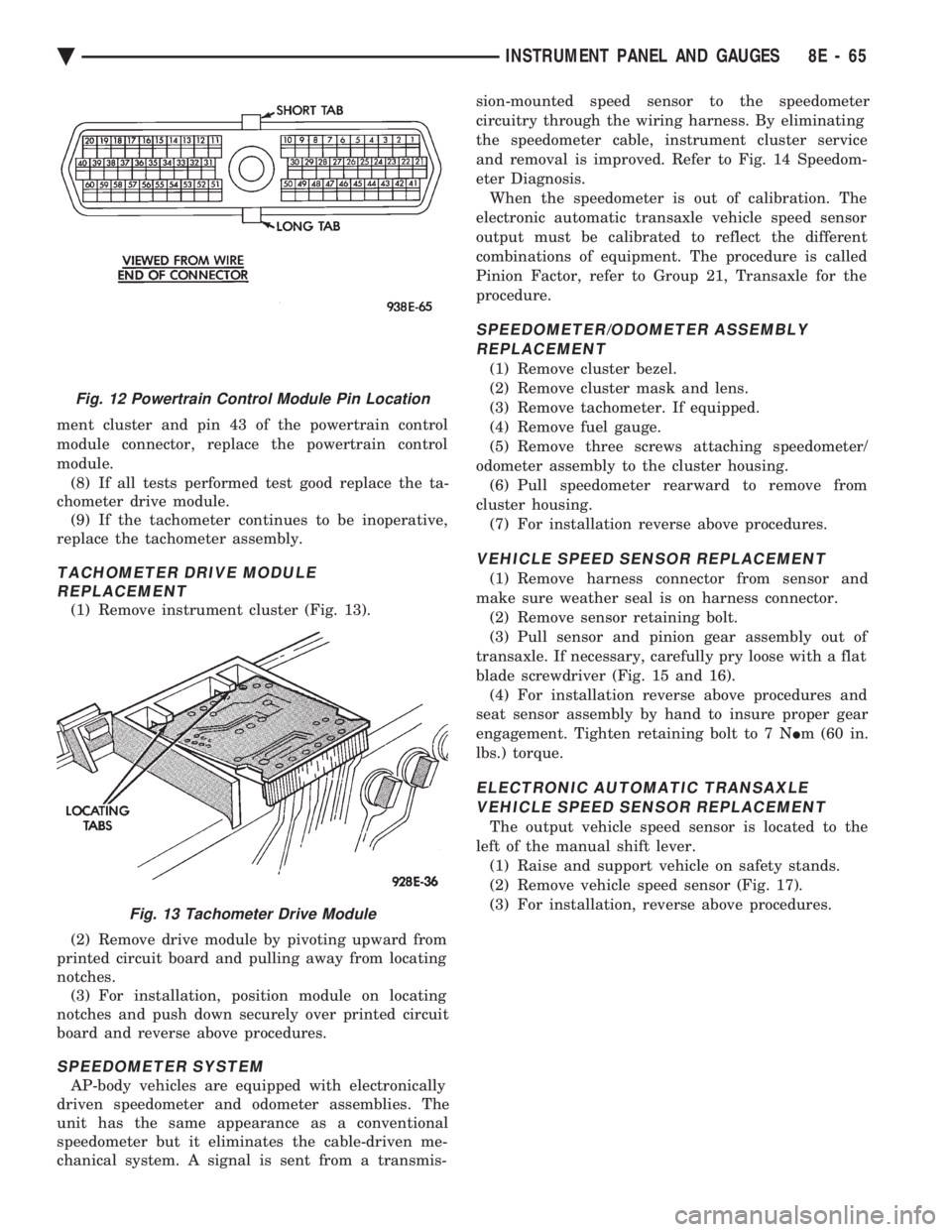
TACHOMETER DRIVE MODULE REPLACEMENT
(1) Remove instrument cluster (Fig. 13).
(2) Remove drive module by pivoting upward from
printed circuit board and pulling away from locating
notches. (3) For installation, position module on locating
notches and push down securely over printed circuit
board and reverse above procedures.
SPEEDOMETER SYSTEM
AP-body vehicles are equipped with electronically
driven speedometer and odometer assemblies. The
unit has the same appearance as a conventional
speedometer but it eliminates the cable-driven me-
chanical system. A signal is sent from a transmis- sion-mounted speed sensor to the speedometer
circuitry through the wiring harness. By eliminating
the speedometer cable, instrument cluster service
and removal is improved. Refer to Fig. 14 Speedom-
eter Diagnosis.
When the speedometer is out of calibration. The
electronic automatic transaxle vehicle speed sensor
output must be calibrated to reflect the different
combinations of equipment. The procedure is called
Pinion Factor, refer to Group 21, Transaxle for the
procedure.
SPEEDOMETER/ODOMETER ASSEMBLY REPLACEMENT
(1) Remove cluster bezel.
(2) Remove cluster mask and lens.
(3) Remove tachometer. If equipped.
(4) Remove fuel gauge.
(5) Remove three screws attaching speedometer/
odometer assembly to the cluster housing. (6) Pull speedometer rearward to remove from
cluster housing. (7) For installation reverse above procedures.
VEHICLE SPEED SENSOR REPLACEMENT
(1) Remove harness connector from sensor and
make sure weather seal is on harness connector. (2) Remove sensor retaining bolt.
(3) Pull sensor and pinion gear assembly out of
transaxle. If necessary, carefully pry loose with a flat
blade screwdriver (Fig. 15 and 16). (4) For installation reverse above procedures and
seat sensor assembly by hand to insure proper gear
engagement. Tighten retaining bolt to 7 N Im (60 in.
lbs.) torque.
ELECTRONIC AUTOMATIC TRANSAXLE VEHICLE SPEED SENSOR REPLACEMENT
The output vehicle speed sensor is located to the
left of the manual shift lever. (1) Raise and support vehicle on safety stands.
(2) Remove vehicle speed sensor (Fig. 17).
(3) For installation, reverse above procedures.
Fig. 12 Powertrain Control Module Pin Location
Fig. 13 Tachometer Drive Module
Ä INSTRUMENT PANEL AND GAUGES 8E - 65
Page 589 of 2438
(8) Upon establishing that the fault is in the an-
tenna assembly, it may be traced to one or more of
the following conditions: (a) Broken lead-in wire or shielding.
(b) Grounded lead-in wire or mast assembly.
(c) Moisture in support tube or lead-in assembly.
(d) Poor connection at antenna lead-in assembly
or shielding ground.
REMOVAL
(1) Disconnect battery negative cable.
(2) Remove the right front fender splash shield fas-
teners and pull shield away from the wheel housing.
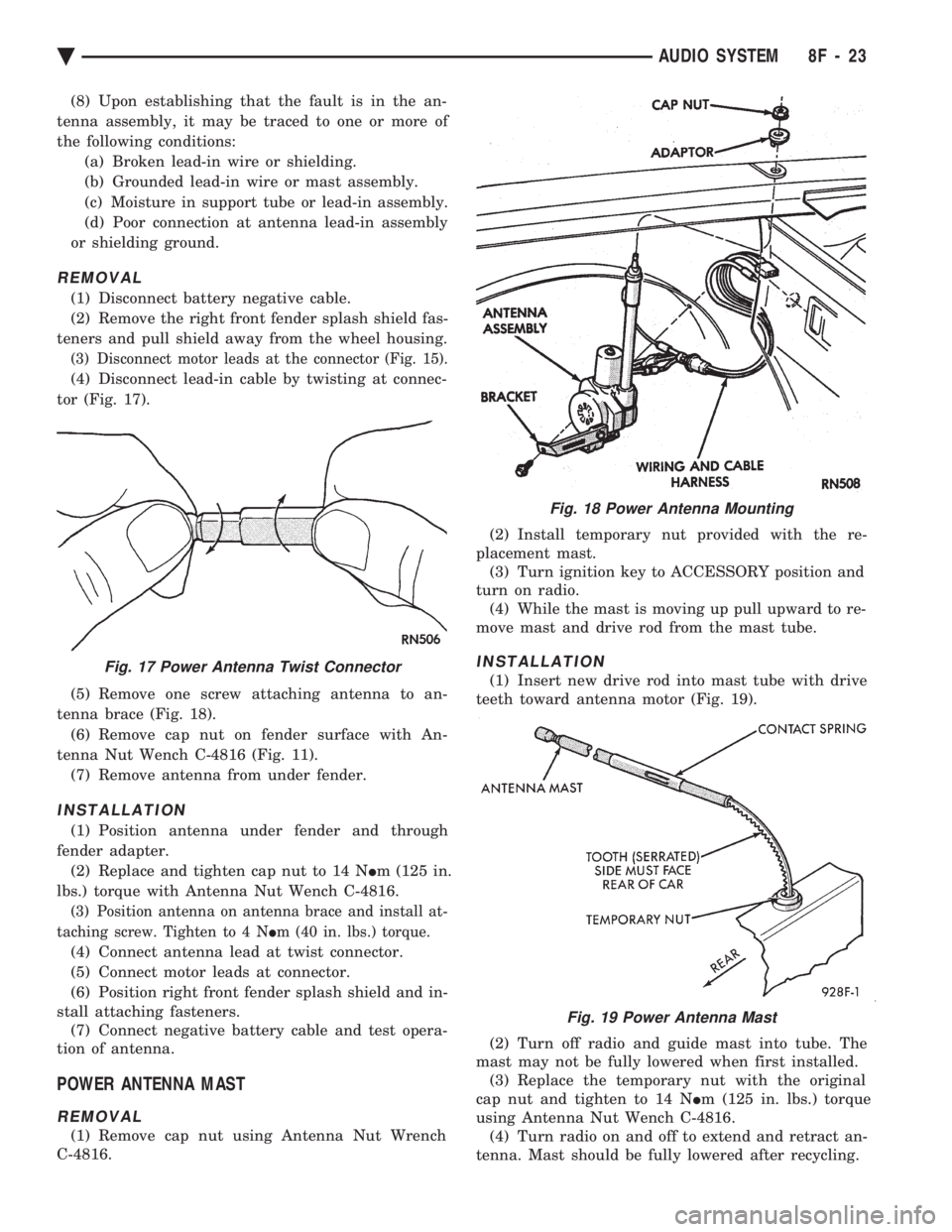
(3) Disconnect motor leads at the connector (Fig. 15).
(4) Disconnect lead-in cable by twisting at connec-
tor (Fig. 17).
(5) Remove one screw attaching antenna to an-
tenna brace (Fig. 18). (6) Remove cap nut on fender surface with An-
tenna Nut Wench C-4816 (Fig. 11). (7) Remove antenna from under fender.
INSTALLATION
(1) Position antenna under fender and through
fender adapter. (2) Replace and tighten cap nut to 14 N Im (125 in.
lbs.) torque with Antenna Nut Wench C-4816.
(3) Position antenna on antenna brace and install at-
taching screw. Tighten to 4 N Im (40 in. lbs.) torque.
(4) Connect antenna lead at twist connector.
(5) Connect motor leads at connector.
(6) Position right front fender splash shield and in-
stall attaching fasteners. (7) Connect negative battery cable and test opera-
tion of antenna.
POWER ANTENNA MAST
REMOVAL
(1) Remove cap nut using Antenna Nut Wrench
C-4816. (2) Install temporary nut provided with the re-
placement mast. (3) Turn ignition key to ACCESSORY position and
turn on radio. (4) While the mast is moving up pull upward to re-
move mast and drive rod from the mast tube.
INSTALLATION
(1) Insert new drive rod into mast tube with drive
teeth toward antenna motor (Fig. 19).
(2) Turn off radio and guide mast into tube. The
mast may not be fully lowered when first installed. (3) Replace the temporary nut with the original
cap nut and tighten to 14 N Im (125 in. lbs.) torque
using Antenna Nut Wench C-4816. (4) Turn radio on and off to extend and retract an-
tenna. Mast should be fully lowered after recycling.
Fig. 18 Power Antenna Mounting
Fig. 17 Power Antenna Twist Connector
Fig. 19 Power Antenna Mast
Ä AUDIO SYSTEM 8F - 23
Page 612 of 2438
(4) Disconnect electrical connector and vacuum
hose. (5) Pull cable away from servo to expose retaining
clip and remove clip attaching cable to servo.
INSTALLATION
(1) With throttle in full open position align hole in
vehicle speed control cable sleeve with hole in servo
pin and install retaining clip. (2) Connect vacuum hose to servo.
(3) Connect electrical connector.
(4) Position mounting bracket and install screws
attaching bracket and tighten to 12 N Im (105 in.
lbs.) torque. (5) Insert servo studs through holes in vehicle
speed control cable and mounting bracket. (6) Install nuts, tighten to 7 N Im (60 in. lbs.)
torque.
VEHICLE SPEED CONTROL SWITCH REMOVAL
The vehicle speed control switch is mounted in the
steering wheel and wired through the clock spring
device under the steering wheel hub (Fig.1).
WARNING: IF REMOVAL OF AIR BAG MODULE IS
NECESSARY, REFER TO GROUP 8M, RESTRAINT
SYSTEMS.
REMOVAL
(1) Turn off ignition.
(2) Remove two screws from back side of steering
wheel. (3) Rock switch away from air bag or horn pad
while lifting switch out of steering wheel. (4) Disconnect 4-way electrical connector.
INSTALLATION
(1) Turn off ignition.
(2) Connect 4-way electrical connector from clock
spring to switch. (3) Place switch in steering wheel, sliding the for-
ward edge of switch under air bag or horn pad. Line
up locating pins on switch with holes in steering
wheel frame. (4) Attach switch to wheel with two screws start-
ing with the screw at the left end of the switch.
8H - 10 VEHICLE SPEED CONTROL Ä
Page 616 of 2438
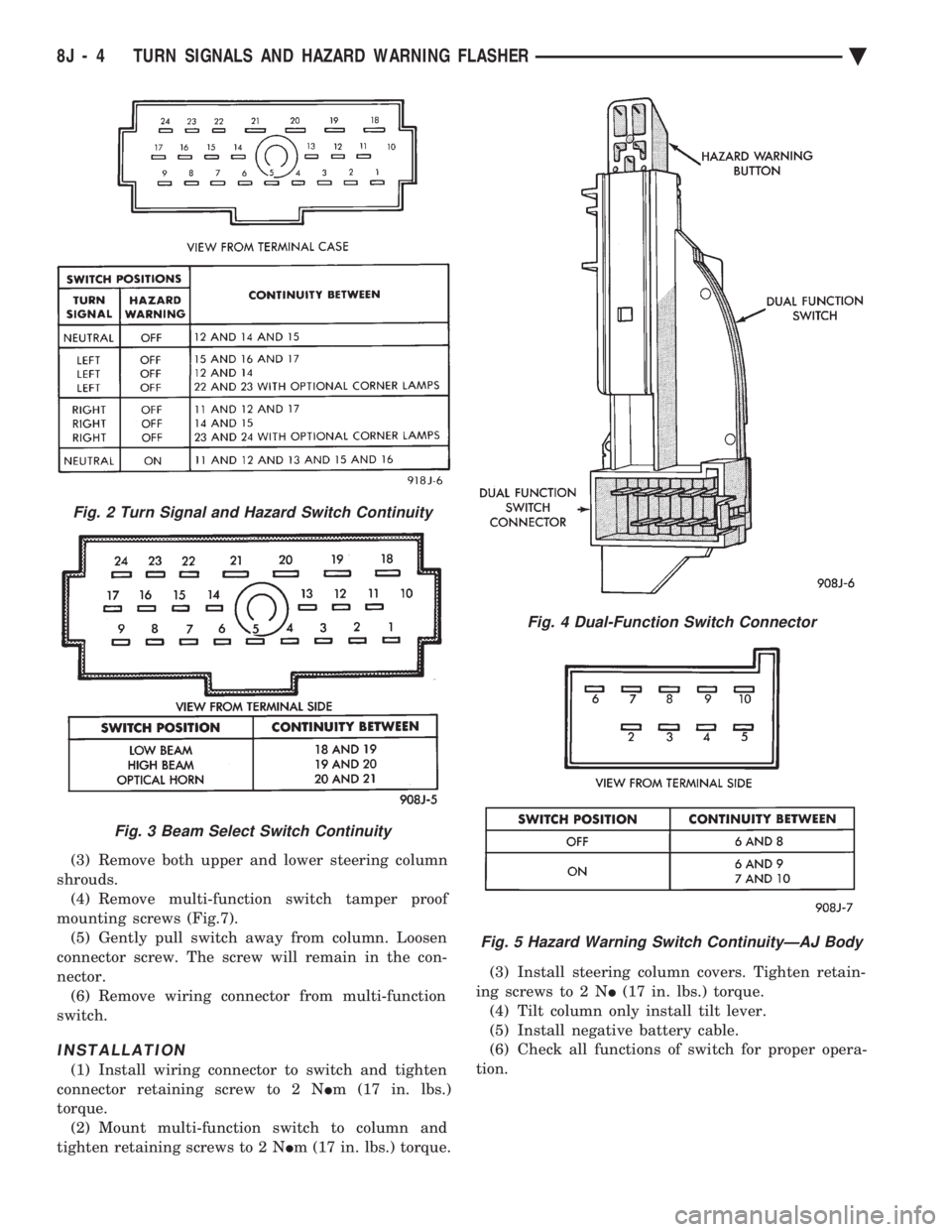
(3) Remove both upper and lower steering column
shrouds. (4) Remove multi-function switch tamper proof
mounting screws (Fig.7). (5) Gently pull switch away from column. Loosen
connector screw. The screw will remain in the con-
nector. (6) Remove wiring connector from multi-function
switch.
INSTALLATION
(1) Install wiring connector to switch and tighten
connector retaining screw to 2 N Im (17 in. lbs.)
torque. (2) Mount multi-function switch to column and
tighten retaining screws to 2 N Im (17 in. lbs.) torque. (3) Install steering column covers. Tighten retain-
ing screws to 2 N I(17 in. lbs.) torque.
(4) Tilt column only install tilt lever.
(5) Install negative battery cable.
(6) Check all functions of switch for proper opera-
tion.
Fig. 2 Turn Signal and Hazard Switch Continuity
Fig. 3 Beam Select Switch Continuity
Fig. 4 Dual-Function Switch Connector
Fig. 5 Hazard Warning Switch ContinuityÐAJ Body
8J - 4 TURN SIGNALS AND HAZARD WARNING FLASHER Ä
Page 617 of 2438
DUAL-FUNCTION SWITCHÐAG AND AJ BODIES
REMOVAL
(1) Disconnect negative battery cable.
(2) Tilt column only remove tilt lever.
(3) Remove three attaching screws, in the upper
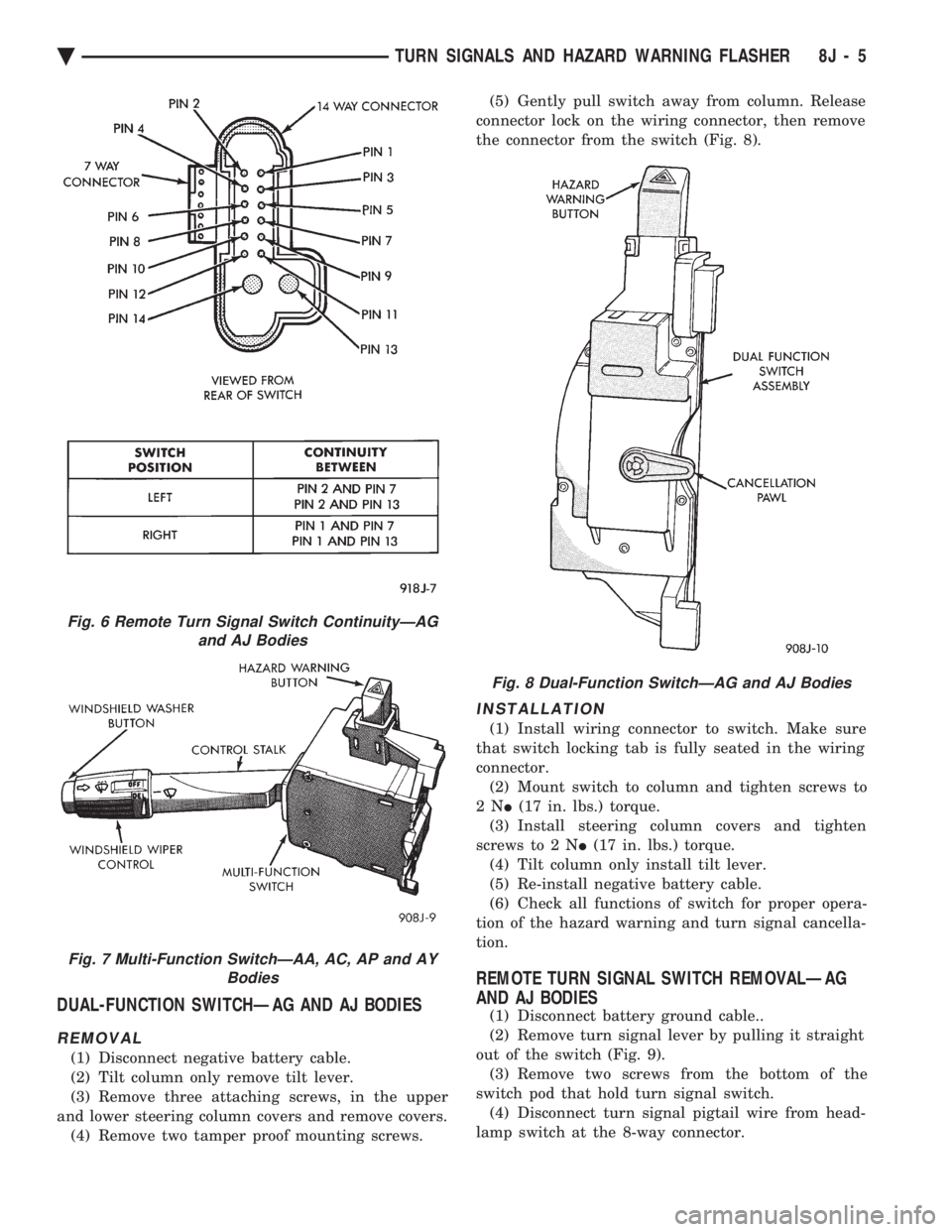
and lower steering column covers and remove covers. (4) Remove two tamper proof mounting screws. (5) Gently pull switch away from column. Release
connector lock on the wiring connector, then remove
the connector from the switch (Fig. 8).
INSTALLATION
(1) Install wiring connector to switch. Make sure
that switch locking tab is fully seated in the wiring
connector. (2) Mount switch to column and tighten screws to
2N I(17 in. lbs.) torque.
(3) Install steering column covers and tighten
screws to 2 N I(17 in. lbs.) torque.
(4) Tilt column only install tilt lever.
(5) Re-install negative battery cable.
(6) Check all functions of switch for proper opera-
tion of the hazard warning and turn signal cancella-
tion.
REMOTE TURN SIGNAL SWITCH REMOVALÐAG
AND AJ BODIES
(1) Disconnect battery ground cable..
(2) Remove turn signal lever by pulling it straight
out of the switch (Fig. 9). (3) Remove two screws from the bottom of the
switch pod that hold turn signal switch. (4) Disconnect turn signal pigtail wire from head-
lamp switch at the 8-way connector.
Fig. 6 Remote Turn Signal Switch ContinuityÐAG and AJ Bodies
Fig. 7 Multi-Function SwitchÐAA, AC, AP and AY Bodies
Fig. 8 Dual-Function SwitchÐAG and AJ Bodies
Ä TURN SIGNALS AND HAZARD WARNING FLASHER 8J - 5
Page 623 of 2438
(3) Secure arm to pivot with attaching nut and
tighten 17 to 22 N Im (155 to 195 in. lbs.) torque.
(4) Close head cover and remove pin from arm pin
hole.
WIPER ARM ADJUSTMENT
FRONT ARM ADJUSTMENT
(1) Cycle the wiper motor into the PARK position.
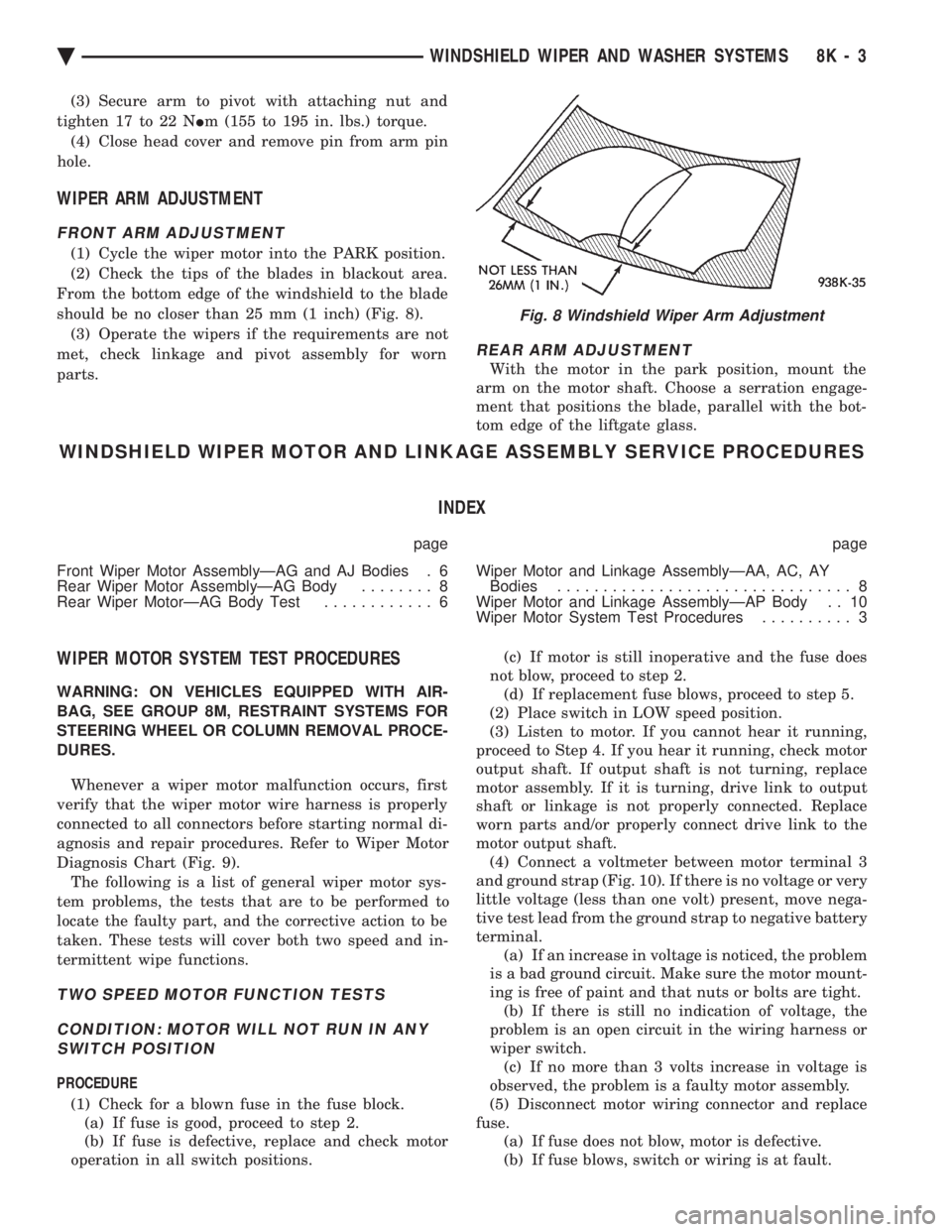
(2) Check the tips of the blades in blackout area.
From the bottom edge of the windshield to the blade
should be no closer than 25 mm (1 inch) (Fig. 8). (3) Operate the wipers if the requirements are not
met, check linkage and pivot assembly for worn
parts.
REAR ARM ADJUSTMENT
With the motor in the park position, mount the
arm on the motor shaft. Choose a serration engage-
ment that positions the blade, parallel with the bot-
tom edge of the liftgate glass.
WINDSHIELD WIPER MOTOR AND LINKAGE ASSEMBLY SERVICE PROCEDURES
INDEX
page page
Front Wiper Motor AssemblyÐAG and AJ Bodies . 6
Rear Wiper Motor AssemblyÐAG Body ........ 8
Rear Wiper MotorÐAG Body Test ............ 6 Wiper Motor and Linkage AssemblyÐAA, AC, AY
Bodies ................................ 8
Wiper Motor and Linkage AssemblyÐAP Body . . 10
Wiper Motor System Test Procedures .......... 3
WIPER MOTOR SYSTEM TEST PROCEDURES
WARNING: ON VEHICLES EQUIPPED WITH AIR-
BAG, SEE GROUP 8M, RESTRAINT SYSTEMS FOR
STEERING WHEEL OR COLUMN REMOVAL PROCE-
DURES.
Whenever a wiper motor malfunction occurs, first
verify that the wiper motor wire harness is properly
connected to all connectors before starting normal di-
agnosis and repair procedures. Refer to Wiper Motor
Diagnosis Chart (Fig. 9). The following is a list of general wiper motor sys-
tem problems, the tests that are to be performed to
locate the faulty part, and the corrective action to be
taken. These tests will cover both two speed and in-
termittent wipe functions.
TWO SPEED MOTOR FUNCTION TESTS
CONDITION: MOTOR WILL NOT RUN IN ANY SWITCH POSITION
PROCEDURE
(1) Check for a blown fuse in the fuse block. (a) If fuse is good, proceed to step 2.
(b) If fuse is defective, replace and check motor
operation in all switch positions. (c) If motor is still inoperative and the fuse does
not blow, proceed to step 2. (d) If replacement fuse blows, proceed to step 5.
(2) Place switch in LOW speed position.
(3) Listen to motor. If you cannot hear it running,
proceed to Step 4. If you hear it running, check motor
output shaft. If output shaft is not turning, replace
motor assembly. If it is turning, drive link to output
shaft or linkage is not properly connected. Replace
worn parts and/or properly connect drive link to the
motor output shaft. (4) Connect a voltmeter between motor terminal 3
and ground strap (Fig. 10). If there is no voltage or very
little voltage (less than one volt) present, move nega-
tive test lead from the ground strap to negative battery
terminal. (a) If an increase in voltage is noticed, the problem
is a bad ground circuit. Make sure the motor mount-
ing is free of paint and that nuts or bolts are tight. (b) If there is still no indication of voltage, the
problem is an open circuit in the wiring harness or
wiper switch. (c) If no more than 3 volts increase in voltage is
observed, the problem is a faulty motor assembly.
(5) Disconnect motor wiring connector and replace
fuse. (a) If fuse does not blow, motor is defective.
(b) If fuse blows, switch or wiring is at fault.
Fig. 8 Windshield Wiper Arm Adjustment
Ä WINDSHIELD WIPER AND WASHER SYSTEMS 8K - 3
Page 628 of 2438
(4) Remove the cowl top plastic screen.
(5) Remove pivot screws.
(6) Remove wiper motor cover and disconnect wiring
harness. (7) Remove three motor mounting nuts.
(8) Push pivots down into plenum chamber and pull
motor out until it clears the mounting studs. Then
move it as far to the drivers side or outboard as it will
go. Pull right pivot and link out through opening. Shift
motor to opposite side or inboard of opening and
remove motor, left link and pivot. (9) Clamp motor crank in a vise and remove nut
from end of motor shaft. Do not rotate motor output
shaft from PARK position.
INSTALLATION
(1) Assemble linkage to motor. Make sure crank fits
over D slot on motor shaft. Tighten mounting nut to 10
to 11 N Im (90 to 100 in. lbs.) torque. Be sure motor is
still in park position before assembling to linkage, if
not temporarily connect motor to wiring and operate
switch to position motor in park before assembling
linkage. (2) Place left pivot and link into plenum chamber.(a) Slide it all the way to the left or outboard side
until motor clears studs and crank is behind sheet
metal. (b) Push right pivot and link through opening.
(c) Move assembly right and position motor on
studs.
(3) Install three motor mounting nuts and tighten 7
to8N Im (60 70 in. lbs.) torque.
(4) Position pivots and install pivot screws and
tighten 7 to 8 N Im (60 to 70 in. lbs.) torque.
(5) Connect wiring to motor.
(6) Install motor cover. Tighten screws to 4 N Im (35
in. lbs.) torque. (7) Attach reservoir hose to T-connector through hole
provided in cowl screen. (8) Use plastic fasteners to install cowl screen.
(9) Install arm and blade assemblies. Refer to Wiper
Arm Adjustment. Connect arm washer hoses to
T-connector.
REAR WIPER MOTOR ASSEMBLYÐAG BODY
REMOVAL
(1) Remove arm and blade assembly, refer to Arm
and Blade Removal. (2) Unlock and open liftgate.
(3) Remove trim panel refer to Group 23, Body.
(4) Disconnect feed wire connector from motor.
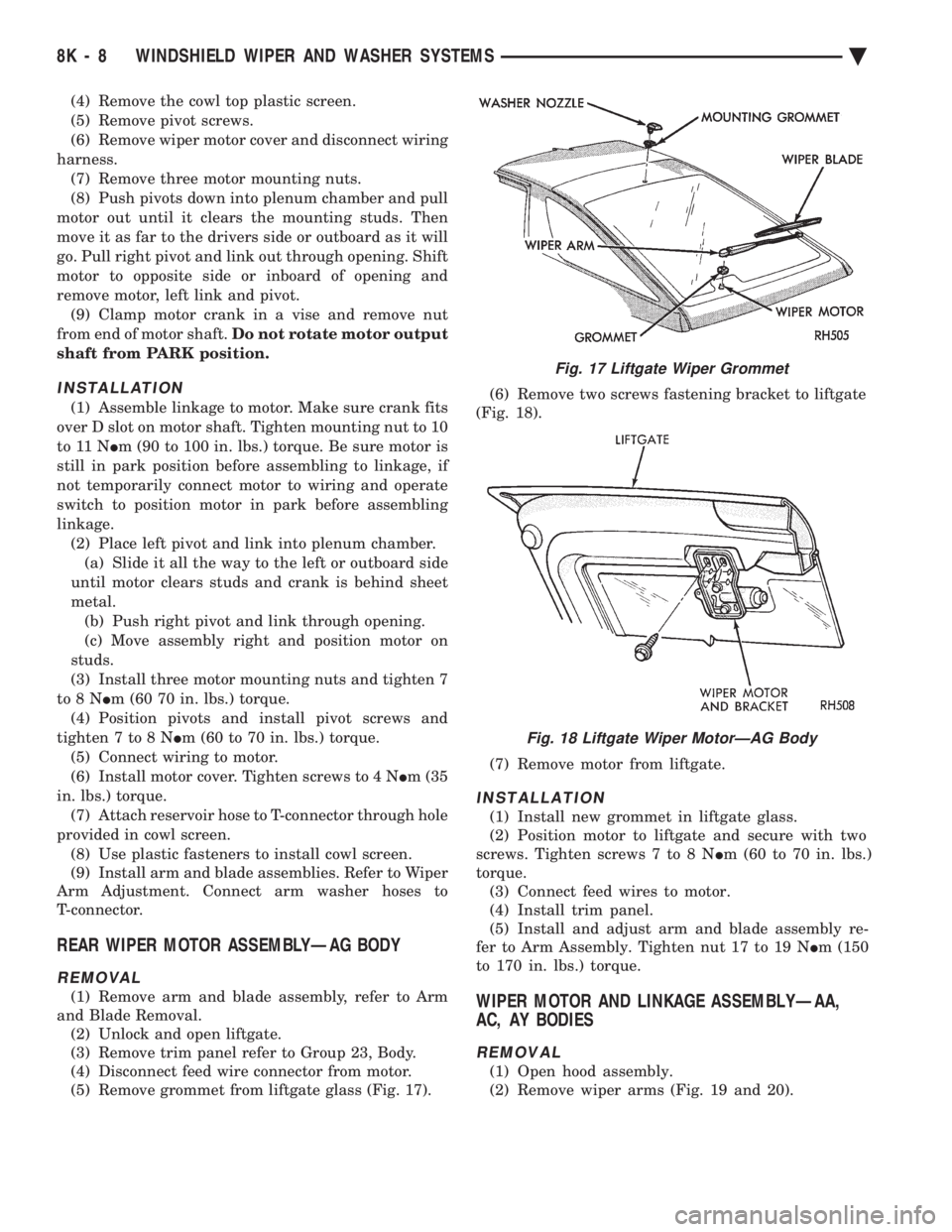
(5) Remove grommet from liftgate glass (Fig. 17). (6) Remove two screws fastening bracket to liftgate
(Fig. 18).
(7) Remove motor from liftgate.
INSTALLATION
(1) Install new grommet in liftgate glass.
(2) Position motor to liftgate and secure with two
screws. Tighten screws 7 to 8 N Im (60 to 70 in. lbs.)
torque. (3) Connect feed wires to motor.
(4) Install trim panel.
(5) Install and adjust arm and blade assembly re-
fer to Arm Assembly. Tighten nut 17 to 19 N Im (150
to 170 in. lbs.) torque.
WIPER MOTOR AND LINKAGE ASSEMBLYÐAA,
AC, AY BODIES
REMOVAL
(1) Open hood assembly.
(2) Remove wiper arms (Fig. 19 and 20).
Fig. 17 Liftgate Wiper Grommet
Fig. 18 Liftgate Wiper MotorÐAG Body
8K - 8 WINDSHIELD WIPER AND WASHER SYSTEMS Ä