battery CHEVROLET DYNASTY 1993 Service Manual
[x] Cancel search | Manufacturer: CHEVROLET, Model Year: 1993, Model line: DYNASTY, Model: CHEVROLET DYNASTY 1993Pages: 2438, PDF Size: 74.98 MB
Page 686 of 2438
AIR BAG MODULE
WARNING: BEFORE BEGINNING ANY AIR BAG
SYSTEM REMOVAL OR INSTALLATION PROCE-
DURES, REMOVE AND ISOLATE THE BATTERY
NEGATIVE (-) CABLE (GROUND) FROM THE VEHI-
CLE BATTERY. THIS IS THE ONLY SURE WAY TO
DISABLE THE AIR BAG SYSTEM. FAILURE TO DO
THIS COULD RESULT IN ACCIDENTAL AIR BAG
DEPLOYMENT AND POSSIBLE PERSONAL INJURY. UNDEPLOYED AIR BAG REMOVAL FROM THE
STEERING WHEEL: DISCONNECT BATTERY
GROUND CABLE AND ISOLATE. ALLOW SYS-
TEM CAPACITOR TO DISCHARGE FOR TWO
MINUTES. BEGIN AIR BAG REMOVAL.
REMOVAL
When removing a deployed module, wear rubber
gloves, eye protection and a long sleeve shirt as de-
posits may be on the surface which could irritate the
skin and eyes. (1) Disconnect battery negative cable and isolate.
(2) Wait two minutes for the reserve capacitor to
discharge before removing undeployed module. (3) Remove four nuts attaching air bag module to
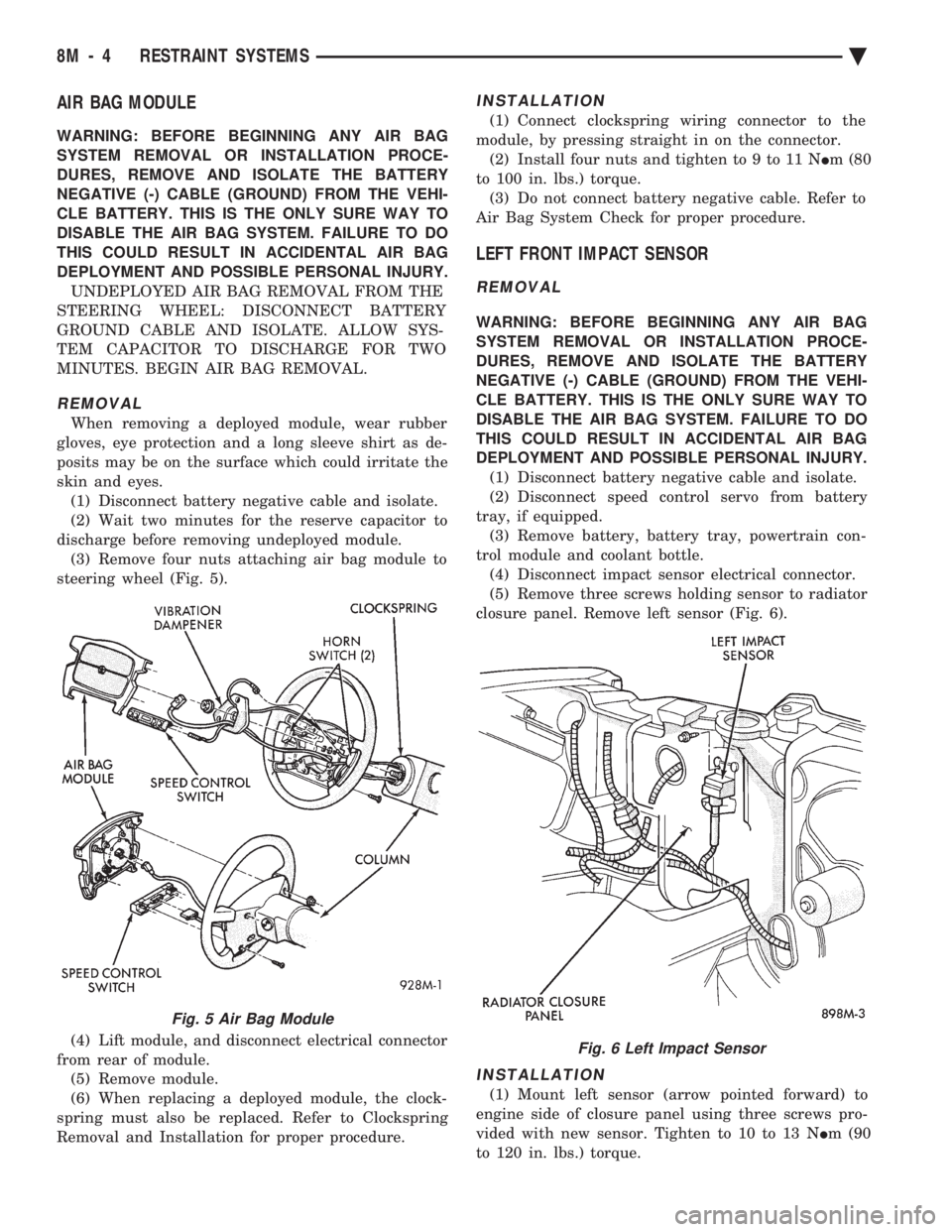
steering wheel (Fig. 5).
(4) Lift module, and disconnect electrical connector
from rear of module. (5) Remove module.
(6) When replacing a deployed module, the clock-
spring must also be replaced. Refer to Clockspring
Removal and Installation for proper procedure.
INSTALLATION
(1) Connect clockspring wiring connector to the
module, by pressing straight in on the connector. (2) Install four nuts and tighten to 9 to 11 N Im (80
to 100 in. lbs.) torque. (3) Do not connect battery negative cable. Refer to
Air Bag System Check for proper procedure.
LEFT FRONT IMPACT SENSOR
REMOVAL
WARNING: BEFORE BEGINNING ANY AIR BAG
SYSTEM REMOVAL OR INSTALLATION PROCE-
DURES, REMOVE AND ISOLATE THE BATTERY
NEGATIVE (-) CABLE (GROUND) FROM THE VEHI-
CLE BATTERY. THIS IS THE ONLY SURE WAY TO
DISABLE THE AIR BAG SYSTEM. FAILURE TO DO
THIS COULD RESULT IN ACCIDENTAL AIR BAG
DEPLOYMENT AND POSSIBLE PERSONAL INJURY. (1) Disconnect battery negative cable and isolate.
(2) Disconnect speed control servo from battery
tray, if equipped. (3) Remove battery, battery tray, powertrain con-
trol module and coolant bottle. (4) Disconnect impact sensor electrical connector.
(5) Remove three screws holding sensor to radiator
closure panel. Remove left sensor (Fig. 6).
INSTALLATION
(1) Mount left sensor (arrow pointed forward) to
engine side of closure panel using three screws pro-
vided with new sensor. Tighten to 10 to 13 N Im (90
to 120 in. lbs.) torque.
Fig. 5 Air Bag Module
Fig. 6 Left Impact Sensor
8M - 4 RESTRAINT SYSTEMS Ä
Page 687 of 2438
(2) Connect sensor wiring lead from harness to
connector on body of sensor. (3) Install coolant bottle, powertrain control mod-
ule, battery tray and battery. (4) Install speed control servo to battery tray, if
equipped. (5) Do not connect negative battery cable. Refer to
Air Bag Systems Check for proper procedure.
RIGHT FRONT IMPACT SENSOR
REMOVAL
(1) Disconnect battery ground cable and isolate.
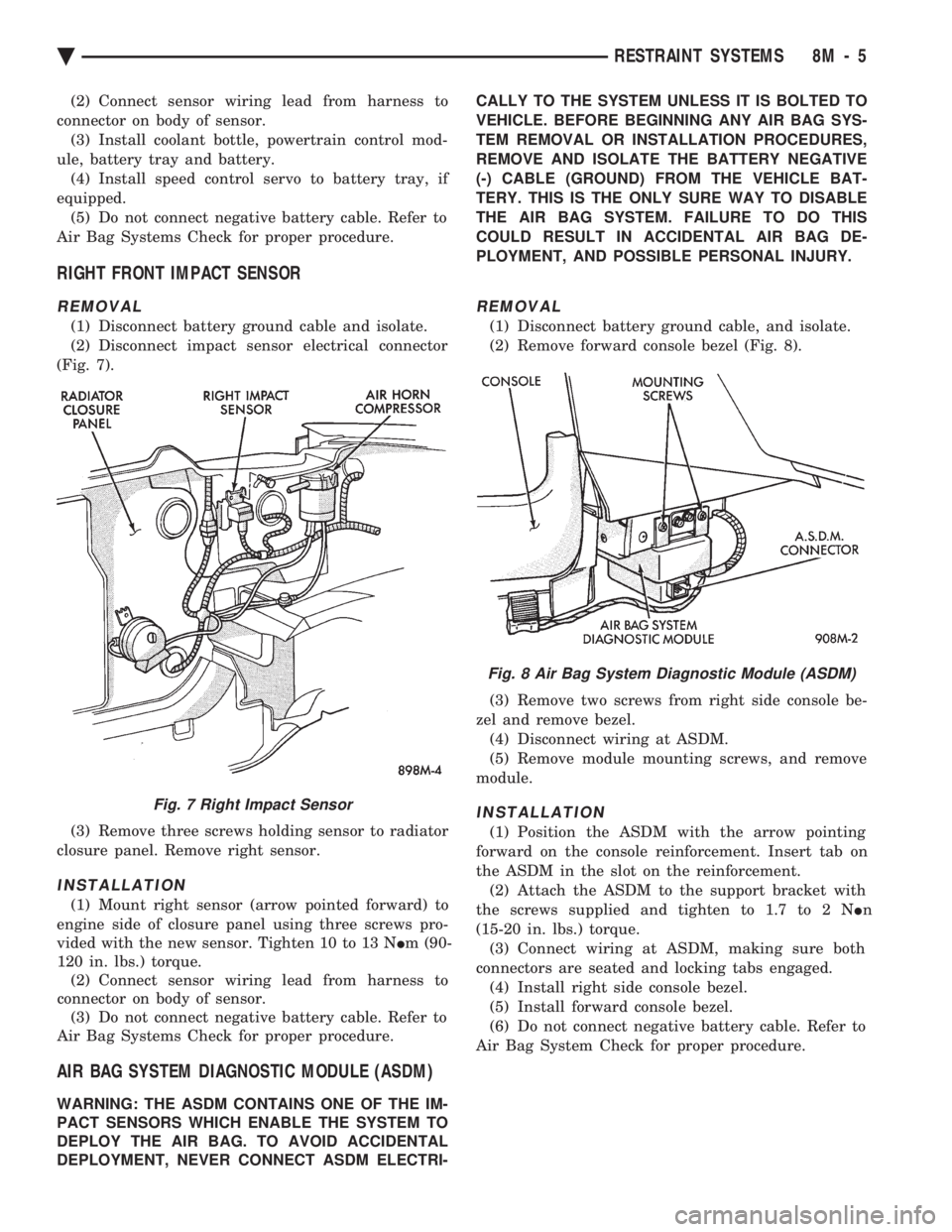
(2) Disconnect impact sensor electrical connector
(Fig. 7).
(3) Remove three screws holding sensor to radiator
closure panel. Remove right sensor.
INSTALLATION
(1) Mount right sensor (arrow pointed forward) to
engine side of closure panel using three screws pro-
vided with the new sensor. Tighten 10 to 13 N Im (90-
120 in. lbs.) torque. (2) Connect sensor wiring lead from harness to
connector on body of sensor. (3) Do not connect negative battery cable. Refer to
Air Bag Systems Check for proper procedure.
AIR BAG SYSTEM DIAGNOSTIC MODULE (ASDM)
WARNING: THE ASDM CONTAINS ONE OF THE IM-
PACT SENSORS WHICH ENABLE THE SYSTEM TO
DEPLOY THE AIR BAG. TO AVOID ACCIDENTAL
DEPLOYMENT, NEVER CONNECT ASDM ELECTRI- CALLY TO THE SYSTEM UNLESS IT IS BOLTED TO
VEHICLE. BEFORE BEGINNING ANY AIR BAG SYS-
TEM REMOVAL OR INSTALLATION PROCEDURES,
REMOVE AND ISOLATE THE BATTERY NEGATIVE
(-) CABLE (GROUND) FROM THE VEHICLE BAT-
TERY. THIS IS THE ONLY SURE WAY TO DISABLE
THE AIR BAG SYSTEM. FAILURE TO DO THIS
COULD RESULT IN ACCIDENTAL AIR BAG DE-
PLOYMENT, AND POSSIBLE PERSONAL INJURY.
REMOVAL
(1) Disconnect battery ground cable, and isolate.
(2) Remove forward console bezel (Fig. 8).
(3) Remove two screws from right side console be-
zel and remove bezel. (4) Disconnect wiring at ASDM.
(5) Remove module mounting screws, and remove
module.
INSTALLATION
(1) Position the ASDM with the arrow pointing
forward on the console reinforcement. Insert tab on
the ASDM in the slot on the reinforcement. (2) Attach the ASDM to the support bracket with
the screws supplied and tighten to 1.7 to 2 N In
(15-20 in. lbs.) torque. (3) Connect wiring at ASDM, making sure both
connectors are seated and locking tabs engaged. (4) Install right side console bezel.
(5) Install forward console bezel.
(6) Do not connect negative battery cable. Refer to
Air Bag System Check for proper procedure.
Fig. 7 Right Impact Sensor
Fig. 8 Air Bag System Diagnostic Module (ASDM)
Ä RESTRAINT SYSTEMS 8M - 5
Page 688 of 2438
CLOCKSPRING
WARNING: BEFORE BEGINNING ANY AIR BAG
SYSTEM REMOVAL OR INSTALLATION PROCE-
DURES, REMOVE AND ISOLATE THE BATTERY
NEGATIVE (-) CABLE (GROUND) FROM THE VEHI-
CLE BATTERY. THIS IS THE ONLY SURE WAY TO
DISABLE THE AIR BAG SYSTEM. FAILURE TO DO
SO COULD RESULT IN ACCIDENTAL AIR BAG DE-
PLOYMENT, AND POSSIBLE INJURY.
WHEN AN UNDEPLOYED AIR BAG ASSEMBLY
IS TO BE REMOVED FROM THE STEERING
WHEEL, DISCONNECT BATTERY GROUND CA-
BLE AND ISOLATE. ALLOW SYSTEM CAPACI-
TOR TO DISCHARGE FOR TWO MINUTES, THEN
BEGIN AIR BAG REMOVAL.
REMOVAL
(1) Place the front wheels in the straight ahead po-
sition before starting the repair. (2) Disconnect battery negative cable and isolate.
(3) Wait two minutes for the reserve capacitor to
discharge before removing undeployed module. (4) Remove the air bag module.
(5) Remove Speed Control switch and connector if
so equipped or cover. (6) Disconnect horn terminals.
(7) Remove the steering wheel.
(8) Remove upper and lower steering column
shrouds to gain access to clockspring wiring. (9) Disconnect the 2-way connector between the
clockspring and the instrument panel wiring harness
on top of the fuse block. (10) To remove, pull clockspring assembly from the
steering column by lifting locating fingers as neces-
sary. The clockspring cannot be repaired, and must
be replaced if faulty.
INSTALLATION
(1) Snap clockspring onto the steering column. If
the clockspring is not properly positioned, follow the
clockspring centering procedure before installing
steering wheel. (2) Connect the clockspring to the instrument
panel harness, ensure wiring locator clips are prop-
erly seated on wiring trough. Ensure harness locking
tabs are properly engaged. (3) Install steering column shrouds. Be sure air
bag wire is inside of shrouds. (4) Front wheels should still be in the straight-
ahead position. Install steering wheel, ensure the
flats on hub align with clockspring. Pull the horn
lead through the smaller upper hole. Pull the air bag
and speed control leads through the larger bottom
hole. Ensure leads are not pinched under the steer-
ing wheel. (5) Connect the horn lead wire, then the air bag
lead wire to the air bag module. (6) Install the air bag module and tighten nuts to
9to11N Im (80 to 100 in. lb.) torque.
(7) Install speed control switch and connector or
cover. (8) Do not connect battery negative cable. Refer to
Air Bag Systems Check for proper procedure.
CLOCKSPRING CENTERING PROCEDURE
If the rotating tape within the clockspring is not
positioned properly with the steering wheel and the
front wheels, the clockspring may fail during use.
The following procedure MUST BE USED to center
the clockspring if it is not known to be properly po-
sitioned, or if the front wheels were moved from the
straight ahead position.
WARNING: BEFORE BEGINNING ANY AIR BAG
SYSTEM REMOVAL OR INSTALLATION PROCE-
DURES, REMOVE AND ISOLATE THE BATTERY
NEGATIVE (-) CABLE (GROUND) FROM THE VEHI-
CLE BATTERY. THIS IS THE ONLY SURE WAY TO
DISABLE THE AIR BAG SYSTEM. FAILURE TO DO
THIS COULD RESULT IN ACCIDENTAL AIR BAG
DEPLOYMENT AND POSSIBLE INJURY.
WHEN AN UNDEPLOYED AIR BAG ASSEMBLY
IS TO BE REMOVED FROM THE STEERING
WHEEL, DISCONNECT BATTERY GROUND CA-
BLE AND ISOLATE. ALLOW SYSTEM CAPACI-
TOR TO DISCHARGE FOR TWO MINUTES, THEN
BEGIN AIR BAG REMOVAL. (1) Place front wheels in the straight ahead posi-
tion. (2) Wait two minutes for the reserve capacitor to
discharge before removing undeployed module. (3) Refer to Steering Wheel procedures for removal
of air bag module and steering wheel. (4) Depress the two plastic locking pins to disen-
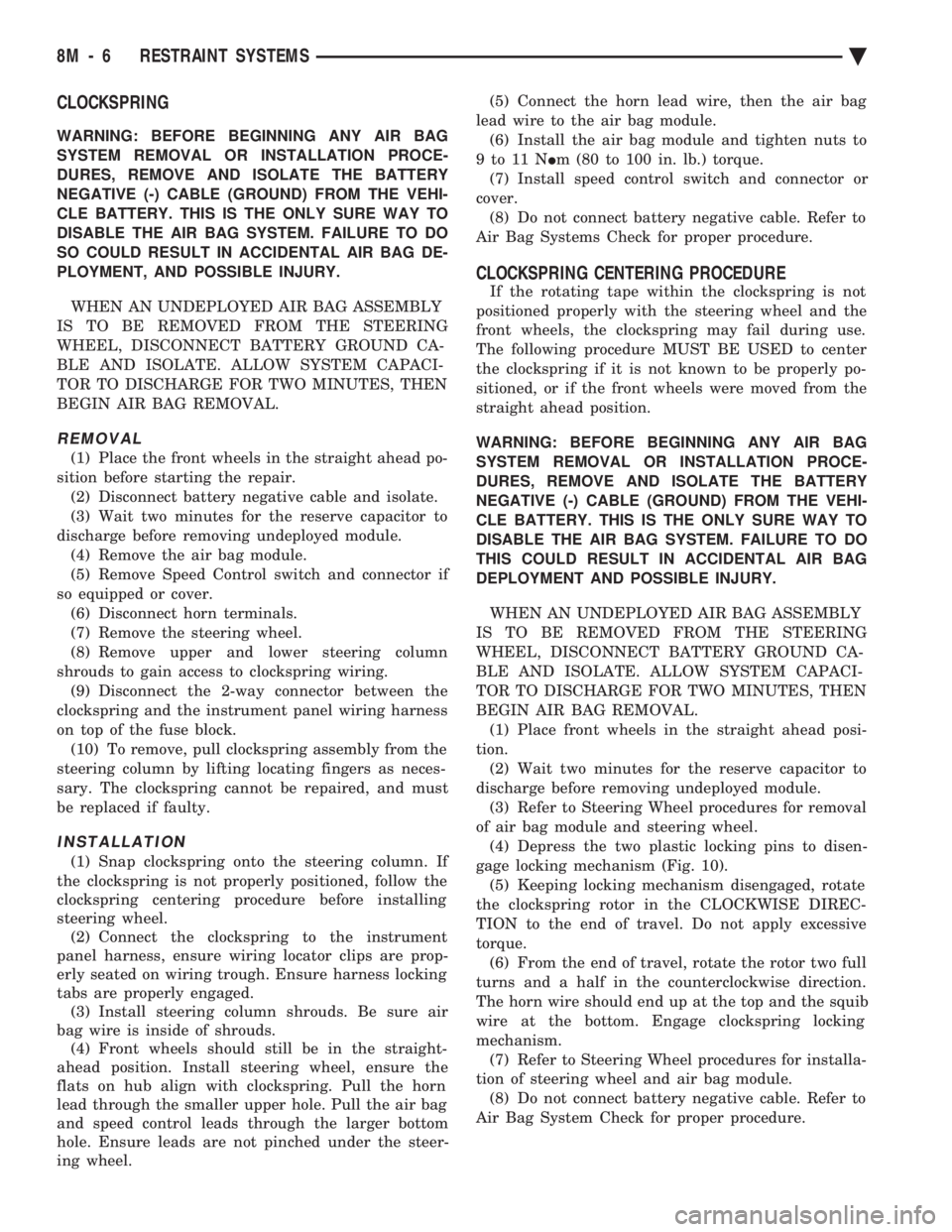
gage locking mechanism (Fig. 10). (5) Keeping locking mechanism disengaged, rotate
the clockspring rotor in the CLOCKWISE DIREC-
TION to the end of travel. Do not apply excessive
torque. (6) From the end of travel, rotate the rotor two full
turns and a half in the counterclockwise direction.
The horn wire should end up at the top and the squib
wire at the bottom. Engage clockspring locking
mechanism. (7) Refer to Steering Wheel procedures for installa-
tion of steering wheel and air bag module. (8) Do not connect battery negative cable. Refer to
Air Bag System Check for proper procedure.
8M - 6 RESTRAINT SYSTEMS Ä
Page 689 of 2438
STEERING WHEEL
WARNING: BEFORE BEGINNING ANY AIR BAG
SYSTEM REMOVAL OR INSTALLATION PROCE-
DURES, REMOVE AND ISOLATE THE BATTERY
NEGATIVE (-) CABLE (GROUND) FROM THE VEHI-
CLE BATTERY. THIS IS THE ONLY SURE WAY TO
DISABLE THE AIR BAG SYSTEM. FAILURE TO DO
THIS COULD RESULT IN ACCIDENTAL AIR BAG
DEPLOYMENT AND POSSIBLE PERSONAL INJURY. WHEN AN UNDEPLOYED AIR BAG ASSEMBLY
IS TO BE REMOVED FROM THE STEERING
WHEEL, DISCONNECT BATTERY GROUND CA-
BLE AND ISOLATE. ALLOW SYSTEM CAPACI-
TOR TO DISCHARGE FOR TWO MINUTES.
BEGIN AIR BAG REMOVAL.
REMOVAL
(1) Make sure front wheels are straight, and steer-
ing column is locked in place. (2) Disconnect battery negative cable and isolate.
(3) Wait two minutes for the reserve capacitor to
discharge before removing undeployed module. (4) Remove four nuts attaching air bag module
from the back side of steering wheel. (5) Lift module, and disconnect connector from rear
of module. (6) Remove speed control switch and connector if
so equipped or cover. (7) Remove steering wheel retaining nut.
(8) Remove steering wheel with steering wheel
puller Tool C-3428B.
INSTALLATION
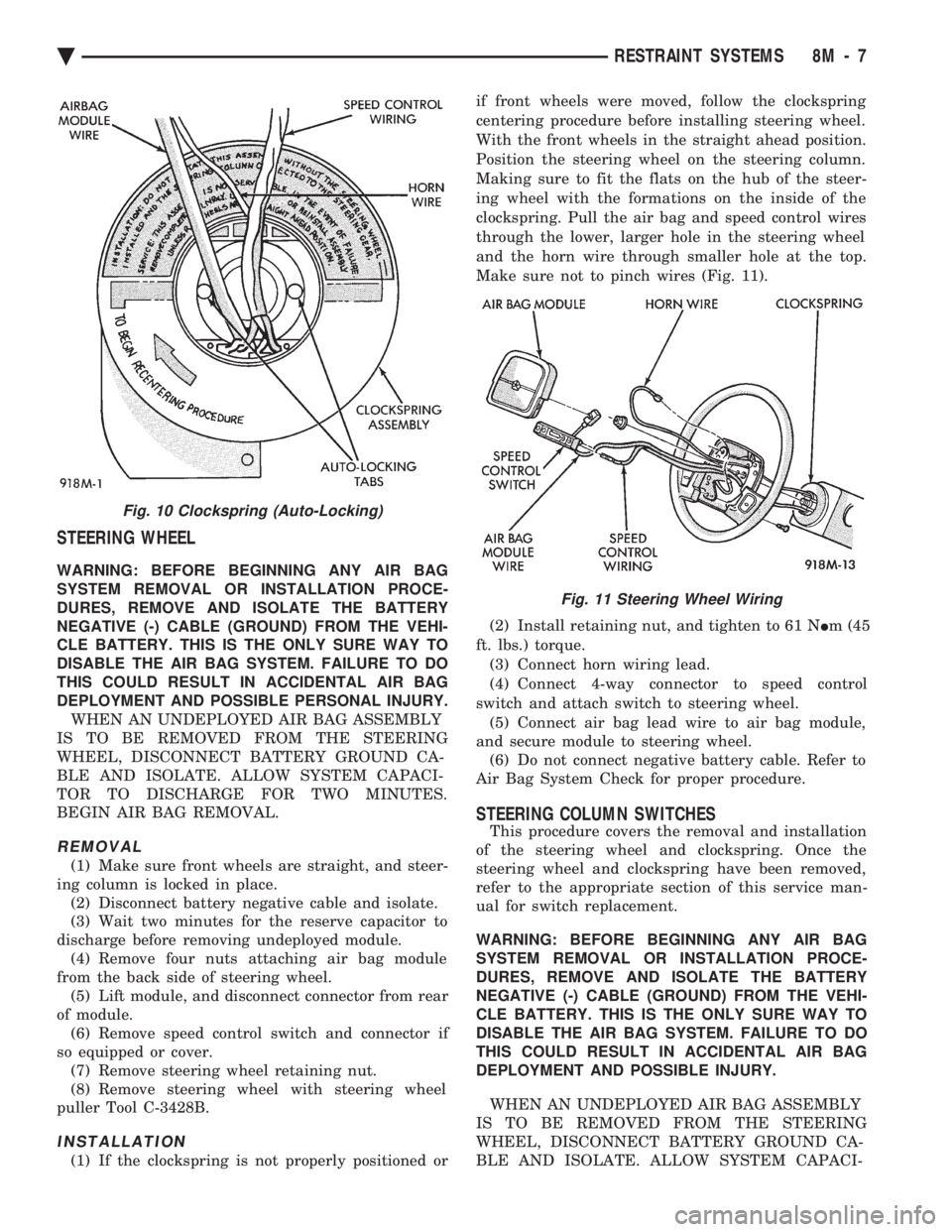
(1) If the clockspring is not properly positioned or if front wheels were moved, follow the clockspring
centering procedure before installing steering wheel.
With the front wheels in the straight ahead position.
Position the steering wheel on the steering column.
Making sure to fit the flats on the hub of the steer-
ing wheel with the formations on the inside of the
clockspring. Pull the air bag and speed control wires
through the lower, larger hole in the steering wheel
and the horn wire through smaller hole at the top.
Make sure not to pinch wires (Fig. 11).
(2) Install retaining nut, and tighten to 61 N Im (45
ft. lbs.) torque. (3) Connect horn wiring lead.
(4) Connect 4-way connector to speed control
switch and attach switch to steering wheel. (5) Connect air bag lead wire to air bag module,
and secure module to steering wheel. (6) Do not connect negative battery cable. Refer to
Air Bag System Check for proper procedure.
STEERING COLUMN SWITCHES
This procedure covers the removal and installation
of the steering wheel and clockspring. Once the
steering wheel and clockspring have been removed,
refer to the appropriate section of this service man-
ual for switch replacement.
WARNING: BEFORE BEGINNING ANY AIR BAG
SYSTEM REMOVAL OR INSTALLATION PROCE-
DURES, REMOVE AND ISOLATE THE BATTERY
NEGATIVE (-) CABLE (GROUND) FROM THE VEHI-
CLE BATTERY. THIS IS THE ONLY SURE WAY TO
DISABLE THE AIR BAG SYSTEM. FAILURE TO DO
THIS COULD RESULT IN ACCIDENTAL AIR BAG
DEPLOYMENT AND POSSIBLE INJURY.
WHEN AN UNDEPLOYED AIR BAG ASSEMBLY
IS TO BE REMOVED FROM THE STEERING
WHEEL, DISCONNECT BATTERY GROUND CA-
BLE AND ISOLATE. ALLOW SYSTEM CAPACI-
Fig. 10 Clockspring (Auto-Locking)
Fig. 11 Steering Wheel Wiring
Ä RESTRAINT SYSTEMS 8M - 7
Page 690 of 2438
TOR TO DISCHARGE FOR TWO MINUTES.
BEGIN AIR BAG REMOVAL.
REMOVAL
(1) Disconnect battery negative cable, and isolate.
(2) Wait two minutes for the reserve capacitor to
discharge before removing undeployed module. (3) Remove four nuts attaching air bag module
from the back side of steering wheel. (4) Lift module, and disconnect connector from rear
of module. (5) Remove speed control switch and connector if
so equipped or cover. (6) Remove steering wheel.
(7) Unsnap clockspring, and remove it. (8) Refer to the appropriate section for switch re-
placement.
INSTALLATION
(1) Snap clockspring on to steering column. Assure
the 4 way connector is still seated. (2) Install steering wheel.
(3) Install speed control switch and connector or
cover. (4) Connect clockspring wiring connector to the
module. (5) Install four nuts to module, and tighten to 9 to
11 N Im (80 to 100 in. lbs.) torque.
(6) Do not connect negative battery cable. Refer to
Air Bag System Check for proper procedure.
8M - 8 RESTRAINT SYSTEMS Ä
Page 691 of 2438
REAR WINDOW DEFOGGER
CONTENTS
page page
CONTROL SWITCH/TIMER RELAY MODULE . . 1
GENERAL INFORMATION .................. 1REPAIR GRID LINES, TERMINALS AND PIGTAILS.3
SERVICE PROCEDURES ................... 1
GENERAL INFORMATION
For proper operation of the Rear Window Defogger
system refer to the Owner's Manual. Vehicles equipped with an electrically heated rear
window defogger also have a 40/90 amp generator. The system consists of a rear glass with two verti-
cal bus bars and a series of electrically connected
grid lines fired on the inside surface. A control
switch and a timer relay combined into a single as-
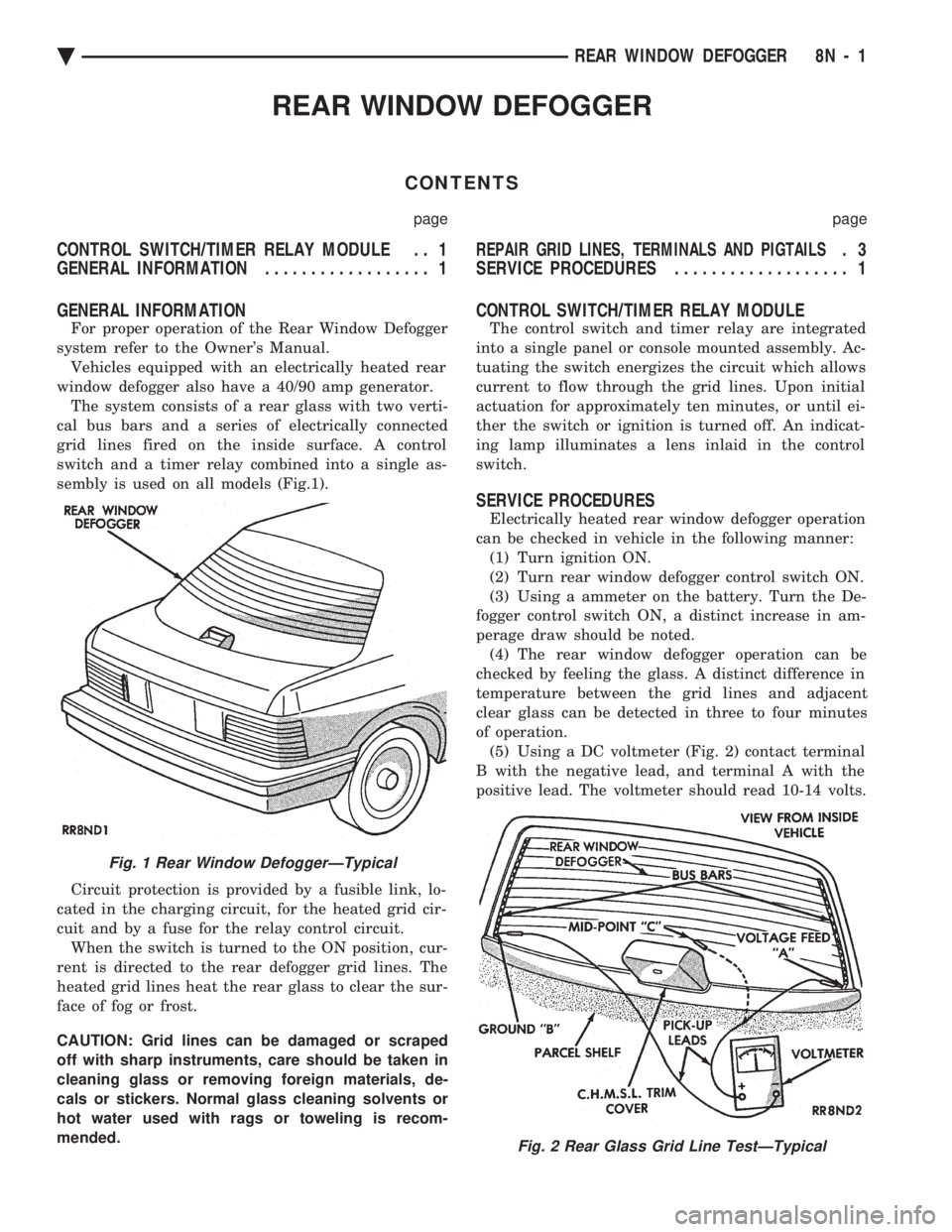
sembly is used on all models (Fig.1).
Circuit protection is provided by a fusible link, lo-
cated in the charging circuit, for the heated grid cir-
cuit and by a fuse for the relay control circuit. When the switch is turned to the ON position, cur-
rent is directed to the rear defogger grid lines. The
heated grid lines heat the rear glass to clear the sur-
face of fog or frost.
CAUTION: Grid lines can be damaged or scraped
off with sharp instruments, care should be taken in
cleaning glass or removing foreign materials, de-
cals or stickers. Normal glass cleaning solvents or
hot water used with rags or toweling is recom-
mended.
CONTROL SWITCH/TIMER RELAY MODULE
The control switch and timer relay are integrated
into a single panel or console mounted assembly. Ac-
tuating the switch energizes the circuit which allows
current to flow through the grid lines. Upon initial
actuation for approximately ten minutes, or until ei-
ther the switch or ignition is turned off. An indicat-
ing lamp illuminates a lens inlaid in the control
switch.
SERVICE PROCEDURES
Electrically heated rear window defogger operation
can be checked in vehicle in the following manner: (1) Turn ignition ON.
(2) Turn rear window defogger control switch ON.
(3) Using a ammeter on the battery. Turn the De-
fogger control switch ON, a distinct increase in am-
perage draw should be noted. (4) The rear window defogger operation can be
checked by feeling the glass. A distinct difference in
temperature between the grid lines and adjacent
clear glass can be detected in three to four minutes
of operation. (5) Using a DC voltmeter (Fig. 2) contact terminal
B with the negative lead, and terminal A with the
positive lead. The voltmeter should read 10-14 volts.
Fig. 1 Rear Window DefoggerÐTypical
Fig. 2 Rear Glass Grid Line TestÐTypical
Ä REAR WINDOW DEFOGGER 8N - 1
Page 695 of 2438
POWER LOCKS
CONTENTS
page page
CIRCUIT BREAKER TEST .................. 1
DECK LID OPERATION ................... 3
DECK LID PULL-DOWN SYSTEMÐAC and AY BODIES .............................. 3
DOOR LOCK INHIBIT ..................... 6
DOOR LOCK INHIBIT ..................... 1
DOOR LOCK MOTOR REPLACEMENT ........ 3
DOOR LOCK SYSTEM TEST ............... 3
ELECTRIC MOTOR TEST .................. 2 GENERAL INFORMATION
.................. 1
KEYLESS ENTRY SYSTEM ................ 1
LAMP OUTAGE MODULE REPLACEMENT .... 6
POWER DOOR LOCKS .................... 2
POWER PULL DOWN .................... 4
REMOTE KEYLESS ENTRY ................ 5
REMOTE KEYLESS MODULE REPLACEMENT . . 6
SWITCH TEST .......................... 1
WIRING VOLTAGE TEST .................. 1
GENERAL INFORMATION
All doors can be locked or unlocked electrically by
operating the switch on a front door panel or arm
rest. The rear doors can be locked or unlocked by actu-
ation of the front door switch, or can be locked or un-
locked mechanically and independently with their
respective locking knobs. The front doors can be locked or unlocked mechan-
ically with the locking knob regardless of electrical
locking and unlocking actuation with the front door
knobs. The right and left front door on all car lines can be
locked or unlocked mechanically from the outside
with the key or electrically as described above. The
left front can also be unlocked by actuation of the in-
side remote door handle. The right front door on AC,
AG, AJ and AY can be unlocked by actuation of the
inside remote door handle. The deck lid lock consists of a latch with internal
solenoid and push button switch. The solenoid is en-
ergized only when the push button is depressed.
DOOR LOCK INHIBIT
The power door lock inhibit system prevents the
doors from being locked using the power door locks
when either of two conditions occur: (1) The key is in the ignition switch and any of the
doors are open. The ignition switch does not have to
be ON. (2) The key is in the ignition switch and the head-
lamp are on.
KEYLESS ENTRY SYSTEM
The system allows locking and unlocking of vehicle
door(s) and Trunk lid by remote control using a hand
held radio transmitter. The ignition switch must be
OFF before the trunk lid can be unlocked with the
transmitter. The receiver may receive signals from two trans-
mitters. Each transmitter has its own code, and the
code has been stored in memory. If the transmitter is
replaced or a second transmitter is add, the code on
both units have to be placed in memory.
CIRCUIT BREAKER TEST
Find correct circuit breaker on fuse block. Pull out
slightly but be sure that circuit breaker terminals
still contact terminals in fuse block. Connect ground
wire of voltmeter to a good ground. With probe of
voltmeter positive wire, check both terminals of cir-
cuit breaker for 12 volts. If only one terminal checks
at 12 volts, circuit breaker is defective and must be
replaced. If neither terminal shows 12 volts, check
for open or shorted circuit to circuit breaker.
WIRING VOLTAGE TEST
The following wiring test sequence determines
whether or not voltage is continuous through the
body harness to switch. (1) Remove left side switch from trim panel.
(2) Carefully separate multiple terminal block on
wiring harness from switch body. (3) Connect one lead of test light to a ground ter-
minal:
² Black Wire AA and AC Bodies
² Gray wire AG and AJ Bodies
² Touch other test light lead to Red Wire terminal.
² If test light comes on, the wiring circuit between
the battery and switch is functional.
² If test light does not come on, check 30 amp circuit
breaker or for a open circuit.
SWITCH TEST
Remove the switch from its mounting location. Us-
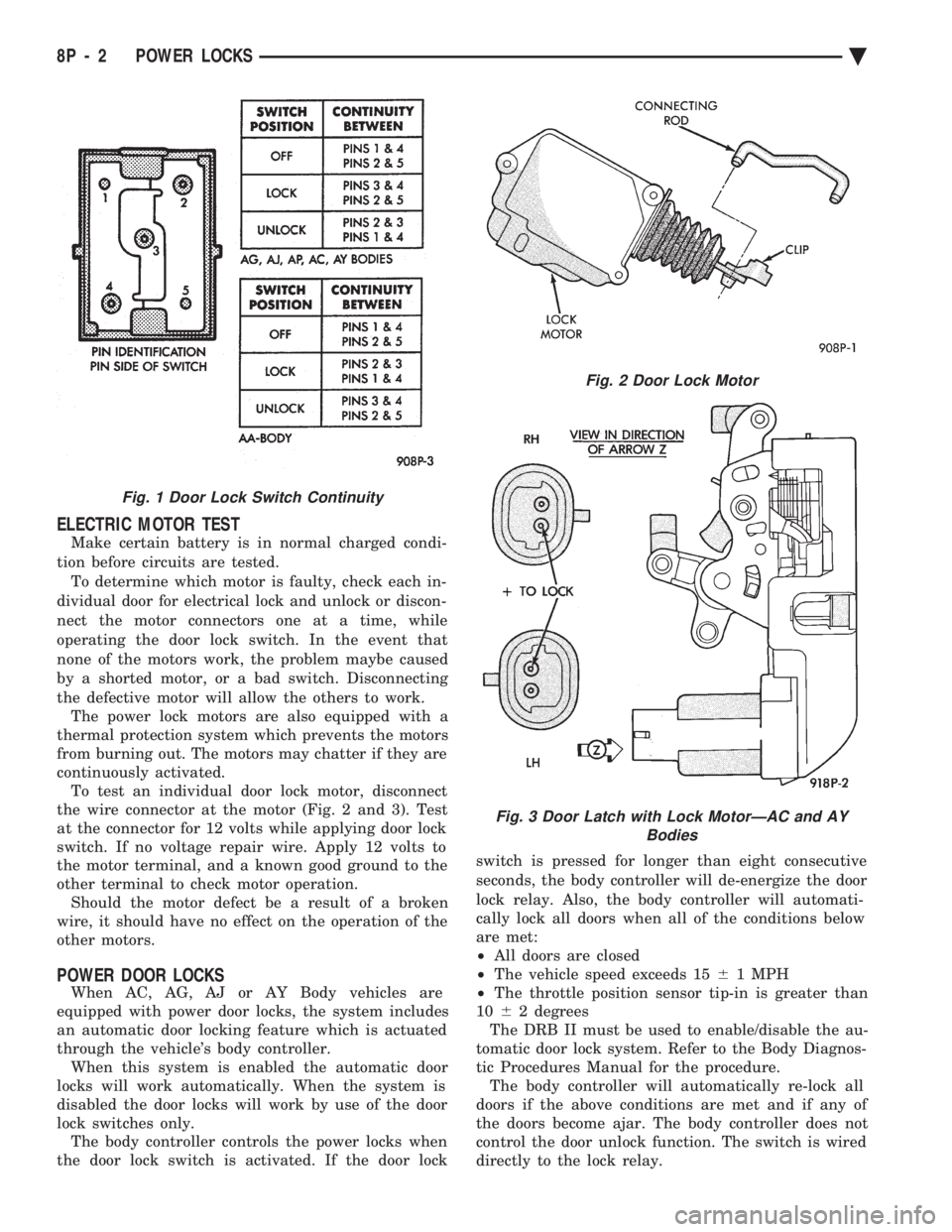
ing an ohmmeter, refer to (Fig. 1) to determine if
continuity is correct in the Lock and Unlock switch
positions. If these results are not obtained, replace
the switch.
Ä POWER LOCKS 8P - 1
Page 696 of 2438
ELECTRIC MOTOR TEST
Make certain battery is in normal charged condi-
tion before circuits are tested. To determine which motor is faulty, check each in-
dividual door for electrical lock and unlock or discon-
nect the motor connectors one at a time, while
operating the door lock switch. In the event that
none of the motors work, the problem maybe caused
by a shorted motor, or a bad switch. Disconnecting
the defective motor will allow the others to work. The power lock motors are also equipped with a
thermal protection system which prevents the motors
from burning out. The motors may chatter if they are
continuously activated. To test an individual door lock motor, disconnect
the wire connector at the motor (Fig. 2 and 3). Test
at the connector for 12 volts while applying door lock
switch. If no voltage repair wire. Apply 12 volts to
the motor terminal, and a known good ground to the
other terminal to check motor operation. Should the motor defect be a result of a broken
wire, it should have no effect on the operation of the
other motors.
POWER DOOR LOCKS
When AC, AG, AJ or AY Body vehicles are
equipped with power door locks, the system includes
an automatic door locking feature which is actuated
through the vehicle's body controller. When this system is enabled the automatic door
locks will work automatically. When the system is
disabled the door locks will work by use of the door
lock switches only. The body controller controls the power locks when
the door lock switch is activated. If the door lock switch is pressed for longer than eight consecutive
seconds, the body controller will de-energize the door
lock relay. Also, the body controller will automati-
cally lock all doors when all of the conditions below
are met:
² All doors are closed
² The vehicle speed exceeds 15 61 MPH
² The throttle position sensor tip-in is greater than
10 62 degrees
The DRB II must be used to enable/disable the au-
tomatic door lock system. Refer to the Body Diagnos-
tic Procedures Manual for the procedure. The body controller will automatically re-lock all
doors if the above conditions are met and if any of
the doors become ajar. The body controller does not
control the door unlock function. The switch is wired
directly to the lock relay.
Fig. 1 Door Lock Switch Continuity
Fig. 2 Door Lock Motor
Fig. 3 Door Latch with Lock MotorÐAC and AY Bodies
8P - 2 POWER LOCKS Ä
Page 699 of 2438
to the deck lid open position. If the pull down limit
switch is depressed at this time, the motor should
stop.(c) If these results are not obtained, replace the
pull down motor assembly.
REMOTE KEYLESS ENTRY
OPERATION
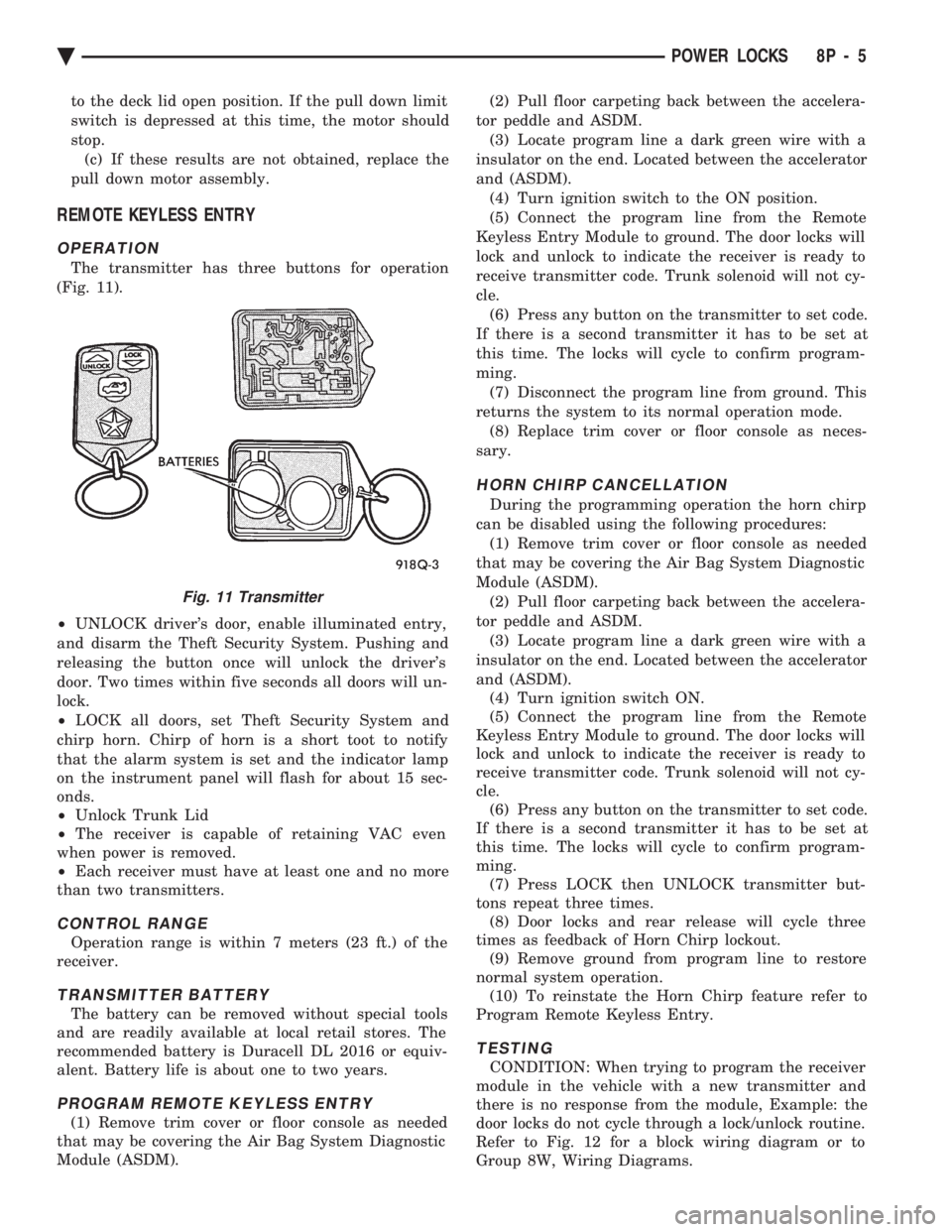
The transmitter has three buttons for operation
(Fig. 11).
² UNLOCK driver's door, enable illuminated entry,
and disarm the Theft Security System. Pushing and
releasing the button once will unlock the driver's
door. Two times within five seconds all doors will un-
lock.
² LOCK all doors, set Theft Security System and
chirp horn. Chirp of horn is a short toot to notify
that the alarm system is set and the indicator lamp
on the instrument panel will flash for about 15 sec-
onds.
² Unlock Trunk Lid
² The receiver is capable of retaining VAC even
when power is removed.
² Each receiver must have at least one and no more
than two transmitters.
CONTROL RANGE
Operation range is within 7 meters (23 ft.) of the
receiver.
TRANSMITTER BATTERY
The battery can be removed without special tools
and are readily available at local retail stores. The
recommended battery is Duracell DL 2016 or equiv-
alent. Battery life is about one to two years.
PROGRAM REMOTE KEYLESS ENTRY
(1) Remove trim cover or floor console as needed
that may be covering the Air Bag System Diagnostic
Module (ASDM). (2) Pull floor carpeting back between the accelera-
tor peddle and ASDM. (3) Locate program line a dark green wire with a
insulator on the end. Located between the accelerator
and (ASDM). (4) Turn ignition switch to the ON position.
(5) Connect the program line from the Remote
Keyless Entry Module to ground. The door locks will
lock and unlock to indicate the receiver is ready to
receive transmitter code. Trunk solenoid will not cy-
cle. (6) Press any button on the transmitter to set code.
If there is a second transmitter it has to be set at
this time. The locks will cycle to confirm program-
ming. (7) Disconnect the program line from ground. This
returns the system to its normal operation mode. (8) Replace trim cover or floor console as neces-
sary.
HORN CHIRP CANCELLATION
During the programming operation the horn chirp
can be disabled using the following procedures: (1) Remove trim cover or floor console as needed
that may be covering the Air Bag System Diagnostic
Module (ASDM). (2) Pull floor carpeting back between the accelera-
tor peddle and ASDM. (3) Locate program line a dark green wire with a
insulator on the end. Located between the accelerator
and (ASDM). (4) Turn ignition switch ON.
(5) Connect the program line from the Remote
Keyless Entry Module to ground. The door locks will
lock and unlock to indicate the receiver is ready to
receive transmitter code. Trunk solenoid will not cy-
cle. (6) Press any button on the transmitter to set code.
If there is a second transmitter it has to be set at
this time. The locks will cycle to confirm program-
ming. (7) Press LOCK then UNLOCK transmitter but-
tons repeat three times. (8) Door locks and rear release will cycle three
times as feedback of Horn Chirp lockout. (9) Remove ground from program line to restore
normal system operation. (10) To reinstate the Horn Chirp feature refer to
Program Remote Keyless Entry.
TESTING
CONDITION: When trying to program the receiver
module in the vehicle with a new transmitter and
there is no response from the module, Example: the
door locks do not cycle through a lock/unlock routine.
Refer to Fig. 12 for a block wiring diagram or to
Group 8W, Wiring Diagrams.
Fig. 11 Transmitter
Ä POWER LOCKS 8P - 5
Page 700 of 2438
(1) Be sure that the module has a battery feed
from the 20 Amp breaker in cavity 1 of the black
connector. Also affected would be the optical horn
and the stop lamps. (2) Be sure that the module has an ignition feed
from 5 Amp fuse in cavity 8 of the black connector.
Also affected would be the body computer, instru-
ment cluster and message center. (3) Be sure that the module has a ground from the
right side cowl behind the body computer to the cav-
ity 5 of the black connector. (4) Be sure that you are supplying a good ground
to the programming wire. (5) If the above circuits are good, replace the Re-
ceiver Module. CONDITION: Doors can be locked or unlocked with
the Keyless Entry transmitter. But the doors will not
lock. The Vehicle Theft Alarm system will not arm,
when using only the power door LOCK switch in the
driver's door. (1) Be sure you have not left key in the ignition
column lock cylinder. (2) If step 1 is OK, check the Key in Lock switch
circuit in the steering column for a short to ground. (3) In this problem the body computer controls the
LOCK function. Be sure that it is providing a battery
voltage output to the door lock relay. The door lock
relay controls the door lock motors. CONDITION: Doors will lock but Vehicle Theft
System will not arm when using the transmitter. (1) The Keyless Entry Receiver Module controls
the door lock signal to the door lock relay. The door
lock relay controls the door lock motors. Check for
battery voltage at cavity 10 of the Theft Alarm mod-
ule from the Receiver module. (2) If voltage is OK, replace Receiver module.
CONDITION: All doors except driver's door will
lock with the transmitter. (1) Test the driver's door output of the Receiver
Module for a ground. (2) If there is no ground at the pin, replace the Re-
ceiver module. (3) If there is a ground at the output, replace the
door lock motor. CONDITION: Only driver's door will lock with the
transmitter.
² Repair ground circuit to unlock relay
² Replace unlock relay
CONDITION: Doors do not lock with the transmit-
ter, but still get horn CHIRP that indicates that they
did lock. Replace Receiver module. CONDITION: Doors will lock with the transmitter
but there is no horn CHIRP. (1) Press horn button, listen horn sound.
(2) If the horn sounded, change horn relay. (3) Still no CHIRP, check continuity between the
horn relay and the receiver output pin. Repair as
necessary. (4) Still no horn CHIRP, replace the receiver mod-
ule. (5) If using a DRB II, refer to Body Diagnostic Pro-
cedures.
REMOTE KEYLESS MODULE REPLACEMENT
(1) Remove lower right instrument panel silencer.
(2) Remove glove box assembly.
(3) Remove three screws attaching the mounting
bracket to instrument panel. (4) Lower bracket and module assembly, to discon-
nect wire connector. (5) Remove two screws attaching the Remote Key-
less entry Module to bracket. (6) Remove two screws attaching the security mod-
ule to bracket. (7) To installation reverse above procedures.
LAMP OUTAGE MODULE REPLACEMENT
(1) Remove lower right instrument panel silencer.
(2) Remove glove box and ash receiver module.
(3) Remove three screws attaching the mounting
bracket to instrument panel. (4) Lower bracket and module assembly, to discon-
nect wire connectors. (5) Remove two screws attaching the Lamp Outage
Module to bracket. (6) Remove two screws attaching the security mod-
ule to bracket. (7) To installation reverse above procedures.
DOOR LOCK INHIBIT
The power door lock inhibit system prevents the
doors from being locked using the power door locks
when either of two conditions occur: (1) The key is in the ignition switch and any of the
doors are open. The ignition switch does not have to
be ON. (2) The key is in the ignition switch and the head-
lamp are on.
AC, AG, AJ AND AY BODIES
With the ignition switch in the ON or OFF position
and the driver's door open the Body Controller will
ignore the command to lock the power door locks.
Once the key is removed, or the driver's door is
closed, the Body Controller will allow the power door
locks to lock. Refer to Body Diagnostic Procedure
Manual for further testing procedures.
8P - 6 POWER LOCKS Ä